USER GUIDE
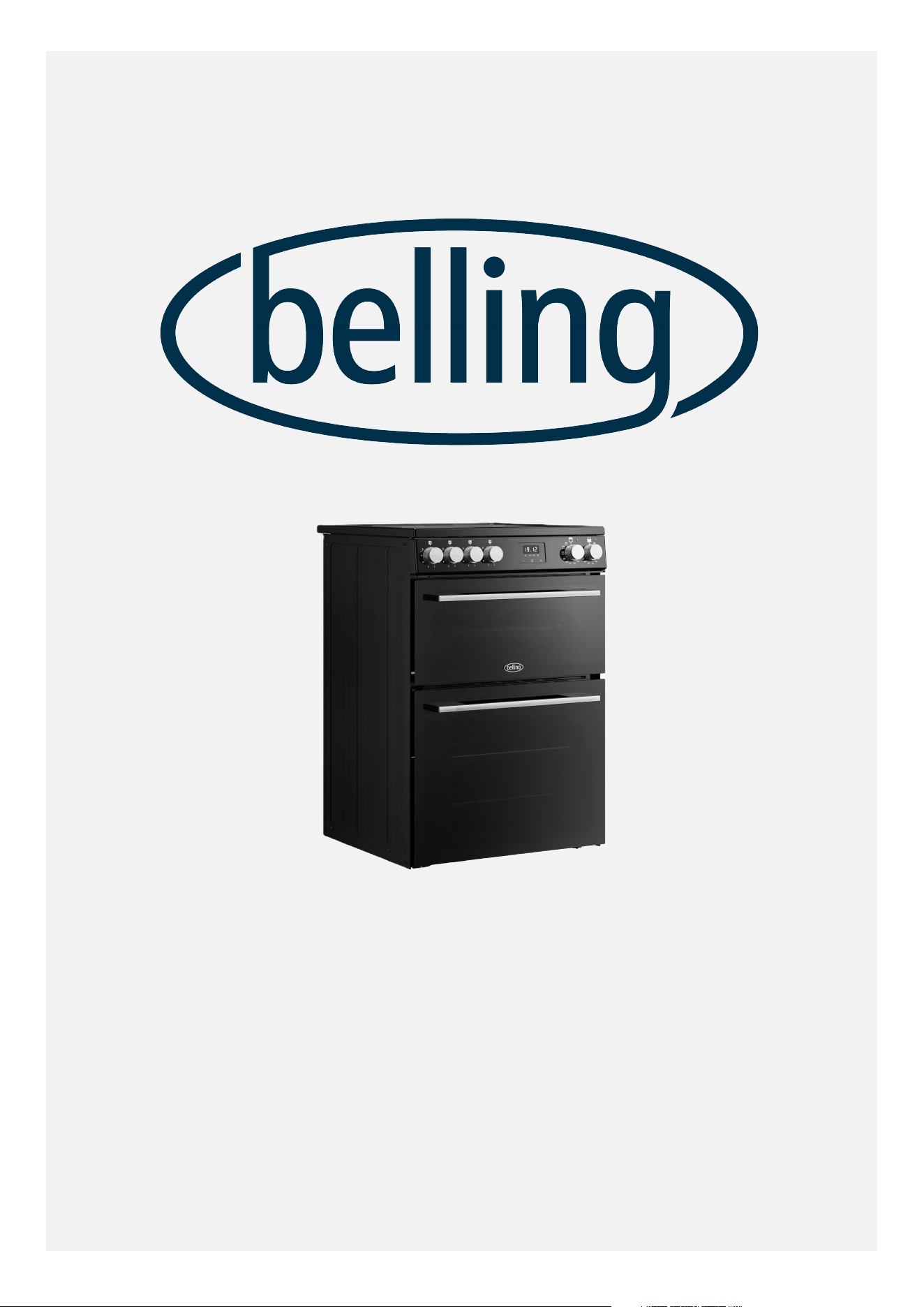
BELLING VISION 60cm ELECTRIC INDUCTION MODELS

Table Of Contents
INTRODUCTION ......................................................................................................... 3
MODELS COVERED BY THIS DOCUMENT .......................................................... 3
COUNTRIES OF DESTINATION: ......................................................................... 3
CONTACT INFORMATION: ................................................................................. 3
EUROPEAN DIRECTIVES ................................................................................... 4
DISPOSAL OF PACKAGING MATERIAL .............................................................. 4
SAFETY & WARNING INFORMATION ........................................................................ 5
ELECTROMAGNETIC INTERFERENCE .............................................................. 12
GETTING TO KNOW YOUR NEW APPLIANCE ......................................................... 13
APPLIANCE OVERVIEW ................................................................................... 13
OVERVIEW OF CONTROL PANEL ..................................................................... 14
OVERVIEW OF INDUCTION HOB ...................................................................... 14
ABOUT THE INDUCTION HOB .......................................................................... 15
INDUCTION SYMBOLS AND CODES ................................................................. 18
OVERVIEW OF OVEN FURNITURE .................................................................. 20
MAIN OVEN OVERVIEW .................................................................................. 23
USING THE MAIN OVEN ........................................................................... 24
TOP OVEN AND GRILL OVERVIEW ................................................................. 26
USING THE TOP OVEN .............................................................................. 29
USING THE GRILL ............................................................................................. 30
GRILL PAN AND TRIVET ............................................................................ 31
USING THE PROGRAMMABLE TIMER ..................................................................... 32
CLEANING YOUR APPLIANCE ................................................................................ 36
CLEANING AND CARE GUIDANCE .................................................................. 37
APPLIANCE MAINTENANCE .................................................................................... 41
CHANGING THE LIGHTBULB ............................................................................ 41
OVEN SHELVES ................................................................................................ 42
REMOVING AND REPLACING SHELF GUIDES ................................................. 42
REMOVING AND RE-FITTING CONTROL KNOBS, SPRINGS AND BEZELS ..... 43
FAQ's ........................................................................................................................ 45
KEY PARTS AND OPTIONAL ACCESSORIES ............................................................ 51
LOCATING THE MODEL AND SERIAL NUMBERS .................................................... 54
TECHNICAL DATA .................................................................................................... 55
ENERGY DATA TABLE .............................................................................................. 56
ENERGY SAVING TIPS FOR HOBS ................................................................... 57
ENERGY SAVING TIPS FOR OVENS ................................................................. 57
SERVICE CONTACT DETAILS ................................................................................... 59
2
INTRODUCTION
Congratulations and thank you for
purchasing your new Stoves range cooker.
We hope you will enjoy many years of
excellent cooking performance and service.
This user guide is designed to help you to
care for and get the best out of your new
product.
Please read it carefully before you
start using your appliance, as we have
endeavoured to answer as many questions
as possible and provide you with as much
support as we can.
General information, spares and service
information is available from our website.
If you should find something missing from
your product or have any questions that
are not covered in this user guide, please
contact us (see contact information on the
back cover).
MODELS COVERED BY THIS
DOCUMENT
Model
Number:
Model
Description:
444412058 BEL FSA VISION
60Ei BLK
444412059 BEL FSA VISION
60Ei BSS
COUNTRIES OF DESTINATION:
GB- Great Britain
IE - Ireland
DE - Germany
FR - France
PL - Poland
NL - Netherlands
SE - Sweden
NZ - New Zealand
AU - Australia
CONTACT INFORMATION:
Customer Care Helpline:
0344 815 3746
Alternatively, use the contact form
on our website
www.belling.co.uk
Details about warranty registration
and spares & service information are
also available on our website.
Calls are charged at the basic rate, please
check with your telephone service provider
for exact charges.
Your new appliance comes with our FREE
2 year warranty (UK only), protecting you
against electrical and mechanical breakdown.
3
To register your new appliance for its
warranty (UK only) please visit our website
www.belling.co.uk. For full terms & conditions
of the manufacturer's guarantee, please refer
to the website above.
In addition, you may wish to purchase an
extended warranty. Details of how to do this
are also on our website www.belling.co.uk.
Our policy is one of constant development
and improvement, therefore we cannot
guarantee the strict accuracy of all of our
illustrations and specifications. Changes may
have been made subsequent to publishing.
Glen Dimplex Home Appliances, Element,
Temple Court, Risley, Warrington, WA3 6GD.
EUROPEAN DIRECTIVES
This appliance is produced in accordance
with all applicable local and international
standards and regulations.
As a producer and a supplier of cooking
appliances we are committed to the
protection of the environment and are in
compliance with the WEEE directive.
All our electric products are labelled
accordingly with the crossed out wheeled bin
symbol. This indicates, for disposal purposes
at the end of their working life, that these
products must be taken to a recognized
collection point, such as local authority sites/
local recycling centres.
By ensuring that this product is disposed
of correctly, you will help prevent potential
negative consequences for the environment
and human health, which could otherwise be
caused by inappropriate waste handling of
this product.
For more detailed information about recycling
of this product, please contact your local
authority, household waste disposal service,
or the retailer from whom you purchased this
appliance.
This appliance complies with European
Community Directives (CE) for household
and similar electrical appliances and Gas
appliances where applicable.
This appliance conforms to European
Directive regarding Eco design requirements
for energy-related products. Our policy is one
of constant development and improvement,
therefore we cannot guarantee the strict
accuracy of all of our illustrations and
specifications - changes may have been made
subsequent to publishing.
DISPOSAL OF PACKAGING
MATERIAL
DISPOSAL OF PACKAGING MATERIAL
Some of the materials used to package this appliance can be recycled. Please
dispose of the packaging materials in the appropriate containers at your local
waste disposal facility.
4

SAFETY & WARNING INFORMATION
Please read the following information
carefully:
WARNINGS
Warning
We strongly recommend
that this appliance is
connected by a competent
person who is a
member of a 'Competent
Person Scheme', who will
comply with the required
regulations.
Any servicing,
maintenance or repair
work on the appliance
must only be carried out
by authorised personnel.
Installation, maintenance
and repair work that
is carried out by
unauthorised persons
could be dangerous
and could invalidate the
manufacturer's warranty.
Warning
This appliance can be
used by children aged
from 8 years and above
and persons with reduced
physical, sensory or
mental capabilities or
lack of experience and
knowledge if they have
been given supervision or
instruction concerning use
of the appliance in a safe
way and understand the
hazards involved.
Children shall not play
with the appliance.
Cleaning and user
maintenance shall not be
made by children without
supervision.
Young children should be
supervised to ensure they
do not play with this
appliance.
Do not store items
of interest to children
in cabinets above
the appliance. Children
climbing on the appliance
could be seriously injured.
Warning
If the hotplate surface is
cracked, switch off the
appliance and do not use
it to avoid the possibility
of electric shock.
5
Warning
During use the appliance
becomes hot. Care should
be taken to avoid touching
heating elements inside
the oven.
Warning
The appliance and its
accessible parts become
hot during use.
Care should be taken to
avoid touching heating
elements, and hot external
and internal surfaces,
including doors.
Use oven gloves.
Children less than 8 years
of age shall be kept
away unless continuously
supervised.
Warning
The cooker must be
switched off before
removing the guard and,
after cleaning, the guard
must be replaced in
accordance with the
instructions.
Warning
A steam cleaner is not to
be used on this appliance.
Warning
Metallic objects such as
knives, forks, spoons and
lids should not be placed
on the hob surface since
they can get hot.
Any spillage should be
removed from the lid
before opening and the
hob surface should be
allowed to cool before
closing the lid (if fitted).
Warning
Ensure that the appliance
is switched off before
replacing the lamp to
avoid the possibility of
electric shock.
Warning
Unattended cooking on a
hob with fat or oil can be
dangerous and may result
in fire. Risk of burns and
scalds.
NEVER try to extinguish a
fire with water, but switch
off the appliance and then
cover the flames e.g. with
a lid or a fire blanket.
Warning
Danger of fire: do not
store items on the cooking
surfaces or in the oven
cavities.
6
Warning
Use only hob guards
designed by the
manufacturer of the
cooking appliance or
indicated by the
manufacturer of the
appliance in the
instructions for use as
suitable or hob guards
incorporated in the
appliance. The use of
inappropriate guards can
cause accidents.
Warning
Never place food, or
dishes on the base of the
main oven, the element
is here, and it will cause
overheating.
Warning
Do not place articles on or
against the appliance.
Warning
The appliance must
never be disconnected
from the mains supply
during use, as this
will seriously affect the
safety and performance,
particularly in relation
to surface temperatures
becoming hot and gas
operated parts not
working efficiently.
The cooling fan (if fitted)
is designed to run on after
the control knob has been
switched off.
Warning
Do not store or use
flammable liquids or items
in the vicinity of this
appliance.
Do not allow curtains,
paper or other flammable
items to come into contact
with the cooker.
Do not spray aerosols
in the vicinity of the
appliance while it is in
operation.
Warning
Do not modify this
appliance.
Warning
Do not operate the
appliance without the
glass door panels
correctly fitted.
Warning
Accessible parts may
become hot when the grill
is in use. Children should
be kept away.
Warning
If a lid is fitted to your
appliance any spillage
should be removed from
the lid before opening and
the hob surface should
be allowed to cool before
closing the lid.
7
Warning
This appliance must be
earthed.
Warning
The grill MUST be used
with the door CLOSED.
Warning
This appliance must not
be used as a space heater.
Warning
Never use cooking vessels
on the hob that overlap its
edges.
Saucepan handles may
become hot during use.
Keep pan handles out of
the reach of children.
Warning
If the electrical connection
cable becomes damaged,
it must be replaced by a
suitably-qualified person.
The cable must not
be replaced by an
unauthorised person.
CAUTIONS
Caution
In order to avoid a
hazard due to inadvertent
resetting of the thermal
cut-out, this appliance
must not be supplied
through an external
switching device, such
as an external timer, or
connected to a circuit that
is regularly switched on
and off by the utility.
8
Caution
Do not use harsh abrasive
cleaners or sharp metal
scrapers to clean the
oven door glass / the
hob surface / the glass of
hinged lids of the hob
(as appropriate), since
they can scratch the
surface, which may result
in shattering of the glass.
Always ensure that the
appliance is switched
off before cleaning
or carrying out user
maintenance.
Do not clean the appliance
with a steam cleaner.
Always clean up food
spillages immediately,
after switching the
appliance off, taking care
to avoid burning yourself.
Do not use scourers,
sharp metal scrapers or
any abrasive or corrosive
cleaning agents - risk
of damage and glass
breakage.
Do not remove the
data badge labels or
clean them with corrosive
cleaners.
Do not allow pans to boil
dry - risk of damage to
ceramic glass surface.
Do not use pans with
jagged edges or drag pans
across the ceramic glass
surface as this can scratch
the glass and lead to
breakage.
Do not attempt to cook
on a broken ceramic
glass hotplate -risk of
electric shock. Switch the
appliance off immediately
at the mains power supply
and call the service
department.
Do not operate hob zones
without a pan in place.
Do not place or drop
heavy objects onto the
ceramic hob surface.
Do not stand on the hob
surface.
Do not allow any part of
your body, hair, clothing,
etc. to come into contact
with the ceramic glass
surface until it has cooled.
Caution
Only use the temperature
probe recommended for
this oven.
Caution
After use, switch off the
hob zone by its control
knob or touch control,
and do not rely on the
pan detector on induction
hobs.
After use, ensure that
all touch controls are
switched off and that all
control knobs are in the
off position.
Caution
This appliance is not
intended to be operated
by means of an external
timer or separate remote
control system.
9
Caution
The cooking process must
be supervised. A short-
term cooking process
has to be supervised
continuously.
Caution
Accessible parts may be
hot when the grill and/or
the oven are in use. Young
children shall be kept
away.
Caution
Our policy is one of
constant development and
improvement, therefore
we cannot guarantee the
strict accuracy of all
of our illustrations and
specifications. Changes
may have been made
subsequent to publishing.
Caution
Make sure that you have
removed all packaging
and wrapping from the
outside and inside of the
appliance before it is
used.
Some of the items inside
this appliance may have
additional wrapping.
It is advised that you turn
the ovens and/or grill on
for a short while. This
will burn off any residues
left from manufacturing.
There may be a smell
which accompanies this
process - but this is
nothing to worry about
and is harmless.
It is recommended that
you wash the oven
shelves, grill pan, and grill
pan trivet before their
first use in hot soapy
water. This will remove the
protective oil coating used
during storage.
Caution
When using the grill, the
oven door must be kept
CLOSED.
Caution
This appliance is designed
for cooking purposes only.
It must not be used
for other purposes, for
example room heating.
10
Caution
When opening oven
doors, grip the handle in
the centre and hold it from
underneath.
Caution
Do not cover the
appliance.
Caution
Take care if moving the
appliance, panel edges
could be sharp. Failure to
use caution could result
in injury or cuts. Do not
attempt to lift or move
the appliance by pulling
on the door handles.
Caution
If you will not be using
the appliance for some
time, switch off the power
supply at the isolator
switch on the wall.
OTHER SAFETY ADVICE
DO
• Always take care when removing food from
the oven as the area around the cavity may
be hot.
• Always use oven gloves when handling any
cookware that has been in the oven as it will
be hot.
• Always make sure that the oven shelves are
resting in the correct position between two
runners.
• Always use the Minute Minder (if fitted) if
you are leaving the oven unattended - this
reduces the risk of food burning.
DO NOT
•
Never place dishes or other items on
the door while it is open. Do not apply
downward pressure to open oven doors. Do
not allow children to climb onto open oven
doors. Do not slam the oven doors shut.
When shutting oven doors, ensure there is
nothing obstructing them from closing. Risk
of breakage.
•
Never wrap foil around the oven shelves or
allow foil to block the flue. Do not line the
oven cavities or grill pan with aluminium
foil - risk of fire. Do not use liners on the
oven floors - risk of build-up of trapped
heat which can cause permanent damage to
the oven enamel.
•
Never drape tea towels, dishcloths or
clothes, etc. near the oven or from the door
handles while it is on; this will cause a fire
hazard.
•
Never pull heavy items, such as turkeys or
large joints of meat, out from the oven on
the shelf, as they may overbalance and fall.
•
Never use this appliance to heat anything
other than food items and do not use it for
heating the room.
FIRE SAFETY ADVICE
Most kitchen fires occur when people are
distracted or leave things unattended. Don’t
let yourself be distracted while cooking. If
you’re called away from the cooker, either
take pans o the heat, or switch o your hob.
If you do have a fire in the kitchen, don’t take
any risks - get everyone out of your home and
call the Fire Brigade.
If a pan catches fire:
•
Do not move it - it is likely to be extremely
hot.
•
Turn o the heat if it’s safe to do so - but
never lean over a pan to reach the controls.
•
If you have a fire blanket, put it over the
pan. If you have put the fire out, leave the
pan to cool completely.
Deep-fat frying presents more dangers in your
kitchen.
11

•
Never fill a chip pan (or other deep fat
fryer) more than one-third full of oil.
•
Do not use a fire extinguisher on a pan of
oil - the force of the extinguisher can spread
the fire and create a fireball.
If you have an electrical fire in the kitchen:
•
Pull the plug out, or switch o the power at
the fuse box - this may be enough to stop
the fire immediately.
•
Smother the fire with a fire blanket, or use a
dry powder or carbon dioxide extinguisher.
•
Remember: never use water on an electrical
or cooking oil fire.
ELECTROMAGNETIC
INTERFERENCE
The functions of the hob comply with
the applicable standard on electromagnetic
interference.
Your induction cooking hob thus complies
fully with the statutory requirements
(Directive 2014/30/EU). It is designed to
not interfere with the functioning of other
electrical equipment as long as these also
comply with the same regulations.
Your induction hob generates magnetic fields
in its immediate vicinity.
So that there is no interference between your
cooking hob and a pacemaker, the pacemaker
must be designed in compliance with the
appropriate regulations.
In this respect we can only guarantee the
compliance of our own product. You can ask
the pacemaker manufacturer or your doctor
about the compliance or any incompatibilities
of your pacemaker.
12
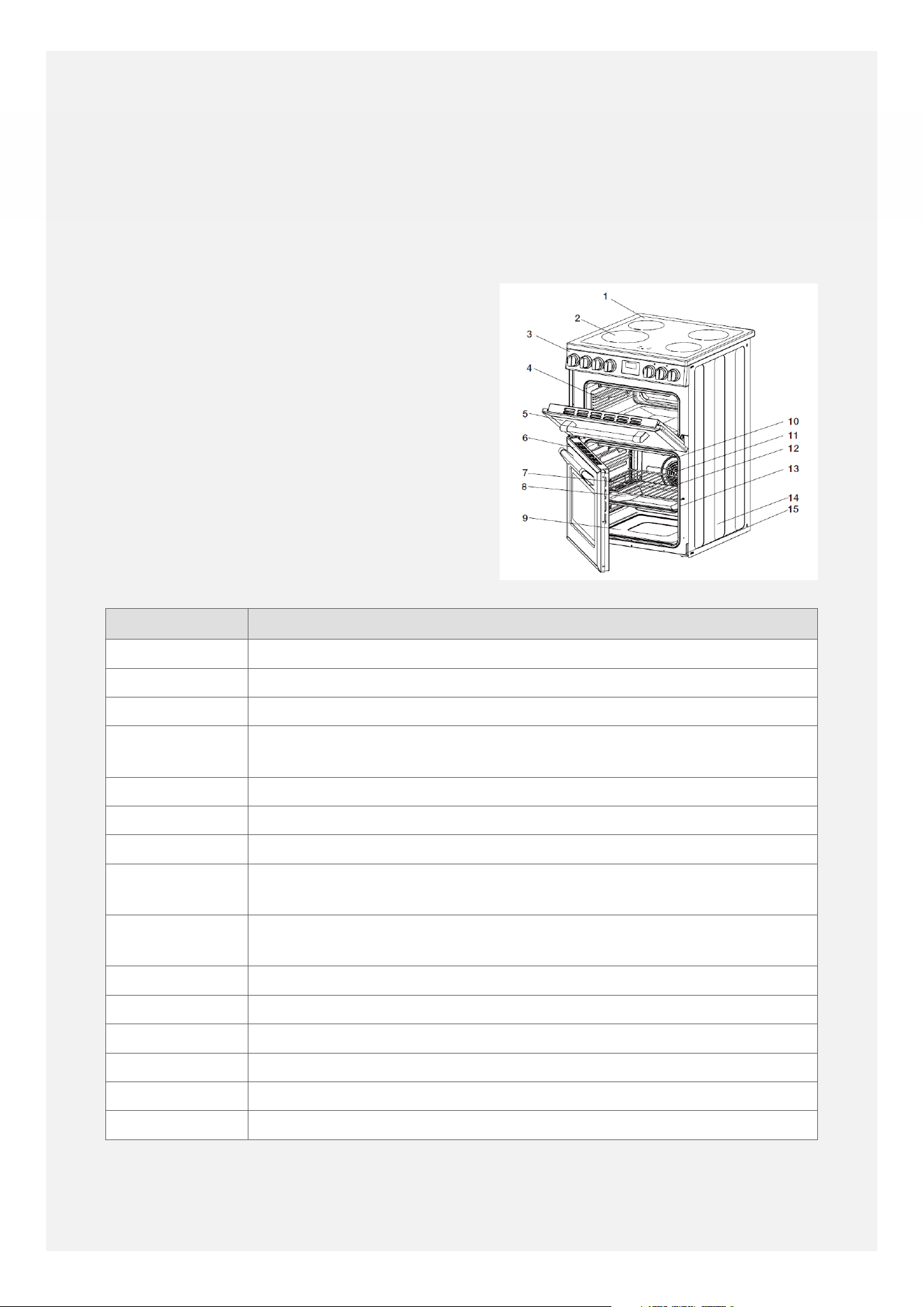
GETTING TO KNOW YOUR NEW
APPLIANCE
The layout of your appliance may dier from
the drawings shown in this guide depending
on the model.
APPLIANCE OVERVIEW
Key Description
1 Induction hob hotplate
2 Induction hob cooking zones
3 Control panel
4 Top oven and grill compartment - with stay-clean catalytic liners on
the sides
5 Top oven door
6 Main oven door
7 Oven shelves - can be used in top oven and main oven
8 Grill pan - can also be used as a baking tray or roasting tin - can be
used in top oven and main oven
9 Main oven compartment - with stay-clean catalytic liners on the
sides - main oven can be controlled by the programmable timer
10 Fan cover
11 Circulation fan
12 Fan heating element
13 Door seal
14 Outer side panel
15 Height-adjustable feet
13
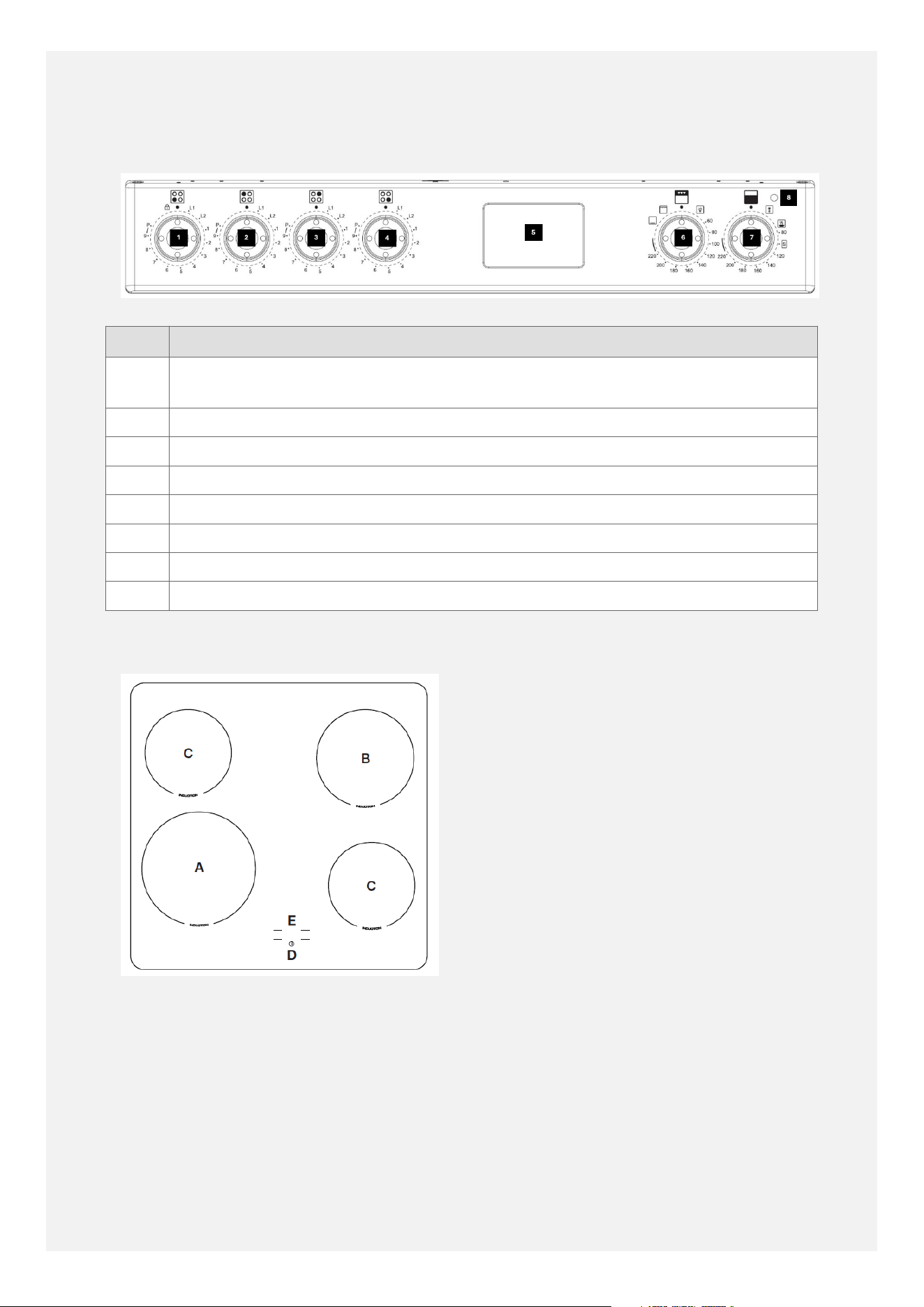
OVERVIEW OF CONTROL
PANEL
Key Description
1 Induction hob control for the front-left zone - also includes the child-lock
function
2 Induction hob control for the back-left zone
3 Induction hob control for the back-right zone
4 Induction hob control for the front-right zone
5 Programmable timer and minute minder - controls the main oven
6 Top oven and grill control
7 Main oven control
8 Heating indicator light
OVERVIEW OF INDUCTION HOB
14
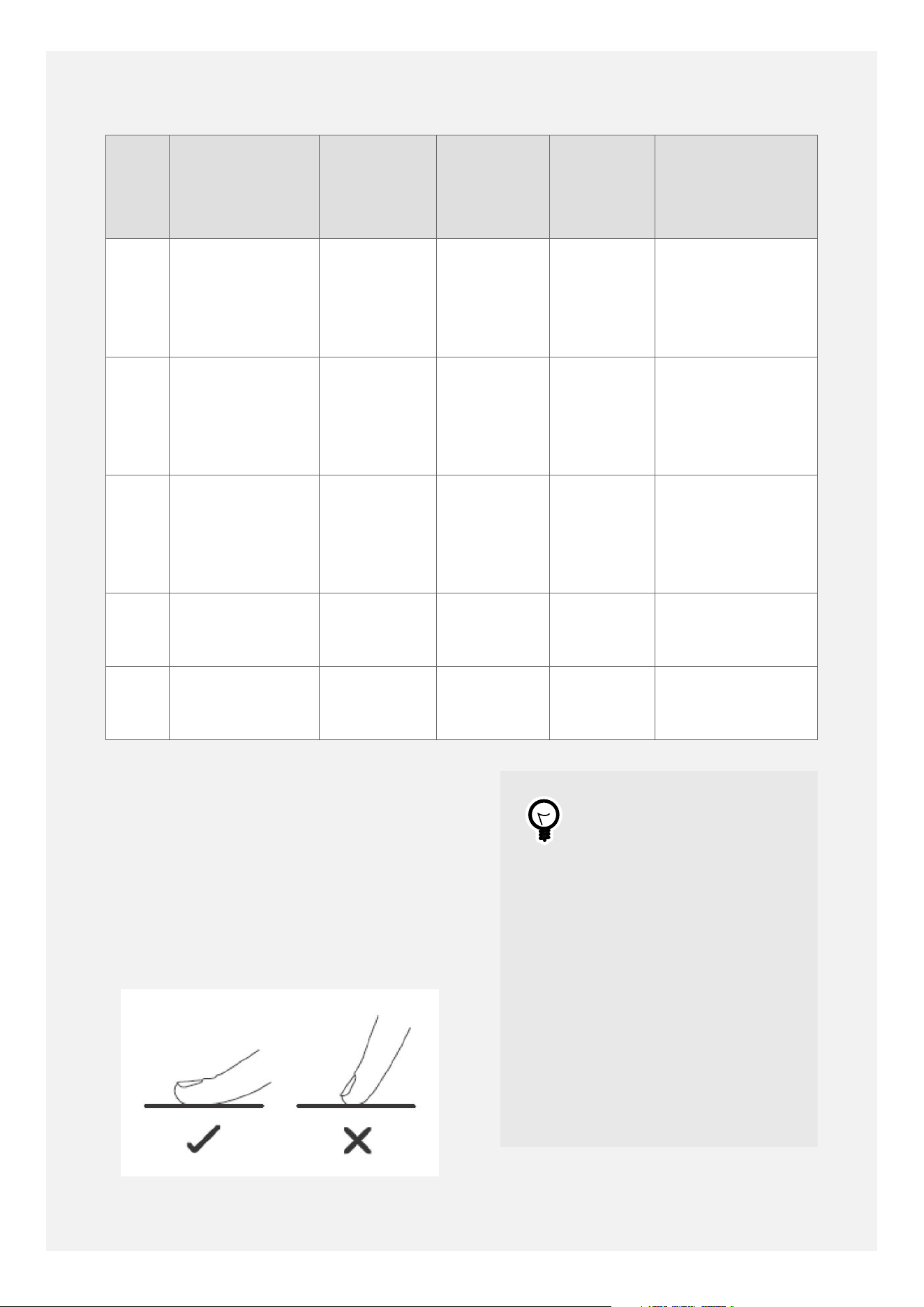
Key Description Location Zone
diameter
Power Minimum
recommended
pan diameter
size
A Large
induction zone
Front-left 210mm 2300
watts -
boost to
3000
watts
160mm
B Medium
induction zone
Back-right 180mm 1800
watts -
boost to
2100
watts
140mm
C Small
induction
zones
Back-left
and front-
right
160mm 1200
watts -
boost to
1500
watts
120mm
D On/o power
key - touch
control
Front
E Hob zone
power level
indicators
Front
Pans must have smooth, flat, magnetic
bases. The hob may not detect pans with a
smaller base diameter than 120mm. Generally,
induction hobs cannot detect pans with a base
diameter of 100mm or less.
ABOUT THE INDUCTION HOB
TURNING THE INDUCTION HOB
ON AND OFF
Tip
When using the touch
control power key, please
use the flat of your finger
for best results, not the
tip. You don't need to
apply any pressure.
Please ensure that the the
touch control is clean, dry
and not covered by any
objects, such as cooking
utensils or cloths. Even a
thin film of water, grease,
dust or fingerprints could
make the touch control
difficult to operate.
15
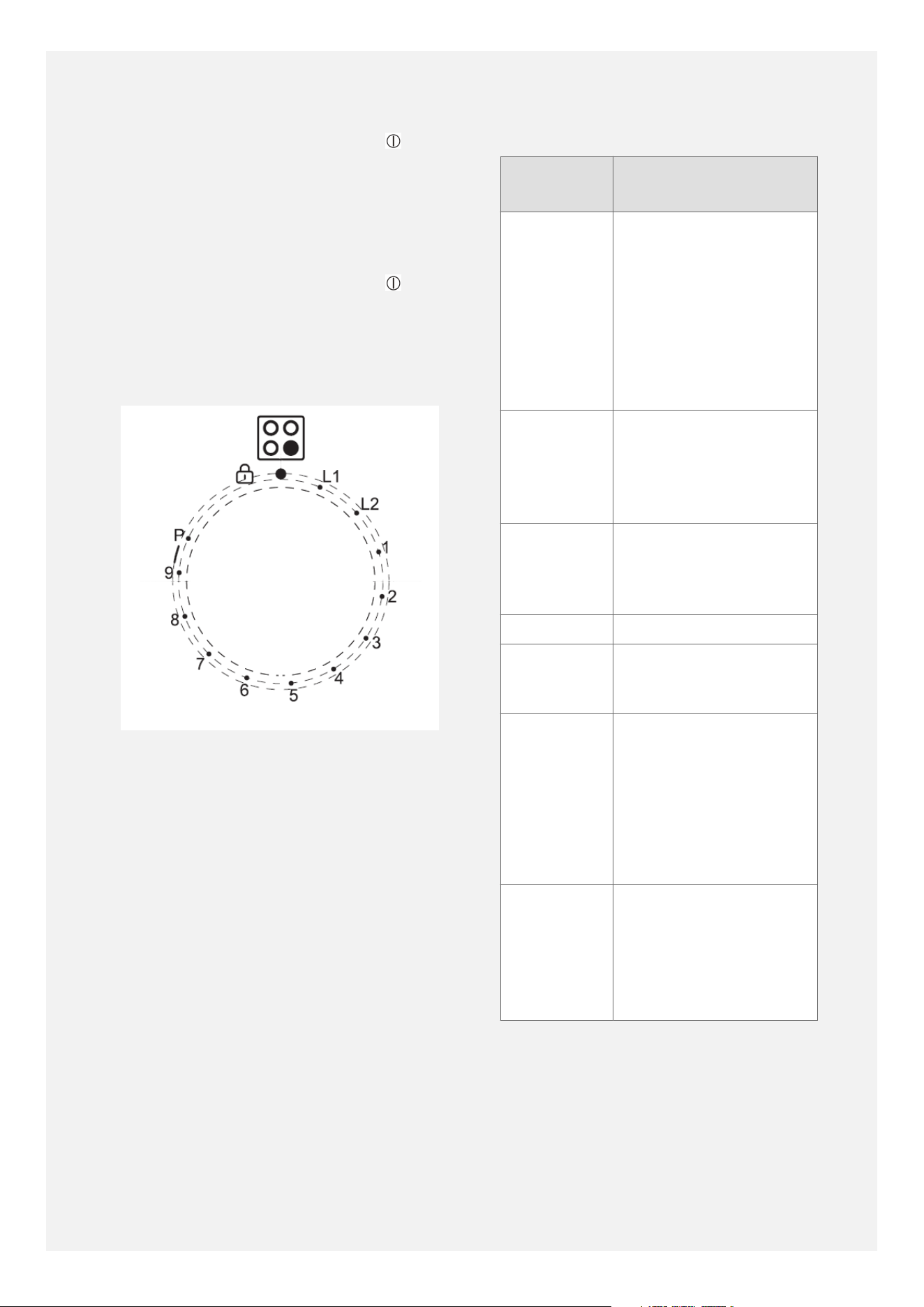
•
The induction hob is switched on by
touching and holding the power key until
the hob display lights up, showing dashes
('-').
•
Once powered up you can then use the
rotary controls to operate the cooking
zones.
•
The whole hob can be switched o by
touching and holding the power key until
the display goes dark.
SELECTING A POWER LEVEL ON
A COOKING ZONE
•
Turn the control knob for the relevant
cooking zone clockwise to the desired
power level (with L1 being the lowest power
level and 9 being the highest power level).
•
The chosen power level is shown in the
display.
•
A beep sounds each time the control knob is
turned to a dierent power level.
•
The power level can be changed at any time
by turning the control knob.
SUGGESTED HEAT SETTINGS
Heat
Setting
Suggested uses
L1, L2 Melting chocolate,
butter and foods
which can burn
quickly
Keeping cooked food
warm prior to serving
Gentle simmering
1, 2 Delicate warming for
small amounts of
food
Slow warming
3, 4 Reheating and rapid
simmering
Cooking rice
5, 6 Making pancakes
7, 8 Sautéing
Cooking food
9 Stir-frying
Searing
Bringing soup to the
boil
Boiling water
P - power
boost
Bringing larger
amounts of water to
the boil more quickly.
Do not use for
heating oil.
SWITCHING A COOKING ZONE
OFF
Turn the relevant control knob anti-clockwise
to the o position to turn the cooking zone
o.
16

Note
•
Always turn the hob
control knobs to the
off position before
switching the hob off
with the power key .
•
If a hob zone control
knob is accidentally
left in a power level
position when the hob
is switched off by the
power key, when the hob
is later switched back
on the zone will stay
powered off and will not
respond to the control
knob being turned to
different power levels.
•
If this happens, turn
the knob anti-clockwise
to the off position,
and then turn it
back clockwise to the
required power level.
•
The zone will now
respond to the control
knob as usual.
USING THE POWER BOOST
FUNCTION
The power boost is a function that temporarily
boosts the power to a cooking zone.
•
Rotate the relevant control knob to the right
(clockwise) as far as it will go, past the level
9 position to the 'P' position.
•
Release the control knob and it will rest on
the power level 9 position.
•
The display shows the 'P' symbol and the
power boost will operate for approximately
5 minutes, before returning to power level
9.
•
Alternatively, power boost can be cancelled
at any time by selecting a dierent power
level, or by turning the control knob to the
'P' position again.
Note
After approximately 5
minutes the power boost
is automatically switched
off and the zone returns to
power level 9. Please note,
if you adjust the power
level down from power
boost, the zone display
will change from 'P' to '8',
rather than from 'P' to '9'
because the control knob
was already in the power
level 9 position.
Power boost works by
temporarily 'borrowing'
extra power from an
adjacent zone. Therefore
it is not possible to boost
all 4 cooking zones at the
same time.
When using power boost
on one zone, the
electronics may need to
automatically reduce the
power of the adjacent
zone on the same side of
the hob. This is normal
and is designed to prevent
the appliance drawing too
much power.
Do not hold the the hob
zone control knob in the
'P' position for more than
a couple of seconds. If you
were to hold the control
knob in the 'P' position
for too long, the beeping
would sound to remind
you to release the control
knob.
17

ACTIVATING AND
DEACTIVATING THE HOB
CHILD-LOCK
•
First ensure that no hob zones are currently
in use. All of the hob control knobs must be
in the o position.
•
To prevent accidental operation of the
cooking zones, turn the front-left cooking
zone control knob to the left (anti-
clockwise) and hold it at the child lock
symbol for about 3 seconds.
•
A beep sounds. Release the knob and it
returns to rest on the o position. The lock
will activate and 'LO' will appear on the
display.
•
While the child lock is active, turning the
hob zone control knobs has no eect.
•
Please note, the 'LO' message can appear in
the hob display even if the hob is powered
o, as long as the cooker is switched on at
the wall.
•
To deactivate the child lock repeat the
above operation, turn the front-left cooking
zone control knob to the left (anti-
clockwise) and hold it at the child lock
symbol for about 3 seconds.
•
A beep sounds, the lock will deactivate and
'LO' will disappear from the display.
•
The hob will become operational again and
can be powered on and used normally.
INDUCTION SYMBOLS AND
CODES
The hob display can show information codes,
and codes to alert you to any issues which
may need to be resolved.
18
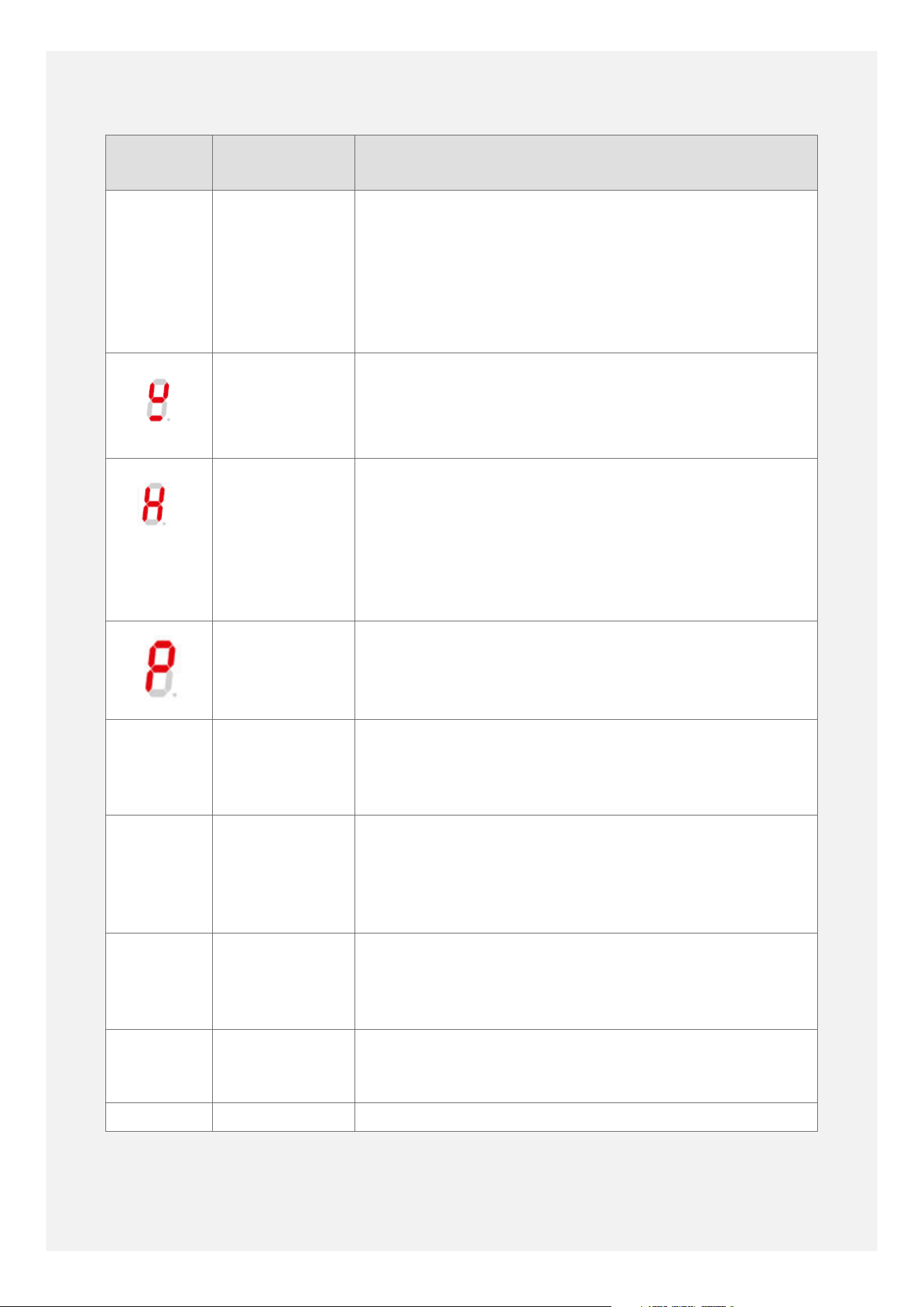
Symbol
/ Code
Meaning Description
- Hob is
powered on
but not in
use.
The dash symbol means that the hob has been
powered up by touching the on/o power key but no
power levels have been chosen for the cooking zones.
Choose a power level by turning the relevant control
knob. If no power levels are chosen within about 1
minute, the hob will switch o again and return to
standby mode.
Pan missing,
or unsuitable
pan.
If the electronics cannot detect the pan, because it is
too small or does not have a magnetic base, then the
hob display will show the missing or unsuitable pan
symbol.
Residual heat
indicator.
When the cooking zone or hob is switched o after
use, if the glass surface is still hot, the residual heat
indicator will be displayed. The residual heat symbol
will automatically go out when the glass surface
temperature cools (to below approximately 45°C). The
cooling fan runs for a while after the hob is switched
o to help cool the hob electronics.
Power boost. Power boost is active.
ER03 Obstruction. Something is covering the hob display area, such as
a pan, utensil or cloth, or even just water, grease or
finger prints . Remove the item and clean the area
before using the hob again.
E6 or E9 Over-heat
indicator.
The hotplate may have over-heated, possibly because
an empty pan has been heated for too long or a pan
has boiled dry. Remove the pans and allow the hob to
cool down for about 30 minutes before trying to use it
again.
E2 or E3 Possible issue
with
electricity
supply.
The electrical voltage supplying the cooker may be too
high or too low. Switch the cooker o at the wall and
contact your local electricity board for assistance.
L1 or L2 Low
temperature
setting.
The cooking zone has been set to a low temperature
setting. You can turn the control knob to a dierent
setting to choose a dierent power level.
LO Child lock. The child lock has been activated.
19
For other codes, please switch the appliance
o at the wall for a few minutes to let the
electronics reset. If the code reappears when
the power is restored, please contact our
customer support team using the details on
the back cover.
AUTOMATIC SHUTDOWN
Automatic shutdown is an additional safety
feature which will switch the hob cooking
zones o should you ever forget to turn a zone
o. The maximum operating times for each
power level are shown below.
Power
Level
Maximum
Operating Time
L1 2 hours
L2 2 hours
1 8 hours
2 8 hours
3 8 hours
4 4 hours
5 4 hours
6 4 hours
7 2 hours
8 2 hours
9 2 hours
P - Power
Boost
5 minutes (plus 2
hours at power level
9)
OVERVIEW OF OVEN
FURNITURE
Item Quantity
supplied
with
cooker
Notes
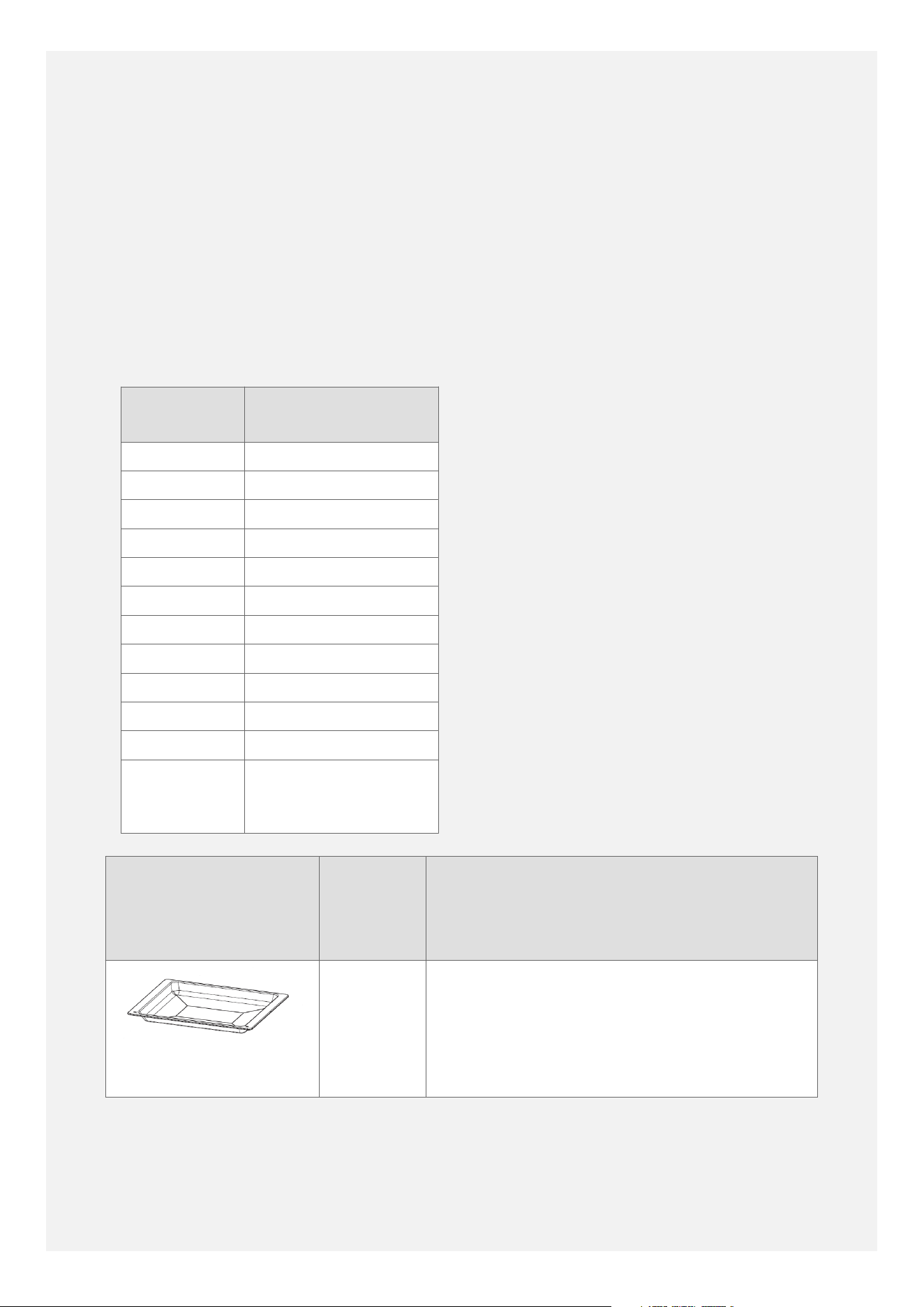
Full-width grill-pan
1 Can also be used as a baking tray or roasting
tin.
Can be used in the top oven or the main oven.
20
Item Quantity
supplied
with
cooker
Notes
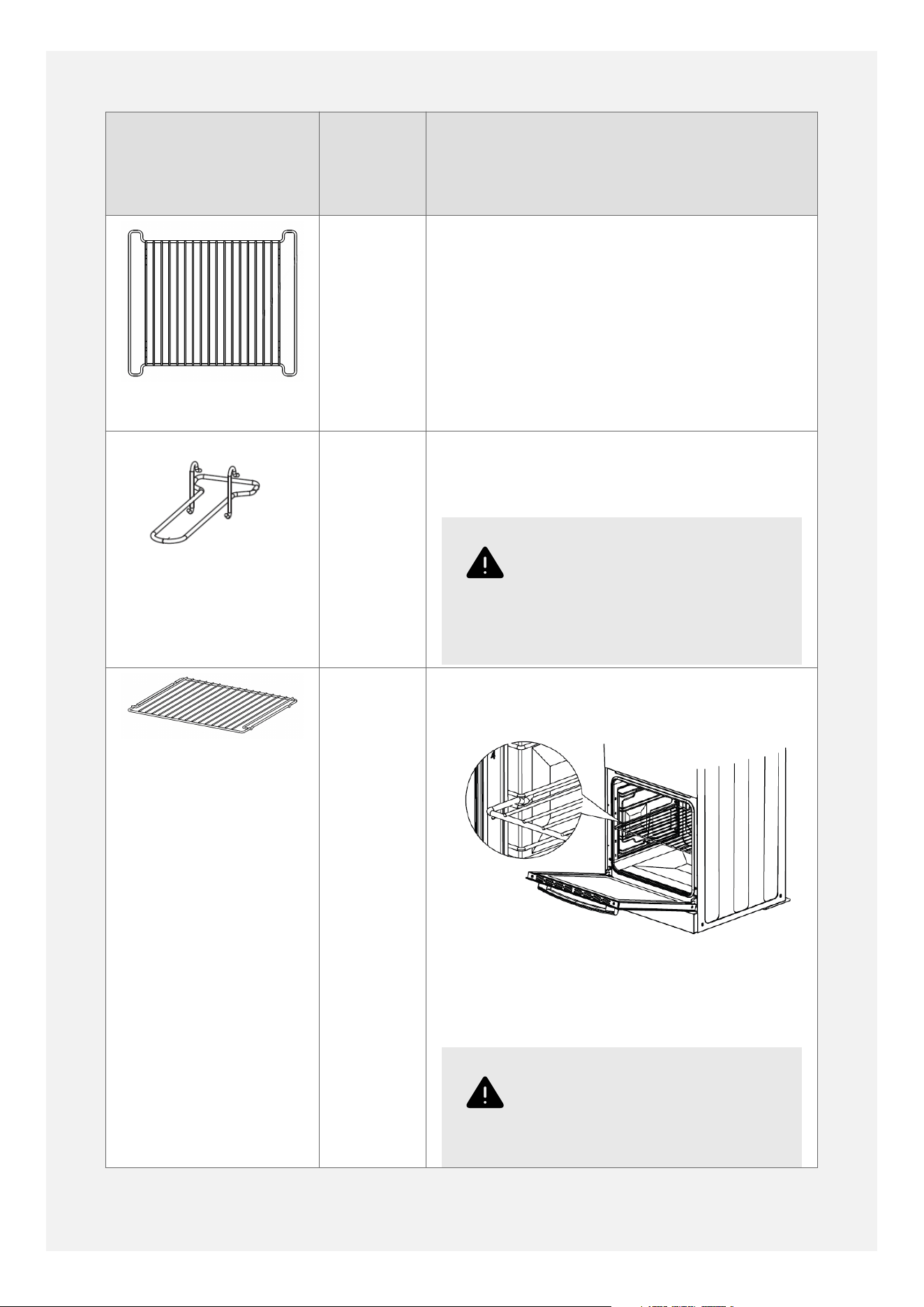
Grill-pan trivet
1 Place inside the grill-pan to support the food
being grilled.
The useable grilling area is approximately
300mm wide by 280mm deep.
Grill-pan handle
1 Hooks over the front of the grill-pan to make
it easier to insert and withdraw the grill-pan.
Warning
Do not use the handle to
carry the grill-pan - danger
of scalding or injury.
Shelf
2 The shelves can be used in the top oven or in
the main oven.
Insert the shelf with the anti-tip notches at
the back and facing downwards.
Warning
Insert the shelf between
the two wires of the shelf
guide position, not on top
21

Item Quantity
supplied
with
cooker
Notes
of the upper wire - danger
of scalding or injury.
Do not attempt to place a
shelf on top of the shelf
guides as the shelf will not
be held in a stable position
and could tip out - danger
of scalding or injury.
When removing a shelf for cleaning, wait for
the shelf to cool, then pull it outwards and lift
it upwards to remove it completely.
The useable shelf area is approximately
390mm wide by 360mm deep.
The maximum recommended size of baking
tray to use is approximately 340mm wide by
340mm deep.
22
MAIN OVEN OVERVIEW
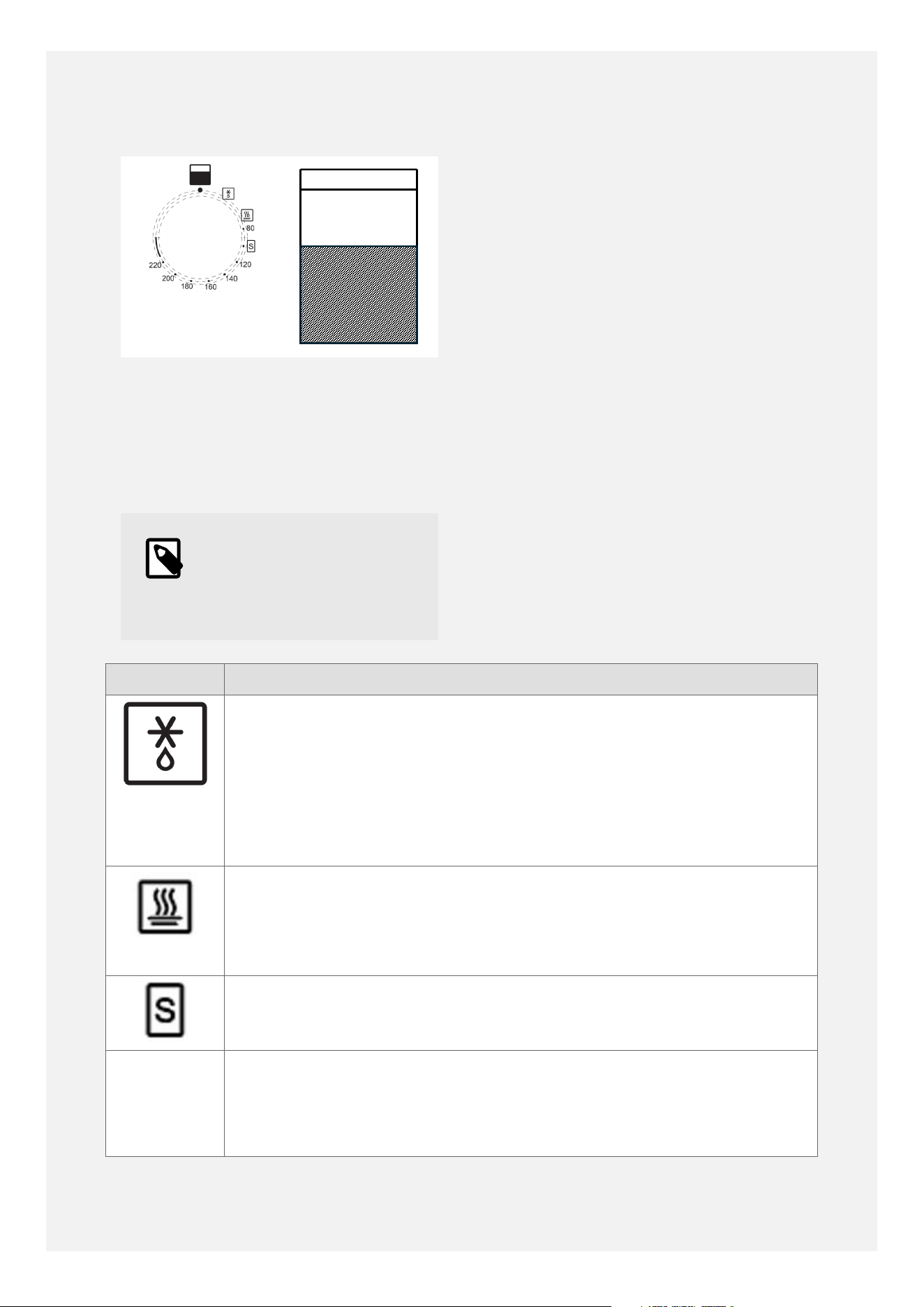
Turn the main oven control knob clockwise to
the cooking function or temperature required.
Turn the main oven o by turning the control
knob anti-clockwise back to the o position.
Note
The time of day must be
set on the timer before the
main oven can be used.
MAIN OVEN COOKING
FUNCTIONS
Symbol Description
Defrost function (without heat).
Use with the door closed to defrost frozen items such as bread and
gateaux. Place the grill pan below the shelf to catch drips.
Use with the door closed for proving dough prior to baking.
Use with the door open for cooling cooked food prior to refrigerating.
Keep warm function (70°C).
For keeping food warm prior to serving.
Can be used for warming plates - place plates on the shelves.
Slow cook function (100°C).
For slow cooking of casseroles, stews, etc.
80°C to
220°C
Fanned oven cooking function (80°C to 220°C).
Use any suitable shelf position - can bake on two levels simultaneously.
Generally does not require pre-heating.
23
Symbol Description
Reduce the temperature by around 20°C and reduce the cooking time a
little compared to conventional ovens.
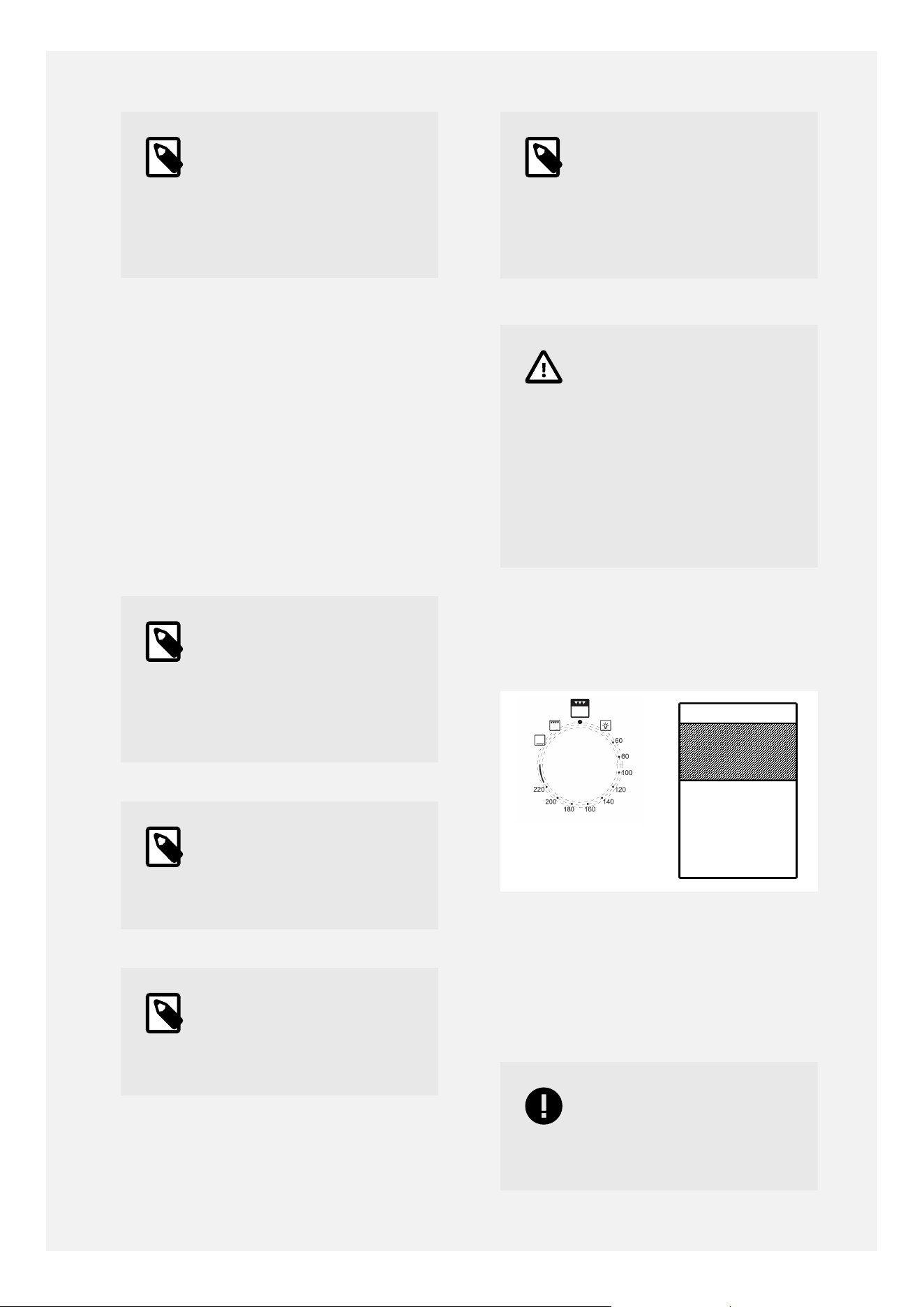
MAIN OVEN SHELF POSITIONS
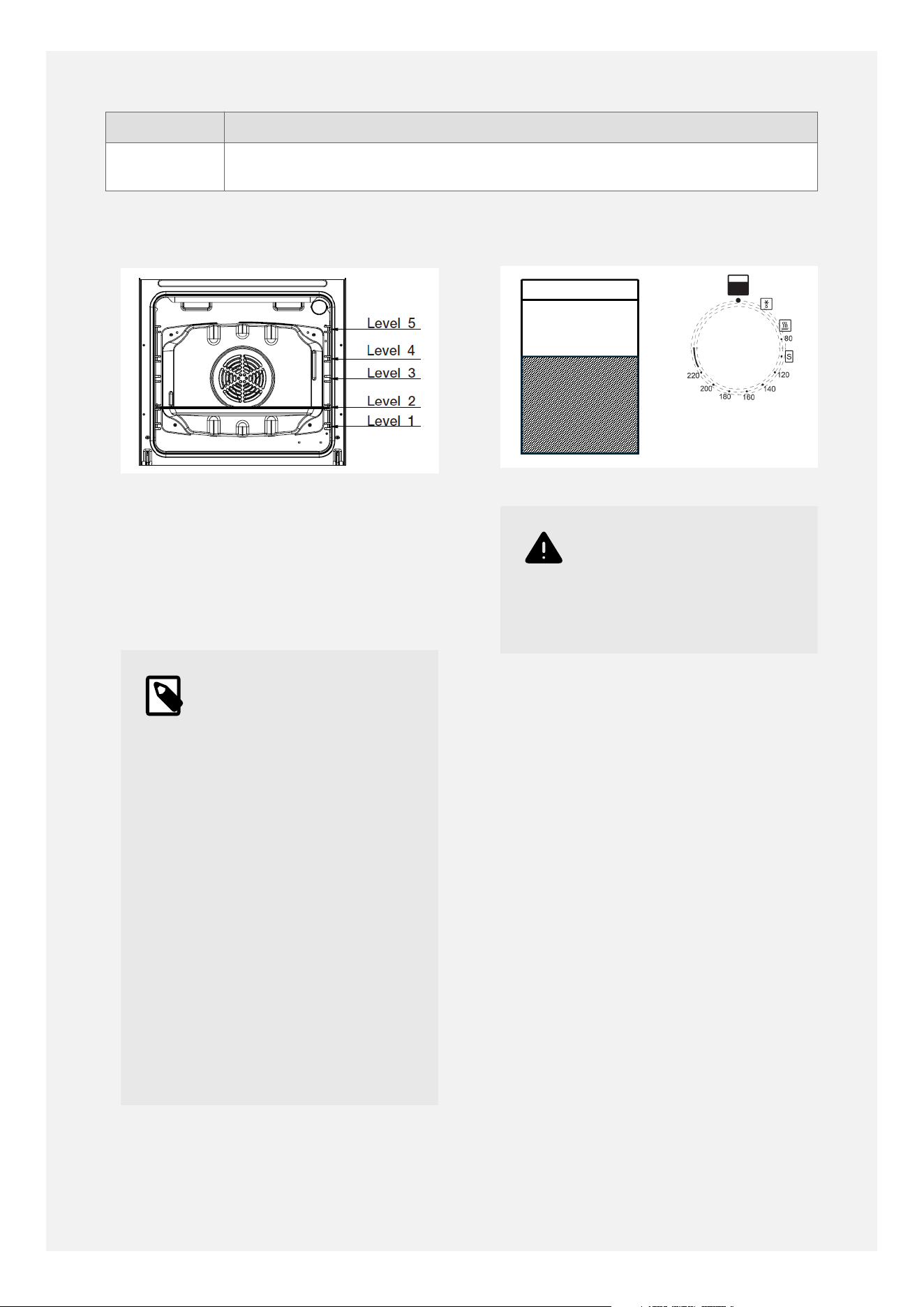
As this is a fanned oven there is an even
temperature distribution throughout the oven
cavity.
Use any suitable shelf position, and can bake
on two levels simultaneously, remembering to
allow space for baking to rise.
Note
•
The ovens may give off
an unusual odour when
first used, as the oils
used to protect the oven
enamel in storage are
being burnt off.
•
Ventilate the kitchen
and heat the ovens,
without food in them, at
180°C for approximately
two hours to remove any
smell.
•
Once the ovens have
cooled down, clean the
oven interiors, shelves,
guides and grill-pan
with warm soapy water
before using the ovens
to cook.
USING THE MAIN OVEN
Warning
Accessible parts may be
hot when the oven is used.
Young children should be
kept away.
SETTING A HEATING OPERATION
To start a heating operation, a temperature
must be selected.
Setting a heating temperature:
•
Rotate the temperature control to select the
desired heating temperature.
To modify or cancel the heating temperature:
•
Rotate the temperature control to select
another heating temperature.
•
Rotate the temperature control back to
the o position to cancel the heating
temperature.
COOKING WITH A FANNED OVEN
24
Caution
As this is a high efficiency
oven, you may notice the
emission of steam from
the oven when the door is
opened. Please take care
when opening the door.
If you are used to cooking with a conventional
oven you will find a number of dierences to
cooking with a fan oven which will require a
dierent approach.
Tip
Foods are cooked at a
lower temperature than
a conventional oven,
so conventional recipe
temperatures may have to
be reduced.
Tip
Preheating is generally
not necessary as a fan
oven heats up quickly.
Tip
There is no flavour
transference in a fan
oven, which means you
can cook strong smelling
foods such as fish at
the same time as milder
foods, such as an apple
pie.
Tip
When batch baking foods
that will rise during
cooking - e.g. bread and
cakes, always ensure that
enough space has been
left between the shelves
to allow for the rise.
• There are no zones of heat in a fan oven as
the convection fan at the back of the oven
ensures an even temperature throughout
the oven. This makes it ideal for batch
baking - e.g. when planning a party, as all
the items will be cooked within the same
length of time.
Note
When 2 shelves are being
used, it may be necesary
to increase the cooking
time slightly.
Note
Because the 2 oven
shelves are wider than in
many ovens, it is possible
to cook 2 items per shelf
side by side.
Note
When roasting meats,
you will notice that
fat splashing is reduced,
which is due in part to the
lower oven temperatures,
and this will help keep
cleaning of the oven to a
minimum.
25
Note
There is no need to
swap dishes onto different
shelves part way through
cooking, as with a
conventional oven.
DEFROSTING AND COOLING IN THE MAIN
OVEN
To defrost frozen foods, turn the oven control
to the defrost position, place the food in the
centre of the oven and close the door.
To cool foods after cooking prior to
refrigerating or freezing, turn the main oven
control to the defrost position and open the
door.
DEFROSTING TIMES
Note
Small or thin pieces of
frozen fish or meat-
e.g. fish fillets, prawns
or mince will take
approximately 1-2 hours.
Note
Placing food in a single
layer will reduce the
thawing time.
Note
A medium sized casserole
or stew will take
approximately 3-4 hours.
Note
A 1½kg/ 3lb oven
ready chicken will take
approximately 5 hours,
remove the giblets as
soon as possible.
Caution
BE SAFE:
Do not defrost stuffed
poultry using this method.
Do not defrost larger
joints of meat and poultry
over 2kg / 4lb using this
method.
TOP OVEN AND GRILL
OVERVIEW
Turn the top oven control knob clockwise to
the cooking function or temperature required.
Turn the top oven o by turning the control
knob anti-clockwise back to the o position.
Important
When using the grill
function, the top oven
door must be kept closed.
26
Notice
The grill is designed to be
used with the door closed
for faster heat-up times
and more efficient grilling.
TOP OVEN AND GRILL
COOKING FUNCTIONS
Symbol Description
Light only function.
Puts the oven light on without putting the heat on.
Useful for increased visibility when wiping round the oven.
60°C to
220°C
Conventional oven function (60°C to 220°C).
Cooks using heat from above and below the food.
Pre-heat the oven for approximately 10-15 minutes, until the
temperature indicator light has gone out.
For best results, place the food in the middle shelf position. The oven
will be a little hotter at the top and cooler at the bottom.
Bake on one level only.
Base heat only.
Used towards the end of cooking to crisp the base of pies and pizzas,
etc.
Place the food in the middle shelf position in most cases. The lower shelf
position can be used if more crisping of the base is required.
Conventional grill function - fixed-rate.
Used for toasting bread and grilling thinner meats, like bacon and
sausages.
Use a medium-to-high shelf position, ensuring that the food is clear of
the upper grill element.
Use with the door closed.
For best results, pre-heat the grill for 3 to 5 minutes before use.
27

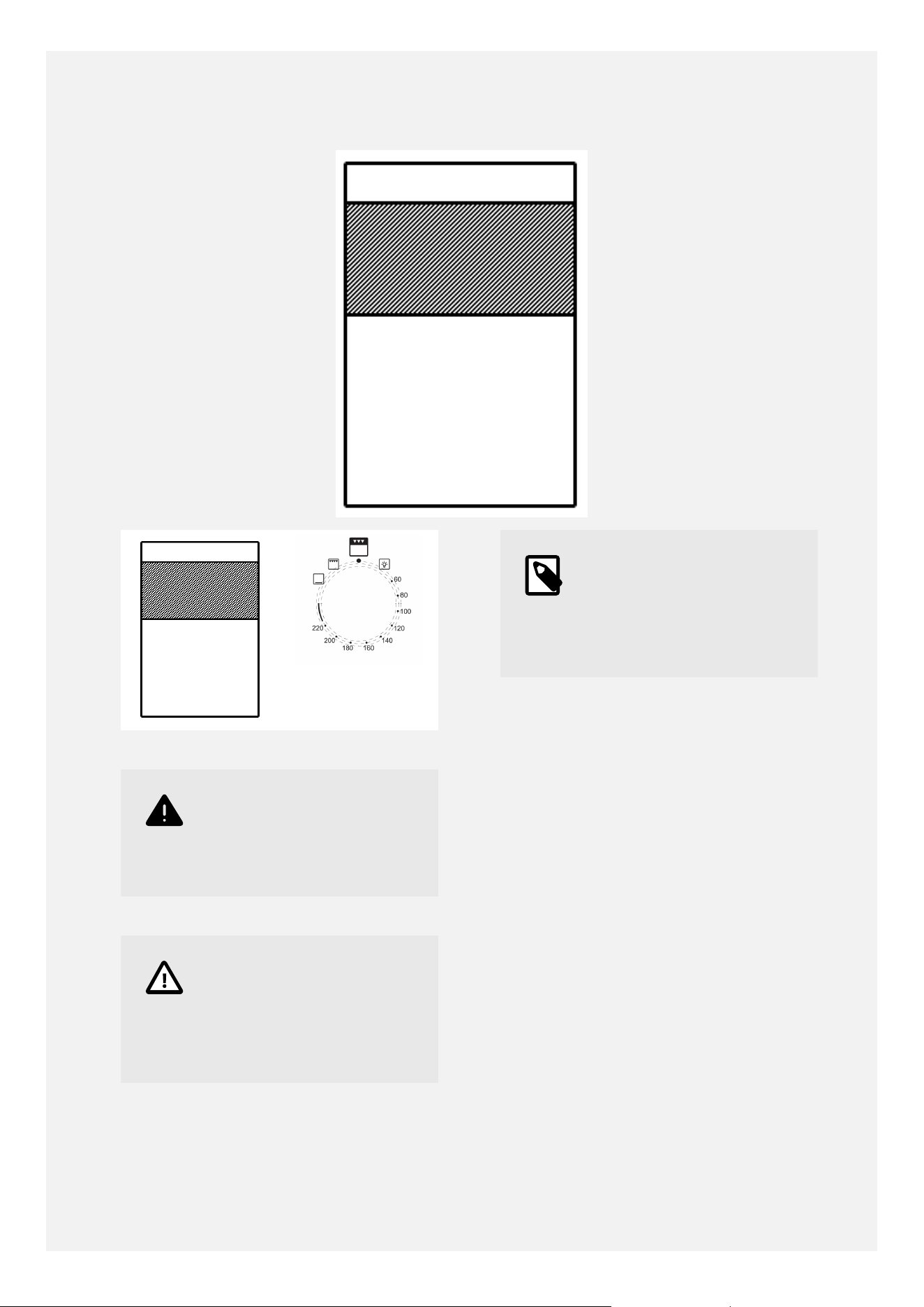
TOP OVEN SHELF POSITIONS
•
The top oven / grill compartment has 3 shelf
positions.
•
When using the compartment as a
conventional oven, please use the middle
shelf position.
•
When using the compartment as a grill,
please use a shelf position which will bring
the food close to the heat from the grill
while leaving enough space so that the
food is clear of the upper grill element. The
intensity of heat reaching the food can be
adjusted by using a lower shelf position.
Note
•
The ovens may give off
an unusual odour when
first used, as the oils
used to protect the oven
enamel in storage are
being burnt off.
•
Ventilate the kitchen
and heat the ovens,
without food in them, at
180°C for approximately
two hours to remove any
smell.
•
Once the ovens have
cooled down, clean the
oven interiors, shelves,
guides and grillpan
with warm soapy water
before using the ovens
to cook.
28
USING THE TOP OVEN
Warning
When you are cooking
keep children away from
the vicinity of the oven.
Caution
The top element gets
extremely hot when in use,
so take extra care to avoid
touching it.
Note
The top oven is a
conventional oven and
is not controlled by the
programmable timer.
TO TURN ON THE TOP OVEN
1. Turn the temperature control knob until the
required temperature is selected. Allow the
oven to pre-heat for approximately 10 to 15
minutes before placing the food in the oven.
2. To switch o, return the top oven control
knob to the o position.
Important: Never put items directly on the
base of the oven, or cover the oven base with
foil, as this may cause the base element to
overheat. Always position items on the shelf
or tray.
PREHEATING
Preheat the oven for approximately 10 to 15
minutes.
The oven must be preheated when cooking
frozen or chilled foods, and we recommend
preheating for yeast mixtures, batters,
soués, and whisked sponges.
29
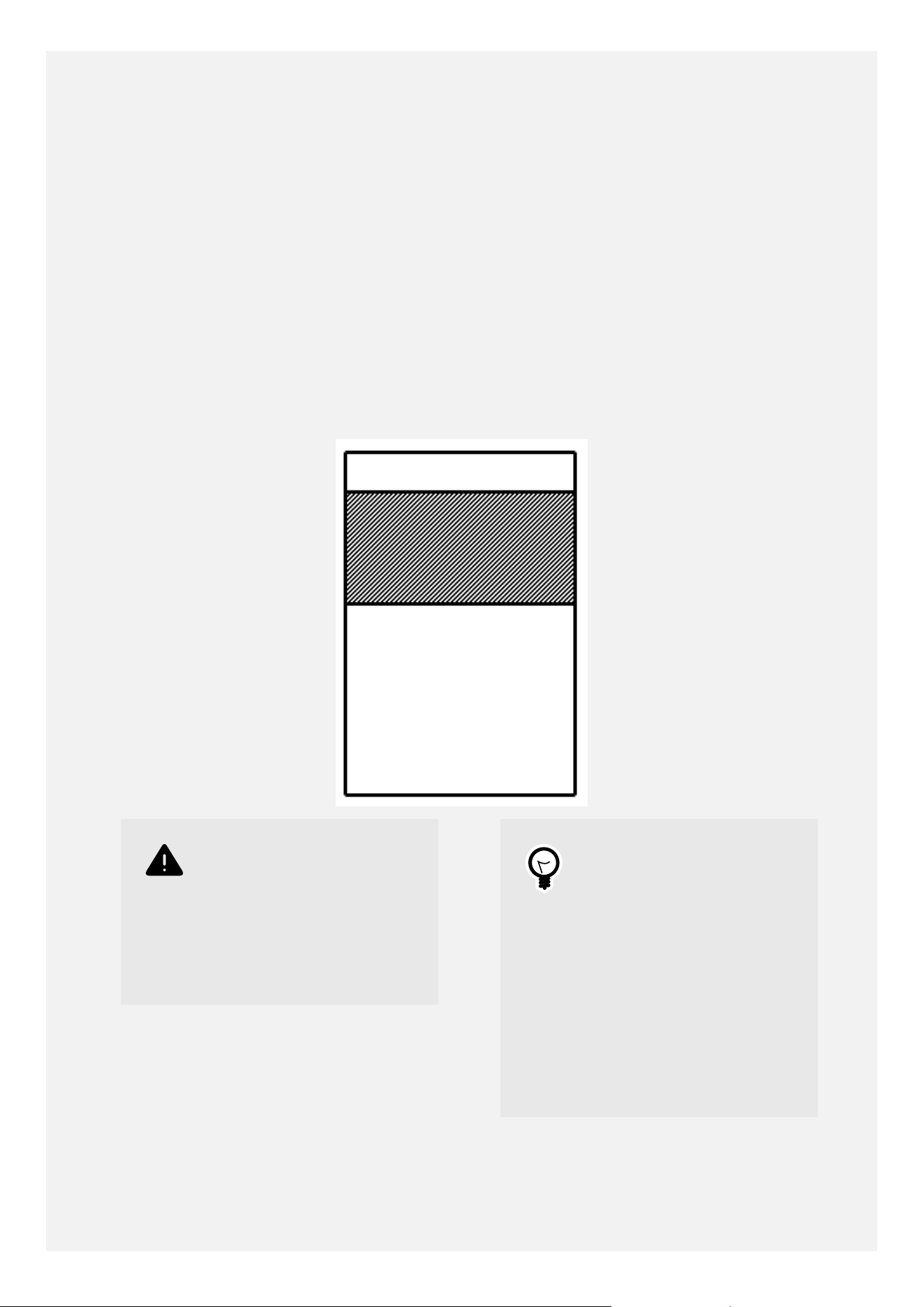
Put the oven shelf in the position required
before preheating the oven.
Position baking trays and roasting tins on the
middle of the shelf to aid the circulation of
heat.
WHEN USING THE TOP OVEN
As part of the cooking process, hot air is
expelled through a vent at the top of the
oven. When opening the oven door, care
should be taken to avoid any possible contact
with potentially hot air, since this may cause
discomfort to people with sensitive skin. We
recommend that you hold the underneath of
the oven door handle.
USING THE GRILL
Warning
Never cover the grill
pan or grill trivet with
aluminium foil, or allow
fat to build up in the grill
pan, as this creates a fire
hazard.
Tip
For best grilling results
use a suitable shelf
position to move the food
closer to the heat, while
ensuring that the food
will not come into contact
with the grill heating
element.
For best results, always
pre-heat the grill for 3-5
minutes prior to use,
30
USING THE GRILL
Caution
Accessible parts may be
hot when the grill is used-
young children should be
kept away.
Important
The grill door must be
kept closed when the grill
is used.
1. Turn the top oven control knob to the grill
setting . For best cooking results, we
recommend that you preheat the grill for
3 to 5 minutes.
2. Push the grill pan in to position it under
the grill.
3. To switch o return the control knob to
the o position.
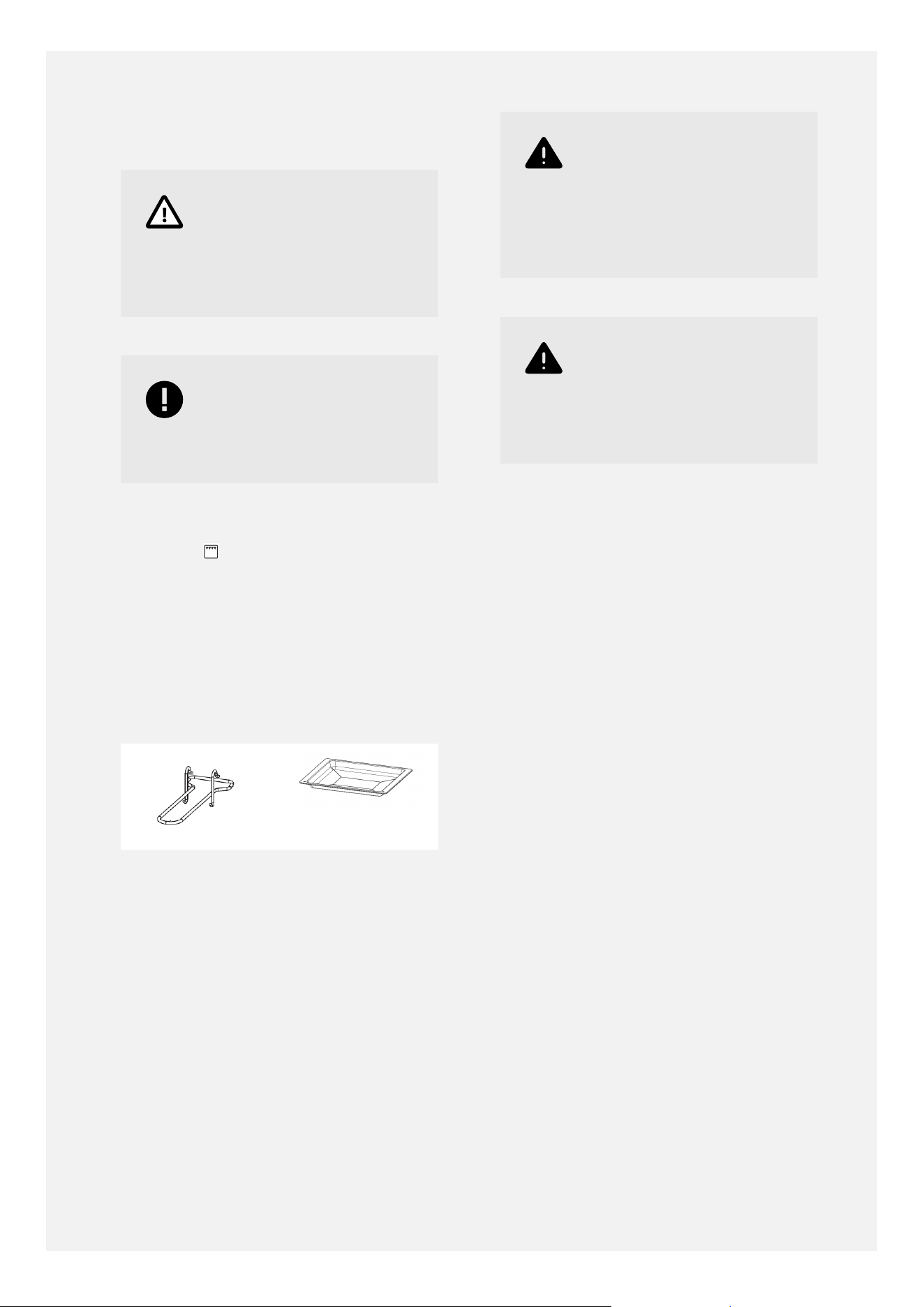
GRILL PAN AND TRIVET
The trivet sits inside the grill-pan.
The holes and the sloping lip of the grill-pan
go at the back.
The grill-pan handle clips over the front of
the grill-pan. Ensure that the grill-pan handle
prongs are at the top, and the wider support
piece sits underneath the grill-pan.
Warning
The grill-pan handle is
designed for sliding the
grill-pan in and out. Do
not attempt to carry the
grill pan by the handle.
Warning
The top oven/grill door
must be open when
the grill is used for
conventional grilling.
31
USING THE PROGRAMMABLE TIMER
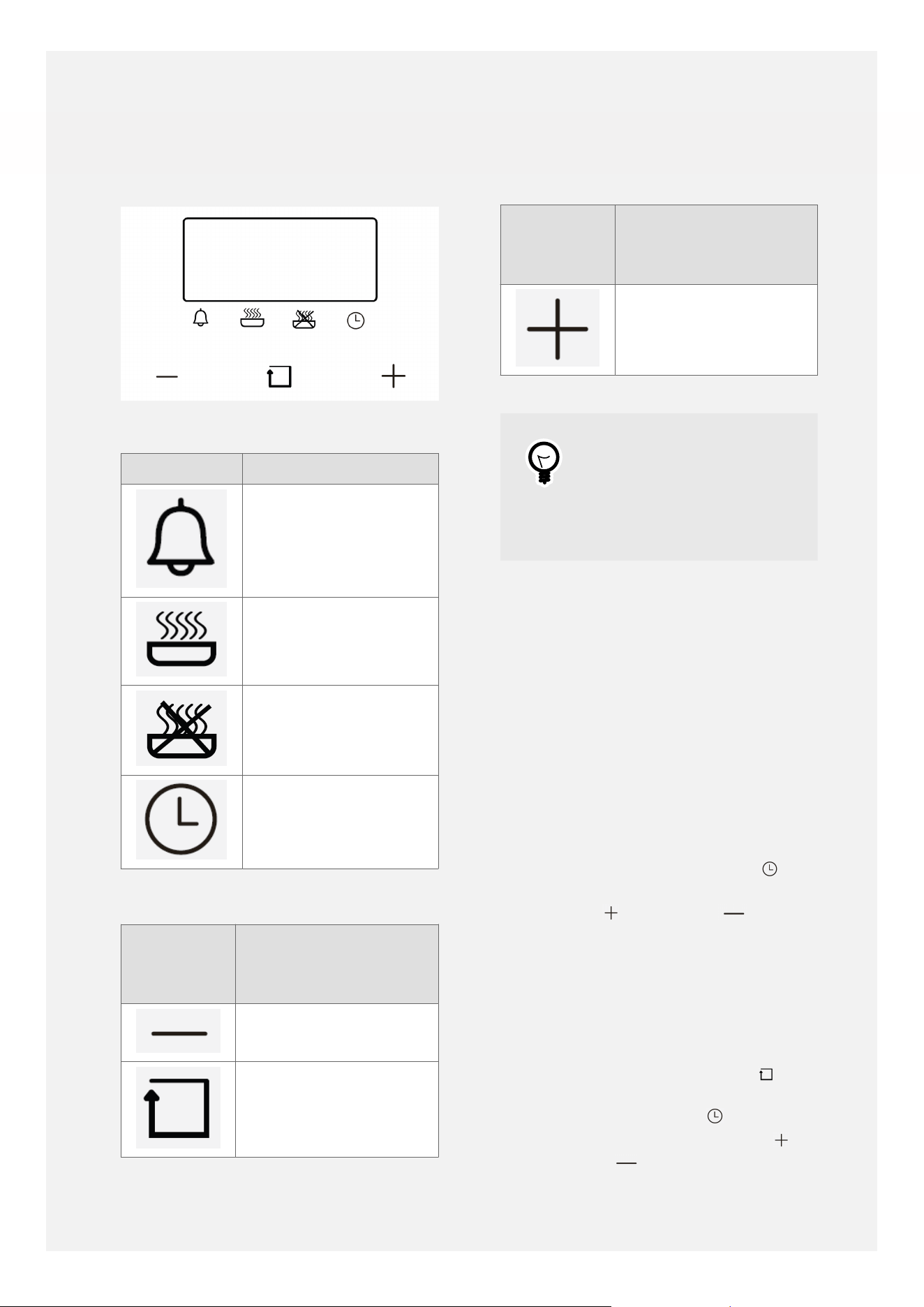
Timer Symbols
Symbol Description
Minute minder
Cooking duration
time
End of cooking time
Time of day
Timer Touch Controls
Touch
Control
Symbol
Description
Minus key - to
decrease time value
Function key - to
scroll through the
timer functions
Touch
Control
Symbol
Description
Plus key - to increase
time value
Tip
Touching and holding the
plus key/minus key makes
the time value increase/
decrease more quickly.
MANUAL MODE
• The main oven can be used manually,
that is without the timer switching the
main oven o automatically, or on and o
automatically.
• The time of day must be set on the timer
before using the main oven manually.
SETTING THE TIME OF DAY
• When the cooker is first connected to the
power supply the time display shows '12:00'
and the bar above the clock symbol
flashes.
• Use the plus
and/or minus keys to
set the current time of day using the 24
hour clock.
• A few seconds after the last key touch, the
time of day will be accepted and the main
oven can be used manually.
• If you need to adjust the time of day, for
example at the start and end of daylight
saving time, touch the function key
repeatedly (usually four touches) until the
bar above the clock symbol flashes.
• While the bar is flashing, use the plus
and/or minus keys to set the correct
time of day using the 24 hour clock.
32

• A few seconds after the last key touch, the
time of day will be accepted and the bar will
stop flashing.
USING THE MINUTE MINDER
• The minute minder function sounds an
alarm after a set time, to remind you to
check, stir, turn or baste food, but does not
switch the main oven o automatically.
• Touch the function key repeatedly
(usually one touch) until the bar above the
bell symbol starts to flash.
• While the bar is flashing, use the plus
and/or minus keys to set the required
minute minder time (up to 23 hours and 59
minutes).
• A few seconds after the last key touch, the
minute minder duration time is accepted
and starts counting down in the display. The
bar above the bell symbol
shows solidly.
• When the minute minder duration time
has elapsed, the alarm sounds. Touch the
function key to silence the alarm.
• If you wish to amend the minute minder
duration time, touch the function key
repeatedly again (usually one touch) until
the bar above the bell symbol starts
to flash. While the bar is flashing, use the
plus and/or minus keys to set
the updated minute minder time (up to
23 hours and 59 minutes). A few seconds
after the last key touch, the updated minute
minder duration time is accepted and starts
counting down.
• If you wish to cancel the minute minder
function, touch the function key
repeatedly again (usually one touch) until
the bar above the bell symbol starts
to flash. While the bar is flashing, use the
minus key to take the minute minder
time down to zero. A few seconds after the
last key touch, the minute minder function
is cancelled.
USING THE TIMER FOR SEMI-
AUTOMATIC COOKING
• With semi-automatic cooking, the timer will
switch the main oven o after a set time, to
help prevent over-cooking.
• Place the food in the main oven and select
the required temperature.
• Touch the function key repeatedly
(usually two touches) until the bar above
the dish symbol starts to flash.
• While the bar is flashing, use the plus
and/or minus keys to set the required
cooking duration time (up to 10 hours).
•
A few seconds after the last key touch,
the cooking duration time is accepted, and
starts counting down in the background.
The bar above the dish symbol shows
solidly.
•
When the cooking duration time has
elapsed, the alarm sounds and the main
oven heating is switched o. Turn the main
oven control dial back to the o position.
Touch the function key to silence the
alarm.
•
If you wish to check how much time
is remaining, touch the function key
repeatedly again (usually two touches) until
the bar above the dish symbol starts
to flash. While the bar is flashing, the
remaining time will be displayed.
•
If you wish to amend the cooking duration
time, touch the function key repeatedly
again (usually two touches) until the bar
above the dish symbol starts to flash.
While the bar is flashing, use the plus
and/or minus keys to set the
amended cooking duration time (up to 10
hours). A few seconds after the last key
touch, the updated cooking duration time
is accepted, and starts counting down in the
background.
•
If you wish to cancel the semi-automatic
cooking function, touch the function key
repeatedly again (usually two touches) until
the bar above the dish symbol starts
to flash. While the bar is flashing, use the
minus key to take the cooking duration
time down to zero. A few seconds after the
last key touch, the semi-automatic cooking
function is cancelled. Please note that the
timer would not then turn the main oven
o, and the main oven would need to be
turned o manually by turning the main
oven control dial to the o position at
the end of cooking.
33

USING THE TIMER FOR FULLY-
AUTOMATIC COOKING
• With fully-automatic cooking, food can be
placed in the main oven earlier on, for
example before going out. The timer will
then switch the main oven on and o at set
times so that the food is cooked ready for
your return.
• The function works by setting a cooking
duration time and an end time, and the
timer then works out the start time. For
example, if you wish the food to be ready at
18:00, and the cooking time is 1 hour, them
the timer would switch the main oven on at
17:00, cook for one hour, and then switch
o at 18:00.
• Place the food in the main oven.
• Touch the function key
repeatedly
(usually two touches) until the bar above
the dish symbol starts to flash.
• While the bar is flashing, use the plus
and/or minus keys to set the required
cooking duration time (up to 10 hours).
• Then touch the function key repeatedly
(usually one further touch) until the bar
above the crossed-out dish symbol
starts to flash.
• While the bar is flashing, use the plus
and/or minus keys to set the required
cooking end time (up to 23 hours and 59
minutes after the current time of day).
• A few seconds after the last key touch, the
cooking duration time and the cooking end
time are accepted, with the bars above the
dish symbol and the crossed-out dish
symbol showing solidly.
• Place the food in the main oven and select
the temperature required.
• When the calculated start time arrives
(17:00 in this example), the main oven
heating is turned on and the food starts to
cook for the length of the cooking duration
time (1 hour in this example).
• When the cooking end time arrives (18:00
in this example), the alarm sounds and the
main oven heating is switched o. Turn
the main oven control dial
back to the
o position. Touch the function key to
silence the alarm.
• If you wish to check the cooking duration
time, touch the function key repeatedly
again (usually two touches) until the bar
above the dish symbol starts to flash.
While the bar is flashing, the cooking
duration time will be displayed.
•
If you wish to check the cooking end time,
touch the function key repeatedly again
(usually three touches) until the bar above
the crossed-out dish symbol starts to
flash. While the bar is flashing, the cooking
end time will be displayed.
•
If you wish to amend the cooking duration
time, touch the function key repeatedly
again (usually two touches) until the bar
above the dish symbol starts to flash.
While the bar is flashing, use the plus
and/or minus keys to set the amended
cooking duration time (up to 10 hours). A
few seconds after the last key touch, the
updated cooking duration time is accepted.
•
If you wish to amend the cooking end,
touch the function key repeatedly again
(usually three touches) until the bar above
the crossed-out dish symbol starts to
flash. While the bar is flashing, use the
plus and/or minus keys to set the
amended cooking end time (up to 23 hours
and 59 minutes after the current time of
day). A few seconds after the last key touch,
the updated cooking end time is accepted.
•
If you wish to cancel the fully-automatic
cooking function, please adjust the cooking
duration time to zero and the cooking end
time to the current time of day.
• Firstly, touch the function key repeatedly
again (usually two touches) until the bar
above the dish symbol starts to flash.
While the bar is flashing, use the minus
key to take the cooking duration time
down to zero. A few seconds after the last
key touch, the bar goes out above the dish
symbol .
• Then, touch the function key repeatedly
again (usually three touches) until the bar
above the crossed-out dish symbol
starts to flash. While the bar is flashing, use
the minus key to take the cooking end
time down to the current time of day. A few
seconds after the last key touch, the bar
goes out above the crossed-out dish symbol
.
•
The fully-automatic cooking programme is
now cancelled. Please note that the timer
34

would not then turn the main oven o, and
the main oven would need to be turned o
manually by turning the main oven control
dial to the o position at the end of
cooking.
35
CLEANING YOUR APPLIANCE
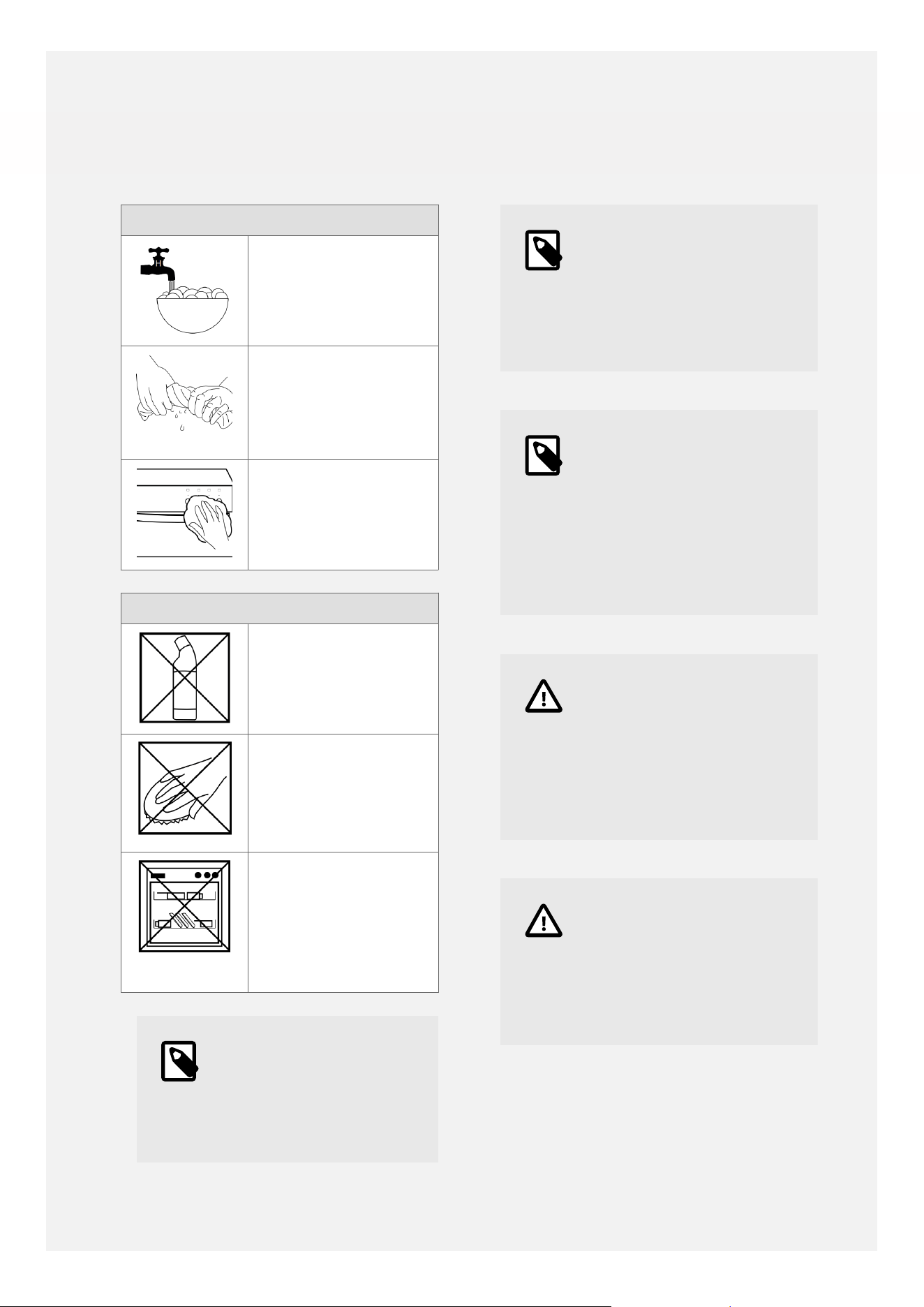
Cleaning: Do's
Use warm, soapy
water
Wipe the appliance
with a damp cloth
•
Clean the cloth
regularly
Dry with a soft dry
cloth
Cleaning: Don'ts
Don't use undiluted
bleaches or
Chloride products
Don't use Wire
Wool, Abrasive
cleaners, Nylon
pads or Steam
Cleaners
Do not wash
the cast iron
griddle, wok cradle,
pan supports or
telescopic sliders in
the dishwasher
•
Note
Always switch off your
appliance and allow it
to cool down before you
clean any part of it.
Note
Please take extra care
when cleaning over the
symbols on the control
panel, as this can lead to
them fading.
Note
Tips: Some foods can
mark or damage the
metal or paint work e.g;
Vinegar, fruit juices and
salt. Always clean food
spillages as soon as
possible.
Caution
It is important to clean
your appliance regularly
as a build up of fat
can affect its performance
or damage it and may
invalidate your guarantee.
Caution
In addition to the above,
do not use metal scrapers
to clean the oven door
glass, ceramic hob surface
or any glass lids.
36

CLEANING AND CARE
GUIDANCE
Area of
appliance /
material
Cleaning guidance Example
products
Catalytic liners
•
Catalytic liners absorb splashes of fat
during cooking, which are then burnt
of at high temperatures.
•
Please still clean the oven floor, back
panel and roof of the oven cavity as
usual.
•
Catalytic liners need to be burnt
o regularly. Approximately once per
month, empty the oven of food,
bakeware and shelves, and heat the
oven to at least 200°C for about half
an hour. This will help to burn o the
grease.
•
If the liners become heavily soiled,
wipe them with a soft sponge that has
been soaked in warm soapy water.
Washing-up
liquid, if required.
Ceramic glass
hotplates
•
Clean with a ceramic hotplate cleaner/
conditioner, applied with kitchen
paper, following the instructions on
the package.
•
Rinse with a damp, well-wrung out soft
cloth.
•
Polish dry with a microfibre cloth.
•
If you do ever use a hob scraper to
remove stubborn marks or deposits,
please apply some ceramic hob
cleaner onto the ceramic glass surface
first, so that the hob scraper blade can
glide across, at a 45° angle, without
scratching the surface.
•
Please note that the cooker
manufacturer cannot accept
responsibility for scratches or damage
to the ceramic glass surface caused by
the use of a hob scraper.
•
Kitchen foil and spillages of sugary
foods must not be allowed to bake
onto the ceramic glass surface as they
may cause pitting of the glass.
•
Ceramic hob
cream cleaner.
•
Microfibre
cloths.
37

Area of
appliance /
material
Cleaning guidance Example
products
•
They must be removed immediately,
even if the hob is still hot, taking care
not to burn yourself.
•
Please be aware that pans with
aluminium in the base can tend to
leave marks on ceramic glass surfaces.
•
New hobs can sometimes show white
'bloom' marks which are related to
manufacturing residues.
•
Apply some lemon juice to the glass
surface and leave to soak for a while
before cleaning with ceramic hob
cleaner, rinsing and drying.
•
Do not clean ceramic hobs with
washing-up liquid as it can sometimes
leave behind a blue sheen.
Chrome oven
shelves, grill
pan trivets,
shelf guides and
telescopic sliders
•
Immerse a soft cloth in warm soapy
water, wring out and wipe the shelves
and shelf guides.
•
For heavier soiling, soak in warm
soapy water, then clean with a non-
scratch sponge.
•
Wave-shaped sponges can be useful
for cleaning chrome shelves and grill
pan trivets.
•
Wipe telescopic sliders with a damp
cloth. Do not wash them in the
dishwasher as the detergent will
remove the lubricant from the runners
which can prevent gliding and make
them sti.
•
Washing-up
liquid.
•
Wave-shaped
sponge.
Control knobs and
bezels
•
Wipe with a damp cloth.
•
On most models control knobs can be
removed for more through cleaning in
warn soapy water.
•
Please refer to the section for
removing and replacing the knobs,
bezels and the springs that go in
between them.
•
It is a good idea to keep the user guide
handy, or to take some photographs
before you start removing the control
knobs, so that you will be able to see
•
Washing-up
liquid.
38

Area of
appliance /
material
Cleaning guidance Example
products
which knob and bezel goes in which
position when you are refitting them.
•
Do not attempt to remove control
knobs from pyrolytic oven models, or
from models with retractable control
knobs.
Enamelled oven
cavities and grill
pans
•
Wash with warm soapy water.
•
For heavier soiling, use a proprietary
oven cleaner spray or gel, leave to
work for as long as recommended in
the instructions, then wipe away and
rinse.
•
Do not allow oven cleaners to come
into contact with stainless steel,
aluminium or chrome parts, shelves,
shelf supports, door seals, heating
elements, or fascias with printed
markings.
•
Do not allow fat to build up in grill
pans and do not line grill pans with
aluminium foil as this presents a risk of
fire.
•
Grill pans can be lined with special
non-stick PTFE cooking liners.
•
Non-stick PTFE cooking liners can
reduce soiling in ovens.
•
Place these liners on the lower shelf,
below the shelf where the food is
being cooked, not on the floor of
the oven cavity as this could block
heat from the base element and cause
damage.
•
Washing-up
liquid.
•
Proprietary
oven cleaner.
•
Non-stick PTFE
cooking liners.
Glass door parts
•
Wash with warm soapy water.
•
To remove grease from inner glass
panels, use a proprietary oven cleaner
spray or gel, leave to work for as long
as recommended in the instructions,
then wipe away and rinse.
•
Polish with a soft microfibre cloth.
•
Do not allow oven cleaners to come
into contact with stainless steel,
aluminium or chrome parts, shelves,
shelf supports, door seals, heating
•
Washing-up
liquid.
•
Proprietary
oven cleaner.
•
Microfibre
cloths.
39

Area of
appliance /
material
Cleaning guidance Example
products
elements, or fascias with printed
markings.
Grill compartment
•
It is a good idea to leave the grill
element on for a few minutes after
finishing cooking to burn o any
grease on the heating element.
•
Do not leave a grill-pan containing
grease under the grill element during
this procedure.
•
Once the grill compartment has cooled
down, it can be wiped down with a
damp wrung-out cloth which has been
soaked in warm soapy water.
•
Wave-shaped sponges can be useful
for cleaning chrome shelves, grill pan
trivets, and for cleaning the roof of the
grill cavity, getting in between the grill
element.
•
Washing-up
liquid.
•
Wave-shaped
sponges.
Rubber door seals
•
Clean with warm soapy water.
•
Do not attempt to clean fibreglass
door seals on pyrolytic ovens.
•
Washing-up
liquid.
Steel - fascia
control panels,
electric hotplate
frames
•
Clean steel parts with warm soapy
water and a soft sponge.
•
Do not scrub fascias / control panels as
the markings could start to wear away.
•
Rinse with warm water and a soft
cloth.
•
Polish dry with a microfibre cloth.
•
Washing-up
liquid.
•
Microfibre
cloths.
40
APPLIANCE MAINTENANCE
CHANGING THE LIGHTBULB
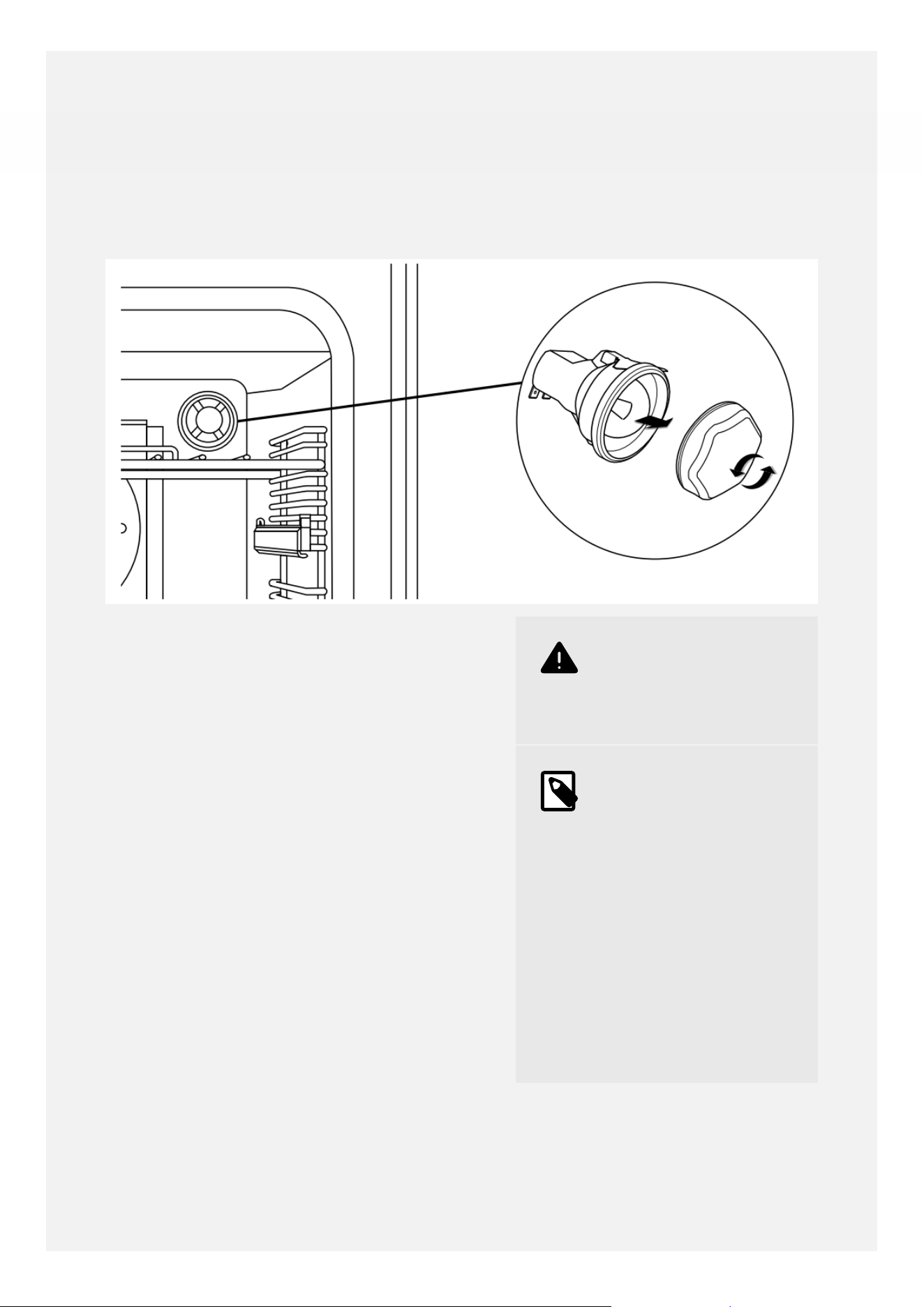
1. Switch the cooker o at the wall. Remove
the oven shelves, grill pan and air fry tray.
2. Unscrew the lens cover by turning
anticlockwise.
3. Remove the old bulb and replace it with
a new one. Handle the new bulb with a
piece of kitchen paper as skin oils can
damage halogen bulbs.
4. Replace the lens cover and put the oven
shelves back.
•
Warning
Switch off the power
before you change the
light bulb.
•
Note
Not all appliances have
the same number and
type of bulbs. Before
you replace your bulb,
check to see what type
you have. Usually a 25
watt G9 halogen capsule
bulb - part number
082650920.
Please remember that
bulbs are not covered
by the manufacturer's
warranty.
41
OVEN SHELVES
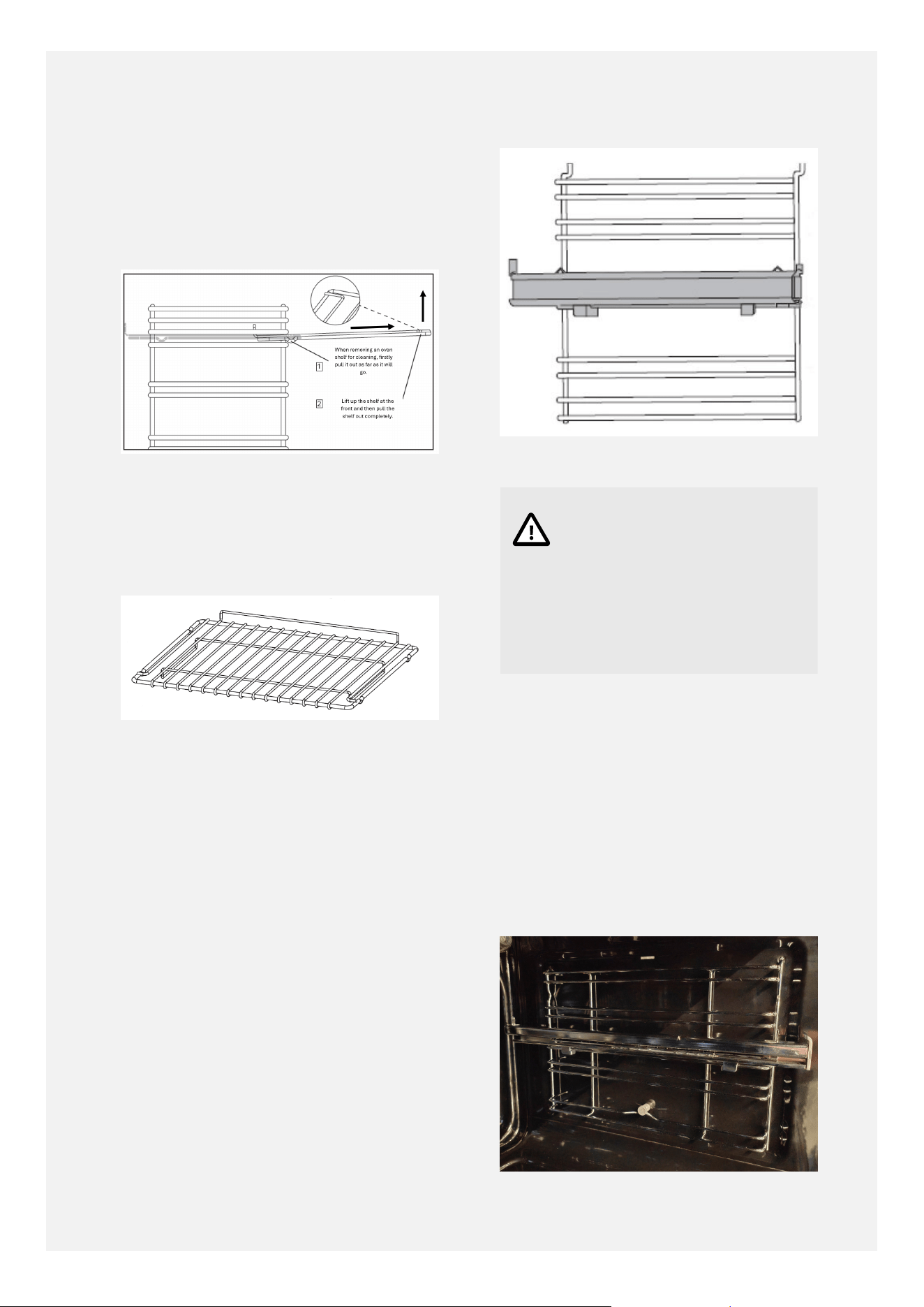
The oven shelves use anti-tip notches to
prevent them being accidentally pulled out
fully with hot food and cookware on them, to
help prevent accidents.
Shelves With Anti-Tip Notches.
To remove the shelves fully, for cleaning or to
reposition them, pull the shelf out as far as it
will go, then lift upwards at the front to pull
out fully.
Shelves.
When inserting the shelves into the shelf
guides, ensure that the upstand piece is at
the back of the shelf and is pointing upwards.
(Not all shelf types have an upstand).
The anti-tip notches should always be
pointing downwards, and should be towards
the back of the shelf.
Shelf Guides.
Caution
Each shelf guide position
consists of an upper and
a lower wire. Please insert
the shelf between the two
wires, and not sitting on
top of the upper wire.
REMOVING AND REPLACING
SHELF GUIDES
The shelf guides have lugs which attach into
holes on the side of the oven cavity. The shelf
guide wires at the bottom (and at the top for
the main oven) clip over retainers to keep the
shelf guides in position. The retainers look
like small cotton reels or bobbins which are
attached to the side of the oven cavity,
42
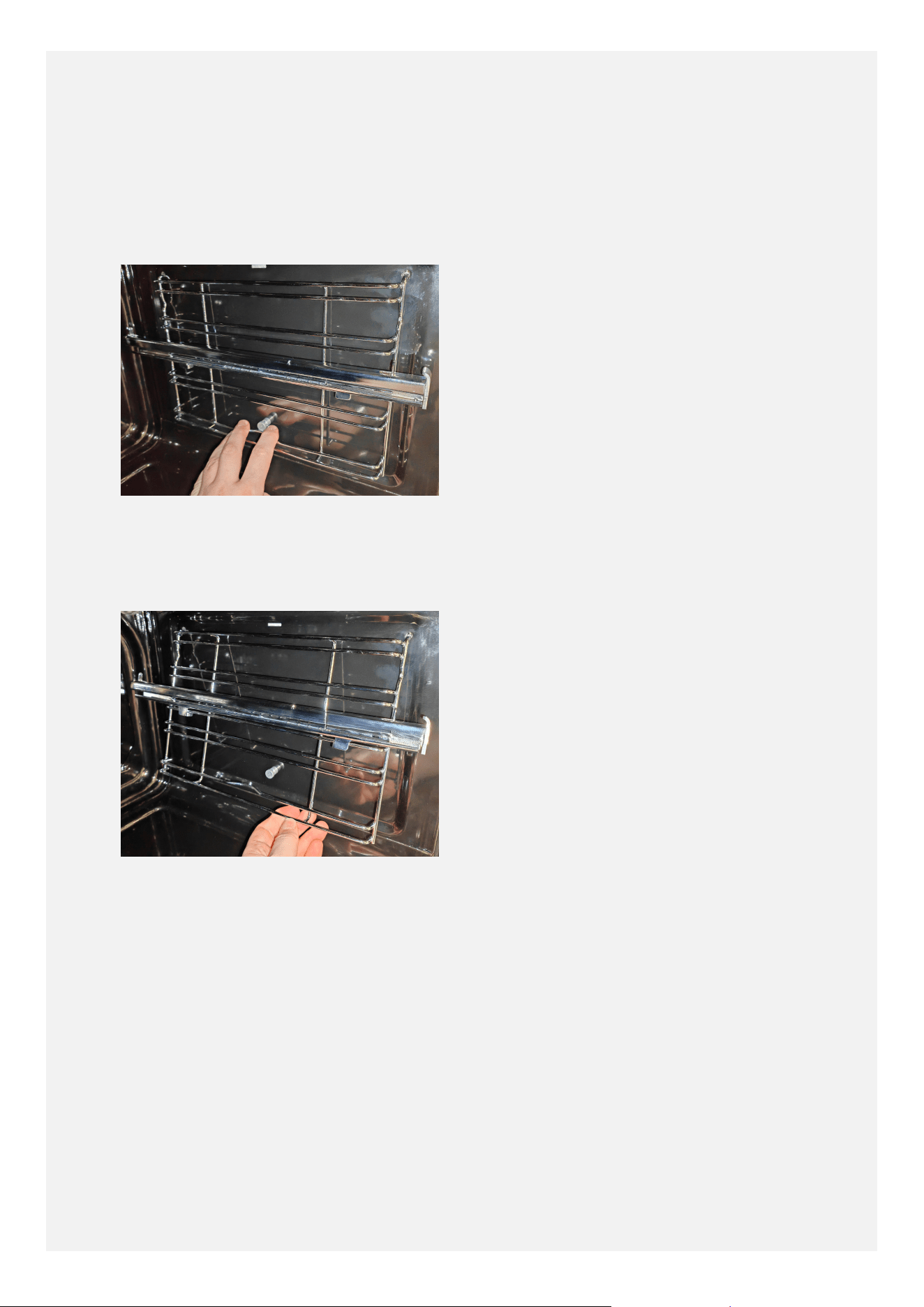
To remove the shelf guides for cleaning, firstly
please remove the shelves and/or grill pan
as appropriate. Gently stretch the shelf guide
wire at the bottom, pushing up and away from
the retainer (or pushing down and away from
the retainer in the top oven) to release the
wire from the retainer.
The shelf guide can then be pulled away from
the side of the oven cavity. The shelf guide
lugs will come out of the holes in the side of
the cavity.
The shelf guide is replaced in the opposite
manner. Insert the lugs into the holes on the
side of the oven cavity. Then, in the main oven,
gently stretch the guide wire at the top to
loop it under the upper retainer. Then gently
stretch the guide wire at the bottom to loop
it over the lower retainer in the main oven. In
the top oven, gently stretch the guide wire at
the bottom to loop it under the retainer.
REMOVING AND RE-FITTING
CONTROL KNOBS, SPRINGS
AND BEZELS
• The control knob assembly consists of the
knob at the front, a bezel with markings
around the knob, and a spring between the
knob and the bezel.
• For cleaning, the bezels can be carefully slid
forward to allow easy cleaning of the fascia
control panel behind with a cloth.
• The bezels will spring back into position
when you let go.
• For more thorough cleaning, the knobs,
bezels and springs can be removed as
follows.
• Firstly, please take a moment to note the
positions of the dierent types of bezels
on the cooker, take some photographs or
have the appliance user guide handy. This
will help you to replace the controls in the
correct positions after cleaning.
• Ensure that all of the control knobs are in
the 'o' position, and that the cooker is
turned o at the wall.
• Push the control knob in towards the bezel.
• Then. holding the knob and bezel together,
pull them both towards you and o the
cooker spindle.
• Be careful not to lose the spring, or the
small silver clip which is inside the control
knob shaft.
• To re-fit the control knobs, bezels and
springs after cleaning, please follow these
steps:
• Place the bezel face up on a surface.
• The flat side of the D-shaped hole and the
printed dot for the 'o' position should be
at the top.
• Place the spring over the hole in the middle
of the bezel.
• Ensure that the knob is facing upwards, with
the indicator mark at the top.
• Place the knob firmly over the spring,
ensuring that the shaft on the back of the
knob is located through the middle of the
spring.
• The flat side of the D-shaped shaft at the
back of the knob should be lined up with
the flat side of the D-shaped hole in the
middle of the bezel.
43

•
Press down on the knob to push it into the
bezel and keep it held down.
•
The flat side of the D-shaped shaft at the
back of the knob should be facing upwards.
•
While holding the knob and bezel together,
push the control knob assembly on to the
cooker spindle.
•
The cooker spindle is also D-shaped, so
ensure that the flat side of the D-shaped
shaft at the back of the knob is aligned with
the flat side of the spindle.
•
The control knob assembly has now been
correctly installed and the controls can be
used as normal.
44

FAQ's
Please refer to these frequently asked
questions about your appliance as they may
help to resolve any minor issues.
Should any issue persist after following this
advice, please contact the service oce for
further assistance.
45
Can I remove the inner
glass on the doors for
cleaning?
The inner glass panels are removable for cleaning, however
this does involve removing the door from the cooker body
(for side-opening doors) and the screws from the retaining
strip along the top of the door first.
For routine cleaning we recommend leaving the glass
panels in situ.
There's been a power
failure and the cooker
won't work- what
should I do?
Switch o the electricity supply to the cooker at the wall
switch.
When the power supply is restored switch the electricity
supply back on at the wall and re-set the timer clock to the
correct time of day.
Why is there some
warm air coming out of
the sides of the doors?
This is normal. The doors have some side vents which
allows a small amount of this heat to be expelled at the
door sides to help keep the door surfaces keep cool.
How do I attach the
grill pan handle to the
grill pan?
Attach the handle to the grill pan making sure the prongs
are at the top and the wider support piece sits underneath
the grill pan.
Why can I not insert
the shelf or grill-pan
into one of the shelf
positions in the top
oven?
This is because of the retainer which is required to keep the
shelf guide clipped to the side of the top oven cavity.
Counting the guide shelf positions from bottom to top,
please use positions 1, 3, 4 and 5.
Please do not use position 2 as that is where the retainer is
located.
Why can I not remove
the shelves completely
for cleaning?
The shelves have 'anti-tip notches' which prevent the
shelves being accidentally pulled out completely with
cookware on the shelf, to help prevent accidents.
To remove the shelves fully for cleaning, pull the shelf out,
then lift upwards at the front to pull out fully.
The induction hob
zones are not
responding when I turn
the control knob.
Please ensure that the induction hob has been powered up
into standby mode, by touching the power key on the
hotplate glass for a few seconds until the dashes appear,
before turning the hob control knob to the required power
level.
Please check that the hob child-lock has not been activated
in error (with 'LO' appearing in the hob display). If it has,
please deactivate the hob child-lock by turning the front-
left cooking zone control knob to the left (anti-clockwise)
and holding it at the child lock symbol for about 3
seconds, until a beep sounds and 'LO' disappears from the
hob display.
46

The hob induction
zones seem to pulse
on and o - is this
normal?
Yes, this is perfectly normal and will not aect cooking
results.
Induction hobs are dierent to ceramic hobs in that they
don’t have heating elements underneath the glass.
Instead there are induction coils which create a magnetic
field when an electric current is passed through them.
The magnetic field causes the magnetic base of the pan to
vibrate and the resulting friction generates heat in the pan.
The electronics will switch the induction coil on and o at
intervals, in order to maintain the requested power level.
So on lower power settings, the coil will be on for shorter
periods and will rest o for longer periods. On higher
power settings, the coil will be on for longer periods and
rest o for shorter periods.
This is perfectly normal and is necessary to maintain the
overall power setting requested and to prevent the pan
overheating. This will not aect the overall cooking results
in any way.
As a general rule, a good test is to heat a pan containing 1
litre of water at power level 9. If the water starts to bubble
and boil within approximately 5 minutes then you can be
sure that the induction hob is working correctly.
There are clicking /
buzzing / humming
sounds when I use the
induction hob - is this
normal?
Yes; you may hear some soft clicking when the induction
coil is switched on or o, and some soft buzzing relating to
the friction creating heat in the pan.
Induction hobs also use cooling fans to help protect and
prolong the working life of electronic components and so
you may hear a fan running on for a while after you have
finished cooking.
To minimise noises, please ensure that the base of the pan
and the ceramic glass are dry, as if the base of the pan or
ceramic glass is wet this may create a ‘crackling’ sound.
Any noises may be more noticeable at higher power
settings than lower power settings.
Dierent types of pans can create dierent levels of noise.
Generally-speaking, the greater the quantity of magnetic
material in the base of the pan, the quieter it will be in
operation.
47

As stainless steel is not magnetic, when stainless steel pans
are made for induction hobs they are given a magnetic
base containing layers of dierent materials. (This is why a
magnet will stick to the base of the pan but not to the sides
of the pan). This allows induction hob-compatible pans to
be produced and sold at a reasonable price, but they do
tend to be noisier in operation because of the vibrations
which occur where the dierent material layers touch.
On the other hand, a pan made from cast iron is already
magnetic and does not need a separate magnetic base
adding to it, and so tends to produce quieter sounds in
operation.
When shopping for pans, it can be useful to take along a
fridge magnet. If the side of the pan and the base of the
pan is magnetic, it is likely to be quieter in operation. If the
side of the pan is not magnetic, but the whole diameter of
the base is magnetic, then it will work on an induction hob
but it is likely to be louder in operation.
I can hear the sound
of a fan running after
cooking - is this
normal?
Yes, it is normal to hear the sound of the cooling fan
running after switching the ovens or the induction hob o.
The cooling fan(s) help to cool the appliance down and
help to keep exterior parts, such as control knobs and door
handles, cooler during operation.
The cooling fan(s) may run on for up to about 30 minutes
after cooking, but they don't use very much electricity.
Please do not switch the cooker o at the wall until the
cooling fan has stopped completely, to prevent the risk of
heat damage to control knobs and control panels.
Why is the main oven
not working?
Please check that there is power to the cooker and the
timer display is lit up.
Please ensure that the time of day has been set on the
timer.
Please ensure that there are no bars flashing on the
timer display. If they are flashing, please press the middle
function key to return the timer to manual mode.
Then try turning the main oven control knob to a
temperature as usual.
The installer is having
diculty adjusting
the cooker height to
the level of adjacent
The levelling feet are supplied with two locknuts, which is
ideal when adjusting the cooker height to worktop heights
between 900-930mm.
48
worktops, when the
worktops are a bit
lower than standard
900mm height.
When adjusting the cooker height to worktop heights
a little lower than 900mm, the installer should please
remove one of the locknuts from each foot to be able to
adjust the height of the cooker lower.
I have found two hooks
inside the oven with
the shelves - what are
they for?
These new models have two stability chains fitted to the
back of the cooker.
The hooks are provided to be drilled into the wall behind
the cooker to attach the stability chains to.
If you already had hooks in the wall from your previous
cooker, the installer may have re-used those hooks which is
why the new ones are still in the packaging.
If in doubt, please consult your installer.
The main oven does
not seem to return to
manual mode after I
have used automatic
cooking.
When the oven heating switches o at the end of semi-
automatic cooking or fully-automatic cooking, turn the
main oven control knob back to the o position.
Then press the middle function key on the timer to
silence the alarm and return the timer to manual mode.
The grill seems to be
taking a long time to
cook.
Please ensure that the door is kept closed during grilling
to keep the heat in for better grilling results and energy-
eciency.
For best results , please pre-heat the grill for 3-5 minutes
before use, and position the food on the grill pan trivet
using a suitable shelf position which brings the food close
to the grill element without the food touching the grill
element.
The oven lamps are not
working.
Please refer to the section on changing the light bulb. [41]
The oven seems to be
overheating.
Please ensure that the oven control knob has been turned
to the required temperature.
When using the top oven for cooking, place the food on the
middle shelf position. The oven will be hotter at the top.
When using the main fanned oven, please remember that
the temperature will need to be reduced by about 20°C
and the duration reduced a little compared to conventional
oven cooking instructions.
The oven seems to be
under-heating.
Please ensure that the oven control knob has been turned
to the required temperature.
When using the top oven for cooking, place the food on
the middle shelf position. The oven will be cooler at the
bottom.
49

When using the top oven for cooking, pre-heat the oven for
10-15 minutes prior to use.
Check that the door is closing and sealing well, and that the
door seal is in good condition.
Ensure that any additional tins and trays which are not
being used are removed from the oven before cooking.
Use good quality bakeware with a dull, matt finish; avoid
bakeware with a shiny silver finish.
There is a strange
smell / a little smoke
produced when using
the ovens for the first
time.
This is normal. The oils used to protect the oven cavities
during storage of the appliance are being burnt o.
Heat the ovens empty for around 30 minutes at around
200°C to allow the smell / smoke to dissipate. Open the
kitchen window(s) during this procedure.
One control knob
appears to be missing
on delivery of the new
cooker.
For packaging reasons, to protect the cooker in transit, the
left-hand-side control knob, spring and bezel are packaged
inside the oven cavity for the installer to fit once the cooker
has been unpackaged.
Please ensure that this control knob, spring and bezel is
fitted before attempting to use the cooker.
Please see the
Removing and re-fitting control knobs, springs and bezels
[43] section for further details.
For more useful information and FAQs,
please visit our online FAQ section at:
Freestanding Cooker FAQs
50

KEY PARTS AND OPTIONAL
ACCESSORIES
Please see below for useful part numbers for
your cooker, in case you require a replacement
part or wish to purchase additional shelves or
optional telescopic sliders, for example.
For any queries relating to parts missing
on delivery of a new cooker, or relating to
replacement parts during the manufacturer's
warranty period, please contact our customer
care team using the telephone number on the
back cover.
To purchase additional shelves, sliders,
consumables or parts outside of the
manufacturer's warranty period, please refer
to the Spare Parts section of our website - the
website address is on the back cover.
51
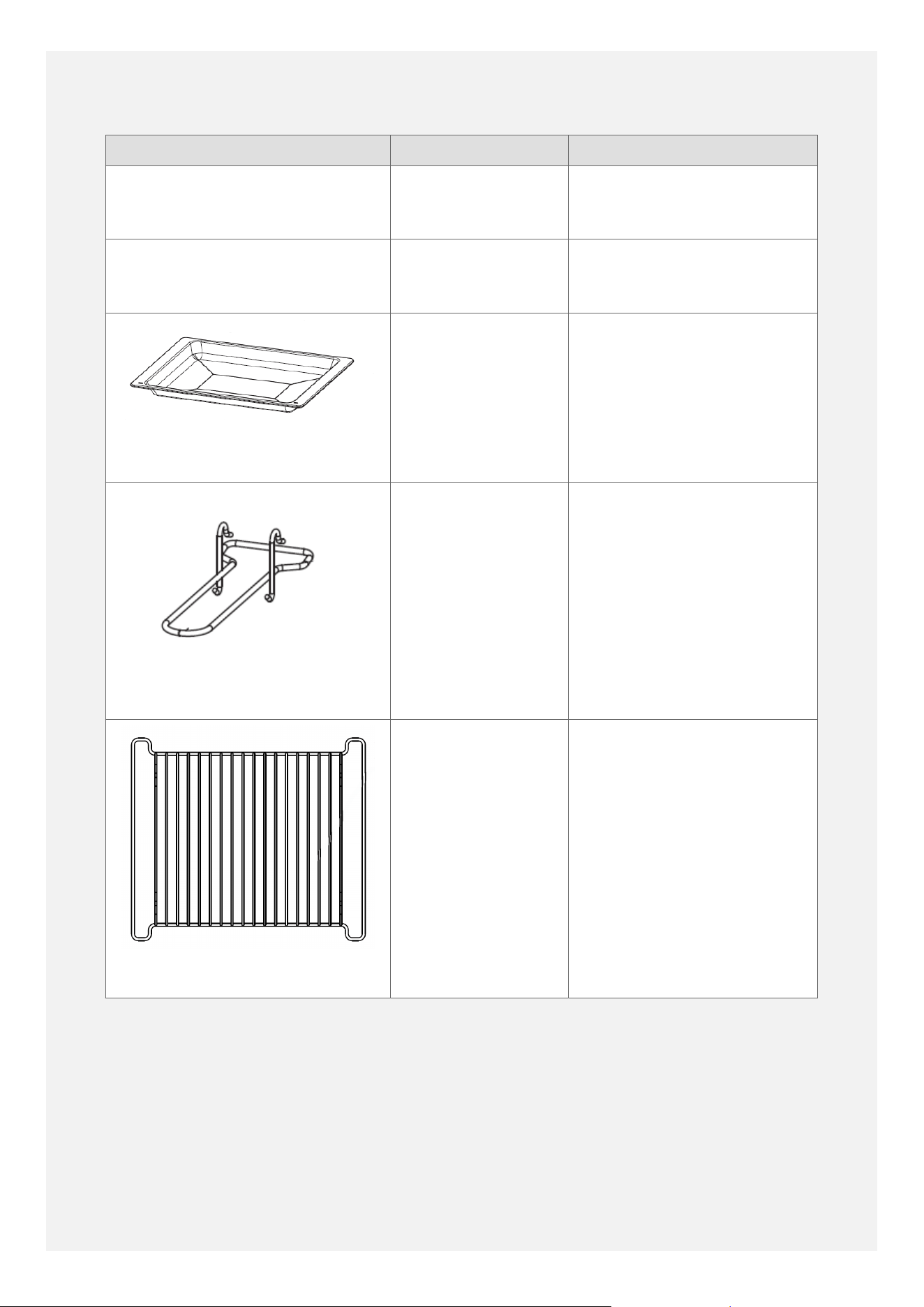
Part Part Number Notes
Clip-in door seal - main oven 2041000008 Clips in - does not usually
require an engineer service
visit.
Clip-in door seal - top oven 2030400013 Clips in - does not usually
require an engineer service
visit.
Grill pan
30304200002 Quantity 1 is supplied with
the cooker.
Can be used as a grill-pan,
baking tray or roasting tin.
Grill pan handle
30400800002 Quantity 1 is supplied with
the cooker.
Grill pan trivet
30401000003 Quantity 1 is supplied with
the cooker.
52
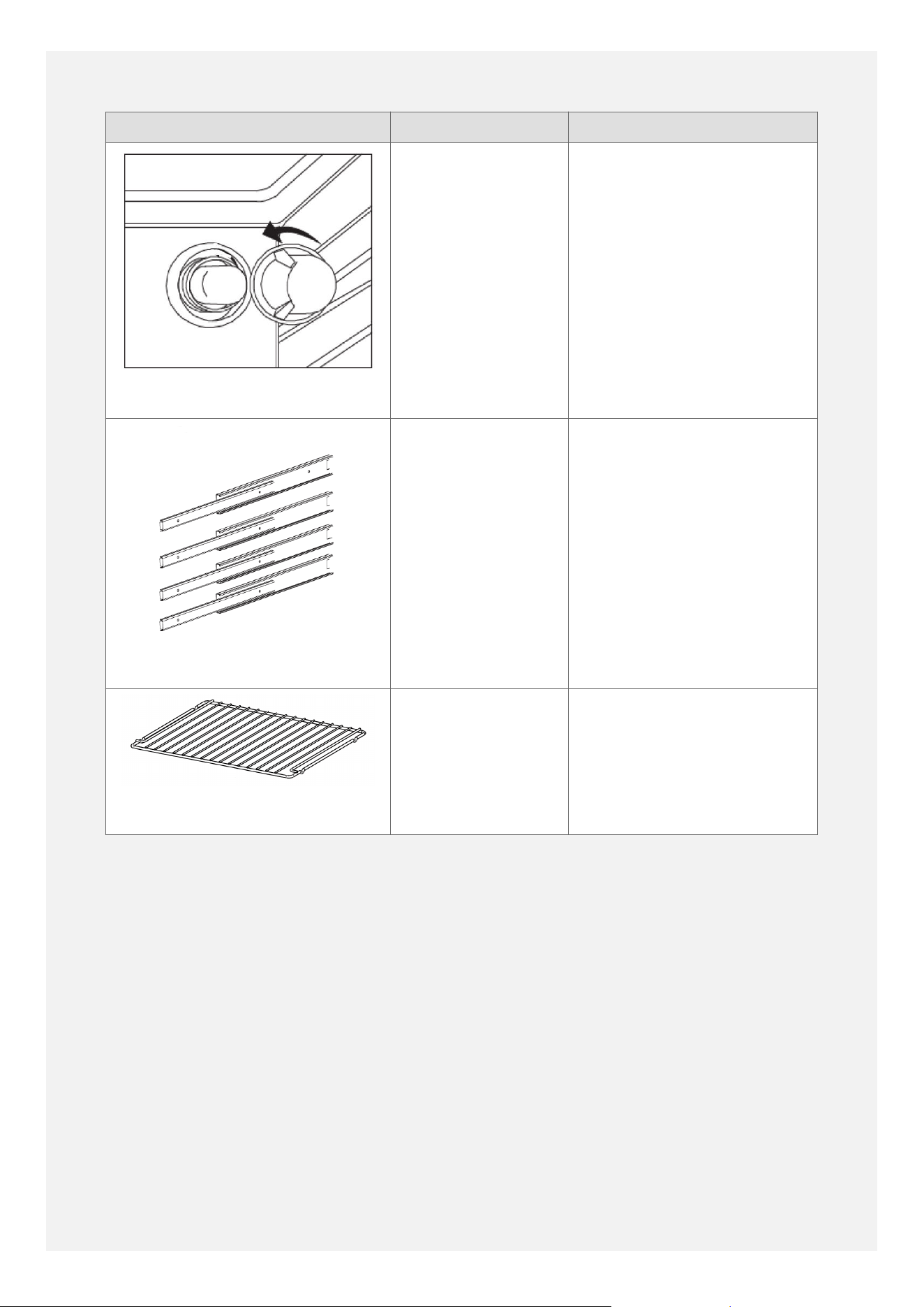
Part Part Number Notes
Lamp bulb
082650920 Type - 25 watt G9 halogen
capsule bulb.
Please note that
replacement bulbs are
not covered under the
manufacturer's warranty.
Telescopic Sliders
Left hand side
slider: 1 x
094109802
Right hand side
slider: 1 x
094109803
You need 1 x
094109802 and 1
x 094109803 to
make a pair.
Can be purchased as an
optional extra.
Can be used in the main
oven.
Do not attempt to use
them in positions where
the shelf guide wires are
close together (i.e. in the
top oven).
Shelf
30400100003 Quantity 2 are supplied
with the cooker.
Can be used in the top oven
or the main oven.
53
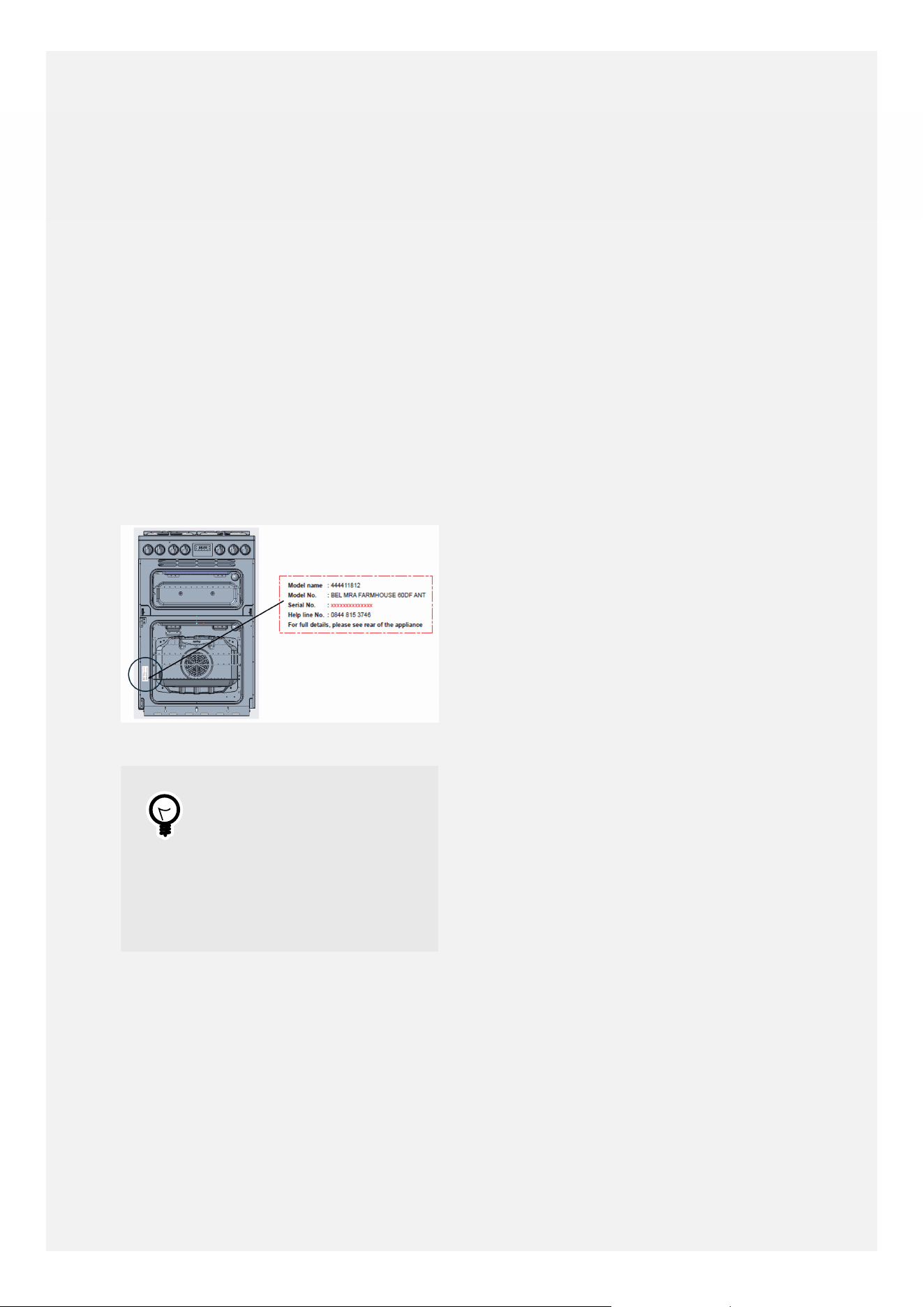
LOCATING THE MODEL AND SERIAL
NUMBERS
•
Please open the bottom / main oven door
to locate the data badge on the front frame,
close to the door seal.
•
Please quote the model number and serial
number should you ever require an engineer
service visit or need to order spare parts.
•
The model number (also known as the SKU
number) is 9 digits long, beginning with
44...
•
The serial number is printed as a string of
17 digits - the first 8 digits are the serial
number and the remaining 9 digits are the
model number.
Tip
It is a good idea to take
a photo of the data badge
or to make a written note
of the model number and
serial number on your
quick start guide.
54
TECHNICAL DATA
Warning
This cooker must be earthed.
Data badge Lower part of the front frame
Appliance class Class 1 - freestanding cooker
Electrical supply 220 - 240V ~1N ~ 50 Hz or 380 - 415V ~ 3N ~ 50-60Hz
Load 10485W - 11110W (Induction Unit 7200W)
Standard Oven Light 25W
Hob Top
Hotplate
Electrical
Supply
Zone Load (W)
Electric 230V Left hand front 2300W (boost to 3000W)
Left hand rear 1200W (boost to 1500W)
Right hand front 1200W (boost to
1500W)
Right hand rear 1800W (boost to 2100W)
N/A
N/A
Appliance Electrical
Supply
Oven Cavity & Function Load (W)
230V Main Oven: Fanned Oven 1843W
N/A
Top Oven: Conventional Oven and Grill 1725W
55
ENERGY DATA TABLE
Regulation (EU) 66/2014:
Model Identification:BEL FSA VS 60EI RTY
Brand: Belling
Size: 60cm
Energy Eciency For Oven
Oven Cavity 1 Cavity 2 Cavity 3 (if
applicable)
Mass of the appliance (M):
48,3 kg
Number of cavities: 2
Location: Top Bottom N/A
Type of oven: Electric oven Electric oven N/A
Heat source per cavity: Electricity Electricity N/A
Volume per cavity (V): 31 Litres 68 Litres N/A
Energy consumption
(electricity consumed) per
cycle in conventional mode
(EC
electric cavity
):
0,50 kWh N/A N/A
Energy consumption
(electricity consumed) per
cycle in fan-forced convection
mode (EC
electric cavity
):
N/A 0,76 kWh N/A
Energy eciency index per
cavity (EEI
cavity
):
73,5 90,5 N/A
Energy eciency class: A+ A N/A
Energy Eciency For Hob
Hob
Type of hob: Induction
Number of cooking zones and/or areas: 4
Heating technology: Induction cooking zones
56
Electric Zone: Location: Useful surface area
per electric heated
cooking zone:
Energy consumption per
cooking zone or area
(EC
electric cooking
):
Zone 1 Front-left 21,0 cm diameter 190.2 Wh/kg
Zone 2 Back-left 16,0 cm diameter 194.2 Wh/kg
Zone 3 Front-right 16,0 cm diameter 194.2 Wh/kg
Zone 4 Back-right 18,0 cm diameter 191.3 Wh/kg
Zone 5 N/A N/A N/A
Zone 6 N/A N/A N/A
Energy consumption for the hob (EC
electric hob
): 192.475 Wh/kg
Energy consumption measured in accordance
with EN 60350-1 and EN 60350-2
ENERGY SAVING TIPS FOR
HOBS
Tip
Use pans with flat bases.
Use pans which are
suitably-sized for the size
of the cooking zone.
Use pans with lids.
Minimise the amount of
liquid or fat when cooking.
When liquid starts boiling,
reduce the power level to
a simmer.
Using a pan with a base
diameter a little larger
than the diameter of
the cooking zone gives
the most energy-efficient
cooking results.
ENERGY SAVING TIPS FOR
OVENS
Tip
Cook separate meals
together, if possible.
Keep the pre-heating time
as short as possible.
Do not elongate the
cooking time.
Do not forget to turn the
oven off at the end of
cooking.
Do not open the oven
door during the cooking
process.
If the oven has a
programmable timer, use
the timer to switch the
oven heating off at the
end of cooking.
If cooking for longer
periods, turning the oven
heating off 10 minutes
before the end of cooking
can save energy by
using the residual heat
to finish the cooking
57

process. Always ensure
that food is thoroughly
cooked through.
58
SERVICE CONTACT DETAILS
Ireland Tel: +353 (0) 1 8428222
Service e-mail: serviceireland@glendimplex.co
Spare parts enquiries e-mail: sparesireland@glendimplex.com
www.glendimplexireland.com
Glen Dimplex Ireland UC, Airport Road, Cloghran, Co. Dublin, K67 DT89
United
Kingdom
Stoves Service Tel: +44 (0) 344 815 3740
www.stoves.co.uk
Belling Service Tel: +44 (0) 344 815 3746
www.belling.co.uk
Glen Dimplex Home Appliances, Element, Temple Court, Risley,
Warrington, WA3 6GD
59
This document relates to these models:
Model Number: Model Description:
444412058 BEL FSA VISION 60Ei BLK
444412059 BEL FSA VISION 60Ei BSS
Glen Dimplex Home Appliances, Element, Temple Court, Risley,
Warrington, WA3 6GD.
0344 815 3746
www.belling.co.uk
GDHA Part Number: UG FS BEL 60D EI UK V1