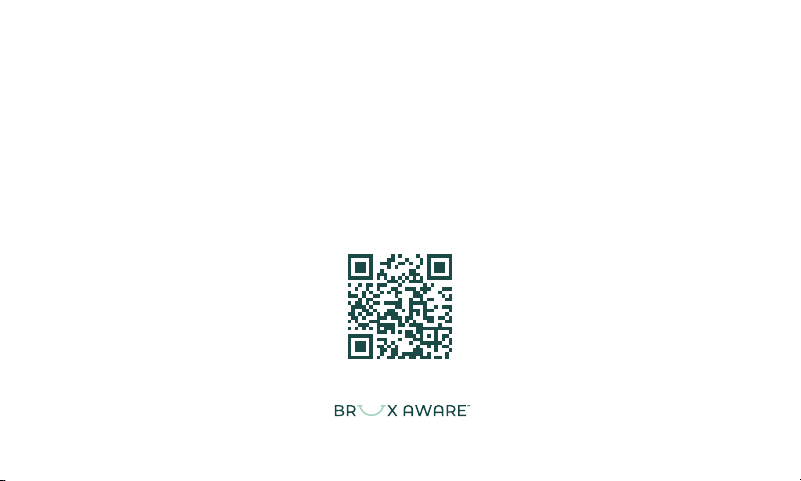
Scan the QR code with your smart phone camera, or visit
www.bruxaware.com/quick-start
welcome
8:43
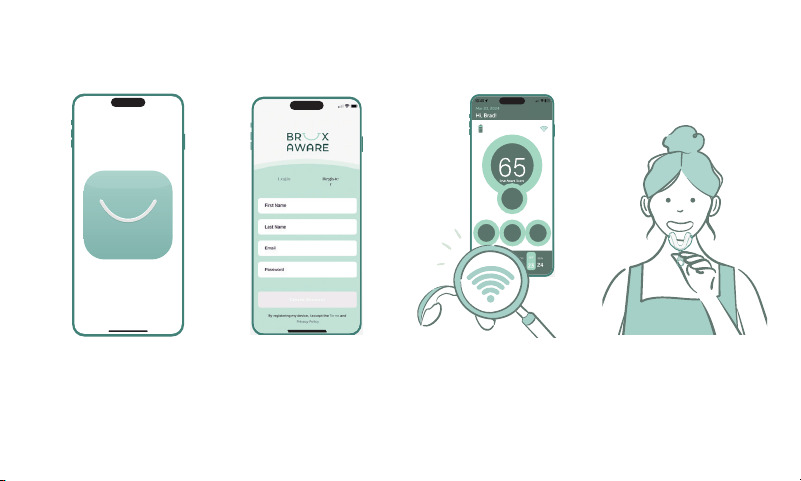
BruxAware Setup Instructions
1. Download the Bruxaware App 2. Create Brux Aware Account &
Login to the App
3. Pair the App with your Brux
Aware device
4. Customize the fit of your Brux
Aware device
If you encounter any issues, please contact us at
support@BruxAware.com
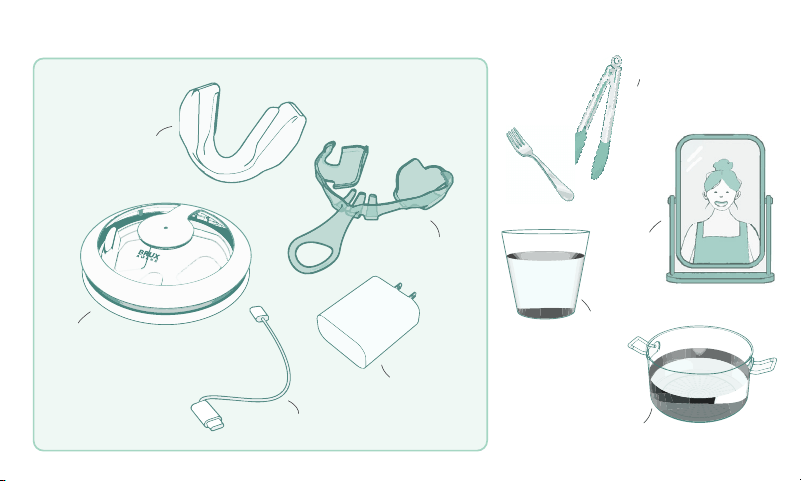
What’s Included What’s Needed
cup of water
mirror
fork or tongs
pot of water for boiling
Brux Aware device
custom forming tray
wireless charger
USB-C cable
power adapter
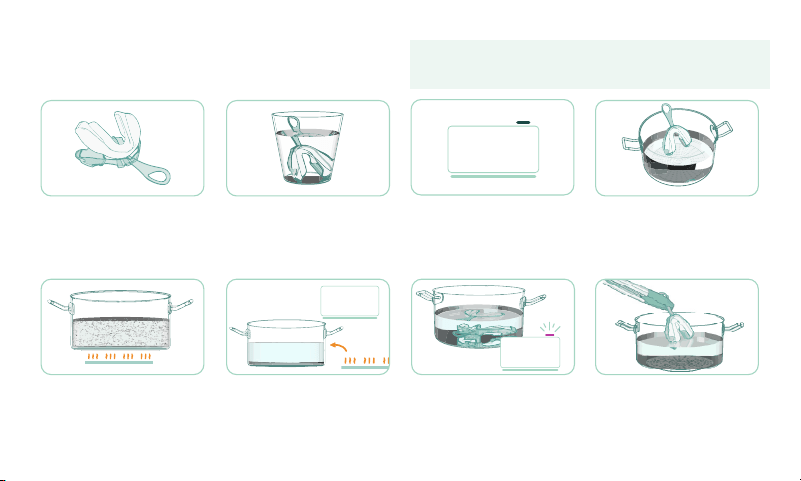
BruxAware Fitting Instructions
1. Snap Brux Aware into the
fitting tray.
2. Fill a glass with enough room-
temperature water to hold
the fitting tray. Set it aside for
steps 9 and 15.
3. Set a timer for one minute. 4. Select a pot or bowl large
enough to hold the fitting
tray under about one to two
inches of water.
5. Bring the water (without Brux
Aware!) to a boil on the stove
or in a microwave.
6. Remove the pot of water from
the heat source and let it rest
for 10 seconds.
7. Place the fitting tray with
Brux Aware in the pot of
hot water and start the one
minute timer.
8. After one minute, remove the
tray with Brux Aware with a
fork or tongs.
For the best fit, practice steps 10-12 beforehand
Read these instructions before fitting Brux Aware to your UPPER teeth
Never place your Brux Aware guard in the microwave!
0:59
seconds
0:10
seconds
1:00
minute
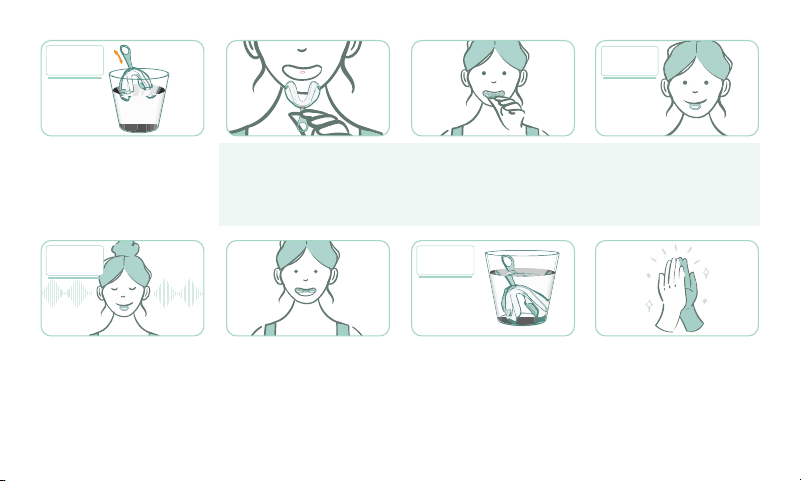
9. Quickly dip Brux Aware
into the glass of water for a
second.
10. Look in the mirror and hold
the tray with Brux Aware
by the handle. The small
indentation on the top-center
bridge aligns with the center
of your two front teeth.
11. Open your mouth wide and
press the bridge against your
top front teeth.
12. Bite down firmly and use
suction for about 10 seconds
to get a good fit. The guard
may feel hot, but it will cool
down quickly.
13. Relax and wait about one
minute.
14. Slowly open your mouth. If
fitted properly, the tray and
guard will remain securely
attached to your upper teeth.
15. Place the tray and Brux
Aware into the glass of room-
temperature water for five
minutes to set it.
16. Remove Brux Aware from the
tray and you are ready for the
next step!
If the fit is not right, bring the pot of water to a boil again and try again!
0:01
second
5:00
minutes
0:10
seconds
1:00
minute
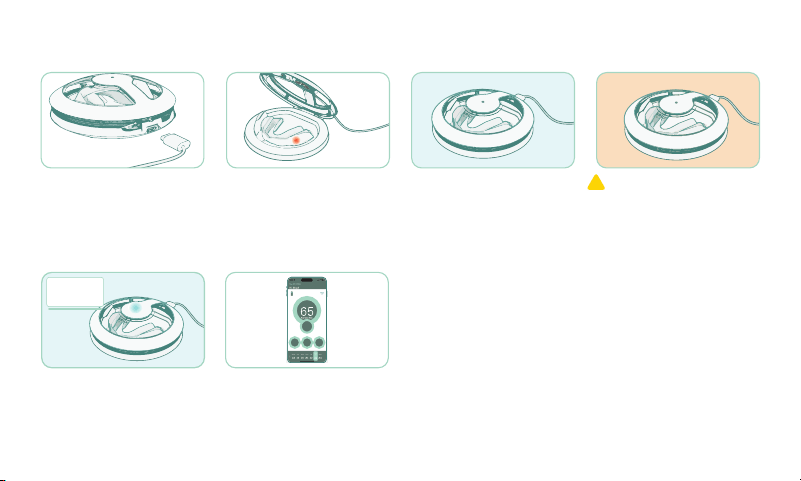
1. Connect the supplied
charging cable to the wall
charger and charging device,
then plug it into a standard
wall outlet.
2. Place Brux Aware in the
charger. This will turn your
Brux Aware guard on as
indicated by a small blinking
light.
3. Close the lid. The flashing
blue light will change to a
gentle blue and purple pulse.
The purple glow is a UV light
that continuosly sanitizes the
surface of Brux Aware.
! An orange blinking light
may indicate metal, water, or
debris in the charger. Remove
it, then unplug the USB-C
cable for 10 seconds and
reconnect it.
4. Allow your Brux Aware to
charge for about two hours.
5. Check the App for the current
charge of your device.
Instructions for Wireless Charging
2:00
hours
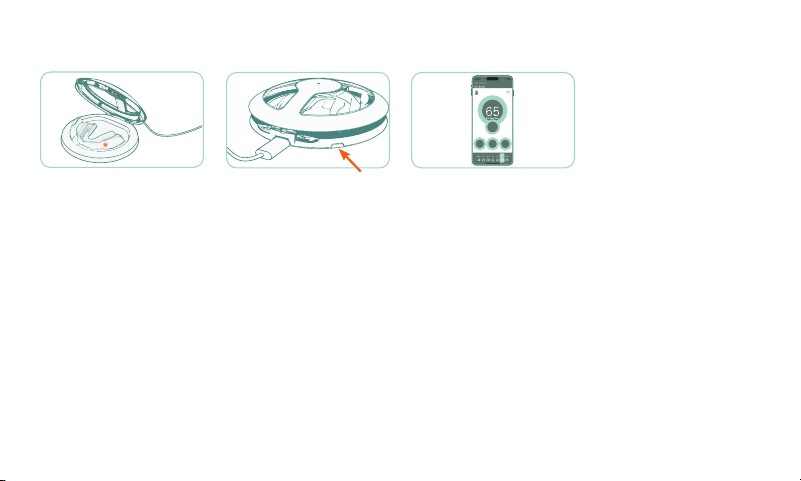
1. To pair your device with the
app, place Brux Aware in the
charger and make sure the
light comes on.
2. Press the pairing button on
the back-left of the charger
case. The light will blink white
and the Brux Aware light will
remain solid.
3. Return to the app and follow
the instructions on the screen.
Pairing with the App

Intended Use
The Brux Aware™ System is designed to monitor
and record teeth grinding and jaw clenching
(Bruxism) during sleep. Data is transmitted
securely via Bluetooth* to the Brux Aware mobile
app and stored in encrypted form in the cloud.
WARNINGS
• For adult use only.
• Keep out of reach of children.
• Keep away from pets.
• Consult your dentist before use if you have
loose teeth, dental implants, or TMJ pain.
• Not a substitute for professional dental care.
• Stop use immediately if pain, irritation, or
discomfort occurs.
• Not intended for athletic or impact protection.
• Do not use while intoxicated or under the
influence of drugs or alcohol.
• Do not subject Brux Aware or charger to
excessive impacts. Inspect for visible damage
before reuse.
• Do not use if cracked or damaged.
• Do not incinerate.
• Do not microwave!
Care and Cleaning
• DO NOT PLACE BRUX AWARE IN HOT WATER
FOR MORE THAN 1 MINUTE!
• Rinse dental guard under running water after
each use. You may clean with effervescent
tablets, mild soap, toothpaste and toothbrush
and warm water.
• You may use mouthwash, alcohol or hydrogen
peroxide to clean your Brux Aware guard.
• You may use ultrasonic devices to clean Brux
Aware.
• After cleaning, shake off excess water and allow
to air dry or towel dry before charging.
• Use a damp cloth to clean the charger.
• Do not submerge charger in water!
• Do not use bleach or abrasive cleaners.
• Do not place dental guard in dishwasher.
• Exposing the dental guard to strong magnetic
fields may turn it off. To turn it back on, place
it in the charger – make sure the charger is
plugged-in!
Replacing your Brux Aware dental guard
All dental guards should be replaced over time.
Please check your Brux Aware guard monthly for
wear. The life of your Brux Aware guard depends
on how often you grind and the force of your
teeth grinding.
30 Day Money-Back Guarantee**
Keep your receipt: If you are not completely
satisfied with the fit and comfort of the dental
guard, we will gladly give you a full refund (not
including taxes or postage costs) if you call or
email us within 30 days of the purchase date.
6 Month Protection Guarantee**
From date of purchase, we guarantee that your
Brux Aware guard will give you 6 months of
teeth grinding protection. If not, we will send
you one free Brux Aware guard per purchase as
a replacement.
**One per purchase. This guarantee is only valid for products
purchased in the U.S. by customers living in the U.S.
Storage and Temperature
• Store between 32°F and 122°F, 0 to 50°C.
• Do not modify or heat except as directed.
• Other than the 1 minute hot water bath to fit
Brux Aware as described in these instructions,
do not heat. Do not expose your Brux Aware
guard to ovens or flame. If exposed to excessive
heat, discontinue use immediately and do not
charge or wear.
• Do not perform the boil-and-bite fitting more
than three times. Contact us if there are fit
issues.
• Do not leave in a hot car. Do not freeze.

Charging and Battery
• Contains a sealed rechargeable lithium-
polymer battery designed for safe use in oral
environments.
• Charge only with the supplied charging base
and cable.
• Charge in a dry, ventilated area away from
bedding or flammable materials.
• Avoid charging while dripping wet or
submerged.
• Ensure area inside charger is free of metals,
debris and excessive moisture before
connecting to power.
• Do not crush, puncture, or incinerate.
FCC § 15.21 Warning
Caution: Changes or modifications not expressly
approved by the party responsible for
compliance could void the user’s authority to
operate the equipment
ISED Warning
MedSense Labs, LLC n’approuve aucune
modification apportée à l’appareil par
l’utilisateur, quelle qu’en soit la nature. Tout
changement ou modification peuvent annuler le
droit d’utilisation de l’appareil par l’utilisateur.
FCC Class B Warnings
The FCC Wants You to Know
This equipment has been tested and found to
comply with the limits for a Class B digital device,
pursuant to Part 15 of the FCC rules. These limits
are designed to provide reasonable protection
against harmful interference in a residential
installation.
This equipment generates, uses and can radiate
radio frequency energy and, if not installed and
used in accordance with the instructions, may
cause harmful interference to radio
communications. However, there is
no guarantee that interference will not occur in
a particular installation. If this equipment does
cause harmful interference to radio or television
reception, which can be determined by turning
the equipment off and on, the user is
encouraged to try to correct the interference by
one or more of the following measures:
a) Reorient or relocate the receiving antenna.
b) Increase the separation between the
equipment and receiver.
c) Connect the equipment to an outlet on a
circuit different from that to which the receiver
is connected.
d) Consult the dealer or an experienced radio/
TV technician.
FCC Compliance Interference statement
This device complies with Part 15 of the FCC
Rules. Operation is subject to the following
two conditions:
(1) this device may not cause interference, and
(2) this device must accept any
interference received , including interference
that may cause undesired operation.
Wireless notice
This device complies with FCC radiation
exposure limits set forth for an uncontrolled
environment and meets the FCC radio frequency
(RF) Exposure Guidelines. This transmitter must
not be co-located or operating in conjunction
with any other antenna or transmitter.
Le présent appareil est conforme à l’exposition
aux radiations FCC / ISED définies pour un
environnement non contrôlé et répond aux
directives d’exposition de la fréquence de la FCC
radiofréquence (RF) et RSS‐102 de la fréquence
radio (RF) ISED règles d’exposition. L’émetteur
ne doit pas être colocalisé ni fonctionne
conjointement avec à autre antenne ou autre
émetteur.
IC STATEMENT
This device contains licence-exempt
transmitter(s)/receiver(s) that comply with
Innovation, Science and Economic Development
Canada’s licence-exempt RSS(s). Operation is
subject to the following two conditions:
1) This device may not cause interference.
2) This device must accept any interference,
including interference that may cause undesired
operation of the device.
L’émetteur/récepteur exempt de licence contenu
dans le présent appareil est conforme aux
CNR d’Innovation, Sciences et Développement
économique Canada applicables aux appareils
radio exempts de licence. L’exploitation est
autorisée aux deux conditions suivantes:
1) L’appareil ne doit pas produire de brouillage;
2) L’appareil doit accepter tout brouillage
radioélectrique subi, même si le brouillage
est susceptible d’en compromettre le
fonctionnement
Brux Aware™ Smart Night Guard System
Manufactured by MedSense Labs, LLC
2N Lake Ave., Suite 520 Pasadena, CA 91101
www.bruxaware.com | support@bruxaware.com
Designed in Pasadena, CA
Brux Aware mouth guard is manufactured in
Reno, NV USA
Charger made in Vietnam
Power cable & adapter from China
Patent Pending 63/841,265
11670.1458
RF Exposure Information - FCC
The RF Exposure Statement - The distance
between the user and the product should be no
less than 20 cm.
Déclaration d’exposition aux RF - La distance
entre l’utilisateur et le produit ne doit pas être
inférieure à 20 cm
Due to the product’s small size and its intended
use inside the mouth, the required regulatory
label cannot be affixed directly to the device. The
label information is therefore provided in this
User Manual.
FCC ID: 2BUJ7-A100
IC: 35120-A100 HVIN: A
CAN ICES-3 (B) / NMB-3 (B)
0.5A max. 5VDC
Limited Warranty
Limited One-Year Warranty: Covers defects
in materials and workmanship under normal use.
See full warranty terms at
www.BruxAware.com/warranty.
Software License and Privacy
By activating or using this device, you agree to
the Terms of Use, Software License Agreement,
and Privacy Policy at www.BruxAware.com/legal.
Full details of data handling, cloud
storage, and user rights are available
at www.BruxAware.com/privacy.
Recycling and Environmental Information
Dispose of the battery in accordance with local
regulations. Do not dispose of this product with
general household waste. Recycle through
approved electronic waste programs.
For proper recycling or take-back information,
visit www.BruxAware.com/recycle.
Support
For troubleshooting, pairing
instructions, or video guides, visit
www.BruxAware.com/quick-start or scan the QR
code on the package.
Recycling and Environmental Information
Dispose of the battery in accordance with
local regulations. Do not dispose of this
product with general household waste.
Recycle through approved electronic waste
programs.
For proper recycling or take-back information,
visit www.Brux Aware.com/recycle.
Support
For troubleshooting, pairing
instructions, or video guides, visit
www.Brux Aware.com/quick-start or scan the
QR code on the package.
*Bluetooth is a registered trademark and certification mark owned
by the Bluetooth Special Interest Group (SIG), Inc.. The Bluetooth
SIG is a non-profit organization that oversees the development,
licensing, and protection of Bluetooth technology standards, and
does not manufacture products itself.