AIGrill User Manual
Copyright © 2026 NEOECO
1
AIGrill User Manual
Make Cooking Easier

AIGrill User Manual
Copyright © 2026 NEOECO
2
1.Product Overview
The AIGrill Thermometer is a high-precision monitoring device designed for the smart
cooking of meat. Integrated with Bluetooth® LE, 2.4GHz Wi-Fi. Supported local and
remote monitoring, voice alert, food cooking time prediction algorithm, and charging
management functions. It delivers accurate and convenient temperature control and
cooking assistance for users.
Core Features:
Precise Sensing, Smart Prediction
Detect Temp Remotely Anywhere Anytime
Smart Alerts + Voice Prompts Cooking Safety Guaranteed
Smooth and portable switch operation
One-Tap Recall of Your Perfect Doneness
Probe IPX8 Waterproof & Washable Ultra-Long Battery Life Worry-Free
Cooking
Apps suitable for Android and iOS.
Target Users:
Home grillers, BBQ enthusiasts, and home cooks seeking
professional-level temperature control.
2.Important Safety Warnings
Burn Hazard: Probes and probe wires get extremely hot (up to 932°F/500°C).
Always use heat-resistant gloves when handling.
Waterproof Limitation: Probes are IPX8 waterproof, but the main unit is
splash-proof only. Do not immerse the main unit in water.
Probe Placement: Never insert probes into bone, gristle, or direct flame, as this
will damage the sensor and skew readings.
Children & Pets: Keep the device and its accessories out of reach of children
and pets.
The probe is SHARP! Care should be exercised when handling the probe.
Electrical Safety: Only use the included USB-C cable for charging. Do not
charge near flammable materials.
Carefully remove the Probe from the cooked meat, taking caution as it may be
hot.
3.Package Contents
Verify all items are included before use. Contact customer support if any
parts are missing or damaged.
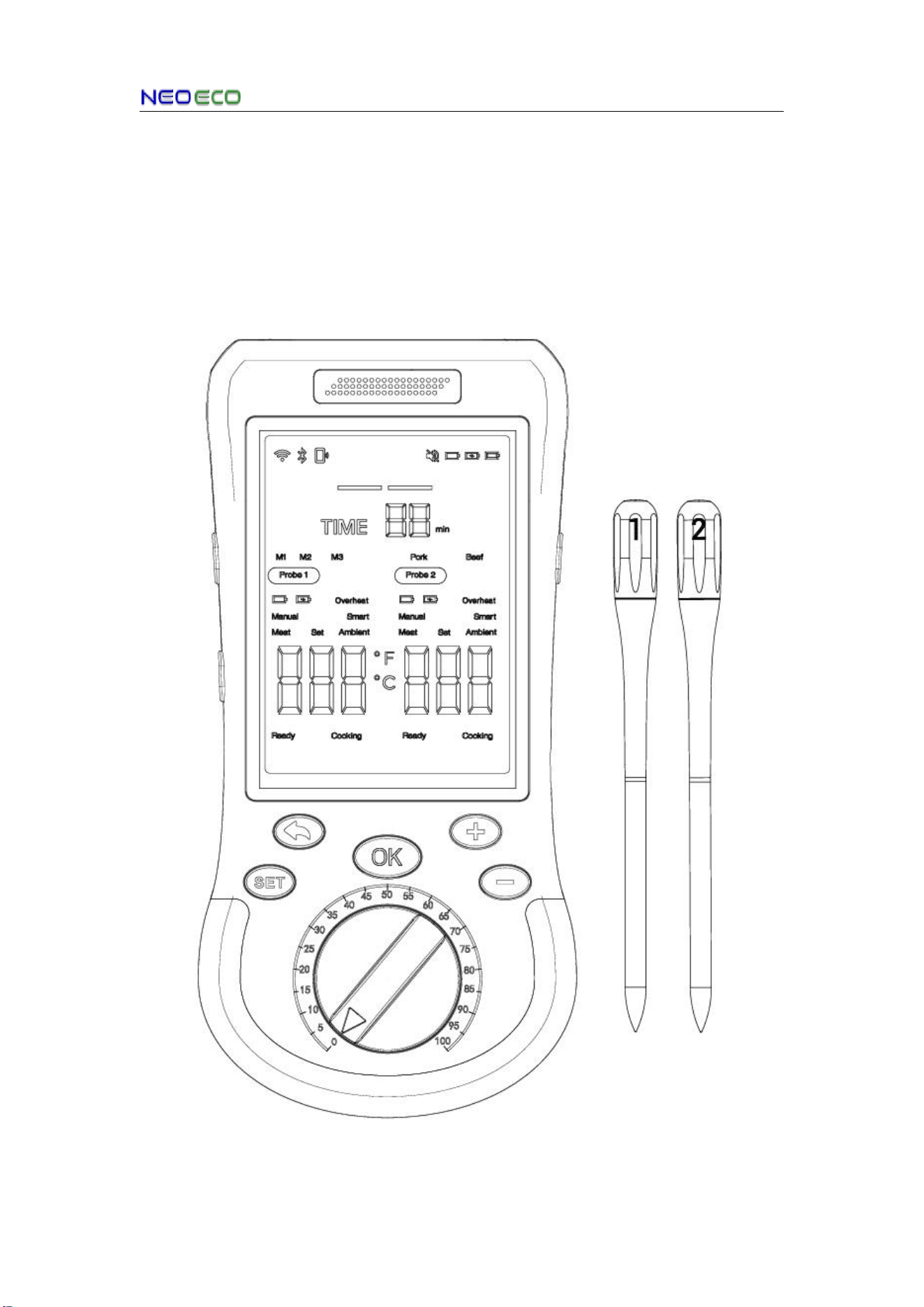
1 x AIGrillr Thermometer Main Unit
2 x IPX8 Waterproof Food Probes
AIGrill User Manual
Copyright © 2026 NEOECO
3
4.Component Description
4.1Probe
Note:
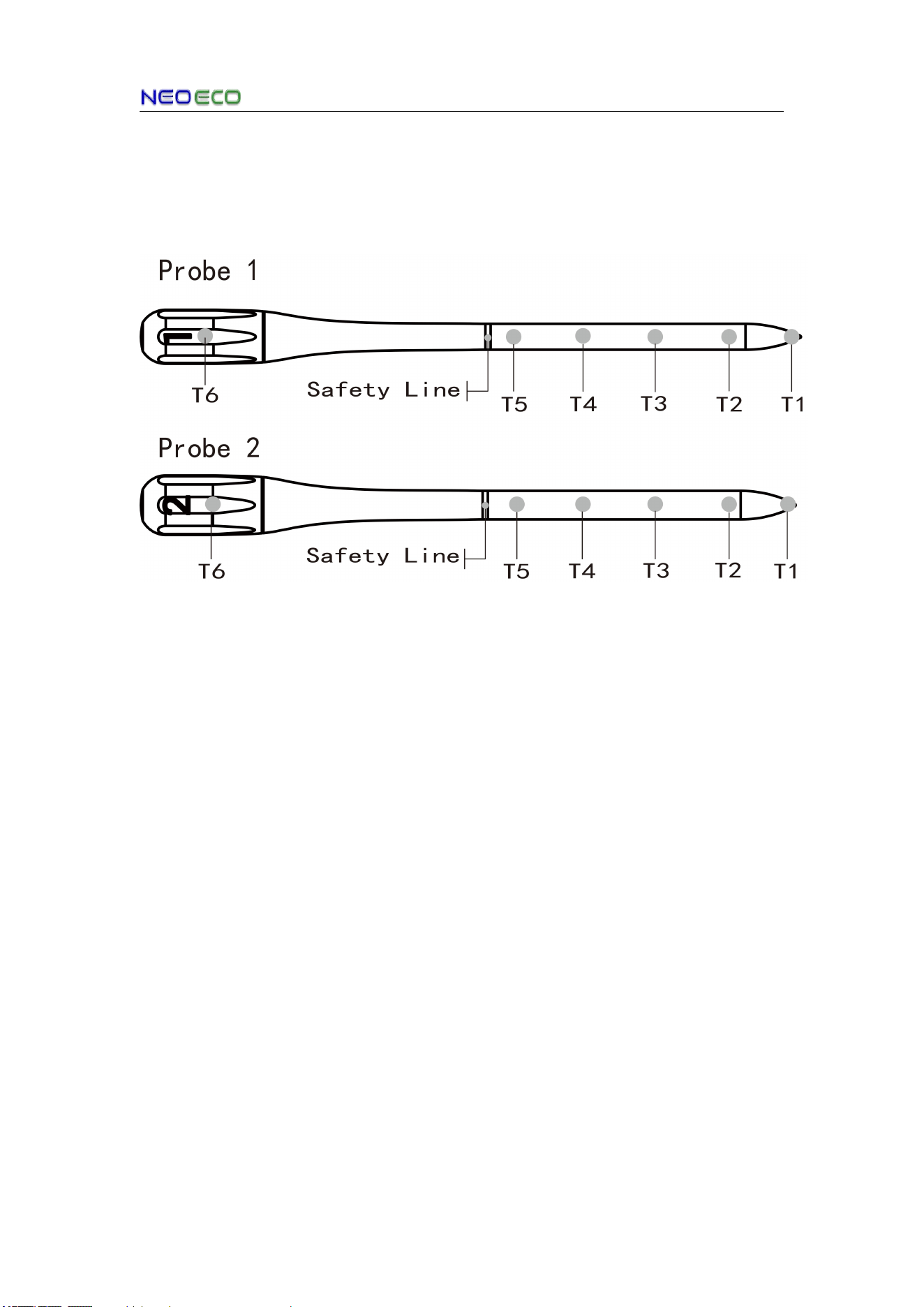
T1-T5:Internal Temperature Sensor (Internal Max 221°F/105°C)
T6:Ambient Temperature Sensor (Ambient Max 932 °F/500°C)
Safety Line:Insert the safety line fully into the meat, no part shall be exposed.
AIGrill User Manual
Copyright © 2026 NEOECO
4
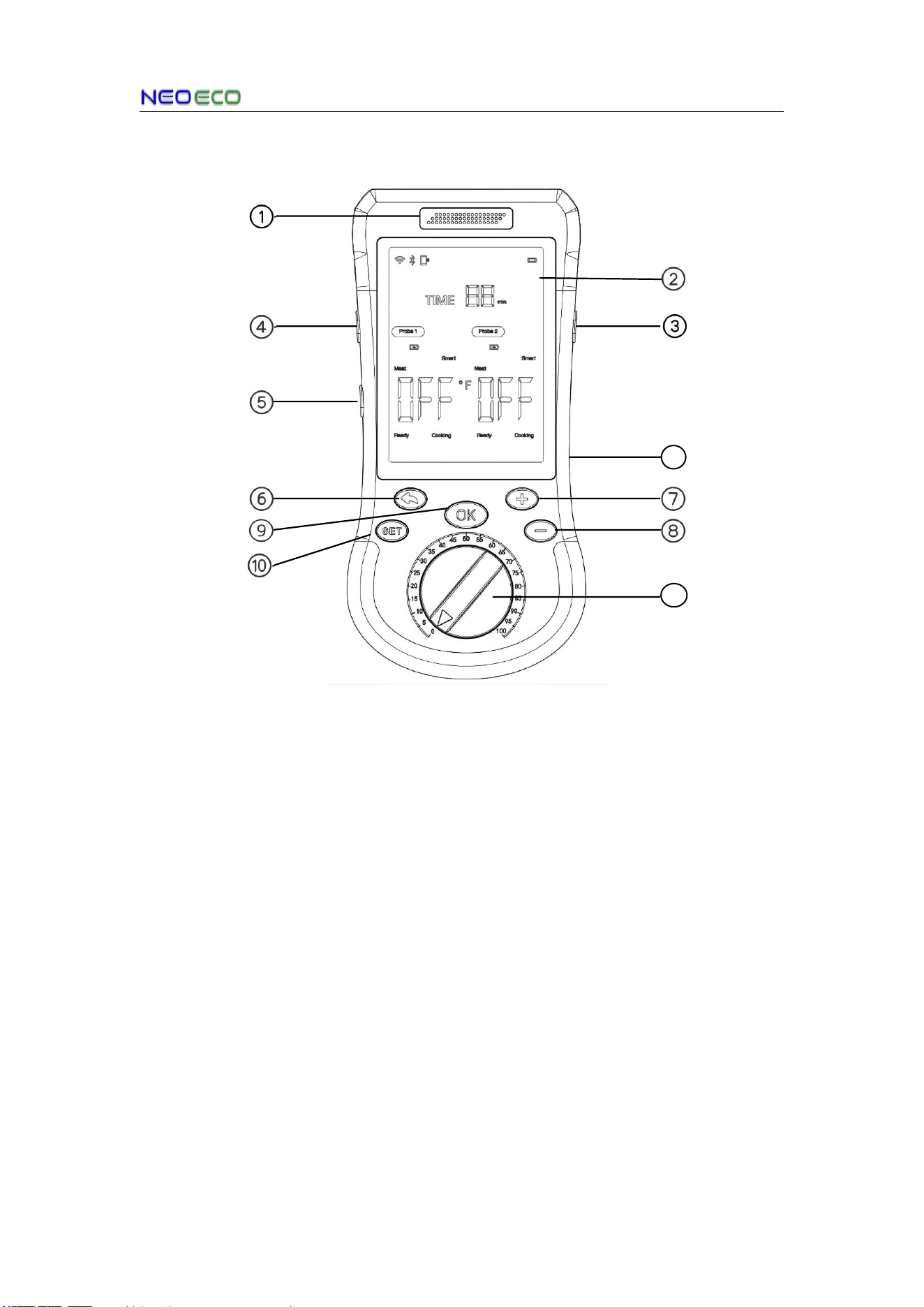
4.2 Front View of the Smart Base
1. Built-in Speaker: Supports voice announcements in all scenarios
2. LCD Display: Unobstructed real-time readings
3. Power Button: Power on/off / Screen on/off
4. Volume + Button: Increases speaker volume
5. Volume - Button: Decreases speaker volume
6. Back Button: Returns to the previous menu / Long press: Exit the ongoing cooking
7. + Button: Fine-tunes temperature / Adjust temperature value display / In selection
mode, switch between different modes.
8. - Button: Fine-tunes temperature / Adjust temperature value display / In selection
mode, switch between different modes.
9. OK Button: Confirms operations / Clears alarms
10.SET Button: Enters settings mode / Switches between settings / Long press: Quick
access to the cooking menu
11. Reverse Button: Rapidly adjusts temperature/time values
12.USB Type-C Port: Charging Only (Typ. 5V/2A)
Note:Long-press the +/- buttons to switch temperature units.
11
12
AIGrill User Manual
Copyright © 2026 NEOECO
5
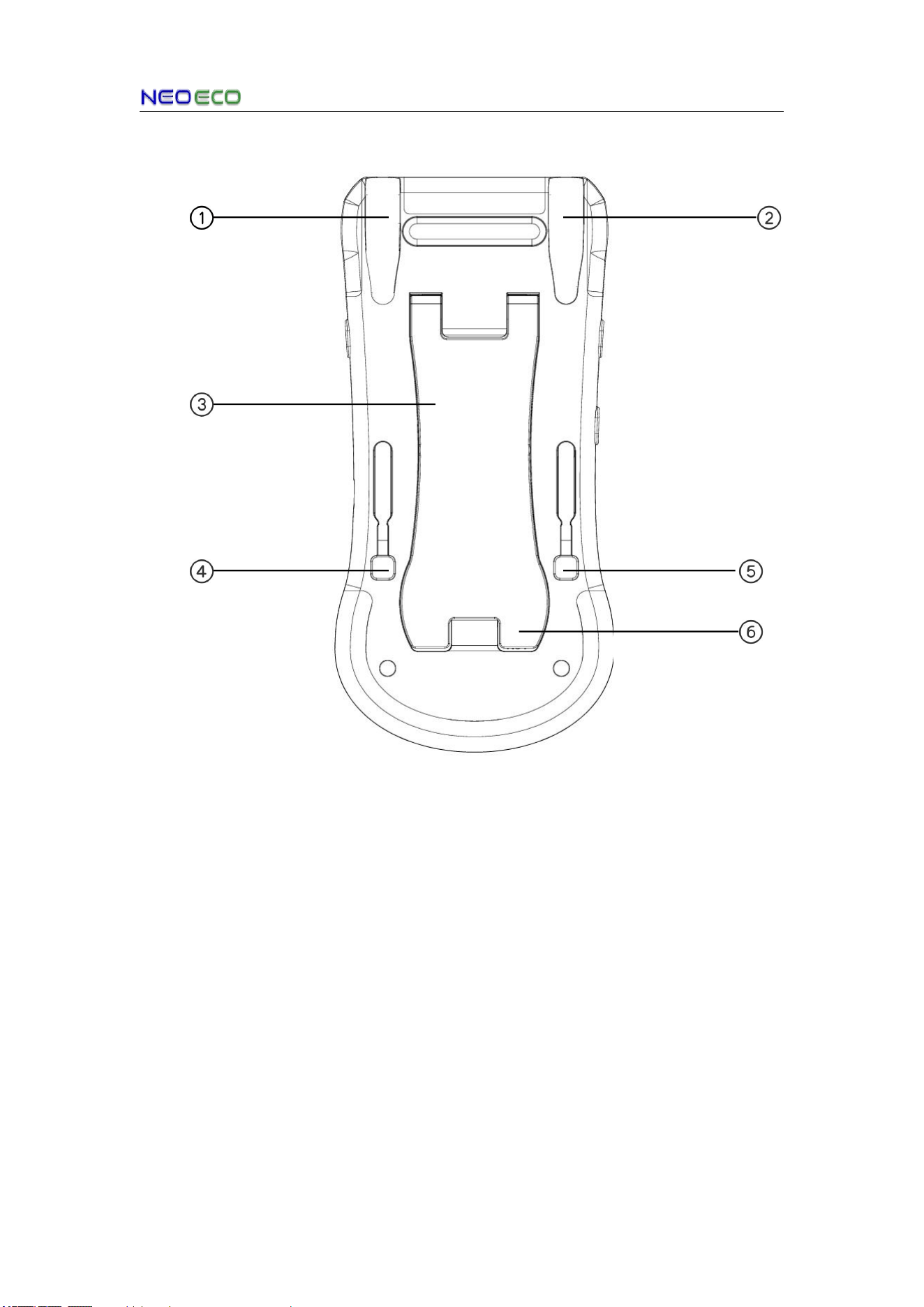
4.3 Back View of the Smart Base
1. Probe 1 Charging Cradle
2. Probe 2 Charging Cradle
3. Support Bracket:Provides stable vertical support for the device, preventing tipping or
sliding during cooking, and serves as a storage base when not in use.
4. Ejector Mechanism:Ejects the Probe1 smoothly from the charging cradle for quick
and easy access.
5. Ejector Mechanism:Ejects the Probe2 smoothly from the charging cradle for quick
and easy access.
6. Reset Button:Featuring a recessed pinhole design (identical to that of home router
reset buttons), it is used to trigger a system reset and restore the device to its initial state
in case of anomalies.
Magnetic Attachment
Equipped with a strong built-in magnet, the device can securely attach to the metal
surfaces of ovens, microwaves, refrigerators, and other household appliances, saving
counter space and allowing easy visibility of cooking status.
AIGrill User Manual
Copyright © 2026 NEOECO
6
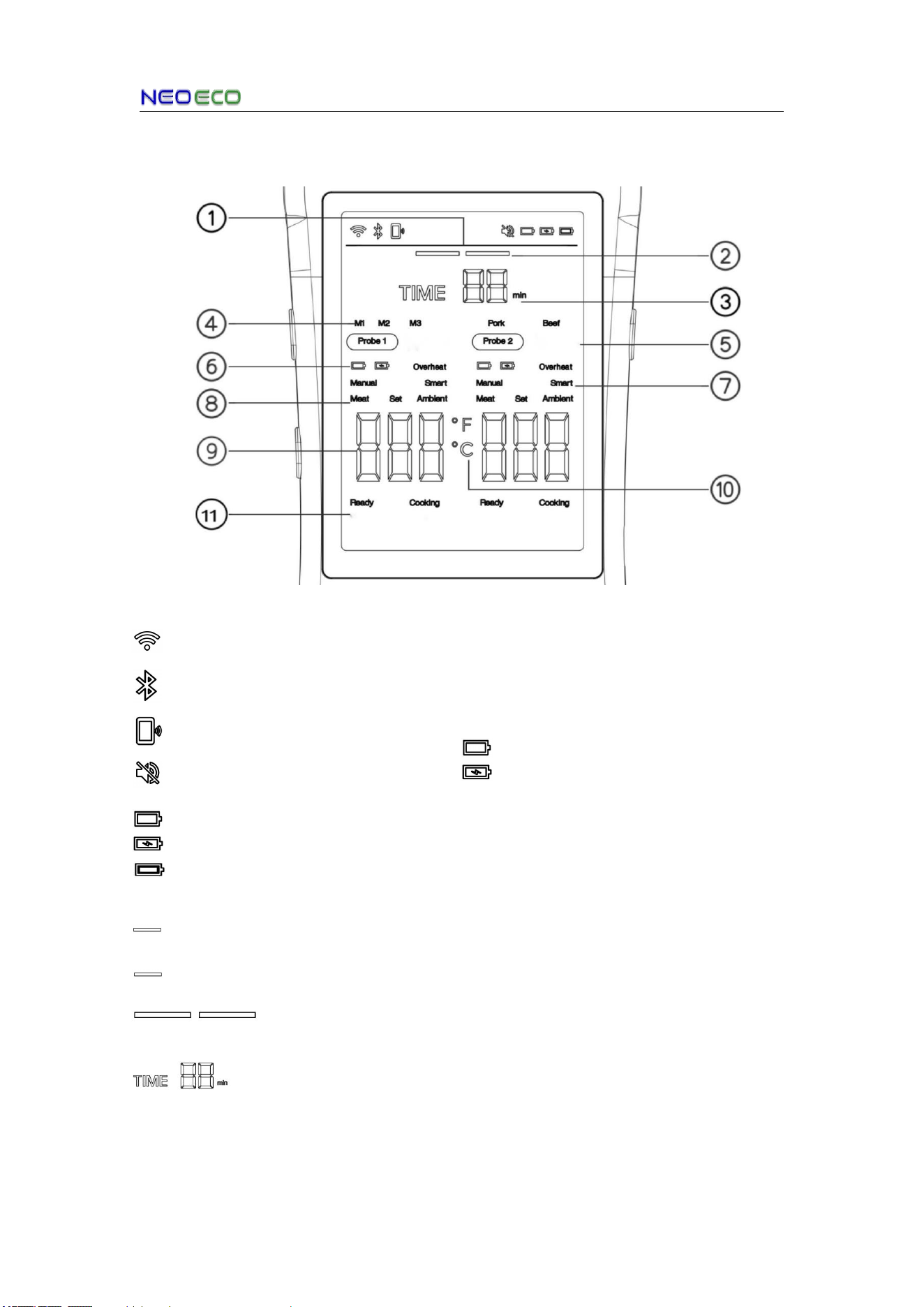
4.4 LCD display icons
1. Top Status Bar:
Wi-Fi Icon: Connected=On
Disconnected=Off
Bluetooth Icon: Connected=On
Disconnected=Off
Data Transfer Icon: Transferring=On
Mute Icon: Active=On
Low Battery Icon: Low=On
Charging Icon: Charging=On / Full= Stable
Battery Icon: Full= Stable
2. Cooking Progress Bar:
Light (L):Cooking Progress Bar:
50%= Stable
Light (R):Cooking Progress Bar:
100%= Stable
Cooking Complete
3. Cooking Timer:
Cooking Timer: Set=On
(Countdown Active)
4. Preset Icon M1/,M2/M3
M1: Pork (Default)
M2: Beef (Default)
M3: Custom setting
5. Probe number
6.Probe Status Indicator
Low Battery
Charging
Overheat:warning
7. Cooking Mode
8. Temperature category
9. Temperature
10. Temperature scale(°F/°C)
11. Bottom Status Bar
Ready:Cooking Complete
Cooking:Cooking in Progress
AIGrill User Manual
Copyright © 2026 NEOECO
7
5. Start Cooking
5.1 Set Cooking Parameters
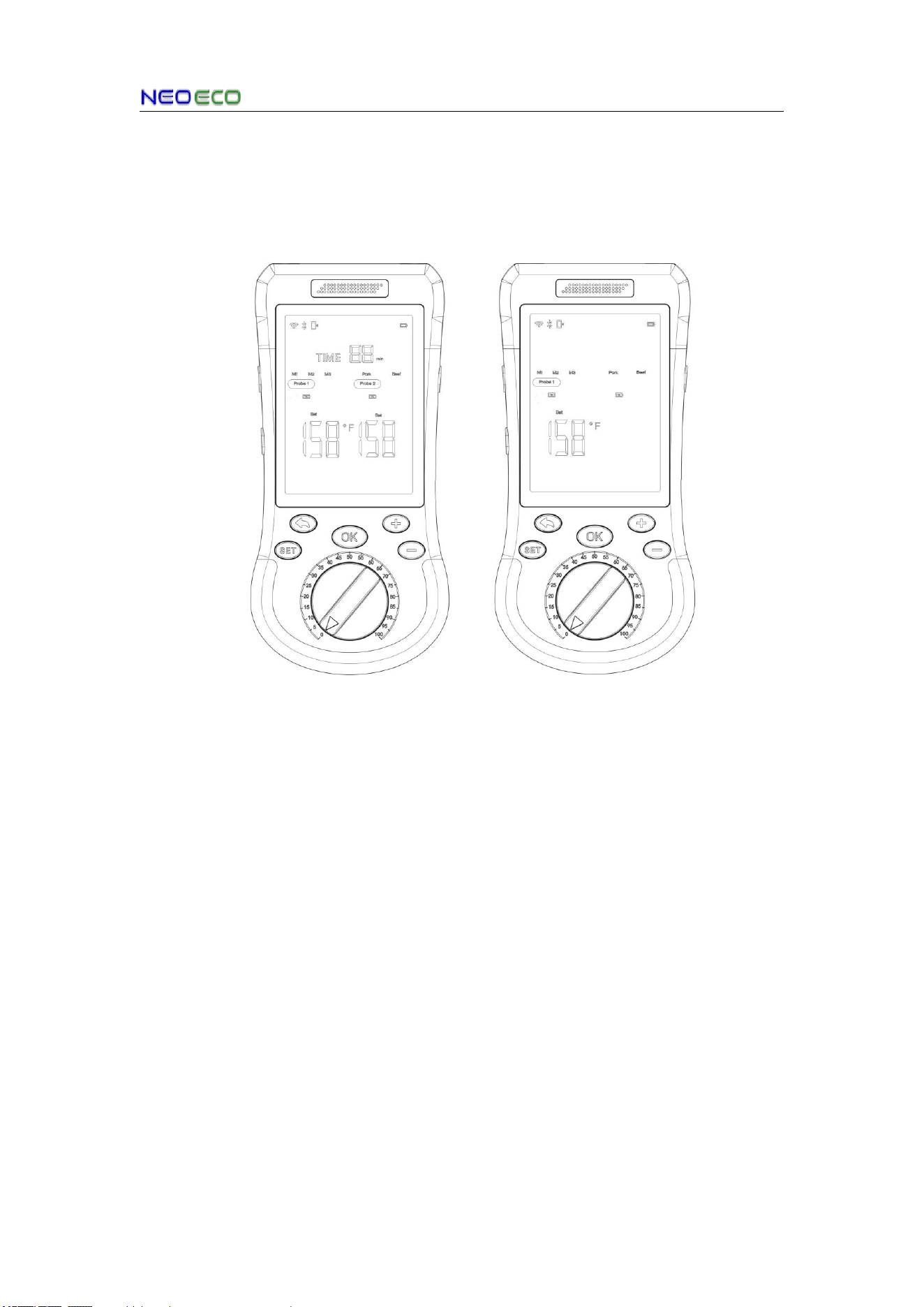
Primary Settings Page Secondary Settings Page
1.Press the SET button to enter the primary settings page. And use the SET button to
switch setting probe1, probe2 or timers.
2. Press the OK button to select a setting item and enter the secondary settings page.
Here you can select setting pork(value saved in M1), beef(value saved in M2), others
(value saved in M3) by the SET button. Then adjust the value using the rotary button, or
fine-tune the values with +/- buttons.
3.After setting the value, press the OK button to enter primary settings page.
4.You can continue to set other parameters, or press the return button to go back to the
main page.
Note: A blinking icon indicates the current cursor position. Press the SET button to
move the cursor and switch between setting items.
Cooking mode:
Smart Mode: Use the mobile App to get smart recommendations for different foods,
doneness levels and flavors, then select your pick with one tap.
Manual Mode: Customize manually on the thermometer based on your preferred food
texture and doneness. (Refer to 5.1)
AIGrill User Manual
Copyright © 2026 NEOECO
8
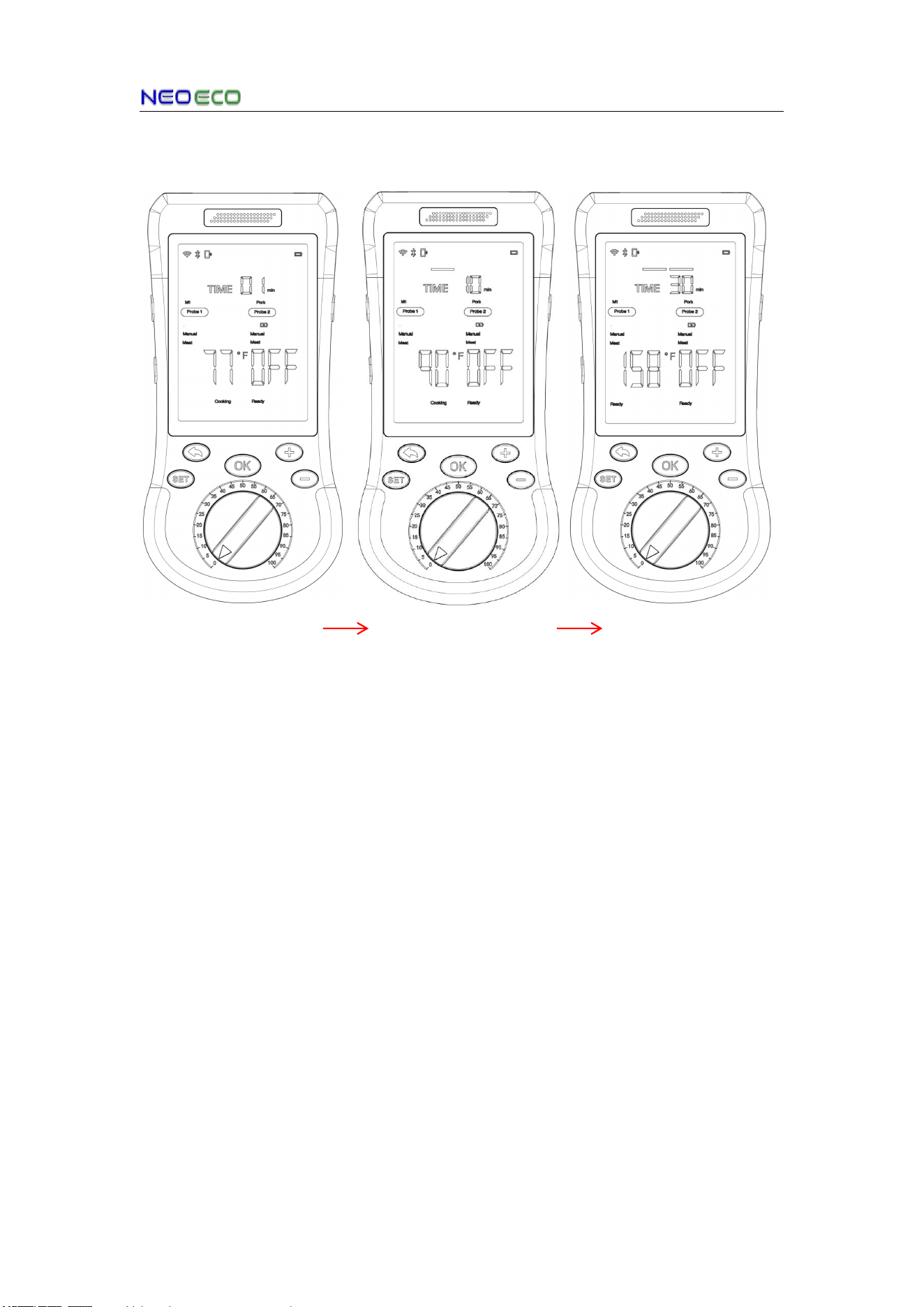
5.2 Start Cooking → Cooking Completed
Start Cooking
Initial temperature: 77°F
Cooking in Progress
Temperature rising
gradually
Cooking finished
Speaker activates alarm;
Ready indicator lights up
1. Unplug the probe after setup to start cooking; alternatively, insert the probe into the
food first, then enter SET to configure parameters
2. Start Cooking: If no timer is set, the TIME icon will start counting to record your cooking
duration once cooking begins
3. Cooking in Progress: When the meat cooking progress reaches 50%, the first progress
bar will light up and the second one will blink
4. Cooking Complete: The speaker will sound an alarm, the READY icon will display, and
both progress bars will stay lit to indicate cooking is finished、
Note:If two probes are used for cooking, the TIME icon/progress bar icons will poll
to display the time and progress information of each probe
Polling Logic:
1. When the Probe1 icon is blinking, the TIME icon/progress bars indicate the status of
Probe1
2. When the Probe2 icon is blinking, the TIME icon/progress bars indicate the status of
Probe2
AIGrill User Manual
Copyright © 2026 NEOECO
9
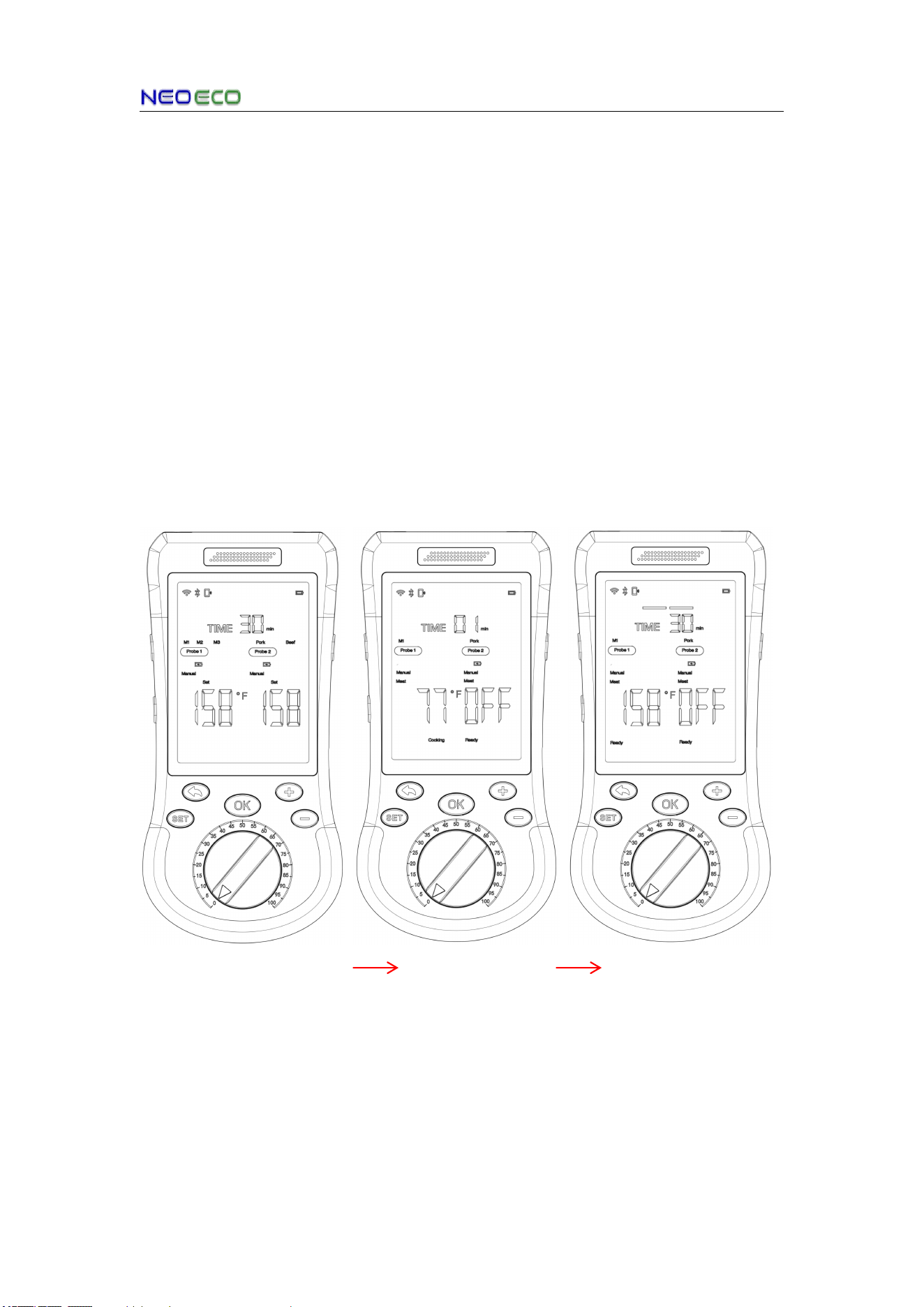
6. Quick Cooking
Quick Parameter Retrieval
1. Press and hold the SET button for 2 seconds to retrieve the cooking parameters
pre-saved in M1/M2/M3;
2. Press +/- buttons to switch selecting items
3. Press the OK button to confirm, and the device will complete the setup quickly and
start cooking.
4. Use the M1 parameters default.
Note:Parameters for M1/M2/M3 can be configured either locally on the device or
remotely via the mobile App
M1: The parameters stored in M1 are related to barbecued pork (default).
M2: The parameters stored in M2 are related to barbecued beef (default).
M3: The parameters stored in M3 are related to others meat.
①Parameter Retrieval Start ②Cooking ③Cooking finished
If the retrieved parameters do not meet your requirements, press the SET button to
enter the settings interface. The specific operation steps are consistent with those
described in Clause 5.1 above.
AIGrill User Manual
Copyright © 2026 NEOECO
10
7.Additional Operations & Status
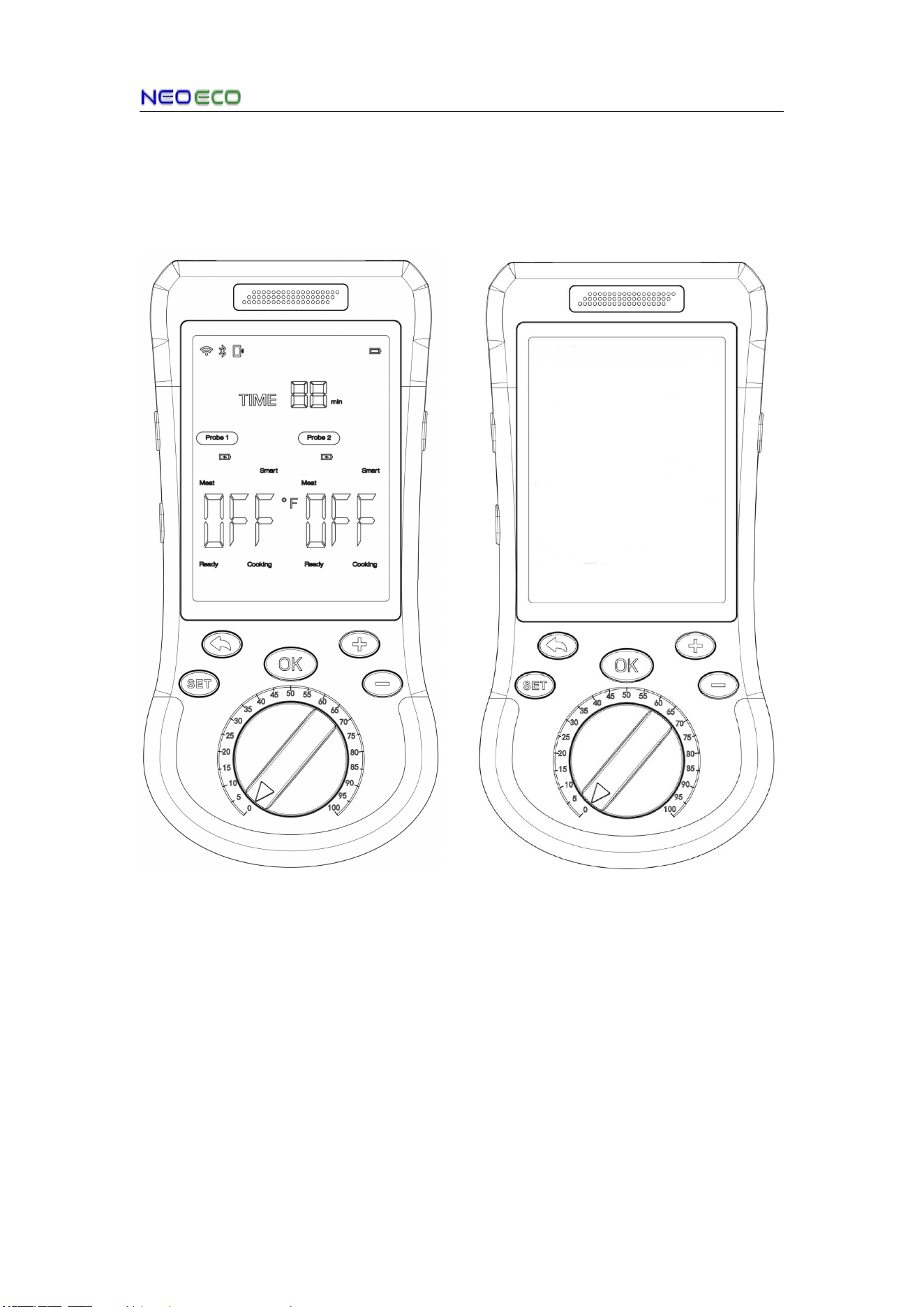
7.1 Power Key Function
1.Power-On Operation : Press and hold
the power button for 2 seconds. The device
is successfully powered on when you hear
the "power on" prompt tone or the standby
interface is displayed.
1.Power-Off Operation : Press and hold
the power button for 2 seconds. The device
is successfully powered off when you hear
the "power off" prompt tone or the screen
turns completely black.
2.Screen-On State
2.Screen-Off State
Not:When powered on, a short press of the Power button activates standby mode
to save battery. The screen turns off, but other functions remain active. The device
will also enter standby mode automatically after 5 minutes of inactivity, and you can
press any button to exit standby mode.
AIGrill User Manual
Copyright © 2026 NEOECO
11
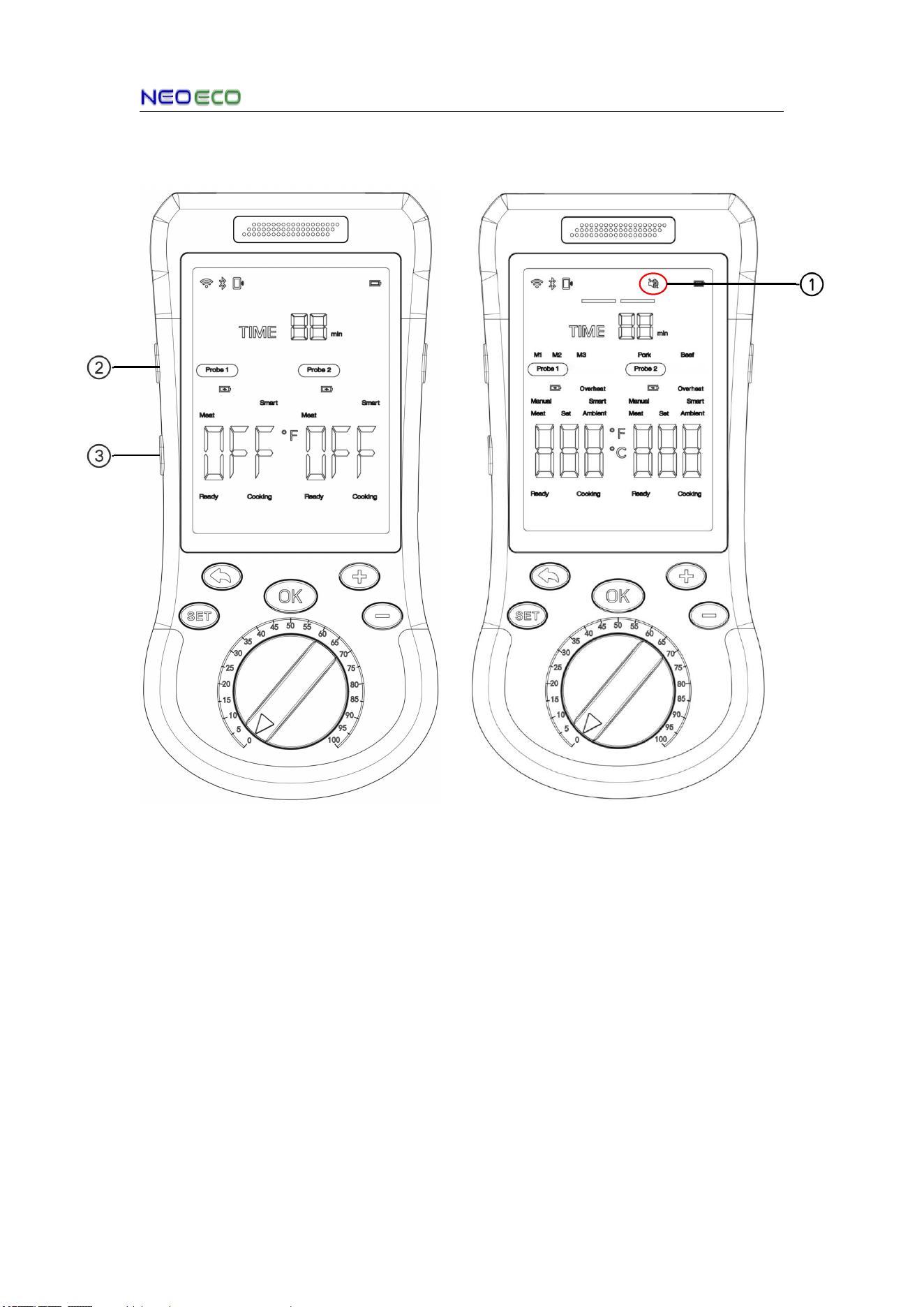
7.2 Volume Adjustment Function
1.Indicates that the device is currently in Mute mode
2.Volume + Button
3.Volume - Button
Volume Adjustment Function:The device offers 4 volume levels: High, Medium, Low,
and Mute. Press the volume +/- buttons briefly to adjust the volume, and the current
volume level will be announced via voice prompt during adjustment.
AIGrill User Manual
Copyright © 2026 NEOECO
12
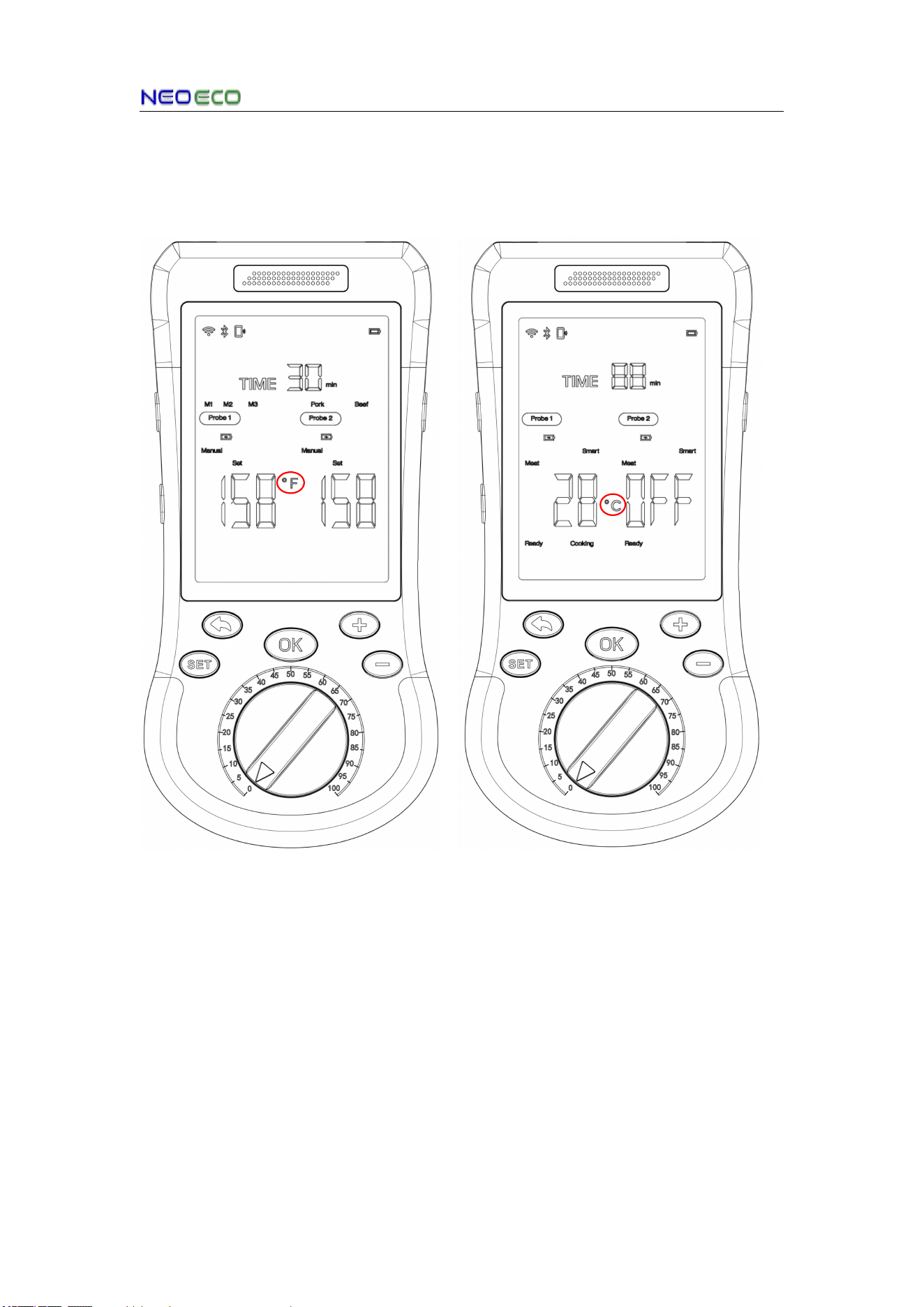
7.3 ℃/℉ Button Function
Long Press the +/- buttons more than 2 seconds to switch the device's
temperature unit.
This icon indicates the probe temperature
unit is "℉"
This icon indicates the probe temperature
unit is "℃"
AIGrill User Manual
Copyright © 2026 NEOECO
13
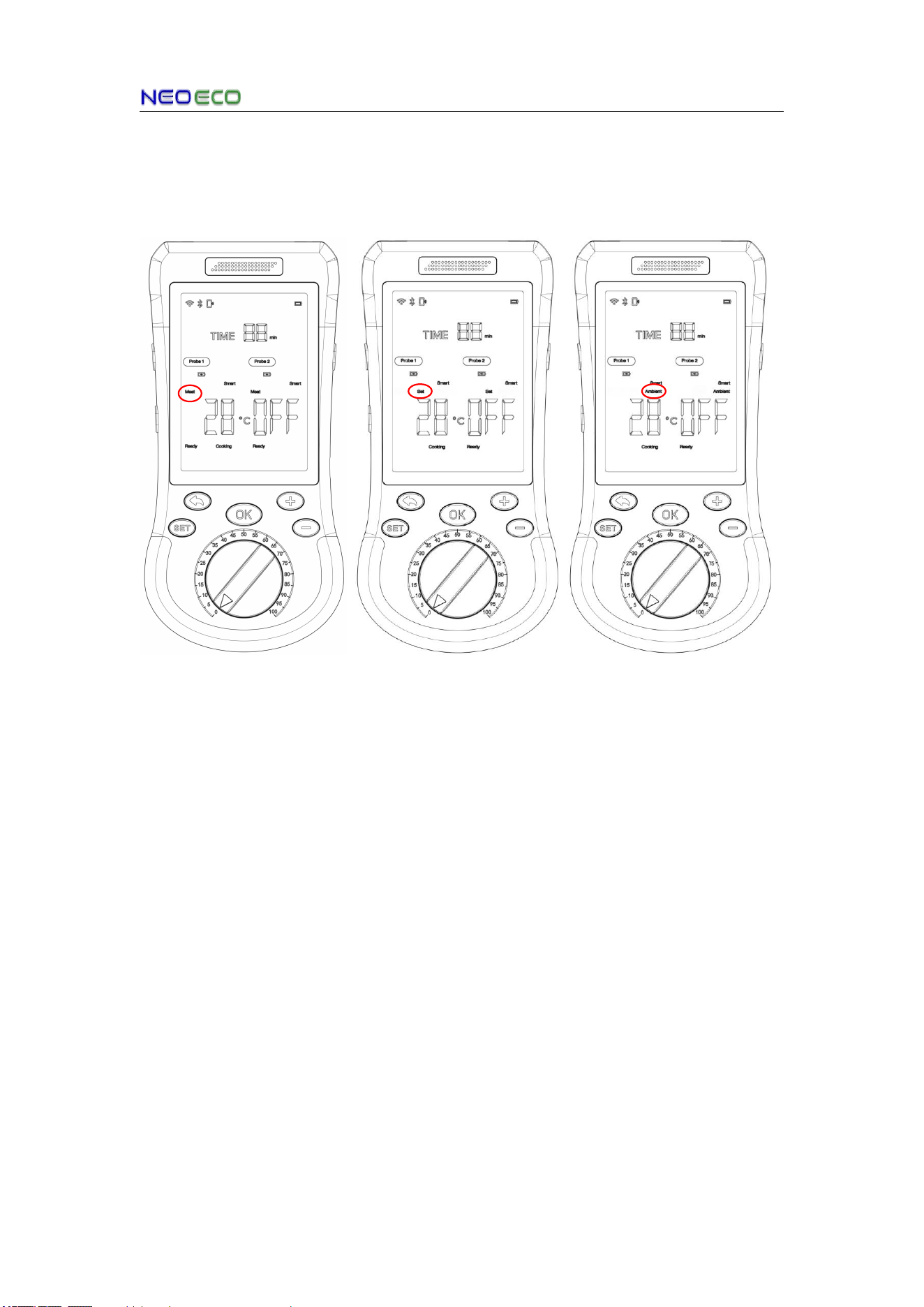
7.4 View Meat, Set, and Ambient Temperatures Function
On the initial main interface, press the +/- buttons to check the Meat, Set, and Ambient
temperatures.
Meat temperature Preset temperature Ambient temperature
AIGrill User Manual
Copyright © 2026 NEOECO
14
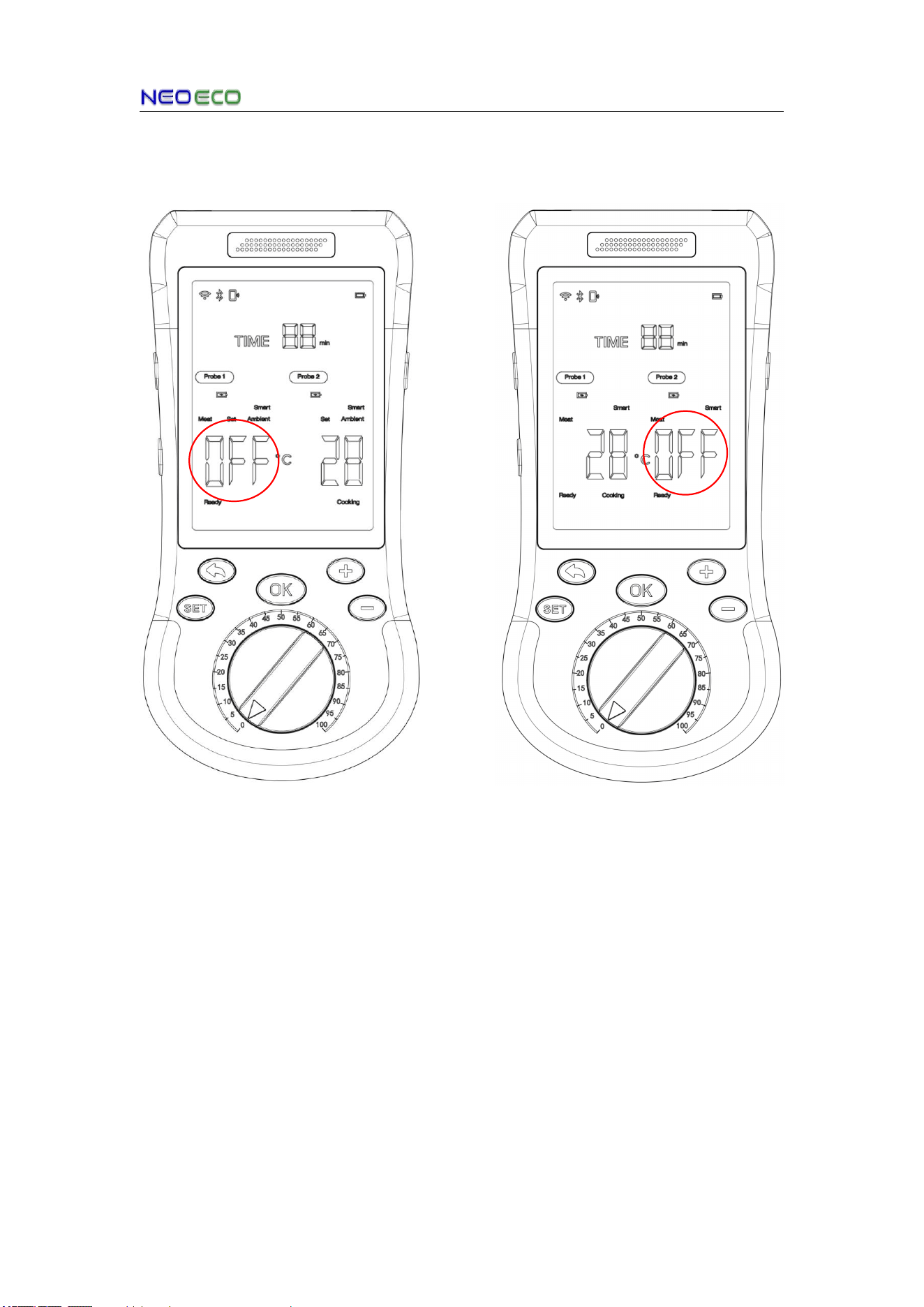
7.5 Probe Insertion/Removal Status Indicator Function
Probe 1 Removal Probe 2 Removal
AIGrill User Manual
Copyright © 2026 NEOECO
15
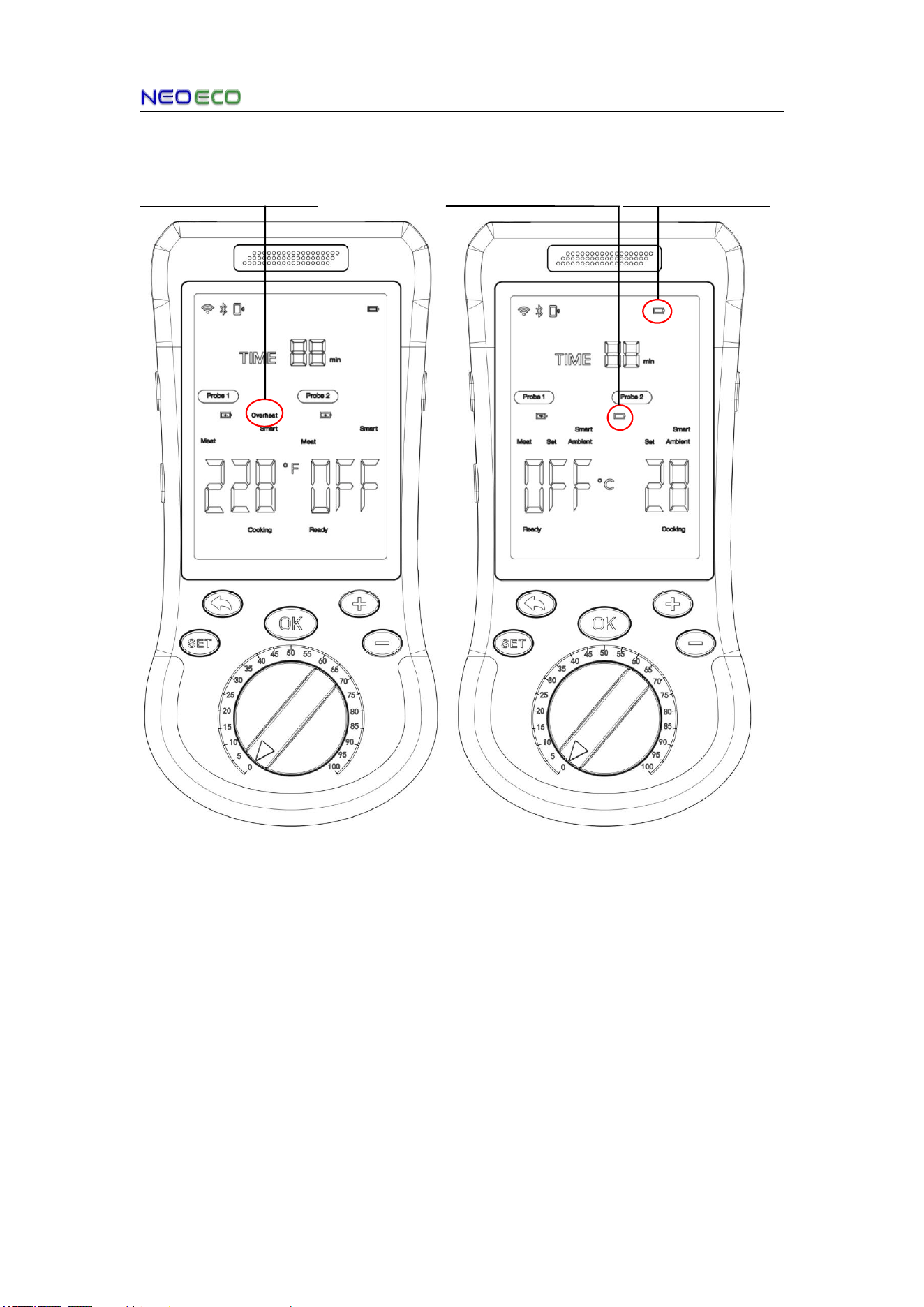
7.6 Probe & Thermometer Abnormal Status Indication
Probe 1 Overheating Prode 1 Low Battery Base Low Battery
Probe Overheat Alert Probe & Thermometer Low Battery Alert

AIGrill User Manual
Copyright © 2026 NEOECO
16
8. Voice Prompt Guide
ID
Announcement Content
Description
1
Temperature Value (0–212°F)
Basic Number Composition: The voice
announcement of temperature values is composed of
the number words zero, one through nineteen,
twenty, thirty through ninety, and hundred, covering
the full temperature range of 0–212.
2
Power-On Prompt
power on
3
Power-Off Prompt
power off
4
SET Button Prompt
SET
5
Back Button Prompt
back
6
OK Button Prompt
OK
7
"+" Button Prompt
up
8
"-" Button Prompt
down
9
Volume Mute Prompt
mute
10
Low Volume Level Prompt
low
11
Medium Volume Level Prompt
middle
12
High Volume Level Prompt
high
13
Bluetooth Connection Prompt
connect
14
Bluetooth Disconnection
Prompt
disconnect
15
Cooking finished
Probe1 cooking complete
Probe2 cooking complete
cooking complete
16
Overheat
Probe1 overheat
Probe2 overheat
Overheat
17
Cooking time is up
time complete
18
Probe disconnect
Probe1 disconnect
Probe2 disconnect
Disconnect
19
Insertion error
Probe1 insertion error
Probe2 insertion error
Insertion error
20
Cooking cancel
Cooking cancel

AIGrill User Manual
Copyright © 2026 NEOECO
17
Specifications
Probe:
Number of Temperature
Sensors
6 (5 Internal and 1 Ambient)
Temperature Range
Internal 32°F - 221°F / 0°C-105°C
Ambient 32°F-932°F/0°F-500°C
Accuracy
Internal ±0.5°C from 32°F - 221°F/0°C-105°C
Dimensions
φ5mm
Water Resistance
IPX8
Bluetooth Output Power
6dBm
Probe Materia
S304
Smart Base:
Display
LCD
Dimensions
185mm x 86mm x 19.9mm
Battery
3000mAh
Connection
Bluetooth/Wi-Fi (device only supports 2.4 GHz Wi-Fi
Sleep Mode
When the system detects that the probe is not removed,
the probe is fully charged, or there is no operation for 5
minutes, it will automatically enter sleep mode.
AIGrill User Manual
Copyright © 2026 NEOECO
18
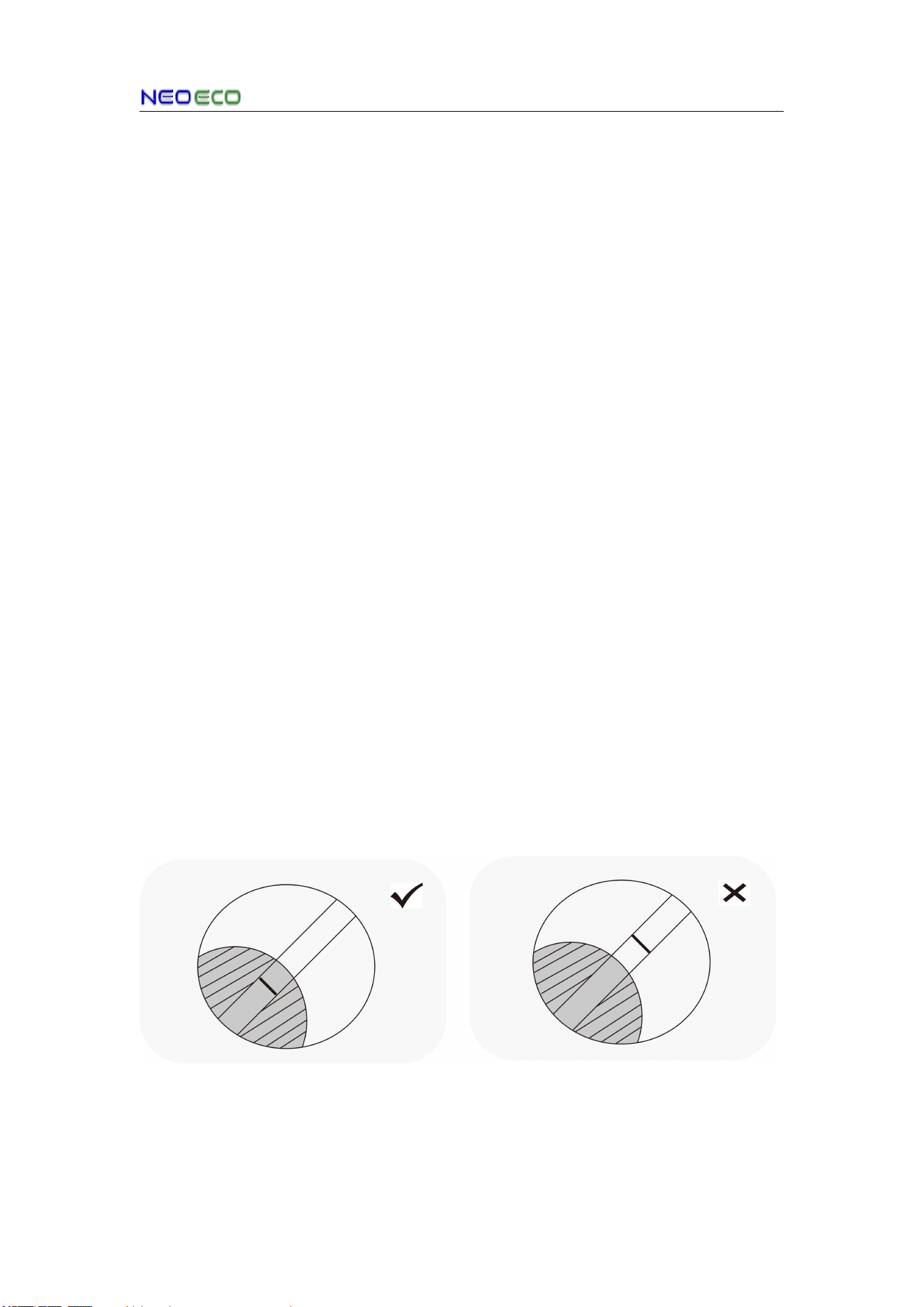
Tips for First-Time Use:
1 Before using your AIGrillr, ensure the product is fully charged and
you have reviewed the important safety information.
2.Download the free AIGrillr App for iOS or Android
TBD
3. Insert the probe completely into the meat, ensuring that it passes
the safety line but does not exceed the ceramic handle and that the
internal sensors are in the center of the meat.

AIGrill User Manual
Copyright © 2026 NEOECO
19
This device complies with part 15 of the FCC Rules. Operation is subject to the following
two conditions: (1) This device may not cause harmful interference, and (2) this device
must accept any interference received, including interference that may cause undesired
operation. Any changes or modifications not expressly approved by the party responsible
for compliance could void the user's authority to operate the equipment. NOTE: This
equipment has been tested and found to comply with the limits for a Class B digital device,
pursuant to Part 15 of the FCC Rules. These limits are designed to provide reasonable
protection against harmful interference in a residential installation. This equipment
generates, uses and can radiate radio frequency energy and, if not installed and used in
accordance with the instructions, may cause harmful interference to radio
communications. However, there is no guarantee that interference will not occur in a
particular installation. If this equipment does cause harmful interference to radio or
television reception, which can be determined by turning the equipment off and on, the
user is encouraged to try to correct the interference by one or more of the following
measures:-- Reorient or relocate the receiving antenna.-- Increase the separation
between the equipment and receiver.-- Connect the equipment into an outlet on a circuit
different from that to which the receiver is connected.-- Consult the dealer or an
experienced radio/TV technician for help. The device has been evaluated to meet general
RF exposure requirement. The device can be used in portable exposure condition without
restriction.
FCC ID: 2BHQV-E208