1
FOR YOUR SAFETY
You must read and understand
this manual before use.
Keep this manual for future
reference.

2
CONTENTS
PAGE NO.S
1
SAFETY
3 - 7
2
PART LOCATIONS
8
3
PRE-OPERATION CHECK
9
4
STARTING PROCEDURE
10 - 11
5
STOPPING PROCEDURE
12
6
OPERATING INSTRUCTIONS
13 - 17
7
MAINTENANCE
17 - 22
8
TRANSPORT & STORAGE
22 - 23
9
TROUBLE SHOOTING
24
10
SPECIFICATION
25
11
RECYCLING & PRODUCT DISPOSAL
26
12
DECLARATION OF CONFORMITY
27
13
CONTACT DETAILS
28
14
WARRANTY
28
INDEX
3
1. SAFETY
1.1
General Safety Notes.
1.2
The operator of the machine is responsible for, and has a duty of care in making sure
that the machine is operated safely and in accordance with the instructions in this
user manual. Keep the manual safe and pass it on if the machine is loaned or sold to
another user.
1.3
Please note the following safety points.
1.4
The machine should never be left it in a condition which would allow an untrained or
unauthorised person/s to operate this machine.
1.5
All due care and diligence should be taken by the operator for the safety of and with
regard to those around whilst using the machine.
1.6
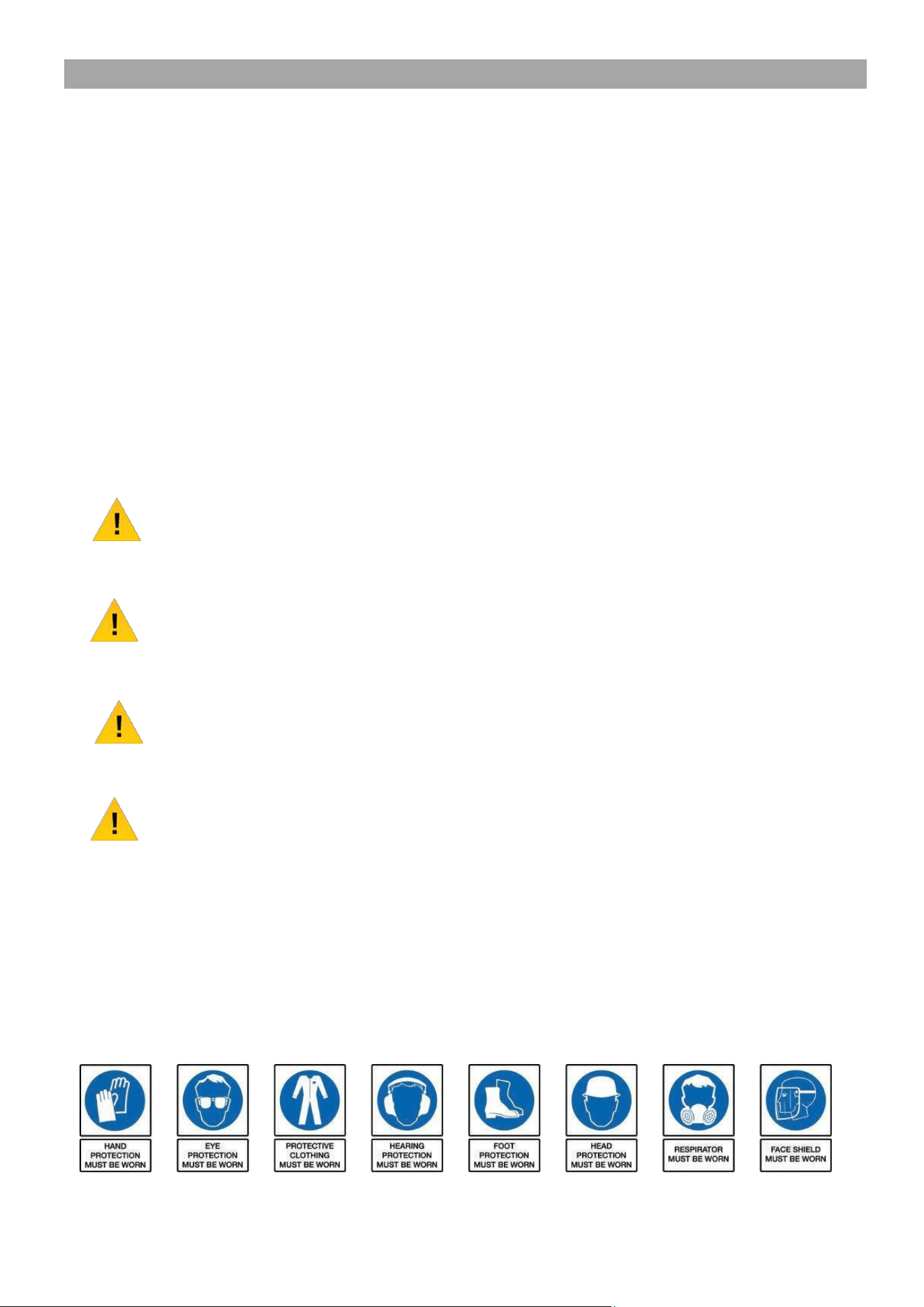
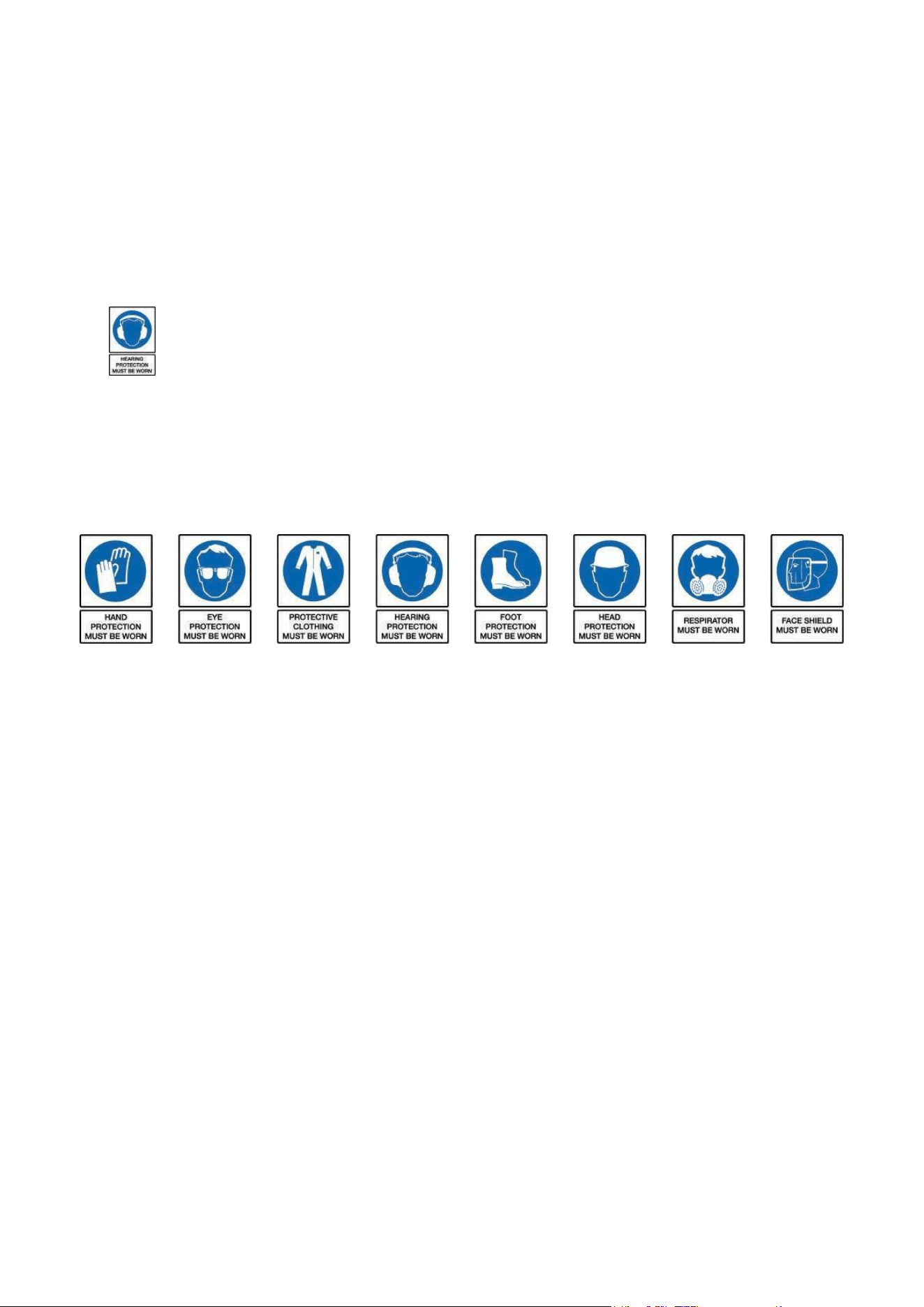
Some or all of the following - warning signs, symbols and/or PPE pictograms may
appear throughout this manual. You MUST adhere to their warnings. Failure to do
so may result in personal injury to yourself or those around you.
DANGER
Indicates a hazard, which, if not avoided, could result in serious injury or death.
WARNING
Indicates a hazard, which, if not avoided, could result in serious injury.
CAUTION
Indicates a hazard which, if not avoided, might result in minor or moderate injury.
NOTE
Indicates a situation that could easily result in equipment damage.
READ and keep the manual safe and pass it on if the machine is loaned or sold to another user.
You MUST fully understand all instructions to ensure you use and operate the machine safely.
Appropriate Personal Protective Equipment (PPE), MUST be worn at all times when operating or
repairing the machine.

4
1.10
Carbon Monoxide (where applicable).
1.11
Carbon monoxide is a colourless and odourless gas. Inhaling this gas can cause
death as well as serious long term health problems such as brain damage.
1.12
The symptoms of carbon monoxide poisoning can include but are not limited to the
following;
Headaches, dizziness, nausea, breathlessness, collapsing or loss of consciousness.
1.13
Carbon monoxide poisoning symptoms are similar to flue, food poisoning, viral
infections and simply tiredness. It is quite common for people to mistake this very
dangerous poisoning for something else.
1.14
To avoid carbon monoxide poisoning DO NOT use Petrol/Diesel powered equipment
inside any of the following; Home, garage, tent, camper van, mobile home, caravan
or boat. This is not exhaustive and if you are in any doubt contact your dealer.
1.15
If you think you have or someone around you has been affected by carbon monoxide
poisoning;
1.16
Get them fresh air immediately, by leaving the affected area or by opening doors and
windows. If safe and practical to do so make sure that the machine is turned off.
DO NOT enter a room you suspect of having carbon monoxide present – instead call
the emergency services.
1.17
Contact a Doctor immediately or go to Hospital – let them know that you suspect
carbon monoxide poisoning.
1.18
DO NOT use in an enclosed area or moving vehicle.
1.20
General Fuel Safety (where applicable).
CAUTION
ALL FUELS ARE FLAMABLE
1.21
Fire Hazard – keep fuel away from all sources of ignition for example heaters.
Lamps, sparks from grinding or welding.
1.22
DO NOT carry out hot work on tanks that have contained fuel.
1.23
ALWAYS keep the work area tidy.
1.24
ALWAYS clean up spills promptly using absorbent granules and a lidded bin.
1.25
ALWAYS dispose of waste fuels correctly.

5
1.30
Fueling/De-fueling (where applicable).
CAUTION
ALL FUELS ARE FLAMABLE
1.31
ALWAYS fuel and defuel in a well ventilated area outside of buildings.
1.32
ALWAYS wear correct, suitable and fit for purpose Personal Protective Equipment
(PPE), suggested items are but not limited to safety gloves, overalls.
1.33
When fueling/de-fueling ALWAYS avoid inhaling fumes.
1.34
When de-fueling ALWAYS use a proper fuel retriever.
1.35
ALWAYS carry fuel in the correct and clearly marked container.
1.40
Electrical Safety )where applicable).
1.41
Electricity can kill – NEVER work on LIVE/ENERGISED equipment.
1.42
Prior to carrying out any maintenance work you MUST identify electrical isolation
methods and isolate all electrical supplies.
1.43
Prior to use and with all electrical supplies isolated, you MUST check all electrical
cables, plugs and connectors for the following;
1.44
Are intact and have no signs of damage, to include but not limited to bare wires,
chaffing, cuts and loose wiring.
1.45
If there are any signs of damage, the damage item MUST be taken out of service
until the damage has been repaired by an electrically competent person.
1.46
All trailing cables should be routed so as not to cause any kind of trip hazard.
1.47
NEVER work on or near electricity with wet hands, wet clothing and wet gloves.

6
1.50
Batteries (where present).
1.51
Batteries present a risk if they become damaged by the possible leaking of
electrolyte. This electrolyte is an acid and can cause serious burn injuries. Care
should be taken when working on or near them. NOTE the electrolyte may be in
a liquid or gel form.
1.52
Should you come in to contact with electrolyte you should;
1.53
Remove all clothing contaminated with electrolyte. If you cannot remove then
saturate them in water.
1.54
Get medical assistance as soon as possible. You must advise the medical staff of
the type of acid.
1.55
Lead/acid battery = dilute sulphuric acid.
1.56
Nickel/cadmium = potassium hydroxide alkali electrolyte.
1.57
Use fresh running water to wash off excess electrolyte, continue this until medical
assistance arrives. Make sure that you do not was the electrolyte to another part of
your body or face.
1.58
If electrolyte comes in to contact with Eyes the electrolyte needs to be immediately
washed away with large amounts of water. Make sure that you do not wash the
electrolyte to another part of your face or body.
1.59
Gasses from charging batteries are highly flammable and great care should be taken
to charge in well ventilated areas.
1.59.1 There is an explosion risk if the battery terminals are short circuited, when
connecting/disconnecting ALWAYS exercise great care so that the terminals or
battery leads are NOT allowed to touch and cause a spark. ALWAYS use suitable
insulated tools.
1.60
Vibrations (where applicable).
1.61
Prolonged use of hand held (operated) machines will cause the user to feel the
effects of/from vibrations. These vibrations can lead to white finger (Raynaud’s
phenomenon) or carpal tunnel syndrome. This condition reduces the ability of the
hand to feel and regulate temperature, causing numbness and heat sensations and
may cause never damage and circulatory tissue death.
1.62
Not all factors that lead to white finger disease are known, but cold weather, smoking
and other diseases that affect blood vessels and blood circulation as well as large
and long-lasting impact of shocks are considered factors in the formation of white
finger. Note the following to reduce the risk of white finger and carpal tunnel
syndrome;
1.63
Wear gloves and keep your hands warm.
1.64
Take regular breaks.
1.65
All of the above precautions may help reduce the risk of white finger disease but not
rule out the carpal tunnel syndrome. Long-term and regular users are therefore
recommended to observe the condition of your hands and fingers. Seek medical
attention immediately if any of the above symptoms should occur.
7
1.70
Noise (where applicable).
1.71
The operating noise of the machine can damage your hearing. Wear hearing
protection such as earplugs or ear defenders to protect your hearing. Long-term
and regular users are advised to have hearing checked regularly. Be especially
vigilant and cautious when hearing ear protection because your ability to hear alarm
warnings will be reduced.
1.72
Noise emissions for this equipment is unavoidable. Carry out noisy work at approved
times and for certain periods. Limit the working time to a minimum. For your personal
protection and protection of people working nearby it is also advisable for them to
wear hearing protection.
1.73
See Certificate of Conformity section for Outdoor Noise declaration of
conformity.
1.74
Make sure you keep this manual handy so you may refer to it whenever questions
arise and ensure you pass this manual on if the machine is loaned or sold.
1.75
Correct Personal Protective Equipment (PPE) MUST be worn at all times when
operating or repairing this machine. This should include but is not limited to;
1.76
DO NOT use this machine inside a confined space such as but not limited to a
vehicle, house, garage, container, boat or building. Only use outside in a well
ventilated area.
1.77
For air cooling a minimum of 1m is required all around the machine.
1.78
Maximum ambient temperature 40 degrees Celsius.
1.79
Fire risk- Fuel can expand and overflow in a hot environment or moving vehicle.
1.80
Explosion risk- LPG/ Petrol can leak and the vapour is heavier than air. Never store
in confined spaces especially in a boat where the vapour/has will accumulate in the
hull and create a high risk of explosion.
1.81
Carbon monoxide poisoning risk- Never run an engine in a confined space or poorly
ventilated area. Keep the machine away from windows to prevent fumes entering the
internal space. Carbon monoxide is produced by the engine and contained in the
exhaust fumes. You cannot see it or smell it and it can kill you in minutes.
1.82
Never use inside a confined space with an exhaust extension. If the exhaust
extension fails the escaping exhaust gases could kill you.
8
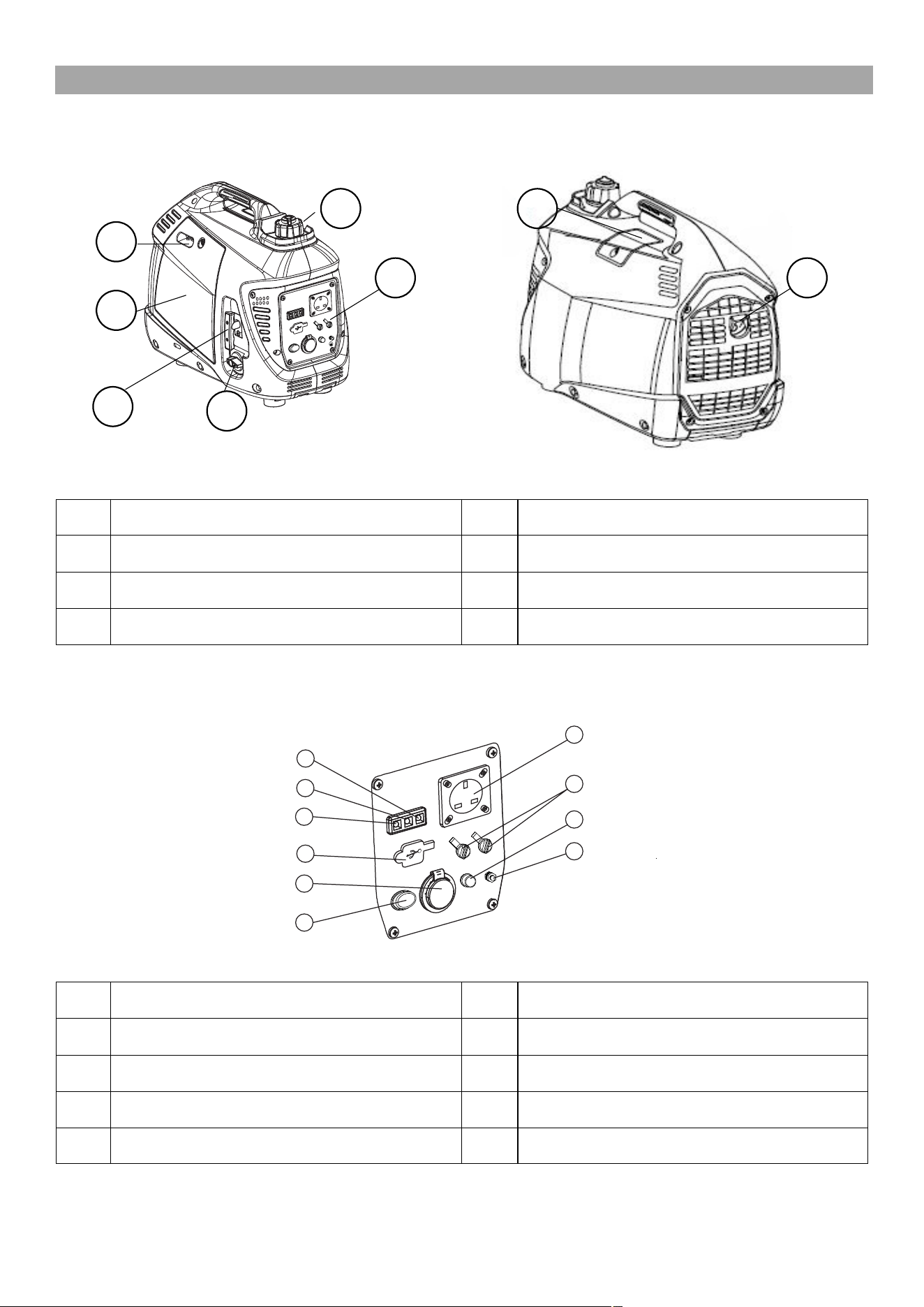
2. PART LOCATIONS & SYMBOLS
1
Fuel Filler Cap
5
Control Panel
2
Spark Plug Maintenance Cover
6
Exhaust
3
Choke Lever
7
Recoil Starter Handle
4
Maintenance Cover
8
Engine Switch
1
DC 12V
6
Parallel Outputs
2
AC Output Socket
7
Economy Switch
3
AC Indicator Light (green)
8
Ground Terminal
4
Overload Indicator Light (red)
9
USB Outlet
5
Oil Warning Indicator Light (red)
1 2
3
5 6
4
7
8
2
1
3
4
5
6
7
8
9
10
9
SCREW
3. PRE-OPERATION CHECK
WARNING
This machine is shipped without fuel and oil and MUST be filled before operation.
Failure to do so may result in engine damage that will not be covered by Warranty.
Ensure the generator is on flat, level ground before filling with fuel or oil.
WARNING
ALL FUELS ARE FLAMMABLE.
Switch off the engine and allow to cool before filling with fuel and ALWAYS fuel and
de-fuel in a well ventilated area.
DO NOT mix fuel with oil
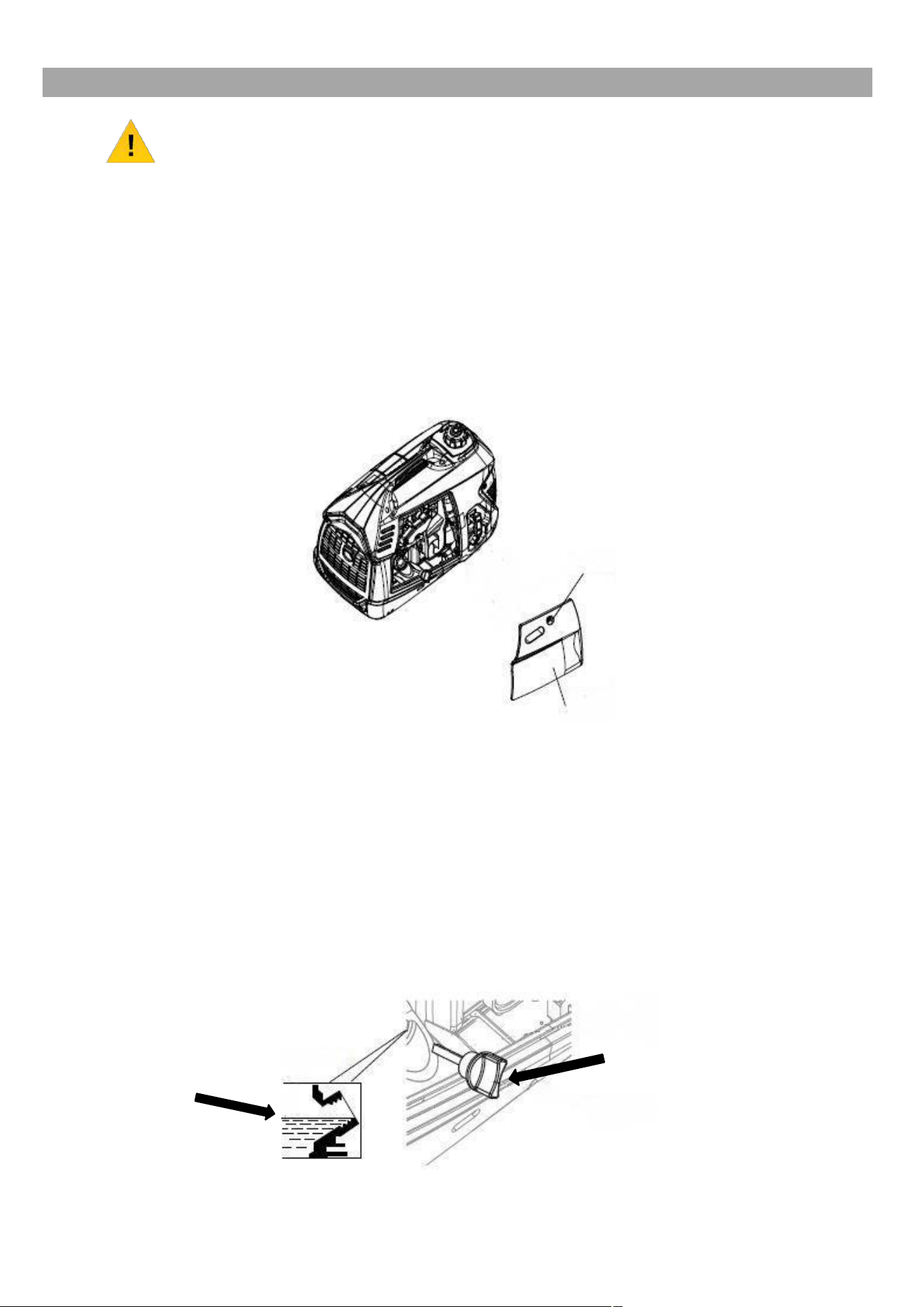
2.0
To fill with oil, remove the maintenance cover to gain access to the oil filler/dipstick.
MAINTENANCE COVER
2.1
Fill with 0.25l of fresh Semi-Synthetic SAE 15w40 engine oil to the upper limit of the
oil filler neck.
DO NOT overfill.
2.2
Fill slowly, stopping occasionally to check the oil level.
2.3
Once the correct amount of oil has been added, refit the dipstick securely.
2.4
If you overfill the oil, you can remove some by gently tilting the machine on its side
and pouring out any excess oil into a suitable container.
Oil Filler / Dipstick
Upper Limit
10
2.5
Refit the maintenance cover.
2.6
To fill with fuel, remove the fuel filler cap.
2.7
Fill with 2.2l of fresh unleaded petrol.
DO NOT mix the fuel with the oil.
2.8
DO NOT overfill, fill to the red upper limit mark or leave a 25mm gap between the
fuel and the top of the fuel tank.
2.9
Wipe up any spills immediately.
2.10
Refit the fuel filler cap securely.
4. STARTING PROCEDURE
CAUTION
For OUTDOOR USE ONLY.
This machine produces Carbon Monoxide which is a colourless and odourless gas.
Inhaling this gas can cause death as well as serious long term health problems such
as brain damage.
NOTE
DO NOT start the generator with any loads connected.
FROM COLD
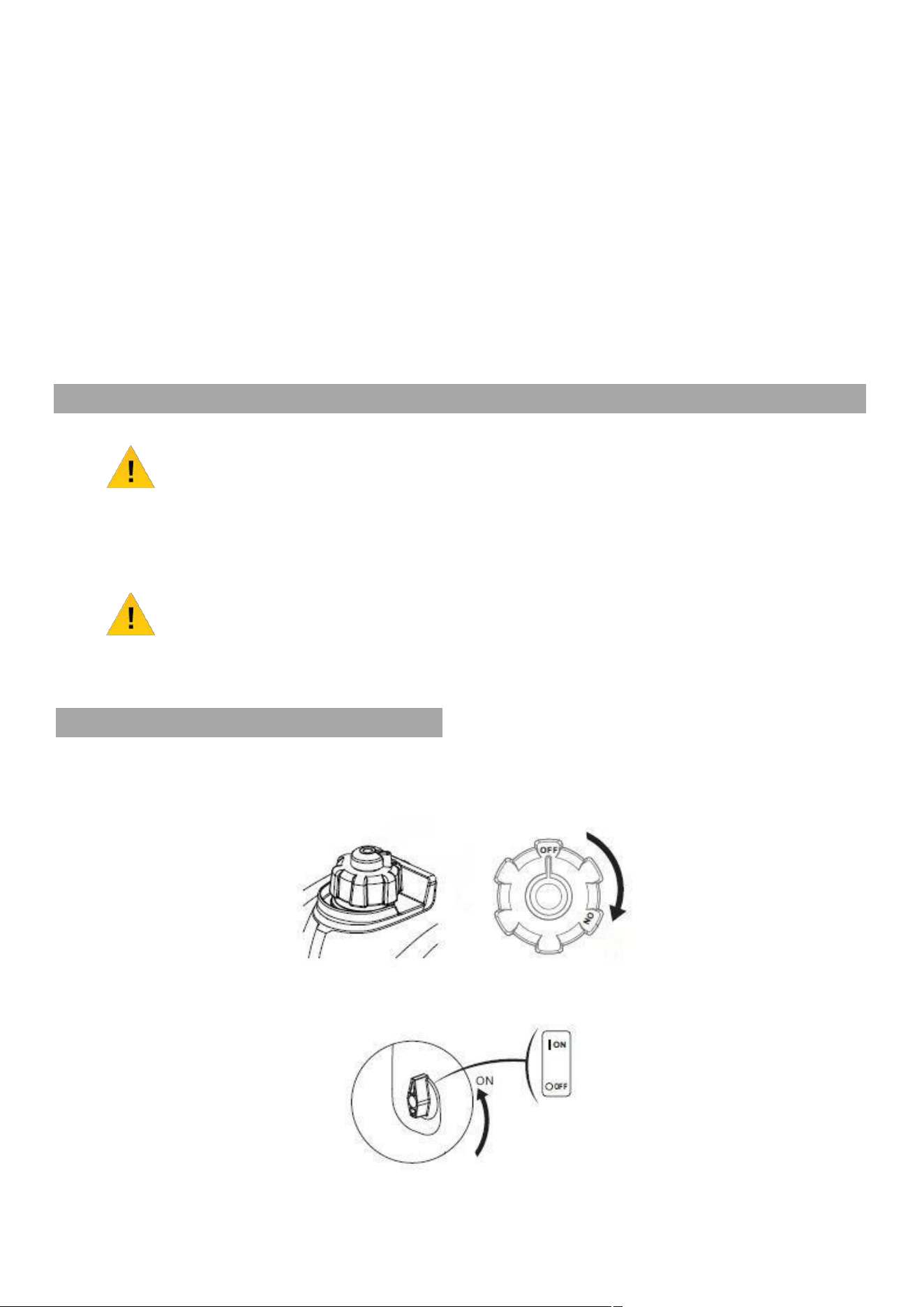
3.0
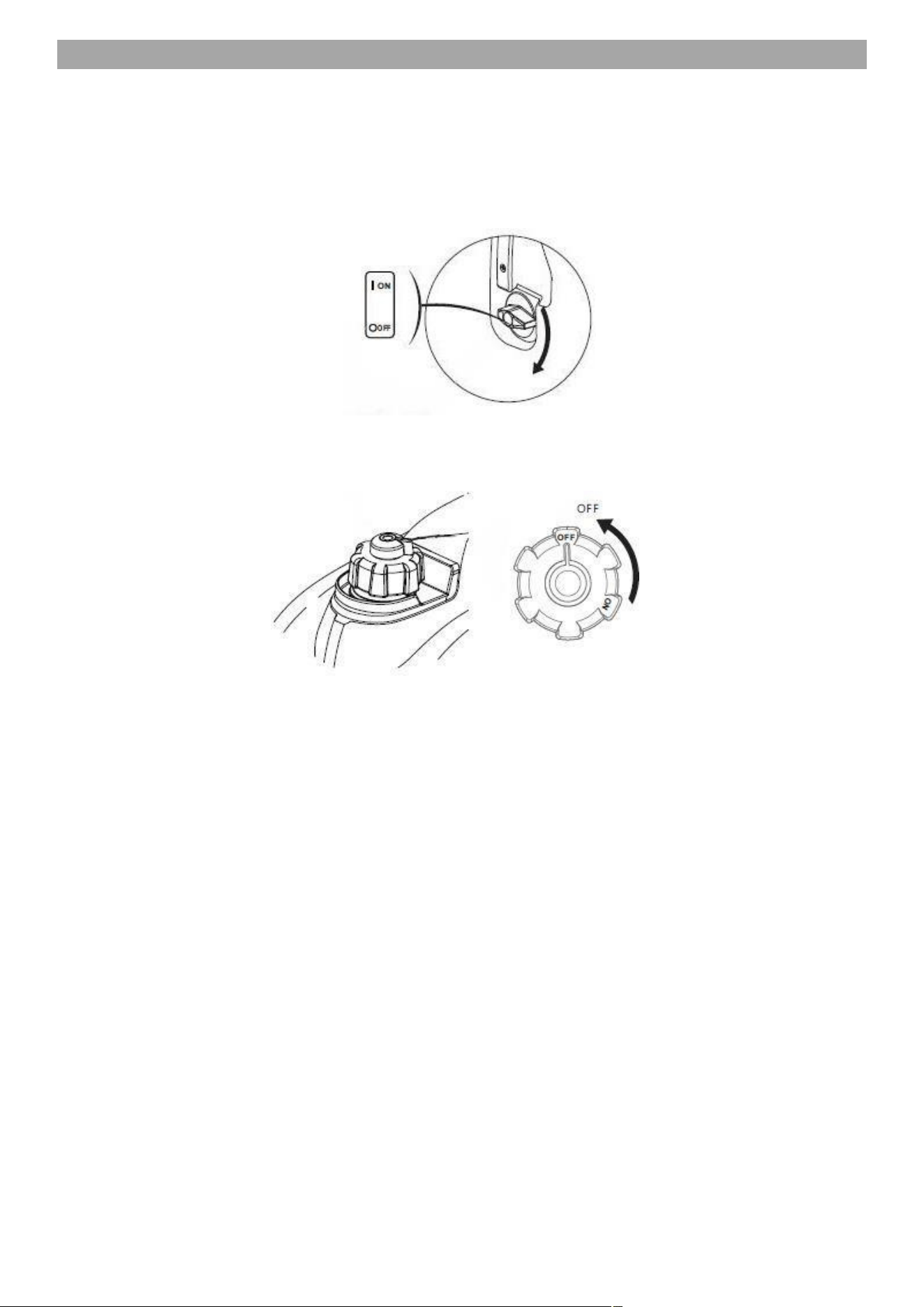
Turn the fuel vent cap to the ‘ON’ position.
3.1
Turn the engine switch to the ‘ON’ position.
11
CHOKE LEVER CLOSED
3.2
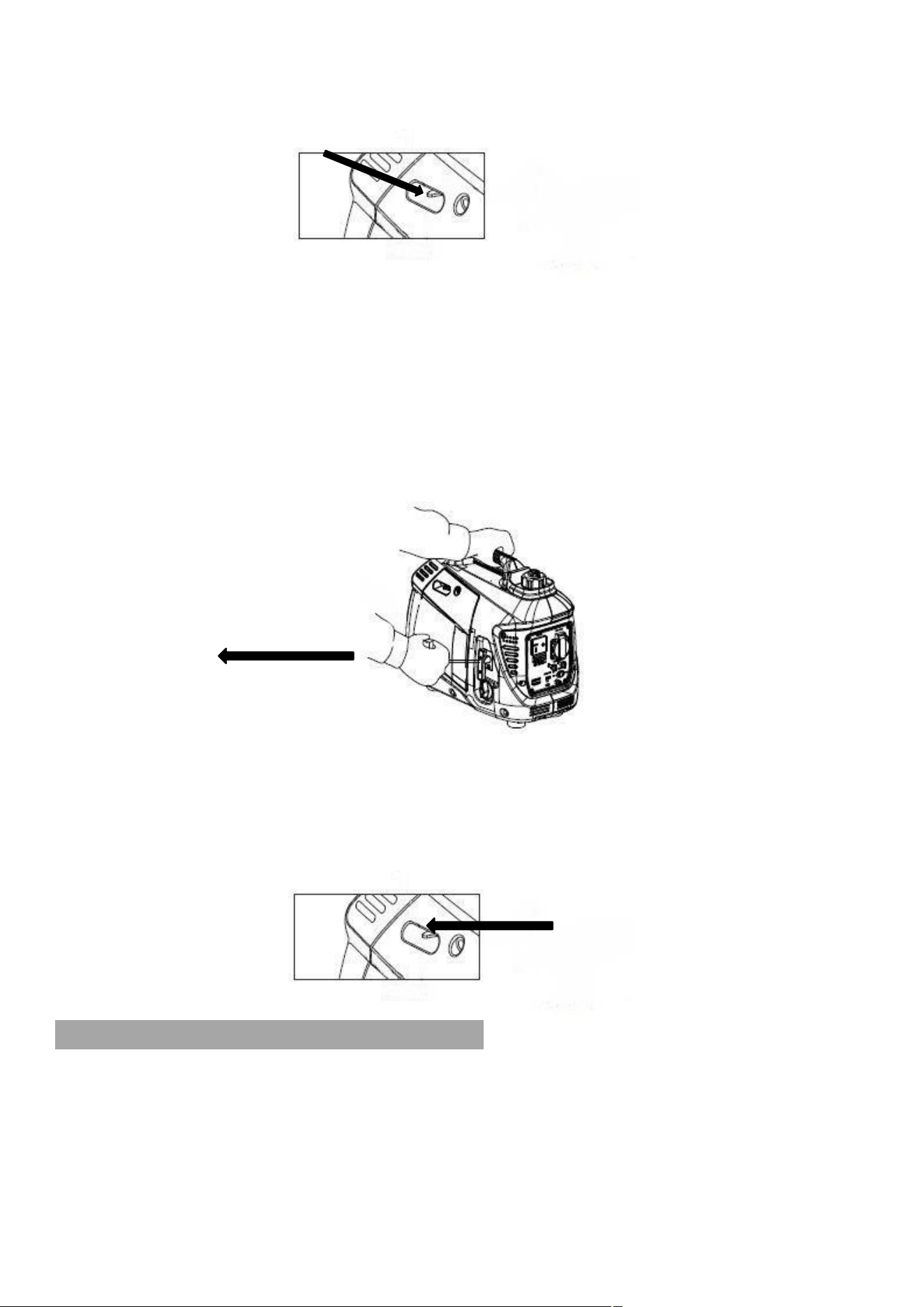
Move the choke lever to the ‘CLOSED’ position.
3.3
Hold the generator handle firmly and pull the recoil starter handle gently until you feel
resistance.
3.4
Once you feel resistance, pull the recoil starter handle swiftly in the direction shown,
until the engine starts.
3.5
Return the recoil starter handle slowly by hand.
DO NOT let go of the handle allowing it to spring back.
3.6
Once the generator is running and has warmed up, move the choke lever to the
‘OPEN’ position.
CHOKE LEVER OPEN
FROM WARM
3.7
Repeat the cold starting procedure but miss out step 3.2
12
5. STOPPING PROCEDURE
4.0
Turn off and unplug all connected appliances.
4.1
Allow the generator to idle with no load for one minute.
4.2
Turn the engine switch to the ‘OFF’ position.
4.3
Turn the fuel cap vent lever to the ‘OFF’ position.

13
6. OPERATING INSTRUCTIONS
WARNING
Connecting for standby power to a building’s electrical system MUST be done by a
qualified electrician and MUST comply with all applicable laws and electrical codes.
Improper connections may cause serious injury to electrical workers during power
outage and when the power is restored, the generator may explode or cause fires.
WARNING
To prevent electrical shock from faulty appliances, the generator should be
grounded.
Limit operation requiring maximum power to 30 minutes.
DO NOT exceed the current limit specified for any one socket.
DO NOT connect the generator to a household circuit.
WARNING
DO NOT modify or use the generator for any other purpose than it was intended
for.
When an extension cable is required, be sure to use a rubber sheathed flexible
cable.
Limit length of extension cables to 60m for cables of 1.5mm
2
and 100 for cables of
2.5mm
2
WARNING
Keep the generator away from other electric cables or wires such as the distribution
network.
The DC socket can be used while the AC power is in use.
If you use both at the same time, be sure not to exceed the total power for AC & DC.
The total power for AC and DC (AC:0.9kVA, DC:5A).
WARNING
Before connecting a device to the generator, make sure the electrical rating of the
device does not exceed the electrical rating of the generator.
Be sure the device is turned OFF before plugging in the power cord.
NOTE
Confirm all electrical appliances are in good working condition before connecting
them to the generator.
If an electrical appliance becomes abnormal, sluggish or stops suddenly, shut off the
generator engine immediately and disconnect the appliance.
NOTE
A new generator should be run at 50% load for 20 hours to ensure a long life from
the engine.
14
AC APPLICATIONS
5.0
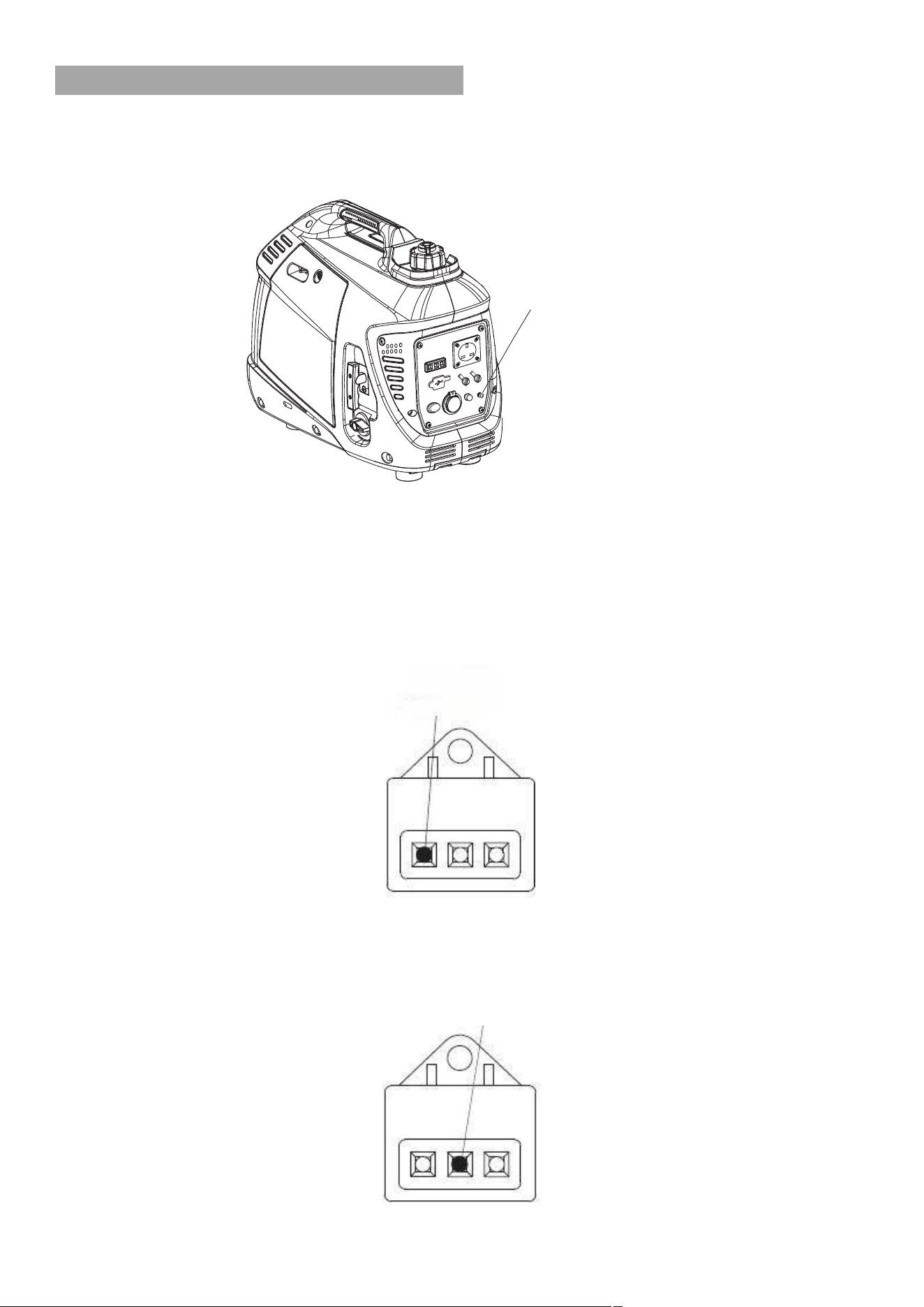
Before using the generator, a ground wire must be connected to the ground terminal.
Before using the ground terminal, consult a qualified electrician.
5.1
Start the generator engine and make sure the output indicator light (green) is on.
5.2
Confirm all electrical appliances are switched OFF and connect the appliance
plug to the generator socket.
5.3
Turn on the appliance.
5.4
Under normal operating conditions, the output indicator light (green) will be ON.
OUTPUT INDICATOR LIGHT (GREEN)
5.5
If the generator is overloaded (over 0.9kVA), or if the connected appliance is faulty,
the output indicator light (green) will turn off and the overload indicator light (red)
will turn on.
OVERLOAD INDICATOR LIGHT
GROUND TERMINAL
EARTH MARK

15
5.6
Power to the appliance will be switched off but the generator engine will remain
running.
5.7
Switch off the electrical appliance and disconnect it from the generator.
5.8
Press and hold the reset button for 1 second.
5.9
The output indicator light should turn back to green and be ready for use again.
5.10
If the indicator light does not turn back to green, stop the generator and refer to the
maintenance section.
5.11
The oil warning system is designed to prevent engine damage caused by insufficient
oil in the crank case.
5.12
Before the oil level in the crankcase falls below a safe limit, the oil warning system
will automatically shut down the engine (the engine switch will remain in the ON
position).
5.13
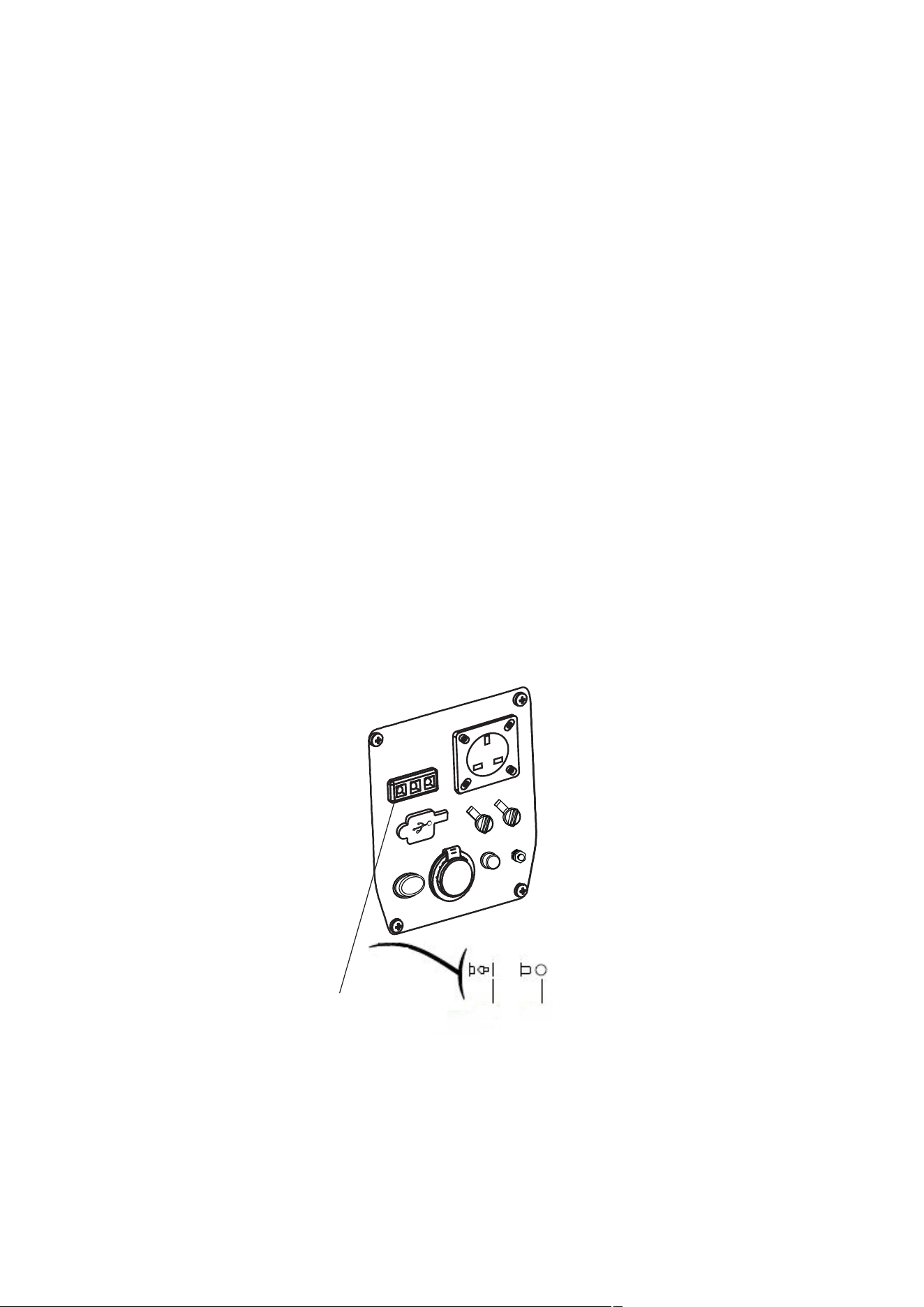
If the oil warning system shuts down the engine, the oil warning indicator light (red)
will be on.
OIL WARNING INDICATOR LIGHT (RED)
5.14
The engine oil level will need replacing before the engine will start again.
DC APPLICATIONS
5.14
The DC socket is only used for charging a 12V battery.
5.15
Turn the economy switch to the OFF position.
5.16
In order to avoid producing a spark, connect the charging cables to the battery
terminals first and then to the generator.
Reverse this procedure when disconnecting.
5.17
Connect the positive battery terminal to the positive charging cable.
DO NOT reverse the charging cable as this could damage the generator or battery.
16
5.18
Before connecting the charger to a battery that is installed in a vehicle, the negative
battery cable must be disconnected first.
This will prevent sparks or a short circuit if the cable accidentally contacts the
vehicles body.
5.19
DO NOT start the vehicle with the battery charger connected to the battery,
otherwise the generator will be damaged.
5.20
A battery can release explosive gasses.
Keep the battery away from any sources of ignition.
5.21
Charge the battery in a well ventilated area.
5.22
Battery electrolyte contains sulphuric acid that can cause severe burns to the skin or
eyes.
The correct Personal Protective Equipment (PPE) MUST be worn when handling
batteries.
5.23
If battery electrolyte gets on to the skin or eyes, rinse thoroughly with warm water for
at least 15 minutes and call a Doctor immediately.
5.24
If you swallow any battery electrolyte, rinse your mouth with water and drink plenty of
water or milk (with magnesia or vegetable oil) and call a Doctor immediately.
5.25
The DC socket can be used while the AC socket is in use.
5.26
If you use both at the same time, be sure not to exceed the total power for AC & DC.
The total power for AC and DC (AC:0.9kVA, DC:5A).
5.27
If the DC circuit overloads it will trip the DC circuit protector.
To reset, remove the load first and then reset the trip switch after a few minutes.
DC CIRCUIT PROTECTOR
ON OFF

17
ECONOMY SWITCH CONTROL
5.28
With the engine Economy Switch turned ‘ON’, the generator automatically
determines the required engine speed based on the generator load.
5.29
This results in much better fuel economy and reduces noise levels.
5.30
With the Economy Switch turned ‘OFF’, the engine will run at the rated speed of
4850rpm.
5.31
The Economy Switch must be turned off when starting devices that require a large
starting current, such as air compressors.
7. MAINTENANCE
WARNING
Before cleaning, inspecting or repairing your unit, you MUST make sure that the
engine has stopped and allowed to cool.
You MUST disconnect the spark plug HT lead cap to prevent any accidental starting.
CAUTION
ALWAYS refuel in a well-ventilated area with the engine off and the spark plug HT
cap removed.
Whilst carrying out maintenance you MUST wear appropriate Personal Protective
Equipment (PPE). Suggested PPE Sturdy footwear, work gloves, long trousers and
hearing protection.
NOTE
Spare parts – If a part needs replacement, you MUST only use parts that meet the
manufacturer’s part number specifications.
Replacement parts that DO NOT meet specifications may result in a safety hazard or
poor operation of the generator and will VOID the warranty.
Major servicing including installation or replacement parts, should be made by a
qualified service technician.
18
Item
Maintenance
Every
Usage
1
st
month
or 20
hours
Every 3
months or
50 hours
Every 6
months or
100 hours
Every 12
month or
200 hours
Engine Oil
Check Level
X
Change
X
X
Air Filter
Check
X
Clean
X*
Spark Plug
Check/Adjust
X
Replace
X
Valve
Clearance
Check/Adjust
X**
Combustion
Chamber
Clean
After every 300 hrs**
Fuel Tank &
Filter
Clean
X**
Fuel Line
Clean
Every 2 years, replace if necessary**
* Service more frequently in dusty environments.
** Work to be carried out by a qualified engineer or your service dealer.
AIR FILTER
CAUTION
The engine MUST NOT be run without an air filter otherwise piston and/or cylinder
damage can occur.
This type of damage will NOT be covered under warranty.
Maintaining the air filter is very important.
If dirt is allowed to get in to the engine through improperly installed, serviced or
inadequate filter elements, it can damage and wear out the engine.
ALWAYS keep the filter element clean.
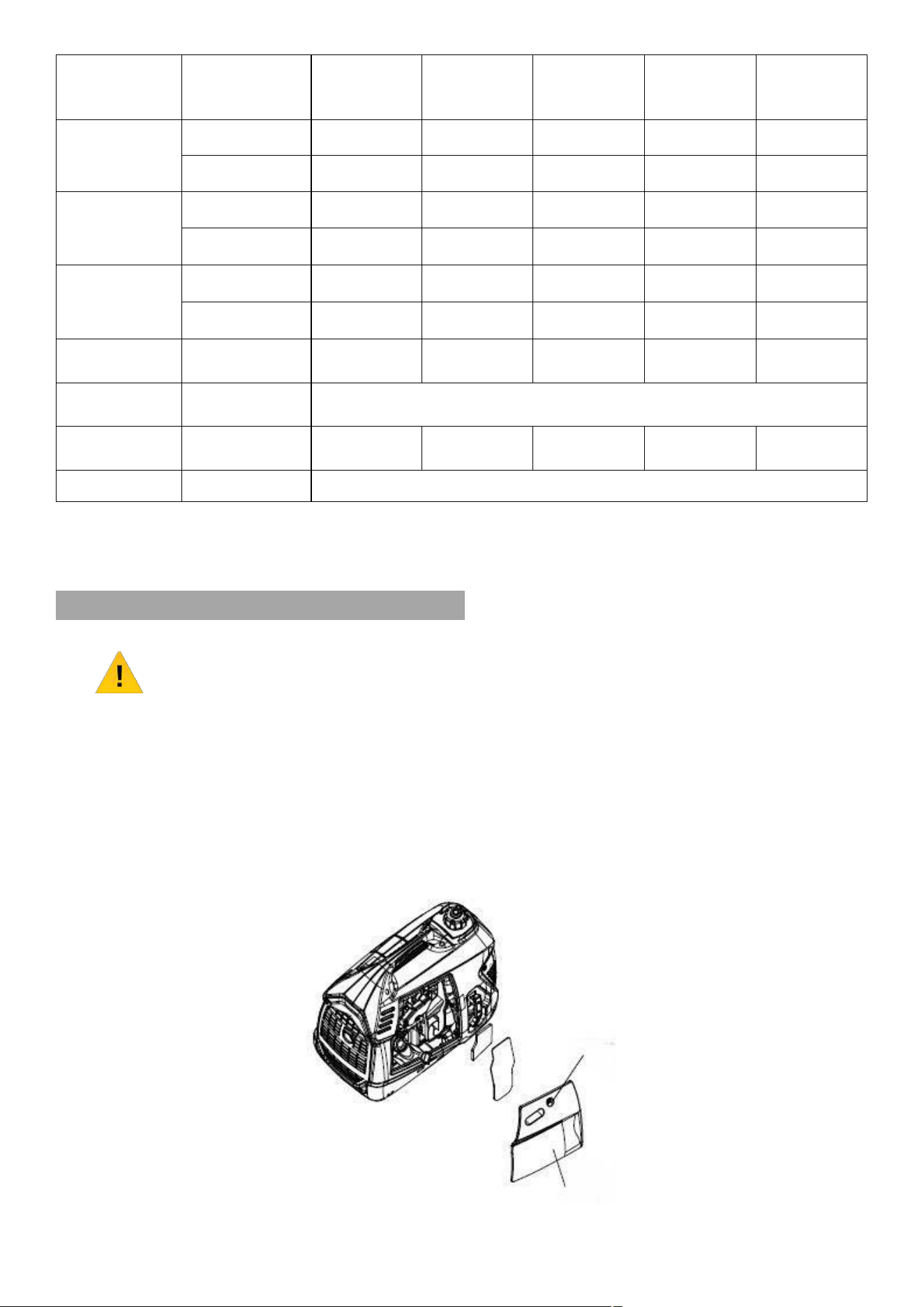
6.0
To gain access to the air filter, remove the maintenance cover.
COVER SCREW
MAINTENANCE COVER
19
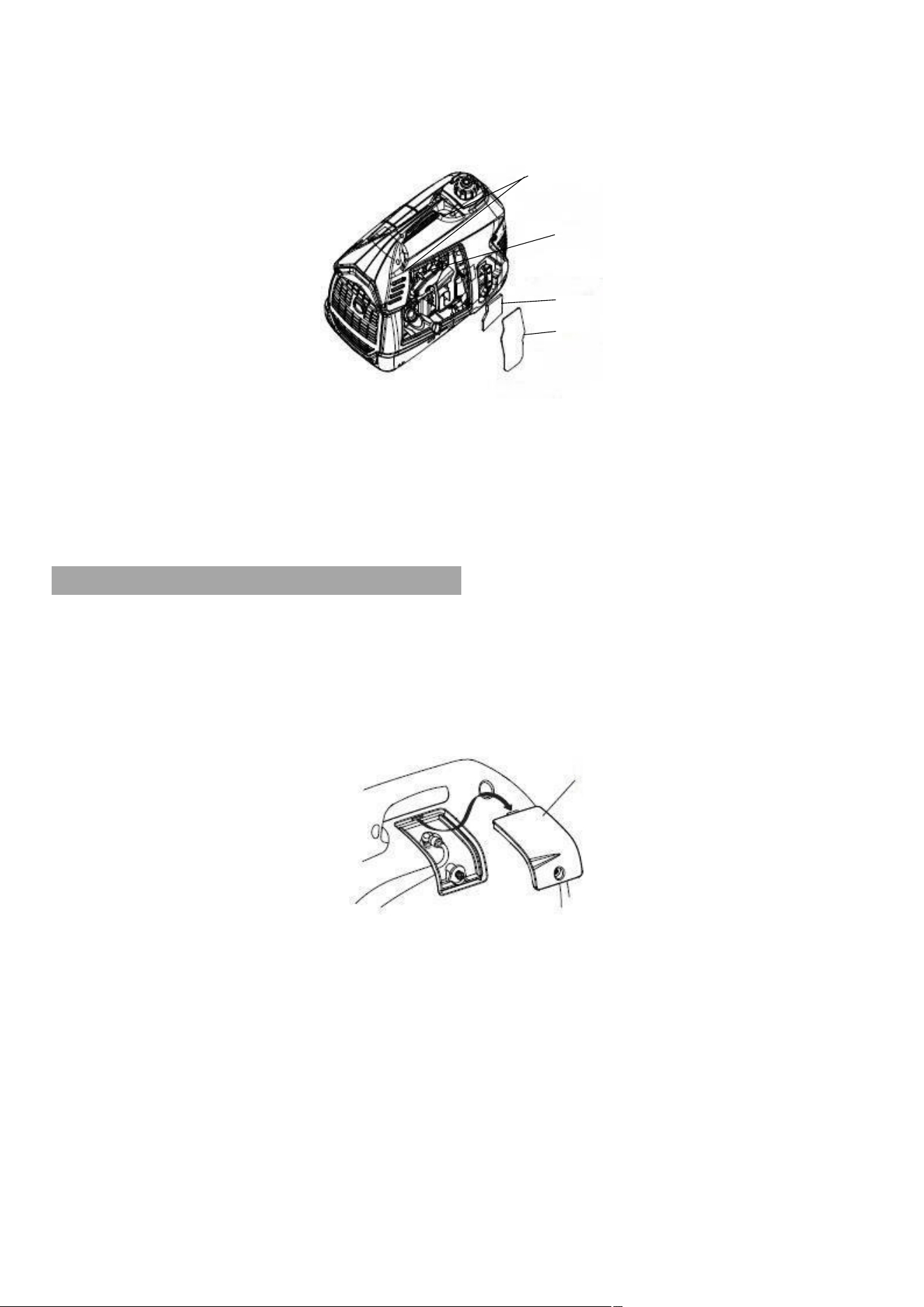
6.1
Press down on the latch tab on the top of the air filter housing and open the air filter
cover.
LATCH TABS
AIR FILTER HOUSING
AIR FILTER ELEMENT
AIR FILTER COVER
6.2
To clean the air filter, wash in warm soapy water and allow to dry.
6.3
Once dry, soak in clean engine oil then squeeze to remove the excess.
6.4
Reinstall the air filter, air filter cover and maintenance panel.
SPARK PLUG
6.5
Always replace with the same model spark plug, recommended spark plug is an
NGK CR7HSA.
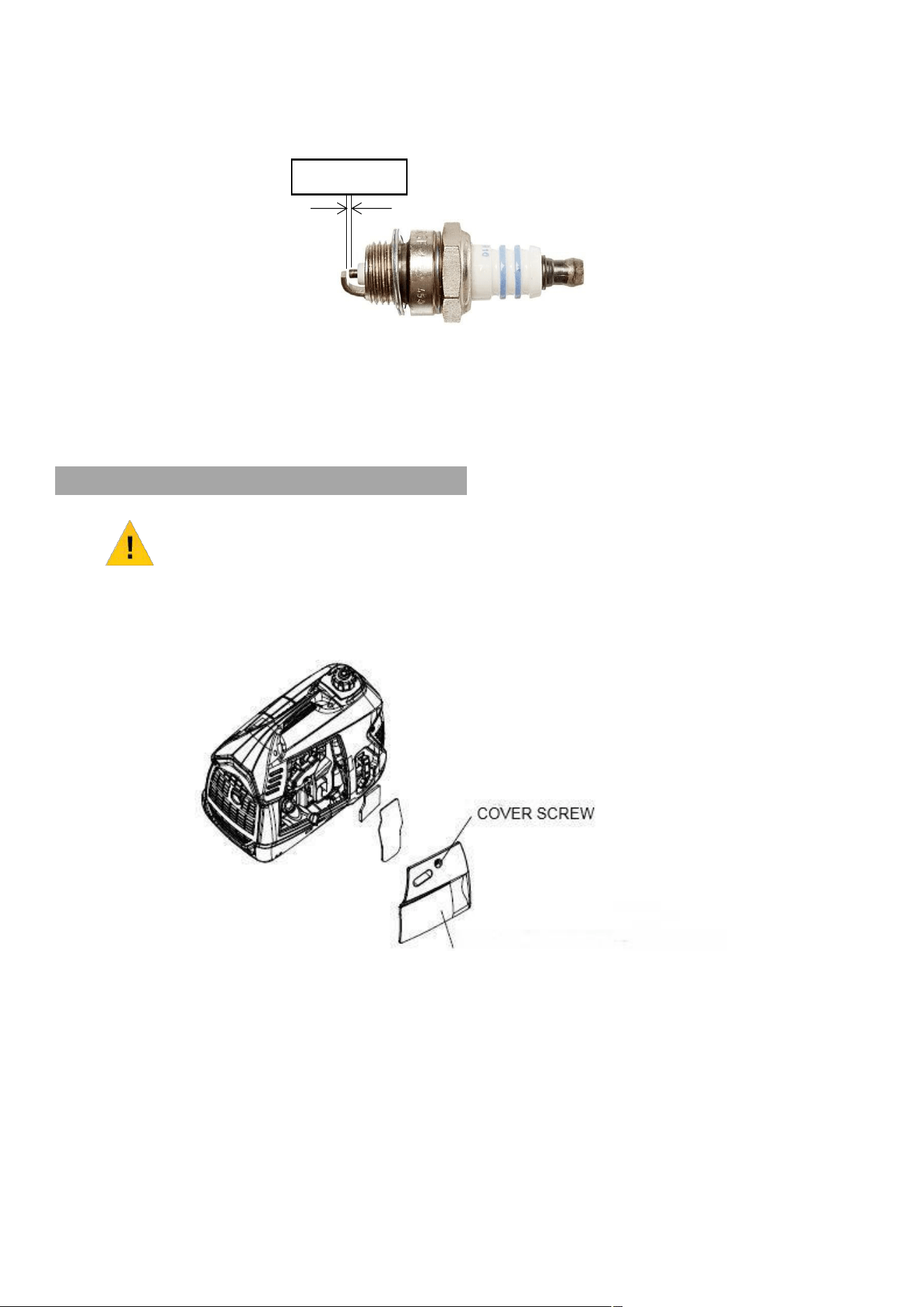
6.6
Remove the spark plug maintenance cover.
SPARK PLUG MAINTENANCE COVER
6.7
Carefully remove the spark plug HT lead cap.
6.8
Remove the spark plug using the box spanner provided in an anti-clockwise
direction.
6.7
Check the spark plug for visible damage and electrode erosion.
6.8
If damaged you MUST replace the spark plug.
6.9
Remove carbon deposits from the spark plug using a soft wire brush.
20
6.10
The spark plug gap should be 0.7 – 0.8mm.
Check the gap using a feeler gauge and adjust as necessary by carefully bending
the side electrode to achieve the correct gap.
6.11
Refit the cleaned and adjusted spark plug by hand to avoid cross-threading.
6.12
After spark plug seats then tighten as necessary but avoid over-tightening.
6.13
Re-attach the spark plug HT lead cap and spark plug maintenance cover.
OIL
NOTE
Oil capacity: 0.25 L
Semi-Synthetic SAE15W-30 Engine oil.
6.14
Remove the maintenance cover.
MAINTENANCE COVER
6.15
Remove the oil filler cap.
6.16
Drain the oil through the oil filler neck, into a suitable container.
0.7 – 0.8mm
21
6.17
Place the generator on a flat, level surface.
6.18
Slowly refill the engine with 0.25l of semi-synthetic SAE 15W-30 engine oil to the
upper level on the crank case.
6.19
DO NOT overfill, stop occasionally to check the oil level.
6.20
Refit the oil filler cap securely.
6.21
Refit the maintenance cover.
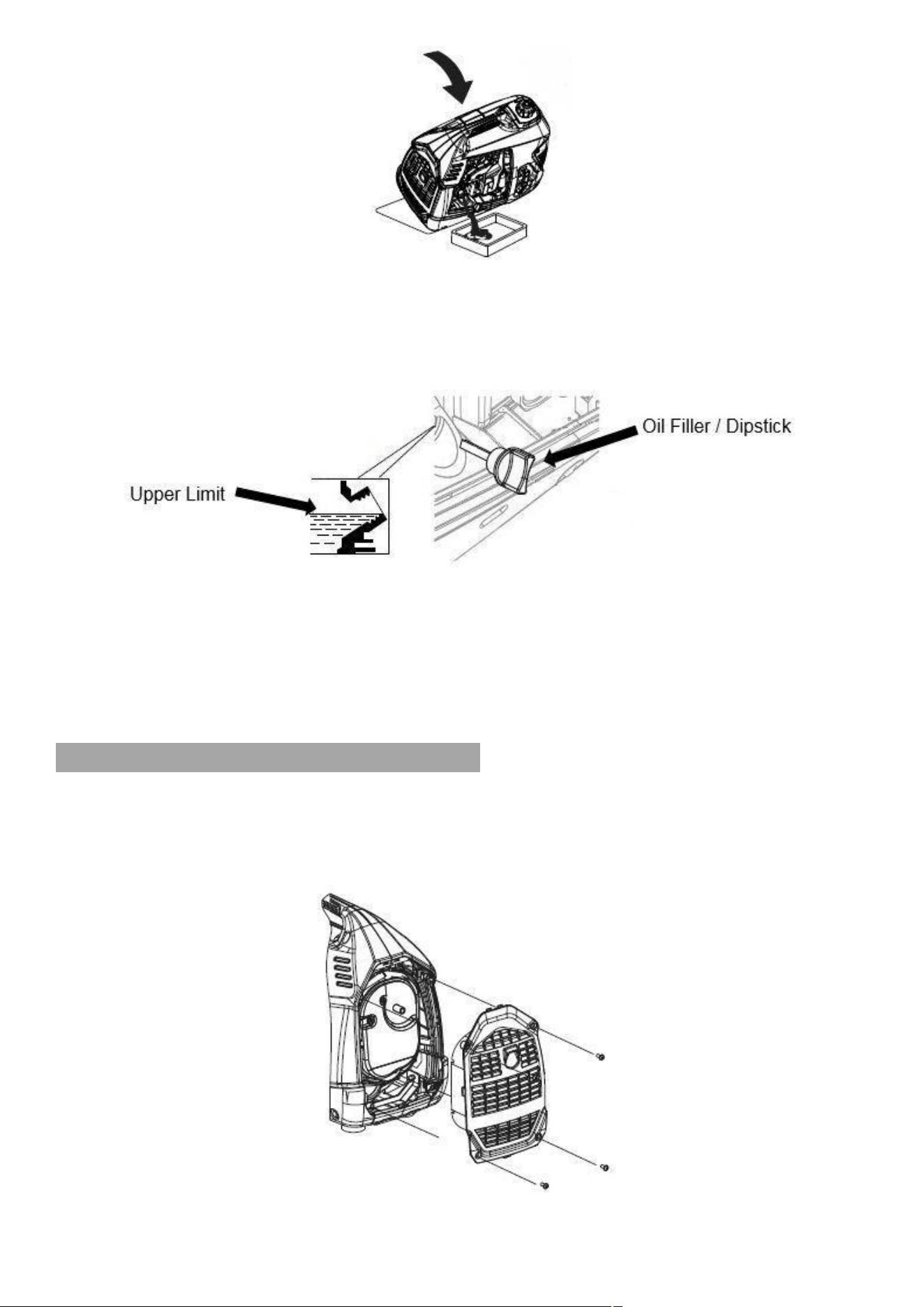
SPARK ARRESTOR
6.22
The spark arrestor MUST be maintained every 100 hours of use.
6.23
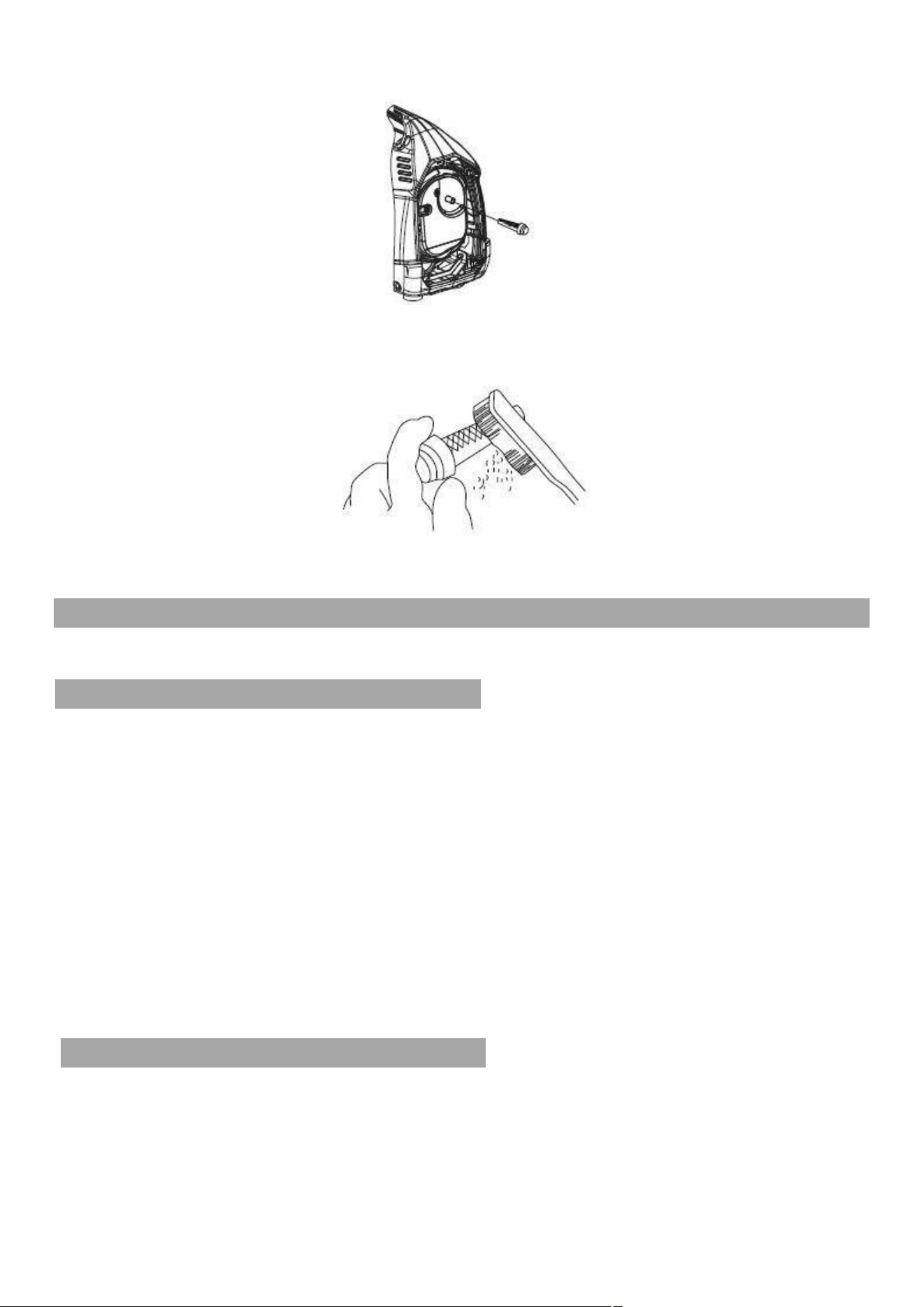
Remove the four screws and remove the exhaust guard.
22
6.24
Remove the spark arrestor from the exhaust.
6.25
Remove carbon deposits from the spark arrestor by using a soft wire brush.
If the spark arrestor shows signs of wear, it MUST be replaced.
6.26
Reinstall the spark arrester and the exhaust guard.
8. TRANSPORT & STORAGE
TRANSPORT
7.0
For transport, do not overfill the fuel tank.
7.1
If the generator has been used, allow it to cool for at least 15 minutes before loading
it in to the transport vehicle.
7.2
To prevent fuel spillage, the generator should be secured upright in its normal
working position with the start switch in the OFF position and the fuel cap vent lever
in the OFF position.
7.3
If transporting over rough terrain, remove all the fuel from the fuel tank.
7.4
DO NOT drop or strike the generator when transporting.
7.5
DO NOT place heavy objects on top of the generator.
STORAGE
7.6
The following steps should be taken if you store the generator for more than 30 days.

23
7.7
Drain all the fuel from the fuel tank into a suitable container.
7.8
Remove the maintenance cover to gain access to the carburetor.
7.9
Turn the engine switch to the ‘ON’ position and loosen the carburetor drain screw to
allow the fuel in the carburetor to drain into a suitable container.
CARBURETOR DRAIN SCREW
7.10
Remove the spark plug HT lead cap and pull the recoil starter handle three to four
times to remove all the fuel from the fuel lines.
7.11
Turn the engine switch to the ‘OFF’ position and tighten the carburetor drain plug
screw.
7.12
Change the engine oil following the procedure 6.14 to 6.20.
7.13
Remove the spark plug and pour a tablespoon of fresh engine oil down the cylinder
bore.
7.14
Pull the recoil starter handle three to four times to distribute the oil along the cylinder
bore, then refit the spark plug.
7.15
Store in a dry place away from sources of ignition.
7.16
Do not stack items on top of the generator.

24
9. TROUBLE SHOOTING
Problem
Recommended Action
Engine will not start
Not enough fuel
Fill with fuel
Start switch and fuel valve not
ON
Turn them to the ON position
Not enough engine oil
Add more oil
No fuel in the carburetor
Start a few times to ensure
fuel enters the carburetor
Spark plug not working
Replace spark plug
Take to authorised dealer
Connected device will not
start
Both the output indicator and
overload indicator lights are
not ON
Send the generator to an
authorised dealer
If the output indicator light is
ON but the device doesn’t
work after plugging in directly
Restart if the overload
indicator light is off, if it doesn’t
work, send to an authorised
dealer.
Both the output indicator light
and the overload indicator light
are ON but device has no
defects
Send the generator to an
authorised dealer
If there is no power in the
DC outlet
Electric circuit breaker is not
intact
Replace the electric circuit
breaker
Electric circuit breaker is intact
Send the generator to an
authorised dealer
Erratic DC output
Dirty air filter
Clean or replace the air filter
Fouled petrol
Replace petrol
Send to an authorised dealer

25
10. SPECIFICATION
ENGINE
Model
Type
4 stroke OHV single cylinder
Displacement
54cc
Bore/Stroke
43.5mm/40mm
Compression Ratio
8.5:1
Rated Speed
5200rpm
Ignition System
Full transistor
Starting Method
Recoil
Fuel Type
Unleaded petrol
Oil Capacity
0.25L
Oil Type
Semi-synthetic SAE 15W-40
GENERATOR
Model
P1000i
Rated Frequency
50Hz
60Hz
Rated Voltage
220V
230V
240V
110V
120V
220V
Rated Current
4.0A
3.9A
3.75A
8.2A
7.5A
4.0A
Rated Speed
500rpm
Rated Output Power
0.9kVA
Max Output Power
1.0kVA
GENERATOR SET
DC Output
12V/5A
Fuel Tank Volume
3.0L
Continuous Running
Time
8.5h @ 50% load
Fuel Consumption
550g/kWH
Working Ambient
Temperature
-5 to 40°C
Max Altitude
1000m
Noise Level
62 dBA @ 7m
Net Weight
14Kg

26
11. RECYCLING & PRODUCT DISPOSAL
8.0
We do not offer a takeback scheme for the recovery of Waste Electrical Electronic
Equipment (WEEE) & Batteries.
Instead the responsibility to dispose of WEEE and or Batteries is passed onto you by
us.
So when it becomes necessary to dispose of your machine you must take it to your
local Civic Amenity Site.
For further information please contact your local Authority for disposal advice.
8.1
You MUST make sure that all unused oil and fuel is disposed of correctly either
beforehand or at your local Civic Amenity Site.
Under NO circumstances must any fuel or oil be put down any drains.
8.2
Certain products contain WEEE waste which should not be disposed
of in your domestic waste.
8.3
You MUST recycle WEEE in accordance with your local authority or
recycling centre.
8.4
Certain products contain batteries which should not be disposed of
in your domestic waste.
8.5
You MUST recycle batteries in accordance with your local authority or recycling
centre.
8.6
Unwanted packaging and materials should be stored and taken to a recycling centre
so it can be disposed of in a manner which is compatible with the environment.
8.7
The following symbol means that you should ‘Reduce – Reuse –
Recycle’.
8.8
We are a Member of the VALPAK National Compliance Scheme and our registration
number is RM08660
8.9
For further information about disposal please contact your Local Authority.
8.10
You can also get more advice and guidance about recycling at the following website
http://www.recycle-more.co.uk
8.11
Should you pass this product on to another user either sold or loaned, you MUST
pass on this user manual.
This will make sure that all other users can use and maintain this machine safely.
27
12. DECLARATION OF CONFORMITY
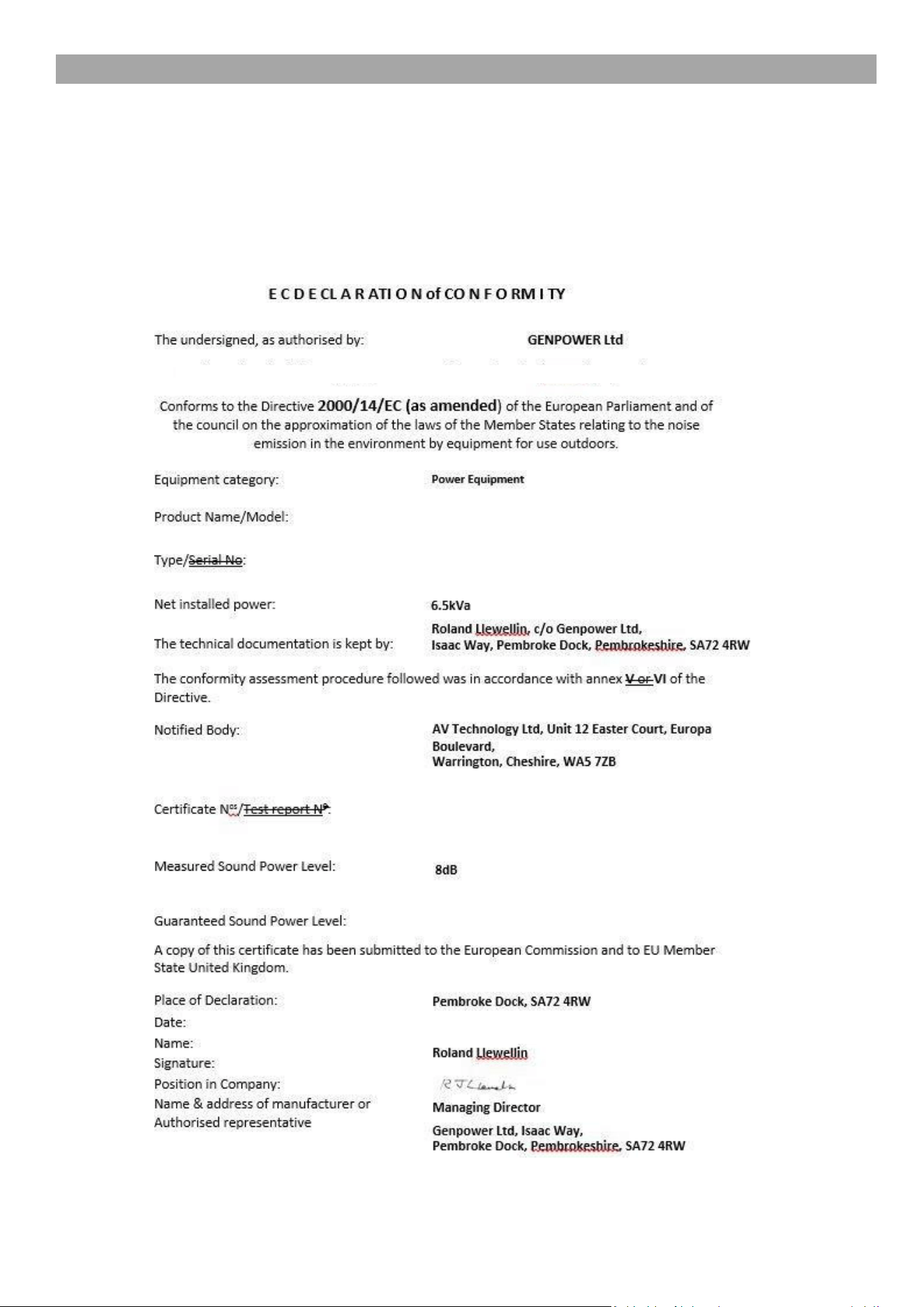
Genpower Ltd confirms that these P1PE products conform to the following CE Directives.
97/68/EC Non Road Mobile Machinery Directive
2000/14/EC Outdoor Noise Directive
2004/108/EC Electro Magnetic Compatibility Device
2006/42/EC Machinery Directive
1kVA
67dB
01 March 2018
67dB
OND-2016508-04-02 P1000i
Inverter Generator
P1000i

28
13. CONTACT DETAILS
9.0 POSTAL ADDRESS Genpower Ltd, Isaac Way,
London Road, Pembroke Dock,
Pembrokeshire.
SA72 4RW. UK.
9.1 TELEPHONE +44 (0) 1646 687880
9.2 FAX +44 (0) 0164 686198
9.3 WEBSITE www.pipe.co.uk
MANUAL UPDATES
10.0
Our manuals are constantly being reviewed and updated.
However if you find and error, omission or something you find unclear, please
contact your dealer for assistance.
10.1
Our latest manuals are also placed online.
10.2
We reserve the right to make any modifications without prior notice whenever
necessary.
14. WARRANTY
11.0 To register your machine for the manufacturer’s warranty, please visit:
http://www.p1pe.co.uk/warranty

29

30

31