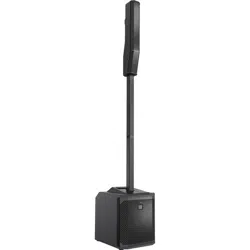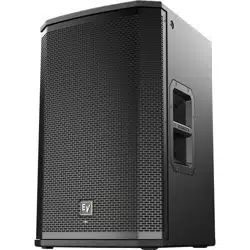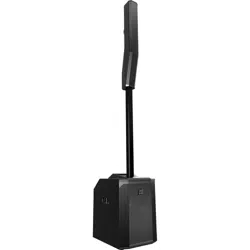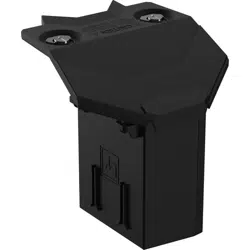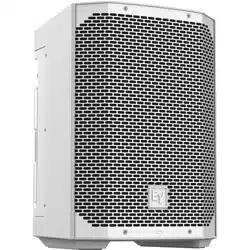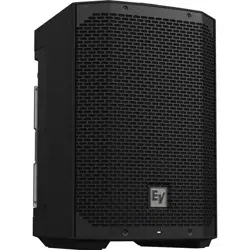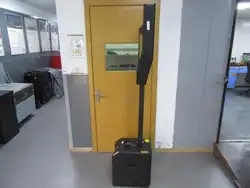

EVOLVE G2 | EVOLVE M G2 Portable Column
Loudspeaker
EVOLVE30M‑G2, EVOLVE50M‑G2, EVOLVE50‑G2
en
User manual
PRELIMINARY

PRELIMINARY

EVOLVE G2 | EVOLVE M G2 Portable Column
Loudspeaker
Table of contents | en 3
Bosch Security Systems, LLC User manual 2025-12 | Draft 03 |
PRELIMINARY
Table of contents
1
Safety 4
1.1 Important safety instructions 4
1.2 Precautions 5
1.3 Suspension 6
2
Product registration 7
3
Short information 8
3.1 Parts included 8
4
Description 10
4.1 Quick setup 10
5
Installation 12
6
Pairing the QuickSmart Mobile application 13
7
Amplifier DSP 15
7.1 Amplifier DSP controls 15
7.1.1 EVOLVE30M-G2 and EVOLVE50M-G2 15
7.1.2 EVOLVE50-G2 16
7.2 System status 16
7.2.1 EVOLVE30M-G2 and EVOLVE50M-G2 16
7.2.2 EVOLVE50-G2 17
7.2.3 System protection 18
7.3 DSP control menu 19
7.3.1 Loudspeaker DSP control menu 19
8
Input & Mixer operation 26
9
Recommended configurations 30
9.1 Stereo pair 30
9.2 DJ performance 32
9.3 Solo musician performance 34
9.4 Speaking event 35
9.5 Bluetooth true wireless stereo (TWS) 36
9.6 Stereo with additional subwoofer 37
10
Troubleshooting 38
11
Technical data 40
11.1 Block diagram? 43
11.2 Dimensions 43
12
Appendices 44
12.1 Audio FX 44
12.1.1 FX on EVOLVE30M-G2 and EVOLVE50M-G2 44
12.1.2 FX on EVOLVE50-G2 effects 45
12.2 Warranty information 46
12.3 OUTPUT list 46
12.4 INPUT list 50
12.4.1 INPUT DSP control menu for EVOLVE30M-G2 and EVOLVE50M-G2 50
12.4.2 INPUT DSP control menu for EVOLVE50-G2 52
12.5 Regulatory information 54
12.5.1 FCC information 54
12.5.2 Simplified Declaration of Conformity (sDoC) for Europe (CE) 55
12.5.3 Regulatory notice for CE - Information concerning the use of the apparatus 58
12.5.4 Certifications 58
12.5.5 Notices 58
4 en | Safety
EVOLVE G2 | EVOLVE M G2 Portable Column
Loudspeaker
2025-12 | Draft 03 | User manual Bosch Security Systems, LLC
PRELIMINARY
1 Safety
1.1 Important safety instructions
1. Read and keep these safety instructions. Follow all instructions and heed all warnings.
2. Download the latest version of the applicable installation manual from www.electrovoice.com for
installation instructions.
Information
Refer to the Installation Manual for instructions.
3. Follow all installation instructions and observe the following alert signs:
i
Notice!
Containing additional information. Usually, not observing a notice does not result in damage to the
equipment or personal injuries.
!
Caution!
The equipment or the property can be damaged, or persons can be injured if the alert is not observed.
Danger!
Risk of electric shock.
4. Clean only with dry cloth. - Unplug the apparatus from the outlet before cleaning. Do not use
liquid cleaners or aerosol cleaners.
5. Condensation - In order to avoid condensation; wait a few hours before turning on the
equipment when it is transported from a cold to a warm space.
6. The apparatus shall not be exposed to dripping or splashing and no objects filled with liquids,
such as vases, shall be placed on the apparatus.
Danger!
To reduce the risk of fire and electric shock, do not expose this apparatus to rain or moisture.
7. Do not block any ventilation openings. Install in accordance with the manufacturer’s
instructions. - Openings in the enclosure, if any, are provided for ventilation and to ensure
reliable operation of the apparatus and to protect it from overheating. These openings must not
be blocked or covered. This apparatus should not be placed in a built-in installation unless proper
ventilation is provided or the manufacturer’s instructions have been adhered to.
8. Do not install near any heat sources such as radiators, heat registers, stoves, or other apparatus
(including amplifiers) that produce heat or in direct sunlight.
9. No naked flame sources, such as lighted candles, should be placed on the apparatus.
10. Only use attachments/accessories specified by the manufacturer. - Any mounting of the
apparatus should follow the manufacturer’s instructions, and should use a mounting accessory
recommended by the manufacturer.
EVOLVE G2 | EVOLVE M G2 Portable Column
Loudspeaker
Safety | en 5
Bosch Security Systems, LLC
User manual
2025-12 | Draft 03 |
PRELIMINARY
11. Use only with the cart, stand, tripod, bracket or table specified by the manufacturer, or sold
with the apparatus. - When a cart is used, use caution when moving the cart/apparatus
combination to avoid injury from tip-over. Quick stops, excessive force, and uneven surfaces may
cause the appliance and cart combination to overturn.
12. System installation and servicing by qualified personnel only, in accordance with applicable local
codes. No user-serviceable parts inside.
13. Devices installed above 2m height may cause injury when falling down. Preventive measures
must be taken.
14. Replacement parts - When replacement parts are required, be sure the service technician has
used replacement parts specified by the manufacturer or having the same characteristics as the
original part. Unauthorized substitutions may result in fire, electric shock or other hazards.
15. Safety check - Upon completion of any service or repairs to this apparatus, ask the service
technician to perform safety checks to determine that the apparatus is in proper operating
condition.
!
Warning!
This product is designed ONLY to be suspended with authorized Electro-Voice mounting accessories.
Do NOT use non-authorized brackets or methods to suspend the loudspeaker. Handles on Electro-
Voice loudspeakers are intended to only be used for temporary transport by people or for use with
Electro-Voice authorized mounting accessories ONLY. Items such as fiber rope, wire rope, cables, or
other types of materials cannot be used to suspend the loudspeaker from the handles.
!
Warning!
Use of non-authorized accessories or attachments with this or any Electro-Voice product is at your
own discretion. Use of non-authorized accessories or attachments can result in product malfunction,
injury, or death.
The user assumes all liability and may result in the warranty being voided.
!
Caution!
Do not attempt to move this loudspeaker system when it is fully assembled.
You may damage the system or cause personal injury.
1.2 Precautions
– Do not use Electro-Voice loudspeakers in an environment where temperatures are below 0°C
(32°F) or exceed +35°C (95°F).
– Electro-Voice loudspeakers are easily capable of generating sound pressure levels sufficient to
cause permanent hearing damage to anyone within normal coverage distance. Caution should be
taken to avoid prolonged exposure to sound pressure levels exceeding 90 dB. To prevent hearing
damage do not listen at high volume levels for long periods.
6 en | Safety
EVOLVE G2 | EVOLVE M G2 Portable Column
Loudspeaker
2025-12 | Draft 03 | User manual Bosch Security Systems, LLC
PRELIMINARY
1.3 Suspension
!
Warning!
Suspending any object is potentially dangerous and should only be attempted by individuals who
have a thorough knowledge of the techniques and regulations of suspending objects overhead.
Electro-Voice strongly recommends all loudspeakers be suspended taking into account all current
national, federal, state, and local laws and regulations. It is the responsibility of the installer to ensure
all loudspeakers are safely installed in accordance with all such requirements. When loudspeakers are
suspended, Electro-Voice strongly recommends the system be inspected at least once per year or as
laws and regulations require. If any sign of weakness or damage is detected, remedial action should
be taken immediately. The user is responsible for making sure the wall, ceiling, or structure is capable
of supporting all objects suspended overhead. Any hardware used to suspend a loudspeaker not
associated with Electro-Voice is the responsibility of others.
!
Warning!
Do not suspend this product in any other manner than explicitly described in this manual, or Electro-
Voice installation guides. Suspending any object (loudspeaker) is potentially dangerous and should
only be done by individuals with thorough knowledge of techniques, materials, and regulations for
suspending objects overhead. Electro-Voice loudspeakers can only be suspended using accessories
and hardware described in Electro-Voice manuals and installation guides. Do NOT use handles to
suspend the loudspeaker. Handles on Electro-Voice loudspeakers are intended to only be used for
temporary transport by people. Items, such as fiber rope, wire rope, cables, or other types of
materials cannot be used to suspend loudspeaker from the handles. Any hardware used to
suspend a loudspeaker not associated with Electro-Voice is the responsibility of others.
!
Warning!
Use of non-authorized accessories or attachments with this or any Electro-Voice product is at your
own discretion. Use of non-authorized accessories or attachments can result in product malfunction,
injury, or death.
The user assumes all liability and may result in the warranty being voided.

EVOLVE G2 | EVOLVE M G2 Portable Column
Loudspeaker
Product registration | en 7
Bosch Security Systems, LLC
User manual
2025-12 | Draft 03 |
PRELIMINARY
2 Product registration
Register your EVOLVE G2: electrovoice.com/register

8 en | Short information
EVOLVE G2 | EVOLVE M G2 Portable Column
Loudspeaker
2025-12 | Draft 03 | User manual Bosch Security Systems, LLC
PRELIMINARY
3 Short information
This document is applicable to these products:
CTN Description
EVOLVE30M-G2-US Portable column system black US 30M G2
EVOLVE30M-G2-EU Portable column system black EU 30M G2
EVOLVE30M-G2-W Portable column system white US&EU 30MG2
EVOLVE50-TB-G2 Column, pole black w/bag EVOLVE50-50M G2
EVOLVE50-TW-G2 Column, pole white w/bag EVOLVE50-50M G2
EVOLVE50-SB-G2-US 12" sub black US cord EVOLVE 50 G2
EVOLVE50-SB-G2-EU 12" sub black EU cord EVOLVE 50 G2
EVOLVE50-SW-G2 12" sub white US&EU cords EVOLVE 50 G2
EVOLVE50M-SB-G2-US 12" sub black US cord EVOLVE 50M G2
EVOLVE50M-SB-G2-EU 12" sub black EU cord EVOLVE 50M G2
EVOLVE50M-SW-G2 12" sub white US&EU cords EVOLVE 50M G2
3.1 Parts included
Make sure that all parts are included and not damaged. If the packaging or any parts are damaged,
contact your shipper. If any parts are missing, contact your Sales or Customer Service Representative.
EVOLVE30M-G2-US, EVOLVE30M-G2-EU, EVOLVE30M-G2-W
Quantity Component
1 Subwoofer
1
1,2
Power cord
1 Column array
1 Sub pole
1 Carry bag
1 Quick user guide
2 Safety and security information
1
EVOLVE30M-G2-W includes two power cords.
2
US and EU power cords available in selected countries. Contact your nearest Electro-Voice dealer or
Electro-Voice distributor for more information.
EVOLVE50-SB-G2-US, EVOLVE50-SB-G2-EU, EVOLVE50-SW-G2, EVOLVE50M-SB-G2-US,
EVOLVE50M-SB-G2-EU, EVOLVE50M-SW-G2
Quantity Component
1 Subwoofer
1
1,2
Power cord

EVOLVE G2 | EVOLVE M G2 Portable Column
Loudspeaker
Short information | en 9
Bosch Security Systems, LLC
User manual
2025-12 | Draft 03 |
PRELIMINARY
Quantity Component
1 Quick user guide
2 Safety and security information
1
EVOLVE50-SW-G2 and EVOLVE50M-SW-G2 include two power cords.
2
US and EU power cords available in selected countries. Contact your nearest Electro-Voice dealer or
Electro-Voice distributor for more information.
EVOLVE50-TB-G2, EVOLVE50-TW-G2
Quantity Component
1 Column array
1 Sub pole
1 Carry bag
10 en | Description
EVOLVE G2 | EVOLVE M G2 Portable Column
Loudspeaker
2025-12 | Draft 03 | User manual Bosch Security Systems, LLC
PRELIMINARY
4 Description
Thank you for choosing an Electro-Voice portable column system. Please take time to consult the
manual to understand all the features built into your EV system and fully utilize its performance
capabilities.
Available in black or white finishes.
Accessories
The EVOLVE G2 family includes a select complement of accessories.
All accessories are sold separately.
CTN Description
EVOLVE30M-SUBCVR Soft cover for EVOLVE 30M sub
EVOLVE50-SUBCVR Subwoofer cover
EVOLVE30M-CASE Carrying case for EVOLVE 30M
EVOLVE50-CASE Column speaker carrying case, wheels
EVOLVE50-PL-SB Column speaker pole, short, black
EVOLVE50-PL-SW Column speaker pole, short, white
– Padded slip cover - slip over cover for the subwoofer, with hook and loop flap for top handle.
– Carrying case - rolling case for subwoofer in high-quality poly material. Includes a telescoping
handle and buckles for attaching the column array carrying bag.
– Short distance pole - to be used when the EVOLVE G2 system is placed in an elevated surface
such as a stage. The short distance pole reduces the system height by 445mm (17.5in).
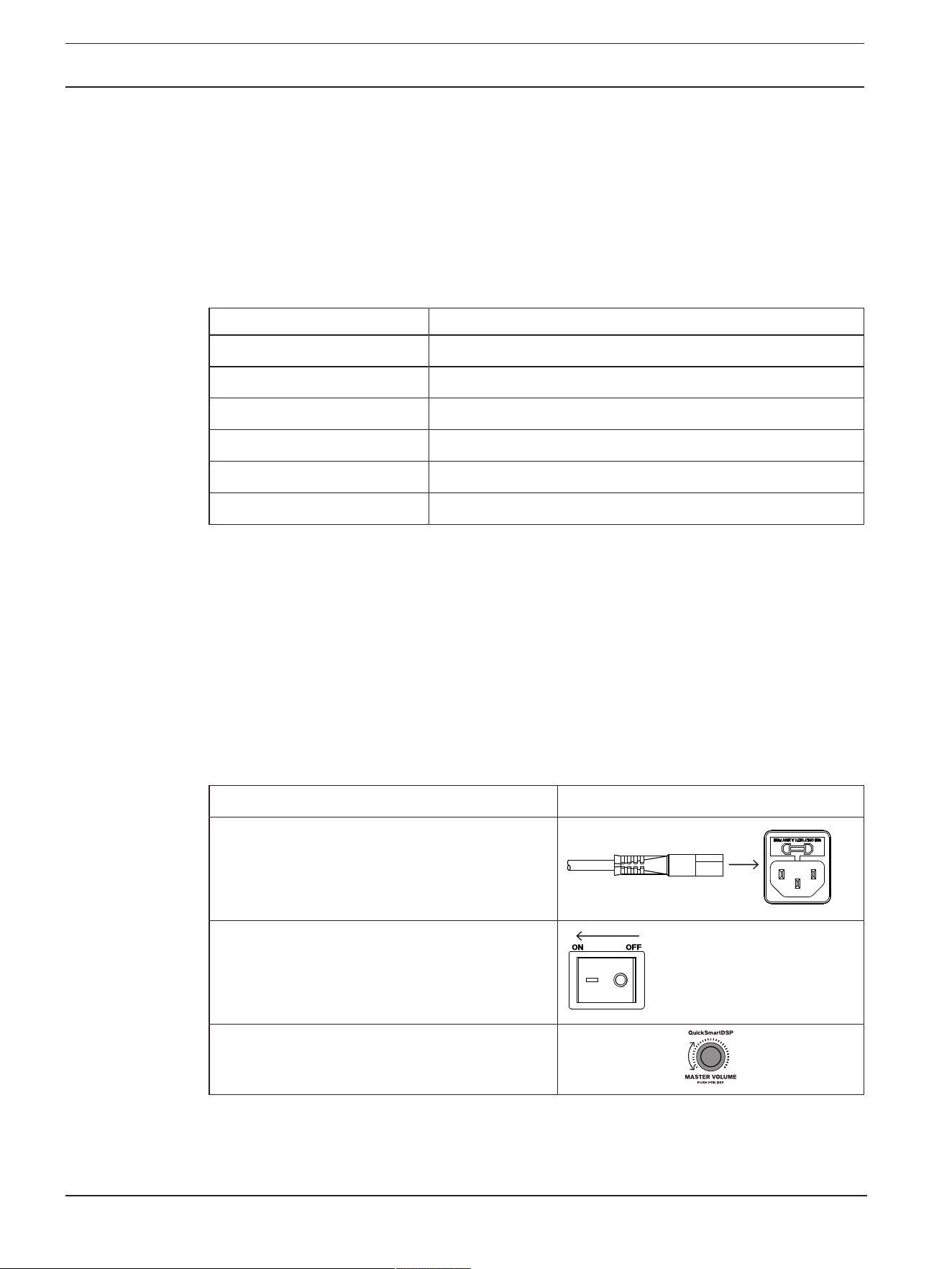
4.1 Quick setup
To set up the loudspeaker:
Step Illustration
1. Connect the AC power cord from a grounded
receptacle to the MAINS IN.
2. Switch power to ON.
3. Adjust the volume (VOL) to 0dB using the
MASTER VOLUME knob.
EVOLVE G2 | EVOLVE M G2 Portable Column
Loudspeaker
Description | en 11
Bosch Security Systems, LLC
User manual
2025-12 | Draft 03 |
PRELIMINARY
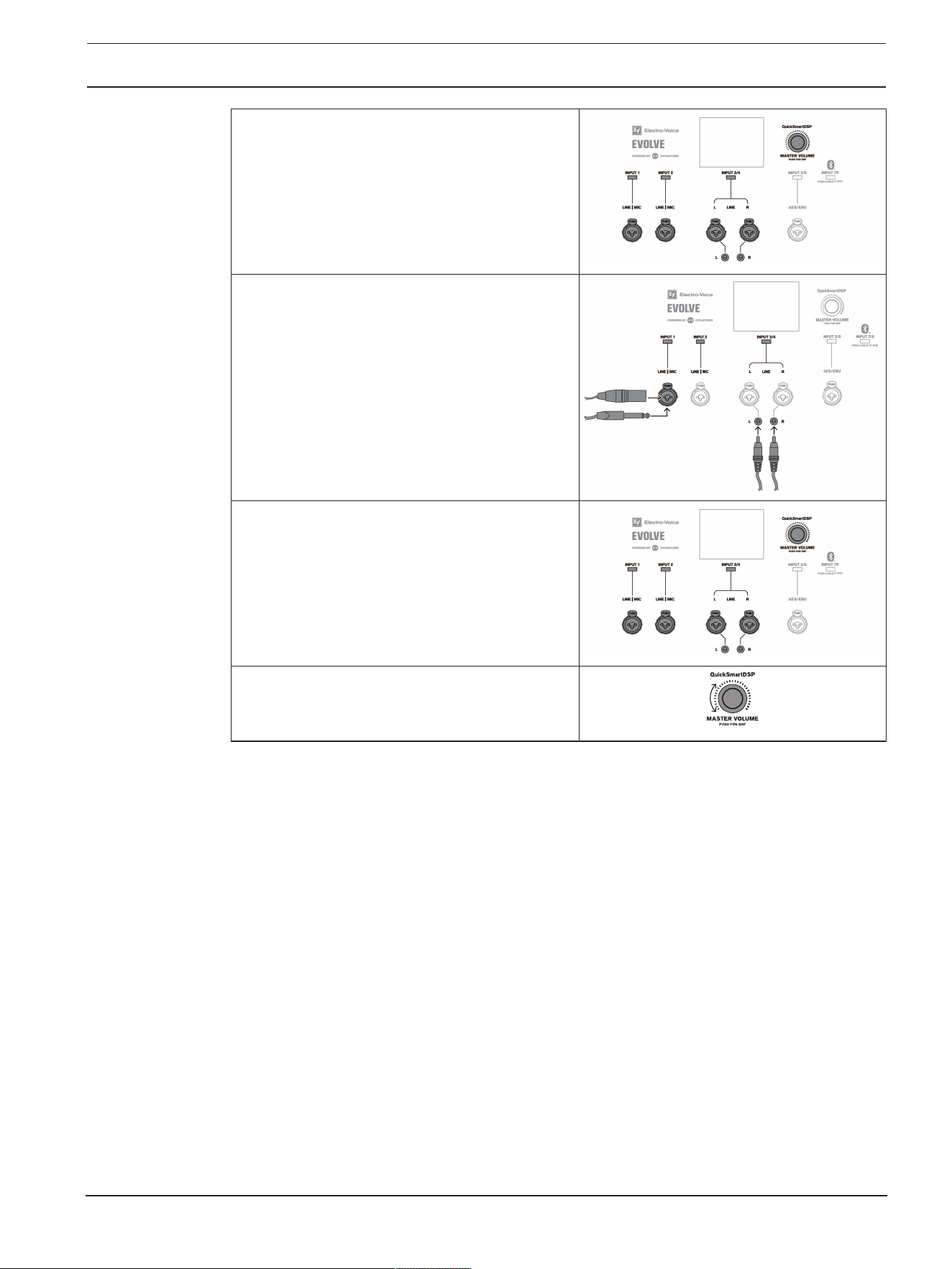
4. Press the input selection soft key to select the
input channel.
The soft key will illuminate once selected.
5. Use the MASTER VOLUME knob to adjust
INPUTLEVEL to MUTE.
6. Connect an audio source using appropriate
XLR, TRS, or RCA (cinch) cables.
Ensure audio source is MUTE or at a low level
before making connection. After connection is
made, increase the source's output to a
reasonable level.
7. Adjust the INPUTLEVEL until the signal peaks
are just below maximum level or the required
output is achieved. If PK is indicated, turn the
level down until the PK indication disappears.
8. Press the input selection soft key again to exit
the channel menu.
9. Using the MASTER VOLUME knob, adjust the
volume (VOL) until you get the required output
from the loudspeaker.
12 en | Installation
EVOLVE G2 | EVOLVE M G2 Portable Column
Loudspeaker
2025-12 | Draft 03 | User manual Bosch Security Systems, LLC
PRELIMINARY
5 Installation
!
Caution!
Do not attempt to move this loudspeaker system when it is fully assembled.
You may damage the system or cause personal injury.
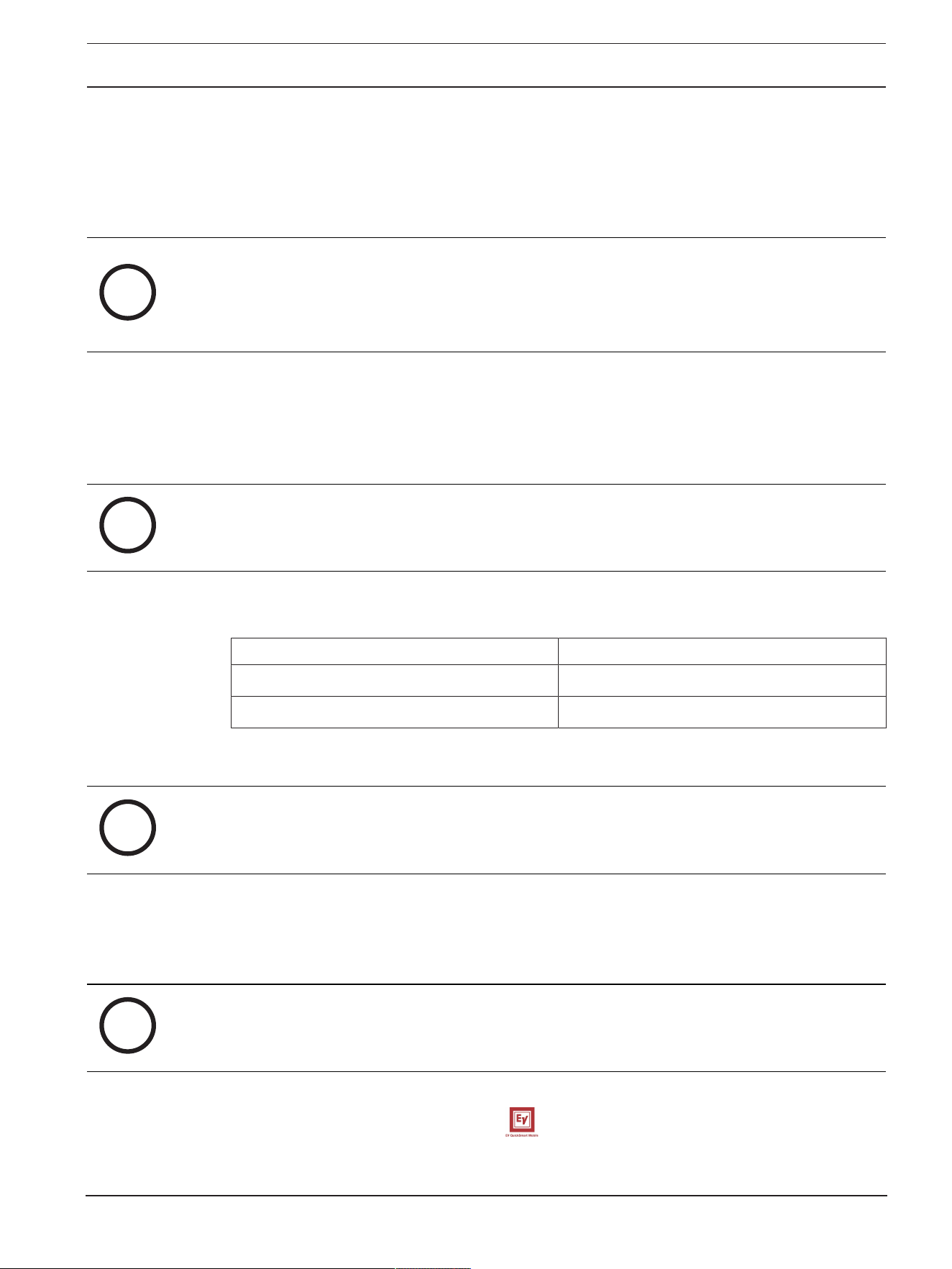
Assembling the loudspeaker system
To assemble the loudspeaker system, do the following:
1. Place the subwoofer on a level and stable surface.
2. Proceed according to the portable column loudspeaker.
The pole has magnets (A) at each end.
Portable column loudspeaker Step 2
EVOLVE30M-G2 Assemble the pole by connecting the two
sections together and inserting them into the
subwoofer base.
EVOLVE50M-G2 and EVOLVE50-G2 Insert the pole into the subwoofer base.
3. Place the column array loudspeaker system on top of the subwoofer pole.
4. The column array loudspeaker system set up is complete.
A
A
EVOLVE G2 | EVOLVE M G2 Portable Column
Loudspeaker
Pairing the QuickSmart Mobile application | en 13
Bosch Security Systems, LLC
User manual
2025-12 | Draft 03 |
PRELIMINARY
6 Pairing the QuickSmart Mobile application
The EV QuickSmart Mobile app for tablets and smartphones is available for download from the Apple
App Store and the Google Play Store.
Download and check the app for the latest firmware updates to enjoy optimal audio performance and
maximize your control of the system.
i
Notice!
The EV QuickSmart Mobile app is designed to only find loudspeakers from Electro-Voice featuring
Bluetooth® control functionality.
The EV QuickSmart Mobile app will not display other types of Bluetooth® devices, e.g. phones,
laptops, tablets, or headsets.
Prior to pairing the EV QuickSmart Mobile app with Electro-Voice loudspeakers:
1. Ensure that Bluetooth® is enabled on the smartphone or tablet.
2. Ensure that pairing mode is enabled on the loudspeaker.
To place the loudspeaker in pairing mode for both control and streaming:
i
Notice!
For control and streaming separately, enable Pairing mode through the LCD menu.
1. Press and hold the dedicated input selection soft key until Pairing Mode On and the 4-digit ID is
shown on the LCD.
Portable column loudspeaker Input selection soft key
EVOLVE30M-G2 and EVOLVE50M-G2 INPUT 7/8
EVOLVE50-G2 INPUT 5/6
Table6.1: Input selection soft keys to enable pairing mode
i
Notice!
The loudspeaker remains in control pairing mode for about 2 minutes. If control pairing fails, repeat
step1.
2. Navigate to your mobile device's Bluetooth® settings menu, find the EVOLVE G2 loudspeaker
with the matching 4-digit ID and ensure you are paired to the loudspeaker.
This will pair the mobile device to the EVOLVE G2 loudspeaker for audio streaming.
3. Continue to the next step to pair for control.
i
Notice!
For Android devices running Android version 11 or older, ensure location services are allowed.
Electro-Voice does not collect, store, or track user location data or personal information.
First time pairing
1. Open the EV QuickSmart Mobile app.
14 en | Pairing the QuickSmart Mobile application
EVOLVE G2 | EVOLVE M G2 Portable Column
Loudspeaker
2025-12 | Draft 03 | User manual Bosch Security Systems, LLC
PRELIMINARY
2. Select your Speakers is displayed on the screen.
The EV QuickSmart Mobile app is looking for available Bluetooth® enabled Electro-Voice
loudspeakers.
The available loudspeakers are displayed on the screen.
3. Tap the loudspeaker you want to pair with the app.
The selected loudspeaker will have a line under it acknowledging it is selected.
4. Repeat the previous step until all of the required loudspeakers are selected.
5. Tap the CONNECT button.
6. The app connects with the selected loudspeaker.
You will get a message from iOS/iPadOS/Android about pairing for each device which has to be
accepted.
i
Notice!
If the message "Bluetooth Connection failed" appears, ensure that control pairing mode is enabled in
the loudspeaker.
7. Tap PAIR on the device to accept pairing to the loudspeakers.
The app can connect to up to six loudspeakers.
Subsequent pairing
To pair additional loudspeakers with the EV QuickSmart Mobile app:
1. Tap the EV QuickSmart Mobile app icon.
2. Select your Speakers is displayed on the screen.
The EV QuickSmart Mobile app is looking for available Bluetooth® enabled Electro-Voice
loudspeakers.
The available loudspeakers are displayed on the screen.
3. Tap the loudspeaker you want to pair with the app.
The selected loudspeaker will have a line under it acknowledging it is selected.
4. Repeat the previous step until all of the required loudspeakers are selected.
5. Tap the CONNECT button.
The app connects with the required loudspeaker.
The app can connect to up to six loudspeakers.

EVOLVE G2 | EVOLVE M G2 Portable Column
Loudspeaker
Amplifier DSP | en 15
Bosch Security Systems, LLC
User manual
2025-12 | Draft 03 |
PRELIMINARY
7 Amplifier DSP
7.1 Amplifier DSP controls
The amplifier has a combination of controls and connectors to ensure the most versatile loudspeaker
system.
7.1.1 EVOLVE30M-G2 and EVOLVE50M-G2
1. LCD – DSP control and monitoring interface.
2. MASTER VOLUME - Adjusts the sound level and navigates the DSP control menu.
DSP - Scroll through the menu and select the available choices. Push the MASTER VOLUME
knob to enter the DSP control menu.
3. Input selection soft keys - Press the soft key to select the input and access the DSP control
menu for the channel. Press the softkey a second time to deselect the channel and return to the
main DSP.
4. INPUT connectors
– INPUT 1 to INPUT 4 - Balanced input for the connection of signal sources like instruments, or
microphones. Connections can be established using TRS or XLR connectors. The XLR connectors
are separately switchable for 48V phantom power. INPUT 4 includes a HI-Z input below the
TRS/XLR combo plug for connection to a high impedance instrument output via a TS plug.
– INPUT 5/6 - Stereo input for connection of stereo line level signals of sources like mixing
consoles or DJ controllers. Connection is made using either two XLR-type, TRS, RCA, or a single
3.5 mm stereo connector.
– INPUT 7/8 - Stereo Bluetooth audio connection.
5. MIXER - Access to mixer controls in DSP, such as LEVEL, GEQ, FX and signal routings.
6. MIX OUT - The post-fader audio signals of INPUT 1 through INPUT 7/8 are mixed and passed to
MIX OUT. When the level controls of INPUT 1 - INPUT 7/8 are adjusted, the volume change will
be reflected at MIX OUT. This feature allows the loudspeaker to act as a basic eight-channel
mixer that can send the mix to another loudspeaker via the MIX OUT socket. The output is
configurable in the menu to provide either the Mixer Mono, Stereo left or Stereo right signal. If
QuickSmart Link is used, MIX OUT provides the same signal as the local column system.
7. AUX OUT - The AUX OUT is configurable to provide two types of audio mixes:
– Separate post fader audio mix of INPUT 1 to INPUT 7/8. This audio mix is controlled by individual
channel AUX levels via DSP and does not include effects.
– Main mix output signal. This audio mix includes effects.
8. QuickSmart Link - RJ45 connector for Cat5 cable to link two EVOLVE systems together for
digital audio and system control. The maximum recommended cable length is 100 m (328 ft).
i
Notice!
QuickSmart Link should only be used to connect two EVOLVE systems. QuickSmart Link is not an
Ethernet/LAN port and is not compatible with network devices.
9. FOOTSWITCH - ¼-inch TRS connector for connecting footswitch control to toggle FX on/off.
10. MAINS IN - The device receives its power supply via the MAINS IN socket. Only the provided
power cord may be used. Connect the device only to a mains network that can handle 100 -
240VAC, 50-60Hz.
11. POWER - Switch for power ON or OFF of the loudspeaker. The LCD screen lights up when the
power is turned ON, after approximately three seconds.

16 en | Amplifier DSP
EVOLVE G2 | EVOLVE M G2 Portable Column
Loudspeaker
2025-12 | Draft 03 | User manual Bosch Security Systems, LLC
PRELIMINARY
7.1.2 EVOLVE50-G2
1. LCD – DSP control and monitoring interface.
2. MASTER VOLUME - Adjusts the sound level and navigates the DSP control menu.
DSP - Scroll through the menu and select the available choices. Push the MASTER VOLUME
knob to enter the DSP control menu.
3. Input selection soft keys - Press the soft key to select the input and access the DSP control
menu for the channel. Press the softkey a second time to deselect the channel and return to the
main DSP.
4. INPUT connectors
– INPUT 1 and INPUT 2 - Balanced INPUT for the connection of signal sources like instruments, or
microphones. Connections can be established using TRS or XLR connectors. The XLR connectors
for INPUT 1 and INPUT 2 are separately switchable for 48V phantom power.
– INPUT 3/4 - Stereo INPUT 3/4 for connection of stereo line level signals of sources like mixing
consoles or DJ controllers. Connection is made using either two XLR-type, TRS, RCA, or a single
3.5 mm stereo connector.
– INPUT 5/6 - Stereo Bluetooth audio connection.
5. MIX OUT - The post-fader audio signals of INPUT 1 through INPUT 5/6 are mixed and passed to
MIX OUT. When the level controls of INPUT 1 - INPUT 5/6 are adjusted, the volume change will
be reflected at MIX OUT. This feature allows the loudspeaker to act as a basic six-channel mixer
that can send the mix to another loudspeaker via the MIX OUT socket. The output is configurable
in the menu to provide either the Mixer Mono, Stereo left or Stereo right signal. If QuickSmart
Link is used, MIX OUT provides the same signal as the local column system.
6. QuickSmart Link - RJ45 connector for Cat5 cable to link two EVOLVE systems together for
digital audio and system control. The maximum recommended cable length is 100 m (328 ft).
i
Notice!
QuickSmart Link should only be used to connect two EVOLVE systems. QuickSmart Link is not an
Ethernet/LAN port and is not compatible with network devices.
7. MAINS IN - The device receives its power supply via the MAINS IN socket. Only the provided
power cord may be used. Connect the device only to a mains network that can handle 100 -
240VAC, 50-60Hz.
8. POWER - Switch for power ON or OFF of the loudspeaker. The LCD screen lights up when the
power is turned ON, after approximately three seconds.
7.2 System status
7.2.1 EVOLVE30M-G2 and EVOLVE50M-G2
1. IN 1 - VU meter displays the signal level of INPUT 1 into the amplifier INPUT 1 connector.
– The display of PHANTOM indicates 48V phantom power is switched on.
– The display of DUCK indicates that the ducker feature was enabled on this channel to reduce all
stereo input signals when INPUT 1 signal exceeds the configured threshold.
2. IN 2 - VU meter displays the signal level of INPUT 2 into the amplifier INPUT 2 connector.
– The display of PHANTOM indicates 48V phantom power is switched on.
– The display of DUCK indicates that the ducker feature was enabled on this channel to reduce all
stereo input signals when INPUT 2 signal exceeds the configured threshold.
3. IN 3 - VU meter displays the signal level of INPUT 3 into the amplifier INPUT 3 connector.
– The display of PHANTOM indicates 48V phantom power is switched on.

EVOLVE G2 | EVOLVE M G2 Portable Column
Loudspeaker
Amplifier DSP | en 17
Bosch Security Systems, LLC
User manual
2025-12 | Draft 03 |
PRELIMINARY
– The display of DUCK indicates that the ducker feature was enabled on this channel to reduce all
stereo input signals when INPUT 3 signal exceeds the configured threshold.
4. IN 4 - VU meter displays the signal level of INPUT 4 into the amplifier INPUT 4 connector.
– The display of PHANTOM indicates 48V phantom power is switched on.
– The display of DUCK indicates that the ducker feature was enabled on this channel to reduce all
stereo input signals when INPUT 4 signal exceeds the configured threshold.
5. IN 5/6 - VU meter displays signal level of INPUT 5/6 into the amplifier INPUT 5/6 connector
(maximum of left and right signal).
6. IN 7/8 - VU meter displays signal level of incoming Bluetooth audio signal (maximum of left and
right signal).
– The display of LINK indicates an active TWS (True Wireless Stereo) audio connection with
another TWS speaker such as EVOLVE G2 / EVOLVE M G2, EVOLVE 70/90, EVERSE 8/12 or
ZLX-G2.
7. M - VU meter displays the signal level of the main speaker output.
– The display of DLY indicates that a system delay was set for this speaker (up to 100meters /
328.1feet).
8. C - Bluetooth control app. The available options are:
Off - disabled
Flashing - pairing mode
Solid - connected
9. S - Bluetooth audio streaming. The available options are:
Off - disabled
Flashing - pairing mode (120s)
Solid - connected
10. Loudspeaker 4-digit ID to pair via Bluetooth®.
11. Status display - Alternately shows the following:
1 - Indicates the selected preset number. There are five user-defined presets and one factory
default preset available.
E - Edited. Indicates the preset is not saved. When the preset is saved, the E is not displayed.
Lock status - Indicates that the LCD display and controls are locked. Press the MASTER
VOLUME knob or channel select soft key to unlock.
7.2.2 EVOLVE50-G2
1. IN 1 - VU meter displays the signal level of INPUT 1 into the amplifier INPUT 1 connector.
– The display of PHANTOM indicates 48V phantom power is switched on.
– The display of DUCK indicates that the ducker feature was enabled on this channel to reduce all
stereo input signals when INPUT 1 signal exceeds the configured threshold.
2. IN 2 - VU meter displays the signal level of INPUT 2 into the amplifier INPUT 2 connector.
– The display of PHANTOM indicates 48V phantom power is switched on.
– The display of DUCK indicates that the ducker feature was enabled on this channel to reduce all
stereo input signals when INPUT 2 signal exceeds the configured threshold.
3. IN 5/6 - VU meter displays signal level of INPUT 5/6 into the amplifier INPUT 5/6 connector
(maximum of left and right signal).
4. IN 7/8 - VU meter displays signal level of incoming Bluetooth audio signal (maximum of left and
right signal).
– The display of LINK indicates an active TWS (True Wireless Stereo) audio connection with
another TWS speaker such as EVOLVE G2 / EVOLVE M G2, EVOLVE 70/90, EVERSE 8/12 or
ZLX-G2.
5. M - VU meter displays the signal level of the main speaker output.

18 en | Amplifier DSP
EVOLVE G2 | EVOLVE M G2 Portable Column
Loudspeaker
2025-12 | Draft 03 | User manual Bosch Security Systems, LLC
PRELIMINARY
– The display of DLY indicates that a system delay was set for this speaker (up to 100meters /
328.1feet).
6. C - Bluetooth control app. The available options are:
Off - disabled
Flashing - pairing mode
Solid - connected
7. S - Bluetooth audio streaming. The available options are:
Off - disabled
Flashing - pairing mode (120s)
Solid - connected
8. Loudspeaker 4-digit ID to pair via Bluetooth®.
9. Status display - Alternately shows the following:
1 - Indicates the selected preset number. There are five user-defined presets and one factory
default preset available.
E - Edited. Indicates the preset is not saved. When the preset is saved, the E is not displayed.
Lock status - Indicates that the LCD display and controls are locked. Press the MASTER
VOLUME knob or channel select soft key to unlock.
7.2.3 System protection
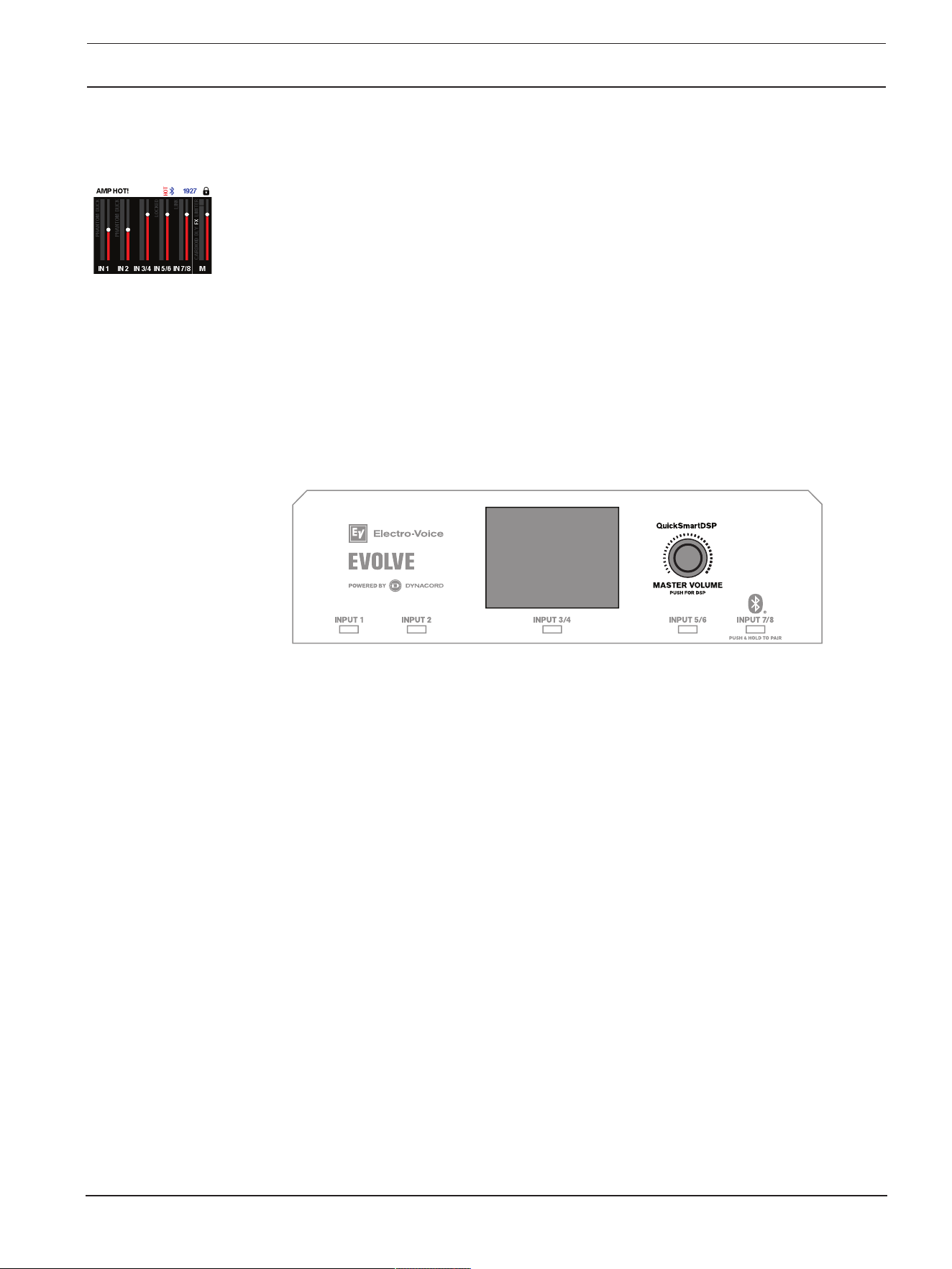
System protection limiters indicate when a system is exceeding recommended usage by showing:
– PK
– CLIP
– LIMITER
– AMP HOT!
i
Notice!
Older firmware versions show PEAK instead of PK.
PK
PK indicates that the audio source signal to the loudspeaker reached the maximum input level, also
called PEAK limit: -3 dB. This may result in a clipped signal causing audio distortion and potential
damage to the equipment.
If PK is shown:
4 Reduce the INPUTGAIN or the audio source signal.
If PK stays active for more than 1 second, the system shows CLIP.
CLIP
CLIP indicates that the audio source signal exceeded the maximum input level and is producing audio
distortion. This results in rough and harsh audio output and can cause damage to the equipment.
If CLIP is shown:
4 Reduce the INPUTGAIN and/or the audio source signal until CLIP stops showing.
LIMITER
LIMITER protects the loudspeaker from short-term peaks and long-term overload, which can cause
distortion. When LIMITER is displayed on the screen, the limiter is active.
If the LIMITER indication is shown often or continuously:
EVOLVE G2 | EVOLVE M G2 Portable Column
Loudspeaker
Amplifier DSP | en 19
Bosch Security Systems, LLC
User manual
2025-12 | Draft 03 |
PRELIMINARY
4 Reduce the output volume (MASTER VOLUME). This is strongly recommended.
AMP HOT!
AMP HOT! indicates that the amplifier has heated up to a point where the loudspeaker will cut out or
shut down.
If AMP HOT! is shown:
4 Make sure the system is not in direct sunlight or near another heat source.
4 Ensure that the system’s airflow is not obstructed and that the rear panel is not covered.
4 If possible, switch off the system and give it time to cool down.
After cooling down, if the system still displays AMP HOT!, contact your Sales or Customer Service
Representative.
7.3 DSP control menu
An integrated DSP control menu allows the user to select multiple DSP system settings on the
loudspeaker.
Accessing the DSP control menu
To access the DSP control menu:
1. Push the MASTER VOLUME knob.
The DSP control menu appears.
2. Using the MASTER VOLUME knob, scroll through the menu items.
3. Push the MASTER VOLUME knob to select the menu item you want to modify.
The focus moves to the parameters on the right side of the DSP control menu.
4. Using the MASTER VOLUME knob, scroll through the parameters.
5. Push the MASTER VOLUME knob to confirm the selected parameter.
The setting is saved. The focus returns to the menu items on the left side of the DSP control
menu.
6. Repeat steps 2 through 5 to modify additional DSP and system settings.
7. Select EXIT to return to the home screen.
7.3.1 Loudspeaker DSP control menu
The loudspeaker DSP control menu selections are available for the EVOLVE G2 loudspeakers.
For complete EVOLVE G2 / EVOLVE M G2 menu list, refer to OUTPUT list, page 46.
EXIT menu
The EXIT menu is used to return to the home screen.

20 en | Amplifier DSP
EVOLVE G2 | EVOLVE M G2 Portable Column
Loudspeaker
2025-12 | Draft 03 | User manual Bosch Security Systems, LLC
PRELIMINARY
i
Notice!
The display returns to the home screen after 30seconds of inactivity.
MODE menu
The MODE menu is used to configure the type of sound the loudspeaker delivers.
Available options for this selection are: MUSIC, LIVE, SPEECH and CLUB.
– MUSIC - is used for recorded music playback.
– LIVE – is used for live sound applications.
– SPEECH – is used for spoken word applications.
– CLUB - is used for recorded electronic music playback when more bass response is desired.
The default is MUSIC.
SUB LEVEL
The SUB LEVEL control is used to adjust the volume of the subwoofer. The column is not affected by
this setting.
The default is 0dB.
TREBLE control
The TREBLE control is used to adjust the high frequency performance of the loudspeaker for different
applications or personal preference. The parameter controls a high shelving filter.
The default is 0dB.
MID control
The MID control is used to adjust the midrange frequency performance of the loudspeaker for different
applications or personal preference.
The default is 0dB.
BASS control
The BASS control is used to adjust the low frequency performance of the loudspeaker for different
applications or personal preference. The parameter controls a low shelving filter.
The default is 0dB.
MAIN GEQ menu (default)
The MAIN GEQ menu is used to adjust the frequency response of the loudspeaker for different
applications or personal preference. There are seven different EQ filters available centered at the
following frequencies: 63, 160, 400, 1.0K, 2.5K, 6.0K & 12K Hz.
The range of each filter is -12dB to +12dB.
The default value for each filter is 0dB.
MAIN PEQ menu
The MAIN PEQ menu is used to adjust the frequency response of the loudspeaker for different
applications or personal preference. There are seven equalization filters available.
The filter type is selectable between the following:
PEQ - Parametric Equalization Filters shape the sound using peak/dip bell shaped filters which have
three controls.

EVOLVE G2 | EVOLVE M G2 Portable Column
Loudspeaker
Amplifier DSP | en 21
Bosch Security Systems, LLC
User manual
2025-12 | Draft 03 |
PRELIMINARY
– Q - Quality Factor defines the bandwidth of the filter. A lower Q provides a wider bandwidth and
a higher Q provides a narrower bandwidth.
– FREQ - selects the center frequency of the EQ filter.
– GAIN - sets the amount of increase or reduction of the equalization filter.
LOW/HI SHELF - Shapes the sound using a shelving type filter that can be applied to the low
frequency or high frequency response using two controls:
– FREQ - sets the center frequency of the filter. For the LOW SHELF filter the GAIN of the filter
tapers off above the frequency selected. For the HIGH SHELF filter the GAIN of the filter tapers
off below the frequency selected.
– GAIN - sets the amount of increase or reduction of the signal below or above the FREQ setting.
LOW/HI PASS - Pass band filters that shape the sound by only passing signal above or below the
selected frequency.
– FREQ - sets the corner frequency for the pass band filter. For HI PASS filters all frequencies
above the selection will be passed through. Frequencies below the setting will be tapered off. For
LOW PASS filters all frequencies below the selection will be passed through. Frequencies above
the selection will be tapered off.
MIX OUT menu
The MIX OUT menu is used to select which signal(s) should be output at MIX OUT and which signal
should be delivered by the loudspeaker.
– L+R - The left and right signals of all inputs are summed. The sum is output at MIX OUT and is
delivered by the loudspeaker (default).
– L - Only the panned left signal of all inputs is output at MIX OUT. The loudspeaker will deliver
only the right signal.
– R - Only the panned right signal of all inputs is output at MIX OUT. The loudspeaker will deliver
only the left signal.
SPK OUT menu
The SPK OUT setting configures the signal sent to the speaker itself.
– QuickSmart Link connected - SPK OUT and MIX OUT signals are identical (L+R/L/R).
– No QuickSmart Link connected - SPK OUT and MIX OUT signals are contrary (L/R) or also
identical in case of mono system (L+R).
BLUETOOTH menu
The BLUETOOTH menu is used to set the Bluetooth® functionality of the loudspeaker.
ON/OFF - The ON/OFF menu controls whether Bluetooth® functionality is enabled or disabled on the
loudspeaker.
CONTROL PAIR - The CONTROL PAIR menu is used to enable the QuickSmart Mobile app wireless
control and monitoring application. Available options for this selection are: ON or OFF.
The default is OFF.
AUDIO PAIR - The AUDIO PAIR menu is used to stream audio from your Bluetooth® enabled device
to the loudspeaker system. Available options for this selection are: PAIRING, ON or OFF.
The default is OFF.
LINKSPEAKERS
The LINKSPEAKERS function allows two EVOLVE G2 loudspeakers to be linked over Bluetooth® in
true wireless stereo for Bluetooth® audio streaming only.
To link two EVOLVE G2 loudspeakers:
22 en | Amplifier DSP
EVOLVE G2 | EVOLVE M G2 Portable Column
Loudspeaker
2025-12 | Draft 03 | User manual Bosch Security Systems, LLC
PRELIMINARY
1. Pair one of the EVOLVE G2 loudspeakers via Bluetooth® to a mobile device. Refer to Pairing the
QuickSmart Mobile app for pairing instructions.
2. In both EVOLVE G2 loudspeakers, navigate to the BLUETOOTH menu in the Main DSP menu.
3. In both EVOLVE G2 loudspeakers, select LINKSPEAKERS.
The LCD display will show LINKINGSPEAKERS... while establishing connection between both
EVOLVE G2 loudspeakers. When the connection is established, the menu will display
UNLINKSPEAKERS.
In the BLUETOOTH menu below LINK SPEAKERS, the stereo channel selection will appear.
4. Select the appropriate stereo channel selection for each EVOLVE G2 loudspeaker: L+R (mono), L,
or R.
Note: This is stereo image from the audience's perspective, also known as House L & R.
i
Notice!
With Bluetooth true wireless stereo (TWS) a mobile device can stream an audio signal to two
loudspeaker systems. It is not possible to send input signals or the Mix of one EVOLVE G2 to another
EVOLVE G2 system with this feature.
AUTO RECONNECT
The AUTO RECONNECT function allows to automatically connect your EVOLVE G2 to your audio
streaming device when paired before. Both are switched on and Bluetooth is enabled. Available
options for this selection are: ON or OFF.
The default is OFF.
AFS (automatic feedback suppression)
i
Notice!
AFS is available in EVOLVE30M-G2 and EVOLVE50M-G2. AFS is not available in EVOLVE50-G2.
The 12-band AFS can be engaged to reduce unwanted feedback frequencies when microphones or
instruments with pickups are used. Feedback occurs when sound from the loudspeaker enters the
microphone or pickup and is amplified by the loudspeaker and played back again. High levels or
extended periods of feedback can damage hearing and equipment.
Available options for this selection are OFF and ON.
Reducing feedback
To reduce feedback:
1. Set the loudspeaker and microphone or instrument according to your performance. Follow
appropriate microphone placement and use practices:
– Do not place the microphone directly in front of the loudspeaker. Refer to the user manual of
your microphone to know the pickup and rejection patterns of your microphone.
– Avoid placing music stands, tablets, or other large flat objects near the microphone such
that they can cause audio reflections into the microphone.
– Use proper microphone technique when speaking, singing or placing by an instrument to
avoid using excessive input gain. For example, hold the microphone close to your mouth
when performing.
– Engage appropriate input channel PRESET for your application: LOWCUT80Hz,
LOWCUT120Hz, VOCALMIC, VOICEFILTER, SPEECH, ACOUSTICGUITAR, etc. Refer
to INPUT DSP control menu.
EVOLVE G2 | EVOLVE M G2 Portable Column
Loudspeaker
Amplifier DSP | en 23
Bosch Security Systems, LLC
User manual
2025-12 | Draft 03 |
PRELIMINARY
– Do not cup the microphone element with your hands while speaking or singing. Only hold
the microphone by the handle or body as per the microphone manufacturer's
recommendation.
2. Enable AFS in the DSP control menu or FX section of the QuickSmart Mobile app. This will enable
AFS on INPUT1 and INPUT2.
3. Slowly turn up the output of the loudspeaker, and begin sound checking your microphone or
instrument.
4. As you hear feedback, allow a few seconds for the AFS to detect and to reduce the feedback.
5. Continue sound check until no additional feedback tones are generated.
LED menu
The LED menu shows power on and indicates limit. Available options for this selection are: ON, OFF
or LIMITER.
– ON - turns the LED on when the power switch is set to ON.
– OFF - turns the LED off.
– LIMITER - turns the LED off under normal operation. The LED brief blinking indicates the limiter
is activating. Short-term blinking is not critical because the integrated limiter keeps distortion
under control. Constant lighting of the LED indicates the sound is negatively affected. If the LED
is constantly lit, check the rear LCD for more information. Reducing the output volume is strongly
recommended.
The default is ON.
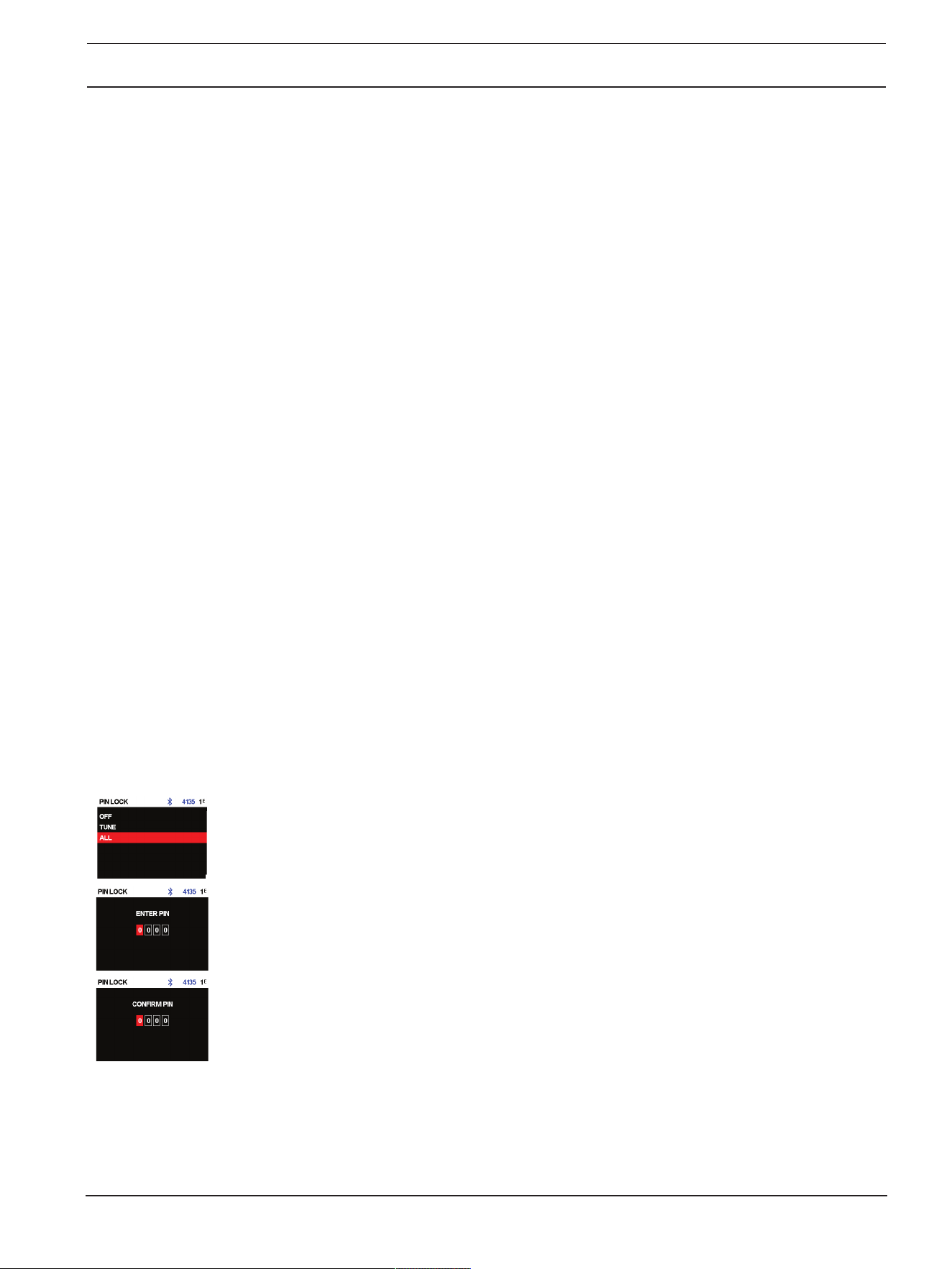
PIN LOCK menu
The PIN LOCK menu locks the DSP control menu. Available options for this selection are: OFF, TUNE
or ALL.
– OFF - turns the PIN LOCK off.
– TUNE - locks the INPUT control parameters but not the DSP control menu.
– ALL - locks all functions of the speaker.
The default is OFF.
To lock the DSP control menu:
1. Select TUNE or ALL.
2. Enter a PIN code.
3. Re-enter the PIN code to confirm.
If the PIN code does not match, it will set the PIN LOCK to OFF.
4. To lock the speaker select LOCK NOW from the DISPLAY menu.
The PIN LOCK will automatically engage after the speaker is power cycled.
To disable the PIN LOCK:
1. If not done already, unlock the device by entering the PIN code.
2. Deselect any input selection soft keys.
3. Push the MASTER VOLUME knob.
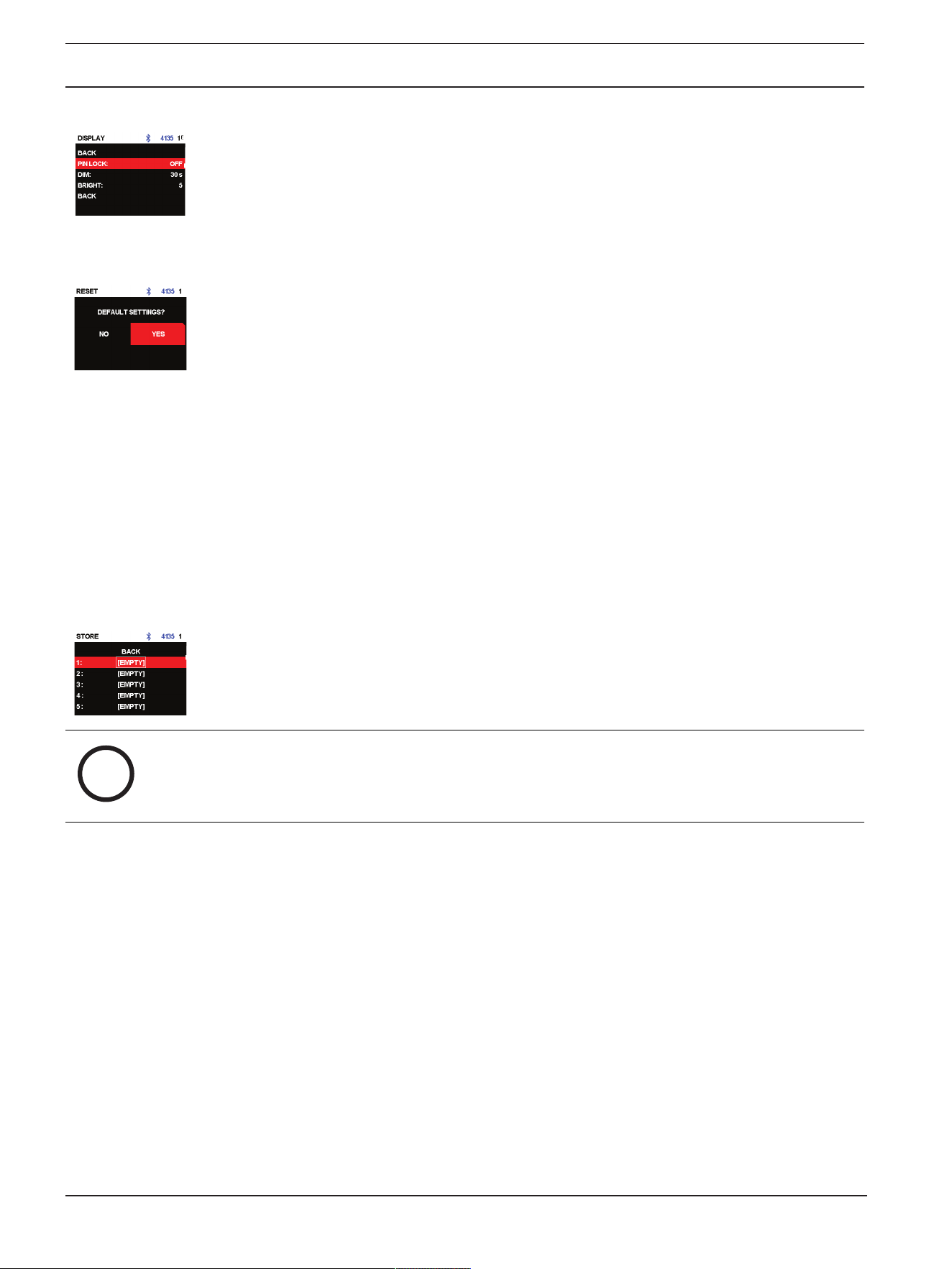
24 en | Amplifier DSP
EVOLVE G2 | EVOLVE M G2 Portable Column
Loudspeaker
2025-12 | Draft 03 | User manual Bosch Security Systems, LLC
PRELIMINARY
4. Using the MASTER VOLUME knob, scroll to DISPLAY.
5. Select PIN LOCK.
6. Select OFF.
If you forget the PIN code, reset the loudspeaker to default settings.
To reset the loudspeaker to default settings:
4 Press and hold the soft key for INPUT 2 and MASTER VOLUME knob for at least 15seconds.
The DEFAULT SETTINGS? message appears.
4 Select YES.
The ERASE USER PRESET... message appears.
4 Select NO.
DIM menu
The DIM menu is used to dim the display when the display is idle for the configured time. Available
options for this selection are: OFF, 10 to 60 seconds.
The default is 30 seconds.
BRIGHT menu
The BRIGHT menu is used to determine the brightness of the LCD.
The range is 1 (darkest) to 10 (brightest).
The default is 5.
STORE menu
The STORE menu allows you to create up to five customized user settings. Available options for this
selection are: BACK, 1, 2, 3, 4, and 5.
i
Notice!
The customized user setting name can contain a combination of alphanumeric characters including
spaces. The alphanumeric character range is A to Z and 0-9.
The name field length is 12 characters.
Storing customized user settings
To store customized user settings:
1. From the DSP control menu, scroll to STORE.
2. Push the MASTER VOLUME knob to select STORE.
The STORE screen appears.
3. Push the MASTER VOLUME knob to select 1.
The Enter name for 1 screen appears.
4. Use the MASTER VOLUME knob to scroll through the characters.
The characters appear.
5. Push the MASTER VOLUME knob to select the required character.
6. Turn the MASTER VOLUME knob to move to the next character entry.
Continue selecting characters until the required name is entered.
7. Use the MASTER VOLUME knob to scroll to SAVE.
8. Push the MASTER VOLUME knob to select SAVE.
9. Repeat steps 3 through 8 to store additional customized user settings.
EVOLVE G2 | EVOLVE M G2 Portable Column
Loudspeaker
Amplifier DSP | en 25
Bosch Security Systems, LLC
User manual
2025-12 | Draft 03 |
PRELIMINARY
10. Select EXIT to return to the home screen.
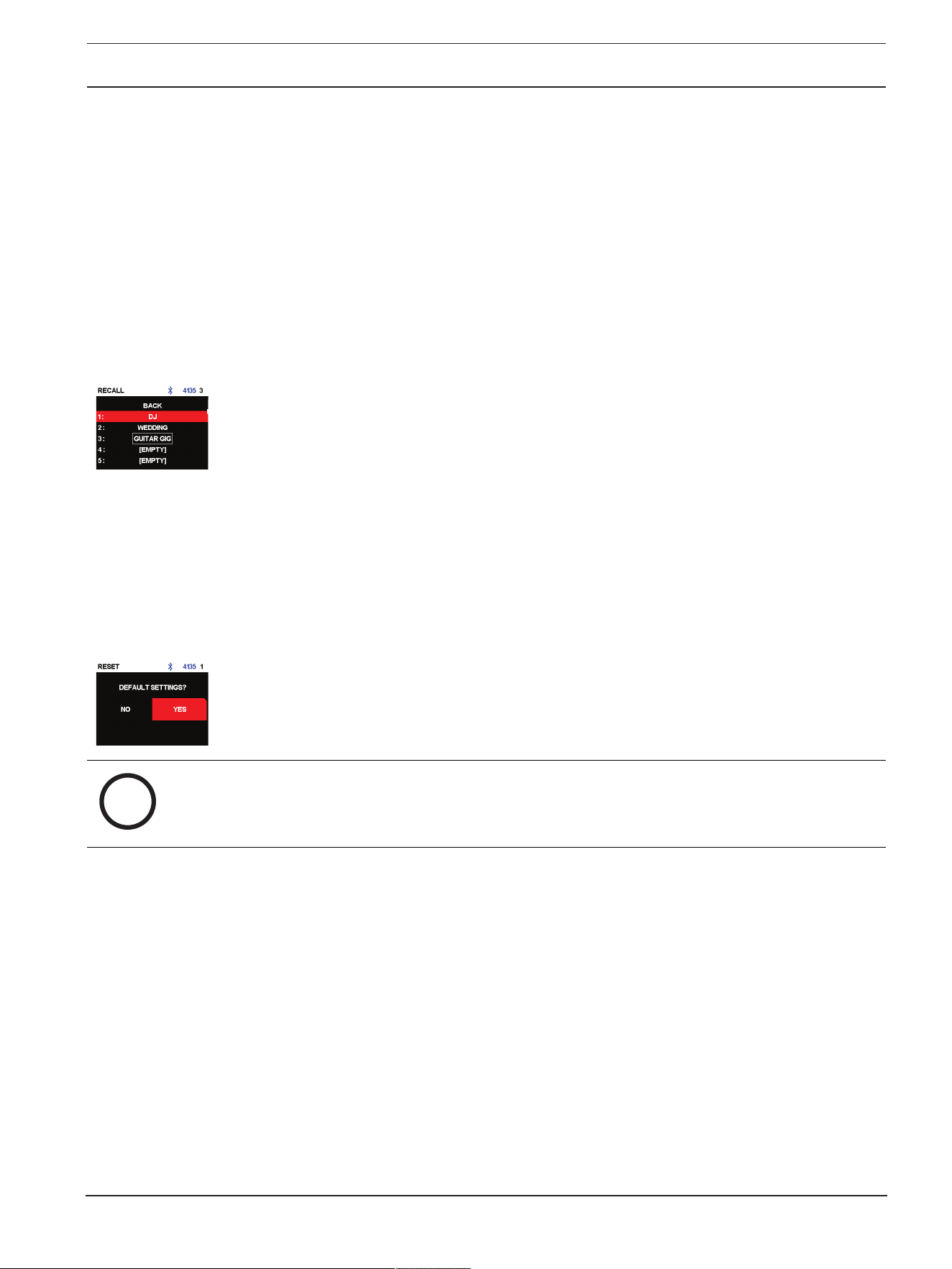
RECALL menu
The RECALL menu allows you to retrieve up to five customized user settings. Available options for
this selection are: BACK, 1, 2, 3, 4, and 5. In addition, setting 6 is available to recall a default setting.
This setting cannot be used to store user settings.
Recalling customized user settings
To recall customized user settings:
4 From the DSP control menu, scroll to RECALL.
4 Push the MASTER VOLUME knob to select RECALL.
The RECALL screen appears.
4 Push the MASTER VOLUME knob to select 1.
The selected item is loaded.
4 After the preset is loaded, the menu will return to the home screen.
RESET menu
The RESET menu is used to reset the loudspeaker to original factory settings. Available options for
this selection are: NO or YES.
Resetting the system
To reset the system to original factory settings:
4 From the DSP control menu, select RESET.
The DEFAULTSETTINGS? message appears.
4 Select YES.
The ERASE USER PRESETS? message appears.
4 Select YES.
i
Notice!
The RESET menu item is used to revert the loudspeaker to the original factory default settings.
INFO menu
The INFO menu is used to display the firmware version.

26 en | Input & Mixer operation
EVOLVE G2 | EVOLVE M G2 Portable Column
Loudspeaker
2025-12 | Draft 03 | User manual Bosch Security Systems, LLC
PRELIMINARY
8 Input & Mixer operation
The loudspeaker INPUT DSP control menu selections are available for the EVOLVE G2 powered
loudspeakers.
For complete EVOLVE30M-G2 and EVOLVE50M-G2 menu list, refer to INPUT DSP control menu for
EVOLVE30M-G2 and EVOLVE50M-G2, page 50.
For complete EVOLVE50-G2 menu list, refer to INPUT DSP control menu for EVOLVE50-G2, page
52.
To control the mixer channels:
1. Press the input selection soft key to select the input channel.
The softkey will illuminate once selected.
2. Use the MASTER VOLUME knob to adjust the level.
3. Press the MASTER VOLUME knob to enter the input channel's DSP control menu.
4. Press the input selection soft key again to deselect the input channel for control.
The soft key will no longer be illuminated.
INPUT control adjustments
Caution is advised when adjusting the INPUTLEVEL and EQ. Usually minor changes are sufficient to
produce the best results in the overall sound.
To adjust the incoming sound:
– Set all EQ controls to 0dB or FLAT.
– Avoid setting the EQ controls to extreme positions.
– Use natural reproduction as a starting point.
– Rely on your musically trained ear.
INPUT LEVEL control
The INPUT LEVEL control adjusts the sensitivity of the incoming signals to the internal operation level
of the mixer.
To achieve a good signal input level:
1. Set the volume to MUTE using the MASTER VOLUME knob.
2. Press the input selection soft key and use the MASTER VOLUME knob to set the INPUT LEVEL
to MUTE.
3. Connect the sound source (microphone, instrument, etc) to the selected input.
4. Start the sound source at the highest volume level to be expected. Sing or speak as loudly as
possible directly (close up) into the microphone.
5. While playing the sound source or singing into the microphone:
– Increase the INPUTLEVEL by selecting the input channel using the input selection soft key
and using the MASTER VOLUME knob, so that during the loudest part, the PK does not
show. Press the input selection soft key again to deselect the input channel.
– Increase the MASTER VOLUME until you get the required output from the loudspeaker.
This is the basic channel setting.
If further adjustments to the EQ setting of the channel are necessary, perform these steps again.
Changes in the sound shaping section also have an influence on the overall level of the channel.
48V
+48V DC phantom power is available on the XLR connector of the dedicated inputs.
EVOLVE G2 | EVOLVE M G2 Portable Column
Loudspeaker
Input & Mixer operation | en 27
Bosch Security Systems, LLC
User manual
2025-12 | Draft 03 |
PRELIMINARY
Portable column loudspeaker Input connector
EVOLVE30M-G2 and EVOLVE50M-G2 INPUT 1 to INPUT 4
EVOLVE50-G2 INPUT 1 and INPUT 2
Table8.1: Input connectors that enable phantom power
Phantom power can be used to power certain devices such as DI boxes and condenser microphones
(non-electret). Consult the user manual of your device before using. There is no phantom power on the
TRS connectors. Phantom power is switchable.
i
Notice!
Switch off phantom power (default) for sources which do not require phantom power such as
dynamic microphones and mixer outputs. With phantom power already activated ensure to mute the
input channel when connecting a microphone to avoid loud plop noise.
i
Notice!
Never connect a mobile device to a phantom power input connector with phantom power activated.
PRESET
The input PRESET adjusts the EQ and compressor settings to provide a starting point for adjusting
the sound for different input types. Presets are available on INPUT 1 and INPUT 2.
COMP control
The COMP (compressor) control controls the onboard compressor to adjust the input signal
processing during operation.
Portable column loudspeaker Input
EVOLVE30M-G2 and EVOLVE50M-G2 INPUT 1 to INPUT 4
EVOLVE50-G2 INPUT 1 and INPUT 2
Table8.2: Inputs that enable COMP control
4 Use the COMP control to adjust the compressor threshold and the compression ratio
simultaneously.
Adjusting the COMP control from 0 to 100 will result in the following:
– The gain below the threshold will increase from 0dB to +6dB.
– The compression ratio will increase from 1:1 to 8:1.
– The compressor will reduce the dynamic range of the audio signal proportional to the compressor
setting.
Once the signal exceeds a certain threshold, the signal gets compressed. Major input level changes
result in minor output level changes. Narrowing the dynamic range often allows for easier recording or
mixing of the audio signal. It is recommended to start with low to moderate levels of compression (25
- 40) and increase slowly if necessary.

28 en | Input & Mixer operation
EVOLVE G2 | EVOLVE M G2 Portable Column
Loudspeaker
2025-12 | Draft 03 | User manual Bosch Security Systems, LLC
PRELIMINARY
TREBLE/MID/BASS controls
The EQ section of the input channel allows for a broad difference in the shaping of the incoming audio
signal within three frequency bands:
– TREBLE control - provides cymbals and vocals with more treble for a more transparent sound.
– MID control - increasing this level provides higher output in the vocal range, reducing this level
can help reduce acoustical feedback.
– BASS control - adds more “punch” to the sound of a kick drum or adds “body” to the vocals.
PAN/BAL
The PAN (mono inputs) or BAL (stereo inputs) control adjusts the amount of the signal coming out of
the stereo L or stereo R loudspeaker in a stereo setup. The PAN/BAL is not engaged for mono (single
loudspeaker) setups.
DUCKER control
The ducker reduces the level of the signal(s) on all stereo inputs whenever a signal is detected at the
selected MIC/LINE input.
Portable column loudspeaker Input
EVOLVE30M-G2 and EVOLVE50M-G2 INPUT 1 to INPUT 4
EVOLVE50-G2 INPUT 1 and INPUT 2
Table8.3: Inputs that enable DUCKER setting
If no signal is detected at the selected MIC/LINE input, the level of the signal(s) on the stereo inputs
will return to the previous set levels.
The DUCKER is useful to speak over background music:
– When signal is detected on the selected MIC input, the music on the stereo input channels will be
reduced.
– When signal is no longer detected on the selected MIC input, the music will return to the
previous level.
Engaging the ducker
To engage the ducker:
1. Press the dedicated input selection soft key.
2. Adjust the ducker level to set the detection threshold for the selected input channel. When signal
is detected on the selected input, the signal on the stereo inputs will be reduced by 12dB.
Typical values are -10 to -20dB.
Ducker operation logic
– The DUCKER setting is the detection threshold selected on the input channel.
– The reduced or ducked channels are the input signals that are reduced by 12dB.
INPUT 1 INPUT 2 INPUT 3 INPUT 4 Reduced
channels
DUCKER
setting
-1dB - -40dB OFF OFF OFF INPUT5 to
INPUT8
OFF -1dB - -40dB OFF OFF INPUT5 to
INPUT8

EVOLVE G2 | EVOLVE M G2 Portable Column
Loudspeaker
Input & Mixer operation | en 29
Bosch Security Systems, LLC
User manual
2025-12 | Draft 03 |
PRELIMINARY
INPUT 1 INPUT 2 INPUT 3 INPUT 4 Reduced
channels
OFF OFF -1dB - -40dB OFF INPUT5 to
INPUT8
OFF OFF OFF -1dB - -40dB INPUT5 to
INPUT8
-1dB - -40dB -1dB - -40dB -1dB - -40dB -1dB - -40dB INPUT5 to
INPUT8
OFF OFF OFF OFF None
Table8.4: DUCKER settings for EVOLVE30M-G2 and EVOLVE50M-G2
INPUT 1 INPUT 2 Reduced channels
DUCKER setting -1dB - -40dB OFF INPUT3 to INPUT6
OFF -1dB - -40dB INPUT3 to INPUT6
-1dB - -40dB -1dB - -40dB INPUT3 to INPUT6
OFF OFF None
Table8.5: DUCKER settings for EVOLVE50-G2
30 en | Recommended configurations
EVOLVE G2 | EVOLVE M G2 Portable Column
Loudspeaker
2025-12 | Draft 03 | User manual Bosch Security Systems, LLC
PRELIMINARY
9 Recommended configurations
9.1 Stereo pair
Push Push
Push
Push
Push
Push
Push
Push Push
Push
R
L
Push Push
Push
Push
Push
Push
Push
Push Push
Push
R
L
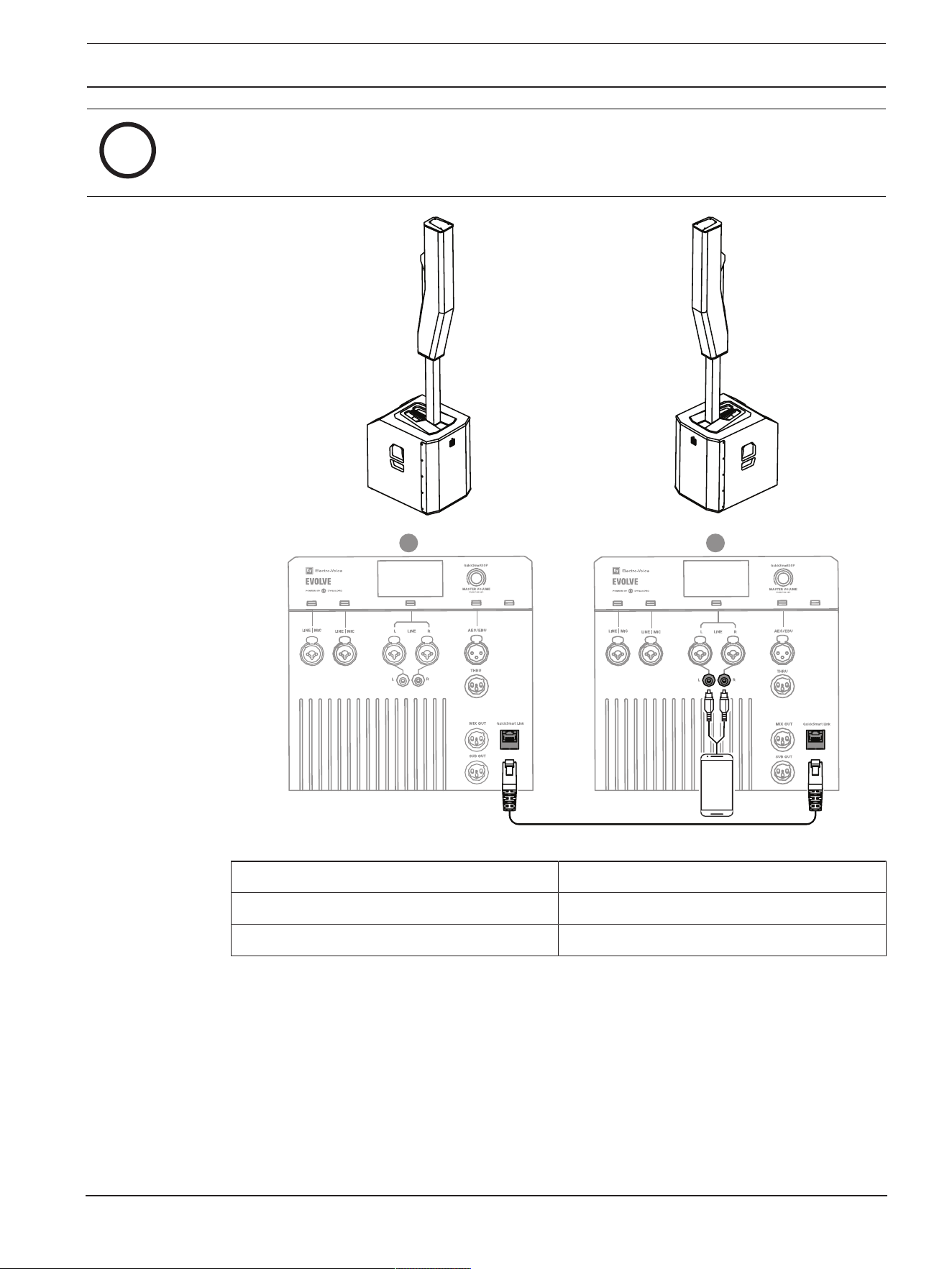
Figure9.1: Setting up EVOLVE G2 for stereo configuration
EVOLVE30M-G2 and
EVOLVE50M-G2
EVOLVE50-G2
MODE MUSIC
MASTER SPEAKER (L) MIX OUT R
SATELLITE SPEAKER (R) INPUT 5/6 (MONO) INPUT 3/4 (MONO)
Table9.1: DSP settings for stereo pair of EVOLVE G2 systems
EVOLVE G2 | EVOLVE M G2 Portable Column
Loudspeaker
Recommended configurations | en 31
Bosch Security Systems, LLC
User manual
2025-12 | Draft 03 |
PRELIMINARY
i
Notice!
Stereo connection from device to MASTER SPEAKER can be made with hard wires into the stereo
inputs or via Bluetooth® into stereo Bluetooth® inputs.
Push Push
R
L
Push
Push
Push
Push
Push
Push
Push Push
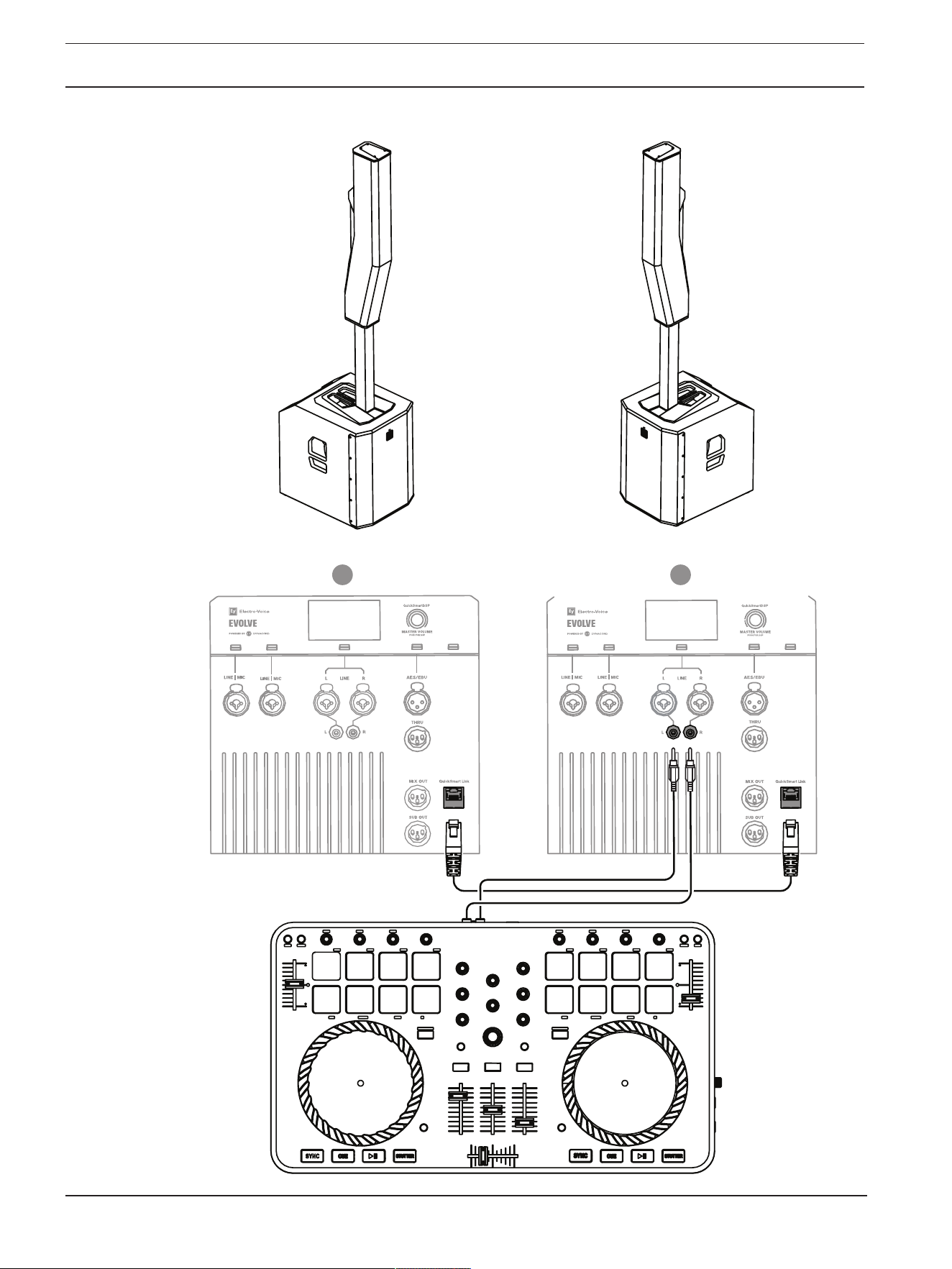
Figure9.2: Setting up EVOLVE G2 for stereo configuration using QuickSmart Link
MODE MUSIC
MASTER SPEAKER (L) SPK OUT L
SATELLITE SPEAKER (R) QuickSmart Link input
Table9.2: DSP settings for stereo pair of EVOLVE G2 / EVOLVE M G2 systems using QuickSmart Link
32 en | Recommended configurations
EVOLVE G2 | EVOLVE M G2 Portable Column
Loudspeaker
2025-12 | Draft 03 | User manual Bosch Security Systems, LLC
PRELIMINARY
9.2 DJ performance
R
L
Push Push
Push
Push
Push
Push
Push
Push Push
Push
Figure9.3: Setting up EVOLVE G2 for DJ performance

EVOLVE G2 | EVOLVE M G2 Portable Column
Loudspeaker
Recommended configurations | en 33
Bosch Security Systems, LLC
User manual
2025-12 | Draft 03 |
PRELIMINARY
MODE MUSIC
MASTER SPEAKER (L) SPK OUT L
SATELLITE SPEAKER (R) QuickSmart Link input
Table9.3: DSP settings for DJ performance

34 en | Recommended configurations
EVOLVE G2 | EVOLVE M G2 Portable Column
Loudspeaker
2025-12 | Draft 03 | User manual Bosch Security Systems, LLC
PRELIMINARY
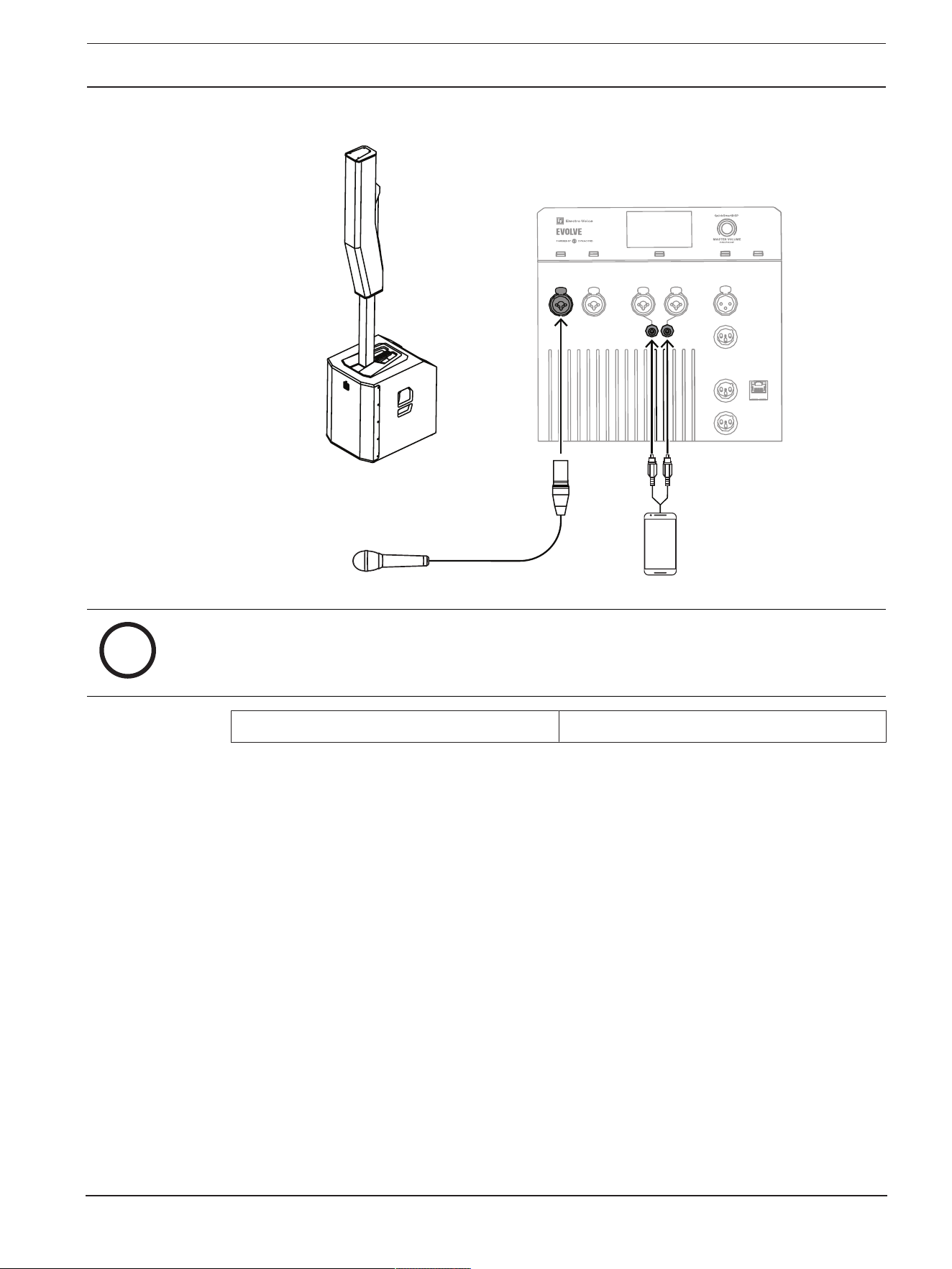
9.3 Solo musician performance
i
Notice!
The direction of the arrow indicates the signal path.
MODE LIVE
Table9.4: DSP settings for solo musician performance
EVOLVE G2 | EVOLVE M G2 Portable Column
Loudspeaker
Recommended configurations | en 35
Bosch Security Systems, LLC
User manual
2025-12 | Draft 03 |
PRELIMINARY
9.4 Speaking event
Push
Push
Push Push Push
Figure9.4: Setting up EVOLVE G2 for speaking event
i
Notice!
The direction of the arrow indicates the signal path.
MODE SPEECH
Table9.5: DSP settings for speaking event
36 en | Recommended configurations
EVOLVE G2 | EVOLVE M G2 Portable Column
Loudspeaker
2025-12 | Draft 03 | User manual Bosch Security Systems, LLC
PRELIMINARY
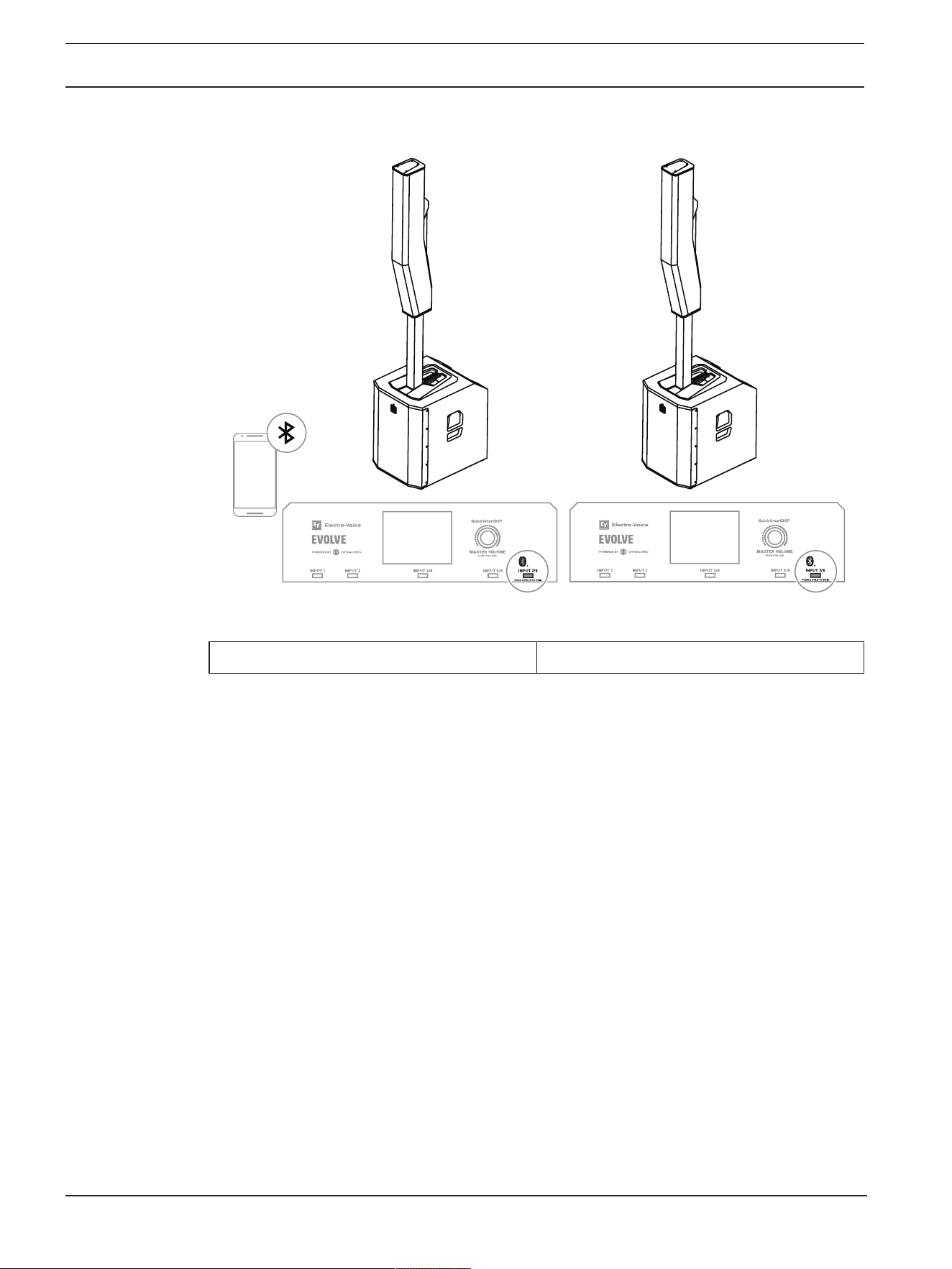
9.5 Bluetooth true wireless stereo (TWS)
Figure9.5: Setting up EVOLVE G2 for Bluetooth TWS
MODE MUSIC
Table9.6: DSP settings for Bluetooth TWS
To connect two loudspeakers via TWS:
1. Connect one of the loudspeakers to your streaming device via Bluetooth®.
2. Select LINK SPEAKERS in the BLUETOOTH control menu on both loudspeakers.
3. Change LINKROUTE in the BLUETOOTH control menu to select Bluetooth input signal (L+R, L
or R).

EVOLVE G2 | EVOLVE M G2 Portable Column
Loudspeaker
Recommended configurations | en 37
Bosch Security Systems, LLC
User manual
2025-12 | Draft 03 |
PRELIMINARY
9.6 Stereo with additional subwoofer

38 en | Troubleshooting
EVOLVE G2 | EVOLVE M G2 Portable Column
Loudspeaker
2025-12 | Draft 03 | User manual Bosch Security Systems, LLC
PRELIMINARY
10 Troubleshooting
Problem Possible cause Action
1. No sound Amplifier Verify all the electronics are on, the signal routing is
correct, the source is active; the volume is turned
up, no channels are muted, etc.
Correct/repair/replace as necessary. If there is still
no sound, the problem may be wiring.
Wiring Verify you have connected the correct cables to the
amplifier. Play something at a low level through the
amplifier. Connect a test loudspeaker in parallel
with the malfunctioning line. If the sound level is
gone or is very weak, the line has a short in it
(possibly a severe scrape, pinch, or a missed
connection). Using the test loudspeaker, move
down the line and test each connection/junction
until you find the problem and correct it. Observe
proper polarity.
2. Intermittent
output such as
crackling or
distortion
Faulty connection Check all connections at amplifier and loudspeakers
to ensure they are all clean and tight. If the problem
persists, check the wiring. See problem 1.
3. Constant noise
such as buzzing
hissing or
humming
Defective source or
other electronic device
If noise is present, but no program material is
playing, evaluate each component as necessary to
isolate the problem. Most likely there is a break in
the signal path.
Poor system grounding
or ground loop
Check and correct the system grounding, as
required.
4. No sound
produced with
microphone
connected to
line/mic inputs
Microphone requires
phantom power.
Ensure the microphone is connected to a line/mic
input. Ensure that PHANTOM is set to ON in this
channel. Phantom power is not available on line
inputs.
Input channel is muted
or LEVEL is too low.
Select the channel and verify the channel is not
muted. If it is not muted, slowly increase the
channel LEVEL until sound is produced.
5. Sound is
distorted, front
LED is OFF,
LCD screen
LIMITER is ON
Excessive input level Reduce the input level or loudspeaker level to
prevent limit.
Incorrect gain structure
or source input (mixing
console/preamp) is
overdriven
Verify level controls of the source are properly
structured by using the VU meter indicator on the
LCD screen. If the VU meter bar is solid or the
system indicates CLIP or LIMITER, the input or
source level is too high.

EVOLVE G2 | EVOLVE M G2 Portable Column
Loudspeaker
Troubleshooting | en 39
Bosch Security Systems, LLC
User manual
2025-12 | Draft 03 |
PRELIMINARY
Problem Possible cause Action
6. Microphone
produces
acoustic
feedback when
input level is
amplified
Incorrect gain structure Reduce the microphone signal by reducing the
INPUT level. Positioning the microphone close to
the sound source increases gain before feedback.
MODE is set to MUSIC Change the MODE to LIVE or SPEECH.
Microphone position is
too close to the front of
the loudspeaker
Whenever possible, setup the loudspeakers so the
microphone is behind them. If using a separate
loudspeaker in a monitor position, aim the
loudspeaker to the back of the microphone.
7. DSP control
menu is locked
The menu LOCK
function has been
turned on. A lock
symbol displays on the
LCD screen.
Press the MASTER VOLUME knob or input
selection soft keys to unlock.
8. QuickSmart
Mobile app
does not detect
the loudspeaker
Enable Bluetooth® Ensure Bluetooth® is enabled on the loudspeaker.
For Android: ensure location services are activated.
Remove loudspeaker from iOS/Android in device
settings (sometimes called “FORGET”).
Restart pairing.
Ensure phone/tablet has required OS version and
latest updates installed. Ensure the latest
QuickSmart Mobile App is installed. Ensure no
other phone/tablet is connected to the same
loudspeaker.
9. PIN code unlock
not successful
Incorrect PIN code
entered
Retry PIN code entry
Or
Press and hold the soft key for INPUT 2 and
MASTER VOLUME knob for at least 15 seconds to
reset the loudspeaker to default settings.
10. Sound is
distorted or
interrupted if
using
QuickSmart
Link
Improper cable or cable
that is too long
Use shielded CAT5 (or better) cables that are not
longer than 100 m (328 ft).
Network hardware
(Switches / Routers)
connected
Only a direct connection between no more than
two EVOLVE G2 systems is allowed to work
correctly.
If these suggestions do not solve your problem, contact your nearest Electro-Voice dealer or Electro-
Voice distributor.

40 en | Technical data
EVOLVE G2 | EVOLVE M G2 Portable Column
Loudspeaker
2025-12 | Draft 03 | User manual Bosch Security Systems, LLC
PRELIMINARY
11 Technical data
EVOLVE30M-G2-EU Portable column system
black EU 30M G2
Column (6) 2.8-inch neodymium drivers
Subwoofer (1) 10-inch woofer
Frequency response (-3 dB) (Hz)
1
51 Hz – 20,000 Hz
Frequency range (-10 dB) (Hz)
1
45 Hz – 20,000 Hz
Maximum sound pressure level at a distance of 1
m (dB)
2
125 dB
Coverage angle HxV (°) 120° x 40°
Amplifier rating (W) tbd
Power consumption (V, Hz, A)
3
100-240VAC, 50-60Hz, tbd
LF channel rating (W) tbd
HF channel rating (W) tbd
Crossover frequency (Hz) 200Hz
Connector type Dual XLR/TRS combo jack mic / line inputs with
switchable 48V phantom power
¼-inch Hi-Z input
XLR combo jack line input
Stereo RCA line input
3.5 mm stereo jack input
XLR Mix out
Aux out
RJ45 QuickSmart Link connector
Bluetooth Stereo input with TWS
Footswitch control jack input
Enclosure Plywood with polyurea coating (subwoofer)
Composite (column)
Aluminum (pole)
Grille material Steel with black or white powder coat
Color Black or white
Dimensions (H x W x D) (in) tbd
Dimensions (H x W x D) (mm) 448mmx332mmx432mm (subwoofer)
620mmx95mmx157mm (column)
(pole)
Assembled dimensions (HxWxD) (in) tbd
Assembled dimensions (HxWxD) (mm) 1997mmx332mmx432mm
Shipping dimensions (HxWxD) (in) tbd
Shipping dimensions (HxWxD) (mm) tbd

EVOLVE G2 | EVOLVE M G2 Portable Column
Loudspeaker
Technical data | en 41
Bosch Security Systems, LLC
User manual
2025-12 | Draft 03 |
PRELIMINARY
EVOLVE30M-G2-EU Portable column system
black EU 30M G2
Weight (lb) 44 lb
Weight (kg) 19.9 kg
Shipping weight (lb) tbd
Shipping weight (kg) tbd
1
Full-space measurement using MUSIC DSP preset.
2
Maximum SPL is measured at 1 m using broadband pink noise at maximum output.
3
Current rating is 1/8 power.
EVOLVE50M-SB-G2-EU 12" sub black EU cord
EVOLVE 50M G2
Column (8) 3.5-inch neodymium drivers
Subwoofer (1) 12-inch woofer
Frequency response (-3 dB) (Hz)
1
43 Hz – 20,000 Hz
Frequency range (-10 dB) (Hz)
1
37 Hz – 20,000 Hz
Maximum sound pressure level at a distance of 1
m (dB)
2
129 dB
Coverage angle HxV (°) 120° x 40°
Amplifier rating (W) tbd
Power consumption (V, Hz, A)
3
100-240VAC, 50-60Hz, tbd
LF channel rating (W) tbd
HF channel rating (W) tbd
Crossover frequency (Hz) 200Hz
Connector type Dual XLR/TRS combo jack mic / line inputs with
switchable 48V phantom power
¼-inch Hi-Z input
XLR combo jack line input
Stereo RCA line input
3.5 mm stereo jack input
XLR Mix out
Aux out
RJ45 QuickSmart Link connector
Bluetooth Stereo input with TWS
Footswitch control jack input
Enclosure Plywood with polyurea coating (subwoofer)
Composite (column)
Aluminum (pole)
Grille material Steel with black or white powder coat

42 en | Technical data
EVOLVE G2 | EVOLVE M G2 Portable Column
Loudspeaker
2025-12 | Draft 03 | User manual Bosch Security Systems, LLC
PRELIMINARY
EVOLVE50M-SB-G2-EU 12" sub black EU cord
EVOLVE 50M G2
Color Black or white
Dimensions (H x W x D) (in) tbd
Dimensions (H x W x D) (mm) 530 mm x 345 mm x 470 mm (subwoofer)
825mmx102.4mmx172mm (column)
tbd (pole)
Assembled dimensions (HxWxD) (in) tbd
Assembled dimensions (HxWxD) (mm) 2045mmx345mm470mm
Shipping dimensions (HxWxD) (in) tbd (subwoofer)
tbd (column, pole, and carry bag)
Shipping dimensions (HxWxD) (mm) tbd (subwoofer)
tbd (column, pole, and carry bag)
Weight (lb) 57lb
Weight (kg) 26kg
Shipping weight (lb) tbd (subwoofer)
tbd (column, pole, and carry bag)
Shipping weight (kg) tbd (subwoofer)
tbd (column, pole, and carry bag)
1
Full-space measurement using MUSIC DSP preset.
2
Maximum SPL is measured at 1 m using broadband pink noise at maximum output.
3
Current rating is 1/8 power.
EVOLVE50-SB-G2-EU 12" sub black EU cord
EVOLVE 50 G2
Column (8) 3.5-inch neodymium drivers
Subwoofer (1) 12-inch woofer
Frequency response (-3 dB) (Hz)
1
43 Hz – 20,000 Hz
Frequency range (-10 dB) (Hz)
1
37 Hz – 20,000 Hz
Maximum sound pressure level at a distance of 1
m (dB)
2
129 dB
Coverage angle HxV (°) 120° x 40°
Amplifier rating (W) tbd
Power consumption (V, Hz, A)
3
100-240VAC, 50-60Hz, tbd
LF channel rating (W) tbd
HF channel rating (W) tbd
Crossover frequency (Hz) tbd

EVOLVE G2 | EVOLVE M G2 Portable Column
Loudspeaker
Technical data | en 43
Bosch Security Systems, LLC
User manual
2025-12 | Draft 03 |
PRELIMINARY
EVOLVE50-SB-G2-EU 12" sub black EU cord
EVOLVE 50 G2
Connector type Dual XLR/TRS combo jack mic / line inputs with
switchable 48V phantom power
Stereo RCA line input
3.5 mm stereo jack input
XLR Mix out
RJ45 QuickSmart Link connector
Bluetooth Stereo input with TWS
Enclosure Plywood with polyurea coating (subwoofer)
Composite (column)
Aluminum (pole)
Grille material Steel with black or white powder coat
Color Black or white
Dimensions (H x W x D) (in) tbd
Dimensions (H x W x D) (mm) 530 mm x 345 mm x 470 mm (subwoofer)
825mmx102.4mmx172mm (column)
tbd (pole)
Assembled dimensions (HxWxD) (in) tbd
Assembled dimensions (HxWxD) (mm) 2045mmx345mmx470mm
Shipping dimensions (HxWxD) (in) tbd (subwoofer)
tbd (column, pole, and carry bag)
Shipping dimensions (HxWxD) (mm) tbd (subwoofer)
tbd (column, pole, and carry bag)
Weight (lb) 57 lb
Weight (kg) 26 kg
Shipping weight (lb) tbd (subwoofer)
tbd (column, pole, and carry bag)
Shipping weight (kg) tbd (subwoofer)
tbd (column, pole, and carry bag)
1
Full-space measurement using MUSIC DSP preset.
2
Maximum SPL is measured at 1 m using broadband pink noise at maximum output.
3
Current rating is 1/8 power.
11.1 Block diagram?
11.2 Dimensions

44 en | Appendices
EVOLVE G2 | EVOLVE M G2 Portable Column
Loudspeaker
2025-12 | Draft 03 | User manual Bosch Security Systems, LLC
PRELIMINARY
12 Appendices
12.1 Audio FX
Audio FX (effects) are processing techniques that alter the sound of an audio signal.
EVOLVE G2 audio FX are subject to change without notice.
12.1.1 FX on EVOLVE30M-G2 and EVOLVE50M-G2
Number Name App Name LCD
0 OFF OFF
Bright Hall Large Room 1
Bright Hall Large Hall 1
Bright Hall Large Hall 3
Bright Hall Church 1
Bright Hall Cathedral 2
Bright Plate Medium Plate 1
Bright Plate Long Plate 4
Echo+Reverb 95ms + Rev1
Echo+Reverb 220ms + Rev5
Chorus 2 slow
Chorus 2 med
Chorus 2 fast
Chorus + Echo 3 slow
Chorus + Echo 3 med
Chorus + Echo 3 fast
Jet Flanger
Mono Delay 185ms 40%
Mono Delay 420ms 40%
Soft Hall Large Room 1
Soft Hall Large Hall 1
Soft Hall Large Hall 3
Soft Hall Church 1
Soft Hall Cathedral 2
Soft Plate Medium Plate 1
Soft Plate Long Plate 4
Mono Delay 185ms 20%
Mono Delay 420ms 20%

EVOLVE G2 | EVOLVE M G2 Portable Column
Loudspeaker
Appendices | en 45
Bosch Security Systems, LLC
User manual
2025-12 | Draft 03 |
PRELIMINARY
Number Name App Name LCD
Doubling Linear 1a
Doubling Linear 2a
Doubling Linear 2c
Reverse 1
Slap Back Fast Echo
Slap Back Slow Echo
Reverb + Chorus Slow
Reverb + Chorus Medium
Reverb + Chorus Fast
Tap Delay
12.1.2 FX on EVOLVE50-G2 effects
Number Name App Name LCD
0 OFF OFF
Bright Hall Large Room 2
Bright Hall Large Hall 1
Bright Hall Large Hall 3
Bright Hall Church 1
Bright Plate Medium Plate 1
Bright Plate Long Plate 4
Echo+Reverb 95ms + Rev1
Chorus 2 slow
Chorus 2 med
Chorus 2 fast
Chorus + Echo 3 slow
Chorus + Echo 3 med
Chorus + Echo 3 fast
Mono Delay 185ms 40%
Mono Delay 420ms 40%
Soft Hall Large Room 1
Soft Hall Large Hall 1
Soft Hall Large Hall 3

46 en | Appendices
EVOLVE G2 | EVOLVE M G2 Portable Column
Loudspeaker
2025-12 | Draft 03 | User manual Bosch Security Systems, LLC
PRELIMINARY
Number Name App Name LCD
Soft Hall Church 1
Soft Hall Cathedral 2
Soft Plate Medium Plate 1
Soft Plate Long Plate 4
Doubling Linear 1a
Doubling Linear 2c
Slap Back Fast Echo
Slap Back Slow Echo
Reverb + Chorus Slow
Reverb + Chorus Medium
Reverb + Chorus Fast
Tap Delay
12.2 Warranty information
For information on warranty periods and after sales service, please visit: www.electrovoice.com/
warranty
12.3 OUTPUT list
The OUTPUT list is available for all EVOLVE G2 / EVOLVE M G2 models, except for AFS.
VOLUME 0 dB (Default)
MUTE, -80 dB- +10 dB,
(1 dB)
EXIT
MODE MUSIC (Default)
LIVE
SPEECH
CLUB
SUB LEVEL 0 dB (Default)
MUTE
-80 dB - +10 dB (1 dB)
TREBLE 0 dB (Default)
-12 dB - +6 dB

EVOLVE G2 | EVOLVE M G2 Portable Column
Loudspeaker
Appendices | en 47
Bosch Security Systems, LLC
User manual
2025-12 | Draft 03 |
PRELIMINARY
MID 0 dB (Default)
-12 dB - +6 dB
BASS 0 dB (Default)
-12 dB - +6 dB
MAIN EQ
(PEQ selected)
BACK
ENABLE ALL ON (Default)
OFF
RESET ALL NO (Default)
YES
PEQ # 1 (Default)
1 - 7
BYPASS OFF (Default)
ON
TYPE PEQ (Default)
LOW SHELF
HIGH SHELF
LOW PASS
HIGH PASS
Q
(PEQ only)
0.7 (Default)
0.5 - 10.0
FREQ 63 Hz (Default)
20 Hz - 20 kHz
GAIN
(PEQ, LOW SHELF and
HI SHELF only)
0 dB (Default)
-12 dB - +12 dB
RESET NO (Default)
YES
BACK
MAIN EQ
(GEQ selected)
BACK
63 Hz 0 dB (Default)
-12 dB - +12 dB (1 dB)
160 Hz
400 Hz
1 kHz
2.5 kHz
6 kHz

48 en | Appendices
EVOLVE G2 | EVOLVE M G2 Portable Column
Loudspeaker
2025-12 | Draft 03 | User manual Bosch Security Systems, LLC
PRELIMINARY
12 kHz
RESET RESET ALL BANDS?
YES/NO
BACK
FX 01 (Default)
00 - 30
FX Delay
(FX 20 only)
427 ms (Default)
30 ms - 550 ms
FX ENABLE ON (Default)
OFF
AFS (not available on
EVOLVE50-G2)
OFF (Default)
ON
DELAY BACK
DELAY OFF (Default)
0.1 m - 100.0 m
SUB DELAY OFF (Default)
-10.0 m - +10.0 m
UNIT METER
FEET
MILLISECONDS
BACK
SPK OUT L + R (Default)
L
R
MIX OUT L + R (Default)
L
R
SUB CONFIG NORMAL (Default)
CARDIOID
BLUETOOTH BACK
BLUETOOTH ON (Default)
OFF
ID (4-digit unique device number)
CONTROL PAIR
AUDIO PAIR

EVOLVE G2 | EVOLVE M G2 Portable Column
Loudspeaker
Appendices | en 49
Bosch Security Systems, LLC
User manual
2025-12 | Draft 03 |
PRELIMINARY
LINK SPEAKERS
LINK ROUTE L+R (Default)
L
R
AUTO RECONNECT OFF (Default)
ON
BACK
LED ON (Default)
OFF
LIMITER
DISPLAY BACK
PIN LOCK OFF (Default)
TUNE
ALL
LOCK NOW (only if PIN is set)
DIM 30 s (Default)
10 s - 60 s
OFF
BRIGHT 5 (Default)
1 - 10
BACK
STORE BACK, 1, 2, 3, 4, 5,
BACK
RECALL BACK, 1, 2, 3, 4, 5, 6
(Default), BACK
RESET DEFAULT SETTINGS? NO (Default)
YES
ERASE USER
PRESETS?
NO (Default)
YES
IMPRINT & LICENSE [OSS license text]
INFO [FIRMWARE VERSION]
©2025 Electro-Voice
EXIT
Table12.1: Loudspeaker DSP control menu

50 en | Appendices
EVOLVE G2 | EVOLVE M G2 Portable Column
Loudspeaker
2025-12 | Draft 03 | User manual Bosch Security Systems, LLC
PRELIMINARY
12.4 INPUT list
12.4.1 INPUT DSP control menu for EVOLVE30M-G2 and EVOLVE50M-G2
INPUTS 1 & 2
LEVEL 0 dB (Default)
MUTE, -80 dB - +42 dB
EXIT
PHANTOM OFF (Default)
ON
PRESET FLAT (Default)
LOW CUT 80
LOW CUT 120
VOCAL MIC
VOICE FILTER
ND76 VOCAL
RE520
ND86 VOCAL
ND96 VOCAL
SPEECH
LINE INPUT
COMP OFF (Default)
OFF, 1 - 100
TREBLE 0 dB (Default)
-12 dB - +12 dB
MID 0 dB (Default)
-12 dB - +12 dB
BASS 0 dB (Default)
-12 dB - +12 dB
PAN (stereo operation only) C (Default)
10 L - 10 R
DUCKER OFF (Default)
OFF, -1 - -40
EXIT
Table12.2: INPUTS 1 & 2 DSP control menu

EVOLVE G2 | EVOLVE M G2 Portable Column
Loudspeaker
Appendices | en 51
Bosch Security Systems, LLC
User manual
2025-12 | Draft 03 |
PRELIMINARY
INPUT 5/6
LEVEL 0 dB (Default)
MUTE, -80 dB - +10 dB
EXIT
TREBLE 0 dB (Default)
-12 dB - +12 dB
MID 0 dB (Default)
-12 dB - +12 dB
BASS 0 dB (Default)
-12 dB - +12 dB
BAL (stereo operation only) C (Default)
10 L - 10 R
EXIT
Table12.3: INPUT 5/6 DSP control menu
INPUT 7/8
LEVEL 0 dB (Default)
MUTE, -80 dB - +10 dB
EXIT
TREBLE 0 dB (Default)
-12 dB - +12 dB
MID 0 dB (Default)
-12 dB - +12 dB
BASS 0 dB (Default)
-12 dB - +12 dB
BAL (stereo operation only) C (Default)
10 L - 10 R
BLUETOOTH BACK
BLUETOOTH ON (Default)
OFF
ID (4-digit unique device number)
CONTROL PAIR
AUDIO PAIR
LINK SPEAKERS
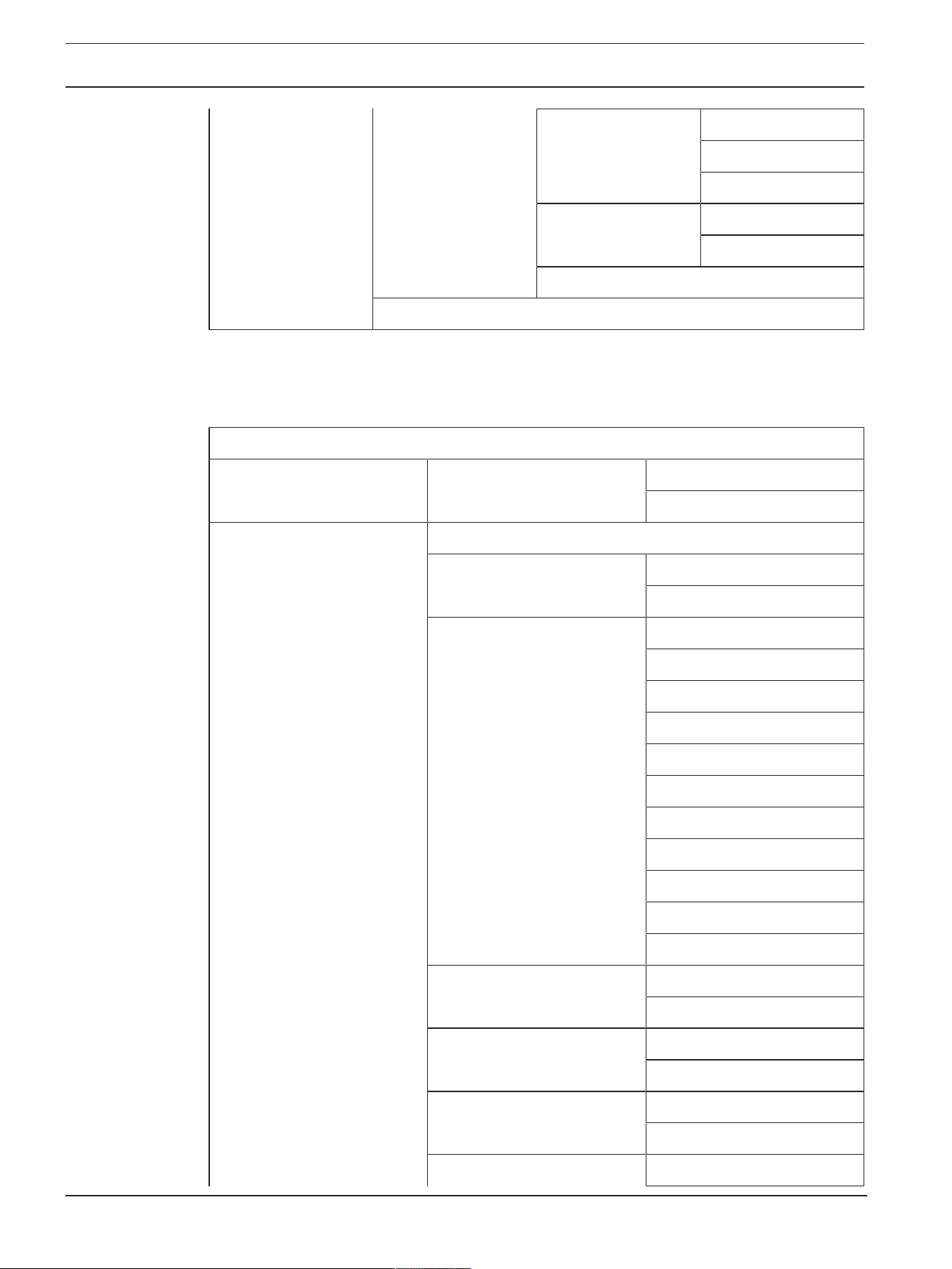
52 en | Appendices
EVOLVE G2 | EVOLVE M G2 Portable Column
Loudspeaker
2025-12 | Draft 03 | User manual Bosch Security Systems, LLC
PRELIMINARY
LINK ROUTE L+R (Default)
L
R
AUTO RECONNECT OFF (Default)
ON
BACK
EXIT
Table12.4: INPUT 7/8 DSP control menu
12.4.2 INPUT DSP control menu for EVOLVE50-G2
INPUTS 1 & 2
LEVEL 0 dB (Default)
MUTE, -80 dB - +42 dB
EXIT
PHANTOM OFF (Default)
ON
PRESET FLAT (Default)
LOW CUT 80
LOW CUT 120
VOCAL MIC
VOICE FILTER
ND76 VOCAL
RE520
ND86 VOCAL
ND96 VOCAL
SPEECH
LINE INPUT
COMP OFF (Default)
OFF, 1 - 100
TREBLE 0 dB (Default)
-12 dB - +12 dB
MID 0 dB (Default)
-12 dB - +12 dB
BASS 0 dB (Default)

EVOLVE G2 | EVOLVE M G2 Portable Column
Loudspeaker
Appendices | en 53
Bosch Security Systems, LLC
User manual
2025-12 | Draft 03 |
PRELIMINARY
-12 dB - +12 dB
PAN (stereo operation only) C (Default)
10 L - 10 R
DUCKER OFF (Default)
OFF, -1 - -40
EXIT
Table12.5: INPUTS 1 & 2 DSP control menu
INPUT 3/4
LEVEL 0 dB (Default)
MUTE, -80 dB - +10 dB
EXIT
TREBLE 0 dB (Default)
-12 dB - +12 dB
MID 0 dB (Default)
-12 dB - +12 dB
BASS 0 dB (Default)
-12 dB - +12 dB
BAL (stereo operation only) C (Default)
10 L - 10 R
EXIT
Table12.6: INPUT 3/4 control menu
INPUT 5/6
LEVEL 0 dB (Default)
MUTE, -80 dB - +10 dB
EXIT
TREBLE 0 dB (Default)
-12 dB - +12 dB
MID 0 dB (Default)
-12 dB - +12 dB
BASS 0 dB (Default)
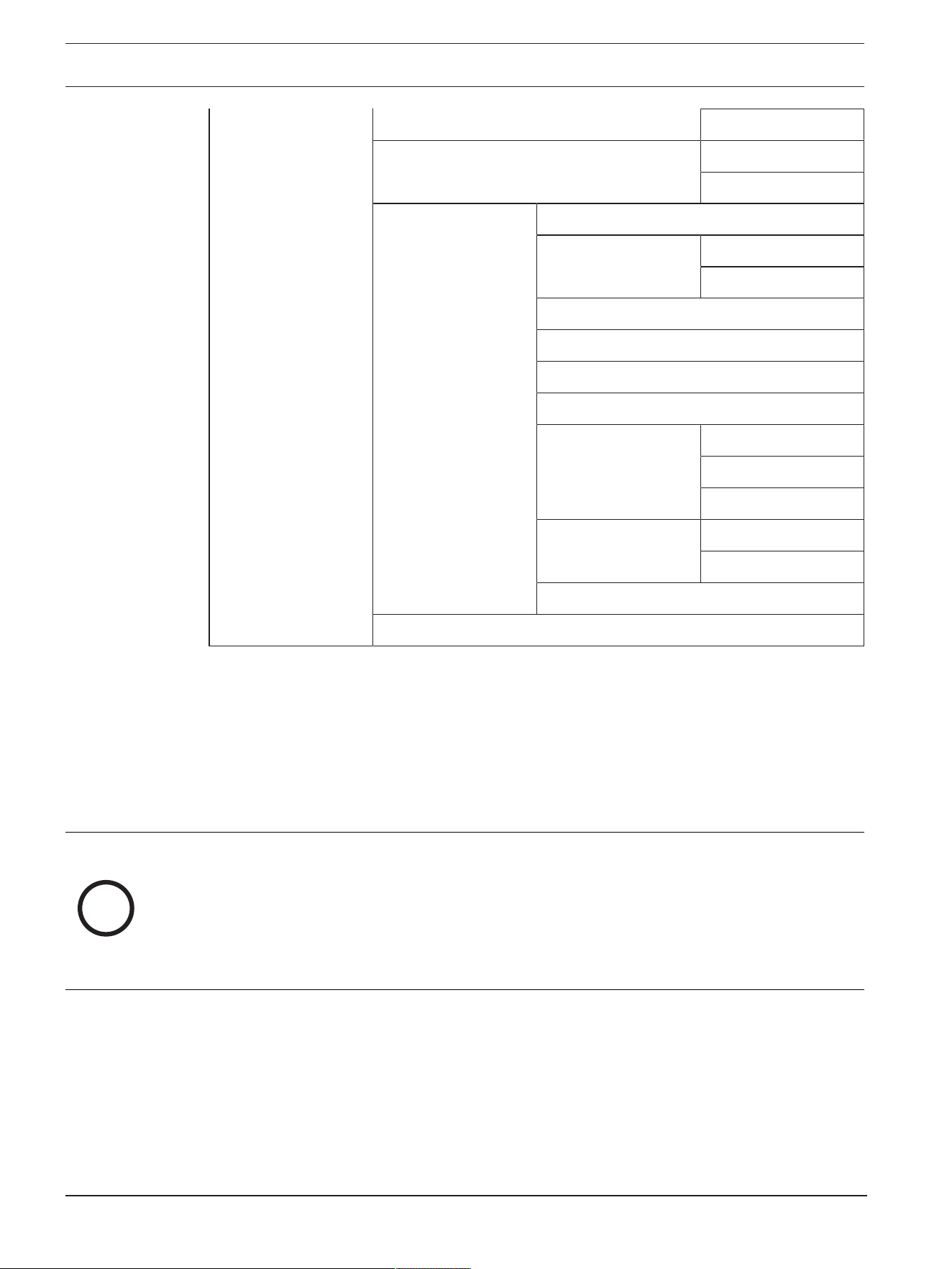
54 en | Appendices
EVOLVE G2 | EVOLVE M G2 Portable Column
Loudspeaker
2025-12 | Draft 03 | User manual Bosch Security Systems, LLC
PRELIMINARY
-12 dB - +12 dB
BAL (stereo operation only) C (Default)
10 L - 10 R
BLUETOOTH BACK
BLUETOOTH ON (Default)
OFF
ID (4-digit unique device number)
CONTROL PAIR
AUDIO PAIR
LINK SPEAKERS
LINK ROUTE L+R (Default)
L
R
AUTO RECONNECT OFF (Default)
ON
BACK
EXIT
Table12.7: INPUT 5/6 DSP control menu
12.5 Regulatory information
12.5.1 FCC information
IMPORTANT: Do not modify this unit! Changes or modifications not expressly approved by the
manufacturer could void the user’s authority, granted by the FCC, to operate the equipment.
i
Notice!
Please take attention that changes or modification not expressly approved by the party responsible for
compliance could void the user’s authority to operate the equipment.
This device complies with Part 15 of the FCC Rules. Operation is subject to the following two conditions:
(1) This device may not cause harmful interference, and
(2) This device must accept any interference received, including interference that may cause undesired
operation.
This equipment complies with FCC/IC RSS-102 radiation exposure limits set forth for an uncontrolled
environment. This equipment should be installed and operated with minimum distance 20cm between the
radiator & your body.

EVOLVE G2 | EVOLVE M G2 Portable Column
Loudspeaker
Appendices | en 55
Bosch Security Systems, LLC
User manual
2025-12 | Draft 03 |
PRELIMINARY
12.5.2 Simplified Declaration of Conformity (sDoC) for Europe (CE)
BG С настоящото Bosch Security Systems, LLC декларира, че този тип радиосъоръжение
EVOLVE30M-G2-EU, EVOLVE30M-G2-W, EVOLVE50-SB-G2-EU, EVOLVE50-SW-G2,
EVOLVE50M-SB-G2-EU, EVOLVE50M-SW-G2 е в съответствие с Директива 2014/53/
ЕС. Цялостният текст на ЕС декларацията за съответствие може да се намери на
следния интернет адрес: www.electrovoice.com
CS Tímto Bosch Security Systems, LLC prohlašuje, že typ rádiového zařízení EVOLVE30M-G2-
EU, EVOLVE30M-G2-W, EVOLVE50-SB-G2-EU, EVOLVE50-SW-G2, EVOLVE50M-SB-
G2-EU, EVOLVE50M-SW-G2 je v souladu se směrnicí 2014/53/EU. Úplné znění EU
prohlášení o shodě je k dispozici na této internetové adrese: www.electrovoice.com
DA Hermed erklærer Bosch Security Systems, LLC , at radioudstyrstypen EVOLVE30M-G2-EU,
EVOLVE30M-G2-W, EVOLVE50-SB-G2-EU, EVOLVE50-SW-G2, EVOLVE50M-SB-G2-
EU, EVOLVE50M-SW-G2 er i overensstemmelse med direktiv 2014/53/EU. EU-
overensstemmelseserklæringens fulde tekst kan findes på følgende internetadresse:
www.electrovoice.com
DE Hiermit erklärt Bosch Security Systems, LLC , dass der Funkanlagentyp EVOLVE30M-G2-
EU, EVOLVE30M-G2-W, EVOLVE50-SB-G2-EU, EVOLVE50-SW-G2, EVOLVE50M-SB-
G2-EU, EVOLVE50M-SW-G2 der Richtlinie 2014/53/EU entspricht. Der vollständige Text
der EU-Konformitätserklärung ist unter der folgenden Internetadresse verfügbar:
www.electrovoice.com
EL Με την παρούσα ο/η Bosch Security Systems, LLC , δηλώνει ότι ο ραδιοεξοπλισμός
EVOLVE30M-G2-EU, EVOLVE30M-G2-W, EVOLVE50-SB-G2-EU, EVOLVE50-SW-G2,
EVOLVE50M-SB-G2-EU, EVOLVE50M-SW-G2 πληροί την οδηγία 2014/53/ΕΕ. Το πλήρες
κείμενο της δήλωσης συμμόρφωσης ΕΕ διατίθεται στην ακόλουθη ιστοσελίδα στο διαδίκτυο:
www.electrovoice.com
This device contains licence-exempt transmitter(s)/receiver(s) that comply with Innovation, Science and
Economic Development Canada’s licence-exempt RSS(s). Operation is subject to the following two conditions:
(1) This device may not cause interference.
(2) This device must accept any interference, including interference that may cause undesired operation
of the device.
l'appareil contient des émetteurs/récepteurs exempts de licence qui sont conformes aux CNR exempts de
licence d’Innovation, Sciences et Développement économique Canada. L’exploitation est soumise aux deux
conditions suivantes :
(1) l'appareil ne doit pas produire de brouillage,
(2) l'utilisateur de l'appareil doit accepter tout brouillage radioélectrique subi, même si le brouillage est
susceptible d'en compromettre le fonctionnement.
This equipment complies with IC RSS-102 radiation exposure limits set forth for an uncontrolled environment.
This equipment should be installed and operated with minimum distance 20cm between the radiator & your
body.
ce matériel est conforme aux limites de dose d'exposition aux rayonnements, CNR-102 énoncée dans un autre
environnement.cette eqipment devrait être installé et exploité avec distance minimale de 20 entre le radiateur et
votre corps.

56 en | Appendices
EVOLVE G2 | EVOLVE M G2 Portable Column
Loudspeaker
2025-12 | Draft 03 | User manual Bosch Security Systems, LLC
PRELIMINARY
EN Hereby, Bosch Security Systems, LLC declares that the radio equipment type EVOLVE30M-
G2-EU, EVOLVE30M-G2-W, EVOLVE50-SB-G2-EU, EVOLVE50-SW-G2, EVOLVE50M-
SB-G2-EU, EVOLVE50M-SW-G2 is in compliance with Directive 2014/53/EU and the
relevant statutory requirements. The full text of the EU declaration of conformity is available
at the following internet address: www.electrovoice.com.
ES Por la presente, Bosch Security Systems, LLC declara que el tipo de equipo radioeléctrico
EVOLVE30M-G2-EU, EVOLVE30M-G2-W, EVOLVE50-SB-G2-EU, EVOLVE50-SW-G2,
EVOLVE50M-SB-G2-EU, EVOLVE50M-SW-G2 es conforme con la Directiva 2014/53/UE.
El texto completo de la declaración UE de conformidad está disponible en la dirección
Internet siguiente: www.electrovoice.com.
ET Käesolevaga deklareerib Bosch Security Systems, LLC , et käesolev raadioseadme tüüp
EVOLVE30M-G2-EU, EVOLVE30M-G2-W, EVOLVE50-SB-G2-EU, EVOLVE50-SW-G2,
EVOLVE50M-SB-G2-EU, EVOLVE50M-SW-G2 vastab direktiivi 2014/53/EL nõuetele. ELi
vastavusdeklaratsiooni täielik tekst on kättesaadav järgmisel internetiaadressil:
www.electrovoice.com
FI Bosch Security Systems, LLC vakuuttaa, että radiolaitetyyppi EVOLVE30M-G2-EU,
EVOLVE30M-G2-W, EVOLVE50-SB-G2-EU, EVOLVE50-SW-G2, EVOLVE50M-SB-G2-
EU, EVOLVE50M-SW-G2 on direktiivin 2014/53/EU mukainen. EU-
vaatimustenmukaisuusvakuutuksen täysimittainen teksti on saatavilla seuraavassa
internetosoitteessa: www.electrovoice.com
FR Le soussigné, Bosch Security Systems, LLC , déclare que l'équipement radioélectrique du
type EVOLVE30M-G2-EU, EVOLVE30M-G2-W, EVOLVE50-SB-G2-EU, EVOLVE50-SW-
G2, EVOLVE50M-SB-G2-EU, EVOLVE50M-SW-G2 est conforme à la directive 2014/53/
UE. Le texte complet de la déclaration UE de conformité est disponible à l'adresse internet
suivante: www.electrovoice.com
HR Bosch Security Systems, LLC ovime izjavljuje da je radijska oprema tipa EVOLVE30M-G2-
EU, EVOLVE30M-G2-W, EVOLVE50-SB-G2-EU, EVOLVE50-SW-G2, EVOLVE50M-SB-
G2-EU, EVOLVE50M-SW-G2 u skladu s Direktivom 2014/53/EU. Cjeloviti tekst EU izjave o
sukladnosti dostupan je na sljedećoj internetskoj adresi: www.electrovoice.com
HU Bosch Security Systems, LLC igazolja, hogy a EVOLVE30M-G2-EU, EVOLVE30M-G2-W,
EVOLVE50-SB-G2-EU, EVOLVE50-SW-G2, EVOLVE50M-SB-G2-EU, EVOLVE50M-SW-
G2 típusú rádióberendezés megfelel a 2014/53/EU irányelvnek. Az EU-megfelelőségi
nyilatkozat teljes szövege elérhető a következő internetes címen: www.electrovoice.com
IT Il fabbricante, Bosch Security Systems, LLC , dichiara che il tipo di apparecchiatura radio
EVOLVE30M-G2-EU, EVOLVE30M-G2-W, EVOLVE50-SB-G2-EU, EVOLVE50-SW-G2,
EVOLVE50M-SB-G2-EU, EVOLVE50M-SW-G2 è conforme alla direttiva 2014/53/UE. Il
testo completo della dichiarazione di conformità UE è disponibile al seguente indirizzo
Internet: www.electrovoice.com
LT Aš, Bosch Security Systems, LLC , patvirtinu, kad radijo įrenginių tipas EVOLVE30M-G2-EU,
EVOLVE30M-G2-W, EVOLVE50-SB-G2-EU, EVOLVE50-SW-G2, EVOLVE50M-SB-G2-
EU, EVOLVE50M-SW-G2 atitinka Direktyvą 2014/53/ES. Visas ES atitikties deklaracijos
tekstas prieinamas šiuo interneto adresu: www.electrovoice.com

EVOLVE G2 | EVOLVE M G2 Portable Column
Loudspeaker
Appendices | en 57
Bosch Security Systems, LLC
User manual
2025-12 | Draft 03 |
PRELIMINARY
LV Ar šo Bosch Security Systems, LLC deklarē, ka radioiekārta EVOLVE30M-G2-EU,
EVOLVE30M-G2-W, EVOLVE50-SB-G2-EU, EVOLVE50-SW-G2, EVOLVE50M-SB-G2-
EU, EVOLVE50M-SW-G2 atbilst Direktīvai 2014/53/ES. Pilns ES atbilstības deklarācijas
teksts ir pieejams šādā interneta vietnē: www.electrovoice.com
MT B'dan, Bosch Security Systems, LLC , niddikjara li dan it-tip ta' tagħmir tar-radju
EVOLVE30M-G2-EU, EVOLVE30M-G2-W, EVOLVE50-SB-G2-EU, EVOLVE50-SW-G2,
EVOLVE50M-SB-G2-EU, EVOLVE50M-SW-G2 huwa konformi mad-Direttiva 2014/53/UE.
It-test kollu tad-dikjarazzjoni ta' konformità tal-UE huwa disponibbli f'dan l-indirizz tal-
Internet li ġej: www.electrovoice.com
NL Hierbij verklaar ik, Bosch Security Systems, LLC , dat het type radioapparatuur
EVOLVE30M-G2-EU, EVOLVE30M-G2-W, EVOLVE50-SB-G2-EU, EVOLVE50-SW-G2,
EVOLVE50M-SB-G2-EU, EVOLVE50M-SW-G2 conform is met Richtlijn 2014/53/EU. De
volledige tekst van de EU-conformiteitsverklaring kan worden geraadpleegd op het
volgende internetadres: www.electrovoice.com
PL Bosch Security Systems, LLC niniejszym oświadcza, że typ urządzenia radiowego
EVOLVE30M-G2-EU, EVOLVE30M-G2-W, EVOLVE50-SB-G2-EU, EVOLVE50-SW-G2,
EVOLVE50M-SB-G2-EU, EVOLVE50M-SW-G2 jest zgodny z dyrektywą 2014/53/UE.
Pełny tekst deklaracji zgodności UE jest dostępny pod następującym adresem
internetowym: www.electrovoice.com
PT O(a) abaixo assinado(a) Bosch Security Systems, LLC declara que o presente tipo de
equipamento de rádio EVOLVE30M-G2-EU, EVOLVE30M-G2-W, EVOLVE50-SB-G2-EU,
EVOLVE50-SW-G2, EVOLVE50M-SB-G2-EU, EVOLVE50M-SW-G2 está em conformidade
com a Diretiva 2014/53/UE. O texto integral da declaração de conformidade está disponível
no seguinte endereço de Internet: www.electrovoice.com
RO Prin prezenta, Bosch Security Systems, LLC declară că tipul de echipamente radio
EVOLVE30M-G2-EU, EVOLVE30M-G2-W, EVOLVE50-SB-G2-EU, EVOLVE50-SW-G2,
EVOLVE50M-SB-G2-EU, EVOLVE50M-SW-G2 este în conformitate cu Directiva 2014/53/
UE. Textul integral al declarației UE de conformitate este disponibil la următoarea adresă
internet: www.electrovoice.com
SK Bosch Security Systems, LLC týmto vyhlasuje, že rádiové zariadenie typu EVOLVE30M-G2-
EU, EVOLVE30M-G2-W, EVOLVE50-SB-G2-EU, EVOLVE50-SW-G2, EVOLVE50M-SB-
G2-EU, EVOLVE50M-SW-G2 je v súlade so smernicou 2014/53/EÚ. Úplné EÚ vyhlásenie o
zhode je k dispozícii na tejto internetovej adrese: www.electrovoice.com
SL Bosch Security Systems, LLC potrjuje, da je tip radijske opreme EVOLVE30M-G2-EU,
EVOLVE30M-G2-W, EVOLVE50-SB-G2-EU, EVOLVE50-SW-G2, EVOLVE50M-SB-G2-
EU, EVOLVE50M-SW-G2 skladen z Direktivo 2014/53/EU. Celotno besedilo izjave EU o
skladnosti je na voljo na naslednjem spletnem naslovu: www.electrovoice.com
SV Härmed försäkrar Bosch Security Systems, LLC att denna typ av radioutrustning
EVOLVE30M-G2-EU, EVOLVE30M-G2-W, EVOLVE50-SB-G2-EU, EVOLVE50-SW-G2,
EVOLVE50M-SB-G2-EU, EVOLVE50M-SW-G2 överensstämmer med direktiv 2014/53/EU.
Den fullständiga texten till EU-försäkran om överensstämmelse finns på följande
webbadress: www.electrovoice.com

58 en | Appendices
EVOLVE G2 | EVOLVE M G2 Portable Column
Loudspeaker
2025-12 | Draft 03 | User manual Bosch Security Systems, LLC
PRELIMINARY
12.5.3 Regulatory notice for CE - Information concerning the use of the apparatus
This equipment has been tested and found to be compliant with class B emission limits. The
electromagnetic disturbance generated does not exceed the level above which radio and
telecommunications equipment or other equipment cannot operate as intended. This means that there
are no restrictions for usage in residential and commercial environments.
12.5.4 Certifications
Brazil:
Após uma perturbação da rede elétrica, o EVOLVE G2 / EVOLVE M G2 pode entrar em estado de
segurança. Neste caso, você deve desligar e ligar o dispositivo novamente.
Este equipamento não tem direito à proteção contra interferência prejudicial e não pode causar
interferência em sistemas devidamente autorizados.
Este equipamento deve ser conectado obrigatoriamente em tomada de rede de energia elétrica que
possua aterramento (três pinos), conforme a Norma de instalações elétricas ABNT NBR 5410, visando
a segurança dos usuários contra choques elétricos.
Incorpora produto homologado pela ANATEL sob número 01000-24-07826.
Para mais informações, consulte o site da ANATEL: www.anatel.gov.br.
12.5.5 Notices
Copyright and disclaimer
All rights reserved. No part of this document may be reproduced or transmitted in any form by any
means, electronic, mechanical, photocopying, recording, or otherwise, without the prior written
permission of the publisher. For information on getting permission for reprints and excerpts, contact
Electro-Voice.
All content including specifications, data, and illustrations in this manual are subject to change without
prior notice.
i
Notice!
To report security vulnerability use this link: https://psirt.bosch.com/report-a-vulnerability/
Bluetooth®
The Bluetooth® word mark and logos are registered trademarks owned by Bluetooth SIG, Inc. and any
use of such marks by Bosch Security Systems, LLC is under license. Other trademarks and trade
names are those of their respective owners.
Radio information
This loudspeaker contains intentionally emitting radio waves in the 2.4Ghz frequency band (2,400
MHz to 2483.5MHz) with a transmit power of 7dBm +/- 1dB EIRP. The system uses one antenna
with a gain of 1dBi +/- 1dB.
EVOLVE G2 | EVOLVE M G2 Portable Column
Loudspeaker
Appendices | en 59
Bosch Security Systems, LLC
User manual
2025-12 | Draft 03 |
PRELIMINARY
Importers
China
ELECTRO VOICE DYNACORD (Shanghai) Electronic Systems Co., Ltd.
333 Fuquan Road North IBP
Changning District Shanghai
200335 P.R. China
艺威大地(上海)电子系统有限公司
上海市长宁区虹桥临空经济园区,福泉北路333号
Mexico
KEENFINITY, S.A. de C.V.
Calle Robert Bosch No. Ext. 405
C.P.50071
Zona industrial Toluca
Mexico
Phone: +527222792300
Disposal
Old electrical and electronic equipment
This product and/or battery must be disposed of separately from household waste.
Dispose such equipment according to local laws and regulations, to allow their reuse
and/or recycling. This will help in conserving resources, and in protecting human health
and the environment.
For use in France: Sorting Info label (Info-tri)
More information
For additional regulatory and country-specific certification information, refer to the column
loudspeaker system’s LCD screens.
To find additional regulatory and country-specific certification information:
1. Navigate to the IMPRINT & LICENSE section in the main DSP menu.
2. Press the encoder.
3. Select License Text.
4. Press the encoder.
5. Select Legal pg1.
6. Press the encoder.
7. Select Legal pg2.
8. Press the encoder.

60 en | Appendices
EVOLVE G2 | EVOLVE M G2 Portable Column
Loudspeaker
2025-12 | Draft 03 | User manual Bosch Security Systems, LLC
PRELIMINARY
9. Select EXIT.
Download the Electro-Voice QuickSmart Mobile app for iOS and Android. Ensure that the
loudspeaker’s firmware is up to date for the most recent legal and regulatory information.

EVOLVE G2 | EVOLVE M G2 Portable Column
Loudspeaker
Appendices | 61
Bosch Security Systems, LLC
User manual
2025-12 | Draft 03 |
PRELIMINARY

62 | Appendices
EVOLVE G2 | EVOLVE M G2 Portable Column
Loudspeaker
2025-12 | Draft 03 | User manual Bosch Security Systems, LLC
PRELIMINARY

PRELIMINARY

Bosch Security Systems, LLC
130 Perinton Parkway
Fairport, NY 14450
USA
www.electrovoice.com
© Bosch Security Systems, LLC, 2025
EU importer:
EVI Audio GmbH
Sachsenring 60
94315 Straubing
Germany
© EVI Audio GmbH, 2025
202512181729
PRELIMINARY