REV C DATE: 03/14/2023
USER MANUALS\21-27948_BLEND_USER MANUAL_NM(L)(H)DSSV_AMBIENT_SELF-SVC_CASE
SCC P/N
21-27948
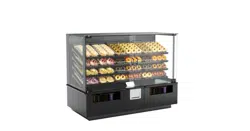
BLEND® SELF-SERVICE DRY (AMBIENT) MERCHANDISERS
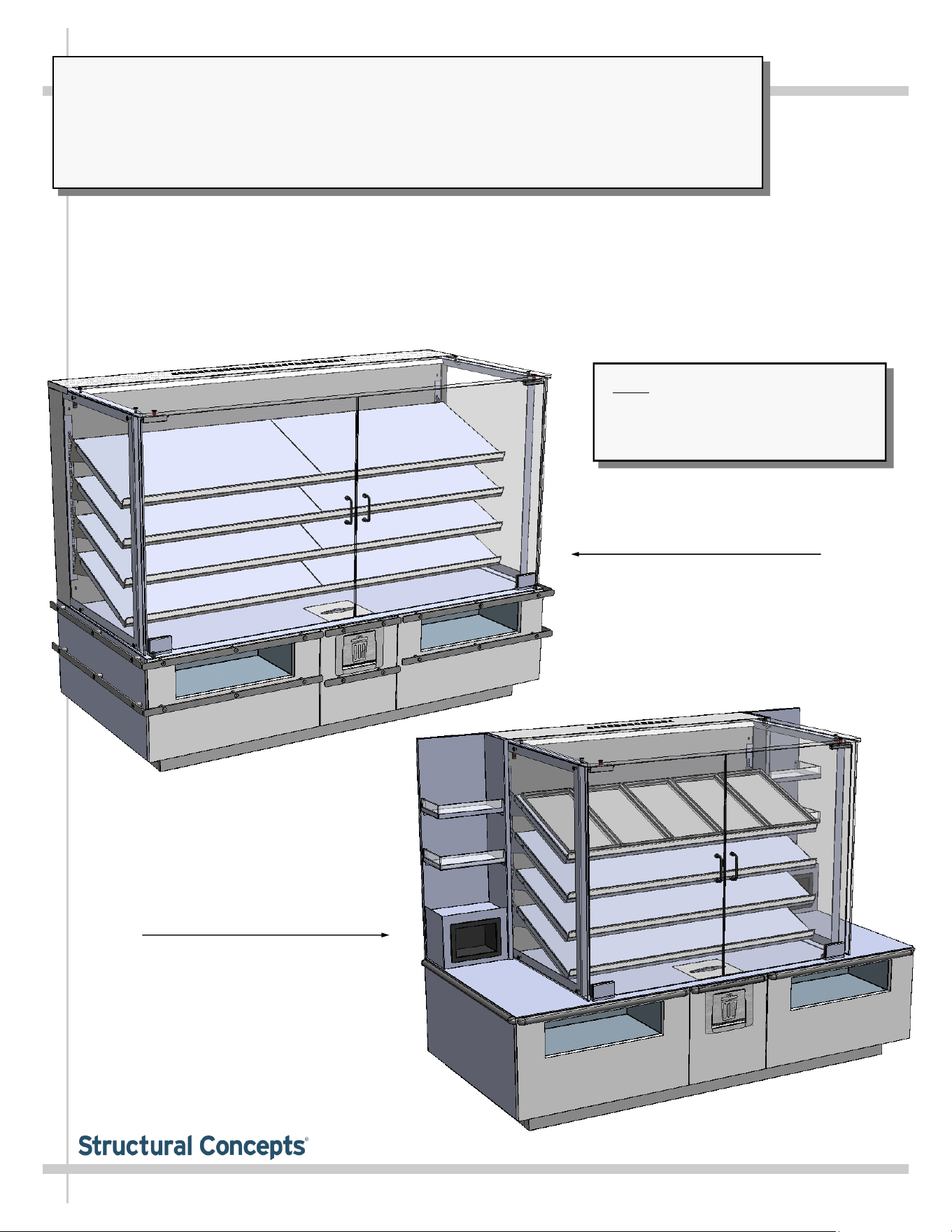
> THIS USER GUIDE IS APPLICABLE TO MODEL NM4855DSSV and NM7255DSSV
> SOLID REAR PLENUM / PRESSURIZED FAN SYSTEM TO PREVENT INSECT INFILTRATION
> HINGED FRONT GLASS DOORS WITH CENTER HANDLES /
> FRONT CUBBIES / FRONT NAPKIN DISPENSER INSIDE UNIT / TRASH DOOR
> CAUTION! DO NOT PUSH OR PULL ON GLASS UPRIGHTS!
> ONLY USE HANDLES (AT EACH END OF CASE) TO PUSH OR PULL CASE INTO POSITION!
Model NM7255DSSV Ambient
Merchandiser Shown At Left
Note: See Blend® Case-To-Case
Adjoinment Guide P/N 21-26284
For Lineup Options As Well As
Step-By-Step Lineup Instructions.
Structural Concepts Corp. ∙ 888 E. Porter Rd ∙ Muskegon, MI 49441 Phone: 231.798.8888 Fax: 231.798.4960 ∙ www.structuralconcepts.com
User
Manual
®
BLEND
READ AND SAVE THESE INSTRUCTIONS
Model NM4855DSSV Ambient
Merchandiser With Optional
Tray Feature Shown At Right
2
TABLE OF CONTENTS
TABLE OF CONTENTS ………………………………………………………………………………….....…...
OVERVIEW / COMPLIANCE / LED LIGHTS PRECAUTION / ELECTRICAL HAZARD WARNING /
WIRING DIAGRAM ……………………………………………………………………..……..………...
BLEND® FREE STANDING REFRIGERATED SELF-SERVICE MODEL APPLICABILITY AND
INDIVIDUAL MODEL DIMENSIONS ……………...………………………………………….…..…...
INSTALLATION: TOE-KICK & REAR PANEL REMOVAL / REMOVING SKID BRACKETS AND
BLOCKS ……………………………………………………………………………………………..…...
INSTALLATION, CONT’D.: CASTER ADJUSTMENT / LOCK / UNLOCK / CASE REMOVAL FROM
SKID ……………………………………………………………………………………………………....
INSTALLATION, CONT’D: TOE-KICK REATTACHMENT ……………………………………………..…..
INSTALLATION, CONT’D: SHELVING ASSEMBLY COMPONENTS ………………………………..…..
INSTALLATION, CONT’D: FIELD WIRE (OR PLUG IN) CASE / TURN ON LED LIGHTS .……...…….
CASE DESIGN: TOP SIDE VIEW OF AMBIENT, SELF-SERVICE MERCHANDISERS .……………....
CASE DESIGN, CONT’D: UNDERSIDE VIEW OF AMBIENT SELF-SERVICE MERCHANDISERS …
CASE DESIGN, CONT’D: LED STYLE LIGHT FIXTURES …………………………………………………
CASE DESIGN, CONT’D: PRESSURIZED FAN SYSTEM TO PREVENT INSECT INFILTRATION …...
CLEANING SCHEDULE (TO BE PERFORMED BY STORE PERSONNEL) ……………….……..……..
TROUBLESHOOTING (TO BE PERFORMED BY STORE PERSONNEL) ...………………...................
TROUBLESHOOTING (TO BE PERFORMED BY TRAINED SERVICE PROVIDERS ONLY) …..…….
SERIAL LABEL LOCATION & INFORMATION LISTED / TECH INFORMATION & SERVICE ….…....…
STRUCTURAL CONCEPTS TECHNICAL SERVICE CONTACT INFORMATION & LIMITED
WARRANTY …………………………………………………………………………....…...…...….......
2
3
4
5
6
7
8
9
10
11
12
13
14
15
16
17
18
3
OVERVIEW / COMPLIANCE / LED LIGHTS / ELECTRICAL HAZARD WARNING / WIRING DIAGRAM
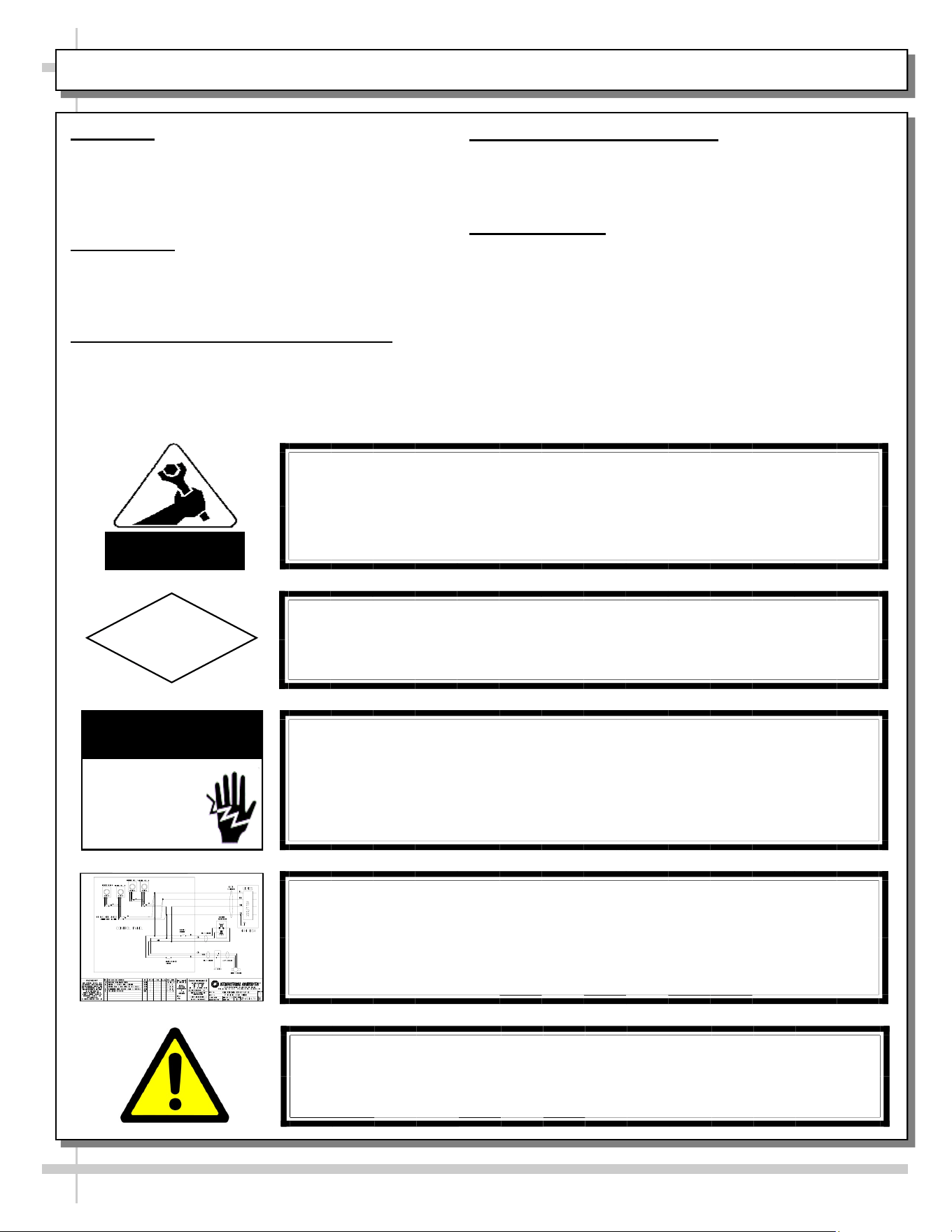
ELECTRICAL HAZARD WARNING
Risk of electric shock. Disconnect power before servicing unit.
CAUTION! More than one source of electrical supply is
employed with units that have separate circuits.
Disconnect ALL ELECTRICAL SOURCES before servicing.
WARNING
ELECTRICAL
HAZARD
OVERVIEW
• These Blend® ambient merchandisers should be
installed and operated according to this operating
manual’s instructions to insure proper performance.
• Improper use will void warranty.
COMPLIANCE
• Performance issues when in violation of applicable
NEC, federal, state and local electrical codes are
not covered by warranty.
LED LIGHT REPLACEMENT PRECAUTIONS
• Following LED light replacement guidelines can
prevent damage to unit. Please read carefully!
ELECTRICAL HAZARD WARNING
• Please read the important warning in this document
carefully as it can prevent injury or death.
• See below.
WIRING DIAGRAM
• Each case’s wiring diagram is folded and in a packet.
• Wiring diagram placement may vary (near ballast box,
field wiring box, raceway cover or other related location).
COMPLIANCE
This equipment MUST be installed in compliance with
all applicable NEC, federal, state and local
electrical codes.
ATTENTION
CONTRACTORS
CAUTION! LED LIGHT REPLACEMENT PRECAUTIONS
LED lights reflect specific size, shape and overall design.
Any replacements must meet factory specifications.
CAUTION
WIRING DIAGRAM FORMAT & LOCATION
• Each case has its own wiring diagram folded & in its own packet.
• Wiring diagram placement may vary; it may be placed near field
wiring box, raceway, or other related location.
WARNING: This product can expose you to chemicals, including
Urethane (Ethyl Carbamate), which are known to the state of
California to cause cancer and birth defects or other reproductive
harm. For more information go to P65Warnings.ca.gov.
4
BLEND® FREE STANDING REFRIGERATED SELF-SERVICE MODEL APPLICABILITY & DIMENSIONS
Model
Upper Display
Case Height
Overall Case Height Case Depth x Width
NM4855DSSV 35 1/4” 54 5/8” 33”D x 71 3/4”W
NM7255DSSV 35 1/4” 54 5/8” 33”D x 71 3/4”W
5
INSTALLATION: TOE-KICK & REAR PANEL REMOVAL / REMOVING SKID BRACKETS AND BLOCKS
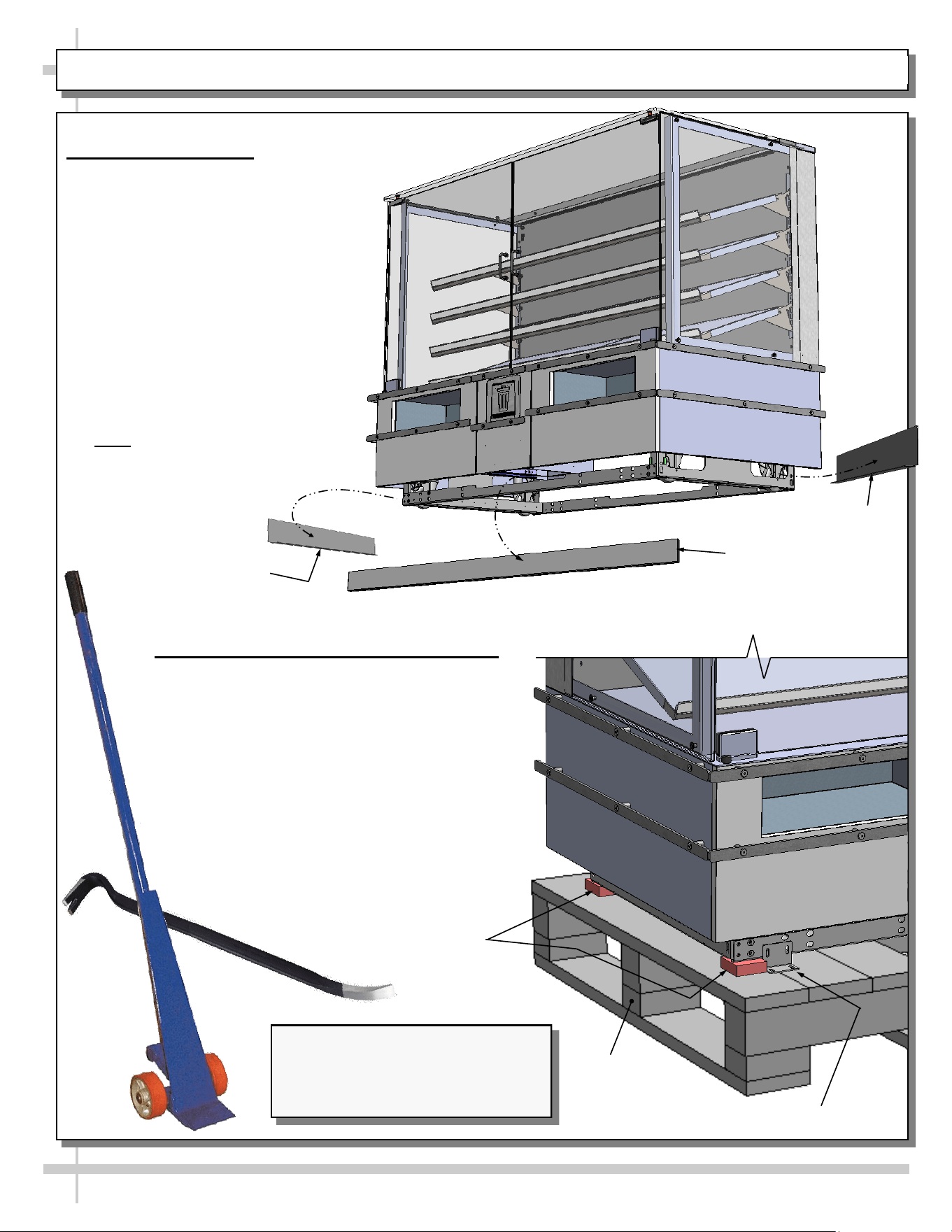
1. Remove Toe-Kicks
• To prevent damage to case, front
and side toe-kick should NOT be
on case at shipment.
• If they are, you must remove toe-
kicks from case before removing
case from skid.
• Toe-kicks are held in place by
magnets only.
• Place toe-kicks in secure locations
while removing case from skid.
• After case has been rolled into
location, adjusted and locked in
place, toe-kicks may be returned to
case.
• Note: Illustration at right is shown
without skid shown for illustrative
purposes.
2. Removing Skid Brackets and Blocks
• Use Phillips driver to remove screws from
shipping brackets. Remove and discard
shipping brackets from skid.
• Place J-bar/pry bar under base frame.
Raise case up from skid to take weight off
casters.
• With case raised, lower casters all the
way down against skid (see next step for
detailed instructions on lowering or
raising casters).
• Remove rubber shipping blocks.
J-Bar
Pry Bar
Shipping Bracket
Rubber Shipping
Block
Skid
Side
Toe-Kick
Side Toe-Kick
Front
Toe-Kick
Illustrations Shown Reflects Model
NM7255DSSV. It May Not Exactly
Reflect Every Feature or Option of
Your Particular Merchandiser.
6
INSTALLATION, CONT’D.: CASTER ADJUSTMENT / LOCK / UNLOCK / CASE REMOVAL FROM SKID
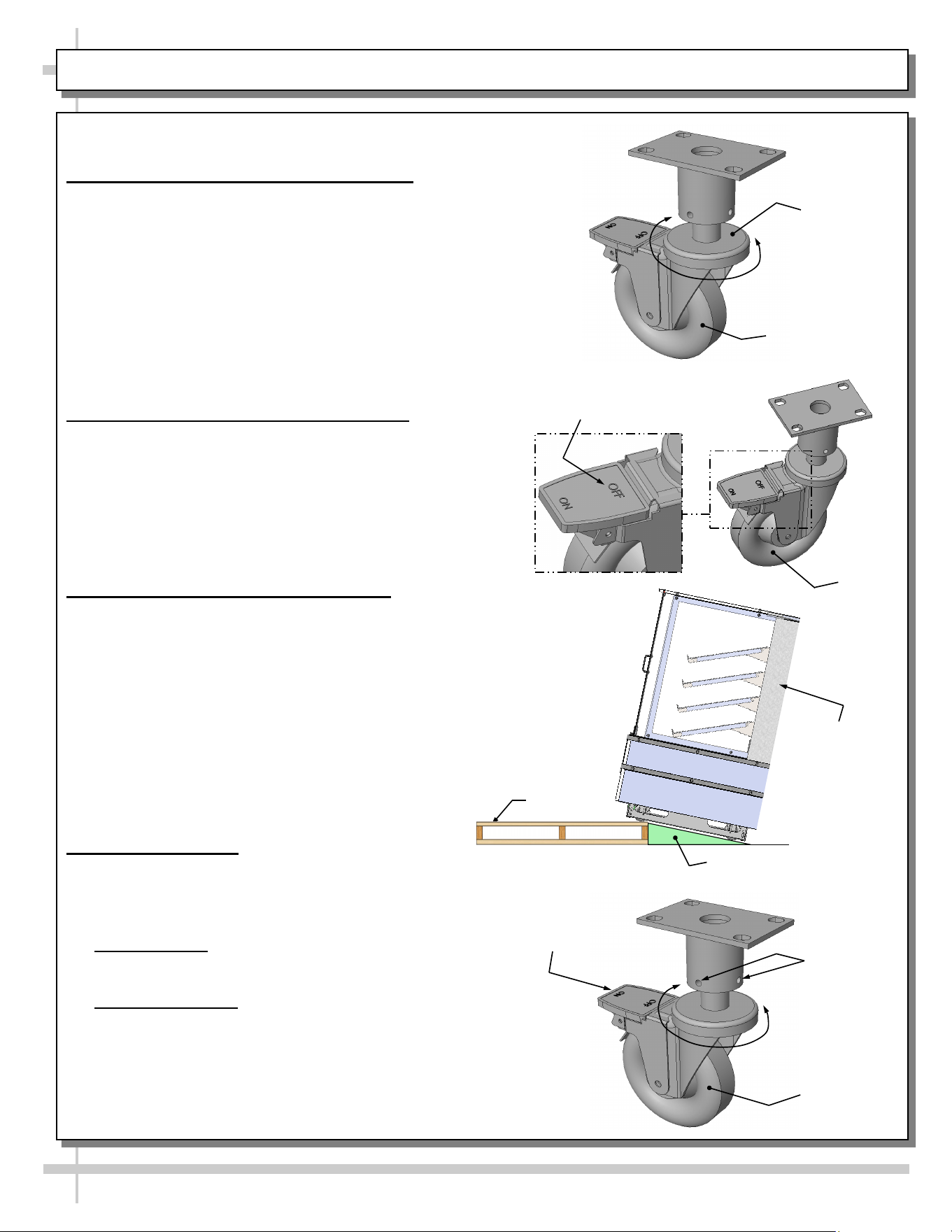
3. Caster Height: Raising and Lowering
• Raise or lower casters (to adjust case height) by
rotating casters’ vertical adjustment rings.
• Rotate vertical adjustment ring clockwise to lower
caster (and increase height of case).
• Rotate vertical adjustment ring counter-clockwise
to raise caster (and decrease height of case).
4. Caster Rolling Capability: Unlocking
• Important! Case is shipped with caster mechanisms
factory set at ON (locked) to prevent case from rolling.
• Unlock casters by pressing OFF on the caster
mechanism.
• See illustration at right.
5. Carefully Remove Case From Skid
• Check that casters are lowered as far down as
they will go (as instructed in step #4).
• Use handles to carefully slide case to edge of
skid (see illustration at right).
• Caution! 4 people are required for this task!
• Carefully lower to floor (using ramp if available).
• Slide skid from under case as required.
• Support case at all times or case may fall.
• See illustration at right.
6. Casters: Locking
• After case is at desired position (and height),
use level to check that case is level and plumb.
• Readjust height as needed (as instructed in
step #4 above).
• Locking Height: After proper height (and
positioning) of case is attained, tighten the two (2)
set screws to lock each caster’s height in place.
• Locking Movement: Then, to prevent casters’ rolling
capability, lock casters by pressing ON atop the
“ON” and “OFF” lever mechanism (shown at right).
Case will now be secured at its new location.
Vertical
Adjustment
Ring
Skid
Support case
while removing
from skid
Caster
Tighten Set
Screws To
Lock Caster
Height In
Place
Press “ON” Lever To
Lock Caster In Place
(And Prevent Caster
From Rolling)
Press “OFF” Lever To
Unlock Caster (And
Allow Casters To Roll)
Caster
Caster
Ramp
7
INSTALLATION, CONT’D: TOE-KICK REATTACHMENT
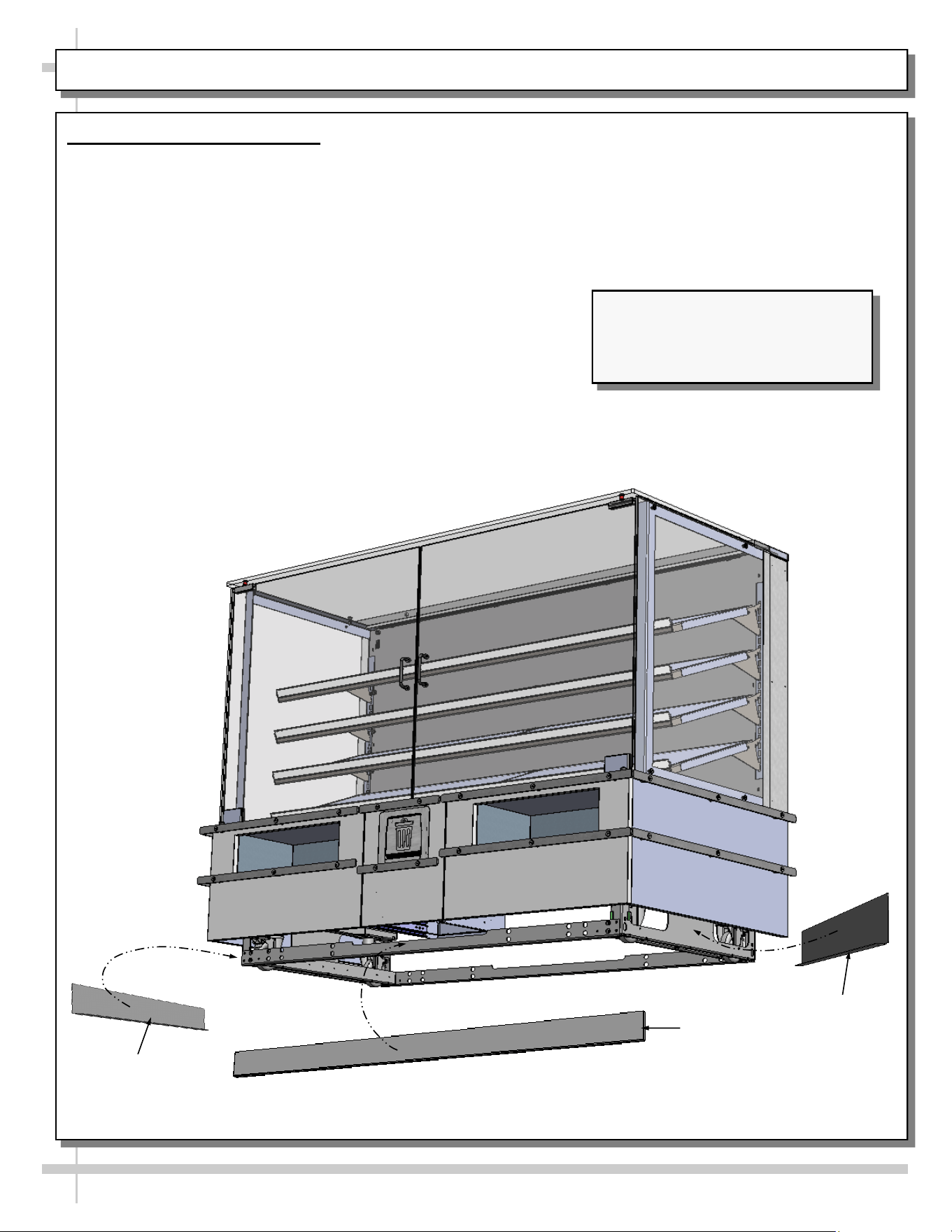
7. Return Toe-Kicks To Case
• After case has been rolled into position and casters height adjusted and locked, return toe-kicks to case.
• Toe-kicks are held in place by magnets only.
• See illustration below.
Side
Toe-Kick
Front
Toe-Kick
Side
Toe-Kick
Illustrations Shown Reflects Model
NM7255DSSV. It May Not Exactly
Reflect Every Feature or Option of
Your Particular Merchandiser.
8
INSTALLATION, CONT’D: SHELVING ASSEMBLY COMPONENTS
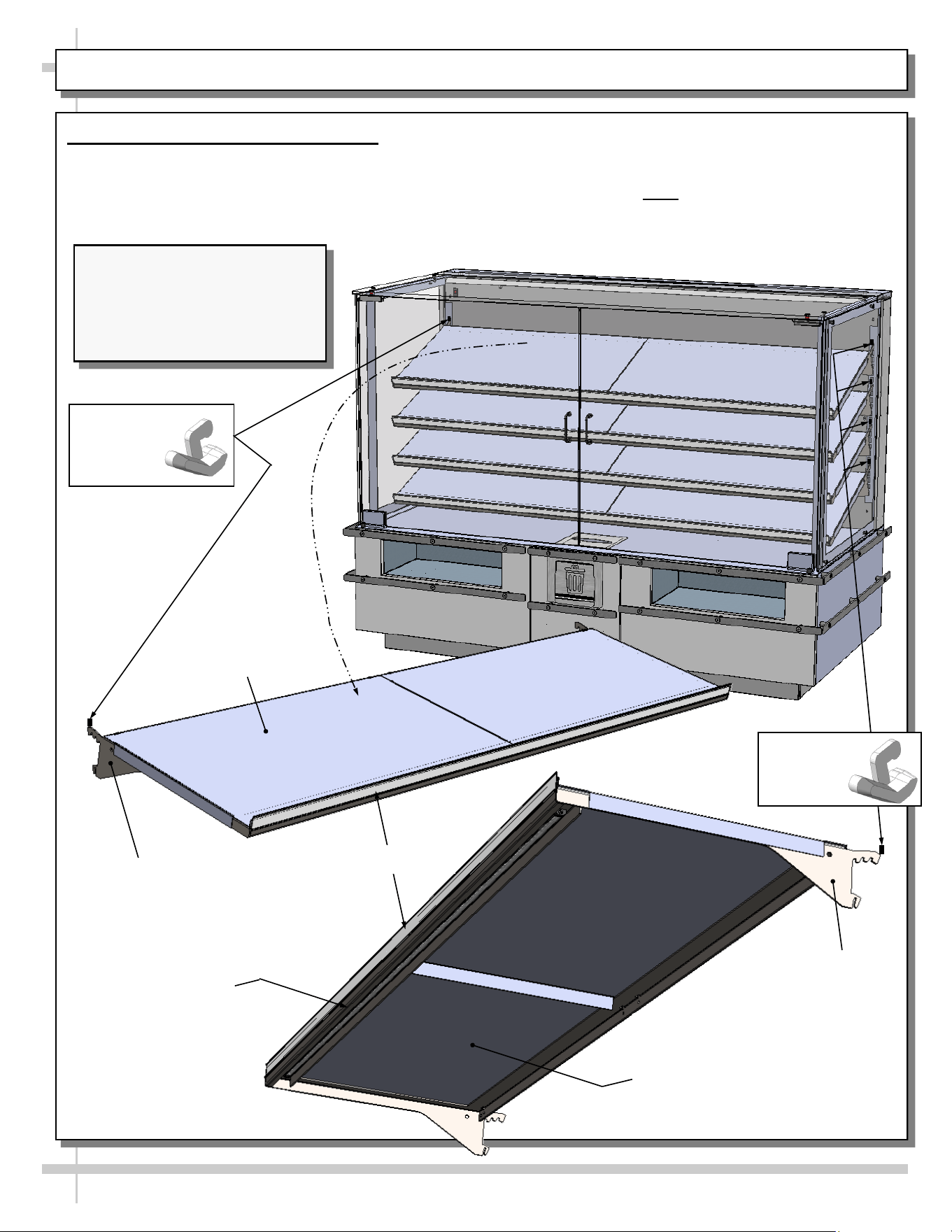
8. Shelving Assembly Components
• Check that shelving is in proper position before
placing product in case
• Shelves may be adjusted vertically, horizontally
or entirely removed from merchandiser.
• See illustrations below for components comprising
each shelf assembly.
• Nylon retainer clips (2 per shelf) secure brackets
during shipment. Note: To adjust or remove
shelves, you must remove retainers; pliers may
be required to accomplish this task.
Bracket With Notches
To Adjust (Typ.)
Shelf Top - For Placing
Product (Typ.)
Shelf Top - For Placing
Product (Typ.)
LED Light (Typ.)
Nylon
Retainer
Clip (Typ.)
Bracket
With Notches To
Adjust (Typ.)
Nylon
Retainer
Clip (Typ.)
Tag Molding (Typ.)
Illustrations Shown Reflects
Model NM7255DSSV. It May
Not Exactly Reflect Every
Feature or Option of Your
Particular Merchandiser.
9
INSTALLATION, CONT’D: FIELD WIRE (OR PLUG IN) CASE / TURN ON LED LIGHTS
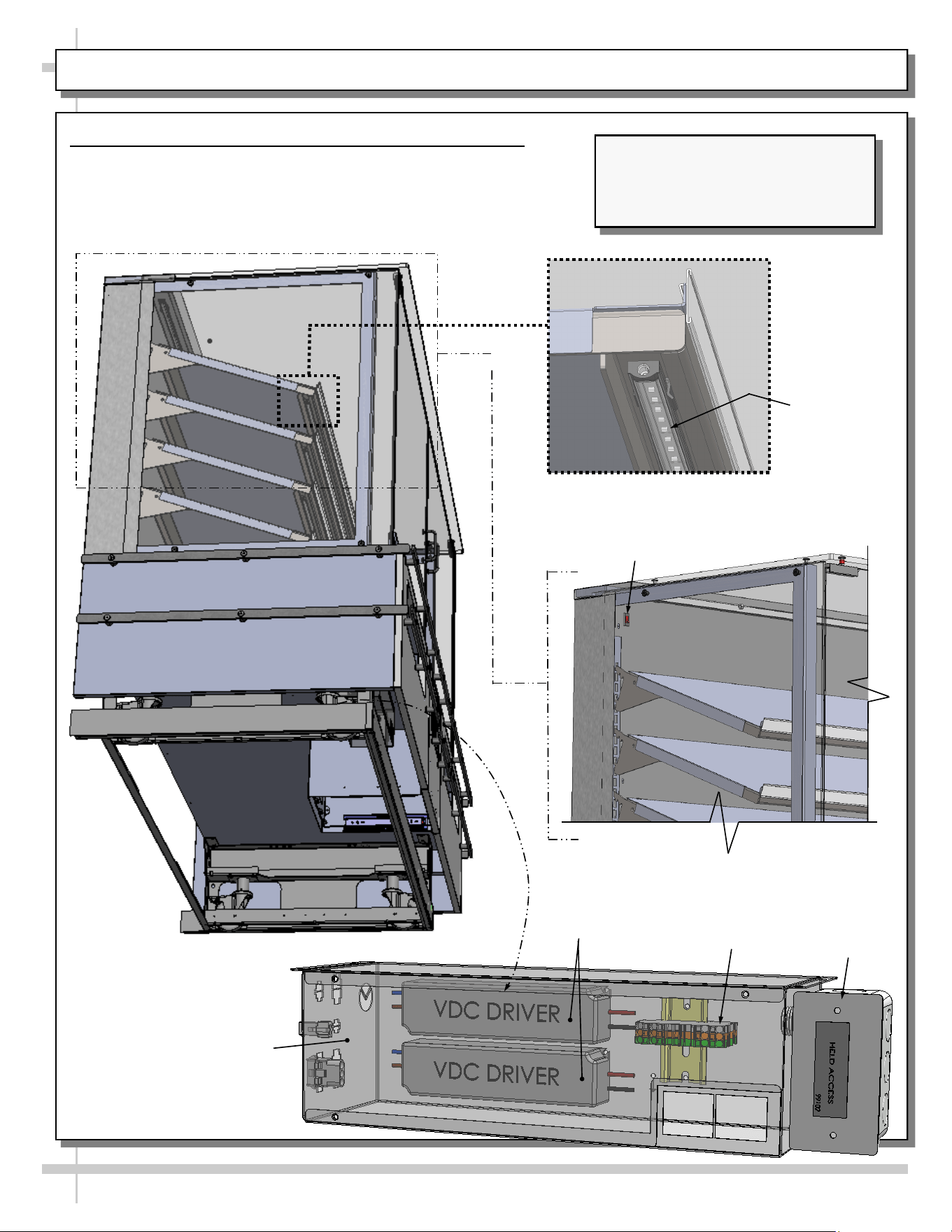
9. Field Wire (Or Plug In) Case / Turn on LED Lights
• Field-wired case or plug unit into outlet (if plug is present).
• Case will energize when properly field-wired (or plugged
into outlet).
• Turn on LED light switch at rear-left plenum.
LED Light
Switch
Field Access
Box
Terminal
Block
LED
Drivers
LED Light
Electrical / LED
Driver Box
Illustrations Shown Reflects Model
NM7255DSSV. It May Not Exactly
Reflect Every Feature or Option of
Your Particular Merchandiser.
10
CASE DESIGN: TOP SIDE VIEW OF AMBIENT, SELF-SERVICE MERCHANDISERS
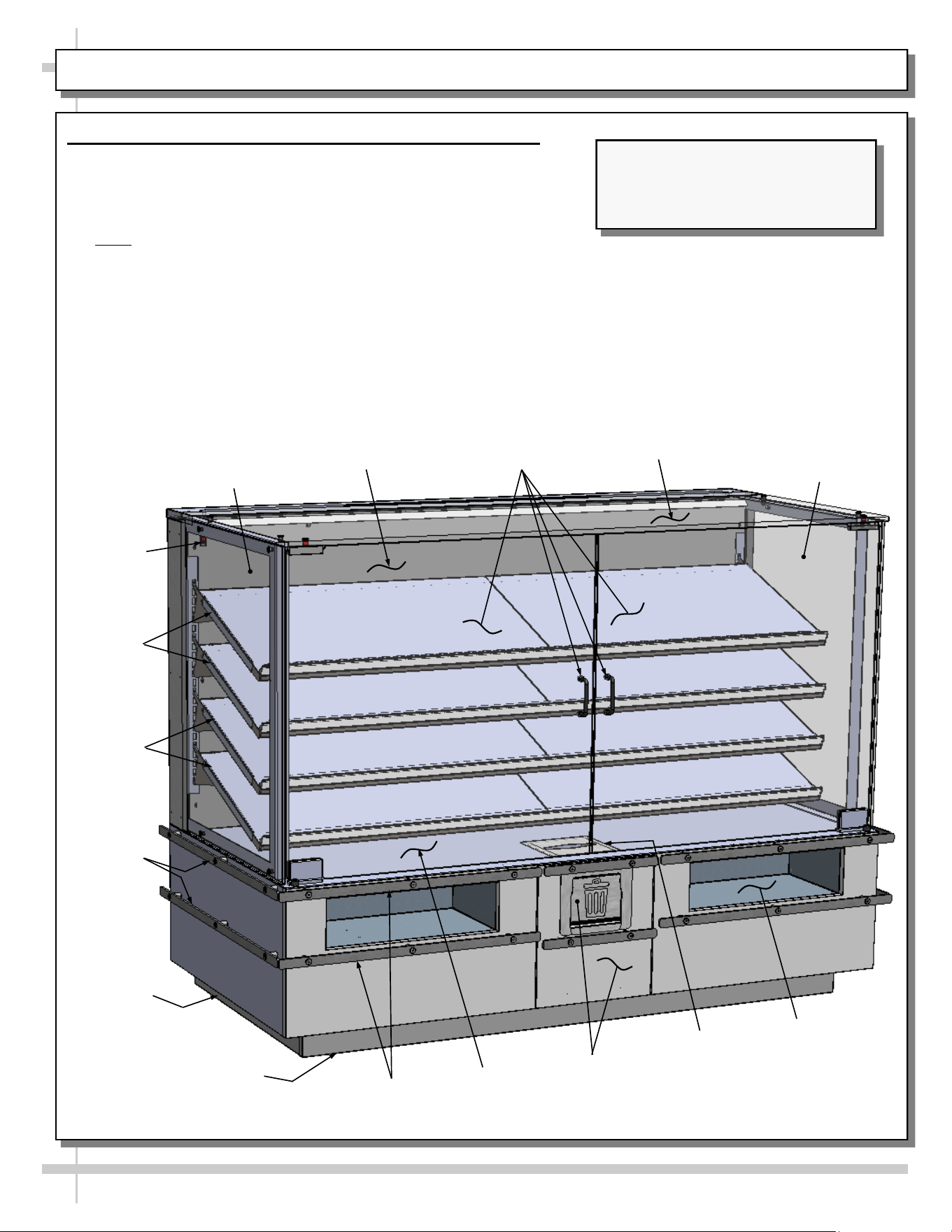
1. Front View of Ambient, Self-Service Merchandisers
• Solid back panel is shown. Your unit may have rear sliding
doors.
• Field access box and electrical box (with LED drivers) are
accessible after front panel has been removed.
• Note: Only certified electricians are to access electrical
components in case.
• See next page for rear view of merchandiser.
Deck
Solid Back
Rear Panel
Glass Doors
and Handles
Right Glass
End Panel
Left Glass
End Panel
LED Light
Switch
Shelves
Shelves
Trash Door
And Drawer
Cubby
(Typ.)
Tissue Box
Holder
Top Glass
Metal
Bumpers
Side
Toe-Kick
Front
Toe-Kick
Metal Rail
Bumpers (Typ.)
Illustrations Shown Reflects Model
NM7255DSSV. It May Not Exactly
Reflect Every Feature or Option of
Your Particular Merchandiser.
11
CASE DESIGN, CONT’D: UNDERSIDE VIEW OF AMBIENT SELF-SERVICE MERCHANDISERS
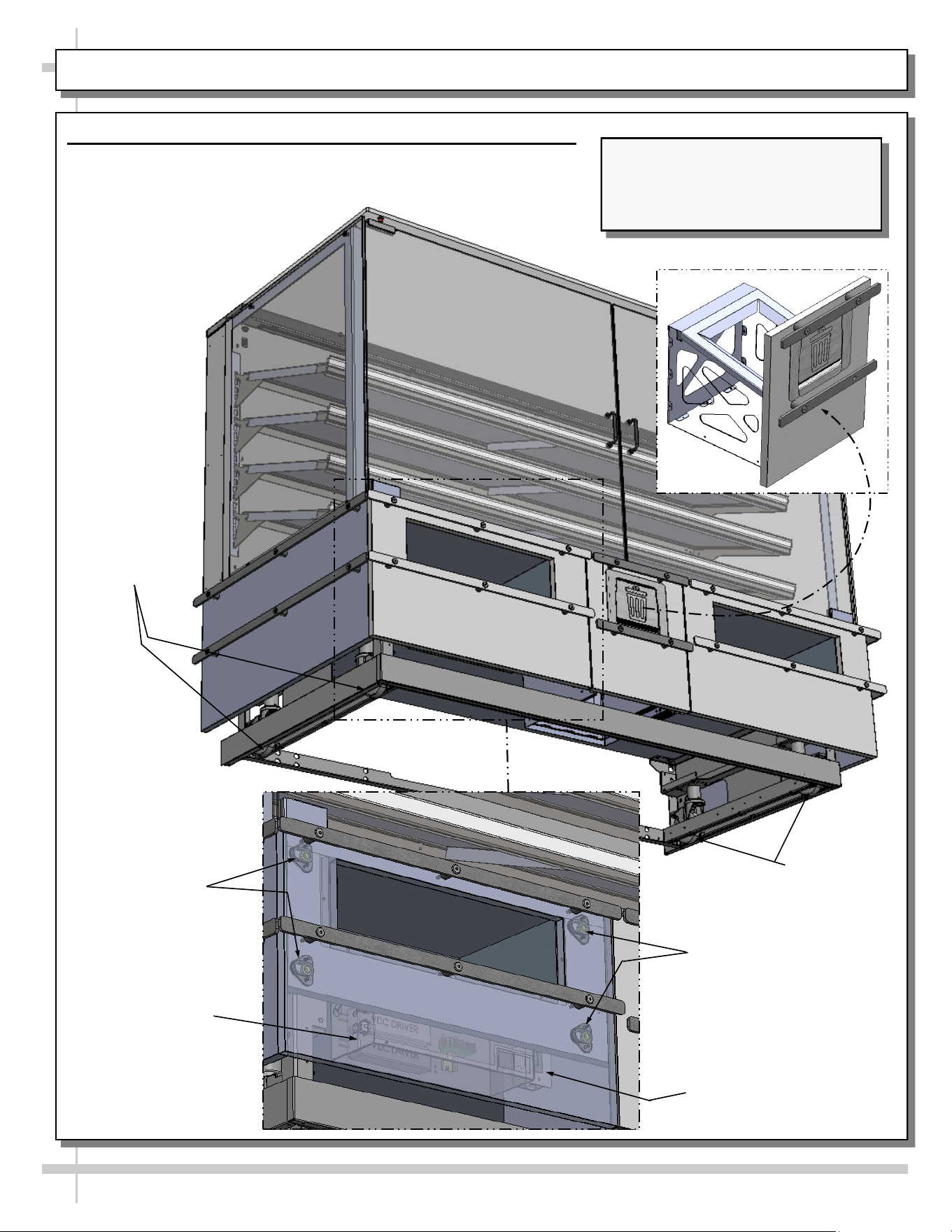
Casters
2. Underside Vew Of Ambient Self-Service Merchandisers
• Power cord route may differ depending upon customer request.
• Slide-out drawer (shown below-right) may be pulled out to
access trash bags.
Casters
Spacer Buttons /
Brackets For Front
& Side Panel
Attachment
Electrical Box (With
Terminal Strip &
Drivers)
Field Access
Box
Spacer Buttons /Brackets
For Front & Side Panel
Attachment
Illustrations Shown Reflects Model
NM7255DSSV. It May Not Exactly
Reflect Every Feature or Option of
Your Particular Merchandiser.
12
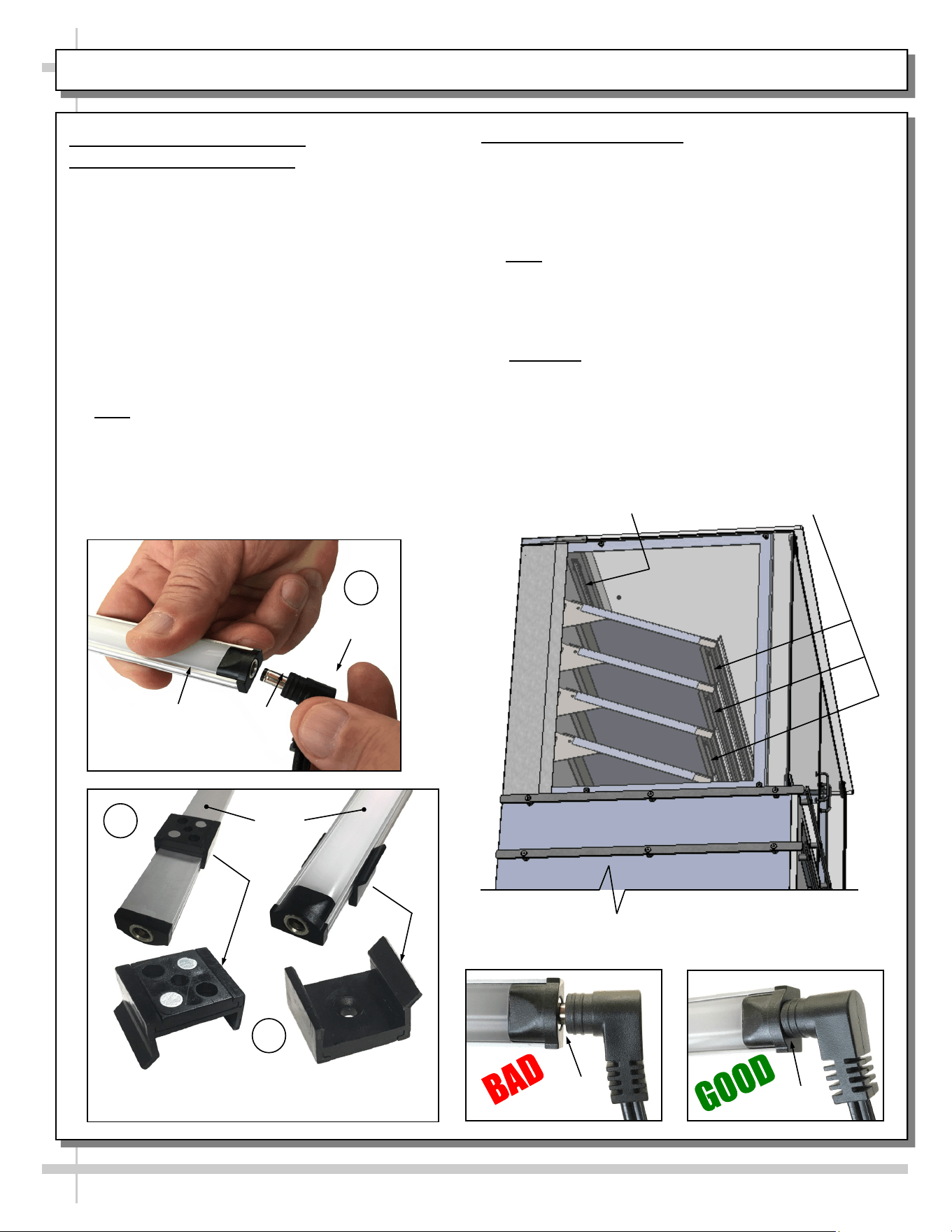
CASE DESIGN, CONT’D: LED STYLE LIGHT FIXTURES
Replacement of LED lights:
• Attach magnetic mounting clips to LED light.
• Adjust magnetic mounting clips so they are equally
spaced on LED light.
• Reattach LED light assembly to its shelf/header.
• Position properly in shelf/header.
>> Note: If mounting clips are riveted to shelf (or
header), attach by placing LED in base of clip and
then snapping into clip at FLANGE SIDE.
• Press plug’s barrel-shaped insert all the way into
LED light.
• Important: If plug is not inserted ALL THE WAY IN
the LED light’s orifice, the light may not energize.
See “BAD” vs. “GOOD” insertion illustrations
below-right.
• Turn LED light switch back on.
No Gap
Gap
A
Plug
Barrel
Shaped
LED
Light
Magnetic Mounting
Clip View #2
LED
Lights
B
C
Magnetic Mounting
Clip View #1
LED Light
(In Header)
LED Lights
(At Underside of Shelves)
--- Angled View of Header and Underside of Shelves ---
3. LED Style Light Fixtures
Removal of Faulty LED Lights:
• LED lights rarely require change-out.
• Contact Structural Concepts’ Technical Service
Department for replacement LED lights.
• Turn off LED light switch.
• To remove faulty LED light, follow these steps:
A. Disconnect plug from LED light.
B. Using both hands, grasp LED light assembly
(with its magnetic mounting clips). Pull
downward and off its shelf (or header).
C. Remove magnetic mounting clips from LED
light by pressing against flange part of clip
with thumb.
>> Note: Mounting clips MAY be riveted to shelf or
header. In such instances, simply remove LED light
from mounting clips by pressing against flange part
of clips with thumb.
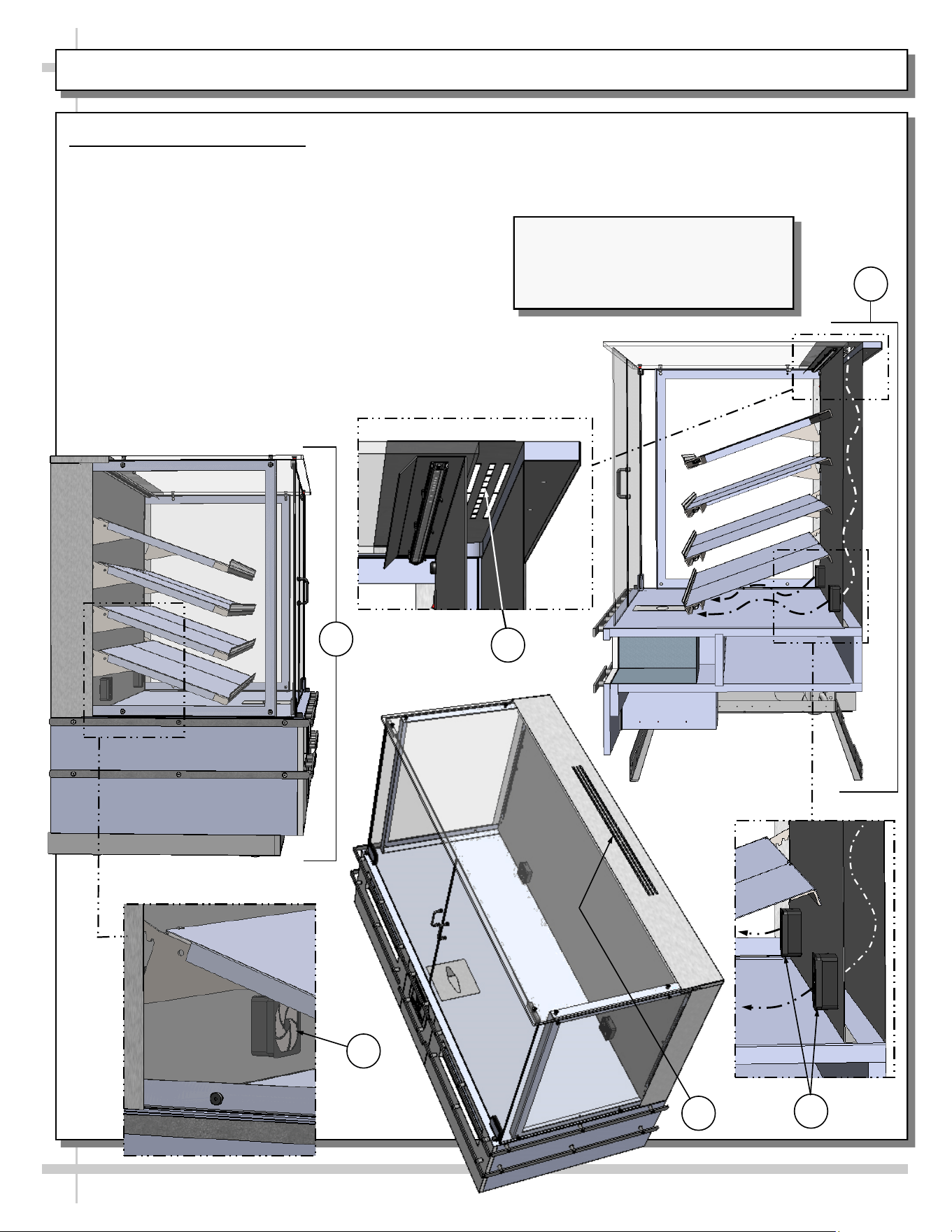
CASE DESIGN, CONT’D: PRESSURIZED FAN SYSTEM TO PREVENT INSECT INFILTRATION
5. Sectioned view of case showing airflow from
axial fans, along rear chimney and through
upper baffle.
6. Sectioned view of case showing upper baffle.
4. Pressurized Fan System
• Case is pressurized from inside to out using
axial fans at rear plenum.
• Case is designed to prevent insect infiltration
with airflow pressure along rear chimney through
upper baffle.
• Illustrations below show how system works.
1. Side view of case.
2. Angled view of one of two axial fans.
3. Top view of upper baffle shown after removal
of shelving (for illustrative purposes only).
4. Side view of axial fans and rear chimney with
airflow route.
13
1
2
3
4
6
5
Illustrations Shown Reflects Model
NM7255DSSV. It May Not Exactly
Reflect Every Feature or Option of
Your Particular Merchandiser.
14
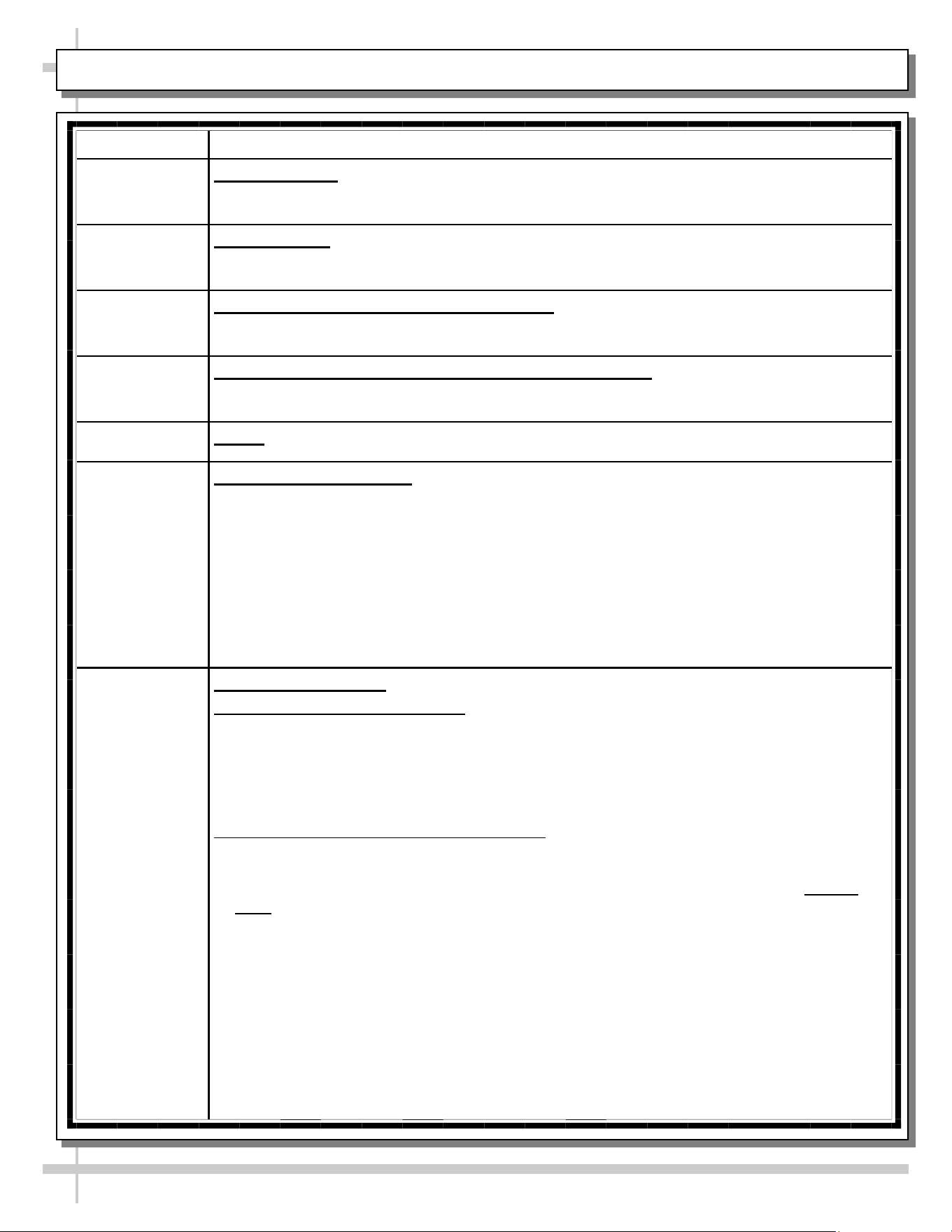
CLEANING SCHEDULE (TO BE PERFORMED BY STORE PERSONNEL)
FREQUENCY INSTRUCTIONS
Daily Glass Surfaces: Clean side glass and shelves with household or commercial glass
cleaner.
Daily Exterior Glass: Clean with household or commercial glass cleaner.
Daily Acrylic Tray/Shelf (on NM4855DSSV Only): Use non-abrasive cloth with warm water
and mild soap solution to wipe off all surfaces. Dry with non-abrasive cloth.
Daily End Panels, Front Panel, Toe-Kick, Tray/Shelving, etc.: Wipe off all surfaces with
warm water and mild soap solution and non-abrasive cloth.
Daily Decks: Wipe off decks with moist cloth dipped in mild soap and water solution.
Daily Stainless Steel Surfaces:
• Wash with a solution of hand dishwashing liquid detergent and water, or a solution of
baking soda and water. Rinse and polish dry with paper towel or soft cloth.
• Never use scouring powders or steel wool as they will scratch stainless steel.
• Brighten by polishing with a cloth dipped in vinegar or in ammonia; sprinkle baking
soda on sponge and rub gently; rinse. Polish dry with paper towel.
• Remove streaks or heat stains from stainless steel by rubbing with club soda.
Quarterly Under Case Cleaning:
A. Rolling Case To New Location:
• If case is NOT hard wired, it may be rolled forward or backward to allow access to
case underside (depending upon its store placement).
• Use vacuum with brush extension or broom and dust pan to remove all dust, dirt,
food particles or residue.
• Roll case back into its previous location after cleaning is complete.
B. Case Component Removal/Replacement:
• Whether case is hard wired or not, case components may be removed to allow
cleaning under case.
• Front and side toe-kicks are held in place with magnets and are removable without
tools.
• Replace components when cleaning process is complete.
15
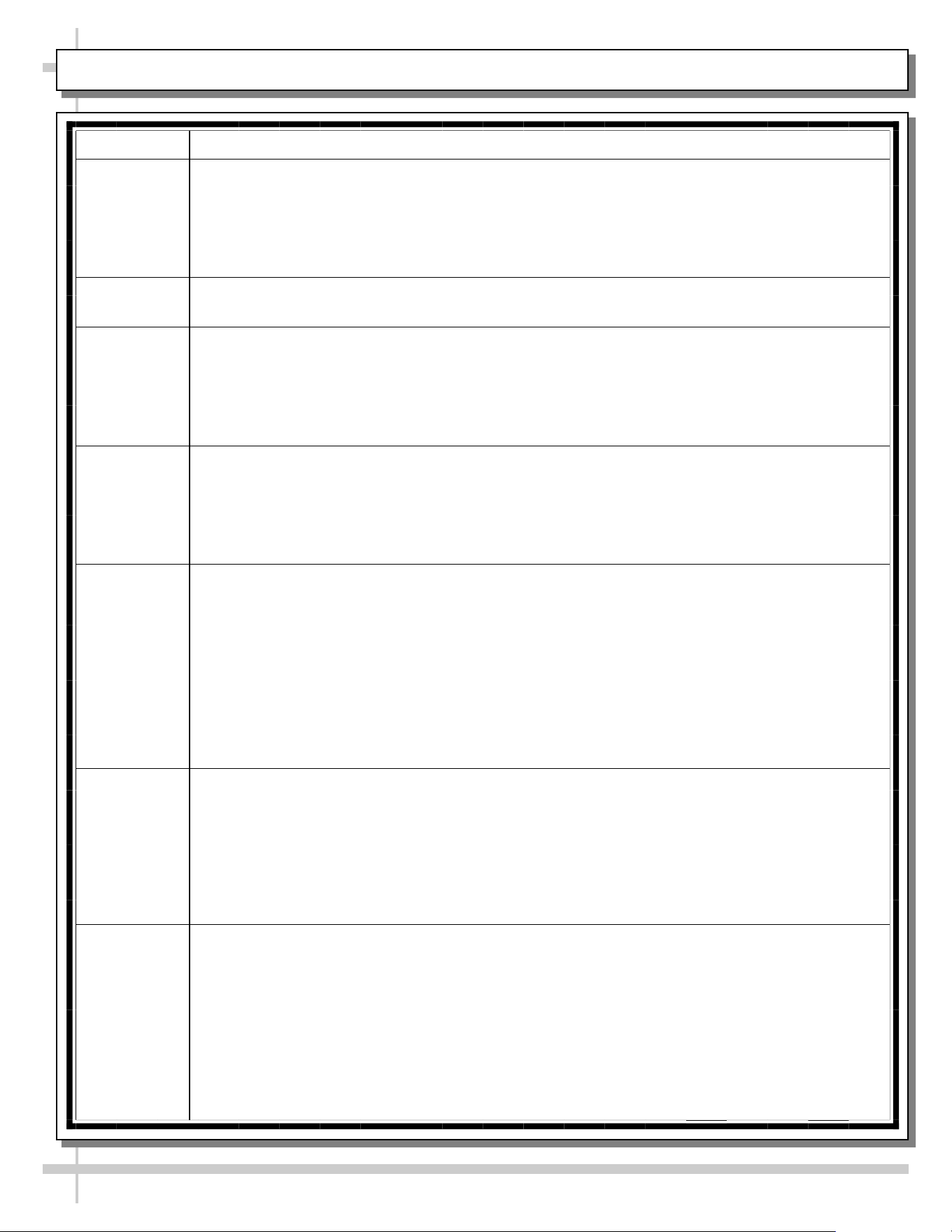
TROUBLESHOOTING (TO BE PERFORMED BY STORE PERSONNEL)
CONDITION TROUBLESHOOTING
Case Lights
Not Working
Check that light switch is in the ON position.
• See CASE DESIGN: TOP SIDE VIEW OF AMBIENT, SELF-SERVICE
MERCHANDISERS section in manual for switch locations.
If case is NOT hard-wired, check that power cord is properly connected to wall outlet.
Check that ALL of the light plugs are properly connected to the LED light.
• Plug must be inserted ALL THE WAY into the LED light orifice (with no gap).
• See CASE DESIGN, CONT’D: LED STYLE LIGHT FIXTURES section in manual.
Power may not be reaching the case.
• Contact store management to have trained service provider perform troubleshooting.
• Troubleshooting to be performed by trained service providers only is on next page.
If case light still do not come on, it may need to be replaced.
• Contact Structural Concepts’ Technical Service Department for replacement light
(see TECHNICAL SERVICE section of this manual for contact information).
• To replace, disconnect plug from existing LED light. Disconnect LED light from its
brackets. Replace with new LED light. Insert plug ALL THE WAY into LED light orifice.
Pressurized
Fan
System’s
Axial Fan(s)
Not
Working
Check that power is being provided to case.
• If case is NOT hard-wired, check that power cord is properly connected to wall outlet.
• If LED light switch is on but LED lights are not energized, axial fan(s) may need to be
replaced.
Power may not be reaching the case.
• Contact store management to have trained service provider perform troubleshooting.
• Troubleshooting to be performed by trained service providers only is on next page.
16
CONDITION TROUBLESHOOTING
Case Lights Are
Not Working
See previous page for most common LED light troubleshooting solutions.
Check power.
• If power is not supplied to the case, facility may have faulty power distribution.
• If power is supplied to the case but lights are not energized, case’s power supply
may be faulty.
Pressurized Fan
System’s Axial
Fan(s) Not
Working
Check power.
• If power is not supplied to the case, facility may have faulty power distribution.
• If power is supplied to the case but axial fans are not operational, case’s power
supply may be faulty.
• Axial fan(s) may be faulty and need to be replaced. Contact Structural Concepts
for replacement fan(s).
TROUBLESHOOTING (TO BE PERFORMED BY TRAINED SERVICE PROVIDERS ONLY)
17
SERIAL LABEL LOCATION & INFO LISTED / TECH INFO & SERVICE - AMBIENT/HEATED CASES ONLY
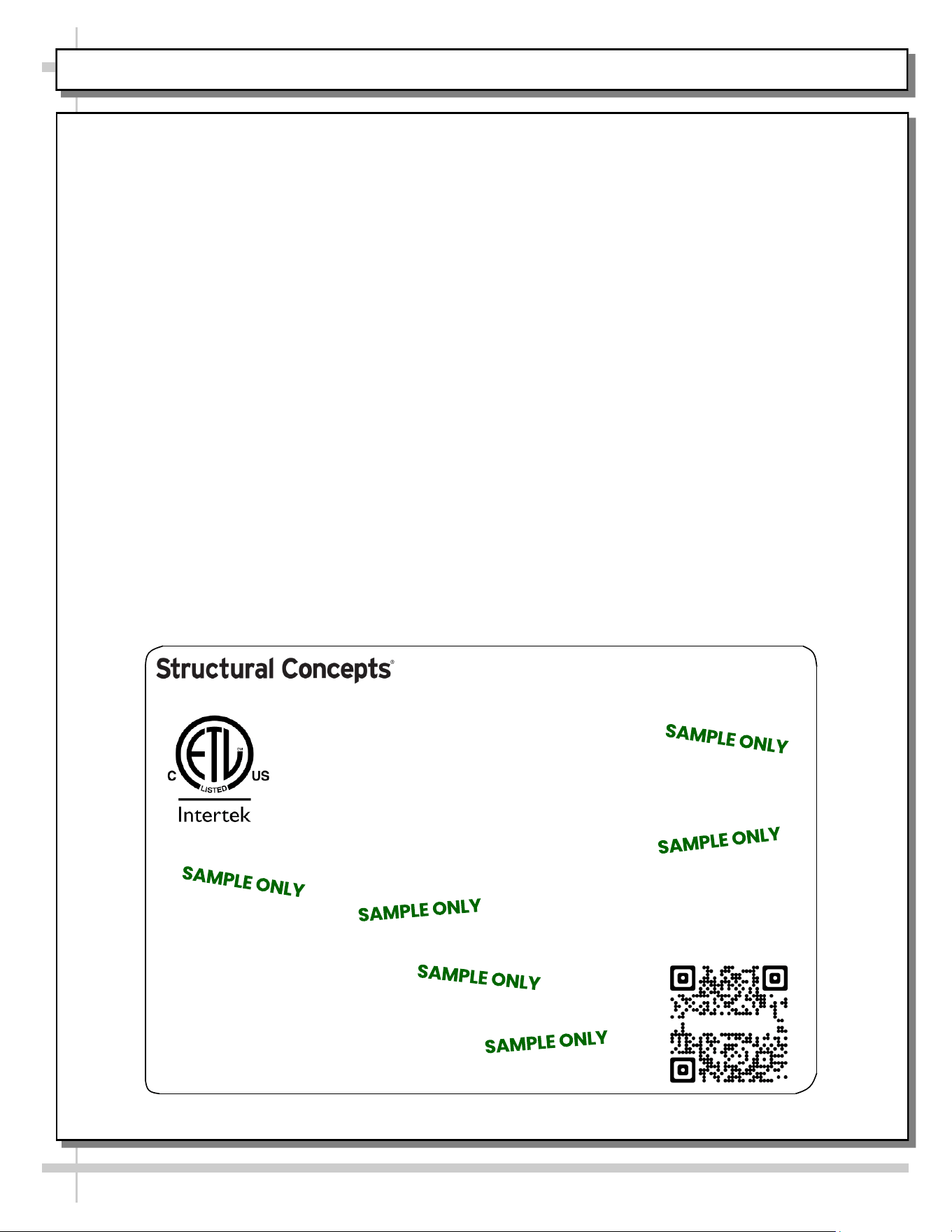
--- Sample Serial Label For Ambient/Heated Cases ---
MODEL NRS3648RXV-SAMPLE
SERIAL NO. 12345X30DZ098765
888 E. Porter Rd - Muskegon, MI 49441
3048256
Conforms to UL Std. 65
CERTIFIED TO CAN/CSA
STD C22.2 NO 120
120 VOLTS 60HZ
FOR PARTS OR SERVICE CALL
STRUCTURAL CONCEPTS
AT 1-800-433-9489
SINGLE PHASE 1.84 AMPS
Serial Label Location & Information Listed /
Technical Information & Service
• Serial labels are affixed at a wide range of places
(on the header, at case rear, behind panels or
toe-kicks, on electrical boxes, etc.).
• Serial labels contain electrical information as well
as regulatory standards to which the case
conforms.
• Sample serial label shown below.
• For additional technical information and service, see
the TECHNICAL SERVICE page in this manual for
instructions on contacting Structural Concepts’
Technical Service Department.
Sample QR Code
SCAN FOR PRODUCT LITERATURE
Reveal
Harmony
Fusion
Impulse
Addenda
Blend
Grocerant
Oasis
STRUCTURAL CONCEPTS TECHNICAL SERVICE CONTACT INFORMATION & LIMITED WARRANTY
18
TECH SERVICE/WARRANTY CONTACT INFO:
1 (800) 433-9490 / EXTENSION 1
DAYS/HOURS AVAILABLE:
MONDAY - FRIDAY (CLOSED HOLIDAYS)
8:00 a.m. TO 5:00 p.m. EST
YOU MUST HAVE THE FOLLOWING INFO AVAILABLE
BEFORE CONTACTING STRUCTURAL CONCEPTS:
SERIAL NO. / MODEL NO. / STORE NO. / STORE
ADDRESS / DETAILS (PHOTOS, LEAK LOCATIONS,
DAMAGE, STORE’S AMBIENT CONDITIONS, ETC.)
To Access The Limited Warranty To Your
Case, Follow These Instructions:
> If Viewing This Document on Smart Phone,
Tablet or Computer, Select/Click On The QR
Code at Right.
> If Viewing This Document In Print (Hard
Copy), Scan The QR Code at Right With Your
Smart Phone or Tablet.
