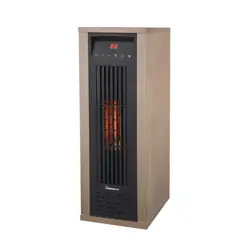
MODEL 1VAHQT13
OWNER’S MANUAL
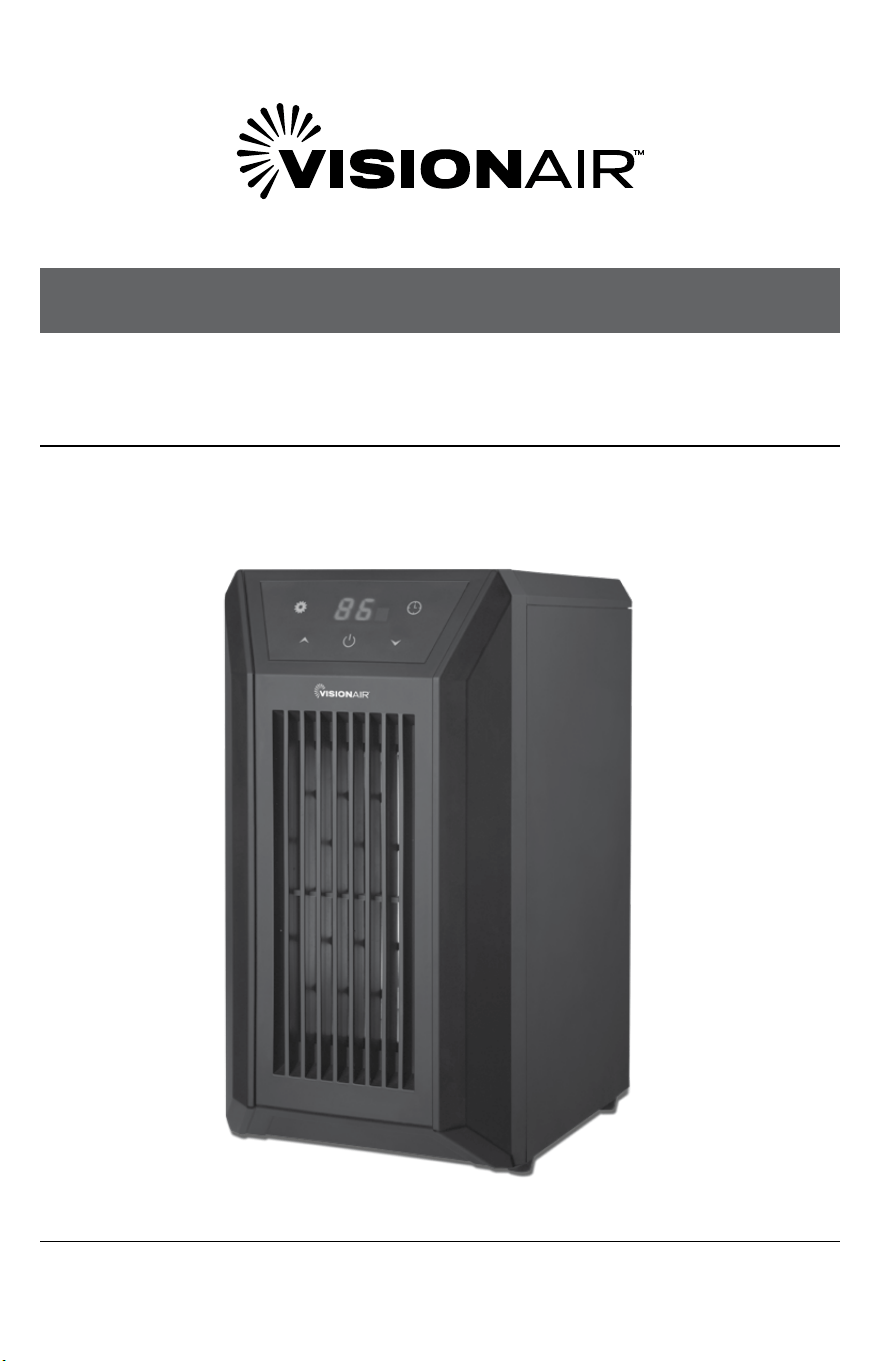
DIGITAL 6 TUBE INFRARED HEATER
13" | 1500/1000W

32
SAFETY & PRECAUTIONS
CONTINUEDCONTINUED
IMPORTANT NOTE:
Read the manual carefully. Make sure to save this manual for
future reference. Illustrations in this manual are for explanatory
purposes only, your actual product may look slightly dierent.
CONTENTS
CONTENTS
SAFETY INFORMATION ........................................................................................... 3
IN THE BOX ................................................................................................................... 6
PRODUCT DIAGRAM ................................................................................................. 6
OPERATING INSTRUCTIONS ................................................................................. 9
MAINTENANCE .........................................................................................................10
STORAGE ....................................................................................................................11
TROUBLESHOOTING ..............................................................................................11
TECHNICAL DATA
Model: 1VAHQT13
Voltage: 120V / 60Hz
Watts: 1000/1500W
SAFETY INFORMATION
Thank you for choosing a VisionAir Infrared Zone Heating System. This owner’s
manual will provide you with valuable information necessary for the proper
care and maintenance of your new product. Please take a few moments to
thoroughly read the instructions and familiarize yourself with all the operational
aspects of your new heater.
READ AND SAVE THESE INSTRUCTIONS
IMPORTANT INSTRUCTIONS
When using this electric unit, basic safety precautions should always be followed to
reduce the risk of re, electric shock, and injury to persons, including the following:
1. Read ALL instructions before using this unit.
2. CAUTION: Risk of Electric Shock. DO NOT open or try to repair the heater
yourself.
3. This heater may get hot when in use. To avoid burns, DO NOT let bare skin
touch hot surfaces. If provided, use handles when moving this heater.
4. Keep combustible materials, such as furniture, pillows, bedding, paper,
clothes, and curtains at least 3 ft from the front of the heater and keep them
away from the sides, top, and rear. DO NOT place towels or other objects on
the heater.
5. Extreme caution is necessary when any heater is used by or near children or
the disabled, or when the heater is left operating and unattended.
6. DO NOT operate any heater with a damaged cord or after the heater
malfunctions, has been dropped or damaged in any manner. Return heater
to authorized service facility for examination, electrical or mechanical
adjustment, or repair.
7. This heater is not intended for use in bathrooms, laundry areas and similar
indoor locations. NEVER locate heater where it may fall into a bathtub or
other water container. To protect against electrical hazards, DO NOT immerse
in water or other liquids.
8. DO NOT touch the control panel or plug with a wet hand.
9. DO NOT run cord under carpeting. DO NOT cover cord with throw rugs,
runners, or similar coverings. Arrange cord away from trac area and where it
will not be tripped over.
10. DO NOT insert or allow foreign objects to enter any ventilation or exhaust
opening as this may cause an electric shock or re, or damage the heater.
4 5
SAFETY & PRECAUTIONS
CONTINUEDCONTINUED
SAFETY INFORMATION
11. To prevent a possible re, DO NOT block the air intakes or exhaust in any
manner. DO NOT use on soft surfaces, like a bed, where openings may
become blocked.
12. A heater has hot and arcing or sparking parts inside. DO NOT use in areas
where gasoline, paint, explosive and/or ammable liquids are used or stored.
Keep unit away from heated surfaces and open ames.
13. Always plug heaters directly into a wall outlet/receptacle. Never use with an
extension cord or relocatable power tap (outlet/power strip).
14. To avoid re or shock hazard, plug the unit directly into a 120 V AC electrical
outlet.
15. To disconnect heater, turn controls to OFF, then remove plug from outlet. Pull
rmly on the plug, DO NOT unplug by pulling on the cord.
16. Always unplug the unit before moving or cleaning, or whenever the heater is
not in use.
17. Use only for intended household use as described in this manual. Any other
use not recommended by the manufacturer may cause re, electric shock,
or injury to persons. The use of attachments not recommended or sold by
unauthorized dealers may cause hazards.
18. Always use on a dry, level surface. Use on oor only.
19. DO NOT use outdoors.
20. WARNING: To reduce the risk of re or electric shock, DO NOT use this unit
with any solid-state speed control device.
21. DO NOT attempt to repair or adjust any electrical or mechanical functions
on this unit. Doing so will void your warranty. The inside of the unit contains
no user serviceable parts. Qualied personnel should perform all servicing
only.
22. Connect to properly grounded outlets only.
23. Save these instructions.
WARNING
Read and understand this entire owner’s manual, including
all safety information, before plugging in or using this product. Failure to do so
could result in re, electric shock, or serious personal injury.
(Continued)
SAFETY INFORMATION
(Continued)
TIP-OVER SAFETY FEATURE
This heater is equipped with a shut-o safety feature. Once the heater is tipped
over, an internal switch will automatically shut the heater o. Once the heater is
restored to an upright position, the heater will reset.
OVERHEAT SAFETY FEATURE
This heater is equipped with an overheat safety feature. When the heater’s
internal components reach a certain temperature that could cause overheating
and possible re, the heater will automatically shut o.
WARNING
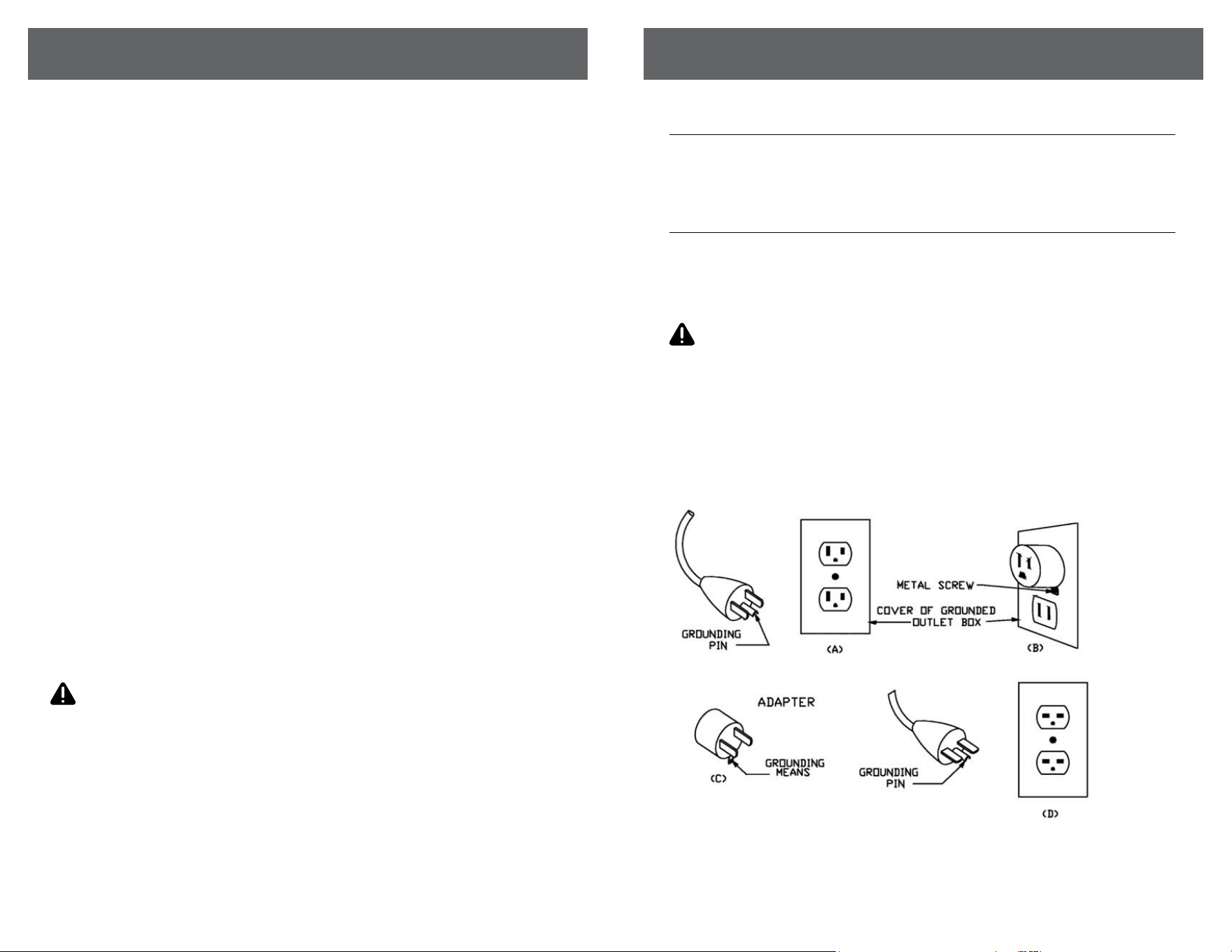
This heater has a voltage rating of 120 volts. The cord has a plug as shown in
A. An adapter as shown in C is available for connecting three-blade grounding-
type plugs to two-slot receptacles. The grounding lug extending from the
adapter must be connected to a permanent ground such as a properly
grounded outlet box. The adapter should not be used if a three-slot grounded
receptacle is available.
DO NOT DEFEAT THE SAFETY PURPOSE OF THE GROUNDED PLUG.
6 7
SAFETY & PRECAUTIONS
CONTINUEDCONTINUED
• INFRARED ZONE HEATING SYSTEM
• REMOTE CONTROL
• REMOTE CONTROL BATTERY
• INSTRUCTION BOOKLET
IN THE BOX
PRODUCT DIAGRAM
PRODUCT DIAGRAM
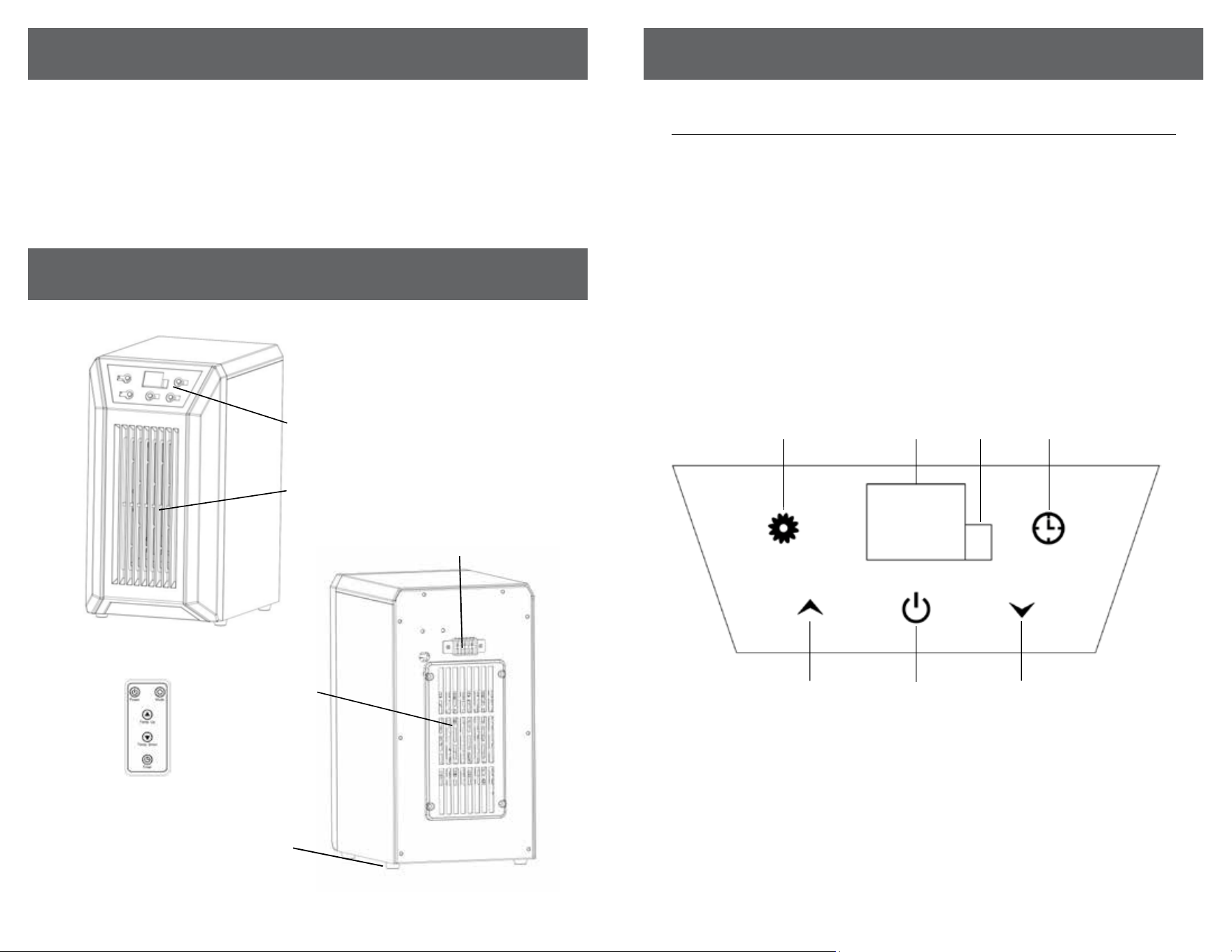
CONTROL PANEL
1. Temp up button: To increase desired temperature.
2. ON/OFF button: Powers the display on and o.
3. Temp down button: To decrease desired temperature.
4. Mode button: To select between High, Low and Eco modes.
5. Digital display: Indicate set room temperature, timer, overheating,
set mode, or display lock
6. Signal receiving window: For receiving remote control signal.
7. Timer button: Used to engage timer mode and to set hour value
for the timer.
1
2
4 7 6 5
3
(Continued)
Control Panel
Footpads
Air Intake &
Washable Filter
(behind grille)
Remote
Air Outlet
Temperature Sensor
8 9
SAFETY & PRECAUTIONS
CONTINUEDCONTINUED
PRODUCT DIAGRAM
REMOTE
PREPARATION
Place the heater on a rm, level surface and plug into a grounded 120V 60Hz
power outlet and turn on the power switch in the rear of the unit. Only operate
heater in upright position.
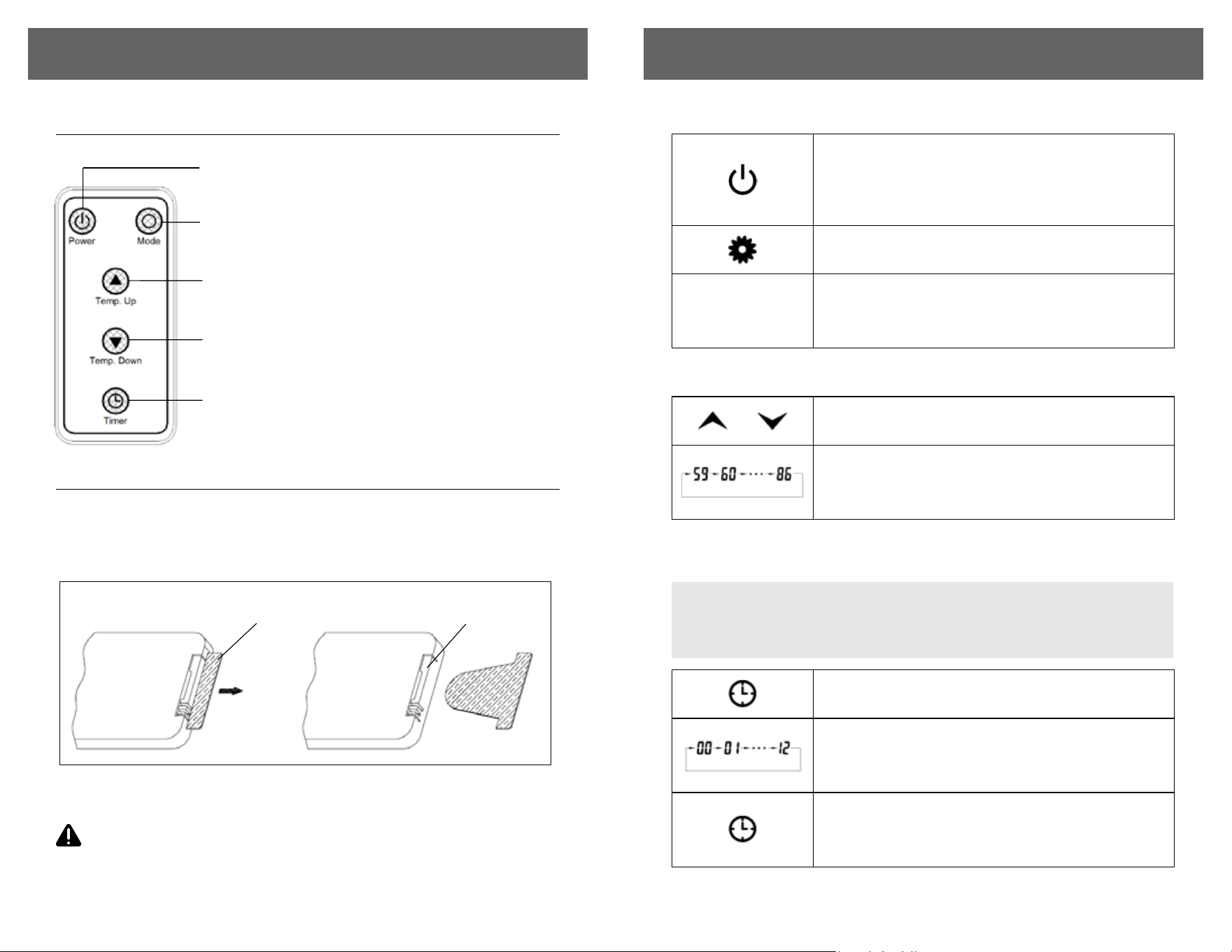
When using remote control, please pull out the insulating lm as the following steps.
Model: CR2025 | Voltage: DC 3V 0.1W | Capacity: 150mAh
This remote control uses one CR2025 battery (included)
WARNING NEVER dispose of batteries in re, failure to observe this
precaution may result in an explosion. Dispose of batteries at your local
hazardous material processing center or per local law.
OPERATING INSTRUCTIONS
1. Start and select working mode
2. Setting Desired Temperature
3. Setting the POWER OFF TIMER Function
Turn the heater on by pressing the ON/OFF button on the control panel or
by pressing the Power button on the supplied remote control.
Once power is o, heating element will stop working at rst. Fan will
prolong working for 3 min to emit plenty of heat inside. This mark will
indicate running during the 3 min.
Select a heat Mode
Press the MODE button to toggle between the three heat modes.
HH LL EC
High Mode uses 1500W; Low Mode uses 1000W. ECO mode is an Economic
Energy Saving Function. When ECO mode is chosen, the heater will manage
itself from less to more heating power (watts) in an attempt to maintain a
constant warm 68°F.
Or
Adjust the desired temperature by pressing the Up/Down arrows on the
control panel or remote control.
Desired temperature options vary from 59°F to 86°F. Once you have
chosen the desired temperature, the heater will remain on until the room
temperature increases to the temperature on the digital display. The heater
will cycle on and o to maintain the desired room temperature.
Turn the heater to the “On” position. Press the Timer button on the heater’s
control panel or the remote.
The digital display changes from the “temperature” to the “hours” option for
the timer. Continue to press the timer button to change the number of hours
you would like the heater to run before powering itself o. The hour options
for the timer are from 0 to 12 hrs. (in 1 hr increments).
The selected hour increments will ash for a few seconds, then revert back
to the set desired temperature. The Timer indicator light will remain lit as
long as the Timer is set. The heater will power OFF when the internal heater
clock counts down the hour increments you set.
NOTE: The Power-O-Timer Function will allow for the heater to power
OFF after a certain set time, and can only be set while the heater’s display
is in the “On” position.
(Continued)
PULL
Temp down button: to make set temperature decline
Temp up button: to make set temperature rise
Timer button: Used for setting timer and adjust time value of timing
Mode button: Used for heating mode selection
ON/OFF button: Used for power-on or power-o
Remote Insulating lm Battery cover
10 11
SAFETY & PRECAUTIONS
CONTINUEDCONTINUED
TROUBLESHOOTING
If the heater will not operate, please check the following:
1. Check if the power cord is plugged into an electrical outlet, if not, plug in.
2. Check if electricity to the main power switch (in the back) is working.
3. Check to see if the battery on the remote is placed correctly, undamaged.
MAINTENANCE
MAINTENANCE
1. Turn o the power switch in the rear of the unit.
2. Unplug the unit and let it cool completely.
3. To keep the heater clean, the outer shell may be cleaned with a soft, damp
cloth. You may use a mild detergent if necessary. After cleaning, dry the
unit with a soft cloth.
CAUTION: DO NOT let liquid enter the heater.
4. DO NOT use alcohol, gasoline, abrasive powders, furniture polish, or rough
brushes to clean the heater. This may cause damage or deterioration to the
surface of the heater.
5. DO NOT immerse the heater in water.
6. Wait until the unit is completely dry before use.
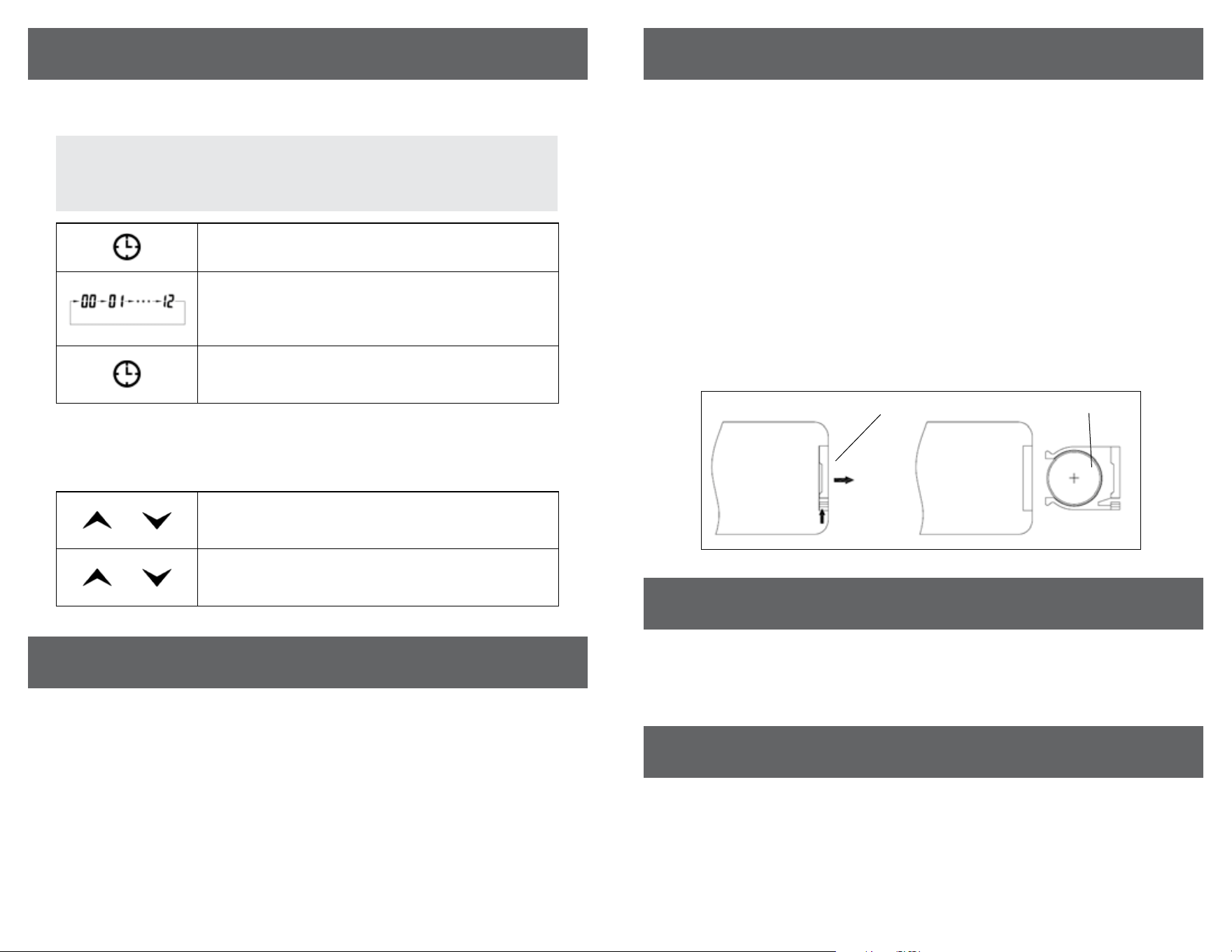
7. If won’t use the unit for a long time, please take out battery in remote
control according to following steps, then take care of the remote control.
This heater’s washable lter should be cleaned at least once a year to maintain
proper performance. If the heater being used in a space with high air particle
pollution (For example animal fur, excessive dust, or smoking etc) the lter
needs to be monitored and cleaned more frequently. Failure to clean the lter
can cause permanent damage and failure to perform.
To access the lter, remove the 4 screws from the back of the machine holding the
grille in place. Then, remove the black lter and rinse under warm water, throughly
air dry and reassemble machine. Mild dish soap can be used if needed, must be
rinsed out throughly. DO NOT clean the lter with harsh chemicals or bleach.
In lieu of water, a vacuum attachment can be used to clean the lter.
STORAGE
Store the heater in a cool, dry location when not in use. To prevent dust and dirt
build-up, use the original packaging to repack the unit.
PULL
PUSH
4. Setting the POWER-ON-TIMER Function
5. Setting electro lock
The Electro Lock can help avoid the heater from being accidentally engaged by
children. The locking mechanism can be set in both the ON and OFF modes.
Turn the heater to the “OFF” position .Press the Timer button on the heater’s
control panel or the remote.
The digital display shows the “hours” option for the timer. Continue to press
the timer button to change the number of hours you would like the heater’s
internal clock to count down before powering itself on. The hour options for
the timer are from 0 to 12 hrs. (in 1 hr increments).
The Timer indicator light will remain lit as long as the Timer is set. The
heater will power itself ON when the internal heater clock counts down the
hour increments you set.
And
Press Temp Up and Temp Down buttons at the same time for 3 seconds.
Locking is complete when you hear a beep. When locked, the functions of
the control panel and remote will be locked for use.
And
When you need to unlock it, press Temp Up and Temp Down buttons at the
same time for 3 seconds. You will hear a beep. The control panel and remote
control will become functional again.
NOTE: The Power-ON-Timer Function will allow for the heater to power
ON after a certain set time, and can only be set while the heater’s display is
in the “O” position.
OPERATING INSTRUCTIONS (Continued)
Remote BatteryBattery cover
(Continued)

833-950-1185 | support@visionairproducts.com
www.visionairproducts.com
4560 W. 160th Street
Cleveland, OH 44135
Printed in China | 0423_M029
CONSUMER PRODUCT INFORMATION
For your own records, please attach a copy of your sales receipt to this manual.
Also, write the store name/location and date purchased below:
Store Name: ___________________________________________________________
Location: ______________________________________________________________
Date Purchased: _______________________________________________________