EN
产品说明书 尺寸:60x90mm 材质:80g书写纸 双面印刷 风琴折
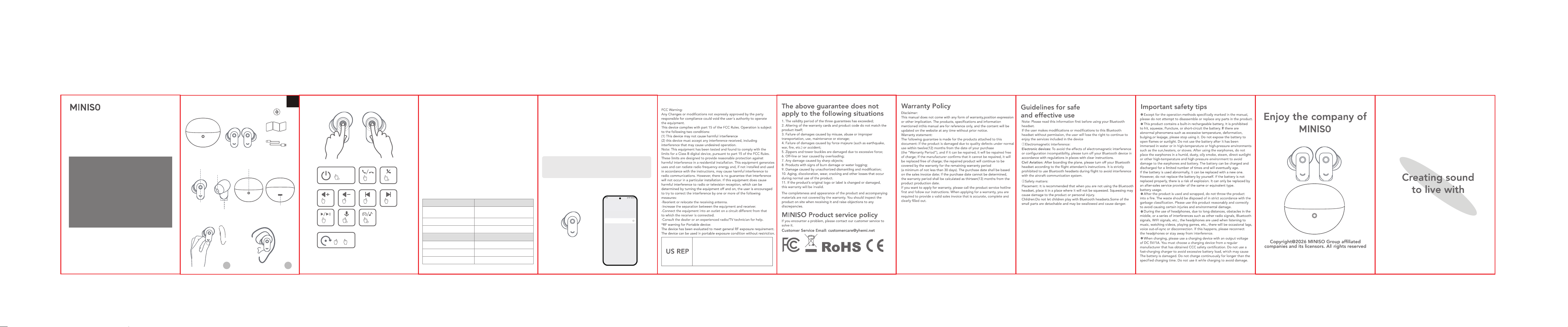
• Play/Pause: Tap either earphone once.
• Volume up: Tap the right earphone twice.
• Volume down: Tap the left earphone twice.
• Play previous track: Tap the left earphone three times.
• Play next track: Tap the right earphone three times.
• Answer/End call: Tap either earphone once.
• Reject call: Press and hold either earphone for two seconds.
• Activate voice assistant: Press and hold the left earphone for two
seconds.
Note: When using a single earphone only, press and hold the active
earphone for two seconds.
• Switch between Game and Music modes: Music mode is the default
mode. Press and hold the right earphone for two seconds to switch
between modes. (The louder notification sound indicates Game mode.)
Note: Mode switching is disabled when you're using a single
earphone only.
Key functions
Basic operations
Earphone LED Status
Blinking white
Both earphones: Powered on
Single earphone: Unpaired
Solid white Earphone charging
Off
Charging case LED
Paired or fully charged
Status
Case charging
Solid white Earphone charging
Solid white Case fully charged
Indicator LEDs
Power on/off
Music mode
Reset earphones
Phone mode
R
x2
L
x2
x5x5
RL
L
x3
R
x3
x1
3s/5s
2s
R
2s
L
2s
x1
Touchpad
Earphone LED
Charging contacts
Charging case LED
USB Type-C port
Earphone speaker
1 2
Charging case 2 Earphones
What’s in the box
FCC ID: 2BHJR-MS122
Components
How to put on the earphones
Wireless Earbud MS122
PRODUCT MANUAL
PLEASE READ THIS MANUAL CAREFULLY BEFORE USING THE
PRODUCT AND KEEP IT IN A SAFE PLACE.
L R
6 Ear cap
Quick Start Guide
USB-C cable
Taking the earphones out of the charging case will automatically turn
them on.
To manually turn on each earphone, press and hold the touchpad for
three seconds.
Power on
Placing the earphones in the charging case will automatically turn
them off.
To manually turn off each earphone, press and hold the touchpad for
five seconds.
Power off
Note: If the earphones are not paired with a Wireless device within three
minutes after powering on, they will automatically power off.
They will also power off after three minutes if the paired Wireless device
moves out of the effective connection range and has not reconnected.
On your device, turn on
wireless and choose to connect
to "MINISO-MS122".
Connect with wireless device
MINISO-MS122
MY DEVICES
If the earphones fail to pair or reconnect to each other,
reset them by tapping both earphones five times simultaneously.
Note: Resetting the earphones will clear the wireless pairing history.
How to reset the earphones
Blinking white
Company Name:LOBOS IOWA INC
FRN: 0036413961
Contact Name: Harley Li
Address: 4623 Bittercreek Dr Colorado Springs
CO 80922 US
Phone: +1 8188180538
Email: [email protected]