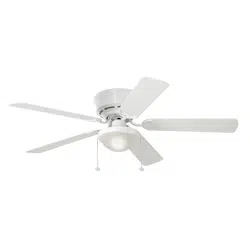
1
H
a
r
b
o
r
B
r
e
e
z
e
H
a
r
b
o
r
B
r
e
e
z
e
ITEM #915543/1133113/2758983/807426
MODEL #41391/41690/42480/42600
BUILDER’S SERIES
CEILING FAN
ATTACH YOUR RECEIPT HERE
SG241186
Español p. 19
HARBOR BREEZE and logo design are trademarks or
registered trademarks of LF, LLC. All rights reserved.
Purchase Date _________________________
Thank you for purchasing this HARBOR BREEZE product.
Questions, problems, or missing parts?
Before returning, contact us at:
888-251-1003, 8 a.m. - 8 p.m., EST, Monday - Sunday or at [email protected].

2
TABLE OF CONTENTS
Package Contents .................................................................3
Hardware Contents ................................................................4
Safety Information .................................................................5
Preparation ......................................................................6
Initial Installation ..................................................................7
Wiring .........................................................................10
Final Installation. . . . . . . . . . . . . . . . . . . . . . . . . . . . . . . . . . . . . . . . . . . . . . . . . . . . . . . . . . . . . . . . . . 11
Operating Instructions .............................................................14
Care and Maintenance ............................................................15
Troubleshooting ..................................................................15
Limited Lifetime Warranty ..........................................................17
Replacement Parts List ............................................................18
3
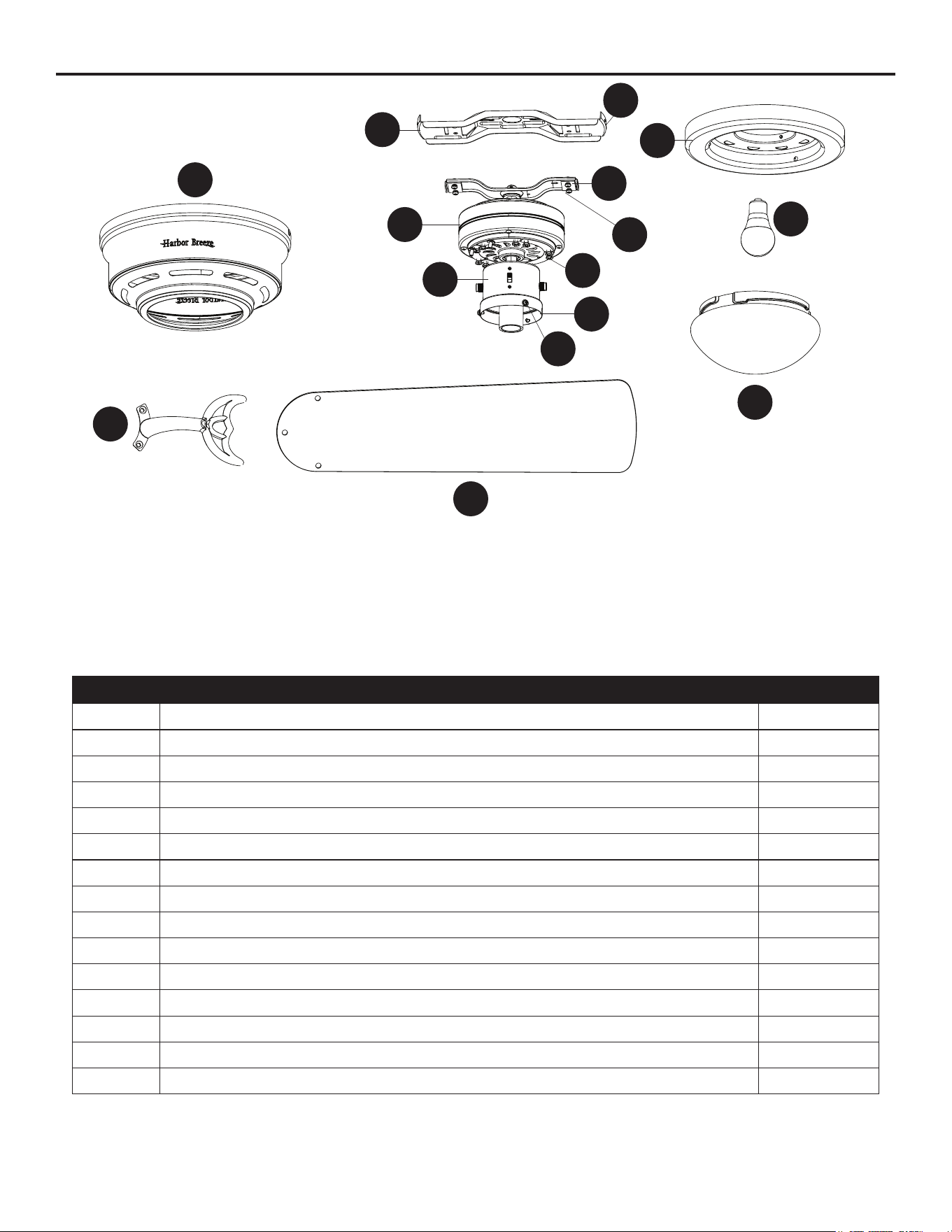
PACKAGE CONTENTS
PART DESCRIPTION QUANTITY
A Motor Housing 1
B Upper Mounting Bracket 1
C Lower Mounting Bracket (preassembled to Motor [D]) 1
D Motor 1
E Switch Housing (preassembled to Motor [D]) 1
F Light Kit (preassembled to the Switch Housing [E]) 1
G Light Pan 1
H Bulb 1
I Glass Bowl 1
J Blade Arm 5
K Blade 5
L Lower Bracket Screw (preassembled to Lower Mounting Bracket [C]) 4
M Switch Housing Screws (preassembled to Light Pan [G]) 3
N Motor Screw (preassembled to Motor [D]) 10
O Motor Housing Screw (preassembled to Upper Mounting Bracket [B]) 4
A
B
C
D
E
F
M
G
H
I
J
K
L
N
O
4
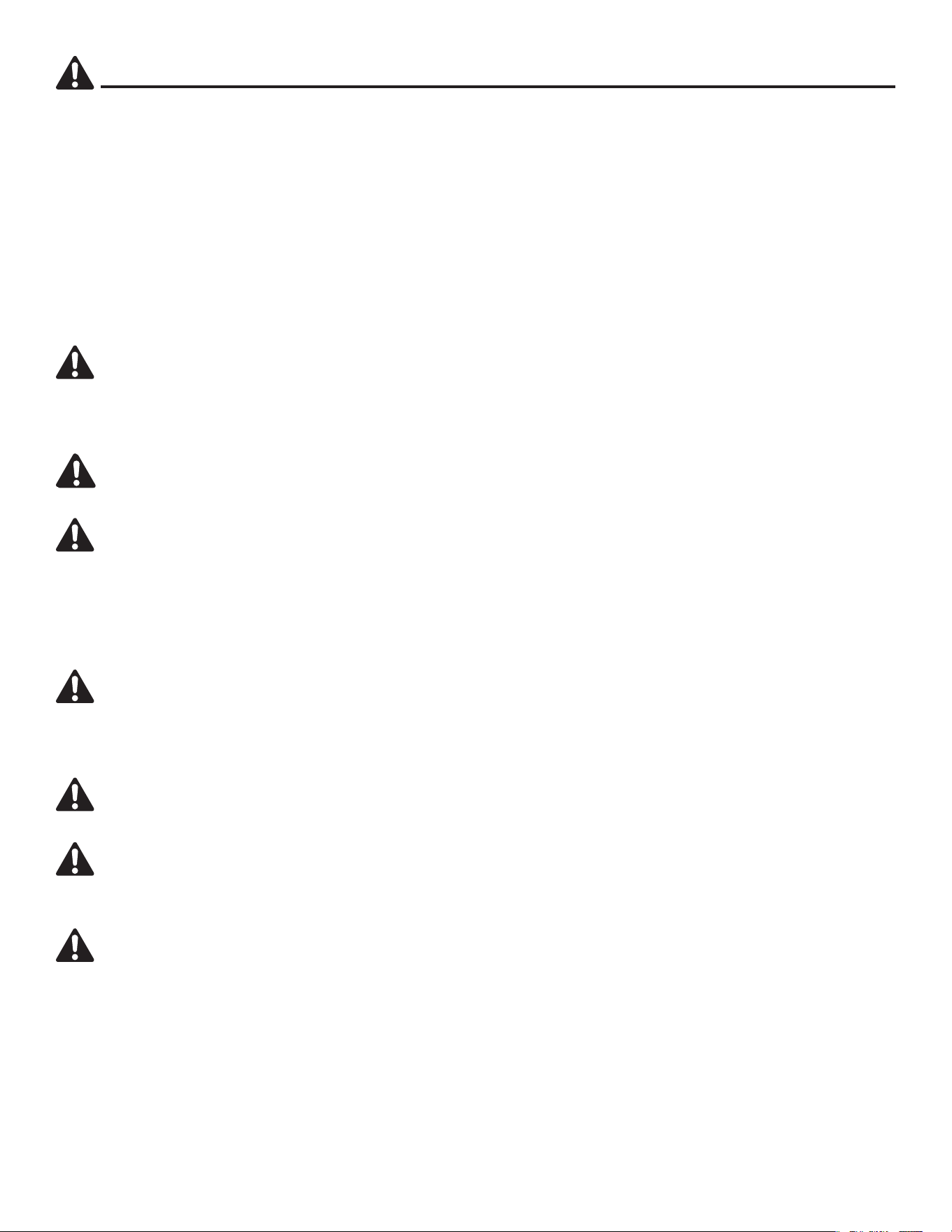
HARDWARE CONTENTS (shown actual size)
Wire Connector
Qty. 3 + 1 extra
Blade Screw
Qty. 15 + 1 extra
Blade Washer
Qty. 15 + 1 extra
Pull Chain Extension
Qty. 2
Motor Screw
1 extra
AA
BB
CC
DD
H
a
r
b
o
r
B
r
e
e
z
e
H
a
r
b
o
r
B
r
e
e
z
e
XX
5
SAFETY INFORMATION
Please read and understand this entire manual before attempting to assemble, operate or install the
product.
• Before you begin installing the fan, disconnect the power by removing fuses or turning o the circuit
breakers.
• Make sure all electrical connections comply with local codes, ordinances, the National Electrical
Code and ANSI/NFPA 70-199. Hire a qualied electrician or consult a do-it-yourself wiring
handbook if you are unfamiliar with installing electrical wiring.
• Make sure the installation site you choose allows a minimum clearance of 7 ft. from the blades to
the oor and at least 30 in. from the end of the blades to any obstruction.
• The net weight of this fan is: 14.11 lbs.
DANGER: When using an existing outlet box, make sure the outlet box is securely attached to
the building structure and can support the full weight of the fan. Failure to do this can result in serious
injury or death. The stability of the outlet box is essential in minimizing wobble and noise in the fan
after installation is complete.
WARNING: To avoid personal injury, the use of gloves may be necessary while handling fan
parts with sharp edges.
WARNING: To reduce the risk of re, electric shock or personal injury, mount the fan to an outlet
box marked “ACCEPTABLE FOR FAN SUPPORT” and use the mounting screws provided with the
outlet box. Most outlet boxes commonly used for the support of lighting xtures are not acceptable
for fan support and may need to be replaced. Consult a qualied electrician if in doubt. Secure the
outlet box directly to the building structure. The outlet box and its support must be able to support the
moving weight of the fan (at least 35 lbs.).
WARNING: To reduce the risk of re, electric shock or personal injury, wire connectors provided
with this fan are designed to accept only one 12-gauge house wire and two lead wires from the fan. If
your house wire is larger than 12 gauges and/or there is more than one house wire to connect to the
two fan lead wires, consult an electrician for the proper size wire connectors to use.
WARNING: To reduce the risk of re or electric shock, do not use the fan with any solid-state
speed-control device or control the fan speed with a full-range dimmer switch.
WARNING: To reduce the risk of re, electric shock or personal injury, do not bend the blade
arms when installing them, balancing the blades or cleaning the fan. Do not insert objects between
the rotating fan blades.
WARNING: To reduce the risk of personal injury, use only parts provided with this fan. The use
of parts OTHER than those provided with this fan will void the warranty.
6
SAFETY INFORMATION
CAUTION: Read all instructions and safety information before installing your new fan. Review the
accompanying assembly diagrams.
CAUTION: Be sure the outlet box is properly grounded or that a ground (green or bare) wire is present.
CAUTION: Carefully check all screws, bolts and nuts on the fan motor assembly to ensure they are
secured.
CAUTION: This device complies with part 15 of FCC Rules. Operation is subject to the following
two conditions: 1) This device may cause harmful interference, and 2) this device must accept any
interference received, including interference that may cause undesired operation.
CAUTION: This equipment has been tested and found to comply with the limits for a Class B digital
device, pursuant to Part 15 of the FCC Rules. These limits are designed to provide reasonable
protection against harmful interference in a residential installation. This equipment generates,
uses and can radiate radio frequency energy and, if not installed and used in accordance with
the instructions, may cause harmful interference to radio communications. However, there is no
guarantee that interference will not occur in a particular installation. If this equipment does cause
harmful interference to radio or television reception, which can be determined by turning the
equipment o and on, the user is encouraged to try to correct the interference by one or more of the
following measures:
--Reorient or relocate the receiving antenna.
--Increase the separation between the equipment and receiver
--Connect the equipment into an outlet on a circuit dierent from that to which the receiver is connected.
--Consult the dealer or an experienced radio/TV technician for help.
Please note changes or modications not expressly approved by the party responsible for compliance
could void the user’s authority to operate the equipment.
PREPARATION
Before beginning the assembly of this product, ensure that all parts are present. Compare all parts
with the package contents list and hardware contents list. If any part is missing or damaged, do not
attempt to assemble the product.
Estimated Assembly Time: 120 minutes
Tools Required for Assembly (not included): Electrical Tape, Phillips Screwdriver, Pliers, Safety
Glasses, Step Ladder, Wire Cutters and Wire Strippers
Helpful Tools (not included): AC Tester Light, Tape Measure and Wiring Handbook
HKC-US
3350 Players Club Pkwy. #225
Memphis, TN 38125
1-888-251-1003
7
INITIAL INSTALLATION
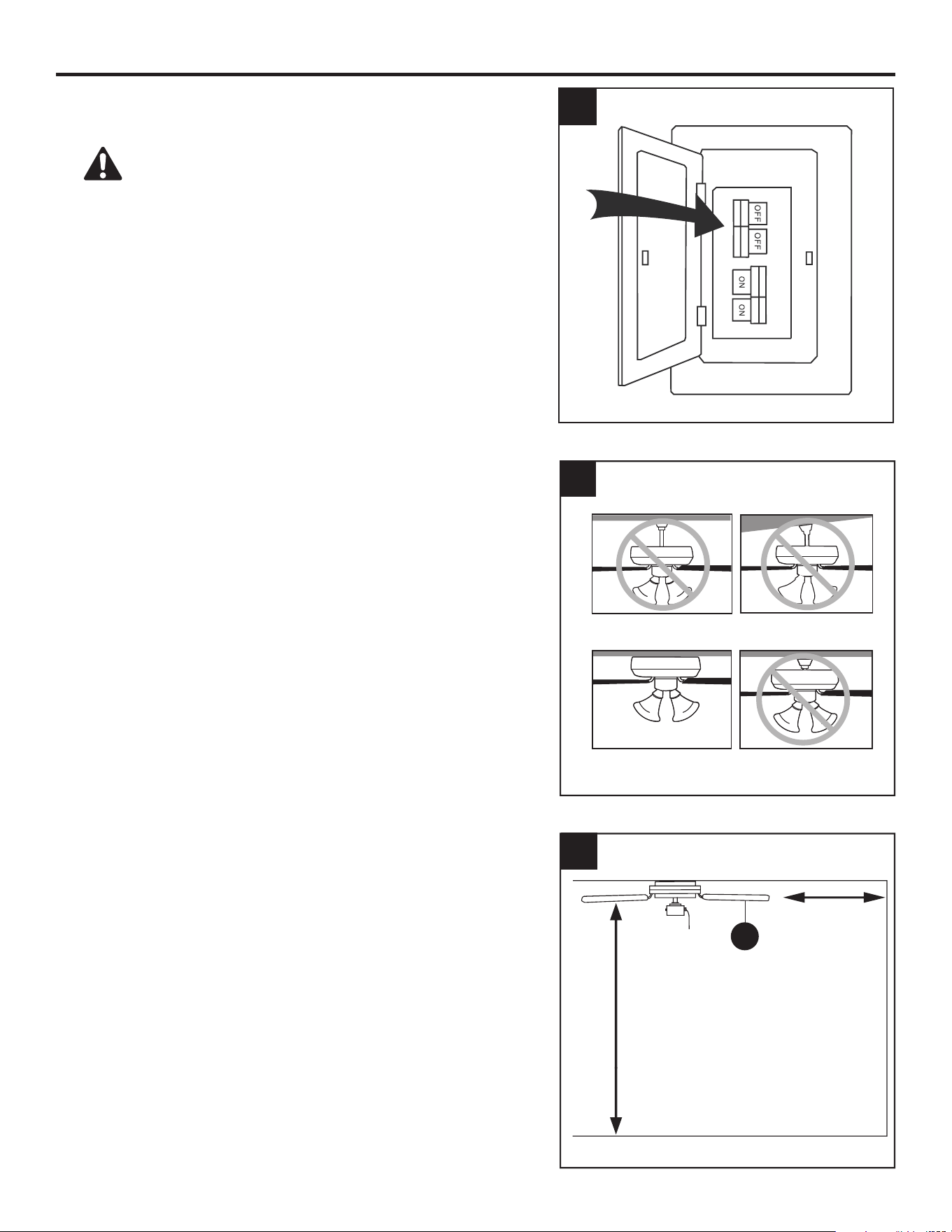
1. Turn o the circuit breakers and the wall switch to the
fan supply line leads.
DANGER: Failure to disconnect the power
supply prior to installation may result in serious injury
or death.
2. This fan is intended for Flushmount installation.
Standard Mounting, Angle Mounting and Closemount
installations are not available.
3. Ensure the blades (K) will be at least 30 in. from any
obstructions and will be at least 7 ft. above the oor.
7 ft. Min
30 in. Min
3
K
2
Standard Mounting
Flushmount Closemount
Angle Mounting
1
8
INITIAL INSTALLATION
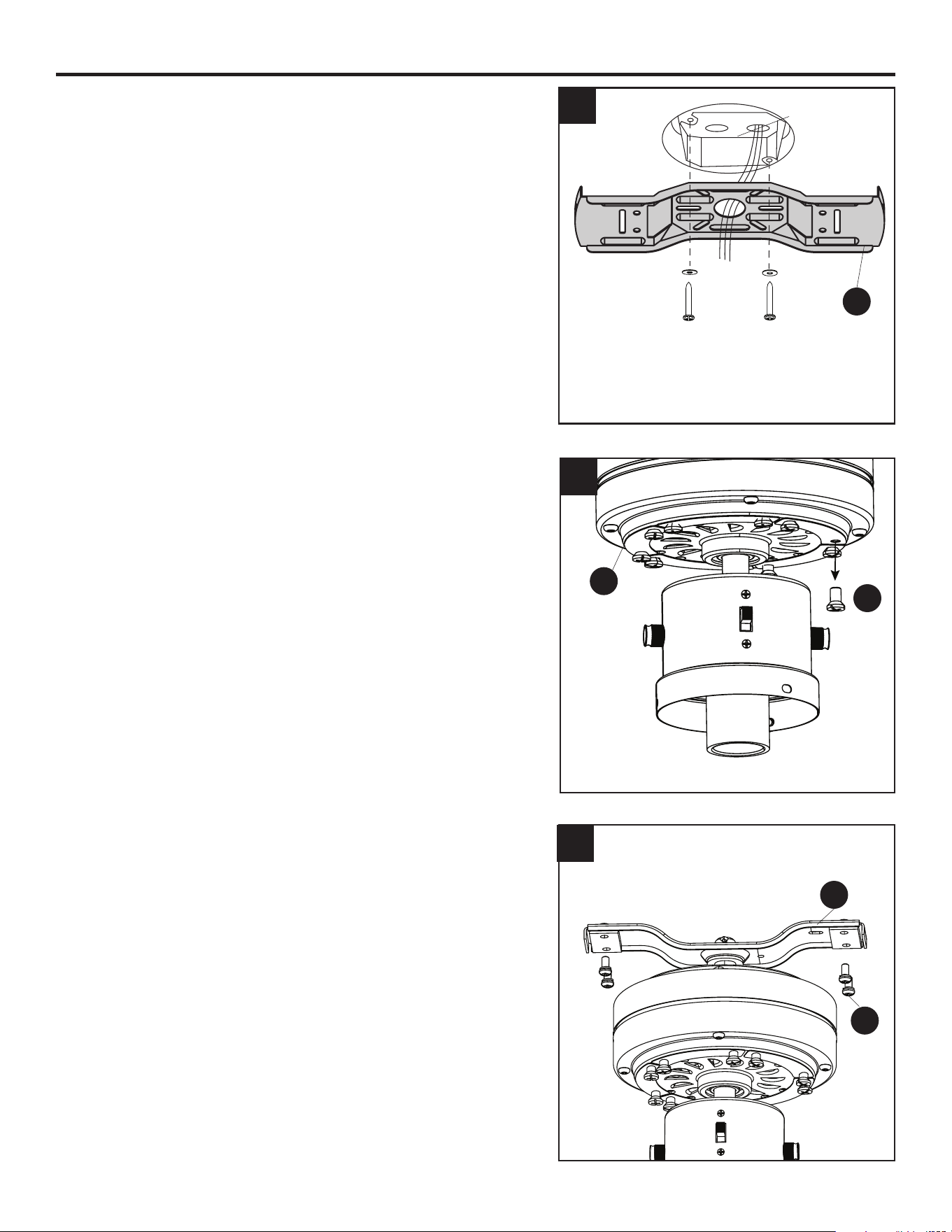
4. Secure the upper mounting bracket (B) to the outlet
box (not included) using screws and washers provided
with the outlet box.
CAUTION: It is very important that you use the proper
hardware when installing the upper mounting bracket
(B) as it will support the fan.
5. Remove the 10 motor screws (N) from the motor (D)
and save for later use.
6. Remove the lower bracket screws (L) from underneath
the lower mounting bracket (C).
Outlet Box
B
4
5
D
N
L
C
6
9
INITIAL INSTALLATION
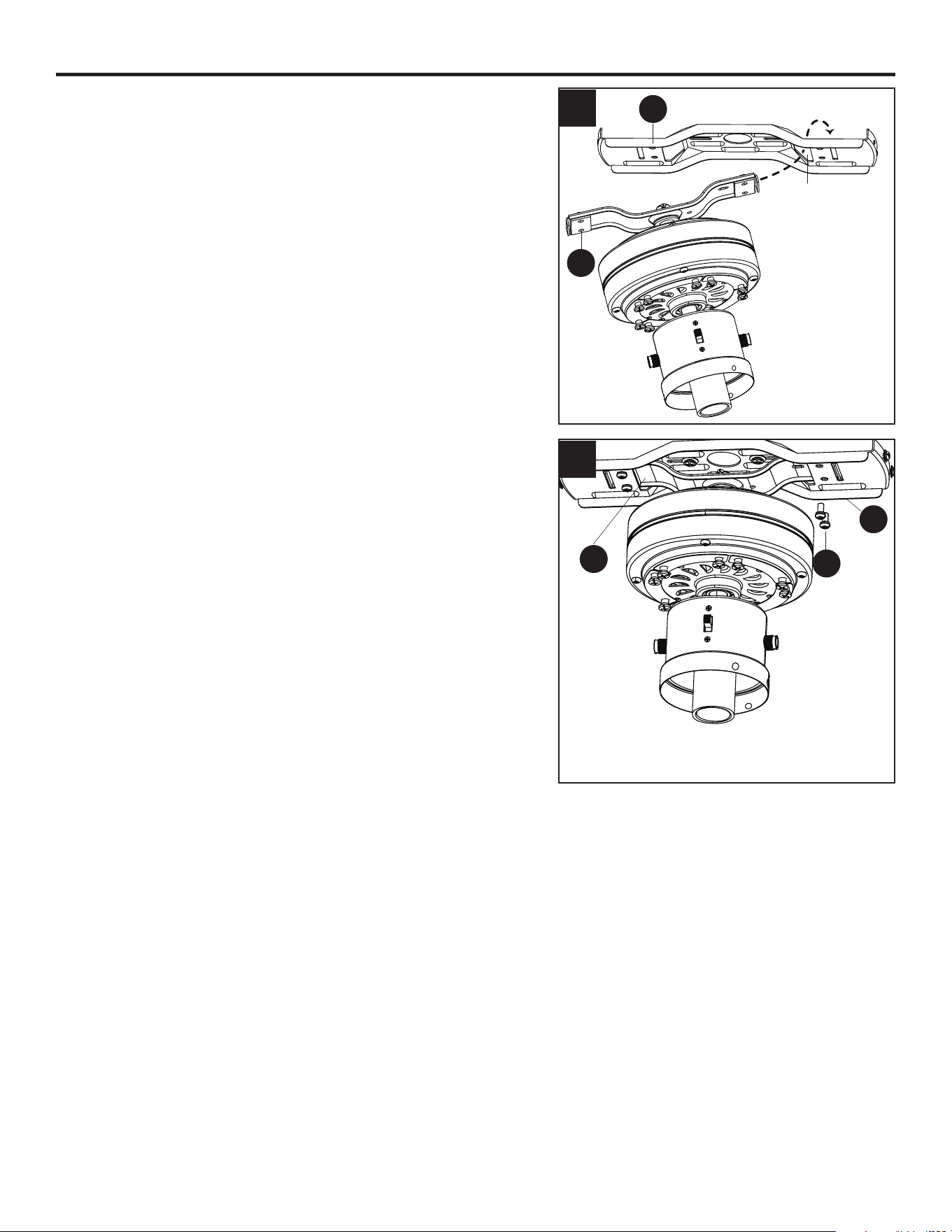
7. Place one tab of the lower mounting bracket (C) into a
slot in the upper mounting bracket (B), then slide the
second tab of the lower mounting bracket (C) into the
second slot on the upper mounting bracket (B) until all
four holes are in alignment.
8. Re-install the previously removed lower bracket
screws (L) to secure the lower mounting bracket (C)
to the upper mounting bracket (B).
7
8
B
C
B
C
L
Slot
10
WIRING
WARNING: To reduce the risk of re, electrical shock or personal injury, wire connectors provided
with this fan are designed to accept only one 12-gauge house wire and two lead wires from the fan. If
your house wire is larger than 12 gauges and/or there is more than one house wire to connect to the
two fan lead wires, consult an electrician for the proper size wire connectors to use.
CAUTION: Be sure the outlet box is properly grounded or that a Ground (Green or Bare) wire is present.
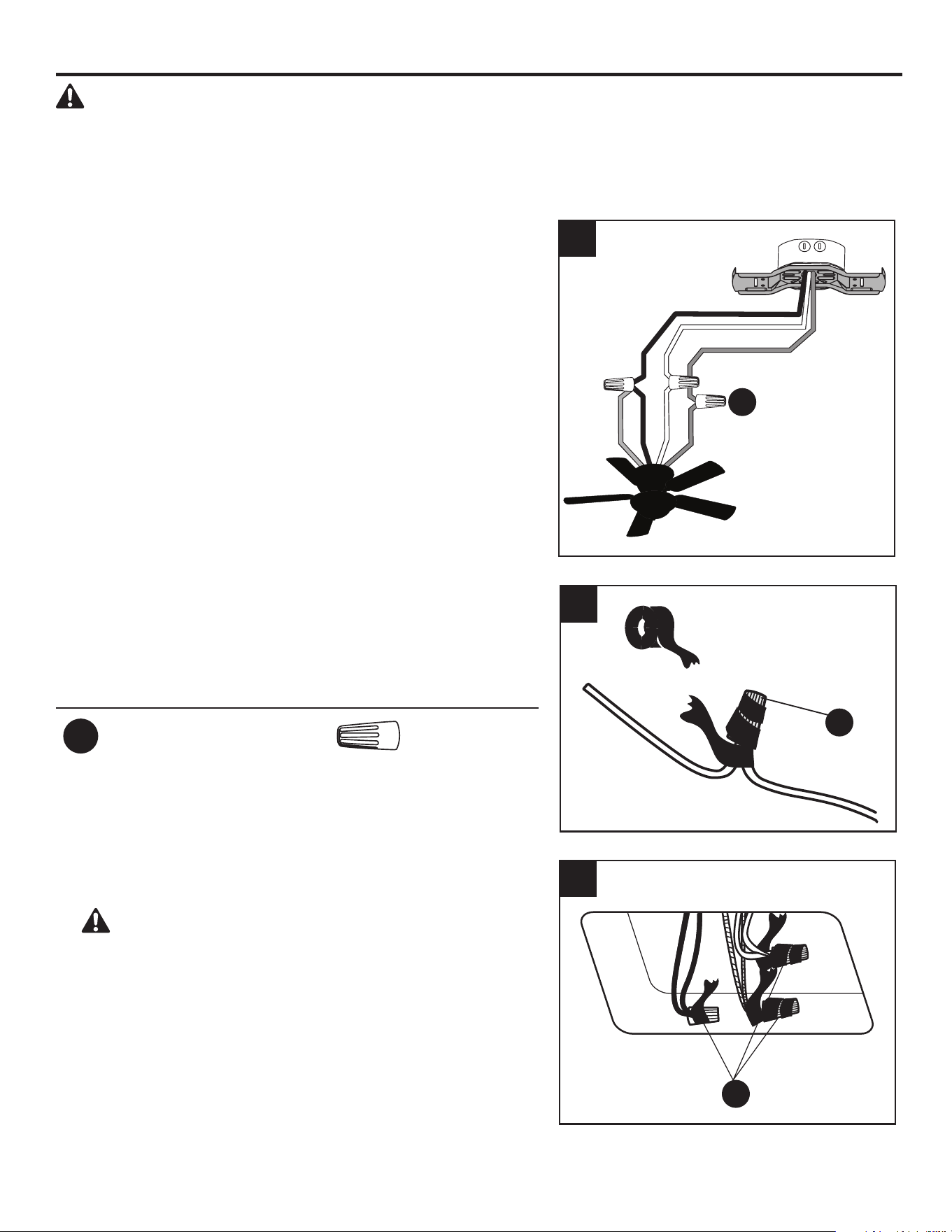
1. Connect household supply and fan wires according to
the diagram and these steps:
• Connect the Green wire from the fan to the Bare/
Green (ground) supply wire.
• Connect the White wire from the fan to the White
(neutral) supply wire.
• Connect the Black and Blue wires from the fan to the
Black (hot) supply wire.
• Secure all wiring connections together with wire
connectors (AA).
Note: If there is a second hot/power wire coming from
the outlet box, connect it to the blue (light power) fan
wire for separate light and fan control.
Note: The Black wire is hot power for the fan. The
White wire is common for the fan and light kit. The
Blue wire is hot power for light. The Green wire is the
ground wire. If household supply wires are dierent
colors than referred to above, it is recommended a
professional electrician determines the proper wiring.
Hardware Used
AA
Wire Connector x 3
2. Wrap electrical tape (not included) around each
individual wire connector (AA) down to the wire.
3. Turn the spliced/taped wires upward and gently push
the wires and wire connectors (AA) into the outlet box.
WARNING: Ensure no bare wire or wire strands
are visible after making connections. Place the Green
and White wire connections on the opposite side of the
outlet box from the Black and Blue wire connections.
1
3
AA
AA
AA
2
Black (Hot)
White (Neutral)
Bare/Green (Ground)
Black
Blue
White
Green
WARNING: Do NOT
wire fan motor to
a variable-speed
(dimmer)wall control.
11
FINAL INSTALLATION
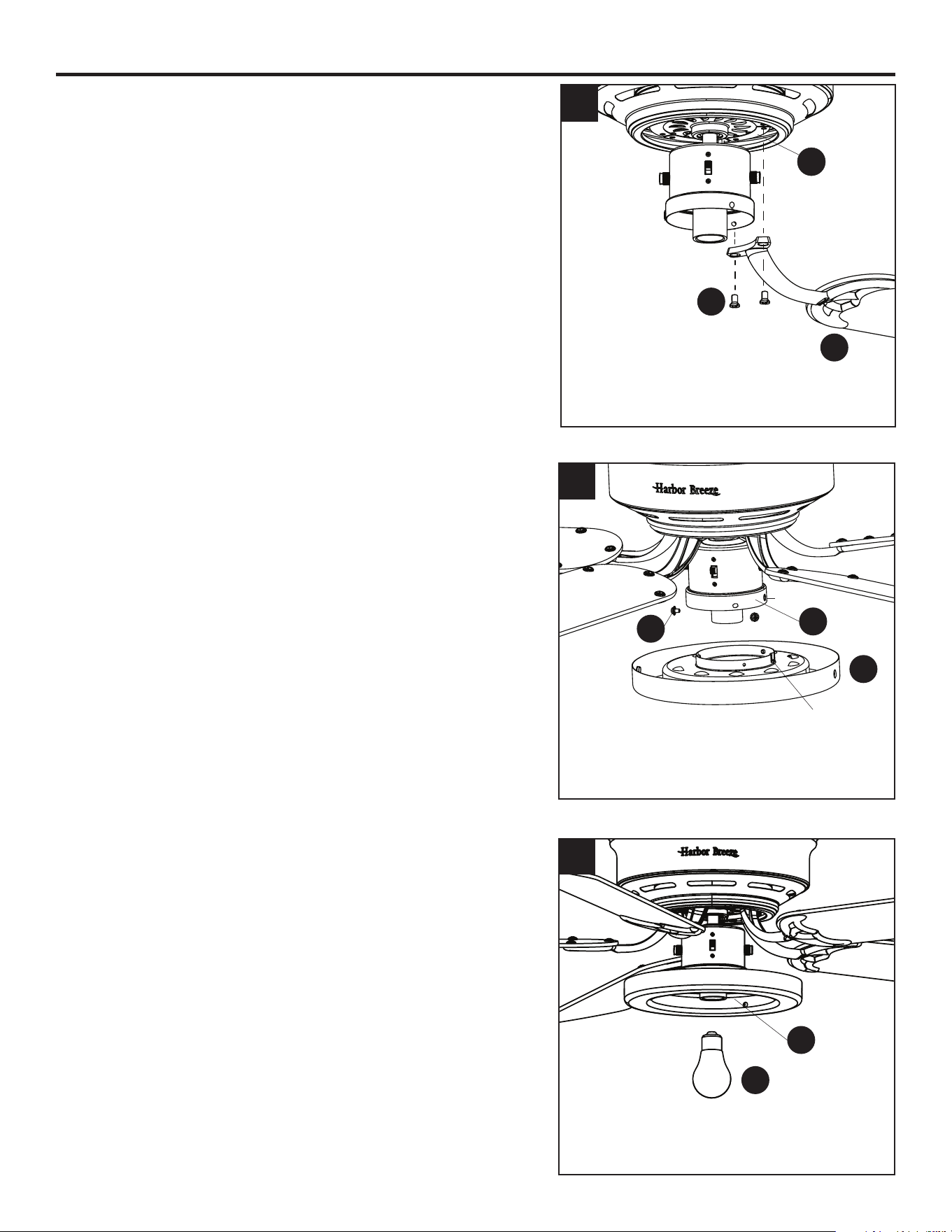
1. Temporarily lift the motor housing (A) to the upper
mounting bracket (B) to determine which two motor
housing screws (O) preassembled in the sides of the
upper mounting bracket (B) align with the slotted holes
in the top edge of the motor housing (A). Partially
loosen the two motor housing screws (O) that align
with the slotted holes.
Remove the other two motor housing screws (O) from
the upper mounting bracket (B).
2. Slide the motor housing (A) over the motor (D), aligning
the slotted holes in the motor housing (A) with the
loosened motor housing screws (O) in the upper
mounting bracket (B). Twist the motor housing (A) to
lock, then re-insert the two previously removed motor
housing screws (O) and securely tighten all screws.
3. Partially insert the blade screws (BB) along with the
blade washers (CC) through the blade (K) and into the
blade arm (J). Tighten each blade screw (BB) with a
Phillips screwdriver, starting with the one in the middle.
Repeat this step for the remaining blades (K) and blade
arms (J).
Hardware Used
BB
Blade Screw x 15
Blade Washer x 15
B
O
A
O
A
1
2
3
BB
CC
K
J
CC
12
FINAL INSTALLATION
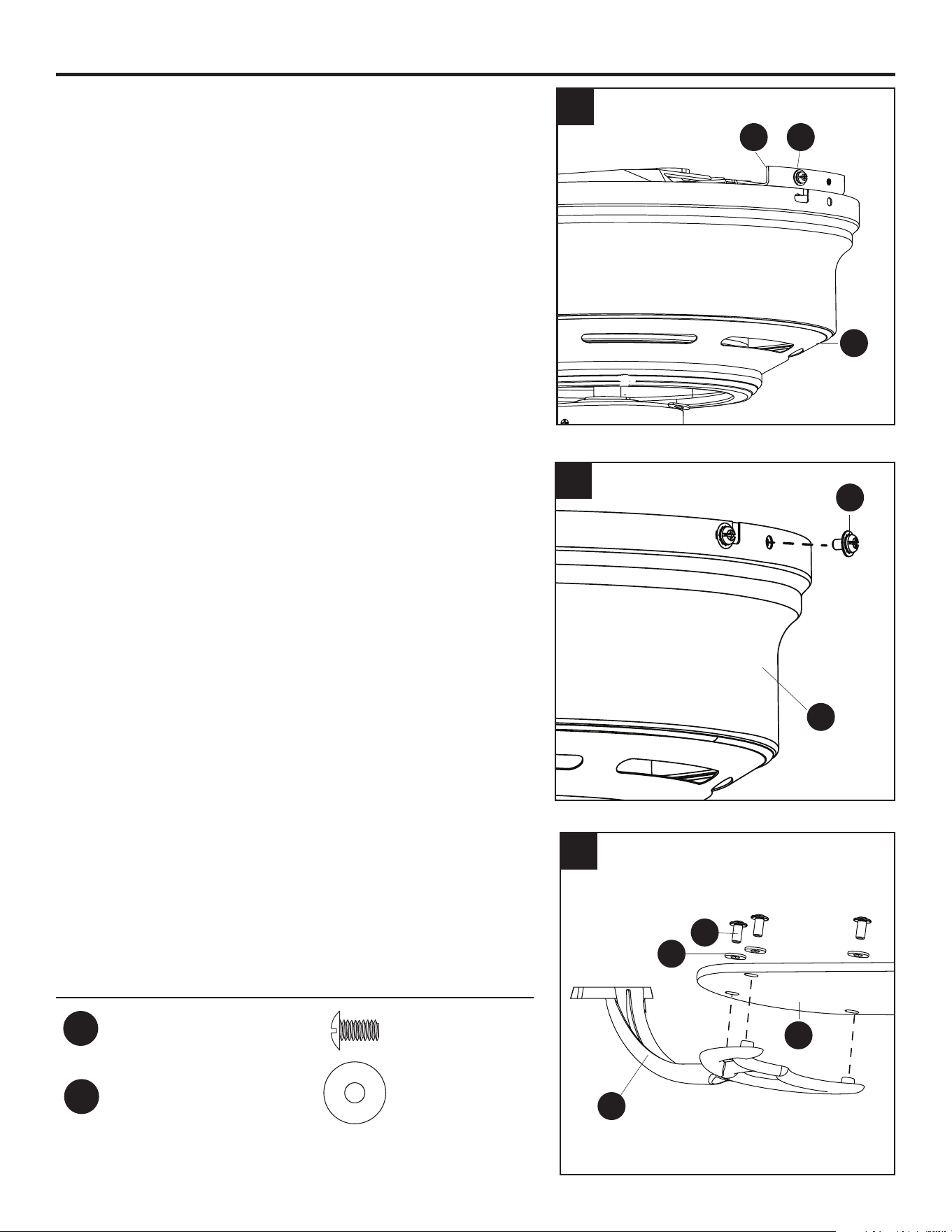
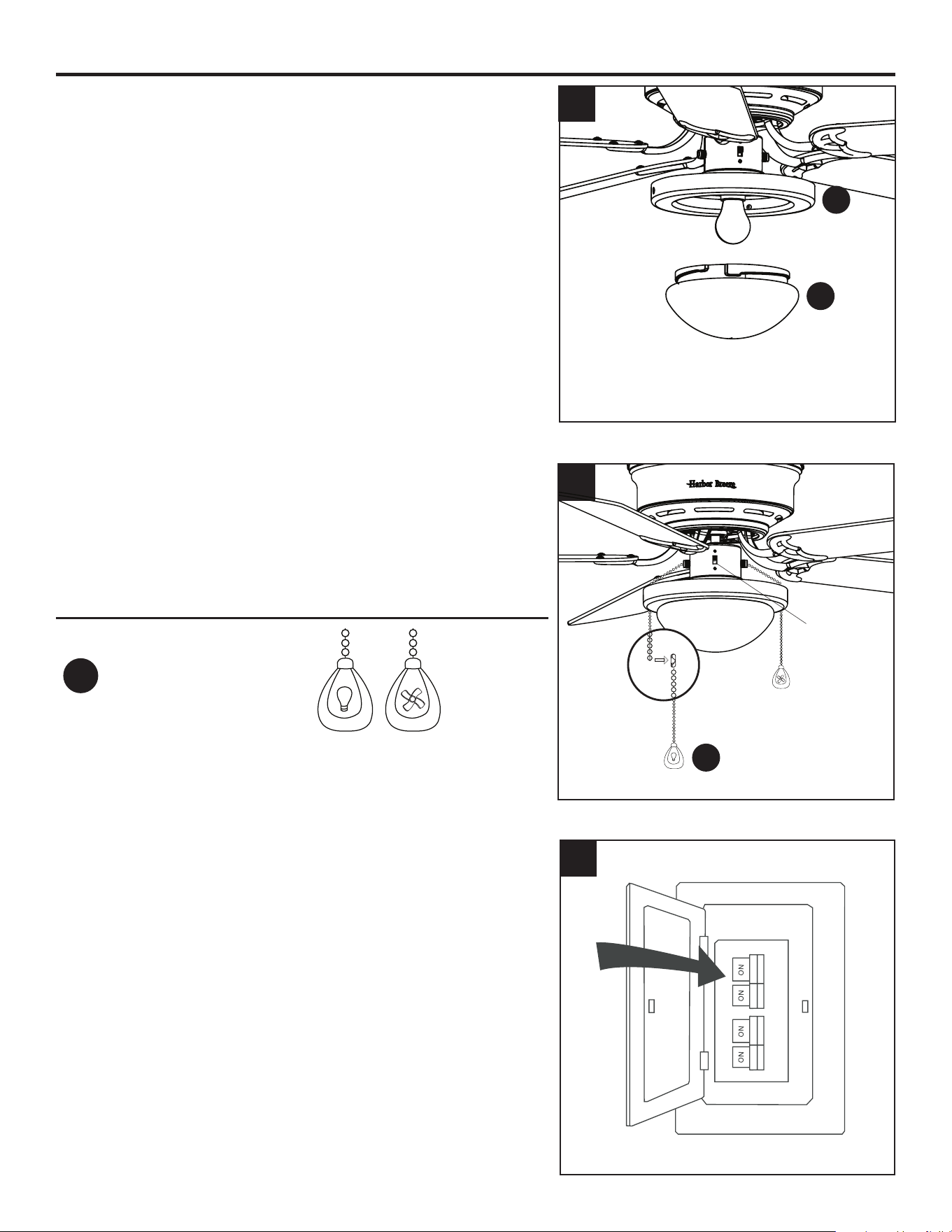
4. Install the blade arm (J) to the underside of the motor
(D) with motor screws (N) previously removed (Step 5,
page 8). Tighten with Phillips screwdriver.
Repeat for each blade arm (J).
5. Remove the three preassembled switch housing screws
(M) from the light pan (G). Lift the light pan (G) onto
the light kit (F) and secure the light pan (G) with the
previously removed switch housing screws (M).
Note: Align the notch in the light kit with the bump on
the lower edge of the light kit.
6. Install the bulb (H) into the socket of the light kit (F).
4
J
N
D
5
G
M
F
Bump
Notch
H
F
6
13
FINAL INSTALLATION
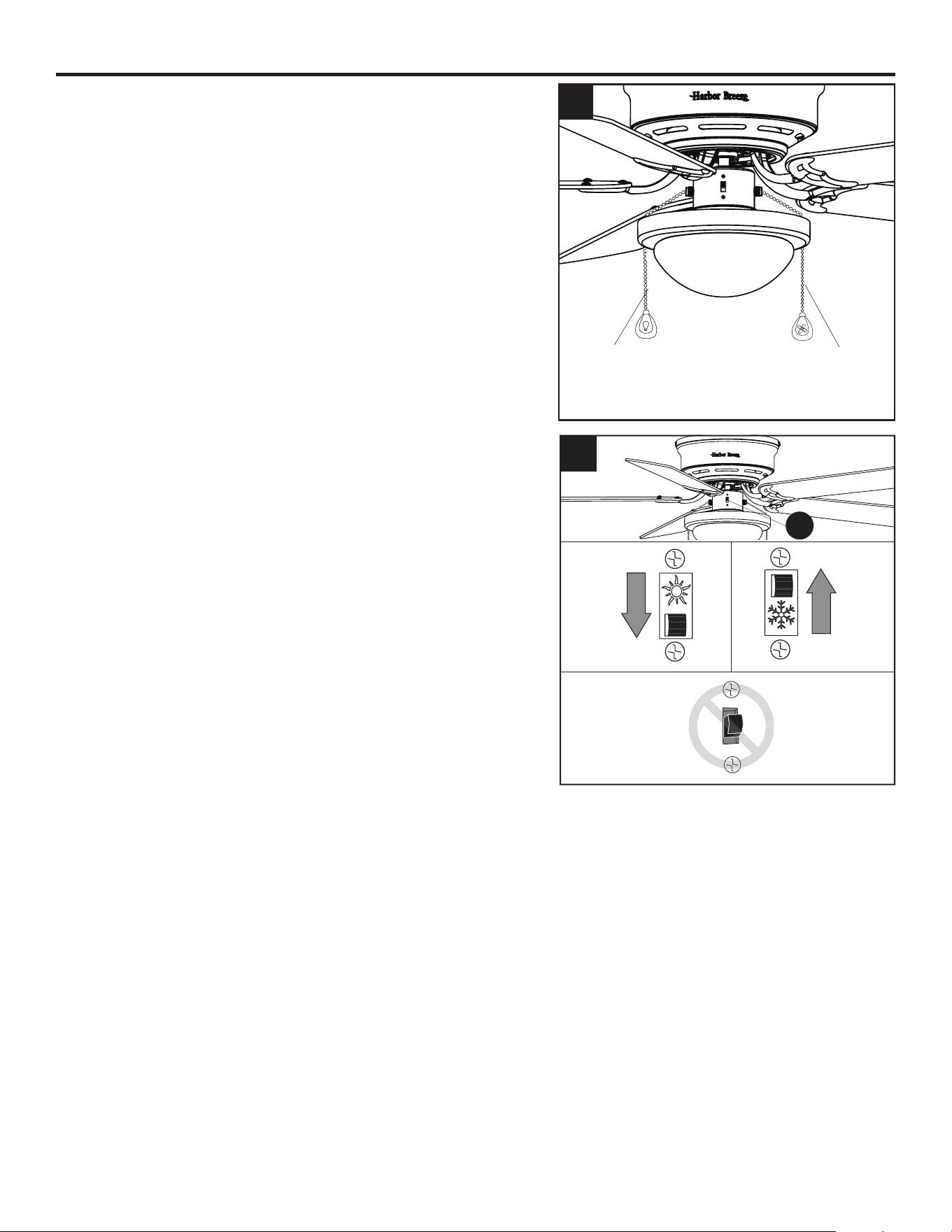
7. Lift the glass bowl (I) into the light pan (G) and twist in
a clockwise direction until the glass bowl (I) is secure.
8. Attach the pull chain extensions (DD) or custom pull chain
extensions (not included) to the fan and light pull chains.
Note: When facing the reverse switch, the pull chain for
the fan is on the right and the pull chain for the light is
on the left.
Hardware Used
DD
Pull Chain
Extension
x 2
9. Turn on power supply to fan.
Assembly is complete.
8
Reverse
Switch
H
a
r
b
o
r
B
r
e
e
z
e
H
a
r
b
o
r
B
r
e
e
z
e
DD
I
G
H
a
r
b
o
r
B
r
e
e
z
e
H
a
r
b
o
r
B
r
e
e
z
e
7
9
14
OPERATING INSTRUCTIONS
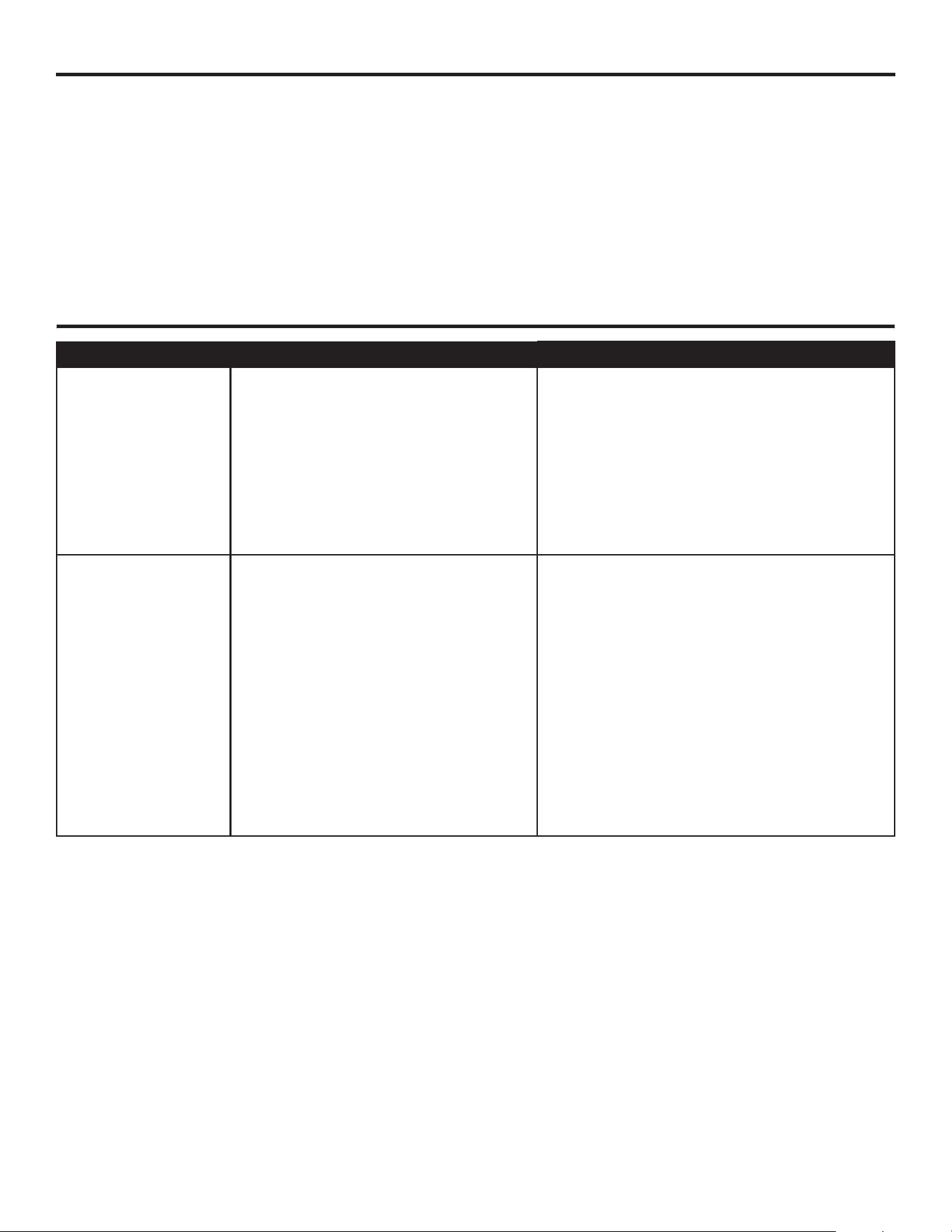
1. The fan pull chain has four positions to control fan
speed. One pull is HIGH, two is MEDIUM, three is LOW
and four turns the fan OFF.
The light pull chain has two positions to control the light,
ON and OFF.
H
a
r
b
o
r
B
r
e
e
z
e
H
a
r
b
o
r
B
r
e
e
z
e
2. Use the fan reverse switch, located on the switch
housing (E), to optimize your fan for seasonal
performance.
Using a ceiling fan will allow you to raise your thermostat
setting in summer and lower your thermostat setting in
winter without feeling a dierence in your comfort.
Note: Wait for the fan to stop before moving the reverse
switch.
2a. In warmer weather, push the reverse switch down to
display a sun icon, which will result in downward airow
creating a wind chill eect.
2b. In cooler weather, push the reverse switch up to
display a snowake icon, which will result in upward
airow that can help move stagnant, hot air o the
ceiling area.
Important: The reverse switch must be set either
completely up or down for the fan to function correctly. If
the reverse switch is set in the middle position, the fan
will not operate (Fig. 2c).
Fig. 2a Fig. 2b
Fig. 2c
2
1
Fan Pull
Chain
Light Pull
Chain
E
15
CARE AND MAINTENANCE
At least twice each year, lower the motorhousing and tighten all screws on the fan. Clean the motor
housing with only a soft brush or lint-free cloth to avoid scratching the nish. Clean the blades with
a lint-free cloth. You may occasionally apply a light coat of furniture polish to wood blades for added
protection.
Bulb Replacement: Use 60-watt max. E26-base LED, CFL or incandescent bulbs. Halogen bulbs are
not recommended for this item.
Important: Shut o the main power supply before you begin any maintenance task. Do not use water
or a damp cloth to clean the fan.
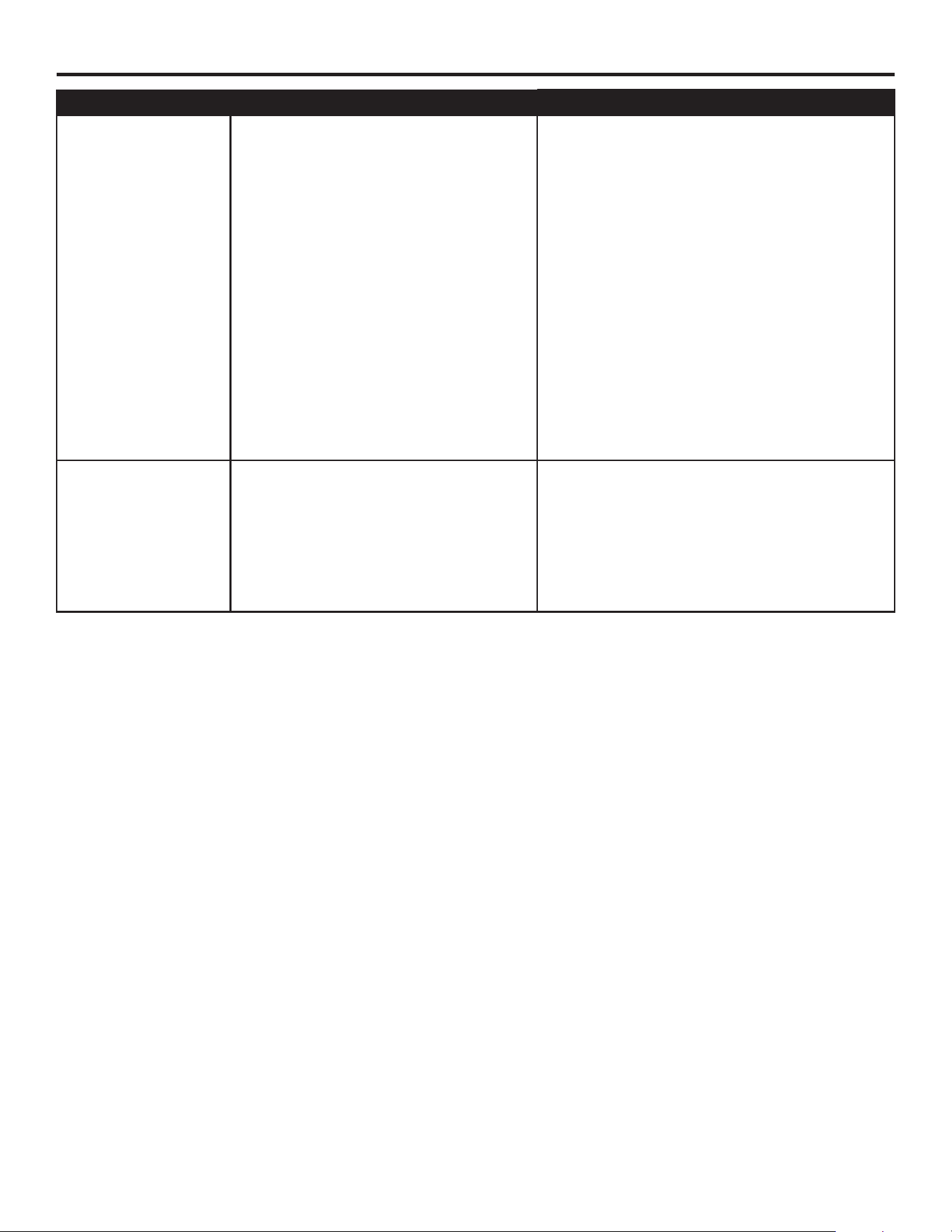
TROUBLESHOOTING
PROBLEM POSSIBLE CAUSE CORRECTIVE ACTION
The fan does not
move.
1. The reverse switch is not
engaged.
2. The wall switch is turned o.
3. The power is o or the fuse
(breaker) is blown.
4. There is a faulty wire
connection.
1. Firmly push the reverse switch
completely up or down.
2. Make sure the wall switch is turned on.
3. Turn the power on or check the fuse
(breaker).
4. Turn the power o and check all
connections at the ceiling outlet box.
The fan is noisy.
1. The blades are loose.
2. There is a cracked blade.
3. The wall control is not
compatible with the fan.
4. The outlet box is not secure.
5. The mounting bracket is not
secure.
1. Check and tighten all screws that
hold the fan blades to the blade
arms and the motor.
2. Replace the cracked blade.
3. Do not use a full range dimmer
switch to control the fan speed.
4. Ensure the outlet box is secured to
the building structure.
5. Ensure the mounting bracket is
secured to the outlet box and that
the screws are tight.
16
TROUBLESHOOTING
PROBLEM POSSIBLE CAUSE CORRECTIVE ACTION
There is excessive
wobbling.
1. The blades and/or blade arms
are loose.
2. The blades are unbalanced.
3. The fan mounting is not
secure.
1. Check and tighten all screws that
hold the fan blades to the blade
arms and the blade arms to the
motor.
2. Switch one blade with a blade from
the opposite side. Or balance the
fan using a blade balancing kit (sold
separately).
3. Turn o the power. Loosen the
motor housing and verify that the
mounting bracket is secure to the
electrical outlet box. The bracket
must be ush without movement
against the outlet box. Verify the
outlet box is secure.
The fan operates
correctly, but the
lights are not
working.
1. The bulbs are not installed
correctly.
2. The light kit wire plugs are not
connected properly.
3. There is a faulty wire
connection.
1. Re-install the bulb(s).
2. Ensure the single-pin connectors in
the light kit are connected properly.
3. Turn the power o and check all
connections at the ceiling outlet box.

17
LIMITED LIFETIME WARRANTY
Set forth below, the manufacturer warrants the fan motor for this ceiling fan to be free from defects
in workmanship and material for the life of the product. Also, subject to the limitations below, the
manufacturer warrants all ceiling fan parts (“ceiling fan parts” excludes the motor and parts made
in whole or in part with glass) to be free from defects in workmanship and material for a period of
one year after the date of purchase by the original purchaser at retail.
All claims must be made by the original purchaser from an authorized dealer, whether such
purchaser purchased the product through a store or contractor. Ceiling fan part defects must be
reported within the rst year from the date of purchase. Parts made in whole or in part with glass
and the nishes of metal and other surfaces are not warranted.
Purchasers are responsible for all costs of removing and reinstalling the product. Any damage
to any part caused by ordinary wear and tear, accident, misuse, or improper installation, is
not covered by this warranty. The manufacturer assumes no responsibility whatsoever for fan
installation. Any service performed by a non-licensed electrician will render the warranty invalid.
The manufacturer’s sole responsibility shall be to repair or replace the motor, parts, or product
within the terms stated above. The manufacturer shall not be liable for any loss or damage of any
kind, including any incidental or consequential damages resulting directly or indirectly, from any
breach of warranty, express or implied, or any other failure of this product. Some states do not
allow the exclusion or limitation of incidental or consequential damages so this limitation may not
apply to you.
If the original purchaser ceases to own the fan, this warranty is voided.
Should the purchaser encounter a problem with your fan related to defects in workmanship or
materials within the warranty period associated with the defective part, the manufacturer agrees
to replace the defective part without charge, or at its option, to replace the ceiling fan with a
comparable or superior model.
The manufacturer’s warranties are limited to the written warranties set out in this ceiling fan
limited lifetime warranty. All other express and implied warranties, including, without limitation, the
implied warranty of tness for a particular purpose and the implied warranty of merchantability is
disclaimed. Some states do not allow the disclaimer of implied warranties, so this disclaimer may
not apply to you.
18
Printed in China
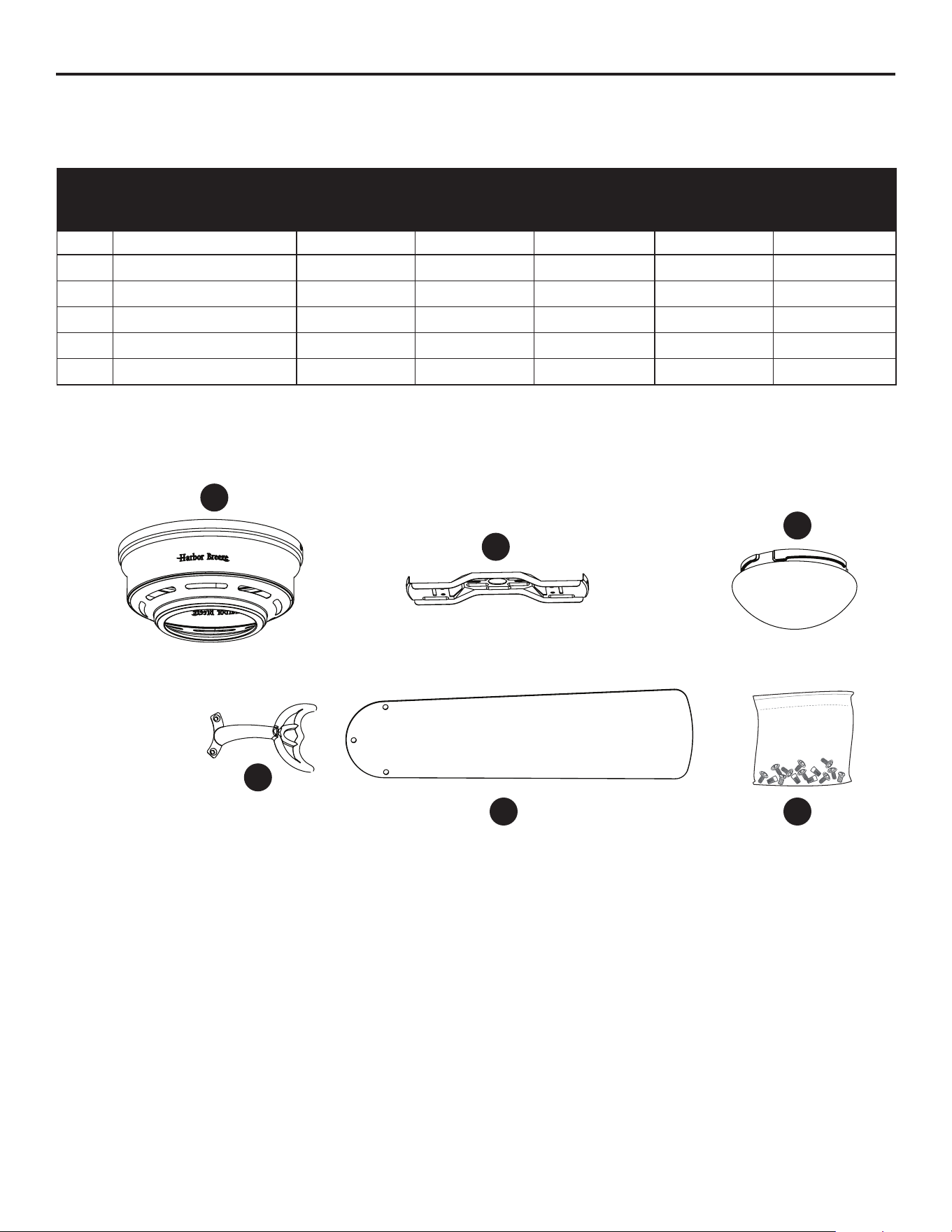
PART DESCRIPTION 0915543
PART #
1133113
PART #
2758983
PART #
0807426
PART #
COVERED
UNDER
WARRANTY
A Motor Housing 4L000008830 4L000009970 4L000014270 4L000015610 YES - 1 year
B Upper Mounting Bracket 4L000005480 4L000005400 4L000005400 4L000008200 YES - 1 year
I Glass Bowl 4L166810001 4L166810001 4L166810001 4L166810001 NO
J Blade Arm 4L073700000 4L073700001 4A073700004 4L073700002 YES - 1 year
K Blade 4L084870001 4L084870001 4L084870006 4A084870012 YES - 1 year
HW Hardware Kit 4L000010710 4L000010700 4L000014280 4L000015600 NO
9264-PB • 101424
B
I
A
J
HWK
REPLACEMENT PARTS LIST
For replacement parts, call the customer service department at 1-888-251-1003, 8 a.m. - 8 p.m., EST,
Monday - Sunday. You could also contact us at [email protected] or visit www.lowespartsplus.com.