Sense the card
(You will hear three short beeps)
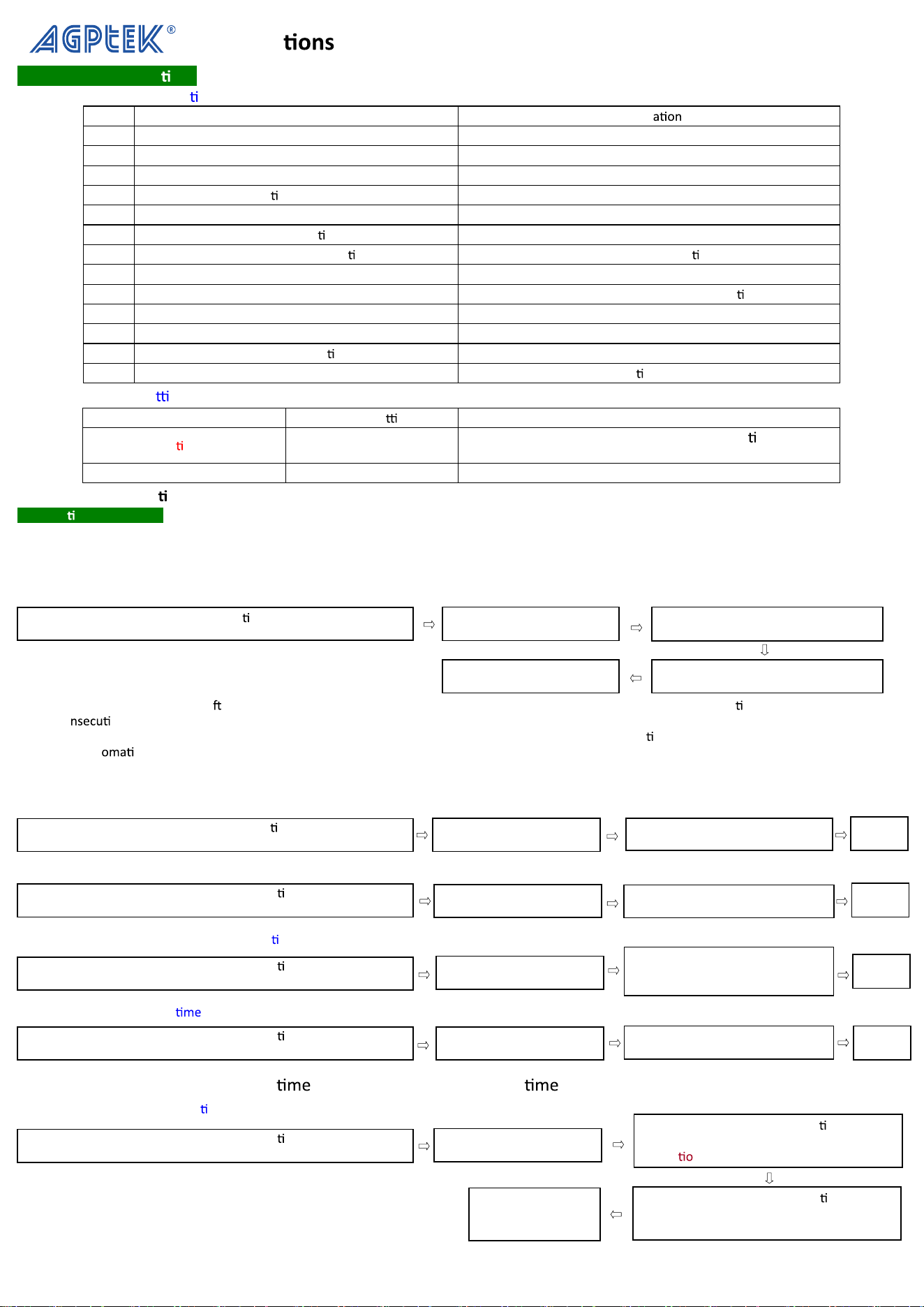
Instruc for AD2000-M Door Access Machine
I. Technical Specifica ons
1. Major product specifica ons
No.
Item Specific
s
1
Working power DC: 12V±10%/1.2A
2
Unlocking relay DC12V/2A
3
Ambient temperature Working: 0℃~45℃ Storage: -10℃~55℃
4
Rela
ve humidity Working:40%~90%RH Storage:20%~90%RH
5
Number of cards allowed 1000
6
Proximity card recogni
on frequency ID type: 125KHz
7
Proximity card recogni
on ID type: EM or EM compa ble cards
8
Car reading distance ID type: 5~15cm
9
Electric lock interface Output from the relay or the level (op
onal)
10
External car reader interface A Weigand26 interface
11
Ways of opening the door Door card or the unlocking passcode
12
Unlocking dura
on 3 seconds
13
Tamper alarm Ac
vated
2. Default product se ngs
Types Original se ngs Notes
Administra on passcode 881122
can only be used to access the administra on system
and is useless for undoing the lock.
Unlocking passcode 1234 can only be used to undo the lock.
※ Notes: Adminstra on passcode and Unlocking passcode can be modified based on user needs.
II. Opera onal Procedure
1. How to add a door card
The door card refers to the card for undoing the lock. The maximum number of cards allowed is 1,000. For security, each added card is assigned a
three-digit, unique serial number. The user is advised to remember this serial number. In case the user loses a card, this number can be deleted to prevent
the card from being used by anyone else. (The serial number of the door card cannot be repeated. Otherwise, the system will produce three short beeps,
and the r
ed light wi
ll turn green. In this case, you can press 【5】to input other three-digit numbers or press【#】to exit the system)
※Note: If 【#】 is not pressed a er the card is sensed, the system will exit within five seconds to complete the entry opera on. If several cards are to be
added co
vely, the next card can be sensed within five seconds. The system will add the card and assign a serial number following the previous one.
For example, if the serial number of the first card is 015,
then the serial number of the second card will automa
cally be set to 016. If 016 has been used, the
system will aut
cally skip it and assign to the next available number.
2. How to delete the door card
(1)Delete the card via card sensing
(2)Delete the card usingthe serial number (in the case of card loss)
3. How to modify the unlocking passcode (ini alized to 1234)
4. How to set the unlocking
※Note: TT denotes the unlocking in seconds. If the unlocking is 3 seconds, then TT=03.
5. How to modify the administra on passcode
Press
【
5
】
(
The
red
light
will
come
on
)
Press
【
#
】
+
【
administra on
code
】
(The
green
light
will
come
on
and
you
will
hear
three
short
beeps)
Enter the three-digit serial number
(You
will
hear
two
short
beeps)
Sense t
h
e car
d
(
You wi
ll
h
ear t
h
ree
short
beeps
come
on)
Press【#】to exit
Press
【
#
】
+
【
administra on code
】
(The green light will come on and you will hear three short beeps)
Press【
#
】
to
exit
Press
【
#
】
+
【
administra on code
】
(The green light will come on and you will hear three short beeps)
Enter the three-digit serial number
(You will hear three short beeps)
Press
【
#
】
+
【
administra on code
】
(The green light will come on and you will hear three short beeps)
Enter the new four-digit passcode
(You will hear two short beeps
and The green light will come on)
Press
【
#
】
+
【
administra on code
】
(The green light will come on and you will hear three short beeps)
TT
(
You will hear two short beeps
and The green light will come on)
Press
【
#
】
+
【
administra on code
】
(The green light will come on and you will hear three short beeps)
Enter the new 6-digit administra on passcode
(The system will provide no light or sound
indica
n)
Enter the new 6-digit administra on passcode
again(The green light will come on and you
will hear three short beeps)
Press【#】to exit
Press
【
7
】
( The red light will come on )
Press
【
3
】
( The red light will come on )
Press
【
2
】
( The red light will come on )
Press
【
0
】
( The red light will come on )
Press
【
7
】
( The red light will come on )
Press
【
#】
to
exit
Press【#】
to
exit
Press【#】
to
exit
6. How to ini
alize the controller (all data will be deleted)
※Note: This opera will delete all data and restore the controller to its original state.
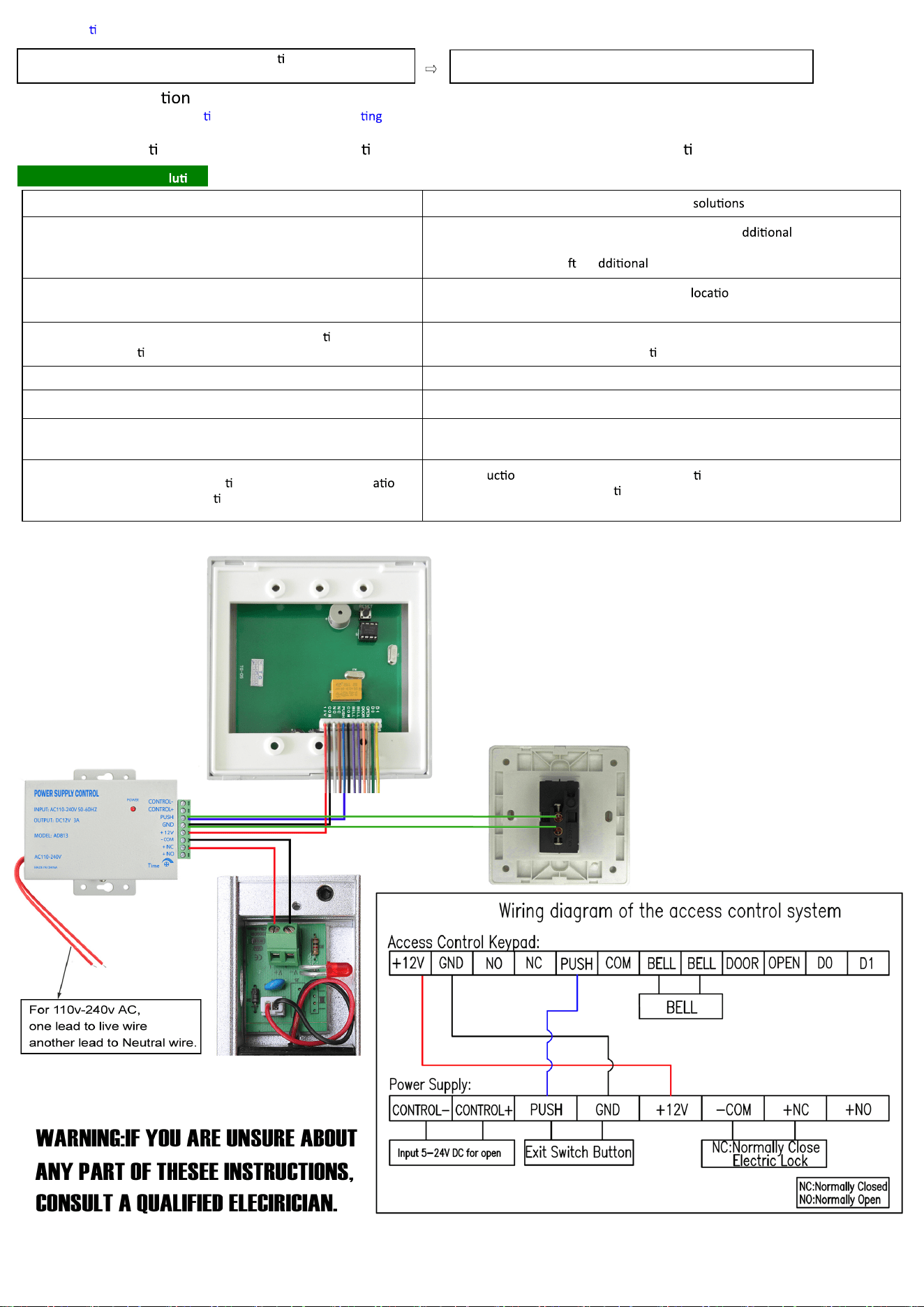
7. How to recover the administra on passcode (without dele user data)
Press in the circuit board at the back of the controller when the system is on.
※Note: This opera on will restore the administra on passcode to its original value without dele ng user data.
III. Common Issues and So ons
Symptom Possible causes and
The key can be pressed normally, but the card cannot be sensed,
and there are eight hoots while undoing the lock.
Insufficient supply of DC causes controller failure. An a
DC power supply
should be provided, or a larger power supply should be used. The door card
should be added again a er a power supply is used.
The key can be pressed normally, but the card cannot be read
promptly or it must be read from a short distance.
1.The controller is on a metallic surface, so its n should be adjusted.
2.The current supply is insufficient, so the power should be improved.
Long beeps occur while pressing 【#】+【administra on passcode】,
and the administra
on system cannot be accessed.
Other keys were pressed before 【#】is pressed. Press 【#】to return to the normal
state. Then, press 【#】+【administra on passcode】again to access the system.
There are three hoots when pressing 【5】. The capacity of the controller is full.
There are three hoots when pressing 【5】+【three-digit number】. This serial number has been used. Choose a different three-digit number.
There are two hoots when pressing 【5】+【three-digit number】
and four hoots when sensing the card
This card has been set to valid. Its serial number can be used by other cards.
The controller exits the administra on system when no oper n is
performed under the administra on state.
If no instr
n is input under the administra on state for 20 seconds, then the
system will exit the administra
on system and switch to the normal working
state.
Press 【#】 + 【administra on code】
(The green light will come on and you will hear three short beeps)
Press
【
86
】
(
You wi
ll
h
ear
f
ive s
h
ort
b
eeps. Five secon
d
s
l
ater,
you
will
hear
three
short
beeps)