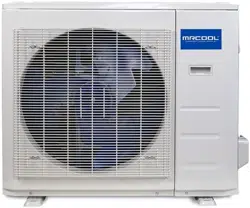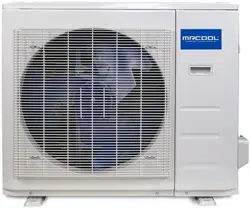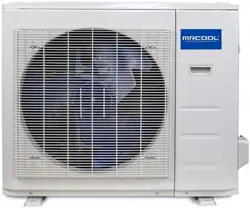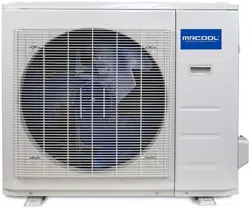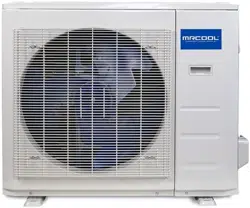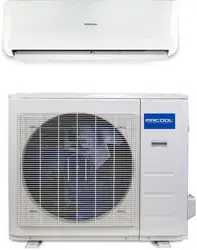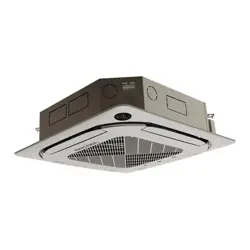
MODELS:
Read this manual carefully before installation and keep it where
the operator can easily nd it for future reference.
Due to updates and constantly improving performance, the
information and instructions within this manual are subject to
change without notice.
Version Date: May 12, 2025
Please visit www.mrcool.com/documentation
to ensure you have the latest version of this manual.
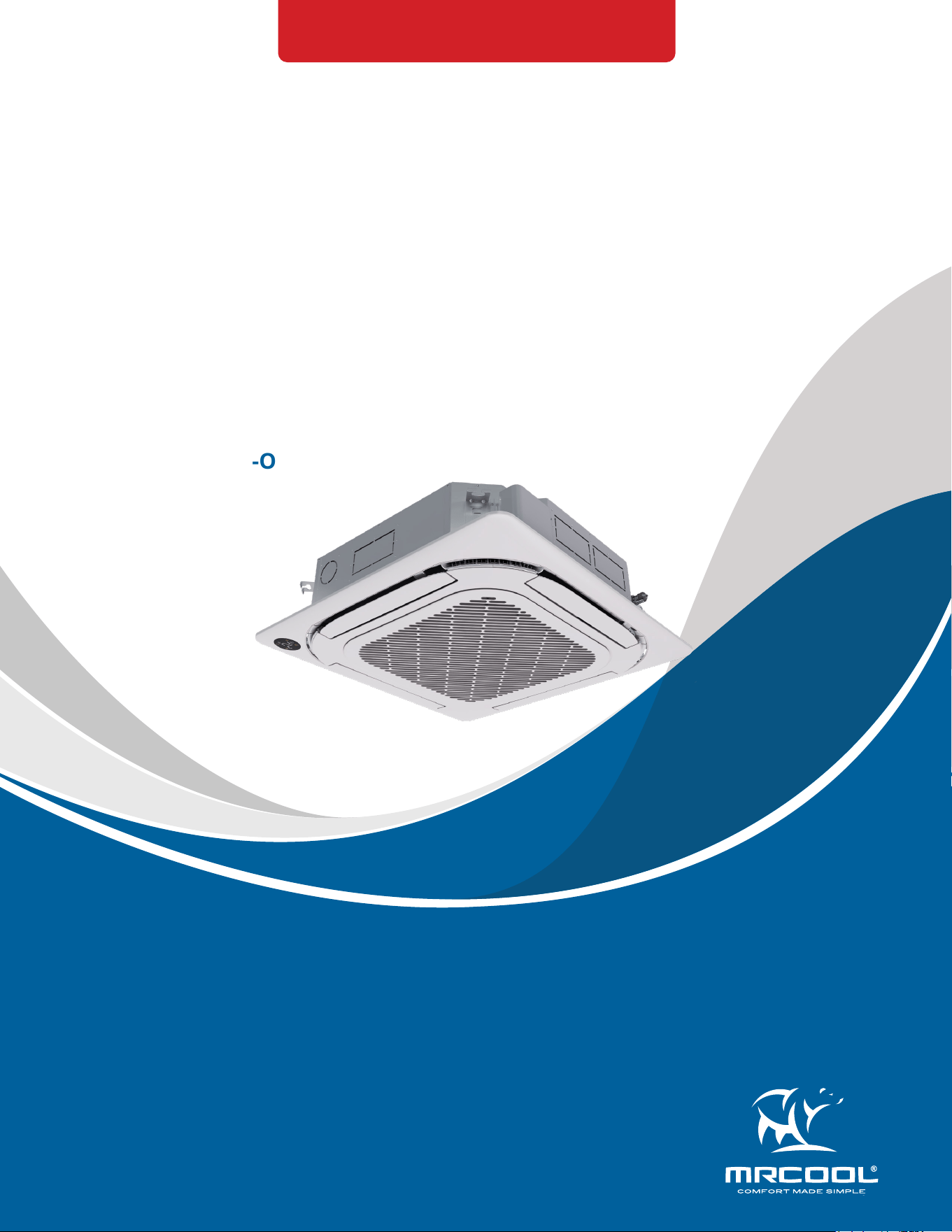
CASSETTE*HP-230C-O
This product utilizes R-454B refrigerant
Olympus Series
Cassette
Air Handler
Service Manual

mrcool.com1
CONTENTS
SAFETY ............................................................................................................................... 2
SYSTEM OVERVIEW ........................................................................................................... 9
2.1 Model Reference .................................................................................................. 9
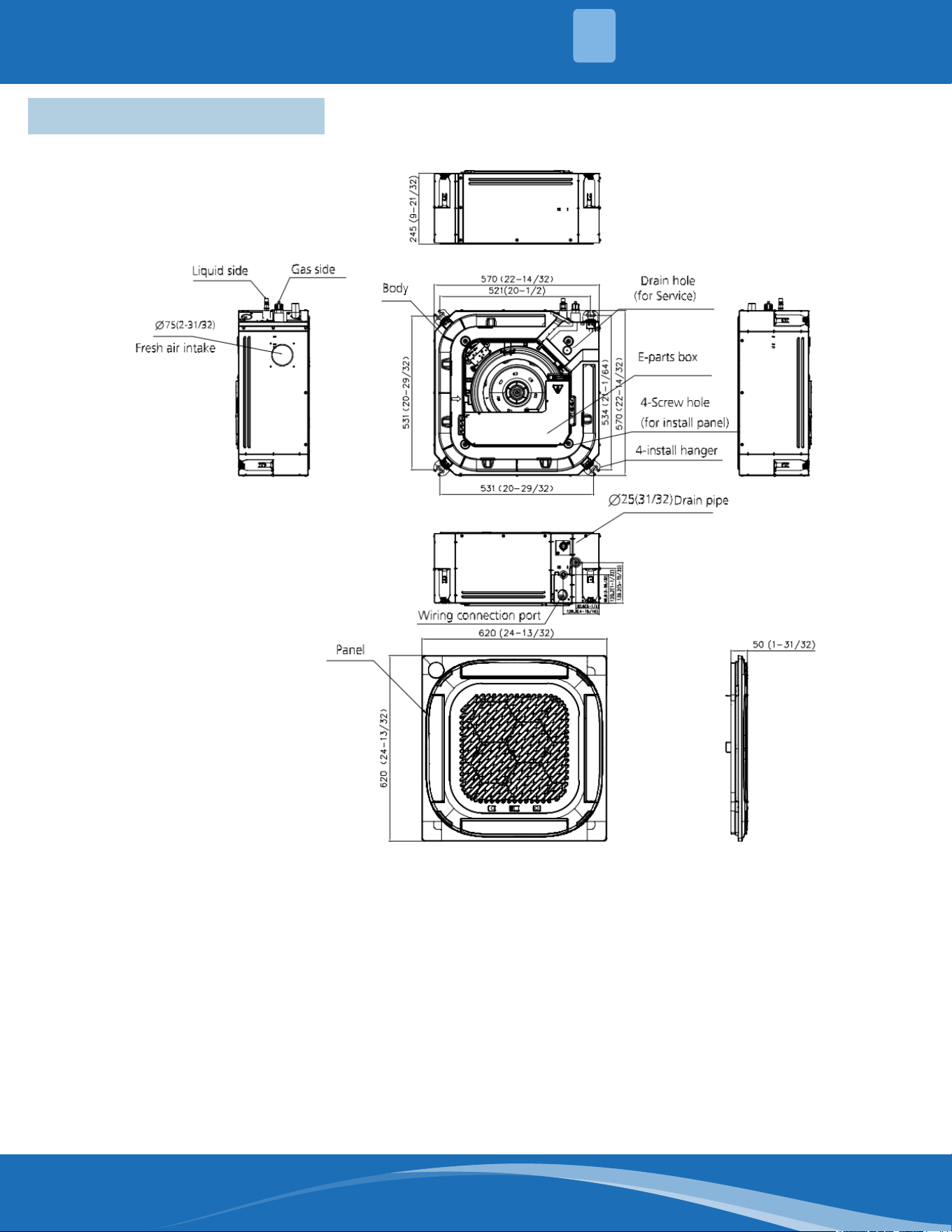
2.2 External Appearance ........................................................................................... 9
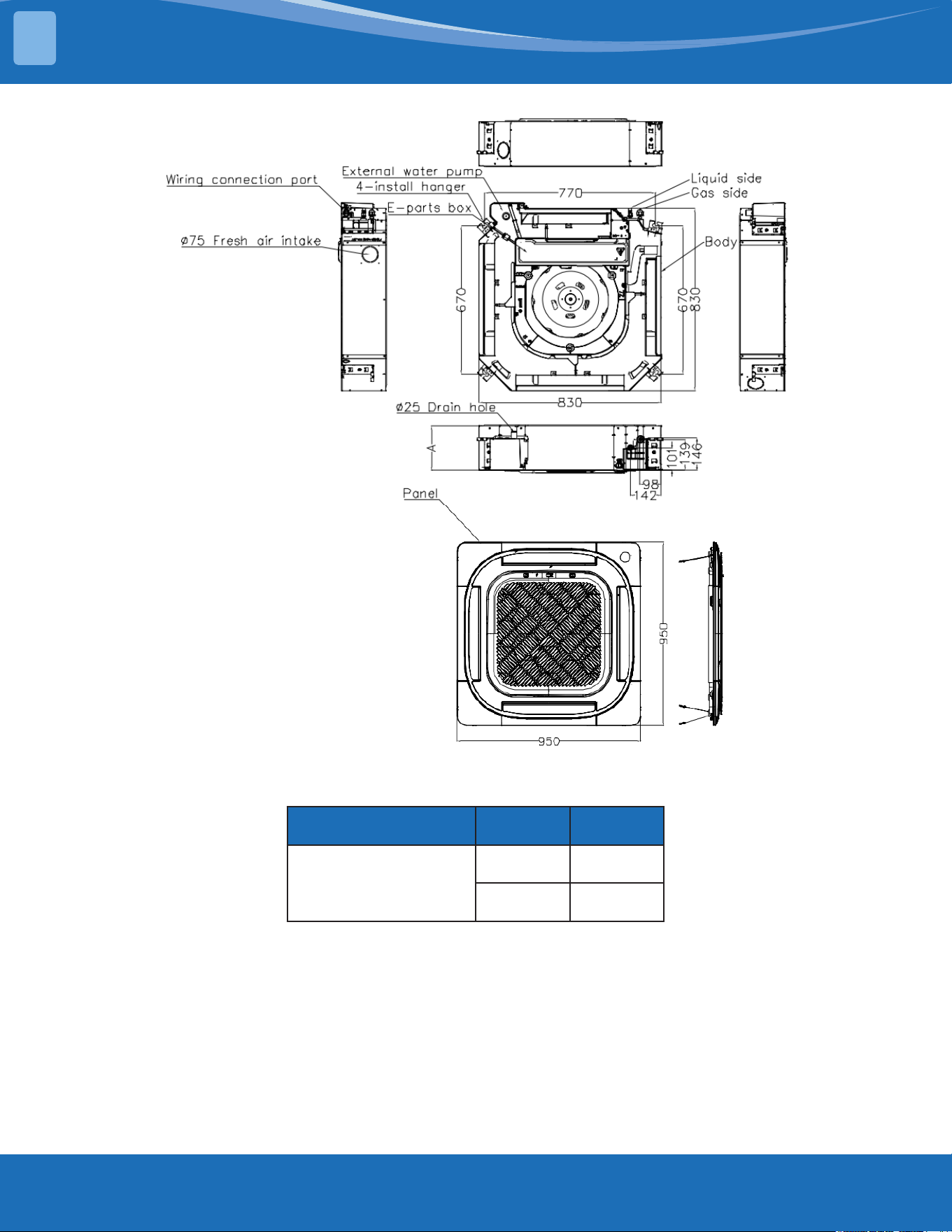
2.3 Dimensional Drawings ...................................................................................... 10
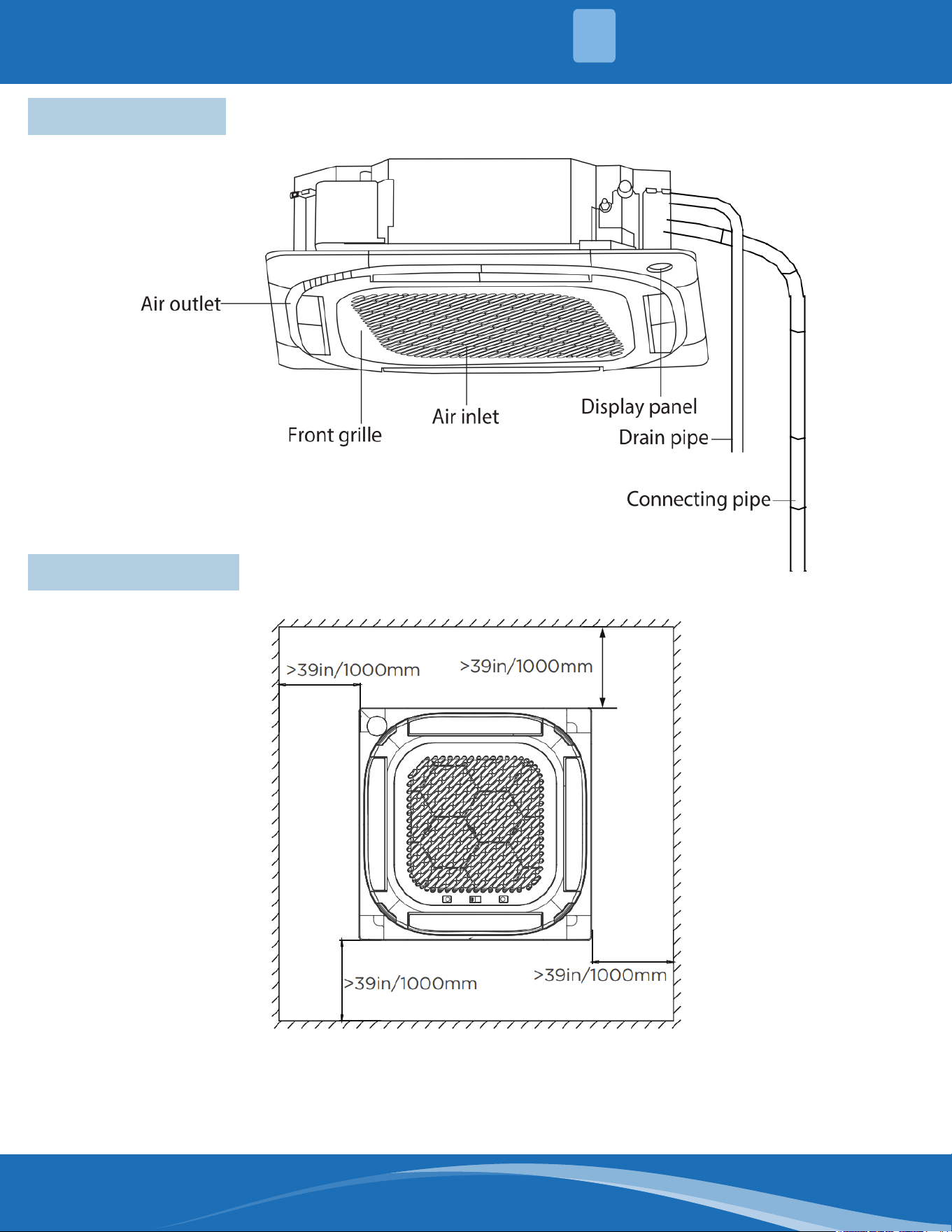
2.4 Part Names ......................................................................................................... 12
2.5 Service Place ...................................................................................................... 12
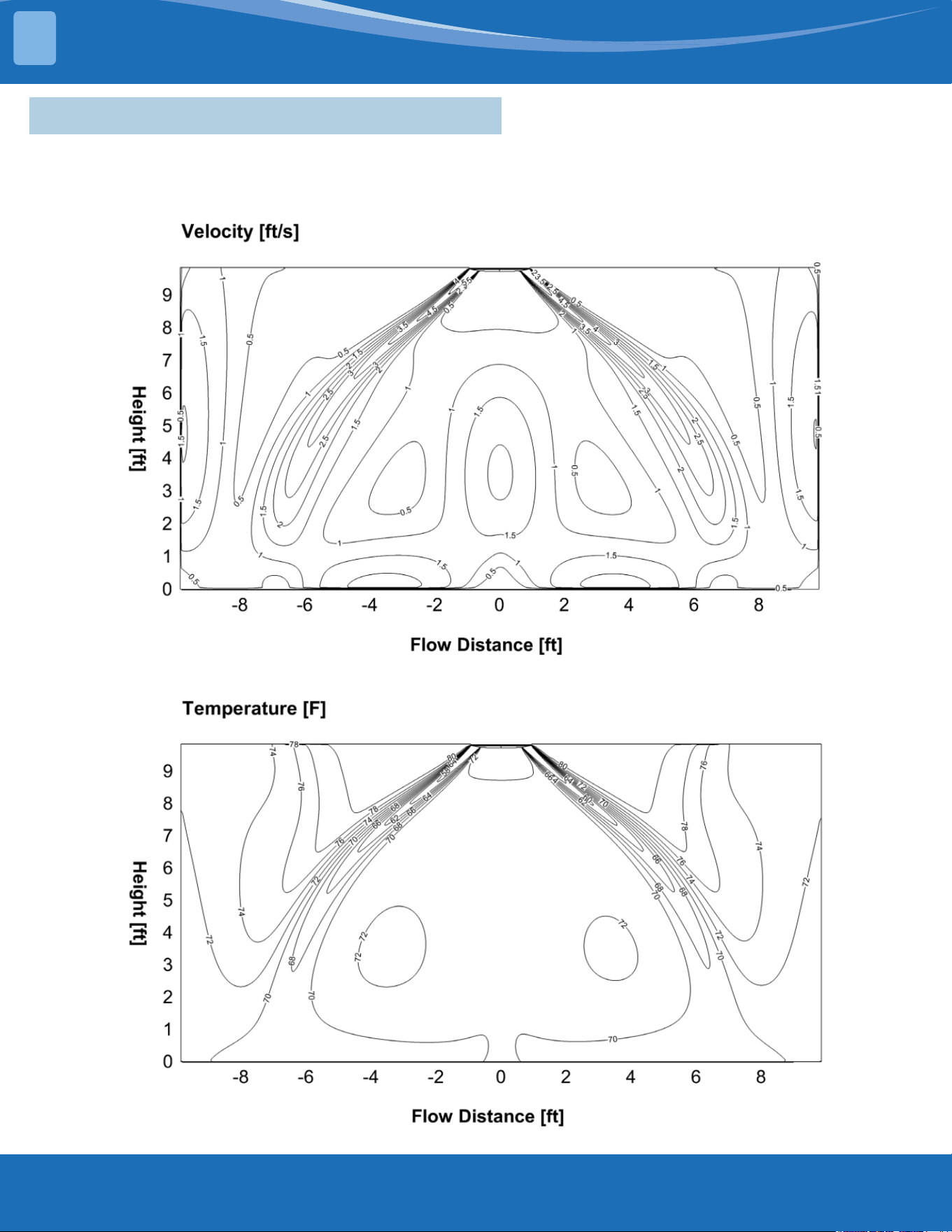
2.6 Air Velocity & Temperature Distributions ...................................................... 13
2.7 Sound Pressure Levels & Curves ..................................................................... 21
2.8 Refrigerant System Diagram ............................................................................ 22
2.9 Electrical ............................................................................................................. 22
INSTALLATION ................................................................................................................ 32
3.1 Location .............................................................................................................. 32
3.2 Indoor Unit Installation .................................................................................... 32
3.3 Panel Installation ............................................................................................... 34
3.4 Drain Pipe Installation ...................................................................................... 35
3.5 Refrigerant Pipe Installation ............................................................................ 36
3.6 Insulation ............................................................................................................ 37
3.7 Electrical Wiring ................................................................................................. 38
PRODUCT FEATURES ...................................................................................................... 39
4.1 Display Function ................................................................................................ 39
4.2 Safety Features .................................................................................................. 39
4.3 Basic Functions .................................................................................................. 40
TROUBLESHOOTING ...................................................................................................... 44
5.1 Safety Caution .................................................................................................... 44
5.2 Error Display (Indoor Unit) ............................................................................... 45
5.3 Information Inquiry & Setting .......................................................................... 46
5.4 Error Diagnosis Without Error Code ................................................................ 47
5.5 Quick Maintenance by Error Code .................................................................. 58
5.6 Troubleshooting by Error Code ....................................................................... 60
5.7 Check Procedures .............................................................................................. 80
TEMPERATURE SENSOR RESISTANCE TABLE ............................................................... 81
SYSTEM PRESSURE TABLE .............................................................................................. 83
Contents
1
2
3
4
5
6
7
mrcool.com 2 2
SAFETY
1
Incorrect usage may cause serious damage or injury.
The symbols below are used throughout this manual to indicate instructions that should be
followed closely or actions that should be avoided to prevent death, injury, and/or property
damage.
Safety Precautions
CAUTION
Indicates the possibility of personal injury or loss of life.
Indicates the possibility of property damage or serious
consequences.
Read Before Using
WARNING
WARNING FOR PRODUCT INSTALLATION
INSTALLATION MUST BE PERFORMED BY AN AUTHORIZED DEALER OR SPECIALIST. DEFECTIVE
INSTALLATION CAN CAUSE WATER LEAKAGE, ELECTRICAL SHOCK, OR FIRE.
****ELECTRICAL WORK MUST BE COMPLETED BY A QUALIFIED ELECTRICAL TECHNICIAN****
DO NOT install the unit in a location that may be exposed to combustible gas leaks. If
combustiblegasaccumulatesaroundtheunit,itcouldcausere.
DO NOT turn on the power until the installation and all work has been completed.
1. Installation must be performed according to the installation instructions. Improper installation could cause
water leakage, electrical shock, or re.
2. Contact an authorized service technician for repair or maintenance of this unit.
3. This appliance must be installed in accordance with national wiring regulations.
4. Only use the included accessories, parts, and specied parts for installation. Using non-standard parts can
cause water leakage, electrical shock, re, and/or failure of the unit.
5. Install the unit in a rm location that can support the unit’s weight. If the location cannot support the unit’s
weight, or the installation is not done properly, the unit may drop and cause serious injury and damage.
6. Install the drainage piping according to the instructions in this manual. Improper drainage could cause
water damage to your home and/or property.
7. When moving or relocating the air conditioner, consult experienced service technicians for disconnection
and re-installation of the unit.
8. For detailed information of how to install the indoor and outdoor units to their respective supports, please
refer to the indoor unit installation and outdoor unit installation sections of this manual.
9. USB device access, replacement, and maintenance operations must be carried out by professional sta.
WARNING FOR CLEANING & MAINTENANCE
1. DO NOT clean the unit with excessive amounts of water.
2. DO NOT clean the unit with combustible cleaning agents, as these could cause deformation and/or re.
3. Turn o the device and disconnect the power before cleaning. Failure to do this could result in electrical
shock.
TAKE NOTE OF FUSE SPECIFICATIONS
• The unit’s circuit board (PCB) is designed with a fuse to provide over-current protection.
• The specications of the fuse are printed on the circuit board, examples of such are T5A/250VAC and
T10A/250VAC.
Note: Only a blast-proof ceramic fuse can be used.
mrcool.com3
SAFETY
1
WARNING FOR PRODUCT USE
DO NOT insertngers,rods,orotherobjectsintotheairinletoroutlet.Thiscouldcauseinjury,
since the fan may be rotating at high speeds.
DO NOT useammablesprayssuchashairspray,lacquerorpaintneartheunit,asthiscould
causereand/oranexplosion.
DO NOT operate the unit in places near or around combustible gases. Emitted gas may collect
around the unit and cause an explosion.
DO NOT allow children to play with the appliance. Children must be supervised around
the unit at all times.
DO NOT operate the unit in a room where it could be exposed to excessive amounts of water,
such as a bathroom or laundry room. Exposure to excessive water amounts can cause the
electrical components to short circuit.
DO NOT exposeyourbodydirectlytodirectcoolairowfromtheunitforaprolongedperiod
of time.
1. If the unit operates abnormally (emits strange noises or a burning smell), immediately turn o the unit
and disconnect the power in order to avoid electric shock, re, and/or injury. Call your local dealer, or
MRCOOL® tech support at (270) 366-0457, for further assistance.
2. If the air conditioner is used together with burners or other heating devices, thoroughly ventilate the room
in order to avoid an oxygen deciency.
3. In certain functional environments (such as kitchens and server rooms etc.), the use of specially designed
air-conditioning units is highly recommended.
4. This appliance is not intended for use by persons(including children) with reduced physical, sensory or
mental capabilities, or lack of experience and knowledge, unless they have been given supervision or
instruction concerning use of the appliance by a person responsible for their safety. Children should be
supervised to ensure that they do not play with the appliance.
5. Turn o the unit and disconnect the power before performing any cleaning, installation, or repairing.
Failure to do so can cause electric shock.
ELECTRICAL WARNINGS
****ELECTRICAL WORK MUST BE COMPLETED BY A QUALIFIED ELECTRICAL TECHNICIAN****
DO NOT sharethepowersupplywithotherappliances.Animproperorinsucientpower
supplycouldcausereand/orelectricalshock.
1. Only use the specied wire. If the wire is damaged, it must be replaced by the manufacturer, its service
agent or similarly qualied persons in order to avoid a hazard.
2. The product must be properly grounded during installation or electrical shock could occur.
3. Appropriate wiring standards, regulations, and the installation manual must be followed for all electrical
work.
4. If connecting power to xed wiring, an all-pole disconnection device must be incorporated in the xed
wiring in accordance with the wiring rules and must meet the following requirements: at least 3 mm of
clearances in all poles, a leakage current that may exceed 10 mA, and a residual current device (RCD)
having a rated residual operating current not exceeding 30 mA.
5. Connect cables tightly and clamp them securely to prevent external forces from damaging the terminal.
CAUTION
DO NOT allow the air conditioner to operate for extended periods of time with the doors or
windows open, or in very high humidity.
DO NOT operate the air conditioner with wet hands, as this could cause electric shock.
DO NOT use device for any other purpose than its intended use.
DO NOT climbontoorplaceobjectsontopoftheoutdoorunit.
1. Make sure that water condensation can drain smoothly and unhindered from the unit.
2. Turn o the unit and disconnect the power if the unit will not be used for an extended period of time.
3. Turn o and unplug the unit during storms.
mrcool.com 4
4
SAFETY
1
FLAMMABLE REFRIGERANT WARNINGS
1. The installation of pipe-work should be kept to a minimum and should be protected from physical damage.
2. Refrigerant pipes should comply with national gas regulations.
3. All mechanical connections and ventilation openings should be kept clear of obstruction.
4. Utilize proper disposal processes based on national regulations.
5. Any person involved with working on or breaking into a refrigerant circuit should hold a current valid
certicate from an industry-accredited assessment authority, which authorizes their competence to handle
refrigerants safely in accordance with an industry recognized assessment specication.
6. Maintenance and repair requiring the assistance of other skilled personnel shall be carried out under the
supervision of the person competent in the use of ammable refrigerants.
7. Do not use any means to accelerate the defrosting process or to clean, other than those recommended by
the manufacturer.
8. The appliance shall be stored in a room without continuously operating ignition sources (for example: open
ames, an operating gas appliance, or an operating electric heater).
9. Do not allow foreign matter (oil, water, etc.) to enter the piping, and securely seal the opening by pinching,
taping, etc.
10. Do not pierce or burn.
11. Refrigerants may not contain an odor.
12. Working procedures that aect safety should only be carried out by competent persons.
13. The unit should be stored in a well-ventilated area where the room size corresponds to the room area as
specic for operation, and should be stored so as to prevent potential mechanical damage from occurring.
14. Joints should be tested with detection equipment with a capability of 5 g/year of refrigerant or better, with
the equipment in standstill and under operation or under a pressure of at least these standstill or operation
conditions after installation. Detachable joints should NOT be used in the indoor side of the unit (brazed,
welded joint could be used).
15. A leak detection system is installed. The unit must be powered except for service. For units with a refrigerant
sensor, the indoor unit will display an error code and emit a buzzing sound, the compressor of the outdoor
unit will immediately stop, and the indoor fan will start running. The service life of the refrigerant sensor
is 15 years. When the refrigerant sensor malfunctions, the indoor unit will display the error code "FHCC".
The refrigerant sensor cannot be repaired and can only be replaced by the manufacturer. It should only be
replaced with the sensor specied by the manufacturer.
16. When a ammable refrigerant is used, the requirements for installation space of the appliance and/or
ventilation requirements are determined according to:
• The mass charge amount (M) used in the unit.
• The installation location.
• The type of ventilation of the location of the unit.
• Piping material, pipe routing, and installation must include protection from physical damage in
operation and service. This must be in compliance with local codes and standards, such as ASHRAE
15, IAPMO Uniform Mechanical Code, ICC International Mechanical Code, or CSA B52. All eld joints
must be accessible for inspection prior to being covered or enclosed.
• Protection devices, piping and ttings must be protected as much as possible against adverse
environmental eects. For example, against the danger of water collecting and freezing in relief pipes
or against accumulation of dirt or debris.
ELECTRICAL WARNINGS
Improper electrical connections could overheat, causing re and/or electrical shock.
5. All electrical connections must be made according to the Electrical Connection Diagram located on the
panels of the indoor and outdoor units.
6. All wiring must be properly arranged to ensure that the control board cover can close properly. If the
control board cover is not properly closed, it can lead to corrosion and cause the connection points on the
terminal to heat up, catch re, or cause electrical shock.
7. Disconnection must be incorporated in the xed wiring in accordance with the wiring rules.
mrcool.com5
SAFETY
1
FLAMMABLE REFRIGERANT WARNINGS
• Piping in refrigeration systems must be designed and installed to minimize the likelihood of hydraulic
shock, resulting in damage from the system.
• Steel pipes and components must be protected against corrosion with a rust-proof coating before
applying insulation.
• Precautions must be taken against excessive vibration or movement of the unit.
• The minimum oor area of the room must be mentioned in the form of a table or a single gure
without reference to a formula.
17. After completion of eld piping for split systems, the eld pipework should be pressure tested with an inert
gas and then vacuum tested prior to refrigerant charging, according to the following requirements:
• The minimum test pressure for the low side of the system should be the low side design pressure and
the minimum test pressure for the high side of the system should be the high side design pressure,
unless the high side of the system cannot be isolated from the low side of the system in which case the
entire system should not be pressure tested to the low side design pressure.
• The test pressure after removal of pressure source shall be maintained for at least 1 hour with no
decrease of pressure indicated by the test gauge, with test gauge resolution not exceeding 5% of the
test pressure.
18. Prior to beginning work on systems containing ammable refrigerants, safety checks are necessary
to ensure that the risk of ignition is minimized. For repairs to the refrigerating system, the following
precautions shall be complied with prior to conducting work on the system.
19. Work should be undertaken under a controlled procedure so as to minimize the risk of a ammable gas or
vapor being present while the work is being performed.
20. All maintenance sta and others working in the local area should be instructed on the nature of work being
carried out. Avoid work in conned spaces.
21. The area should be checked with an appropriate refrigerant detector prior to and during work, to ensure the
technician is aware of potentially ammable atmospheres. Ensure that the leak detection equipment being
used is suitable for use with ammable refrigerants, i.e. no sparking, adequately sealed, or intrinsically safe.
22. If any hot work is to be conducted on the refrigeration equipment or any associated parts, appropriate re
extinguishing equipment should be on site and readily available. Have a dry power or CO2 re extinguisher
adjacent to the charging area.
23. No person carrying out work in relation to a refrigerating system which involves exposing any pipe work
should use any sources of ignition in such a manner that it may lead to the risk of re or explosion. All
possible ignition sources, including cigarette smoking, should be kept suciently far away from the site
of installation, repairing, removing, and disposal, during which refrigerant can possibly be released to the
surrounding space. Prior to work taking place, the area around the equipment is to be surveyed to make
sure that there are no ammable hazards or ignition risks. "No Smoking" signs should be displayed.
24. Ensure that the area is in the open or that it is adequately ventilated before breaking into the system or
conducting any hot work. A degree of ventilation shall continue during the period that the work is carried
out. The ventilation should safely disperse any released refrigerant and preferably expel it externally into the
atmosphere.
23. Where electrical components are being changed, they shall be t for the purpose and to the correct
specication. At all times the manufacturer's maintenance ad service guidelines shall be followed. If in
doubt, consult the manufacturer's technical department for assistance. The following checks should be
applied to installations using ammable refrigerants:
• the actual refrigerant charge is in accordance with the room size within which the refrigerant containing
parts are installed;
• the ventilation machinery and outlets are operating adequately and are not obstructed;
• if an indirect refrigerating circuit is being used, the secondary circuits should be checked for the
presence of refrigerant;
• marking to the equipment continues to be visible and legible, marking and signs that are illegible
should be corrected;
• refrigerant pipe or components are installed in a position where they are unlikely to be exposed to
any substance which may corrode refrigerant containing components, unless the components are
constructed of materials which are inherently resistant to or protected against corrosion.
mrcool.com 6
6
SAFETY
1
FLAMMABLE REFRIGERANT WARNINGS
24. Repair and maintenance to electrical components shall include initial safety checks and component
inspection procedures. If a fault exists that could compromise safety, then no electrical supply shall be
connected to the circuit until it is satisfactorily dealt with. If the fault cannot be corrected immediately but it
is necessary to continue operation, an adequate temporary solution should be used.
25. Initial safety checks should include:
• that capacitors are discharged: this should be done in a safe manner to avoid the possibility of sparking;
• that there are no live electrical components and wiring are exposed while charging, recovering, or
purging the system;
• that there is continuity of earth bonding.
26. Sealed electrical components should be replaced if damaged.
27. Intrinsically safe components should be replaced if damaged.
28. Check that wiring will not be subject to wear, corrosion, excessive pressure, vibration, sharp edges, or
any other adverse environmental eects. The check shall also take into account the eects of aging or
continual vibration from sources such as compressors or fans.
29. Under no circumstances should potential sources of ignition be used in the search for or detection of
refrigerant leaks. A halide torch (or any other detector using a naked ame) should not be used. The
following leak detection methods are deemed acceptable for refrigerant systems. Electronic leak detectors
may be used to detect refrigerant leaks but, in the case of ammable refrigerants, the sensitivity may
not be adequate, or may need re-calibration. (Detection equipment shall be calibrated in a refrigerant-
free area.) Ensure that the detector is not a potential source of ignition and is suitable for the refrigerant
used. Leak detection equipment shall be set at a percentage of the LFL of the refrigerant and should
be calibrated to the refrigerant employed, and the appropriate percentage of gas (25% minimum) is
conrmed. Leak detection uids are also suitable for use with most refrigerants but the use of detergents
containing chlorine may react with the refrigerant and corrode the copper work. Examples of leak
detection uids are the bubble method, uorescent method agents, etc. If a leak is suspected, all naked
ames should be removed/extinguished. If a leakage of refrigerant is found which requires brazing, all of
the refrigerant should be recovered from the system, or isolated (by means of shut-o valves) in a part of
the system remote from the leak. See the following instructions of removal of refrigerant.
30. When breaking into the refrigerant circuit to make repairs, or for any other purpose, conventional
procedures should be used. However, for ammable refrigerants, it is even more vital to follow best
practice. The following procedure should be adhered to:
• safely remove refrigerant following local and national regulations;
• evacuate;
• purge the circuit with inert gas;
• evacuate;
• continuously ush or purge with inert gas when using ame to open circuit;
• open the circuit
31. The refrigerant charge should be recovered into the correct recovery cylinders if venting is not allowed by
local and national codes. For units containing ammable refrigerants, the system should be purged with
oxygen-free nitrogen to render the appliance safe for ammable refrigerants. This process might need to
be repeated several times. Compressed air or oxygen shall not be used for purging refrigerant systems.
For appliances containing ammable refrigerants, refrigerant purging should be achieved by breaking the
vacuum in the system with oxygen-free nitrogen and continuing to ll the working pressure is achieved,
then venting to atmosphere, and nally pulling down to a vacuum. This process should be repeated until
no refrigerant is within the system. When the nal oxygen-free nitrogen charge is used, the system should
be vented down to atmospheric pressure to enable work to take place. The outlet for the vacuum pump
should not be close to any potential ignition sources, and ventilation should be available.
32. In addition to conventional charging procedures, the following requirements should be followed:
• Work should be undertaken with appropriate tools only (in case of uncertainty, please consult the
manufacturer of the tools for use with ammable refrigerants)
• Ensure that contamination of dierent refrigerants does not occur when using charging equipment.
Hoses or lines shall be as short as possible to minimize the amount of refrigerant contained in them.
mrcool.com7
FLAMMABLE REFRIGERANT WARNINGS
• Ensure that the refrigeration system is grounded prior to charging the system with refrigerant.
• Label the system when charging is complete (if not already).
• Extreme care should be taken not to overll the refrigeration system.
• Prior to recharging the system, it should be pressure tested with oxygen-free nitrogen (OFN). The
system should be leak-tested on completion of charging but prior to commissioning. A follow-up leak
test shall be carried out prior to leaving the site.
33. Before carrying out this procedure, it is essential that the technician is completely familiar with the
equipment and all its detail. It is good recommended practice that all refrigerants are recovered safely.
Prior to the task being carried out, an oil and refrigerant sample should be taken in case analysis is
required prior to re-use of recovered refrigerant. It is essential that electrical power is available before the
task is commenced.
a. Become familiar with the equipment and its operation.
b. Isolate the system electrically.
c. Before attempting the procedure ensure that:
• mechanical handling equipment is available, if required, for handling refrigerant cylinders;
• all personal protective equipment is available and being used correctly;
• the recovery process is supervised at all times by a competent person;
• recovery equipment and cylinders conform to the appropriate standards
Pump down refrigerant system, if possible.
e. If a vacuum is not possible, make a manifold so that refrigerant can be removed from various parts of
the system.
f. Make sure that the cylinder is situated on the scales before recovery takes place.
g. Start the recovery machine and operate in accordance with instructions.
h. Do not overll cylinders (no more than 80% volume liquid charge).
i. Do not exceed the maximum working pressure of the cylinder, even temporarily.
j. When the cylinders have been lled correctly and the process completed, make sure that the cylinders
and equipment are removed from the site promptly and all isolation valves on the equipment are closed o.
k. Recovered refrigerant should not be charged into another refrigeration system unless it has been
cleaned and checked.
34. Equipment shall be labeled stating that it has been decommissioned and emptied of refrigerant. The label
should be dated and signed. For appliances containing ammable refrigerants, ensure that there are labels
on the equipment stating the equipment contains ammable refrigerant.
35. When removing refrigerant from a system, either for servicing or decommissioning, it is good
recommended practice that all refrigerants are removed safely. When transferring refrigerant into
cylinders, ensure that only appropriate refrigerant recovery cylinders are employed. Ensure that the
correct number of cylinders for holding the total system charge is available. All cylinders to be used should
be designated for the recovered refrigerant and labeled for that refrigerant (i.e. special cylinders for the
recovery of refrigerant). Cylinders shall be complete with pressure-relief valve and associated shut-o
valves in good working order. Empty recovery cylinders are evacuated and, if possible, cooled before
recovery occurs. The recovery equipment should be in good working order with a set of instructions
concerning the equipment that is at hand and should be suitable for the recovery of the ammable
refrigerant. If in doubt, the manufacturer should be consulted. In addition, a set of calibrated weighing
scales should be available and in good working order. Hoses should be complete with leak-free disconnect
couplings and in good condition. The recovered refrigerant should be processed according to local
legislation in the correct recovery cylinder, and the relevant waste transfer note arranged. Do not mix
refrigerants in recovery units and especially not in cylinders.
36. If compressors or compressor oils are to be removed, ensure that they have been evacuated to an
acceptable level to make certain that ammable refrigerant does not remain within the lubricant. The
compressor body should not be heated by an open ame or other ignition sources to accelerate this
process. When oil is drained from a system, it should be carried out safely.
37. An unventilated area where the appliance using ammable refrigerants is installed should be constructed
so that should any refrigerant leak, it will not stagnate so as to create a re or explosion hazard. If
appliances connected via an air duct system to one or more rooms below the ventilation requirements,
SAFETY
1
mrcool.com 8
8
FLAMMABLE REFRIGERANT WARNINGS
that room should never contain potential ignition sources. A ame-producing device may be installed
in the space if the device is provided with an eective ame arrest. Auxiliary devices which may be a
potential ignition source should not be installed in the duct work. Examples of such are hot surfaces with
a temperature exceeding 1292°F (700°C) and electric switching devices. Only auxiliary devices (such as
a certied heater kit) approved by the manufacturer or declared suitable with the refrigerant should be
installed in connecting ductwork. False or drop ceilings may be used as a return air plenum if a refrigerant
detection system is provided in the appliance and any external connections are also provided with a sensor
immediately below the return air plenum duct joint. Refrigerant sensors for refrigerant detection systems
should only be replaced with sensors specied by the manufacturer. A leak detection system is installed.
The unit must be powered except for service.
38. Transport of equipment containing ammable refrigerants should comply with transportation regulations.
39. Marking of equipment using signs should comply with local regulations.
40. Disposal of equipment using ammable refrigerants should comply with national regulations.
41. Storage of equipment/appliances should be in accordance with the manufacturer's instructions.
42. Storage of packed (unsold) equipment should be constructed so that mechanical damage to the equipment
inside the package will not cause a leak of the refrigerant charge. The maximum number of pieces of
equipment permitted to be stored together will be determined by local regulations.
43. During the evacuation test, after achieving a vacuum level specied in the manual or less, the refrigeration
system shall be isolated from the vacuum pump and the pressure shall not rise above 1500 microns within
10 minutes. The vacuum pressure level should be specied in the manual, and should be the lessor of 500
microns of the value required for compliance with national and local codes and standards, which may vary
between residential, commercial, and industrial buildings.
• Field-made refrigerant joints indoors should be tightness-tested according to the following
requirements: the test method should have a sensitivity of 5 grams per year of refrigerant or better
under a pressure of at least 0.25 times the maximum allowable pressure. No leak should be detected.
• Any servicing should be performed only as recommended by MRCOOL®.
43. Any maintenance, service, or repair operations must be performed by qualied personnel. Every working
procedure that aects safety should only be carried out by competent persons that are both trained and
certied. The training of these procedures should be carried out by national training organizations or
manufacturers that are accredited to teach the relevant national competency standards that may be set in
legislation. All training should follow the ANNEX HH requirements of UL 60334-2-40 4th Edition.
Examples of such working procedures are:
• breaking into a refrigerant circuit
• opening of sealed components
• opening of ventilated enclosures
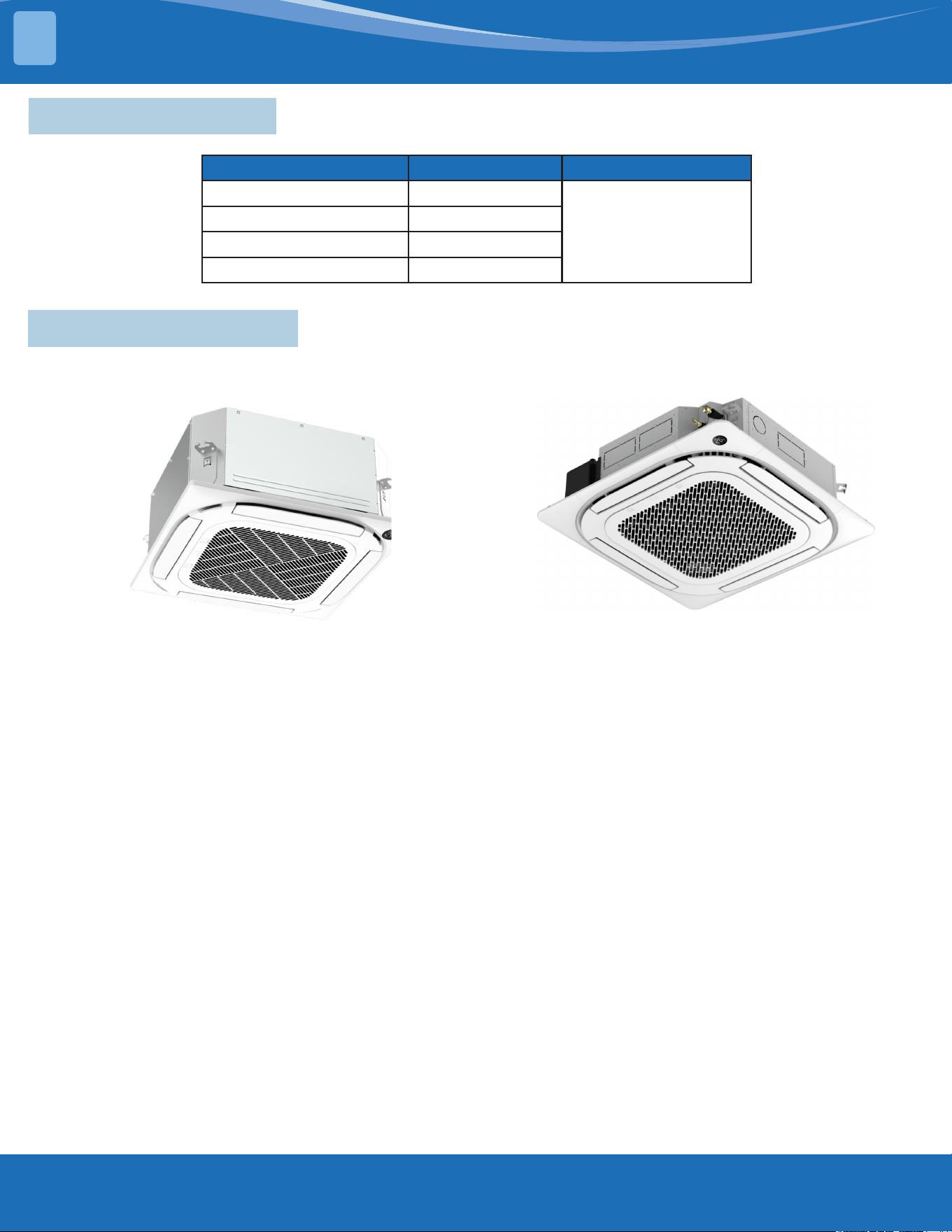
Symbols Displayed on Indoor & Outdoor Unit
WARNING
This symbol shows that this appliance uses a ammable refrigerant. If the refrigerant
is leaked and exposed to an external ignition source, there is a risk of re.
CAUTION This symbol shows that the operation manual should be read carefully.
CAUTION
This symbol shows that a service personnel should be handling this equipment with
reference to the installation manual.
CAUTION
CAUTION
This symbol shows that information is available such as the operating manual or
installation manual.
SAFETY
1
mrcool.com9
2.1 Model Reference
Indoor Unit Model Capacity(Btu/h) Power Supply
CASSETTE09HP-230C-O 9K
1Ph, 208/230V~, 60Hz
CASSETTE12HP-230C-O 12K
CASSETTE18HP-230C-O 18K
CASSETTE24HP-230C-O 24K
SYSTEM OVERVIEW
2
2.2 External Appearance
9/12/18K
24K
mrcool.com 10
10
2.3 Dimensional Drawings
9/12/18K
2
SYSTEM OVERVIEW
mrcool.com11
SYSTEM OVERVIEW
2
24K
Model(KBtu/h) Unit A
24
mm 205
inch 8.07
mrcool.com 12
12
2.4 Part Names
2.5 Service Place
2
SYSTEM OVERVIEW
mrcool.com13
SYSTEM OVERVIEW
2
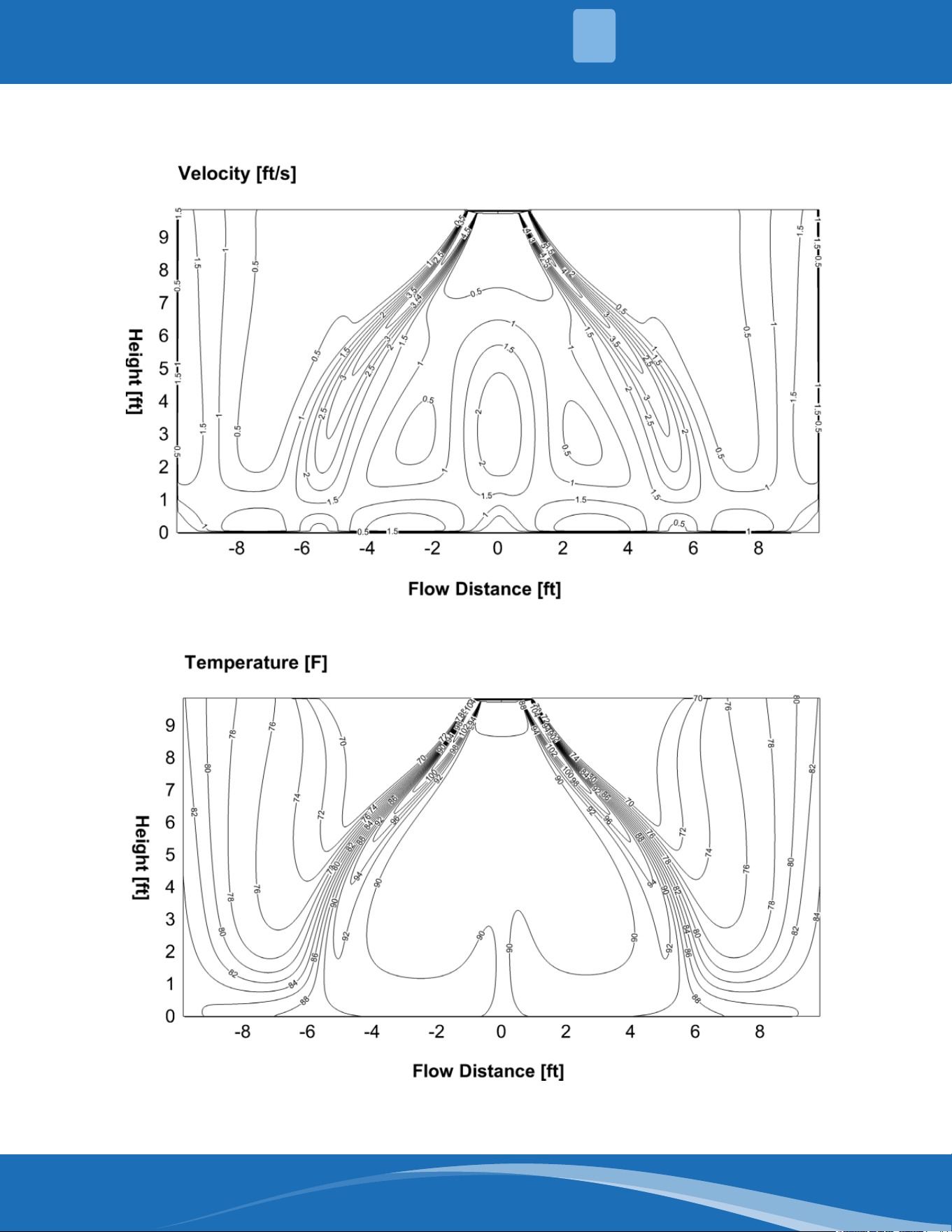
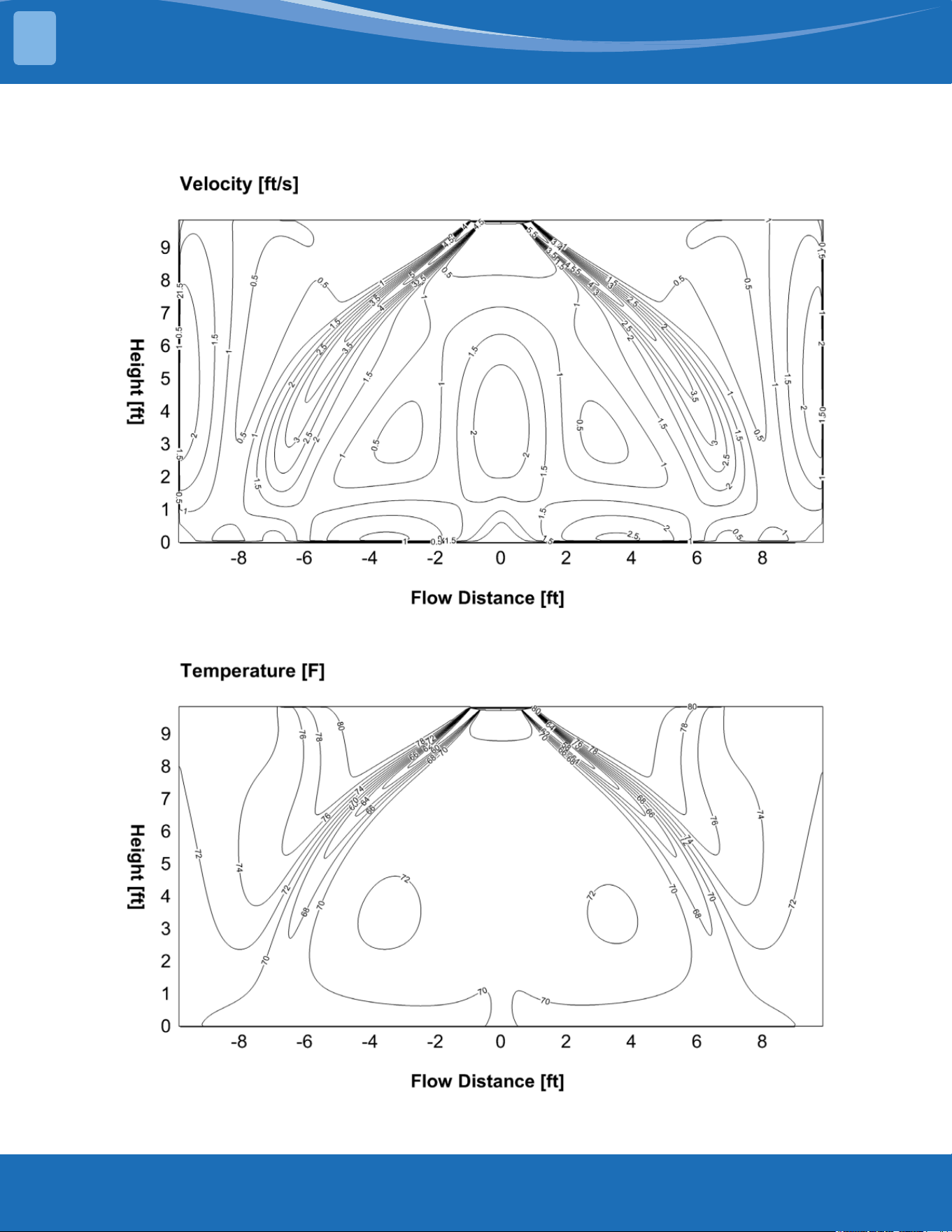
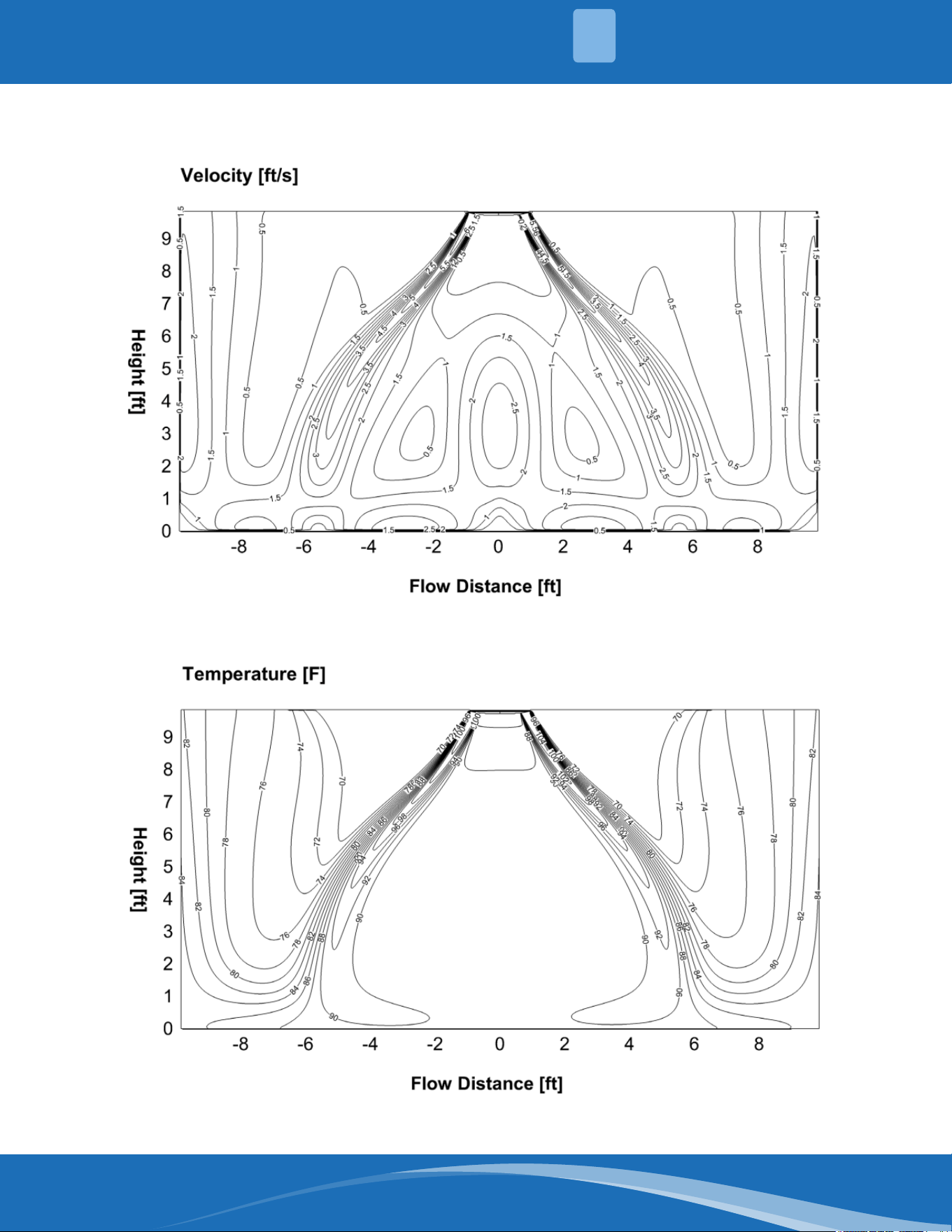
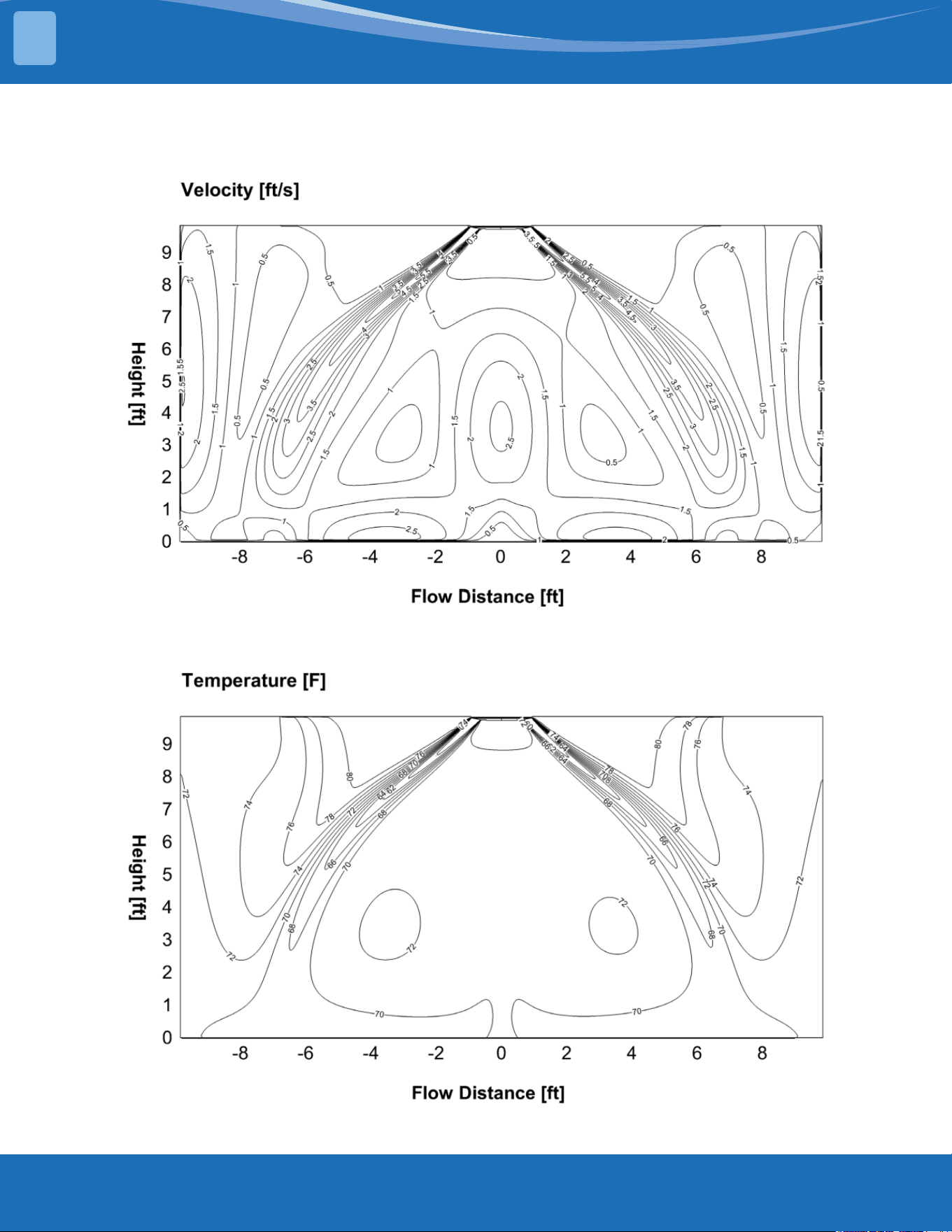
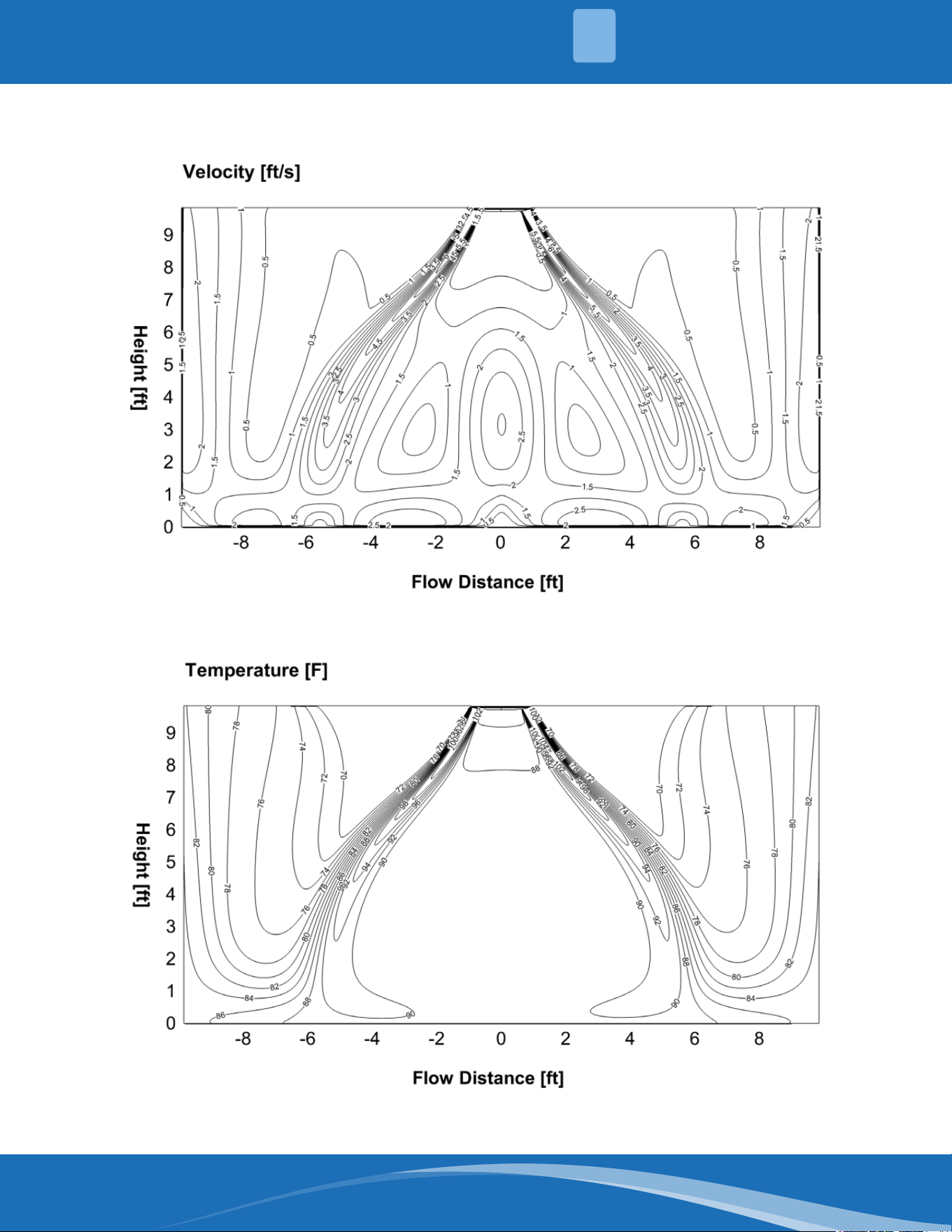
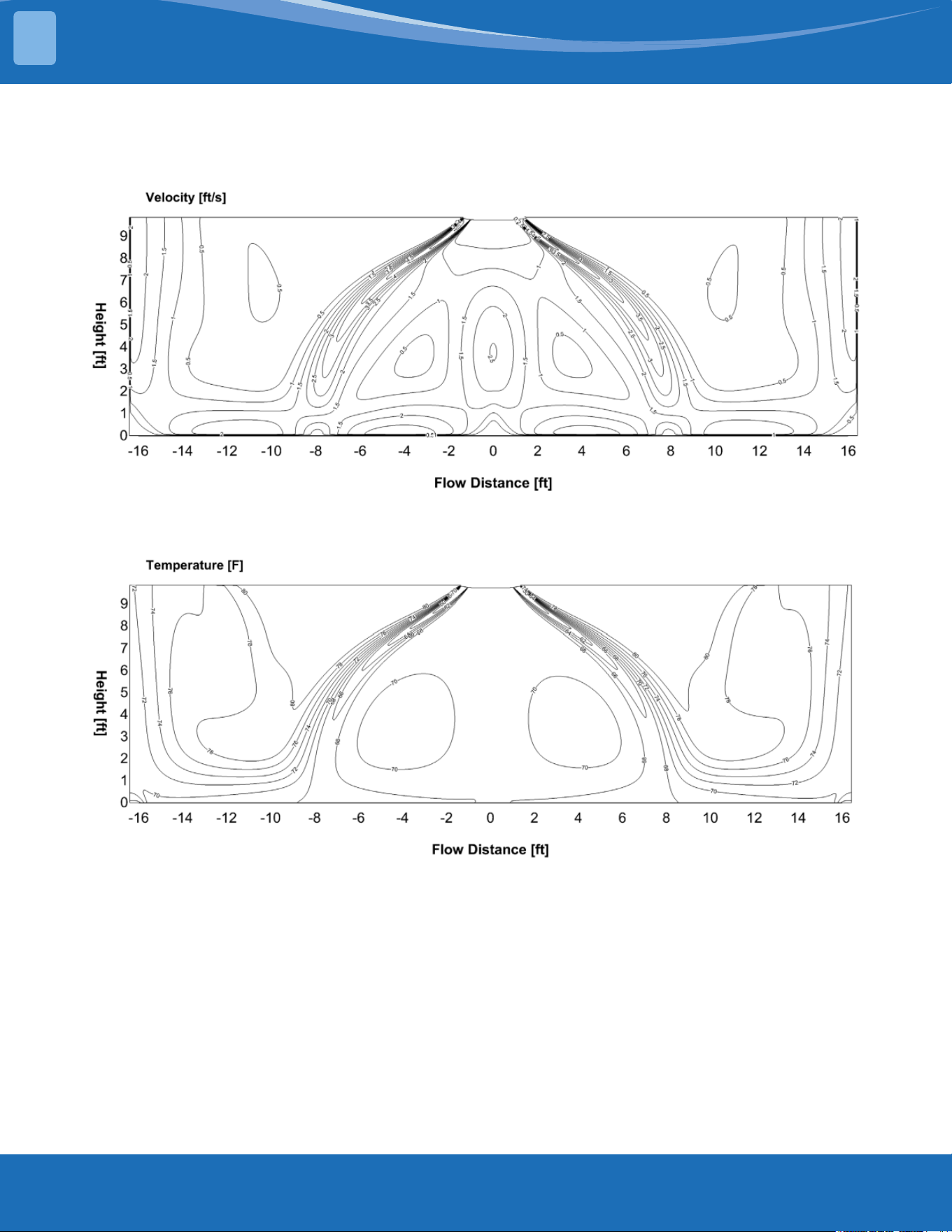
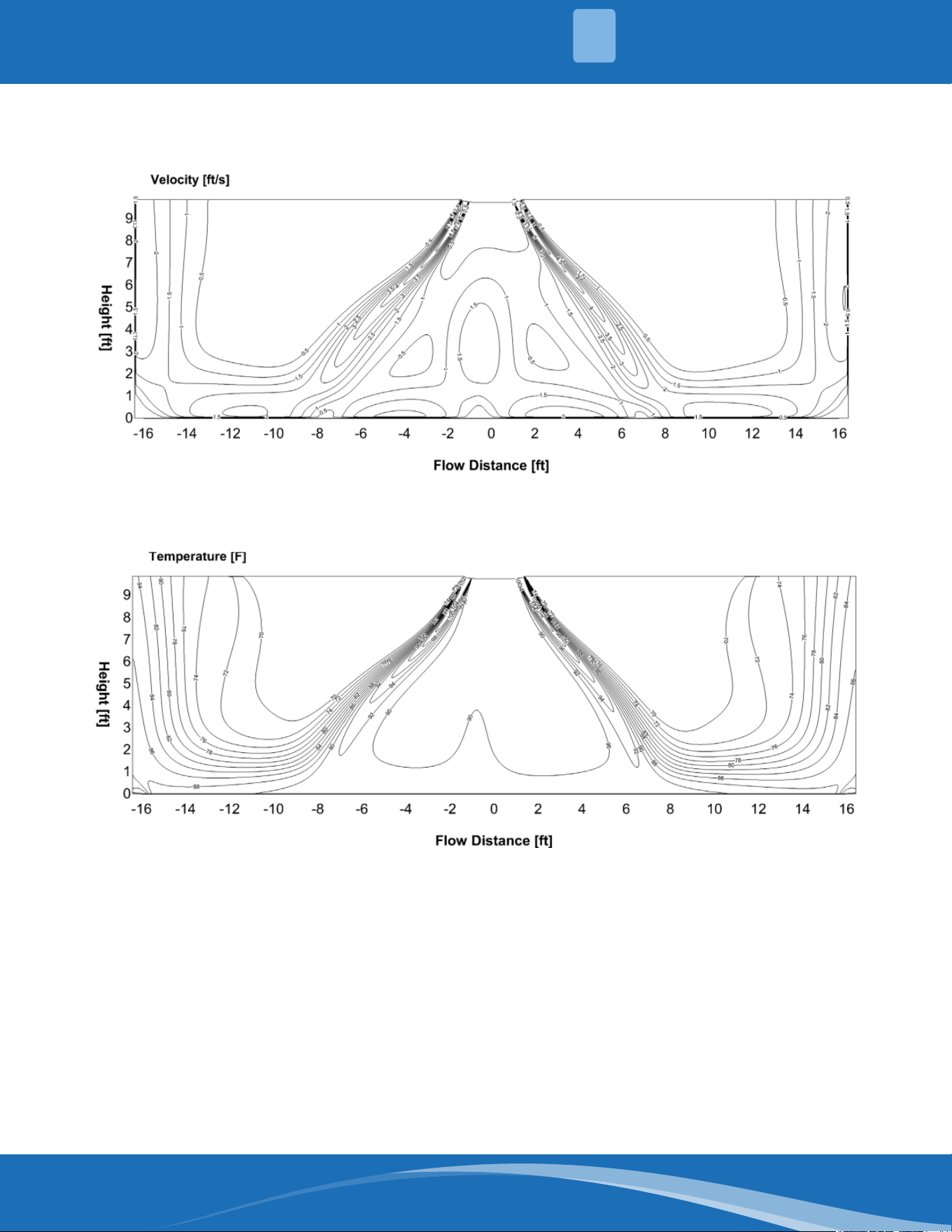
2.6 Air Velocity & Temperature Distributions
CASSETTE09-HP230C-O:
Discharge angle 50°
CoolingAirowVelocityDistributions
Cooling Temperature Distributions
mrcool.com 14
14
CASSETTE09-HP230C-O:
Discharge angle 65°
HeatingAirowVelocityDistributions
Heating Temperature Distributions
2
SYSTEM OVERVIEW
mrcool.com15
SYSTEM OVERVIEW
2
CASSETTE12-HP230C-O:
Discharge angle 50°
CoolingAirowVelocityDistributions
Cooling Temperature Distributions
mrcool.com 16
16
CASSETTE12-HP230C-O:
Discharge angle 65°
HeatingAirowVelocityDistributions
Heating Temperature Distributions
2
SYSTEM OVERVIEW
mrcool.com17
SYSTEM OVERVIEW
2
CASSETTE18-HP230C-O:
Discharge angle 50°
CoolingAirowVelocityDistributions
Cooling Temperature Distributions
mrcool.com 18
18
CASSETTE12-HP230C-O:
Discharge angle 65°
HeatingAirowVelocityDistributions
Heating Temperature Distributions
2
SYSTEM OVERVIEW
mrcool.com19
SYSTEM OVERVIEW
2
CASSETTE24-HP230C-O:
Discharge angle 50°
CoolingAirowVelocityDistributions
Cooling Temperature Distributions
mrcool.com 20
20
CASSETTE12-HP230C-O:
Discharge angle 65°
HeatingAirowVelocityDistributions
Heating Temperature Distributions
2
SYSTEM OVERVIEW
mrcool.com21
SYSTEM OVERVIEW
2
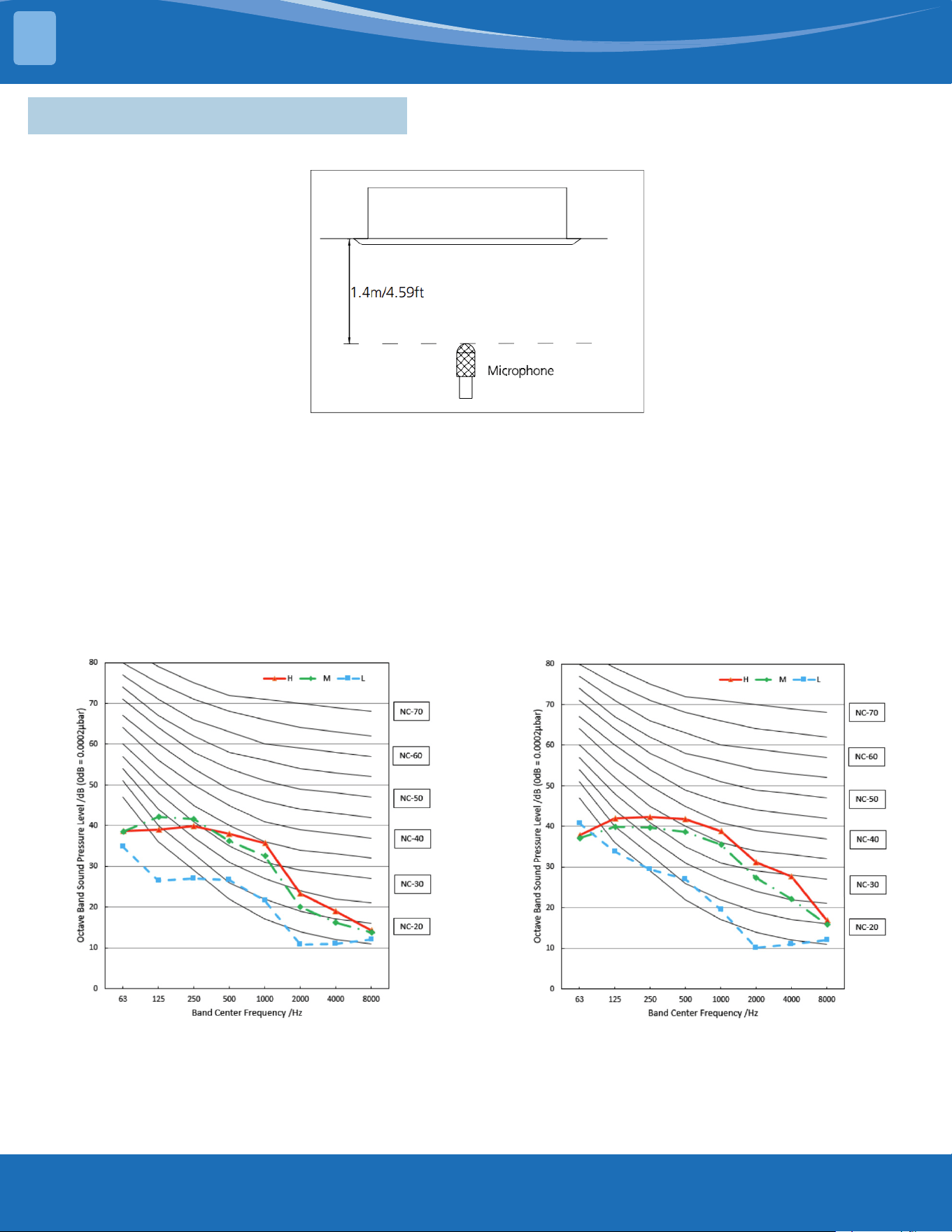
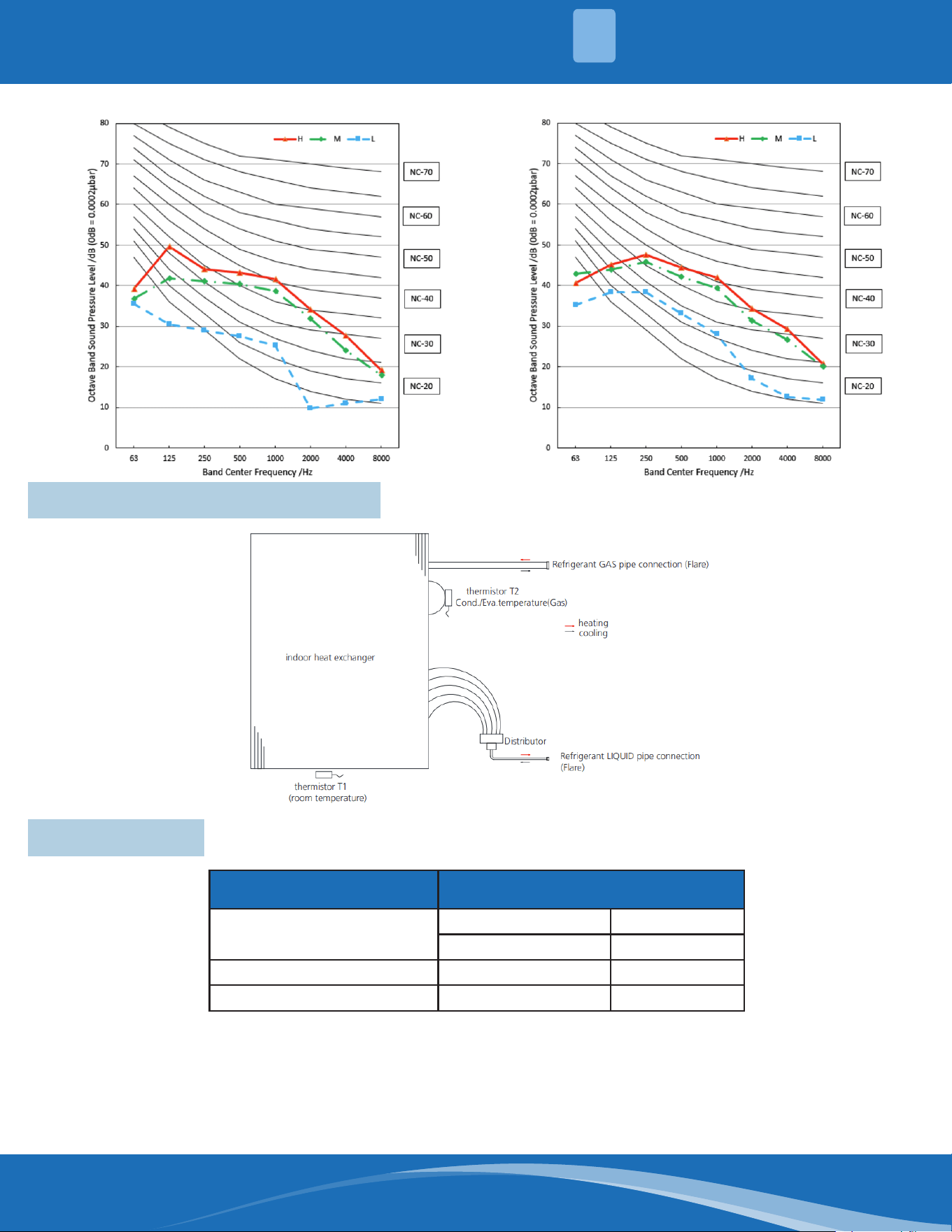
2.7 Sound Pressure Levels & Curves
Notes:
• Sound is measured at 4.59ft (1.4m) away from the noisiest location of the unit.
• Data is valid at free eld condition.
• Data is valid at nominal operation condition.
• Reference acoustic pressure OdB=20µPa.
• The sound level will vary depending on a range of factors such as the construction -(acoustic
absorption coecient) of a particular room in which the equipment is installed.
• The operating conditions are assumed to be standard.
CASSETTE09HP-230C-O CASSETTE12HP-230C-O
mrcool.com 22
CASSETTE18HP-230C-O CASSETTE24HP-230C-O
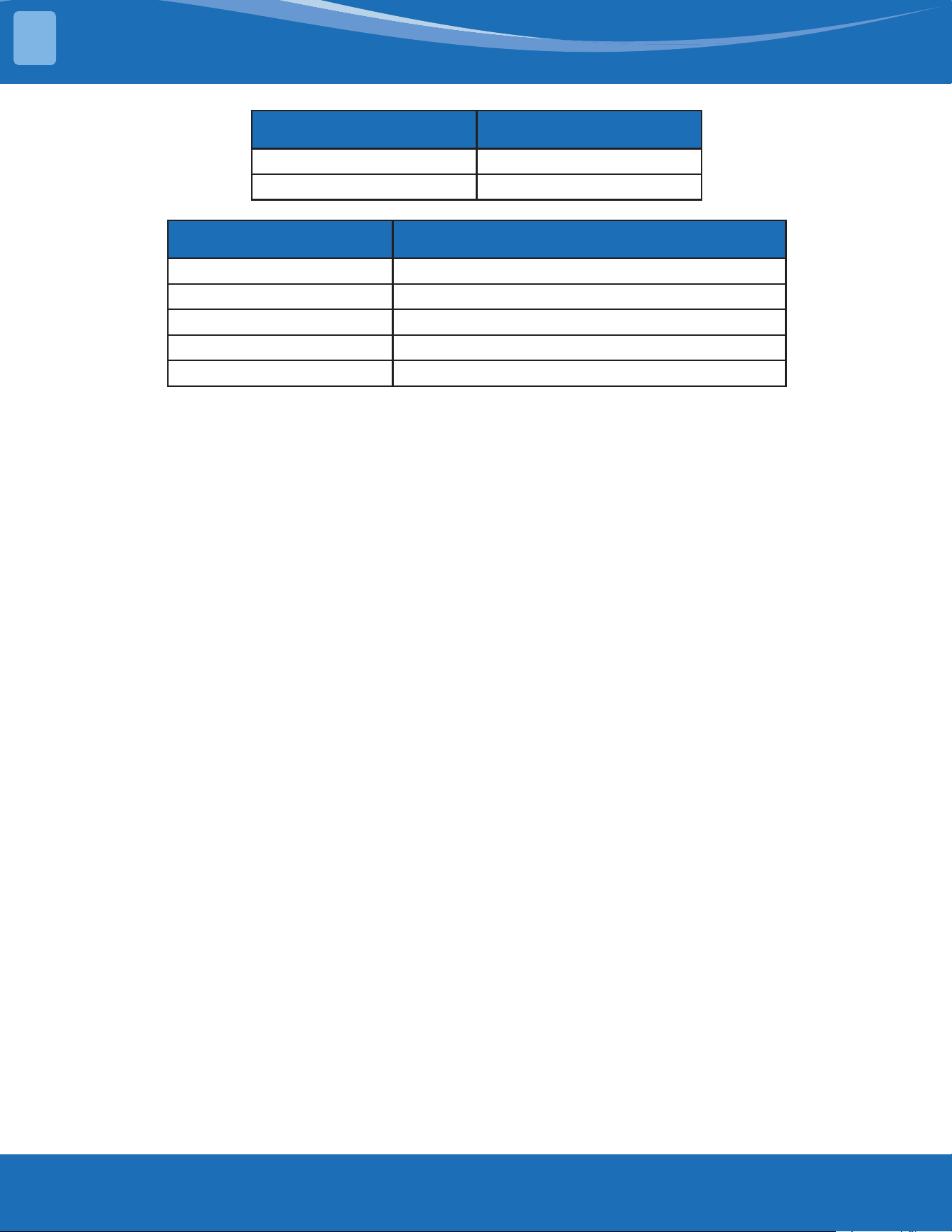
2.8 Refrigerant System Diagram
2.9 Electrical
Indoor Model 9K~24K
Power
Phase 1
Frequency and Volt 208/230V,60Hz
Minimum Circuit Ampacity A 3
Max Fuse A 15
2
SYSTEM OVERVIEW
mrcool.com23
SYSTEM OVERVIEW
2
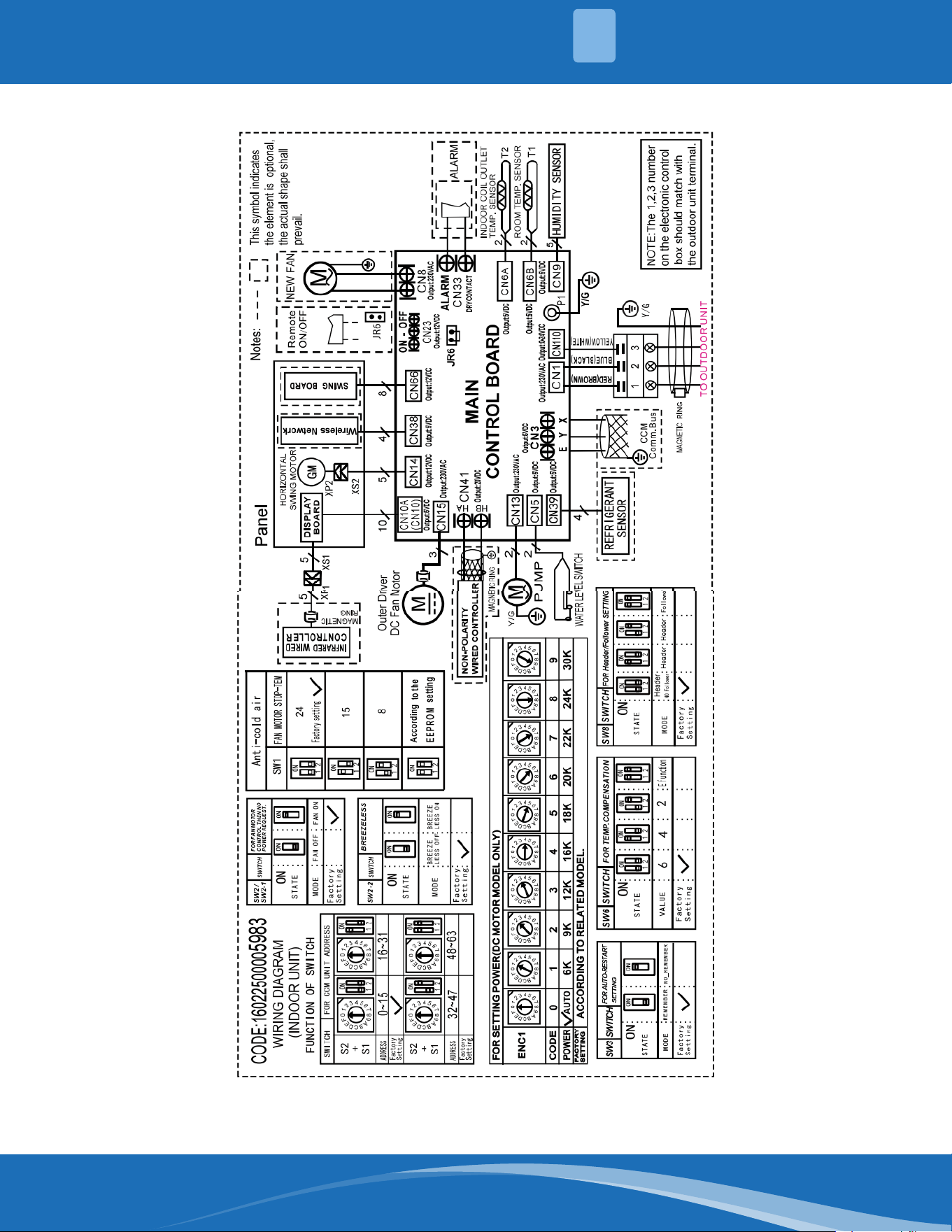
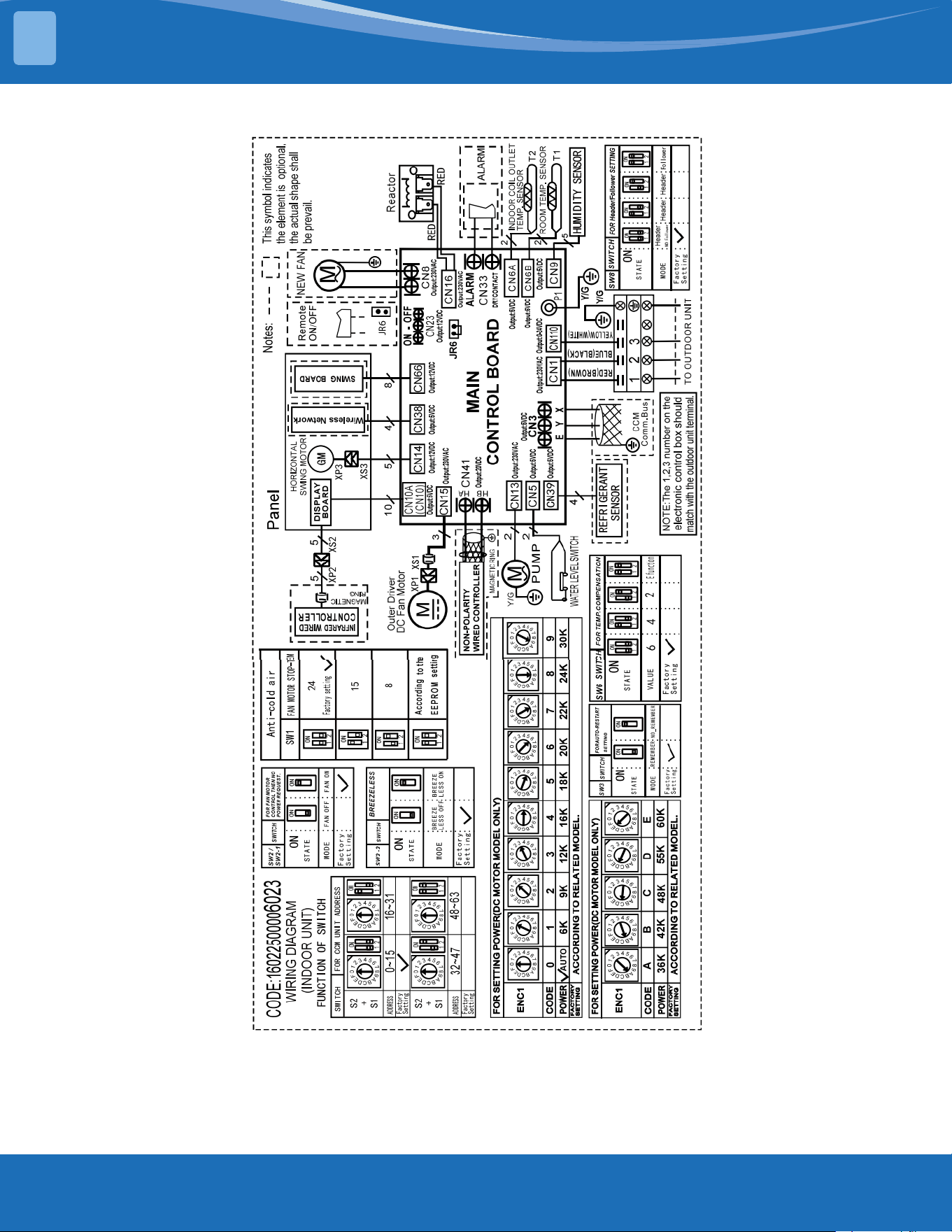
IDUCapacity(Btu/h) IDU Wiring Diagram
9~18k 16022500005983
24K 16022500006023
Abbreviation Paraphrase
Y/G Yellow-Green Conductor
PUMP PUMP
TO CCM Comm.Bus Central Controller
T1 Indoor Room Temperature
T2 Coil Temperature of Indoor Heat Exchanger
mrcool.com 24
24
Indoor Unit Wiring Diagram: 1602250005983
2
SYSTEM OVERVIEW
mrcool.com25
SYSTEM OVERVIEW
2
Indoor Unit Wiring Diagram: 16022500006023
mrcool.com 26
26
Connectors:
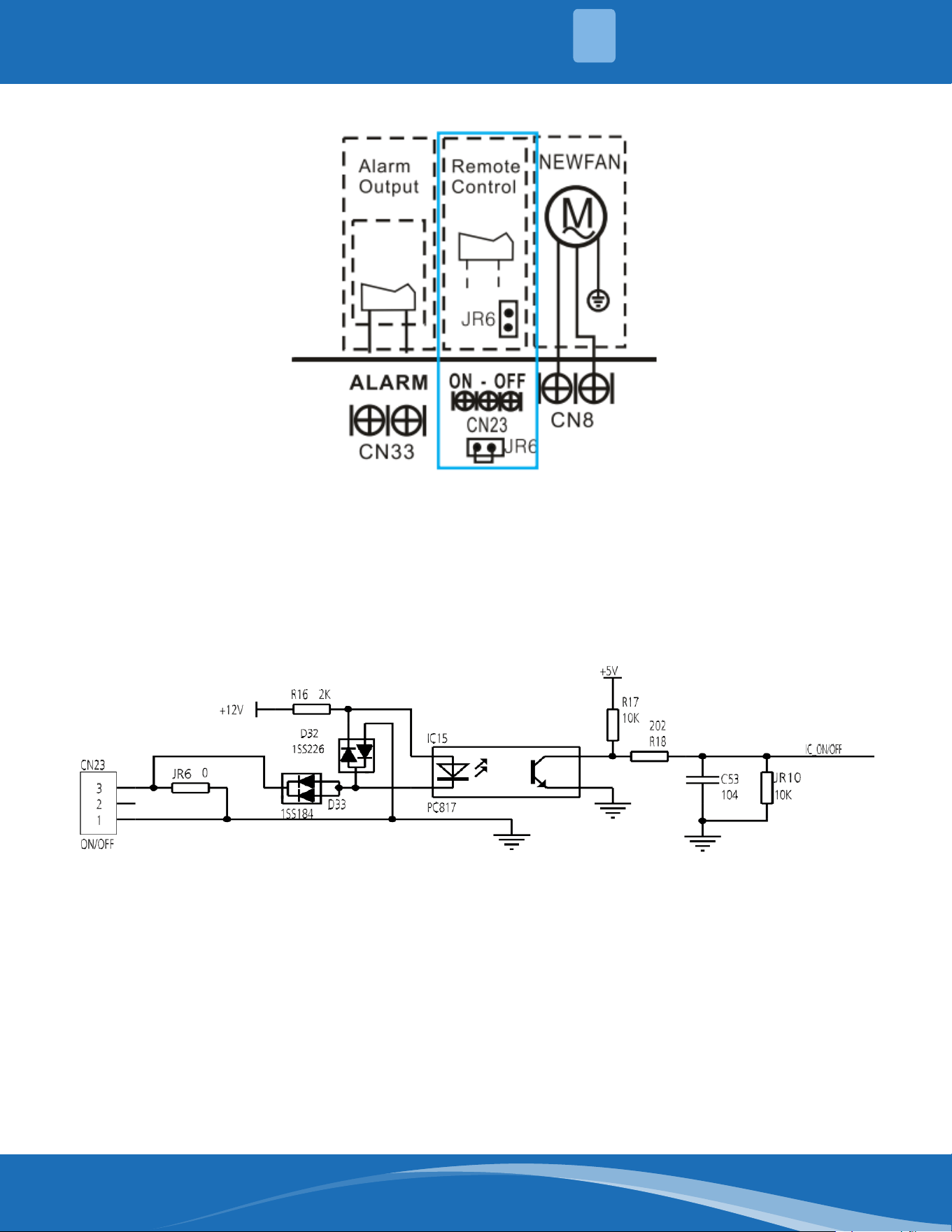
ForRemoteControl(ON-OFF)TerminalPortCN23andShortConnectorofJR6.
1. Remove the short connector of JR6 when you use ON-OFF function.
2. When the remote switch is o (OPEN); the unit will be o.
3. When the remote switch is on (CLOSED); the unit will be on.
4. When the switch is closed/open the unit will respond to the demand within 2 seconds.
5. When the remote switch is on you can use the remote controller to select the mode desired; when the
remote switch is o the unit will not respond to any demand from the remote.
6. The voltage of the port is 12VDC with a design max current of 5mA.
2
SYSTEM OVERVIEW
mrcool.com27
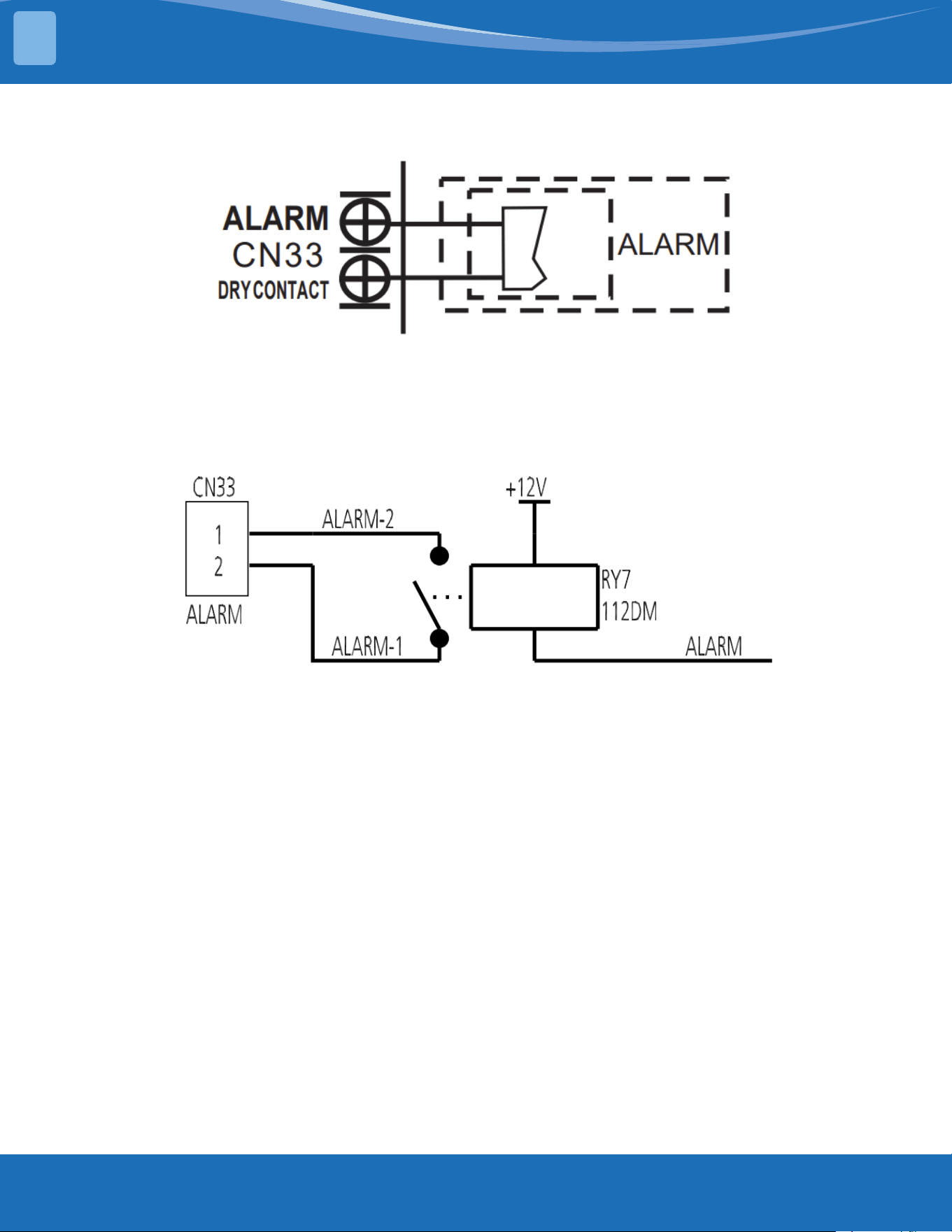
For ALARM Terminal Port CN33.
1. Provide the terminal port to connect ALARM as the port will not supply power from the unit.
2. Although the design voltage can support higher voltage it is highly advised to have the incoming power less
than 24V with a current draw of less than 0.5A.
3. When the unit occurs a problem the relay will close then the ALARM will activate.
SYSTEM OVERVIEW
2
mrcool.com 28
28
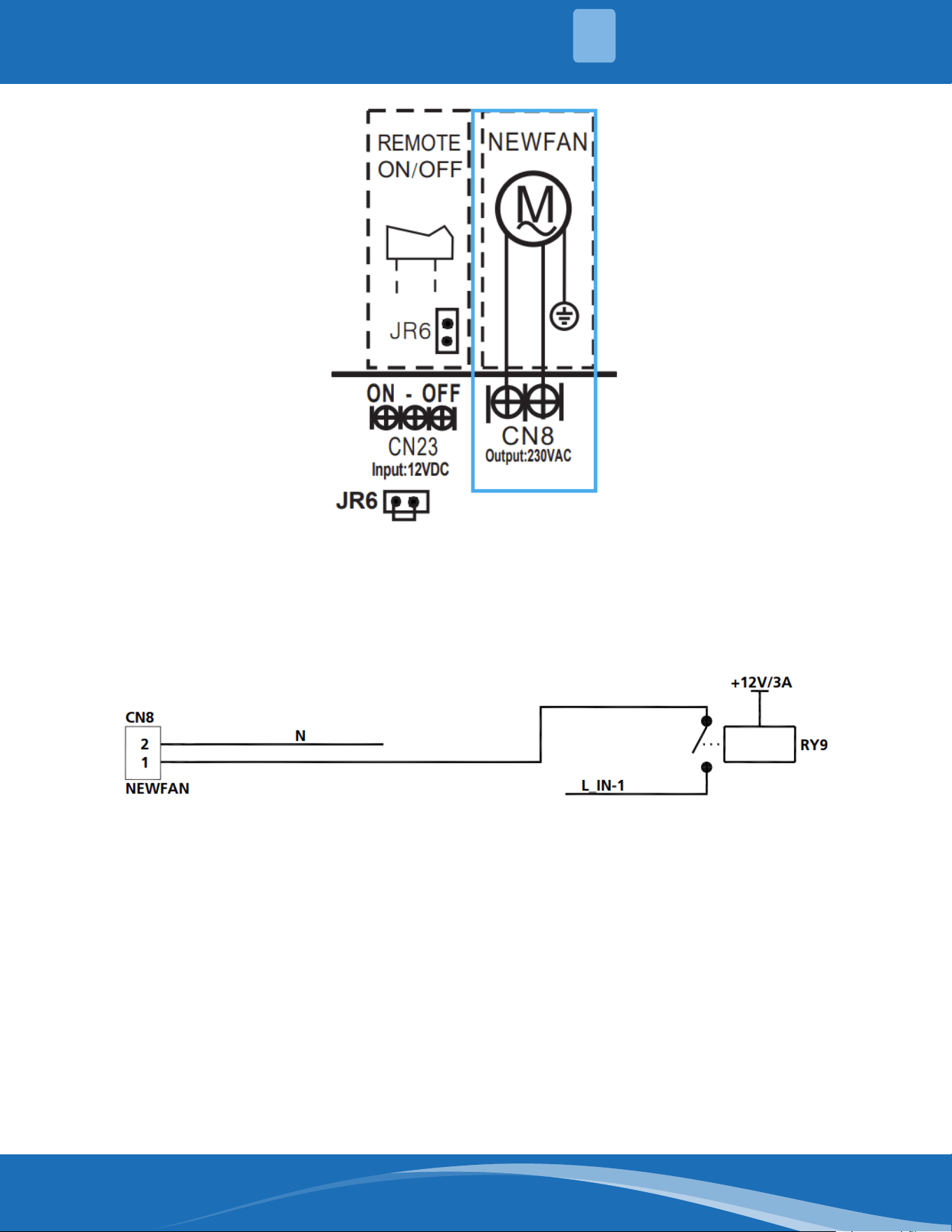
For New Motor Terminal Port CN8.
1. Connect the new fan motor to the port ignoring L/N of the fan motor.
2. The output voltage will be the power supply voltage.
3. The new motor cannot exceed 200W or 1A.
4. The new motor will work when a call is made for the indoor fan to operate.
5. When the unit goes into forced cooling mode or capacity testing mode the new motor will not work.
2
SYSTEM OVERVIEW
mrcool.com29
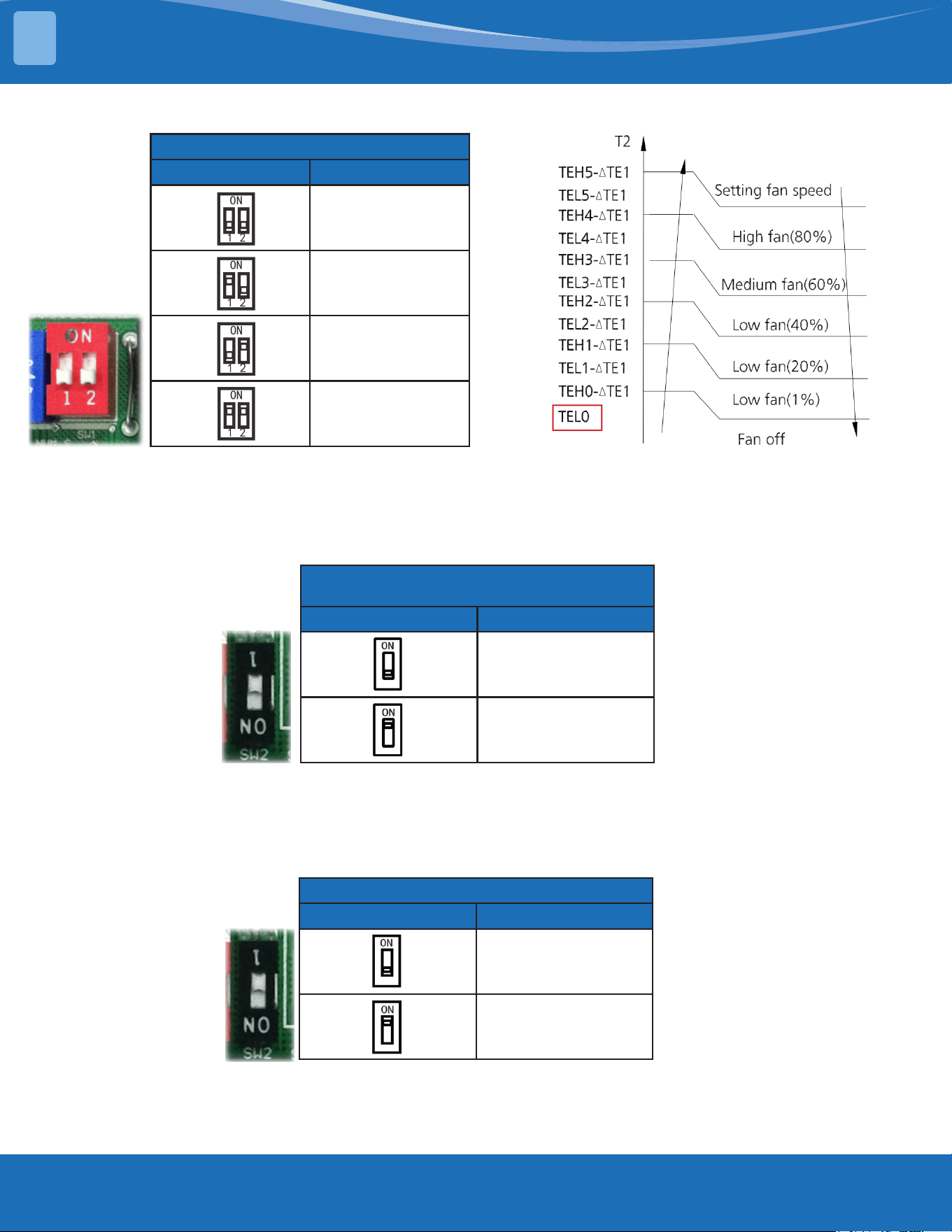
Micro-Switch:
Anti-Cold Air
SW1 Fan Motor Stop
24
(Factory Setting)
15
8
According to the
EEPROM Setting
Micro-switchSW1isforselectionoftheindoorfanstoptemperature(TEL0)whenitisinanti-
cold wind action in heating mode.
Range:24°C,15°C,8°C,AccordingtotheEEPROMsetting(reserved).
Fan Motor Control Then No Power
Request
SW2/SW2-1 Mode
Fan O
Fan On
(Factory Setting)
Micro-switchSW2/SW2-1isforselectionofindoorFANACTIONifroomtemperaturereachesthe
set point and the compressor stops.
Range: OFF: Anti-cold wind is available in heating mode. ON: No anti-cold wind function.
Note: SW2 dip switch is only reserved as a physical part but without mode modication function, if
changes are needed to the factory setting use the remote control.
Breezeless
SW2-2 Mode
O
(Factory Setting)
On
Micro-switch SW2-2 is for selection of breezeless function.
Range: OFF, ON.
SYSTEM OVERVIEW
2
mrcool.com 30
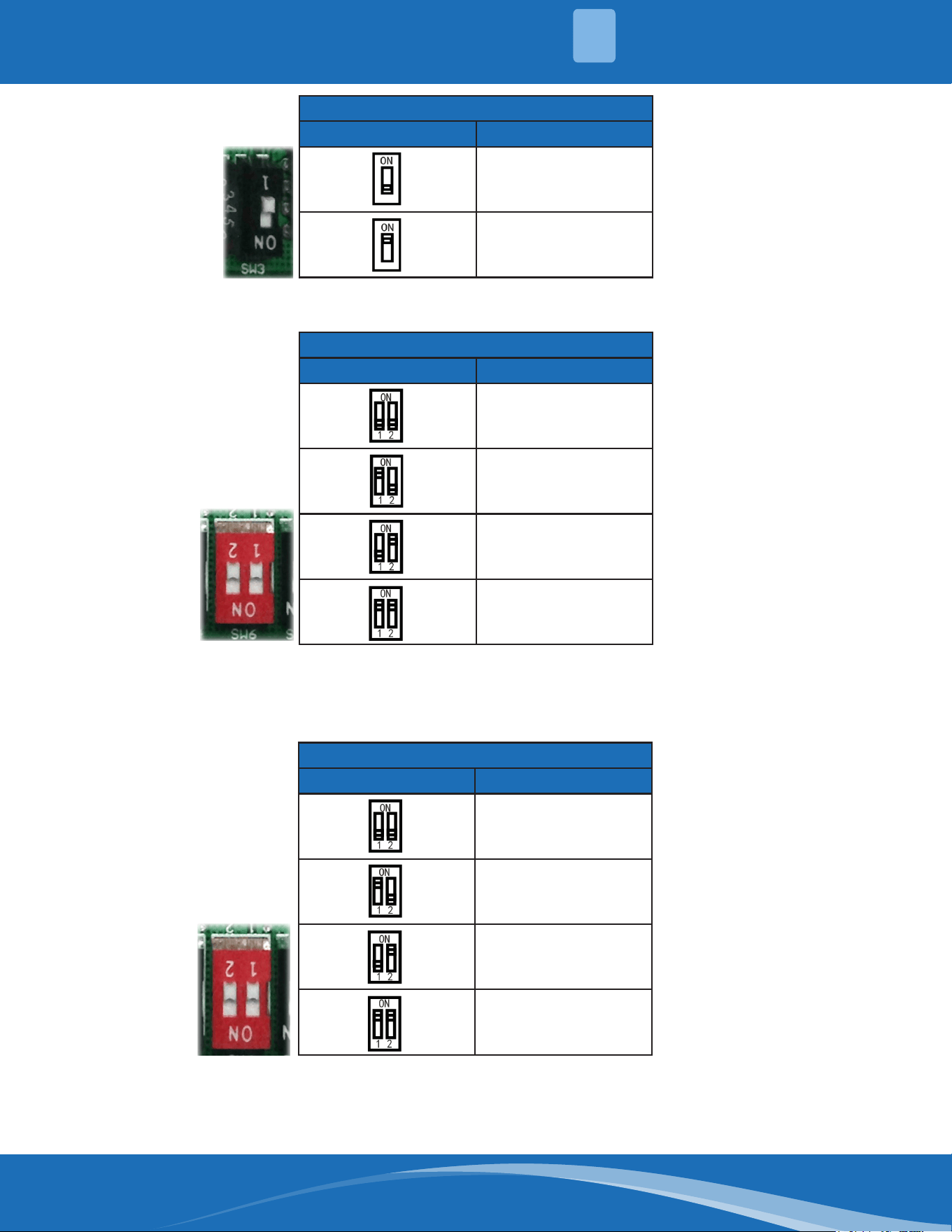
For Auto-Restart Setting
SW3 Mode
Remember
(Factory Setting)
No Remember
Micro-switch SW3 is for selection of the Auto-Restart Function.
Range: Active, Inactive.
For Temp. Compensation
SW6 Mode
6
(Factory Setting)
4
2
E Function
Micro-switch SW6 is or the selection of temperature compensation in heating mode. This helps
toreducethetemperaturedierencebetweentheceilingandoorsothattheunitcanrun
properly. If the height of installation is lower, a smaller value can be chosen.
Range:6°C,4°C,2°C,EFunction(reservedforspecialcustomizing).
ForHeader/FollowerSetting
SW6 Mode
Header No Follower
(Factory Setting)
Header
Header
Follower
Micro-switchSW8isforsettingMainorSlave(forsomemodels).
Range: No Slave, Main & Slave.
2
SYSTEM OVERVIEW
mrcool.com31
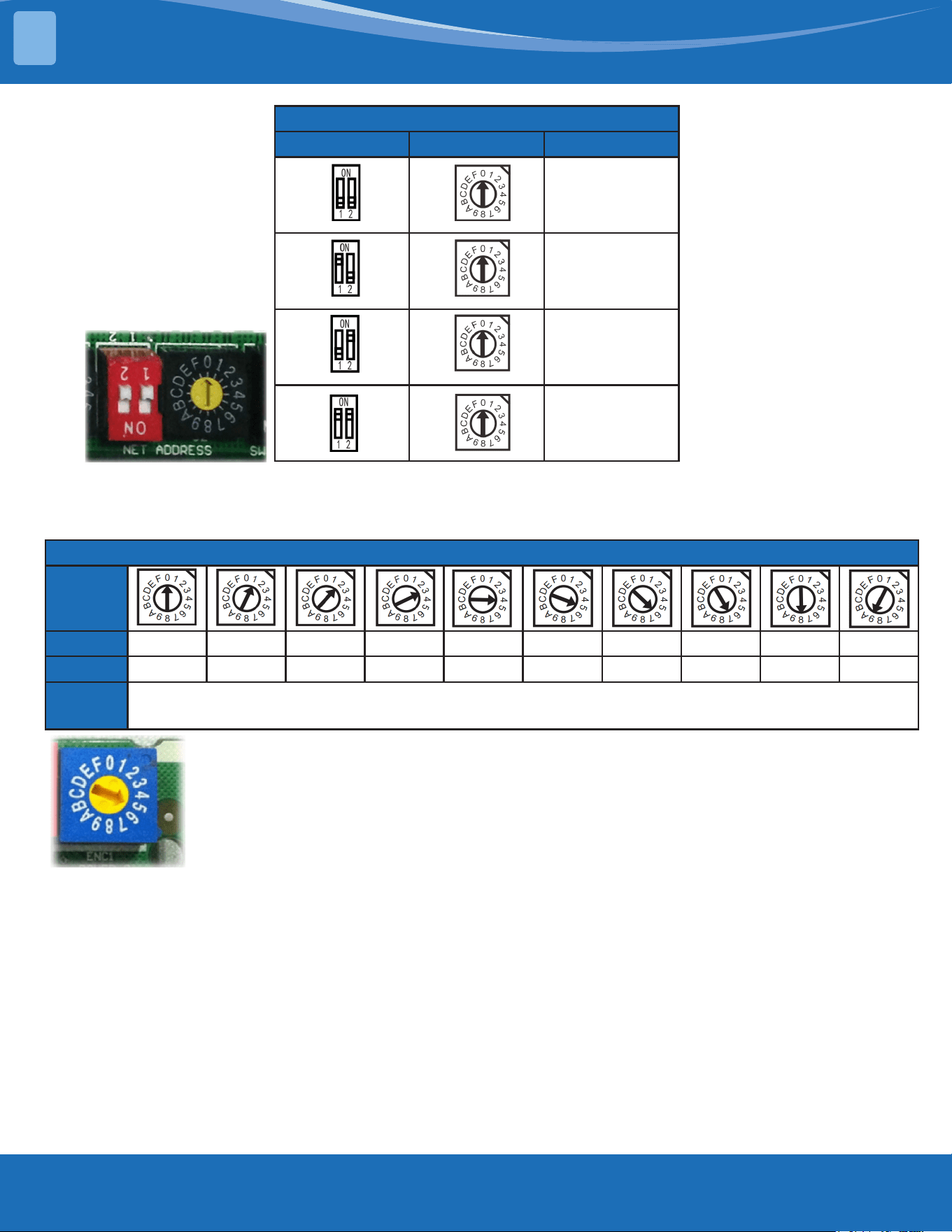
For CCM Unit Address
S2 + S1 Address Dial Address
0~15
(Factory
Setting)
16~31
32~47
48~63
Micro-switch S1 and Dial switch S2 are for address settings when controlling the unit by a
central controller.
Range: 00-63
For Setting Power (DC Motor Model Only
ENC1
Code 0 1 2 3 4 5 6 7 8 9
Power √Auto 6K 9K 12K 16K 18K 20K 22K 24K 30K
Factory
Setting
According To Related Model
Dial switch ENC1: The indoor PCB is universally designed for whole series units from 6K to 30K.
The ECN1 setting will tell the main program what size the unit is.
Range: AUTO, 6K, 9K,...., 30K.
Note: AUTO means the indoor unit is equipped with dierent outdoor units which can automatically
identify the capacity of the outdoor unit, model, single, or multi-zone match up and set the indoor units
parameters.
Usually there is glue on the switch as the switch position cannot be changed at random unless
youusethePCBasasparepartonanotherunit.Ifusingonadierentunityouwillhaveto
select the proper position to match the size of the system.
SYSTEM OVERVIEW
2
mrcool.com 32
INSTALLATION
3
3.1 Location
DO NOT install the unit in the following
locations:
• Coastal areas with high salt content in the air.
• Areas with oil drilling or fracking.
• Areas with caustic gases in the air, such as hot
springs.
• Areas that experience power uctuations, such as
factories.
• Enclosed spaces, such as cabinets.
• Kitchens that use natural gas.
• Areas with strong electromagnetic waves.
• Areas that store ammable materials or gas.
• Rooms with high humidity, such as bathrooms or
laundry rooms.
3.2 Indoor Unit Installation
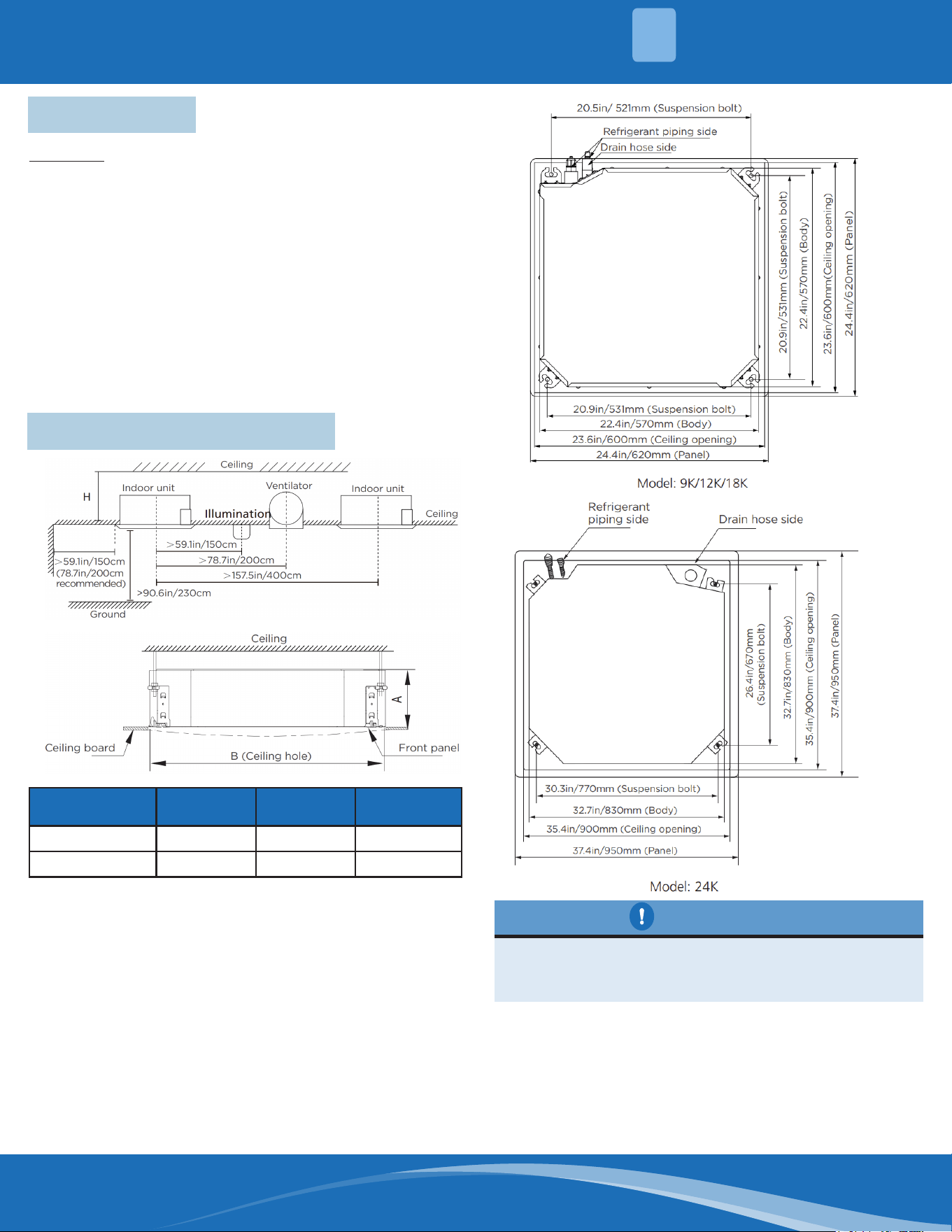
Capacity(Btu/h) A(inch/mm) H(inch/mm) B(inch/mm)
9/12/18K 9.6/245 >11.4/290 23.6/600
24K 8.07/205 >9.06/230 35.4/900
Hand the Indoor Unit:
1. Use the included paper template to cut a
rectangular hole in the ceiling, leaving at least 39in
(1m) on all sides. The cut hole size should be 16in
(4cm) larger than the body size.
Be sure to mark the areas where ceiling hook
holes will be drilled.
The unit body should align perfectly with the hole,
Be sure that the unit and the hole are the same size
before moving on.
CAUTION
mrcool.com33
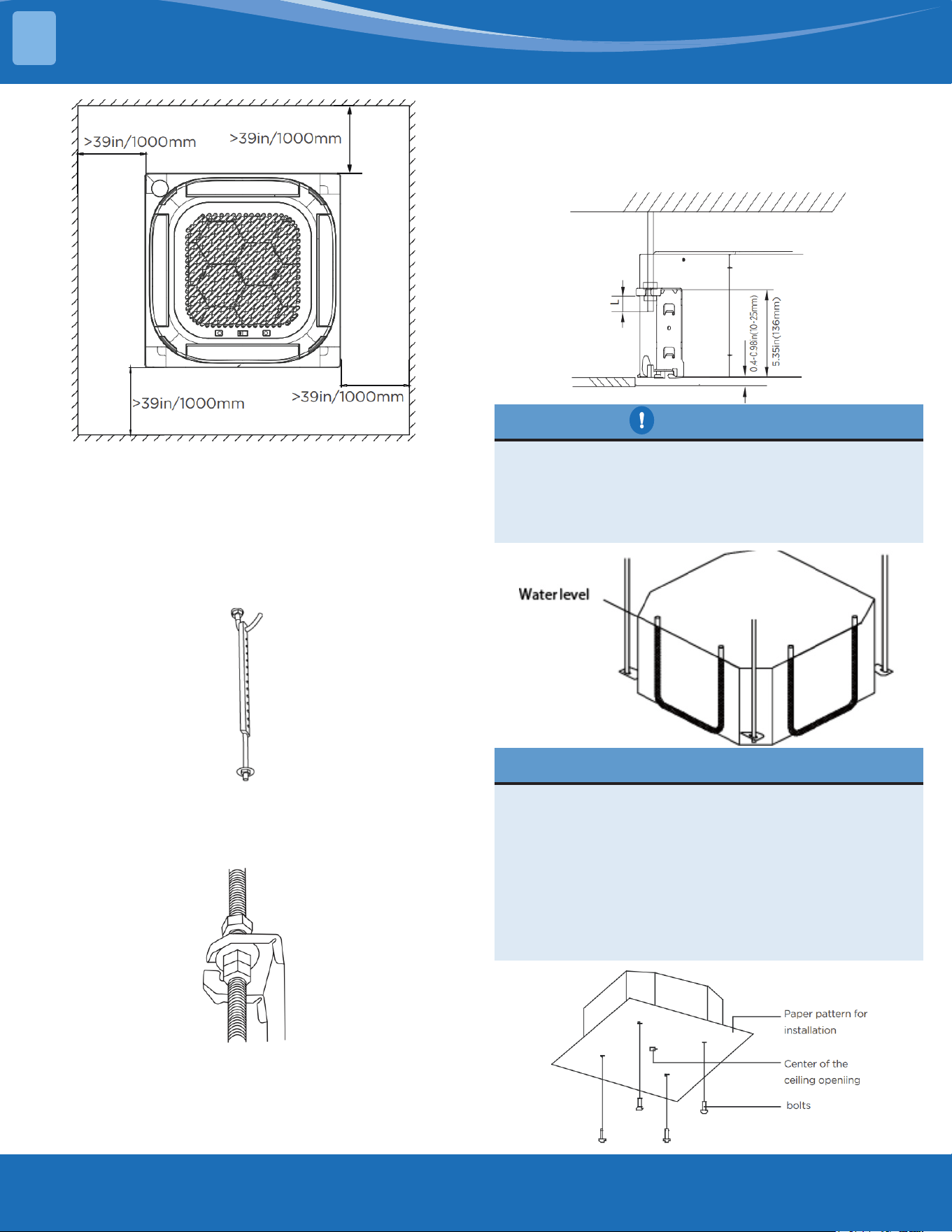
2. Drill 4 holes 4.7in~6/1in (12cm~15.5cm) deep at
the ceiling hook positions in the internal ceiling. Be
sure to hold the drill at a 90° angle to the ceiling.
3. Using a hammer, insert the ceiling hooks into
the pre-drilled holes. Secure the bolt using the
included washers and nuts.
4. Install the four suspension bolts.
5. Mount the indoor unit. You will need two people
to lift and secure it. Insert suspension bolts into
the unit's hanging holes. Fasten them using the
included washers and nuts.
NOTE: The bottom of the unit should be 0.4~0.98in
(10~25mm) higher than the ceiling board. Generally, L
(indicated in the next gure) should be half the length
of the suspension bolt or long enough to prevent the
nuts from coming o.
Be sure that the unit is completely level. The unit
is equipped with a built-in drain pump and oat
switch. If the unit is tilted against the direction of
condensate ow (the drainpipe is raised), the oat
switch may malfunction and cause water to leak.
CAUTION
When installing the unit in a new home, the ceiling
hooks can be embedded in advance. Make sure
that the hooks do not come loose due to concrete
shrinkage. After installing the indoor unit, fasten
the installation paper template onto the unit with
bolts to determine in advance the dimension
and position of the opening on the ceiling. Follow
the instructions above for the remainder of the
installation.
NOTE FOR NEW HOME INSTALL
INSTALLATION
3
mrcool.com 34
3.3 Panel Installation
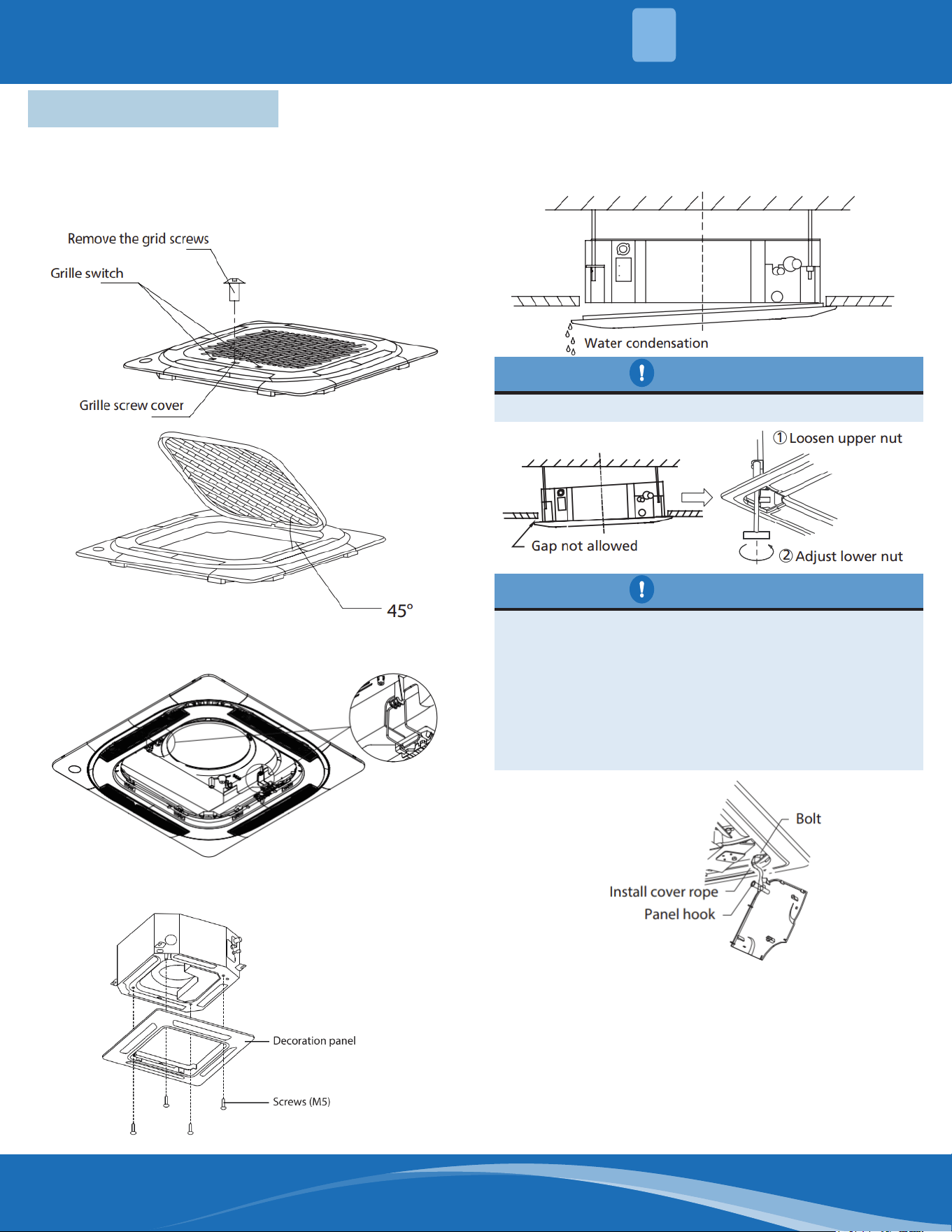
Remove the Front Grille:
1. Push both of the tabs towards the middle
simultaneously to unlock the hook on the grille.
2. Hold the grille at a 45° angle, lift it up slightly and
detach it from the main body.
The panel hook is pre-hung to the indoor unit
owguidering,asshown:
Installthepanelwithfourscrews(M5),as
shown:
(supplied with the panel)
NOTE: If the height of the indoor unit needs to
be adjusted, you can do so through the opening
at the panel's four corners. Make sure that the
internal wiring and drainpipe are not aected by
this adjustment.
Failure to tighten screws can cause water leakage.
CAUTION
If the unit is note hung correctly and a gap exists,
the unit's height must be adjusted to ensure
proper function. The unit's height can be adjusted
by loosening the upper nut and adjusting the
lower nut. Hang the intake grille on the panel, and
then connect the lead connectors of the louver
motor and the control box on the panel to the
corresponding connectors of the main body.
CAUTION
Re-install into the style grid.
Re-install the installation cover.
Fix the installation cover plate rope to the pillar of
the installation cover plate and gently press the
installation cover plate into the panel.
INSTALLATION
3
mrcool.com35
INSTALLATION
3
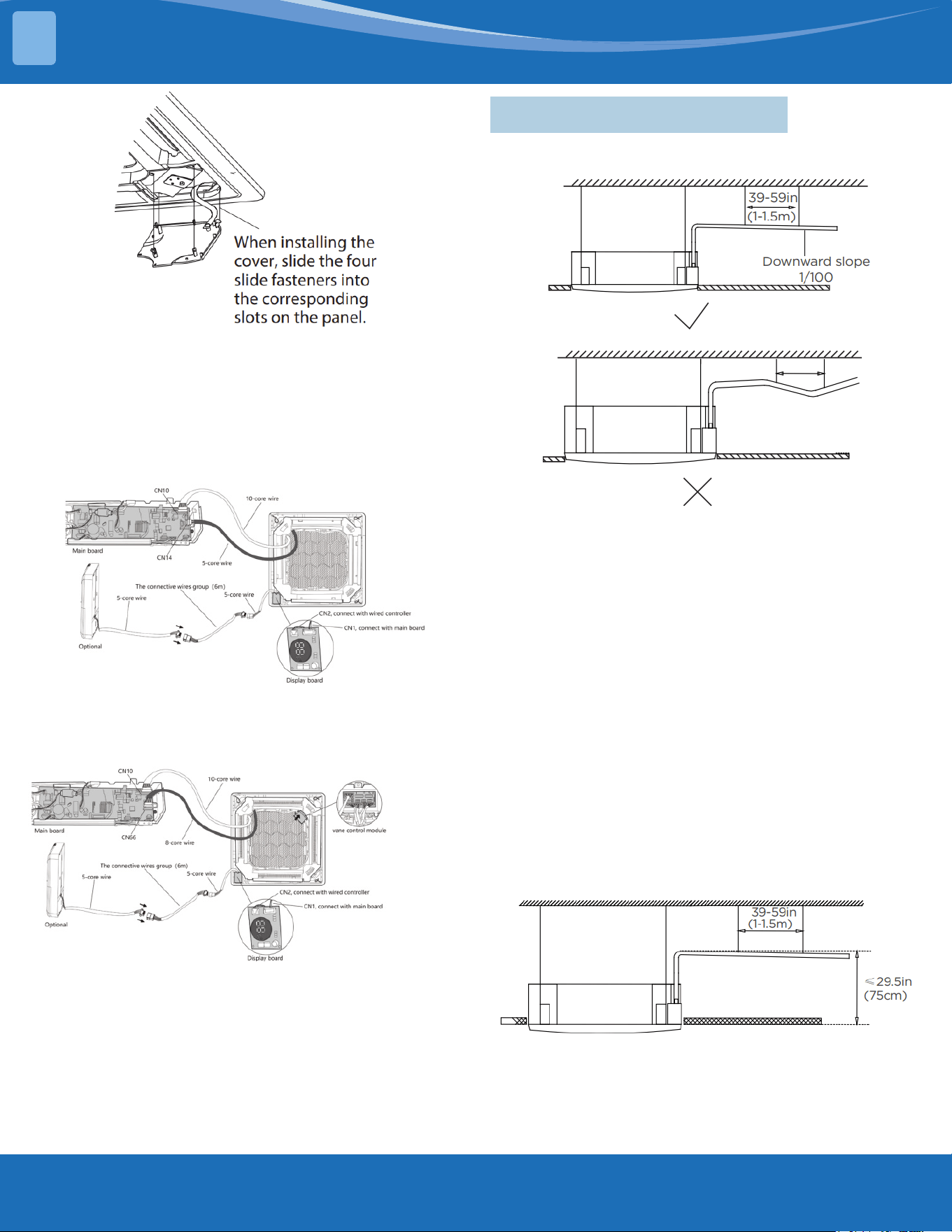
NOTE: After installation, the connector ends of the
display, swing, water pump, and other wire bodies
must be placed in the electric control box.
Connection Diagram:
For panels with out van control module, the display
board CN1 is connected to the main control board
CN10, the motor cable is connected to the main
control board CN14.
For panels with a vane control module, the display
board CN1 is connected to the main control board
CN10, the vane control motor cable is connected to
the main control board CN66.
The display board CN2 is connected to a connecting
cable then connects to the other side of the
connecting cable to an optional wired controller.
3.4 Drain Pipe Installation
Install the drainpipe as illustrated in the following
gure.
NOTE ON DRAINPIPE INSTALLATION:
• When using an extended drainpipe, tighten the
indoor connection with an additional protection
tube to prevent it from pulling loose.
• The drainpipe should slope downward at a
gradient of at least 1/100 to prevent water from
owing back into the air conditioner.
• To prevent the pipe from sagging, space hanging
wires every 39~59in (1~1.5m).
• If the outlet of the drainpipe is higher than the
body's pump joint, provide a lift pipe for the
exhaust outlet of the indoor unit. The lift pipe
must be installed no higher than 29.5in (75cm)
from the ceiling board and the distance between
the unit and the lift pipe must be less than 11.8in
(30cm),
• Incorrect installation could cause water to ow
back into the unit and ood.
• To prevent air bubbles, keep the drain hose level
or slightly tiled up (3in/<75mm).
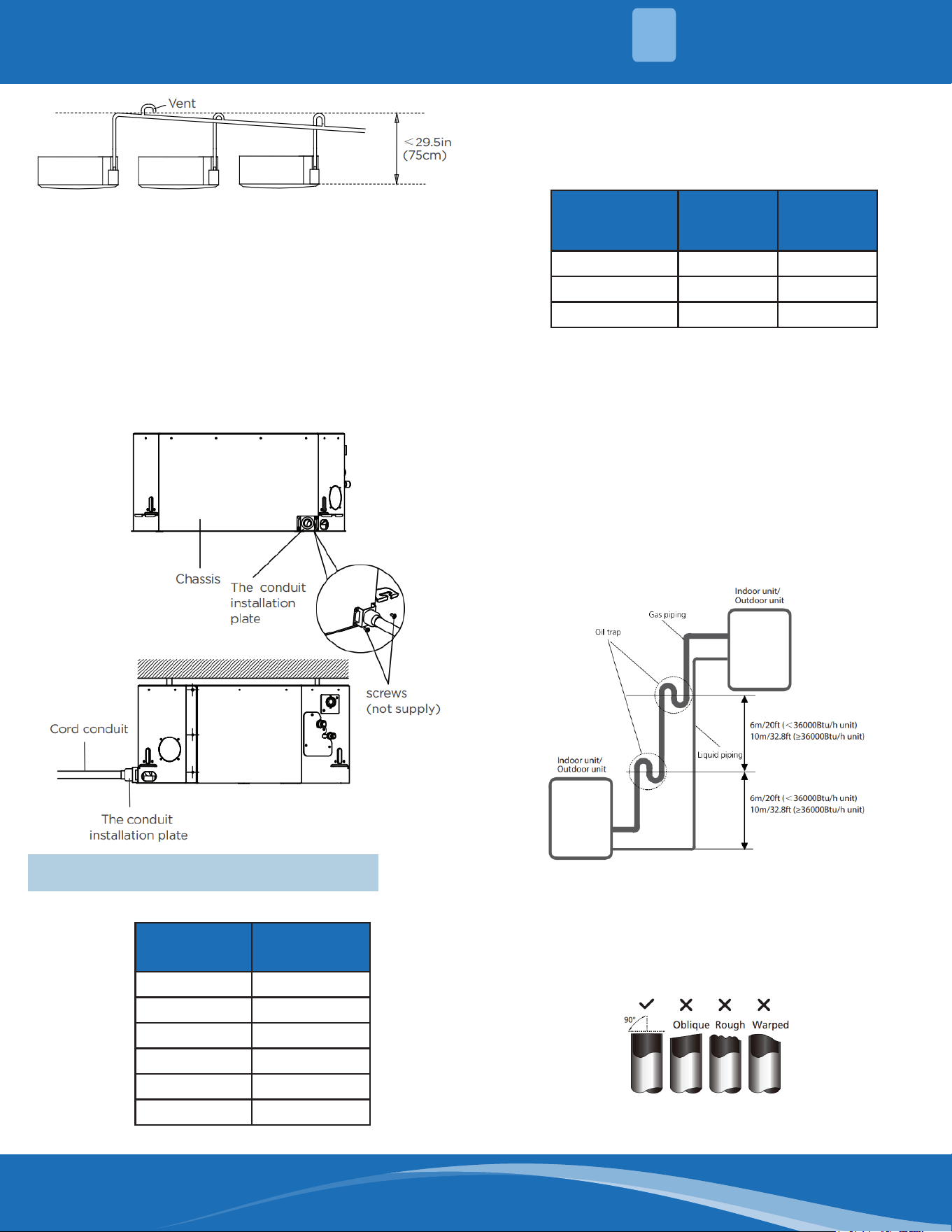
NOTE: When connecting multiple drainpipes, install
the pipes as illustrated in the following gure.
mrcool.com 36
Pass the drain hose through the wall hole.
Make sure the water drains to a safe location where it
will not cause water damage or a slipping hazard.
NOTE: The drainpipe outlet should be at least 1.9in
(5cm) above the ground. If it touches the ground, the
unit may become blocked and malfunction.
How to install the conduit installation plate (if
supplied).
1. Fix the sheath connector (not supplied) on the wire
hole of the conduit installation plate.
2. Fix the conduit installation plate on the chassis of
the unit.
3.5 Refrigerant Pipe Installation
Pipe Diameter
(inch(mm))
Thickness
(inch/mm)
Ø1/4 (Ø6.35) 0.024/0.6
Ø3/8 (Ø9.52) 0.028/0.7
Ø1/2 (Ø12.7) 0.03/0.75
Ø5/8 (Ø15.9) 0.03/0.75
Ø3/4 (Ø19) 0.031/0.8
Ø7/8 (Ø22) 0.039/1
Recommended Copper Pipe Thickness
Maximum Length and Drop Height:
Be sure that the length of the refrigerant pipe, the
number of bends, and the drop height between the
indoor and outdoor units meet the requirements
shown in the following table.
Capacity(Btu/h)
Max. Length
(ft/m)
Max.
Elevation
(ft/m)
9/12K 82/25 49.2/15
18K 98.4/30 65.6/20
24K 164/50 82/25
CAUTION:
1. The capacity test is based on the standard length
and the maximum permissive length is based on
the system reliability.
2. Oil Traps
• If oil ows back into the outdoor unit's
compressor, this may cause liquid compression or
deterioration of oil return. Oil traps in the rising
gas piping can prevent this.
• An oil trap should be installed every 20ft (6m) of
vertical suction line riser (<36K Btu/h unit).
• An oil trap should be installed every 32.8ft (10m)
of vertical suction line riser (≥36K Btu/h unit).
Procedure of Connecting Pipes:
1. Choose the pipe size according to the specication
table.
2. Conrm the cross way of the pipes.
3. Measure the necessary pipe length.
4. Cut the selected pipe with a pipe cutter.
• Make the section at and smooth.
INSTALLATION
3
mrcool.com37
5. Insulate the copper pipe.
• Before test operation, the joint parts should not
be heat insulated.
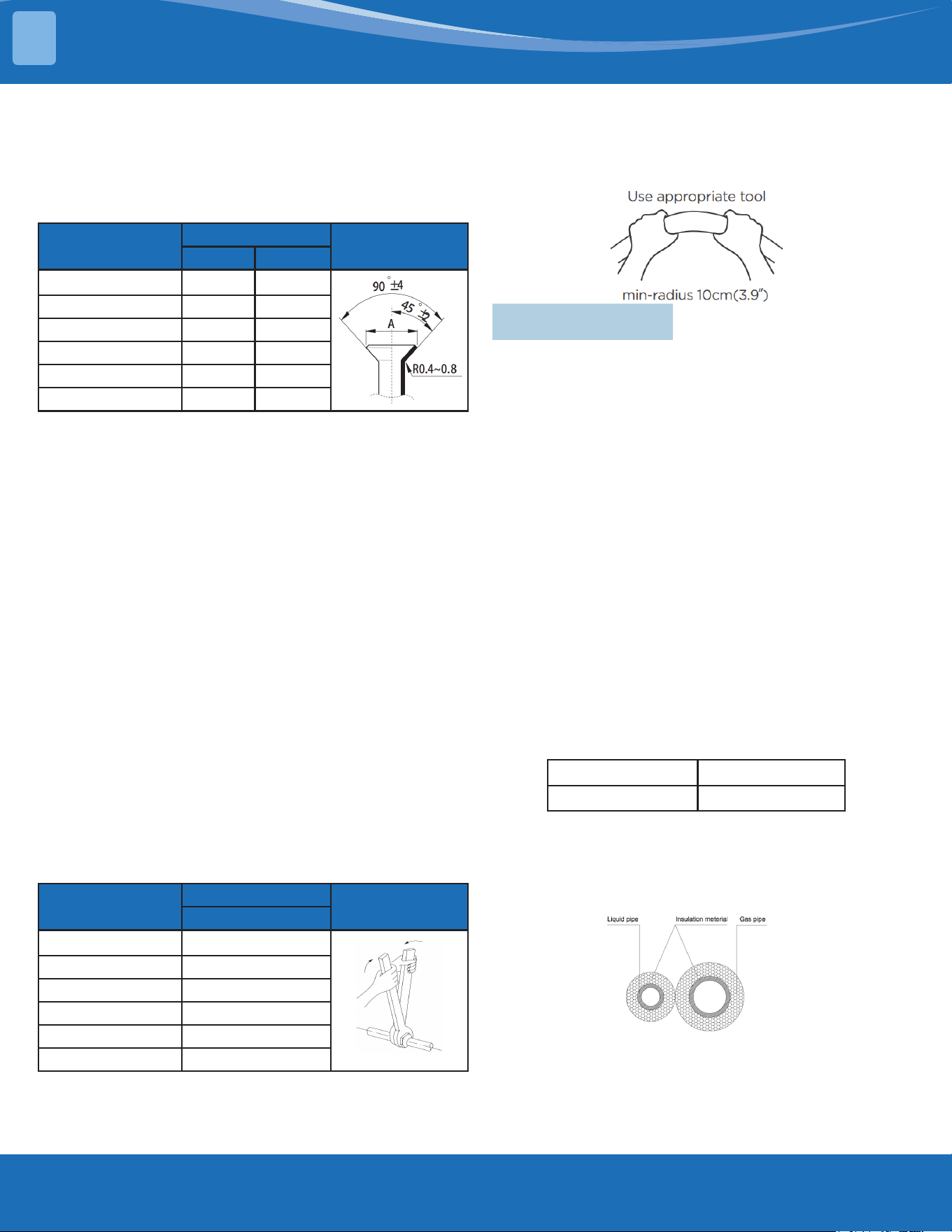
6. Flare the pipe.
• Insert a are nut into the pipe before aring the
pipe.
• According to the following table to are the pipe.
Pipe Diameter
(inch(mm))
Flare Dimension A
Flare Shape
Min. Max.
Ø1/4 (Ø6.35) 0.33/8.4 0.34/8.7
Ø3/8(Ø9.52) 0.52/13.2 0.53/13.5
Ø1/2(Ø12.7) 0.64/16.2 0.65/16.5
Ø5/8(Ø15.9) 0.76/19.2 0.78/19.7
Ø3/4(Ø19) 0.91/23.2 0.93/23.7
Ø7/8(Ø22) 1.04/26.4 1.06/26.9
• After aring the pipe, the opening end must be
sealed to avoid dust or impurities from coming
into the piping.
7. Drill holes if the pipes need to pass through the
wall.
8. If needed bend the pipes slowly to pass through
the wall.
9. Bind and wrap the wire together with the
insulated pipes if necessary.
10. Set the wall conduit.
11. Set the supporter for the pipe.
12. Locate the pipe and x it by the supporter.
• For horizontal refrigerant pipe, the distance
between supporters should not exceed 3.2ft
(1m).
• For vertical refrigerant pipe, the distance
between supports should not exceed 4.9ft
(1.5m).
13. Connect the pipe to the indoor and outdoor unit
by using two crescent wrenches.
• Be sure to use two crescent wrenches and
proper torque to fasten the nut, too much
torque will damage the bell housing, and too
little of torque can cause leakage. Refer to the
following table for dierent pipe connections.
Pipe Diameter
(inch(mm))
Torque
Flare Shape
N.m(lb.ft)
Ø1/4 (Ø6.35) 18~20 (13.3~14.8)
Ø3/8(Ø9.52) 32~39 (23.6~28.8)
Ø1/2(Ø12.7) 49~59 (36.1~43.5)
Ø5/8(Ø15.9) 57~71 (42~52.4)
Ø3/4(Ø19) 67~101 (49.4~74.5)
Ø7/8(Ø22) 85~110 (62.7~81.1)
NOTE: MINIMUM BEND RADIUS
Carefully bend the tubing in the middle according to
the diagram below.
DO NOT bend the tubing more than 90° or more than
3 times.
3.6 Insulation
Insulation of Refrigerant Pipe:
Cut the pipe—insulation (except joint section)—are
the pipe—piping layout and connection—vacuum—
insulate the joining parts
Purpose of Refrigerant Pipe Insulation:
• During operation the temperature of the gas pipe
and liquid pipe will be hot/cold. Therefore, it is
necessary to install insulation; otherwise it will
lower performance or burn up the compressor.
• The gas pipe temperature is low during cooling.
If there is insucient insulation it will condensate
and drip.
• The temperature of the gas pipe is high
(122°F~212°F(50°C~100°C) during heating.
Insulation must be installed to prevent burns.
Insulation Material Selection for Refrigerant Pipe:
• The insulation rating should be over 248°F (120°C).
• Choose insulation according to local codes and
ordnances.
• The thickness of the insulation should be above
0.39in(10mm). If in a hot or wet environment use
thicker insulation.
Humidity<80%RH Humidity≥80%RH
10mm/0.39in 15mm/0.59in
Installation Highlights:
• The gas and liquid pipe should be insulated
separately, if the gas pipe and liquid pipe
were insulated together it will decrease the
performance of the system.
• The insulation material at the joint pipe should be
1.96in~3.93in(5cm~10cm) longer than the gap of
insulation material.
INSTALLATION
3
mrcool.com 38
• The insulation material at the joint pipe should be
inserted into the gap of the insulation material.
• The insulation material at the joint pipe should be
banded to the gap pipe and liquid pipe tightly.
• The a joining part should be glued together.
• Be sure not to bind the insulating material over-
tight, it may extrude out the air in the material and
cause it to rot.
Insulation of Drainage Pipe:
Operational procedure of refrigerant pipe
insulation.
Select the suitable pipe—insulation (except joint
section)—Piping layout and connection—drainage
test—insulate the joint parts.
Purpose of drainage pipe insulation.
The temperature of the condensate drainage water
is very low. If the insulation is not enough, it shall for
dew and may leak which will cause damage to the
house.
Insulation material selection for drainage pipe.
• The insulation material should be ame retardant
material, the ame retardancy of the material
should be selected according to the local law.
• Thickness of the insulation layer is usually above
10mm/0.39in.
• Use specic glue to past the seam of insulation
material, and then bind with adhesive tape. The
width of tape shall not be less than 5cm/1.97in.
Make sure it is rm and avoid dew.
Installation and highlights of insulation
construction.
• The single pipe should be insulated before
connecting to another pipe, the joint part should
be insulated after the drainage test.
• There should be no insulation gap between the
insulation material.
3.7 Electrical Wiring
• If connecting power to xed wiring, a switch or
circuit breaker that disconnects all poles and has
a contact separation of at least 1/8in(3mm) must
be incorporated in the xed wiring. The qualied
technician must use an approved circuit breaker
or switch.
• Only connect the unit to an individual branch
circuit. Do not connect another appliance to that
outlet.
• Make sure to properly ground the air conditioner.
• Every wire must be rmly connected. Loose wiring
can cause the terminal to overheat, resulting in
product malfunction and possible re.
• Do not let wires touch or rest against refrigerant
tubing, the compressor, or any moving parts
within the unit.
• If the unit has an auxiliary electric heater, it must
be installed at least 40in(1m) away from any
combustible material.
• To avoid electrical shock, never touch the electrical
components after the power supply has been
turned o. After turning o the power, always
wait 10 minutes or more before you touch the
electrical components.
• Make sure that you do not cross your electrical
wiring with your signal wiring as this may cause
distortion, interference, or possibly damage to the
circuit boards.
• No other equipment should be connected to the
same power circuit.
• Connect the outdoor wires before connecting the
indoor wires.
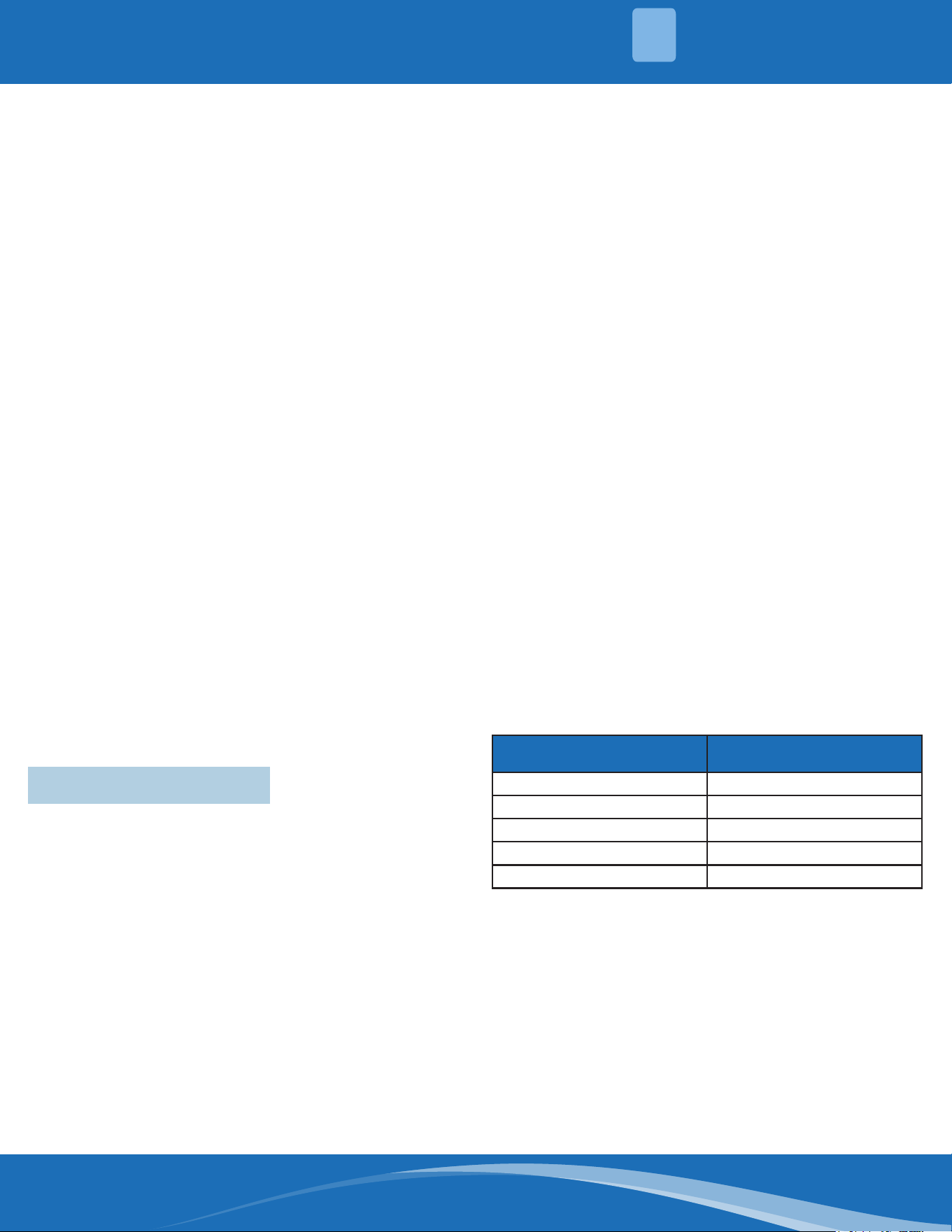
Table: Minimum Cross-Sectional Area of Power
and Signal Cables:
Highlights of Electrical Wiring Installation:
• All wiring must comply with local and national
electrical codes, regulations, and must be installed
by a licensed electrician.
• All electrical connections must be made according
to the Electrical Connection Diagram located on
the panels of the indoor and outdoor unit.
• If there is a serious safety issue with the power
supply, stop work immediately. Explain your
reasoning to the client, and refuse to install the
unit until the safety issue is properly resolved.
• Power voltage should be within 90~110% of the
rated voltage. Insucient power supply can cause
malfunction, electrical shock, or re.
• Installation of an external surge suppressor at the
outdoor disconnect is recommended.
Rated Current of Appliance
(A)
AWG
≤6 18
6~10 16
10~16 14
16~25 12
25~32 10
INSTALLATION
3
mrcool.com39
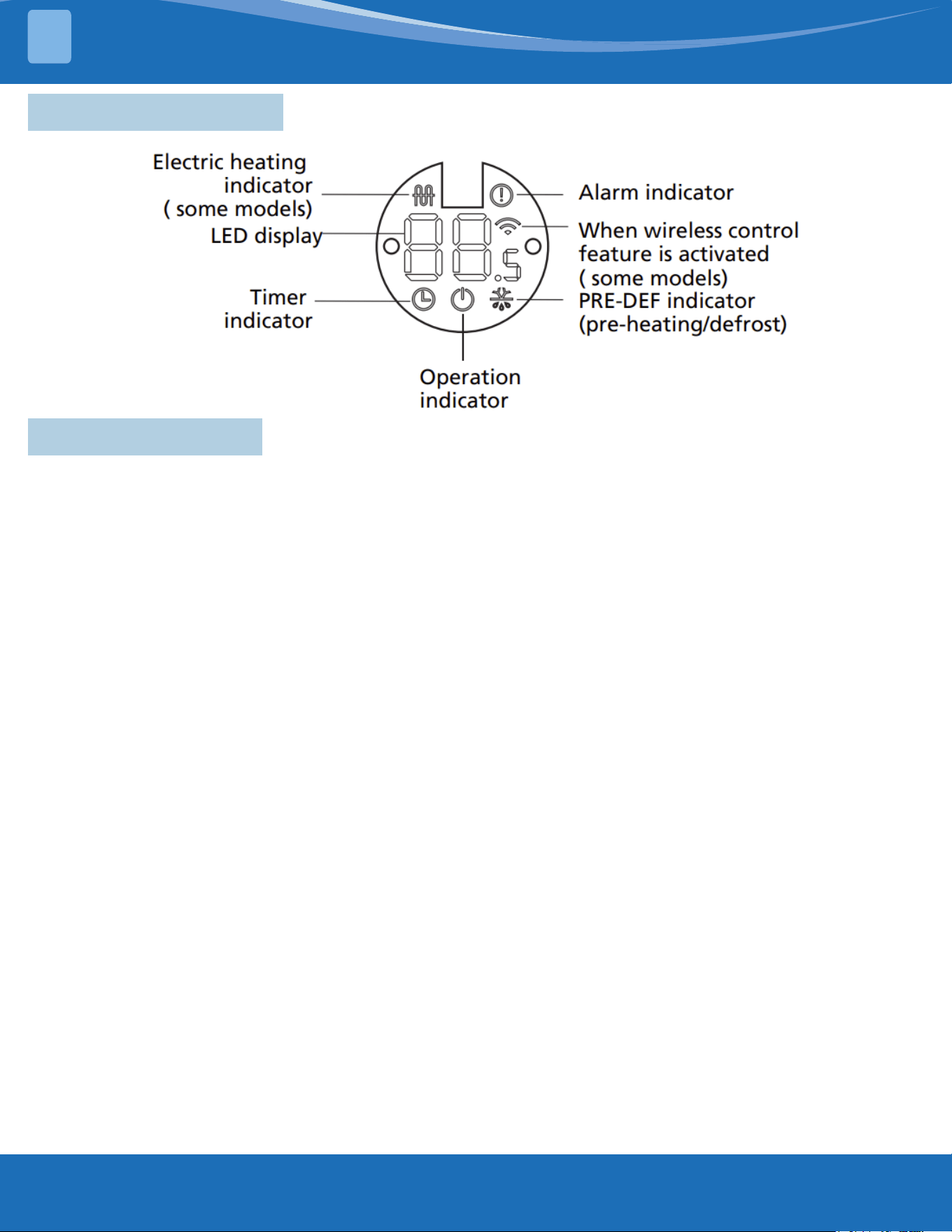
4.1 Display Functions
4.2 Safety Features
Compressor three minute delay at restart:
Compressor functions are delayed for up to ten seconds upon the rst startup of the unit, and are
delayed for up to three minutes upon subsequent unit restarts.
Automaticshutobasedondischargetemperature:
If the compressor discharge temperature exceeds a certain level for a period of time, the compressor
ceases operation.
Automaticshutobasedonfanspeed:
If the indoor fan speed registers below 200RPM or over 2100RPM for an extended period of time, the
unit ceases operation and the corresponding error code is displayed on the indoor unit.
Inverter module protection:
The inverter module has an automatic shuto mechanism based on the unit's current, voltage, and
temperature. If the automatic shuto is initiated, the corresponding error code is displayed on the
indoor unit and the unit ceases operation.
Indoor fan delayed operation:
• When the unit starts, the louver is automatically activated and the indoor fan will operate after a
period of setting time or the louver is in place.
• If the unit is in heating mode, the indoor fan is regulated by the anti-cold wind function.
Compressor Preheating:
Preheating is automatically activated when T4 sensor is lower than setting temperature.
Sensorredundancyandautomaticshuto
• If one temperature sensor malfunctions, the air conditioner continues operation and displays the
corresponding error code, allowing for emergency use.
• When more than one temperature sensor is malfunctioning, the air conditioner ceases operation.
PRODUCT FEATURES
4
mrcool.com 40
PRODUCT FEATURES
4
4.3 Basic Functions
Abbreviation Element
T1 Indoor room temperature sensor
T2 Evaporator coil temperature sensor
T3 Condenser coil temperature sensor
T4
Outdoor ambient temperature
sensor
TP
Compressor discharge temperature
sensor
Tsc Adjusted setting temperature
CDIFTEMP Cooling shutdown temperature
HDIFTEMP2 Heating shutdown temperature
Unit Element Abbreviations:
In this manual, such as CDIFTEMP, HDIFTEMP2,...etc,
they are well-setting parameter of EEPROM.
Fan Mode:
When fan mode is activated
• The outdoor fan and compressor cease operation.
• Temperature control is disabled and indoor room
temperature is displayed.
• The indoor fan speed can be set to 1%~100%, or
auto.
• The louver operations are identical to those in
cooling mode.
• Auto fan: In fan-only mode, AC operates the same
as auto fan in cooling mode with the temperature
set at 75°F (24°C).
Cooling Mode:
Compressor Control
1. In cooling mode, the indoor fan operates
continuously. The fan speed can be set to
1%~100%, or low, medium, high, and auto.
2. Auto fan action in cooling mode:
• Descent Curve
• When T1-Tsc is lower than 6.3°F/3.5°C, the fan
speed reduces to 80%.
• When T1-Tsc is lower than 1.8°F/1°C, the fan
speed reduces to 60%.
• When T1-Tsc is lower than 0.9°F/0.5°C, the fan
speed reduces to 40%.
• When T1-Tsc is lower than 0°F/0°C, the fan speed
reduces to 20%.
• When T1-Tsc is lower than -0.9°F/-0.5°C, the fan
speed reduces to 1%.
• Rise Curve
• When T1-Tsc is higher than or equal to 0°F/0°C,
the fan speed increases to 20%.
• When T1-Tsc is higher than or equal to
0.9°F/0.5°C, the fan speed increases to 40%.
• When T1-Tsc is higher than or equal to 1.8°F/1°C,
the fan speed increases to 60%.
• When T1-Tsc is higher than or equal to
2.7°F/1.5°C, the fan speed increases to 80%.
• When T1-Tsc is higher than or equal to 7.2°F/4°C,
the fan speed increases to 100%.
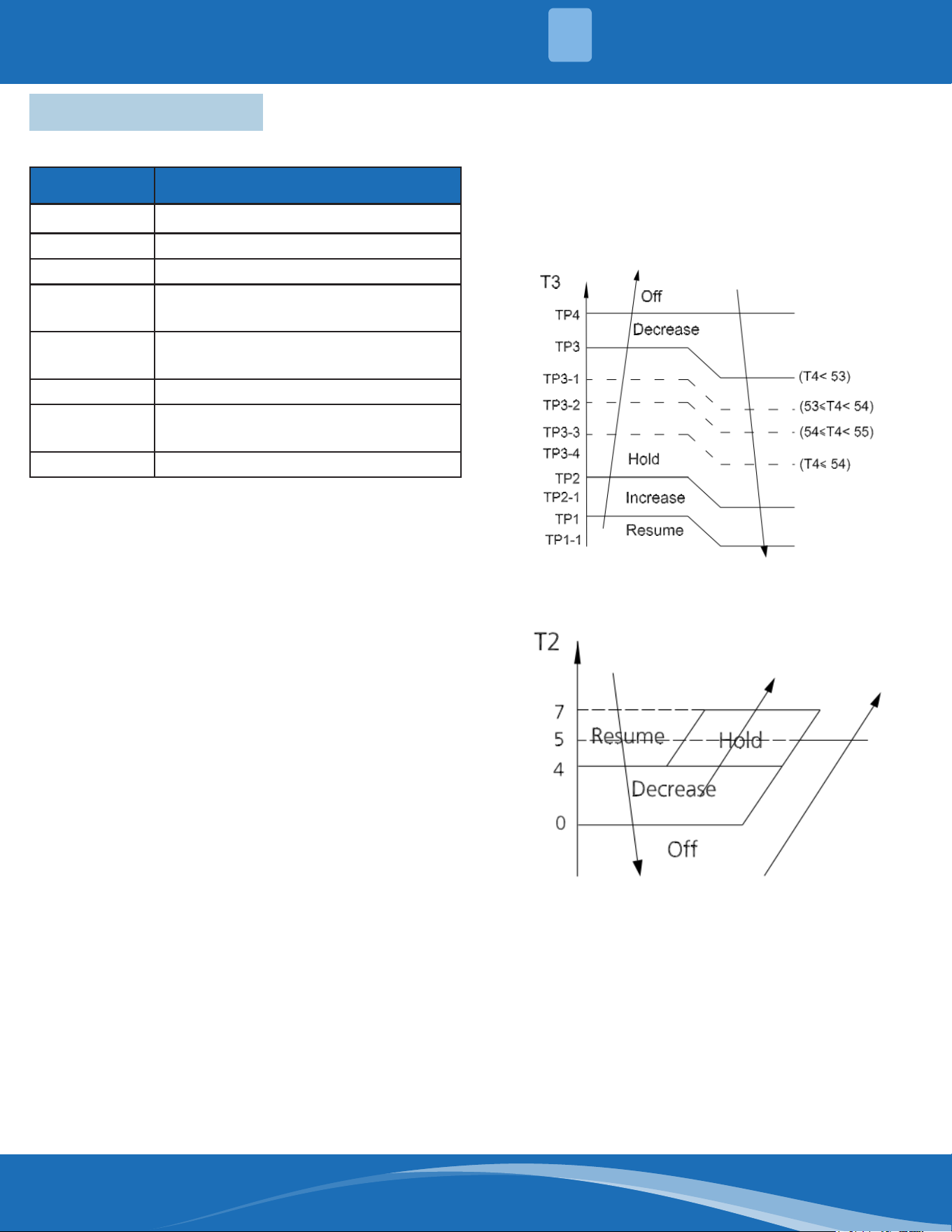
Condenser Temperature Protection
When the condenser temperature exceeds a
congured value, the compressor ceases operation.
Evaporator Temperature Protection
• O: Compressor Stops.
• Decrease: Decreases the running frequency to the
lower level per 1 minute.
• Hold: Keep the current frequency.
• Resume: No limitation for frequency.
HEATING MODE:
Indoor Fan Control
1. In heating mode, the indoor fan operates
continuously. The fan speed can be set to
1%~100% and auto.
• Anti-cold air function.
• If the temperature dierence of T2 changes during
auto fan and causes the fan speed to change, run
mrcool.com41
the current fan speed for 30 seconds rst, the
default interval is the interval before the fan speed
changes, and then judge T2 according to the
current interval after 30 seconds to get the nal
anti-cold air interval.
2. Auto fan action in heating mode:
• Rise Curve
• When T1-Tsc is higher than -2.7°F/-1.5°C, the fan
speed reduces to 80%.
• When T1-Tsc is higher than 0°F/0°C, the fan
speed reduces to 60%.
• When T1-Tsc is higher than 0.9°F/0°C, the fan
speed reduces to 40%.
• When T1-Tsc is higher than 1.8°F/1°C, the fan
speed reduces to 20%.
• Descent Curve
• When T1-Tsc is lower than or equal to
0.9°F/0.5°C, the fan speed increases to 40%.
• When T1-Tsc is lower than or equal to 0°F/0°C,
the fan speed increases to 60%.
• When T1-Tsc is lower than or equal to -2.7°F/-
1.5°C, the fan speed increases to 80%.
• When T1-Tsc is lower than or equal to -5.4°F/-3°C,
the fan speed increases to 100%.
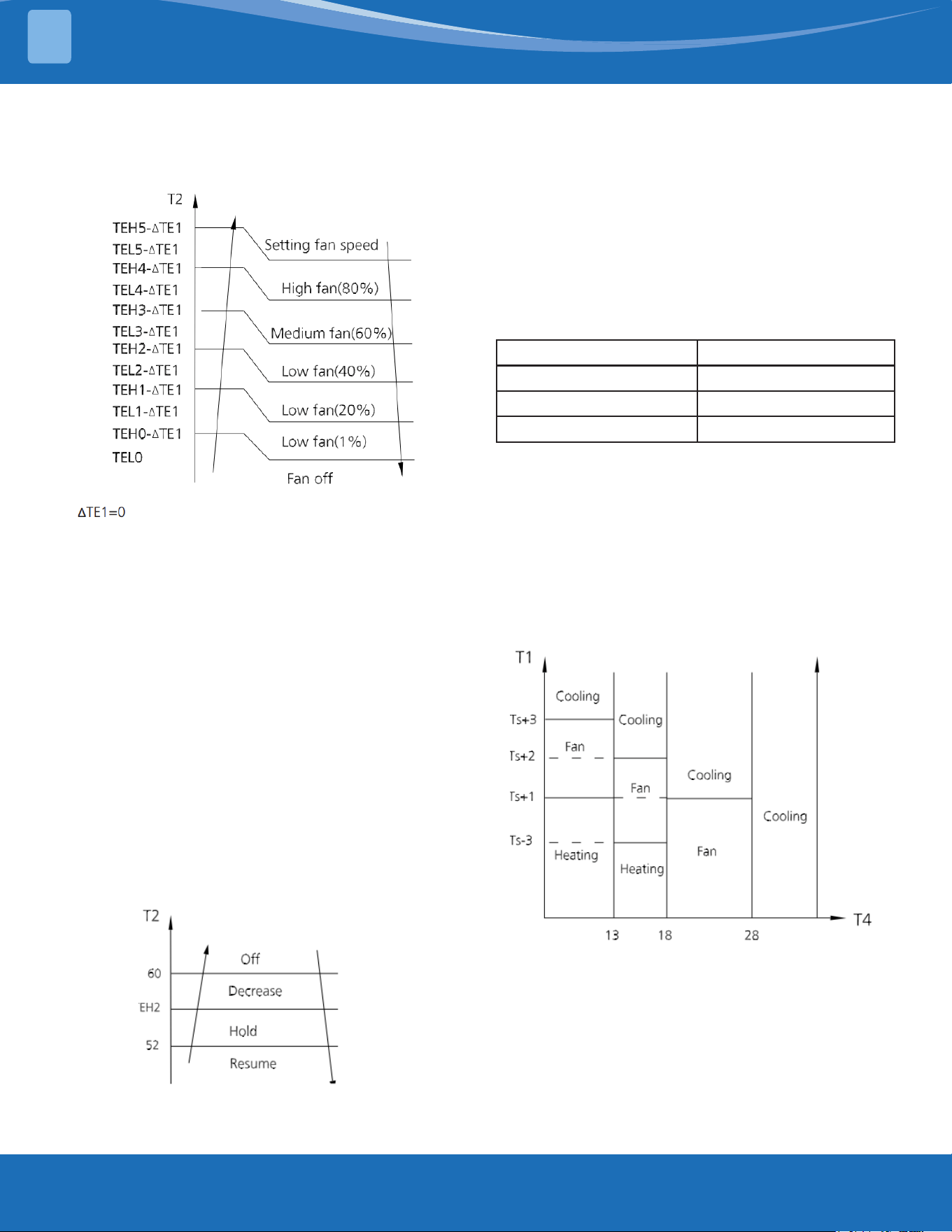
Evaporator Coil Temperature Protection
• O: Compressor stops.
• Decrease: Decrease the running frequency to the
lower level per 20 seconds.
• Hold: Keep the current frequency.
• Resume: No limitation for frequency.
Auto-Mode:
• This mode can be selected with the remote
controller and the temperature setting can be
adjusted between 60.8°F~80°F (16°C~30°C).
Case 1:
• In auto mode, the machine selects cooling,
heating, or fan-only mode on the basis of ΔT
(ΔT=T1-Ts).
ΔT Running Mode
ΔT>3.6°F (2°C) Cooling
-5.4°F (-3°C)≤ΔT≤3.6°F (2°C) Fan-Only
ΔT< -5.4°F (-3°C) Heating
• Indoor fan will run at auto fan speed.
• The louver operates the same as in relevant mode.
• If the machine switches mode between heating
and cooling, the compressor will keep stopping
for a certain time and then choose the mode
according to the ΔT.
Case 2:
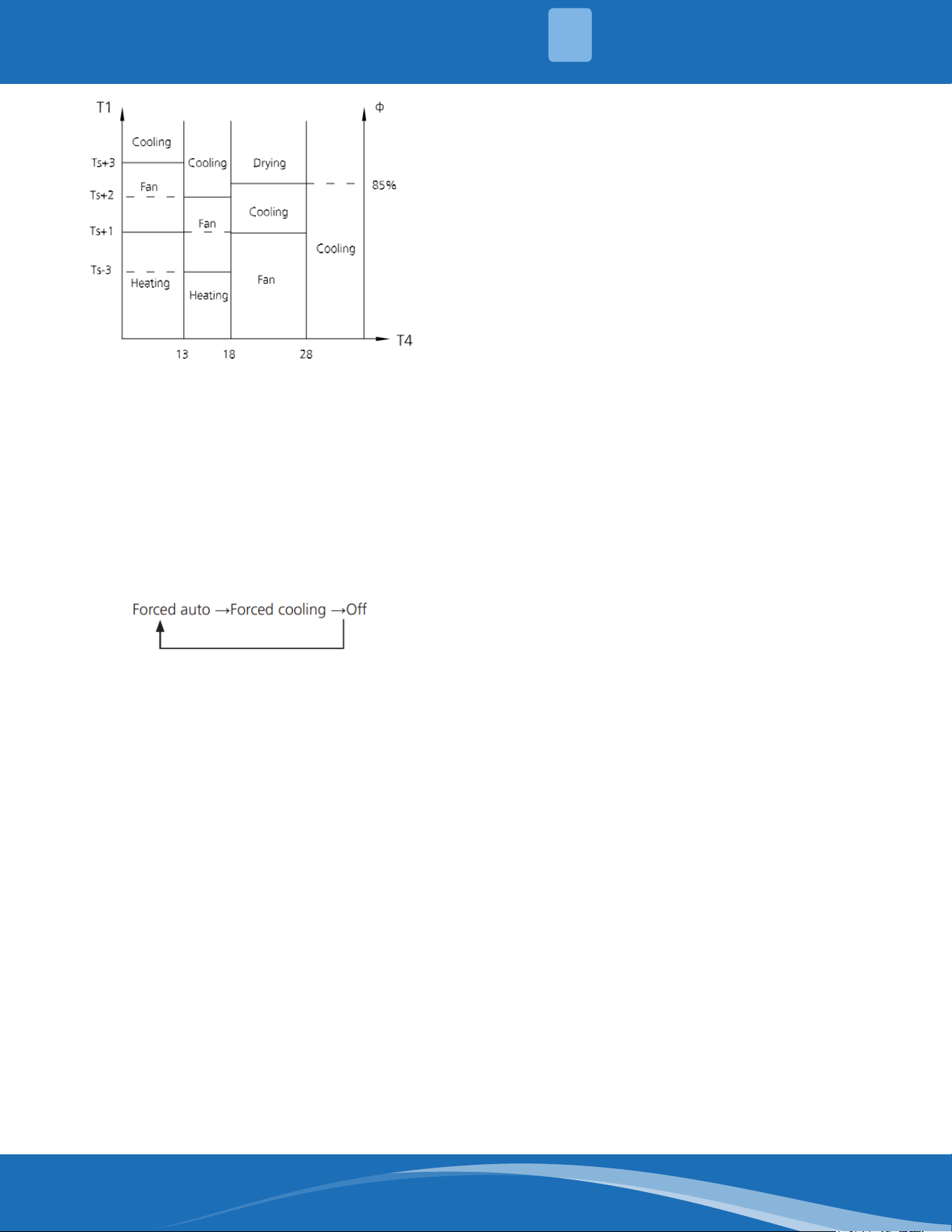
In auto mode, the machine selects cooling, heating, or
fan-only mode on the basis of T1, Ts and the outdoor
ambient temperature (T4).
Case 3:
In auto mode, the machine selects cooling, heating, or
fan-only mode on the basis of T1, Ts, outdoor ambient
temperature (T4) and relative humidity (Φ).
PRODUCT FEATURES
4
mrcool.com 42
Drying Mode:
• In drying mode, the system operates the same as
auto fan in cooling mode.
• All protections are activated and operate the same
as they do in cooling mode.
• Low Room Temperature Protection.
If the room temperature is lower than 50°F/10°C, the
compressor ceases operations and does not resume
until the room temperature exceeds 53.6°F/12°C.
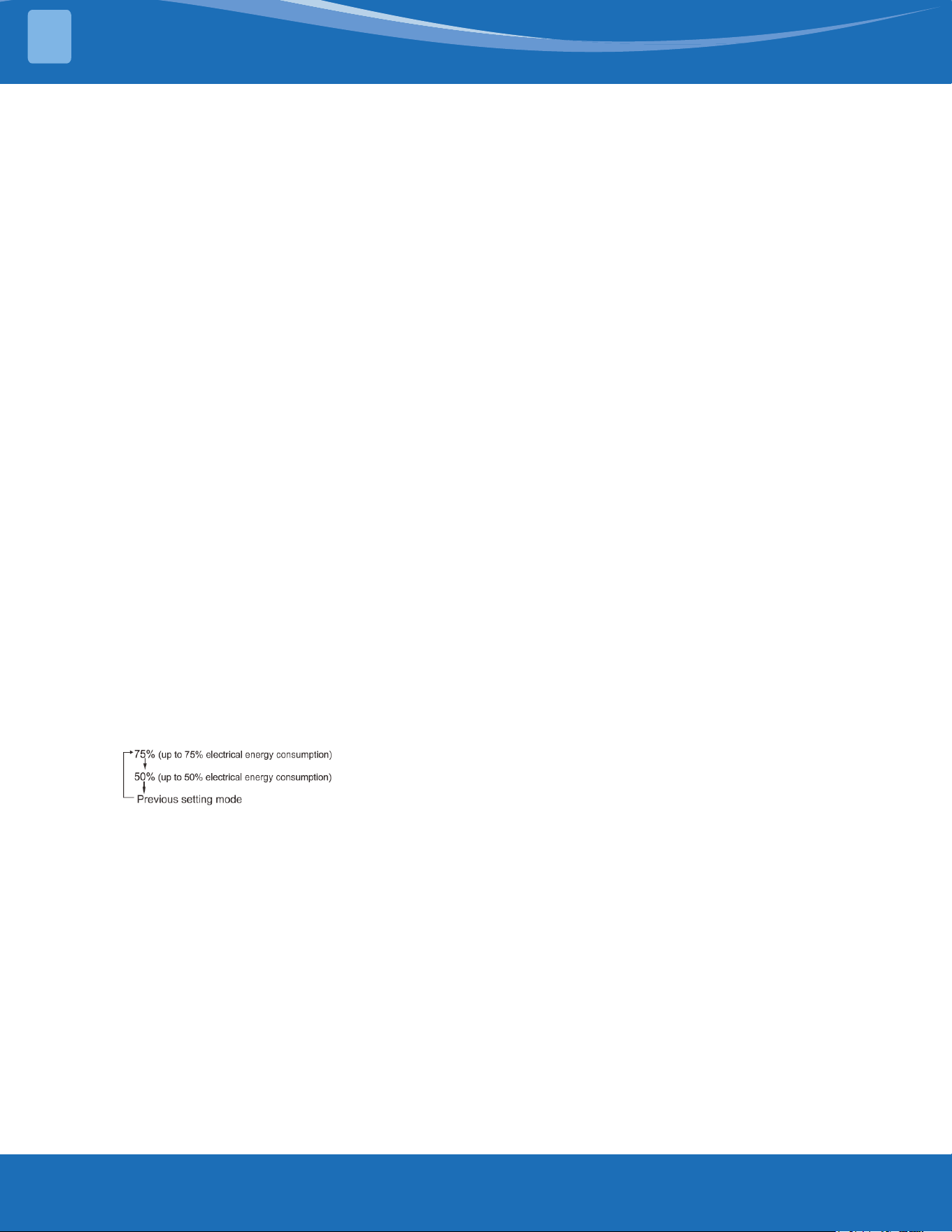
Forced Operation Function:
Press the AUTO/COOL button, the system will run as
shown in the sequence below:
• Forced cooling mode:
The compressor and outdoor fan continue to run and
the indoor fan runs at breeze speed. After running for
30 minutes, the system will switch to auto mode with
a preset temperature of 76°F/24°C.
• Forced auto mode:
Forced auto mode operates the same as normal auto
mode with a preset temperature of 76°F/24°C.
• The unit exits forced operation when it receives
the following signals:
• Switch o
• Changes in:
• mode
• fan speed
• sleep mode
• follow me
Timer Function:
• The timing range is 24 hours.
• Timer On. The machine turns on automatically at
the preset time.
• Timer O. The machine turns o automatically at
the preset time.
• Timer On/O. The machine turns on automatically
at the preset On Time, and then turns o
automatically at the preset O Time.
• Timer O/On. The machine turns o automatically
at the preset O Time and then turns on
automatically at the preset On Time.
• The timer does not change the units operation
mode. If the unit is o now, it does not start up
immediately after the "timer o" function is set.
When the setting time is reached, the timer LED
switches o and the unit running mode remains
unchanged.
• The timer uses relative time, not clock time.
Sleep Function:
• The sleep function is available in cooling, heating,
or auto mode.
• The operational process for sleep mode is as
follows:
• When cooling, the temperature rises 1.8°F/1°C
(to no higher than 86°F/30°C) every hour. After
2 hours, the temperature stops rising and the
indoor fan is xed at a low speed.
• When heating, the temperature decreases
1.8°F/1°C (to no lower than 60.8°F/16°C) every
hour. After 2 hours, the temperature stops
decreasing and the indoor fan is xed at a low
speed. Anti-cold wind function takes priority.
• The operating time for sleep mode is 8 hours, after
which, the unit exits this mode.
• The timer setting is available in this mode.
Auto-Restart Function:
• The indoor unit has an auto-restart module
that allows the unit to restart automatically. The
module automatically stores the current settings
and in the case of a sudden power failure, will
restore those settings automatically within 3
minutes after power returns.
FPMode(46°F(8°C)Heating)
In heating mode, the temperature can be set to as low
as 46°F/8°C, preventing the indoor area from freezing
if unoccupied during severe cold weather.
Follow Me:
• Once the follow me function is active, the remote
control will send a signal every 3 minutes,
with no beeps. The unit automatically sets the
temperature according to the measurements from
the remote control.
• The unit will only change modes if the information
from the remote control makes it necessary, not
from the unit's temperature settings.
• If the unit does not receive a signal for 7 minutes
or you press "Follow Me", the function turns o.
The unit regulates temperature based on its own
sensor and settings.
PRODUCT FEATURES
4
mrcool.com43
Optional Functions:
Silence (Multi-zone systems do not have this
function)
• Press "Silence" or keep pressing the Fan button
for more than 2 seconds on the remote control to
enable the SILENCE function. While this function
is active, the compressor frequency is maintained
at a lower level than F3. The indoor unit will run
at a faint breeze (1%), which reduces noise to the
lowest possible level.
• When matched with a multi-zone, this function is
disabled.
ECO Function (Multi-zone systems do not have this
function)
• Used to enter the energy ecient mode.
• Under cooling mode, press the ECO button, the
remote controller will adjust the temperature
automatically to 75°F/24°C, the fan speed
to AUTO to save energy (but only if the set
temperature is less than 75°F/24°C). If the
set temperature is more than 75°F/24°C and
86°F/30°C, press the ECO button, the fan speed
will change to AUTO, the set temperature will
remain unchanged.
• When pressing the ECO button, modifying the
mode, or adjusting the set temperature to less
than 75°F/24°C, the system will cease the ECO
operation.
• Operation time in ECO mode is 8 hours. After 8
hours the system ceases this mode.
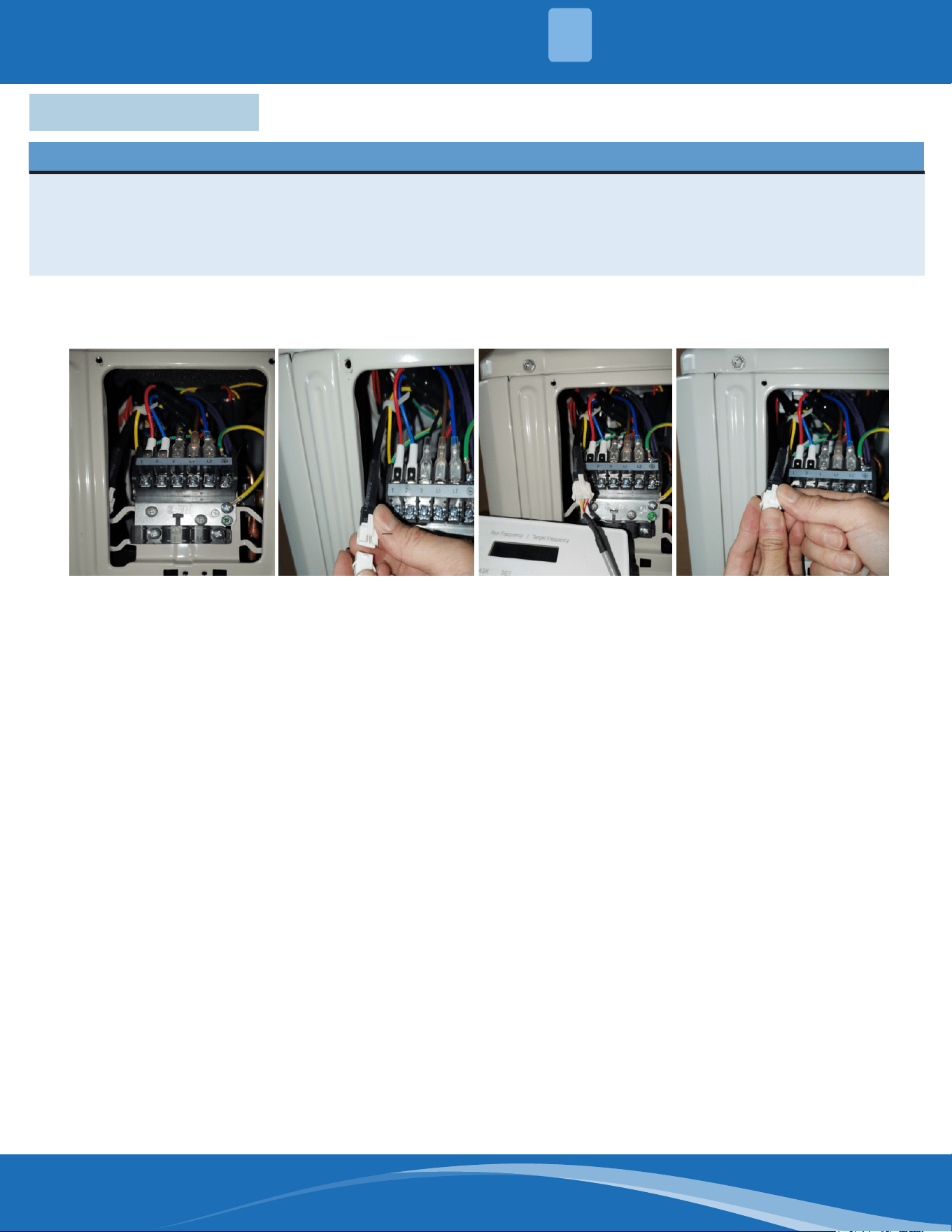
Electrical Energy Consumption Control Function
(Multi-zone systems do not have this function)
Press the "Gear" button on the remote controller to
enter the energy ecient mode in a sequence of the
following:
Turn o the unit or activate ECO, sleep, Super Cool,
46°F/8°C Heating, Silence, or Self Clean Functions to
cease this mode.
Breeze Away (for some models) (Multi-zone systems
do not have this function)
• This feature avoids direct airow blowing on the
body and makes you feel in the cool air.
• NOTE: This feature is available under cooling
mode, fan-only mode, and drying mode.
Active Clean Function (for some models) (Multi-zone
systems do not have this function)
• The Active Clean Technology washes away dust,
mold, and grease that may cause odors when it
adheres to the heat exchanger by automatically
freezing and then rapidly thawing the frost. The
internal wind wheel then keeps operating to blow-
dry the evaporator, thus preventing the growth of
mold and keeps the inside clean.
• When this function is turned on, the indoor unit
display window appears "CL", after 20 to 45
minutes, the unit will turn o automatically and
cancel Active Clean Function.
PRODUCT FEATURES
4
mrcool.com 44
TROUBLESHOOTING
5
5.1 Safety Caution
WARNING
Besuretoturnoallpowersuppliesordisconnectallwirestoavoidelectricshock.Whilecheckingthe
indoor/outdoorPCB,pleaseequipyourselfwithanti-staticglovesorawriststraptoavoiddamaging
the board.
Electricitywillremainincapacitorsevenwhenthepowersupplyiso.Ensurethecapacitorsarefully
discharged before troubleshooting
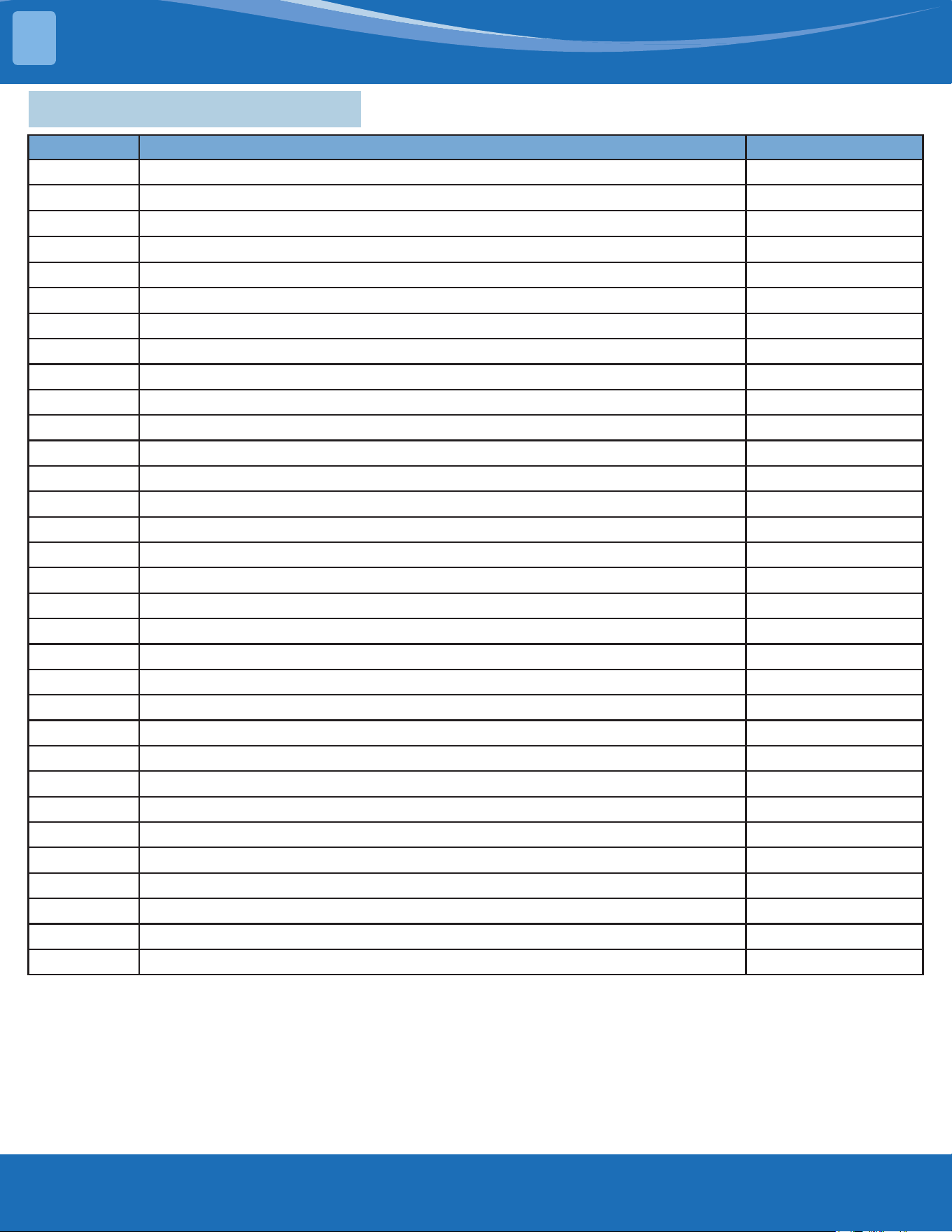
Note: If using the inverter test tool for maintenance, remove the big handle from the unit, take out
the detection cable, take out the female end of the cable, and connect the inverter testing tool. After
maintenance is completed, insert the female end back into the port.
Note: This picture is for reference only. Actual appearance may vary.
mrcool.com45
TROUBLESHOOTING
5
5.2ErrorDisplay(IndoorUnit)
Display Error Information Solution
FC
Forced cooling (not an error code) --
EC 07
ODU fan speed out of control TS23
EC 51
ODU EEPROM parameter error TS19
EC 52
ODU coil temp. sensor (T3) error TS25
EC 53
ODU ambient temp. sensor (T4) error TS25
EC 54
COMP. discharge temp. sensor (TP) error TS25
EC 56
IDU coil outlet temp. sensor (T2B) error (multi-zone) TS25
EC C1
Other IDU refrigerant sensor detects leakage (multi-zone) TS39
EH 00
IDU EEPROM Malfunction TS19
EH 03
IDU fan speed out of control TS23
EH 0A
IDU EEPROM parameter error TS19
EH 0E
Water-level alarm malfunction TS27
EH 12
Main unit or secondary units malfunction TS40
EH 3A
External fan DC bus voltage is too low protection TS37
EH 3b
External fan DC bus voltage is too high fault TS37
EH 60
IDU room temp. sensor (T1) error TS25
EH 61
IDU evaporator coil temp. sensor (T2) error TS25
EH bA
Communication error between the indoor unit and external fan module TS37
EH C1
Refrigerant sensor detects leakage TS39
EH C2
Refrigerant sensor is out of range and leakage is detected TS39
EH C3
Refrigerant sensor is out of range TS38
EL 01
IDU & ODU communication error TS20
EL 0C
System lacks refrigerant TS26
EL 11
Communication malfunction between main unit and secondary units TS40
FH 07
Communication malfunction between indoor unit and auto-lifting panel TS38
FH CC
Refrigerant sensor error TS28
PC 00
ODU IPM module protection TS29
PC 01
ODU voltage protection TS34
PC 02
Compressor top (or IPM) temp. protection TS31
PC 03
Pressure protection (low or high pressure) (for some models) TS30
PC 04
Inverter compressor drive error TS35
PC 0L
Low ambient temperature protection (for some models) --
For Other Errors:
The display board may show a garbled code or
a code undened by the service manual. Ensure
that this code is not a temperature reading.
Troubleshooting:
Test the unit using the remote control. If the unit
does not respond to the remote, the indoor PCB
requires replacement. If the unit responds, the
display board requires replacement.
mrcool.com 46
TROUBLESHOOTING
5
5.3InformationInquiry&Setting
In order to enter to engineering mode and check the data of the system (data checking mode), please
follow these steps:
• Make sure that the system is in standby status or working in non-locked conditions.
• Press the "Power" + "Fan" buttons together for 7s until the remote controller screen shows "0", and
also "Auto, Cool, Dry, Heat, Battery" icons will be displayed at the same time.
• Press the "UP" or "Down" buttons to choose dierent channel numbers that want to check (from
0-30) on the remote controller, and then the display will show the parameter value.
Channel Code Meaning Remark
0 Error Code
Refer to the next list of error codes
Empty means no error code
1 T1 Room temperature Actual data, °C
2 T2 Indoor coil temperature Actual data, °C
3 T3 Outdoor coil temperature Actual data, °C
4 T4 Ambient temperature Actual data, °C
5 TP Discharge temperature Actual data, °C
6 FT Targeted frequency Actual data
7 Fr Actual frequency Actual data
8 dl Running current 3.2A-3
9 Ac AC voltage
10 Sn Reserved
11 -- Indoor operating mode
0-O; 1-Cooling; 2-Heating;
3-Fan Only; 4-Drying; 5-Auto;
7-Defrosting; 12-Active Clean
12 Pr Outdoor fan speed Actual data/8
13 Lr EXV opening steps Actual data/8
14 Ir Indoor fan speed Actual data/8
15 Hu Humidity (if a sensor is there) Actual data, %
16 TT Set temperature including compensation Actual data, °C
17 nA Reserved
18 nA Reserved
19 Uo Outdoor DC bus voltage
20 oT Target Frequency calculated by indoor Without limitation
21 nA
Reserve
22~30 nA
Note:
1. The channel number indicates a certain parameter value (Check next table).
2. The indoor unit display will show the code for 2s and then the parameter value.
3. In the engineering mode, the other keys or operations are invalid except for the following buttons
"Power", "Up", "Down", and "Ok".
4. In order to exit from the engineering mode, press the "Power" + "Fan" buttons together for 2s to
quit checking and return back to the home screen
5. The engineering mode will be exited if there is no valid input data for 60s.
mrcool.com47
TROUBLESHOOTING
5
Error Code of Engineer Mode:
Display Error Information
EH 00
IDU EEPROM malfunction
EH 0A
Indoor EEPROM parameter error
EL 01
IDU & ODU communication error
EH bA
Communication error between indoor unit and indoor external fan module
EH 30
Parameters error of indoor external fan
EH 35
Phase failure of indoor external fan
EH 36
Indoor external fan current sampling bias fault
EH 37
Indoor external fan zero speed failure
EH 38
Indoor external fan stall failure
EH 39
Out of step failure of indoor external fan
EH 3A
Low voltage protection of indoor external fan DC bus
EH 3b
Indoor external fan DC bus voltage is too high fault
EH 3E
Indoor external fan overcurrent fault
EH 3F
Indoor external fan module protection/hardware overcurrent protection
EH 03
IDU fan speed out of control
EC 51
ODU EEPROM parameter error
EC 52
ODU coil temp. sensor (T3) error
EC 53
ODU ambient temp. sensor (T4) error
EC 54
COMP. Discharge temp. sensor (TP) error
EC 55
ODU IPM module temp. sensor (TH) error
EC 0d
Outdoor unit malfunction
EH 60
IDU room temp. sensor (T1) error
EH 61
Evaporator coil temperature sensor T2 is in open circuit or short circuit
EC 71
Outdoor external fan overcurrent fault
EC 75
Outdoor external fan module protection/hardware overcurrent protection
EC 72
Outdoor external fan phase failure
EC 74
Outdoor external fan current sampling bias fault
EC 73
Zero speed failure of outdoor unit DC fan
EC 07
ODU fan speed out of control
EH b5
Intelligent eye communication failure
EL 0C
System lacks refrigerant
EH 0E
Water-level alarm malfunction
EH 0F
Intelligent eye malfunction
FH 07
Communication malfunction between indoor unit and auto-lifting panel
PC 00
ODU IPM module protection
PC 10
Over low voltage protection
PC 11
Over voltage protection
PC 12
DC voltage protection
mrcool.com 48
TROUBLESHOOTING
5
Display Error Information
PC 02
Top temperature protection of compressor High temperature protection of IPM module
PC 40
Communication error between outdoor main chip and compressor driven chip
PC 41
Current Input detection protection
PC 42
Compressor start error
PC 43
Lack of phase (3 phase) protection
PC 44
Outdoor unit zero speed protection
PC 45
341PWM error
PC 46
Compressor speed malfunction
PC 49
Compressor over current protection
PC 06
Compressor discharge temperature protection
PC 08
Outdoor current protection
PH 09
Anti-cold air in heating mode
PC 0f
PFC module malfunction
PC 30
System overpressure protection
PC 31
System pressure is too low protection
PC 03
Pressure protection
PC 0L
Outdoor low ambient temperature protection
PH 90
Evaporator coil temperature over high protection
PH 91
Evaporator coil temperature over low protection
PC 0A
Condenser high temperature protection
PH 0C
Indoor unit humidity sensor failure
LH 00
Frequency limit caused by T2
LH 30
Indoor external fan current limit
Lh 31
Indoor external fan voltage limit
LC 01
Frequency limit caused by T3
LC 02
Frequency limit caused by TP
LC 05
Frequency limit caused by voltage
LC 03
Frequency limit caused by current
LC 06
Frequency limit caused by PFC
LC 30
Frequency limit caused by high pressure
LC 31
Frequency limit caused by low pressure
LH 07
Frequency limit caused by remote controller
----
IDUs comm. conict (match with multi outdoor unit)
NA
No malfunction and protection

mrcool.com49
TROUBLESHOOTING
5
In order to enter to the engineering mode and check the advanced function settings please follow
these steps.
Ifyouwanttocheckthecurrentfunctionssetvalue(PresettingPage):
1. First, you will need to disconnect the power supply from the unit and wait 1 minute.
2. Then re-connect the power supply to the unit and it should enter standby mode.
3. Press the "Power" + "Fan" buttons together for 7s until the remote controller screen shows "0",
then the "Auto, Cool, Dry, Heat, Battery" icons will be displayed at the same time.
4. Press "UP" or "Down" buttons to choose dierent channel numbers that you want to check (from
0-30) on the remote controller.
5. The press the "Power" button for 2s until the remote controller screen shows "Ch".
6. Press the "OK" button to query the current function set value while the remote controller shows
"Ch" and the function set vale will be shows on the indoor units display.
If you want to change the current functions set value:
1. First, you will need to disconnect the power supply form the unit and wait 1 minute.
2. Then connect the power supply again to the unit and it should enter standby mode.
3. Press the "Power" + "Fan" buttons together for 7s until the remote controller screen shows "0" then
the "Auto, Cool, Dry, Heat, Battery" icons will be displayed at the same time.
4. Press the "UP" or "Down" buttons to choose dierent channel numbers that you want to change
(from 0~30) on the remote controller.
5. The press the "Power" button for 2s until the remote controller screen shows "Ch".
6. Press the "Up" or "Down" button to choose the desired set value from the screen of the remote
control.
7. The press "OK" to send the new set value to the indoor unit, the indoor will display "CS" which
means that the new set value is uploaded successfully.
8. Finally, disconnect the power supply again from the unit and wait for 10 minutes then re-connect.
Note:
1. The channel number indicates a certain function and each number will be showed on the indoor
units screen indicates the current function set value (Check the table following table).
2. In the engineering mode the other keys or operations are invalid except for the following buttons
"Power", "Up", "Down", and "OK".
3. I order to set a new set value successfully you need to nish the steps (from 2 to 7) within 1 minute
only.
4. The engineering mode will be exited if there is no valid input data for 60s.
5. In order to exit from the engineering mode please follow these steps.
• Press the "Power" button for 2s until the remote controller screen shows "0".
• The press the "Power" + "Fan" buttons together for 2s to quit the engineering mode and back to
the home screen.
Advanced Function Setting:
mrcool.com 50
TROUBLESHOOTING
5
Channel Function Parameter Value Meaning Remark
0 Capacity setting (Btu/h) 1-100K
1 Auto-restart function
0- Inactive
1- Active
2
Fan control when Ts
reached
1- Fan stop
2- Fan runs at lowest RPM
3- Fan runs at setting RPM
4~11- Fan stops for 4 mins and runs for 1 min
3 Mode lock
CH- Cooling and heating (all modes)
HH- Heating only (Heating + Fan only)
CC- Cooling only (Cooling + Drying + Fan only)
nU- Cooling and heating without Auto
Remote controller will change as
well.
4
Lowest setting
temperature
16-24
Remote controller will change as
well.
5
Highest setting
temperature
25-30
Remote controller will change as
well.
6 Reserved
7 Twins selection 0- No twins; 1- Master unit; 2- Secondary unit
8 / Nothing to set
9 / Nothing to set
10 / Nothing to set
11
Min. frequency
limitation in cooling
mode
10,11,12,..., 49,50,-- (cancel)
12
Min. frequency
limitation in heating
mode
20,21,22,...,149,250,-- (cancel)
13
Max. frequency
selection in T4
limitation of Zone 6
20,21,22,...,149,250,-- (cancel)
14 / Nothing to set
15
Frequency selection
of outdoor forced-
operation
10,11,12,...,249,250,-- (cancel)
16 One button reset rS- Reset
17 nA Nothing to set
18 Capacity setting (kW) 23,26,32,35,51,72,120,-- (cancel)
19
Max. frequency
selection in cooling
mode
40,41,42,..,83,83,-- (cancel)
20
Max. frequency
selection in heating
mode
40,41,42,...,83,84,-- (cancel) Without limitation
21
Cooling temperature
compensation
-3.0,-2.5,-2.0,...,3.0,3.5,-- (cancel)
22
Heating temperature
compensation
-6.5,-6.0,-5.5,...,0.5,1.0,1.5,...,7.0,7.5,-- (cancel)
23
Max. fan speed
selection in cooling
-41,-40,-39,...,19,20,-- (cancel)
mrcool.com51
TROUBLESHOOTING
5
Channel Function Parameter Value Meaning Remark
24
Min. fan speed
selection in cooling
-41,-40,-39,...,19,20,-- (cancel)
25
Max. fan selection in
heating
-41,-40,-39,...,19,20,-- (cancel)
26
Min. fan speed
selection in heating
-41,-40,-39,...,19,20,-- (cancel)
27 Reserved Nothing to set
28
Anti-cold air stop fan
temperature
16~28
Remote controller will change as
well.
29 Reserved Nothing to set
30 Reserved Nothing to set
5.4 Error Diagnosis Without Error Code
Remote Maintenance:
Suggestion: When troubles occur, please check the following points with the customer before eld maintenance.
No. Problem Solution
1 Unit will not start TS14-TS15
2 The power switch is on but fans will not start TS14-TS-15
3 The temperature on the display board cannot be set TS14-TS-15
4 Unit is on but the air is not cold/hot TS14-TS-15
5 Unit runs but shortly stops TS14-TS-15
6 The unit starts up and stops frequently TS14-TS-15
7 Unit runs continuously but insucient cooling/heating TS14-TS-15
8 Cool cannot change to heat TS14-TS-15
9 Unit is noisy TS14-TS-15
Field Maintenance:
No. Problem Solution
1 Unit will not start TS16-TS17
2 Compressor will not start but fans run TS16-TS17
3 Compressor and condenser fan will not start TS16-TS17
4 Air handler fan will not start TS16-TS17
5 Condenser fan will not start TS16-TS17
6 Unit runs but shortly stops TS16-TS17
7 Compressor short-cycles due to overload TS16-TS17
8 High suction pressure TS16-TS17
9 Low discharge pressure TS16-TS17
10 High suction pressure TS16-TS17
11 Low suction pressure TS16-TS17
12 Unit runs continuously but insucient cooling TS16-TS17
13 Too cool TS16-TS17
14 Compressor is noisy TS16-TS17
15 Horizontal louver cannot revolve TS16-TS17
mrcool.com 52
TROUBLESHOOTING
5
1. Remote
Maintenance
Electrical Circuit Refrigerant Circuit
Possible causes of
trouble
Power failure
The main power tripped
Loose connections
Faulty transformer
The voltage too high or too low
Theremotecontrolispoweredo
Broken the remote control
Dirtyairlter
Dirtycondenserns
Thesettingtemperatureishigher/lower
thantheroom's(cooling/heating)
Theambienttemperatureistoohigh/
lowwhenthemodeiscooling/heating
Fan mode
Silence function is activate
Frostinganddefrostingfrequency
Unit will not start √ √ √ √ X X X X X X X X X X
The power switch is
on but fans will not
start
X X √ √ √ X X X X X X X X X
The temperature
on the playboard
cannot be set
X X X X X √ √ X X X X X X X
Unit is on but the air
is not cold/hot
X X X X X X X X X √ √ √ X X
Unit runs but shortly
stops
X X X X √ X X X √ √ X X X
The unit startup and
stops frequently
X X X X √ X X X X X √ X X √
Unit runs
continuously but
insucient cooling/
heating
X X X X X X X √ √ √ √ X √ X
Cool cannot change
to heat
X X X X X X X X X X X X X X
Unit is noisy X X X X X X X X X X X X X X
Testmethod/
remedy
Test voltage
Close the power switch
Inspect connections - tighten
Change the transformer
Test voltage
Replace the battery of the
remote control
Replace the remote control
Clean or replace
Clean
Adjustthesettingtemperature
Turn on the unit later
Adjusttocoolmode
Turnothesilencefunction
Turn on the unit later
mrcool.com53
TROUBLESHOOTING
5
1. Remote
Maintenance
Others
Possible causes of
trouble
Heavy load condition
Loosen hold down bolts or screws
Bad airproof
The air inlet or outlet of either unit is
blocked
Interference from cell phone towers and
remote boosters
Shipping plates remain attached
Unit will not start X X X X X X
The power switch is
on but fans will not
start
X X X X √ X
The temperature
on the playboard
cannot be set
X X X X X X
Unit is on but the air
is not cold/hot
X X X X X X
Unit runs but shortly
stops
X X X X X X
The unit startup and
stops frequently
X X X √ X X
Unit runs
continuously but
insucient cooling/
heating
√ X √ √ X X
Cool cannot change
to heat
X X X X X X
Unit is noisy X √ X X X √
Testmethod/
remedy
Check heat load
Tighten bolts and screws
Close all windows and doors
Remove the obstacles
Reconnect the power or press
ON/OFFbuttonontheremoteto
restart operation
Remove item
mrcool.com 54
TROUBLESHOOTING
5
2. Field
Maintenance
Refrigerant Circuit Others
Possible
causes of
trouble
Compressor stuck
Shortage of refrigerant
Restrictedliquidline
Dirtyairlter
Dirty evaporator coil
Insucientairthrough
evaporator coil
Overcharge of refrigerant
Dirty or partially blocked
condenser
Air or incompressible gas in
refrigerant cycle
Short cycling of condensing air
High temperature condensing
medium
Insucientcondensingmedium
Broken compressor internal parts
Inecientcompressor
Expansion valve obstructed
Expansion valve or capillary tube
close completely
Leaking power element on
expansion valve
Poor installation of feeler bulb
Heavy load condition
Loosenholddownboltsand/or
screws
Shipping plates remain attached
Poor choices of capacity
Contact of piping with other
piping or external plate
Unit will not
start
X X X X X X X X X X X X X X X X X X X X X X X
Compressor
will not start
but fans run
√ X X X X X X X X X X X X X X X X X X X X X X
Compressor
and condenser
fan will not
start
X X X X X X X X X X X X X X X X X X X X X X X
Air handler fan
will not start
X X X X X X X X X X X X X X X X X X X X X X X
Condenser fan
will not start
X X X X X X X X X X X X X X X X X X X X X X X
Unit runs but
shortly stops
X √ √ X X X √ √ X X X X X X X √ √ X X X X X X
Compressor
short-cycles
due to overload
X √ X X X X √ √ X X X X X X X X X X X X X X X
High discharge
pressure
X X X X X X √ √ √ √ √ √ X X X X X X X X X X X
Low discharge
pressure
X √ X X X X X X X X X X X √ X X X X X X X X X
Testmethod/
remedy
Replace the compressor
Leak test
Replace restricted part
Clean or replace
Clean coil
Check fan
Change charged refrigerant
volume
Clean condenser or remove
obstacle
Purge, evacuate and recharge
Removeobstructiontoairow
Remove obstruction in air or
waterow
Remove obstruction in air or
waterow
Replace compressor
Testcompressoreciency
Replace valve
Replace valve
Replace valve
Fix feeler bulb
Check heat load
Tighten bolts or screws
Remove them
Choose system of larger capacity
or add another system
Rectify piping so as to not contact
with each other or with external
plate
mrcool.com55
TROUBLESHOOTING
5
2. Field
Maintenance
Refrigerant Circuit Others
Possible causes of
trouble
Compressor stuck
Shortage of refrigerant
Restrictedliquidline
Dirtyairlter
Dirty evaporator coil
Insucientairthroughevaporator
coil
Overcharge of refrigerant
Dirty or partially blocked condenser
Air or incompressible gas in
refrigerant cycle
Short cycling of condensing air
High temperature condensing
medium
Insucientcondensingmedium
Broken compressor internal parts
Inecientcompressor
Expansion valve obstructed
Expansion valve or capillary tube
close completely
Leaking power element on
expansion valve
Poor installation of feeler bulb
Heavy load condition
Loosenholddownboltsand/or
screws
Shipping plates remain attached
Poor choices of capacity
Contact of piping with other piping
or external plate
High suction
pressure
X X X X X X √ X X X X X X √ X X X √ √ X X X X
Low suction
pressure
X √ √ √ √ √ X X X X X X X X √ √ √ X X X X X X
Unit runs
continuously but
insucient cooling
X √ √ √ √ √ X √ √ √ X X X √ X X X X √ X X √ X
Too Cool X X X X X X X X X X X X X X X X X X X X X X X
Compressor is
noisy
X X X X X X √ X X X X X √ X X X X X X √ √ X √
Horizontal louver
cannot revolve
X X X X X X X X X X X X X X X X X X X X X X X
Testmethod/
remedy
Replace the compressor
Leak test
Replace restricted part
Clean or replace
Clean coil
Check fan
Change charged refrigerant volume
Clean condenser or remove obstacle
Purge, evacuate and recharge
Removeobstructiontoairow
Removeobstructioninairorwaterow
Removeobstructioninairorwaterow
Replace compressor
Testcompressoreciency
Replace valve
Replace valve
Replace valve
Fix feeler bulb
Check heat load
Tighten bolts or screws
Remove them
Choose system of larger capacity or add
another system
Rectify piping so as to not contact with
each other or with external plate
mrcool.com 56
TROUBLESHOOTING
5
2. Field
Maintenance
Electrical Circuit
Possible causes of
trouble
Power Failure
Blown fuse or varistor
Loose connections
Shorted or broken wires
Safety device opens
Faultythermostat/room
temperature sensor
Wrong setting place of
temperature sensor
Faulty transformer
Shorted or open capacitor
Faulty magnetic contactor for
compressor
Faulty magnetic contactor for fan
Low voltage
Faulty stepping motor
Shorted or grounded compressor
Shorted or grounded fan motor
Unit will not start √ √ √ √ √ X X √ X X X X X X X
Compressor will
not start but fans
run
X X X √ X √ X √ √ X X X X √ X
Compressor and
condenser fan will
not start
X X X √ X √ X X X √ X X X X X
Air handler fan will
not start
X X X √ X X X X √ X √ X X X √
Condenser fan will
not start
X X X √ X √ X X √ X √ X X X √
Unit runs but
shortly stops
X X X X X X X X X √ X √ X X X
Compressor
short-cycles due to
overload
X X X X X X X X X √ X √ X X X
High discharge
pressure
X X X X X X X X X X X X X X X
Low discharge
pressure
X X X X X X X X X X X X X X X
Testmethod/
remedy
Test voltage
Inspect fuse type & size
Inspect connections - tighten
Test circuits with tester
Test continuity of safety device
Testcontinuityofthermostat/sensor
& wiring
Place the temperature sensor at the
central of the air inlet grille
Check control circuit with tester
Check capacitor with tester
Test continuity of coil & contacts
Test continuity of coil & contacts
Test voltage
Replace the stepping motor
Check resistance with multimeter
Check resistance with multimeter
mrcool.com57
TROUBLESHOOTING
5
2. Field
Maintenance
Electrical Circuit
Possible causes of
trouble
Power Failure
Blown fuse or varistor
Loose connections
Shorted or broken wires
Safety device opens
Faultythermostat/room
temperature sensor
Wrong setting place of temperature
sensor
Faulty transformer
Shorted or open capacitor
Faulty magnetic contactor for
compressor
Faulty magnetic contactor for fan
Low voltage
Faulty stepping motor
Shorted or grounded compressor
Shorted or grounded fan motor
High suction
pressure
X X X X X X X X X X X X X X X
Low suction
pressure
X X X X X X X X X X X X X X X
Unit runs
continuously but
insucient cooling
X X X X X X X X X X X X X X X
Too cool X X X X X X √ √ X X X X X X X
Compressor is
noisy
X X X X X X X X X X X X X X X
Horizontal louver
can not revolve
X X √ √ X X X X X X X X √ X X
Testmethod/
remedy
Test voltage
Inspect fuse type & size
Inspect connections - tighten
Test circuits with tester
Test continuity of safety device
Testcontinuityofthermostat/sensor
& wiring
Place the temperature sensor at the
central of the air inlet grille
Check control circuit with tester
Check capacitor with tester
Test continuity of coil & contacts
Test continuity of coil & contacts
Test voltage
Replace the stepping motor
Check resistance with multimeter
Check resistance with multimeter
mrcool.com 58
TROUBLESHOOTING
5
5.5 Quick Maintenance by Error Code
If you do not have the time to test which specic parts are faulty, you can change the required parts according to
the error code. You can nd the parts to replace by error code in the following table.
PartRequiring
Replacement
Error Code
EH00/
EH 0A
EL 01 EH 03 EH 60 EH 61 EL 0C
EHC1/
EH C2
EH 0E EC 53 EH 0b
Indoor PCB
√ √ √ √ √ √
X
√
X
√
Outdoor PCB
X
√
X X X X X X
√
X
Indoor Fan Motor
X X
√
X X X X X X X
T1 Sensor
X X X
√
X X X X X X
T2 Sensor
X X X X
√ √
X
√
X X
T3 Sensor
X X X X X X X X X X
T4 sensor
X X X X X X X X
√
X
Reactor
X
√
X X X X X X X X
Compressor
X X X X X X X X X X
Additional
Refrigerant
X X X X X
√ √ √
X X
Water-Level Switch
X X X X X X X
√
X X
Water Pump
X X X X X X X
√
X X
Display Board
X X X X X X X X X
√
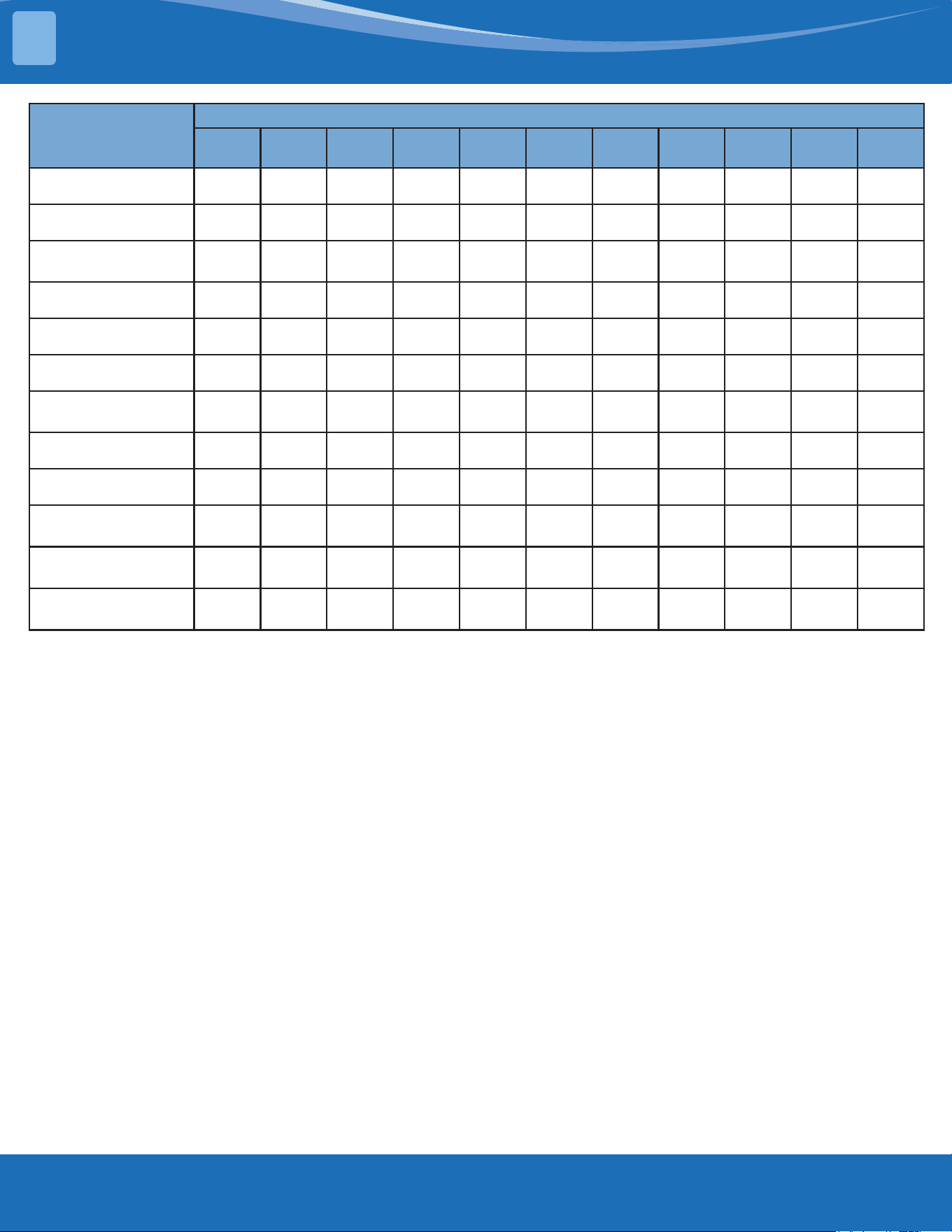
mrcool.com59
TROUBLESHOOTING
5
PartRequiring
Replacement
Error Code
EC 54 EC 51 EC 52 EC 56 EC 07 PC 00 PC 01 PC 02 PC 04 PC 03
FHCC/
EH C3
Indoor PCB
X X X X X X X X X X
√
Outdoor PCB
√ √ √ √ √ √ √ √ √ √
X
Outdoor Fan
Motor
X X X X
√ √
X
√ √
X X
T3 Sensor
X X
√
X X X X X X X X
TP Sensor
√
X X X X X X X X X X
T2B Sensor
X X X
√
X X X X X X X
Refrigerant
Sensor
X X X X X X X X X X
√
Reactor Sensor
X X X X X X
√
X X X X
Compressor
X X X X X
√
X X
√
X X
IPM Module
Board
X X X X X
√ √ √ √
X X
Pressure
Protector
X X X X X X X X X
√
X
Additional
Refrigerant
X X X X X X X X X
√
X
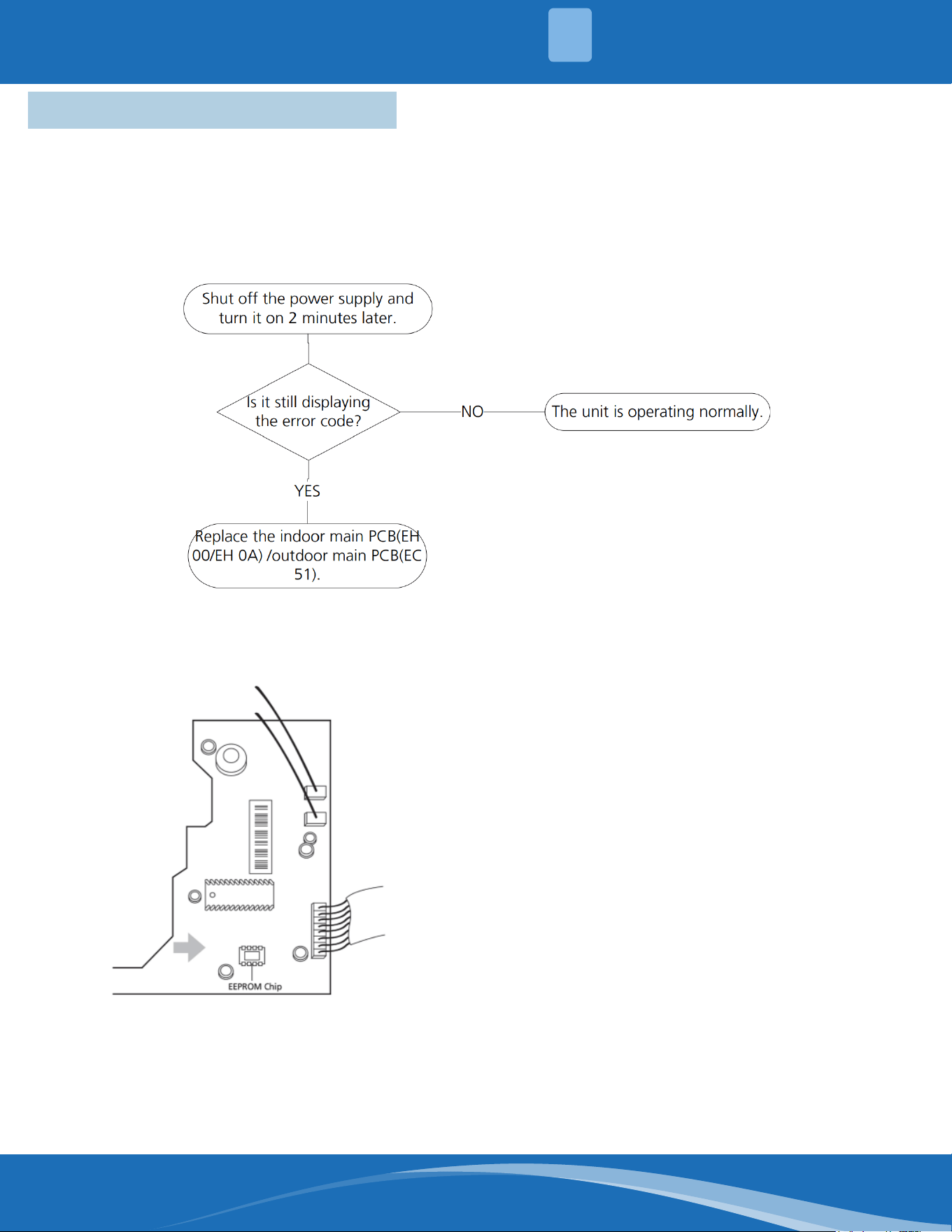
mrcool.com 60
TROUBLESHOOTING
5
5.6 Troubleshooting by Error Code
EH00/EH0A/EC51:EEPROMMalfunctionErrorDiagnosisandSolution.
Description: Indoor PCB main chip does not receive feedback from EEPROM chip.
Recommended parts to prepare:
• Indoor PCB
• Outdoor PCB
Troubleshooting and repair:
Remarks:
EEPROM: A read-only memory whose contents can be erased and reprogrammed using a puled
voltage. The location of the EEPROM chip on the indoor PCB is shown in the following images:
Note: These pictures are for reference, actual appearance may vary.
Troubleshooting and repair of the compressor driven chip EEPROM parameter error and
communication error between the outdoor main chip and compressor driven chip are the same
as EC 51.
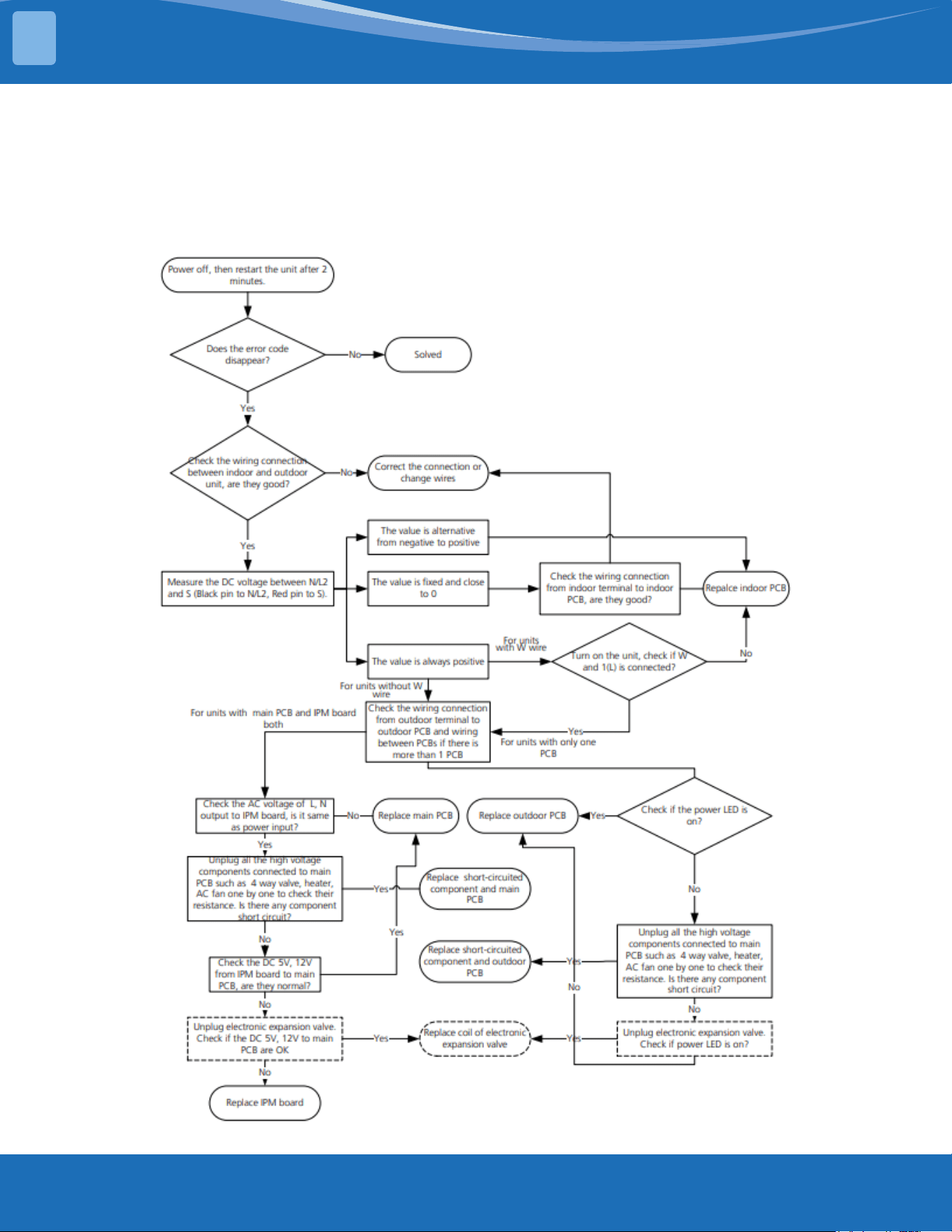
mrcool.com61
TROUBLESHOOTING
5
EL 01: IDU & ODU Communication Error Diagnosis and Solution.
Description: Indoor unit cannot communicate with the outdoor unit.
Recommended parts to prepare:
• Indoor PCB
• Outdoor PCB
• Reactor
Troubleshooting and repair:
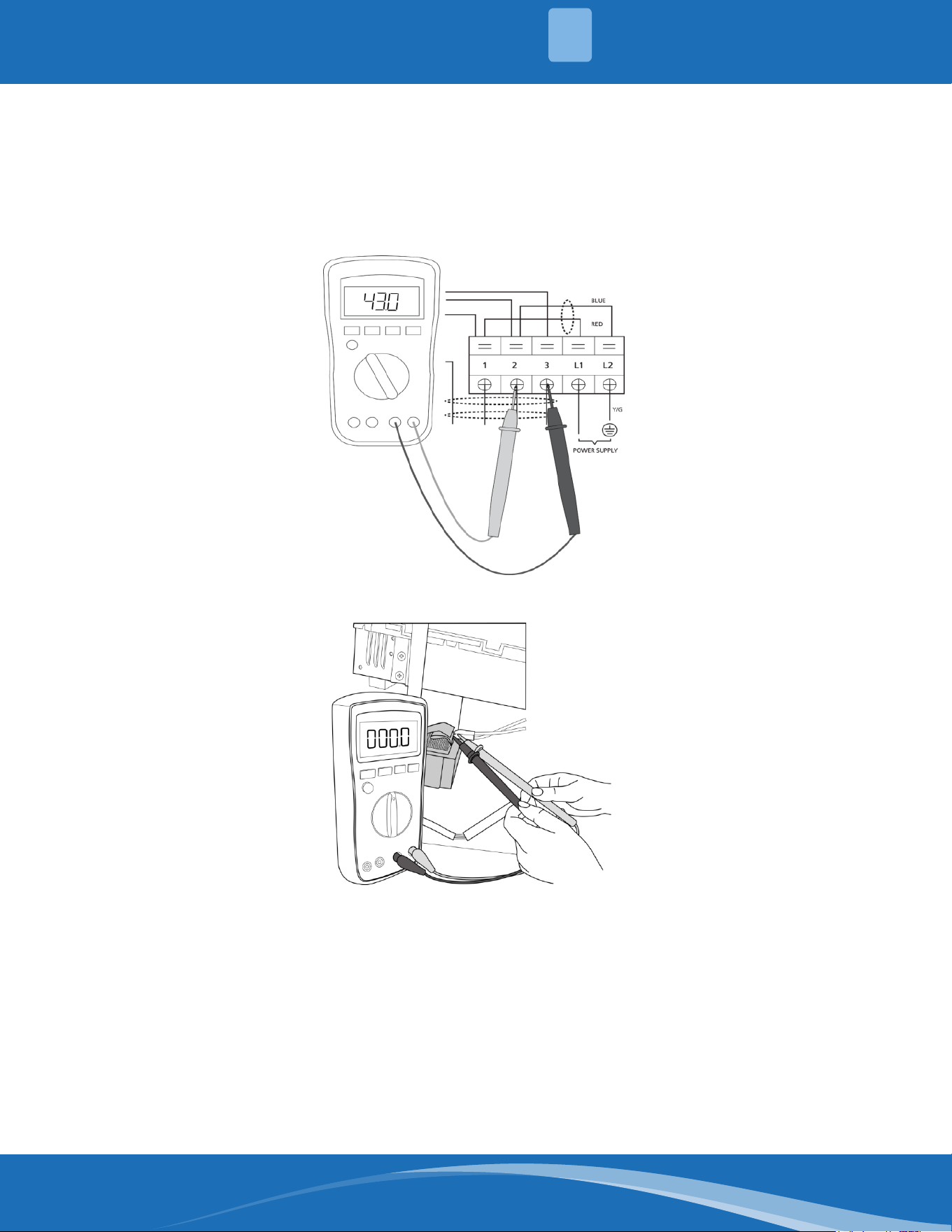
mrcool.com 62
TROUBLESHOOTING
5
Remarks:
• Use a multimeter to test the DC voltage between 2 port (or S or L2 port) and 3 port (or N or S port)
of outdoor unit. The red pin of the multimeter connects with 2 port (or S or L2 port) while the black
pin is for 3 port (or N or S port).
• When AC is running normal the voltage will move alternately between -25V to 25V.
• If the outdoor unit has a malfunction, the voltage will alternate with a positive value.
• If the indoor unit has a malfunction the voltage will be a certain value.
• Use a multimeter to test the resistance of the reactor which does not connect with the capacitor.
• The normal value should be around zero ohms. Otherwise the reactor has a malfunction.
Note: The pictures and the values are for reference only, actual condition and specic values may vary.
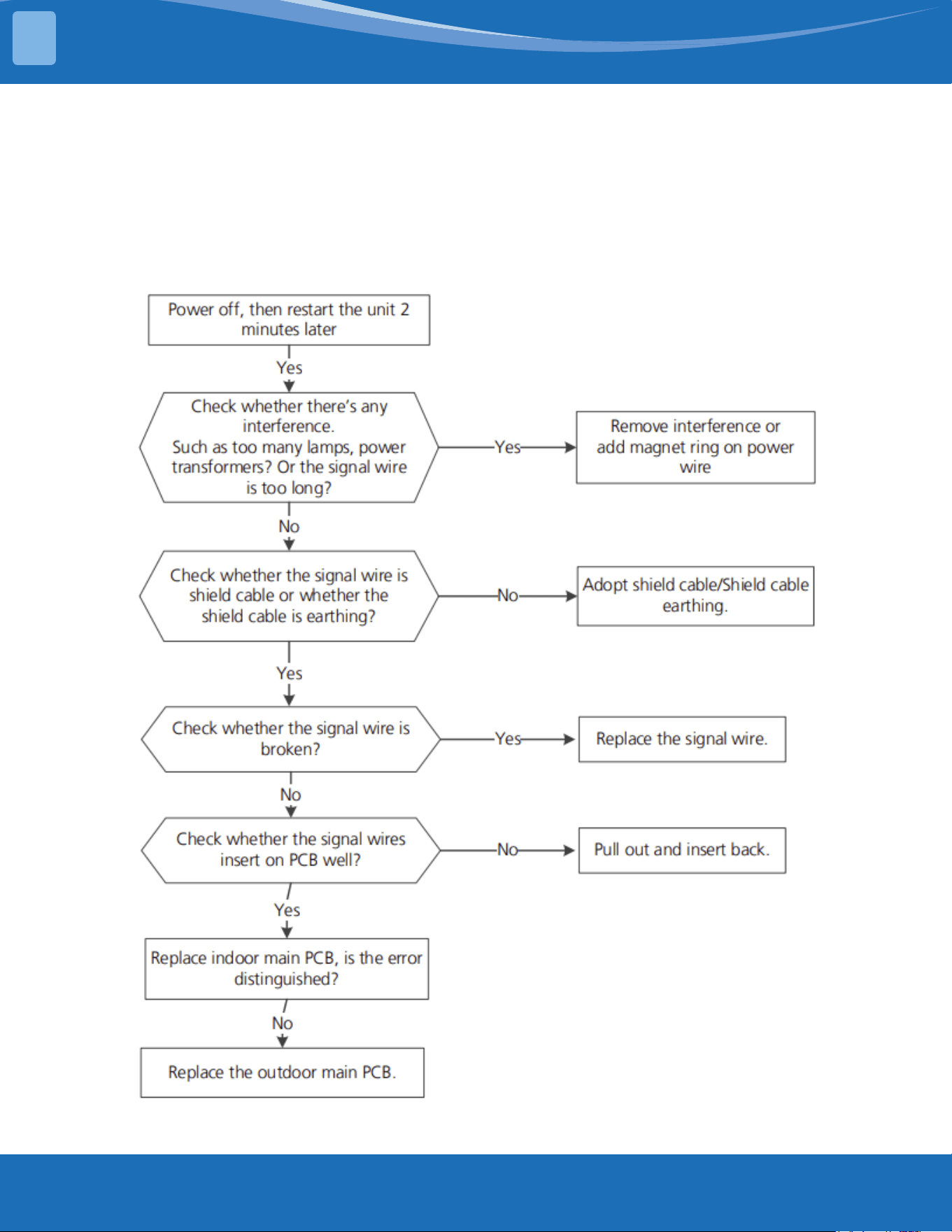
mrcool.com63
TROUBLESHOOTING
5
485Communication(S1,S2Communication)
Recommended parts to prepare:
• Signal wires
• Magnet ring
• Indoor PCB
• Outdoor PCB
Troubleshooting and repair:
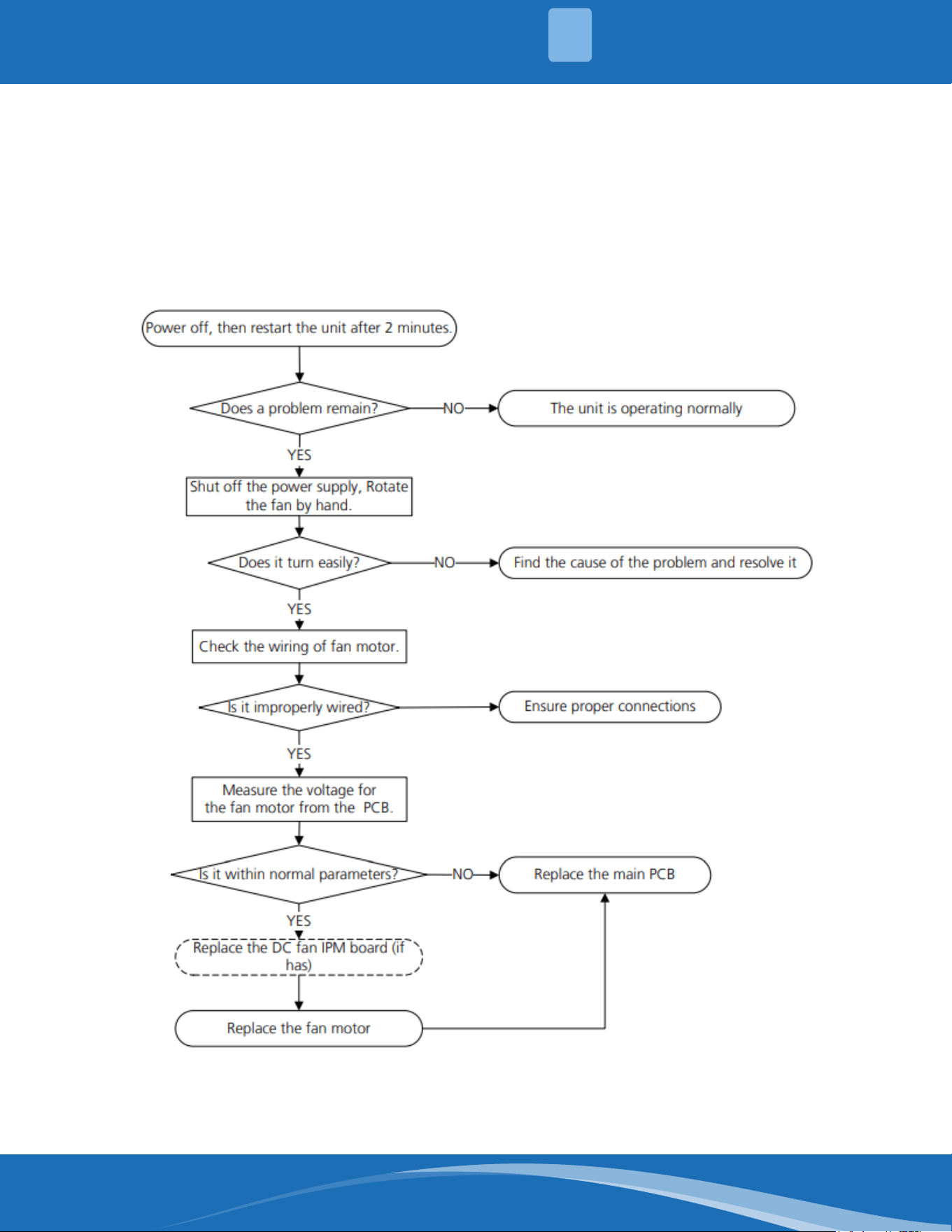
mrcool.com 64
TROUBLESHOOTING
5
EH03/EC07:FanSpeedOutofControlDiagnosisandSolution.
Description: When the indoor/outdoor fan speed keeps too low or too high for a certain time, the unit
ceases operation and the LED displays a fault.
Recommended parts to prepare:
• Connection wires
• Fan assembly
• Fan motor
• PCB
Troubleshooting and repair:
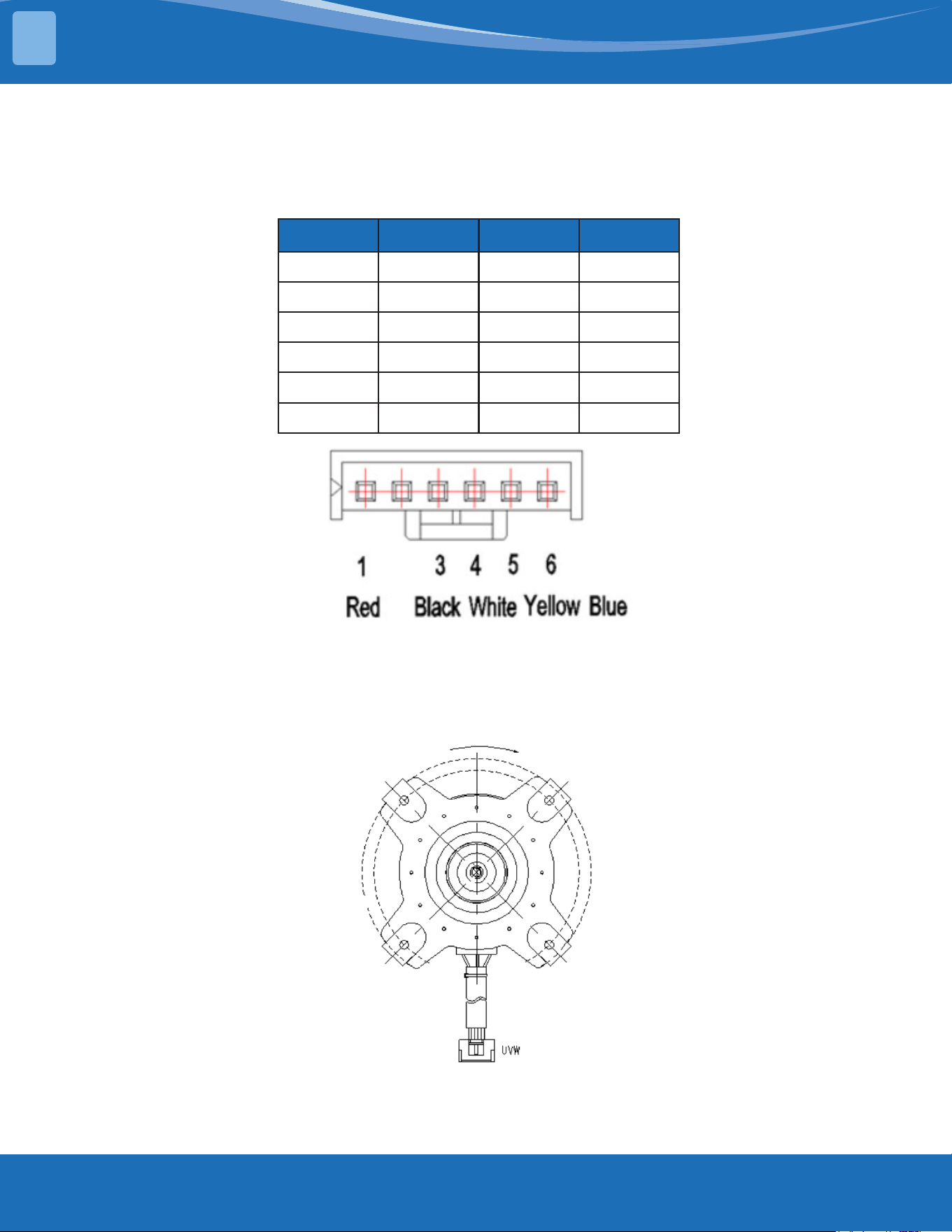
mrcool.com65
TROUBLESHOOTING
5
Index:
1. IndoororOutdoorDCfanmotor(controlchipisinfanmotor)
Power on and make sure the unit is in standby, measure the voltage of pin1-pin3, pin4-pin3 on the fan
motor connector. If the value of the voltage is not in the range showing in the tables below the PCB
will have problems and will need to be replaced.
NO. Color Signal Voltage
1 Red Vs/Vm 192V~380V
2 --- --- ---
3 Black GND 0V
4 White Vcc 13.5-16.5V
5 Yellow Vsp 0~6.5V
6 Blue FG 13.5-16.5V
Index:
1. OutdoorDCfanmotor(controlchipisinoutdoorPCB)
Release the UVW connector and measure the resistance of U-V, U-W, V-W. If the resistance is not equal
to each other the fan motor has a problem and needs to be replaced. Otherwise the PCB has a
problem and needs to be replaced.
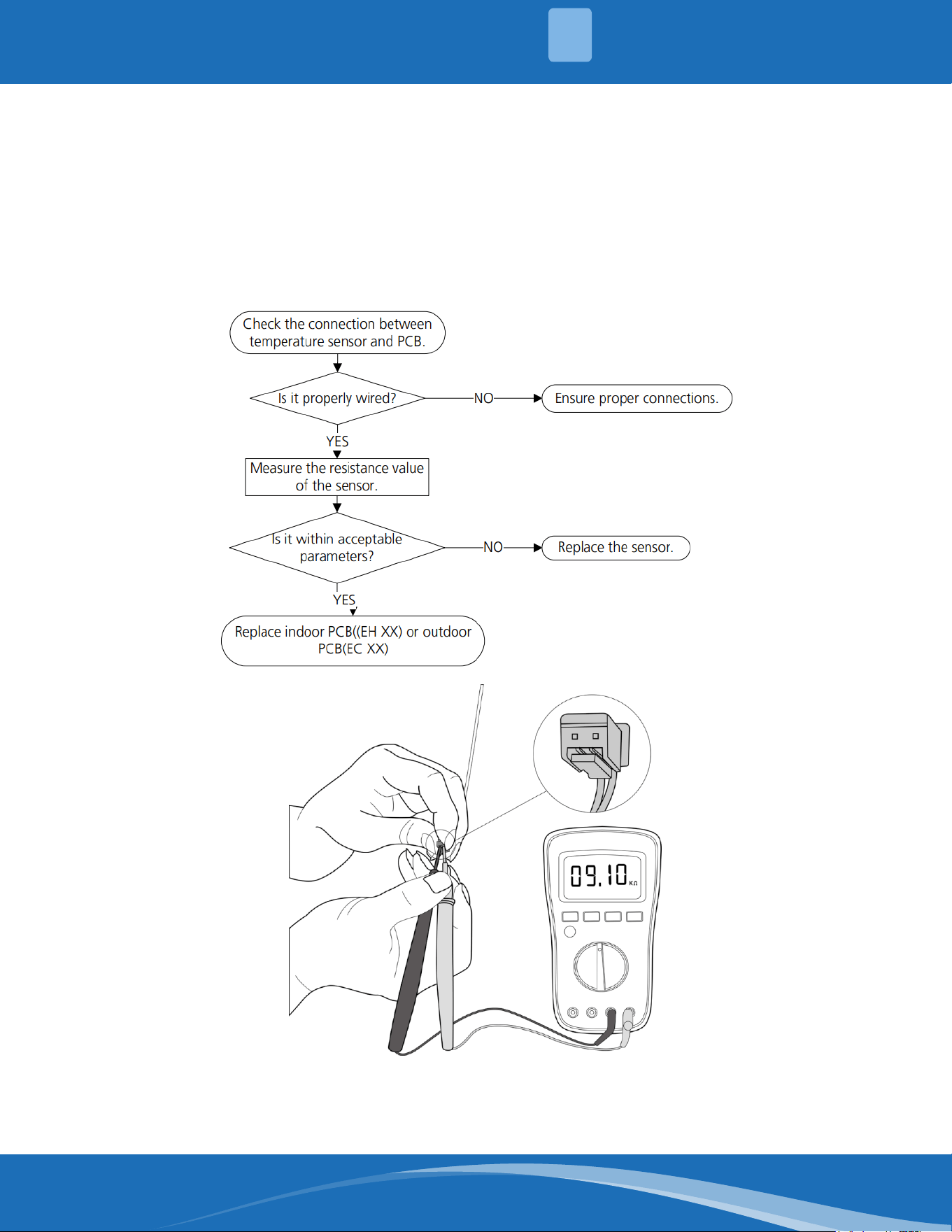
mrcool.com 66
TROUBLESHOOTING
5
EH60/EH61/EC53/EC52/EC54/EC56:OpenCircuitorShortCircuitof
Temperature Sensor Diagnosis and Solution.
Description: If the sampling voltage is lower than 0.06V or higher than 4.94V, the LED displays a fault
code.
Recommended parts to prepare:
• Connection wires
• Sensors
• PCB
Troubleshooting and repair:
Note: The picture and the value are for reference only, actual condition and specic values may vary.
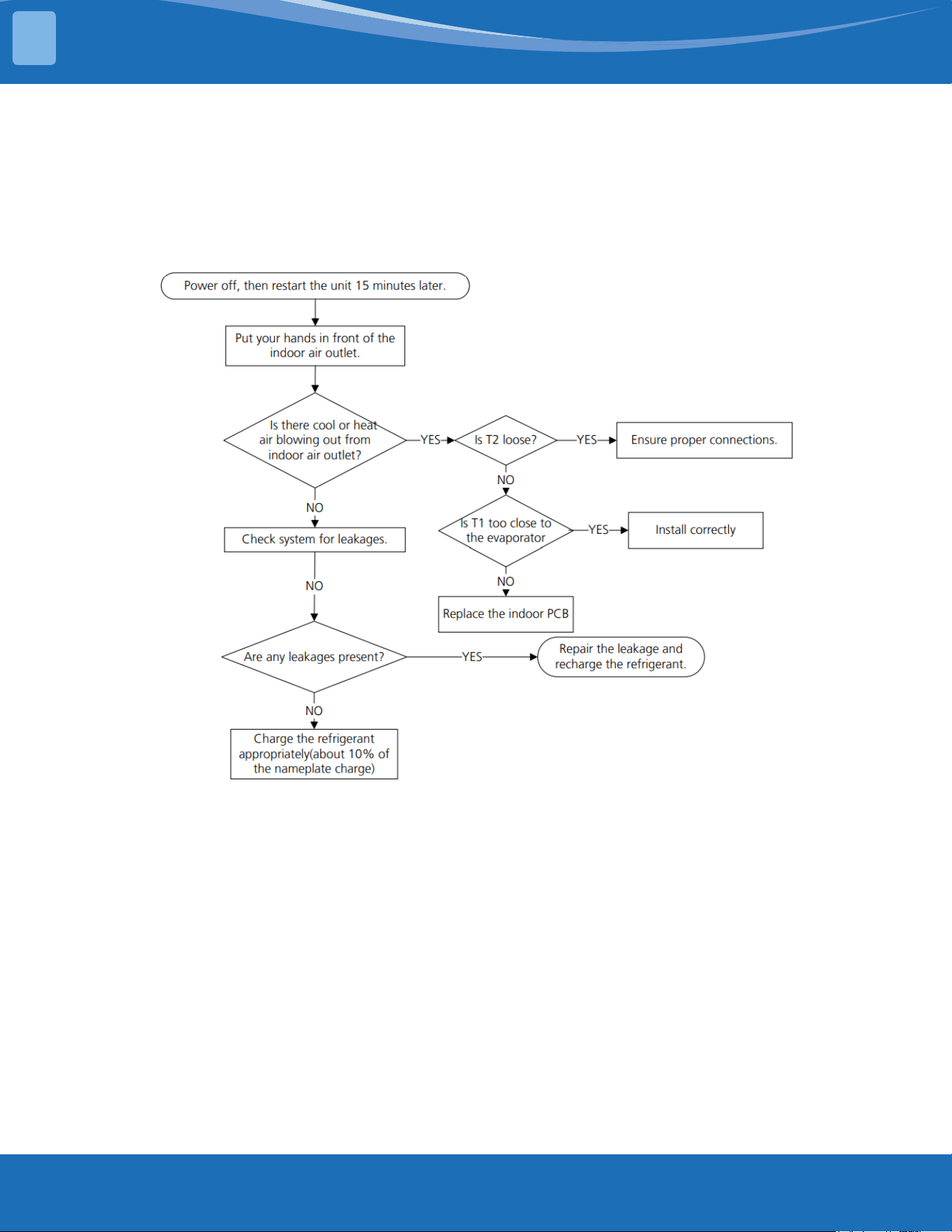
mrcool.com67
TROUBLESHOOTING
5
EL 0C: System Lacks Refrigerant Diagnosis and Solution.
Description: Judging the abnormality of the refrigeration system according to the number of
compressor stops and the changes in operating parameters caused by excessive exhaust temperature.
Recommended parts to prepare:
• Indoor PCB
• Additional refrigerant
Troubleshooting and repair:
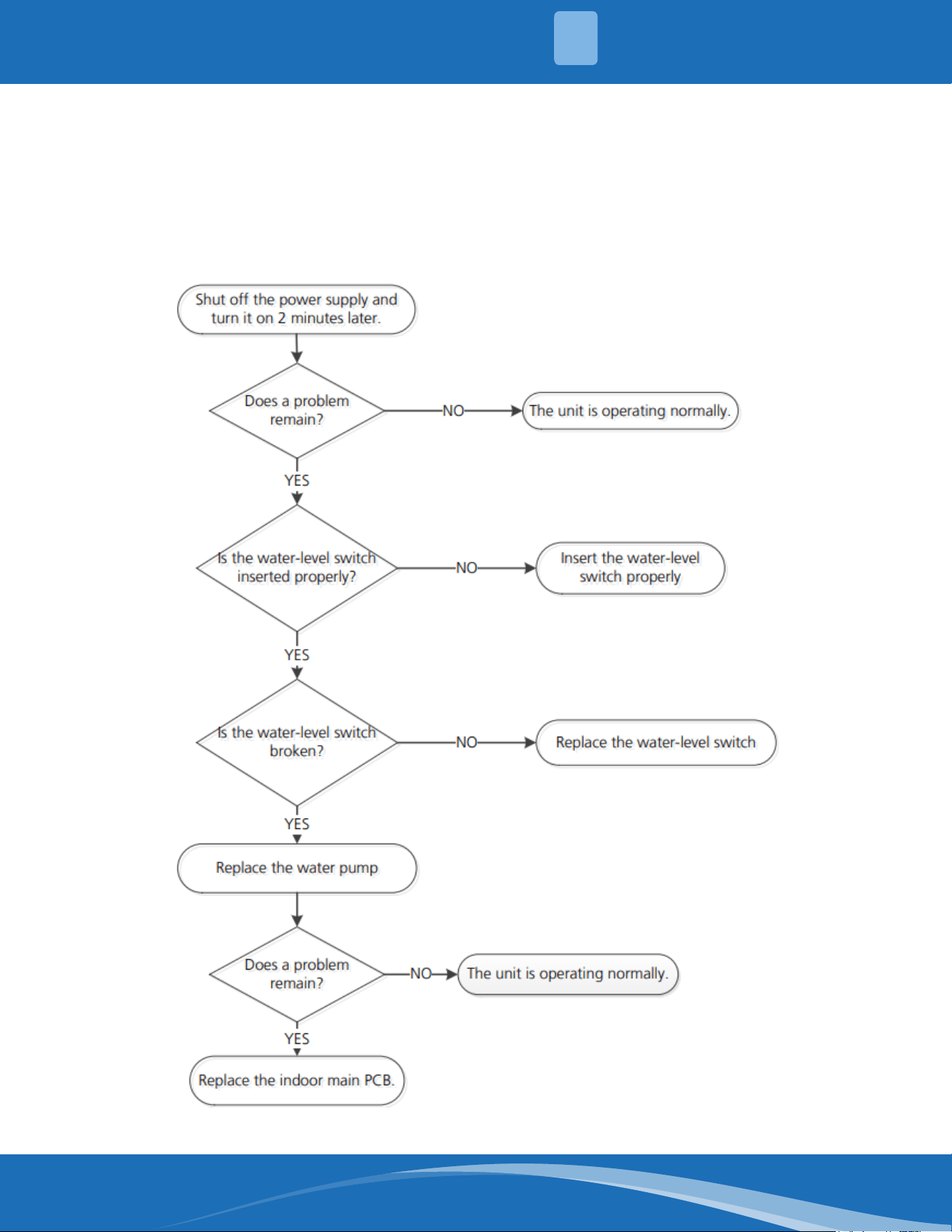
mrcool.com 68
TROUBLESHOOTING
5
EH 0E: Water-Level Alarm Malfunction Diagnosis and Solution.
Description: If the sampling voltage is not 5V, the LED displays a fault code.
Recommended parts to prepare:
• Connection wires
• Water-level switch
• Water pump
• Indoor PCB
Troubleshooting and repair:
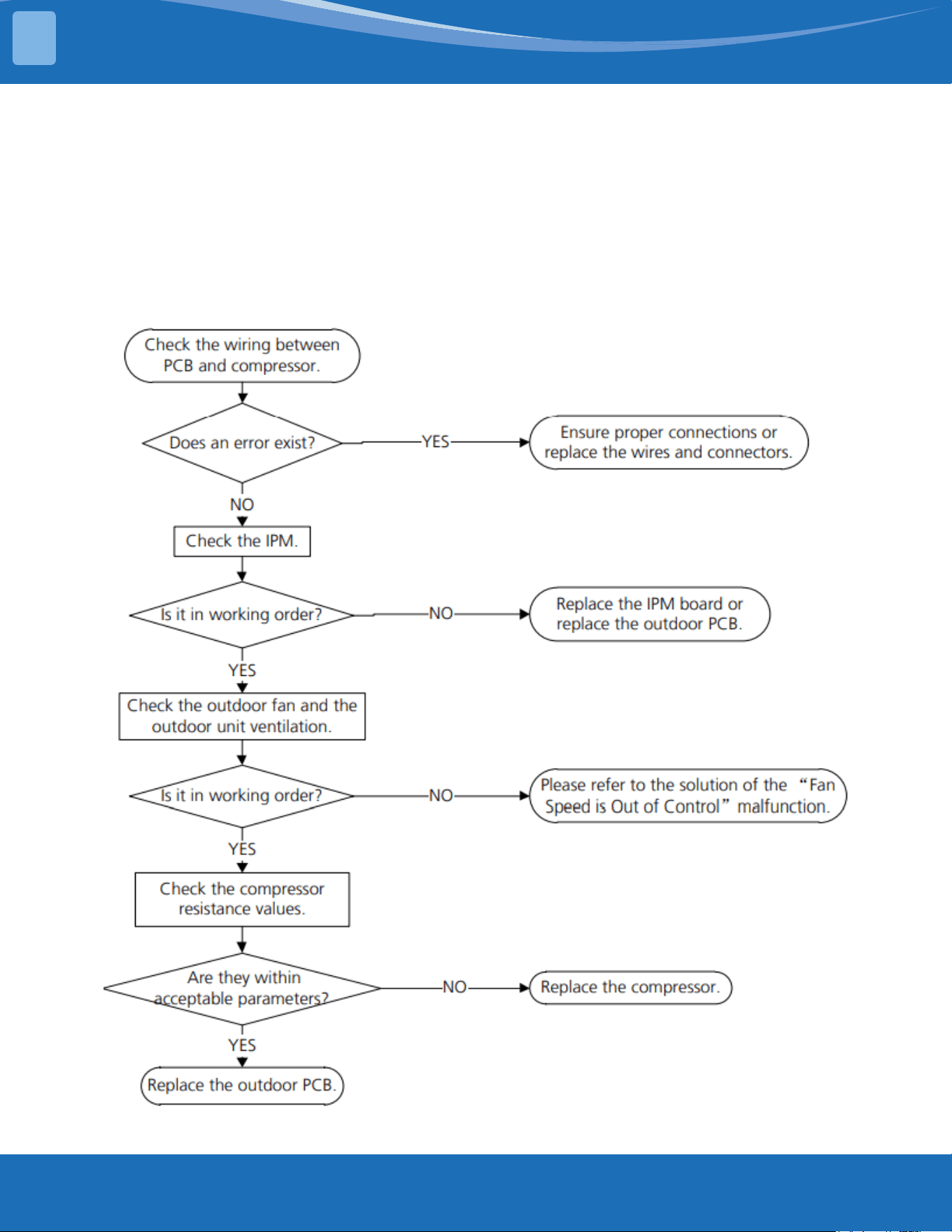
mrcool.com69
TROUBLESHOOTING
5
PC 00: ODU IPM Module Protection Diagnosis and Solution.
Description: When the voltage signal the IPM sends to the compressor drive chip is abnormal, the LED
displays a fault code.
Recommended parts to prepare:
• Connection wires
• IPM module board
• Outdoor fan assembly
• Compressor
• Outdoor PCB
Troubleshooting and repair:
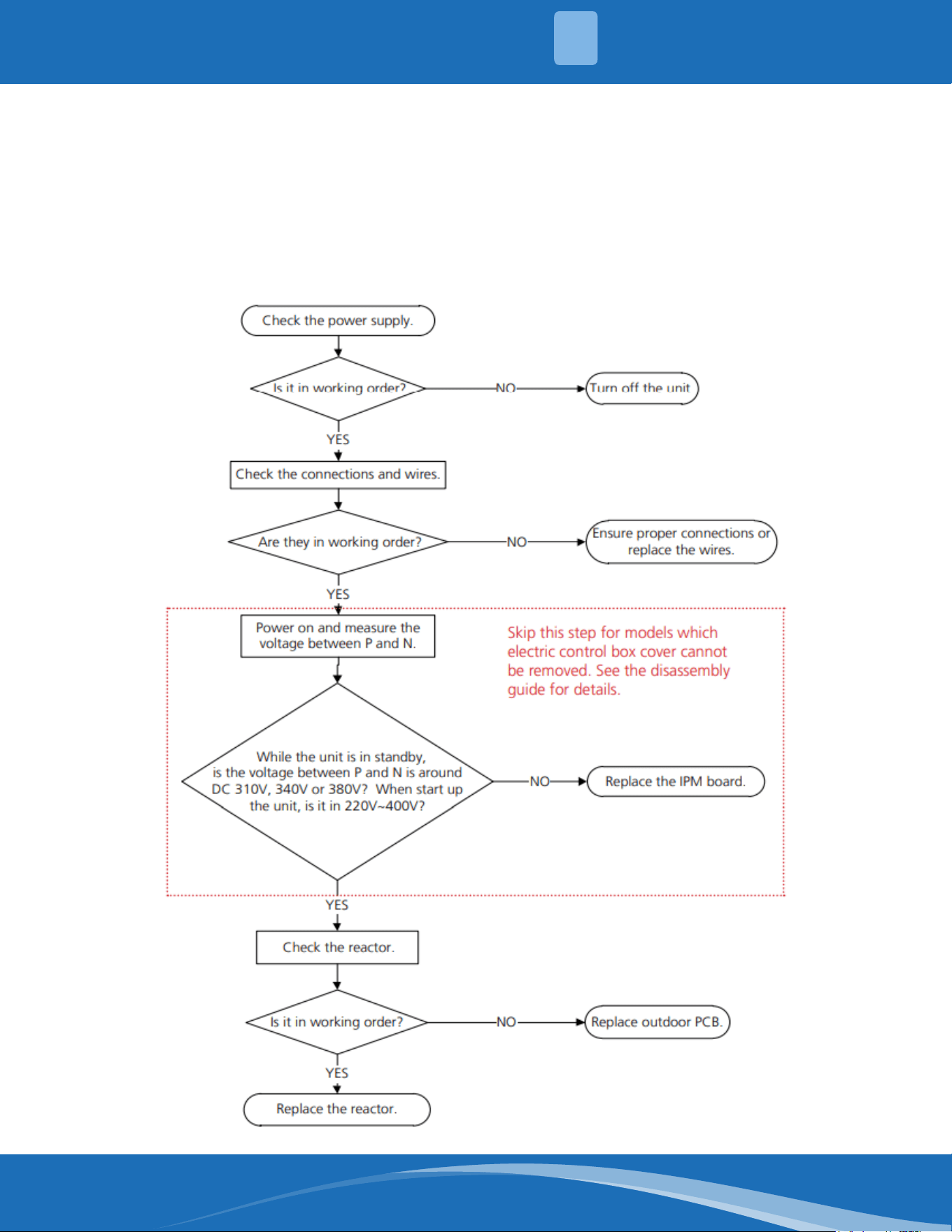
mrcool.com 70
TROUBLESHOOTING
5
PC 01: ODU Voltage Protection Diagnosis and Solution.
Description: Abnormal increases or decreases in voltage are detected by checking the specied
voltage detection circuit.
Recommended parts to prepare:
• Power supply wires
• IPM module board
• PCB
• Reactor
Troubleshooting and repair:
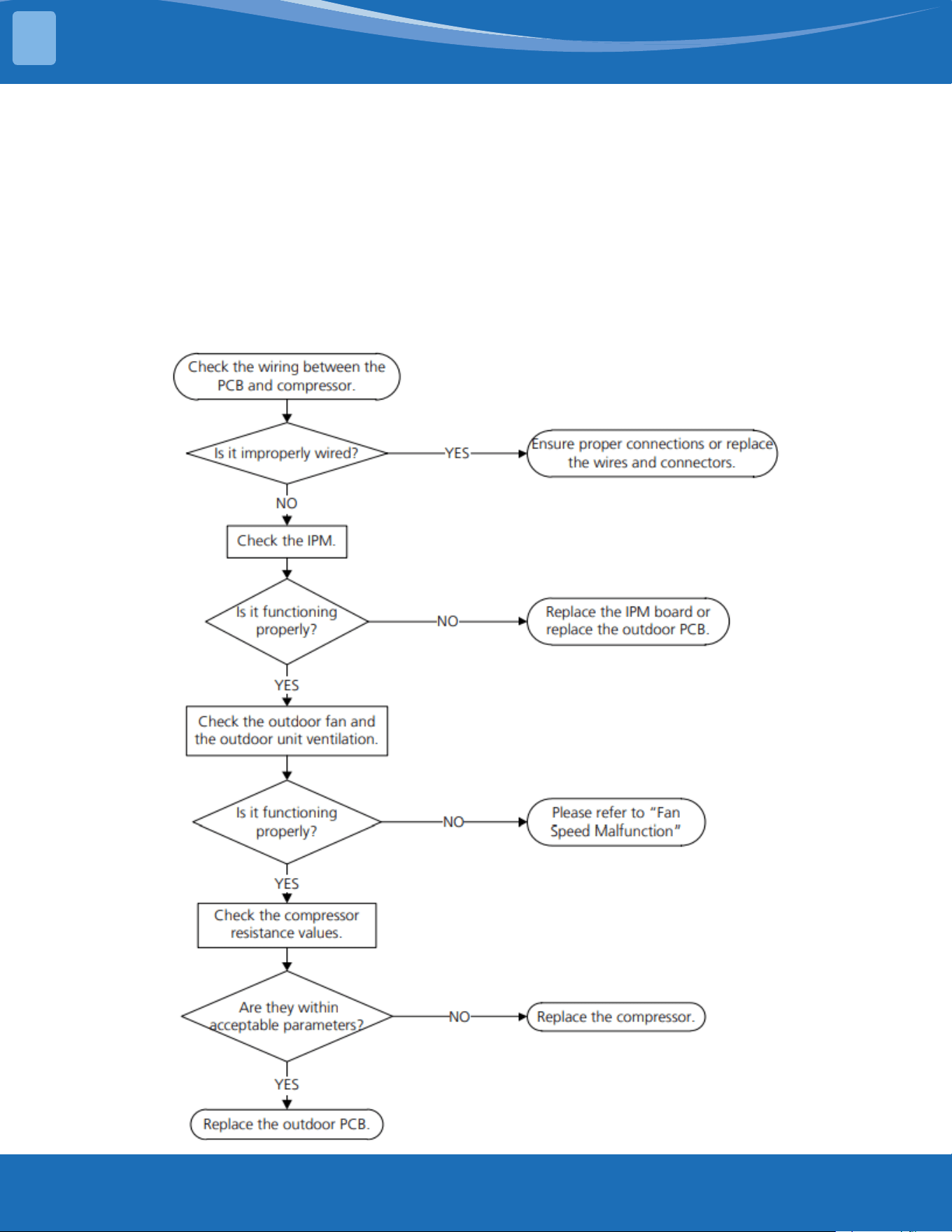
mrcool.com71
TROUBLESHOOTING
5
PC 04: Inverter Compressor Drive Error Diagnosis and Solution.
Description: An abnormal inverter compressor drive is detected by a special detection circuit,
including communication, signal detection, voltage detection, compressor rotation speed signal
detection, and so on.
Recommended parts to prepare:
• Connection wires
• IPM module board
• Outdoor fan assembly
• Compressor
• Outdoor PCB
Troubleshooting and repair:
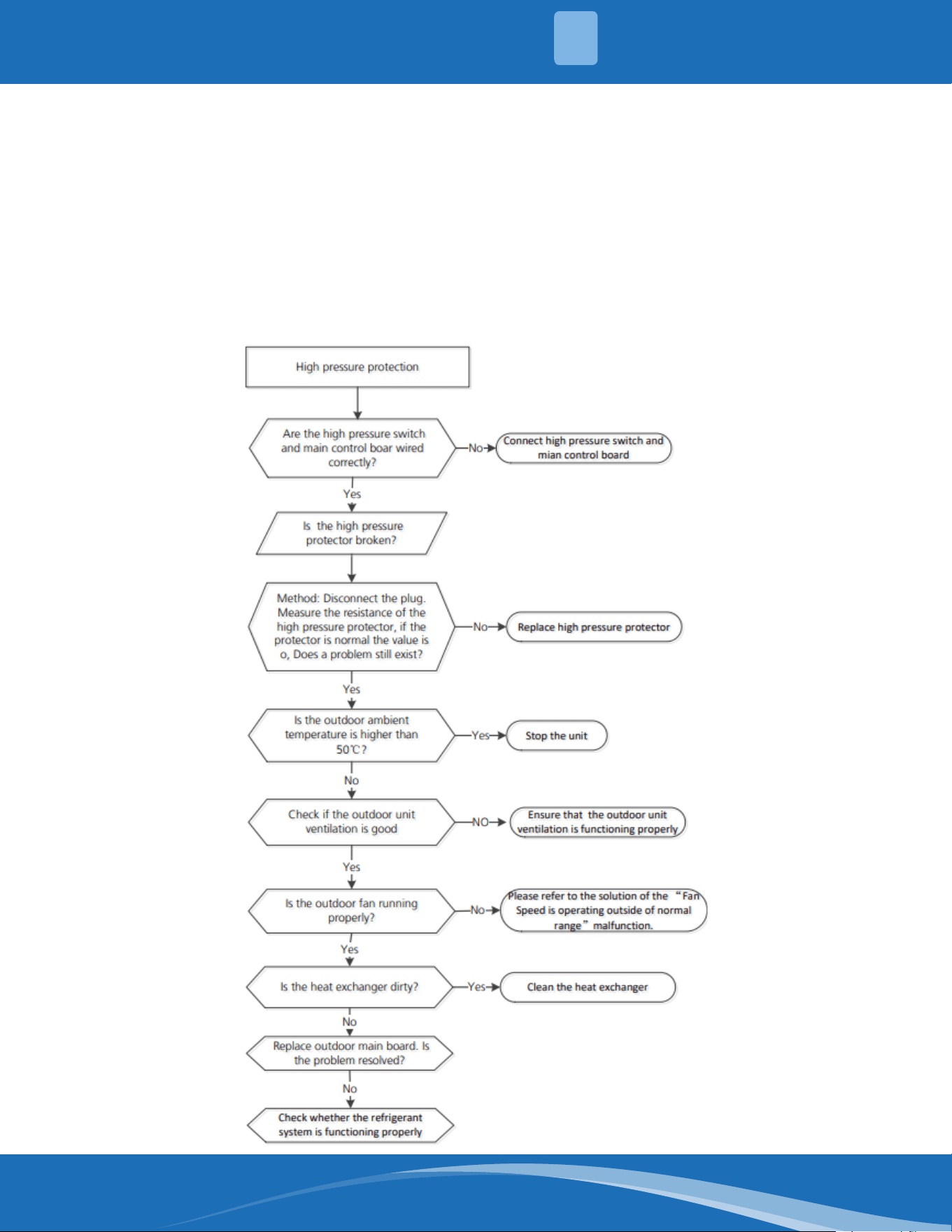
mrcool.com 72
TROUBLESHOOTING
5
PC03:PressureProtection(LoworHighPressure)DiagnosisandSolution.
Description: The outdoor pressure switch cut o the system due to high pressure (if pressure is
higher than 638 PSI.(4.4MPa)). Or the outdoor pressure switch cut o the system due to low pressure
(if the pressure is lower than 18.85 PSI.(0.13MPa) the LED will display a fault code.
Recommended parts to prepare:
• Connection wires
• Pressure switch
• Outdoor fan
• Outdoor main PCB
• Refrigerant
Troubleshooting and repair:
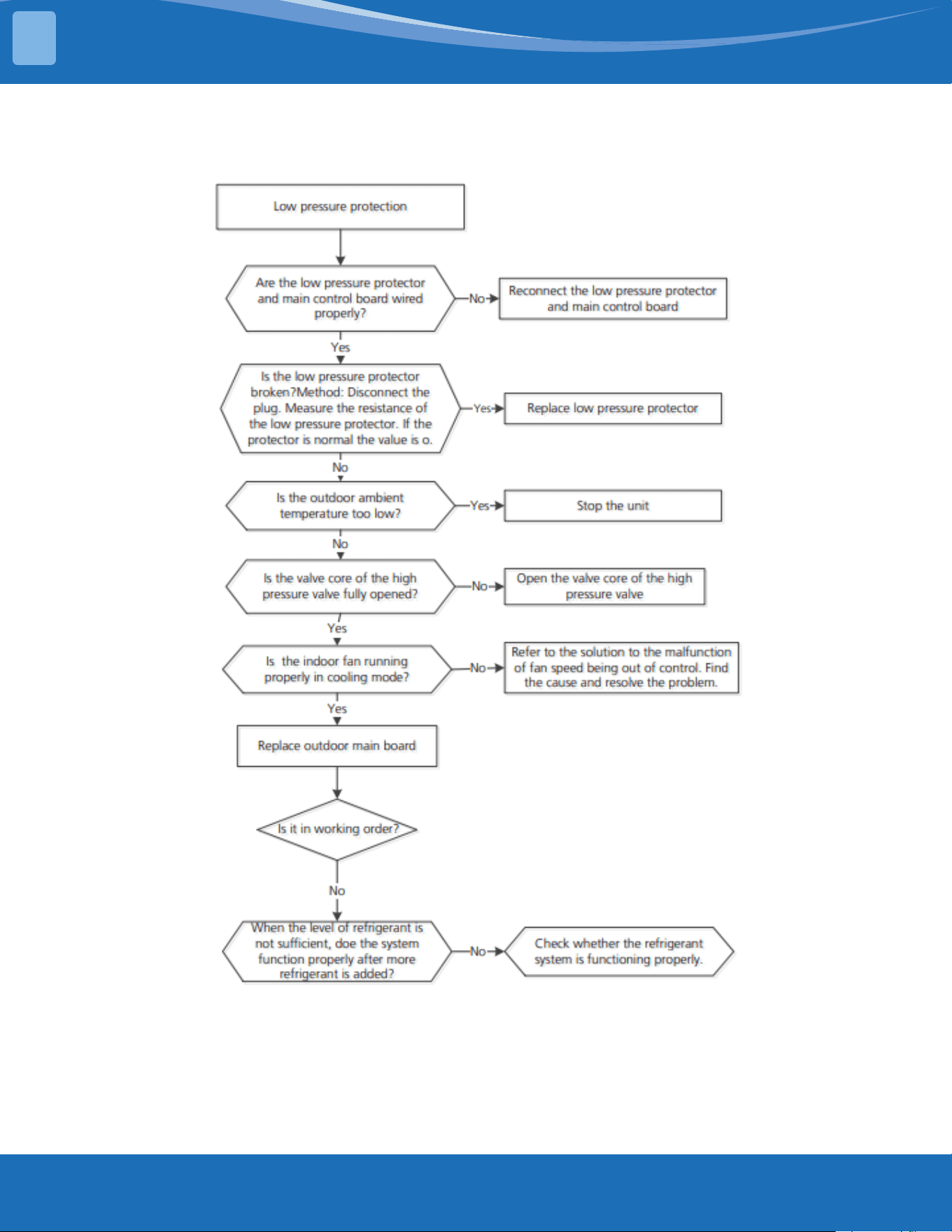
mrcool.com73
TROUBLESHOOTING
5
PC 03: Cont.
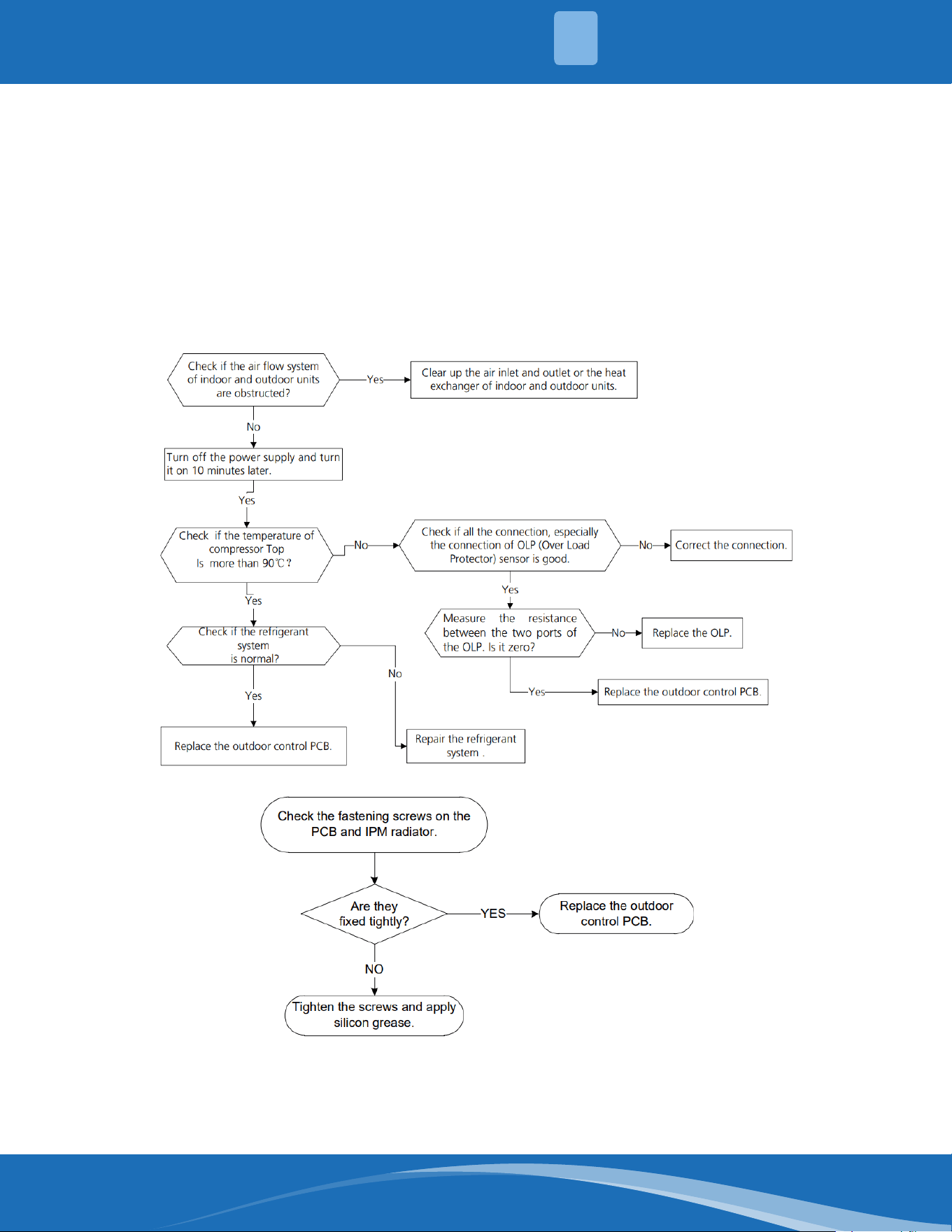
mrcool.com 74
TROUBLESHOOTING
5
PC02:CompressorTop(orIPM)Temp.ProtectionDiagnosisandSolution.
Description: (For some models with overload protection). If the sampling voltage is not 5V, the LED
will display a fault code. If the temperature of the IPM module is higher than a certain value, the LED
will display a fault code.
Recommended parts to prepare:
• Connection wires
• Outdoor PCB
• IPM module board
• High pressure protector
• System blockages
Troubleshooting and repair:
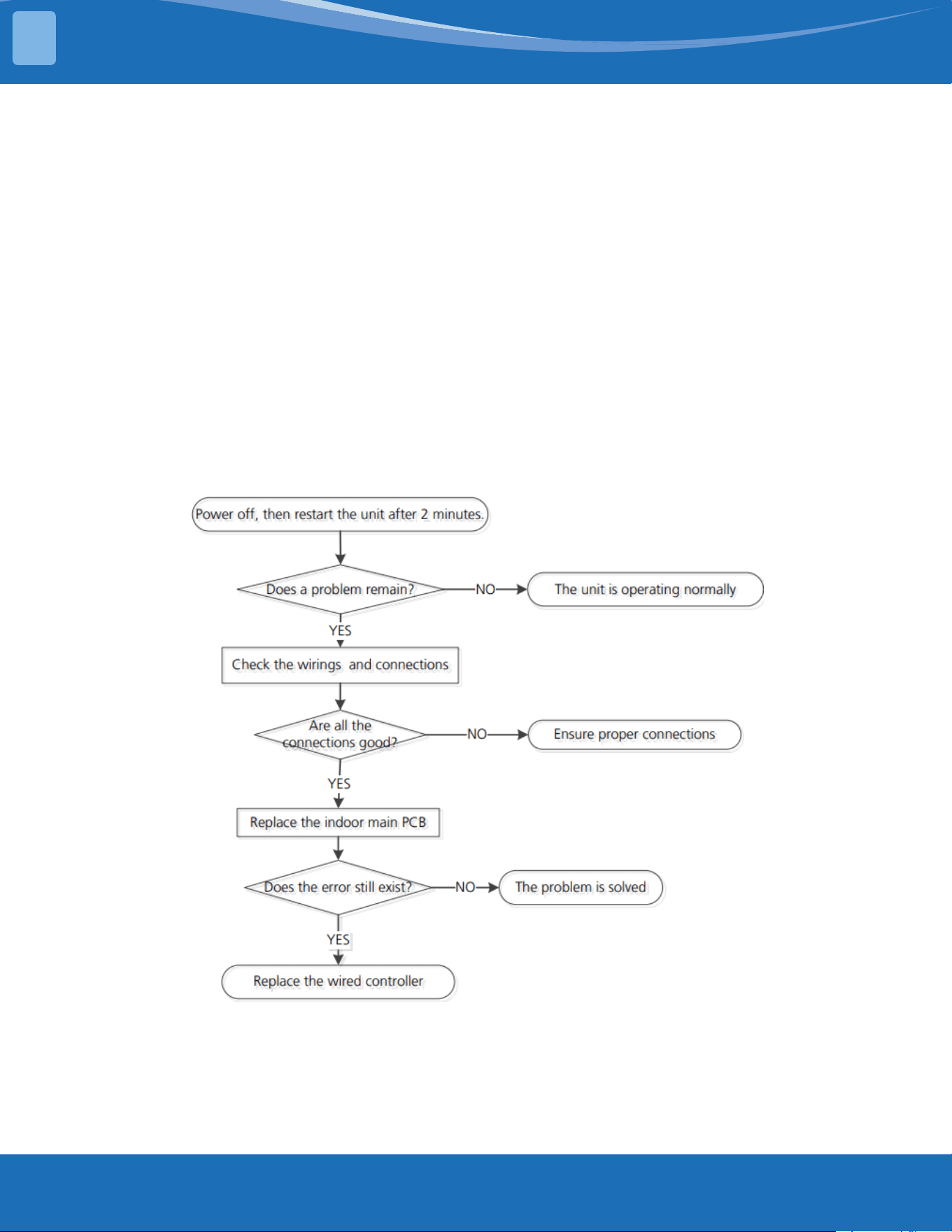
mrcool.com75
TROUBLESHOOTING
5
PC 0L: Low Ambient Temperature Protection.
Description: It is a protection function. When the compressor is o and the outdoor ambient
temperature (T4) is lower than -35°C for 10s, the AC will stop and display the fault code.
When the compressor is on and the outdoor ambient temperature (T4) is lower than -40°C for 10s, the
AC will stop and display the fault code.
When the outdoor ambient temperature (T4) is no lower than -32°C for 10s, the unit will exit the
protection.
EH b3: Communication malfunction Between Wire and Master Control Diagnosis
and Solution.
Description: If the indoor PCB does not receive feedback from the wired controller, the error displays
on the wired controller..
Recommended parts to prepare:
• Connection wires
• Indoor PCB
• Wired Controller
Troubleshooting and repair:
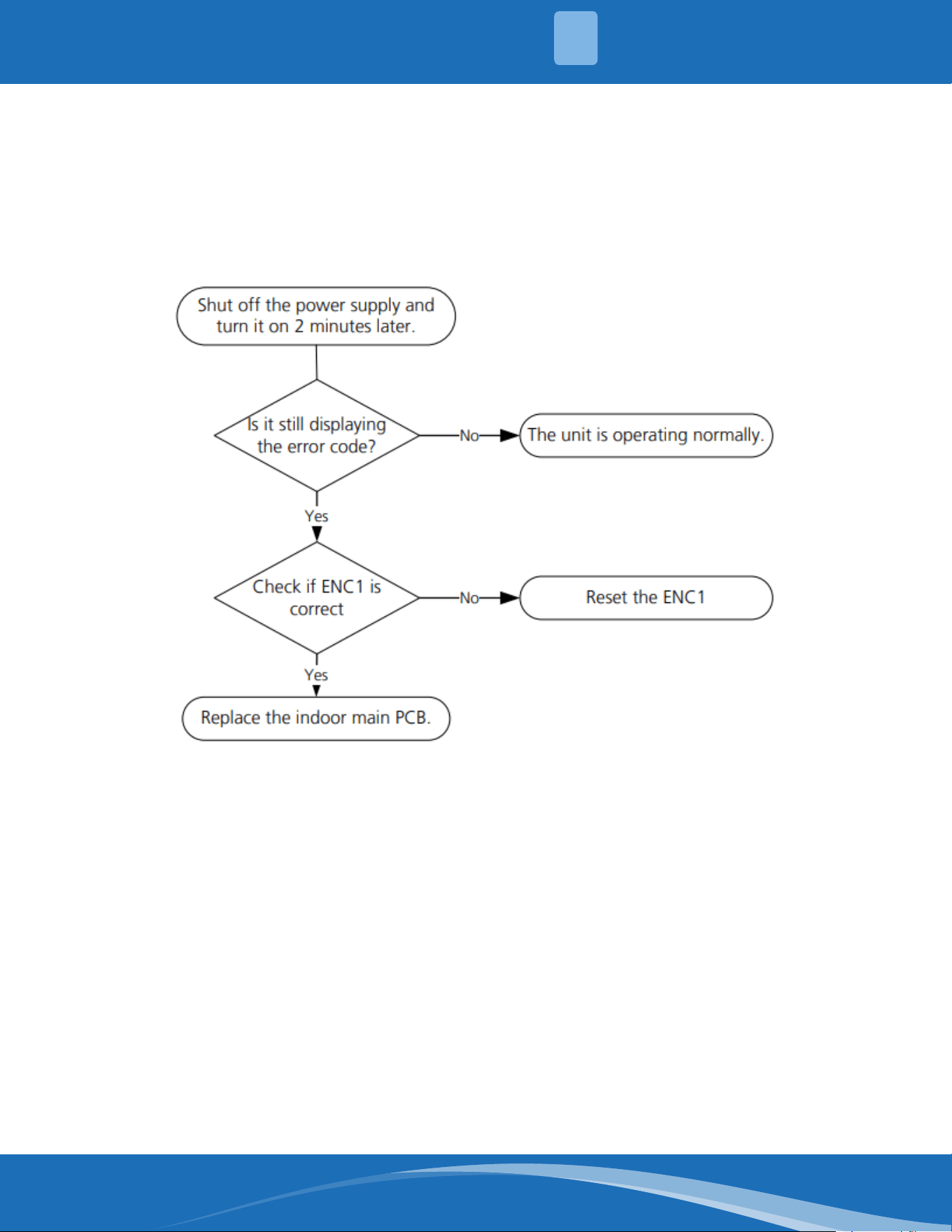
mrcool.com 76
TROUBLESHOOTING
5
EH bA: Communication Error Between the Indoor Unit and the External Fan
module/EH3A:ExternalFanDCBusVoltageistooLowProtection/EH3b:External
fan DC bus voltage is too High Fault Diagnosis and Solution.
Description: The indoor unit does not receive the feedback from the external fan module during 150s
or the indoor unit receives abnormal increases or decreases in voltage from the external fan module.
Recommended parts to prepare:
• Indoor main PCB
Troubleshooting and repair:
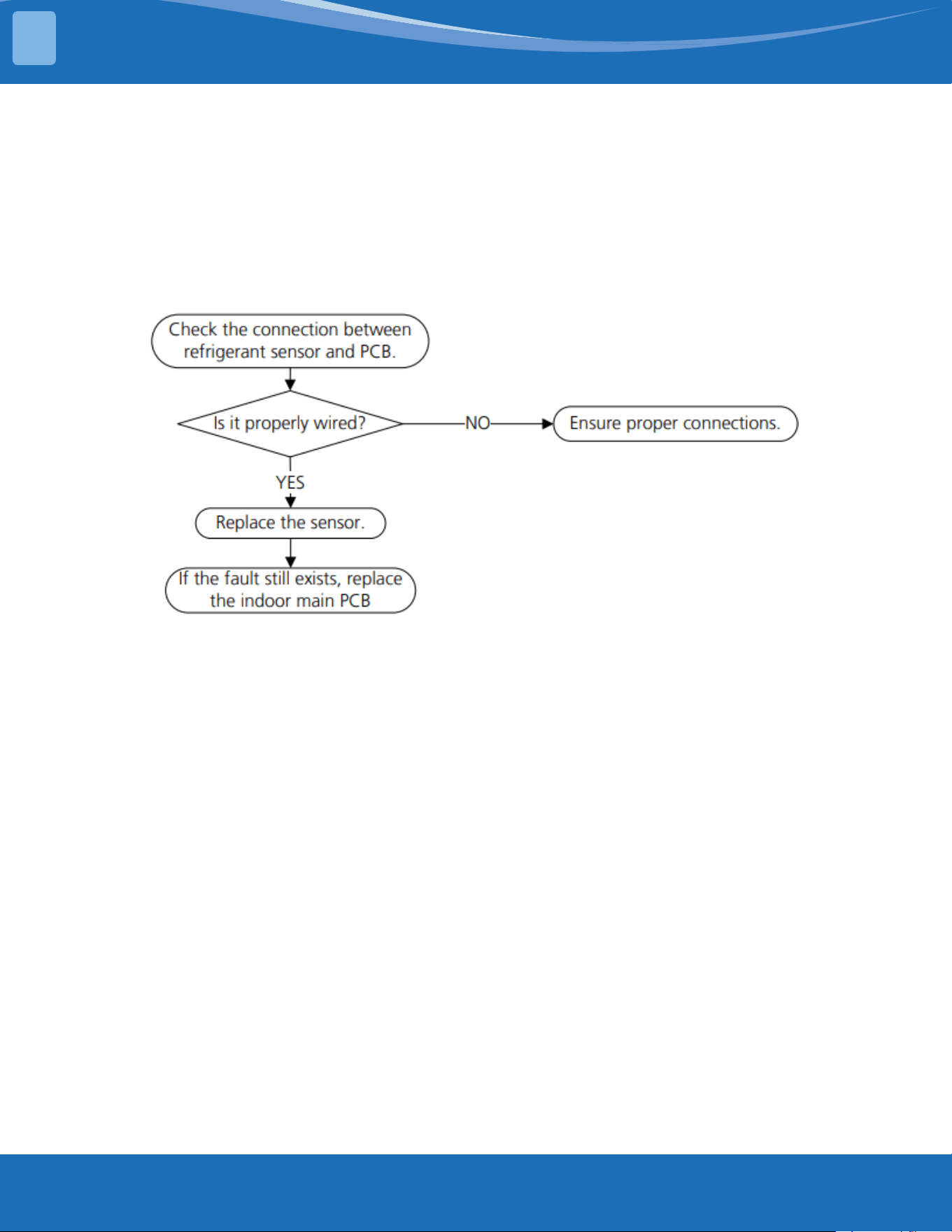
mrcool.com77
TROUBLESHOOTING
5
FHCC:RefrigerantSensorError/EHC3:RefrigerantSensorisOutofRange
Diagnosis and Solution.
Description: Indoor unit receives a fault signal for 10s or the indoor unit does not receive feedback
from the refrigerant sensor for 150s.
Recommended parts to prepare:
• Connection wires
• Sensors
• Indoor man PCB
Troubleshooting and repair:
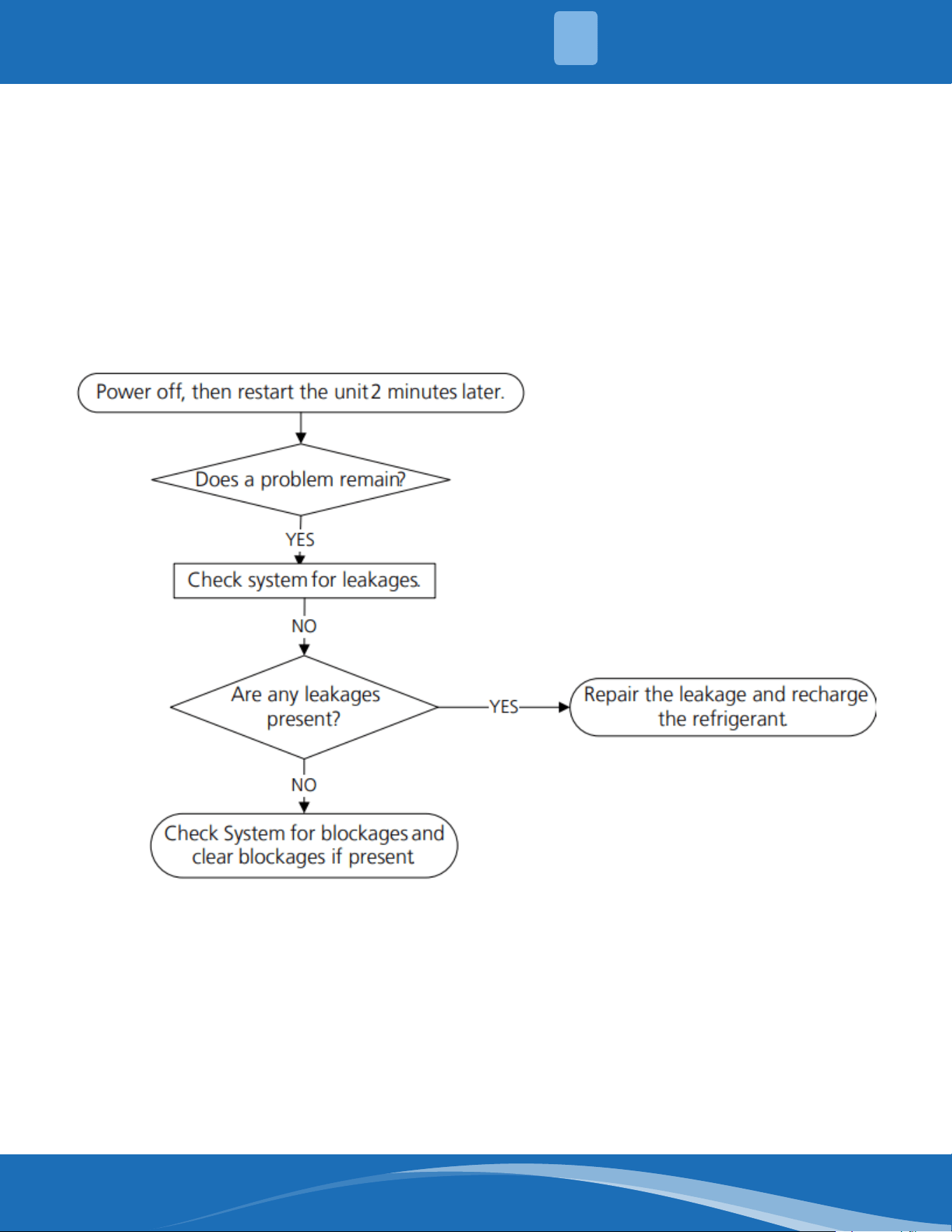
mrcool.com 78
TROUBLESHOOTING
5
EHC1:RefrigerantSensorDetectsLeakage/EHC2:RefrigerantSensorisOutof
Range and Leakage is Detected Diagnosis and Solution
Description: The refrigerant sensor detects a concentration higher than or equal to 10%*LFL for 10
seconds or the refrigerant sensor detects a concentration higher than or equal to 20%*LFL or the multi
model receives the refrigerant leakage protection fault sent by the outdoor unit.
Multi-zone: Only the buzzer of the indoor unit that detects refrigerant leakage continues to sound the
alarm, the shortest sound is 10 seconds and the longest sound is 5 minutes (you can press any key
on the remote control, wired controller, APP, and so on to eliminate the alarm) and any other non-
refrigerant leakage fault the indoor unit will only display ECC1 and the buzzer will not make a sound.
Recommended parts to prepare:
• Additional refrigerant
Troubleshooting and repair:
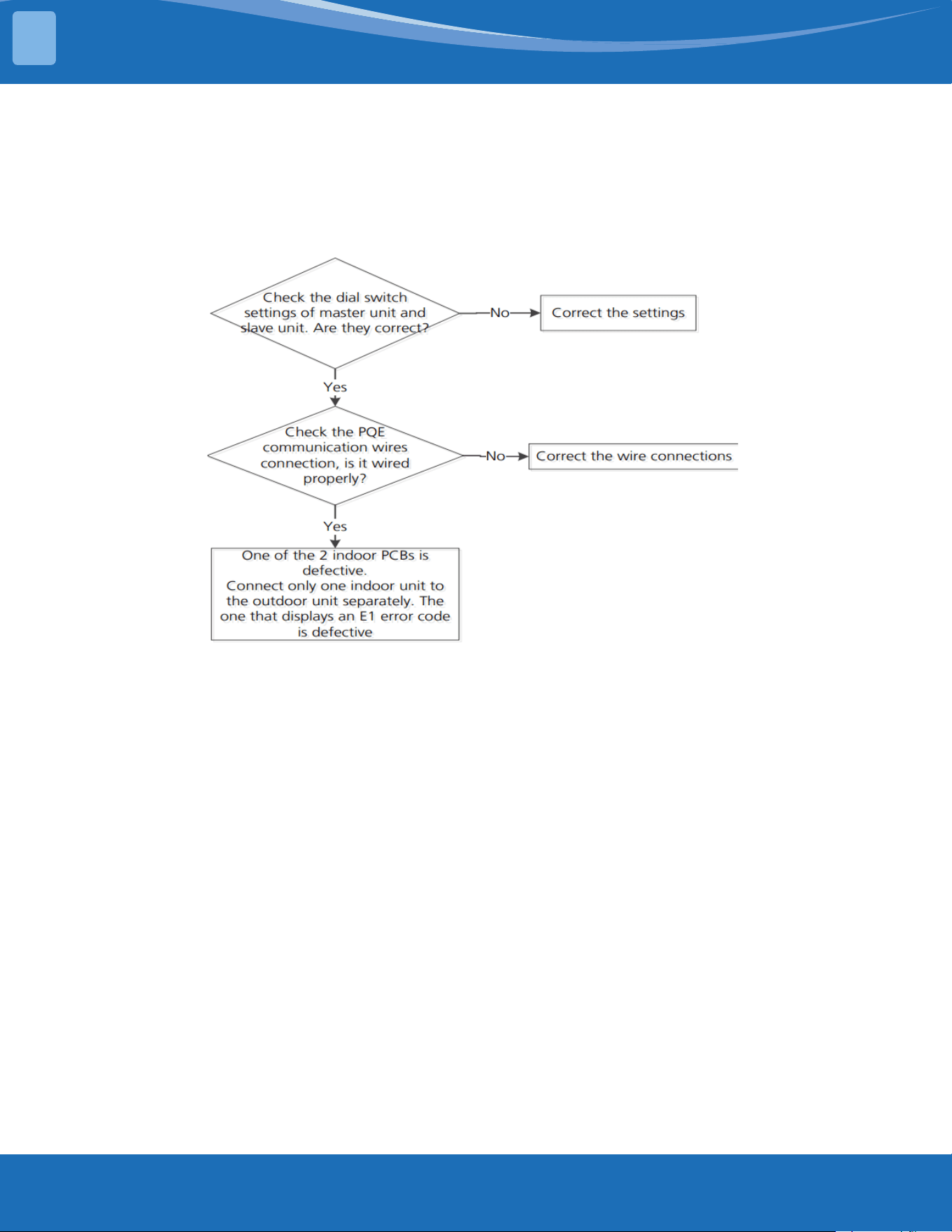
mrcool.com79
TROUBLESHOOTING
5
EL 11: Communication Malfunction Between the Main unit and Secondary Units
(forTwinSystems)DiagnosisandSolution.
Description: When set in twin systems the master unit and slave unit cannot be recognized normally.
Recommended parts to prepare:
• Connection wires
• Indoor man PCB
Troubleshooting and repair:
EH12:MainUnitorSecondaryUnitMalfunction(forTwinSystem)Diagnosisand
Solution.
Description: When set in twin systems, one indoor unit displays this error code which means another
unit if faulty. Check another indoor unit's error code and then follow the prescribed solutions to
resolve the malfunction.
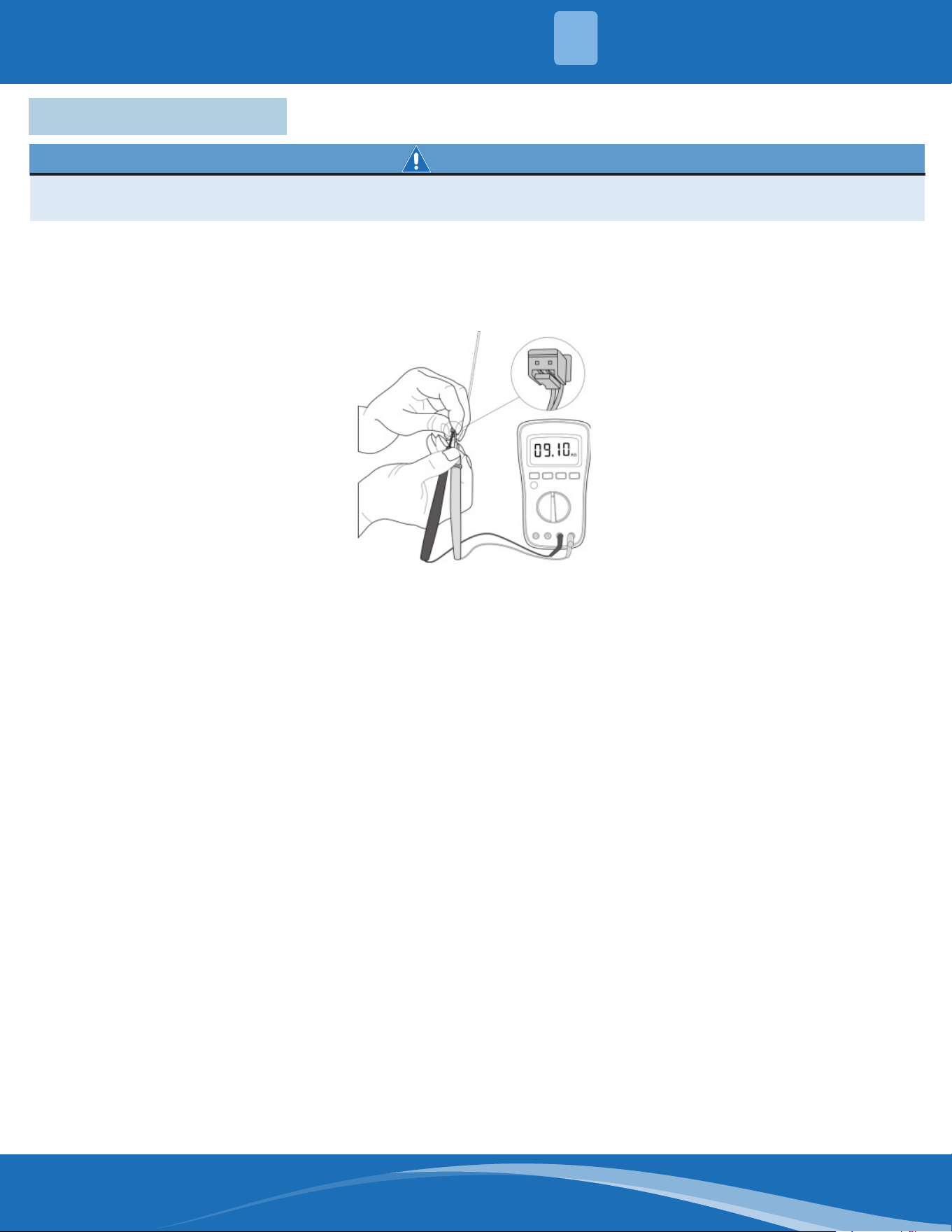
mrcool.com 80
TROUBLESHOOTING
5
5.7 Check Procedures
WARNING
Besuretoturnoallpowersuppliesordisconnectallwirestoavoidelectricshock.Operateonlyafter
thecompressorandcoilhasreturnedtonormaltemperatureincaseofinjury.
1. Disconnect the temperature sensor from the PCB.
2. Measure the resistance value of the sensor using a multi-meter.
3. Check corresponding temperature sensor resistance value table.
Note: The picture and the value are for reference only, actual condition and specic values may vary.
Temperature Sensor Check:
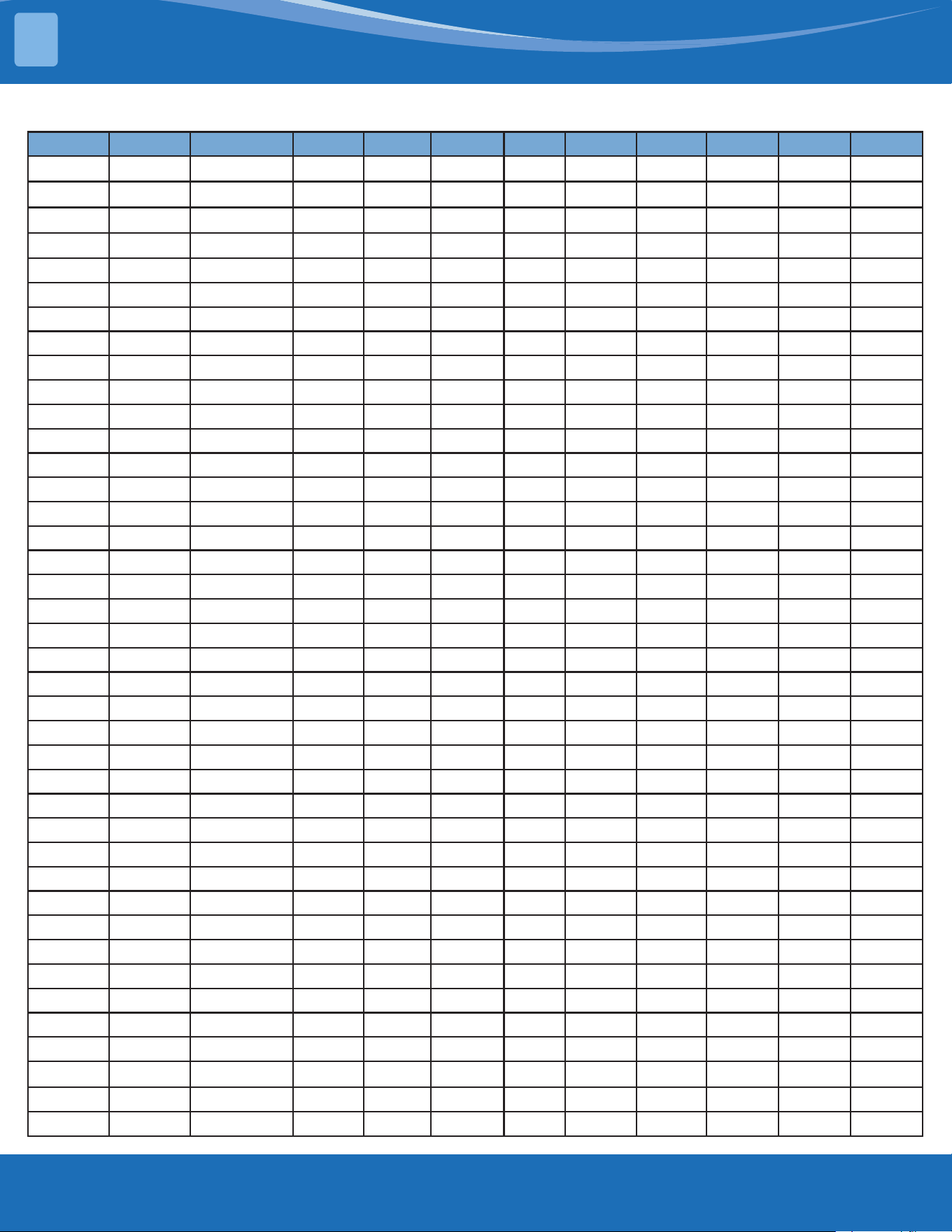
mrcool.com81
°C °F K Ohm °C °F K Ohm °C °F K Ohm °C °F K Ohm
-20 -4 542.7 20 68 68.66 60 140 13.59 100 212 3.702
-19 -2 511.9 21 70 65.62 61 142 13.11 101 214 3.595
-18 0 483 22 72 62.73 62 144 12.65 102 216 3.492
-17 1 455.9 23 73 59.98 63 145 12.21 103 217 3.392
-16 3 430.5 24 75 57.37 64 147 11.79 104 219 3.296
-15 5 406.7 25 77 54.89 65 149 11.38 105 221 3.203
-14 7 384.3 26 79 52.53 66 151 10.99 106 223 3.113
-13 9 363.3 27 81 50.28 67 153 10.61 107 225 3.025
-12 10 343.6 28 82 48.14 68 154 10.25 108 226 2.941
-11 12 325.1 29 84 46.11 69 156 9.902 109 228 2.86
-10 14 307.7 30 86 44.17 70 158 9.569 110 230 2.781
-9 16 291.3 31 88 42.33 71 160 9.248 111 232 2.704
-8 18 275.9 32 90 40.57 72 162 8.94 112 234 2.63
-7 19 261.4 33 91 38.89 73 163 8.643 113 235 2.559
-6 21 247.8 34 93 37.3 74 165 8.358 114 237 2.489
-5 23 234.9 35 95 35.78 75 167 8.084 115 239 2.422
-4 25 222.8 36 97 34.32 76 169 7.82 116 241 2.357
-3 27 211.4 37 99 32.94 77 171 7.566 117 243 2.294
-2 28 200.7 38 100 31.62 78 172 7.321 118 244 2.233
-1 30 190.5 39 102 30.36 79 174 7.086 119 246 2.174
0 32 180.9 40 104 29.15 80 176 6.859 120 248 2.117
1 34 171.9 41 106 28 81 178 6.641 121 250 2.061
2 36 163.3 42 108 26.9 82 180 6.43 122 252 2.007
3 37 155.2 43 109 25.86 83 181 6.228 123 253 1.955
4 39 147.6 44 111 24.85 84 183 6.033 124 255 1.905
5 41 140.4 45 113 23.89 85 185 5.844 125 257 1.856
6 43 133.5 46 115 22.89 86 187 5.663 126 259 1.808
7 45 127.1 47 117 22.1 87 189 5.488 127 261 1.762
8 46 121 48 118 21.26 88 190 5.32 128 262 1.171
9 48 115.2 49 120 20.46 89 192 5.157 129 264 1.674
10 50 109.8 50 122 19.69 90 194 5 130 266 1.632
11 52 104.6 51 124 18.96 91 196 4.849
12 54 99.69 52 126 18.26 92 198 4.703
13 55 95.05 53 127 17.58 93 199 4.562
14 57 90.66 54 129 16.94 94 201 4.426
15 59 86.49 55 131 16.32 95 203 4.294
16 61 82.54 56 133 15.73 96 205 4.167
17 63 78.79 57 135 15.16 97 207 4.045
18 64 75.24 58 136 14.62 98 208 3.927
19 66 71.86 59 138 14.09 99 210 3.812
TemperatureSensorResistanceValueTable(°C-K)
TEMPERATURE SENSOR RESISTANCE TABLE
6
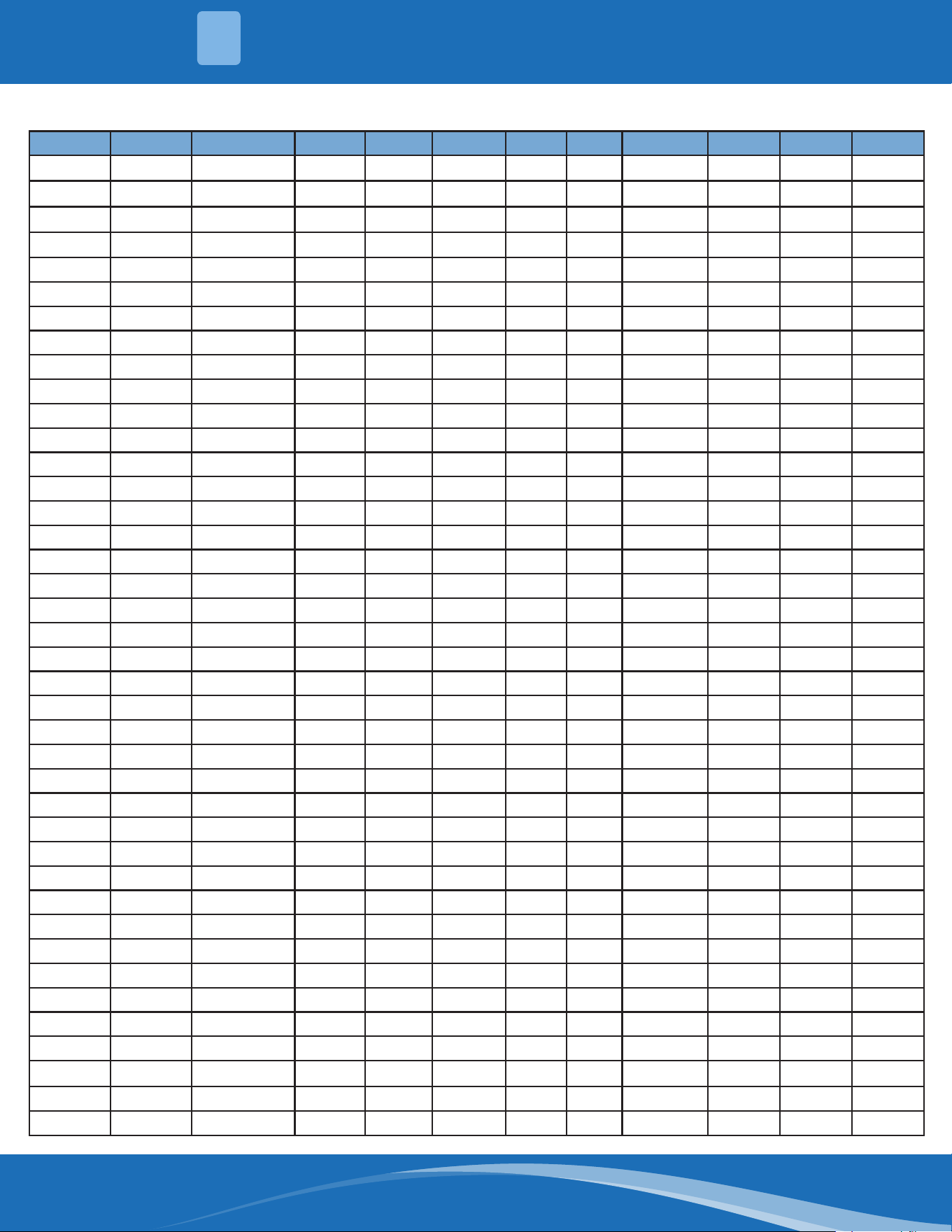
mrcool.com 82
OtherTemperatureSensorResistanceValueTable(°C-K)
°C °F K Ohm °C °F K Ohm °C °F K Ohm °C °F K Ohm
-20 -4 115.266 20 68 12.6431 60 140 2.35774 100 212 0.62973
-19 -2 108.146 21 70 12.0561 61 142 2.27249 101 214 0.61148
-18 0 101.517 22 72 11.5 62 144 2.19073 102 216 0.59386
-17 1 96.3423 23 73 10.9731 63 145 2.11241 103 217 0.57683
-16 3 89.5865 24 75 10.4736 64 147 2.03732 104 219 0.56038
-15 5 84.219 25 77 10 65 149 1.96532 105 221 0.54448
-14 7 79.311 26 79 9.55074 66 151 1.89627 106 223 0.52912
-13 9 74.536 27 81 9.12445 67 153 1.89627 107 225 0.51426
-12 10 70.1698 28 82 8.71983 68 154 1.83003 108 226 0.49989
-11 12 66.0898 29 84 8.3356 69 156 1.76647 109 228 0.486
-10 14 62.2756 30 86 7.97078 70 158 1.70547 110 230 0.47256
-9 16 58.7079 31 88 7.62411 71 160 1.64691 111 232 0.45957
-8 18 56.3694 32 90 7.29464 72 162 1.59068 112 234 0.44699
-7 19 52.2438 33 91 6.98142 73 163 1.53668 113 235 0.43482
-6 21 49.3161 34 93 6.68355 74 165 1.48481 114 237 0.42304
-5 23 46.5725 35 95 6.40021 75 167 1.43498 115 239 0.41164
-4 25 44 36 97 6.13059 76 169 1.38703 116 241 0.4006
-3 27 41.5878 37 99 5.87359 77 171 1.34105 117 243 0.38991
-2 28 39.8239 38 100 5.62961 78 172 1.29078 118 244 0.37956
-1 30 37.1988 39 102 5.3689 79 174 1.25423 119 246 0.36954
0 32 35.2024 40 104 5.17519 80 176 1.2133 120 248 0.35982
1 34 33.3269 41 106 4.96392 81 178 1.17393 121 250 0.35042
2 36 31.5635 42 108 4.76253 82 180 1.13604 122 252 0.3413
3 37 29.9058 43 109 4.5705 83 181 1.09958 123 253 0.33246
4 39 28.3459 44 111 4.38736 84 183 1.06448 124 255 0.3239
5 41 26.8778 45 113 4.21263 85 185 1.03069 125 257 0.31559
6 43 25.4954 46 115 4.04589 86 187 0.99815 126 259 0.30754
7 45 24.1932 47 117 3.88673 87 189 0.96681 127 261 0.29974
8 46 22.5662 48 118 3.73476 88 190 0.93662 128 262 0.29216
9 48 21.8094 49 120 3.58962 89 192 0.90753 129 264 0.28482
10 50 20.7184 50 122 3.45097 90 194 0.8795 130 266 0.2777
11 52 19.6891 51 124 3.31847 91 196 0.85248 131 268 0.27078
12 54 18.7177 52 126 3.19183 92 198 0.82643 132 270 0.26408
13 55 17.8005 53 127 3.07075 93 199 0.80132 133 271 0.25757
14 57 16.9341 54 129 2.95896 94 201 0.77709 134 273 0.25125
15 59 16.1156 55 131 2.84421 95 203 0.7537 135 275 0.24512
16 61 15.3418 56 133 2.73823 96 205 0.73119 136 277 0.23916
17 63 14.6181 57 135 2.63682 97 207 0.68844 137 279 0.23338
18 64 13.918 58 136 2.53973 98 208 0.66818 138 280 0.22776
19 66 13.2631 59 138 2.4467 99 210 0.64862 139 282 0.22231
6
TEMPERATURE SENSOR RESISTANCE TABLE
mrcool.com83
Pressure Temperature Pressure Temperature
Kpa Bar PSI °C °F Kpa Bar PSI °C °F
58.196 0.58 8.44 -60 -76 935.23 9.35 135.64 8 46.4
61.517 0.62 8.92 -59 -74.2 963.75 9.64 139.78 9 48.2
64.988 0.65 9.43 -58 -72.4 992.93 9.93 14401 10 50
68.615 0.69 9.95 -57 -70.6 1022.8 10.23 148.34 11 51.8
72.402 .072 10.50 -56 -68.8 1053.3 10.53 152.76 12 53.6
76.354 0.76 11.07 -55 -67 1084.5 10.85 157.29 13 55.4
80.478 0.80 11.67 -54 -65.2 1116.4 11.16 161.91 14 57.2
84.776 0.85 12.30 -53 -63.4 1149 11.49 166.64 15 59
89.256 0.89 12.95 -52 -61.6 1182.3 11.82 171.47 16 60.8
93.923 0.94 13.62 -51 -59.8 1216.3 12.16 176.40 17 62.6
98.781 0.99 14.33 -50 -58 1251.1 12.51 181.45 18 64.4
103.84 1.04 15.06 -49 -56.2 1286.6 12.87 186.60 19 66.2
109.1 1.09 15.82 -48 -54.4 1322.8 13.23 191.85 20 68
114.56 1.15 16.61 -47 -52.6 1359.9 13.60 197.23 21 69.8
120.25 1.20 17.44 -46 -50.8 1397.7 13.98 202.71 22 71.6
126.15 1.26 18.30 -45 -49 1436.3 14.36 208.31 23 73.4
132.28 1.32 19.18 -44 -47.2 1475.7 14.76 214.02 24 75.2
138.64 1.39 20.11 -43 -45.4 1515.9 15.16 219.85 25 77
145.24 1.45 21.06 -42 -43.6 1557 15.57 225.82 26 78.8
152.09 1.52 22.06 -41 -41.8 1598.9 15.99 231.89 27 80.6
159.18 1.59 23.09 -40 -40 1641.6 16.42 238.09 28 82.4
166.54 1.67 24.15 -39 -38.2 1685.2 16.85 244.41 29 84.2
174.15 1.74 25.26 -38 -36.4 1729.7 17.30 250.86 30 86
182.04 1.82 26.40 -37 -34.6 1775 17.75 257.43 31 87.8
190.2 1.90 27.59 -36 -32.8 1821.3 18.21 264.15 32 89.6
198.65 1.99 28.81 -35 -31 1868.4 18.68 270.98 33 91.4
207.39 2.07 30.08 -34 -29.2 1916.5 19.17 277.95 34 93.2
216.42 2.16 31.39 -33 -27.4 1965.6 19.66 285.08 35 95
225.76 2.26 32.74 -32 -25.6 2015.5 20.16 292.31 36 96.8
235.41 2.35 34.14 -31 -23.8 2066.5 20.67 299.71 37 98.6
245.37 2.45 35.59 -30 -22 2118.4 21.18 307.24 38 100.4
255.67 2.56 37.08 -29 -20.2 2171.3 21.71 314.19 39 102.2
266.29 2.66 38.62 -28 -18.4 2225.2 22.25 322.73 40 104
277.25 2.77 40.21 -27 -16.6 2280.2 22.80 330.70 41 105.8
288.56 2.89 41.85 -26 -14.8 2336.1 23.36 38.81 42 107.6
300.22 3.00 43.54 -25 -13 2393.2 23.93 347.09 43 109.4
312.24 3.12 45.28 -24 -11.2 2451.3 24.51 355.52 44 111.2
324.63 3.25 47.08 -23 -9.4 2510.4 25.10 364.09 45 113
337.39 3.37 48.93 -22 -7.6 2570.7 25.71 372.84 46 114.8
350.54 3.51 50.84 -21 -5.8 2632.1 26.32 381.74 47 116.6
364.08 3.64 52.80 -20 -4 2694.7 26.95 390.82 48 118.4
378.02 3.78 54.83 -19 -2.2 2758.33 27.58 400.04 49 120.2
392.37 3.92 56.91 -18 -0.4 2823.2 28.23 409.46 50 122
407.13 4.07 59.05 -17 1.4 2889.3 28.89 419.04 51 123.8
System Pressure Table-R454B
SYSTEM PRESSURE TABLE
7
mrcool.com 84
Pressure Temperature Pressure Temperature
Kpa Bar PSI °C °F Kpa Bar PSI °C °F
422.31 4.22 61.25 -16 3.2 2956.5 29.57 428.79 52 125.6
437.92 4.38 63.5 -15 5 3025 30.25 438.72 53 127.4
453.98 4.54 65.84 -14 6.8 3094.7 30.95 448.83 54 129.2
470.47 4.70 68.23 -13 8.6 3165.7 31.66 459.13 55 131
487.43 4.87 70.69 -12 10.4 3238.1 32.38 469.63 56 132.8
504.84 5.05 73.22 -11 12.2 3311.7 33.12 480.30 57 134.6
522.73 5.23 75.81 -10 14 3386.7 33.87 491.18 58 136.4
541.1 5.41 78.48 -9 15.8 3463 34.63 502.25 59 138.2
559.95 5.60 81.21 -8 17.6 3540.7 35.41 513.52 60 140
579.31 5.79 84.02 -7 19.4 3619.9 36.20 525.00 61 141.8
599.16 5.99 86.90 -6 21.2 3700.5 37.01 536.69 62 143.6
619.54 6.20 89.85 -5 23 3782.7 37.83 548.61 63 145.4
640.43 6.40 92.88 -4 24.8 3866.3 38.66 560.74 64 147.2
661.86 6.62 95.99 -3 26.6 3951.5 39.52 573.10 65 149
683.82 6.84 99.18 -2 28.4 4038.3 40.38 585.69 66 450.28
706.34 7.06 102.44 -1 30.2 4126.8 41.27 598.52 67 152.6
729.41 7.29 105.79 0 32 4217 42.17 611.60 68 154.4
753.06 7.53 109.22 1 33.8 4309 43.09 624.95 69 156.2
777.28 7.77 112.73 2 35.6 4402.9 44.03 638.56 70 158
802.08 8.02 116.33 3 37.4 4498.7 44.99 652.46 71 159.8
827.47 8.27 120.01 4 39.2 4596.5 45.97 666.64 72 161.6
853.49 8.53 123.78 5 41 4696.5 46.97 681.15 73 163.4
880.11 8.80 127.64 6 42.8 4798.9 47.99 696.00 74 165.5
907.35 9.07 131.60 7 44.6 4904.1 49.04 711.25 75 167
System Pressure Table-R454B Cont.
7
SYSTEM PRESSURE TABLE

Olympus Series
Cassette
Air Handler
Service Manual
The design and specications of this product and/or manual are subject to change without prior notice.
Consult with the sales agency or manufacturer for details.