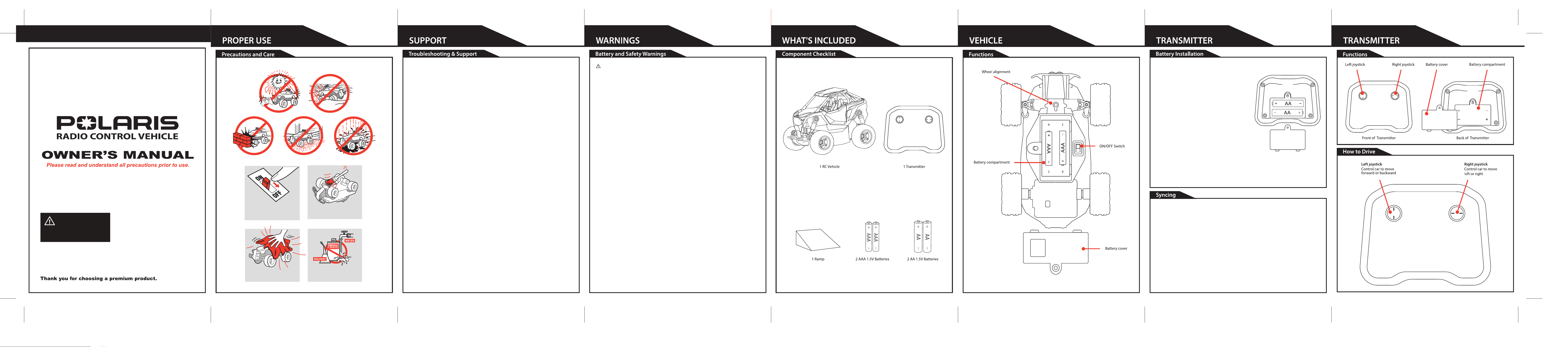
Switch vehicle OFF
when not in use.
Wipe body with a
soft rag or cloth.
Do not use chemicals
or water to clean.
Brush areas where
dirt gets trapped.
Problem - Vehicle does not move or moves slowly.
- Make certain there are fresh batteries in the transmitter and that they have been installed in the correct
position. You may need to re-sync the transmitter and vehicle. Refer to sync instructions in section 7.
- Are the (+) and (-) markings on the batteries in the same position as the (+) and (-) markings in the
Transmitter Battery Compartment?
- Has the Battery Pack been installed in the vehicle?
- Has the rechargeable Battery Pack been fully charged?
- Are the (+) and (-) markings on the Battery Pack in the same position as the (+) and (-) markings in the
Battery Compartment?
- Are the metal contact tabs touching, rusty or dirty in the transmitter?
- Make certain that the vehicle ON/OFF switch is in the "ON" position.
Problem - Vehicle moves by itself or exhibits reduced range from the transmitter.
- Make certain there is no outside radio interference in your area. The best way to test this is to take the
vehicle as far away from radio towers, electrical lines or tall buildings as possible to ensure no further
radio interference wil occur.
This device complies with Part 15 of the FCC Rules. Operation is subject to the following two conditions:
(1) this device may not cause harmful interference, and (2) this device must accept any interference
received, including interference that may cause undesired operation.
Note: This equipment has been tested and found to comply with the limits for a Class B digital device,
pursuant to Part 15 of the FCC Rules. These limits are designed to provide reasonable protection against
harmful interference in a residential installation. This equipment generates, uses and can radiate radio
frequency energy and, if not installed and used in accordance with the instructions, may cause harmful
interference to radio communications.
However, there is no guarantee that interference will not occur in a particular installation. If this
equipment does cause harmful interference to radio or television reception, which can be determined by
turning the equipment off and on, the user is encouraged to try to correct the interference by one or more
of the following measures:
— Reorient or relocate the receiving antenna.
— Increase the separation between the equipment and receiver.
— Connect the equipment into an outlet on a circuit different from that to which the receiver is
connected.
— Consult the dealer or an experienced radio/TV technician for help.
Warning: Changes or modifications to this unit not expressly approved by the party responsible for
compliance could void the user's authority to operate the equipment.
AGES
6+
*If vehicle pulls to the left or right during forward driving the wheel Alignment may need to be adjusted.
The Wheel Alignment Dial is located on bottom of chassis between the front wheels.
1. Locate and remove the Battery Compartment Cover which is located on the back of
the Transmitter.
2. Insert 2 AA 1.5V Batteries. Make certain the
positive (+) and negative (-) markings on the
batteries are in the same position as the
positive (+) negative (-) markings inside the
Battery Compartment.
3. Replace Battery Compartment Cover making
certain that the Battery Compartment tab has
"snapped" into the locked position.
Note: When replacing included Transmitter batteries:
Do not mix old and new batteries.
Do not mix alkaline, standard or rechargeable batteries.
Use alkaline batteries only.
This transmitter is equipped with 2.4GHz technology which allows up to 6 vehicles to be used at the same
time.
Before first use and after any time the batteries are replaced, the transmitter must be paired to the vehicle.
To sync transmitter and vehicle, follow these steps:
1. Install batteries in transmitter.
2. Turn transmitter ON/OFF switch to the ON position.
3. Turn vehicle ON/OFF switch to the ON position.
4. Status light on transmitter will flash for pairing.
5. When status light stops flashing pairing is complete. You are now ready to play.
• Do not mix old and new batteries.(if more than one batteries are used).
• Do not mix alkaline, standard (carbon-zinc), or rechargeable batteries.
• Alkaline batteries are recommended. Use only the specified voltage.
• Insert batteries using the correct polarity. Always use, replace, and recharge (if applicable) batteries
under adult supervision.
• Do not attempt to charge non-rechargeable batteries.
• Do not short-circuit the battery supply terminals.
• Do not dispose of batteries in fire: batteries may explode or leak.
• Remove batteries before storing.
• Recycle or dispose of batteries according to federal, state, and local laws.
• Keep these instructions for future reference.
BATTERY WARNINGS
© 2025 MerchSource, LLC. Irvine, CA 92618. All rights reserved.
Official licensed product of Polaris Industries Inc., all rights reserved.
POLARIS and the POLARIS Logos are trademarks of Polaris Industries Inc.
Printed in China
WARNING:
CHOKING HAZARD – Small Parts.
Not for children under 3 years of age.