0911-07
Vienna Wireless
Charging Pad
Writing Pad
Instruction Manual
Whats Included:
1 x Writing Pad with Wireless Charging Pad
1 x Micro-USB to USB Cable
•
•
Functions:
Instructions:
Tech Specications:
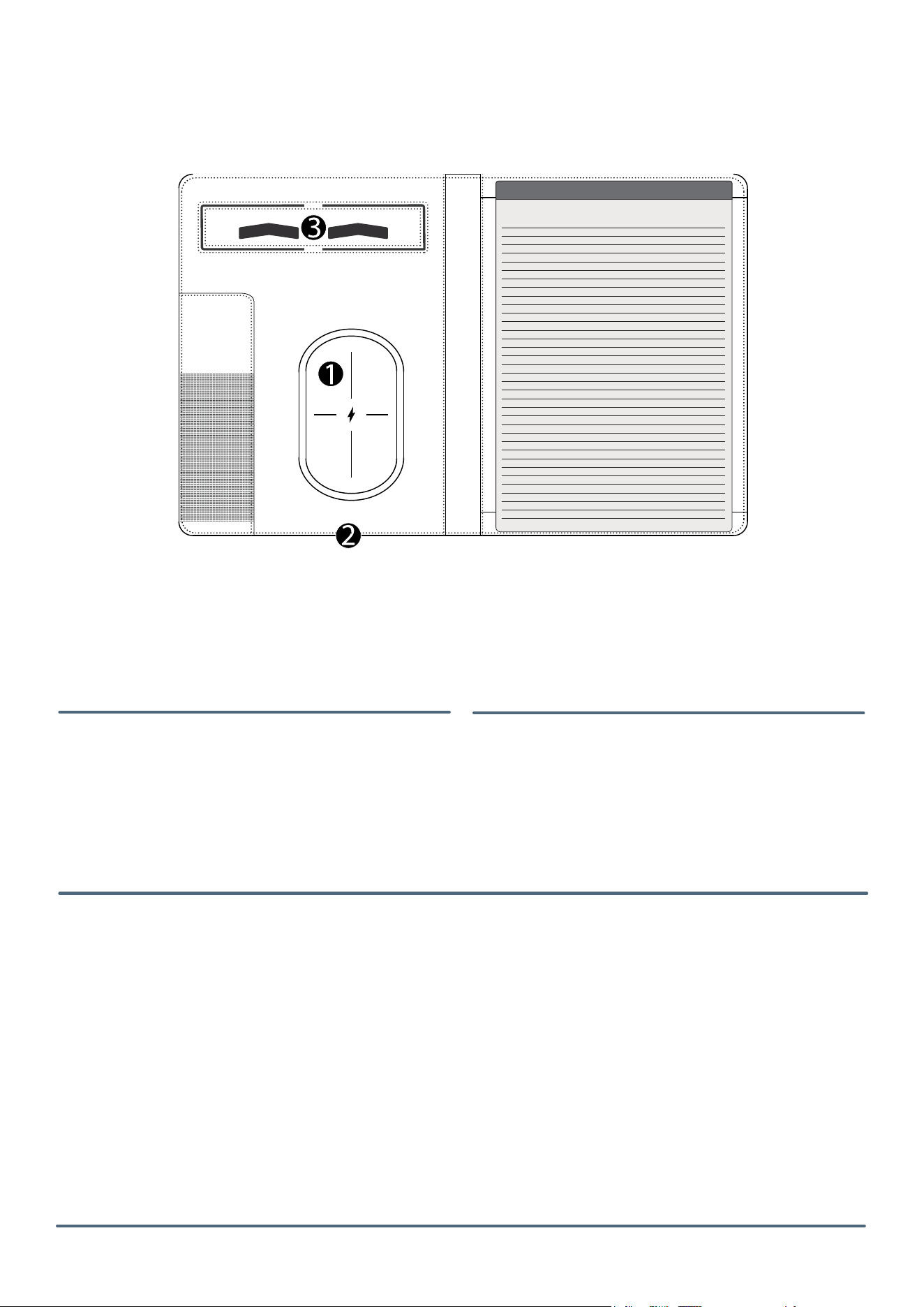
Wireless charging pad surface
LED indicator / Micro-USB input port for
the wireless charging pad
Phone stand
Wireless Charging Mobile Phones and Other Electronic Devices:
Ensure that your phone supports wireless charging. It will be listed in the
manufacturer’s specications.
Connect the provided power cable to a power source and to the micro-USB port (2)
on the bottom of the wireless charging pad writing pad. Once connected, the LED
Indicator will turn RED.
Place the enabled device on the surface of the wireless charging pad (1).
The LED will turn BLUE to indicate that the phone is charging.
If the LED indicator is ashing BLUE, an unknown object is being detected between
the wireless charging pad and the phone by FOD (Foreign Object Detection), or the
device is not compatible with wireless charging. The device will not begin to charge
until the object is removed.
Note: In order to charge devices, use only the accessory cable or the cable included
with your own device by the manufacturer.
USB Input: 5V/2A
Wireless Output: 5V/1A, 5W
1.
2.
3.
1.
•
•
•
•
**
**
1.
2.

Safety Precautions:
FCC Statement:
Note:
This device complies with Part 15 of the
FCC Rules. Operation is subject to the
following two conditions:
This device may not cause harmful
interference, and
This device must accept any interference
received, including interference that may
cause undesired operation.
Warning:
Changes or modications not expressly
approved by the party responsible for
compliance could void the user’s authority
to operate the equipment.
This equipment complies with FCC radiated
exposure limits set forth for an uncontrolled
environment. This equipment can be used in
portable exposure conditions.
- Connect the equipment into an outlet on a circuit
dierent from that to which the receiver is connected.
- Consult the dealer or an experienced radio/TV
technician for help.
This equipment has been tested and found to comply
with the limits for a Class B digital device pursuant to
part 15 of the FCC Rules. These limits are designed to
provide reasonable protection against harmful
interference in a residential installation.
This equipment generates uses and can radiate radio
frequency energy and, if not installed and used in
accordance with the instructions, may cause harmful
interference to radio communications. However, there
is no guarantee that interference will not occur in a
particular installation. If this equipment does cause
harmful interference to radio or television reception,
which can be determined by turning the equipment
the interference by one or more of the following
measures:
- Reorient or relocate the receiving antenna.
- Increase the separation between the equipment
and receiver.
1.
2.
Name of the Distributor:
Leedsworld Inc
Address of the Distributor:
400 Hunt Valley Road,
New Kensington,
PA 15068 USA.
WWW.PCNA.COM
FCC ID: 2BVE2-0911-07
Made in China
WARNING – When using this product, basic
precautions should always be followed, including
the following:
Read all the instructions before using the product.
Charge the power bank fully before initial use. The
unit’s full performance is achieved only after 2 or 3
completed charge and discharge cycles.
To reduce the risk of injury, close supervision is
necessary when the product is used near children.
Do not expose the device to moisture.
Do not use the device in excess of its output rating.
Overload outputs above rating may result in a risk
of re or injury.
Do not use the device if damaged or modied.
Damaged or modied batteries may exhibit
unpredictable behavior resulting in re, explosion,
or risk of injury.
Do not disassemble the device. Take it to a
qualied service person when service or repair is
required. Incorrect reassembly may result in a risk
of re or injury.
Do not expose the device to re or excessive
temperature. Exposure to re or temperatures
above 212°F may cause an explosion.
Have servicing performed by a qualied repair
person using only identical replacement parts.
Avoid overheating: Do not place anything between
the phone and the charger, especially magnetic
devices.
1.
2.
3.
4.
5.
6.
7.
8.
9.
10.
11.