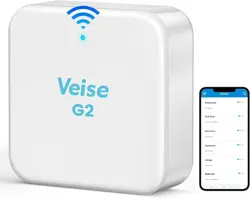
SMART LOCK GATEWAY G2
Model :
Dimensions :
Network :
IEEE standard :
Power interface :
Power input :
G2
70mm x 70mm x 26mm
WiFi 2.4G
802.11 b/g/n
Type-C USB
5V/500mA
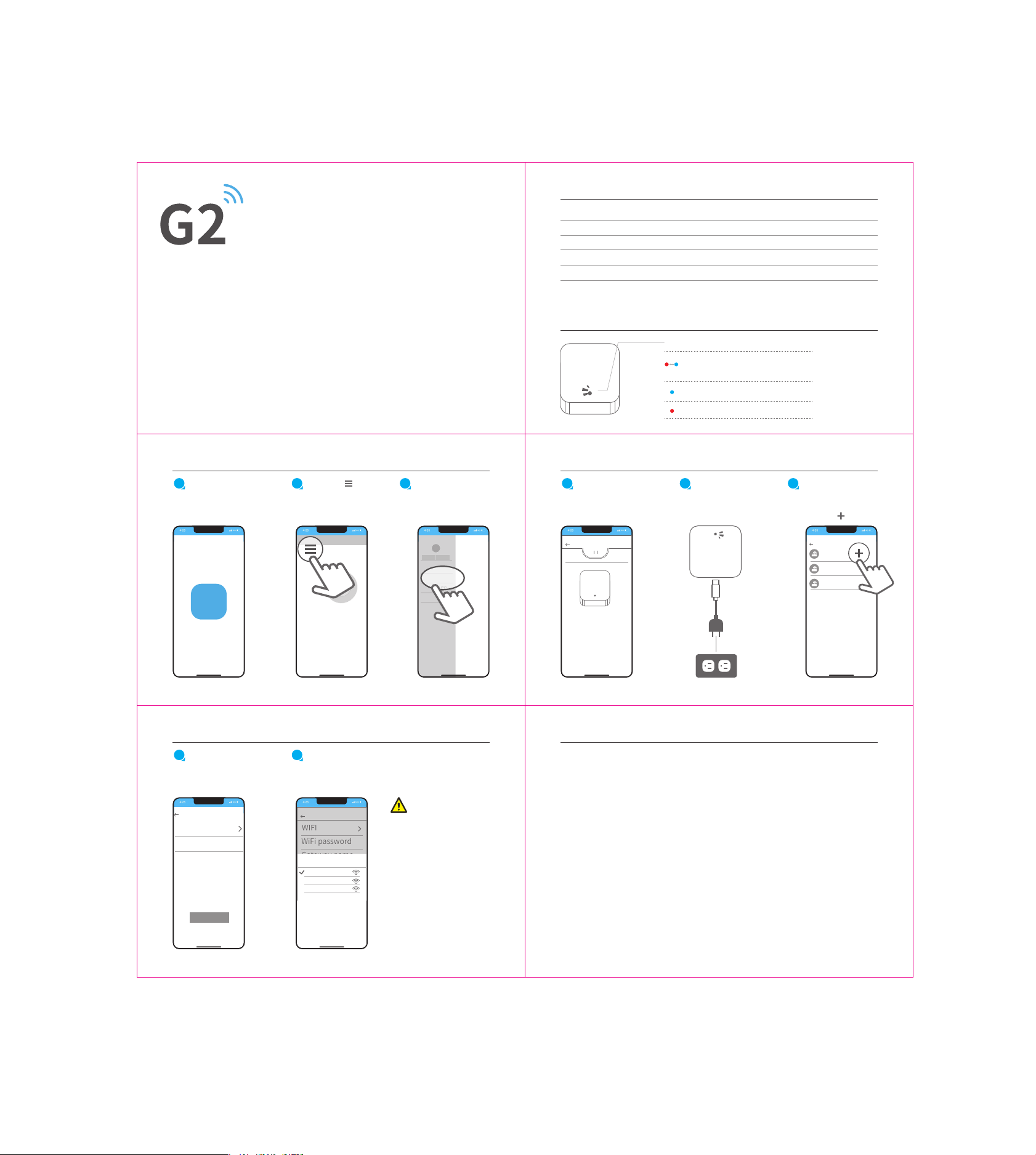
Light Status
Select [Gateway]
Open the App
1
Tap on “ ” on
the upper left
corner of the
screen
2 3
When the Gateway is powered on:
Flashing Red/Blue lights:
Stand-by mode - Ready to Pair
Red light: Network failure
Blue light: Normal mode
Pair with App
Smart Lock Gateway
User Manual
Thank you for purchasing our products. Please review this manual thoroughly before operating your device.
All pictures in this manual are for illustration purpose only. Actual product may vary due to product upgrade.
APP
Add lock
Message
Customer service
settings
Gateway
Add Gateway
7
Select the network
and enter your
Wi-Fi password.
8
Pair with App FCC Warning
While the light is
flashing in Red and
Blue alternately,
tap on “ ”
Select [ G2 ]
4
Plug in the
Gateway and
power it on
5 6
Pair with App
Gateway
G1
G2
Add Gateway
AIDJDNV62SJ
Online
AIDJDNV62SJ
Online
AIDJDNV62SJ
Online
Add Gateway
WIFI
WiFi password
Gateway name
Next
Add Gateway
WIFI
WiFi password
Gateway name
确定
network
cancel
sciener
mywifi
sciener-x
Notice
If the above process
times out, please power
off and try again.
Disclaimer
This device complies with part 15 of the FCC Rules. Operation is subject to the following two conditions:
(1) this device may not cause harmful interference, and (2) this device must accept any interference
received, including interference that may cause undesired operation.
Any changes or modifications not expressly approved by the party responsible for compliance could void
the user's authority to operate the equipment.
NOTE: This equipment has been tested and found to comply with the limits for a Class B digital device,
pursuant to Part 15 of the FCC Rules. These limits are designed to provide reasonable protection
against harmful interference in a residential installation. This equipment generates, uses and can radiate
radio frequency energy and, if not installed and used in accordance with the instructions, may cause
harmful interference to radio communications.
However, there is no guarantee that interference will not occur in a particular installation.
If this equipment does cause harmful interference to radio or television reception,
which can be determined by turning the equipment off and on, the user is encouraged to try to correct
the interference by one or more of the following measures:
-- Reorient or relocate the receiving antenna.
-- Increase the separation between the equipment and receiver.
-- Connect the equipment into an outlet on a circuit different from that to which the receiver is connected.
-- Consult the dealer or an experienced radio/TV technician for help.
To maintain compliance with FCC’s RF Exposure guidelines, This equipment should be installed and
operated with minimum distance between 20cm the radiator your body: Use only the supplied antenna.
We continuously optimize products as new technologies and features are developed. For this reason,
we reserve the right to make alterations to the products without prior notice.