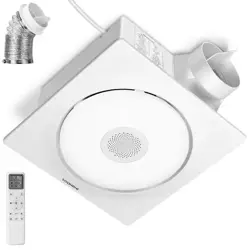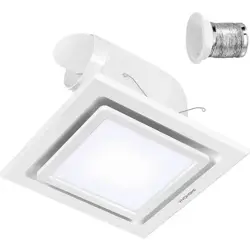
240CFM Bathroom Exhaust
Fan with RGB Lights
ON/OFF

240CFM Bathroom Exhaust
Fan with RGB Lights
Safety Information.........................................................1
Product Introduction ..................................................4
What’s in the Box ..........................................................3
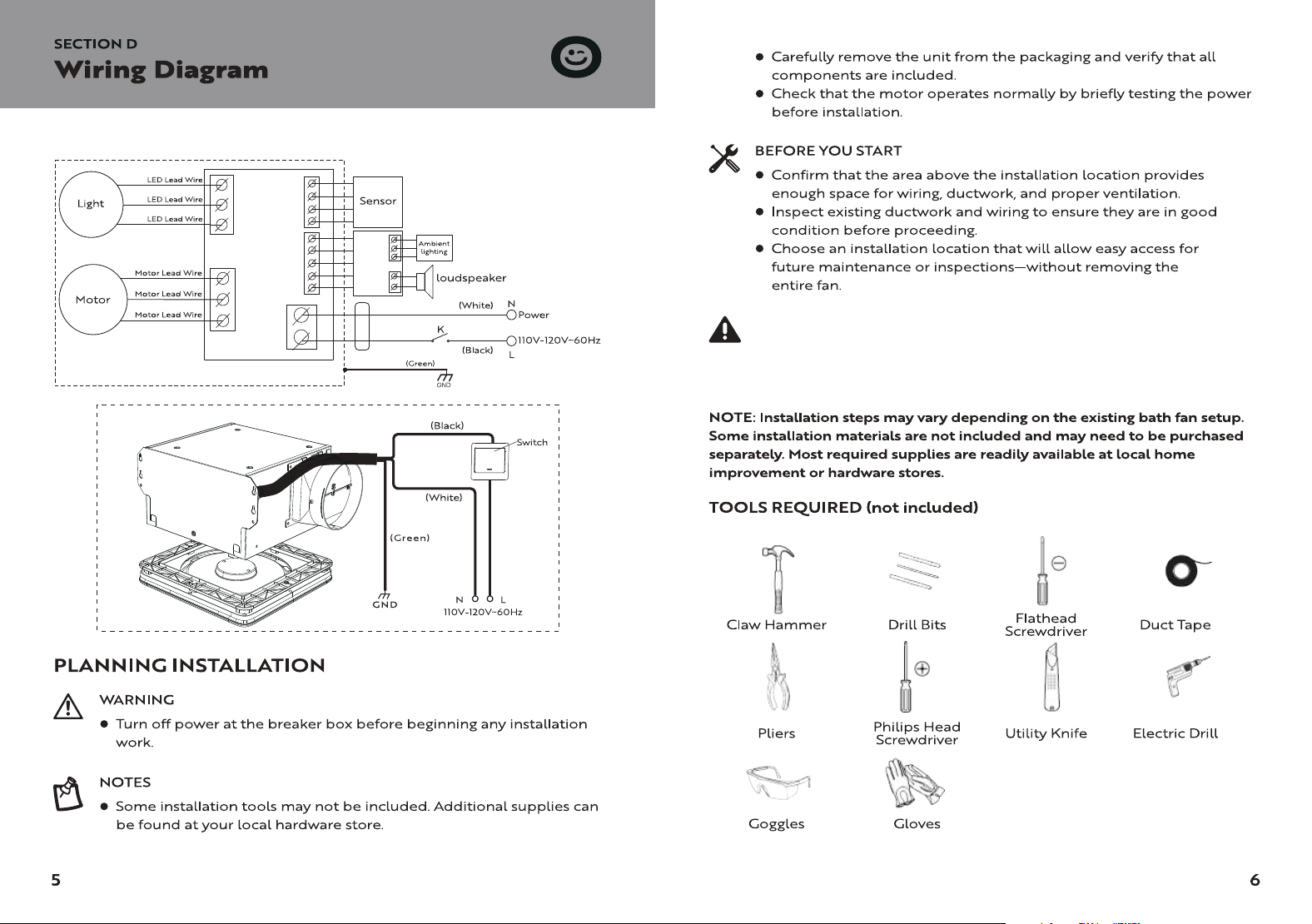
Wiring Diagram ..............................................................5
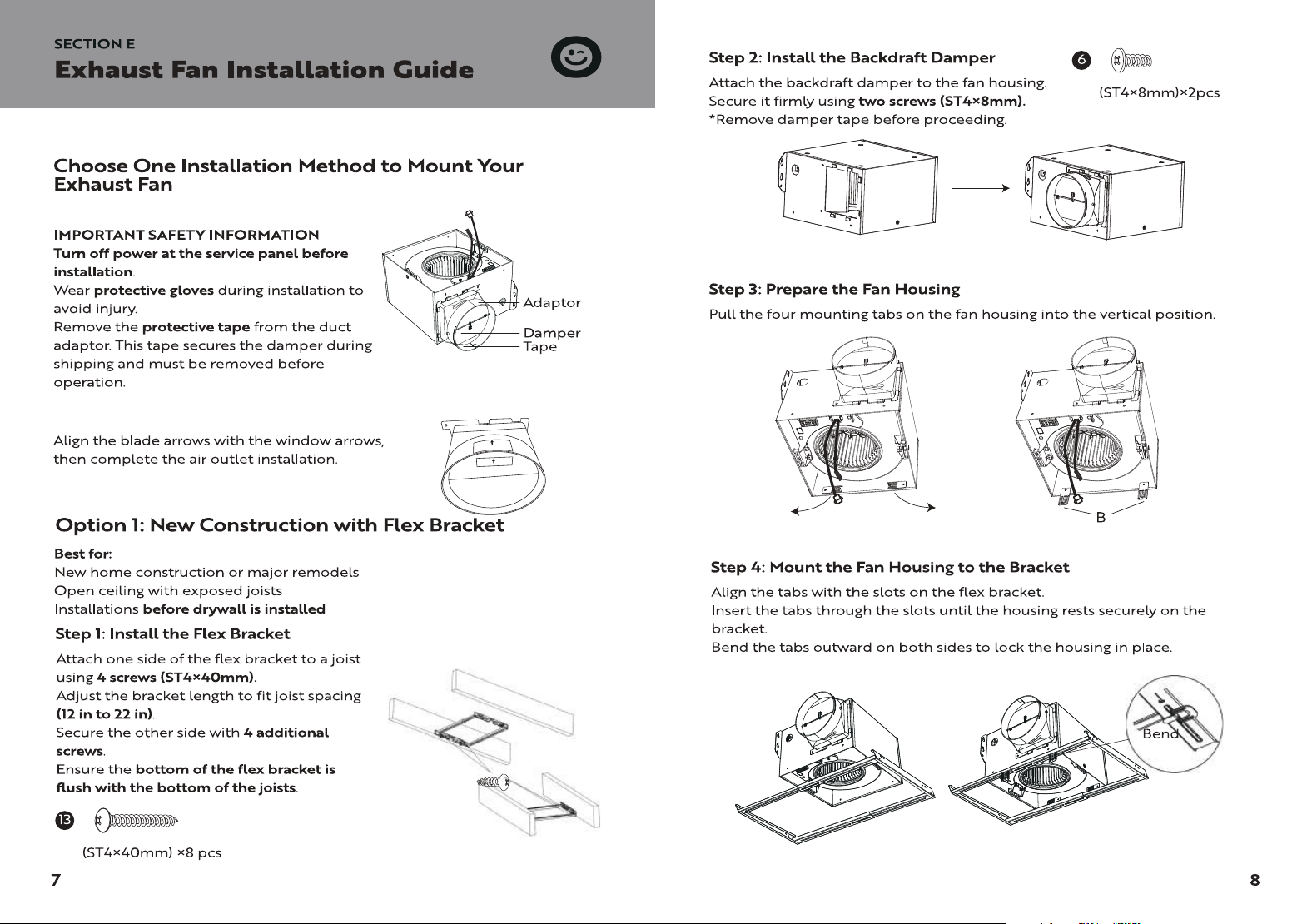
Exhaust Fan Installation Guide ..............................7
New Construction with Flex Bracket ........................7
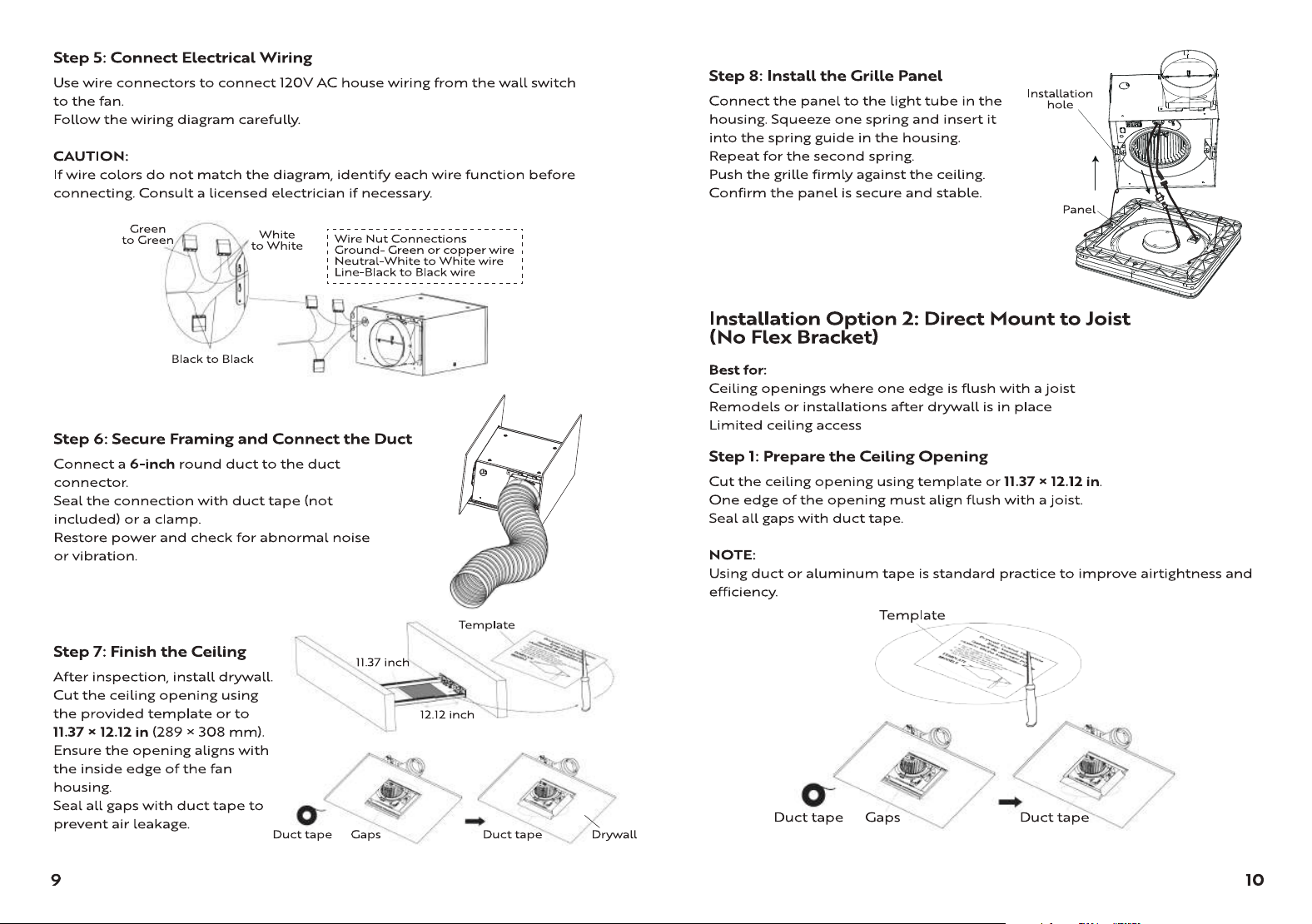
Direct Mount to Joist (No Flex Bracket) ................10
Retrofit Installation (Replacing an Existing Fan)...12
Exhaust Fan Operation .............................................15
FAQ ...................................................................................21
Troubleshooting ..........................................................19
Remote Control Operation ....................................16
Cautions ...........................................................................22
Maintenance ..................................................................23
Warranty..........................................................................23
SKU: VH1915
ON/OFF
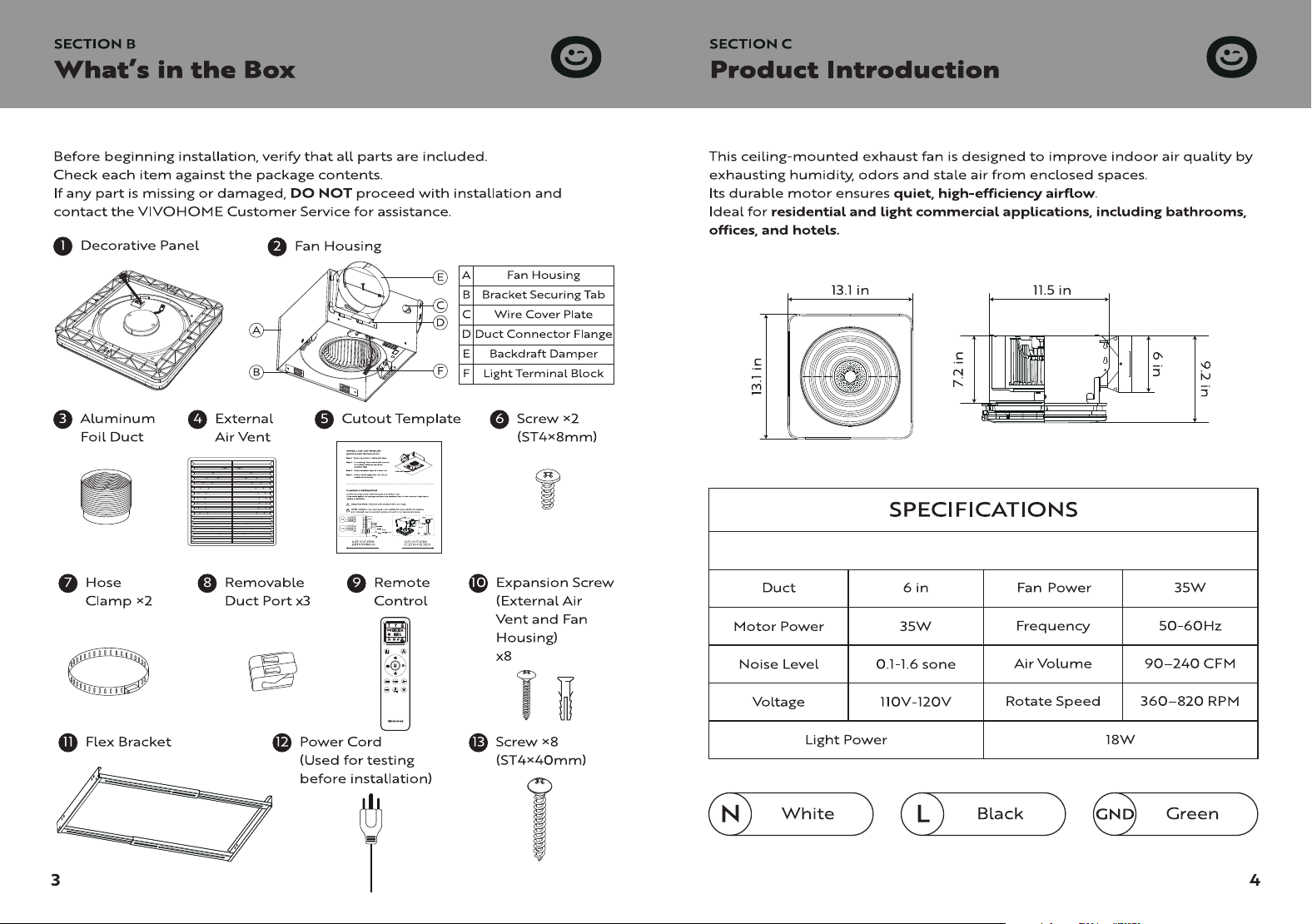
After receiving the product, verify all accessories are included and
briefly test the power to ensure the motor operates normally.
Do not proceed with installation until all checks are complete.
ON/OFF
NOTES
1. Startup Mode
The unit returns to the previous mode before it was turned off.
If the unit was turned off by pressing the standby button, it will power on in
standby mode.
Press to turn the fan off.
This button cannot turn the fan on.
(Simply press the function button to activate the corresponding function.)
9. ” ” Power-Off (Standby)
5. ” ” RGB light
This function features a memory mode. When the RGB light is turned off, it
will automatically resume its last used mode upon the next power-on.
Mode 1: Aurora Mode: Colors change and cycle automatically.
Mode 2: Mono Mode: Press the button once to cycle through solid colors in
sequence: Red → Orange → Yellow → Green → Cyan → Blue → Violet.
Mode 3: Breathing Mode: Colors automatically fade in and out through the
7-color sequence without manual operation.
Mode 4: Pinwheel Mode: Automatically cycles through 6 preset two-color
combinations.
Turn Off: Press and hold the button for 3 seconds to turn off the RGB function.
Music Sync: The RGB light will not sync to music unless the Bluetooth speaker
is enabled.
Select 0.5H / 1H / 1.5H to activate the timer immediately.
Pressing the same timer button again resets the countdown to the full
selected duration.
Example: If 0.5H has been running for 0.1H, pressing 0.5H again restarts the
timer from 0.5H.
Repeated presses of the same timer button do not cancel the timer.
Adjusting fan speed does not cancel the active timer.
Press Power-Off to cancel the timer immediately.
Press and hold the Auto key for 3 seconds to cancel the timer.
6. ” ”Set and cancel a timer
7. ” ” Bluetooth & Music Sync Power Control
Press once to turn on the Bluetooth speaker. The unit will emit a beep.
Open your phone's Bluetooth settings and search for the device to pair. When
pairing is successful, a beep will sound.
If pairing fails, press once to turn off the Bluetooth speaker, then restart
Bluetooth and try pairing again.
Default operation: Short press once to turn on; short press once to turn off.
When the Bluetooth speaker is turned on, the RGB light syncs with the music
by default. Press and hold for 3 seconds to cancel RGB music sync. Press and
hold again to restore it.
ON/OFF
8. Buzzer
Press and hold the RGB and Timer buttons simultaneously for 3 seconds. The
unit will emit three short beeps ("di di di") and turn off the buzzer function.
Press and hold again for 3 seconds. The unit will emit one long beep (1
second) and turn the buzzer function back on.
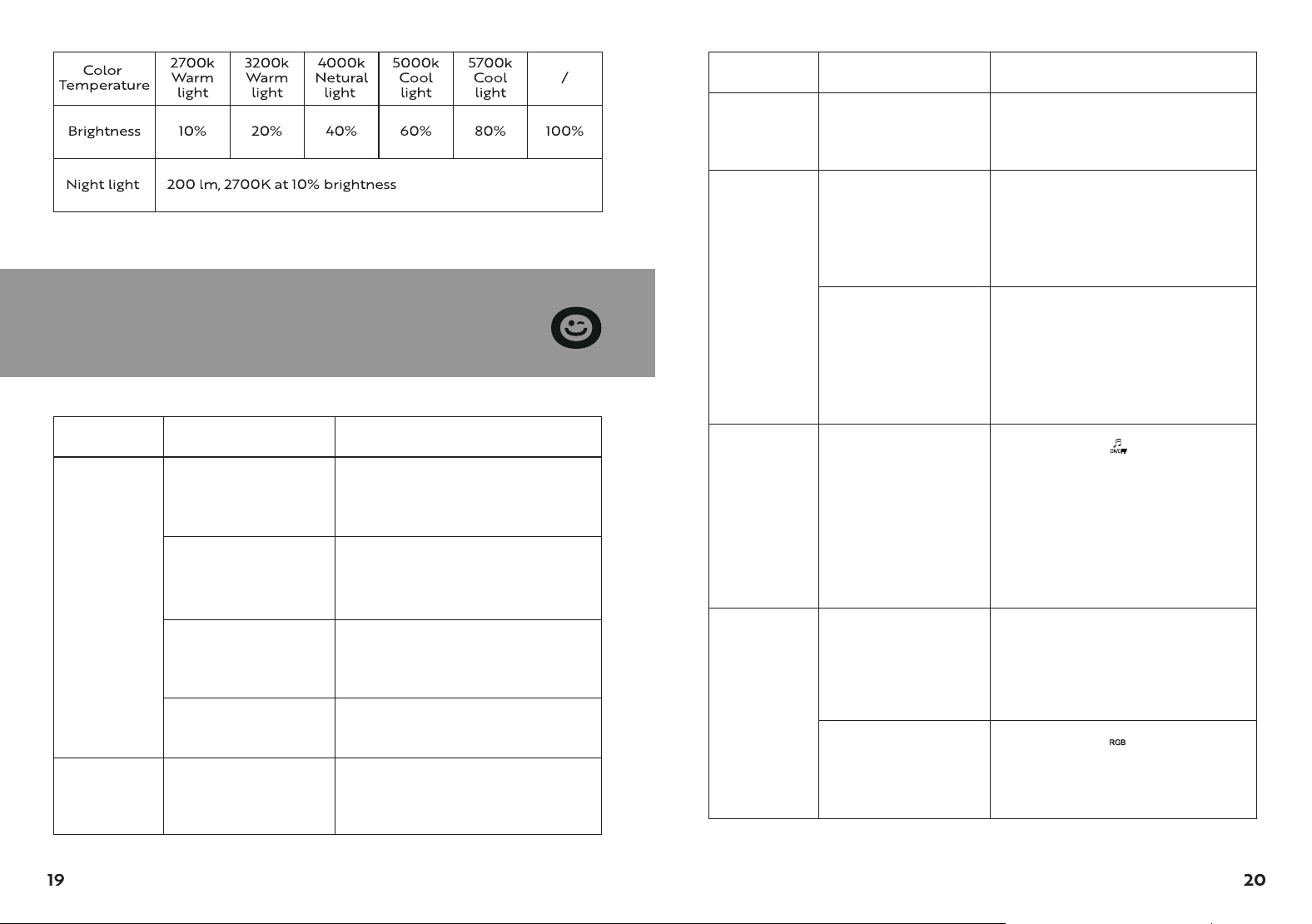
Problem SolutionPossible Cause
Bluetooth
speaker not
working
The speaker cable
between the front
panel and the fan
was not properly
connected.
After powering off, remove the
panel, reconnect the two necessary
interfaces, and then reconnect
Bluetooth.
Your phone has
been connected to
multiple Bluetooth
devices, which may
cause the volume to
become out of sync.
The current mode is
set to not follow the
music. The product is
shipped with music
sync enabled by
default. It may have
been accidentally
changed to the
non-sync mode.
You'll need to enable "Sync current
device" above the Bluetooth icon.
Press and hold ” “ for 3 seconds to
enable music sync mode. Once
enabled, the RGB light will sync
with the Bluetooth speaker
whenever it is turned on (memory
function).
The fan is not
clearing the
room
CFM is too low for
the room size
Ensure the fan's CFM rating is
appropriate for the room's square
footage.
SECTION H
Troubleshooting
Problem
The fan is
louder than
expected
SolutionPossible Cause
Damper damaged or
stuck
Check if the damper opens/closes
smoothly; contact support if
damaged.
The fan is not
clearing the
room
Insufficient airflow
intake
Keep a door or window slightly
open to allow fresh air to enter the
room.
The fan outlet is
reduced to fit a
smaller duct
Use a duct size that matches the fan
outlet
The fan housing is not
securely mounted
Make sure the fan is firmly attached
to the ceiling joists.
The duct is sharply
bent near the fan’s
outlet
Avoid bending the duct until at
least 18 inches away from the outlet
I've connected
via Bluetooth
and turned on
the music, but
the colored
lights aren't
moving in
sync with the
music.
Why can't the
colored lights
be turned off
by themselves?
If you want to switch
the colored lights to
CCT lighting
Pressing any of the CCT light
buttons, including those for color
temperature, brightness, and night
light, will switch the colored lights
off.
Turn off the colored
lights directly
ON/OFF
Press and hold ” “ for 3 seconds or
more. A single beep will sound, and
the RGB light will turn off immedi-
ately.
24