
1
SD7000
Quick Start Guide
2
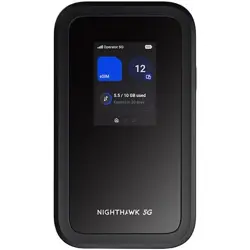
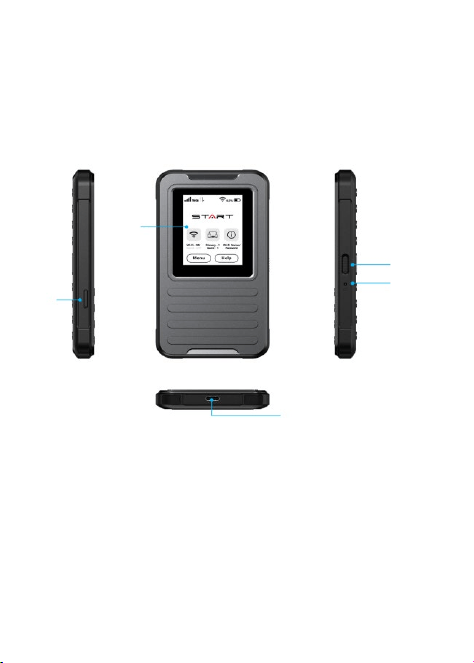
GETTING TO KNOW YOUR HOTSPOT
Touch
screen
Power Key
Reset Key
Card Slot
Charging
/Type-C USB
3
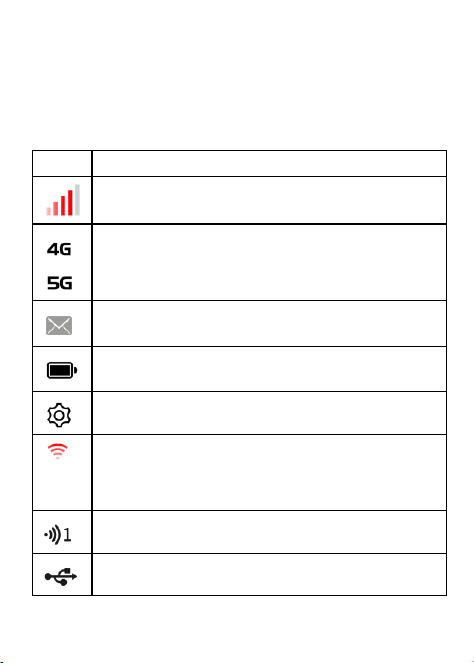
Touch Screen Icons and Interfaces
Icons
Description
Network signal strength
Network type
New SMS
Battery power level
Settings: To configure the device settings.
Wi-Fi status
Show the number of connected users.
Connect with your computer via a USB Type-C cable.
4
GETTING STARTED
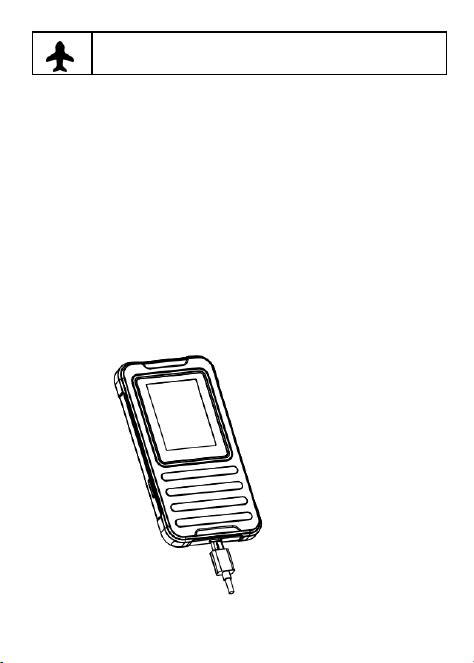
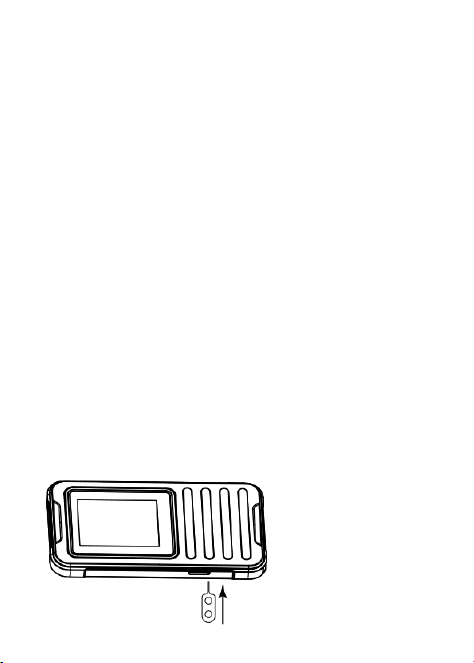
Charge the Device
Your device battery should have enough power for the Mobile hotspot
to turn on and find a signal. You should fully charge the battery as
soon as possible.
Airplane mode
5
IMPORTANT! Use only approved chargers and USB cables.
Insert the SIM card
Press and hold the Power key to power on the Hotspot. After a
moment the device will connect to the Internet automatically.
To install the 4G LTE SIM card
1. Take out the card sticker from the packing box.
2. Align the card sticker with the SIM area on the metal-free side of
the card and then stick it.
3. Open the SIM card slot cover.
4. Insert your SIM card.

6
Caution!
Do not bend or scratch your SIM card. Avoid exposing your SIM card
to static electricity, water, or dirt.
To avoid damage to the device, do not use any other kind of SIM
cards, or any non-standard SIM card cut from a SIM card. You can get
a standard SIM card from your service provider.
7
Start Your Device
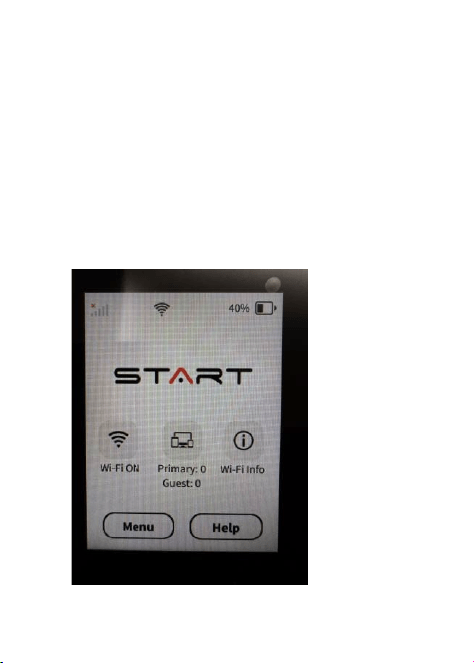
Press and hold the Power Key to turn your Mobile Hotspot on.
Press and release the Power Key to wake the Mobile Hotspot
display.
NOTE:
8
If the battery is extremely low, you may be unable to power on
the device. Please charge your device first.
Access the Internet
Wi-Fi: Connect to the Wi-Fi network with your mobile device and then
access the Internet.
1.
Press and hold the
Power Key
to turn on the
Mobile Hotspot
.
The welcome logo is displayed on the screen, and the Wi-Fi is ON.
2.
Use your terminal device to search for the wireless network
connection wit
h
the Wi-Fi’s
SSID
“
START-xxxx
”.
3.
Enter the password.

9
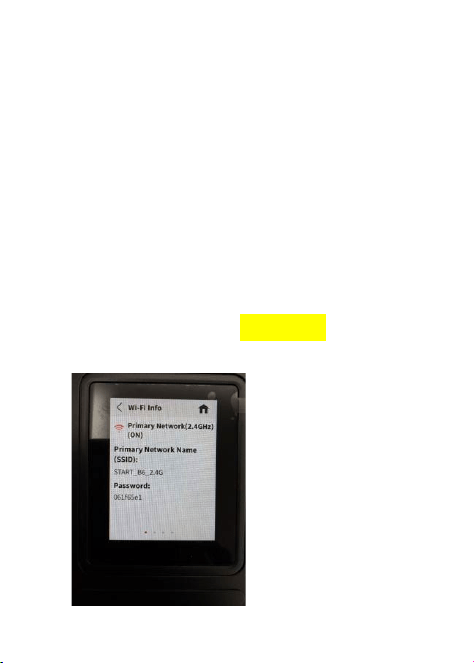
NOTE: The default Wi-Fi SSID and password can be found on the
Wi-Fi Information screen
.
From the Home screen,
tap Wi-Fi ON or
tap Menu to view the default Wi-Fi SSID and password.
USB Type-C cable: Connect with the computer via USB port and
then access the Internet.
Change Your Device Settings
You can change the device settings by logging in to the Mobile
Hotspot configuration web page.
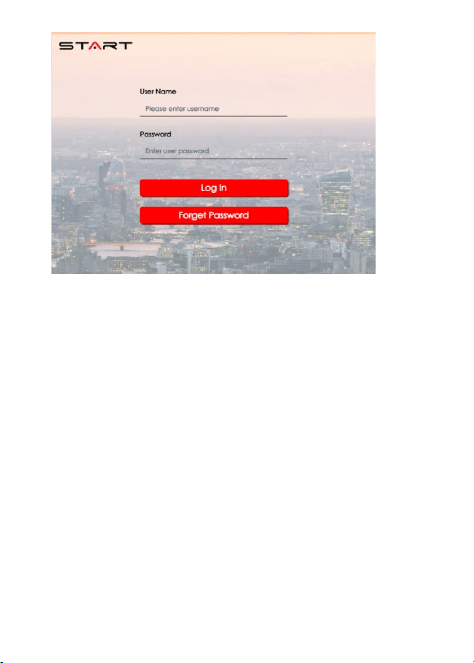
1. Launch the Internet browser. Enter the Device Manager Website
IP address http://192.168.1.1 in the Address bar.
2. Input the Password and then click Log In.
10
3. After the Mobile Hotspot configuration web page is opened, you
can change the default settings.
NOTE: The default password can be found on the Help
Information
screen
.
From the Home screen,
tap Help
>Admin Website
to view
the default username and password.
11
Troubleshooting
Problem
Recommended Action
The connection between your
device and a client through Wi-Fi
cannot be established.
Ensure that the Wi-Fi function
is enabled.
Refresh the network list and
select the correct SSID.
Check the IP address, and
ensure that your client can
automatically obtain an IP
address.
Enter the correct network key
(Wi-Fi password) when you
connect the client to your device.
12
The client connected
to the device cannot
access the Internet.
Ensure that the Wi-Fi function
is enabled.
Ensure that your SIM card is
available.
Change the location and find a
place with good signal.
Contact your service provider
and confirm your APN settings.
SAFETY PRECAUTIONS
• Do not disassemble or open crush, bend or deform, puncture
or shred.
• Do not modify or remanufacture, attempt to insert foreign
objects into the battery, immerse or expose to water or other
liquids, expose to fire, explosion or other hazard.
• Only use the battery with a charging system that has been
qualified with the system per CTIA Certification Requirements
for Battery System Compliance to IEEE 1725. Use of an
unqualified battery or charger may present a risk of fire, explo-
sion, leakage, or other hazard.
• Replace the battery only with another battery that has been
qualified with the system per this standard, IEEE-Std-1725. Use
of an unqualified battery may present a risk of fire, explosion,
leakage or other hazard.

13
Only authorized service providers shall replace battery.
(If the battery is non-user replaceable).
• Promptly dispose of used batteries in accordance with local
regulations.
• Avoid dropping the hotspot or battery. If the hotspot or battery is
dropped, especially on a hard surface, and the user suspects
damage, take it to a service center for inspection.
• Improper battery use may result in a fire, explosion or other
hazard.
FCC RF Exposure Information (SAR)
This device is designed and manufactured not to exceed the emission
limits for exposure to radio frequency (RF) energy set by the Federal
Communications Commission of the United States.
During SAR testing, this device was set to transmit at its highest
certified power level in all tested frequency bands, and placed in
positions that simulate RF exposure in usage near the body with the
separation of 10mm. Although the SAR is determined at the highest
certified power level, the actual SAR level of the device while
operating can be well below the maximum value.
This is because the hotspot is designed to operate at multiple power
levels so as to use only the power required to reach the network. In
general, the closer you are to a wireless base station antenna, the
lower the power output.

14
The exposure standard for wireless devices employing a unit of
measurement is known as the Specific Absorption Rate, or SAR.
The SAR limit set by the FCC is 1.6 W/kg.
This device is complied with SAR for general population / uncontrolled
exposure limits in ANSI/IEEE C95.1-2019 and had been tested in
accordance with the measurement methods and procedures specified
in IEEE1528.
The FCC has granted an Equipment Authorization for this model
hotspot with all reported SAR levels evaluated as in compliance with
the FCC RF exposure guidelines. SAR information on this model
hotspot is on file with the FCC and can be found under the Display
Grant section of www.fcc.gov/ oet/ea/fccid after searching on FCC ID:
2AWF6-SD7000.
For this device, the highest reported SAR value for usage near the
body is 0.727W/kg.
While there may be differences between the SAR levels of various
hotspots and at various positions, they all meet the government
requirements.
SAR compliance for body-worn operation is based on a separation
distance of 10 mm between the unit and the human body. Carry this
device at least 10 mm away from your body to ensure RF exposure
level compliant or lower to the reported level. To support body-worn
operation, choose the belt clips or holsters, which do not contain
metallic components, to maintain a separation of 10 mm between this
device and your body.

15
RF exposure compliance with any body-worn accessory, which
contains metal, was not tested and certified, and using such
body-worn accessory should be avoided.
FCC COMPLIANCE
This device complies with part 15 of the FCC rules. Operation is
subject to the following two conditions: (1) this device may not
cause harmful interference, and (2) this device must accept any
interference received, including interference that may cause
undesired operation.
NOTE: The manufacturer is not responsible for any radio or TV
interference caused by unauthorized modifications or changes
to this equipment. Such modifications or changes could void the
User's authority to operate the equipment.
NOTE: This equipment has been tested and found to comply
with the limits for a Class B digital device, pursuant to part 15 of
the FCC Rules. These limits are designed to provide reason-
able protection against harmful interference in a residential

16
installation. This equipment generates uses and can radiate
radio frequency energy and, if not installed and used in accor-
dance with the instructions, may cause harmful interference to
radio communications. However, there is no guarantee that
interference will not occur in a particular installation.
If this equipment does cause harmful interference to radio or
television reception, which can be determined by turning the
equipment off and on, the user is encouraged to try to correct
the interference by one or more of the following measures:
‐Reorient or relocate the receiving antenna.
‐Increase the separation between the equipment and receiver.
‐Connect the equipment into an outlet on a circuit different
from that to which the receiver is connected.
‐Consult the dealer or an experienced radio/TV technician for
help.
Federal Communication Commission (FCC) Radiation Exposure
Statement.
When using the product, maintain a distance of 10mm from the
body to ensure compliance with RF exposure requirements.
Operations in the 5150-5250MHz and 5925-6425MHz band
are restricted to indoor usage only.
The operation of this device is prohibited on oil platforms and aircraft,
except that operation of this device in 5.925-6.425GHz is permitted in
large aircraft while flying above 10,000 feet. Installation on outdoor
fixed infrastructure is prohibited. Controlling or communications with
unmanned aircraft systems, including drones, is prohibited.
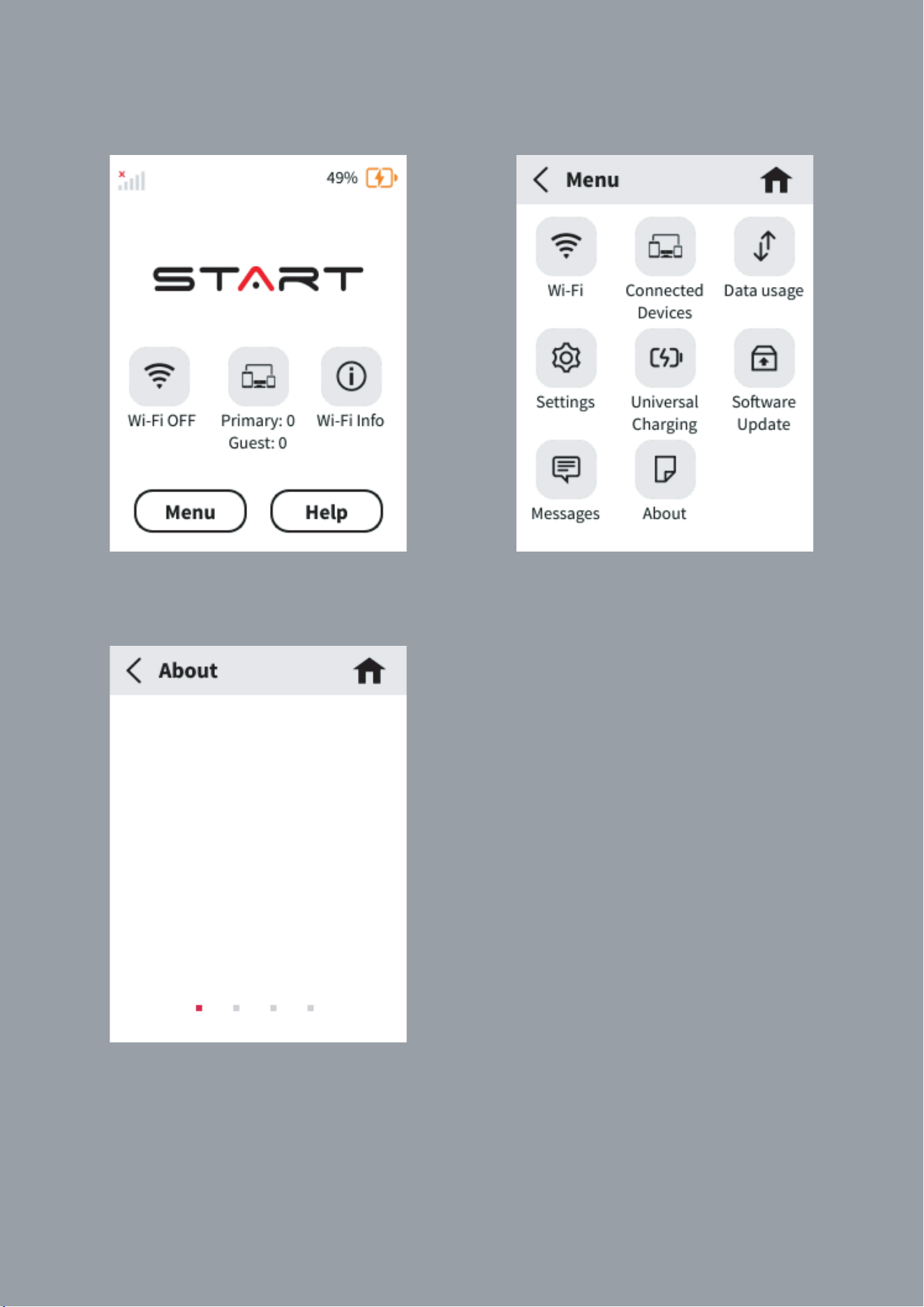
Model:
SD7000
FCC ID:
2AWF6-SD7000
SW Version:
SD7000_V1.0.05_GBL
HW Version:
V1.0
Step 1:
Press the Menu Button.
Step 2:
Press the About Button.
Step 3:
The device information is shown on the display screen and cannot be changed by user.