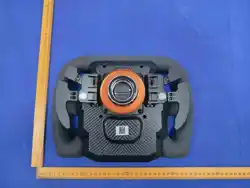

【KTM X-BOW GT2】User Guide
Ⅰ. Introduction
1.1 Overview
Model: KTM X-BOW GT2
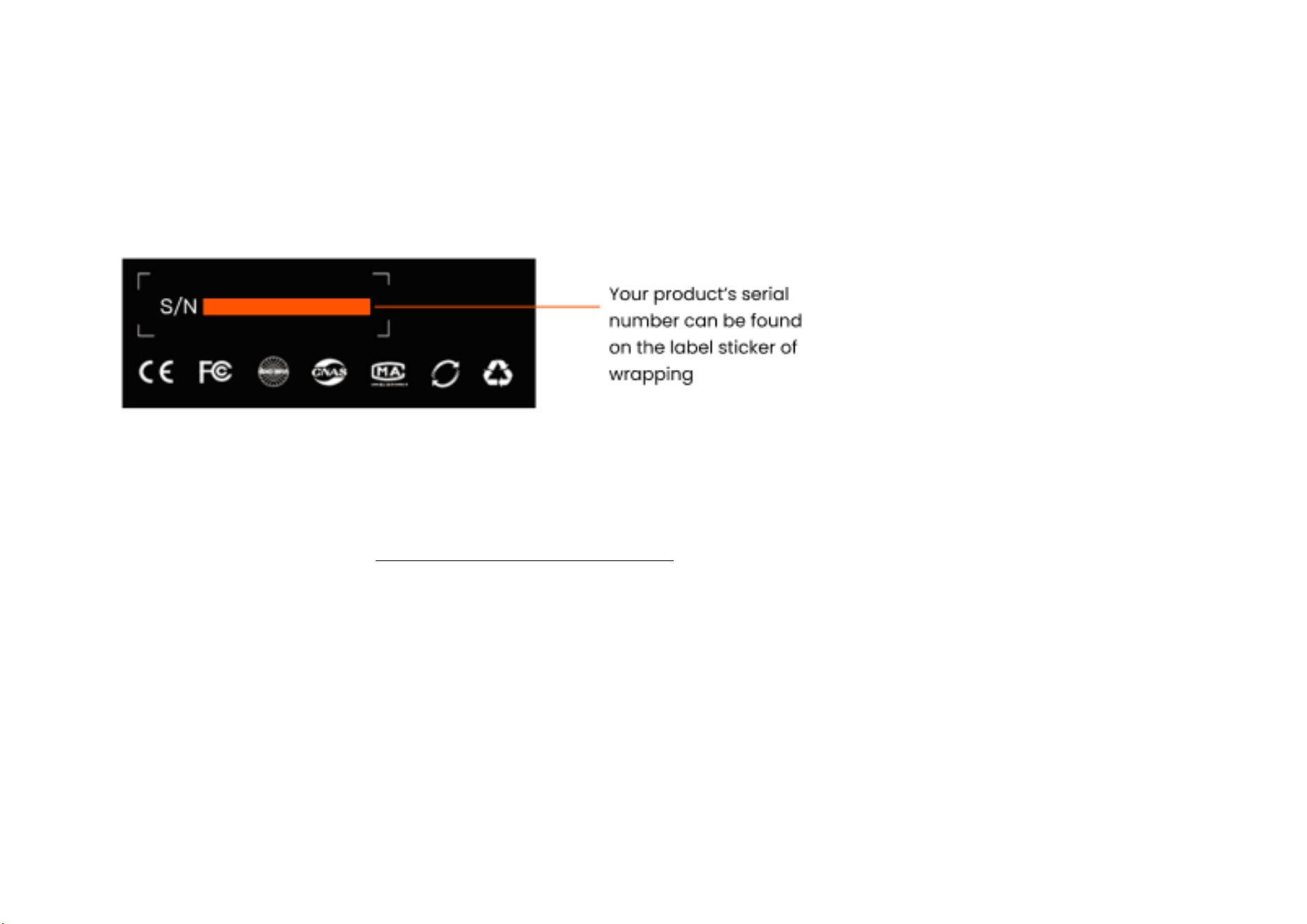
Serial Number (S/N): The SIMAGIC product serial number (S/N) is an essential credential for after-sales service and technical support. Please keep it properly
for future reference. The S/N consists of 10 or 14 digits and is clearly printed and affixed to both the product packaging label and the product body.
Designed by: SHEN ZHEN SIMAGIC TECHNOLOGY CO.,LIMITED
Manufacturer: SHEN ZHEN SIMAGIC TECHNOLOGY CO.,LIMITED
EU Authorized Representative: Bureau 450, 37 passage du Ponceau, Paris, France 75002
Country of Origin: MADE IN CHINA
Date of Manufacture: Please refer to the label on the product, packaging, or nameplate. Scan the serial number on the package for confirmation.
Product Features
Restores the design language of the KTM real car steering wheel, while optimizing details according to the simulated racing usage scenario, balancing appearance
fidelity with functional practicality. Incorporates SIMAGIC high-end standards (RGB lighting, modular components)
Hardcore Architecture: Carbon fiber reinforced composite materials, aluminum alloy load-bearing frame, complex handmade stitched grips.
Race Track Cockpit: KTM real car engineering model, highly replicating the experience of a real race car.
Intelligent Interaction: Brand new Simpro Manager V3.0.0, 5.5-inch touch display, supports deep tuning with SIMHUB.

Module Customization: Modular paddle modules, freely combined as needed.
Open ecology: Wide compatibility, software iteration (continuously updated telemetry data and customizable dashboard features).
1.2 Specifications
Product Name KTM X-BOW GT2
Model KTM X-BOW GT2
Wheel Type GT Wheel
Diameter 320mm
Weight
Without quick release / with standard dual shifters: 1697g,
With standard quick release / with standard dual shifters: 2099g
Material
Outer shell carbon fiber reinforced composite,
handle ultra-fiber suede
Programmable RGB button 8
Seven-way switch 2
12-slot programmable knob 2
Thumb knob 2
Communication method CAN FD\USB\WIFI
Wireless module
Dual-band Wi-Fi (2.4G/5.8G): 2.400 GHz ~ 2.497 GHz, 5.15 GHz ~ 5.85 GHz, Transmit power: < 13 dBm
Electrical parameters DC:5V/2A 10W MAX

Hall Paddle Module Standard configuration
Independently Developed
Keycap Stickers
Standard configuration
Quick release Zeus QR50
Includes in the package KTM X-BOW Steering Wheel (Main Product), Simagic Hotspot (Accessory), Accessory Pack (Accessory), Envelope Pack (Accessory)
Optional Accessories
Maglink Pro, single-paddle module, dual-paddle module, triple-paddle module, bidirectional paddle module
* Specifications subject to change without notice
1.3 Package Contents
KTM X-BOW GT2 Steering Wheel (accessories) include:
KTM X-BOW GT2 Steering Wheel
Accessory Pack(Tweezers x 1、No. 2 hex key x 1)
Envelope bag(Button sticker x 1, Transparent information sticker x 1, Quick guide x 1, Speed Magic Fun creation sticker x 1, USB(C) data cable x 1)
1.4 Certification Information
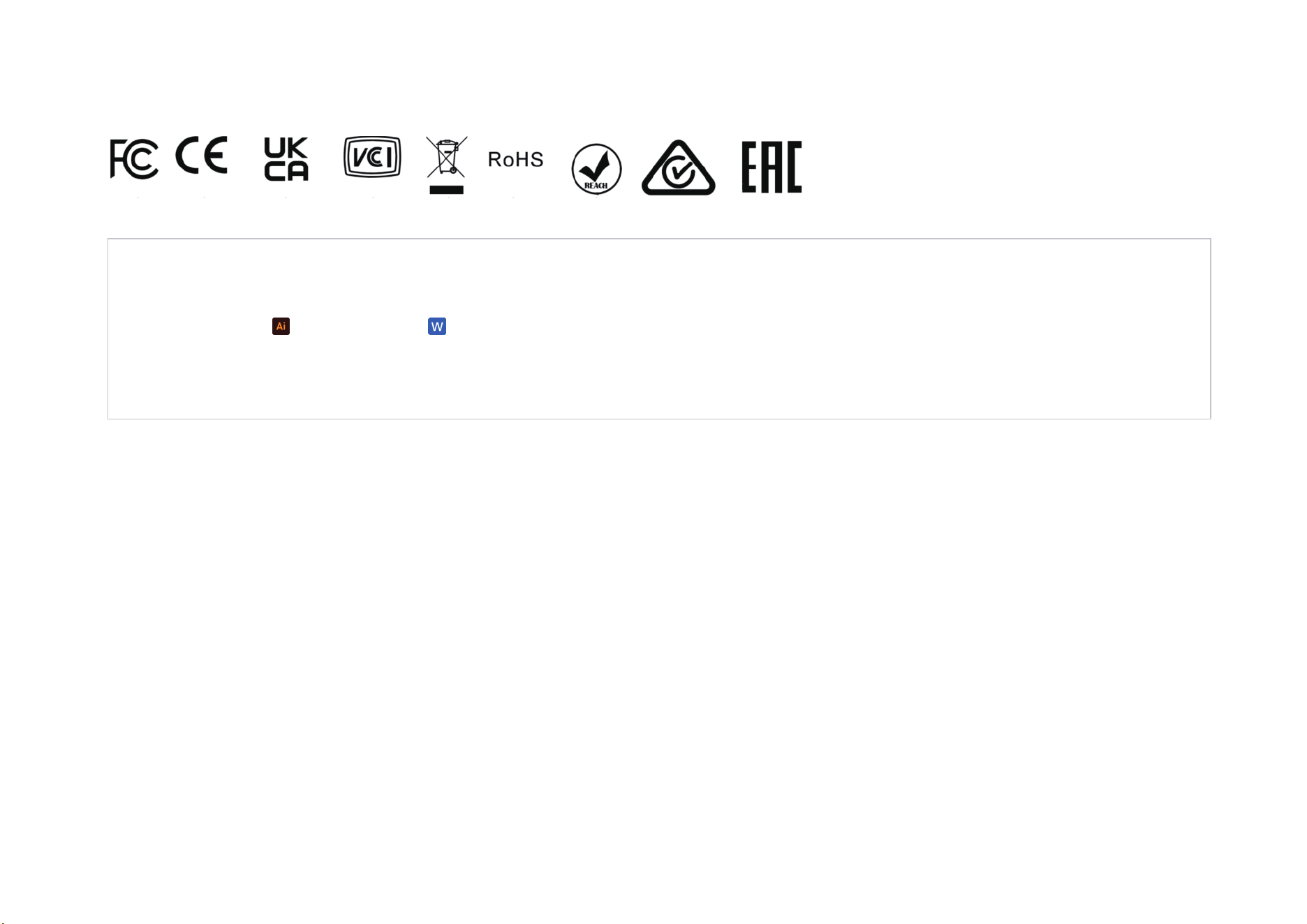
Markings: Quality Inspection Report FCC ID/CE/UKCA/VCCI/WEEE/ROHS/REACH/RCM/EAC/
Related documents: 认证矢量图(1).ai 认证标志要求(1).docx
Pending certifications: :FCC ID/CE/UKCA/VCCI/WEEE/RoHS/REACH/RCM/EAC/质检报告
The device is CE certified and meets the requirements of the European Union Directive 2014/53/EU on radio equipment.
Compliance Statement:
This product complies with UKCA relevant regulations and standards.
本機器は、民間情報処理装置障害自主規制協議会(VCCI)のクラス B 情報通信機器の基準を満たしており、家庭及びそれに類する生活環境
での使用に適しています。

The product has passed all evaluation procedures established in the technical regulations of the Customs Union and complies with the norms of
the Customs Union countries.
FCC Warning:
This equipment has been tested and found to comply with the limits for a Class B digital device, pursuant to part 15 of the FCC Rules. These
limits are designed to provide reasonable protection against harmful interference in a residential installation. This equipment generates, uses and
can radiate radio frequency energy and, if not installed and used in accordance with the instructions, may cause harmful interference to radio
communications. However, there is no guarantee that interference will not occur in a particular installation. If this equipment does cause harmful
interference to radio or television reception, which can be determined by turning the equipment off and on, the user is encouraged to try to
correct the interference by one or more of the following measures:
• Reorient or relocate the receiving antenna.
• Increase the separation between the equipment and receiver.
• Connect the equipment into an outlet on a circuit different from that to which the receiver is connected.
• Consult the dealer or an experienced radio/TV technician for help.
Caution: Any changes or modifications to this device not explicitly approved by manufacturer could void your authority to operate this equipment.
This device complies with part 15 of the FCC Rules. Operation is subject to the following two conditions: (1) This device may not cause harmful
interference, and (2) this device must accept any interference received, including interference that may cause undesired operation.
The device has been evaluated to meet general RF exposure requirement
. The device can used as portable exposure without any restriction.
These symbols indicate that you must follow the Waste Electrical and Electronic Equipment (WEEE) and Waste Battery and Battery Regulations
when disposing of the device, its batteries and accumulators, and its electrical and electronic accessories.According to the rules, this equipment
must be disposed of separately at the end of its service life. Do not dispose of the device, its batteries and accumulators, or its electrical and
electronic accessories together with unsorted municipal waste, as this will harm the environment. To dispose of this equipment, it must be
returned to the point of sale or turned in to a local recycling facility. You should contact your local household waste disposal service for details.

Ⅱ.Instructions for Use
2.1 User Tutorial
Thank you for purchasing the SIMAGIC KTM X-BOW GT2 Steering Wheel.
Before setting up the product, carefully read all the documentation that came with the package.
For information about firmware upgrades, please check Download SimPro - Official SIMAGIC Website
The related files are game adaptation files developed by SIMAGIC for SIMAGIC-compatible devices. To safeguard users' legal rights and interests, please
download all files through SIMAGIC's designated channels.
Please visit SIMAGIC official website (SIMAGIC Product Tutorials | Setup Guides & Videos) for tutorial videos showcasing different product setup
options and usage techniques. Learn more about the development behind our products.
Please visit SIMAGIC Game Telemetry Support | SIMAGIC Game Support to access the list of games supported by this product. Note that using this
product in non-supported games may result in certain functions not working as intended.
This device complies with the requirements for the restriction of hazardous substances (RoHS) in electrical and electronic equipment as
stipulated in Directives 2011/65/EU and 2015/863. The content of hazardous substances including lead, mercury, cadmium, hexavalent
chromium, polybrominated biphenyls (PBBs), polybrominated diphenyl ethers (PBDEs) and four phthalates in its homogeneous materials is
below the statutory limit values.
The device complies with the requirements of Regulation (EC) No. 1907/2006 concerning Registration, Evaluation, Authorization and Restriction
of Chemicals (REACH).
This product complies with the requirements of the Australian and New Zealand Radiocommunications Act (RCM), meeting
Electromagnetic Compatibility (EMC) and electrical safety standards.
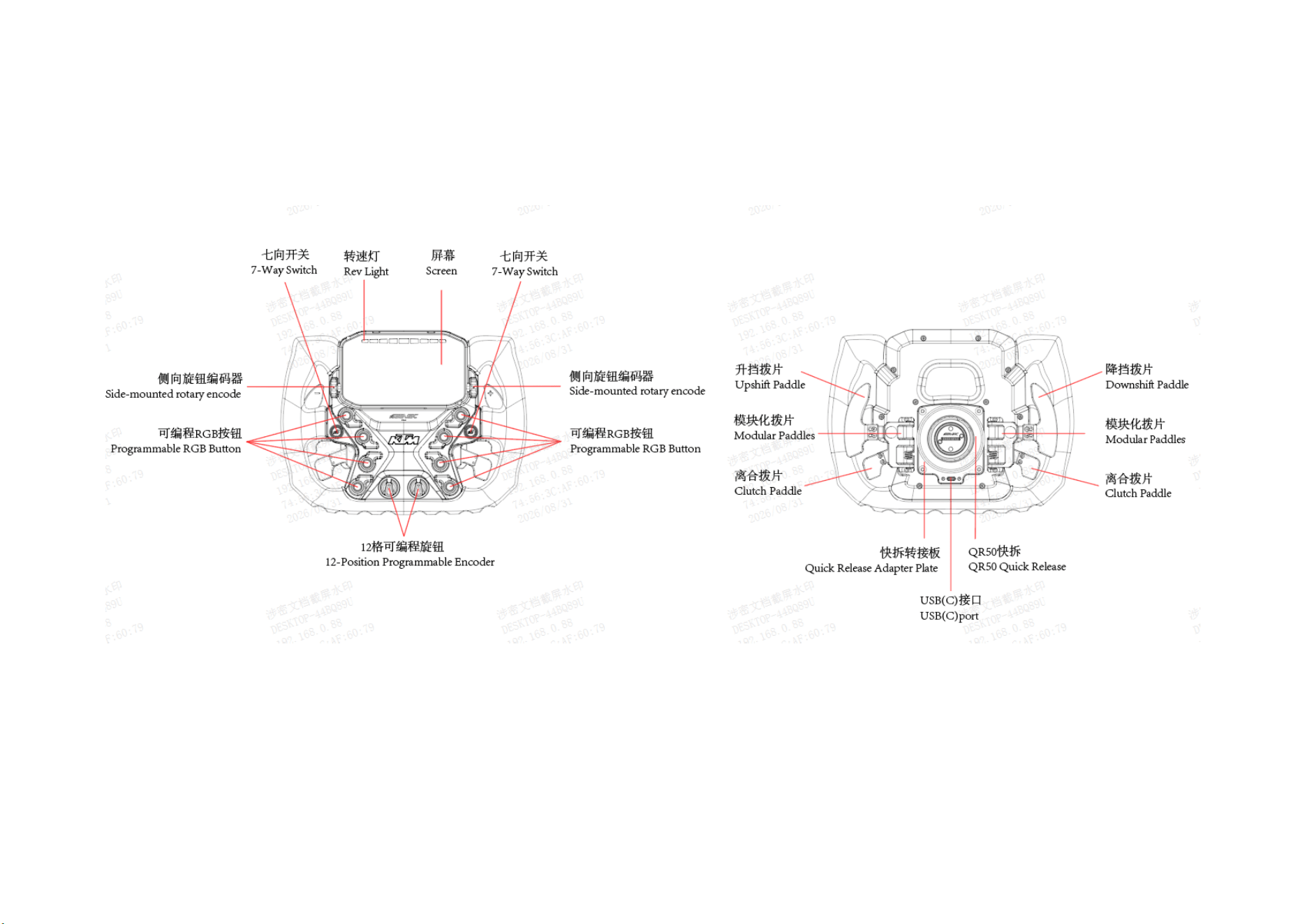
2.2 Function Overview
2.2.1 KTM X-BOW GT2

2.3 Steering Wheel Hotkeys
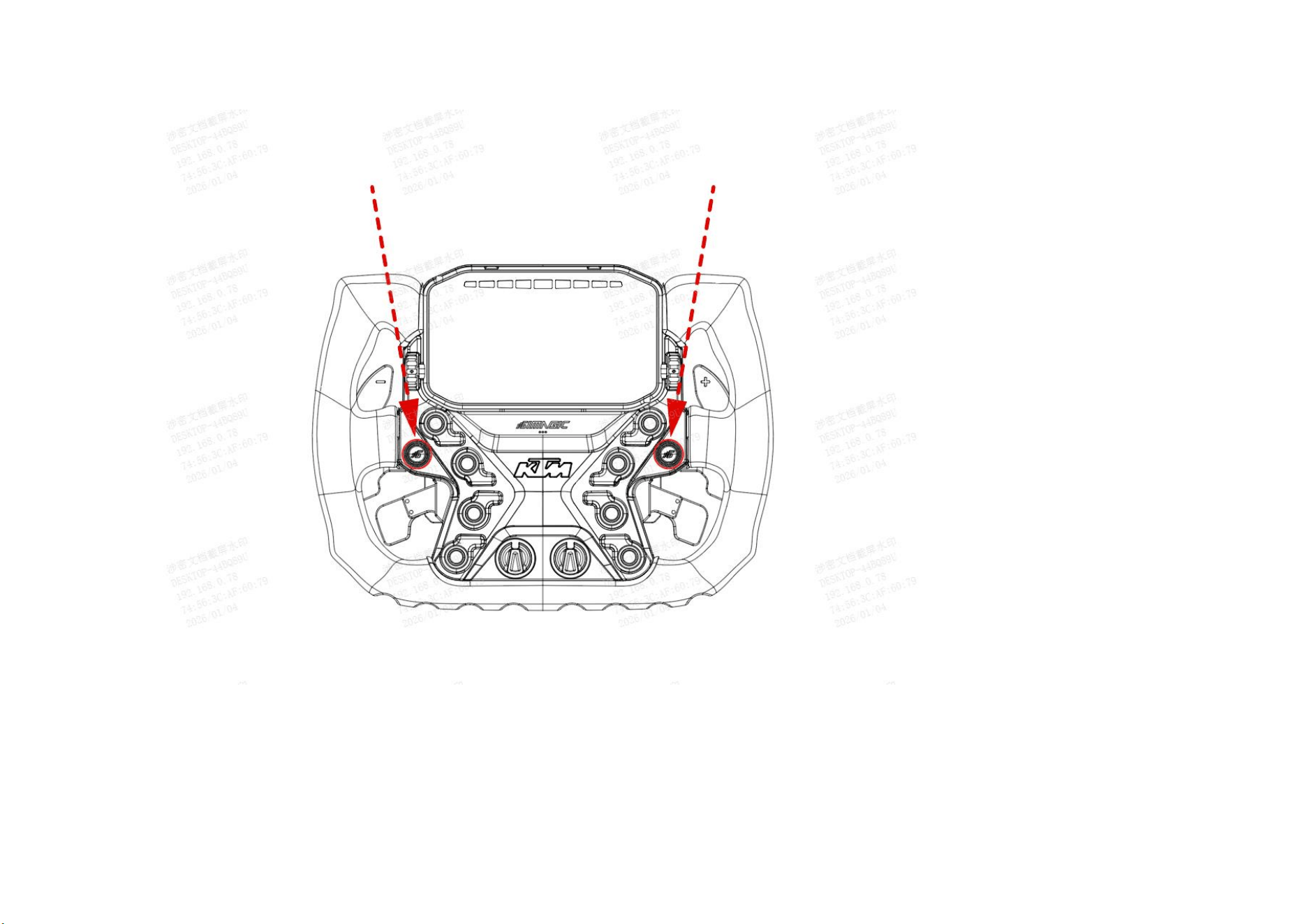
2.3.1 Clutch Calibration
Push the 7-way switch upward for 5 seconds to enter clutch calibration mode, and press each clutch paddle to the bottom once to complete the clutch calibration
(a paddle module with clutch paddles must be installed). After calibration is complete, press any key to exit clutch calibration mode.
2.3.2 Manually Switch Encoder Mode
Press the 7-way switch ① for 1.5 seconds, then rotate knob ② to the right (clockwise) to enter absolute mode, at which point the lighting effect rotates
clockwise.
Press the 7-way switch ① for 1.5 seconds, then rotate knob ② to the left (counterclockwise) to enter incremental mode, at which point the lighting effect
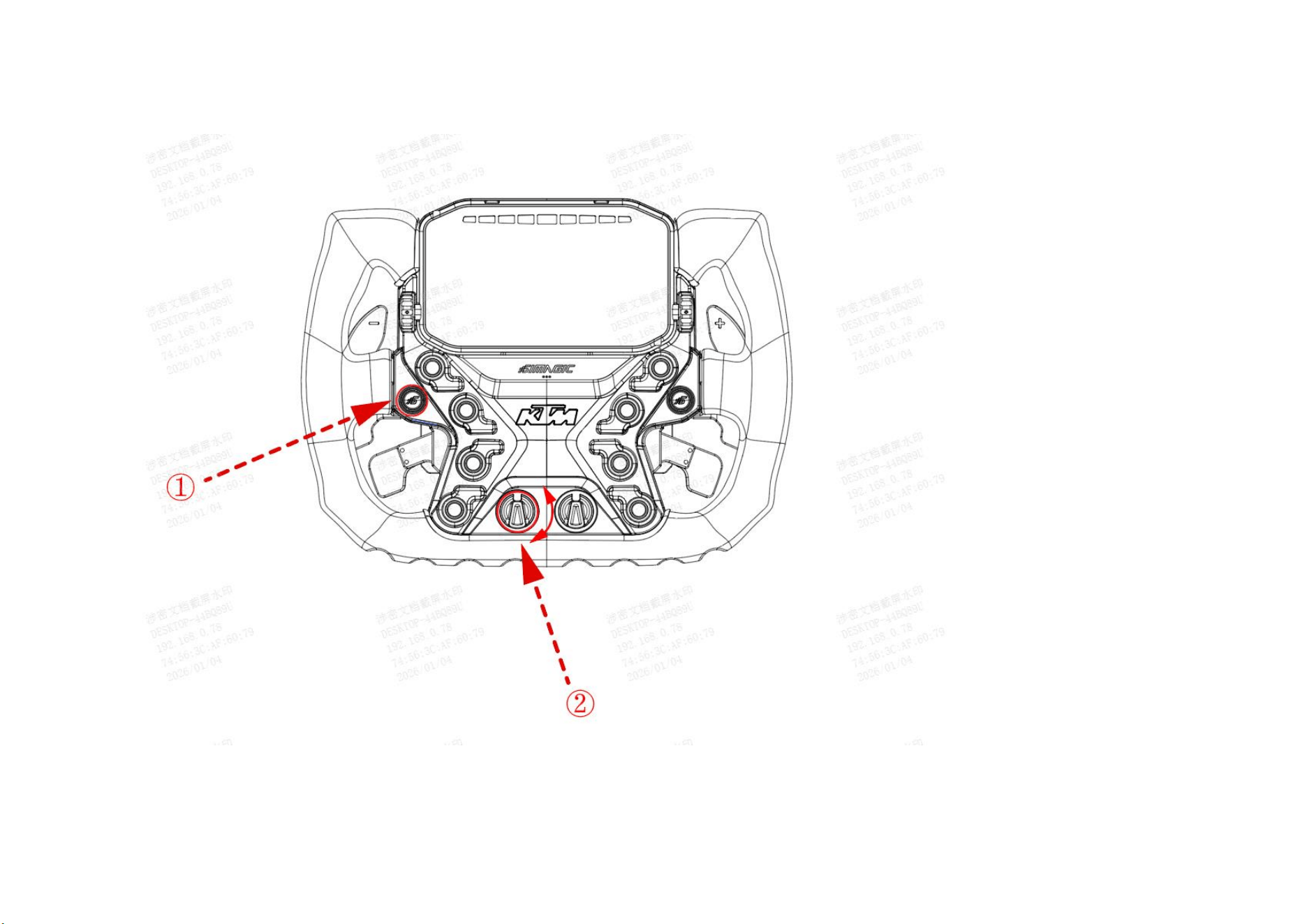
rotates counterclockwise.

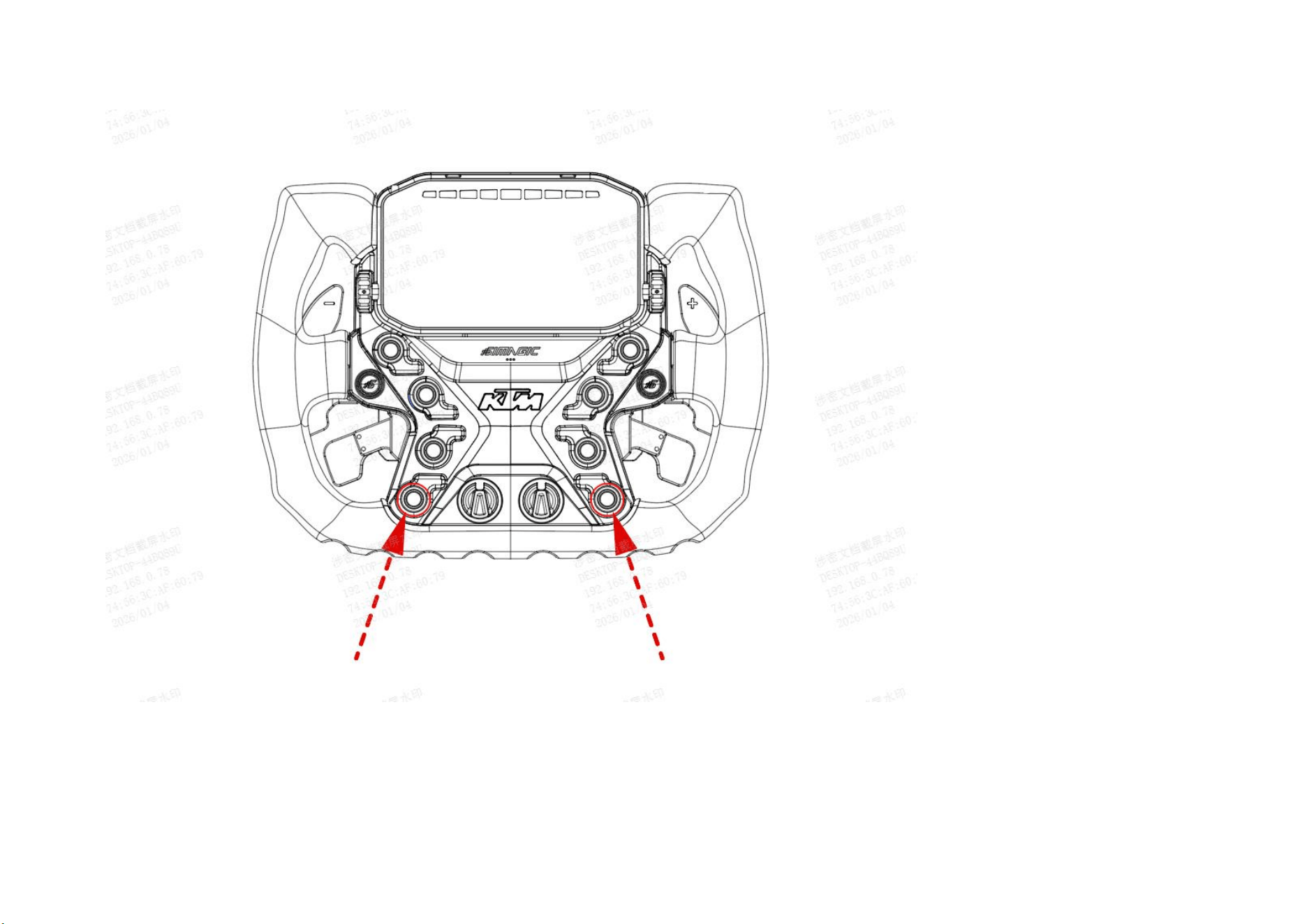
2.3.3 Factory Reset
Press and hold the two indicated buttons simultaneously for 5 seconds to reset the wheel back to factory default settings.

2.4 Steering Wheel and Wheelbase Connection
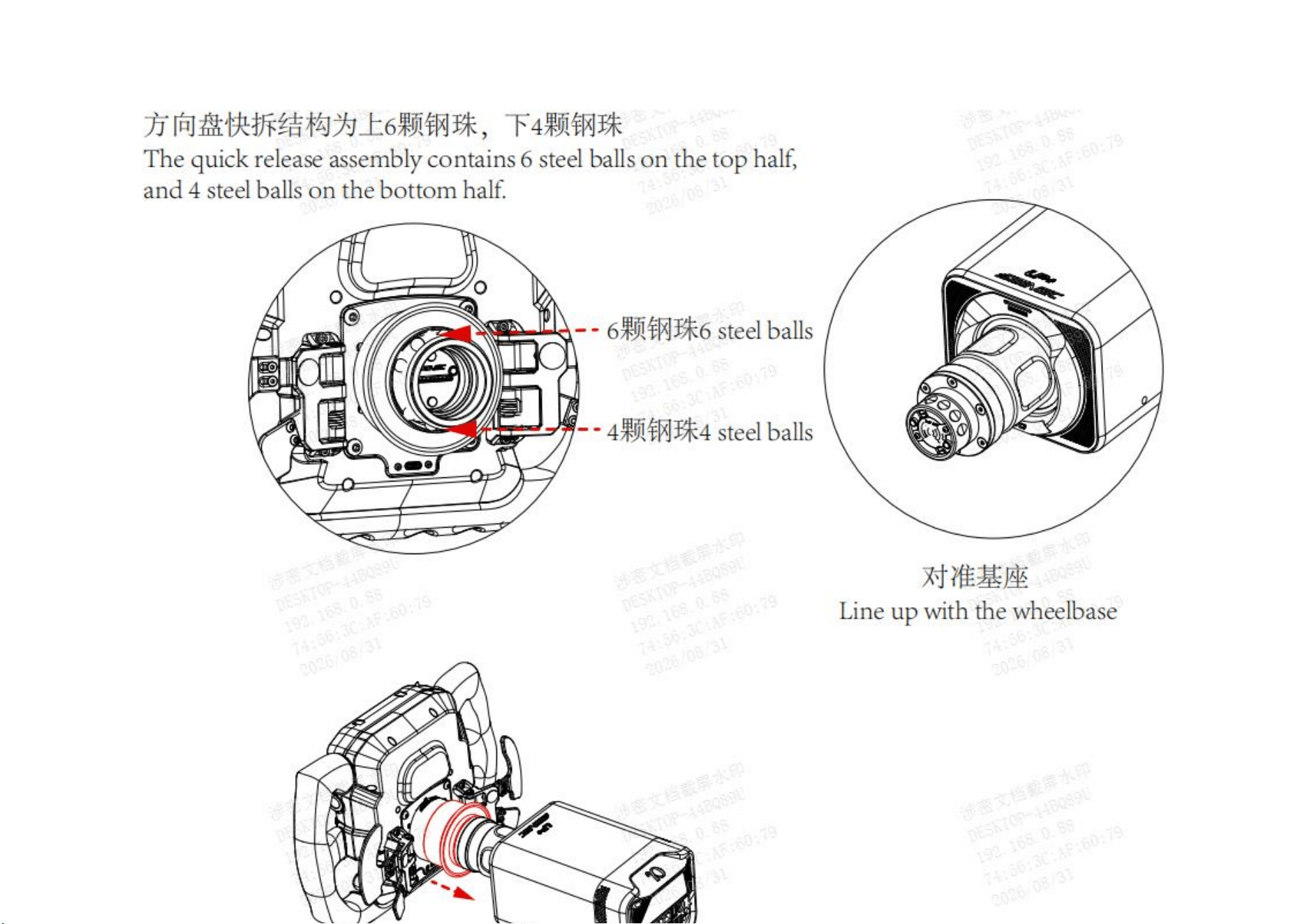
2.4.1 Connecting to Alpha EVO Wheelbase
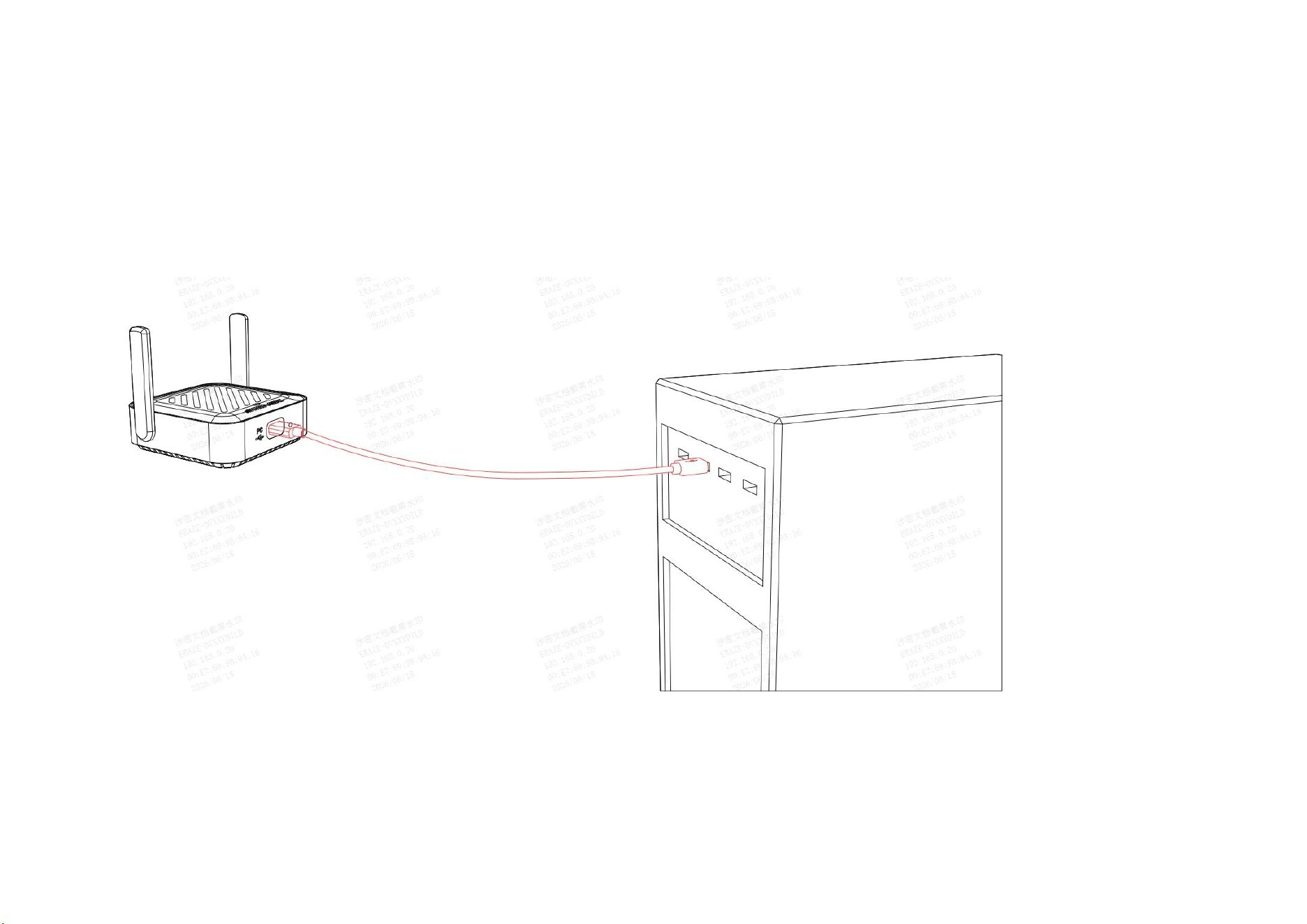
2.4.2 Connect the SIMAGIC Air Link to your PC.
① Connect the SIMAGIC Air Link to your PC via USB-C, start SimPro, and the Air Link will autonomously detect and pair with any SIMAGIC
devices in range.
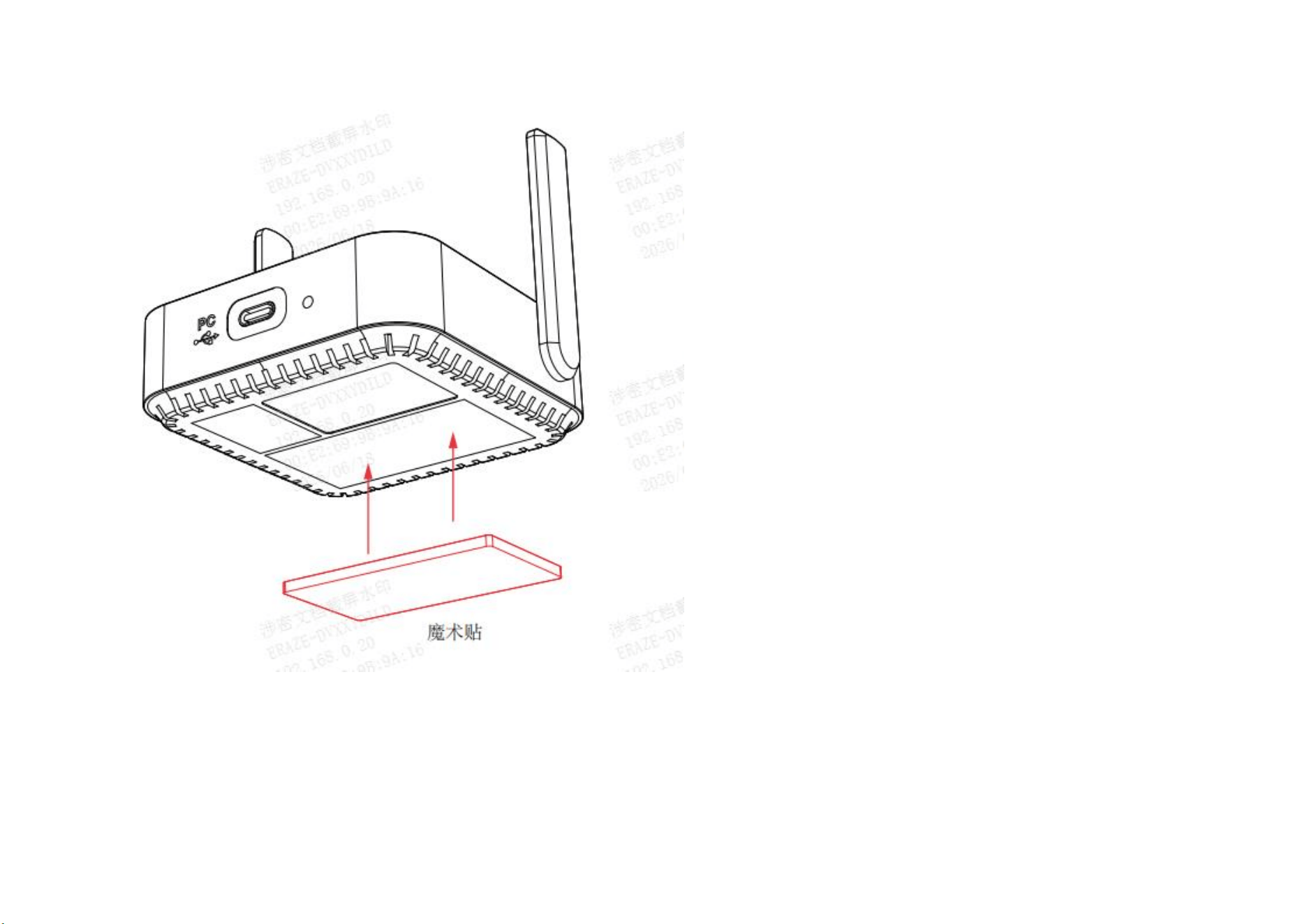
② Attach the hookǦ andǦ loop fastener (Velcro) to the bottom of the SIMAGIC Air Link, then use it to secure the Air Link to another location.
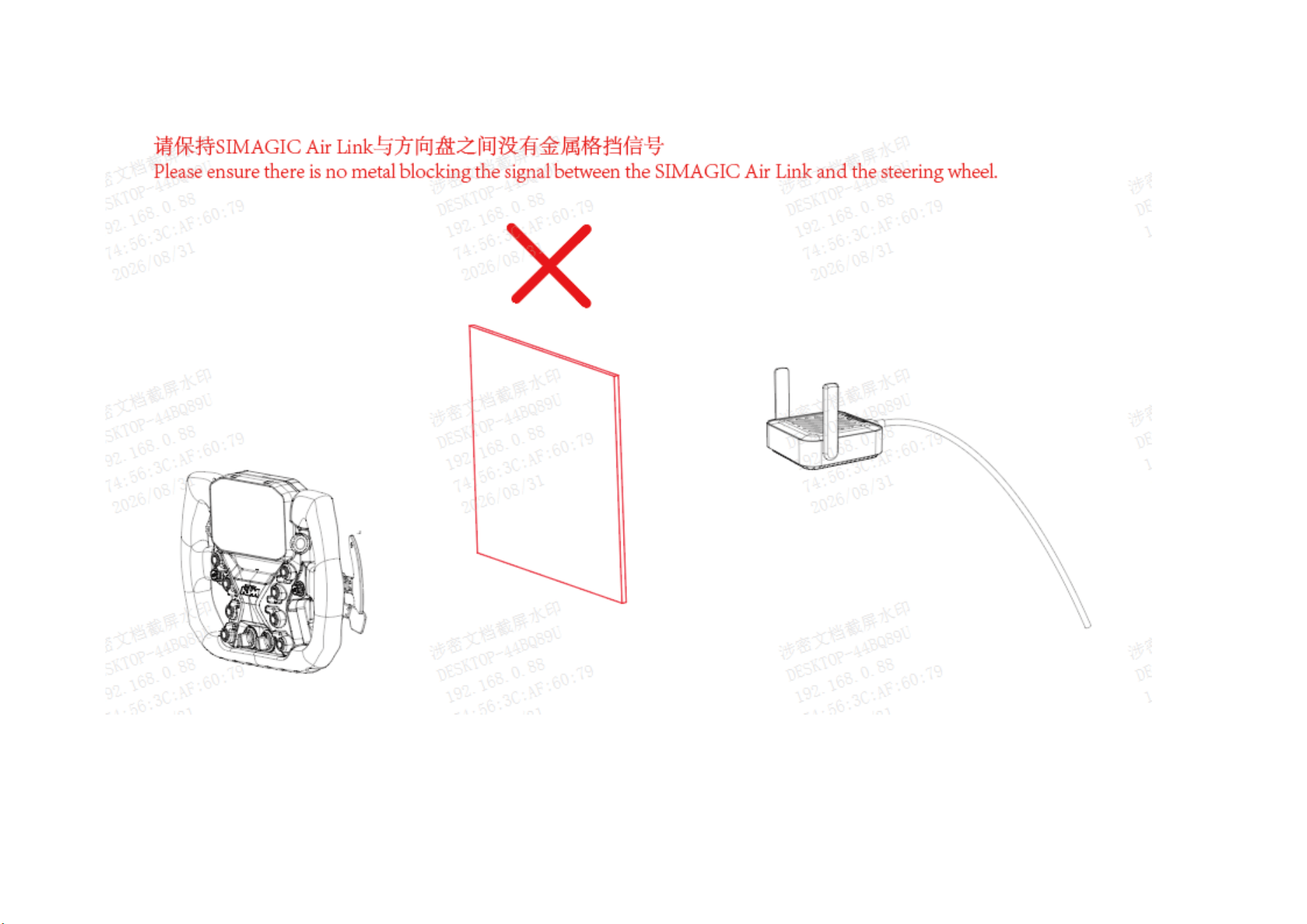
Please ensure there is no metal blocking the signal between the SIMAGIC Air Link and the steering wheel.

2.5 Connecting to Other Wheelbase or PC
2.5.1 The method of connecting Maglink Pro with M10/Alpha Mini/Alpha/Alpha Ultimate docking stations or third-
party docking stations.
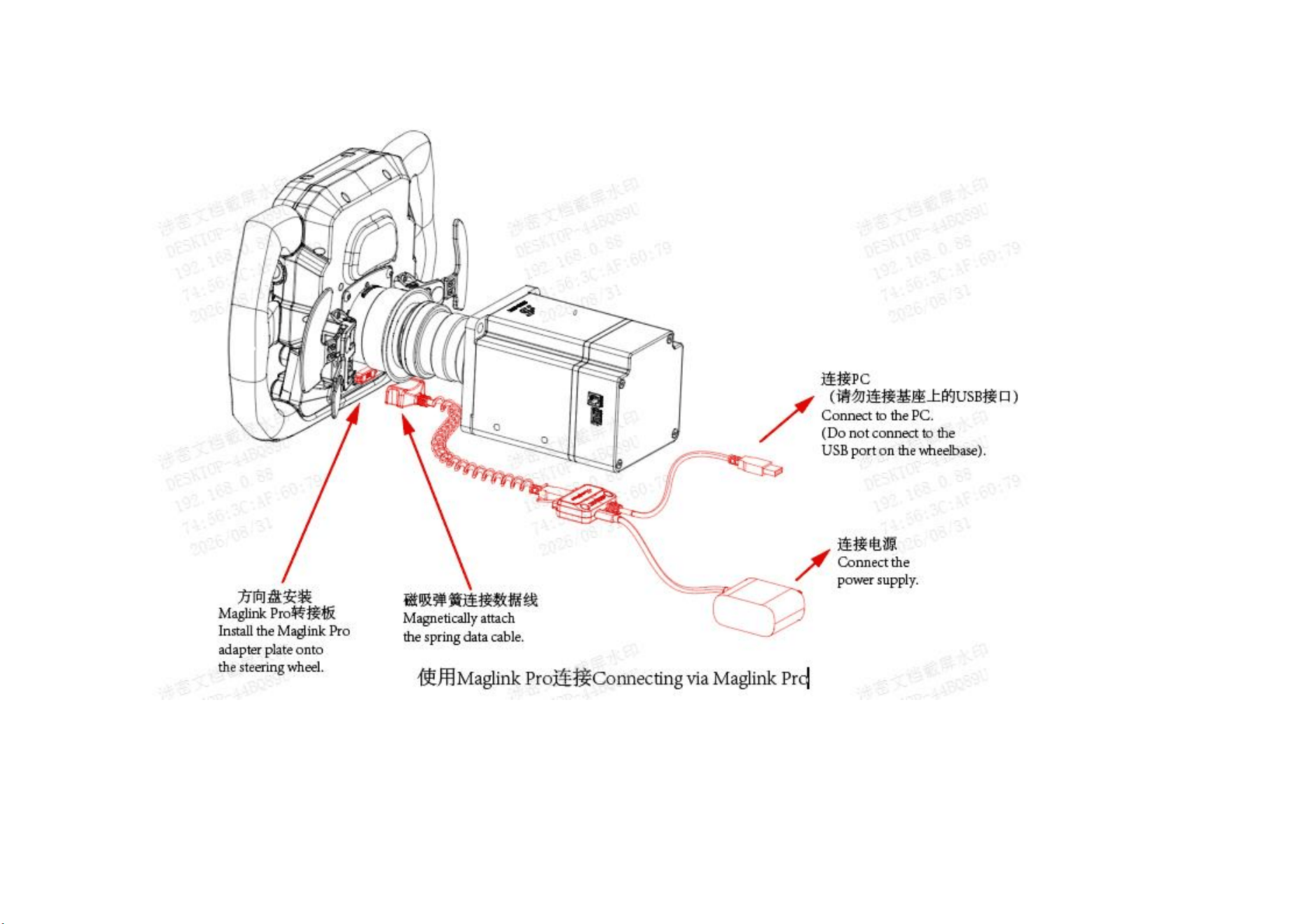
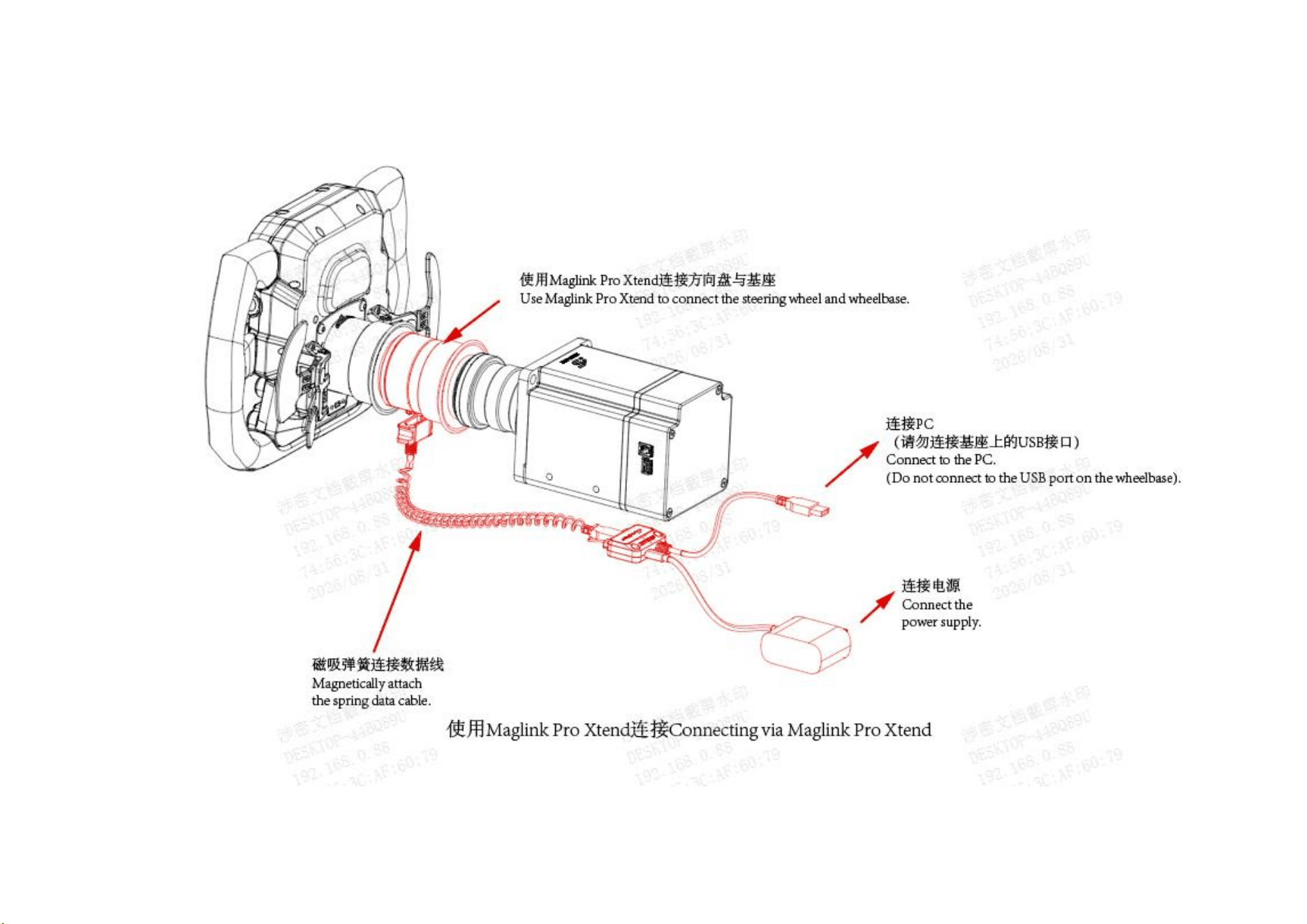
2.5.2 The method of connecting Maglink Pro Xtend with the M10/Alpha Mini/Alpha/Alpha Ultimate base.
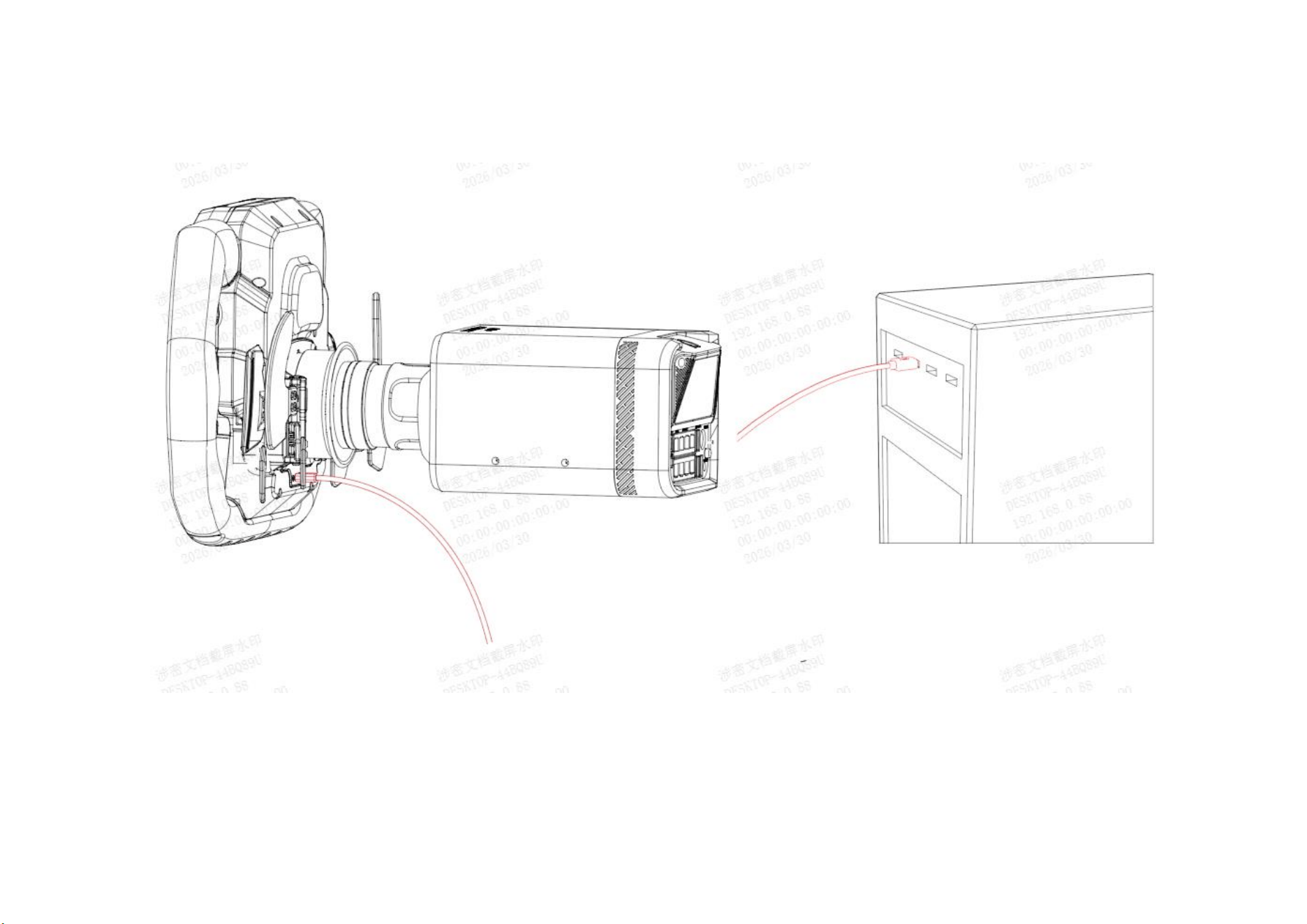
2.6 Methods to connect a PC for firmware upgrade
Connect the PC using the USB (C) port on the back of the steering wheel to perform a firmware upgrade.
2.7 Steering Wheel Adjustment
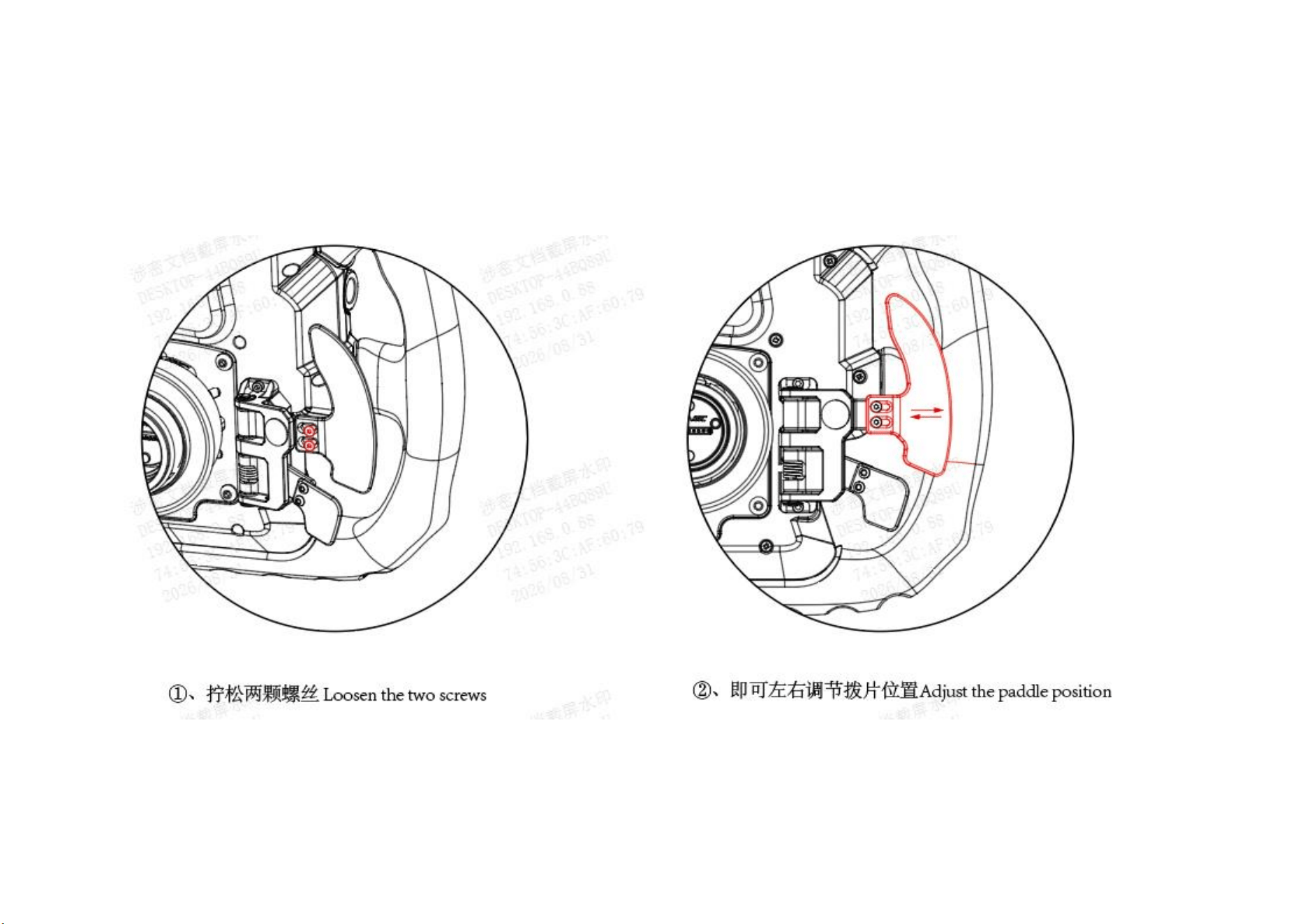
2.7.1 Plectrum plate adjustment
Use a No. 2 hex wrench to loosen the two screws to adjust the position of the paddle.
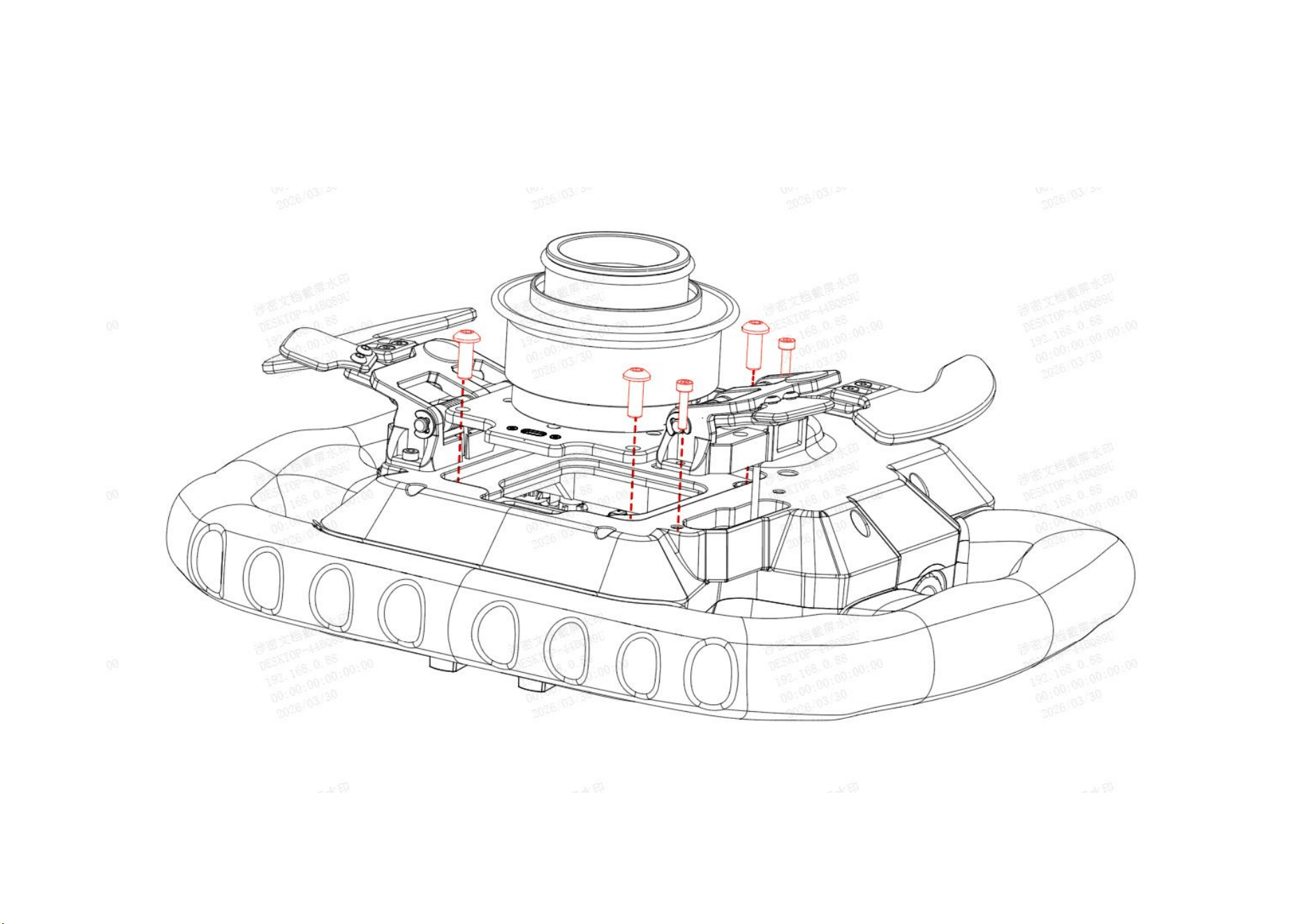
2.7.2 Pick set replacement
①、Remove the shift lever set and quick release set screws

②、 Unplug the quick-release terminal connected to the motherboard and remove the
quick-release.
③ Unplug the switch group terminal and remove it to replace the switch group.
When inserting or removing the connector, please refrain from using excessive force, as this may cause damage.
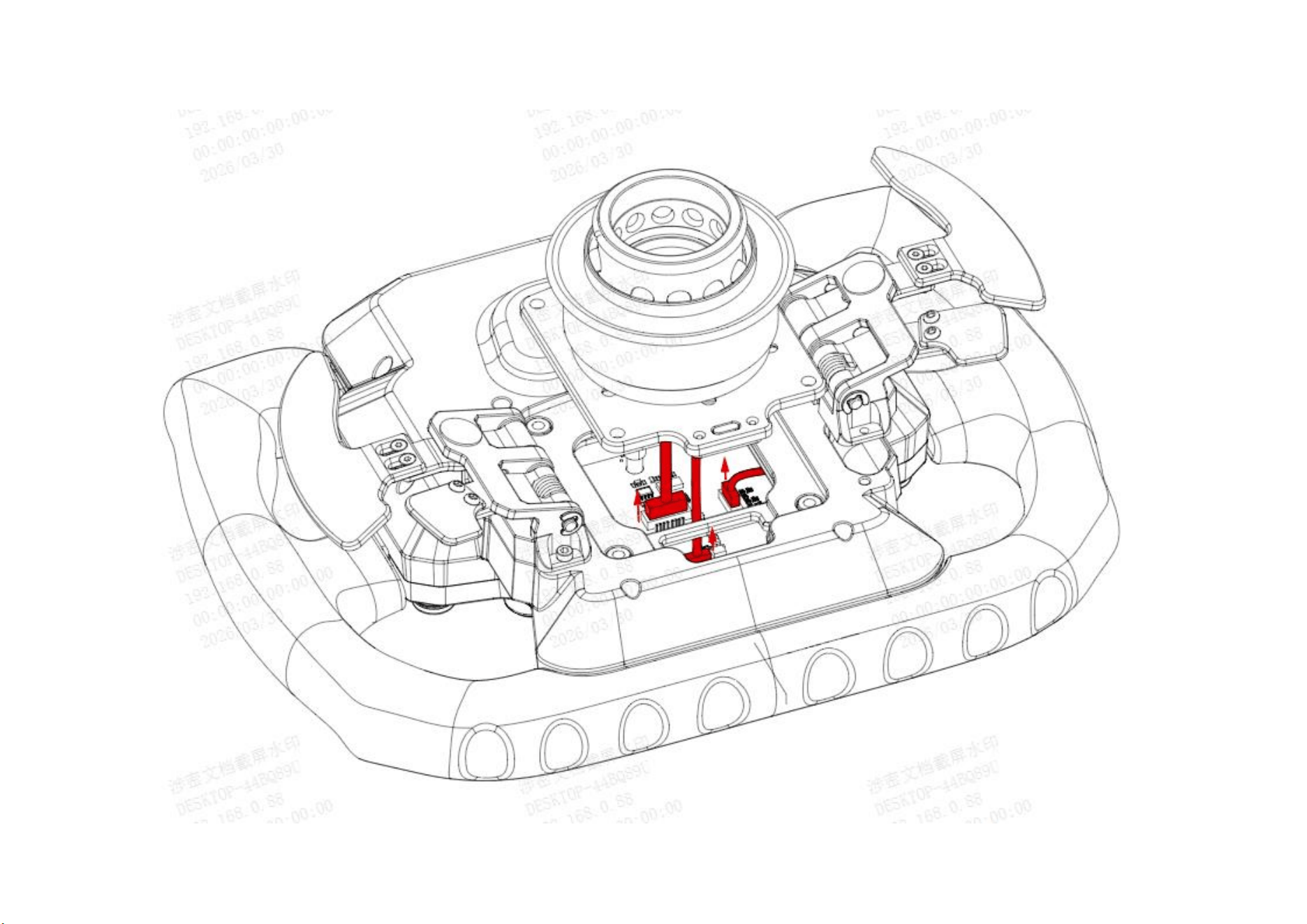

④ After replacing the switch group with a new one, reinstall it following the original steps.
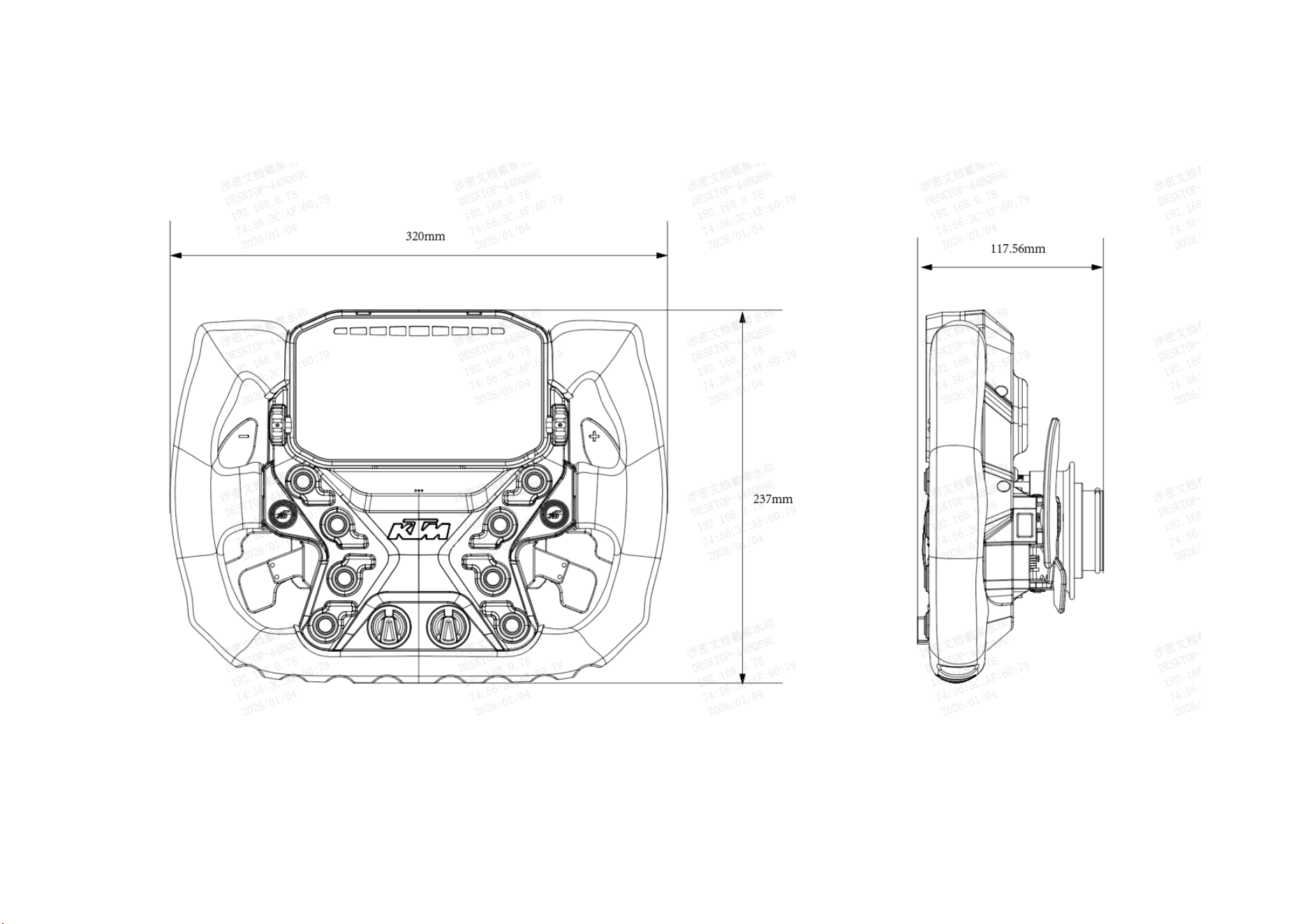
2.8 Product Dimensions

Ⅲ.Software Guide
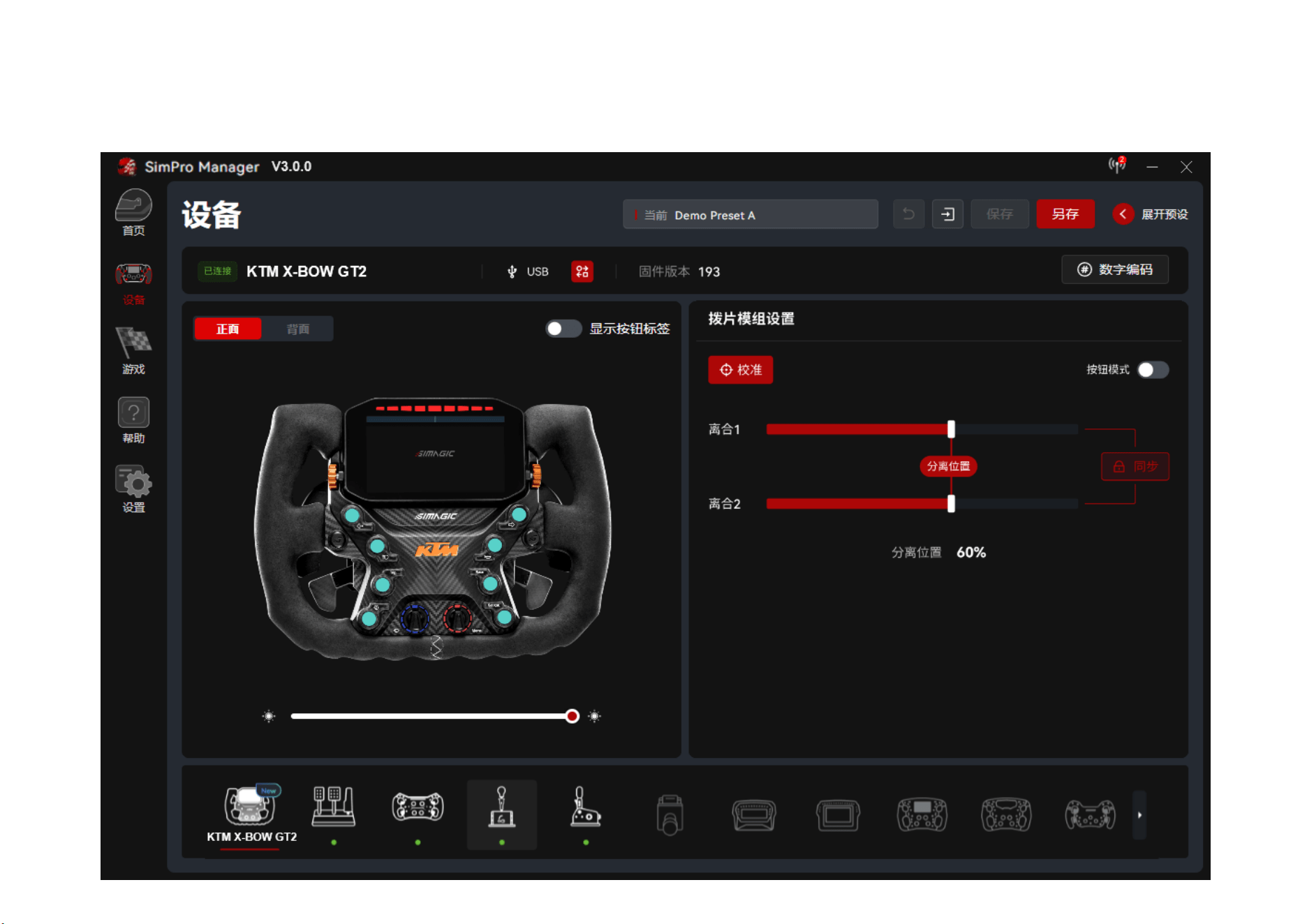
3.1 SimPro Manager Software Overview
SimPro Manager is a device management software designed for SIMAGIC sim racing hardware. It supports steering wheels, wheelbases, pedals, and related
expansion devices, allowing users to centrally manage their equipment and perform advanced tuning to fully unlock hardware performance.
Main Features:
①
Device Management: Automatically detects and manages connected SIMAGIC devices.
②
Function Configuration: Configure parameters and enable features by device type.
③
Performance Tuning: Fine-tune key performance settings such as force feedback and pedal curves.
④
Dashboard Configuration: Customize dashboard content and layout. (supported on selected devices.)
⑤
Firmware Updates: Detect and update device firmware online.
⑥
Quick Launch: Quickly launch installed sim racing titles.
Before using this product for the first time, please install SimPro Manager. Download link: Download SimPro - Official SIMAGIC Website.
3.2 Software Features

Note: The software interface shown in this manual is based on the final version released on the official website. As the software may be updated from time to
time, the actual interface may differ from the illustrations in this manual. For complete instructions and detailed information on SimPro Manager settings,
please refer to the official information released through authorized channels. The following is an example of the
Main Interface:
⚠WARNING:
KTM X-BOW GT2 Steering Wheel comes with pre-installed firmware, which may be outdated. When launching SimPro Manager for the first time, the software may prompt you to
update if a newer firmware version is available.
Click ‘Firmware Update’ at the bottom of the device module to start the update. Once completed, the wheelbase will restart automatically.

Through our software SimPro Manager, the KTM X-BOW GT2 supports the following viewing and configuration functions:
① Device Information: View device model, firmware version and response status of button codes.
②
Connection Modes: Check supported connection options including USB, CANFD and Wi-Fi.
③
Paddle Module Settings: Calibrate paddles, set separation points (Clutch 1 / Clutch 2), enable sync lock, and switch to button mode. The rear view of the
steering wheel identifies installed paddle types: dual-action paddles, single paddle, triple paddles and dual paddles.
④
Shift Light Settings: Toggle between percentage mode and RPM mode. Global shift light configuration is available by default. Advanced settings allow
independent RPM threshold configuration for light activation on each gear.
⑤
Button Configuration: Modify button codes and link button lighting to telemetry data. For example, the button light will activate when vehicle ABS is
triggered in-game after relevant telemetry linkage is set.
Supported touch gestures include
wheel functions
⑥
Brightness Adjustment: Adjust the overall brightness of the steering wheel panel lights to suit different lighting conditions and personal preferences.
⑦
Dashboard Functions: Select dashboards from the dashboard library and synchronize them to the device. Switch displayed dashboards via the touchscreen.
single tap, double tap, swipe, and two-finger vertical swipe, which simulate mouse press, mouse release, left-click and scroll
respectively.
Ⅳ.
⑧
Preset Profiles: Use official presets directly. Modified settings can be saved as custom presets for quick access and easy management.
Important Information
4.1Safety Information
In order to achieve maximum safety while using your products, We suggest that you adopt the following guidelines:
* Storage and Operating Conditions:
Operating Temperature
0°C~40°C

Humidity
20% – 80% RH, Non-Condensing.
Storage and Usage
For indoor use only. Avoid direct sunlight. If the device is moved from a cold
outdoor environment indoors, leave it unused for 2 hours to allow condensation
to dissipate before powering on
This product is designed to operate under the conditions specified above. Operating outside these conditions may cause certain functions to malfunction or
affect overall performance.
Before using the product, ensure it has adjusted to the recommended indoor temperature if it was exposed to extreme heat or cold.
*⚠This product is intended for sim racing only.
*⚠Should you have trouble using the product properly and troubleshooting does not work, unplug the power and go to your local distributor for support. Do not
attempt to service or fix the product yourself at any time.
*⚠To prevent fire or shock hazard, never expose the products to rain or moisture.
*⚠Only use the power and/or accessories included in the package, and/or purchase accessories made and/or approved by the manufacturer.
*⚠Use only a standard AC wall outlet with protective grounding to avoid product damage or electric shock.
*⚠When terminating use, please turn off the buttons and power equipment to prevent accidents.
*⚠Unplug the unit during a lightning storm or if it will not be used for a long period of time.
*⚠This device contains no user-serviceable parts; disassembling it may cause a risk of electric shock. Do not disassemble the device (doing so will void your
warranty). Component replacement must be carried out by the SIMAGIC official service center or a SIMAGIC authorized repair facility.
When using the simulator, please pay attention to the following:
*⚠This device contains small parts and is prohibited for use by children under 6 years old. Children under 15 must use it under adult supervision, adjust the

force feedback parameters in child mode before use, and be supervised at all times. The base is not allowed to be used in high-torque mode.
*⚠First-time users or those experiencing the device should be guided by the device owner.
*⚠When using the equipment, please ensure that the surrounding environment is tidy, and keep limbs, hair, loose clothing, cables, and accessories away from
rotating parts. Strong force feedback may cause serious crushing injuries, muscle damage, or fractures.
*⚠Users with a history of epilepsy, heart disease, or who have a pacemaker should consult a qualified physician before using this device. Certain patterns may
trigger seizures with no prior history. If you experience any symptoms, please stop using the product immediately and consult a doctor.
*⚠When using a high-torque base, the peak force feedback may cause hand injuries. If the feedback is too strong, release your hands immediately and adjust
the feedback intensity parameters promptly to prevent potential accidents.
*⚠The equipment contains moving parts, pinch points, and sharp edges that may cause personal injury. Operate with caution to prevent pinching, bruising,
kicking, smashing, or other bodily injuries.
*⚠It is recommended to limit the force feedback gaming time from 20 to 40 mins to avoid health risks from excessive use.
*⚠Users should refrain from driving a real car for at least 1 hour after finishing the game.
*⚠If any abnormalities are detected, stop using the device immediately and seek assistance from SIMAGIC's official or authorized service center.
*⚠Please follow SIMAGIC's official website and public platforms for the latest product information.
4.2Warranty Description
Warranty Terms
Thank you for purchasing this product.
Prior to installation, please thoroughly review all documentation provided with the product.
The warranty period is 24 months from the date of purchase. During this period, if any components, materials, or workmanship of the machine encounter issues
under normal use and maintenance, and upon inspection it is confirmed to be a quality problem, our company will provide free repair and parts replacement
services.
SIMAGIC product's Serial Number (S/N) will serve as the primary identifier for after-sales support. You can locate the S/N on the product packaging and the
product itself, attached via a sticker on the product surface. Simply provide the 10 or 14-digit S/N to our customer service team or SIMAGIC distributor when
applying for after-sales service, and they will assist you promptly.
SIMAGIC adheres to a service spirit that is responsible for users and ensures user confidence, striving to create the ultimate user experience. Regarding these
warranty terms, if adjustments are necessary, we regret that specific notifications may not be provided.
Please refer to the latest content released through official channels such as the official website. Please avoid causing damage to the machine intentionally. Do
not deviate from the guidance of official or officially authorized personnel when performing non-normal hardware or system operations on the machine. For
detailed usage instructions, please visit https://simagic.com/pages/product-tutorial .
The Limited Warranty does not apply to any:
a) Failure to provide proof of purchase for the product or an order number, or if there is reason to believe that they have been forged or altered.

b) The warranty claim is made in a country or customs area other than where the product was originally purchased.
c) Damage caused to the product by disassembly or modification of its structure without written authorization from SIMAGIC.
d) Products purchased from a retailer other than SIMAGIC's official online store.
e) Cosmetic damage, including but not limited to scratches, dents, and plastic damage at ports, unless the damage is caused by defects in materials or
workmanship.
f) Damage caused by not adhering to SIMAGIC's product usage and operation specifications, or by modifying or disassembling the product.
g) Damage caused by using third-party components or products that do not meet the specifications of SIMAGIC's hardware products.
h) Defects caused by normal wear and tear or normal aging of the product.
i) The serial number on SIMAGIC's product has been removed or altered.
j) If SIMAGIC receives information from relevant authorities that the product has been stolen, and the user cannot prove in any way that they are the authorized
user of the product.
k) Damage caused by accidents, lightning strikes, corrosion, fire, liquid contact, earthquakes, or other external causes.

Ⅴ.Legal Notices and Trademark
5.1.Trademark Information
Copyright © 2026 SHEN ZHEN SIMAGIC TECHNOLOGY CO.,LIMITED. All Rights Reserved.
- The products and corporate names mentioned in this manual may or may not be registered trademarks or copyrights of their respective companies. They are
used solely for the purposes of identification or explanation, and to the benefit of the owners, without any intention of infringement.
- The specifications and information provided in this manual are intended for informational purposes only and are subject to change at any time without notice.
They should not be interpreted as a commitment by SIMAGIC. SIMAGIC assumes no responsibility or liability for any errors or inaccuracies that may appear
in this manual, including those related to the products and software described within it.
- SIMAGIC shall not be liable for any lost profits, loss of information or data, special, incidental, indirect, punitive, or consequential damages arising in any
way out of the distribution, sale, resale, use, or inability to use the Product. In no event shall SIMAGIC's liability exceed the retail purchase price of the
Product.
5.2 Contact Us

SIMAGIC official website: https://simagic.com/
Global social media account name: simagic official