
HangzhouZhiyuanTechnologyCo.,Ltd.
LJ Bed Remote Control
BYKQ01-A0
Product Manual
Version V0.10
Thank you for choosing our product. Please read this product manual
carefully before use.
Manufacturer: Hangzhou Zhiyuan Technology Co., Ltd.
Address: No.10, Naxian Street, Liangzhu Dalu Industrial Park, Hangzhou,
Zhejiang, China

HangzhouZhiyuanTechnologyCo.,Ltd.
Revision History
Version
Date
Description
Editor
Reviewer
Approver
V0.10
2026/07/15
Initial release
Liu
Weiqiang
Liu Tong
Jiang Shi
HangzhouZhiyuanTechnologyCo.,Ltd.
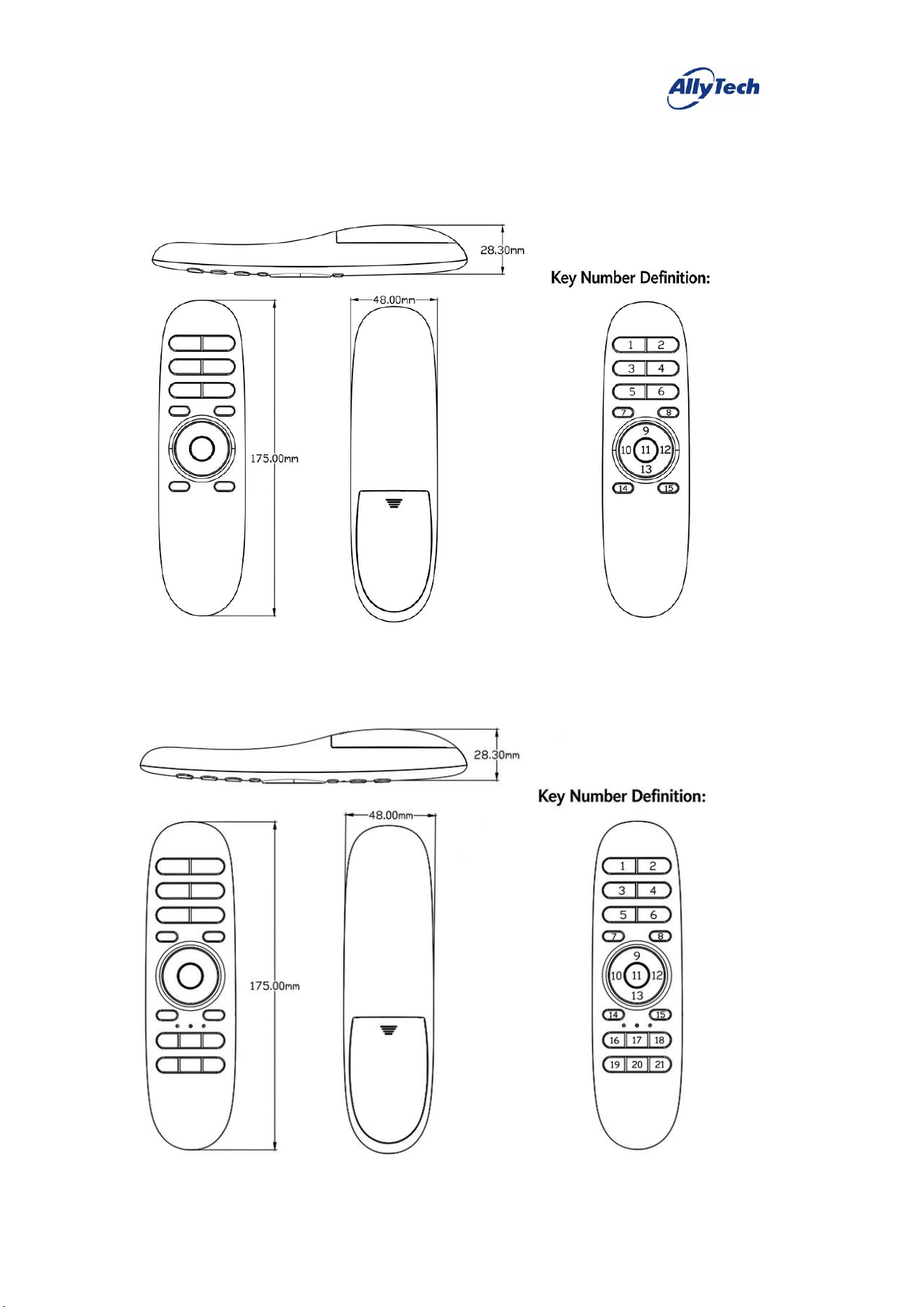
一、 Appearance and Dimensions
1. 15-key version (for A21, A22, A31, A41)
2. 21-key version (for B21, B22, B31, B32, B33, B34, B35,
B41, B42, B43, B51, B52, B53)
HangzhouZhiyuanTechnologyCo.,Ltd.
二、
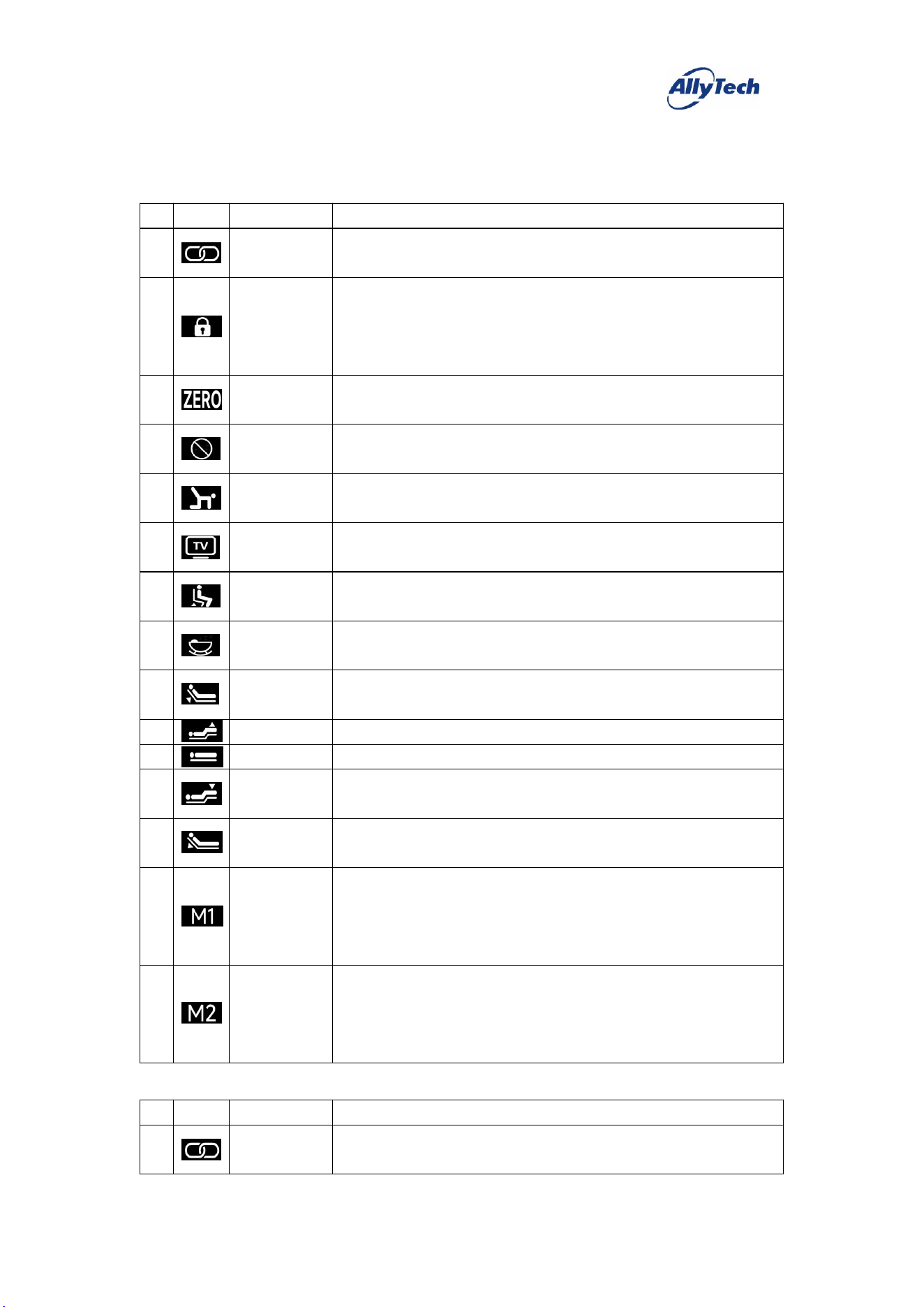
Function Descriptions of Each Remote Control Version
1. Two-Motor Basic (A21)
#
Icon
Key Definition
Function Description
1
Pairing
Press and hold to activate; after pressing, the backlight blinks, and pairing
succeeds once the backlight stays steadily on.
2
Child Lock
When unlocked, press and hold this key to switch the backlight from steady
on to blinking and lock the remote (key presses are then disabled); while
locked, press and hold this key to switch the backlight from blinking to
steady on and release the child lock.
3
Zero Gravity
Press and release this key, and the motor runs to the preset "Zero Gravity"
position.
4
Snoring
Intervention
Press and release this key, and the motor runs to the preset "Snoring
Intervention" position.
5
Yoga Mode
Press and release this key, and the motor runs to the preset "Yoga Mode"
position.
6
Cinema Mode
Press and release this key, and the motor runs to the preset "Cinema Mode"
position.
7
Assist Up
Press and release this key, and the motor runs to the preset "Assist Up"
position.
8
Sleep Aid
Press and release this key, and the bed runs the sleep aid sequence, with the
motors and vibrators operating as preset.
9
Back Motor
Up
Press and hold this key, and the back motor raises; release it to stop.
10
Leg Motor Up
Press and hold this key, and the leg motor raises; release it to stop.
11
One-touch Flat
Press and release this key, and the motor runs to the preset "Flat" position.
12
Leg Motor
Down
Press and hold this key, and the leg motor lowers; release it to stop.
13
Back Motor
Down
Press and hold this key, and the back motor lowers; release it to stop.
14
Memory 1
Press and hold this key for about 5 seconds to set the current motor position
as "Memory 1".
Briefly press and release this key, and the motor runs to the preset "Memory
1" position.
15
Memory 2
Press and hold this key for about 5 seconds to set the current motor position
as "Memory 2".
Briefly press and release this key, and the motor runs to the preset "Memory
2" position.
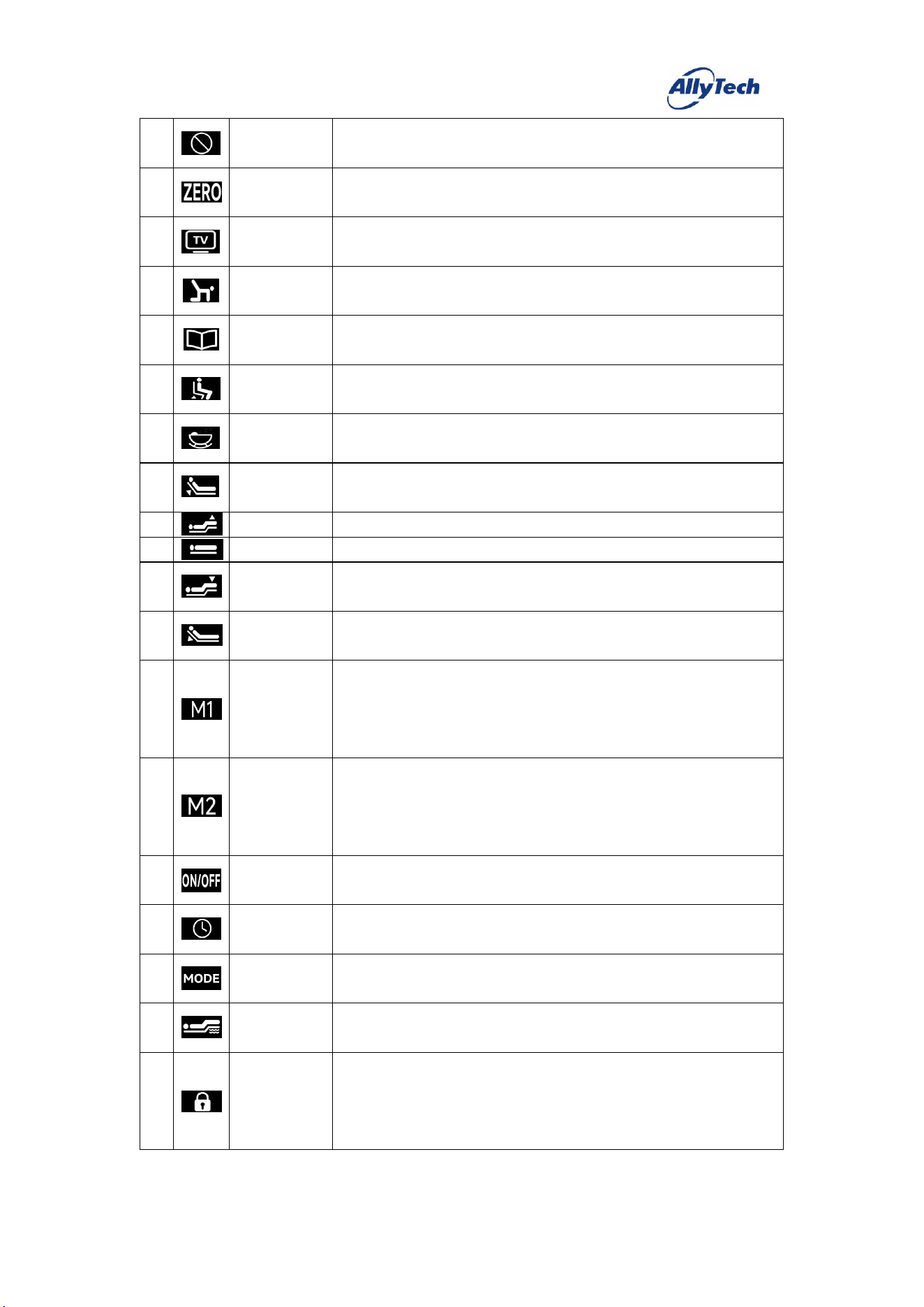
2. Two-Motor + Massage (B21)
#
Icon
Key Definition
Function Description
1
Pairing
Press and hold to activate; after pressing, the backlight blinks, and pairing
succeeds once the backlight stays steadily on.
HangzhouZhiyuanTechnologyCo.,Ltd.
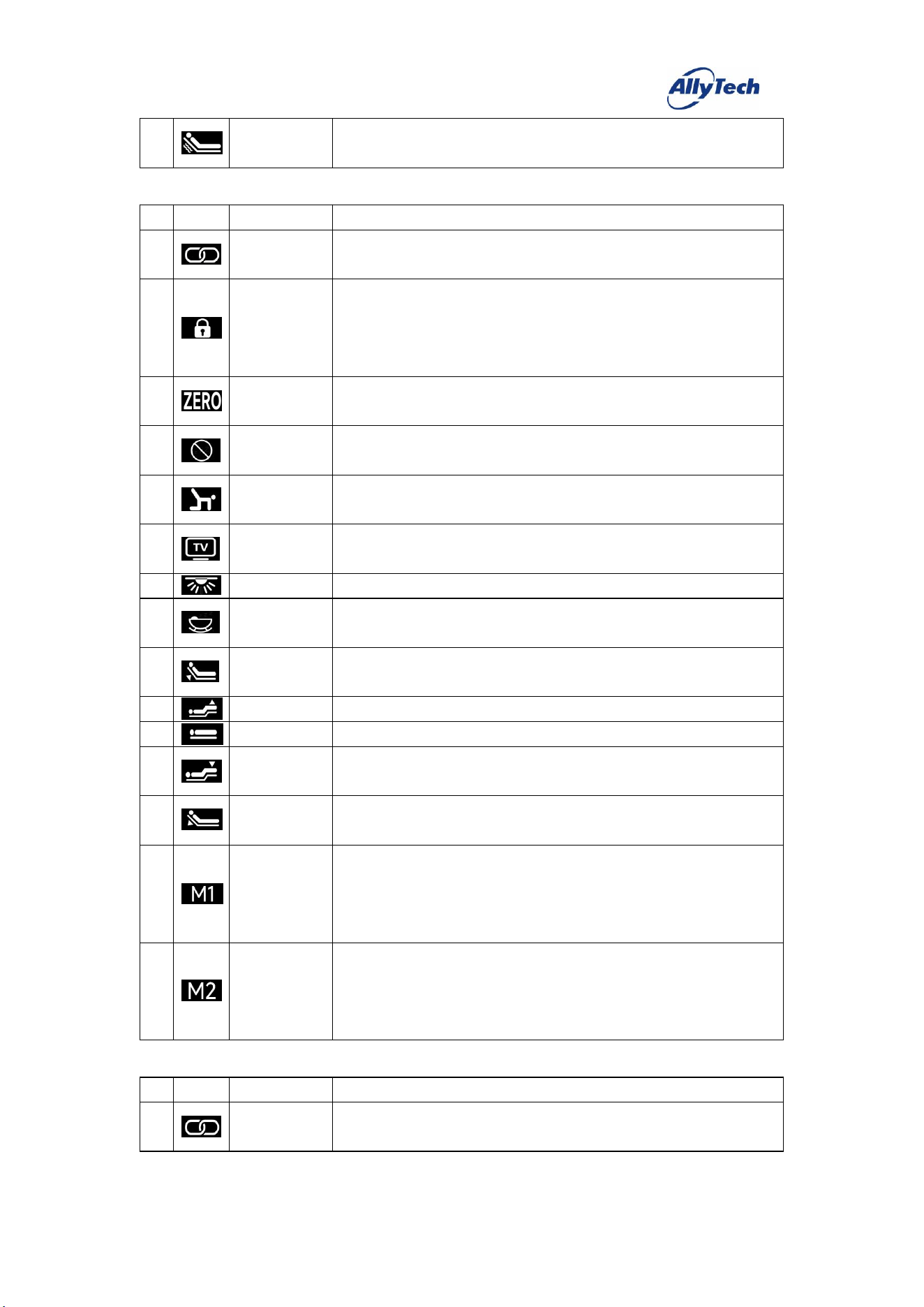
2
Snoring
Intervention
Press and release this key, and the motor runs to the preset "Snoring
Intervention" position.
3
Zero Gravity
Press and release this key, and the motor runs to the preset "Zero Gravity"
position.
4
Cinema Mode
Press and release this key, and the motor runs to the preset "Cinema Mode"
position.
5
Yoga Mode
Press and release this key, and the motor runs to the preset "Yoga Mode"
position.
6
Reading Mode
Press and release this key, and the motor runs to the preset "Reading Mode"
position.
7
Assist Up
Press and release this key, and the motor runs to the preset "Assist Up"
position.
8
Sleep Aid
Press and release this key, and the bed runs the sleep aid sequence, with the
motors and vibrators operating as preset.
9
Back Motor
Up
Press and hold this key, and the back motor raises; release it to stop.
10
Leg Motor Up
Press and hold this key, and the leg motor raises; release it to stop.
11
One-touch Flat
Press and release this key, and the motor runs to the preset "Flat" position.
12
Leg Motor
Down
Press and hold this key, and the leg motor lowers; release it to stop.
13
Back Motor
Down
Press and hold this key, and the back motor lowers; release it to stop.
14
Memory 1
Press and hold this key for about 5 seconds to set the current motor position
as "Memory 1".
Briefly press and release this key, and the motor runs to the preset "Memory
1" position.
15
Memory 2
Press and hold this key for about 5 seconds to set the current motor position
as "Memory 2".
Briefly press and release this key, and the motor runs to the preset "Memory
2" position.
16
Massage
On/Off
Press and release this key to start/stop the two vibrators.
17
Massage Timer
Press and release this key to cycle through the massage timer [10min→
20min→30min→10min].
18
Massage Mode
Press and release this key to cycle through the massage modes [Off→Mode 1
→Mode 2→Mode 3→Off].
19
Leg Intensity
Press and release this key to cycle the leg vibrator intensity through four
modes.
20
Child Lock
When unlocked, press and hold this key to switch the backlight from steady
on to blinking and lock the remote (key presses are then disabled); while
locked, press and hold this key to switch the backlight from blinking to
steady on and release the child lock.
HangzhouZhiyuanTechnologyCo.,Ltd.
21
Back Intensity
Press and release this key to cycle the back vibrator intensity through four
modes.
3. Two-Motor + Light (A22)
#
Icon
Key Definition
Function Description
1
Pairing
Press and hold to activate; after pressing, the backlight blinks, and pairing
succeeds once the backlight stays steadily on.
2
Child Lock
When unlocked, press and hold this key to switch the backlight from steady
on to blinking and lock the remote (key presses are then disabled); while
locked, press and hold this key to switch the backlight from blinking to
steady on and release the child lock.
3
Zero Gravity
Press and release this key, and the motor runs to the preset "Zero Gravity"
position.
4
Snoring
Intervention
Press and release this key, and the motor runs to the preset "Snoring
Intervention" position.
5
Yoga Mode
Press and release this key, and the motor runs to the preset "Yoga Mode"
position.
6
Cinema Mode
Press and release this key, and the motor runs to the preset "Cinema Mode"
position.
7
Light
Press and release this key to turn the LED strip on/off.
8
Sleep Aid
Press and release this key, and the bed runs the sleep aid sequence, with the
motors and vibrators operating as preset.
9
Back Motor
Up
Press and hold this key, and the back motor raises; release it to stop.
10
Leg Motor Up
Press and hold this key, and the leg motor raises; release it to stop.
11
One-touch Flat
Press and release this key, and the motor runs to the preset "Flat" position.
12
Leg Motor
Down
Press and hold this key, and the leg motor lowers; release it to stop.
13
Back Motor
Down
Press and hold this key, and the back motor lowers; release it to stop.
14
Memory 1
Press and hold this key for about 5 seconds to set the current motor position
as "Memory 1".
Briefly press and release this key, and the motor runs to the preset "Memory
1" position.
15
Memory 2
Press and hold this key for about 5 seconds to set the current motor position
as "Memory 2".
Briefly press and release this key, and the motor runs to the preset "Memory
2" position.
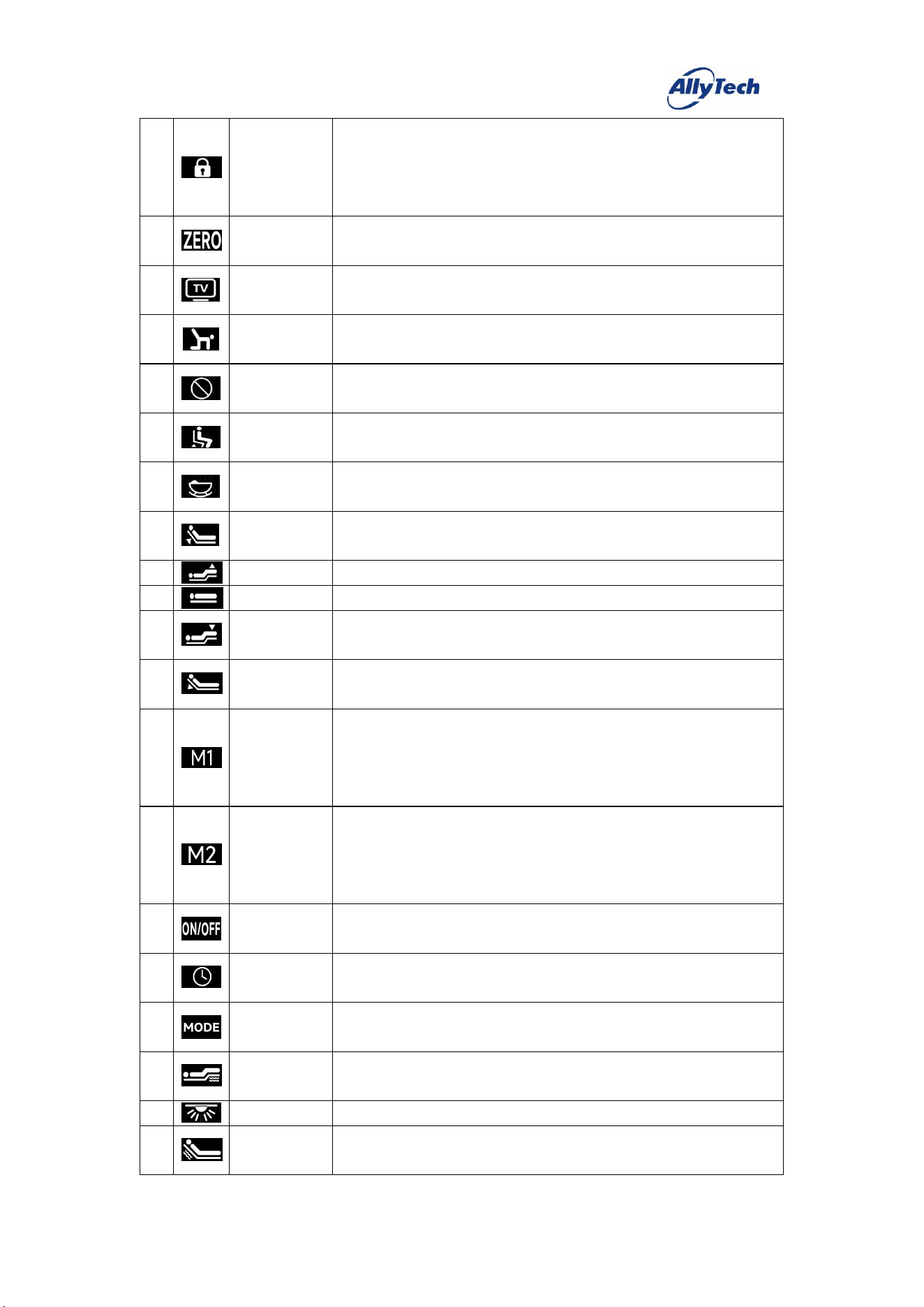
4. Two-Motor + Massage + Light (B22)
#
Icon
Key Definition
Function Description
1
Pairing
Press and hold to activate; after pressing, the backlight blinks, and pairing
succeeds once the backlight stays steadily on.
HangzhouZhiyuanTechnologyCo.,Ltd.
2
Child Lock
When unlocked, press and hold this key to switch the backlight from steady
on to blinking and lock the remote (key presses are then disabled); while
locked, press and hold this key to switch the backlight from blinking to
steady on and release the child lock.
3
Zero Gravity
Press and release this key, and the motor runs to the preset "Zero Gravity"
position.
4
Cinema Mode
Press and release this key, and the motor runs to the preset "Cinema Mode"
position.
5
Yoga Mode
Press and release this key, and the motor runs to the preset "Yoga Mode"
position.
6
Snoring
Intervention
Press and release this key, and the motor runs to the preset "Snoring
Intervention" position.
7
Assist Up
Press and release this key, and the motor runs to the preset "Assist Up"
position.
8
Sleep Aid
Press and release this key, and the bed runs the sleep aid sequence, with the
motors and vibrators operating as preset.
9
Back Motor
Up
Press and hold this key, and the back motor raises; release it to stop.
10
Leg Motor Up
Press and hold this key, and the leg motor raises; release it to stop.
11
One-touch Flat
Press and release this key, and the motor runs to the preset "Flat" position.
12
Leg Motor
Down
Press and hold this key, and the leg motor lowers; release it to stop.
13
Back Motor
Down
Press and hold this key, and the back motor lowers; release it to stop.
14
Memory 1
Press and hold this key for about 5 seconds to set the current motor position
as "Memory 1".
Briefly press and release this key, and the motor runs to the preset "Memory
1" position.
15
Memory 2
Press and hold this key for about 5 seconds to set the current motor position
as "Memory 2".
Briefly press and release this key, and the motor runs to the preset "Memory
2" position.
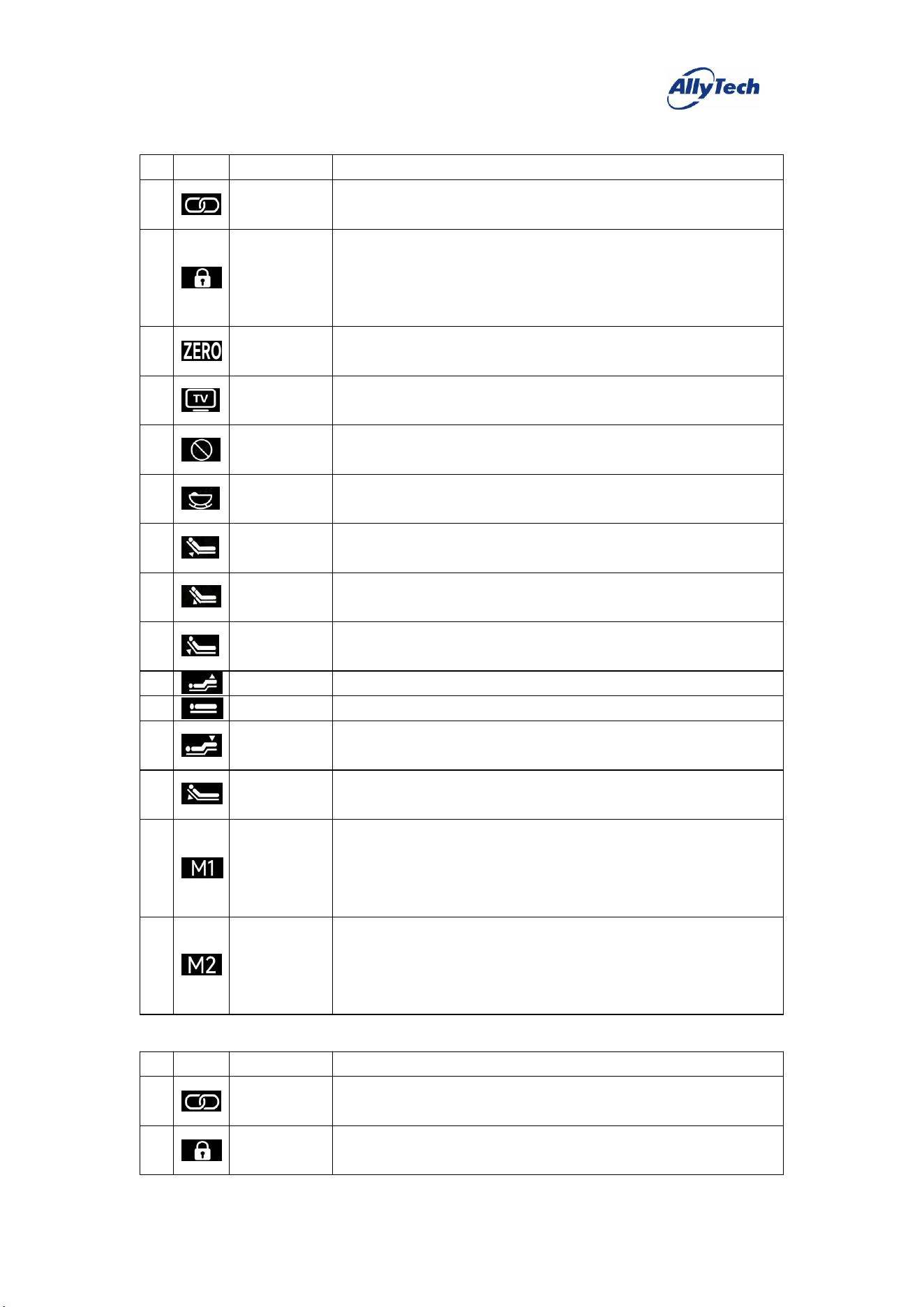
16
Massage
On/Off
Press and release this key to start/stop the two vibrators.
17
Massage Timer
Press and release this key to cycle through the massage timer [10min→
20min→30min→10min].
18
Massage Mode
Press and release this key to cycle through the massage modes [Off→Mode 1
→Mode 2→Mode 3→Off].
19
Leg Intensity
Press and release this key to cycle the leg vibrator intensity through four
modes.
20
Light
Press and release this key to turn the LED strip on/off.
21
Back Intensity
Press and release this key to cycle the back vibrator intensity through four
modes.
HangzhouZhiyuanTechnologyCo.,Ltd.
5. Three-Motor Light (A31)
#
Icon
Key Definition
Function Description
1
Pairing
Press and hold to activate; after pressing, the backlight blinks, and pairing
succeeds once the backlight stays steadily on.
2
Child Lock
When unlocked, press and hold this key to switch the backlight from steady
on to blinking and lock the remote (key presses are then disabled); while
locked, press and hold this key to switch the backlight from blinking to
steady on and release the child lock.
3
Zero Gravity
Press and release this key, and the motor runs to the preset "Zero Gravity"
position.
4
Cinema Mode
Press and release this key, and the motor runs to the preset "Cinema Mode"
position.
5
Snoring
Intervention
Press and release this key, and the motor runs to the preset "Snoring
Intervention" position.
6
Sleep Aid
Press and release this key, and the bed runs the sleep aid sequence, with the
motors and vibrators operating as preset.
7
Waist Motor
Up
Press and hold this key, and the waist motor raises; release it to stop.
8
Waist Motor
Down
Press and hold this key, and the waist motor lowers; release it to stop.
9
Back Motor
Up
Press and hold this key, and the back motor raises; release it to stop.
10
Leg Motor Up
Press and hold this key, and the leg motor raises; release it to stop.
11
One-touch Flat
Press and release this key, and the motor runs to the preset "Flat" position.
12
Leg Motor
Down
Press and hold this key, and the leg motor lowers; release it to stop.
13
Back Motor
Down
Press and hold this key, and the back motor lowers; release it to stop.
14
Memory 1
Press and hold this key for about 5 seconds to set the current motor position
as "Memory 1".
Briefly press and release this key, and the motor runs to the preset "Memory
1" position.
15
Memory 2
Press and hold this key for about 5 seconds to set the current motor position
as "Memory 2".
Briefly press and release this key, and the motor runs to the preset "Memory
2" position.
6. Three-Motor – Head (B31)
#
Icon
Key Definition
Function Description
1
Pairing
Press and hold to activate; after pressing, the backlight blinks, and pairing
succeeds once the backlight stays steadily on.
2
Child Lock
When unlocked, press and hold this key to switch the backlight from steady
on to blinking and lock the remote (key presses are then disabled); while
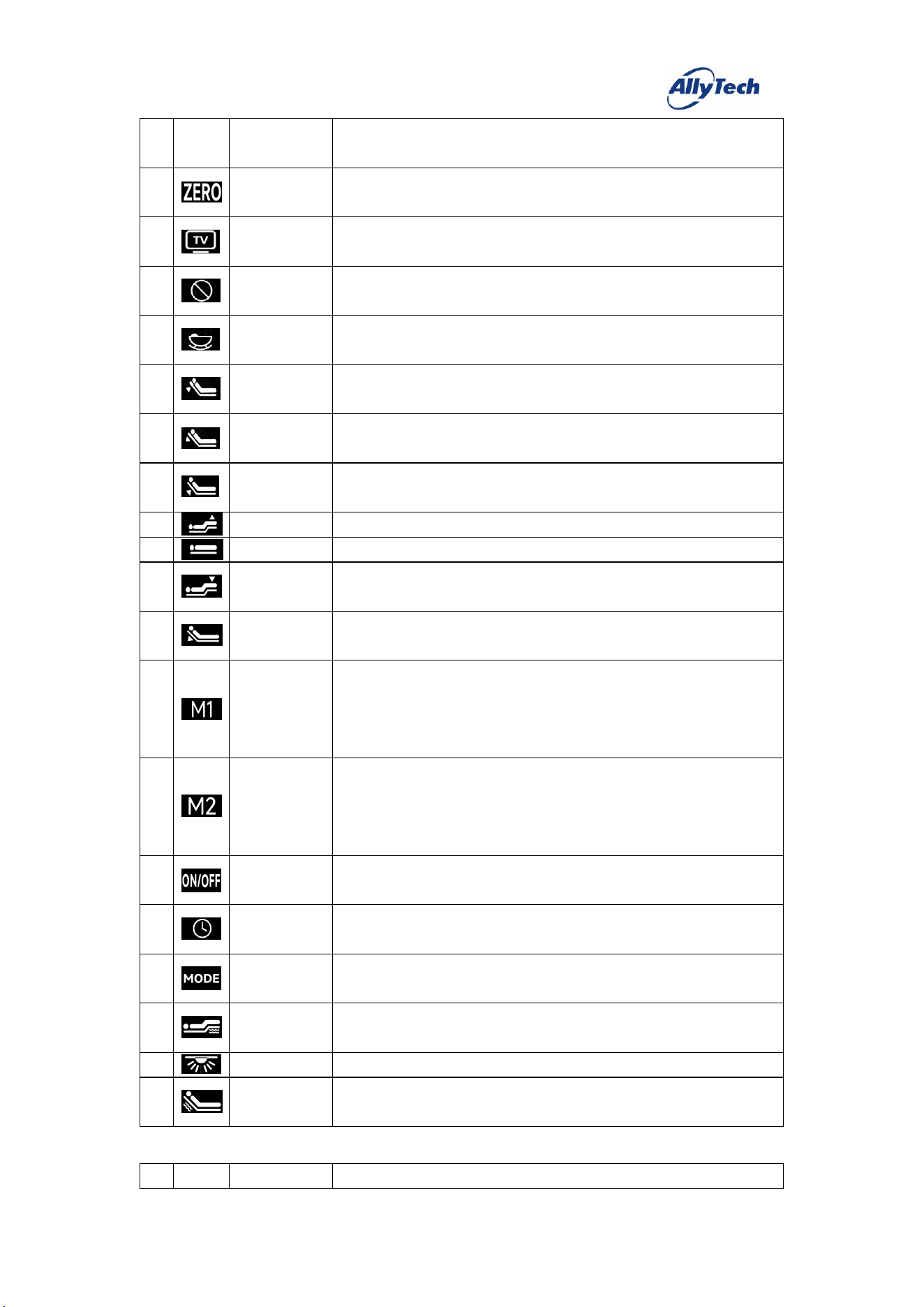
HangzhouZhiyuanTechnologyCo.,Ltd.
locked, press and hold this key to switch the backlight from blinking to
steady on and release the child lock.
3
Zero Gravity
Press and release this key, and the motor runs to the preset "Zero Gravity"
position.
4
Cinema Mode
Press and release this key, and the motor runs to the preset "Cinema Mode"
position.
5
Snoring
Intervention
Press and release this key, and the motor runs to the preset "Snoring
Intervention" position.
6
Sleep Aid
Press and release this key, and the bed runs the sleep aid sequence, with the
motors and vibrators operating as preset.
7
Head Motor
Up
Press and hold this key, and the head motor raises; release it to stop.
8
Head Motor
Down
Press and hold this key, and the head motor lowers; release it to stop.
9
Back Motor
Up
Press and hold this key, and the back motor raises; release it to stop.
10
Leg Motor Up
Press and hold this key, and the leg motor raises; release it to stop.
11
One-touch Flat
Press and release this key, and the motor runs to the preset "Flat" position.
12
Leg Motor
Down
Press and hold this key, and the leg motor lowers; release it to stop.
13
Back Motor
Down
Press and hold this key, and the back motor lowers; release it to stop.
14
Memory 1
Press and hold this key for about 5 seconds to set the current motor position
as "Memory 1".
Briefly press and release this key, and the motor runs to the preset "Memory
1" position.
15
Memory 2
Press and hold this key for about 5 seconds to set the current motor position
as "Memory 2".
Briefly press and release this key, and the motor runs to the preset "Memory
2" position.
16
Massage
On/Off
Press and release this key to start/stop the two vibrators.
17
Massage Timer
Press and release this key to cycle through the massage timer [10min→
20min→30min→10min].
18
Massage Mode
Press and release this key to cycle through the massage modes [Off→Mode 1
→Mode 2→Mode 3→Off].
19
Leg Intensity
Press and release this key to cycle the leg vibrator intensity through four
modes.
20
Light
Press and release this key to turn the LED strip on/off.
21
Back Intensity
Press and release this key to cycle the back vibrator intensity through four
modes.
7. Three-Motor
–
Waist (B32)
#
Icon
Key Definition
Function Description
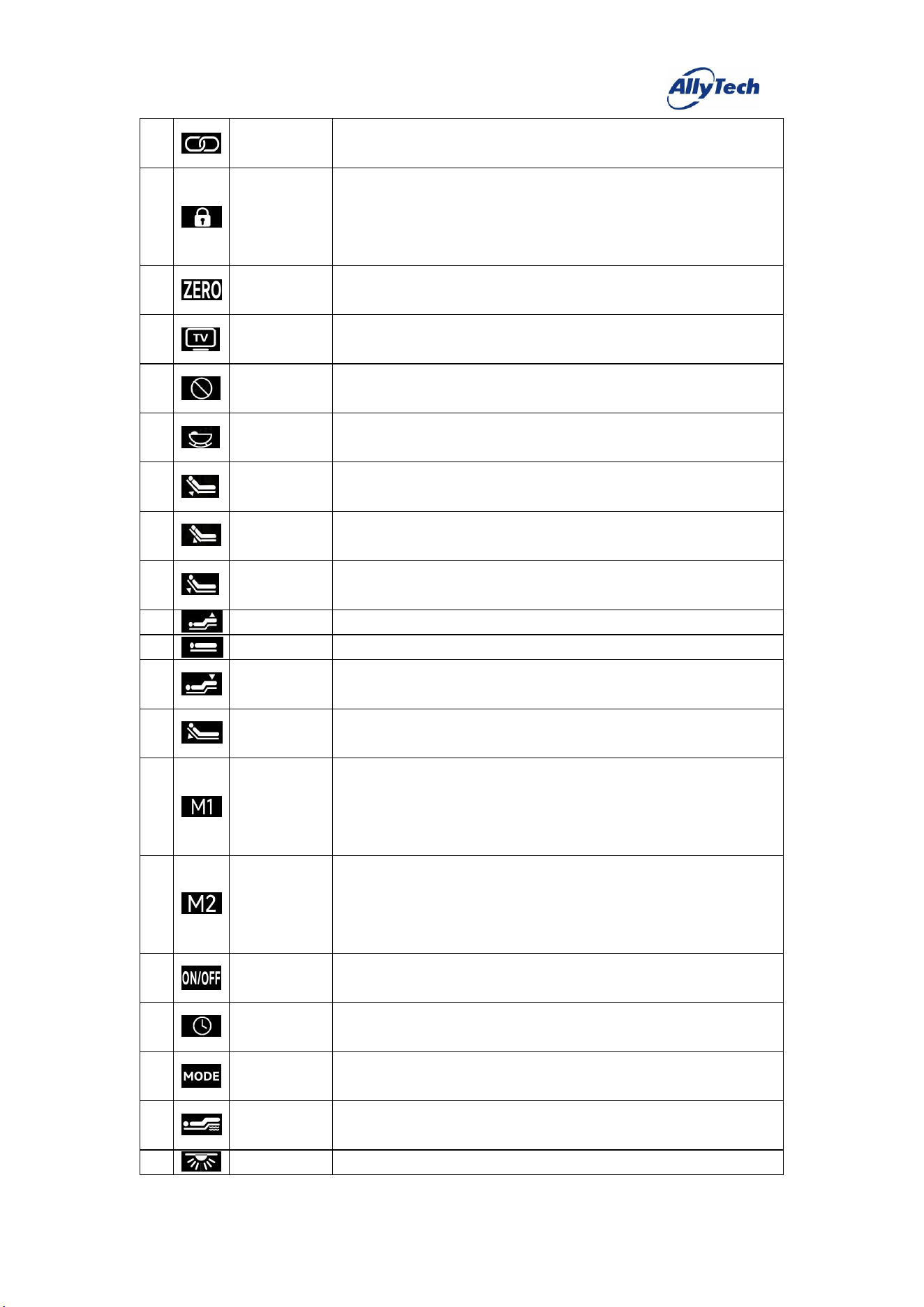
HangzhouZhiyuanTechnologyCo.,Ltd.
1
Pairing
Press and hold to activate; after pressing, the backlight blinks, and pairing
succeeds once the backlight stays steadily on.
2
Child Lock
When unlocked, press and hold this key to switch the backlight from steady
on to blinking and lock the remote (key presses are then disabled); while
locked, press and hold this key to switch the backlight from blinking to
steady on and release the child lock.
3
Zero Gravity
Press and release this key, and the motor runs to the preset "Zero Gravity"
position.
4
Cinema Mode
Press and release this key, and the motor runs to the preset "Cinema Mode"
position.
5
Snoring
Intervention
Press and release this key, and the motor runs to the preset "Snoring
Intervention" position.
6
Sleep Aid
Press and release this key, and the bed runs the sleep aid sequence, with the
motors and vibrators operating as preset.
7
Waist Motor
Up
Press and hold this key, and the waist motor raises; release it to stop.
8
Waist Motor
Down
Press and hold this key, and the waist motor lowers; release it to stop.
9
Back Motor
Up
Press and hold this key, and the back motor raises; release it to stop.
10
Leg Motor Up
Press and hold this key, and the leg motor raises; release it to stop.
11
One-touch Flat
Press and release this key, and the motor runs to the preset "Flat" position.
12
Leg Motor
Down
Press and hold this key, and the leg motor lowers; release it to stop.
13
Back Motor
Down
Press and hold this key, and the back motor lowers; release it to stop.
14
Memory 1
Press and hold this key for about 5 seconds to set the current motor position
as "Memory 1".
Briefly press and release this key, and the motor runs to the preset "Memory
1" position.
15
Memory 2
Press and hold this key for about 5 seconds to set the current motor position
as "Memory 2".
Briefly press and release this key, and the motor runs to the preset "Memory
2" position.
16
Massage
On/Off
Press and release this key to start/stop the two vibrators.
17
Massage Timer
Press and release this key to cycle through the massage timer [10min→
20min→30min→10min].
18
Massage Mode
Press and release this key to cycle through the massage modes [Off→Mode 1
→Mode 2→Mode 3→Off].
19
Leg Intensity
Press and release this key to cycle the leg vibrator intensity through four
modes.
20
Light
Press and release this key to turn the LED strip on/off.
HangzhouZhiyuanTechnologyCo.,Ltd.
21
Back Intensity
Press and release this key to cycle the back vibrator intensity through four
modes.
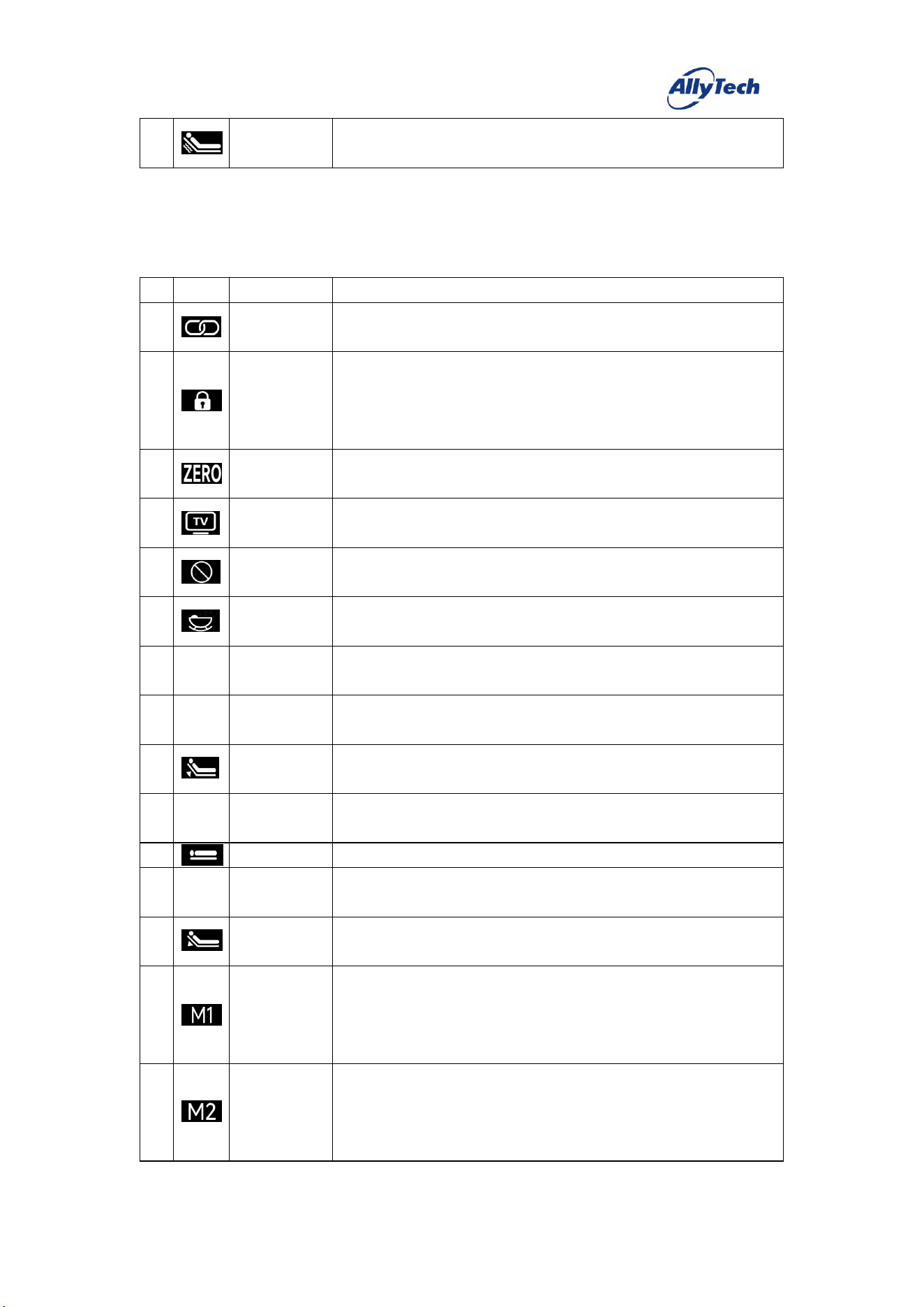
8. Three-Motor
–
Split Back (B33)
#
Icon
Key Definition
Function Description
1
Pairing
Press and hold to activate; after pressing, the backlight blinks, and pairing
succeeds once the backlight stays steadily on.
2
Child Lock
When unlocked, press and hold this key to switch the backlight from steady
on to blinking and lock the remote (key presses are then disabled); while
locked, press and hold this key to switch the backlight from blinking to
steady on and release the child lock.
3
Zero Gravity
Press and release this key, and the motor runs to the preset "Zero Gravity"
position.
4
Cinema Mode
Press and release this key, and the motor runs to the preset "Cinema Mode"
position.
5
Snoring
Intervention
Press and release this key, and the motor runs to the preset "Snoring
Intervention" position.
6
Sleep Aid
Press and release this key, and the bed runs the sleep aid sequence, with the
motors and vibrators operating as preset.
7
Back 2 Motor
Up
8
Back 2 Motor
Down
9
Back Motor
Up
Press and hold this key, and the back motor raises; release it to stop.
10
Back 1 Motor
Up
11
One-touch Flat
Press and release this key, and the motor runs to the preset "Flat" position.
12
Back 1 Motor
Down
13
Back Motor
Down
Press and hold this key, and the back motor lowers; release it to stop.
14
Memory 1
Press and hold this key for about 5 seconds to set the current motor position
as "Memory 1".
Briefly press and release this key, and the motor runs to the preset "Memory
1" position.
15
Memory 2
Press and hold this key for about 5 seconds to set the current motor position
as "Memory 2".
Briefly press and release this key, and the motor runs to the preset "Memory
2" position.
HangzhouZhiyuanTechnologyCo.,Ltd.
16
Massage
On/Off
Press and release this key to start/stop the two vibrators.
17
Massage Timer
Press and release this key to cycle through the massage timer [10min→
20min→30min→10min].
18
Massage Mode
Press and release this key to cycle through the massage modes [Off→Mode 1
→Mode 2→Mode 3→Off].
19
Leg Intensity
Press and release this key to cycle the leg vibrator intensity through four
modes.
20
Light
Press and release this key to turn the LED strip on/off.
21
Back Intensity
Press and release this key to cycle the back vibrator intensity through four
modes.
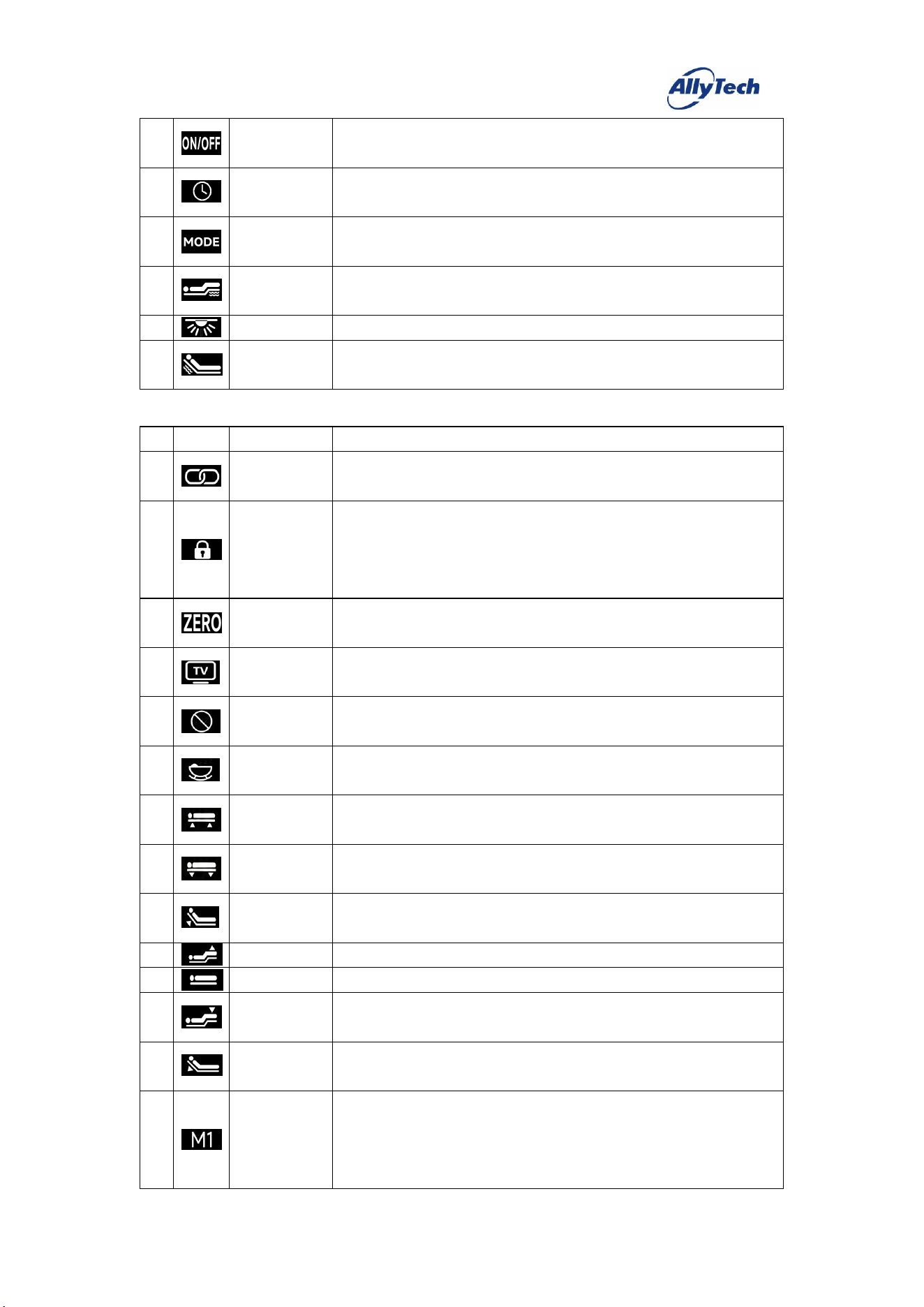
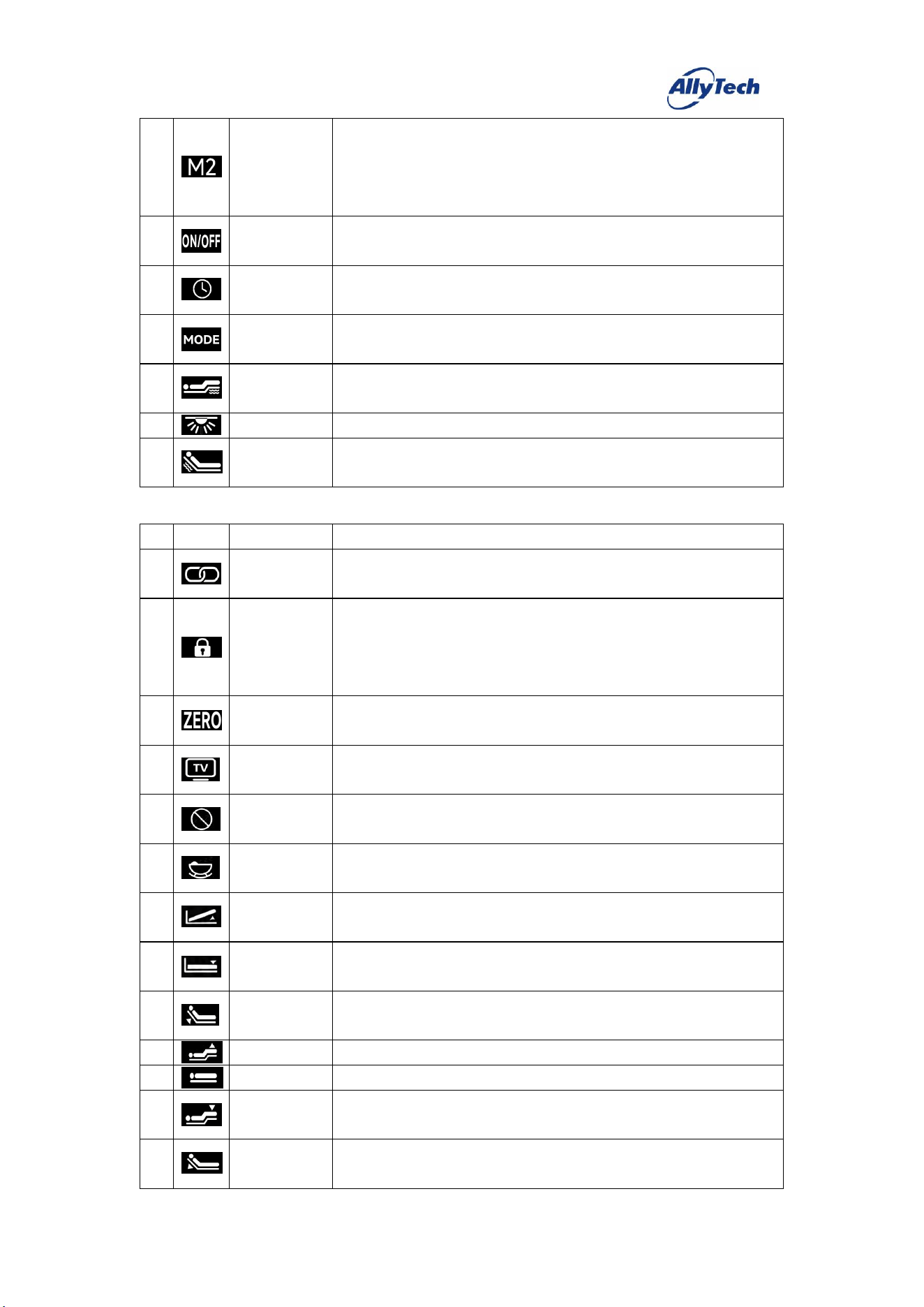
9. Three-Motor – Parallel Lift (B34)
#
Icon
Key Definition
Function Description
1
Pairing
Press and hold to activate; after pressing, the backlight blinks, and pairing
succeeds once the backlight stays steadily on.
2
Child Lock
When unlocked, press and hold this key to switch the backlight from steady
on to blinking and lock the remote (key presses are then disabled); while
locked, press and hold this key to switch the backlight from blinking to
steady on and release the child lock.
3
Zero Gravity
Press and release this key, and the motor runs to the preset "Zero Gravity"
position.
4
Cinema Mode
Press and release this key, and the motor runs to the preset "Cinema Mode"
position.
5
Snoring
Intervention
Press and release this key, and the motor runs to the preset "Snoring
Intervention" position.
6
Sleep Aid
Press and release this key, and the bed runs the sleep aid sequence, with the
motors and vibrators operating as preset.
7
Parallel Motor
Up
Press and hold this key, and the parallel motor raises; release it to stop.
8
Parallel Motor
Down
Press and hold this key, and the parallel motor lowers; release it to stop.
9
Back Motor
Up
Press and hold this key, and the back motor raises; release it to stop.
10
Leg Motor Up
Press and hold this key, and the leg motor raises; release it to stop.
11
One-touch Flat
Press and release this key, and the motor runs to the preset "Flat" position.
12
Leg Motor
Down
Press and hold this key, and the leg motor lowers; release it to stop.
13
Back Motor
Down
Press and hold this key, and the back motor lowers; release it to stop.
14
Memory 1
Press and hold this key for about 5 seconds to set the current motor position
as "Memory 1".
Briefly press and release this key, and the motor runs to the preset "Memory
1" position.
HangzhouZhiyuanTechnologyCo.,Ltd.
15
Memory 2
Press and hold this key for about 5 seconds to set the current motor position
as "Memory 2".
Briefly press and release this key, and the motor runs to the preset "Memory
2" position.
16
Massage
On/Off
Press and release this key to start/stop the two vibrators.
17
Massage Timer
Press and release this key to cycle through the massage timer [10min→
20min→30min→10min].
18
Massage Mode
Press and release this key to cycle through the massage modes [Off→Mode 1
→Mode 2→Mode 3→Off].
19
Leg Intensity
Press and release this key to cycle the leg vibrator intensity through four
modes.
20
Light
Press and release this key to turn the LED strip on/off.
21
Back Intensity
Press and release this key to cycle the back vibrator intensity through four
modes.
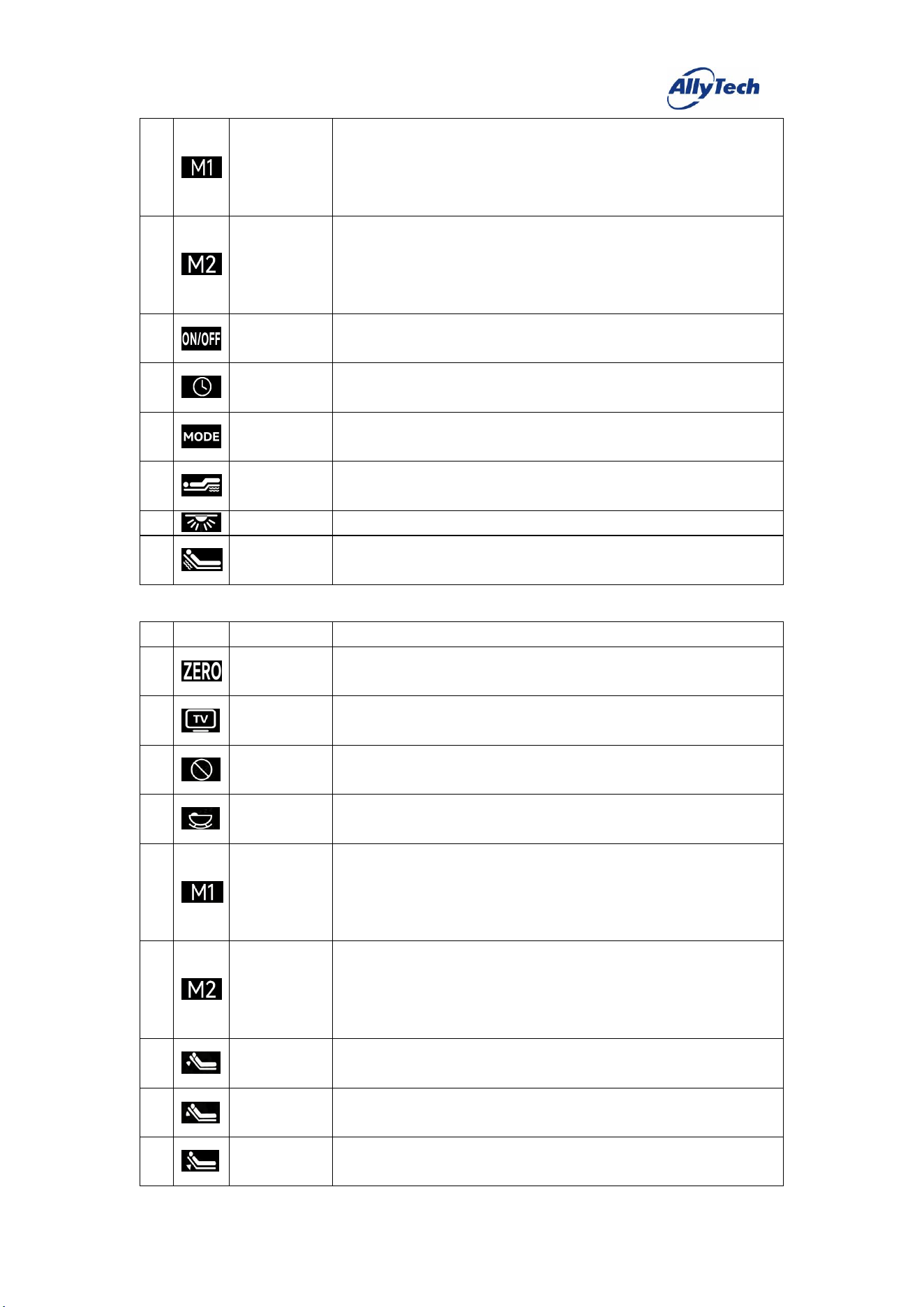
10. Three-Motor
–
Storage (B35)
#
Icon
Key Definition
Function Description
1
Pairing
Press and hold to activate; after pressing, the backlight blinks, and pairing
succeeds once the backlight stays steadily on.
2
Child Lock
When unlocked, press and hold this key to switch the backlight from steady
on to blinking and lock the remote (key presses are then disabled); while
locked, press and hold this key to switch the backlight from blinking to
steady on and release the child lock.
3
Zero Gravity
Press and release this key, and the motor runs to the preset "Zero Gravity"
position.
4
Cinema Mode
Press and release this key, and the motor runs to the preset "Cinema Mode"
position.
5
Snoring
Intervention
Press and release this key, and the motor runs to the preset "Snoring
Intervention" position.
6
Sleep Aid
Press and release this key, and the bed runs the sleep aid sequence, with the
motors and vibrators operating as preset.
7
Storage Motor
Up
Press and hold this key, and the storage motor raises; release it to stop.
8
Storage Motor
Down
Press and hold this key, and the storage motor lowers; release it to stop.
9
Back Motor
Up
Press and hold this key, and the back motor raises; release it to stop.
10
Leg Motor Up
Press and hold this key, and the leg motor raises; release it to stop.
11
One-touch Flat
Press and release this key, and the motor runs to the preset "Flat" position.
12
Leg Motor
Down
Press and hold this key, and the leg motor lowers; release it to stop.
13
Back Motor
Down
Press and hold this key, and the back motor lowers; release it to stop.
HangzhouZhiyuanTechnologyCo.,Ltd.
14
Memory 1
Press and hold this key for about 5 seconds to set the current motor position
as "Memory 1".
Briefly press and release this key, and the motor runs to the preset "Memory
1" position.
15
Memory 2
Press and hold this key for about 5 seconds to set the current motor position
as "Memory 2".
Briefly press and release this key, and the motor runs to the preset "Memory
2" position.
16
Massage
On/Off
Press and release this key to start/stop the two vibrators.
17
Massage Timer
Press and release this key to cycle through the massage timer [10min→
20min→30min→10min].
18
Massage Mode
Press and release this key to cycle through the massage modes [Off→Mode 1
→Mode 2→Mode 3→Off].
19
Leg Intensity
Press and release this key to cycle the leg vibrator intensity through four
modes.
20
Light
Press and release this key to turn the LED strip on/off.
21
Back Intensity
Press and release this key to cycle the back vibrator intensity through four
modes.
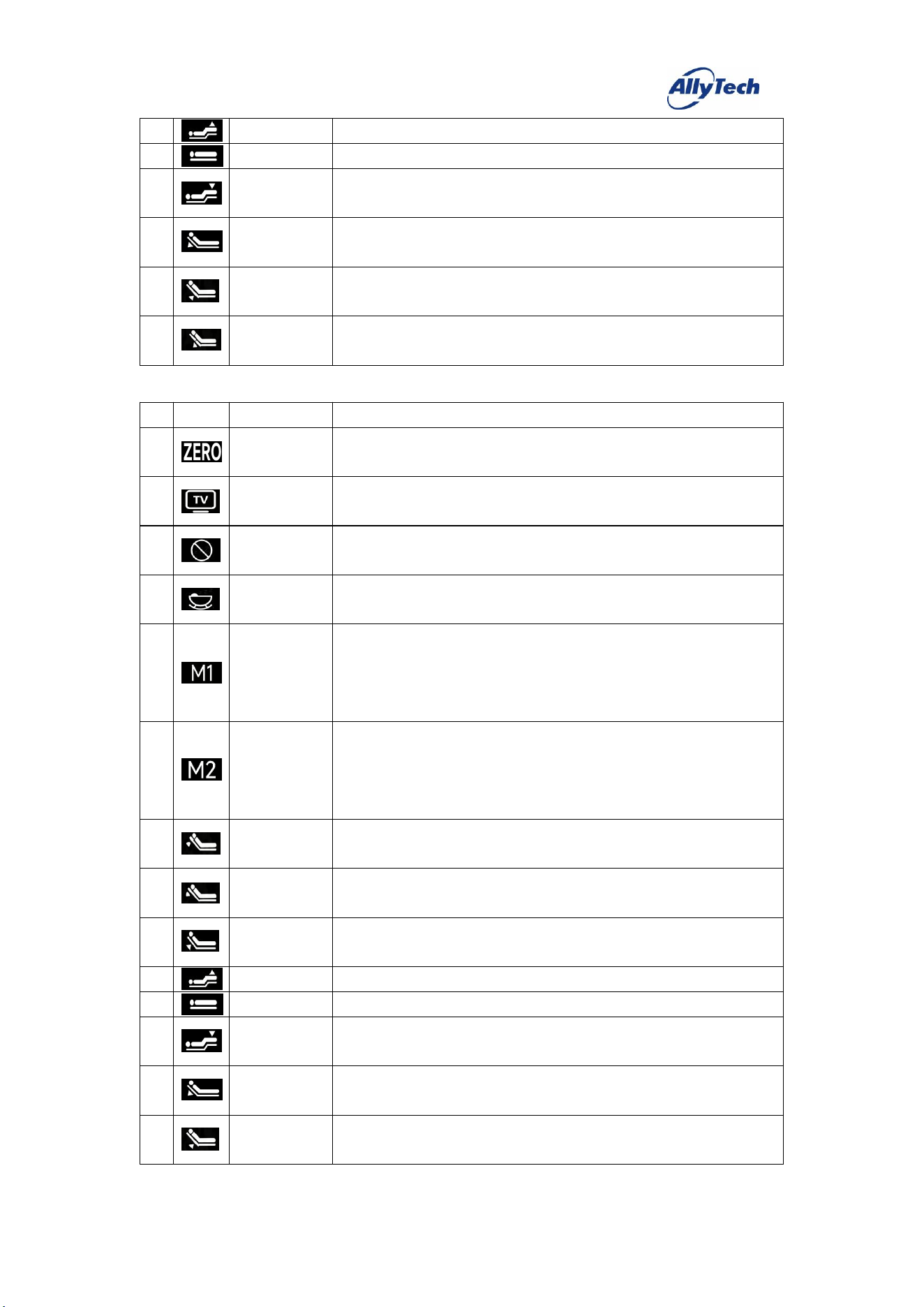
11. Four-Motor Light (A41)
#
Icon
Key Definition
Function Description
1
Zero Gravity
Press and release this key, and the motor runs to the preset "Zero Gravity"
position.
2
Cinema Mode
Press and release this key, and the motor runs to the preset "Cinema Mode"
position.
3
Snoring
Intervention
Press and release this key, and the motor runs to the preset "Snoring
Intervention" position.
4
Sleep Aid
Press and release this key, and the bed runs the sleep aid sequence, with the
motors and vibrators operating as preset.
5
Memory 1
Press and hold this key for about 5 seconds to set the current motor position
as "Memory 1".
Briefly press and release this key, and the motor runs to the preset "Memory
1" position.
6
Memory 2
Press and hold this key for about 5 seconds to set the current motor position
as "Memory 2".
Briefly press and release this key, and the motor runs to the preset "Memory
2" position.
7
Head Motor
Up
Press and hold this key, and the head motor raises; release it to stop.
8
Head Motor
Down
Press and hold this key, and the head motor lowers; release it to stop.
9
Back Motor
Up
Press and hold this key, and the back motor raises; release it to stop.
HangzhouZhiyuanTechnologyCo.,Ltd.
10
Leg Motor Up
Press and hold this key, and the leg motor raises; release it to stop.
11
One-touch Flat
Press and release this key, and the motor runs to the preset "Flat" position.
12
Leg Motor
Down
Press and hold this key, and the leg motor lowers; release it to stop.
13
Back Motor
Down
Press and hold this key, and the back motor lowers; release it to stop.
14
Waist Motor
Up
Press and hold this key, and the waist motor raises; release it to stop.
15
Waist Motor
Down
Press and hold this key, and the waist motor lowers; release it to stop.
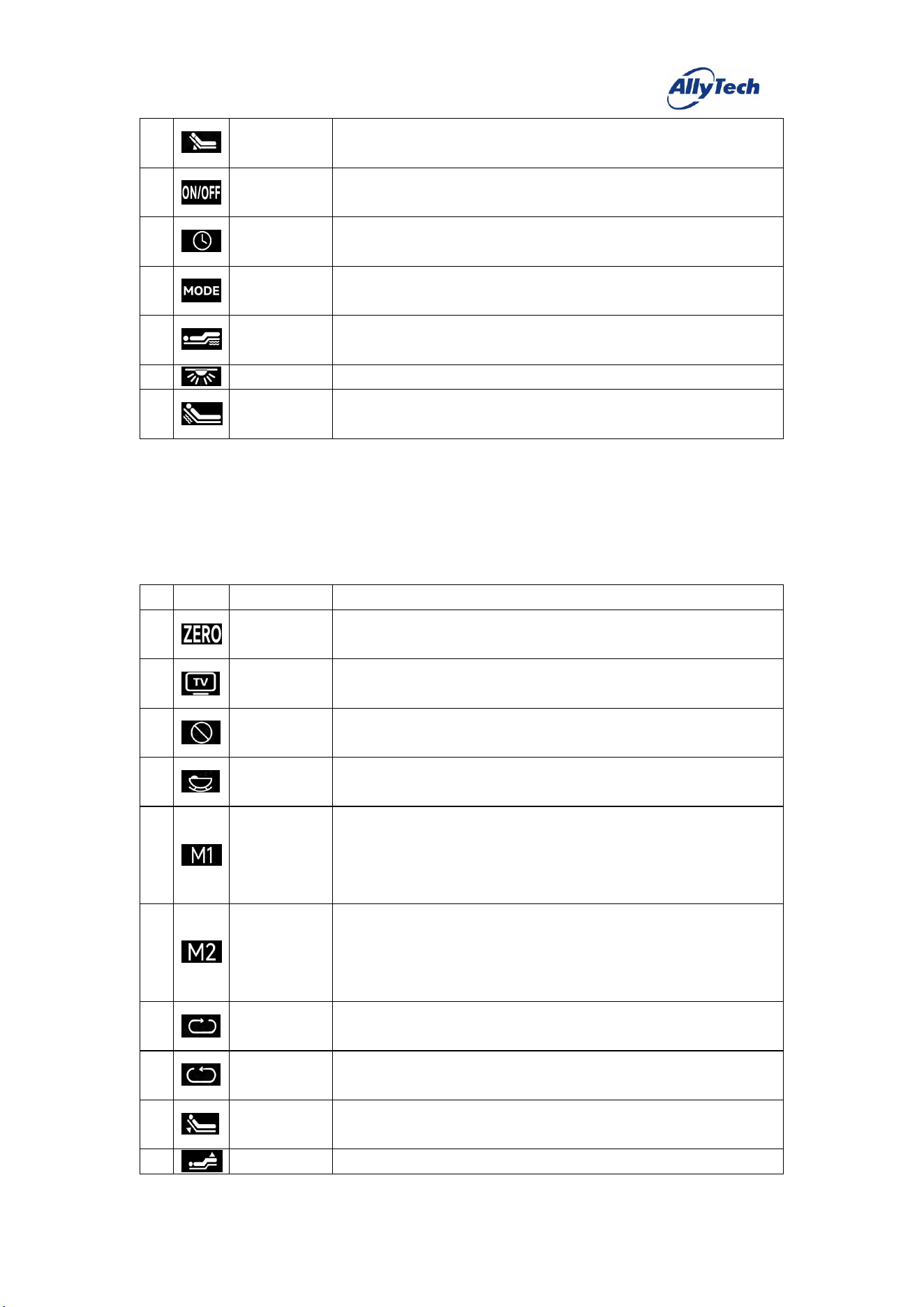
12. Four-Motor Basic (B41)
#
Icon
Key Definition
Function Description
1
Zero Gravity
Press and release this key, and the motor runs to the preset "Zero Gravity"
position.
2
Cinema Mode
Press and release this key, and the motor runs to the preset "Cinema Mode"
position.
3
Snoring
Intervention
Press and release this key, and the motor runs to the preset "Snoring
Intervention" position.
4
Sleep Aid
Press and release this key, and the bed runs the sleep aid sequence, with the
motors and vibrators operating as preset.
5
Memory 1
Press and hold this key for about 5 seconds to set the current motor position
as "Memory 1".
Briefly press and release this key, and the motor runs to the preset "Memory
1" position.
6
Memory 2
Press and hold this key for about 5 seconds to set the current motor position
as "Memory 2".
Briefly press and release this key, and the motor runs to the preset "Memory
2" position.
7
Head Motor
Up
Press and hold this key, and the head motor raises; release it to stop.
8
Head Motor
Down
Press and hold this key, and the head motor lowers; release it to stop.
9
Back Motor
Up
Press and hold this key, and the back motor raises; release it to stop.
10
Leg Motor Up
Press and hold this key, and the leg motor raises; release it to stop.
11
One-touch Flat
Press and release this key, and the motor runs to the preset "Flat" position.
12
Leg Motor
Down
Press and hold this key, and the leg motor lowers; release it to stop.
13
Back Motor
Down
Press and hold this key, and the back motor lowers; release it to stop.
14
Waist Motor
Up
Press and hold this key, and the waist motor raises; release it to stop.
HangzhouZhiyuanTechnologyCo.,Ltd.
15
Waist Motor
Down
Press and hold this key, and the waist motor lowers; release it to stop.
16
Massage
On/Off
Press and release this key to start/stop the two vibrators.
17
Massage Timer
Press and release this key to cycle through the massage timer [10min→
20min→30min→10min].
18
Massage Mode
Press and release this key to cycle through the massage modes [Off→Mode 1
→Mode 2→Mode 3→Off].
19
Leg Intensity
Press and release this key to cycle the leg vibrator intensity through four
modes.
20
Light
Press and release this key to turn the LED strip on/off.
21
Back Intensity
Press and release this key to cycle the back vibrator intensity through four
modes.
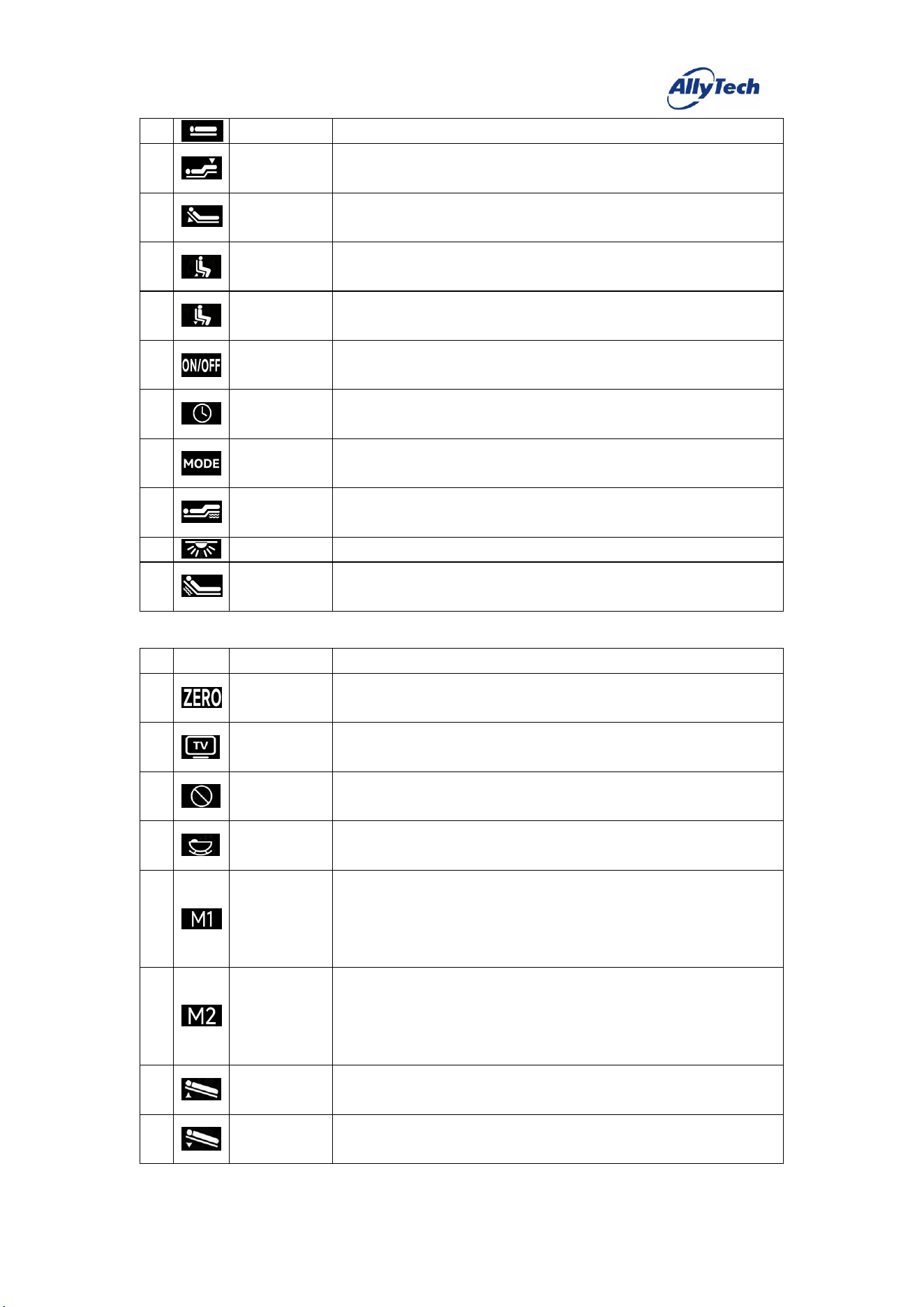
13. Four-Motor
–
Rotation (B42)
#
Icon
Key Definition
Function Description
1
Zero Gravity
Press and release this key, and the motor runs to the preset "Zero Gravity"
position.
2
Cinema Mode
Press and release this key, and the motor runs to the preset "Cinema Mode"
position.
3
Snoring
Intervention
Press and release this key, and the motor runs to the preset "Snoring
Intervention" position.
4
Sleep Aid
Press and release this key, and the bed runs the sleep aid sequence, with the
motors and vibrators operating as preset.
5
Memory 1
Press and hold this key for about 5 seconds to set the current motor position
as "Memory 1".
Briefly press and release this key, and the motor runs to the preset "Memory
1" position.
6
Memory 2
Press and hold this key for about 5 seconds to set the current motor position
as "Memory 2".
Briefly press and release this key, and the motor runs to the preset "Memory
2" position.
7
Rotation Motor
Up
Press and hold this key, and the rotation motor raises; release it to stop.
8
Rotation Motor
Down
Press and hold this key, and the rotation motor lowers; release it to stop.
9
Back Motor
Up
Press and hold this key, and the back motor raises; release it to stop.
10
Leg Motor Up
Press and hold this key, and the leg motor raises; release it to stop.
HangzhouZhiyuanTechnologyCo.,Ltd.
11
One-touch Flat
Press and release this key, and the motor runs to the preset "Flat" position.
12
Leg Motor
Down
Press and hold this key, and the leg motor lowers; release it to stop.
13
Back Motor
Down
Press and hold this key, and the back motor lowers; release it to stop.
14
Sit-up Motor
Up
Press and hold this key, and the sit-up motor raises; release it to stop.
15
Sit-up Motor
Down
Press and hold this key, and the sit-up motor lowers; release it to stop.
16
Massage
On/Off
Press and release this key to start/stop the two vibrators.
17
Massage Timer
Press and release this key to cycle through the massage timer [10min→
20min→30min→10min].
18
Massage Mode
Press and release this key to cycle through the massage modes [Off→Mode 1
→Mode 2→Mode 3→Off].
19
Leg Intensity
Press and release this key to cycle the leg vibrator intensity through four
modes.
20
Light
Press and release this key to turn the LED strip on/off.
21
Back Intensity
Press and release this key to cycle the back vibrator intensity through four
modes.
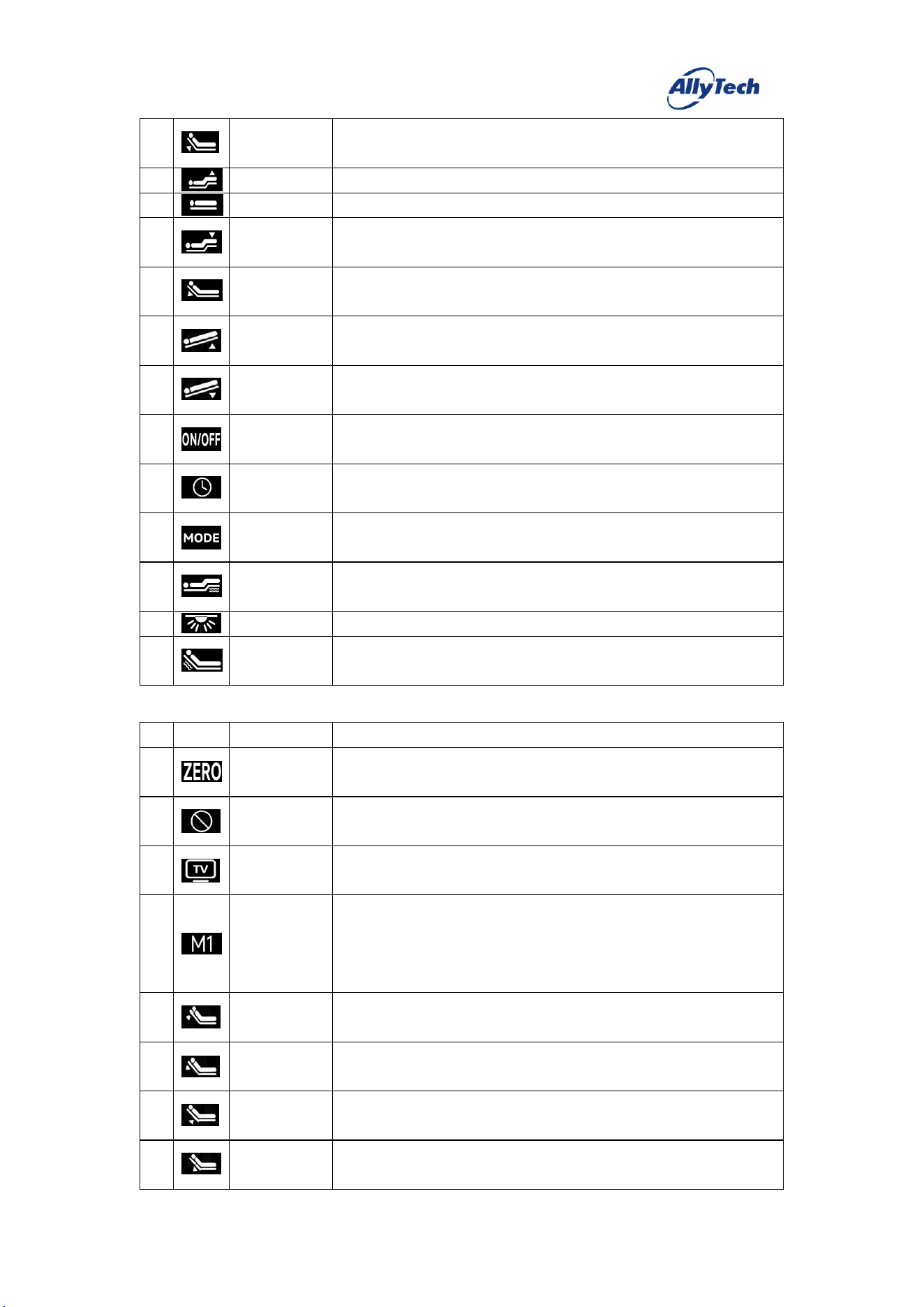
14. Four-Motor – Tilt (B43)
#
Icon
Key Definition
Function Description
1
Zero Gravity
Press and release this key, and the motor runs to the preset "Zero Gravity"
position.
2
Cinema Mode
Press and release this key, and the motor runs to the preset "Cinema Mode"
position.
3
Snoring
Intervention
Press and release this key, and the motor runs to the preset "Snoring
Intervention" position.
4
Sleep Aid
Press and release this key, and the bed runs the sleep aid sequence, with the
motors and vibrators operating as preset.
5
Memory 1
Press and hold this key for about 5 seconds to set the current motor position
as "Memory 1".
Briefly press and release this key, and the motor runs to the preset "Memory
1" position.
6
Memory 2
Press and hold this key for about 5 seconds to set the current motor position
as "Memory 2".
Briefly press and release this key, and the motor runs to the preset "Memory
2" position.
7
Forward Tilt
On
Press and hold this key, and the forward tilt motor raises; release it to stop.
8
Forward Tilt
Off
Press and hold this key, and the forward tilt motor lowers; release it to stop.
HangzhouZhiyuanTechnologyCo.,Ltd.
9
Back Motor
Up
Press and hold this key, and the back motor raises; release it to stop.
10
Leg Motor Up
Press and hold this key, and the leg motor raises; release it to stop.
11
One-touch Flat
Press and release this key, and the motor runs to the preset "Flat" position.
12
Leg Motor
Down
Press and hold this key, and the leg motor lowers; release it to stop.
13
Back Motor
Down
Press and hold this key, and the back motor lowers; release it to stop.
14
Backward Tilt
On
Press and hold this key, and the backward tilt motor raises; release it to stop.
15
Backward Tilt
Off
Press and hold this key, and the backward tilt motor lowers; release it to stop.
16
Massage
On/Off
Press and release this key to start/stop the two vibrators.
17
Massage Timer
Press and release this key to cycle through the massage timer [10min→
20min→30min→10min].
18
Massage Mode
Press and release this key to cycle through the massage modes [Off→Mode 1
→Mode 2→Mode 3→Off].
19
Leg Intensity
Press and release this key to cycle the leg vibrator intensity through four
modes.
20
Light
Press and release this key to turn the LED strip on/off.
21
Back Intensity
Press and release this key to cycle the back vibrator intensity through four
modes.
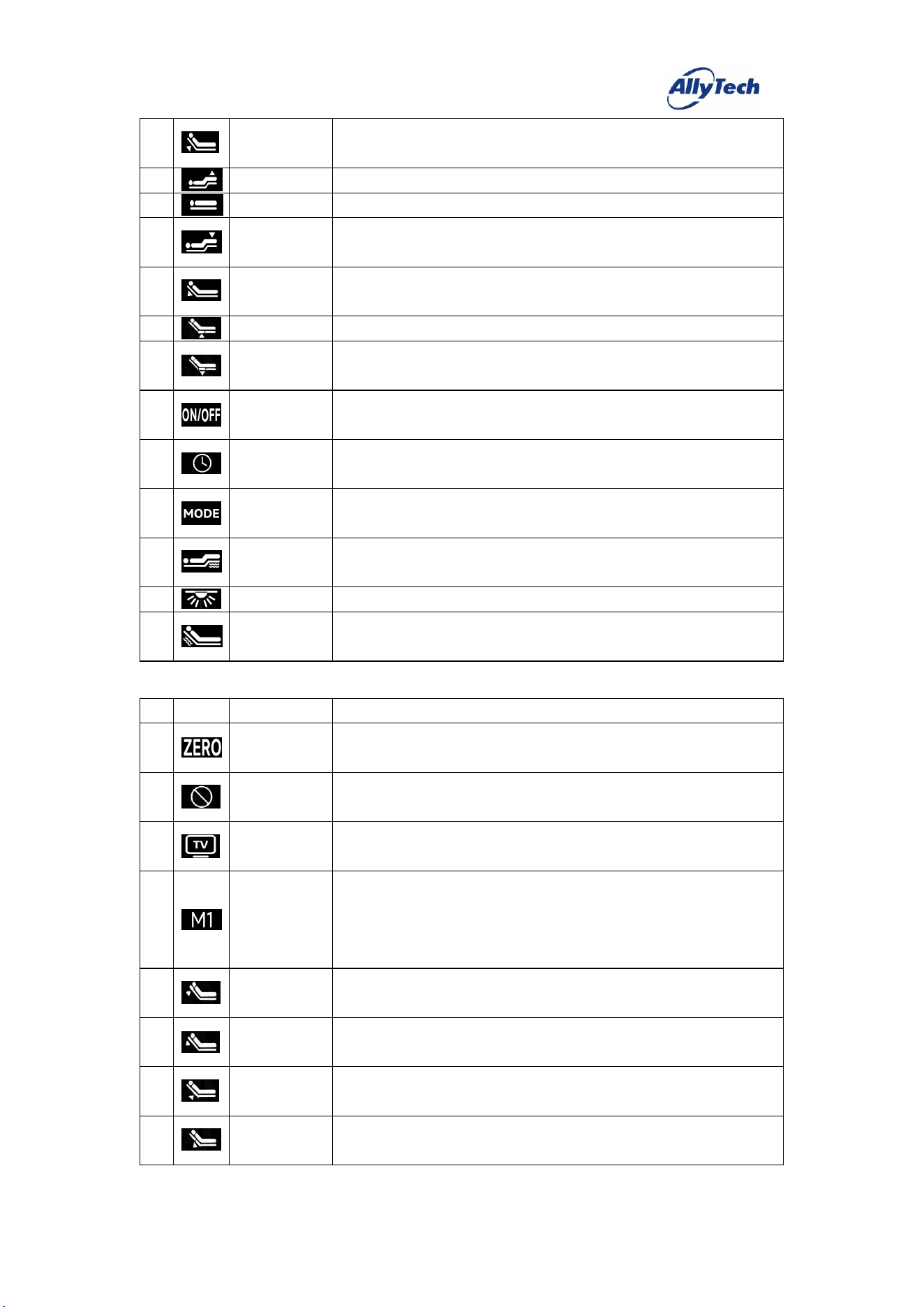
15. Five-Motor Basic (B51)
#
Icon
Key Definition
Function Description
1
Zero Gravity
Press and release this key, and the motor runs to the preset "Zero Gravity"
position.
2
Snoring
Intervention
Press and release this key, and the motor runs to the preset "Snoring
Intervention" position.
3
Cinema Mode
Press and release this key, and the motor runs to the preset "Cinema Mode"
position.
4
Memory 1
Press and hold this key for about 5 seconds to set the current motor position
as "Memory 1".
Briefly press and release this key, and the motor runs to the preset "Memory
1" position.
5
Head Motor
Up
Press and hold this key, and the head motor raises; release it to stop.
6
Head Motor
Down
Press and hold this key, and the head motor lowers; release it to stop.
7
Waist Motor
Up
Press and hold this key, and the waist motor raises; release it to stop.
8
Waist Motor
Down
Press and hold this key, and the waist motor lowers; release it to stop.
HangzhouZhiyuanTechnologyCo.,Ltd.
9
Back Motor
Up
Press and hold this key, and the back motor raises; release it to stop.
10
Leg Motor Up
Press and hold this key, and the leg motor raises; release it to stop.
11
One-touch Flat
Press and release this key, and the motor runs to the preset "Flat" position.
12
Leg Motor
Down
Press and hold this key, and the leg motor lowers; release it to stop.
13
Back Motor
Down
Press and hold this key, and the back motor lowers; release it to stop.
14
Hip Motor Up
Press and hold this key, and the hip motor raises; release it to stop.
15
Hip Motor
Down
Press and hold this key, and the hip motor lowers; release it to stop.
16
Massage
On/Off
Press and release this key to start/stop the two vibrators.
17
Massage Timer
Press and release this key to cycle through the massage timer [10min→
20min→30min→10min].
18
Massage Mode
Press and release this key to cycle through the massage modes [Off→Mode 1
→Mode 2→Mode 3→Off].
19
Leg Intensity
Press and release this key to cycle the leg vibrator intensity through four
modes.
20
Light
Press and release this key to turn the LED strip on/off.
21
Back Intensity
Press and release this key to cycle the back vibrator intensity through four
modes.
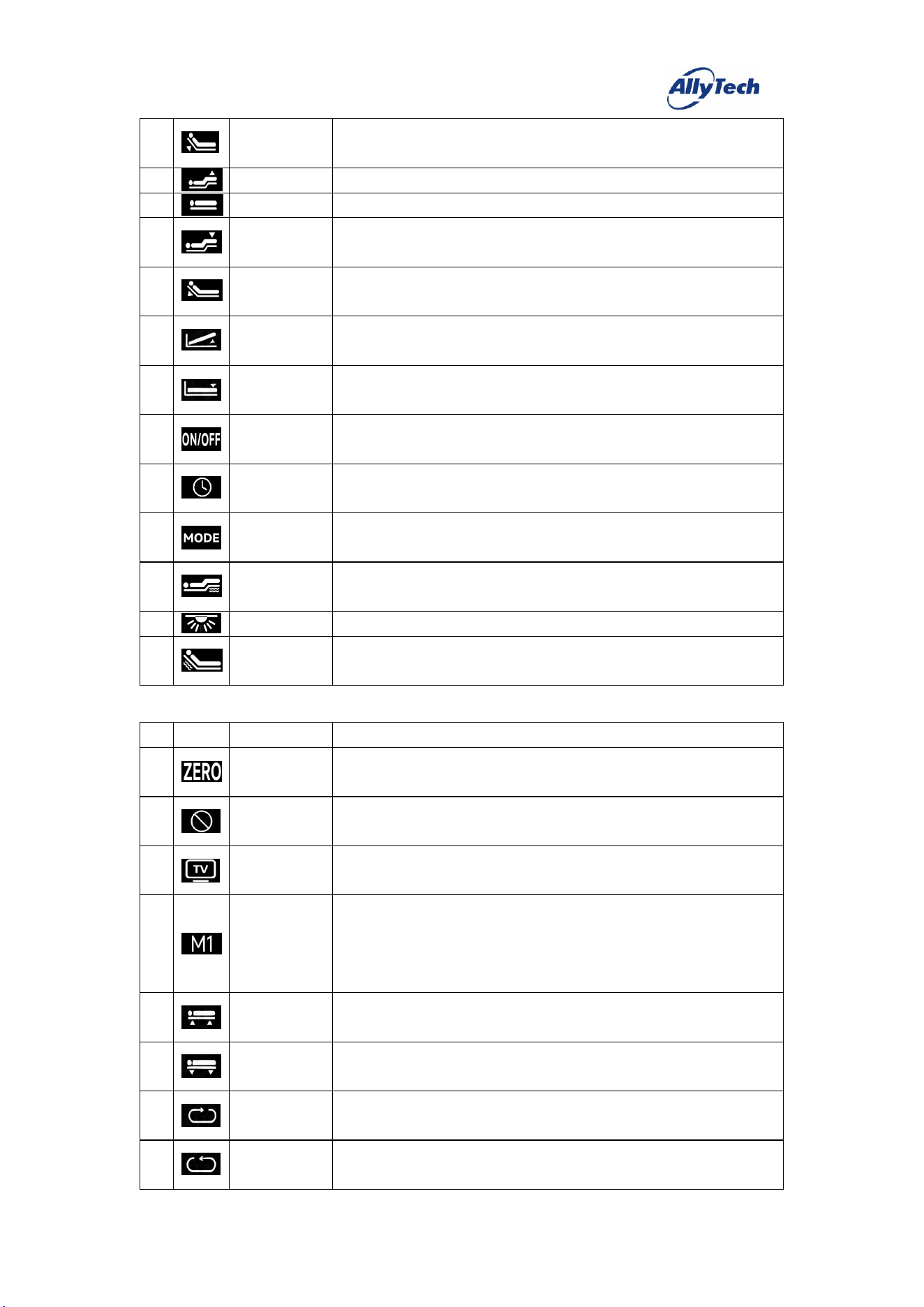
16. Five-Motor
–
Storage (B52)
#
Icon
Key Definition
Function Description
1
Zero Gravity
Press and release this key, and the motor runs to the preset "Zero Gravity"
position.
2
Snoring
Intervention
Press and release this key, and the motor runs to the preset "Snoring
Intervention" position.
3
Cinema Mode
Press and release this key, and the motor runs to the preset "Cinema Mode"
position.
4
Memory 1
Press and hold this key for about 5 seconds to set the current motor position
as "Memory 1".
Briefly press and release this key, and the motor runs to the preset "Memory
1" position.
5
Head Motor
Up
Press and hold this key, and the head motor raises; release it to stop.
6
Head Motor
Down
Press and hold this key, and the head motor lowers; release it to stop.
7
Waist Motor
Up
Press and hold this key, and the waist motor raises; release it to stop.
8
Waist Motor
Down
Press and hold this key, and the waist motor lowers; release it to stop.
HangzhouZhiyuanTechnologyCo.,Ltd.
9
Back Motor
Up
Press and hold this key, and the back motor raises; release it to stop.
10
Leg Motor Up
Press and hold this key, and the leg motor raises; release it to stop.
11
One-touch Flat
Press and release this key, and the motor runs to the preset "Flat" position.
12
Leg Motor
Down
Press and hold this key, and the leg motor lowers; release it to stop.
13
Back Motor
Down
Press and hold this key, and the back motor lowers; release it to stop.
14
Storage Motor
Up
Press and hold this key, and the storage motor raises; release it to stop.
15
Storage Motor
Down
Press and hold this key, and the storage motor lowers; release it to stop.
16
Massage
On/Off
Press and release this key to start/stop the two vibrators.
17
Massage Timer
Press and release this key to cycle through the massage timer [10min→
20min→30min→10min].
18
Massage Mode
Press and release this key to cycle through the massage modes [Off→Mode 1
→Mode 2→Mode 3→Off].
19
Leg Intensity
Press and release this key to cycle the leg vibrator intensity through four
modes.
20
Light
Press and release this key to turn the LED strip on/off.
21
Back Intensity
Press and release this key to cycle the back vibrator intensity through four
modes.
17. Five-Motor
–
Rotation (B53)
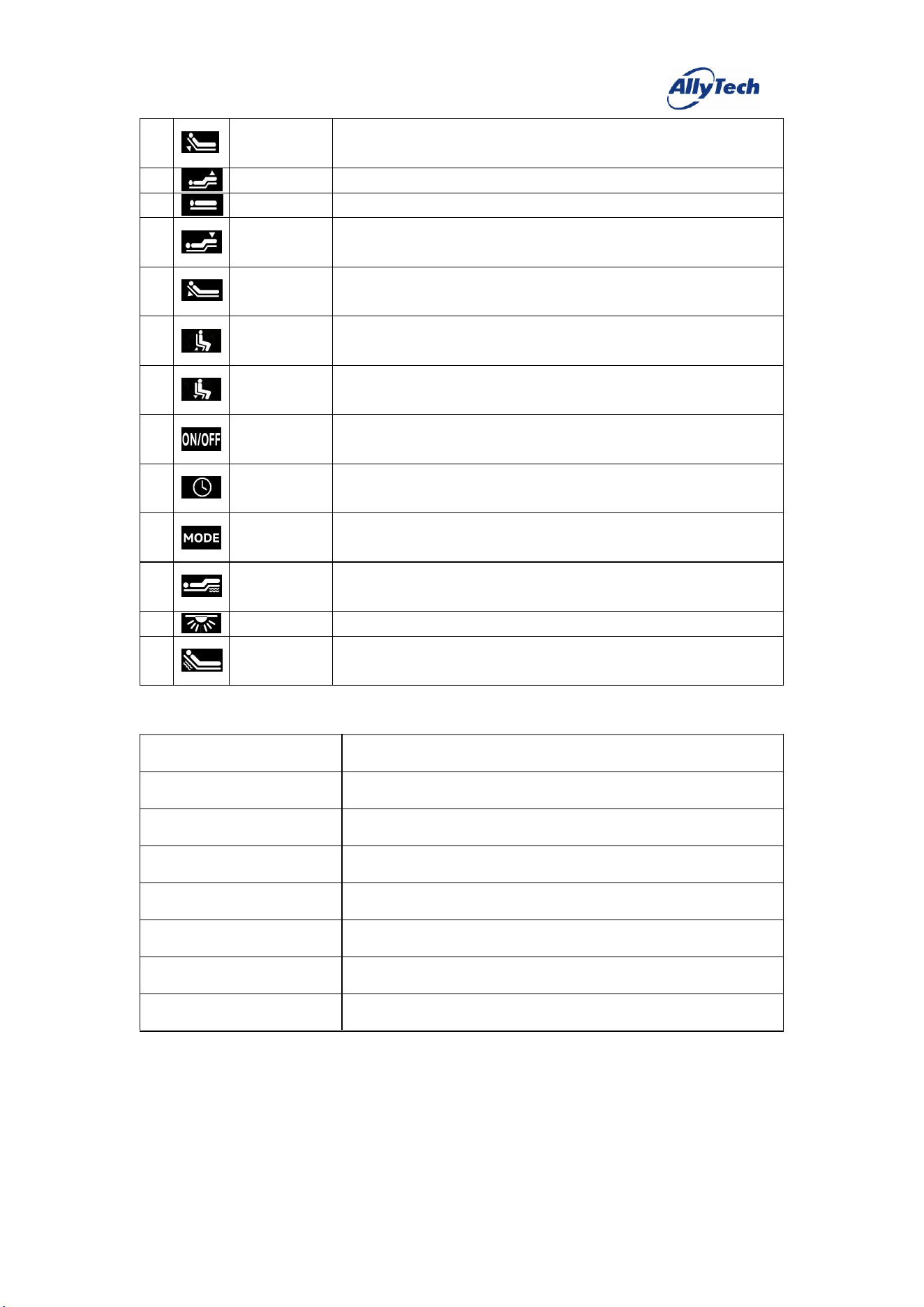
#
Icon
Key Definition
Function Description
1
Zero Gravity
Press and release this key, and the motor runs to the preset "Zero Gravity"
position.
2
Snoring
Intervention
Press and release this key, and the motor runs to the preset "Snoring
Intervention" position.
3
Cinema Mode
Press and release this key, and the motor runs to the preset "Cinema Mode"
position.
4
Memory 1
Press and hold this key for about 5 seconds to set the current motor position
as "Memory 1".
Briefly press and release this key, and the motor runs to the preset "Memory
1" position.
5
Parallel Motor
Up
Press and hold this key, and the parallel motor raises; release it to stop.
6
Parallel Motor
Down
Press and hold this key, and the parallel motor lowers; release it to stop.
7
Rotation Motor
Up
Press and hold this key, and the rotation motor raises; release it to stop.
8
Rotation Motor
Down
Press and hold this key, and the rotation motor lowers; release it to stop.
HangzhouZhiyuanTechnologyCo.,Ltd.
9
Back Motor
Up
Press and hold this key, and the back motor raises; release it to stop.
10
Leg Motor Up
Press and hold this key, and the leg motor raises; release it to stop.
11
One-touch Flat
Press and release this key, and the motor runs to the preset "Flat" position.
12
Leg Motor
Down
Press and hold this key, and the leg motor lowers; release it to stop.
13
Back Motor
Down
Press and hold this key, and the back motor lowers; release it to stop.
14
Sit-up Motor
Up
Press and hold this key, and the sit-up motor raises; release it to stop.
15
Sit-up Motor
Down
Press and hold this key, and the sit-up motor lowers; release it to stop.
16
Massage
On/Off
Press and release this key to start/stop the two vibrators.
17
Massage Timer
Press and release this key to cycle through the massage timer [10min→
20min→30min→10min].
18
Massage Mode
Press and release this key to cycle through the massage modes [Off→Mode 1
→Mode 2→Mode 3→Off].
19
Leg Intensity
Press and release this key to cycle the leg vibrator intensity through four
modes.
20
Light
Press and release this key to turn the LED strip on/off.
21
Back Intensity
Press and release this key to cycle the back vibrator intensity through four
modes.
三、 Technical Specifications
Top Cover Color
Matte Black
Bottom Cover Color
Matte Black
Battery Cover Color
Matte Black
Key Type
Black Translucent Silicone
Material
ABS
Battery Specification
2*AAA 1.5V
Operating Current
12mA
Sleep Current
16uA
HangzhouZhiyuanTechnologyCo.,Ltd.
Operating Environment
Temperature 0°C~50°C, Humidity 20%~75%
Storage Environment
Temperature -10°C~60°C, Humidity 0%~80%
Certification
四、 Version Information
Hardware Version
(P1)BYKQ(H)A01
Software Version
(P1)BYKQ(S)A0
FCC Warming:
This device complies with part 15 of the FCC Rules. Operation is
subject to the following two conditions:
(1)This device may not cause harmful interference, and
(2)this device must accept any interference received, including interference that may
cause undesired operation.
Any Changes or modifications not expressly approved by the party responsible for
compliance could void the user's authority to operate the equipment.
Note: This equipment has been tested and found to comply with
the limits for a Class B digital device, pursuant to part 15 of the FCC
Rules. These limits are designed to provide reasonable protection against harmful
interference in a residential installation. This equipment generates uses and can radiate
radio frequency energy and, if not installed and used in accordance with the
instructions, may cause harmful interference to radio communications. However, there
is no guarantee that interference will not occur in a particular installation. lf this
equipment does cause harmful interference to radio or television reception, which can
be determined by turning the equipment off and on, the user is encouraged to try to
correct the interference by one or more of the following measures:
-Reorient or relocate the receiving antenna.
-Increase the separation between the equipment and receiver.
-Connect the equipment into an outlet on a circuit different from that to which the
receiver is connected.
-Consult the dealer or an experienced radio/TV technician for help.
RF warning for Portable device:
The device has been evaluated to meet general RF exposure requirement.
The device can be used in portable exposure condition without restriction.