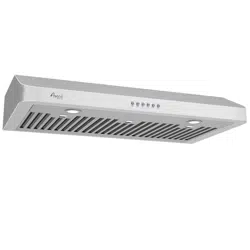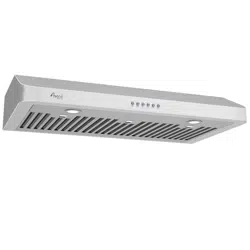
* Unpack & Check for Shipping Damages *
* Test Run Before Installation *
awoco.com
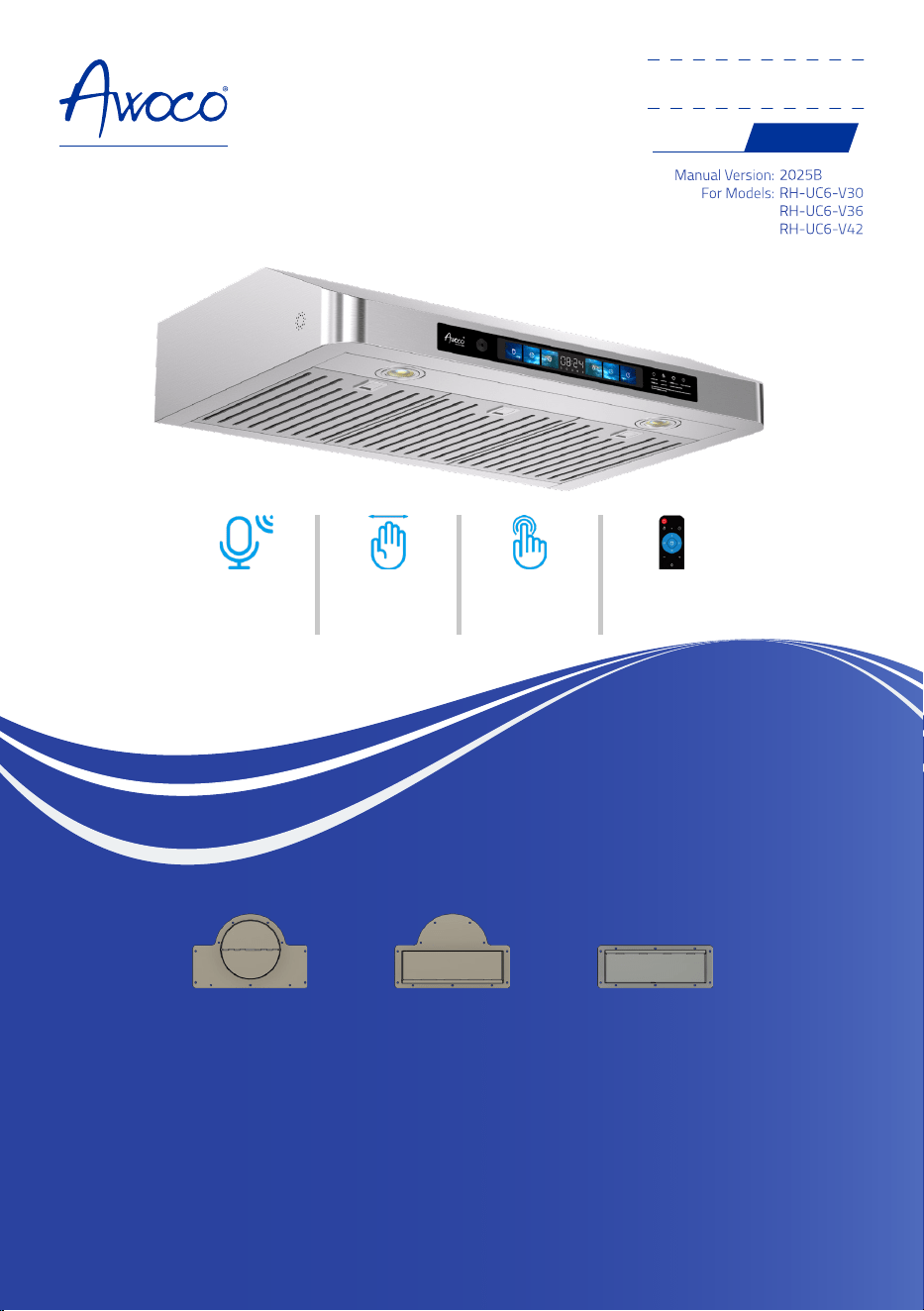
Under Cabinet Series
w/ Voice & Gesture Controls
Range Hood
OWNER'S MANUAL
Manual Version:
For Models:
2025B
RH-UC6-V30
RH-UC6-V36
RH-UC6-V42
6" Top
Round Adapter
3-1/4" x 10" Top
Rectangular Adapter
3-1/4" x 10" Rear
Rectangular Adapter
Caution !
Make sure the air damper can open
freely after the installation.
* 3 adapters and matching covers are included for your convenience.
* Only 1 adapter should be used in any installation.
Voice
Control
Gesture
Control
Touch
Buttons
Remote
Control

Steps To Test Run Before Installation
IMPORTANT!
Wear gloves to protect against sharp edges.
Please follow these instructions to
TEST THE RANGE HOOD BEFORE INSTALLATION
for any defect or
shipping damage:
1. Remove the range hood and accessories from the package carefully.
2. Place the range hood on a flat stable surface, remove the baffle filter and check for any dents or
damages on the range hood body.
3. Remove the loosen parts if there's any.
4. Plug the range hood into a 120V AC power source. Press the power button once and then any
of the speed buttons to turn it on.
5. Check each speed variation and pay attention to the noise level to make sure there isn't any
unusual noise besides it coming from the wind blowing. Press the Light Button to check the
lights.
6. Verify all functions, as described in Page 11 are working properly.
7. Refer to Range Hood Troubleshooting in Page 16 for general issues and solutions.
Note
The protective films on the body was removed to complete the brush finished polishment on the surface.
Important Saf ety Instructions 4
Installation Preparations 5
Venting Requirements 5
Venting System Setup 5
Mounting Height Recommendations 5
Electrical Requirement 6
RH-UC6-V Dimensions 7
Installation 8
Installation Option 1 - Top Venting Through The Roof 8
Installation Option 2 - Top Venting Through The Wall 9
Installation Option 3 - Rear Venting Through The Wall 10
Range H ood Operation 11
Manual Operation 11
Voice Control Operation 12
Gesture Control Operation 13
Smart Memory Function 13
Remote Control Operation 14
Range H ood Care 15
Clean the Exterior Surfaces 15
Clean or Replace the Baffle Filters 15
Replace the LED Lamps 15
Range H ood T roubleshooting 16
Warranty 17
TABLE OF CONTENTS

4
IMPORTANT SAFETY INSTRUCTIONS
TO REDUCE THE RISK OF FIRE, ELECTRIC
SHOCK OR PERSONAL INJURY, PLEASE
READ THE FOLLOWING CAREFULLY
BEFORE ATTEMPTING TO ASSEMBLE,
INSTALL, OPERATE OR MAINTAIN THE
RANGE HOOD:
• Always disconnect, lock and tag the power
source before installing or servicing the range
hood. Failure to do so may result in fire, shock or
serious injury.
• Installation and eletrical wiring must be done
by qualified technician(s) in accordance with all
applicable codes and standards, including fire-
rated construction.
• When cutting or drilling into walls or ceilings,
please be careful not to damage any eletrical
wirings and other hidden utilities.
• Verify and ensure the rated voltage and
frequency of the range hood is in compliance
with the nearby power source.
• Always unplug the range hood from the power
source before cleaning it.
• Use the range hood only as directed in this
manual. Do not use it to vent hazardous or
explosive materials or vapors.
• Clean the baffle filters regularly to prevent it
become blocked or clogged. Good air flow is
essential for the range hood to work propoerly.
• Do not install, repair or replace any parts of the
range hood unless you are instructed to do so by
the manufacturer.
• Do not tamper with or modify the PCB.
• This range hood model requires a duct to vent
the air outside. Do not vent the air into spaces
within walls, ceiliings, attics, crawl spaces or
garages.
TO REDUCE THE RISK OF A RANGE TOP
GREASE FIRE:
• Never leave surface units unattended at high
settings. Boilovers cause smoking and greasy
spillovers that may ignite. Heat oils slowly on
low or medium settings.
• Always turn the hood ON when cooking at high
heat or when flambeing food (i.e. Crepes Suzette,
Cherries Jubilee, Peppercorn Beef Flambé).
• Clean ventilating fans frequently. Grease should
not be allowed to accumulate on the fan or filter.
• Use proper pan sizes. Always use cookware
appropriate for the size of the surface element.
TO REDUCE THE RISK OF INJURY TO
PERSONS IN THE EVENT OF A RANGE
TOP GREASE FIRE:
• SMOTHER FLAMES with a close-fitting lid,
cookie sheet or metal tray, then turn off the
burner. BE CAREFUL TO PREVENT BURNS. If the
flames do not go out immediately, EVACUATE
AND CALL THE FIRE DEPARTMENT.
• NEVER PICK UP A FLAMING PAN - you may be
burned.
• DO NOT USE WATER, including wet dish cloths
or towels - a violent steam explosion may result.
• Use a fire extinguisher ONLY if:
• You have a Class ABC extinguisher, and you
already know how to operate it.
• The fire is small and contained in the area
where it started.
• The fire department is being called.
• You can fight the fire with your back to an exit.
TO REDUCE THE RISK OF PERSONAL
INJURY IN THE EVENT OF A GAS LEAK:
• Extinguish any open flame.
• DO NOT turn on the lights or any type of
appliance.
• Open all doors and windows to disperse the gas.
If you still smell the gas, call the gas company,
fire department, or 911 immediately.
Read and Save These Instructions
5
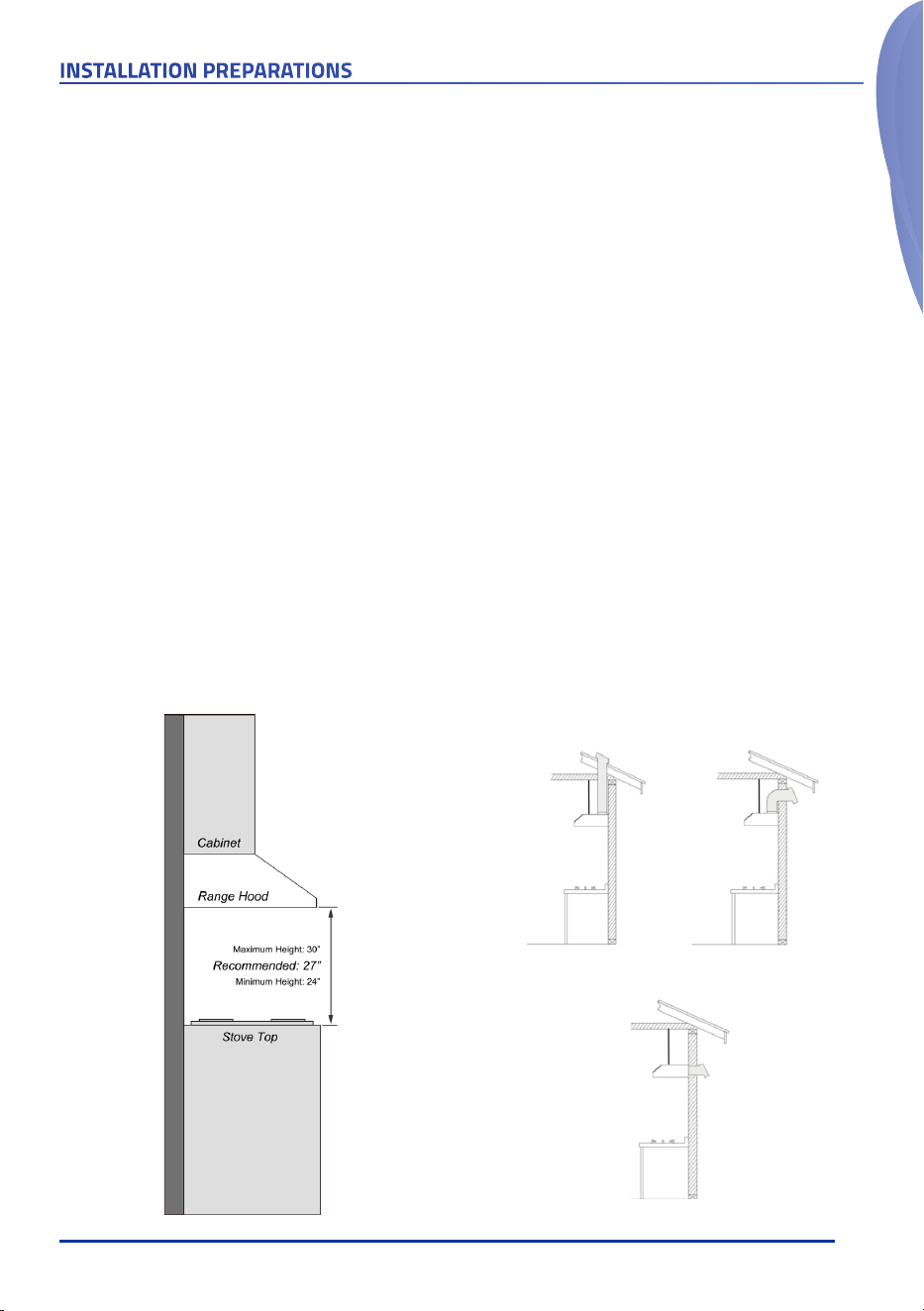
Venting Requirements
DO
• Have the venting system go vertically from the
range hood to the roof if possible.
• Have 24"-30" distance between the cooktop and
the range hood. 27" is recommended.
• Use uniformed 6" round duct for 6" Round
Adaptor or 3-1/4" x 10” rectangular duct or
larger.
• Use metal vent only. Rigid metal vent is
recommended. Semi-rigid aluminum duct is
subject to your local buiding code requirement.
• Make sure there is a minimum of 24" of straight
vent between the elbows if more than 1 elbow is
used.
• Use minimal numbers of elbows and the
shortest route for the venting system for a
better performance.
• Use silver tap or duct tap to seal all joints in the
venting system.
• Use caulking silicone to seal exterior wall or roof
opening around the cap.
• Always keep the duct clean to ensure proper
airflow
Mounting Height Recommendations:
DO NOT
• End the venting system in an enclosed area
indoors.
• Use plastic vent.
• Use no more than three 90° elbows.
• Install 2 elbows together.
• Install the range hood outside of the
recommended height.
• Reduce the duct size below the recommended
size.
Note
• It is important to install the range hood at the
proper mounting height. Hoods mounted too low
could result in heat damage and fire hazard while
hoods mounted too high will be out of reach and
hense reduce its performance and efficiency.
Venting System Setup
• This Range Hood can either be 6” round or
3-1/4" x 10" rectangular top venting through
the roof or wall, or 3-1/4" x 10" rectangular rear
venting through the wall.
INSTALLATION PREPARATIONS
Cabinet
Range Hood
Stove Top
Roof Cap
Top Venting Roof Exhaust
Cabinet
Side
Wall
Cap
Range Hood
Stove Top
Top Venting Wall Exhaust
Rear Venting Wall Exhaust
Cabinet
Side
Wall
Cap
Range Hood
Stove Top
6
INSTALLATION PREPARATIONS
IMPORTANT!
• If long duct run is needed, increase the duct size
from 6" to 7".
• If a reducer is needed, use a long reducer instead
of a pancake reducer and install it as far away
from the range hood as possible. Reducing the
duct size will restrict and decrease the speed of
the airflow and hense lower the range hood's
performance.
• If transitions or turns are needed, install them
as far away from the range hood as possible and
keep the distance between them as far apart as
possible.
• Also refer to the owner's manual of the stove
top for the height clearance requirement and the
recommended mounting height above the range.
Minimum Duct Size:
• Round
: 6" minimum.
• Rectangular
: 3-1/4" x 10” minimum.
Make sure all the ducts and vent out adapters
meet the minimum sizes. Avoid 4" or 5" in
any sections.
IMPORTANT!
Observe all governing codes and ordinances.
It is the customer's responsibility:
• To contact a qualified electrical installer;
• To ensure that the electrical installation is in
compliance with applicable codes and standards.
Electrical Requirements:
• A 120V, 60Hz., AC only, 3A fused electrical circuit
is required.
• Wire sizes and connections must conform with
the power rating of the range hood and all
applicable codes and standards.
• DO NOT have a fuse in the neutral or ground
circuit.
• The 3-prong outlet should be grounded. If the
power cord plug is not used, the power cord’s
green wire should be connected to ground.
Check with a qualified electrician if you are not
sure that the range hood is properly grounded.
• DO NOT ground to a gas pipe.
• The range hood must be connected with copper
wire/plug only.
• The range hood should be connected directly
to the fused disconnect box (or circuit breaker)
through flexible armored or non-metallic
sheathed copper cable. ETL listed strain relief
must be provided at each end of the power
supply cable.
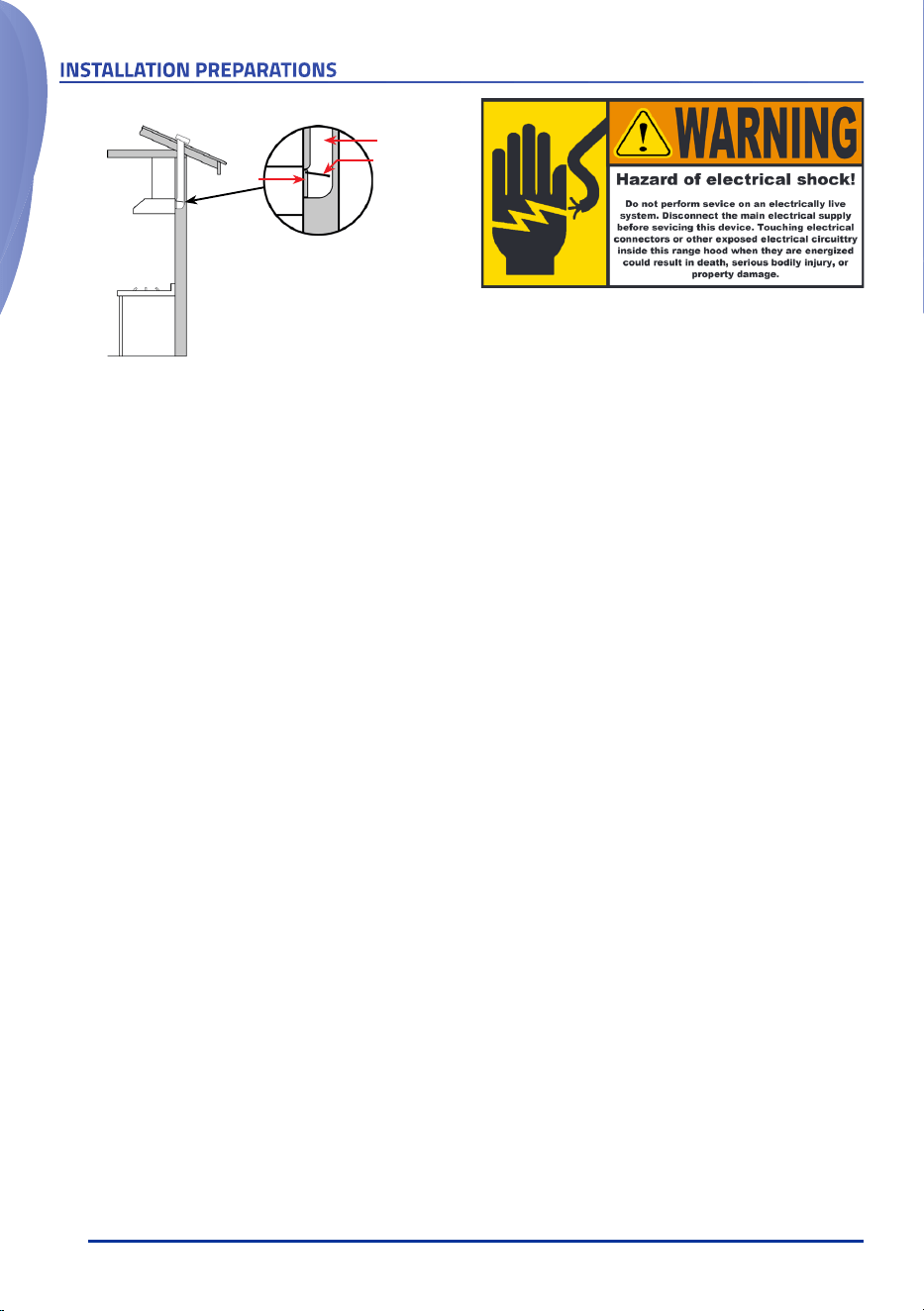
Rear Venting in-Wall Exhaust
Cabinet
Range Hood
Stove Top
Caution !
• The fully opened Air
Damper might block the air
flow.
• Remove the Air Damper first
before connecting the duct
to the Rear Adapter.
Rear
Adapter
Duct
Air
Damper
7
INSTALLATION PREPARATIONS
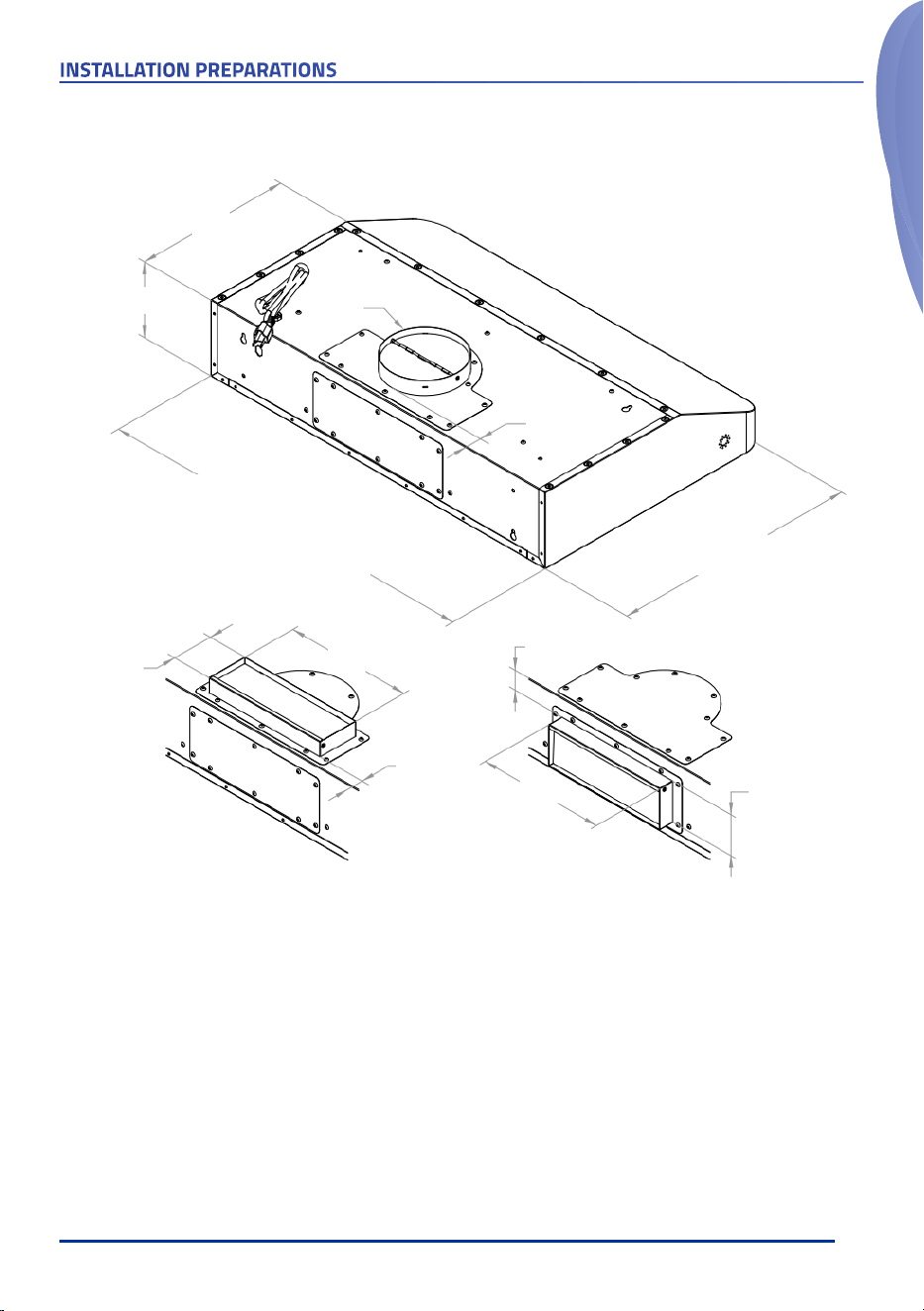
RH-UC6-V30:
29-3/4"
RH-UC6-V36:
35-3/4"
RH-UC6-V42:
41-3/4"
6"
12"
Ø6"
1-1/4"
19-3/4"
3-1/4"
10"
53/64"
3-1/4"
10"
1-13/32"
RH-UC6-V Dimensions
8
INSTALLATION
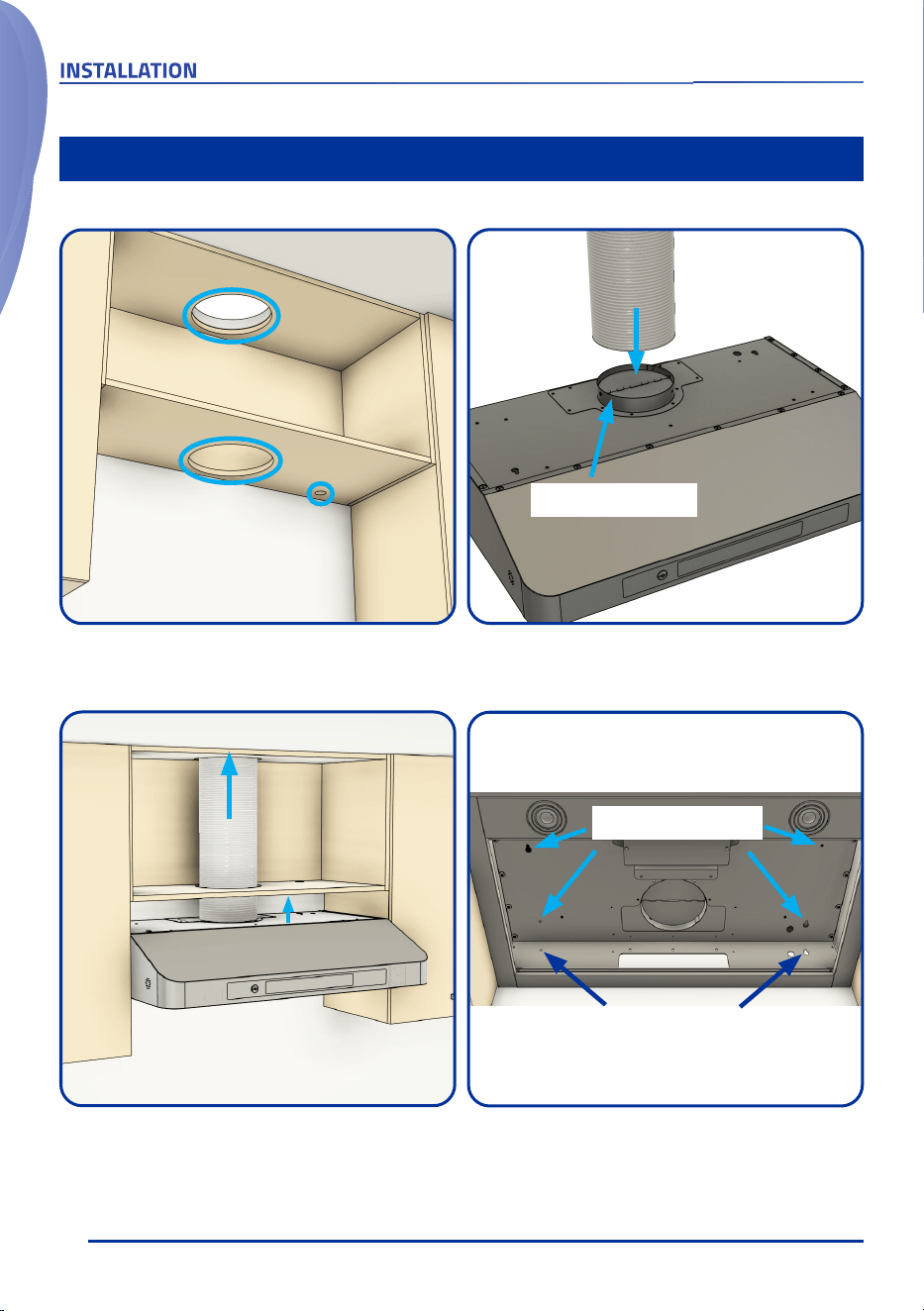
Installation Option 1 - Top Venting Through The Roof
• Install the top adapter.
• Connect the duct and seal the connection.
1. Install adapter
2. Connect duct
②
Measure and make cutouts for the duct and power
cord on the cabinet and the ceiling.
Make cutouts for
duct & power cord
Ceiling
①
Install the range hood to the bottom of the cabinet.
Mounting Screws
Optional
Mounting Screws
Raise the hood and guide the duct through the
cutouts.
Connect to the
ceiling ductwork
③ ④
9
INSTALLATION
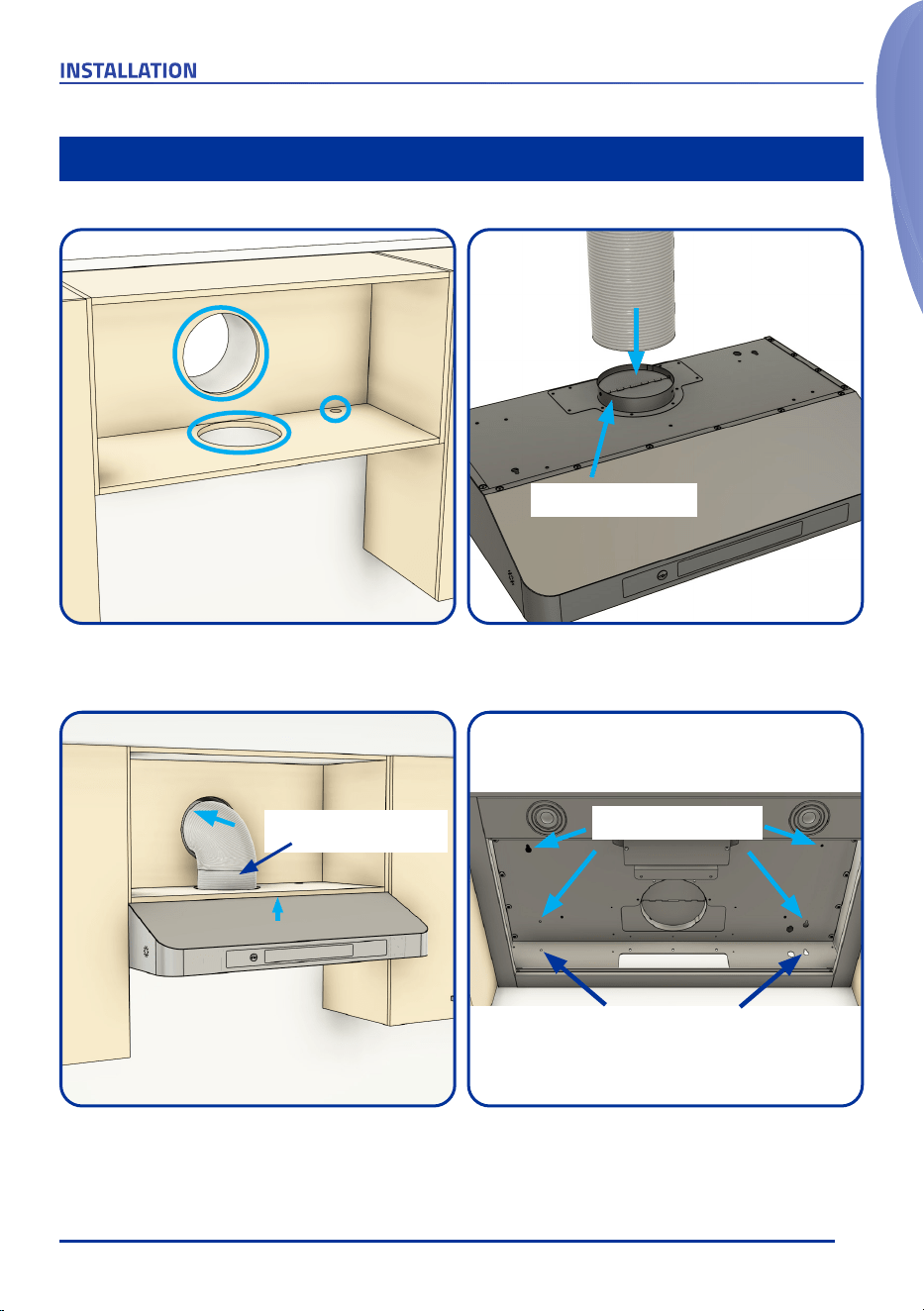
Installation Option 2 - Top Venting Through The Wall
Measure and make cutouts for the duct and power
cord on the cabinet and the wall.
Make cutouts for
duct & power cord
①
• Install the top adapter.
• Connect the duct and seal the connection.
1. Install adapter
2. Connect duct
②
Raise the hood and guide the duct through the
cutouts.
Connect to the
wall cap
Install the range hood to the bottom of the cabinet.
Mounting Screws
Optional
Mounting Screws
Make sure the air damper
can open freely.
③ ④
10
INSTALLATION
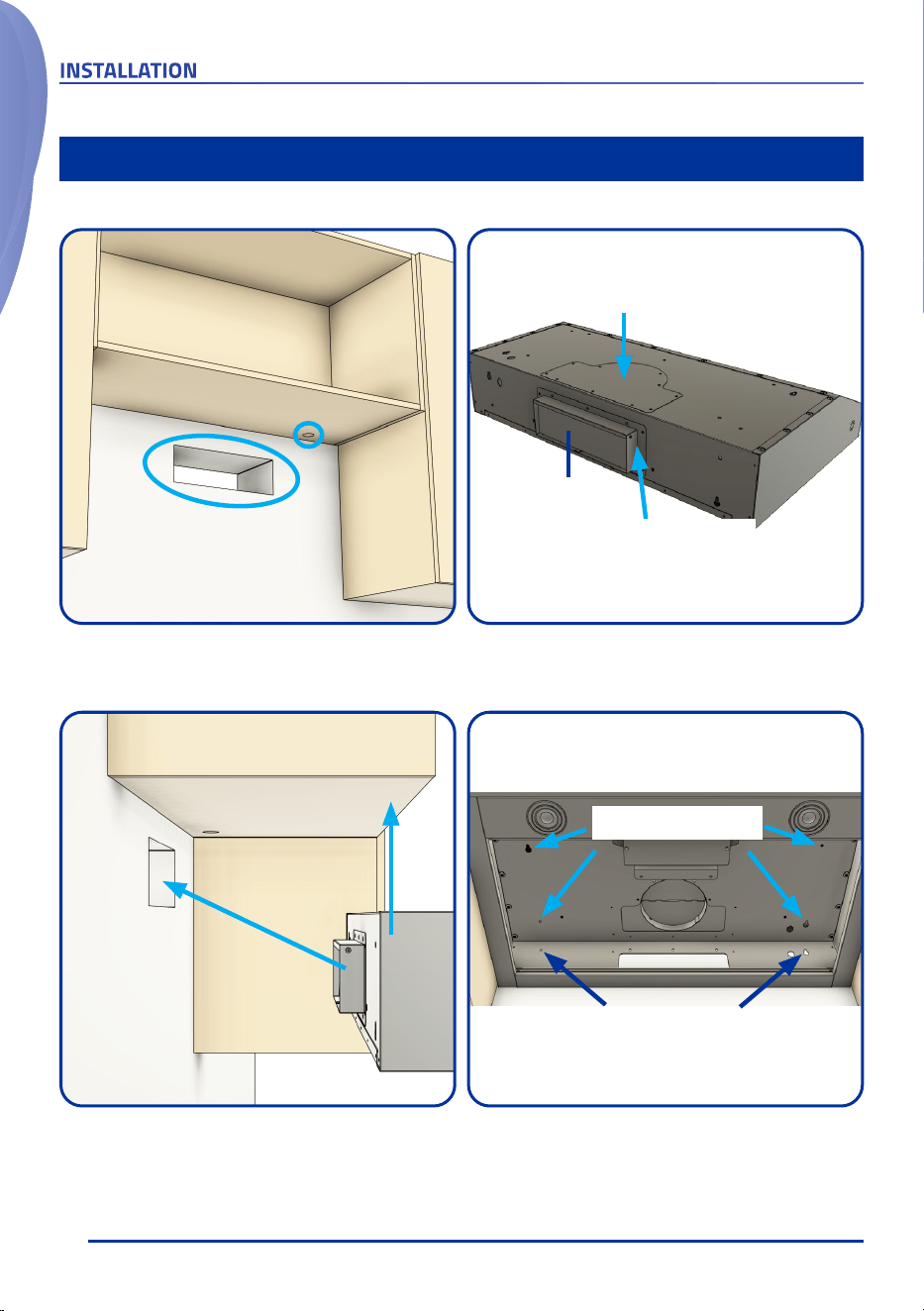
Installation Option 3 - Rear Venting Through The Wall
Measure and make cutouts for the duct and power
cord on the cabinet and the wall.
Make cutouts for
vent adapter & power cord
①
• Install the rear vent adapter & the top cover.
• Remove the rear air damper if it's blocking the air flow.
Install rear vent adapter
Install top cover
②
Rear air damper
Raise the hood and guide the rear vent adapter
through the cutouts.
Connect to
the wall cap
Install the range hood to the bottom of the cabinet.
Mounting Screws
Optional
Mounting Screws
③ ④
11
RANGE HOOD OPERATION
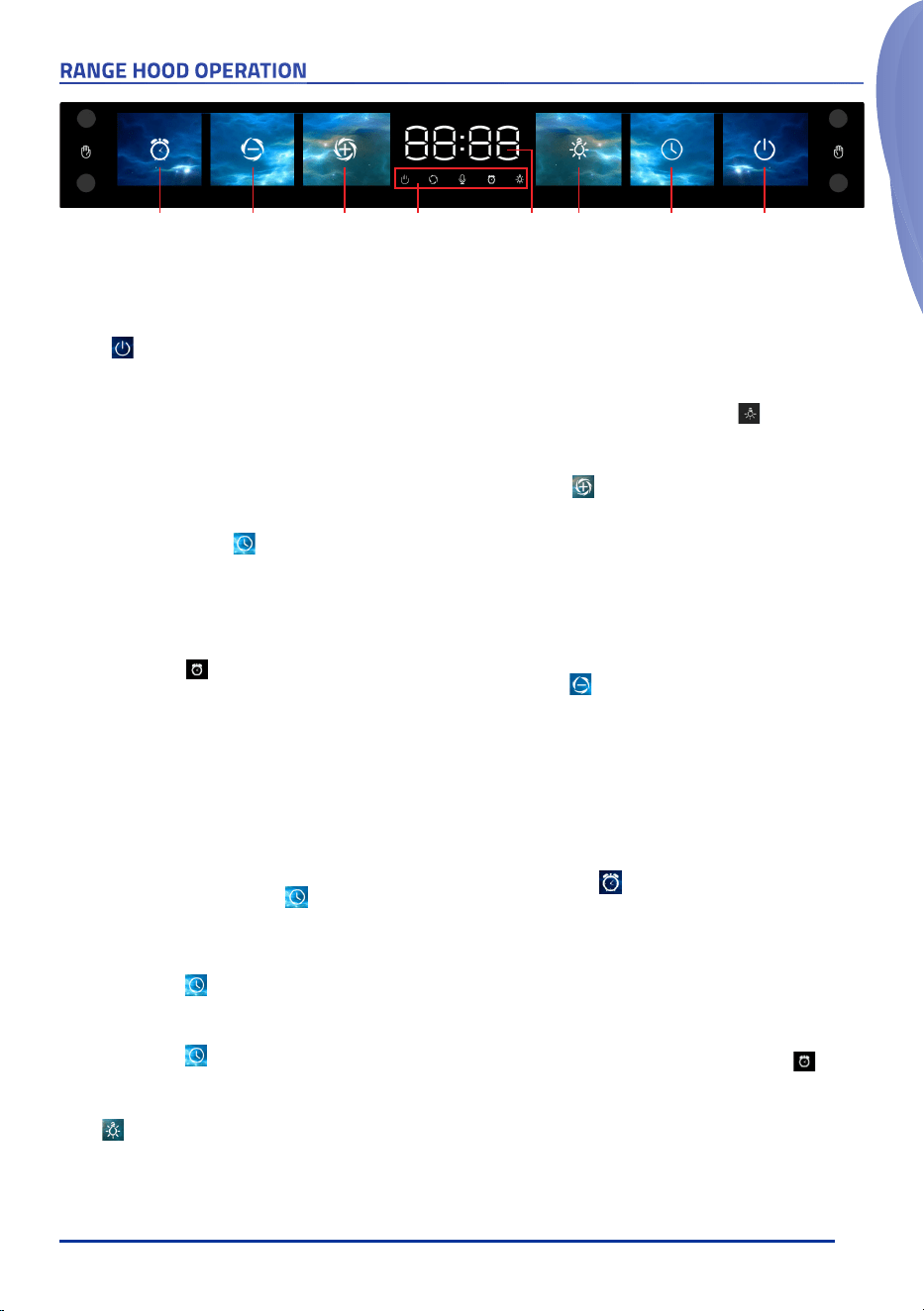
Shut-Off
Timer
Speed +Speed - Center Display Light Delay Shut-Off
/ Clock
Power
MANUAL OPERATION
Indicator
Icons
Control Panel Touch Buttons (From Right To Left)
Power
• When the range hood is OFF, touch the power button once will
turn on the range hood. Set the speed to F0 to put it into
Standby
Mode
. Now the range hood is ready for additional operation
inputs.
• While in standby mode, touching the power button will turn off
the range hood immediately.
• While the range hood is OFF, touch and hold the power button for
3 seconds to activate/deactivate the Gesture Control function.
Delay Shut-Off / Clock
• While the range hood is running at any speed, touch this button
to activate the Delayed Auto Shut-Off fuction.
• When the Delayed Auto Shut-Off fuction is activated, this button
will begin to flash and the center display will show a default
5-minute countdown timer.
• The indicator icon for the Delayed Auto Shut-Off fuction
will also light up, indicating the Delayed Auto Shut-Off fuction is
activated.
• When the countdown timer is present, changing the range hood
speed will cancel the countdown timer and resume the range
hood into normal operation.
• When the countdown timer reaches 0, it will shut off the range
hood fans and the lamps.
• How To Set The Clock
• When the range hood is on
Standby Mode
(power on the
hood and decrease the speed to F0), touch and hold the
Delayed Shut-Off/Clock button for 5 seconds to enter
the time adjustment mode. The Hour indicator will flash.
• Use the Speed + or Speed - button to adjust the hour to the
correct one. The Hour can be adjusted from 1 to 12.
• When done setting the Hour, touch the Delayed Shut-Off/
Clock button once and the Minute indicator will flash.
• Use the Speed + or Speed - button to adjust the minute to
the correct one. The Minute can be adjusted from 00 to 59.
• When done setting Minute, touch the Delayed Shut-Off/
Clock button once to save the inputs. The clock is now
set up and will be shown in the center display when the
range hood is not running.
Light
• When the range hood is on and the light button is touched for the
first time, it will turn on the lamps at the maximum light level.
• When the lamps are on, touch and hold the light button to adjust
the lighting level steplessly. The lamps will begin to dim, and when
they reach the minimum lighting level (16%), they will become
brighter and brighter until they reach the maximum lighting level,
then they will begin to dim again till the minimum lighting level, so
on and so forth.
• When the lamps are on, the indicator icon also lights up.
Speed + & Speed -
• Speed +
• When the range hood is on standby mode, touching the
Speed + button will set the range hood to speed 2 (F2).
F2 will be shown in the center display. Each following
consecutive touch of the button will increase the speed by 1,
until it reaches the maximum speed 4 (F4).
• When the range hood is running at any speed below speed
4 (F4), touching the Speed + button will increase the speed
by 1, until it reaches the maximum speed 4 (F4).
• Speed -
• When the range hood is on standby mode, touching the
Speed - button will set the range hood to speed 1 (F1).
• When the range hood is running at speed 1 (F1), touching
the Speed - button will turn off the motors.
• When the range hood is on standby mode, touch and hold
the Speed - button for 3 seconds to enable/disable the
Voice Control fuction.
• The center display will show the current speed (Min. F1, Max F4).
Shut-Off Timer
• When the range hood is running, touching this button will start
a countdown timer to shut off the range hood. The default
duration is 15 minutes. It can be adjusted to minimum 1 minute
with the Speed - button or maximum 30 minutes with the Speed
+ button.
• When the countdown timer is active, changing the range hood
speed will cancel the countdown timer and resume the range
hood into normal operation.
• When the countdown timer is set, the indicator icon also
lights up.
12
How To Enable/Disable Voice Control
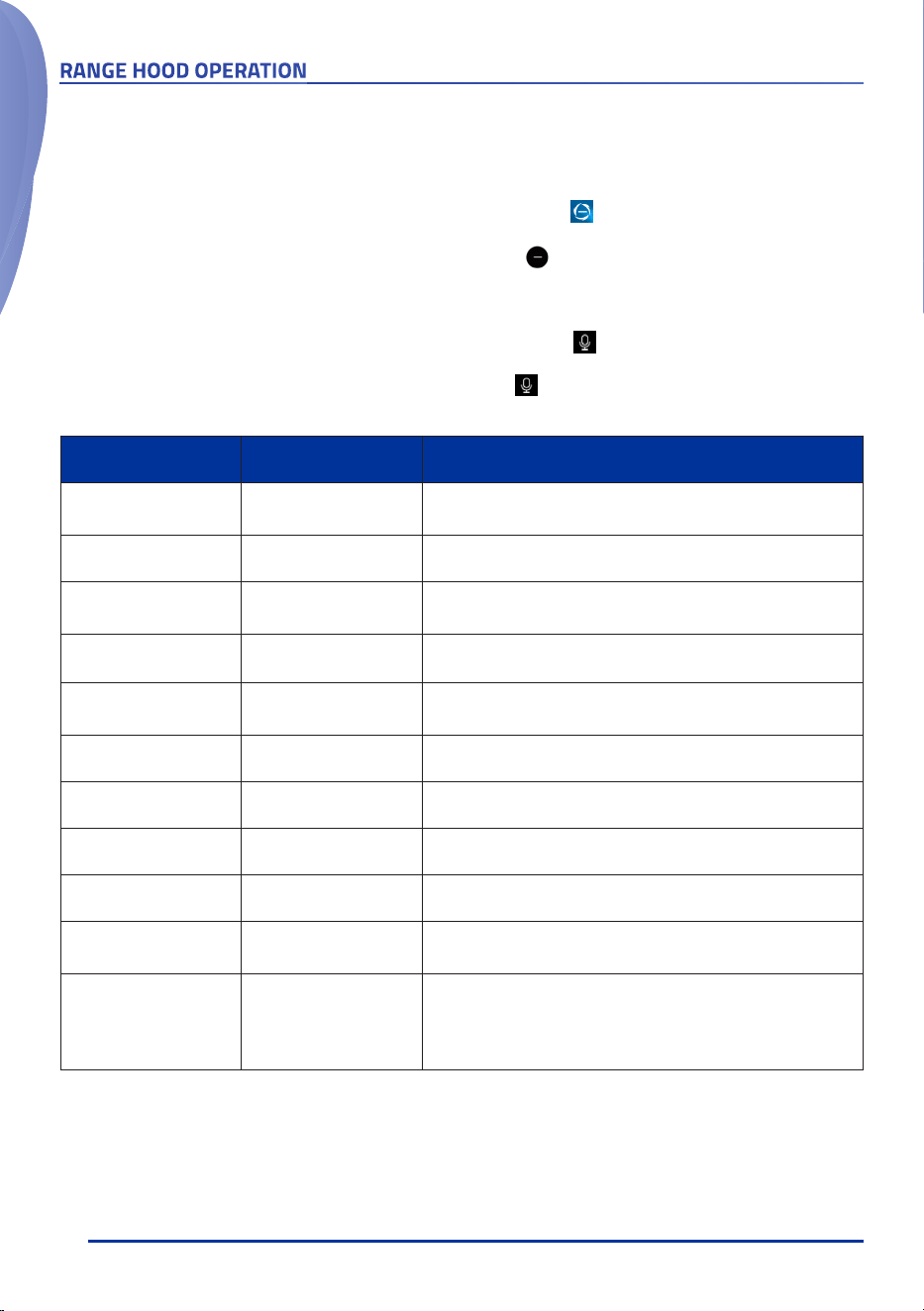
• Using the control panel button
• When the range hood is on standby mode, touch and hold the Speed (-) button for 3 seconds.
• Using the remote control
• When the range hood is on standby mode, press and hold the (-) button for 3 seconds.
Wake Up Phrase
• When the Voice Control function is activated and the wake up phrase "
Hi Awoco
" is said, the range hood will respond with
"
Hi, I'm here.
" and begin to listen to the voice commands. The indicator icon also lights up.
• When there's no voice command input within 15 seconds from the last voice command, the range hood will say "
See you
later
" and stop listening to the voice commands. The indicator icon will go out. From here on, the wake up phrase "
Hi
Awoco
" must be said before the range hood can accept any additional voice commands.
RANGE HOOD OPERATION
VOICE CONTROL OPERATION
Voice Command Respond Result
"Hi Awoco" "Hi, I'm here."
Wake up Phrase, the range hood is ready to accept voice
commands.
"Power on" "OK, it is on." Power on the range hood.
"Speed 1/2/3/4" "OK, speed 1/2/3/4"
Change the speed to the corresponding speed level in the
voice command
"Lights on/off" "OK, lights on/off." Turn lights on/off.
"Power off" "OK, goodbye"
The range hood shuts off all motors, and enters standby
mode, ready to be woke up by the Wake Up Command.
"Higher speed" "OK, speed 1/2/3/4" Increase the speed level by 1. F0 to F1.... F3 to F4
"Lower speed" "OK, speed 3/2/1" Decrease the speed level by 1. F4 to F3 ... F2 to F1
"Lower speed" at F1 "OK, motor off" Motors are turned off.
"Higher speed" at F4 "OK, speed 4" The speed level will stay at the maximum speed F4
No voice input within
15 seconds
"See you later"
No longer listening. Need to wake up the range hood with
the Wake Up Phrase.
"Delay shutdown"
"OK, shutdown 5
minutes later"
A default 5-minute countdown timer will show up in the
Time/Speed Dispaly. Increasing or decreasing the speed
level will cancel the timer and resume the range hood into
working order at the selected speed.

13
RANGE HOOD OPERATION
GESTURE CONTROL OPERATION
How To Enable/Disable Gesture Control
• Using The Control Panel Button
• When the range hood is
OFF
, touch and hold the Power button for 3 seconds.
• Using The Remote Control
• When the range hood is
OFF
, press the "Hand" button once.
Hand Gestures
• The optimal distant for the hand gestures to work best is 3 to 4 inches away from the control panel.
• Move the hand accross the left and right sensors in a short time for the gesture control to determine if it is a left-to-right
or right-to-left command..
• Swiping From Left To Right
• Every time the range hood is shut off, it memorizes the speed level and lighting level at the time of shutting off and
store the info into the buffer memory, unless there's a power outage.
Swiping From Left To Right
will turn on the
range hood and resume it to the previous speed level and lighting level from the buffer memory.
• When the range hood is running at any speed that is below speed 4 (F4),
Swiping From Left To Right
will increase
the speed level by 1, up to max speed 4 (F4). Continuing to swipe from left to right when at speed 4 (F4) will no longer
increase the speed level.
• Swiping From Right To Left
• When the range hood is running at any speed that is above speed 1 (F1),
Swiping From Right To Left
will decrease
the speed level by 1.
• When the range hood is running at speed 1 (F1),
Swiping From Right To Left
will turn off the motors. If the lamps are
on,
Swipe From Right To Left
again to turn off the lamps.
SMART MEMORY FUNCTION
• This range hood will memorize the speed level and lighting level at the time it is shut off and store the info into the built-
in buffer memory. Such info will then be used to resume the range hood into operation the next time the range hood is
powered on.
Warning !
• If the range hood is unplugged from the wall power outlet, or there's a power outage:
• The stored info will be lost!
• The clock for current time will be reset to the default value. You will need to set the time again.
14
RANGE HOOD OPERATION
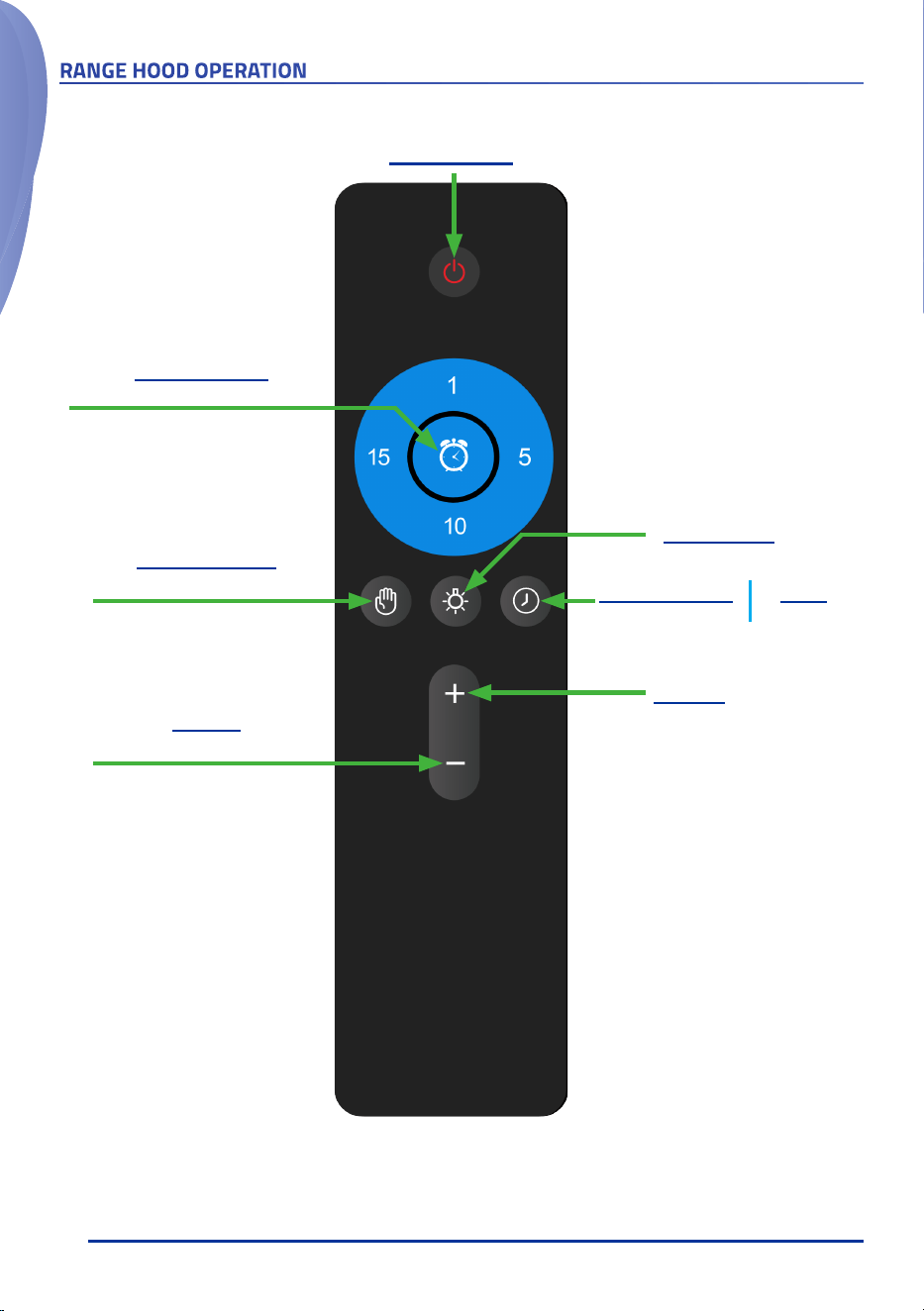
REMOTE CONTROL OPERATION
Power On/Off
Speed +
To increase the speed/settings
Light On/Off
Press and hold to adjust the brightness
Speed -
To decrease the speed/settings
Press and hold for 3 seconds to
enable/disable Voice Control
Gesture Control
ON/OFF
Enable/disable when the range
hood is powered off
Delay Shut-Off
5-Minute
Clock
To set time
Shut-Off Timer
Timer duration: 1, 5, 10 or 15 minutes
Use the -/+ button to adjust the
timer to up to 30 minutes
IMPORTANT!
• The remote requires 2x AAA batteries to operate.
• Batteries not included. Must be purchased separately.

15
RANGE HOOD CARE
Cleaning
WARNING
• To reduce the risk of electrical shock, DO NOT clean the
hood while it's operating.
• Never put your hands into the area housing the fan when
the fan is operating.
Cleaning the Exterior Surfaces
IMPORTANT !
To avoid damage to the exterior surfaces:
• DO NOT use corrosive or abrasive detergent.
• DO NOT use steel wool, scoring pad or steel brushes.
Use a paper towel or soft cloth or nonabrasive sponge
instead.
• DO NOT use salt solutions, disinfectants, bleaches or
cleaning compound that contains harmful chemicals.
Cleaning Method
• Noncorrosive or nonabrasive liquid detergent soap or all-
purpose liquid cleanser.
• Wipe the surfaces with a damp paper towel or soft cloth
or nonabrasive sponge.
• Rinse with clean water.
• Wip dry with dry towel or cloth.
Note
• The nonabrasive stainless steel polisher can be applied
when done cleaning to retain the stainless luster and
grain.
• Always follow the instrunction of the polisher.
Cleaning the Stainless Steel Baffle Filters
• Pull the spring release handle and remove the filter by
pulling it down.
• Wash the filter in the top rack of the dishwasher or with
warm soapy solution manually.
• Let the filters dry thoroughly.
• Make sure the spring release handle is toward the front,
align and insert the filter.
• Pull the spring release handle and push the filter into
position.
• Release the handle.
• Repeat the steps for the remaining filters.
Replacing the Filters
• Replace the baffle filters immediately should they
become worn out due to aging or prolonged usage.
Replacing the LED Lamps
WARNING
Electrical Shock Hazard
Disconnect power before servicing
Wear gloves to protect against sharp edges
• This range hood uses two 12V DC, 3W LED lamps.
• Unplug the range hood, or turn off the breaker.
• Remove the baffle filters.
• Locate and unplug the power connectors that connect
the LED lamp to the circuitboard.
• Take out the old lamp.
• Install the new lamp and connect the power connectors.
• Put the baffle filters back into place.
• Plug in the range hood or turn on the breaker.
• Turn on the light and check if the new lamp is working
properly.
16
Before Calling for Service
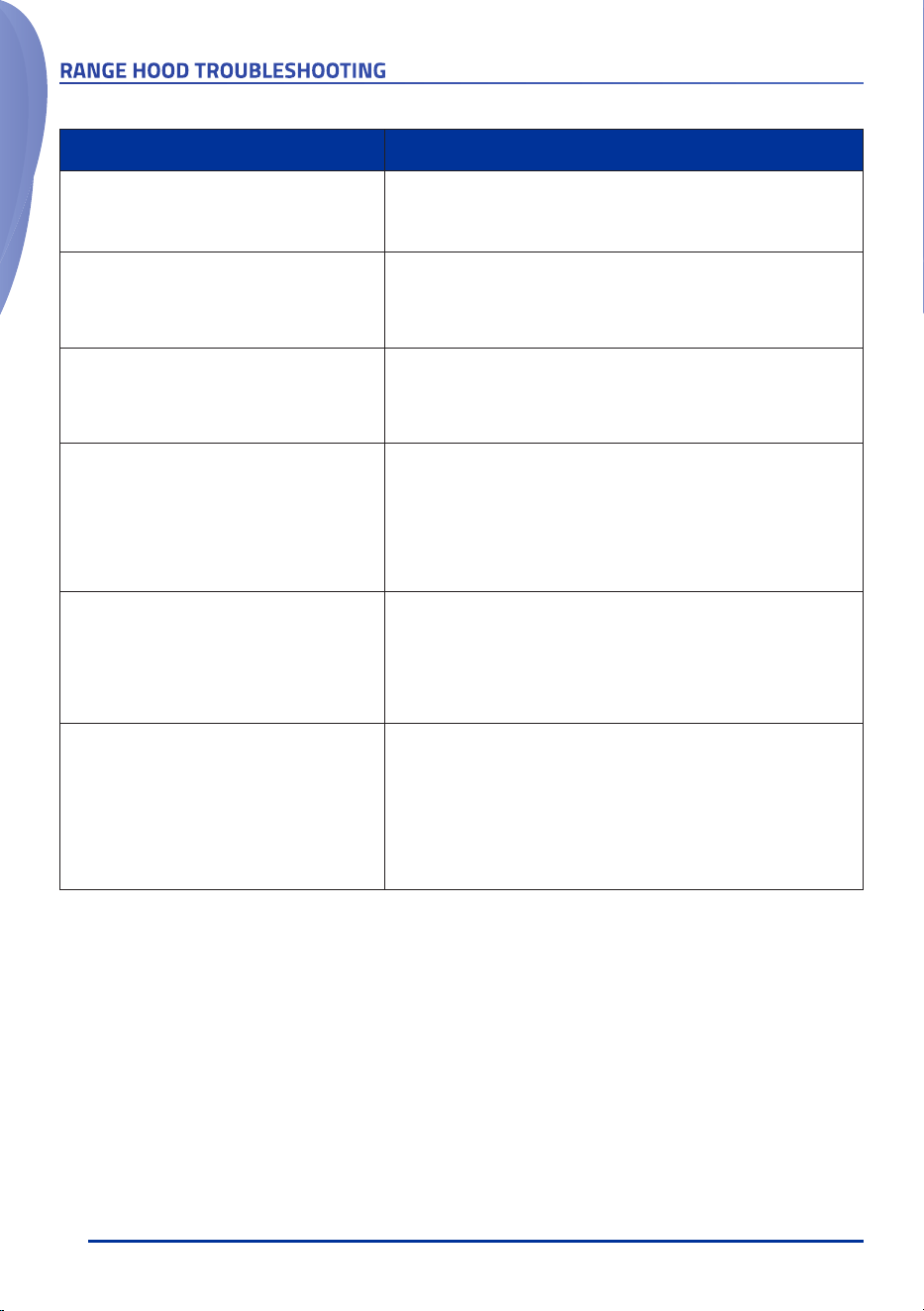
RANGE HOOD TROUBLESHOOTING
Issue Possible Cause / Solution
The range hood doesn't turn on
• Check if the range hood is plugged in. Make sure that all power is
turned ON and all electrical wirings are properly connected.
The range hood turns on but the LED light
doesn't
• Check the LED light cable connectors, disconnect and reconnect the
cable connectors.
• Replace the defective LED assembly. Refer to Range Hood Care
section for instructions.
The range hood vibrates when the blower is on
• Check and tighten the mounting screws to secure the hood to the
cabinet or wall properly.
• Check if the fan wheel is tighten to the motor shaft.
• Check if the fan wheel is unbalanced.
The blower or fan seems weak
• Check that the duct size used is at least 6” and does not have sections
with smaller sizes between the hood and the Roof/Wall Cap
. Range
hood WILL NOT function efficiently with insufficient duct size. For
example: 4" ducts or 4" vent out adapter is in used.
• Check if the duct is clogged or the damper (half-circular flapper) is not
installed correctly or opening properly. A tight mesh on a side wall
cap might also cause restriction to the air flow.
The lights work but the blower is not spinning at
all or is rattling
• The blower might be jammed or scraping the bottom due to shipping
damage.
• Disconnect the power cord, remove the fan grill and the fan blade,
might see the fan blade or/and motor is not in the proper position
(offset from the center). Try to fix/adjust it or please contact us
immediately.
The hood is not venting out properly
• Make sure the air damper can open freely.
• Make sure the distance between the stove top and the bottom of
the hood is within recommended 24” and 30” in distance. *Due to
different ceiling height configurations, the recommended height may
not be applicable.
• Reduce the number of elbows and length of duct work. Check if all
joints are properly connected, taped and sealed.
• Make sure the power is on high speed for heavy cooking.

17
This product is warranted for a limited period of
ONE
YEAR Parts, begins from the date of purchase.
This limited warranty is applied to the original retail
purchaser and valid only for products purchased
for home use in the continental United States of
America.
This limited warranty is non-transferable and
does not extend to the subsequent owners of this
product.
Any applicable implied warranties, including the
warranty of merchantability, are limited in duration
to a period of express warranty as provided herein
beginning with the date of original purchase at retail
and, no warranties, whether express or implied,
shall apply to this product thereafter.
In the event of the product fail to work
properly due to a defect in manufacturing
materials or workmanship under normal
home use, during the warranty period
mentioned above, subject to the conditions
and limitations set forth below, Awoco
will, at our options, either repair or replace
any part of our products proven defective
by reason of improper materials or
workmanship:
• Proof of original retail purchase is required to
receive warranty service within the limited
warranty period.
• Repair parts or replacement products will
be provided by Awoco, free of charge, on an
exchange basis, and will be either new or
reconditioned.
This Limited Warranty Does Not Cover:
• Consumable parts such as light bulbs, stainless
steel baffle filters.
• The natural wear of finish, and wear due to
improper maintenance, use of corrosive and
abrasive cleaning products, pads, and oven
cleaner products.
• Chips, dents or cracks on the product caused by
transportation and handling.
• Damage of product caused by accidents, pests
and vermin, lightning, wind, fire, floods or acts of
God.
• Damage of product caused by unauthorized
modification or alteration, or if it is used for other
than the intended purpose, or any water leakage
where the unit was not installed properly.
• Damage of product caused by incorrect electrical
wiring, commercial or inductrial use, or use of
any cleaning products not recommended in this
manual.
• Damage of product due to product misuse, abuse,
improper installation, unauthorized repair or
maintenance.
• Any loss of properties or any costs associated
with removing, servicing, installing, or determining
the source of problems with our products.
To Receive Warranty Service:
• Contact the seller or distributor from which you
purchase the product. Please confirm the terms
of your dealer’s or distributor’s policies prior to
contacting. Or contact us directly.
• Provide the product identification information,
such as model number and lot number, and proof
of original purchase.
• Decribe the issue you are experiencing in detail.
Product Support and Additional Information:
If you need assistance using your product or you
would like to start the warranty service:
• Contact us at 1-626-522-9688, between 10 AM
and 5 PM, Monday - Friday, Pacific Time.
Or
• Email us at [email protected].
WARRANTY