70 mm
QUICK START GUIDE
USER GUIDE
Please read this user guide carefully before using the camera for the
first time.
Safety Instructions
1.
This product is a high-precision instrument. Do not drop or bump it.
2.
Do not place the product near magnets, motors, or other objects
with strong magnetic fields. Keep it away from devices that emit
strong radio waves, as magnetic fields and radio waves may cause
product malfunction or damage images/audio.
3.
Do not expose the product to high temperatures or direct sunlight
for extended periods.
4.
Use a TF card from a reputable brand. Non-brand cards may not
guarantee proper operation.
5.
Keep the TF card away from objects with strong magnetism to
prevent data loss.
6.
Do not disassemble or burn the battery, as this may cause
leakage or explosion.
7.
Store the product in a cool, dry, dust-free place.
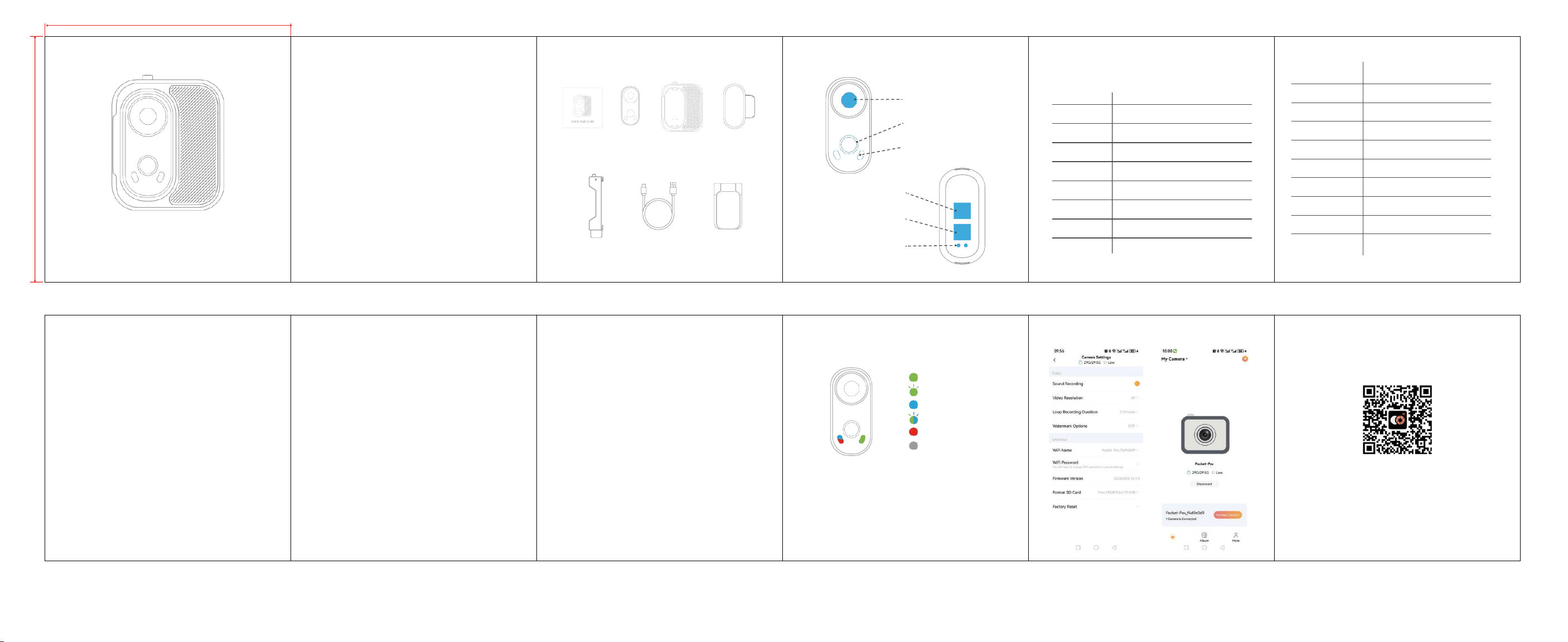
WHAT'S IN THE BOX
Manual Camera Expansion Magnetic
Battery Pendant
Magnetic snap-
USB Cable Magnetic hat clip
on attachments
CAMERA STRUCTURE
Lens
Buttons
Status LED
Magnetic Point
Magnetic Point
Magnetic charging
SPECIFICATIONS
Item Specification
Lens Module GC2083 12MP+ 140° wide-angle lens
Wi-Fi Module 2.4G-2.48G, 802.11b/g/n
Battery Capacity 490mAh rechargeable Li-ion battery
Battery Life 2 hours @ 2K30fps (camera only)
Expansion Battery 1300mAh rechargeable Li-ion battery
Battery Life 6 hours @ 2K30fps (with expansion module)
Audio Input Built-in Single Microphone
Indicator Light LED Charging/Working Indicator
Interface Type TYPE-C
说明书正面
Warning:
This device complies with Part 15 of the FCC Rules. Operation is
subject to the following two conditions: (1) this device may not
cause harmful interference, and (2) this device must accept any
interference received, including interference that may cause
undesired operation.
.
Changes or modifications not expressly approved by the party
responsible for compliance could void the user's authority to
operate the equipment.
NOTE: This equipment has been tested and found to comply with
the limits for a Class B digital device, pursuant to Part 15 of the
FCC Rules. These limits are designed to provide reasonable
protection against harmful interference in a residential
installation. This equipment generates, uses and can radiate radio
frequency energy and, if not installed and used in accordance with
the instructions, may cause harmful interference to radio
communications. However. there is no guarantee that interference
will not occur in a particular installation.
If this equipment does cause harmful interference to radio or
television reception which can be determined by turning the
equipment off and on, the user is encouraged to try to correct the
interference by one or more of the following measures:
--Reorient or relocate the receiving antenna.-
--Increase the separation between the equipment and receiver
--Connect the equipment into an outlet on a circuit different from
that to which the receiver is connected.
--Consult the dealer or an experienced radio/TV technician for help
NOTE: This device and its antenna(s) must not be co-located or
operation in conjunction with any other antenna or transmitter
.
The device has been evaluated to meet general RF exposure
requirement. The device
.
can be used in portable exposure condition without restriction.
BUTTON FUNCTIONS
Button
Long Press: Power On / Off
Short Press (Power On): Start / Stop Recording
Double Press: Turn Wi-Fi On / Off
Power On/Off
Power On: Long press the button. Blue and green lights turn on, then green
light stays steady (standby mode).
Power Off: Long press the button. All indicator lights turn off.
Recording
Standby Mode
Status: Green light steady
Start Recording: Short press (Green light flashes)
Stop Recording: Short press again (Green light returns to steady)
SD Card
Locate the TF card slot on the side of the product. Ensure the metal contacts
face the correct direction, then gently push in until you hear a "click".
Note: Supports 32GB-512GB TF cards. Format new cards on a
computer before first use.
Power On
Recording
Wi-Fi Mode On
Wi-Fi Recording
Charging
Fully Charged
Indicator Lights
Blue light on: Wi-Fi enabled Green light on: Standby mode
Green light flashing: Recording Red light on: Charging
Red light off: Fully charged
Note: For more operation instructions, please refer to the following pages
APP FEATURES
APP DOWNLOAD
This product can be connected to
smartphones and tablets (Android or iOS systems).
Wi-Fi Setup
Short press the button twice until the blue indicator light stays on.
The device enters Wi-Fi connection mode.
Mobile
Connection
Connect to Pocket-Pov_******via phone Wi-Fi,enter password 12345678,
then open the App to operate the device.
说明书反面
70 mm
Memory Capacity
Supports microSD card up to 256GB
(Class 10/U1 or higher)
Working Current
190mA
Charging Voltage
5V/1-
2A
Video Resolution
2K30
Video Codec
H.264/H.265
MOV
Video Mode
Normal Recording, Loop Recording
Photo
Supports APP Photo
Distortion Correction
Viipulse app, Android, iOS systems
Timestamp
Manual Setting Supported
Screen Protection
Auto screen off after 1/3/5 mins of
no operation