VER 1.1
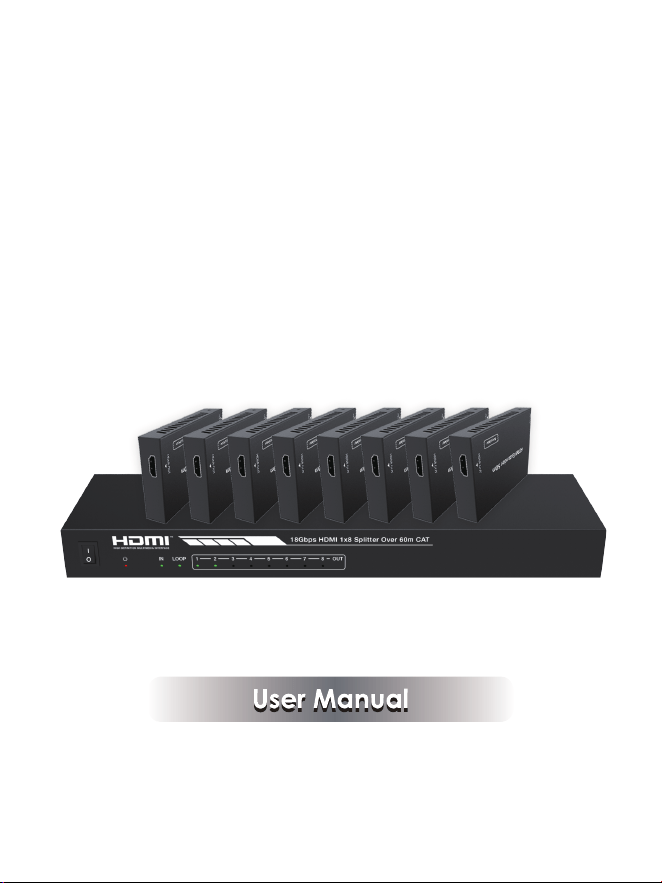
18Gbps HDMI 1×8 Splitter
over 60m CAT

Thank you for purchasing this product
For optimum performance and safety, please read these instructions carefully
before connecting, operating or adjusting this product. Please keep this manual
for future reference.
Surge protection device recommended
This product contains sensitive electrical components that may be damaged
by electrical spikes, surges, electric shock, lighting strikes, etc. Use of surge
protection systems is highly recommended in order to protect and extend the
life of your equipment.
Table of Contents
1. Introduction...........................................................................................
2. Features.................................................................................................
3. Package Contents................................................................................
4. Specifications.......................................................................................
5. Operation Controls and Functions......................................................
5.1 Transmitter.......................................................................................
5.2 CAT Receiver...................................................................................
5.3 IR Pin Definition................................................................................
6. EDID Mode.............................................................................................
7. ASCII Commands.................................................................................
8. Application Example............................................................................
1
1
1
2
3
3
5
6
7
8
11

1. Introduction
2. Features
3. Package Contents
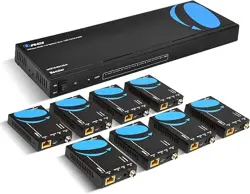
① 1× 18Gbps 1×8 HDMI Splitter over 60m CAT
② 8× CAT Receiver
③ 1× IR Blaster Cable (1.5 meters)
④ 8× 20K~60KHz IR Receiver Cable (1.5 meters)
⑤ 1× 12V/2.5A DC Locking Power Adapter
⑥ 1× User Manual
The 18Gbps HDMI 1x8 Splitter can distribute 1 HDMI
source signal to 8 display
devices. The product supports 1 HDMI input, 1 HDMI loop output and 8 CAT
outputs. It can extend the signal transmission distance up to 35 meters at the
resolution of 4K2K@60Hz, 50 meters at 4K2K@30Hz, 60 meters at 1080P@
60Hz via a single CAT6/6a/7 cable. The product supports up to 7.1CH HD
audio pass-through. It supports audio extract function and advanced EDID
management.
-1-
☆ HDMI 2.0, HDCP 2.2 / 1.x and DVI 1.0 compliant
☆ Support 18Gbps video bandwidth
☆ Support video resolution up to 4K2K@50/60Hz 4:4:4
☆ Support 3D, HDR, HDR10+, HLG and Dolby vision
☆ Support up to 7.1CH HD audio pass-through
☆ Support digital and analog audio de-embedded output
☆ Extend the signal transmission distance up to 35 meters at the resolution of
4K2K@60Hz, 50 meters at 4K2K@30Hz, 60 meters at 1080P@60Hz via a
single CAT6/6a/7 cable
☆ Support 1 HDMI input, 1 HDMI loop output and 8 CAT outputs.
☆ Support one-way IR control signal pass-through
☆ Advanced EDID management
☆ Support one-way PoC function (only from transmitter to receiver)
☆ Compact design for easy and flexible installation
4. Specifications
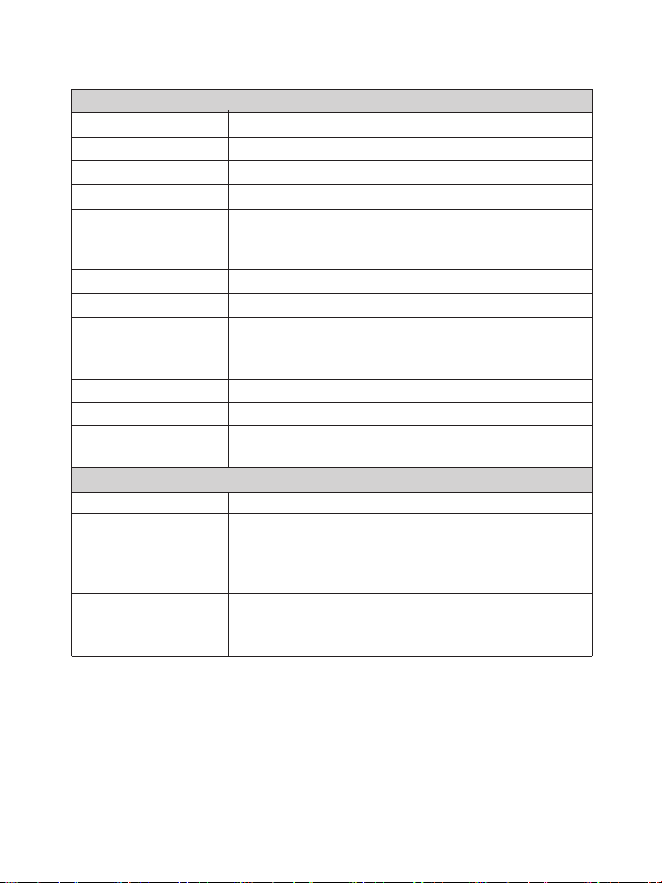
Up to 4k2k@50/60Hz 4:4:4
-2-
Human body model—±8kV (Air-gap discharge) &
±4kV (Contact discharge)
ESD Protection
Technical
Video Bandwidth 594MHz/18Gbps
Input
1×HDMI Type A (19-pin female)
Output
1×HDMI Type A (19-pin female)
8x CAT OUT [RJ45, 8-pin female]
1x Coaxial Audio OUT [RCA]
1x L/R Audio OUT [3.5mm Stereo Mini-jack]
Video Resolution
HDMI Audio Formats
LPCM, Dolby Digital/Plus/EX, Dolby True HD, DTS,
DTS-EX, DTS-96/24, DTS High Res, DTS-HD Master
Audio, DSD
Connection
HDMI Compliance HDMI 2.0
HDCP Compliance
HDCP 2.2/1.x
Support HDR10, HDR10+, HLG, Dolby vision
Color Space RGB, YCbCr 4:4:4 / 4:2:2. YUV 4:2:0
HDR
Color Depth
8-bit,10-bit,12-bit(1080p@60Hz)
8-bit (4K2K@60Hz YUV4:4:4)
8-bit,10-bit,12-bit(4K2K@60Hz YCbCr 4:2:2/4:2:0)
Control
1×SERVICE (Micro USB, Update port)
1x EDID DIAL switch [5-pin]
1x IR OUT [3.5mm Stereo Mini-jack]
PCM 2.0
Coaxial Audio Formats LPCM2.0, LPCM5.1, Dolby Digital2/5.1CH
Analog Audio Formats
5. Operation Controls and Functions
Transmitter: 300mm (W) × 100mm (D) × 28mm (H)
Receiver: 88mm (W) × 61mm (D) × 18mm (H)
1
2
5
3
-3-
Power Supply
Dimensions
Weight Transmitter: 823g Receiver:155g
Housing Metal Enclosure
Silkscreen Color Black
Operation
Temperature
0°C ~ 40°C / 32°F ~ 104°F
Storage Temperature -20°C ~ 60°C / -4°F ~ 140°F
Relative Humidity 20~90% RH (non-condensing)
Power Consumption 25.44W
Mechanical
Input: AC100 - 240V 50/60Hz, Output: DC 12V/2.5A
(US/EU standards, CE/FCC/UL certified)
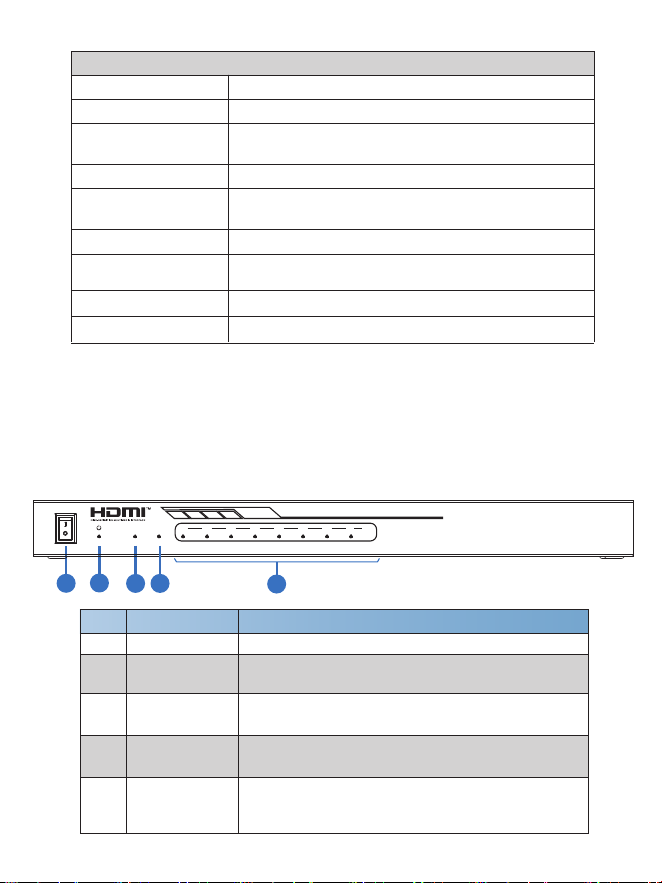
Front Panel
18Gbps HDMI 1x8 Splitter Over 60m CAT
OUT1 2 3 4 5 6 7 8IN LOOP
ON
OFF
4
3
4
5
1/5
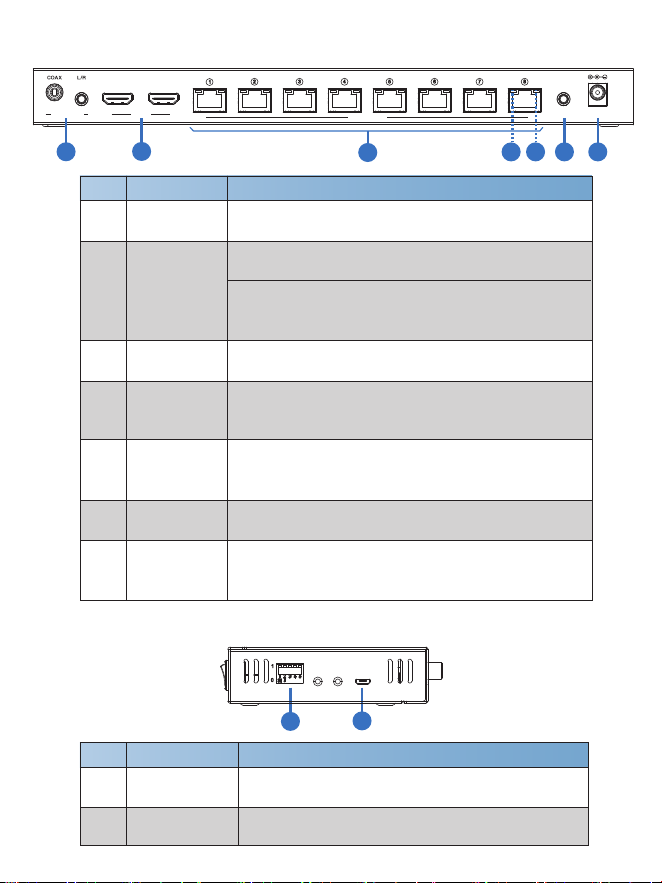
No. Name Function Description
1
2
3
4
POWER LED
When the device is powered on, the red power
LED will be on.
IN LED
When the HDMI IN port connects an active source
device, the green LED will be on.
OUT LED
(1~8)
POWER switch
Press this switch to power on/off the device.
When the HDMI OUT port connects an active
display device, the corresponding green OUT
LED will be on.
LOOP LED
When the HDMI LOOP OUT port connects an
active display device, the green LED will be on.
5.1 Transmitter Panel
3
4
5
6
CAT OUTPUT
port (1~8)
7 DC 12V
1/5
1
2
No. Name Function Description
1
2
3
4
Plug the DC 12V power supply into the unit and
connect the adaptor to an AC outlet. (Note: The
transmitter can power the receiver via a CAT cable.)
Connect to the CAT IN port of the CAT receiver with
a CAT cable.
HDMI port
IN: HDMI input port, connect to HDMI source device
such as DVD or set-top box with an HDMI cable.
IR OUT
Connect the IR Blaster cable to transmit IR signal
from the CAT receiver.
Rear Panel
Side Panel
EDID
SERVICE
0
1
5 6 7 8
LOOP OUT
IN
OUT
IR
CAT OUTPUT
AUDIO OUT
DC 12V
1
2 3 4
HDMI
1
2
3
6 7
-4-
1
EDID DIAL
switch
Used to set EDID mode. Please refer to Section
“6. EDID Mode” for details.
No. Name Function Description
2 SERVICE port
Used for firmware update or serial port command
control.
AUDIO OUT
(COAX, L/R)
Coaxial/analog audio output port, connect to amplifer
or speaker.
LOOP OUT: HDMI loop output port, connect to the
HDMI display device such as TV or Monitor with
an HDMI cable.
4 5
Link Signal
Indicator lamp
(Green)
▪ Illuminate: Transmitter and receiver are connected.
▪ Dark: Transmitter and receiver are not connected.
Data Signal
Indicator lamp
(Orange)
▪ Illuminate: There is signal transmission between
the transmitter and the receiver.
▪ Dark: No signal transmission.
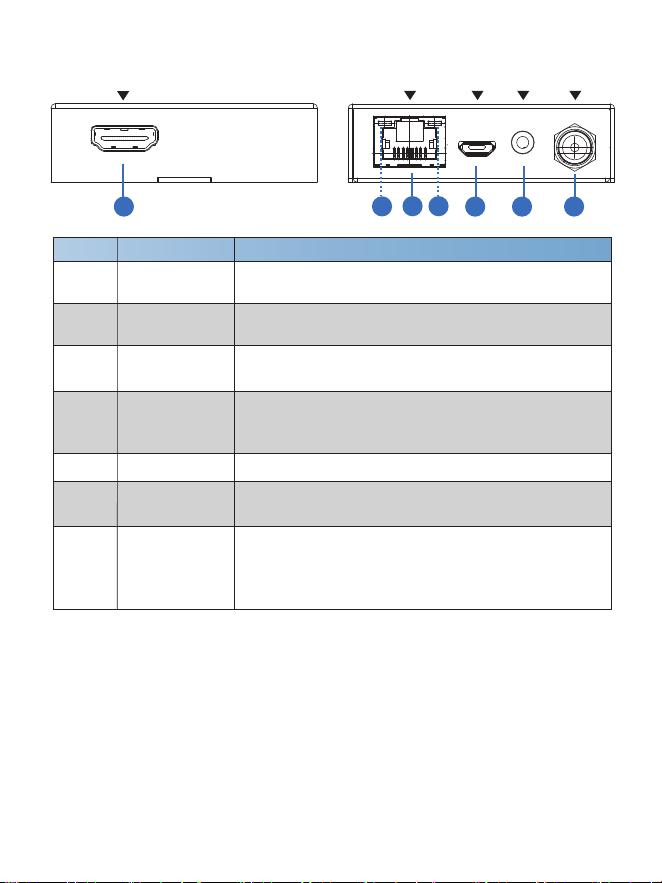
5.2 CAT Receiver
-5-
HDMI OUT
DC 12VIR INSERVICECAT IN
1
2
3
4
5 6
7
CAT IN
Connect to the CAT OUTPUT port on the transmitter
with a CAT cable.
HDMI OUT
HDMI output port, connect to HDMI display device such
as TV or Projector with an HDMI cable.
No. Name Function Description
1
2
3
Data signal
Indicator Lamp
(Orange)
When there is signal transmission between the
transmitter and the receiver, the lamp will be on.
Power Indicator
Lamp (Green)
When the receiver is powered on, the power indicator
lamp will be on.
4
SERVICE port Used for firmware update.
IR IN
Connect to the IR Receiver cable. The IR signal will
send to the IR OUT port of the transmitter.
5
6
7 DC 12V
Plug DC 12V/1A power supply into the unit and connect
the adapter to an AC outlet.
(Note: The CAT receiver also can be powered
by the
transmitter via a CAT cable. )
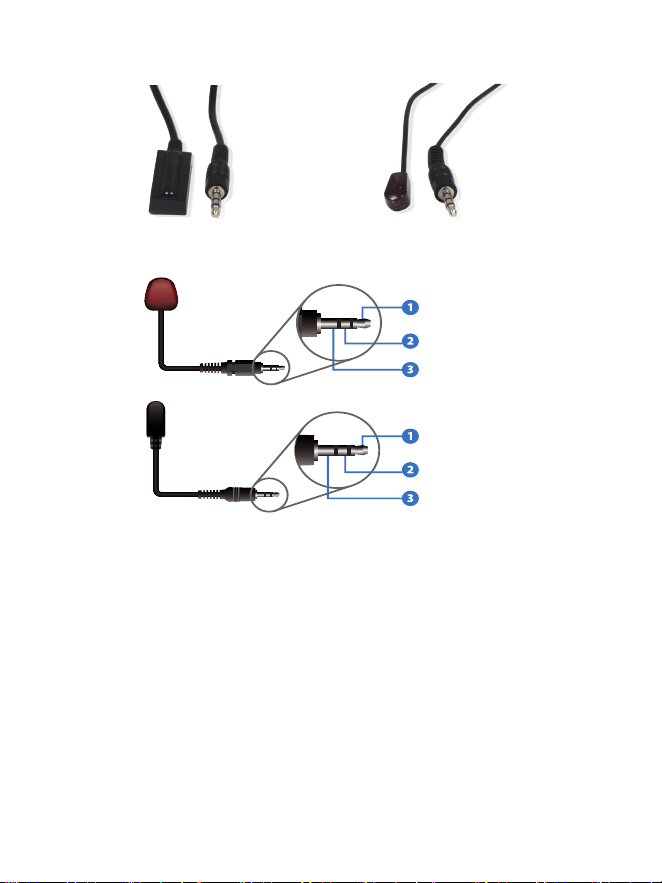
5.3 IR Pin Definition
-6-
IR Receiver
IR Blaster
IR Blaster
IR Receiver
IR Blaster Signal
Power
NC
IR Signal
Power
Grounding

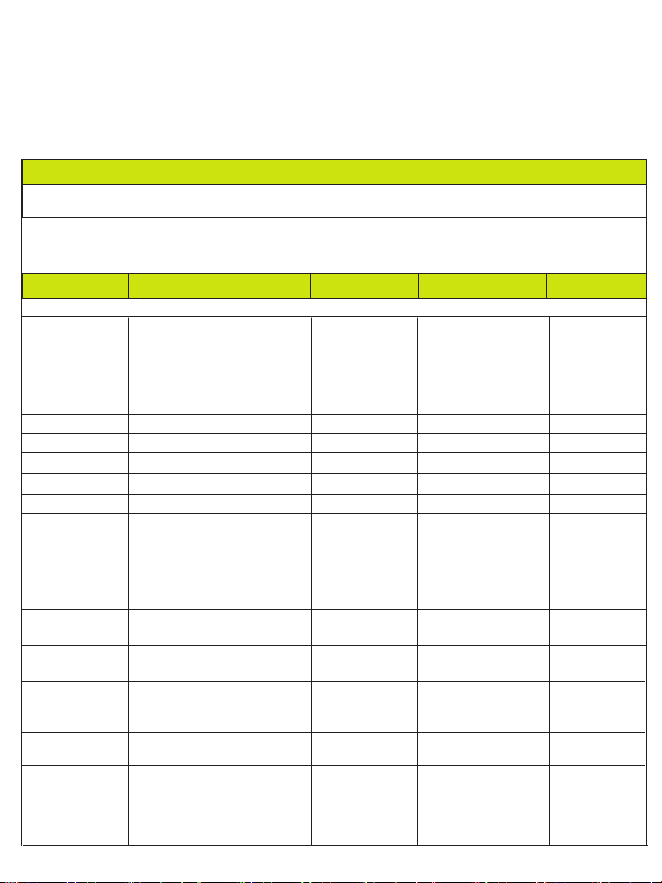
6. EDID Mode
-7-
The defined EDID setting list of the product is shown as below:
EDID Mode EDID Description
11111 1080P, Stereo Audio 2.0
11110
11101
11100
11011
11010
11001
1080P, Dolby/DTS 5.1
1080P, HD Audio 7.1
1080I, Stereo Audio 2.0
1080I, HD Audio 7.1
1080I, Dolby/DTS 5.1
11000
10111
1080P 3D, Stereo Audio 2.0
1080P 3D, Dolby/DTS 5.1
1080P 3D, HD Audio 7.1
10110
10101
10100
10011
10010
10001
10000
01111
01110
4K2K30Hz_444, Stereo Audio 2.0
4K2K30Hz_444, Dolby/DTS 5.1
4K2K30Hz_444, HD Audio 7.1
4K2K60Hz_420, Stereo Audio 2.0
4K2K60Hz_420, Dolby/DTS 5.1
4K2K60Hz_420, HD Audio 7.1
4K2K60Hz_444, Stereo Audio 2.0
4K2K60Hz_444, Dolby/DTS 5.1
4K2K60Hz_444, HD Audio 7.1
01100
01011
01010
01001
COPY_FROM_LOOP OUT
COPY_FROM_CAT OUT1
COPY_FROM_CAT OUT2
COPY_FROM_CAT OUT3
01000
00111
01101 4K2K60Hz_444, Stereo Audio 2.0 HDR
4K2K60Hz_444, Dolby/DTS 5.1 HDR
4K2K60Hz_444, HD Audio 7.1HDR
00101
00100
00011
00010
COPY_FROM_CAT OUT7
COPY_FROM_CAT OUT8
1080P, Stereo Audio 2.0
PC control mode
00001
00000
00110 COPY_FROM_CAT OUT4
COPY_FROM_CAT OUT5
COPY_FROM_CAT OUT6
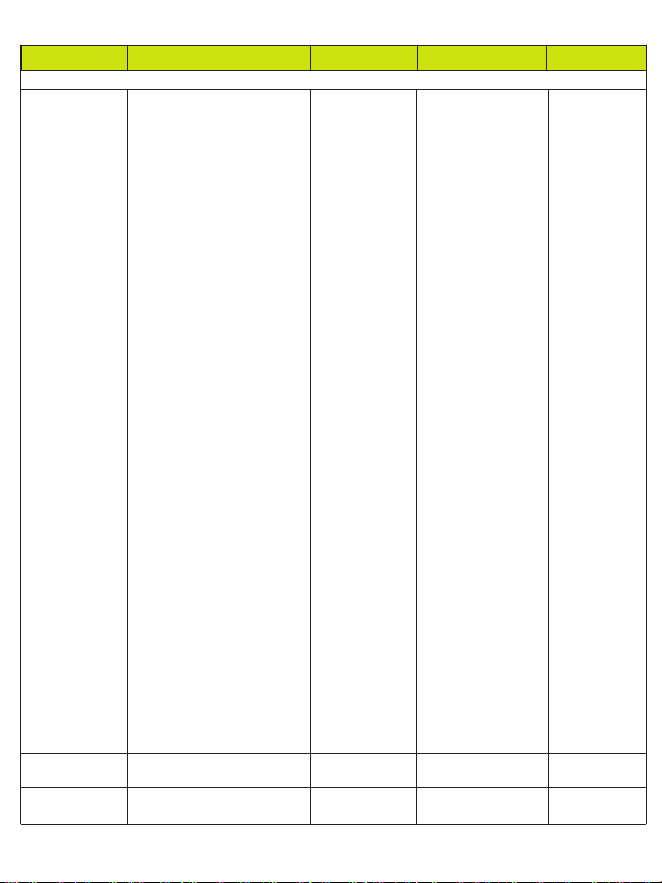
7. ASCII Commands
The product also supports ASCII command control. Connect the SERVICE
port of the product to a PC with an USB cable. Then, open a Serial Command
tool on PC to send ASCII commands to control the product.
The ASCII command list about the product is shown as below.
ASCII Commands
Serial port protocol. Baud rate: 115200, Data bits: 8bit, Stop bits:1, Check bit: 0
x - Parameter 1
y - Parameter 2
! - Delimiter
Command Code
Function Description Feedback
Default Setting
Power
s power z!
Power on/off the device,z=0~1
(z=0 power off, z=1 power on)
Power on
System Initializing...
Initialization Finished!
power off
POWER 0
r power! Get current power state power on/power off
s reboot! Reboot the device
reboot
help! List all commands
r type! Get device model HDC-SPB18D60
r status! Get device current status
Get the unit all status:
power, beep, lock, in/
out connection, video/
audio crosspoint,
edid, scaler, network
status
power on
System Setup
Example
s power 1!
r power!
s reboot!
help!
r type!
r status!
r link in!
Get the connection status of
the input port
r link out y!
Get the connection status of
the y output port,
y=0~8(0=all, 1~8=CAT 1~8)
CAT OUT1: connect
HDMI IN: connect
s reset! Reset to factory defaults
Reset to factory
defaults
System Initializing...
Initialization Finished!
FW version x.xx.xx
r fw version! Get Firmware version
MCU BOOT: Vx.xx.xx
MCU APP: Vx.xx.xx
r link in!
r link out 1!
s reset!
r fw version!
r link loop out y!
Get the connection status of
the y loop output port,y=1
HDMI LOOP OUT:
connect
r link loop out 1!
-8-

Command Code
Function Description Feedback
Default Setting
Output Setting
s hdmi stream z!
Set hdmi loop output stream
on/off
z=0~1(0:disable,1:enable)
Enable hdmi loop out
stream
Disable hdmi loop out
stream
s cat y stream z!
Set cat output y stream on/off,
y=0~8(0=all) z=0~1
(0:disable,1:enable)
Enable cat output 1
stream
Disable cat output 1
stream
Enable cat all outputs
stream
Disable cat all
outputs stream
s cat y dsc
mode z!
set cat output y port dsc mode
status y=0~8(0=all) z=1~3
(1=Cat cable distance normal
Mode, 2= Cat cable distance
35M Mode,3= Cat cable
distance 70M Mode)
r cat y dsc mode!
Get dsc mode of cat out y,
y=0~8(0=all)
cat out 1 dsc mode 2
r hdmi stream!
Get hdmi loop out stream
status
Enable hdmi loop
output stream
enable
Example
s hdmi stream 1 !
s cat 1 stream 1 !
s cat 0 stream 1 !
s cat 1 dsc
mode 2!
r cat 1 dsc mode!
r hdmi stream!
s hdmi hdcp z!
set hdmi loop output port hdcp
status
r hdmi hdcp!
Get HDCP status of loop out
hdmi loop out hdcp on
hdmi loop out hdcp on
r cat y hdcp!
Get HDCP status of cat out y,
y=0~2(0=all)
cat out 1 hdcp on
r cat y stream!
Get cat output y stream status,
y=0~8(0=all)
Enable cat output 1
stream
s hdmi hdcp 1!
r hdmi hdcp!
r cat 1 hdcp!
r cat 1 stream!
s cat y hdcp z!
set cat output y port hdcp
status y=0~2(0=all) z=0~1
(1=on,0=off)
cat out 1 hdcp on
s cat 1 hdcp 1!
enable
all hdmi out
hdcp active
all cat out
hdcp active
cat out 1 dsc mode 2
Cat cable
distance 35M
Mode(35M)
s audio mute 1!
set audio output port mute
status (1-mute, 0-umute)
r audio mute!
Get audio output mute status
audio mute 1
s audio mute 1
s audio mute 1!
r audio mute!
s audio unmute
(0)
-9-
Command Code
Function Description Feedback
Default Setting
EDID Setting
s edid in from z!
Set input EDID from default
EDID z, z=1~30
1, 1080p,Stereo Audio 2.0
2, 1080p,Dolby/DTS 5.1
3, 1080p,HD Audio 7.1
4, 1080i,Stereo Audio 2.0
5, 1080i,Dolby/DTS 5.1
6, 1080i,HD Audio 7.1
7, 3D,Stereo Audio 2.0
8, 3D,Dolby/DTS 5.1
9, 3D,HD Audio 7.1
10, 4K2K30_444,
Stereo Audio 2.0
11, 4K2K30_444,
Dolby/DTS 5.1
12, 4K2K30_444,HD Audio 7.1
13, 4K2K60_420,
Stereo Audio 2.0
14, 4K2K60_420,
Dolby/DTS 5.1
15, 4K2K60_420,HD Audio 7.1
16, 4K2K60_444,
Stereo Audio 2.0
17, 4K2K60_444,
Dolby/DTS 5.1
18, 4K2K60_444,HD Audio 7.1
19, 4K2K60_444,
Stereo Audio 2.0 HDR
20, 4K2K60_444,
Dolby/DTS 5.1 HDR
21, 4K2K60_444,
HD Audio 7.1 HDR
22, copy from hdmi loop out
23, copy from cat output 1
24, copy from cat output 2
25, copy from cat output 3
26, copy from cat output 4
27, copy from cat output 5
28, copy from cat output 6
29, copy from cat output 7
30, copy from cat output 8
input EDID:1080p,
Stereo Audio 2.0
Please toggle EDID
dip switch to 00000!
r edid in! Get EDID status of the input
input EDID: 4K2K60_
444,Stereo Audio 2.0
r edid in data!
Get the EDID data of the hdmi
input
EDID data : 00 FF FF
FF FF FF FF 00 ……
1080p,Stereo
Audio 2.0
Example
s edid in from 1!
r edid in!
r edid in data!
-10-
5 6 7 8
LOOP OUT
IN
OUT
IR
CAT OUTPUT
AUDIO OUT
DC 12V
1
2 3 4
HDMI
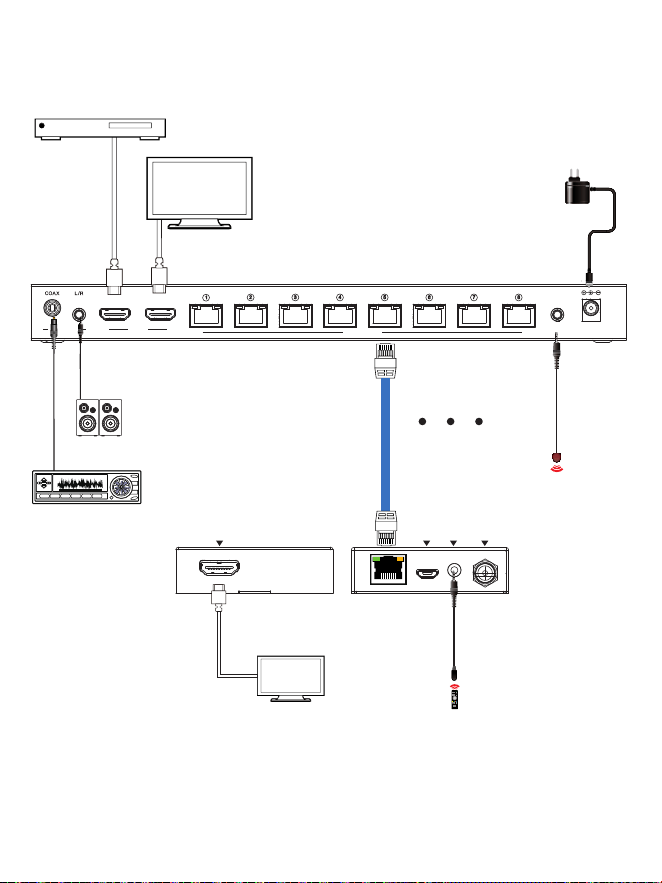
7. Application Example
-11-
UHDTV
DVD or Blu-ray Player
Power Supply
IR Receiver
HDMI OUT DC 12VIR INSERVICECAT IN
LAN
LAN
UHDTV
Receiver
Cat 6/6a/7
IR Blaster
Amplifier
2.0 Speakers
Transmitter

