@ninjakitchen
SharkNinja Operating LLC
US: Needham, MA 02494
1-877-646-5288
ninjakitchen.com
Illustrations may dier from actual product. We are constantly striving to improve our products,
therefore the specifications contained herein are subject to change withoutnotice.
NINJA is a registered trademark of SharkNinja Operating LLC.
This product may be covered by one or more U.S. patents. See sharkninja.com/patents
for more information.
© 2023 SharkNinja Operating LLC
PB040_PB050_Series_IB_REV_Mv2
RECORD THIS INFORMATION
Model Number: ____________________
Serial Number: _____________________
Date of Purchase: ___________________
(Keep receipt)
Store of Purchase: __________________
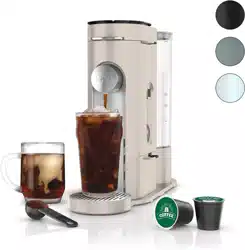
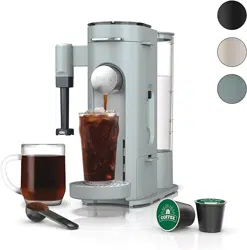
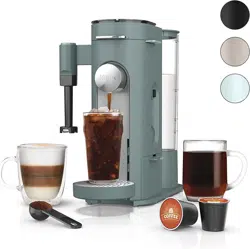
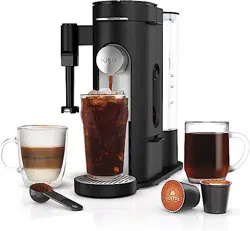
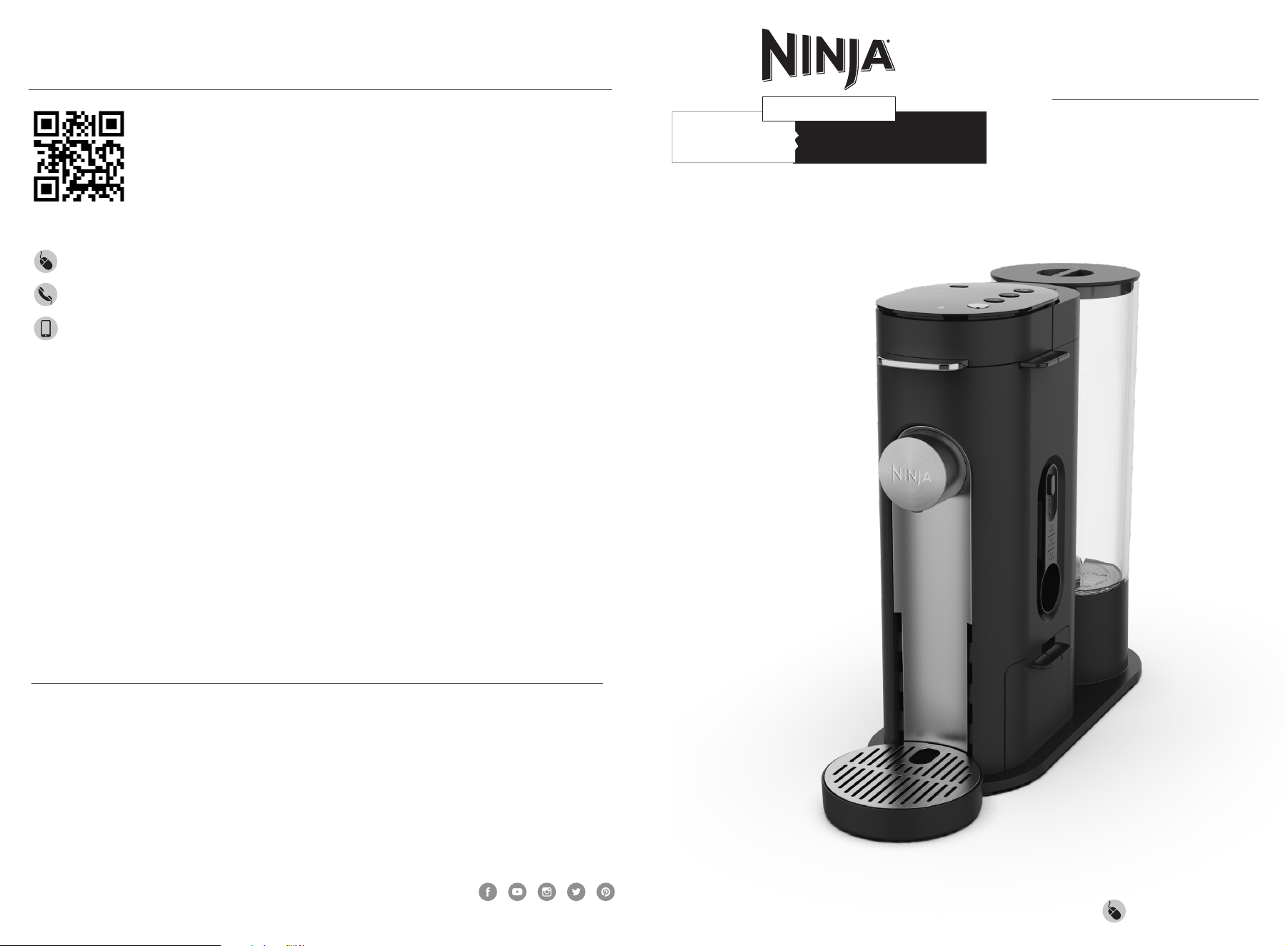
THANK YOU for purchasing the SINGLE-SERVE PODS & GROUNDS
SPECIALITY COFFEE MAKER
PLEASE READ CAREFULLY AND
KEEP FOR FUTURE REFERENCE.
These instructions are designed to help you
get a complete understanding of your new
Single-Serve Pods & Grounds Specialty
Coee Maker.
If you have any questions, please call our
Customer Service line at 1-877-646-5288.
TECHNICAL SPECIFICATIONS
Voltage: 120V~, 60Hz
Power: 1500W
Water Reservoir
Capacity: 56 oz.
TIP: You can find the model and serial numbers
on the QR code label located on the back of the
unit by the power cord.
REGISTER YOUR PURCHASE
registeryourninja.com
1-877-646-5288
Scan QR code using mobile device
OWNER’S GUIDE
PB040/050
Series
PODS GROUNDS
&&
SPECIALTY COFFEE MAKER
SINGLE-SERVE
ninjakitchen.com
ninjakitchen.com
Operating Notice
13 To disconnect, turn any control to "OFF," then remove plug from wall outlet.
14 The use of an accessory not recommended by the manufacturer may create an overflow
condition and scalding hazard, or result in fire, electric shock, or personal injury.
15 ALWAYS use appliance on a clean, dry, level surface.
16 DO NOT place on or near a hot gas or electric burner or in a heated oven.
17 DO NOT use this appliance for anything other than its intended use.
18 DO NOT use outdoors.
19 DO NOT touch hot surfaces. Use handles or knobs.
20 To avoid contact with steam and hot surfaces, DO NOT reach across top of coee maker to froth.
21 ALWAYS place a vessel or cup beneath the nozzle to receive the brewed coee.
22 DO NOT open brew chamber during brew cycle and cleaning cycle. Scalding may occur.
23 DO NOT remove the vessel or cup while the appliance is running.
24 DO NOT fill water reservoir with anything other than water, as other liquids may damage your
coee maker. Vinegar can be used, but ONLY for running a clean cycle.
25 DO NOT overfill the water reservoir. Fill water only to the MAX line.
26 Keep lid on water reservoir when brewing.
27 DO NOT run the appliance without water.
28 DO NOT brew ground coee without a permanent filter installed in the brew basket.
29 Exceeding maximum Coee Measurement Chart capacity may cause overflow. DO NOT use fine
or espresso ground coee.
Ninja® Pod Adapter
30 Only use capsules/pods intended for this appliance. If the capsule/pod does not fit, do not force
it into the appliance.
31 Ensure the pod is not damaged, torn, or expired.
Care & Maintenance
32 Unplug the coee maker from outlet when not in use and before cleaning.
33 To prevent illness from bacterial growth in the appliance, follow all cleaning instructions in the
Care & Maintenance section of this Owner’s Guide.
34 Clean the system on a weekly basis.
35 If the product is not operating properly, visit ninjakitchen.com or contact SharkNinja Operating
LLC for examination, repair, or adjustment.
36 Cleaning and user maintenance shall not be done by children.
Cord Statement
37 A short power-supply cord is provided to reduce the risks resulting from becoming entangled in
or tripping over a longer cord.
38 DO NOT use extension cords with this product.
IMPORTANT SAFEGUARD
INSTRUCTIONS
PLEASE READ CAREFULLY BEFORE USE • FOR HOUSEHOLD USE ONLY
IMPORTANT SAFEGUARD
INSTRUCTIONS
PLEASE READ CAREFULLY BEFORE USE • FOR HOUSEHOLD USE ONLY
READ AND SAVE
THESE INSTRUCTIONS
ninjakitchen.com
WARNING
Risk of fire or electric shock.
Do not remove bottom cover.
WARNING To reduce the risk of fire, electric shock, serious injury, death, or damage when
using this appliance, follow these basic safety precautions.
General Precautions
1 To eliminate a choking hazard for young children, discard all packaging materials
immediately upon unpacking.
2 This appliance can be used by persons with reduced physical, sensory or mental
capabilities or lack of experience and knowledge if they have been given supervision or
instruction concerning use of the appliance in a safe way and understand the hazards
involved.
3 To reduce the risk of electric shock, this appliance has a polarized plug (one blade is wider
than the other). As a safety feature, this plug will fit into a polarized outlet only one way. If
the plug does not fit fully into the outlet, reverse the plug. If it still does not fit, contact a
qualified electrician. DO NOT force into outlet or try to modify to fit.
4 Keep the appliance and its cord out of reach of children. DO NOT allow the appliance to be
played with or used by children. Close supervision is necessary when used near children.
5 To protect against fire, electric shock, and injury to persons, DO NOT immerse cord, plugs,
or body of machine in water or other liquid.
6 NEVER carry the appliance by the power cord or pull it to disconnect from electrical
socket; instead grasp the plug and pull to disconnect.
7 DO NOT operate any appliance with a damaged cord or plug, or after the appliance
malfunctions, or has been dropped or damaged in any manner. Contact SharkNinja
Operating LLC for service.
8 For household and countertop use only. DO NOT let the power cord hang over the edge or
touch hot surfaces such as the stove.
9 NEVER use socket below counter.
10 To avoid risk of fire, electrical shock, or damage to the coee maker, DO NOT use coee
maker in an appliance garage.
11 Unplug from outlet when either the appliance or display clock is not in use, and before
cleaning.
12 Turn o and allow to cool before putting on or taking o parts, and before cleaning the
appliance.
Read and review instructions to understand operation and use of product.
Indicates the presence of a hazard that can cause personal injury, death or substantial
property damage if the warning included with this symbol is ignored.
Avoid contact with hot surface. Always use hand protection to avoid burns.
For indoor use only.
1
ninjakitchen.com
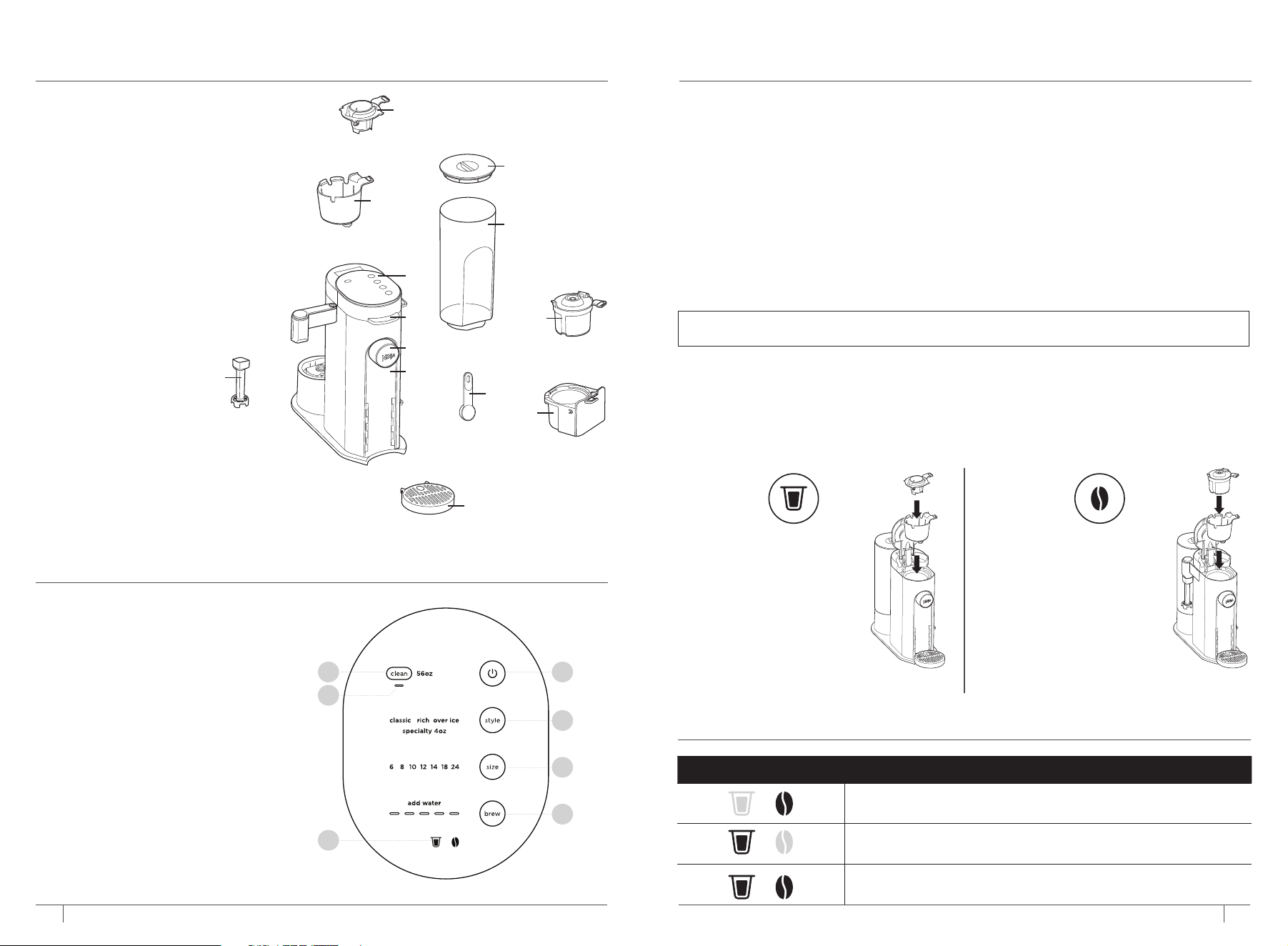
PARTS & ACCESSORIES
USING THE CONTROL PANEL
ninjakitchen.com
HIGH-ALTITUDE CALIBRATION BREW
Required for users in high-altitude areas. Not running the high-altitude calibration brew in a high-
altitude area will result in excessive steaming during brewing.
Because water boils at a lower temperature at higher altitudes, running a calibration cycle before
your first brew allows the coee maker to detect the boiling point of water at your location. Running
a calibration cycle will help deliver a consistent brew each time.
1 Fill the water reservoir up to, but not exceeding, the MAX line.
2 Insert the brew basket and close the coee maker lid, then place a 24 oz. cup or travel mug
underneath the nozzle.
3 Power on the unit and press and hold the BREW and CLEAN buttons until you hear a
confirmation sound.
4 A calibration cycle will begin, and the progress bar will advance until the altitude calibration is
complete. The coee maker will beep when completed. Discard the water in the 24 oz. cup or
travel mug.
1 Power Button
2 Brew Style Button
3 Brew Size Button
4 Start/Cancel Brew Button
5 Intelligent Clean Cycle Button
6 Smart Sensing Mode Indicators
7 Intelligent Clean Cycle Indicator
(Orange)
NOTE: This calibration is permanently saved and will not be reset if power is lost or unit is
unplugged. The coee maker can be recalibrated at any time.
SMART SENSING MODE INDICATORS
MODE INDICATORS STATE
Grounds: The Permanent Filter is inserted; shut the coee maker lid and
the coee maker is ready to brew grounds.
Pods: The Ninja® Pod Adapter is inserted; shut the coee maker lid and
the coee maker is ready to brew pods.
No State: One of the above criteria has not been met.
USING THE NINJA POD ADAPTER AND
PERMANENT FILTER
1
2
3
4
5
6
7
The coee maker comes with the unique Ninja Pod Adapter already installed in the brew basket, and
the Permanent Filter located in the Adapter Storage Bin on the bottom right side of the coee maker.
Always ensure the Ninja Pod Adapter or Permanent Filter is installed over the brew basket.
INSTALLING THE NINJA
POD ADAPTER
Place the Ninja Pod Adapter
in the brew basket, ensure
the handle is aligned with
the brew basket handle, and
press down on the Ninja Pod
Adapter firmly until it clicks
into place.
INSTALLING THE
PERMANENT FILTER
Place the Permanent
Filter in the brew basket
and ensure the handle
is aligned with the brew
basket handle.
A Coee Maker
(Power cord not shown)
B 56 oz. Removable
Water Reservoir
C Removable Water Reservoir Lid
D Control Panel
E Coee Maker Lid
F Brew Basket
G Permanent Filter
H Ninja Pod Adapter
I Frother Whisk*
J Adjustable Cup Tray
K Ninja Smart Scoop
L Adapter Storage Bin
M Removable Nozzle
J
*(accessories may vary by model)
G
K
B
C
H
F
L
A
D
E
M
I
2 3
ninjakitchen.com
ninjakitchen.com
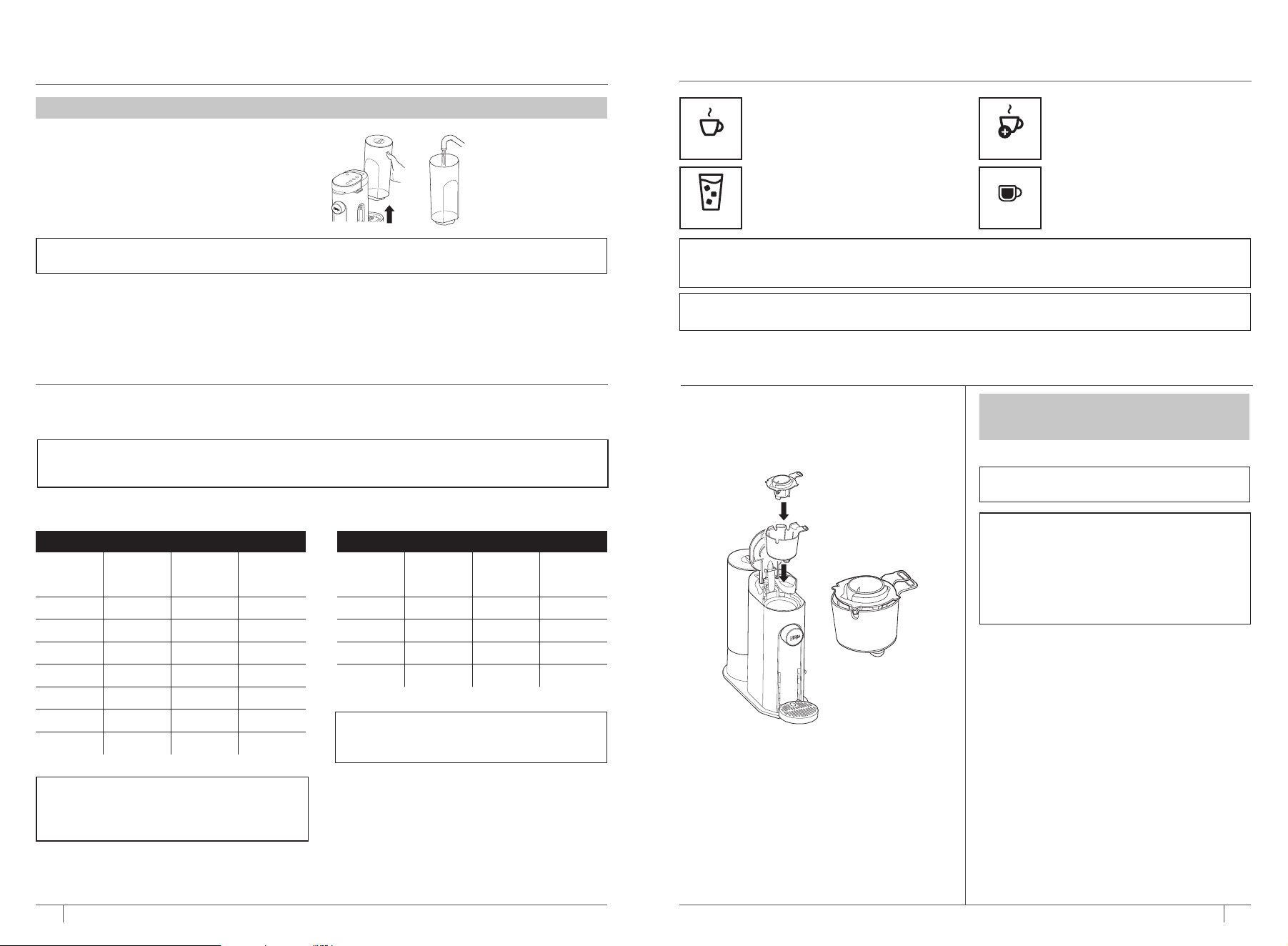
1 Clean all accessories before your first brew.
2 Plug in the power cord and the coee maker
will turn on automatically.
3 Lift the water reservoir o its base. Remove
the reservoir lid. Fill the reservoir up to at least
the 24 oz. line with fresh water and place it on
the base.
4 Insert the brew basket and Permanent Filter and close the lid. Do not add coee.
5 Place a 24 oz. cup or travel mug under the nozzle and prime the system by running a 24 oz. Classic
brew with water only. After the brew is complete, discard the water. You are now ready to brew coee.
NOTE: We recommend using cool or room temperature water in the reservoir. DO NOT fill with hot
or boiling water.
PRIMING YOUR NINJA SINGLE SERVE
SPECIALTY COFFEE MAKER
BREW VOLUMES AND MEASUREMENTS
Each size and brew style produces a dierent amount of coee to optimize strength and flavor.
NOTE: The coee grounds will absorb some of the water that is brewed; this will cause slight
variability in brew volumes. Brew volumes may be slightly larger or smaller than what is stated due to
various factors in the system.
GROUNDS
Size Classic Rich
Over Ice
(filled
with ice)
6 oz. 6 oz. 5 oz. 6 oz.
8 oz. 8 oz. 7 oz. 8 oz.
10 oz. 10 oz. 8 oz. 10 oz.
12 oz. 12 oz. 10 oz. 12 oz.
14 oz. 14 oz. 12 oz. 14 oz.
18 oz. 18 oz. 16 oz. 18 oz.
24 oz. 24 oz. 22 oz. 24 oz.
APPROXIMATE BREW VOLUMES
NOTE: There may be some water left in the
reservoir after your brew. This is normal and
keeps the coee maker from running out
of water.
PODS
Size Classic Rich
Over Ice
(filled
with ice)
6 oz. 6 oz. 6 oz. 6 oz.
8 oz. 8 oz. 8 oz. 8 oz.
10 oz. 10 oz. 9 oz. 10 oz.
12 oz. 12 oz. 11 oz. 12 oz.
NOTE: You do not need to adjust the
size for Specialty brew; it always yields
approximately 4 oz.
USING THE NINJA SINGLE SERVE
SPECIALTY COFFEE MAKER
CLASSIC RICH
Smooth, well-balanced flavor.
More intense flavor that stands up
to milk, cream, or flavoring.
Specially designed to brew hot over
ice for freshly brewed iced coee that
is not watered down.
Always fill your vessel to the top with
ice cubes before brewing Over Ice.
A super-rich concentrate that
allows you to make coee-based
drinks like cappuccinos and lattes.
Will only brew 4 oz. (not included
on all models).
SPECIALTY
NOTE: Rich brew will use slightly less water and yield slightly less brewed coee than Classic brew.
See Approximate Brew Volumes chart for additional information.
NOTE: Over Ice brew is designed to produce a concentrated brew into a vessel filled with ice. It is normal
for some ice in the vessel to melt as the coee is brewed, and this will produce a cold beverage with the
ideal strength and flavor.
OVER ICE
IMPORTANT: Ensure you prime your coee maker before your first brew.
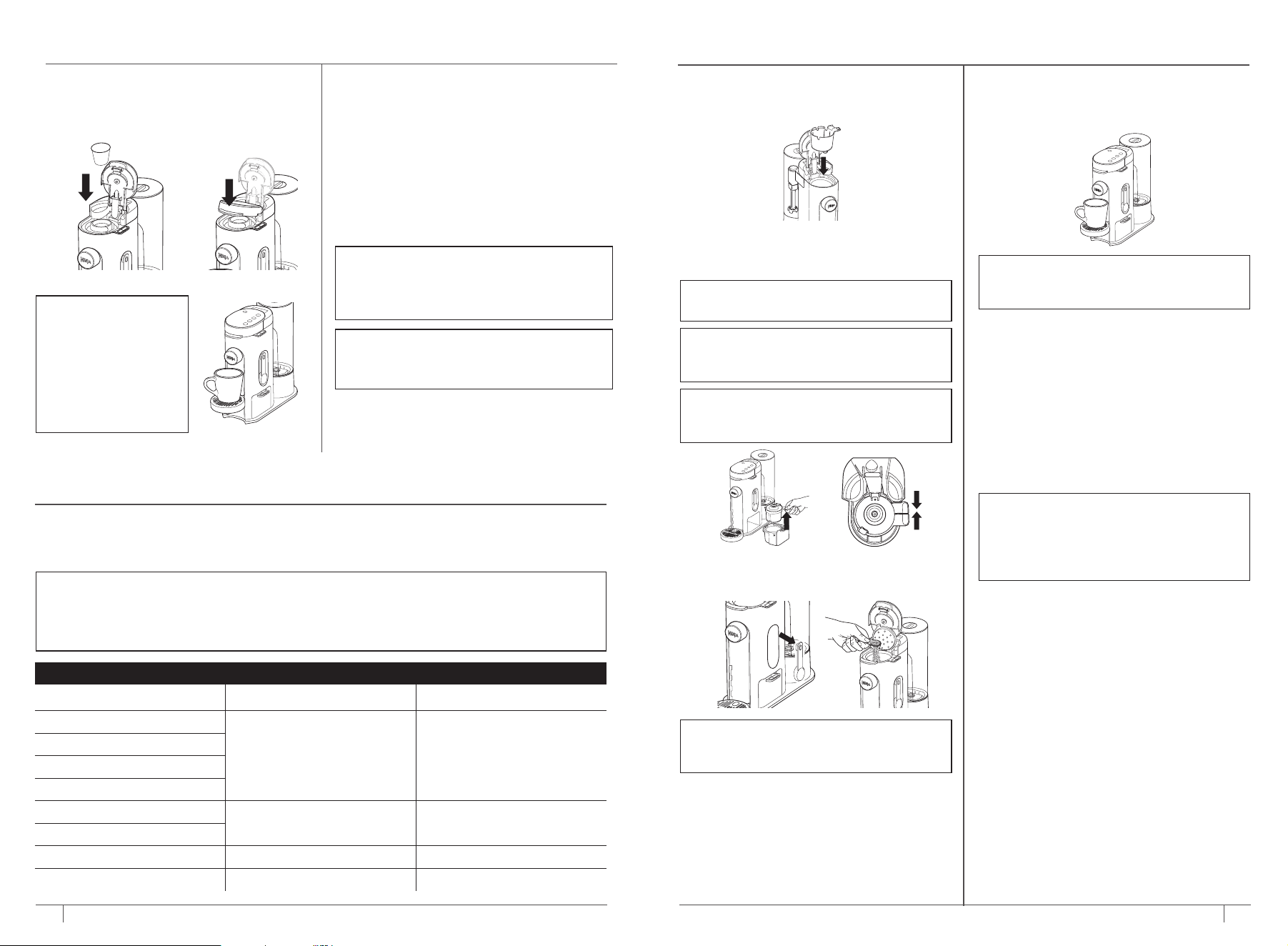
BREWING PODS
1 To prepare for brewing using pods, open the
coee maker lid and ensure the brew basket
and Ninja Pod Adapter are installed and
handles are aligned.
2 Place the pod in the Ninja Pod Adapter.
HIGH-ALTITUDE BREWING: Before closing
the coee maker lid to start a brew, using
your fingers, carefully apply pressure on the
K-Cup Pod until the bottom of the K-Cup Pod
is punctured by the exit needle, and the pod
is fully seated in the pod holder. This releases
excessive gas built up from the high altitude
and prevents pod blowout.
NOTE: Reusable K-Cup Coee Filters are not
compatible with the Ninja Pod Adapter.
BREWING STYLES
IMPORTANT: Ensure the pod is not damaged,
torn, or expired. DO NOT remove the top of
the K-Cup Pod.
4 5
ninjakitchen.com
ninjakitchen.com
BREWING PODS CONT.
4 Place an empty vessel under the nozzle.
NOTE: Set the
Adjustable Cup Tray to
desired height by pulling
the cup tray up and out
for smaller vessels and
to help prevent coee
splatter. The cup tray
may be removed for
brewing into taller and
wider vessels.
3 Press the coee maker lid down firmly to
pierce the pod and ensure that it is completely
closed. There will be an audible click and some
resistance when closing the handle as the needle
punctures the pod.
5 Press the Style Button and select either Classic,
Rich, Over Ice, or Specialty brew (not available
on all models).
6 Press the Size Button to toggle through and
choose your desired size.
7 Press the Brew Button to start brewing. A
confirmation beep will sound and the progress bar
on the control panel will illuminate to indicate the
status of the brew. When finished, the coee maker
will beep three times.
8 To cancel the brew at any time, press the Brew
Button again or press the Power Button.
NOTE: The brewing cycle will begin then
pause for a short period before resuming. This
is to evenly saturate the coee grounds. The
progress bar is an indication of the total time
remaining until the end of the brew.
NOTE: We recommend disposing of the used
pod after it has cooled down following a brew
to prevent any excess water retention in the
brew basket.
For best results, use the measurements on the Ninja Smart Scoop™ or in the chart to determine
how much ground coee to use for each brew size. The amount of ground coee for each size will
remain the same for any brew type you select. For example, if you select 10 oz. and Classic, you will use
the same amount of coee grounds as if you were to select 10 oz. Rich and 10 oz. Over Ice.
NOTE: Adjust to your preferred taste. More scoops result in stronger coee but slightly lower
volumes, fewer scoops result in weaker coee and slightly higher volumes. Decaf and finer grind
coees drain slower and may cause coee to overflow the filter. If overflow occurs, we recommend
one less scoop. We also recommend one less scoop for decaf. With some brands of coee, the
amount of grounds may need to be reduced to prevent overflow.
MEASURING YOUR COFFEE GROUNDS
COFFEE MEASUREMENT CHART
Serving Size Ninja Smart Scoop Tablespoons
6 oz.
2–3 Scoops 2–3 Tablespoons
8 oz.
10 oz.
12 oz.
14 oz.
3–5 Scoops 3–5 Tablespoons
18 oz.
24 oz. 5–7 Scoops 5–7 Tablespoons
Specialty (4 oz.) 4 Scoops 4 Tablespoons
1 To prepare for brewing using ground coee,
open the coee maker lid and ensure the brew
basket is installed.
2 Place the Permanent Filter in the brew basket;
the Permanent Filter is located in the
Adapter Storage Bin on the right side of the
coee maker.
NOTE: Ensure that the Ninja Pod Adapter is
removed from brew basket before inserting
the Permanent Filter.
NOTE: The adapter storage bin can be used
for both Permanent Filter and Ninja Pod
Adapter.
NOTE: DO NOT use a paper filter in this
coee maker.
BREWING GROUND COFFEE
3 Follow the measurements on the Ninja Smart
Scoop or in the Coee Measurement Chart to
fill the Permanent Filter.
NOTE: DO NOT place ground coee directly
in the brew basket without the Permanent
Filter installed.
6 Press the Style Button and select either
Classic, Rich, Over Ice, or Specialty brew
(not available on all models).
7 Press the Size Button to toggle through sizes.
8 Press the Brew Button to start brewing. A
confirmation beep will sound and the progress
bar on the control panel will illuminate to
indicate the status of the brew. When finished,
the coee maker will beep three times.
9 To cancel the brew at any time, press the Brew
Button again or press the Power Button.
NOTE: The brewing cycle will begin then
pause for a short period before resuming. This
process is used to evenly saturate the coee
grounds. This applies to all brew styles. The
progress bar is an indication of the total time
remaining until the end of the brew.
5 Place an empty vessel under the nozzle.
NOTE: Set the Adjustable Cup Tray to desired
height for smaller vessels and to help prevent
coee splatter.
4 Close the Permanent Filter lid and the coee
maker lid.
6 7
ninjakitchen.com
ninjakitchen.com
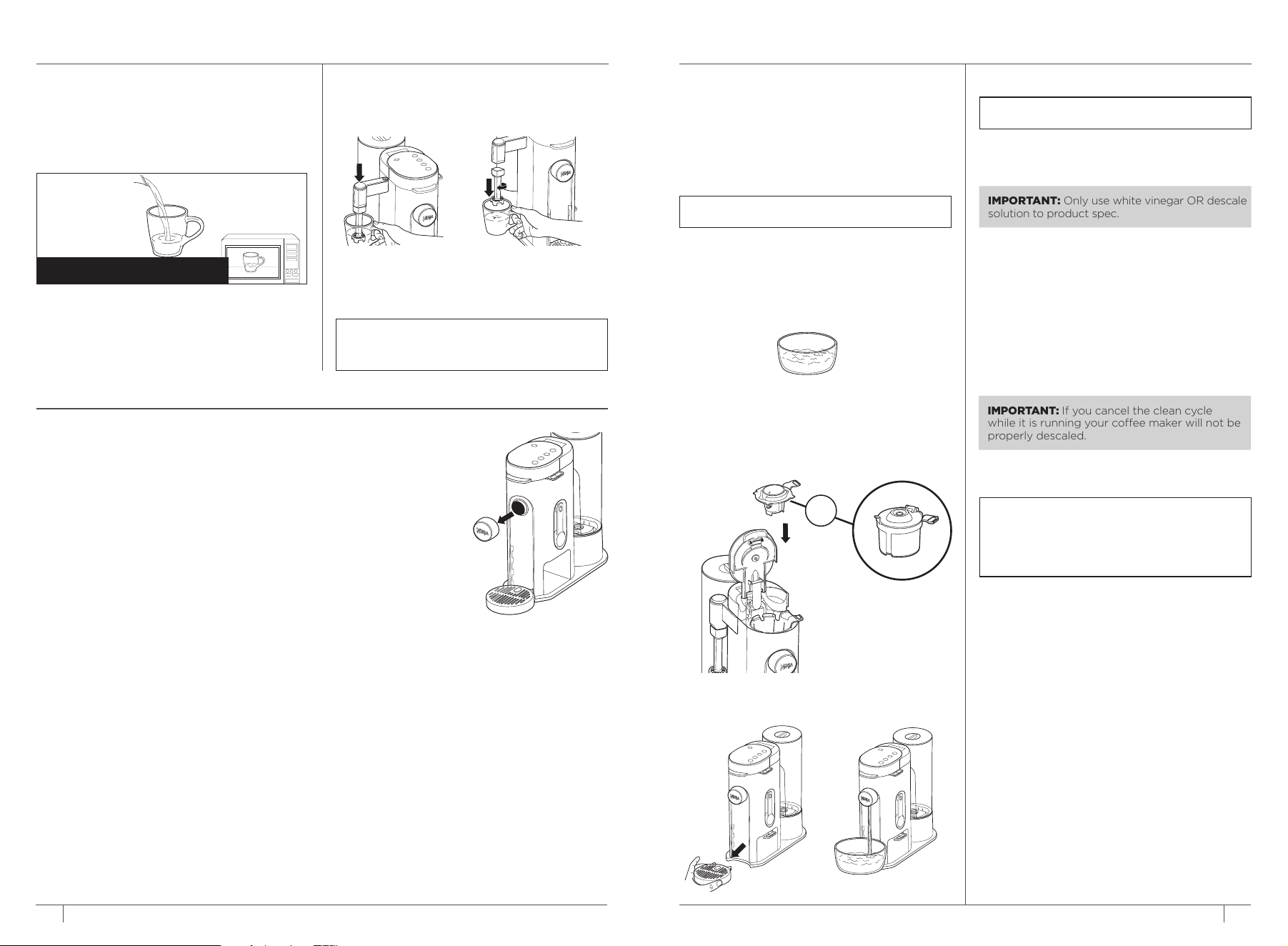
CLEANING & DESCALING YOUR BREWING SYSTEM
The Intelligent Clean Cycle Indicator will
automatically illuminate orange when a
cleaning cycle is recommended for the coee
maker. The coee maker will eventually need
to be cleaned with a clean cycle. The clean
cycle is used for descaling the coee maker
when calcium scale buildup is aecting the
performance of the coee maker and/or the
flavor of your coee.
NOTE: The clean cycle takes approximately
75 minutes.
BEFORE YOU BEGIN
You will need a large vessel that holds at least
56 oz. of water. We recommend using a 2 qt. or
larger mixing bowl or saucepan. If you are unsure
if you have a large enough vessel, fill the water
reservoir to the MAX line and pour it into the
desired vessel to ensure capacity.
TO CLEAN AND DESCALE YOUR NINJA
SINGLE-SERVE COFFEE MAKER:
1 Insert either the Permanent Filter or Ninja Pod
Adapter in the brew basket and close the lid.
Ensure there are no grounds or pods inside the
coee maker.
OR
2 Remove the Adjustable Cup Tray by lifting up
and out.
3 Place vessel beneath the nozzle.
NOTE: Ensure vessel can hold at least 56 oz.
(MAX line) of water.
4 Fill the water reservoir with 16 oz. of white
vinegar, then fill the rest of the reservoir with
water up to, but not exceeding, the MAX line.
5 Once the water reservoir is filled with white
vinegar and water mixture, press the CLEAN
button.
6 Press the BREW button to begin the cleaning
cycle. The clean cycle will take approximately
75 minutes. The coee maker will deliver a
small amount of cleaning solution to distribute
through the system. It will then pause, deliver
additional cleaning solution, and repeat this
process for 75 minutes. The extended pauses
allow for maximum cleaning and descaling.
IMPORTANT: Only use white vinegar OR descale
solution to product spec.
IMPORTANT: If you cancel the clean cycle
while it is running your coee maker will not be
properly descaled.
NOTE: To cancel the clean cycle, press the
Power button or CLEAN button once. The
coee maker will beep and stop brewing
through the cleaning mixture. Continue to
follow the instructions starting at Step 4.
7 Upon completion, the coee maker will beep
and the Clean Cycle Indicator will turn o.
8 Empty the vessel and clean the water
reservoir with warm, soapy water to remove
any cleaning solution that could aect the
flavor of your coee.
9 Place the vessel back beneath the nozzle
and fill the water reservoir with fresh water
to the 24 oz. line.
10 Flush the system by running a water-only
24 oz. Classic brew.
INTEGRATED FROTHER (NOT INCLUDED ON ALL MODELS)
INTEGRATED FROTHER
The Integrated Frother does not heat milk.
1 Add milk to your cup until it is about
1
/3 full.
• For cold froth, continue to Step 2.
• For hot froth, microwave for 45–60 seconds.
WARNING: To avoid contact with steam and hot
surfaces, DO NOT reach across top of coee
maker to froth.
FOR HOT FROTH
2 Swing the arm of the frother toward the front
of the coee maker. Install the frother whisk by
twisting it to the right.
3 Hold the cup under the frother and submerge
the whisk just below the surface of the milk.
Press and hold the button on top of the frother
and froth for 30–45 seconds.
4 Remove the frother whisk by twisting it to the
left. Keep your cup below the whisk while you
carry it to your sink or dishwasher for easy
cleaning.
8 9
CLEANING & MAINTENANCE
CLEANING THE TOP & BOTTOM NEEDLES
If you are experiencing inconsistent brews, have
an add water error, or see grounds in the needles,
then there may be a clogging issue. We recom-
mend using a paper clip to clean out the grounds
from inside the needles. Ensure you run a water-
only brew to rinse after.
DISHWASHER-SAFE PARTS:
Brew basket, Permanent Filter, Ninja® Pod
Adapter, Water Reservoir, Frother Whisk, Nozzle,
and Ninja Smart Scoop™.
CLEANING THE FROTHER
Clean the Frother Whisk after each use. Hand-
wash thoroughly or wash in the dishwasher.
CLEANING THE WATER RESERVOIR
Empty the Water Reservoir and hand-wash
or place in dishwasher. For a better clean, we
recommend placing it in the bottom rack of the
dishwasher standing upright with the opening
facing downward.
CLEANING THE ADAPTER STORAGE BIN
Remove the Adapter Storage Bin from the unit and
the adapter inside. Hand-wash thoroughly with
warm, soapy water.
CLEANING THE NINJA POD ADAPTER
If brewing pods, first remove the used pods from
the Ninja Pod Adapter. Then pinch the right tab of
the handle and lift straight up to remove from the
brew basket. Hand-wash the Ninja Pod Adapter
and brew basket with warm, soapy water. To
ensure that the needle in the Ninja Pod Adapter
is free from any residual buildup, we recommend
using a flat wire or plastic clip, such as a paper
clip, to clean it out.
CLEANING THE NOZZLE
Remove the nozzle by
pinching the sides and
pulling out of the coee
maker. Hand-wash
thoroughly or wash in
the dishwasher. We
recommend checking
and cleaning the
nozzle periodically to
ensure there is no built-
up residue from brewed
coee which may cause
overflow in the nozzle.
When reinstalling the
nozzle, ensure that the
nozzle is securely in place
on the coee maker.
CLEANING THE PERMANENT FILTER
If brewing grounds, allow the coee maker
to cool. First remove the Permanent Filter by
lifting up on the brew basket tab; this keeps the
Permanent Filter inside the brew basket to help
prevent dripping. Open the Permanent Filter
lid fully until it is fixed in place, then discard
the used grounds. The showerhead on the
Permanent Filter can also be removed by turning
it counterclockwise and pulling it o the lid. To
reinstall the showerhead, line up the notches on
the Permanent Filter lid with the cutouts on the
showerhead and turn clockwise. Hand-wash the
Permanent Filter, showerhead, and brew basket
with warm, soapy water.
ninjakitchen.com
ninjakitchen.com
There’s sediment in my coee.
• This may be due to using finely ground coee. To reduce the amount of sediment in the brewed
coee, use a slightly coarser grind.
• This may be due to using a damaged or old pod.
Over Ice brew is not cold.
• Ensure your cup or travel mug is filled all the way to the top with ice cubes before brewing. Coee
maker will brew at elevated temperatures to lock in the best flavor, then the ice will cool the brewed
coee to the perfect temperature.
Coee is too weak.
• For stronger coee, use the Rich brew setting. For an even bolder flavor, you can add more coee
grounds to the filter. DO NOT exceed the maximum recommended amount of scoops when brewing a
24 oz. coee.
Coee is too strong.
• For milder coee, use the Classic brew setting. For an even milder flavor, use fewer coee grounds in
the filter.
Brew cycle is too slow.
• The brew time will vary based on size and brew style. Larger size brews and Rich brews will take
longer than smaller size brews and Classic brews. The progress bar on the control panel will indicate
brew status.
Cup or travel mug overflowed.
• Refer to the Approximate Brew Volumes chart on page 6.
Brew Basket overflowed.
• The bottom of the brew basket or the nozzle may be clogged. If nozzle is clogged, refer to the
CLEANING THE NOZZLE section on page 10. This can happen with finely ground coee or too many
coee grounds in the filter. Medium-grind coee is recommended.
• Decaf coee grounds absorb water dierently, so use fewer scoops when using decaf.
There is water left in the reservoir.
• When the reservoir is filled to a specific size and then that size is brewed, there will be some water left
in the reservoir. This is normal to ensure the reservoir does not run dry and aect the performance of
the pump and brew system.
Coee maker is leaking.
• After removing the water reservoir, there may be a small amount of water in the reservoir valve. This
can be easily removed with a dry cloth.
• If the leak is coming from above the brew basket, refer to “Brew Basket overflowed.” above.
• If the leak is coming from below the brew basket, lift the coee maker lid to engage the drip stop.
• If the leak is coming from behind the nozzle, refer to "CLEANING THE NOZZLE" section on page 10.
• If the leak is coming from the bottom of the coee maker, call Customer Service at 1-877-646-5288.
Intelligent Clean Cycle Indicator is illuminating orange.
• Run a clean cycle. If you have recently completed a clean cycle, you may need to run another cycle to
remove additional mineral buildup that occurs naturally over time and is common in hard-water areas.
Make sure you are using vinegar or a descaling solution and follow the cleaning instructions.
Machine is clogged.
• Check the top needle that pierces the K-Cup; there could be grounds buildup causing the clogging
issue. Use a paper clip or something similar to clean out the needle.
TROUBLESHOOTING GUIDE
1 Ensure that the top and bottom of the pod you are using are punctured.
a. If the pod wasn’t punctured, place a new pod in the Ninja Pod Adapter and carefully apply
pressure on the pod until the bottom of the pod is punctured by the bottom needle and then
close the coee maker lid.
b. If the new pod wasn't punctured, please contact Customer Service for assistance.
c. If the pod was punctured, go to step 2.
2 Check if there are any visible grounds inside the top and bottom needles.
a. If there are grounds visible in the top or bottom needle, use a flat wire or plastic clip, such as a
paper clip, to clean the grounds out of the needle.
b. After cleaning out the needle, restart the system by powering o the coee maker, turn it back
on, and run a water-only 12 oz. brew to clear the system.
c. If there are no grounds present, go to Step 3.
3 There may be calcium scale buildup in the brew system and a clean cycle needs to be run
immediately to remove the buildup. See ‘Cleaning & Descaling Your Brewing System’ for
instructions.
TROUBLESHOOTING GUIDE CONT.
10 11
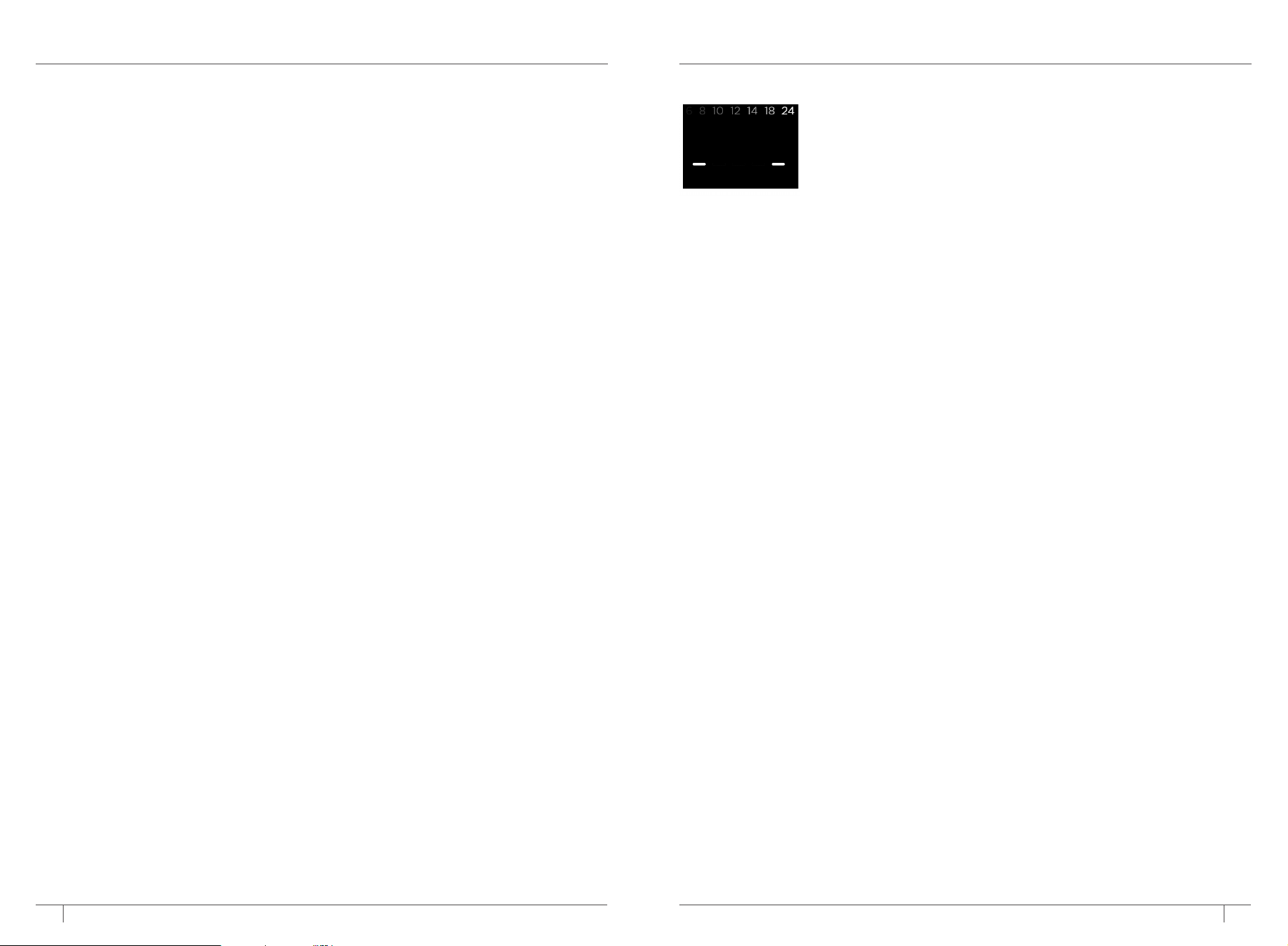
If your control panel is flashing each size, this means either there are grounds built up inside the top
needle or calcium scale buildup in the brew system.
Coee Maker Buildup
12 13
ninjakitchen.com
ninjakitchen.com
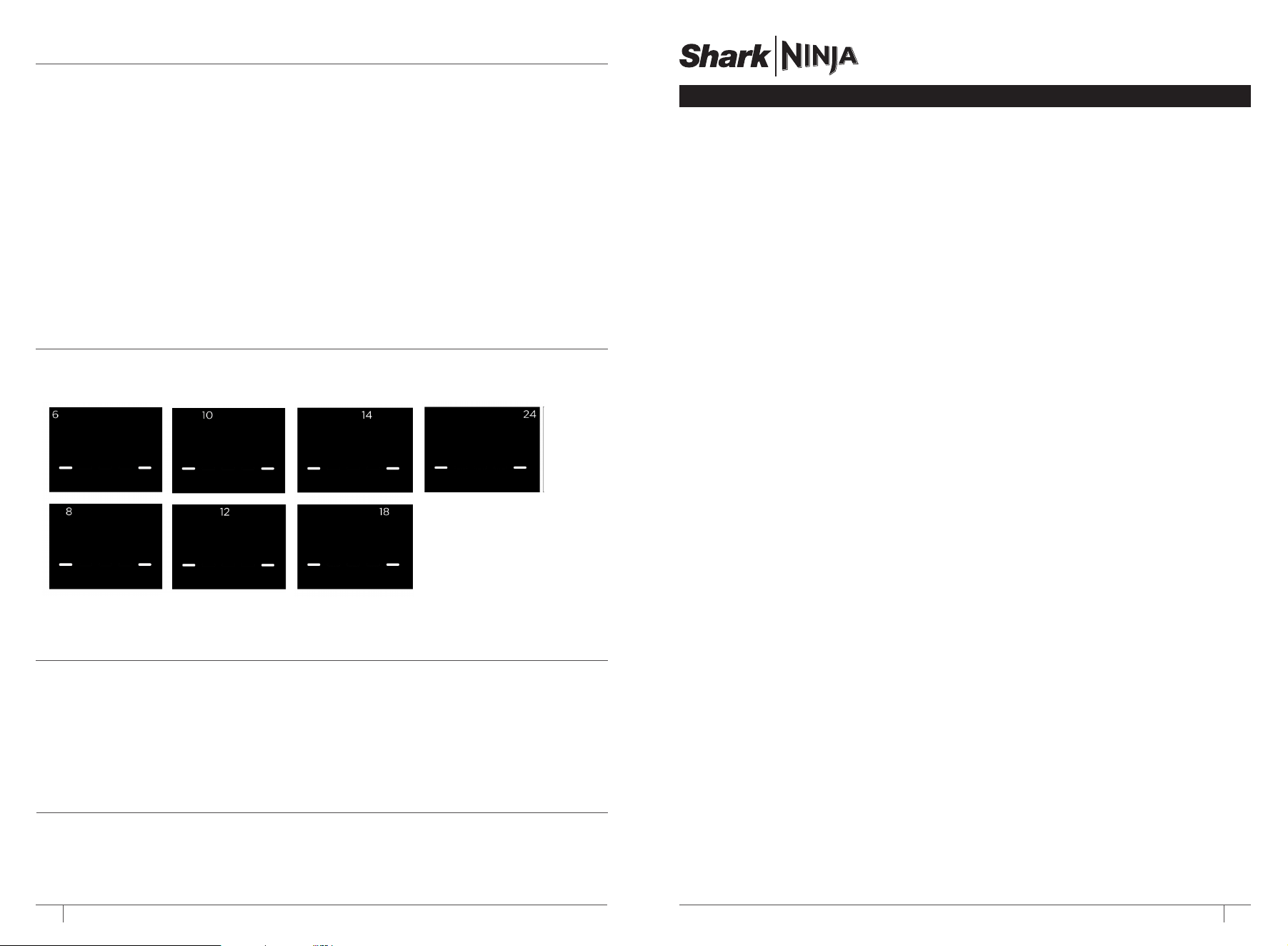
ERROR STATES
If any of these error states appear on the control panel, please call our Customer Service Specialists at
1-877-646-5288 to assist with product support and to resolve any issues.
Coee is splattering.
• Some splatter is normal. Use the cup tray when possible to reduce the distance between the cup and the
coee nozzle.
• Ensure the Ninja Pod Adapter is installed over the brew basket when brewing pods and that the nozzle is
fully installed on the unit.
Water reservoir is unstable.
• Ensure the water reservoir is properly installed on the coee maker and pressed down firmly into the water
reservoir base.
Coee keeps dripping after my brew.
• Coee dripping after your brew means that the drip stop is not engaged. Once the brew is complete, open
the coee maker lid to pop up the brew basket in order to stop dripping.
There are multiple streams of coee coming out of the nozzle.
• Multiple streams of coee means that there is residual buildup in the nozzle causing overflow.
• Refer to the Cleaning & Maintenance section on Page 10 on how to clean the nozzle.
TROUBLESHOOTING GUIDE CONT.
To order additional parts and accessories, visit ninjaaccessories.com or contact Customer Service at
1-877-646-5288. We ask that you register your product online at registeryourninja.com and have the
product on hand when you call so we may better assist you.
REPLACEMENT PARTS
Please visit registeryourninja.com or call 1-877-646-5288 to register your new Ninja® product within ten
(10) days of purchase. You will be asked to provide the store name, date of purchase, and model number
along with your name and address.
The registration will enable us to contact you in the unlikely event of a product safety notification. By
registering, you acknowledge you have read and understood the instructions for use and warnings set
forth in the accompanying instructions.
PRODUCT REGISTRATION
The One (1) Year Limited Warranty applies to purchases made from authorized retailers of
SharkNinja Operating LLC. Warranty coverage applies to the original owner and to the original
product only and is not transferable.
SharkNinja warrants that the unit shall be free from defects in material and workmanship for a period
of one (1) year from the date of purchase when it is used under normal household conditions and
maintained according to the requirements outlined in the Owner’s Guide, subject to the following
conditions and exclusions:
What is covered by this warranty?
1. The original unit and/or non-wearable parts deemed defective, in SharkNinja’s sole discretion,
will be repaired or replaced up to one (1) year from the original purchase date.
2. In the event a replacement unit is issued, the warranty coverage ends six (6) months following
the receipt date of the replacement unit or the remainder of the existing warranty, whichever is
later. SharkNinja reserves the right to replace the unit with one of equal or greater value.
What is not covered by this warranty?
1. Normal wear and tear of wearable parts (such as blending vessels, lids, cups, blades, blender
bases, removable pots, racks, pans, etc.), which require regular maintenance and/or replacement
to ensure the proper functioning of your unit, are not covered by this warranty. Replacement
parts are available for purchase at ninjaaccessories.com.
2. Any unit that has been tampered with or used for commercial purposes.
3. Damage caused by misuse, abuse, negligent handling, failure to perform required maintenance
(e.g., failure to keep the well of the motor base clear of food spills and other debris), or damage
due to mishandling in transit.
4. Consequential and incidental damages.
5. Defects caused by repair persons not authorized by SharkNinja. These defects include damages
caused in the process of shipping, altering, or repairing the SharkNinja product (or any of its parts)
when the repair is performed by a repair person not authorized by SharkNinja.
6. Products purchased, used, or operated outside North America.
How to get service
If your appliance fails to operate properly while in use under normal household conditions within the
warranty period, visit ninjakitchen.com/support for product care and maintenance self-help. Our
Customer Service Specialists are also available at 1-877-646-5288 to assist with product support
and warranty service options, including the possibility of upgrading to our VIP warranty service
options for select product categories. So we may better assist you, please register your product
online at registeryourninja.com and have the product on hand when you call.
SharkNinja will cover the cost for the customer to send in the unit to us for repair or replacement. A fee
of $20.95 (subject to change) will be charged when SharkNinja ships the repaired or replacement unit.
How to initiate a warranty claim
You must call 1-877-646-5288 to initiate a warranty claim. You will need the receipt as proof of purchase.
We also ask that you register your product online at registeryourninja.com and have the product on
hand when you call, so we may better assist you. A Customer Service Specialist will provide you with
return and packing instruction information.
How state law applies
This warranty gives you specifi c legal rights, and you also may have other rights that vary from state
to state. Some states do not permit the exclusion or limitation of incidental or consequential damages,
so the above may not apply to you.
ONE (1) YEAR LIMITED WARRANTY
NJA_1_YR_IB_LMTD_WRNTY_US_ENG