×
○
Dear users:
Hello!
Thank you very much for choosing this
product!
Before you use this product, please take the
time to read the functions and usage information
of this product, so that you can use this
product easily and conveniently.
The Company shall not be liable for any loss
or damage to personal data caused by
misoperation of software or hardware, product
maintenance, battery replacement or other
accidents, nor shall it be liable for any other
indirect losses caused thereby. At the same time,
we can’t control the user's understanding error
that may be caused by this manual, therefore,
the company will not be responsible for the
accidental losses that may occur in the process
of using this manual, and is not responsible for
third-party claims caused by the use of the
product, the functional information of this
manual is subject to the product itself, and the
relevant information is changed without prior
notice, and the company reserves the right of
final interpretation of this manual, three
guarantees voucher and its related information.
There may be errors and omissions in the
preparation of this manual, you are welcome to
criticize and correct, if you find any problems
in the process of using the product, please
contact the dealer in time, thank you for your
support and cooperation!
Instruction manual for the product
This product meets IP67 standard, when working
in humid environment, rainwater and shallow
water, please ensure that the rubber plug of
each interface is blocked, otherwise it is easy
to cause water or moisture, which may be cause
equipment failure or even can't to repair.
In order to ensure the stable performance of
this product,please don't expose the product to
extreme temperature and humidity environment,
don't directly exposed to sunlight or other heat
sources
Don’t use conductive objects to touch the
POGOPIN contact point at the bottom of this
product to avoid damage to the main unit after a
short circuit.
Don't damage the speaker and microphone
waterproof membrane, otherwise it will be lead
to the risk of water ingress and loss of the
three-proof function.
When scanning module is working, please don't
point the laser of the scanning module at the
eyes of people or animals to avoid accidental
injury.。
Please use the adapter provided with this
product, otherwise this product may be burned.
If this product is not used for a long
time,Please turn off the power and download the
data to other storage tools in time. .
If the product cannot be used normally, please
contact the dealer, do not disassemble the
machine for repair, and if you disassemble the
machine by yourself during the warranty period,
you will not enjoy the warranty terms.
01-Safety Tips
host
adapter
Power cord
Hand/wristband
02-Packing list
List of checklists
Name
Rugged version
Lightweight
version
10.1" 8" 10.1" 8"
host √ √ √ √
adapter √ √ √ √
power cord
√√√√
Wrist strap
√√√√
Instructions
√√√√
Certificate
√√√√
Warranty card √ √ √ √
(This packing list page is for reference only, due to the
product configuration selection will be different, please
refer to the actual product specifications of the purchase)
power on:
In the shutdown state, press and hold the
"POWER" button for 3 seconds, and the system
enters the Windows operation interface.
Wake up from sleep:
When the system goes to sleep, press the "POWER"
button for 1 second and release it when the blue
light turns on:
1、It takes about 3 seconds for the Windows user
interface to be displayed。
2、It takes about 2 seconds for the Android user
interface to be displayed。
Normal shutdown:
Windows needs to select the shutdown command at
the beginning of the operation screen to shut
down.
Android needs to press and hold the "POWER"
button for 1-3 seconds, the system will pop up
the shutdown interface, and the system will shut
down after selecting the shutdown option.
Forced shutdown:
Press and hold the "POWER" button for about 10
seconds The system shuts down, please do not use
this operation frequently, it is easy to cause
the operating system to be abnormal.
System installation:
When the operating system of this product needs
to be reinstalled, you need to download the
Windows image file of the corresponding version
of the product or the Android installation
firmware, otherwise the product cannot be
installed or driven
03-power on/off
Battery life:
When the ambient temperature is between 10°C
and 45°C, the brightness is 75%, the volume is
50%, and the high-definition video is played,
the X86 platform can continue to play videos
for about 7 hours, and the ARM platform can
continue to play for about 10 hours.
Battery environment:
Don’t place the product in a closed container
with high temperature, do not expose the
product directly to the sun for a long time in
summer, and do not put it on other heat
sources, otherwise it is easy to cause the
battery to abnormal. In cold environments of
0°C and below, the battery life will continue
to decrease as the temperature decreases;
Battery Charging:
When the product is charging and working at the
same time, the temperature of the product will
be slightly higher, please try to turn off the
charging or standby charging when charging.
The product is an industrial product that only
supports DC charging, and does not support
Type-C charging and fast charging mode.
Generally, it takes more than 3.5 hours to
fully charge 7.6V/6000 mAh.When the battery is
completely depleted, the battery will start
protection, resulting in failure to turn on,
you need to plug in the adapter for a long time
to charge and then turn on, if it cannot be
used normally, please contact the seller.
4-Battery
5-reliability
According to the Chinese government's "Measures
for the Control and Administration of Pollution
from Electronic Information Products", in order
to reduce environmental pollution and protect
human health, the relevant products may contain
the following toxic and harmful substances:
6-China's requirements for pollution control of
electronic information products
It means that the content of the toxic and
harmful substances in all homogeneous materials
of the part is below the limit requirements
specified in the GB/T 26572-2011 standard.
It means that the content of the toxic and
harmful substance in a homogeneous material of
the part exceeds the limit specified in the GB/T
26572-2011 standard.
temperatu
re
Operating temperature: -5°~ 45°
Storage temperature: -20°~ 55°
humidity
Relative humidity 95% (non-condensing
state)
certifica
tion
IP67 certified
ROHS certified
UN38.3+MSDS certified
Test
report
Complies with GB/T 9254.1-2021
"Electromagnetic Compatibility of
Information Technology Equipment,
Multimedia Equipment and Receivers Part
1: Emission Requirements"
Comply with GB 17625.1-2012
"Electromagnetic Compatibility Limit,
Harmonic Current Emission Limit (Input
Current of Equipment per Phase ≤16A),
in line with GB9254 standard
Accord with. GB 4943.1-2022 Audio-
visual, information technology and
communication technology equipment –
Part 1: Safety requirements
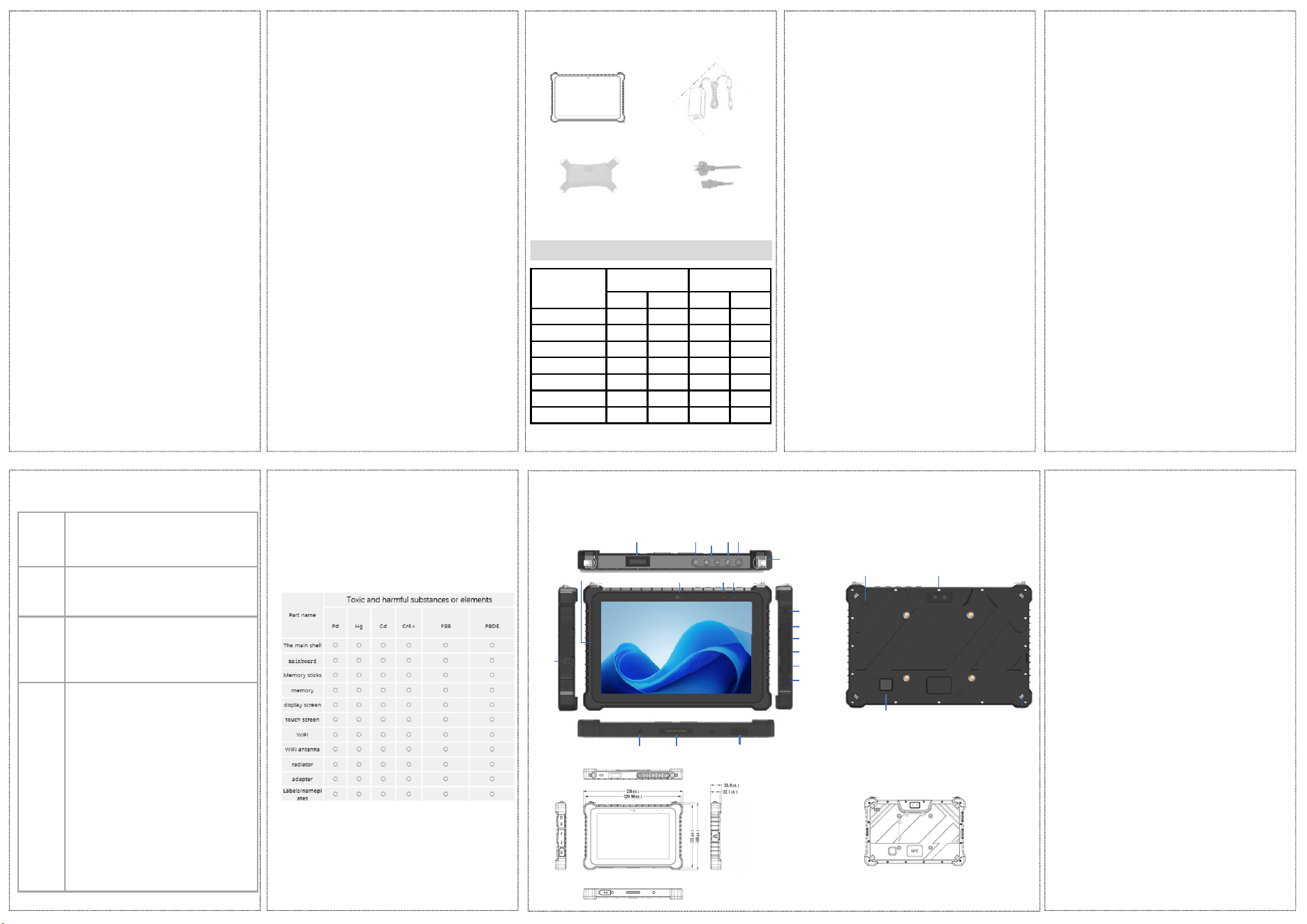
Safety lock
cameraspeaker
finge
rprin
t
Wrist
strap hook
RJ45
camera power
lighti
ng
AUDIO
HDMI
USB
Type-C
DC口
POGOPIN
TF
power on/off volume+/-
scan
charging
lighting
microphone
Rugged version 8"---Function & size
schematic
(Due to the different products and configurations selected, this figure is for reference only)
75mm
75mm
Charging base
positioning hole
Hand
strap/strap
hook
FCC Warning:
This device complies with part 15 of the FCC Rules.
Operation is
subject to the following two conditions:
(1)This device may not cause harmful interference, and
(2)this device must accept any interference received,
including interference that may cause undesired operation.
Any Changes or modifications not expressly approved by
the party responsible for compliance could void the user's
authority to operate the equipment.
Note: This equipment has been tested and found to
comply with
the limits for a Class B digital device, pursuant to part 15
of the FCC
Rules. These limits are designed to provide reasonable
protection against harmful interference in a residential
installation. This equipment generates uses and can
radiate radio frequency energy and, if not installed and
used in accordance with the instructions, may cause
harmful interference to radio communications. However,
there is no guarantee that interference will not occur in a
particular installation. lf this equipment does cause harmful
interference to radio or television reception, which can be
determined by turning the equipment off and on, the user
is encouraged to try to correct the interference by one or
more of the following measures:
-Reorient or relocate the receiving antenna.
-Increase the separation between the equipment and
receiver.
-Connect the equipment into an outlet on a circuit different
from that to which the receiver is connected.
-Consult the dealer or an experienced radio/TV technician
for help.
RF warning for Portable device:
The device has been evaluated to meet general RF
exposure requirement.
The device can be used in portable exposure condition
without restriction.