Troubleshooting Guide for K-175 K-180 Electronic Faucets
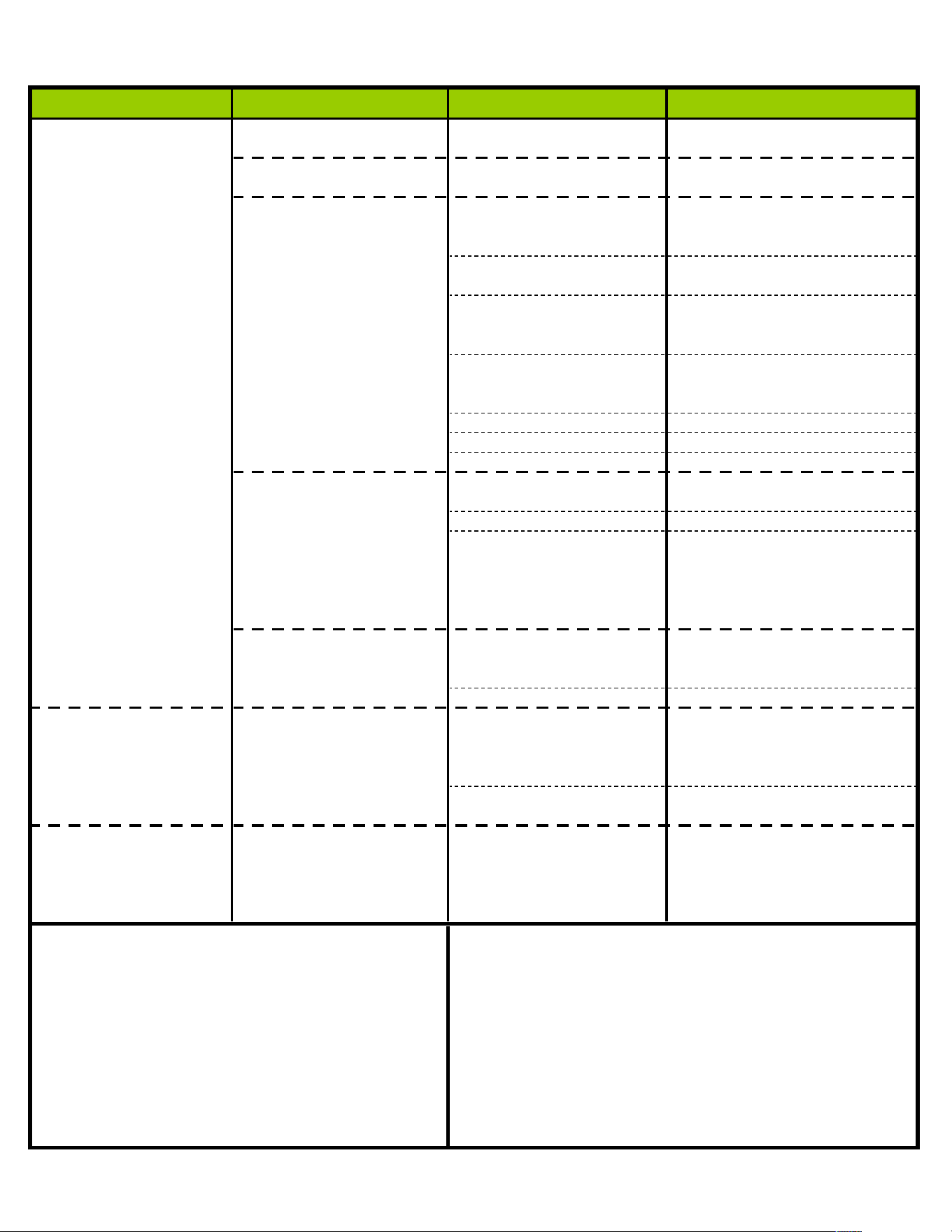
Problem Indication Cause Solution
No or little water flow
Solid red LED light in the Batteries are dead. Change batteries.
out of faucet. electronic eye stays on.
Red LED light flashing. Low charge from Change batteries.
batteries.
No red LED light flashes Mis-connection between Unplug the cable line and
after pushing the ON/OFF the sensor cable and the inspect for damaged
button. control module. prongs; straighten prongs.
Batteries are not proper- Inspect batteries for the
ly installed. proper installation.
Electronic eye dirty. Clean the electronic eye
with mild soap and water.
Dry with soft cloth.
Person not placing hands Slow down hand move-
in front of sensor properly. ment. Make sure to cover
sensor.
Range is not set properly. Refer to Installation Instr.
Defective sensor. Replace sensor.
Defective Control Module. Replace Control Module.
Red LED light flashes, Water supply may be Open water supply fully.
but "no" water closed or partially closed.
In-line filter clogged. Clean filter.
Faucet assembly may be Disconnect water outlet from
air-locked. faucet, turn on water, hold
ON/OFF button 5-7 seconds
release and repeat. Then
reconnect water line to fct.
Red LED light flashes, Electronic eye dirty. Clean the electronic eye
but runs continuously. with mild soap and water.
Dry with soft cloth.
Defective Control Module. Replace Control Module
Water Backflow Only getting "hot" or Defective check valve in Take mixing valve loose,
"cold" water out of faucet. faucet mixing valve. inspect, clean, or replace
check valves or entire
mixing valve.
Fct. distance from hot Check distance to hot
water source too far. water source.
Cannot set faucet range
RED light will not come on Electrical problem inside Replace control module
when hand is placed in control module
front of sensor when going
thru the "Range Setting
Procedure"
Failure Indicators What to do in case of a faucet failure?
Loose fittings that may cause leaks
1) Unless the low battery indicator is not flashing-do not
Cut or damaged sensor cable or connections change the batteries.
Oxidation of brass or copper connections 2) Clean the sensor lens.
Moisture or water inside of control module
3) Press the On/Of
f button to see if the faucet will work
Dirty or clogged filter and check valves manually. If water begins to flow, reset the faucet's
Dirty or scratched sensor lens working range.
Dirty, greasy environment
4) If the faucet does not work manually when the "On/Of
f"
Bright light and highly reflective surfaces button is pressed, call for Technical Support.
Extremely cold temperatures
Low battery indicator light is "on" or flashing.