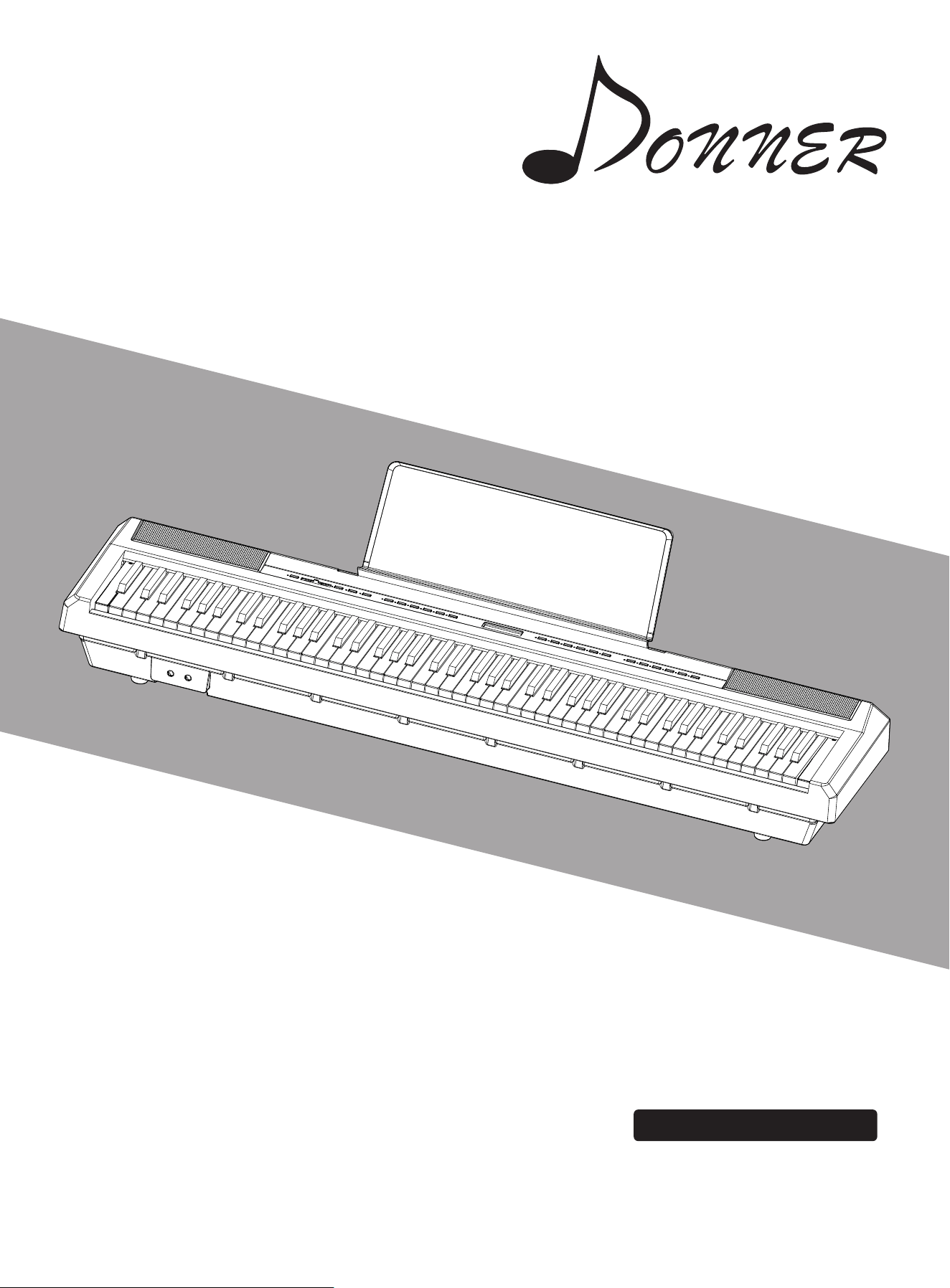
DEP-20
DIGITAL PIANO
INSTRUCTION MANUAL
数码钢琴使⽤说明书


Please read carefully the following precautions before use.
Keep these precautions somewhere safe for future reference.
▲When using, please observe the following precautions at any time. All these
precautions prevent user from casualty accidents caused by electrical shock, shock
circuits, accidents, fire or other dangerous events. Notices are described in the
following(but not limited to):
l Keep away from rain & avoid using in the damp place.
l Do not put the water container on the piano since it may result in water flowing
into the piano.
l If wire or plug is wore out, damaged or cut off suddenly during operation with
unusual odors or smoke, please shut off the power immediately, pull out the plug
and call maintenance personnel to check & repair.
▲Please control the supply voltage between 100V-220V, too high or too low will
damage the piano.
l Please turn the power off and pull the plug before cleaning the piano.
l Do not touch any charged body with wet hands or wipe & wash the piano with
corrosive volatile solvent.
l Check the condition of power switch & line regularly.
l When replacing the fuse, be sure to use only a fuse of the same rating.
Warning
Notes
▲When using, please also observe the following precautions to avoid injury to user &
other people or avoid damage to the piano or other external equipment. Notices are
described in the following(but not limited to):
l Keep the AC power cord away from heat, such as heater.
l Don’t over bend the power line.
l Don’t put heavy stuff on the power line.
l Don’t place the power line somewhere people walk through.
l Don’t twine other stuff with power line to avoid damage the power cord.
l When pulling the plug, please pull the plug itself rather than wire.
l Unplug the power plug when not in use or under thunderstorms weather.
l Don’t place the piano in dusty, vibration, cold or high temperature
environment(Such as direct sunlight, heating or sun-exposed conveyance) to
avoid damage inner or external components.
Precautions
1

Precautions
2
l Unplug the power line or other connection wires before moving the piano.
l Wipe the piano with dry and soft cloth for cleaning. Do not wipe it with paint,
organic solvent, detergent or other corrosive cleaners to avoid color fading of
the panel or piano key.
l Please turn off all the power switch before connecting the piano with other
devices.
l Adjust the volume to the minimum before switching off the power. When
using, set the volume to the minimum first, and increase it to confirm suitable
volume.
l Keep away from other appliances, such as television, radio, sound, etc.
Because they may interfere each other.
l Set the piano on flat ground to avoid toppling down.
l Don't put heavy stuff on the piano and do not type on the keys or adjust the
switch heavily.
l This product has volume settings with large range to fit most occasions like
classroom, studio, etc. For daily use, user should adjust the proper volume. If
the volume is too loud for a long time, it will affect the musical effect and
damage your listening.
l Avoid violent collision because it may damage the user and piano itself.
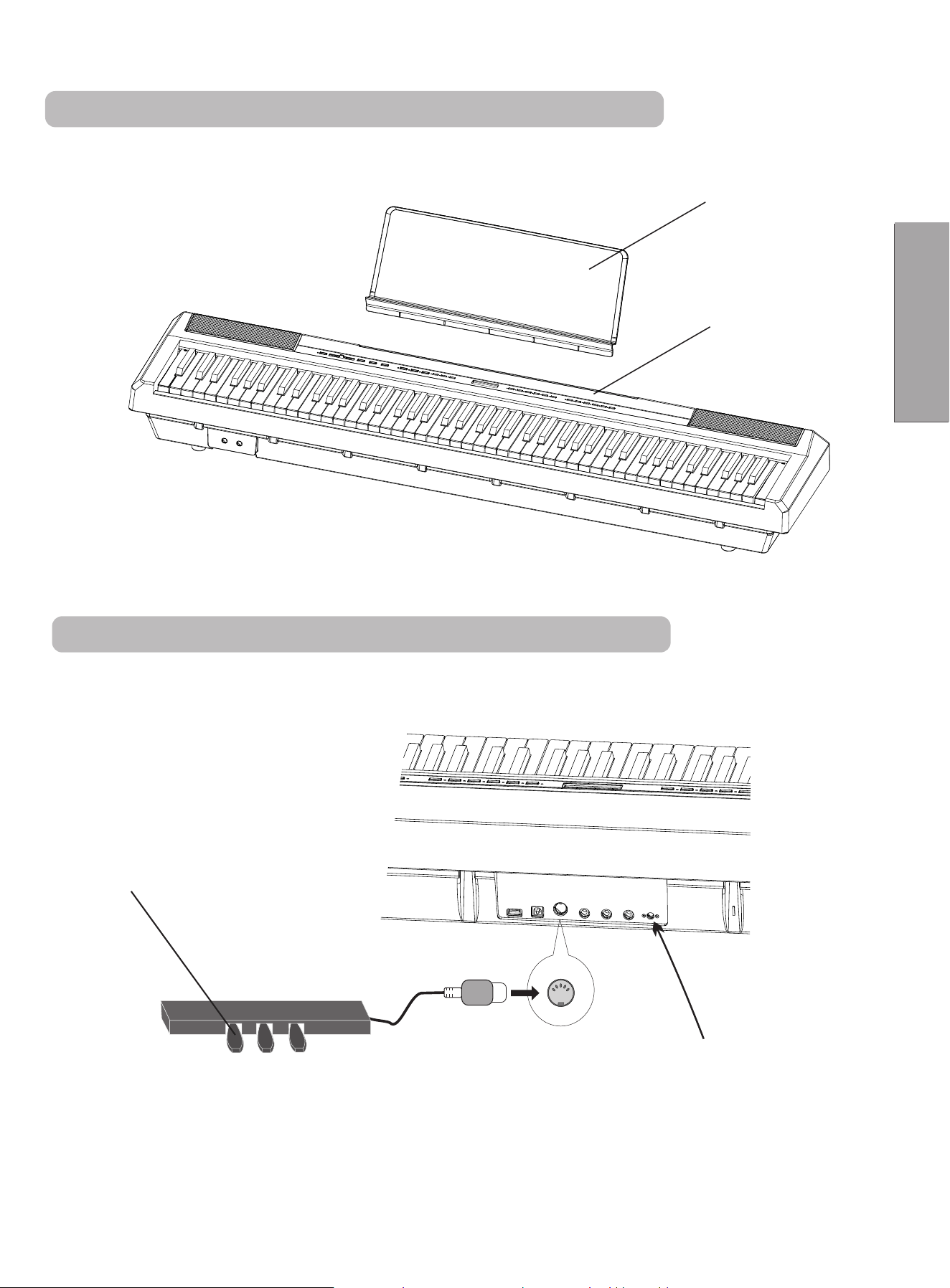
BODY
PEDAL
MUSIC STAND
1. Slightly install the music stand into the groove of the piano body.
2. Insert pedal into the pedal jacks on the back of the body.
After the installation is done, plug in the
power supply and start your music journey.
(Power Outlet is on the back of the body.)
POWEROUTLET
①
②
③
PEDALJACK
Installation
3
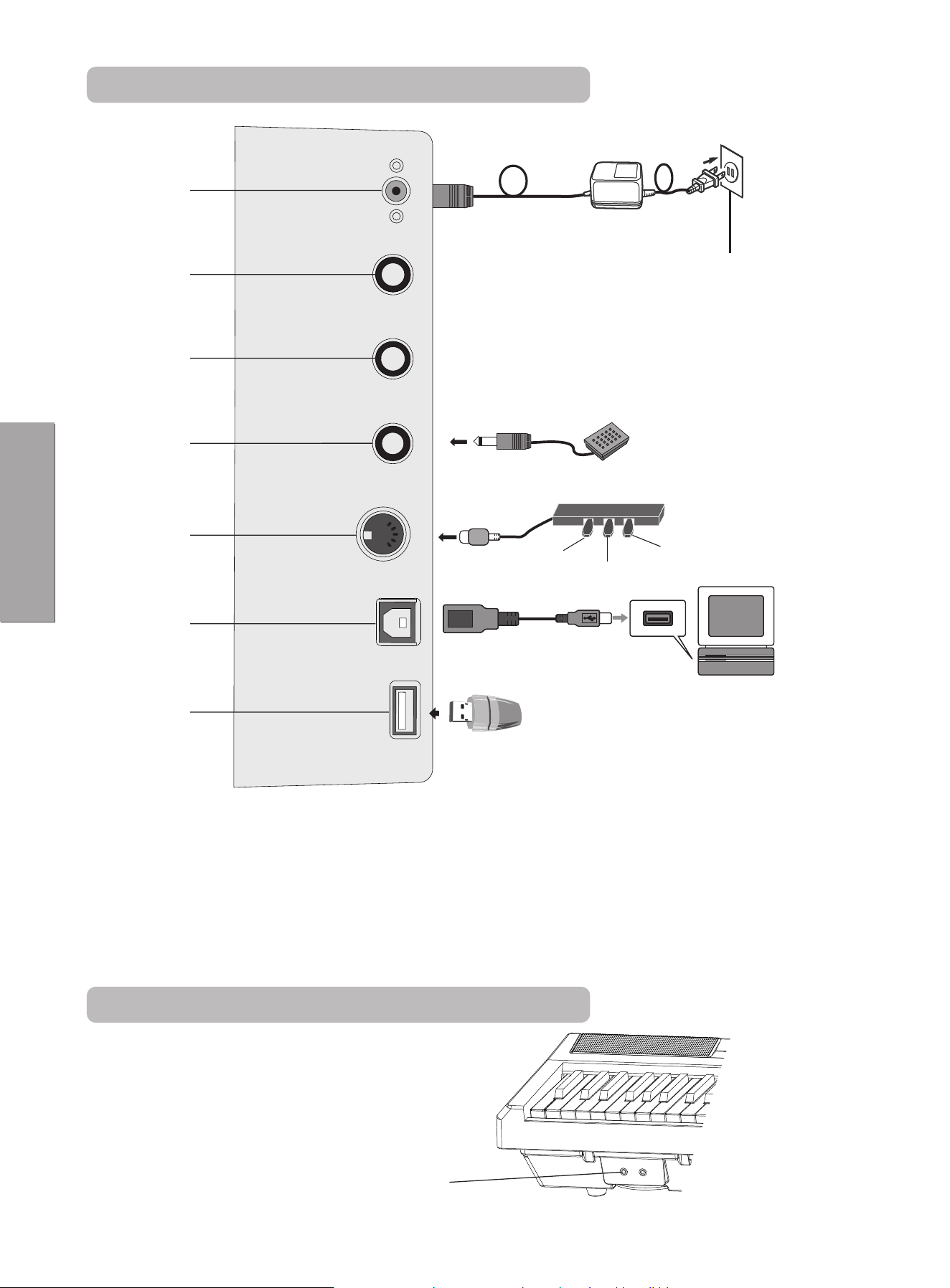
1.Piano Connection Interface Panel
Double-Earphone
Socket
100V-220V
ACSocket
①
②
③
④
⑤
⑥
2.Earphone Interface
⑦
⑧
① Socket Power Line
② Audio Output
③ Audio Input
④ Sustain Pedal Socket
⑤ Pedals Socket
⑥ smission Socket USB Tran
⑦ MP3 Socket
Connect computer,
smart phone ,tablet PC
Soft
Sostenuto
Sustain
Operations
4
1. As figure shows, connect the power line when using. One end is inserted into the power outlet on the
controller plate at the bottom of piano. The other end is inserted into a 100V-220V household socket.
2. Please unplug the power line and reserve it in an appropriate way when it is not used for a long time.
1. Power Line Socket
2. Audio Output
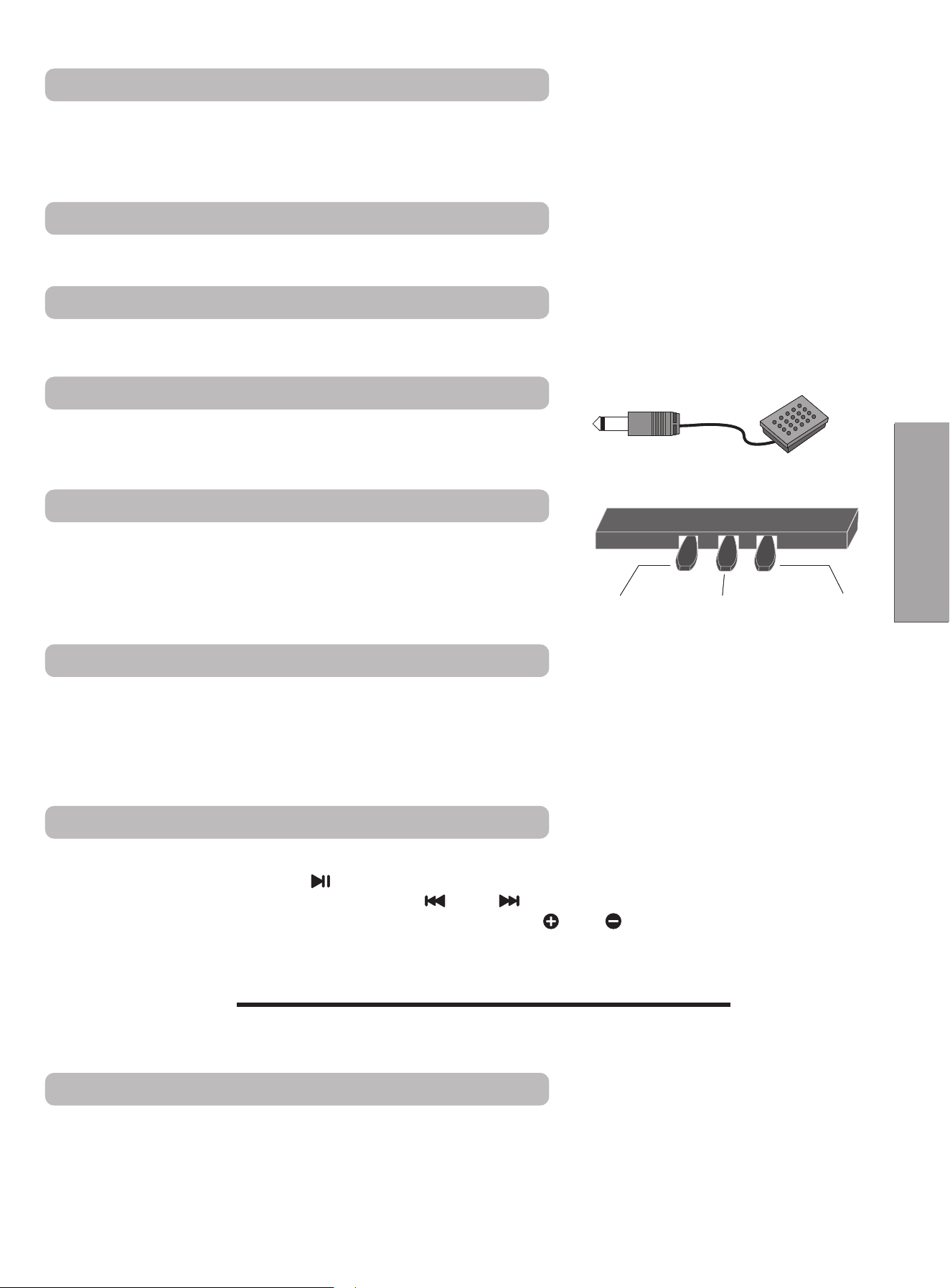
The product has tenuto pedal function. Please use pedal according
to your needs when playing.
4. Sustain Pedal Socket
Insert the pedal plug into the round jack at the back of the piano and
put through the triple pedals function with speaker effect.
The order is as follows: Soft, Sostenuto , ;Sustain
Single pedal is optional. (Third Point)
5. Pedals Socket
The product can be connected with computer by USB transfer interface. You can learn or play the
keyboard to play, compose, store and operate other functions by the pre-installed music software on the
computer. Edited music or accompaniments built in the music software can be played by the digital piano
which is connected to the software or performed along with accompaniments.
6. USB Transmission Socket
7. MP3 Socket
The connection of headphones will cut off the output of the piano built-in speaker for not disturbing
others when performing.
This product is designed with 2 earphone sockets which you can insert double earphones.
8. Double-Earphone Socket
Soft Sostenuto Sustain
3. Audio Input
It supports external large speaker equipment by audio output plug.
External sound source can be connected to electric piano to play by audio input plug.
1. Insert the flash disk with MP3 format songs into "USB plug" and play MP3 songs in 3 seconds or so.
2. By pressing the MP3 Control " " button, MP3 songs can be paused or replayed.
3. Press once the control button of MP3 Control " " or " " lightly to select previous or next MP3 songs.
4. Adjust the volume of songs by long pressing the MP3 Volume " " or " " control button.
Ÿ The peak value of sound needs the control of main volumelever.
Attention!
●Only support songs with MP3 format.
1. As figure shows, connect the power line when using. One end is inserted into the power outlet on the
controller plate at the bottom of piano. The other end is inserted into a 100V-220V household socket.
2. Please unplug the power line and reserve it in an appropriate way when it is not used for a long time.
1. Power Line Socket
2. Audio Output
The product has tenuto pedal function. Please use pedal according
to your needs when playing.
4. Sustain Pedal Socket
Insert the pedal plug into the round jack at the back of the piano and
put through the triple pedals function with speaker effect.
The order is as follows: Soft, Sostenuto , ;Sustain
Single pedal is optional. (Third Point)
5. Pedals Socket
The product can be connected with computer by USB transfer interface. You can learn or play the
keyboard to play, compose, store and operate other functions by the pre-installed music software on the
computer. Edited music or accompaniments built in the music software can be played by the digital piano
which is connected to the software or performed along with accompaniments.
6. USB Transmission Socket
7. MP3 Socket
The connection of headphones will cut off the output of the piano built-in speaker for not disturbing
others when performing.
This product is designed with 2 earphone sockets which you can insert double earphones.
8. Double-Earphone Socket
Soft Sostenuto Sustain
3. Audio Input
It supports external large speaker equipment by audio output plug.
External sound source can be connected to electric piano to play by audio input plug.
1. Insert the flash disk with MP3 format songs into "USB plug" and play MP3 songs in 3 seconds or so.
2. By pressing the MP3 Control " " button, MP3 songs can be paused or replayed.
3. Press once the control button of MP3 Control " " or " " lightly to select previous or next MP3 songs.
4. Adjust the volume of songs by long pressing the MP3 Volume " " or " " control button.
Ÿ The peak value of sound needs the control of main volumelever.
Attention!
●Only support songs with MP3 format.
Operations
5
① ② ③ ④ ⑤ ⑥ ⑦ ⑧ ⑨ ⑩ ⑪
⑫
⑬ ⑭ ⑮ ⑯ ⑰ ⑱ ⑲ ⑳ ㉑ ㉒ ㉓ ㉔
㉖
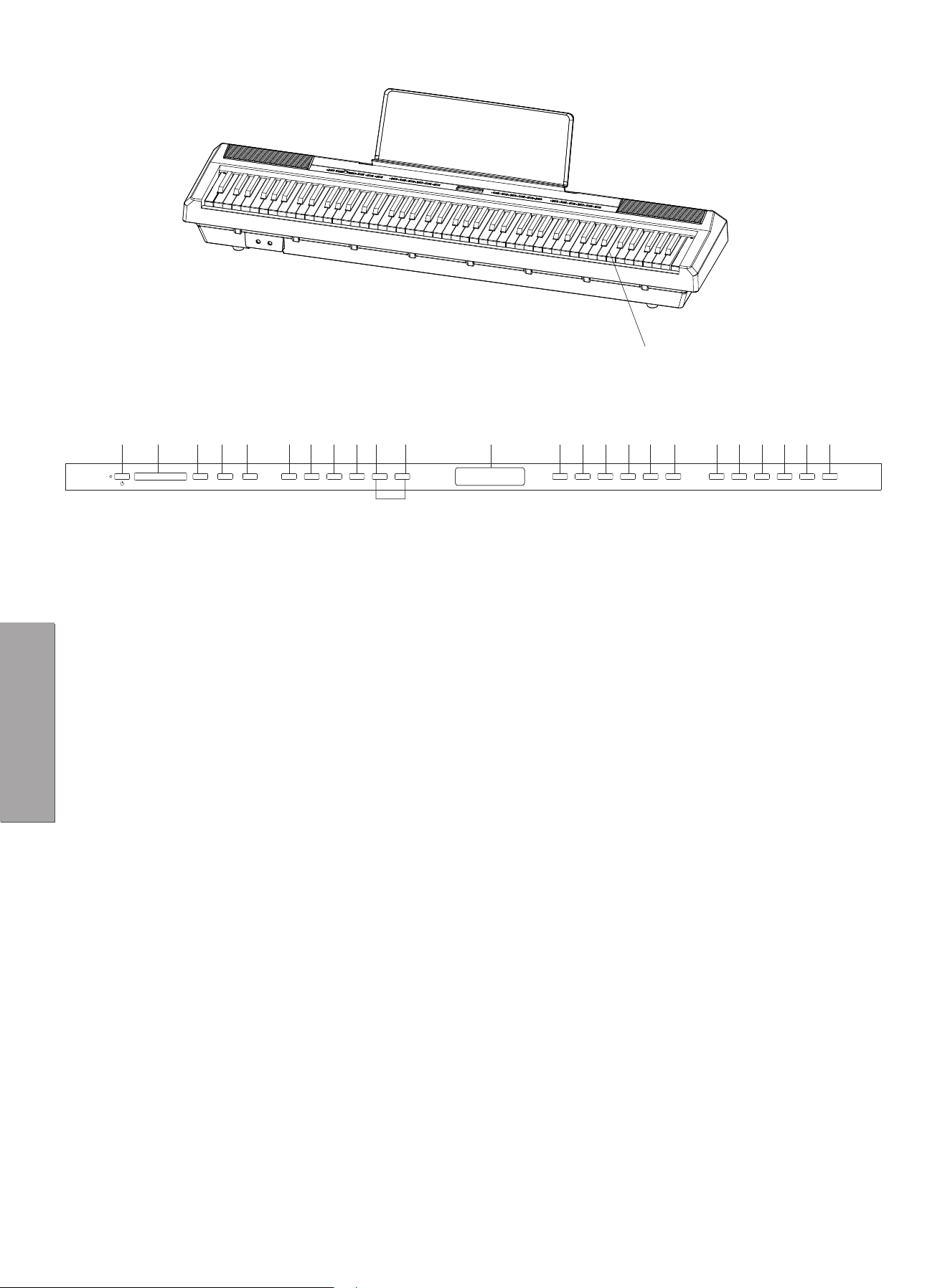
1.Power Switch
2.Total Volume
3.MP3 Move Previous/VOL-
4.MP3 Pause/Play
5.MP3 Move Next/ VOL+
6.Grand Piano/Tone
7.Rhythm
8.Start
9.Sync
10.Tone/Dome/Rhythm/Dual
Tone/Metronome Setting/
Transposition +
11.Tone/Dome/Rhythm/Dual
Tone/Metronome Setting/
Transposition -
12.Transposition
13.Display
14.Demo
15.Synthetical Chord
16.Dynamics
17.Sound
18.Double Keyboard
19.Tempo -
20.Tempo +
21.Dual Tone
22.Keyboard Drum
23.Metronome
24.Record
25.Play Sound
26.Keys
㉕
Features
6
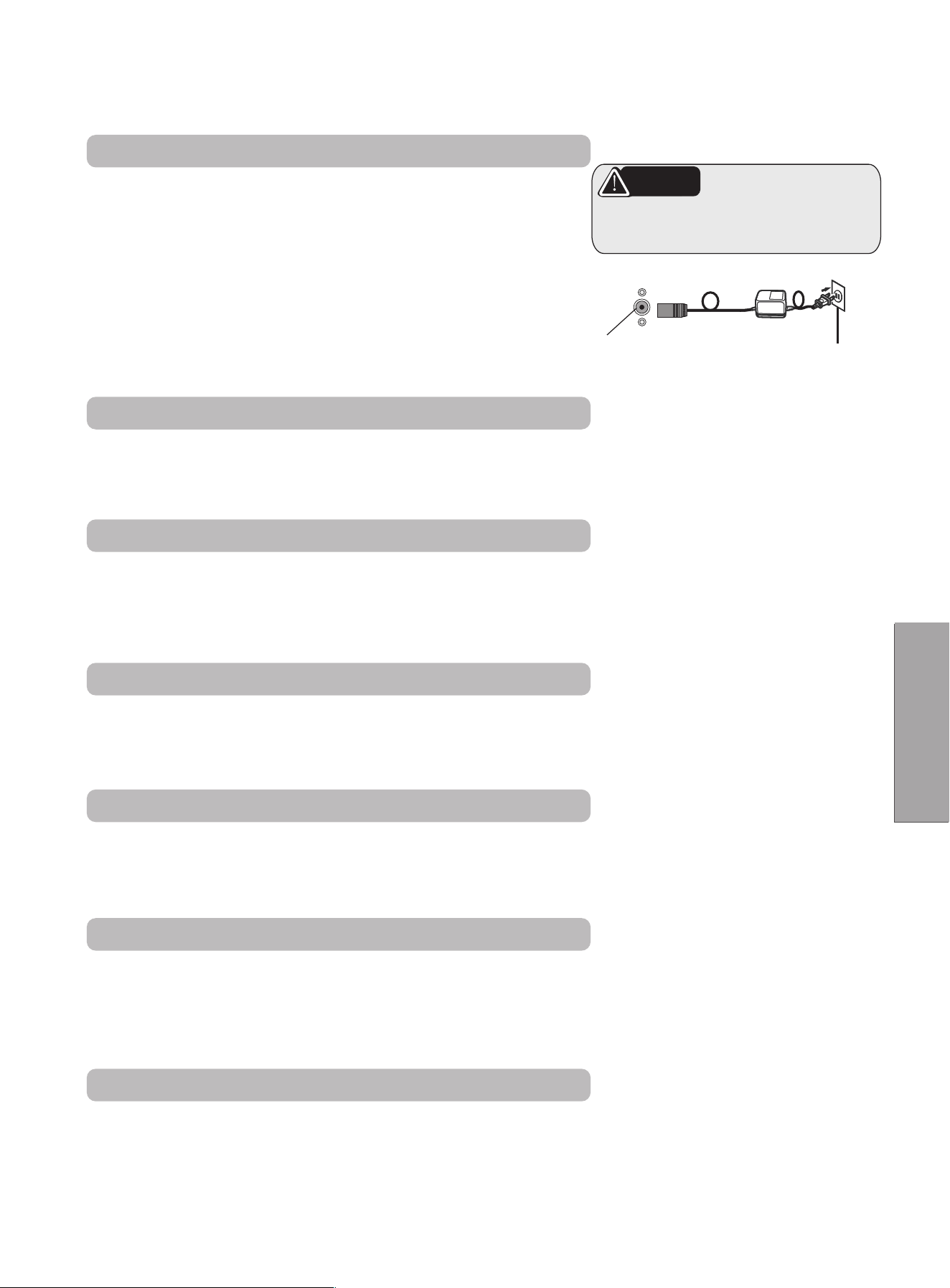
This chapter will introduce functional jacks of the piano & related contents before performance
to you. Before turning the power switch on, be sure to read the following contents.
1. Check if the power switch of the piano is turning off first.
If not, please turn off the power.
2. Connect the power, insert the plug into the power jack
behind the piano first, and then plug the opposite end of
power adapter into the power socket.
3. Before turning on the power, adjust the volume controller
to the minimum first.
4. Before turning off the power of digital piano, adjust the
volume controller to the minimum first, and then turn off
the power.
NOTE
When not using the piano or thunder
Please unplug the power plug.
Backside of Piano Body
100V-220V
Turn On the Power
Master Volume
Adjust the main fader of control panel.
1. Swipe the fader right means increase the volume.
2. Swipe the fader right means decrease the volume.
Tone Setting
1. This digital piano has 238 types of tone.(See annex I)
2. The default tone is grand piano(000). Press the tone button to display +/- button and change the
tone by adjustment.
3. Double click to play back the default tone.
Demo Playing
Press the Model Music Collection button to start playing the demo.
Select the pieces by clicking +/- button .
Re-press the Demo button to stop playing(See annex II).
Velocity Curve
1. Three kinds of velocity curves can be set: Light, Standard, Heavy(t00-t02) & Velocity switch.
The default velocity is t01.
2. Press Velocity button repeatedly to the setting and choose the corresponding curve: t00-t02, tof.
Rhythm Selection
There are 200 kinds of rhythms: 000-200. (See rhythm sheet of annex III)
The default rhythm is No.000.
Press the button and entry mode choice to select the proper rhythm by +/- button.
Press the Start/Stop button to start playing the rhythm.
Accompaniment Speed Adjustment
1. Adjust the speed of accompaniment by Tempo +/- button.
Adjustable range from 20 to 280 beats per minute .
2. Choose the accompaniment when it stops, and the speed automatically turns to the preset.
Switch the accompaniment when it is playing, the speed does not return the preset.
3. Press the Tempo + & - button at once to return the default.
Features
7
ACSocket

Accompaniment Starting Mode
The accompaniment of this digital piano has two opening modes:
u Auto Start:
Press the Sync button to enter prepare state. When performing, the accompaniment will start up
automatically.
Press the Start/Stop button to stop the accompaniment.
u Manual Start:
Press Start/Stop button, the accompaniment will start immediately, repress the button, it will stop
immediately.
Automatic Chord
l There are two chord modes of this digital piano: Single Finger Chord & Multi Finger Chord.
l Press Comprehensive Chord button means enable automatic chord function that will identify
automatically single finger & multi finger and play corresponding chord when playing the keys of the left
half. Repress the button to turn off this function.
Metronome
1. Press Metronome button to enable this function, the default speed is that of first rhythm.
2. Adjust the speed range of metronome from 20-280 beats per minute by Tempo +/- button.
3. Repress the Metronome button to exit this function and the current speed is saved.
Note: Restart the piano will restore the default speed.
Metronome Setting
Long press to enter the mode of metronome type selection.
Choose corresponding metronome type by +/- button:(1-4, 2-4, 3-4, 4-4, 3-8, 6-8).
When finish the selection, the chosen type will be confirmed by pressing the Metronome button or after two
seconds of user inactivity.
Transposition Setting
l Press +&- button simultaneously to enter the mode of transposition selection and choose by +/- button.
l The transposition type has 12 positive & 12 negative levels.
l Press the Tone button or Rhythm button or wait for two seconds to exit this mode.
Double Tone Setting
Enable this function by On/Off button.
Choose the first tone by +/- button, and then press Double Tone button to enter selection mode and choose
second tone by +/- button.
Features
8

Double Keyboard Setting
Enable this function by On/Off button.
When press this function key, the A1-B4 musical scale will play A2-B5 scale accordingly while C5-C9 scale
will play C4-C8 scale.
Choose the main tone by +/- button to replace the original tone of C5-C9 key.
Keyboard Drum Setting
Enable this function by On/Off button.
Press this button to get the drums on the keys.
Record Setting
Ÿ Press Record button to enter record mode and play the Metronome sound.
Ÿ Press the Metronome button to switch off the sound.
Ÿ Press any key to start recording.
Ÿ Repress the Record button to stop recording.
Playback Setting
When the sound track is recorded, press the Playback button to play the recorded sound track.
Effect Setting
Enable this function by On/Off button.
Press this button to open DSP effect.
MP3 Setting
Press MP3 Player button to play or pause the MP3 music.
Short press MP3 Previous Song button to play previous track.
Long press MP3 Previous Song button to turn down the volume.
Short press MP3 Next Song button to play next song.
Long press MP3 Next Song button to turn up the volume.
Features
9

There was no sound on the
keyboard.
1.Volume Controller Set at Minimum
Position.
2.Headphones or Plug Converters insert
headphone jack.
3.The power supply is not connected or
the piano is off.
1.Turn the volume to the right maximum
volume.
2.Remove the original connector form
the headphone jack.
3.Turn on the power supply and press
the boot button.
The pedals don't work.
1.Connecting line jack of pedal is not
plugged into piano.
2.Pedal plug loose.
1.Plug the pedal cord into the piano
jack.
2.Check to confirm whether the plug at
one end of the pedal connection is
loose or not, and then tighten it.
When the piano power is
turned on or off there is a
murmur.
Normal phenomenon
This is a normal phenomenon,
indicating that the current enters the
machine at this time.
The piano is noisy when
using a mobile phone.
Radio interference
The use of mobile phones in the vicinity
of the piano produces radiation. To
avoid this situation, you can turn off the
mobile phone or use it away from the
piano.
Abnormal tone or rhythm.
Power shortage
Power shortage.
Check power stability.
It seems that all tones are
pronounced or that the
pronunciation seems to be
cut off.
Normal phenomenon
The maximum number of simultaneous
sounds on this instrument is 128 notes. If
the dual tone mode is in use and the
accompaniment or music is playing, some
notes or sounds in the accompaniment or
music will be default.
Under the same timbre, the
quality of a note is different
from that
of a note.
Normal phenomenon
This is a normal phenomenon. This machine
adopts AWM sound source mode. This kind
of sound source is sampled and recorded in
the whole keyboard area, so the quality of
the two notes is slightly different.
Issue Reason Solution
Troubleshooting
10

Dear User:
This qualified product passed quality verification under strict quality management.
Thank you very much for using our digital piano. In order to satisfy you with our services,
please read carefully after purchase and fill out this 3-guarantee card and properly keep.
u During warranty period, we are responsible for giving free maintain if the product
breaks down under normal usage circumstance. The warranty period of our product is
referred to the period of state regulation.
u This card is considered as the proof of warranty.
u The work of guaranteed repair will be responsible and arranged by the seller. Please
show this card and related proof when contacting.
Free maintain won’t be given under the following circumstance:
1. The period of 3-guarantee has expired.
2. The breakdown caused by the manipulation that hasn’t follow the requests of the
user manual.
3. The damage caused by the dismantle movement of a non-our-company
authorized maintainer .
4. No certificate & effective invoice three bags, but can prove that the digital piano in the
three bags of goods, except for the life of.
5. Three Guarantees unauthorized alteration.
6. The damage caused by the Force Majeure.
Warranty:
After Sale Service
Service
11
Service
12
The fare of paid service is confined to material,
labor & shipping fees.
Date of Maintenance Date of Inspection
Failure Causes
Maintenance Records
Maintenance Company Signature of Maintenance personnel
Date of Maintenance Date of Inspection
Failure Causes
Maintenance Records
Maintenance Company Signature of Maintenance personnel
Date of Maintenance Date of Inspection
Failure Causes
Maintenance Records
Maintenance Company Signature of Maintenance personnel
Date of Maintenance Date of Inspection
Failure Causes
Maintenance Records
Maintenance Company Signature of Maintenance personnel
Piano
1
AcousticGrandPiano
2
BrightAcousticPiano
3
4
Honky-tonkPiano
5
ElectricPiano1
6
ElectricPiano2
7 Harpsichord
8 Clavichord
Percussion
instruments
9
Celesta
10
Glockenspiel
11 MusicBox
12 Vibraphone
13 Marimba
14 Xylophone
15 TubularBells
16 Dulcimer
Organ
17 HammondOrgan
18 PercussiveOrgan
19 RockOrgan
20 ChurchOrgan
21 ReedOrgan
22 Accordian
23 Harmonica
24 TangoAccordian
Guitar
25 AcousticGuitar
MIDI
PG#
NAME
ElectricGrandPiano
CATEGORY
Appendix I Tone
13
26
27
28
29
30
31
32
Bass
33
34
35
36
37
38
39
40
Strings
41
42
43
44
45
46
47
50
49
48
AcousticGuitar(steel)
ElectricGuitar(jazz)
ElectricGuitar(clean)
ElectricGuitar(muted)
OverdrivenGuitar
DistortionGuitar
GuitarHarmonics
AcousticBass
ElectricBass(finger)
ElectricBass(pick)
FretlessBass
SlapBass1
SlapBass2
SynthBass1
SynthBass2
Violin
Viola
Cello
Contrabass
TremoloStrings
PizzicatoStrings
StringsEnsemble2
OrchestralHarp
Timpani
StringsEnsemble1
51 SynthStrings1
52 SynthStrings2
53 ChoirAahs
Ensemble
Guitar
Appendix I Tone
14
54
VoiceOohs
55
SynthVoice
56 OrchestraHit
57
Trumpet
58
Trombone
59 Tuba
60
MutedTrumpet
61
FrenchHorn
62 BrassSection
63 SynthBrass1
64 SynthBrass2
65 SopranoSax
66
AltoSax
67 TenorSax
68
BaritoneSax
69 Oboe
70
EnglishHorn
71
Bassoon
72
Clarinet
73
Piccolo
74
Flute
75 Recorder
76
77
PanFlute
BottleBlow
Brass
Reed
Blowpipe
Whistle
78
79
80
Shakuhachi
Ocarina
Ensemble
Appendix I Tone
15
81
82
83
84
85
86
87
88
89
90
91
92
93
94
95
96
97
98
99
100
Lead1(square)
Lead2(sawtooth)
Lead3(calliope
lead)
Lead4(chifflead)
Lead5(charang)
Lead6(voice)
Lead7(fifths)
Lead8(bass+lead)
Pad1(newage)
Pad2(warm)
Pad3(polysynth)
Pad4(choir)
Pad5(bowed)
Pad6(metallic)
Pad7(halo)
Pad8(sweep)
FX1(rain)
FX2(soundtrack)
FX3(crystal)
FX4(atmosphere)
Lead
Pad
FX
101
FX5(brightness)
102 FX6(goblins)
103 FX7(echoes)
104 FX8(sci-fi)
105 Sitar
106 Banjo
107 Shamisen
108 Koto
109 Kalimba
Percussion
Appendix I Tone
16
SoundEffect
Piano2
110
Bagpipe
111
Fiddle
112
Shanai
113
TinkleBell
114 Agogo
115
SteelDrums
116 Woodblock
117 TaikoDrum
118 MelodicTom
119 SynthDrum
120
ReverseCymbal
121
GuitarNoise
122
BreathNoise
123
Seashore
124
BirdTweet
125
TelephoneRing
126
Helicopter
127
Applause
128
Gunshot
129
Pianow
130
Pianod
131
132
133
134
135
HonkyTonkW
DetunedEP
60sE.Piano
Harpsichord2
Clavichord2
136
137
138
Celesta2
Glocknspiel2
MusicBox2
Organ2
Percussion
Appendix I Tone
17
139
140
141
142
143
144
145
146
147
148
149
150
151
152
153
154
155
156
157
Vibraphone2
Marimba2
Marimba2
Xylophone2
Tubular-bell2
DetunedOrgan
60'sOrgan
Bandoneon
Ukulele
Mandolin
HawaiianGt
ChorusGt
FunkGt
FeedbackGt
Synth1
Synth2
Synth3
Synth4
Synth5
Synth
158
159
160
161
162
Synth6
Synth7
Violin2
Cello2
Harp2
Strings2
Strings
ChoirAahs2
Voicedoo2
Trumpet2
Trombone2
163
164
165
166
167
Organ2
Guitar
Brass2
Ensemble2
Appendix I Tone
18
MuteTrumpet2
FrenchHorn2
Brass2
SopranoSax2
Oboe2
EnglishHorn
Clarinet2
Piccolo2
Flute2
PanFlute2
Shakuhachi2
Square2
SineWave
VoxLead
SpaceVoice
168
169
170
171
172
173
174
175
176
177
178
179
180
181
182
183
SynMallet
184
EchoBell
FX2
185
EchoPan
186
Sitar2
187
Castanets
188
ConcertBD
189
808Tom
190
ElectricPercussion
191 Gt.CutNoise
192 StringSlap
193
Fl.KeyClick
Ethnic2
Percussion2
SoundEffect2
194 Thunder
195 Wind
196 Stream
Brass2
Reed2
Blowpipe2
Lead2
Appendix I Tone
19
197
Bubble
198
Dog
199
Creaking
200
Door
201
BurstNoise
202
Laughing
203
Screaming
204
HeartBeat
205
Footsteps
206
Explosion
207
Luo
208
PaiGu
209
Qin
210
BianZhong
YangQin
211
Ethnic
Percussion
Instrument
LiuQin
PiPa
ZhongRuan
DaRuan
YueQin
SanXian
GuZheng
GuQin
Shen
NaZi
BiLi
GuanZi
BaWu
Ethnic
Stringed
Instrument
Ethnic
Wind
Instrument
212
213
214
215
216
217
218
219
220
221
222
223
224
SoundEffect2
Appendix I Tone
20
DiZi
HuLuSi
PaiXiao
SouthXiao
Xiao
KouDi
Xun
GaoHu
ErHu
ZhongHu
MaTouQin
BanHu
JingHu
HuEnsemble
National
Bow
Stringed
Instrument
225
226
227
228
229
230
231
232
233
234
235
236
237
238
Ethnic
Wind
Instrument
Appendix I Tone
21

NO.
NAME
1
FUNK
2 RIVER_OF_DREAM
3 DANCINGQUEEN
4
DONNA_LEE
5 FORGET
6 CHOPIN:GRANDEVALSEBRILLANTE
7 ACROSSTHESEA
8
9
10 COUNTRY_GARDEN
11 COURANTE
12 JUSTDRUNK
13 CARRYMEBACKTOOLDVIGINNY
14 EARLY_AUTUMN
15 TWISTVARIATION
16 DANSENEGREOp.58
17 PALMLEAF
18
DMAJORTANGO
19 SYMPHONYNO.94SURPRISE
20 KATYUSHA
21 DESAFINADO
22 BEETHOVEN_BAGATELLES
23 INTHEHALLOFTHEMOUNTAINKING
24 EXPLORING
25 PERELUDEIII
26 GRANDMARCH
27 PARAPHRASE
28 DANGEROUSAREA
29 FUTURE
30 SUNSHINEBEACH
XAVERSCHARWENKA:POLISHDANCEOp.3No.1
REDCHERRYANDWHITEAPPLEBLOSSOM
Appendix II Demo
22

31 JUNESAMBA
32
KENNYG:SONGBIRD
33 L'INVERNOINFMINOR
34 WINE
35 BLUES
36 FEELING
37 TURKEY
38 ETUDEINFSHARPMAJOR
39 FUNNYGENTLEMAN
40 IDOITFORYOU
41
BEETHOVENPIANOSONTANo.30
42
CARMEN
43
AMERICANPATROL
44
MENDELSSOHN:RONDOINDMAJOR
45
AURORAOFCITY
46 WISHUCHRISTMAS
47 NOSTOPPINGGALOP
48 LASTSUMMER
49 JAZZ
50
RHYTHMOFTHERAIN
51
TWINKLETWINKLEVARIATION
52 ATLANTIS
53 FLYINGTRAPEZE
54 TROISECOSSAISESOp.72,No.3-5
55 ALLEGROCONBRIO
56 LEMONTREE
57 ARABESQUE
58 CHILDHOOD
59
JUSTTHETWOOFUS
60 SEESEESHORE
61 ALLKINDOFMYEVERYTHING
62 NOCTURNEOp.9No2
Appendix II Demo
23

63 SOMETHINGINTHEAIR
64 COMFORT
65 LETITSNOW
66 BINGO
67 LIEBESTRAUM
68 PERFECTHAPPINESS
69 TOCCATA
70 LABAMBA
71 RANDOCAPRICCIO
72 SCHERZO
73 LACAMPANELLA
74 LOCKOUT
75 ROMANCEDEAMOR
76 BARCAROLE
77
CHOPIN:ETUDEINCMINOROp.10No.12
78
DANCEOFYOUTH
79
GRIEG_AIR
80 THEHOMECOMING
81 LAZY_BIRD
82 REDRIVERVALLEY
83 ENTERTAINMENT
84 CHOPIN:MAZURKAOp.39No.10
85 THEBEARINTHEFOREST
86 PRIMITIVEDANCESTEPS
87 MODERNGRAY
88 MOONLIGHT
89 LOVEFOREVER
90 JARDINSECRET
91 BALL
92
COUNTRY
Appendix II Demo
24

93 SOMALILAND
94 MAPLELEAFRAG
95 BRAHMS_CONCERTO
96 WALTZINDFLAT,OP.64NO.1
97 COBWEB
98 HAPPYBOSSA
99 SILENTNIGHT
100 CURIOUSSTORY
36
Appendix II Demo
25

NO.
NAME
1 6/8BLUES
2 4/4BLUES
3 5/4BEAT1
4 5/4BEAT2
5 BOOGIEWOOGIE
6 SOULSHUFFLE
7 RAGTIME1
8 RAGTIME2
9 SHUFFLE1
10 SHUFFLE2
11 SHUFFLE3
12 SHUFFLE4
13 BLUES1
14 BLUES2
15 BLUES3
16 BLUES4
17 TWIST1
18 TWIST2
19 TWIST3
20 TWIST4
21 GOSPEL1
22 GOSPEL2
23 GOSPEL3
24 R&B
25 SWING1
26 SWING2
BLUES
27 BLUEBOOGIE
28 JAZZ1
JAZZ
29 JAZZ2
30 JAZZ3
CATEGORY
Appendix III Rhythm
26
31 JAZZ4
32 JAZZ5
33 JAZZBALLAD
34 JAZZWALTZ
35 JAZZBAND1
36 JAZZBAND2
37 JAZZBAND3
38 SWINGJAZZ
39 COOLJAZZ
40 DIXIELAND1
41 DIXIELAND2
42 FUSION
43 LANGE
44 SOUL1
45 SOUL2
46 SOUL3
47 FOXTROT1
48 FOXTROT2
49 FOXTROT3
50 FOXTROT4
51 FOXTROT5
52 FOXTROT6
53 FOXTROT7
FOXTROT
54 FOXTROT8
55 FOXTROT9
56 COUNTRY1
57 COUNTRY2
58 COUNTRY3
59 COUNTRY4
60 COUNTRY5
61 COUNTRY6
COUNTRY
JAZZ
Appendix III Rhythm
27
62 COUNTRY7
63 COUNTRY8
64 COUNTRY9
65 COUNTRY10
66 COUNTRY11
67 COUNTRY12
68 COUNTRY13
69 COUNTRY14
70 COUNTRY15
71 COUNTRY16
72 COUNTRYPOP
73 COUNTRYSHUFFLE1
74
COUNTRYSHUFFLE2
75 COUNTRYSWING
76 LATIN1
77 LATIN2
78 LATIN3
79 LATIN4
80 LATIN5
81 LATIN6
82 TANGO1
83 TANGO2
84 RUMBA1
85 RUMBA2
86 RUMBA3
87 CHACHA1
88 CHACHA2
89 CHACHA3
90 CHACHA4
91 CHACHA5
92 CHACHA6
LATIN
COUNTRY
TANGO
RUMBA
CHACHA
Appendix III Rhythm
28
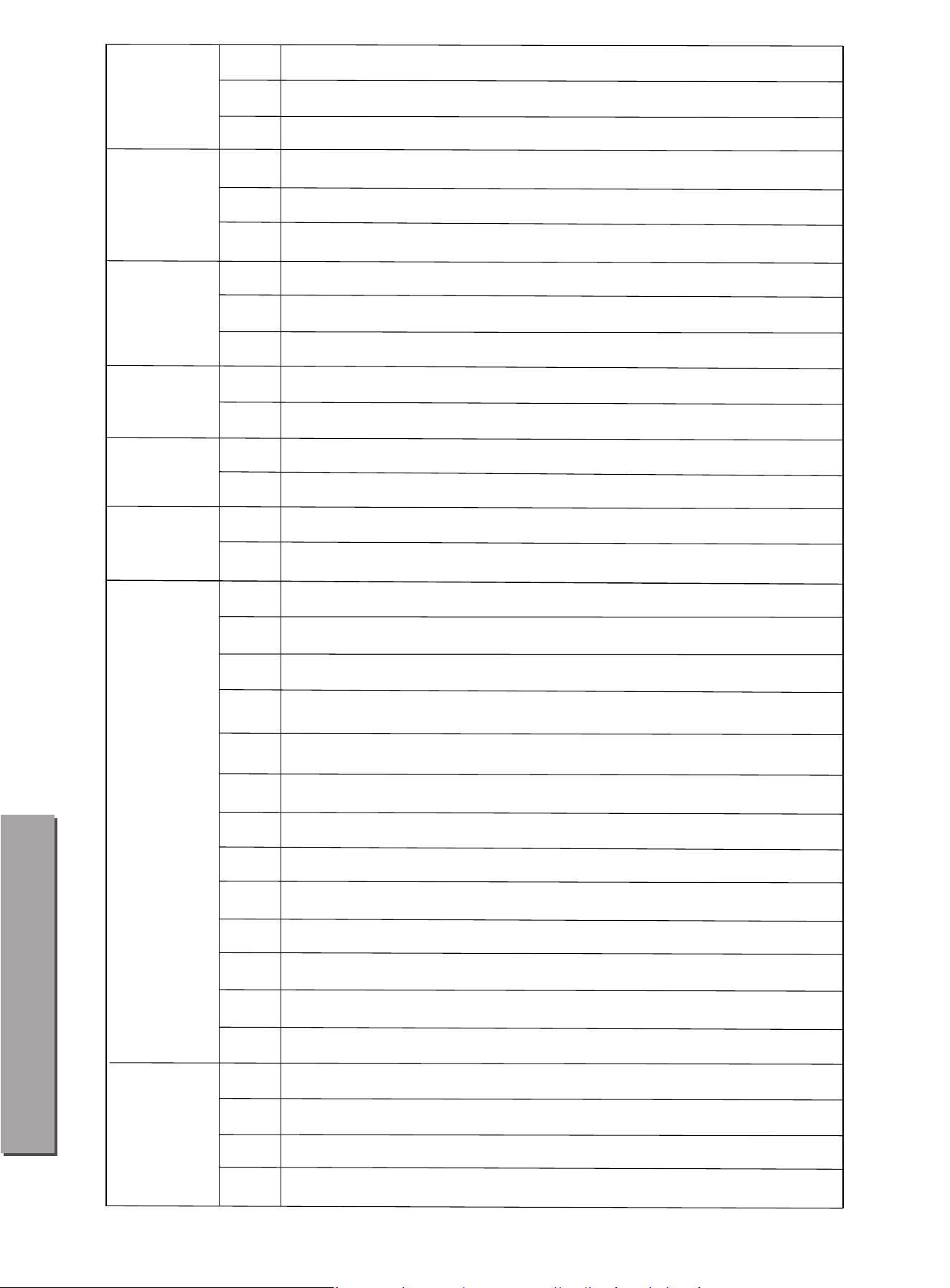
93 BOSSANOVA1
BOSSANOVA
94 BOSSANOVA2
95 BOSSANOVA3
96 SAMBA1
97 SAMBA2
98 SAMBA3
99 MAMBO1
100 MAMBO2
101 MAMBO3
102 REGGAE1
103 REGGAE2
104 SALSA1
105 SALSA2
106 MODERN1
107 MODERN2
109 DANCE2
110 DANCE3
111 DANCE4
112 DANCE5
113 DANCE6
114 DANCE7
115 70sDISCO1
116 70sDISCO2
117 DISCO1
118 DISCO2
119 DISCO3
120 VAPERWAVE
DANCE
121 FUNK1
122 FUNK2
123 FUNK3
124 FUNK4
FUNK
108 DANCE1
SAMBA
MAMBO
REGGAE
MODERN
SALSA
Appendix III Rhythm
29

125 FUNK5
126 FUNK6
127 FUNK7
128 R&B1
129 R&B2
130 R&B3
131 R&B4
132 R&B5
133 R&B6
134 16BEAT1
135 16BEAT2
R&B
136 16BEAT3
137 16BEAT4
138 16BEAT5
139 16BEAT6
140 16BEAT7
141 16BEAT8
142 POP1
143 POP2
144 POP3
145 POP4
POP
146 POP5
147 POP6
148 POP7
149 POP8
150 VINTAGE1
151 VINTAGE2
152 FOLKPOP
153 NEWAGE
154 POPBOSSA1
155 POPBOSSA2
156 POPRAP
157 POPSAMBA
FUNK
Appendix III Rhythm
30

163 8BEAT6
164 8BEAT7
165 8BEAT8
166 8BEAT9
167
8BEATROCK1
ROCK
168 8BEATROCK2
169 ROCK1
170 ROCK2
171 ROCK3
172
ROCK4
173 ROCK5
174 INDIEROCK1
175 INDIEROCK2
176 60thRock
177 GlamMetal1
178 GlamMetal2
179 GlamMetal3
180 PunkRock1
181 PunkRock2
182 PunkRock3
183 PunkRock4
184 PunkRock5
185 JIVEROCK
186 ROCKSHUFFLE
187 ROCK'N'ROLL1
188 ROCK'N'ROLL2
158 8BEAT1
159 8BEAT2
160 8BEAT3
161 8BEAT4
162 8BEAT5
Appendix III Rhythm
31
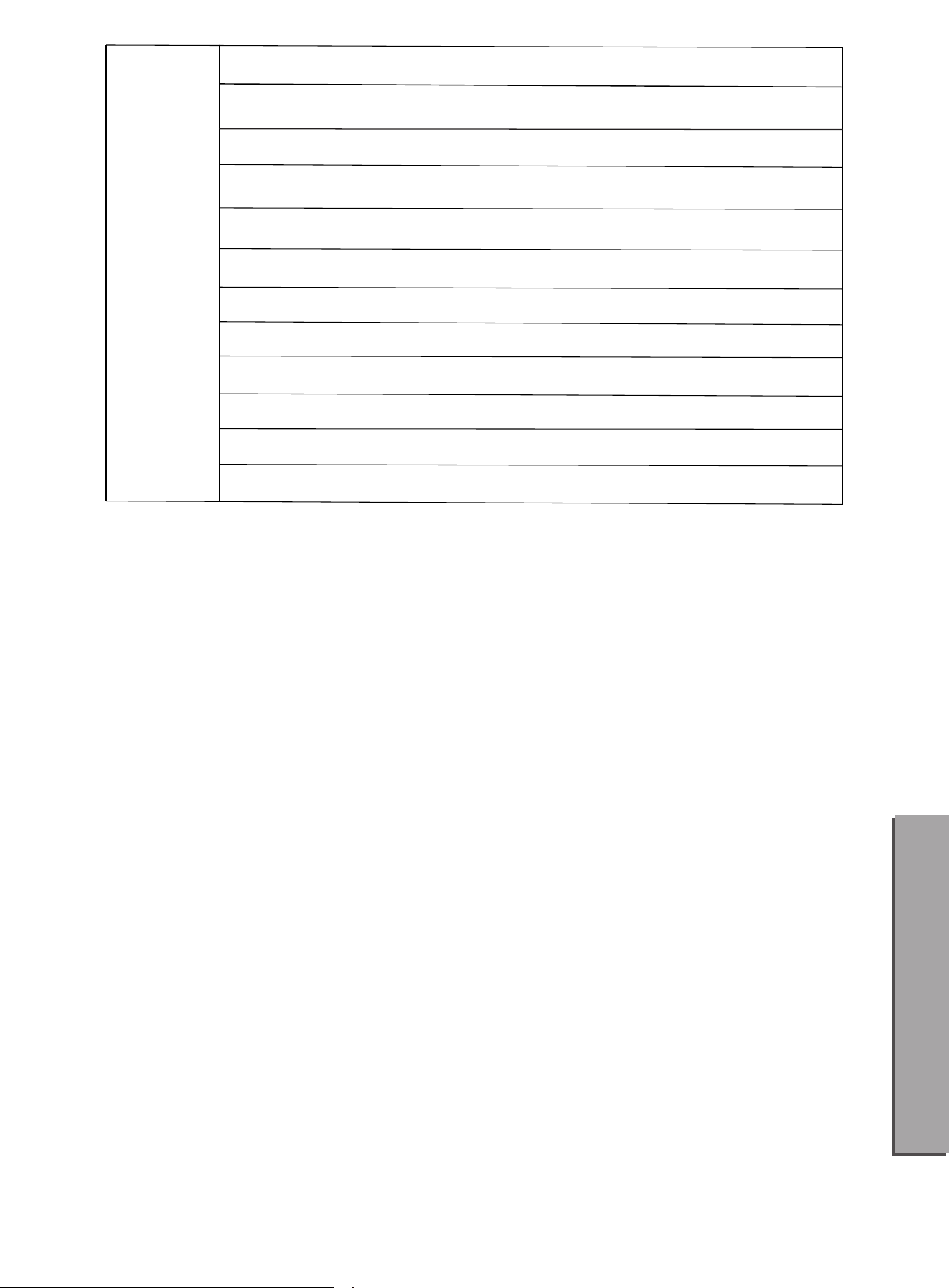
ORIENTAL
190 BEGUINE2
191 CARIBBEAN
192 BOLERO
193 DANGDUT
194 CHINA
195 JIANGNAN
196 XIZANG
197 YUNNAN
198 HAWAII
199
200
CHARLESTON
GUARACHA
BEGUINE1189
Appendix III Rhythm
32

品牌:
⽣产商:⼴州蓝深科技有限公司
⽹址:www.donner.com.cn
Donner Technology Co., Ltd.
www.donnerdeal.com
www.idonner.com