Shenzhen Chainway Information Technology Co., Ltd
1
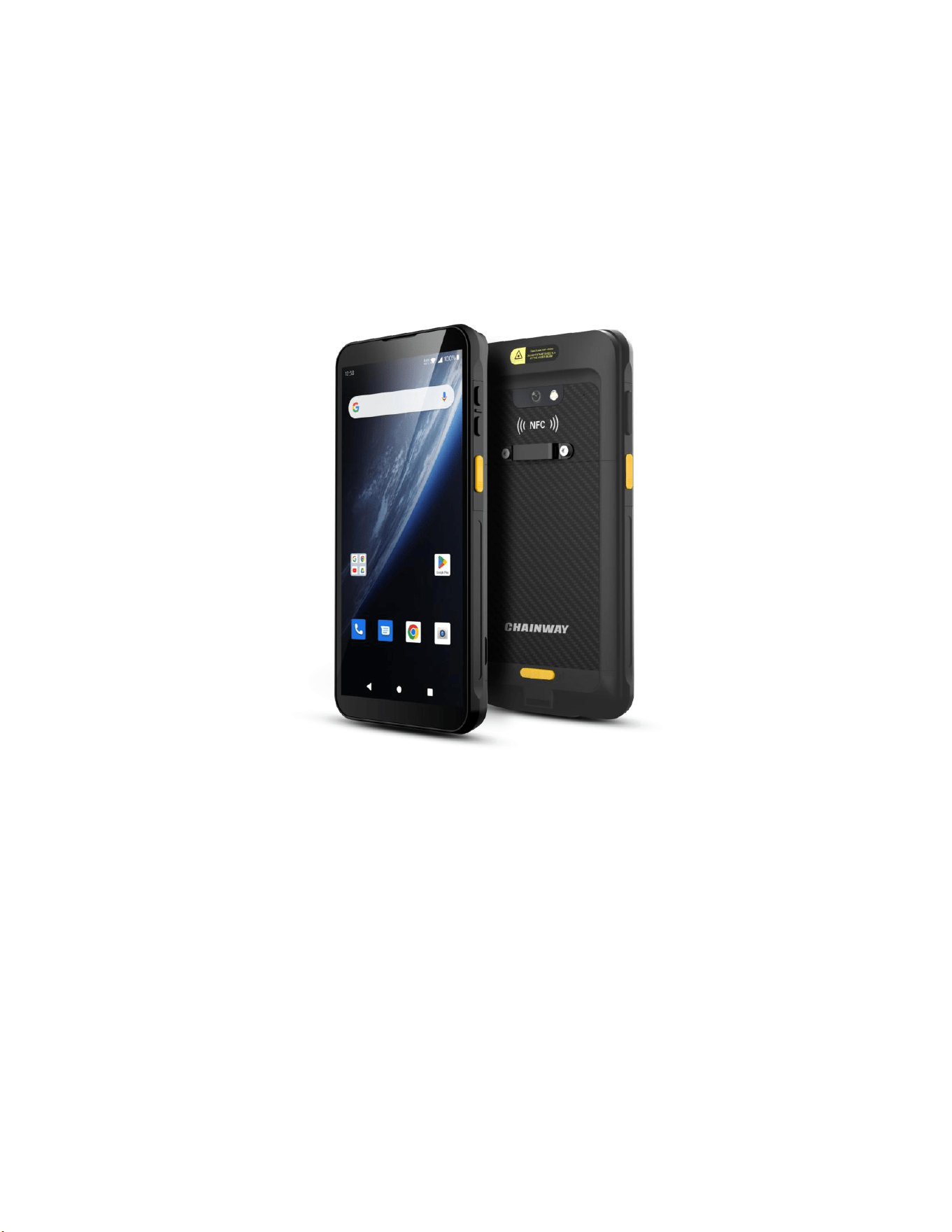
4G Smart Handheld Terminal
MC51S User Manual
Version V1.0 | 2026-07-09

Shenzhen Chainway Information Technology Co., Ltd
2
Table of Contents
Chapter 1 Introduction ..................................................................................................................... 3
Chapter 2 Device Appearance and Function Overview .......................................................... 4
Chapter 3 Phone Function ............................................................................................................... 7
Chapter 4 KeyboardEmulator — Barcode Reading/Writing ................................................. 9
Chapter 5 Other Functions in AppCenter ................................................................................. 11
Chapter 6 Device Specifications ................................................................................................... 15
Chapter 7 Statement ....................................................................................................................... 17

Shenzhen Chainway Information Technology Co., Ltd
3
Chapter 1 Introduction
1.1 Introduction
The Chainway MC51S is a new-generation 4G large-screen smart handheld terminal built for
efficient frontline operations, integrating powerful computing capability, high-speed wireless
communication, and multi-function data capture. Powered by a high-performance processor
and a 6-inch HD display (FHD optional), it supports 4G, Wi-Fi standards IEEE
802.11a/b/g/n/ac/ax (with 802.11ax corresponding to Wi-Fi 6), and Bluetooth 5.1, meeting the
demands of high-frequency data transmission and network stability in complex operating
environments.
Barcode scanning is optional, and NFC is supported. These data capture options make the
MC51S suitable for business scenarios including retail, warehousing, electric power, and asset
management. The device helps enterprises improve operational efficiency and achieve a stable
mobile application experience.
1.2 Battery Precautions
• Do not leave the battery idle for a long time, whether inside the product device or in
storage. If the battery has been in use for 6 months, check the charging status or dispose
of the battery properly.
• The battery service life is typically two to three years, with 300–500 charge cycles. A
complete charge cycle means fully charged, fully discharged, and then fully charged again.
• The service life of a rechargeable battery is limited and it will gradually lose its ability to
hold a charge. This loss (aging) is irreversible. When the battery loses capacity, the service
life (runtime) will shorten.
• When the battery is not in use or left idle, it continues to slowly (automatically) discharge.
Check the battery charging status frequently, and refer to the user manual for instructions
on how to check the battery charging indicator.
• Observe and record a fully charged battery that is not in use. Use the runtime of a new
battery as the baseline and compare it with batteries that have been in service longer.
Battery runtime varies depending on the product configuration and applications.
• Check the battery charging status regularly.
• When the battery runtime drops to about 80% of the original runtime, the battery charging
time will noticeably increase.
Note: Replacing the battery with an incorrect model may cause an explosion. Be sure to
dispose of used batteries according to the instructions.
Shenzhen Chainway Information Technology Co., Ltd
4
Chapter 2 Device Appearance and Function Overview
2.1 Device Appearance
Standard version
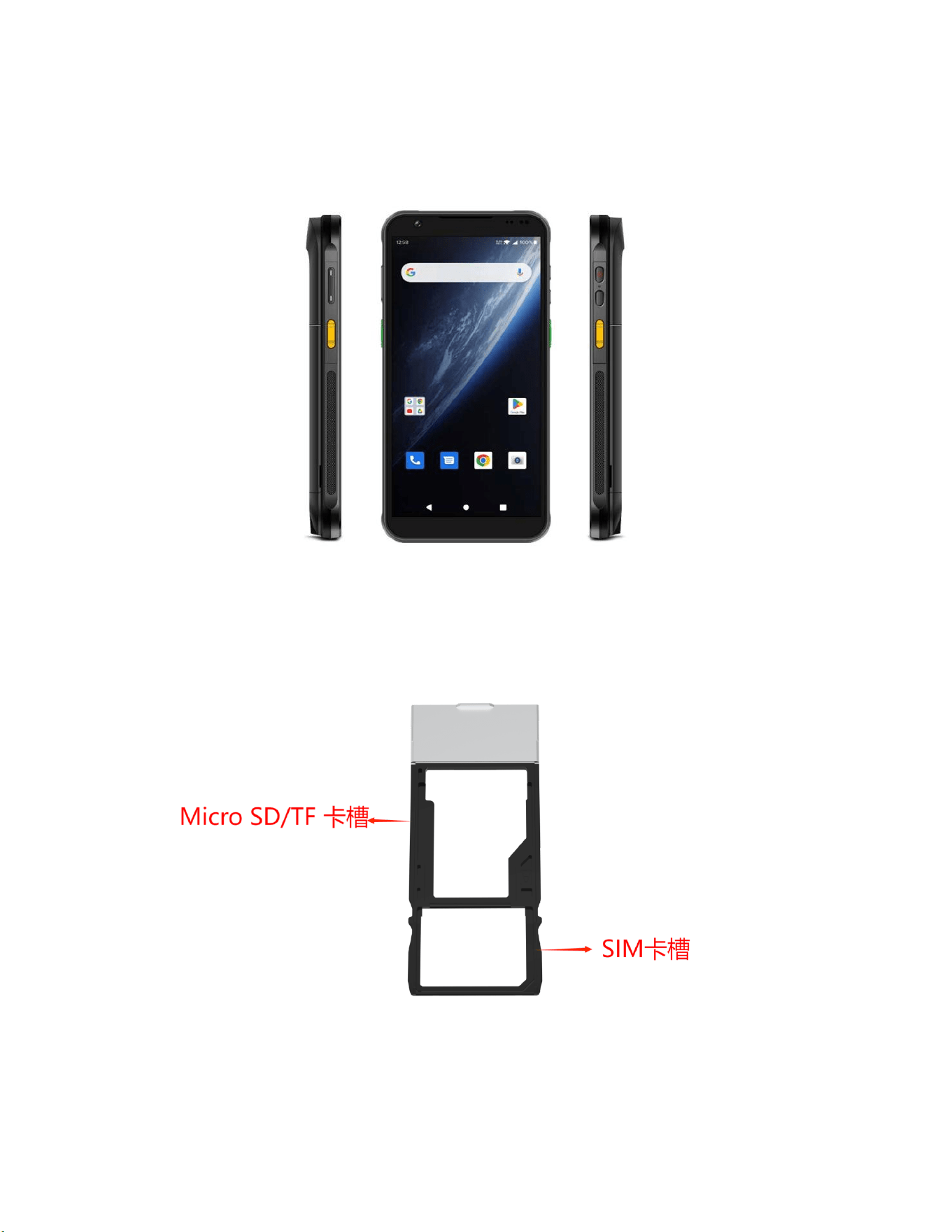
2.2 Installing the Micro SD/TF and SIM Cards
The card slots are located as follows:
Slot
Slot

Shenzhen Chainway Information Technology Co., Ltd
5
2.3 Battery Charging
Charge the battery through the USB port using the original adapter. Do not use adapters of
other brands to charge the device.
2.4 Keys and Function Area Overview
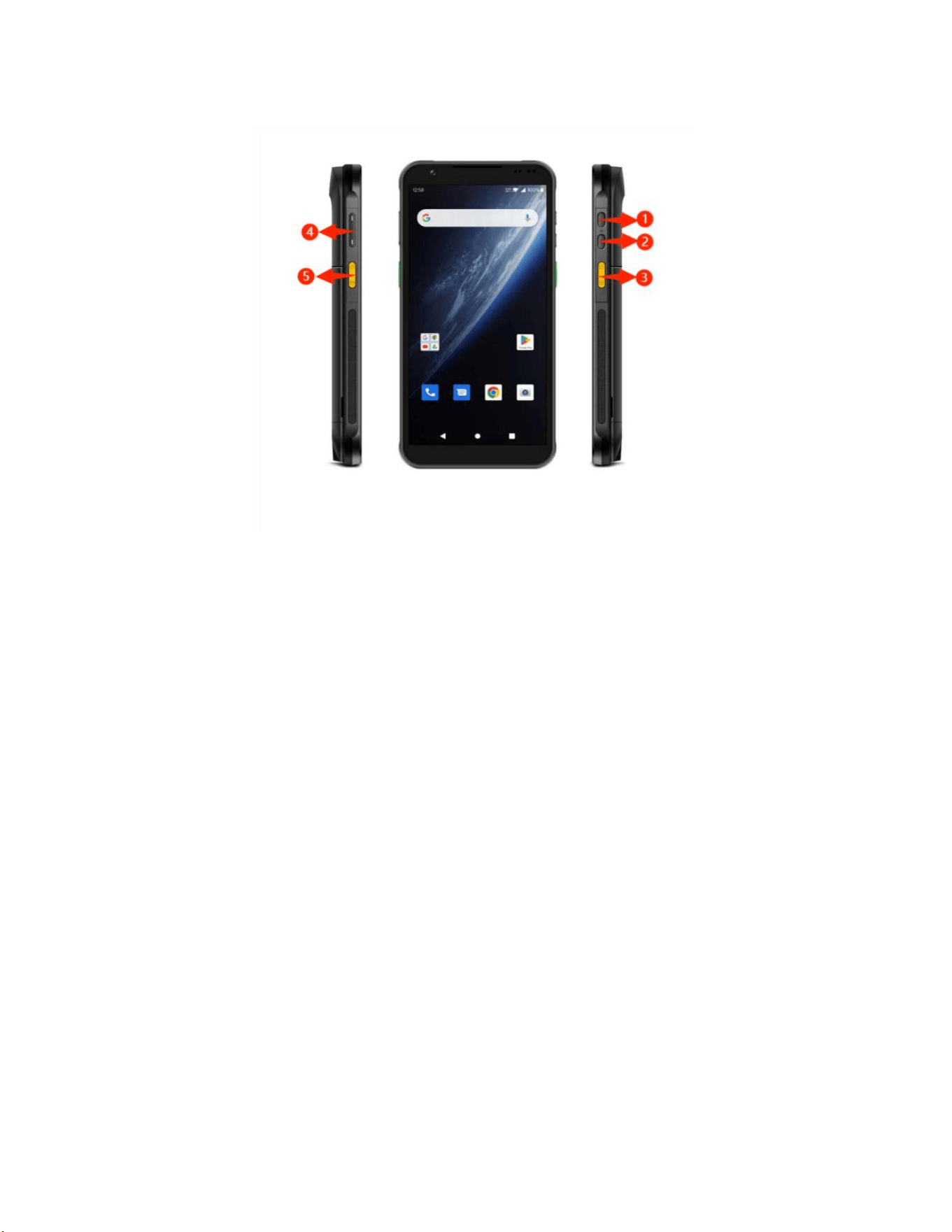
The standard MC51S has a power key, two scan keys, a volume (+/-) key, and a
multifunctional key. When fitted, the optional 2D scan engine is at the top of the device. The
rear camera and flash are on the back, with the NFC recognition area below the camera on
versions that support NFC.
Key Description:
Key
Description
1. Power Key
Located on the right side of the device, used to power the
device on/off.
2. Custom Key
Located on the right side of the device, used to customize
key functions.
Right Scan Key
Located on the right side of the device, used for barcode
scanning.
Volume Key
Located on the left side of the device, Volume +/-
Left Scan Key
Located on the left side of the device, used for barcode
scanning.
Shenzhen Chainway Information Technology Co., Ltd
6
Key Description Illustration
Shenzhen Chainway Information Technology Co., Ltd
7
Chapter 3 Phone Function
3.1 Making a Call
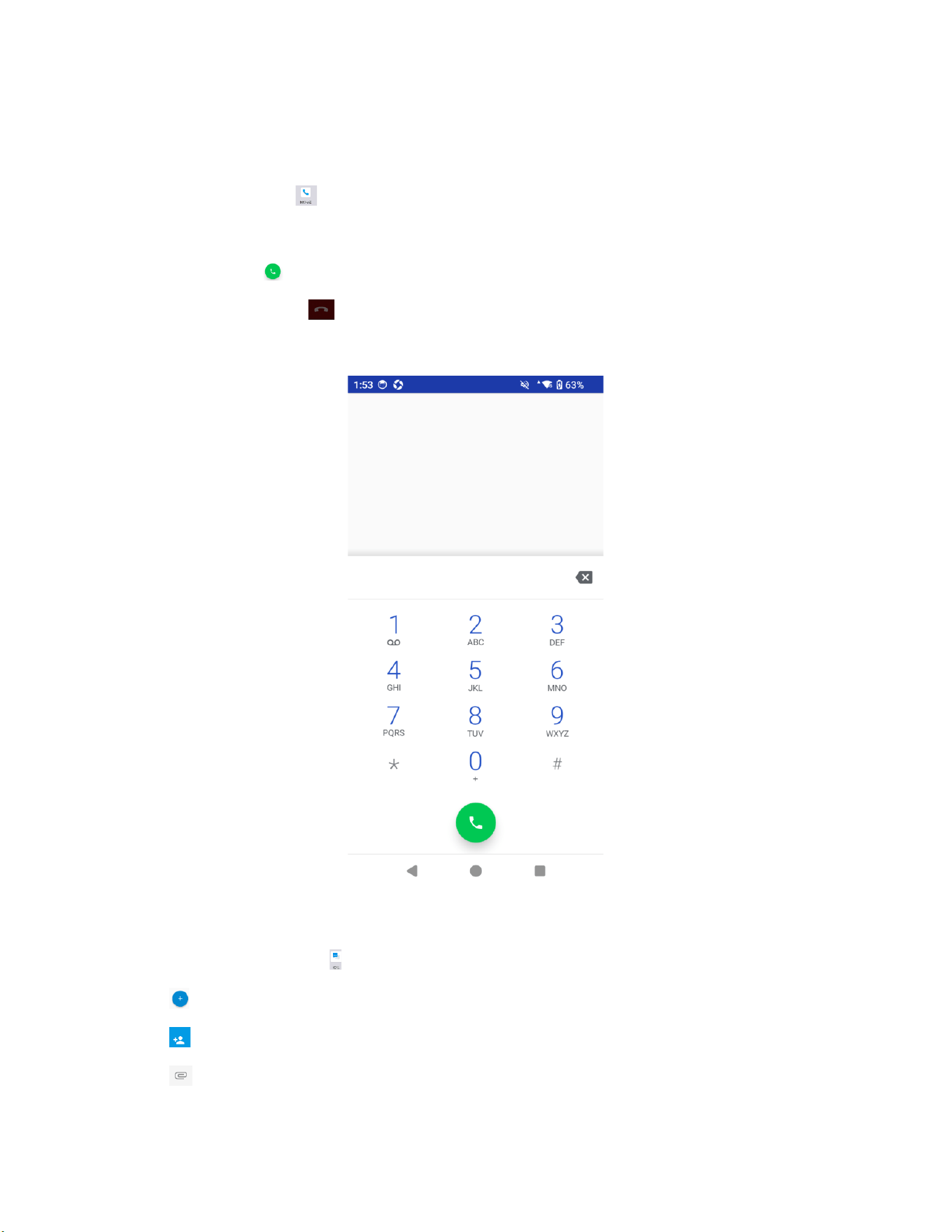
1. Tap the phone icon to enter the dial interface, which consists of three parts.
2. Tap the number keys to enter the phone number.
3. Tap the call key to make a call.
4. Tap the hang-up key to end the call.
Dial interface
3.2 SMS and MMS
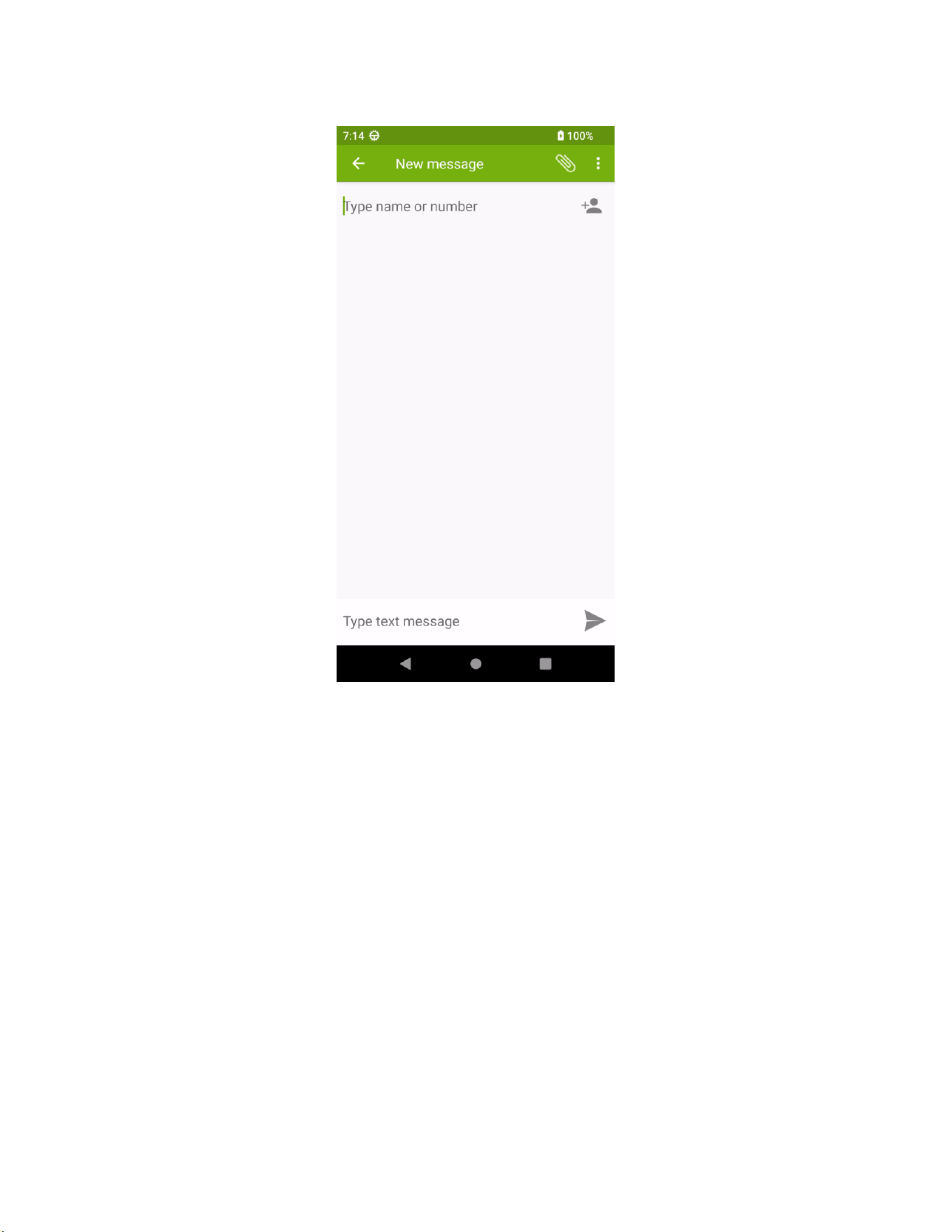
1. Tap the messaging icon to open the SMS window.
2. Tap to compose a message.
3. Tap to select a contact.
4. Tap to attach pictures or videos.
Shenzhen Chainway Information Technology Co., Ltd
8
SMS interface
Shenzhen Chainway Information Technology Co., Ltd
9
Chapter 4 KeyboardEmulator — Barcode Reading/Writing
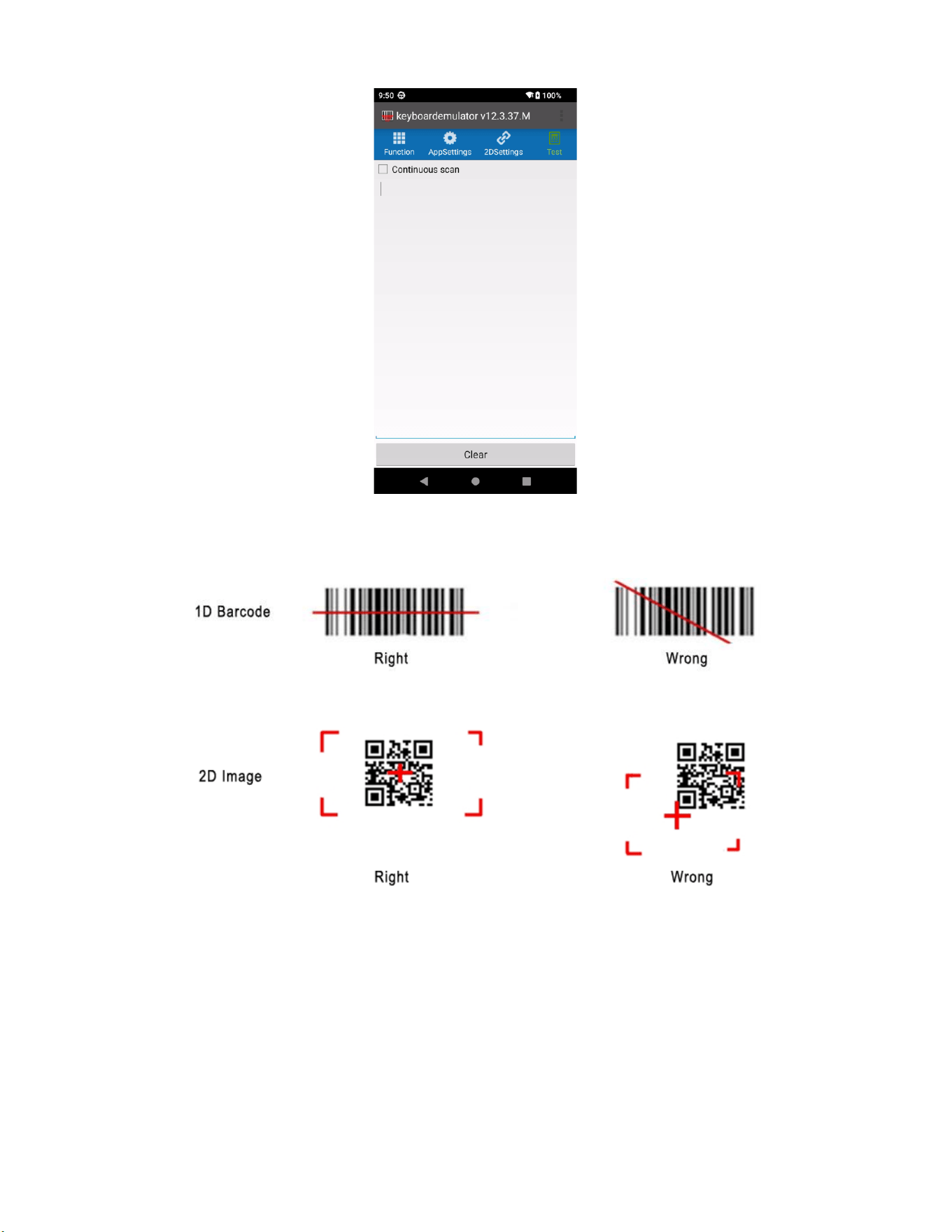
Use the KeyboardEmulator software to scan barcodes and QR codes.
4.1 Function
Turn off the "Enable scan assistant" switch, check "Barcode 2D", tap a number under
"KeyCode" to display the cursor, press a handle key or a side key on the device to configure
the key value, then turn the "Enable scan assistant" switch back on.
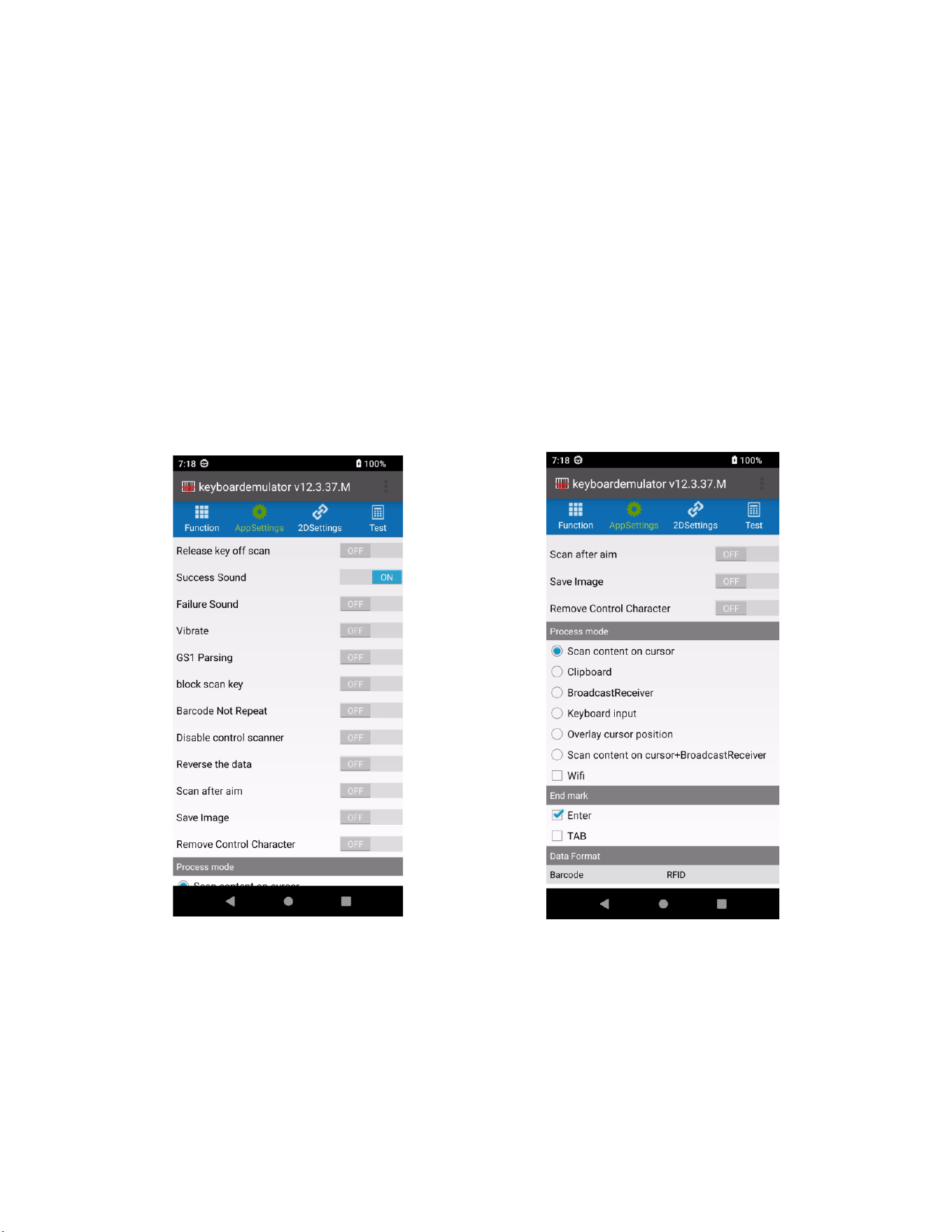
4.2 Application Settings
Configure the relevant settings of the KeyboardEmulator function, including processing mode,
suffix, etc., as needed.
4.3 Test
After configuration, you can perform scan test verification on the Test screen in the navigation
bar.
Shenzhen Chainway Information Technology Co., Ltd
10
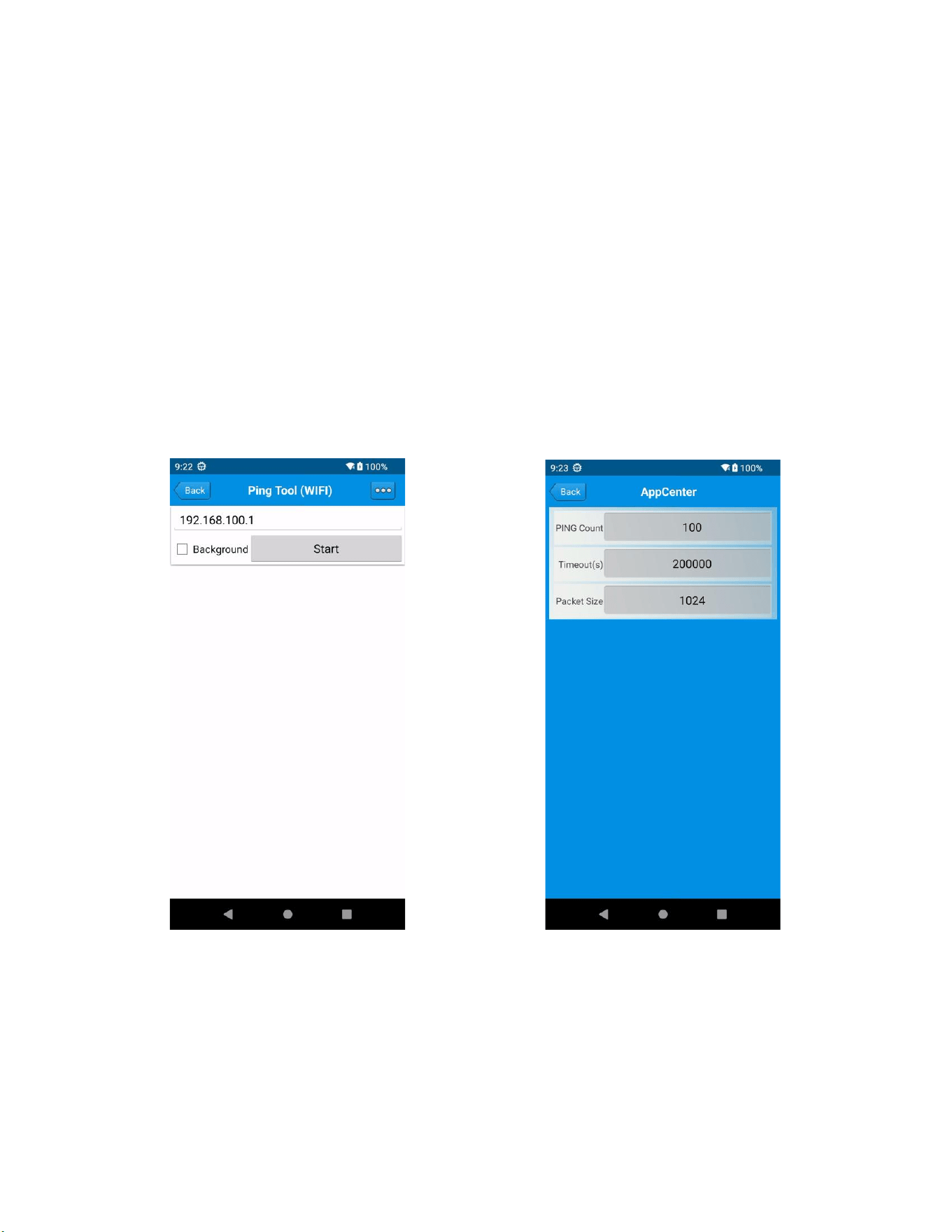
Note: Please perform barcode scanning correctly; otherwise, the scan will fail.
1D Barcode — incorrect vs. correct
2D Barcode — incorrect vs. correct
Shenzhen Chainway Information Technology Co., Ltd
11
Chapter 5 Other Functions in AppCenter
AppCenter includes NFC, positioning, network testing, and device sensor checks. The
commonly used functions are described below. To use other functions, open AppCenter, tap
the upper-left corner of the main page, and tap Configure to select them.
5.1 NFC
In the handheld device's AppCenter, open "NFC" to read tags and write information.
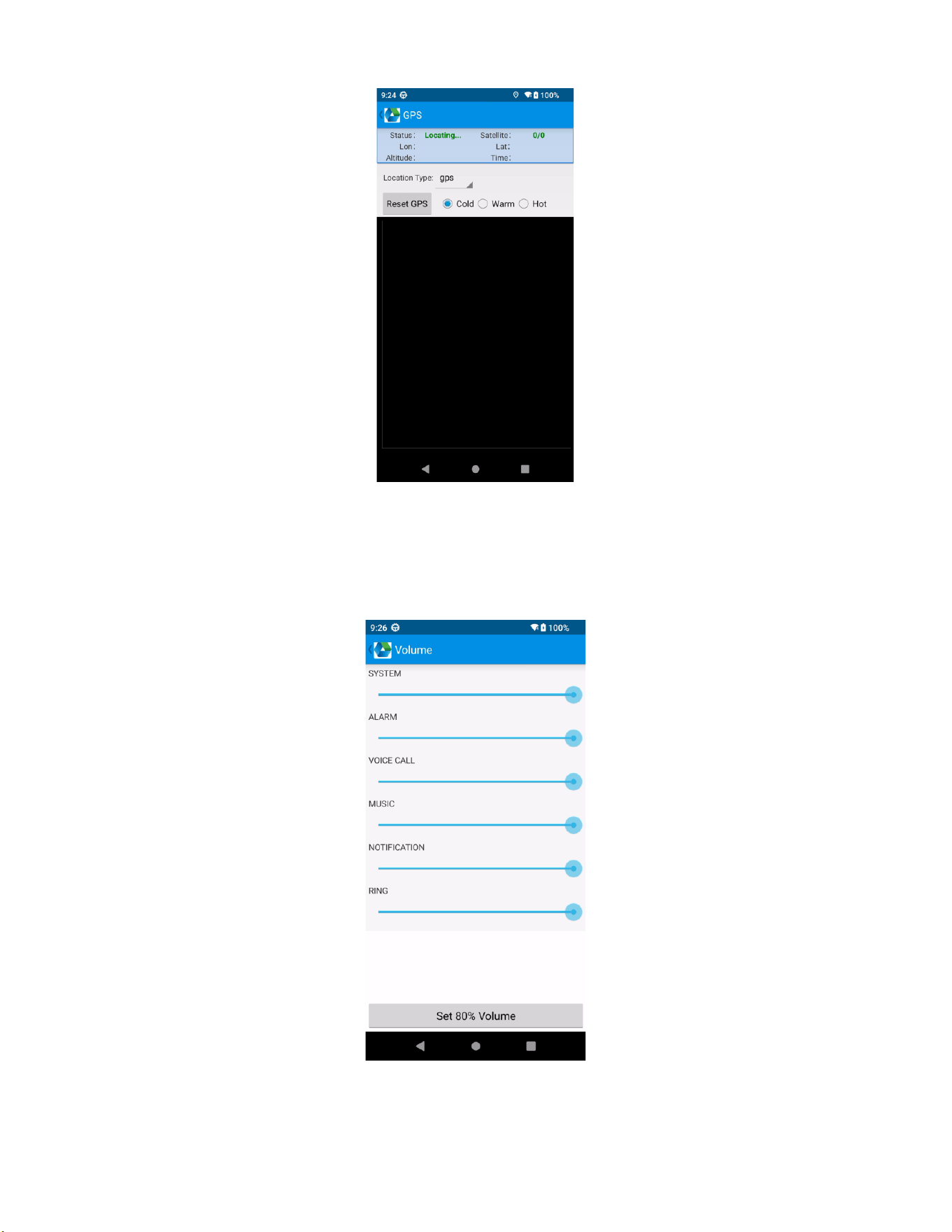
5.2 PING Tool
1. In the handheld device's AppCenter, open "PING Test".
2. Set PING parameters and select an external/internal address.
5.3 GPS
1. In the handheld device's AppCenter, open "GPS Positioning Test".
2. Set GPS parameters and obtain GPS data information.
Shenzhen Chainway Information Technology Co., Ltd
12
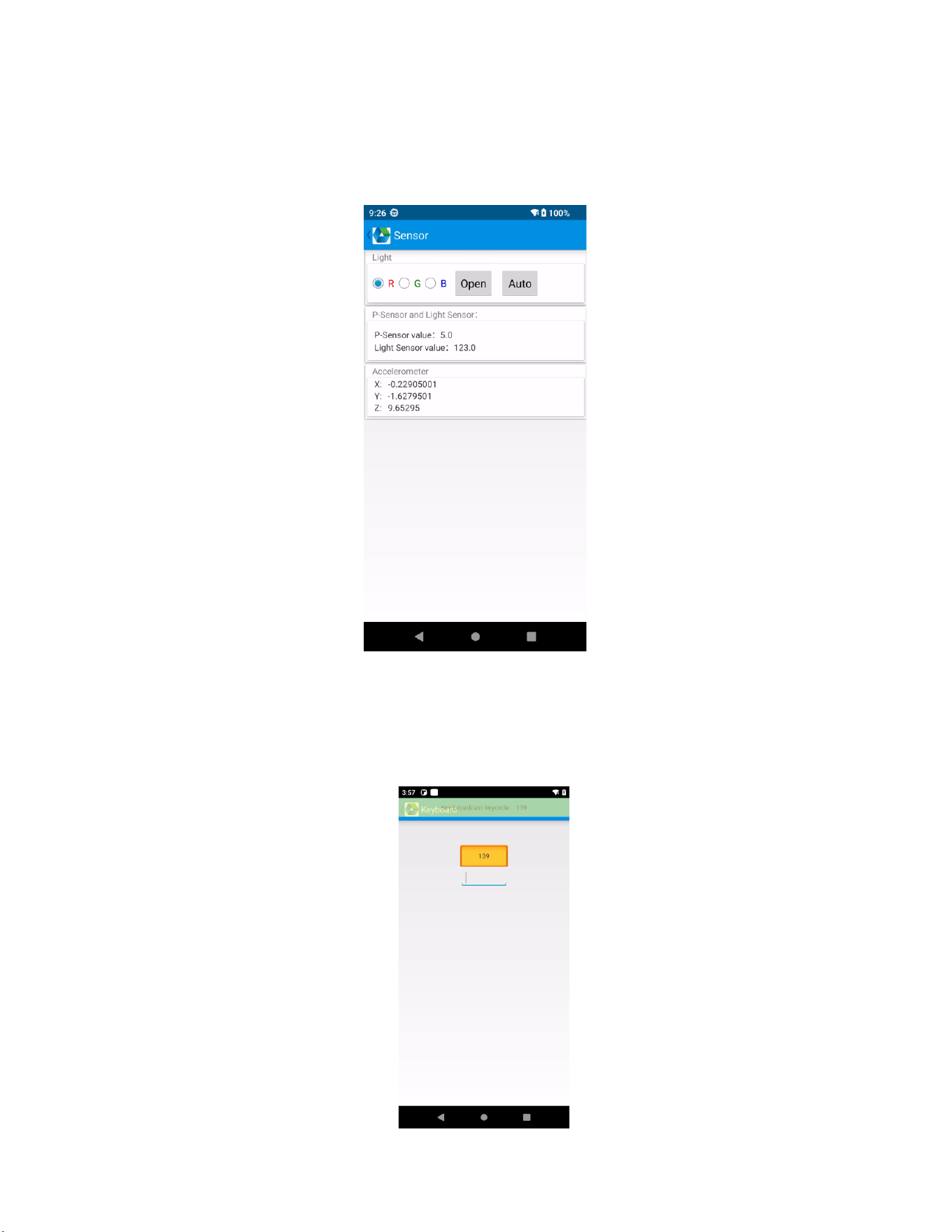
5.4 Volume Settings
1. In the handheld device's AppCenter, open "Volume Settings".
2. Set the volume as needed.
Shenzhen Chainway Information Technology Co., Ltd
13
5.5 Sensors
1. In the handheld device's AppCenter, open "Sensors".
2. Test the sensors as needed.
5.6 Key Test
1. In the handheld device's AppCenter, open "Key Test".
2. Set and test the key values of the device.
Shenzhen Chainway Information Technology Co., Ltd
14
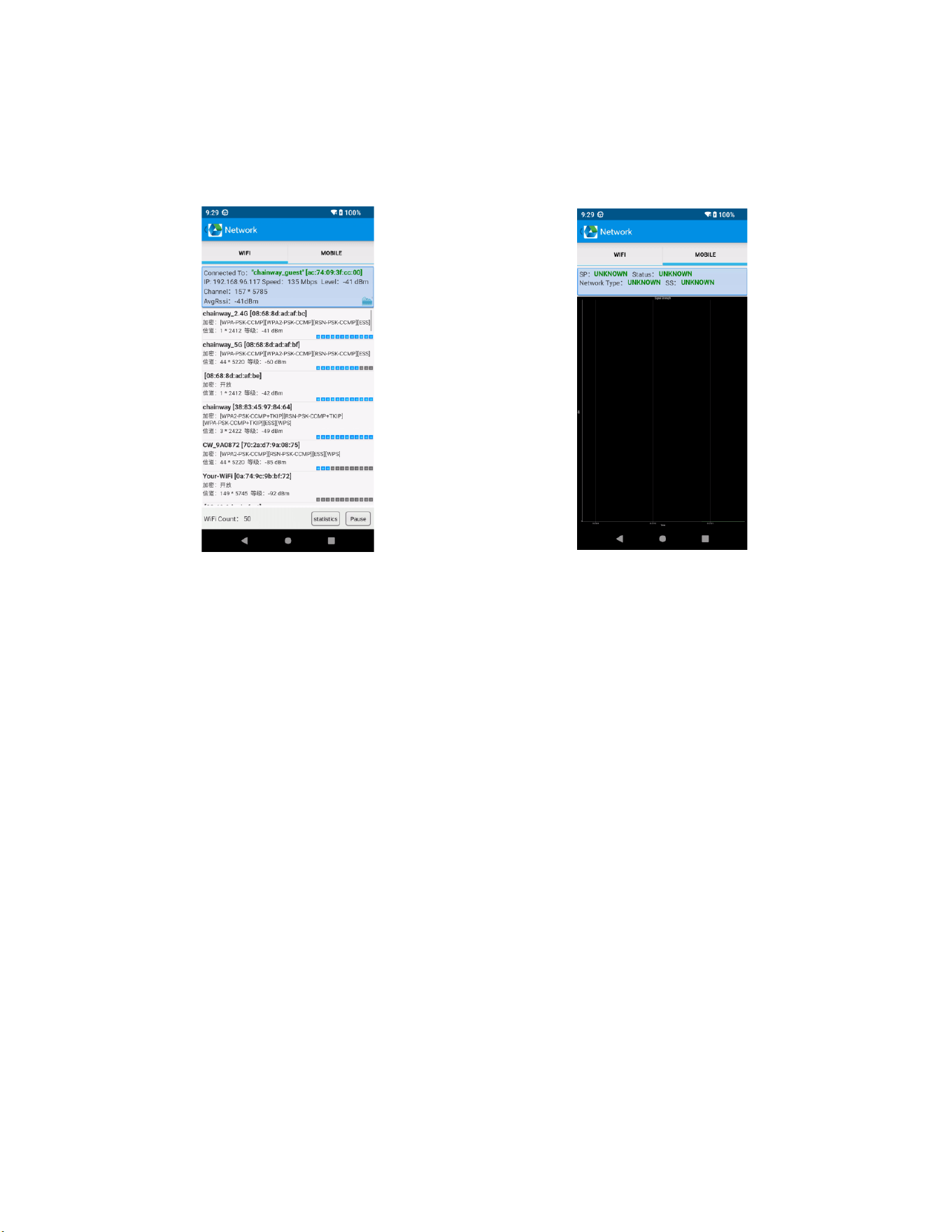
5.7 Network Signal
1. In the handheld device's AppCenter, open "Network Signal".
2. Test the Wi-Fi/mobile signal as needed.
5.8 Scanning
1. In AppCenter (press the multi-function key and the scan key at the same time to bring up
the AppCenter menu), open "1D Barcode Test" or "2D Barcode Test".
2. Tap the "Scan" button or use the scan key to start scanning. You can also set the auto-
interval parameter.

Shenzhen Chainway Information Technology Co., Ltd
15
Chapter 6 Device Specifications
Physical Parameters
Item
Specification
Dimensions
Standard version: 161.0 x 77.8 x 15.5 mm
Weight
Standard version: 297 g (including battery)
Display
6-inch, 1440 x 720; optional 2160 x 1080 FHD version
Touch Screen
Corning Gorilla Glass; supports multi-touch and operation
with gloves or wet hands
Keypad
1 Power Key + 2 Scan Keys + 1 Volume (+/-) Key + 1
Multifunctional Key
Battery
Removable 5000 mAh main battery (with fuel gauge);
supports QC3.0 fast charging and battery hot swap
Expansion Slot
1 SIM slot and 1 SIM/TF slot; eSIM supported (optional)
Communication
Interface
USB 3.0, Type-C, supports OTG, with water droplet detection
Bottom contacts: 2-pin contacts for charging
Rear contacts: 2-pin handle key extension; optional 12-pin
expansion
Audio
2 microphones (1 for noise cancellation), 1 speaker
Sensors
G-sensor, light sensor, proximity sensor, geomagnetic
sensor, and gyroscope/accelerometer 2-in-1 sensor
Camera
Front 5 MP camera; rear 16 MP camera with autofocus (with
flash)
Performance Parameters
Item
Specification
CPU
Octa-core, 2.8 GHz
Operating System
Android 16.0
RAM + ROM
UFS, 4 + 64 GB / 8 + 256 GB (optional)
Max Expansion
MicroSD card expansion up to 256 GB (supports 512 GB
ultra-capacity cards)
Environmental
Item
Specification
Operating Temperature
-20°C to 50°C
Storage Temperature
-40°C to 70°C
Humidity
5% RH to 95% RH (non-condensing)
Drop Specification
Passes 1.5 m drop test per MIL-STD-810H (US military
standard)

Shenzhen Chainway Information Technology Co., Ltd
16
Tumble Test
0.5 m, 1000 cycles, complies with IEC standard
Sealing
Host IP67 per IEC sealing specifications
ESD Protection
±15 kV air discharge, ±8 kV contact discharge
Data Communication
Item
Specification
WWAN (Global)
2G: GSM/EDGE/GPRS (850/900/1800/1900)
3G: WCDMA (B1/B2/B4/B5/B8)
4G: LTE-FDD:
B1/B2/B3/B4/B5/B7/B8/B12/B13/B17/B20/B25/B26/B28A/B28B
LTE-TDD: B34/B38/B39/B40/B41
WLAN
IEEE 802.11a/b/g/n/ac/ax (802.11ax corresponds to Wi-Fi 6);
fast roaming supported
VoLTE
Supports VoLTE HD video and voice calls
Bluetooth
Bluetooth 5.1; headset support
GNSS
Integrated GPS, BeiDou, GLONASS, and Galileo; supports A-
GPS
Data Capture
Item
Specification
Barcode Scan Engine
(Optional)
Zebra: SE4710, SE55; CM60
NFC
Operating frequency: 13.56 MHz
Protocols: ISO14443A/B, ISO15693, NFC-IP1, NFC-IP2, etc.
Tag standards: M1 cards (S50, S70), CPU cards, NFC tags, etc.
Read/write distance: 2-4 cm

Shenzhen Chainway Information Technology Co., Ltd
17
Chapter 7 Statement
This document is protected by copyright law. Any form of reproduction, modification,
distribution, or display of part or all of this document without authorization is an infringement.
This document is intended to provide users with instructions for using the MC51S device. The
information and guidelines described in this document are based on the best of our
knowledge and on the situation known to the author at the time of writing. However, because
the device may be upgraded, evolved, or subject to other changes, please note that the
content in this document may become outdated. We will do our best to ensure that the
information in this document is accurate, but we cannot guarantee the completeness, accuracy,
or timeliness of the information.
This document is for reference and guidance only and does not provide any form of warranty
or guarantee. The author is not liable for any misunderstanding, incorrect operation, loss, or
damage. For more information about this document or support for using the application,
please refer to the official website or contact the Chainway technical support team.
Shenzhen Chainway Information Technology Co., Ltd. reserves all rights. Without prior written
permission from the author, this document may not be used for any other purpose.
Shenzhen Chainway Information Technology Co., Ltd
18
CE Maintenance
1.Use careful with the earphone maybe excessive sound pressure from earphones and headphones
can cause hearing loss.
2.Risk of explosion if battery is replaced by an incorrect type. Dispose of used batteries according to
the instructions.
3.The product shall only be connected to a USB interface of version Type-C. 4.Adapter
shall be installed near the equipment and shall be easily accessible. 5.EUT Operating
temperature range: 0° C to 40° C .
6.Adapter: The plug considered as disconnect device of adapter
Power supply and ADP(rating):
Input: AC 100-240V 50/60Hz 0.6A
Output: DC 5.0V 3.0A or 9.0V 2.0A or 12.0V 1.5A 18.0W
7.The device complies with RF specifications when the device used at 5mm you’re your body. 8.To prevent
possible hearing damage. Do not listen at high volume levels for long periods.
This product may be used in the following European member states subject to the following restrictions. For
products that operate in the frequency band 5.150 to 5.350 GHz, wireless access systems (WAS), including
radio local area networks (RLANs), shall be restricted to indoor use.
Declaration of Conformity
Shenzhen Chainway Information Technology Co., Ltd hereby declares that this Mobile Data Terminal
is in compliance with the essential requirements and other relevant provisions of Directive 2014/53/EU.
In accordance with Article 10(2) and Article 10(10),This product is allowed to be used in all EU
member states.

Shenzhen Chainway Information Technology Co., Ltd
19
Frequency Bands:
GSM 900: 880 MHz to 915 MHz
GSM1800: 1710 MHz to 1785 MHz
WCDMA Band I: 1920 MHz to 19780 MHz
WCDMA Band VIII: 880 MHz to 915 MHz
LTE Band 1: 1920 MHz to 1980 MHz
LTE Band 3: 1710 MHz to 1785 MHz
LTE Band 7: 2500 MHz to 2570 MHz
LTE Band 8: 880 MHz to 915 MHz
LTE Band 20: 832 MHz to 862 MHz
LTE Band 28: 703 MHz to 736 MHz
LTE Band 34: 2010MHz to 2025MHz
LTE Band 38: 2570 MHz to 2620 MHz
LTE Band 40: 2305 MHz to 2400MHz
LTE Band 41: 2496 MHz to 2690MHz
WLAN 802.11b/g/n/ax20: 2412 MHz to 2472MHz
WLAN 802.11a/n20/n40/ac20/ac40/ac80/ax20/ax40/ax80: 5150 MHz to 5250 MHz
WLAN 802.11a/n20/n40/ac20/ac40/ac80/ax20/ax40/ax80: 5250 MHz to 5350 MHz
WLAN 802.11a/n20/n40/ac20/ac40/ac80/ax20/ax40/ax80: 5470 MHz to 5725 MHz
WLAN 802.11a/n20/n40/ac20/ac40/ac80/ax20/ax40/ax80: 5725 MHz to 5850 MHz
Bluetooth: 2402 MHz to 2480 MHz
GPS: 1575.42 MHz ± 1.023 MHz
BDS: 1561.098MHz
GLONASS: 1602 MHz
GALILEO: 1575.42 MHz
NFC: 13.56MHz
Max power:
GSM 900: 33.39dBm
GSM1800: 22.96dBm
WCDMA Band I: 22.77dBm
WCDMA Band VIII: 23.24dBm
LTE Band 1: 23.42dBm
LTE Band 3: 23.35dBm
LTE Band 7: 23.06dBm
LTE Band 8: 23.61dBm
LTE Band 20: 23.34dBm
LTE Band 28: 24.11dBm
LTE Band 34: 22.37dBm
LTE Band 38: 22.47dBm
LTE Band 40: 22.12dBm
LTE Band 41: 22.39dBm
2.4GHz WLAN: 16.62dBm
5GHz WLAN: 15.45dBm
5.8GHz WLAN: 11.45dBm
Bluetooth: 7.44dBm
BLE: 7.20dBm
NFC: -6.48dBuA/m at 3m

Shenzhen Chainway Information Technology Co., Ltd
20
Federal Communication Commission Interference Statement
FCC ID: 2AC6AMC51S
This device complies with Part 15 of the FCC Rules. Operation is subject to the following two
conditions: (1) This device may not cause harmful interference, and (2) this device must accept any
interference received, including interference that may cause undesired operation.
This equipment has been tested and found to comply with the limits for a Class B digital device,
pursuant to Part 15 of the FCC Rules. These limits are designed to provide reasonable protection
against harmful interference in a residential installation. This equipment generates, uses and can
radiate radio frequency energy and, if not installed and used in accordance with the instructions,
may cause harmful interference to radio communications. However, there is no guarantee that
interference will not occur in a particular installation. If this equipment does cause harmful
interference to radio or television reception, which can be determined by turning the equipment off
and on, the user is encouraged to try to correct the interference by one of the following measures:
-Reorient or relocate the receiving antenna.
-Increase the separation between the equipment and receiver.
-Connect the equipment into an outlet on a circuit different from that to which the receiver is
connected.
-Consult the dealer or an experienced radio/TV technician for help.
FCC Caution: Any changes or modifications not expressly approved by the party responsible for
compliance could void the user's authority to operate this equipment.
Radiation Exposure Statement:
This device meets the government's requirements for exposure to radio waves. The guidelines are
based on standards that were developed by independent scientific organizations through periodic
and thorough evaluation of scientific studies. The standards include a substantial safety margin
designed to assure the safety of all persons regardless of age or health. The SAR limit of USA
(FCC) is 1.6 W/kg averaged. Device types: Mobile Data Terminal (FCC ID: 2AC6AMC51S) has also
been tested against this SAR limit. SAR information can be viewed on‐line at
http://www.fcc.gov/oet/ea/fccid/. Please use the device FCC ID number for search. This device was
tested simulation typical 0mm to head and 10mm to body. To maintain compliance with FCC RF
exposure requirements, use accessories should maintain a separation distance between the user's
bodies mentioned above, use accessories should not contain metallic components in its assembly,
the use of accessories that do not satisfy these requirements may not comply with FCC RF
exposure requirements, and should be avoided.