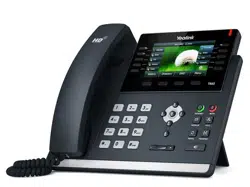

Cordless IP Phone
User Manual
For model:
V103IP/V103IPHDKIT
Version: V1.0

FUNCTION
1. Support DHCP automatic distribution of IP addresses and other parameters
2. Support PPPOE agreement (ADSL, cable modem access use)
3. The program can be upgraded via HTTP, HTTPS, FTP or TFTP
4. Dynamic voice detection; comfort noise generation; voice buffer technology
5. Hold function
6. Speed dial
7. DND (Do Not Disturb), blacklist, call restriction, hotline function
8. Voicemail
9. Using a standard web browser (such as IE) for setting
10. SSH remote management function
11. Classified management for common user password and remote user password
12. Support * * code function
13. Call Waiting Feature
14. Auto answer
15. Call park
16. Call transfer
17. Tripartite conference
18. 802.1x Authentication
19. LLDP Feature
Standard and Protocols
◆ IEEE802.3/802.3u10 Base T/100Base
◆ PPPoE : Point to point protocol over Ethernet
◆ D H CP Cl i ent and Server: Dynamic Host Configuration Protocol
◆Support G.711a/u, G.729, G.723.1, G.722, iLBC speech encoding algorithm
◆ SI P RFC3261, RFC2543
◆ TCP/I P: I nternet transmission control protocol
◆ RTP: Real-time Transfer Protocol
◆ RTCP: Real-time Control Protocol
◆ V A D /C N G : can save bandwidth
◆ TFTP: Trivial File Transfer Protocol
◆ Frequency Range: 1921.536-1928.448 MHz
Conditions of use:
Temperature:-10℃~40℃
Humidity:10%~95%

HARDWARE OVERVIEW
The default WAN port is a DHCP client, the user connects it to the ADSL or WAN
port switch, LAN port connects to the computer; you can use the administrator
username "admin" and password "admin" to set the login password.
Only WAN port supports POE.
SOFTWARE OVERVIEW
Network Protocol
Tone
SIP v2(RFC3261)
IP/TCP/UDP/RTP/RTCP
IP/ICMP/ARP/RARP/SNTP
TFTP Client/DHCP Client/PPPOE
Client
Telnet/HTTP Server
DNS Clients
Ring Tone
Ring Back Tone
Dial Tone
Busy Tone
Phone Function
Volume Adjustment
Speed dial key
Codec
G.711a
G.711u:
G.723.1:
G.729
G.722
iLBC
IP Assignment
IP (Static IP)
DHCP
PPPoE
Voice Quality
Security
VAD
:
Voice activity detection
AGC: Automatic Gain Control
AEC:Automatic Echo Cancellation
SRTP: Secure Real-time Transport
Protocol
HTTP 1.1 basic/digest
authentication for Web setup
MD5 for SIP authentication
(RFC2069/RFC2617)
QoS
QoS field
Call Function
NAT Traversal
Call Hold
Call Waiting
Call forward
Caller ID
STUN
Configuration
Web Browser
Keypad
DTMF
Firmware Upgrade

IN Band
RFC2833
SIP Info
TFTP
HTTP
FTP
HTTPS
You could make a phone call after the phone configuration items are set up. Please
check if the cable is properly connected before use.
1. Basic call
Making the call by handset:After the handset is placed off-hook, dial and use “#”
key as the end dialing symbol.
Making the call by speakerphone:After the phone is placed off-hook, dial and use “#”
key as the end dialing symbol.
2. Hold Key
You can keep and release the call of current line. The only one line is presently in a
call, the other line must be placed on hold.
1) Place the call of one line on hold
Make sure that the call you want to keep is enabled, then press "Hold" key.
2) Release Hold
Make sure that the call is initiated, then press "Hold" key.
3. Volume Control
Press “VOL▲” to increase the volume, while press “VOL▼” to decrease the volume.
4. Mute
During the call, if you do not want to let them hear your own voice, you can press
"Mute" key, so that the other party cannot hear your voice, and you can hear the
sound of other end.
5. Memory Key
In addition to serving as a storage function, but also can be used as hold, DND,
transfer and conference function. See the web call feature function set.
6. Tripartite Conference Function
If the phone is Line1 hold, line2 in the call, press the conference key, which can
achieve three party conference.
During the three party conference, the base unit and handset cannot be switched each
other.
7. Transfer

The telephone is in conversation with A, A wants to call B, you can press the Transfer
key, and then call B, press the Transfer button again after B hooking off, the transfer
function can be achieved.
8. Call Park
After the call park feature is enabled, and Hold Key Active and Idle Hold Key related
parameters are configured, we can perform the function of park. This function is only
applicable to the base unit.
9. Redial
After the base unit is stand by or the handset is off-hooked, press Redial key, the last
dialed number will be dialed out to achieve the redial function.
10. Register the Handset
Place the handset into the cradle of base unit. The “Message” LED on base unit will
blink. Initiate the handset registration. The “Message” LED on handset will also
begin to blink. At that time, if the base unit and handset have found out each other, the
“Message” LED on base unit will stop blinking and the “Message” LED on
handset will also stop blinking and emit the prompt sound of successful registration.
Note: each base unit can register up to 4 handsets.
11. Toggle between Base Unit and Handset
When the base unit is in conversation, press “Line1”/“Line2” key on handset, the call
will switch over to the handset. If the handset is in conversation, press “SPEAKER”
key, the call will switch over to the base unit.
Shortcut Keys
1. * * 47 #, Broadcast the current ip address of the phone.
2. * * 39 #, Broadcast the current software version of the phone.
3. * * 85 #, Broadcast the current phonevlan ID.
4. * * 83 #, Broadcast current tftp server address.
5. * * 72 #, Restart the phone.
6. * * 36 #, Broadcast the current account of the phone.
7. * * 33 * password #, Clear all the current configuration of the phone, and
automatically restart.
8. * * 77 * password * config ID #, The phone downloads the configuration file from
the tftp server and restarts automatically after the download is successful.
9. * * 87 * password * VLAN ID #, Modify the vlan ID of the phone; modify the vlan
id success, the prompt success, and broadcast the modified vlan. ID, and then restart
the phone.
10. * * 89 * < keypad password > * < TFTP server IP address > * < configid> #, The
phone downloads the configuration file from the tftp server and restarts automatically
after the download is successful.

11. The following ways: the phone is connected to the POE static settings after the
start
* * 73 * 123 # Set the phone wan port to a fixed ip address mode.
* * 74 * 123 * 192.168.18.111 # Set a fixed ip address, I heard ip broadcast
voice after the success of the amendment.
* * 76 * 123 * 255.255.255.0 # Set subnet, I heard the broadcast ip address of
the voice after the success of the amendment.
* * 49 * 123 *192.168.18.1 # Set the gateway, I heard the ip address of the
broadcast voice after the success of the amendment.
**72# after the phone restarts, input IP address in the PC’s LAN browser, enter
the WEB setup IP account settings.
BATTERY SAFETY GUIDELINES
● The area in which the Headset is charged should be clear of debris and combustible
materials or chemicals. Improper charging use may result in a fire, explosion, or other
hazard.
● To charge the Headset Battery, the Headset and USB Charger temperatures must be
between 41°F - 95°F (5°C- 35°C).
● Do not use incompatible Batteries and/or Chargers. Use of an incompatible USB Ch
arger
may present a risk of fire, explosion, leakage, or other hazard. If you have any questio
ns
about the compatibility of a USB Charger, contact your Distributor Customer Support.
Do not disassemble, open, crush, bend, deform, puncture, or shred.
●
Severe impact from dropping any Battery-Operated Device on a hard surface could ca
use
the Battery to overheat.
●
Do not short circuit Headset or alow metallic or conductive objects to contact the US
B
Charging Slot.
●
Do not modify or remanufacture, attempt to insert foreign objects into the USB Charg
ing
Slot, immerse or expose to water or other liquids, or expose to fre, explosion, or other
hazard.
●
Do not leave or store the Headset in or near areas that might get very hot, such as ina
parked vehicle, near a radiator or other heat source.
●
Do not place Headset into a microwave oven, conventional oven, toaster oven, washer,

dryer, dishwasher, or other mechanical devices.
● Headset usage by children should be supervised.
● Please follow local regulations to promptly dispose of used Headset.
● Do not dispose of Headset in fire.
●
In the event of a Battery leak, do not allow the liquid to come in contact with the skin
or
eyes. If contact is made, wash the affected area with large amounts of water and seek
medical advice.
●
If you suspect damage to your Headset, contact Blue TIger Customer Support to arran
ge for
inspection.
FCC Warning:
Any Changes or modifications not expressly approved by the party responsible for
compliance could void the user's authority to operate the equipment.
This device complies with part 15 of the FCC Rules. Operation is subject to the
following two conditions: (1) This device may not cause harmful interference, and (2)
this device must accept any interference received, including interference that may
cause undesired operation.
Note: This equipment has been tested and found to comply with the limits for a Class
B digital device, pursuant to part 15 of the FCC Rules. These limits are designed to
provide reasonable protection against harmful interference in a residential installation.
This equipment generates, uses and can radiate radio frequency energy and, if not
installed and used in accordance with the instructions, may cause harmful interference
to radio communications. However, there is no guarantee that interference will not
occur in a particular installation. If this equipment does cause harmful interference to
radio or television reception, which can be determined by turning the equipment off
and on, the user is encouraged to try to correct the interference by one or more of the
following measures:
—Reorient or relocate the receiving antenna.
—Increase the separation between the equipment and receiver.
—Connect the equipment into an outlet on a circuit different from that to which the
receiver is connected.
—Consult the dealer or an experienced radio/TV technician for help.
Privacy of communications may not be ensured when using this phone.
FCC Radiation Exposure Statement:

This base complies with FCC radiation exposure limits set forth for an uncontrolled
environment. This base should be installed and operated with minimum distance
20cm between the radiator& your body.
The handset has been tested and comply with FCC SAR limits.
1. This equipment complies with Part 68 of the FCC rules and the requirements
adopted by the ACTA. On the bottom of this equipment is a label that contains,
among other information, a product identifier in the format US:AAAEQ##TXXXX. If
requested, this number must be provided to the telephone company.
2. A plug and jack used to connect this equipment to the premises wiring and
telephone network must comply with the applicable FCC Part 68 rules and
requirements adopted by the ACTA. A compliant telephone cord and modular plug is
provided with this product. It is designed to be connected to a compatible modular
jack that is also compliant. See installation instructions for details.
3. If this equipment [US 2N3IPNANV103IP] causes harm to the telephone network,
the telephone company will notify you in advance that temporary discontinuance of
service may be required. But if advance notice isn't practical, the telephone company
will notify the customer as soon as possible. Also, you will be advised of your right to
file a complaint with the FCC if you believe it is necessary.
4. The telephone company may make changes in its facilities, equipment, operations
or procedures that could affect the operation of the equipment. If this happens the
telephone company will provide advance notice in order for you to make necessary
modifications to maintain uninterrupted service.
5. If trouble is experienced with this equipment
[US 2N3IPNANV103IP], for repair or warranty information, Service can be
facilitated through our office at:
U.S. Agent Company name: Cetis, Inc.
Address: 4975 N. 30th St. Colorado Springs, CO 80919 USA
Tel: +1 719 571 9231
Fax: N/A
If the equipment is causing harm to the telephone network, the telephone company
may request that you disconnect the equipment until the problem is resolved.
6. Please follow instructions for repairing if any (e.g. battery replacement section);
otherwise do not alternate or repair any parts of device except specified. For repair
procedures, follow the instructions outlined under the limited warranty.
7. Connection to party line service is subject to state tariffs. Contact the state public
utility commission, public service commission or corporation commission for
information.
8. If your home has specially wired alarm equipment connected to the telephone line,
ensure the installation of this [IP] does not disable your alarm equipment. If you have
questions about what will disable alarm equipment, consult your telephone company
or a qualified installer.
9. If the telephone company requests information on what equipment is connected to

their lines, inform them of:
a) The ringer equivalence number [0.5A]
b) The USOC jack required [RJ45]
c) Facility Interface Codes (“FIC”) [N/A]
d) Service Order Codes (“SOC”) [N/A]
e) The FCC Registration Number [US 2N3IPNANV103IP]
10. The REN is used to determine the number of devices that may be connected to a
telephone line. Excessive RENs on a telephone line may result in the devices not
ringing in response to an incoming call. In most but not all areas, the sum of RENs
should not exceed five (5.0). To be certain of the number of devices that may be
connected to a line, as determined by the total RENs, contact the local telephone
company. The REN for this product is part of the product identifier that has the format
US:AAAEQ##TXXXX. The digits represented by ## are the REN without a decimal
point. For this product the FCC Registration number is
[US 2N3IPNANV103IP] indicates the REN would be NAN.
11.We suggest the customers use a surge arrestor to protect the device.
12.This equipment is hearing aid compatible.