Portable Wireless Party Speaker
EN DE FR IT ES JP CN
Model No.: DOSS PartyBoom
User Manual
US:
UK:
FR:
IT :
CA:
DE:
ES:
JP:
EVATOST CONSULTING LTD
Suite 11, First Floor, Moy Road Business
Centre, Taffs Well, Cardiff, Wales, CF15 7QR
contact@evatmaster.com
eVatmaster Consulting GmbH
Bettinastr. 30
60325 Frankfurt am Main,Germany
contact@evatmaster.com
REP
UK
REP
EC
EN
1. Packing content
• DOSS PartyBoom Speaker x 1
• USB-C Charging Cable x 1
• User Manual x 1
2. Specifications
Input: DC 5V 2A
Capacity: 10400mAh
Charging time: 6 hours
Playtime: Up to 12 hours (at 50% volume)
Bluetooth range: up to 20 m/66 ft
Weight: 4.3 kg/9.4 lbs
Size: 9.9 x 10.9 x 14.0 inches
Warranty: One-year limited
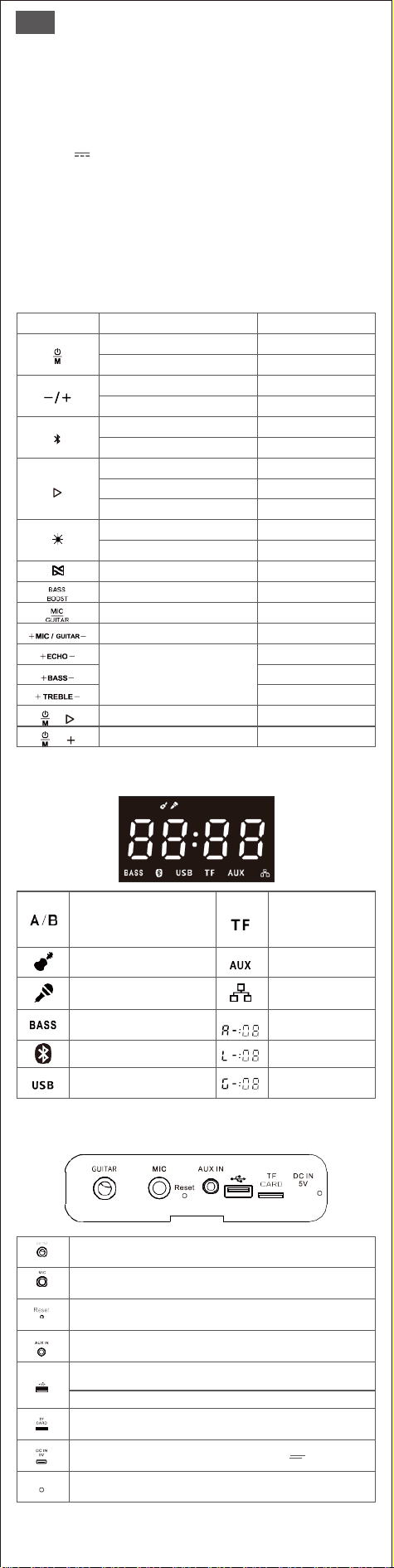
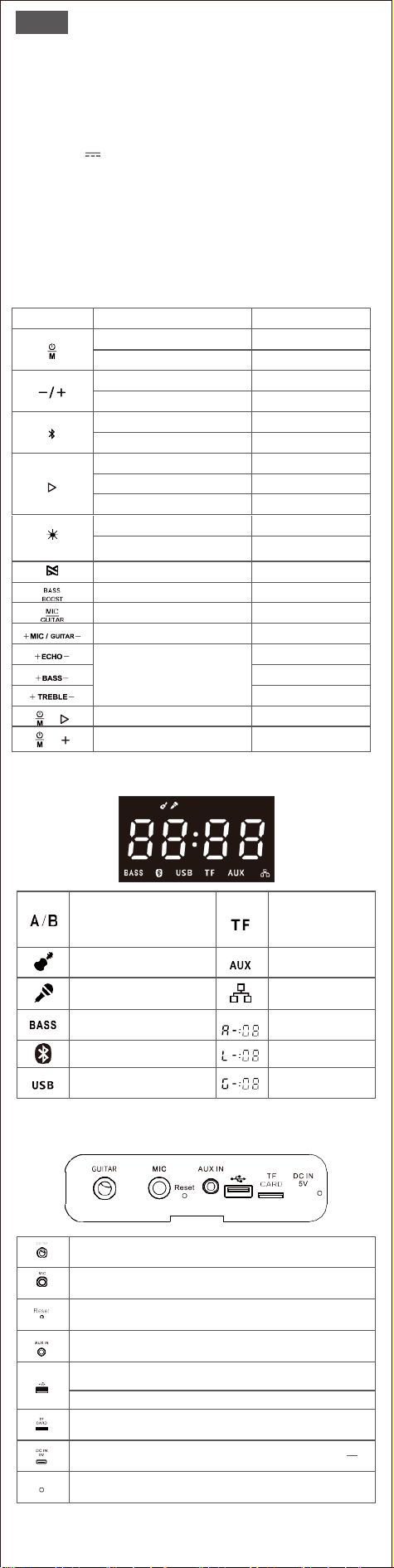
3. Buttons and Controls
Buttons
Function
How to control
Power on/off
Hold for 2s
Switch audio modes
Press
Volume down/up
Press
Skip forward/backward
Press and hold
Bluetooth pairing
Press
Enter/Exit TWS mode
Press and hold
Play/Pause
Press
Disconnect device
Press and hold
Reconnect with the last device
Press
Four multi-color light effects
Press to change
Single color light effects
Press and hold to enter, and
then press to change colors
Enter/Exit PartySync mode
Press and hold
Bass up/off
Press
Enter MIC/GUITAR modes
before adjusting the volume
Press
Adjust MIC/GUITAR volum
Press
Adjust the echo/bass/treble
level when a MIC is connected
Press
Press
Press
Restore factory setting
Press and hold them for 3s
Check speaker version
Press and hold them for 3s
while Bluetooth disconnect
4. LED Display Indicators
A B
In TWS/PartySync mode
light-up "A" is the primary speaker
light-up "B" is the secondary speaker(s)
Light on in TF mode
Light on in Guitar mode
Light on in Aux in mode
Light on in Microphone mode
Light on in PartySync
(pairing) mode
Light on if BassBoost add
Light off if BassBoost cancel
Audio Volume (0 -16)
Flash in Bluetooth/TWS pairing mode
Light on in Bluetooth/TWS mode
MIC Volume (0-16)
Light on in USB audio mode
Guitar Volume (0 -16)
5. Connections
Connect to an electronic guitar via φ6.3mm cable (not included)
Connect to a wired/wireless microphone (not included)
Reset the speaker with a paper clip when all buttons can’t be control
Play via φ3.5mm Auxiliary cable (not included)
Play via USB storage device (Max capacity: 256GB
Support MP3/WAV/WMA/FLAC files; Play in the download/copy order)
Charge other devices
Play via TF card. (Max capacity: 64GB Support MP3/WAV/WMA
/FLAC files; Play in the download/copy order)
Charging port (Please make sure the plug output is 5V 2A)
Charging: steady red Fully charged: light off

Tips
• Only one audio source can be played at a time. The priority order is USB > TF
CARD > Bluetooth > AUX IN.
• The speaker will auto-off after 30 minutes without audio input.
• To avoid sudden loud sound from the speaker, always turn down the volume
to minimum level on the Bluetooth device and speaker(s) before playback
• Please feel free to contact support team at [email protected] if you need
any assistance while using this speaker.
6. Pairing DOSS PartyBoom with Your Device
1. Turn on the speaker, press to enter into Bluetooth pairing.
2. Turn on Bluetooth on your device, and select DOSS PartyBoom in the
Bluetooth list.
3. Once paired, will be steady white with a prompt tone.
• When the speaker connects with two devices at the same time via
Bluetooth, tracks played from the last connected device.
7. True Wireless Stereo Pairing
1. Turn on the two speakers and long press on both simultaneously.
2. The speakers will enter stereo pairing mode, flashes white.
3. Once paired, the LED display of primary speaker will light in "A", and the
secondary speaker will light in "B”.
4. Turn on Bluetooth on your device and select DOSS PartyBoom.
5. Once paired, on the LED display will light in white.
• In TWS mode, if you want to play via PartySync mode, press and hold to
exist TWS mode first.
• If there are two devices connected to the speaker, long press to disconnect
the playing one and enter TWS pairing mode.
• In TWS mode, press on both speakers if you want to active the Extra Bass.
8. PartySync Mode
1. Turn on one speaker and get it paired with your device. Then long press to
enter the PartySync mode. The speaker will be the primary speaker and
light in “A” on the LED display.
2. Turn on the other speaker(s) and long press to enter the PartySync
mode. The speaker(s) will be the secondary speaker(s) and light in “B” on the
LED display.
• In PartySync mode, if you want to play via TWS mode, press and hold
to exist PartySync mode first.
• If there are two devices connected to the speaker, long press to
disconnect the playing one and enter TWS pairing mode.
• In PartySync mode, press on all speakers if you want to active the
Extra Bass, and audio control can only be adjusted on the primary speaker.
9. Warning
• Avoid dropping or hitting the speaker.
• Avoid exposing to extreme temperature.
• Avoid using the speaker near a microwave.
• Never disassemble or repair the speaker.
• Never use any corrosive cleanser/oil to clean.
• Never leave the speaker in a car parked in the sun.
• Never attempt to charge the speaker while it is wet.
10. FCC Statement
This equipment has been tested and found to comply with the limits for a Class
B digital device, pursuant to part 15 of the FCC Rules. These limits are designed
to provide reasonable protection against harmful interference in a residential
installation. This equipment generates, uses and can radiate radio frequency
energy and, if not installed and used in accordance with the instructions, may
cause harmful interference to radio communications. However, there is no
guarantee that interference will not occur in a particular installation. If this
equipment does cause harmful interference to radio or television reception,
which can be determined by turning the equipment off and on, the user is
encouraged to try to correct the interference by one or more of the following
measures:
• Reorient or relocate the receiving antenna.
• Increase the separation between the equipment and receiver.
• Connect the equipment into an outlet on a circuit different from that to which
the receiver is connected.
• Consult the dealer or an experienced radio/TV technician for help.
Caution: Any changes or modifications to this device not explicitly approved by
manufacturer could void your authority to operate this equipment.This device
complies with part 15 of the FCC Rules. Operation is subject to the following
two conditions:
(1) This device may not cause harmful interference, and (2) this device must
accept any interference received, including interference that may cause
undesired operation.
RF Exposure Information
The device has been evaluated to meet general RF exposure requirement.
The device can be used in portable exposure condition without restriction.
DE
1. Paketinhalt
• DOSS PartyBoom Lautsprecher x 1
• USB-C-Ladekabel x 1
• Benutzerhandbuch x 1
2. Spezifikationen
Eingang: DC 5V 2A
Kapazität: 10400mAh
Ladezeit: 6 Stunden
Spielzeit: Bis zu 12 Stunden (bei 50 % Lautstärke)
Bluetooth-Reichweite: DE bis zu 20m/66ft
Gewicht: 4.3 kg/9.4 lbs
Größe: 25.10 x 27.58 x 35.59 cm
Garantie: Ein Jahr begrenzt
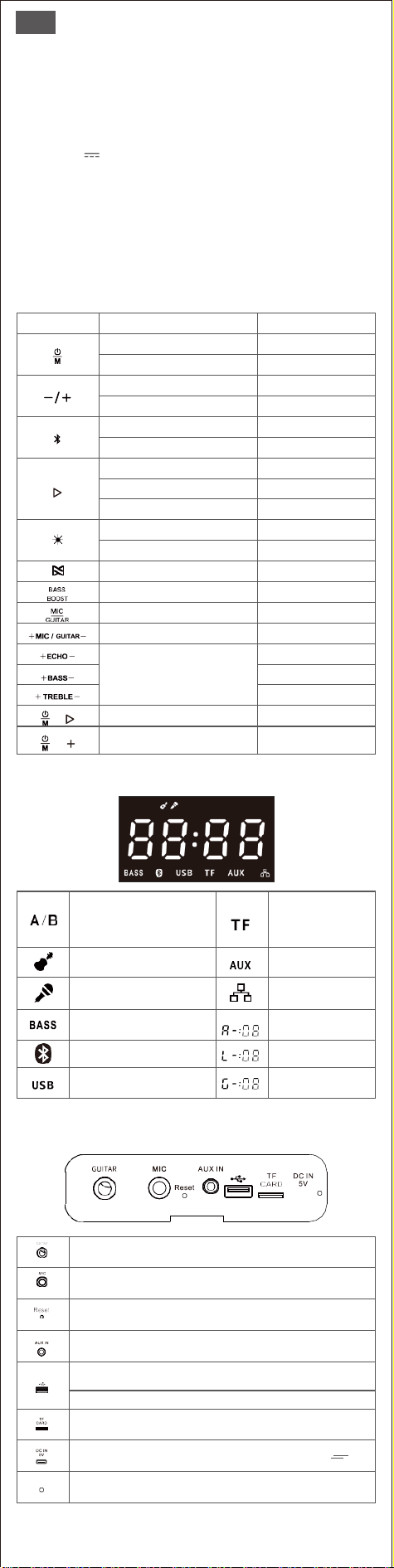
3. Tasten und Bedienelemente
Tasten
Funktion
Wie zu kontrollieren
Einschalten / Ausschalten
2s halten
Audiomodi wechseln
Drücken
Lautstärke verringern/erhöhen
Drücken
Vorwärts/rückwärts springen
Drücken und halten
Bluetooth-Kopplung
Drücken
TWS-Modus aufrufen/verlassen
Drücken und halten
Spiel/pause
Drücken
Gerät trennen
Drücken und halten
Verbinden Sie sich erneut
mit dem letzten Gerät
Drücken
Vier mehrfarbige Lichteffekte
Zum Ändern drücken
Einfarbige Lichteffekte
Halten Sie gedrückt, um
einzutreten, und dann drücken,
Aufrufen/Beenden des
PartySync-Modus
Drücken und halten
Bass hoch/aus
Drücken
Rufen Sie die MIC/GITARRE-Modi auf,
bevor Sie die Lautstärke einstellen
Drücken
Stellen Sie die MIC/
GITARRE-Lautstärke ein
Drücken
Passen Sie den Echo-/Bass-
/Höhenpegel an, wenn ein
Mikrofon angeschlossen ist
Drücken
Drücken
Drücken
Wiederherstellen der
Werkseinstellung
Halten Sie sie 3 Sekunden
lang gedrückt
Überprüfen Sie die
Lautsprecherversion
Halten Sie sie 3 Sekunden
lang gedrückt während
Bluetooth getrennt wird
4. LED-Anzeigen
A B
Im TWS/PartySync-Modus
das aufleuchtende „A“ ist der primäre
LautsprecherAufleuchtendes "B" ist
der/die sekundäre(n) Lautsprecher
Leuchtet im TF-Modus
Leuchtet im Gitarrenmodus
Leuchtet im Aux-In-Modus
Leuchtet im Mikrofonmodus
Leuchtet im PartySync
(Pairing)-Modus
Leuchtet auf, wenn BassBoost
hinzugefügt wird Licht aus, wenn
BassBoost abbricht
Lautstärke (0 -16)
Blinkt im Bluetooth/TWS-Pairing-
Modus. Leuchtet im Bluetooth/
TWS-Modus
MIC-Lautstärke (0-16)
Leuchtet im USB-Audiomodus
Gitarrenlautstärke (0 -16)
5. Verbindungen
Anschluss an eine E-Gitarre über φ6,3-mm-Kabel (nicht im Lieferumfang
enthalten)
Anschluss an ein kabelgebundenes/kabelloses Mikrofon (nicht im Lieferumfang
enthalten)
Setzen Sie den Lautsprecher mit einer Büroklammer zurück, wenn sich nicht
alle Tasten steuern lassen
Wiedergabe über φ3,5-mm-Auxiliary-Kabel (nicht im Lieferumfang enthalten)
Wiedergabe über USB-Speichergerät (Max. Kapazität: 256 GB Unterstützt MP3
/WAV/WMA/FLAC-Dateien; Wiedergabe in Download-/Kopierreihenfolge)
Laden Sie andere Geräte auf
Spielen Sie über TF-Karte. (Max. Kapazität: 64 GB Unterstützt MP3/WAV/WMA
/FLAC-Dateien; Spielen Sie in der Download-/Kopierreihenfolge)
Ladeanschluss (Bitte stellen Sie sicher, dass der Steckerausgang ist 5V 2A)
Aufladen: rotes Dauerlicht Voll aufgeladen: Licht aus

Tipps
• Es kann immer nur eine Audioquelle wiedergegeben werden. Die
Prioritätsreihenfolge ist > USB > TF CARD > Bluetooth > AUX IN.
• Der Lautsprecher schaltet sich nach 30 Minuten ohne Audioeingabe
automatisch aus.
• Um plötzliche laute Töne aus dem Lautsprecher zu vermeiden, reduzieren
Sie die Lautstärke am Bluetooth-Gerät und Lautsprecher(n) vor der
Wiedergabe immer auf das Minimum.
• Bitte zögern Sie nicht, das Support-Team unter support_de@dossav.com
zu kontaktieren, wenn Sie Hilfe bei der Verwendung dieses Lautsprechers
benötigen.
6. DOSS PartyBoom mit Ihrem Gerät koppeln
1. Lautsprecher einschalten, drücken um in die Bluetooth-Kopplung einzutreten.
2. Schalten Sie Bluetooth auf Ihrem Gerät ein und wählen Sie DOSS PartyBoom in
der Bluetooth-Liste aus.
3. Einmal gepaart, leuchtet konstant weiß mit einem Aufforderungston.
• Wenn der Lautsprecher gleichzeitig über Bluetooth mit zwei Geräten
verbunden ist, werden Titel vom zuletzt verbundenen Gerät wiedergegeben.
7. True Wireless Stereo-Kopplung
1. Schalten Sie die beiden Lautsprecher ein und drücken Sie lange auf beiden
gleichzeitig.
2. Die Lautsprecher wechseln in den Stereo-Pairing-Modus,, blinkt weiß.
3. Nach der Kopplung leuchtet die LED-Anzeige des primären Lautsprechers in “A”
und die des sekundären Lautsprechers leuchtet in “B”.
4. Schalten Sie Bluetooth auf Ihrem Gerät ein und wählen Sie DOSS PartyBoom.
5. Einmal gekoppelt, auf der LED-Anzeige leuchtet weiß.
• Wenn Sie im TWS-Modus über den PartySync-Modus spielen möchten, halten
Sie gedrück tzuerst den TWS-Modus zu verlassen.
• Wenn zwei Geräte mit dem Lautsprecher verbunden sind, drücken Sie lange
um die Wiedergabe zu trennen und in den TWS-Pairing-Modus zu wechseln.
• Drücken Sie im TWS-Modus an beiden Lautsprechern, wenn Sie den Extra
Bass aktivieren möchten.
8. PartySync-Modus
1. Schalten Sie einen Lautsprecher ein und koppeln Sie ihn mit Ihrem Gerät. Dann
lange drücken um in den PartySync-Modus zu wechseln. Der Lautsprecher ist
der primäre Lautsprecher und „A“ leuchtet auf der LED-Anzeige.
2. Schalten Sie den/die anderen Lautsprecher ein und drücken Sie lange um in
den PartySync-Modus zu wechseln. Der/die Lautsprecher wird/werden der/die
sekundäre(n) Lautsprecher und leuchten in “B” auf dem LED-Display.
• Wenn Sie im PartySync-Modus über den TWS-Modus spielen möchten,
halten Sie gedrückt um zuerst den PartySync-Modus zu verlassen.
• Wenn zwei Geräte mit dem Lautsprecher verbunden sind, drücken Sie
lange um die Wiedergabe zu trennen und in den TWS-Pairing-Modus
zu wechseln.
• In PartySync mode, drücken Sie an allen Lautsprechern, wenn Sie
den Extra Bass aktivieren möchten, und die Audiosteuerung kann nur am
primären Lautsprecher angepasst werden.
9.Warnung
• Vermeiden Sie es, den Lautsprecher fallen zu lassen oder anzustoßen.
• Vermeiden Sie extreme Temperaturen.
• Verwenden Sie den Lautsprecher nicht in der Nähe einer Mikrowelle.
Zerlegen oder reparieren Sie den Lautsprecher niemals.
• Verwenden Sie zum Reinigen niemals ätzende Reinigungsmittel/Öle.
Lassen Sie den Lautsprecher niemals in einem in der Sonne geparkten Auto
liegen.
• Versuchen Sie niemals, den Lautsprecher aufzuladen, während er nass ist.
FR
1. Contenu de l'emballage
• DOSS Haut-parleur PartyBoom x 1
• Câble de chargement USB-C x 1
• Manuel de l'utilisateur x 1
2. Specifications
Entrée : DC 5V 2A
Capacité: 10400mAh
Temps de charge : 6 heures
Durée de Lecture : Jusqu'à 12 heures (à 50% de volume)
Portée Bluetooth : Jusqu'à 20m/66ft
Poids : 4.3 kg/9.4 lbs
Dimension de l'unité : 25.10 x 27.58 x 35.59 cm
Garantie : Garantie limitée d'un an
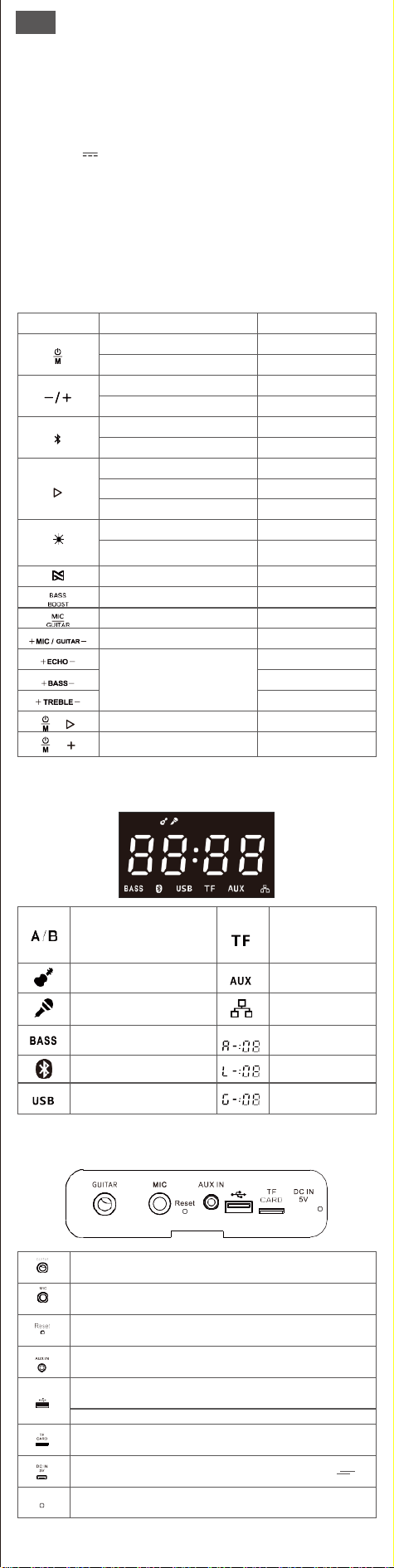
3. Boutons et Commandes
Boutons
Vous voulez
Comment
Allume / Éteint
Maintenez pendant 2s
Changement de mode audio
Appuyez
Volume haut/bas
Appuyez
Sauter en avant/en arrière
Appuyez et maintenez
Appariement Bluetooth
Appuyez
Entrer/sortir du mode TWS
Appuyez et maintenez
Jouer/Pauser
Appuyez
Déconnecter l'appareil
Appuyez et maintenez
Se reconnecter avec le dernier appareil
Appuyez
FQuatre effets lumineux multicolores
Appuyez pour changer
Effets lumineux unicolores
Appuyez et maintenez pour
entrer, puis appuyez sur
pour changer les couleurs
Entrer/Quitter le mode PartySync
Appuyez et maintenez
Basse allume / éteint
Appuyez
Accédez aux modes MIC/GUITAR
avant de régler le volume.
Appuyez
Régler le volume du MIC/GUITAR
Appuyez
Réglez le niveau de l'écho, des
basses et des aigus lorsqu'un
MiC est connecté.
Appuyez
Appuyez
Appuyez
Restaurer les paramètres d'usine
Appuyez et maintenez-les
pendant 3s
Vérifiez la version du haut-parleur
Appuyez et maintenez-les
pendant 3spendant la
déconnexion Bluetooth
4. Indicateurs d'Affichage LED
A B
En mode TWS/PartySync le voyant
«A» est le haut-parleur principal
le voyant «B» correspond à l'enceinte
ou aux enceintes secondaires.
Lumière allumée en
mode TF
Lumière allumée en mode Guitar
Lumière allumée en
mode Aux in
Lumière allumée en mode
Microphone
Lumière allumée en mode
PartySync (appairage)
Lumière allumée si BassBoost ajouté
Lumière éteinte si BassBoost annulé
Volume Audio (0 -16)
Flash en mode d'appairage Bluetooth
/TWS Lumière allumée en mode
Bluetooth/TWS
Volume du MIC (0-16)
Lumière allumée en mode audio USB
Volume de Guitare (0 -16)
5. Connexions
Connexion à une guitare électronique via un câble de φ6.3 mm (non inclus)
Connexion à un microphone filaire/sans fil (non inclus)
Réinitialisez le haut-parleur avec un trombone lorsque tous les boutons
ne peuvent pas être contrôlés
Lecture via un câble auxiliaire de φ3.5 mm (non inclus)
Lecture via un périphérique de stockage USB (capacité maximale : 256 GB)
Prise en charge des fichiers MP3/WAV/WMA/FLAC; Lecture dans l'ordre de
téléchargement/copie)
Chargez d'autres appareils
Lecture via la carte TF (Capacité maximale : 64 GB) Prise en charge des fichiers
MP3/WAV/WMA/FLAC;Lecture dans l'ordre de téléchargement/copie)
Port de charge (Veuillez vous assurer que la sortie de la prise est de 5V 2A)
Chargement : Rouge fixe Chargement Complet : Lumière éteinte

NB:
• Une seule source audio peut être lue à la fois. L'ordre de priorité est >USB
>Carte TF > Bluetooth > AUX IN.
• Le haut-parleur s'éteint automatiquement après 30 minutes sans entrée
audio.
• Pour éviter que le haut-parleur ne produise un son fort et soudain, baissez
toujours le volume au niveau minimum sur le dispositif Bluetooth et le(s)
haut-parleur(s) avant la lecture.
• N'hésitez pas à contacter l'équipe d'assistance à l'adresse
support_fr@dossav.com si vous avez besoin d'aide pour utiliser ce haut-parleur.
6. Jumelage de DOSS PartyBoom avec Votre Appareil
1. Allumez le haut-parleur, appuyez sur pour accéder au couplage Bluetooth.
2. Activez la fonction Bluetooth sur votre appareil, puis sélectionnez DOSS
PartyBoom dans la liste Bluetooth.
3. Une fois jumelé, s'affiche en blanc fixe et émet un signal sonore.
• Lorsque le haut-parleur se connecte à deux appareils en même temps via
Bluetooth, les pistes sont lues à partir du dernier appareil connecté.
7. Véritable Couplage Stéréo sans Fil
1. Allumez les deux haut-parleurs et appuyez longuement sur simultanément.
2. Les haut-parleurs entreront en mode d'appairage stéréo, clignote en blanc.
3. Une fois couplé, l'affichage LED du haut-parleur principal s'allumera en «A»,
et le haut-parleur secondaire s'allumera en «B».
4. Activez Bluetooth sur votre appareil et sélectionnez DOSS PartyBoom.
5. Une fois jumelé, sur l'écran LED s'allume en blanc.
• En mode TWS, si vous souhaitez jouer via le mode PartySync, maintenez
enfoncé pour activer le mode TWS en premier.
• Si deux appareils sont connectés au haut-parleur, appuyez longuement sur
pour déconnecter celui en cours de lecture et passer en mode d'appairage TWS.
• En mode TWS, appuyez sur sur les deux haut-parleurs si vous souhaitez
activer l'Extra Bass.
8. Mode PartySync
1. Allumez un haut-parleur et couplez-le avec votre appareil. Appuyez ensuite
longuement sur pour accéder au mode PartySync. Le haut-parleur sera le
haut-parleur principal et s'allumera en «A» sur l'affichage LED.
2. Allumez les autres enceintes et appuyez longuement sur pour entrer en
mode PartySync. Le(s) haut-parleur(s) seront le(s) haut-parleur(s) secondaire(s)
et s'allumeront en «B» sur l'affichage LED.
• En mode PartySync, si vous souhaitez jouer via le mode TWS, maintenez
enfoncé pour activer le mode PartySync en premier.
• Si deux appareils sont connectés au haut-parleur, appuyez longuement
sur pour déconnecter celui en cours de lecture et passer en mode
d'appairage TWS.
• En mode PartySync, appuyez sur sur tous les haut-parleurs si vous
9. Avertissement
• NE PAS laisser tomber, frapper, secouer.
• NE PAS exposer le haut-parleur à des températures extrêmes.
• NE PAS utiliser le haut-parleur à proximité d'un four à micro-ondes.
• NE PAS désassembler, réparer ou modifier le haut-parleur.
• NE PAS utiliser de nettoyant/huile corrosif pour nettoyer.
• NE PAS laiser le haut-parleur dans une voiture garée au soleil.
• NE PAS essayez de charger le haut-parleur lorsqu'il est mouillé.
IT
1. Contenuto della confezione
• DOSS PartyBoom Altoparlante x 1
• Cavo USB C x 1
• Manuale Utente x 1
2. Specifiche
Ingresso: DC 5V 2A
Capacità: 10400mAh
Tempo di ricarica: 6 ore
Tempo di gioco: fino a 12 ore(al 50% del volume)
Distanza di connessione: fino a 20m/66ft
Peso: 4.27Kg, 9.41lb
Dimensione: 25.10 x 27.58 x 35.59 cm
Garanzia: Limitata di un anno
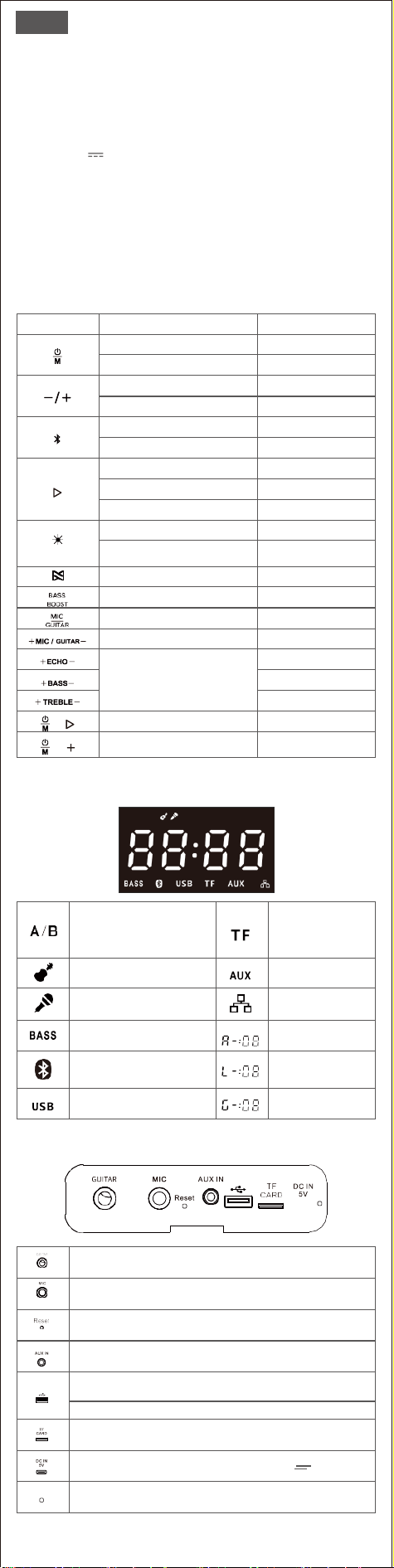
3. Pulsanti e controlli
Pulsanti
Funzione
Come controllare
On/Off
Mantieni per 2 secondi
Cambia le modalità audio
Premi
Abbassamento/aumento del volume
Premi
Salto in avanti/indietro
Tieni premuto
Accoppiamento Bluetooth
Premi
Entrare/uscire dalla modalità TWS
Tieni premuto
Riproduci/Pausa
Premi
Disconnetti il dispositivo
Tieni premuto
Ricollegarsi all'ultimo dispositivo
Premi
Quattro effetti di luce multicolore
Premi per cambiare
Effetti luminosi monocolore
Tieni premuto per
entrare, e poi premi
per cambiare colore
Entra/esce dalla modalità PartySync
Tieni premuto
Aumento/Spegnimento BASSO
Premi
Entra in modalità MIC/ GUITAR
prima di regolare il volume
Premi
Regola il volume di MIC/GUITAR
Premi
Regola il livello di echo/bass/treble
quando è collegato il microfono
Premi
Premi
Premi
Ripristina le impostazioni di fabbrica
Tieni premuto
per 3 secondi
Controlla la versione dell'altoparlante
Tieni premuto per 3 secondi
durante la disconnessione
del Bluetooth.
4. Indicatori del display LED
A B
In modalità TWS/PartySync
la luce "A" è il diffusore principale
la luce "B" è il diffusore secondario(s
)
Luce accesa in modalità TF
Luce accesa in modalità Chitarra
Luce accesa in
modalità Aux in
Luce accesa in modalità microfono
Luce accesa in modalità
PartySync (accoppiamento)
Luce accesa se è stato aggiunto
BassBoost Luce spenta se BassBoost
è annullato
Volume audio (0 -16)
Luce lampeggiante in modalità di
accoppiamento Bluetooth/TWS
Luce accesa in modalità
Bluetooth/TWS
Volume del
microfono (0-16)
Luce accesa in modalità audio USB
Volume della
chitarra (0 -16)
5. Connessioni
Collegamento a una chitarra elettronica tramite cavo da φ6,3 mm (non incluso)
Collegamento a un microfono cablato/wireless (non incluso)
Resettare il cassa con un clip quando non è possibile controllare tutti i pulsanti
Riproduce tramite cavo audio da φ3.5 mm (non incluso)
Riproduce tramite Flash Drive USB (capacità massima: 256 GB, supporta file
MP3/WAV/WMA/FLAC, riprodotti in ordine di download/copia)
Caricare altri dispositivi
Riproduce tramite scheda Micro SD (capacità massima: 64 GB, supporta
MP3/WAV/WMA/FLAC, riproduce in ordine di download/copia)
Porta di ricarica (assicurarsi che l'uscita della spina sia di 5V 2A)
In carica: rosso fisso
Carica completa : luce spenta

Consigli
• È possibile riprodurre una sola sorgente audio alla volta. L'ordine di priorità è
USB>scheda Micro SD >Bluetooth>AUX IN.
• Il diffusore si spegne automaticamente dopo 30 minuti di assenza di
riproduzione audio.
• Per evitare che il diffusore emetta un suono forte e improvviso, abbassare
sempre il volume al minimo sul dispositivo Bluetooth e sul diffusore prima della
riproduzione.
• Non esitate a contattare l'assistenza clienti all'indirizzo support_it
@dossav.com se avete bisogno di assistenza durante l'uso di questo diffusore.
6. Come associare DOSS PartyBoom al vostro dispositivo
1. Accendere il diffusore, premere per accedere all'accoppiamento Bluetooth.
2. Accendere il Bluetooth sul dispositivo e selezionare DOSS PartyBoom nell'elenco
Bluetooth.
3. Una volta accoppiato, sarà di colore bianco fisso con un segnale acustico di
avvertimento.
• Quando il diffusore si collega a due dispositivi contemporaneamente tramite
Bluetooth, i brani vengono riprodotti dall'ultimo dispositivo collegato.
7. Vero accoppiamento stereo wireless
1. Accendere entrambi i diffusori e tenerli premuti contemporaneamente.
2. I diffusori entrano in modalità di accoppiamento stereo, lampeggiando in
bianco.
3. Una volta accoppiato, il display a LED del diffusore primario si accende su "A"
e quello del diffusore secondario su "B".
4. Attivate il Bluetooth sul vostro dispositivo e selezionate DOSS PartyBoom.
5. Una volta accoppiato, il display LED si illumina di bianco.
• In modalità TWS, se si vuole giocare in modalità PartySync, tenere premuto
per far esistere la modalità TWS.
• Se al diffusore sono collegati due dispositivi, tenere premuto per scollegare
quello in riproduzione ed entrare in modalità di accoppiamento TWS.
• In modalità TWS, premere su entrambi i diffusori se si desidera attivare
Extra Bass.
8. Modalità PartySync
1. Accendere un altoparlante e associarlo al dispositivo. Quindi premere e tenere
premuto per accedere alla modalità PartySync. Il diffusore sarà il diffusore
principale e si illuminerà con "A" sul display LED.
2. Accendere l'altro o gli altri diffusori e tenere premuto per entrare in modalità
PartySync. I diffusori saranno i diffusori secondari e si accenderanno come "B" sul
display LED.
• In modalità PartySync, se si vuole riprodurre mediante la modalità TWS,
tenere premuto per far esistere prima la modalità PartySync.
• Se al diffusore sono collegati due dispositivi, tenere premuto per
scollegare quello in riproduzione ed entrare in modalità di accoppiamento
TWS.
• In modalità PartySync, premere su tutti i diffusori se si desidera
attivare Extra Bass, mentre il controllo audio può essere regolato solo sul
diffusore principale. speaker..
9. Avvertenze
• Evitare di far cadere o urtare il diffusore.
• Evitare l'esposizione a temperature estreme.
• Evitare di utilizzare il diffusore in prossimità di un forno a microonde.
• Non smontare o riparare mai il diffusore.
• Non utilizzare mai un detergente/olio corrosivo per pulirlo.
• Non lasciare mai il diffusore in un'auto parcheggiata al sole.
• Non tentare mai di caricare il diffusore quando è bagnato.
ES
1. Contenidos del paquete
• DOSS PartyBoom Altavoz x 1
• Cable USB tipo Cx 1
• Manual de Usuario x 1
2. Especificaciones
Entrada: DC 5V 2A
Capacidad: 10400mAh
Tiempo de carga: 6 horas.
Tiempo de reprodución: hasta 12 horas(al 50% del volumen)
Distancia de conexión: hasta 20m/66ft
Peso: 4.27Kg, 9.41lb
Tamaño: 25.10 x 27.58 x 35.59 cm
Garantia: limitada de 1 año
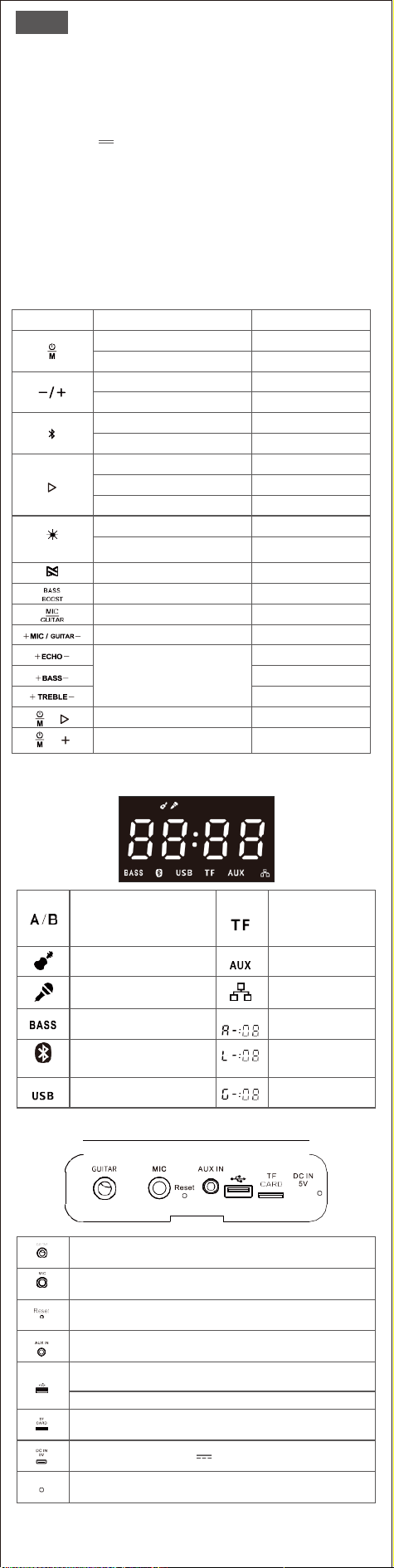
3. Botones y controles
Botones
Función
Cómo controlar
Encendido/Apagado
Mantenga durante 2s
Cambia los modos de audio
Presione
Baja/sube el volumen
Presione
Salta hacia delante/atrás
Mantenga presionado
Emparejamiento Bluetooth
Presione
Entra/sale del modo TWS
Mantenga presionado
Reproduce/Pausa
Presione
Desconecta dispositivo
Mantenga presionado
Reconecta con el último dispositivo
Presione
Cuatro efectos de luz multicolor
Presione para cambia
Efectos de luz de un solo color
Mantenga presionado para
entrar,y luego presione para
cambiar los colores
Entra/sale del modo PartySync
Mantenga presionado
Aumenta/Apagar BASS
Presione
Entra en MIC/GUITAR Modo antes
de ajustar el volumen
Presione
Ajusta el volumen de MIC/GUITAR
Presione
Ajusta el nivel de Echo/Bass/
Treble cuando se conecta el MIC
Presione
Presione
Presione
Restaura la configuración de fábrica
Manténgalos presionados
durante 3s
Comproba la versión del altavoz
Manténgalos presionados
durante 3s mientras se
desconecta el Bluetooth
4. Indicadores de pantalla LED
A B
En el modo TWS/PartySync
la luz "A" es el altavoz principal
la luz "B" es el altavoz secundario(s)
Luz encendida en modo TF
Luz encendida en modo Guitarra
Luz encendida en
modo Aux in
Luz encendida en el modo Micrófono
Luz encendida en modo
PartySync (emparejando)
Luz encendida si se añade BassBoost
Luz apagada si BassBoost cancela
Volumen de audio (0 -16)
Luz parpadeante en modo
emparejamiento Bluetooth/TWS
Volumen del
micrófono (0-16)
Luz encendida en el
modo de USB audio
Volumen de la
guitarra (0 -16)
5. Conexiones
Conéctate a una guitarra electrónica mediante un
cable de φ 6,3 mm (no incluido)
Conéctate a un micrófono Micrófono con cable/sin cable (no incluido)
Reinicia el altavoz con un clip cuando no se pueden controlar todos los botones
Reproduce a través de un cable de Audio φ3.5mm (no incluido)
Reproduce a través de Memoria flash USB (capacidad máxima: 256 GB,Sopo-
rta archivos MP3/WAV/WMA/FLAC,reproduce en el orden de descarga/copia)
Carga otros dispositivos
Reproduce a través de una Tarjeta Micro SD (Capacidad máxima: 64GB, Soporta
archivos MP3/WAV/WMA/FLAC,Reproduce en el orden de descarga/copia
Puerto de carga (Por favor, asegúrese de que la salida del enchufe es de 5V 2A)
Cargando: rojo fijo Completamente cargado: luz apagada

Consejos
• Sólo se puede reproducir una fuente de audio a la vez. El orden de prioridad
es USB>Tarjeta Micro SD >Bluetooth>AUX IN.
• El altavoz se apagará automáticamente después de 30 minutos sin
reproducción de audio.
• Para evitar que el altavoz emita un sonido fuerte y repentino, baja siempre el
volumen al mínimo en el dispositivo Bluetooth y en el altavoz antes de la
reproducción.
• Por favor, no dudes en contactar con el servicio de atención al cliente en
support_es@dossav.com si necesitas ayuda mientras utilizas este altavoz.
6. Cómo emparejar DOSS PartyBoom con tu dispositivo
1. Encienda el altavoz, presione para entrar en el emparejamiento de Bluetooth.
2. Encienda el Bluetooth en su dispositivo, y seleccione DOSS PartyBoom en la lista
de Bluetooth.
3. Una vez emparejado, estará en blanco fijo con un tono de aviso.
• Cuando el altavoz se conecta con dos dispositivos al mismo tiempo a través
de Bluetooth, las pistas se reproducen desde el último dispositivo conectado.
7. Verdadero emparejamiento estéreo inalámbrico
1. Enciende los dos altavoces y mantén presionados ambos simultánea-
mente.
2. Los altavoces entrarán en el modo de emparejamiento estéreo,
parpadeando en blanco.
3. Una vez emparejados, la pantalla LED del altavoz principal se iluminará en
"A", y el altavoz secundario se iluminará en "B".
4. Encienda el Bluetooth en su dispositivo y seleccione DOSS PartyBoom.
5. Una vez emparejado, en la pantalla LED se iluminará en blanco.
• En el modo TWS, si quieres reproducir a través del modo PartySync, mantén
presionado para que exista el modo TWS primero.
• Si hay dos dispositivos conectados al altavoz, mantén presionado para
desconectar el que está reproduciendo y entrar en el modo de emparejamiento
TWS.
• En el modo TWS, presiona en ambos altavoces si quieres activar Extra Bass.
8. Modo PartySync
1. Enciende un altavoz y emparéjalo con tu dispositivo. A continuación, mantén
presionado para entrar en el modo PartySync. El altavoz será el principal y se
iluminará en "A" en la pantalla LED.
2. Enciende el otro altavoz o altavoces y mantén presionado para entrar en el
modo PartySync. Los altavoces serán los secundarios y se iluminarán en "B" en la
pantalla LED.
• En el modo PartySync, si quieres reproducir a través del modo TWS,
mantén presionado para que exista el modo PartySync primero.
• Si hay dos dispositivos conectados al altavoz, mantén presionado
para desconectar el que está reproduciendo y entrar en el modo de
emparejamiento TWS.
• En el modo PartySync, presiona en todos los altavoces si quieres
activar Extra Bass, y el control de audio sólo se puede ajustar en el altavoz
principal.
9.Advertencias
• Evite que el altavoz se caiga o se golpee.
• Evite exponerlo a temperaturas extremas.
• Evite utilizar el altavoz cerca de un microondas.
• No desmonte ni repare nunca el altavoz.
• No utilice nunca un limpiador/aceite corrosivo para limpiarlo.
• Nunca dejes el altavoz en un coche aparcado al sol.
• Nunca intentes cargar el altavoz mientras esté mojado.
同梱品
JP
1
.
•
DOSS PartyBoom スピーカーx 1
•
USB-C 充電ケ
ーブ
ル x 1
• 取扱説明書(本書)x 1
2.
基本仕様
入力電圧: DC 5V
2A
バ
ッテリー容量: 10400mAh
充
電時間: 6 時間
再生時間: 約12時間 (50%ボリューム)
Bluetooth通信範囲: 最大約20m/66ft
重量: 4.3 kg/9.4 lbs
外形寸法: 25.1 x 27.6 x 35.6 cm
保証:一年間
3.
ボタンと操作
ボタン
や
り
たい操作
操作方法
電源on/off
2秒間長押
し
オーデ
ィ
オモ
ー
ドを
切
り
替
える
押す
音量ー/+
押す
前の曲/次の曲
長押し
Bluetoothペアリング
押す
TWSモードon/off
長押し
再生/一時停止
押す
接続中のデバイスと接続を解除
長押し
最後に接続されたデバイスと再接続
押す
4つカ
ラー
のイル
ミ
ネ
ー
シ
ョ
ン
効果
押
して
効
果を変わる
シングルカラーのイル
ミ
ネ
ー
ション
効果
長押
ししてこ
の機能
を
起動
し
短
く
押
しして
各種
カラーに変わる
PartySync モードon/off
長押し
Bassモードon/off
押す
音量を調節する前にマイク/ギ
ターモードに
入れ
押す
マイク/ギタ
ーモー
ドの音量を調節
押す
マイク
を接続中
、
echo/bass/treble
の
レ
ベルを調整
押す
押す
押す
スピーカーを初期化
同時に3秒間長押し
スピーカーのバージョンを
確認
Bluetooth接続が切
るとき、
同時に3秒間長押し
4.
LEDデ
ィ
スプレ
イイ
ンジケ
ー
タ
A B
点灯:
TWS/PartySync
*ー¾
"A"
点灯するのは
Ǵ
£9ー£
Ǫ
ーPー
"B"
点灯するのは£レーӲ£
Ǫ
ーPー
点灯:TFカードモ
ー
ド
点灯:
ギターモード
点灯:Aux inモード
点灯:マ
イクロフォンモード
点灯:PartySync
(ペアリング)モード
点灯:BassBoostモードON
消灯:BassBoostモードOFF
オ
ー
デ
ィ
ボリ
ュー
ム (0 -16)
点滅:Bluetooth/TWSペアリングを
待っている
点灯:Bluetooth/TWSペアリング済み
マイクボリューム (0-16)
点灯:USBオ
ー
デ
ィ
オモ
ード
ギタ
ー
ボリ
ュー
ム (0 -16)
5.
接続
φ6.3mmケーブル(別売)で電子ギターに接続する
有線/無線マイク(別売)に接続する
全て
のボタンがコントロール
出来
ない
時
、クリップでスピーカーをリセットする
φ3.5mm Auxケーブル(別売)で曲を再生する
USB
メモリ
で曲
を
再生す
る
(最大容量: 256GB
ま
で
。
サポ
ートファイ
ル:
MP3/WAV/WMA/FLAC
ダウンロード
/
コピー
の順番に
よって
音楽
を
再生す
る
)
他のデバイスに充電する
TF
カード
で曲を再生する. (最大容量: 64GBまで
。
サポ
ートファイ
ル:
MP3/WAV/WMA/FLAC ダ
ウンロード
/
コピー
の順番によ
っ
て音楽を再生する)
充電ポ
ート
(プ
ラ
グの出力は5V 2Aをおすすめです
。
)
充電中:赤点灯 充電完了:
ラン
プは消灯

モード
6.デバイスをDOSS PartyBoomと接続
7
.ステレオ
(T
W
S
)ペアリング
ご注意
•
一度に一つ音源のみ再生です。優先順位はUSB TF カードBluetoothAUX
IN.
•
何か音声が入力しない30分の後、スピーカーは自動的に電源を切れます。
•
ス
ピーカー
か
ら
突然に大きな音を出る
こと
を避けるために
、
音楽を再生す
る前にBluetooth機器
と
本機の音量を最低まで調整
し
て
く
だ
さ
い
。
•
ス
ピーカー
を使用する時
、
何かご不明な点
・
ご問題が
ご
ざいま
し
た
ら、
お気
軽にsupport_jp@dossav.comまでご連絡
く
だ
さ
い
。
1.ス
ピー
カ
ー
をオンに
し
て
、
を押
し
てBluetoothペア
リ
ングモ
ード
に入
り
ます
。
2.デバ
イ
スのBluetoothを起動
し、
Bluetooth
リ
ス
ト
にて
「
DOSS PartyBoom
」
を
選択
し
て
く
ださい。
3.ペア
リ
ングは成功になる
と、
何か提示音が鳴る
と
は白
く
点灯
し
ます
。
•
スピーカーは同時に2台のデバイスと接続した場合、最後に接続されたデ
バイスか
ら
音量を再生
し
ます
。
1.2台の
スピーカーをオンにして、
2台の
を
同時に長押
して
く
ださ
い
。
2.
スピーカー
は
ステレオペアリングモードに
入れ
て、
は白く点滅します。
3.
ペア
リ
ングは成功になる
と、
デ
ィ
スプ
レイ
にてマスタ
ー
ス
ピーカー
のLEDの
「
A
」
は点灯
し、スレーブスピーカー
LED
の「
B
」は
点灯
します。
4.
デバイスのBluetoothを起動し、Bluetoothリストにて「DOSS PartyBoom」を
選択
し
て
く
ださい。
5.
ペア
リ
ングは成功になる
と、
デ
ィ
スプ
レイ
にて
が点灯
し
ます
。
•
TWSモ
ード
中
、
PartySync モ
ード
で音声を再生
し
たい場合
、「 」
を押
し
続け
てTWSモ
ー
ドをに入
り
ます
。
.
•
スピーカ
は2台の
デバイスと
ペ
アリン
グ中
、
「 」
を
長押
し
す
ると
再生
していた
一台の
スピーカー
の接続
を
解除
して
TWS
モードに
入
りま
す
。
•
TWS
モード
中
、
を押してExtra Bassモードを起動します。
8.PartySync
1.
1台のス
ピー
カ
ー
の電源を入れてデバ
イ
ス
と
接続
さ
せます.
。
を押
し
続
けてPartySyncモ
ード
に入
り
ます
。
デ
ィ
スプ
レイ
にてLEDの
「
A
」
は点灯
し、こ
の
スピーカー
はマスタ
ースピーカーと
示
し
ます
。
2.
別のス
ピー
カ
ー
の電源を入れて を押
し
続けてPartySyncモ
ード
に入
り
ます
。
デ
ィ
スプ
レイ
にてLEDの
「
B
」
は点灯
し、
ス
ピーカー
はス
レー
ブス
ピーカー
と
示
し
ます。
•
PartySyncモード中、TWSモードで音楽を再生したい場合、まずは
を押し続けてPartySyncに入ります。
•
スピーカーは2台のデバイスとペアリング中、 を長押しすると再
生していた一台のスピーカーの接続を解除してTWSペアリングモー
ドに入ります。
PartySyncモード中、 を押してExtra Bassモードを起動します。
マ
スタースピーカーしかオーディオを調整できません
9.安全上のご注意
•
本機
を
落
とし
た
り、
ぶつけた
り、
揺れた
りし
ないて
く
だ
さ
い
。
•
自分
で本機を
解体
し
た
り、
修理
し
た
り、
改造
し
た
りし
ないて
く
だ
さ
い
。
•
本機
をベンゼン、アルコールなど
の溶剤の入
っ
た洗剤で洗浄
しないてくだ
さい
。
•
本機を異常に温度の高いところや直射日光のあたるところに長く置かない
てください。
•
本機を湿気のあたる
とこ
ろやホ
コリ
の多い
とこ
ろで保存
し
ないて
く
だ
さ
い
。
•
本機の上に重たい物体を置かないでください。
•
本機
を
電子
レン
ジや無線LANデバ
イスに
近付けないで
くださ
い
。
包装清单
按键功能
CN
1.
•
DOSS PartyBoom 音箱 x 1
• USB-C充电线 x 1
• 说明书 x 1
2. 产品规
输入: DC 5V
2A
电池容量: 10400mAh
充电时间: 6 hours
播放时间: 12小时 (50% 音量)
蓝牙距离: ≤20 米
产品重量: 4.3 kg
产品尺寸: 25.10 x 27.58 x 35.59 cm
保质期:一年
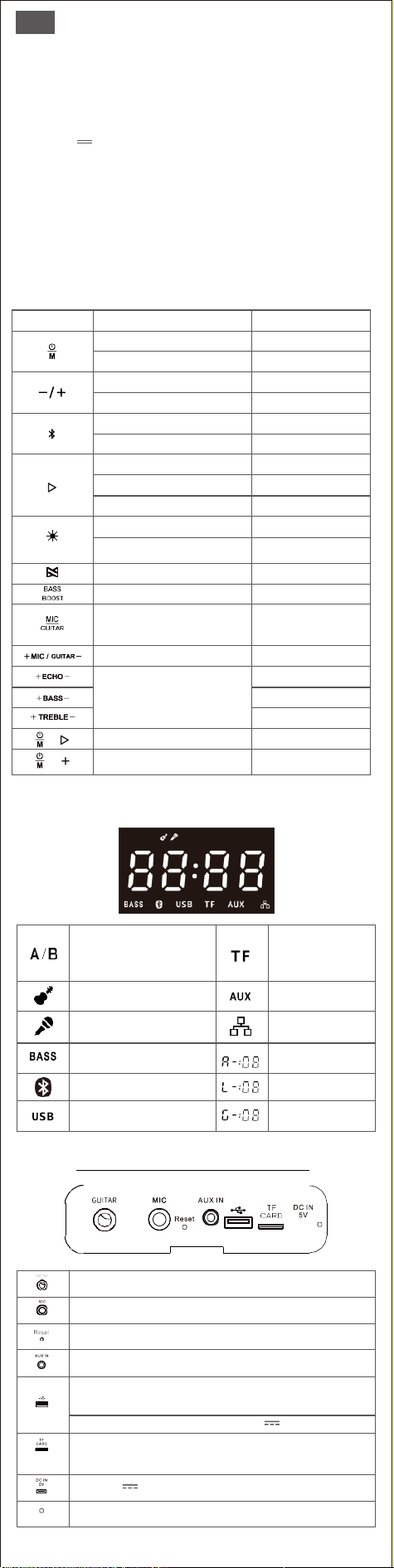
3.
按钮
功能
操作
开/关机
长按2秒
切换播放模式
点按
音量减加
点按
切到上一首/下一首
长按
蓝牙搜索
点按
进入/退出TWS配对
长按
播放/暂停
点按
断开正在连接的蓝牙设备
长按
回连最后一台连接的设备
点按
切换4种混色灯光效果
点按
先长 入单色灯光模式,
切换单色灯光效果
再短按切换不同的颜色
进入/退出多机互联
长按
打开/关闭低音增强
点按
在
下,
同
切
时
换
连
到
接
麦
麦
克
克
风
风
,
和
调
电
节
吉
麦
他
克
的
风
情
音
况
量,
切换到电吉他,调节电吉他音量
点按
调节麦克风和电吉他的音量
点按
调节麦克风的混响/低音/高音效果
点按
点按
点按
恢复出厂设置
长按3s
查询音箱版本号
蓝
同
牙
时
未
长
连
按
接
3s
状态下,
4. LED显示屏
A B
在
字
T
母
W
A
S
亮
或
的
者
音
多
箱
机
为
互
主
联
音
的
箱
模式下
字母B亮的音箱为辅音箱
TF卡播放模式
电吉他模式
AUX播放模式
麦克风模式
多机互联模式
灯灭表示
打
关
开
闭低音增强效果
音源音量等级 (0 -16级)
灯长
-
亮
等
-
待
蓝牙
蓝牙
配
配
对
对
成功
麦克风音量等级 (0-16)
U盘播放模式
电吉他音量等级(0 -16)
5. 背面示意图
通过φ6.3mm吉他专用线连接电吉他
连接有线和无线麦克风
当音箱所有按键都无作用的情况下,用回形针戳一下进行重置
通过φ3.5mm音频线连接手机,电脑,平板等设备
U盘
播
最
放
大支持256GB,支持格式 MP3/WAV/WMA/FLAC,
并且按照歌曲下载的顺序播放
通过USB接口为USB设备充电,最大输出电源5V 1A
T
并
F
且
卡
按
最
照
大
歌
支
曲
持
下
25
载
6
G
的
B
顺
,支
序
持
播
格
放
式
MP3/WA
V
/WMA/FLAC
,
输入电压5V 2A
充电中:红灯长亮 充电完成:灯灭

•
•
•
配对
操作。
温馨提示
此音箱音源播放的顺序为U盘 TF卡 BluetoothAUX ,例如当您的音箱同时
插入U盘和TF卡时,那么默认播放U盘里的音源.
30分钟无音源输入,此音箱会进入省电模式自动关机.
为了保护您和他人的听力,每一次在开始播放音乐前,请务必将音箱或者您
的设备调至最小音量.
6. 蓝牙模式
1.
打开音箱,按
进入到搜索状态.
2.
打开手机上的蓝牙功能,在列表上找到“
DOS
S
P
artyBoom
”
点击连接.
3.
连接成功后,蓝牙指示灯
变成长亮状态.
后
•
温
连
馨
接
提
的
示
设
:
备
如
.
果音箱通过蓝牙同时连接了两台设备,音频播放源默认为
7. TWS
1.
打开两台音箱,同时长按
TWS
搜索配对状态.
2.
当两个音箱TWS配对成功后,主音箱的LED屏幕上指示灯A长亮,辅音箱的
指示灯B长亮.
3.
打开手机上的蓝牙功能,在列表上找到“
DOS
S
P
artyBoom
”
点击连接.
4.
手机连接成功后,蓝牙指示灯
变成长亮状态.
•
在
温
T
W
馨
S
提
配
示
对模式下,如果您想开启低音增强功能,请同时在所有音箱上执行此
8. 多机互联
1.
按照蓝牙模式(
6
)的操作步骤,完成连接,接着长按 ,主音箱的LED显
示屏上A长亮.
2.
打开第二台PartyBoom并确保此设备未与任何蓝牙设备连接,然后长按
,第二台音箱与主音箱连接成功后显示”
B
”
即为辅音箱,
以此类推最多可以
添加至99个.
• 温馨提示
在多机互联模式下,如果您想开启低音增强功能,请同时在所有音箱上执
行此操作.
9. 安全告示
•
避免跌落和严重撞击.
•
避免靠近微波炉使用.
•
非专业人士请勿擅自拆机.
•
请勿使用任何腐蚀性液体擦拭音箱.
•
避免将音箱留在被暴晒的车里.
•
充电前请检查充电口是否干燥.