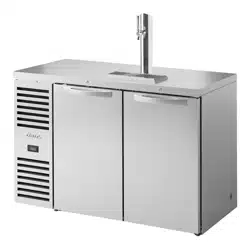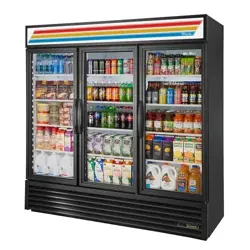
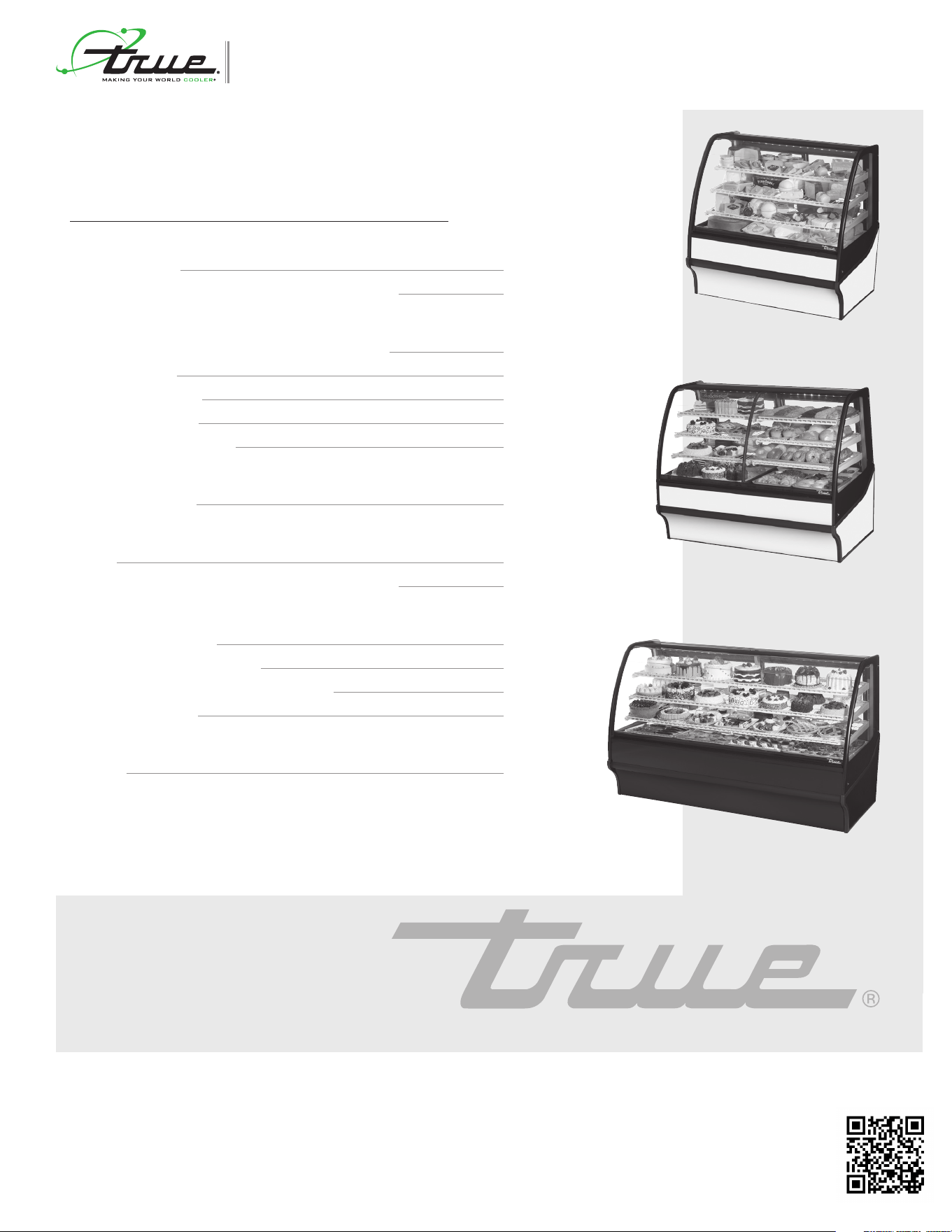
true display merchandiser
TRUE MANUFACTURING CO., INC.
2001 East Terra Lane • O’Fallon, Missouri 63366-4434
(636)-240-2400 • FAX (636)-272-2408 • INT'L FAX (636)272-7546 • (800)-325-6152
Parts Department (800)-424-TRUE • Parts Department FAX# (636)-272-9471
Web: www.truemfg.com
TABLE OF CONTENTS
TRUE
manufacturing co., inc.
INSTALLATION MANUAL
INSTALLATION MANUAL
true display merchandiser
CONGRATULATIONS!
You have just purchased the finest commercial refrigerator
available. You can expect many years of trouble-free operation.
SAFETY INFORMATION
Safety Precautions 1
Proper Disposal, Connecting Electricity, & Adapter Plugs 2
INSTALLATION
Ownership, Uncrating, & How to Connect to Electricity 3
Wire Gauge Chart 4
Locating and Leveling 5
Installation of Castors 6
Sealing Cabinet to the Floor 6
SETUP
Standard Accessories 7
OPERATION
Startup 12
Electronic Temperature Controls Sequence of Operation 13
MAINTENANCE, CARE, CLEANING
Cleaning Condenser Coil 21
Important Warranty Information 22
Stainless Steel Equipment Care and Cleaning 23
General Maintenance 24
WARRANTY
Warranty 26
TDM-R-48-GE/GE-W-W
TDM-R-77-GE/GE-B-W
TDM-DZ-59-GE/GE-W-W
1
TRUE
true display merchandiser
www.truemfg.com
Loss or spoilage of products in your refrigerator/
freezer is not covered by warranty. In addition to
following recommended installation procedures
you must run the refrigerator/freezer 24 hours
prior to usage.
NOTICE TO CUSTOMER
WARNING: Use this appliance for its intended purpose as described in this Owner Manual.
How to Maintain Your True Refrigerator to Receive the Most Efficient and Successful Operation.
You have selected one of the finest commercial refrigeration units made. It is manufactured under strict quality controls with only the best
quality materials available. Your TRUE cooler when properly maintained will give you many years of trouble-free service.
TO LOCATE REFRIGERANT TYPE, SEE SERIAL LABEL ON OUTSIDE REAR OF CABINET. This cabinet may contain
fluorinated greenhouse gas covered by the Kyoto Protocol (please refer to cabinet’s inner label for type and volume, GWP of 134a= 1,300.
R404a= 3,800).
FOR HYDROCARBON REFRIGERATION ONLY (R-290) SEE BELOW:
• DANGER - Risk of fire or explosion. Flammable refrigerant used. Do not use mechanical devices to defrost refrigerator. Do not
puncture refrigerant tubing.
• DANGER - Risk of fire or explosion. Flammable refrigerant used. To be repaired only by trained service personnel. Do not puncture
refrigerant tubing.
• CAUTION - Risk of fire or explosion. Flammable refrigerant used. Consult repair manual/owner’s guide before attempting to service
this product. All safety precautions must be followed.
• CAUTION - Risk of fire or explosion. Dispose of properly in accordance with federal or local regulations. Flammable refrigerant used.
• CAUTION - Risk of fire or explosion due to puncture of refrigerant tubing; follow handling instructions carefully. Flammable refrigerant
used.
• CAUTION - Keep clear of obstruction all ventilation openings in the appliance enclosure or in the structure for building-in.
SAFETY INFORMATION
SAFETY PRECAUTIONS
When using electrical appliances, basic safety precautions should be
followed, including the following:
• This refrigerator must be properly installed and located in
accordance with the Installation Instructions before it is used.
• Do not allow children to climb, stand or hang on the shelves
in the refrigerator. They could damage the refrigerator and
seriously injure themselves.
• Do not touch the cold surfaces in the freezer compartment
when hands are damp or wet. Skin may stick to these
extremely cold surfaces.
• Do not store or use gasoline or other flammable vapors and
liquids in the vicinity of this or any other appliance. Do not store
explosive substances such as aerosol cans with a flammable
propellant in this appliance.
• Keep fingers out of the “pinch point” areas; clearances between
the doors and between the doors and cabinet are necessarily
small; be careful closing doors when children are in the area.
• Unplug the refrigerator before cleaning and making repairs.
• Setting temperature controls to the 0 position does not
remove power to the light circuit, perimeter heaters, or
evaporator fans.
NOTE: We strongly recommend that any servicing be preformed
by a qualified technician.
2
TRUE
true display merchandiser
www.truemfg.com
RISK OF CHILD
ENTRAPMENT
PROPER DISPOSAL OF THE REFRIGERATOR
Child entrapment and suffocation are not problems of the past.
Junked or abandoned refrigerators are still dangerous… even if they
will sit for “just a few days.” If you are getting rid of your old refrigera-
tor, please follow the instructions below to help prevent accidents.
BEFORE YOU THROW AWAY YOUR OLD
REFRIGERATOR OR FREEZER:
• Take off the doors.
• Leave the shelves in place so that children may not easily climb
inside.
APPLIANCE DISPOSAL
When recycling appliance please make sure that the refrigerants are
handled according to local and national codes, requirements and
regulations.
REFRIGERANT DISPOSAL
Your old refrigerator may have a cooling system that uses “Ozone
Depleting” chemicals. If you are throwing away your old refrigerator,
make sure the refrigerant is removed for proper disposal by a quali-
fied service technician. If you intentionally release any refrigerants you
can be subject to fines and imprisonment under provisions of the
environmental regulations.
USE OF EXTENSION CORDS
NEVER USE AN EXTENSION CORD! TRUE will not war-
ranty any refrigerator that has been connected to an extension cord.
REPLACEMENT PARTS
• Component parts shall be replaced with like components.
• Servicing shall be done by authorized service personnel, to
minimize the risk of possible ignition due to incorrect parts or
improper service.
• Lamps must be replaced by identical lamps only.
• If the supply cord is damaged, it must be replaced by a special
cord or assembly available from the manufacturer or its service
agent.
HOW TO CONNECT ELECTRICITY
USE OF ADAPTER PLUGS
NEVER USE AN ADAPTER PLUG! Because of potential safety
hazards under certain conditions, we strongly recommend against the
use of an adapter plug.
The incoming power source to the cabinet including any adapters
used must have the adequate power available and must be properly
grounded. Only adapters listed with UL should be used.
WARNING!DANGER
NORTH AMERICA USE ONLY!
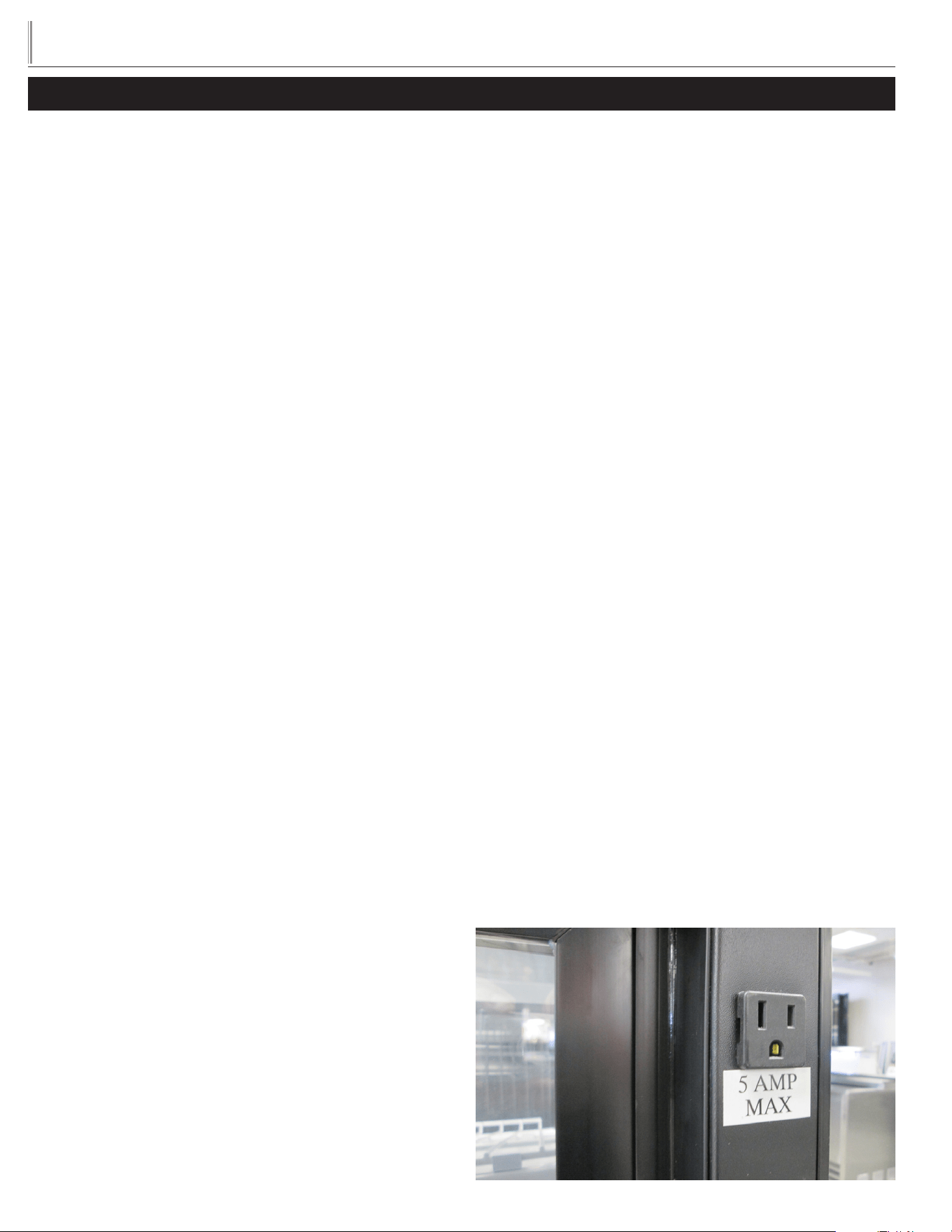
NEMA plugs
TRUE uses these types of plugs. If you do not have the right outlet
have a certified electrician install the correct power source.
NOTE: International plug configurations vary by voltage and
country.
115/60/1
NEMA-5-15R
115/208-230/1
NEMA-14-20R
115/60/1
NEMA-5-20R
208-230/60/1
NEMA-6-15R
3
TRUE
true display merchandiser
www.truemfg.com
OWNERSHIP
To ensure that your unit works properly from the first day, it must
be installed properly. We highly recommend a trained refrigeration
mechanic and electrician install your TRUE equipment. The cost of a
professional installation is money well spent.
Before you start to install your TRUE unit, carefully inspect it for
freight damage. If damage is discovered, immediately file a claim with
the delivery freight carrier.
TRUE is not responsible for damage incurred during shipment.
UNCRATING
TOOLS REQUIRED
• Tin Snips / Band Cutters
• Claw Hammer
• Hex Head Driver
• Adjustable Wrench
• 3/4" (19 mm) Open-End Wrench
• Phillips Screwdriver
• Level
The following procedure is recommended for uncrating the unit:
A. Cut metal retaining straps securing protective top skid. Remove
the outer packaging by pulling tri-wall nails from skid. Remove
(4) cardboard corner pads and dust cover.
B. Inspect for concealed damage. Again, immediately file a claim
with the freight carrier if there is damage.
C. Move your display case as close to the final location as possible
before removing the wooden skid.
NOTE: KEYS FOR COOLERS WITH DOOR LOCKS
ARE LOCATED IN WARRANTY PACKETS.
INSTALLATION
ELECTRIC INSTALLATION & SAFETY
INFORMATION
Models standard with power cords: Do not, under any circumstances, cut
or remove the ground prong from the power cord. For personal safety, this
appliance must be properly grounded.
• If the supply cord is damaged, it must be replaced by a special
cord or assembly available from the manufacturer or its service
agent.
• Lamps must be replaced by identical lamps only.
• Appliance tested according to the climate classes 5 and 7
temperature and relative humidity.
ELECTRICAL INSTRUCTIONS
A. Before your new unit is connected to a power supply, check the
incoming voltage with a voltmeter. If anything less than 100% of
the rated voltage for operation is noted, correct immediately.
B. All units equipped with a service cord must be powered at
proper operating voltage at all times. Refer to cabinet data
plate for this voltage.
TRUE RECOMMENDS THAT A SOLE USE CIRCUIT BE
DEDICATED FOR THE UNIT.
WARNING: Compressor warranties are void if compressor burns
out due to low voltage.
WARNING: Power supply cord ground should not be removed!
WARNING: Do not use electrical appliances inside the food stor-
age compartments of the appliances unless they are of the type
recommended by the manufacturer.
NOTE: To reference wiring diagram, remove rear grill. Wiring dia-
gram is positioned under the electrical box.
CURVED GLASS DISPLAY CASES
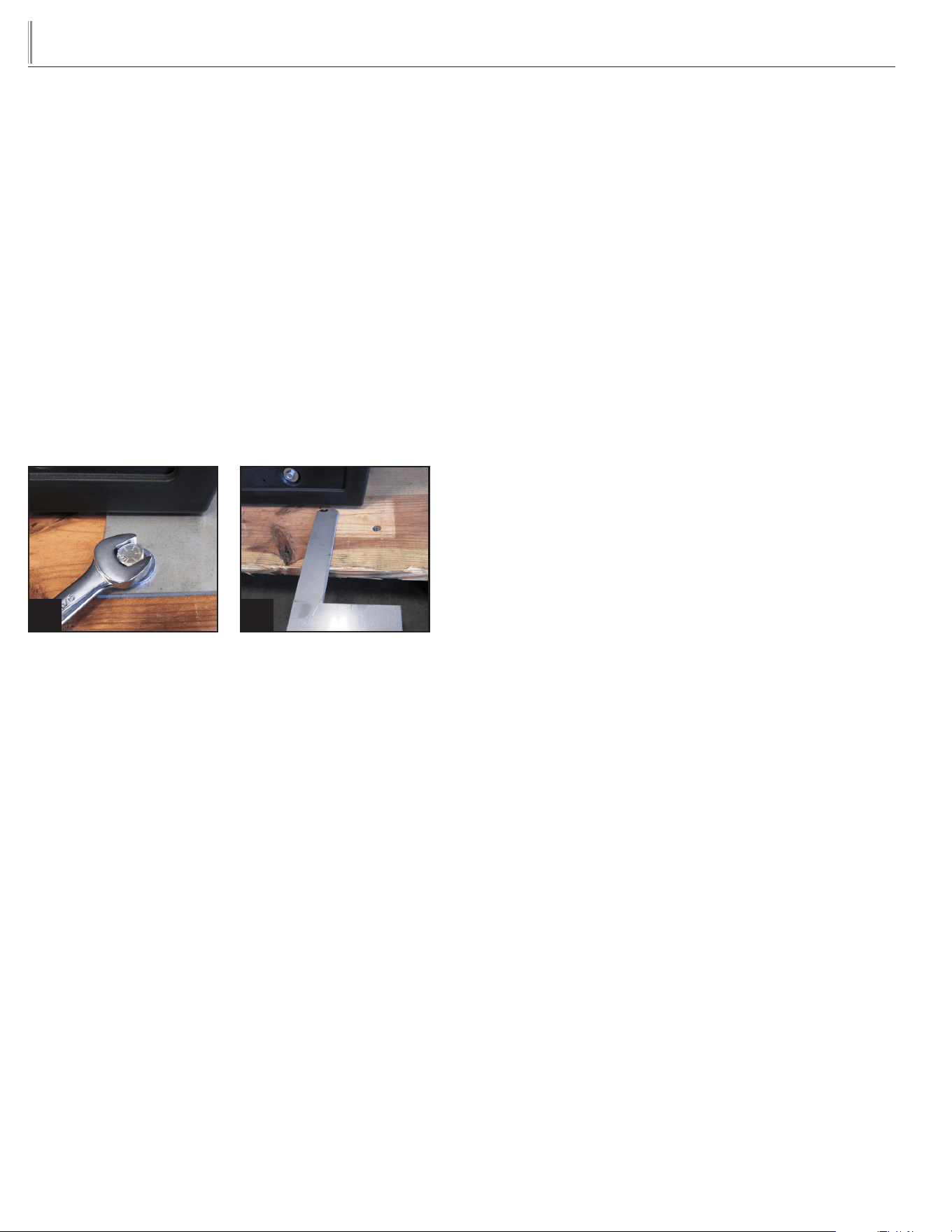
Some cases are equipped with a service receptacle, found on the
upper right cabinet and backside. No electrical load greater than 4-5
amps should be connected to this receptacle. Maximum Amp load is
listed on the label next to the service receptacle.
FOR REFERENCE ONLY

4
TRUE
true display merchandiser
www.truemfg.com
230 Volts Distance In Feet To Center of Load
Amps 20 30 40 50 60 70 80 90 100 120 140 160
5 14 14 14 14 14 14 14 14 14 14 14 14
6 14 14 14 14 14 14 14 14 14 14 14 12
7 14 14 14 14 14 14 14 14 14 14 12 12
8 14 14 14 14 14 14 14 14 14 12 12 12
9 14 14 14 14 14 14 14 14 12 12 12 10
10 14 14 14 14 14 14 14 12 12 12 10 10
12 14 14 14 14 14 14 12 12 12 10 10 10
14 14 14 14 14 14 12 12 12 10 10 10 8
16 14 14 14 14 12 12 12 10 10 10 8 8
18 14 14 14 12 12 12 10 10 10 8 8 8
20 14 14 14 12 10 10 10 10 10 8 8 8
25 14 14 12 12 10 10 10 10 8 8 6 6
30 14 12 12 10 10 10 8 8 8 6 6 6
35 14 12 10 10 10 8 8 8 8 6 6 5
40 14 12 10 10 8 8 8 6 6 6 5 5
50 12 10 10 8 6 6 6 6 6 5 4 4
60 12 10 8 6 6 6 6 6 5 4 4 3
70 10 10 8 6 6 6 5 5 4 4 2 2
80 10 8 8 6 6 5 5 4 4 3 2 2
90 10 8 6 6 5 5 4 4 3 3 1 1
100 10 8 6 6 5 4 4 3 3 2 1 1
115 Volt s Distance In Feet To Center of Load
Amps 20 30 40 50 60 70 80 90 100 120 140 160
2 14 14 14 14 14 14 14 14 14 14 14 14
3 14 14 14 14 14 14 14 14 14 14 14 12
4 14 14 14 14 14 14 14 14 14 12 12 12
5 14 14 14 14 14 14 14 12 12 12 10 10
6 14 14 14 14 14 14 12 12 12 10 10 10
7 14 14 14 14 14 12 12 12 10 10 10 8
8 14 14 14 14 12 12 12 10 10 10 8 8
9 14 14 14 12 12 12 10 10 10 8 8 8
10 14 14 14 12 12 10 10 10 10 8 8 8
12 14 14 12 12 10 10 10 8 8 8 8 6
14 14 14 12 10 10 10 8 8 8 6 6 6
16 14 12 12 10 10 8 8 8 8 6 6 6
18 14 12 10 10 8 8 8 8 8 8 8 5
20 14 12 10 10 8 8 8 6 6 6 5 5
25 12 10 10 8 8 6 6 6 6 5 4 4
30 12 10 8 8 6 6 6 6 5 4 4 3
35 10 10 8 6 6 6 5 5 4 4 3 2
40 10 8 8 6 6 5 5 4 4 3 2 2
45 10 8 6 6 6 5 4 4 3 3 2 1
50 10 8 6 6 5 4 4 3 3 2 1 1
WIRE GAUGE CHART
5
TRUE
true display merchandiser
www.truemfg.com
LOCATING
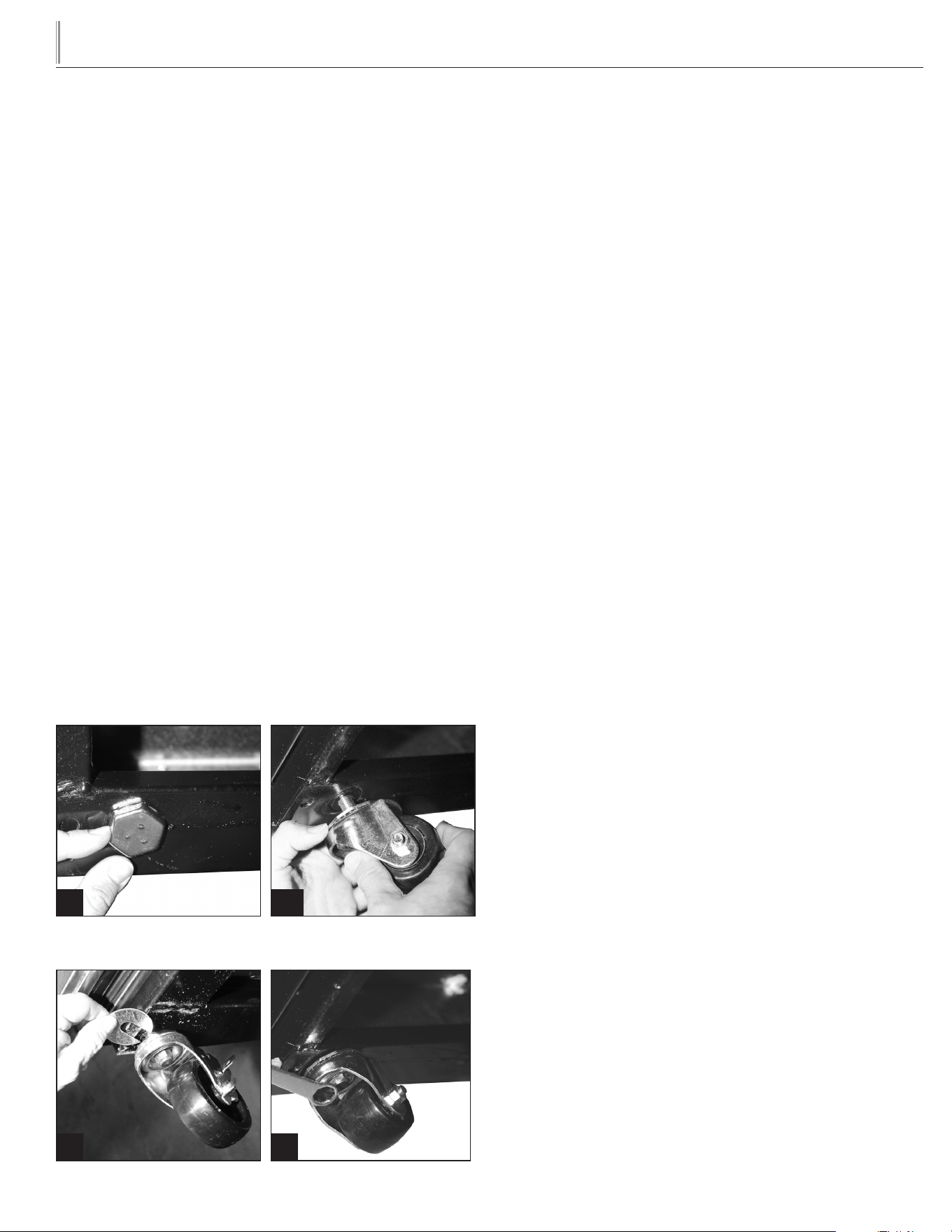
A. Use a 9/16 inch wrench to remove the bolts from the bracket
that connects the unit to the wood skid. See image 1. Slide the
bracket out from beneath the unit. See image 2.
TO AVOID DAMAGE TO GLASS DO NOT LAY
CABINET ON ITS SIDE OR BACK WHEN REMOVING
SKID, INSTALLING LEG LEVELERS, CLEANING, ETC.
B. Lift up from the base and walk unit off the skid and set in final
location.
C. Unblock doors, free plastic wedges, blue foam and tape.
Remove fiberglass tape securing glass. Remove components:
(shelves, brackets, etc.) from inside cabinet.
D. Appliance tested according to the climate classes 5 and 7 for
temperature and relative humidity.
LEVELING
A. Set unit in its final location. Be sure there is adequate ventilation
in your room. Under extreme heat conditions, (100°F+,
38°C+), you may want to install an exhaust fan.
WARNING: WARRANTY IS VOID IF VENTILATION IS
INSUFFICIENT.
B. Proper leveling of your TRUE unit is critical to operating success
(for non-mobile models). Effective condensate removal and
door operation will be effected by leveling.
WARNING: DISPLAY CASE MUST BE LEVELED
ACCURATELY TO ENSURE FRONT GLASS DOOR
SEALS PROPERLY.
C. The unit should be leveled front to back and side to side with
a level. Place the level in the interior floor of the unit and check
all four sides.
D. If the cabinet is not level adjust leg levelers by first relieving
weight to leveler and adjusting by either hand or wrench.
Repeat with all leg levelers until cabinet is level in all directions.
E. Ensure that the drain hose or hoses are positioned in the pan.
F. Models with power cord: Free plug and cord from inside the
lower rear of the cooler (do not plug in).
G. Models with power cord: The unit should be placed close
enough to the electrical supply so that extension cords are
never used.
NOTE: If the cabinet has a center leveling screw, castor, or leg,
make sure it is adjusted properly so it makes full contact with the
floor after the cabinet has been leveled.
WARNING: CABINET WARRANTIES ARE VOID IF OEM
POWER CORD IS TAMPERED WITH. TRUE WILL NOT
WARRANTY ANY UNITS THAT ARE CONNECTED TO
AN EXTENSION CORD.
RECOMMENDED OPERATION CONDITIONS (80˚F
DEGREES & 55% RELATIVE HUMIDITY)
Removing bracket from skid. Removing bracket from cabinet.
1 2
CLEARANCES: For proper cabinet operation, clearance guidelines
should be followed.
TDM – 0" at the sides. Open at the front and rear.
6
TRUE
true display merchandiser
www.truemfg.com
INSTALLATION OF CASTORS
TOOLS REQUIRED:
• Castor wrench (if not included contact TRUE)
• Adjustable wrench
WARNING: MAKE SURE UNIT IS EMPTY OF
ALL ITS CONTENTS (SHELVING, SHELVING
LIGHTING). MAKE SURE POWER SUPPLY HAS BEEN
DISCONNECTED.
A. Curved glass can be damaged if you lay unit on its back, side,
or front. Use a 6" x 6" (15.2 cm x 15.2 cm) block of wood or
equivalent. Slide the block under the cabinet frame rail. This will
support the unit while installing castors.
B. Leg levelers can be backed out by hand (Image 1).
C. Take two threaded castors and thread them into the existing
leg leveler holes. (Image 2). Shims can be used between castor
and cabinet frame rail for leveling (Image 3). Use the tool
provided to tighten the threaded castors (Image 4).
D. Repeat process for the other side of the cabinet.
WARNING: DISPLAY CASE MUST BE LEVELED
ACCURATELY TO ENSURE FRONT GLASS DOOR
SEALS PROPERLY.
E. The unit should be leveled front to back and side to side with
a level. Place the level in the interior floor of the unit and check
all four sides.
SEALING CABINET TO FLOOR
It may be necessary to seal the bakery case to the floor for local sani-
tary codes or if the customer so desires. TRUE recommends either
of the following methods.
A. Using a vinyl cove base trim as produced by Armstrong,
Johnson, or Kentile (available at floor covering suppliers) or
using mastics available at hardware stores.
B. When applying the cove base trim, thoroughly clean both the
cabinet and floor of dirt and grease. Apply a recommended
contact cement to the cove base trim. After cove base trim has
dried, fill in cracks and joints with a caulking material.
C. When applying a mastic, thoroughly clean both the cabinet
and floor of dirt and grease. Draw an outline of the cabinet on
the floor. Raise and block the front side of the cabinet. Apply
a bead of mastic to the floor 1/2" (1.3 cm) inside the outline
drawn. Lower the cabinet. Raise and block the rear side of the
cabinet. Apply the bead of mastic, lower the cabinet.
NOTE: Asphalt floors are very susceptible to chemical attack.
A layer of tape on the floor prior to applying the sealant will protect
the floor.
NSF APPROVED SEALANTS:
1. Minnesota Mining #ECU800 Caulk
2. Minnesota Mining #ECU2185 Caulk
3. Minnesota Mining #ECU1055 Bead
4. Minnesota Mining #ECU1202 Bead
5. Armstrong Cork - Rubber Caulk
6. Products Research Co. #5000 Rubber Caulk
7. G.E. Silicone Sealer
8. Dow Corning Silicone Sealer
Tighten castor in position with
castor wrench.
Use shims as necessary to level
cabinet.
43
Back out leg levelers by hand, or
with adjustable wrench.
Thread castors into existing leg
leveler holes.
21
7
TRUE
true display merchandiser
www.truemfg.com
STANDARD ACCESSORIES
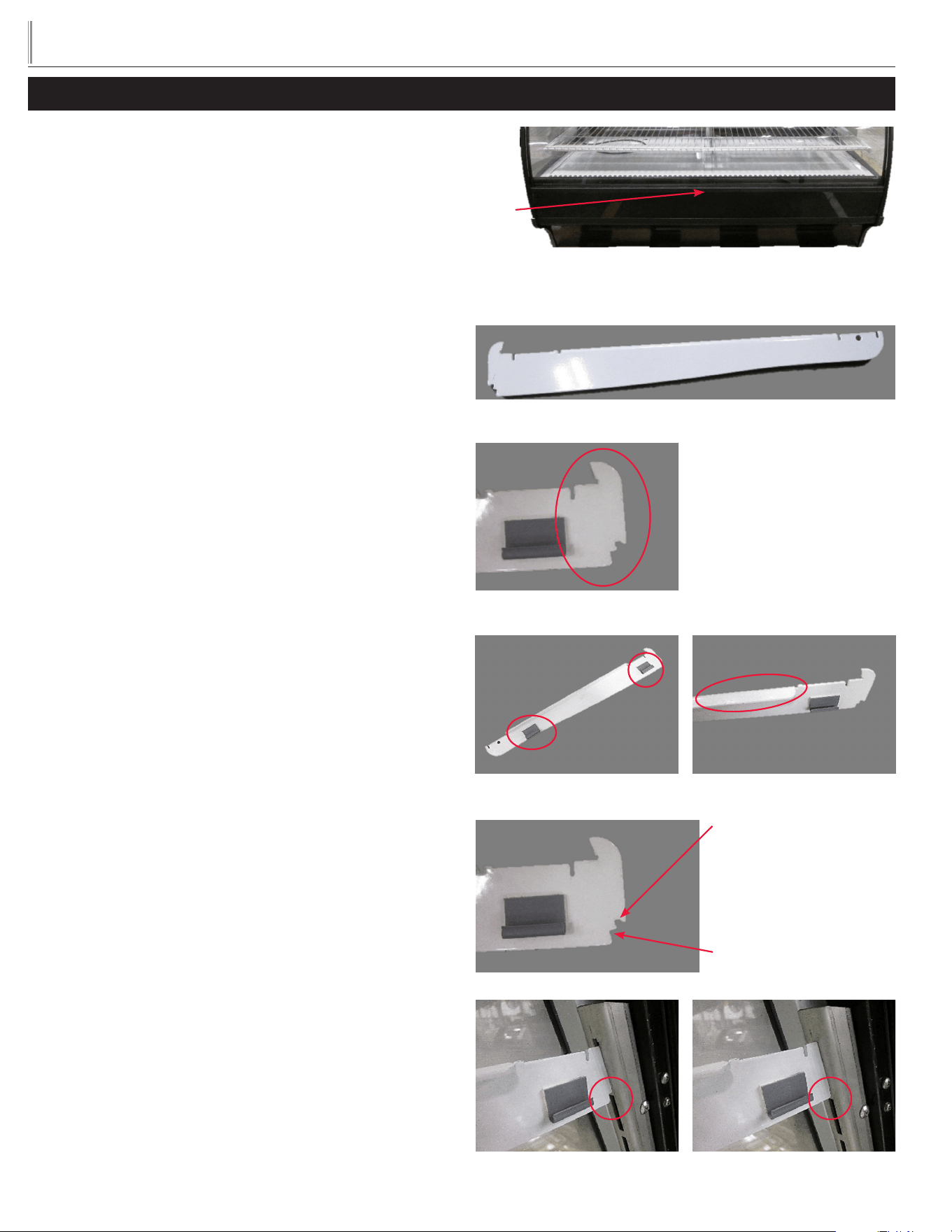
SHELF INSTALLATION:
STEP 1
Lift the front glass up from the center to allow access.
STEP 2
Locate and remove any boxes containing the brackets, light bars,
shelves, etc. from the cabinet interior.
STEP 3
SHELF SUPPORTS
Install shelf supports into stainless pilasters located on interior walls.
Adjust to desired height matching right and left pairs.
Supports are left and right determined.
NOTE: Models TDM-R-77 and TDM-DC-77 have three (3) shelf
supports per shelf.
When installed correctly, the shelf wire clips and horizontal tab are
positioned towards center of cabinet.
Supports have two notches to allow for a flat shelf or a slightly angled
shelf installation.
SETUP
Shelf support
Top notch installed (gap)
Bottom notch installed (no gap)
Hook End
Wire clip Horizontal tab
The top notch will provide a
flat shelf
The bottom notch will
provide an angled shelf
Lift here
Front of cabinet shown
8
TRUE
true display merchandiser
www.truemfg.com
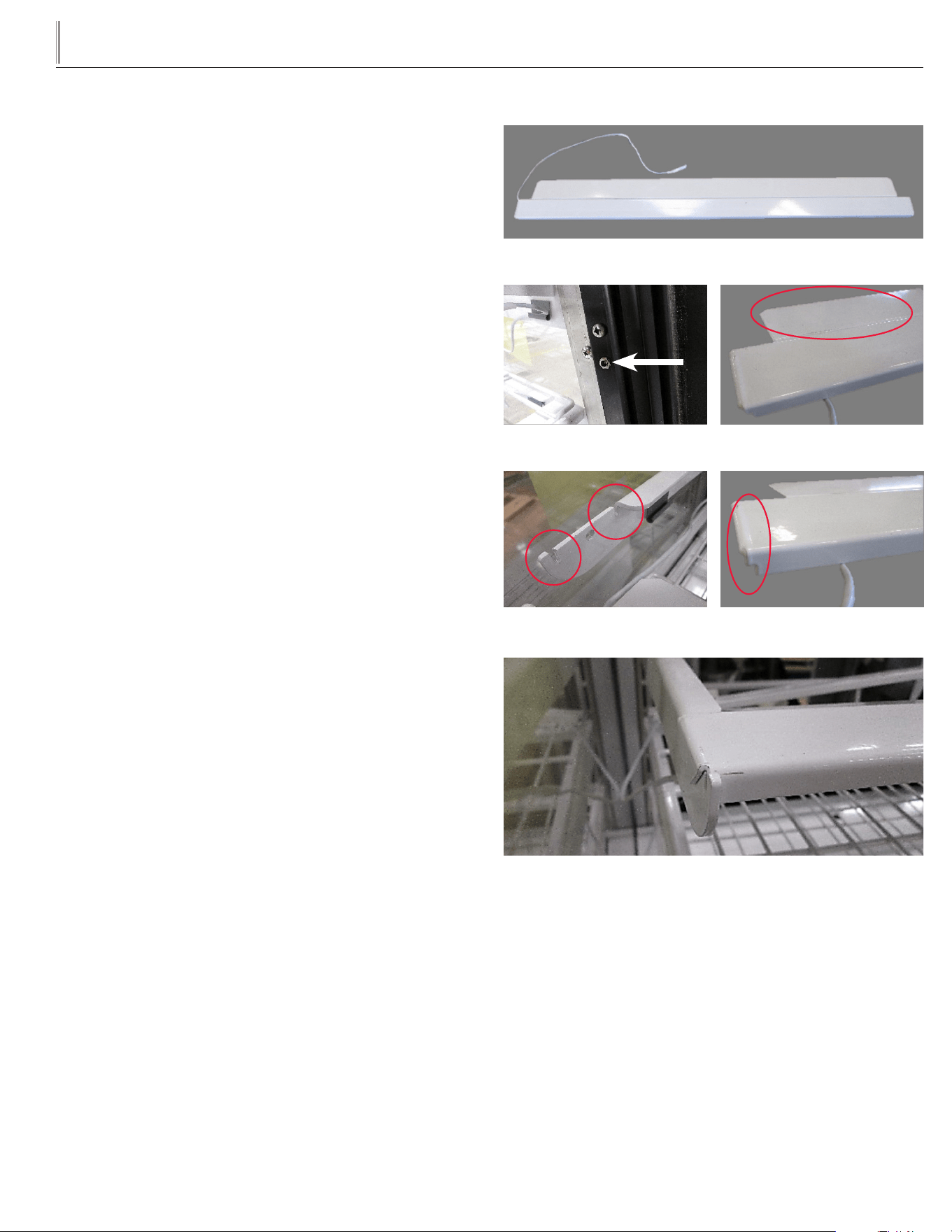
STEP 4
HORIZONTAL LIGHT BAR ASSEMBLY.
Position the light bar assembly light with the lamp on the bottom.
The electrical cord will be on the same side as the light receptacle.
Light bar assembly will be installed with deflector facing towards the
back of the cabinet.
LIGHT RECEPTACLE LOCATION:
TDM-DC-36/48/59: left side
TDM-R-36/48/59: left side
TDM-DZ-48/59/77: (dual zone) left and right side.
TDM-DC-77 and TDM-R-77: left and right side.
Hang the end hooks of light bar assembly on the front of the shelf
supports. Maneuver the light assembly until it seats into the notch
of the shelf support. Secure light assembly onto all shelf supports.
Horizontal light bar assembly
Light Receptacle Light Deflector
Notches of shelf support End hooks of light assembly
Light assembly installed on shelf support
9
TRUE
true display merchandiser
www.truemfg.com
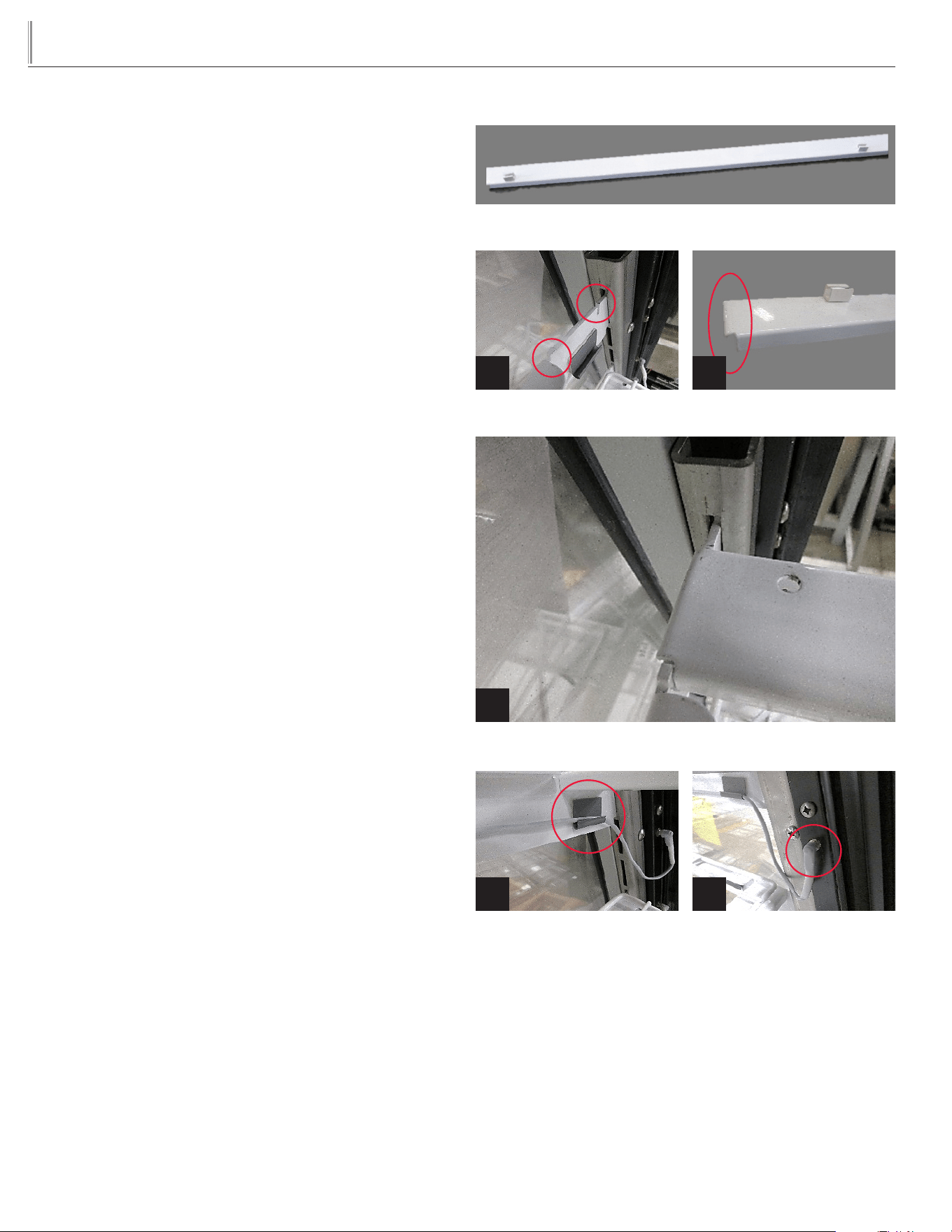
STEP 5
REAR HORIZONTAL BRACKET
NOTE: Rear horizontal brace will not have the plastic shelf clips
installed when shipped with stainless or glass shelves.
Position the rear horizontal bar so the shelf clips are towards the
back of the cabinet.
Hang the end hooks of rear horizontal bar on the back of the shelf
supports.
Install rear bracket by sliding end hooks over rear notches of shelf
support. Secure onto all shelf supports. See images 1-3.
Route light bar assembly wiring harness to the back of the cabi-
net. Plug the light assembly into the corresponding light receptacle.
Secure the light assembly wire harness to the shelf support with
installed clips. See images 4 and 5.
Rear horizontal bracket
Notches of shelf support End hooks of light assembly
Light assembly installed on shelf support
1 2
Wire clip Light cord installed
4 5
3
10
TRUE
true display merchandiser
www.truemfg.com
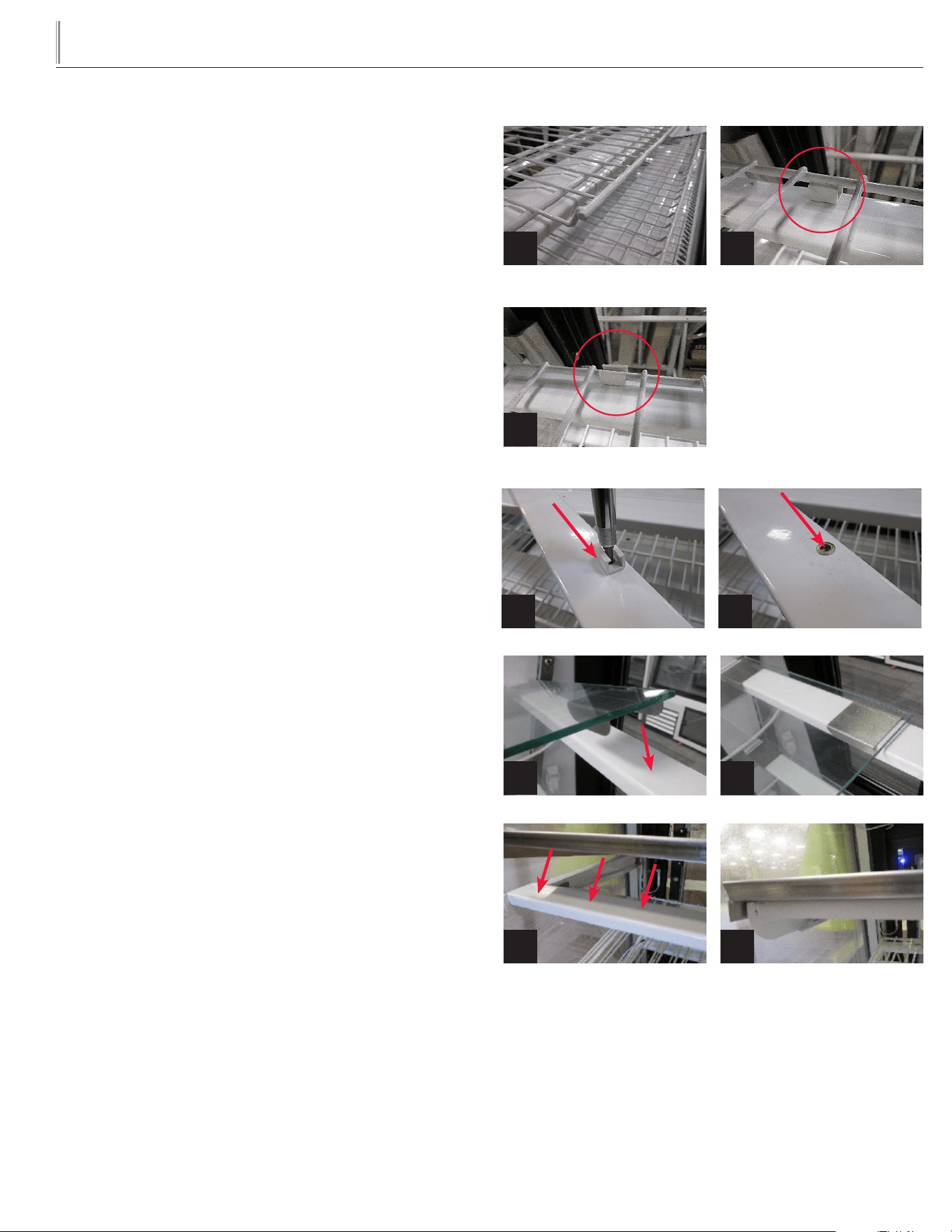
STEP 6
SHELF INSTALLATION OPTIONS:
Wire Shelf Step 6.1
Glass Shelf Step 6.2
Stainless Shelf Step 6.3
NOTE: The shelves are different sizes. The deepest shelf will install
on the bottom and the narrowest shelf will install on the top.
STEP 6.1 WIRE SHELVES
NOTE: Shelf retainer on rear horizontal bracket will only be used
with wire shelves. Shelf retainer will need to be removed prior to
installing glass or stainless shelving. See images 4-5.
With the tray lip/stop of shelf facing up and towards the front of the
cabinet, place and align the rear of the shelf with the shelf retainers
on the rear horizontal bracket. Snap the rear of the shelf into the
shelf retainers. See images 1-3.
Gently lower the front of the shelf onto the light bar assembly.
Repeat for all remaining wire shelves.
STEP 6.2 GLASS SHELVES
NOTE: Shelf retainer will need to be removed prior to installing
glass shelving. See images 4-5.
Gently lay the glass shelves on the front horizontal light bar assembly
and the rear horizontal brackets. See images 6-7
"U" brackets on the back of the glass shelf fits over the rear horizontal
bracket.
There are two glass pieces per shelf.
Repeat for all remaining glass shelves.
STEP 6.3 STAINLESS SHELVES
NOTE: Shelf retainer will need to be removed prior to installing
stainless shelving. See images 4-5.
Gently lay the stainless shelves on the front horizontal light bar
assembly and the rear horizontal brackets. See images 8-9.
Bottom edges of stainless shelf fits over the outer edges of the shelf
braces and shelf supports.
Repeat for all remaining stainless shelves.
Front tray lip /stop
Press shelf into retainer
Align shelf with retainer
1
6
8
3
2
7
9
4 5
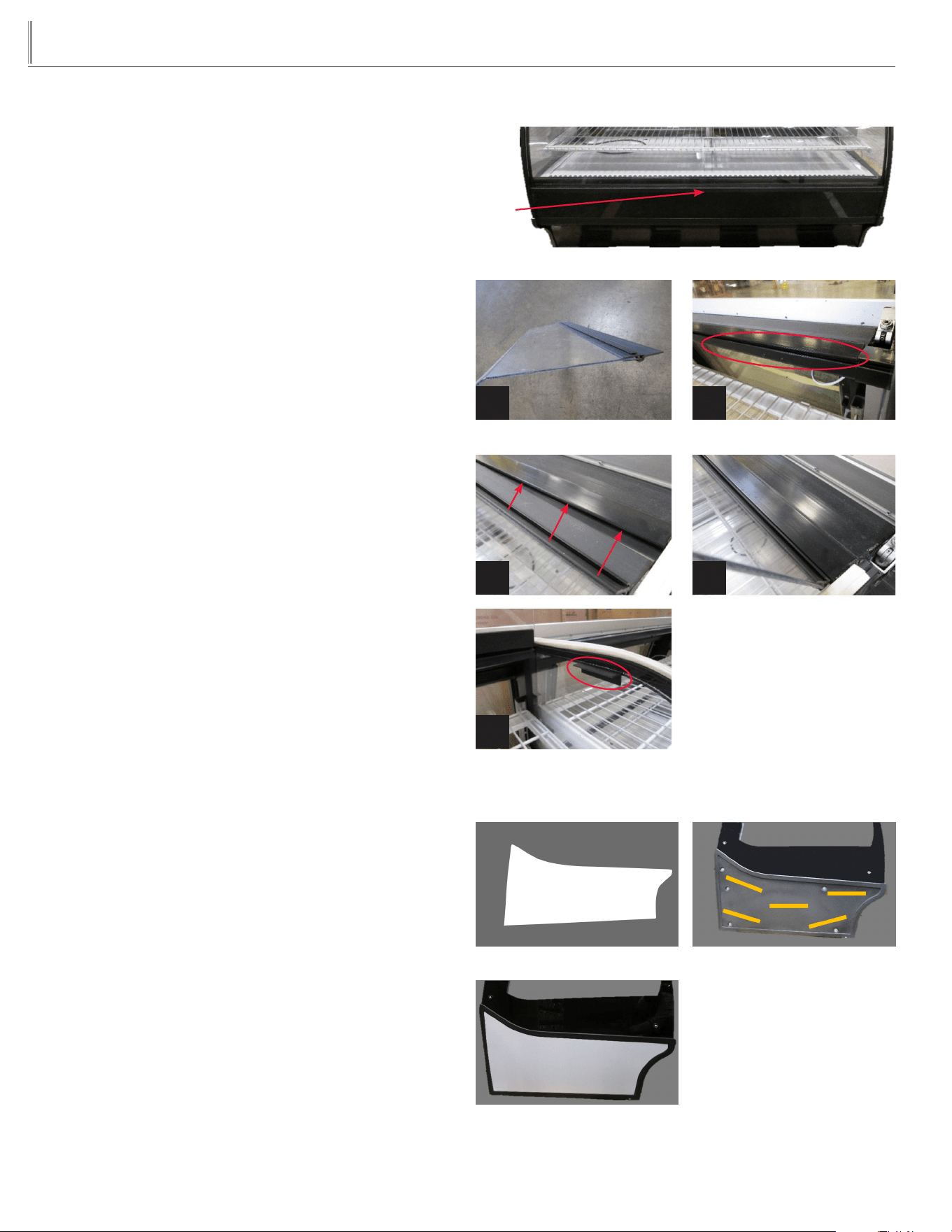
11
TRUE
true display merchandiser
www.truemfg.com
AIR DEFLECTOR INSTALLATION
STEP 1
Lift the front glass up from the center to allow access.
STEP 2
Locate box containing the air deflector and hinge assembly.
See image 1.
STEP 3
Locate the slot in the top black plastic cover that is located in front
of the glass. See image 2.
STEP 4
Slide the black air deflector hinge into the top black plastic cover.
Push in until it stops to secure it. See images 3 and 4.
STEP 5
Gently lower the air deflector onto the retainer located on both side
walls of the cabinet. See image 5
OVERLAY KIT INSTALLATION
STEP 1
Locate the boxes containing the overlay kit. Unwrap the end panel
overlay.
Verify and determine correct
STEP 2
Remove protective film from double sided tape located on side of
cabinet.
STEP 3
Carefully align the bottom edge of the end panel overlay at a 45
degree angle with the bottom side edge of the cabinet.
Allow the bottom edge of the end panel to come in contact with the
double sided tape. If alignment is good, continue to press and adhere
the entire end panel overlay to the rest of the double sided tape.
Repeat for opposite side end panel overlay.
Lift here
Front of cabinet shown
Air deflector and hinge assembly
1
Slot
2
Gently lowering
5
3 4
Left end panel overlay shown Left end of cabinet shown
Left end panel overlay installed
shown
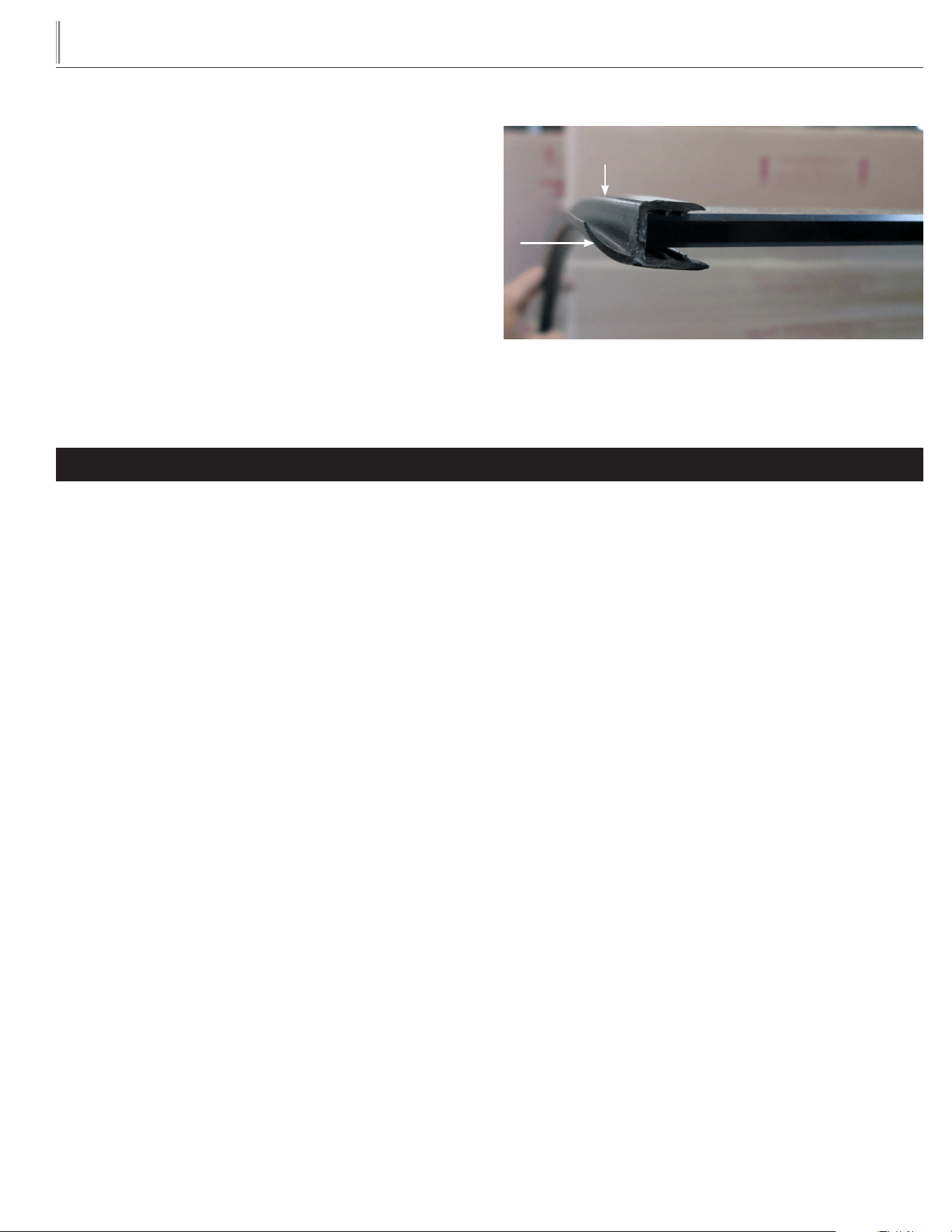
12
TRUE
true display merchandiser
www.truemfg.com
STARTUP
A. The compressor is ready to operate. Plug in the cooler.
B. Temperature controls are factory-set to give refrigerated deli/
bakery display an approximate temperature of 35-41°F (1.6-
5°C) or an approximate temperature of 42-65˚ (5.5-18.3˚C)
for chocolate/wine. Allow unit to function several hours,
completely cooling cabinet before changing the control setting.
Temperature Control Location and Settings.
• LAE temperature control is located in the lower right corner
at the rear of the unit.
See website for adjustments, sequence of operation, and more
information.
C. Excessive tampering with the control could lead to service
difficulties. Should it ever become necessary to replace
temperature control, be sure it is ordered from your TRUE
dealer or recommended service agent.
D. Good air flow in your TRUE unit is critical. Be careful to
load product so that it neither presses against the back wall,
nor comes within four inches of the evaporator housing.
Refrigerated air off the coil must circulate down the back wall.
NOTE: If the unit is disconnected or shut off, wait five minutes
before starting again.
RECOMMENDATION - Before loading product we recommend
you run your TRUE unit empty for two to three days. This allows you
to be sure electrical wiring and installation are correct and no ship-
ping damage has occurred. Remember, our factory warranty does not
cover product loss!
LIGHT SWITCH LOCATION
In most instances, the light switch is located next to the temperature
control.
OPERATION
NOTE:
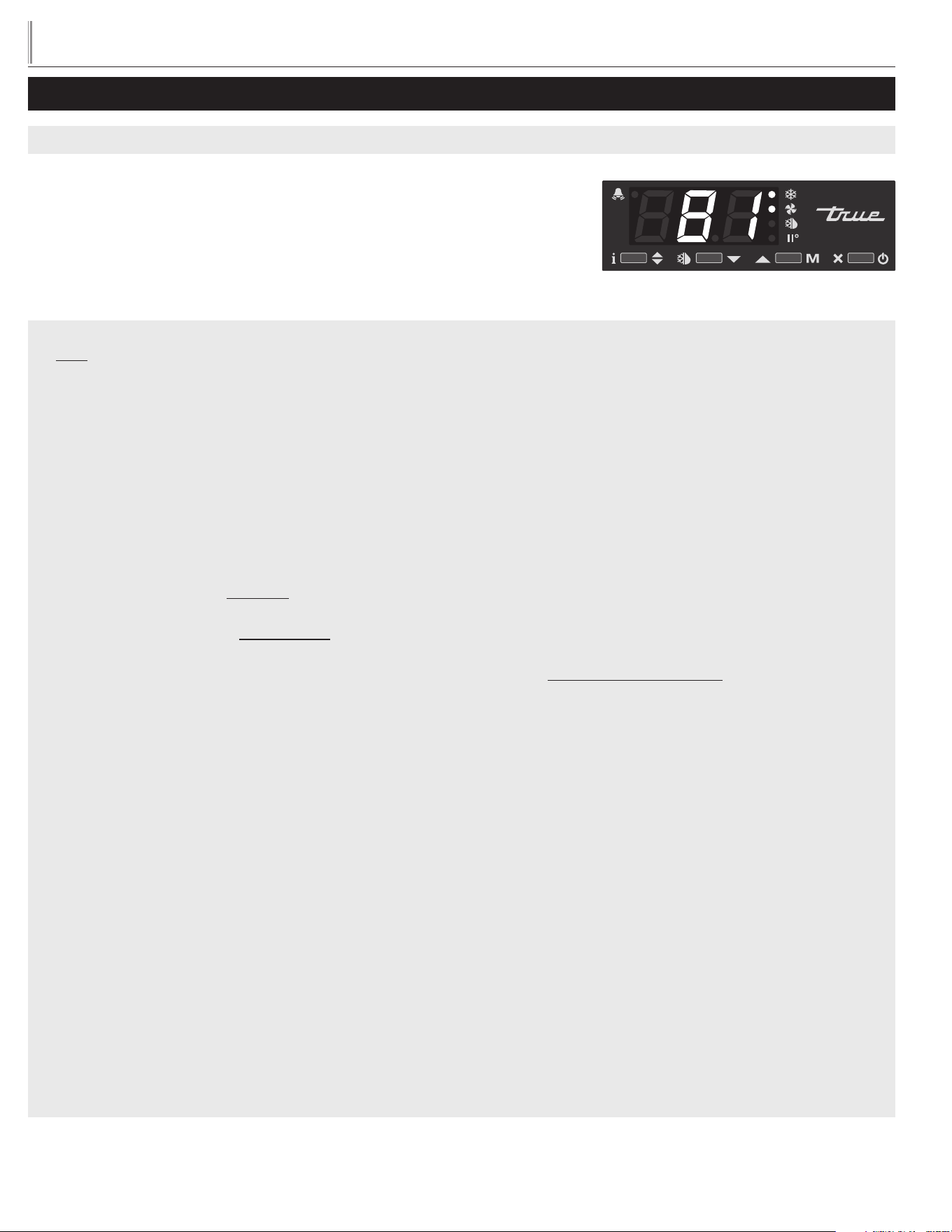
The cabinet is shipped with additional gaskets that are positioned on
the left and right side of the front curved glass. If the existing gaskets
have become compressed during shipping, replace with new.
Identify the mounting and position of the old gasket on the glass.
This will ensure a proper fit when installing the new gasket.
The old gasket will simply peel off the glass.
Both gaskets are the same. When installed correctly, the gasket flap
will be posited on the bottom edge of the curved front glass end.
Picture shown is with glass lifted up
Picture shown is the left gasket on the curved glass edge.
CAUTION:
This display refrigerator is designed to operate in an environment of max 80ºF and 55% relative humidity. In this environment the display
refrigerator can display/store potentially hazardous foods at a temperature at or below 41ºF per NSF 7 - Type II guidelines. The display
refrigerator has the potential to operate at a higher internal temperature (necessary for storage of wine bottles, chocolates, etc.) but in this
condition the display refrigerator cannot be used for the display/storage of potentially hazardous foods.
Left curved end of glass
Gasket flap
To p
Front flat edge of glass
Bottom
13
TRUE
true display merchandiser
www.truemfg.com
LAE ELECTRONIC CONTROL GENERAL SEQUENCE OF OPERATION
1. Cabinet is plugged in.
a. Display will illuminate.
b. Interior light will illuminate on Glass Door Models only. Solid door cabinet lights are controlled by the door switch.
2. After the LAE control preprogrammed time delay of up to 6 minutes, the compressor and evaporator fan(s) will start if the
control is calling for cooling.
a. Control or condenser fans may be already pre-programmed from the factory so at the start of every compressor cycle or
during a defrost cycle, the condenser fan(s) will reverse for 30 seconds to blow dirt off the condensing coil.
3. The LAE control will cycle the compressor but may also cycle evaporator fan(s) on and off determined by the Set-Point and
Differential temperatures.
a. The Set-Point is the adjustable preprogrammed temperature which shuts off the compressor and evaporator fan(s).
This is not the programmed cabinet temperature.
b. The Differential is the non adjustable preprogrammed temperature that is added to the Set-Point temperature that will
restart the compressor and evaporator fan(s).
c. The LAE control is designed to read and display a cabinet temperature not a product temperature.
This cabinet temperature may reflect the refrigeration cycle of the Set-Point and its Differential, or it may show an
average temperature.
The most accurate temperature on a cabinets operation is to verify the product temperature.
Example: If the Set-Point is -9°F/-23°C and the Differential is 10°F/5°C
(Set-Point) -9°F + 10 (Differential) = 1°F
Or
(Set-Point) -23°C + 5 (Differential) = -18°C
The compressor and evaporator fan(s) will cycle off -9°F/-23°C and back on at 1°F/-18°C
4. The LAE control may be preprogrammed to initiate defrost by interval or at specific times of day.
a. At this time the “dEF” will appear on the display and compressor will turn off until a preprogrammed temperature or
duration is reached. During this time for freezers only, evaporator fan(s) will also turn off and the coil heater and drain tube
heaters will also be energized. Some cabinets may also change the rotation of the reversing condenser fan motor.
b. After the preprogrammed temperature or duration for defrost has been reached there may be a short delay for both the
compressor and evaporator fans to restart. At this time “dEF” may still appear on the display for a short time.
ELECTRONIC TEMPERATURE CONTROLS
LAE ELECTRONIC TEMPERATURE CONTROL GENERAL SEQUENCE OF OPERATION
t1 = Thermostat
t2 = Defrost
t3 = Display
t3 probe is not installed and / or activated in all applications
when t3 is not installed and / or activated, the display probe is t1.
14
TRUE
true display merchandiser
www.truemfg.com
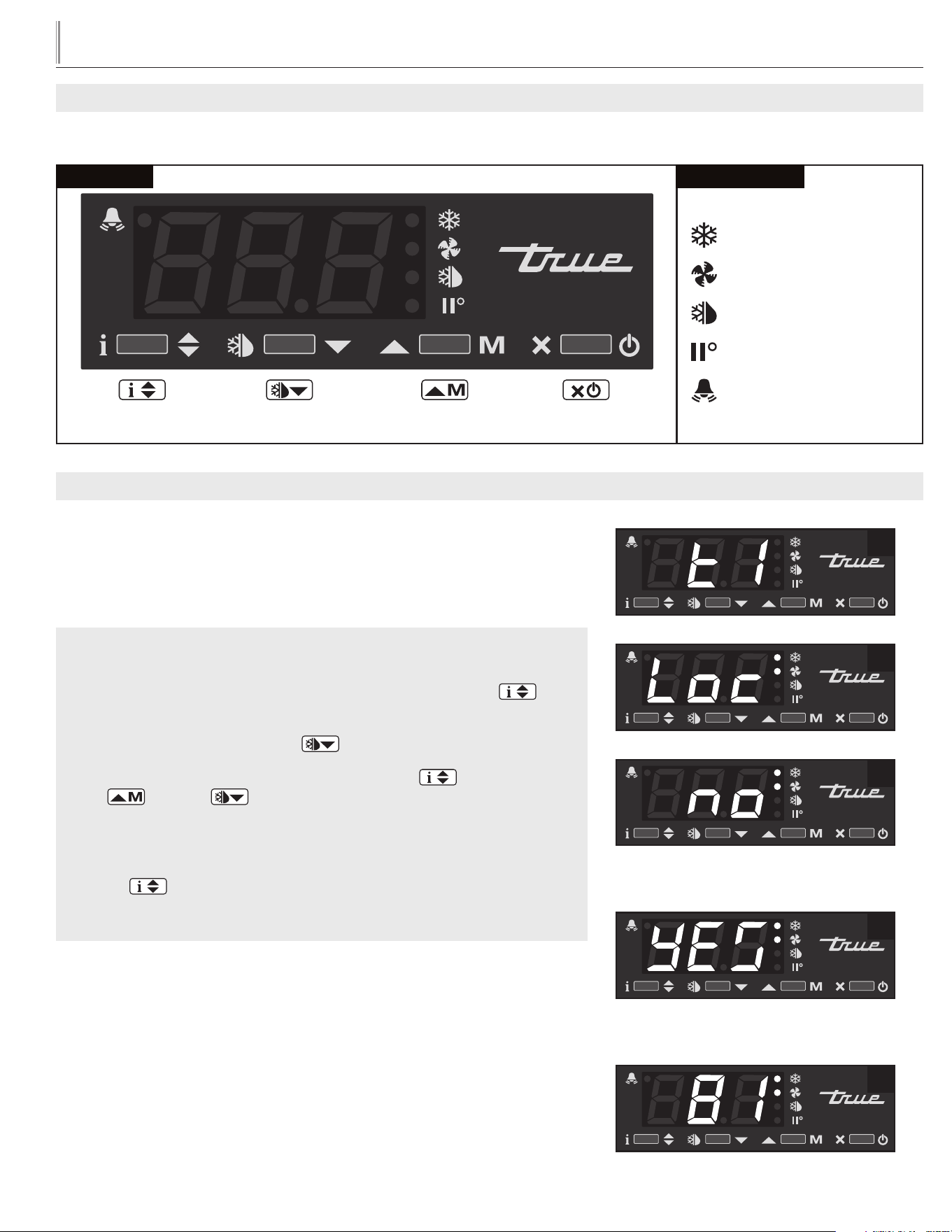
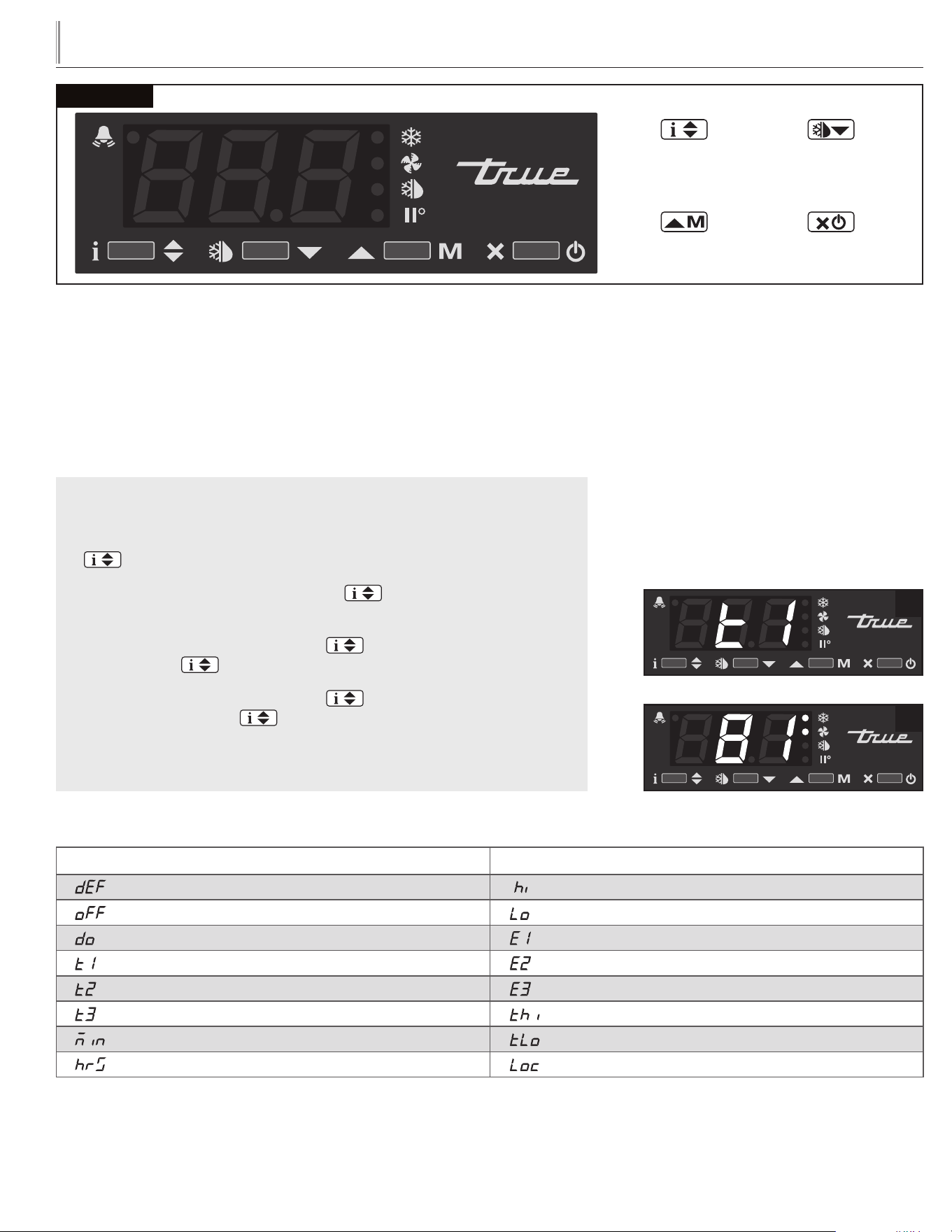
HOW TO USE AN LAE ELECTRONIC CONTROL
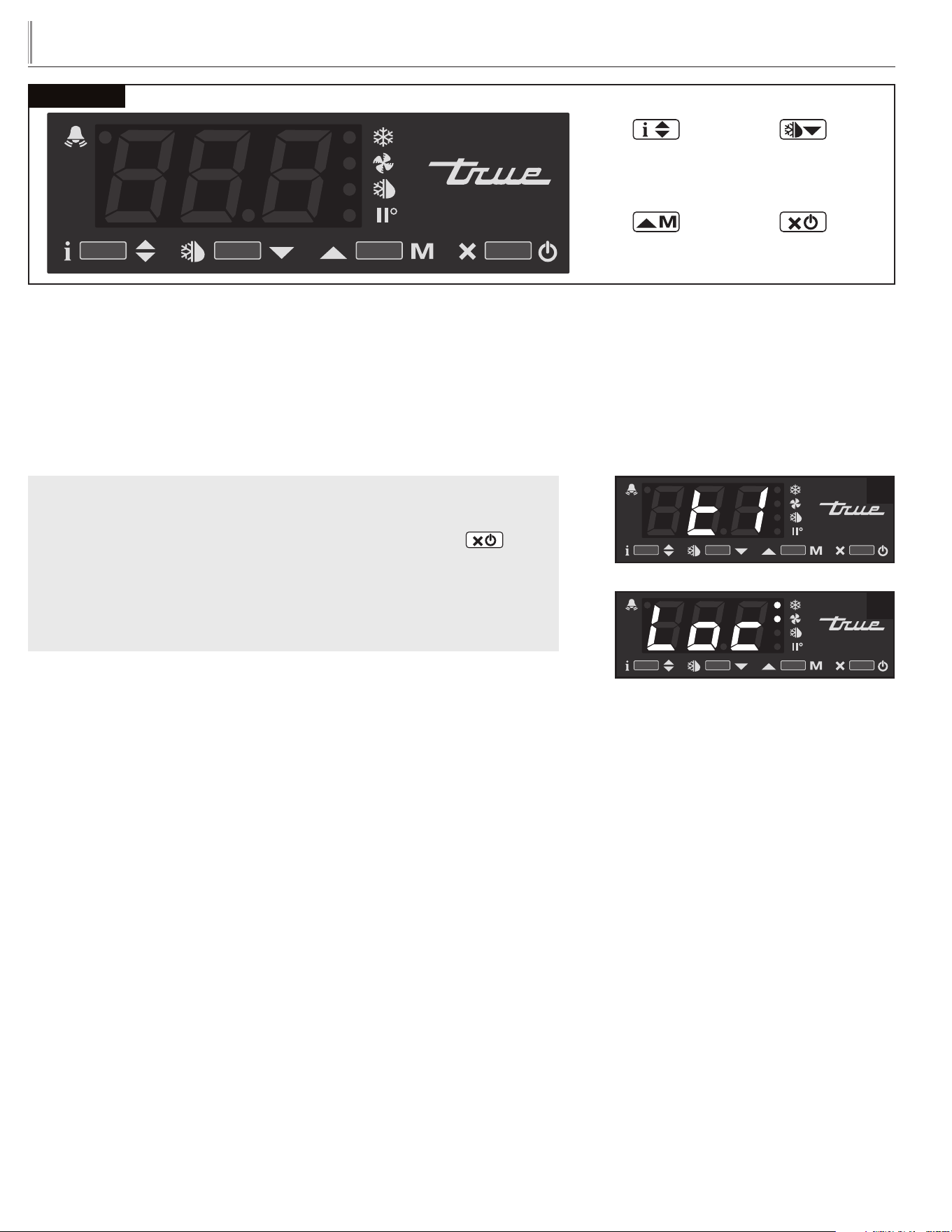
HOW TO LOCK AND UNLOCK LAE CONTROLLER:
STEP 1 - To change lock setting press and release the Info button .
“t1” will appear. See image 1.
STEP 2 - Press the Down button until “Loc” appears. See image 2.
STEP 3 - While pressing and holding the Info button press the
Up or Down button to change the lock settings. If “no”
appears, the controller is unlocked. If “yes” appears, the controller is locked.
See images 3 and 4.
STEP 4 - Once the lock setting has been set correctly release the info
button . Wait 5 seconds for the display to show temperature. See
image 5.
USING THE LAE ELECTRONIC CONTROL
LOCKING AND UNLOCKING THE LAE CONTROLLER:
WHY: Locking of control is necessary to prevent changes to program that may affect
cabinet operation.
Image 3: If “no” appears on screen,
the controller is unlocked.
3
2
1
5
4
Image 4: If “yes” appears on screen, the
controller is locked.
Indicator lights for Refrigeration/Heating Mode, Fan Operation, Defrost Mode.
LAE Control
Info / Set Point
Button
Manual Activation
Up Button
Manual Defrost /
Down Button
Stand-By
Button
LAE Control Icons
Compressor Running
Activation of 2nd Parameter Set
Alarm
Cabinet in Defrost
Evaporator Fan Running
15
TRUE
true display merchandiser
www.truemfg.com
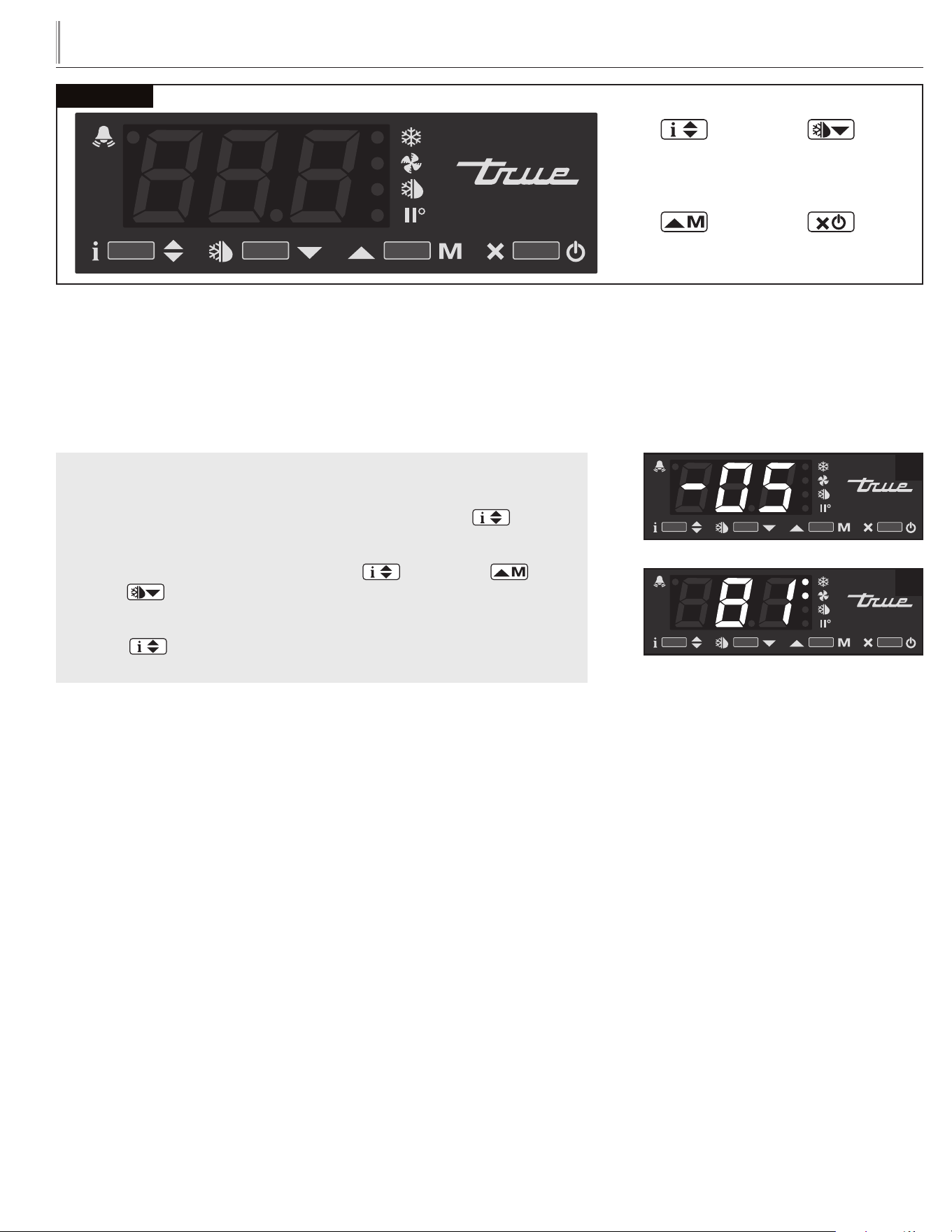
HOW TO TURN OFF THE LAE ELECTRONIC CONTROL:
May need to unlock control.
WHY: Turning off the control will deactivate all electrical components.
CAUTION: Turning off the control will not shut off power to the cabinet. Cabinet
must be unplugged prior to any repair.
HOW TO TURN OFF THE LAE ELECTRONIC CONTROL:
STEP 1 - To turn off control, press and hold the Stand-by button
until "OFF" appears. Release Stand-by button. See Image 2.
STEP 2 - To turn on control, repeat prior steps and a temperature
will appear.
1
2
LAE Control
Manual Activation
Up Button
Info / Set Point
Button
Stand-By
Button
Manual Defrost /
Down Button
16
TRUE
true display merchandiser
www.truemfg.com
LAE Control
Manual Activation
Up Button
Info / Set Point
Button
Stand-By
Button
Manual Defrost /
Down Button
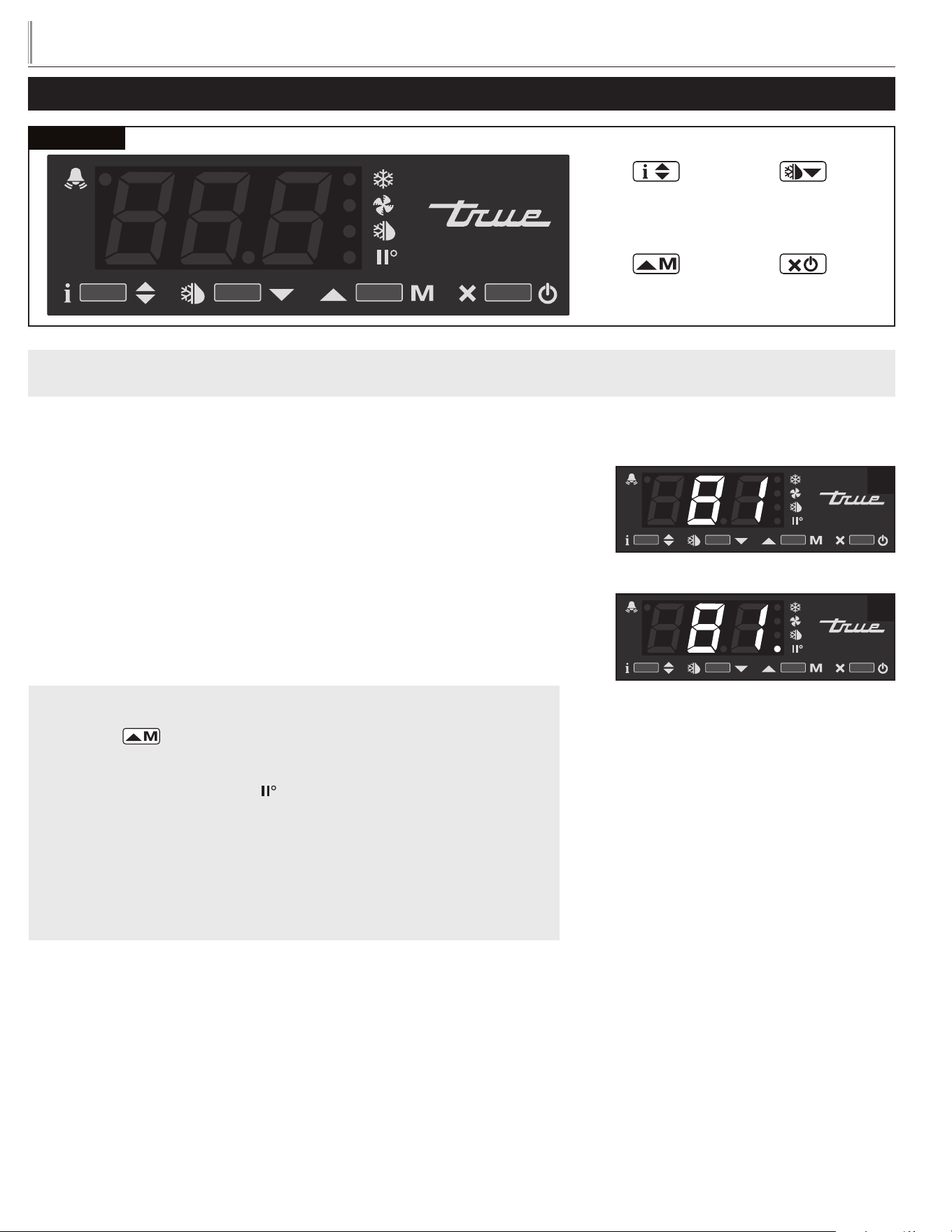
CHANGING THE "SET POINT":
May need to unlock control.
WHY: The set point is the temperature at which the compressor will shut off.
NOTE: The “set point” IS NOT the cabinet holding temperature.
HOW TO CHANGE THE “SET POINT”:
STEP 1 - To see the set point, press and hold the Info button .
See image 1.
STEP 2 - While still holding the Info button , press the Up or
Down button to change the “set point”.
STEP 3 - Once the “set point” has been set correctly release the Info
button . The display will show temperature. See image 2.
1
2
17
TRUE
true display merchandiser
www.truemfg.com
LAE Control
Manual Activation
Up Button
Info / Set Point
Button
Stand-By
Button
Manual Defrost /
Down Button
LAE ELECTRONIC TEMPERATURE CONTROLS
HOW TO CHANGE THE TEMPERATURE SETTING OF THE LAE ELECTRONIC CONTROL
(MODEL TDM'S ONLY):
1
2
CHANGE THE TEMPERATURE RANGE OF A REFRIGERATED UNIT:
May need to unlock control.
WHY: Electronic control is programmed to operate in one of two pre-set
temperature ranges of either a product temperature range of 35-41ºF (1.6º-5ºC) or a
product temperature range of 42-65ºF (5.5-18.3º).
CAUTION: This display refrigerator is designed to operate in an environment of
max 80ºF and 55% relative humidity. In this environment the display refrigerator can
display/store potentially hazardous foods at a temperature at or below 41ºF per NSF
7 - Type II guidelines. The display refrigerator has the potential to operate at a higher
internal temperature (necessary for storage of wine bottles, chocolates, etc.) but in this
condition the display refrigerator cannot be used for the display/storage of potentially
hazardous foods.
STEP 1 - To change the temperature range, press and release the Manual
Activation button on the controller.
STEP 2 - To verify the temperature setting range, locate the icon for the
Activation of 2nd Parameter Set on the controller.
With the icon led off, the setting is 35-41ºF (1.6º-5ºC). See image 1.
With the icon led on, the setting is 42-65ºF (5.5-18.3º). See image 2.
STEP 3 - After changing the programmable range of the electronic
controller, adjust the Set Point to the desired setting (see instructions on
Changing the Set Point)
18
TRUE
true display merchandiser
www.truemfg.com
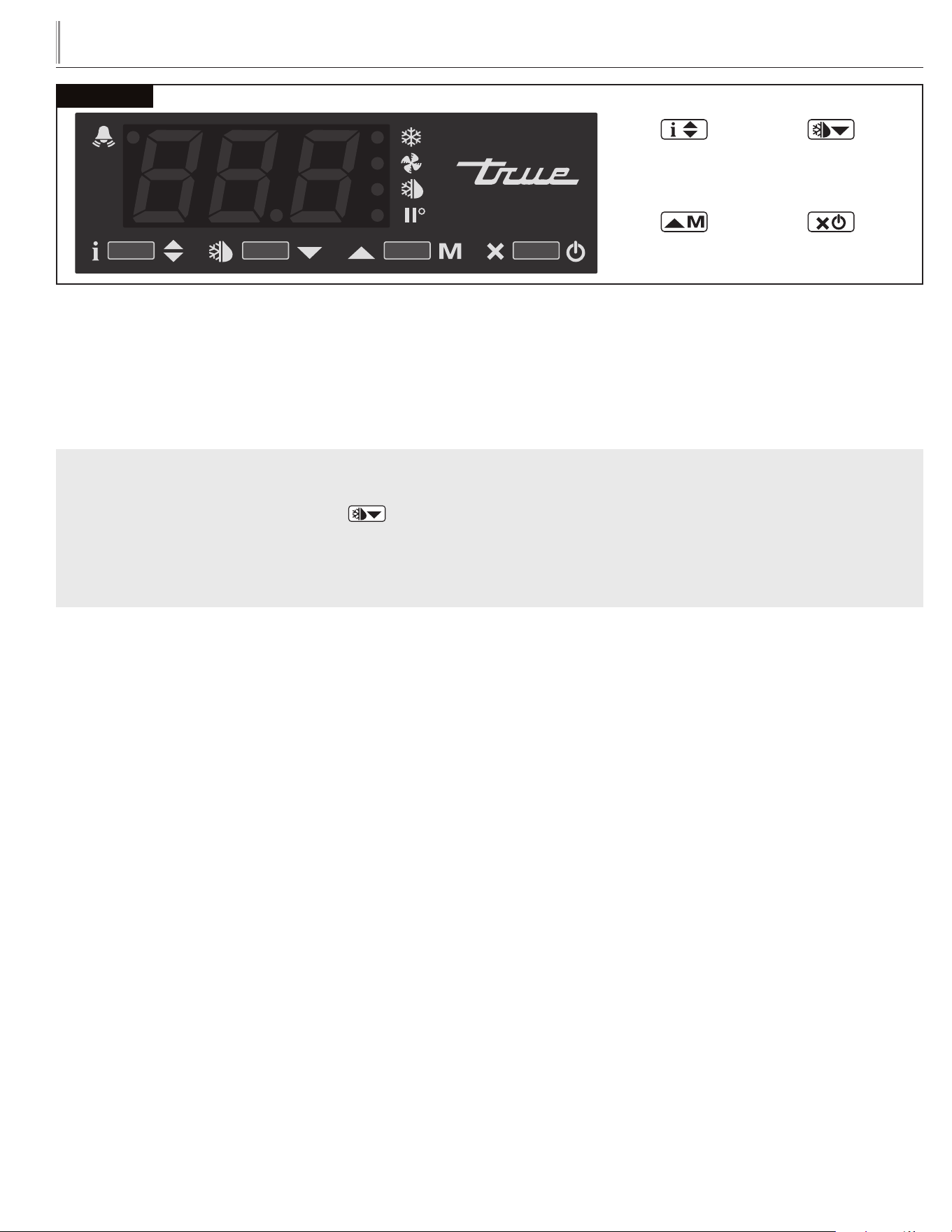
INITIATE A MANUAL DEFROST:
May need to unlock control.
WHY: A one time additional defrost may be necessary to clear accumulated frost / ice from evaporator coil.
HOW TO INITIATE A MANUAL DEFROST:
Press and hold the Manual Defrost button for 5 seconds until “dEF” appears.
NOTE: Defrost will only terminate once a specific preset temperature or a preset time duration is reached.
LAE Control
Manual Activation
Up Button
Info / Set Point
Button
Stand-By
Button
Manual Defrost /
Down Button
19
TRUE
true display merchandiser
www.truemfg.com
LAE Control
Manual Activation
Up Button
Info / Set Point
Button
Stand-By
Button
Manual Defrost /
Down Button
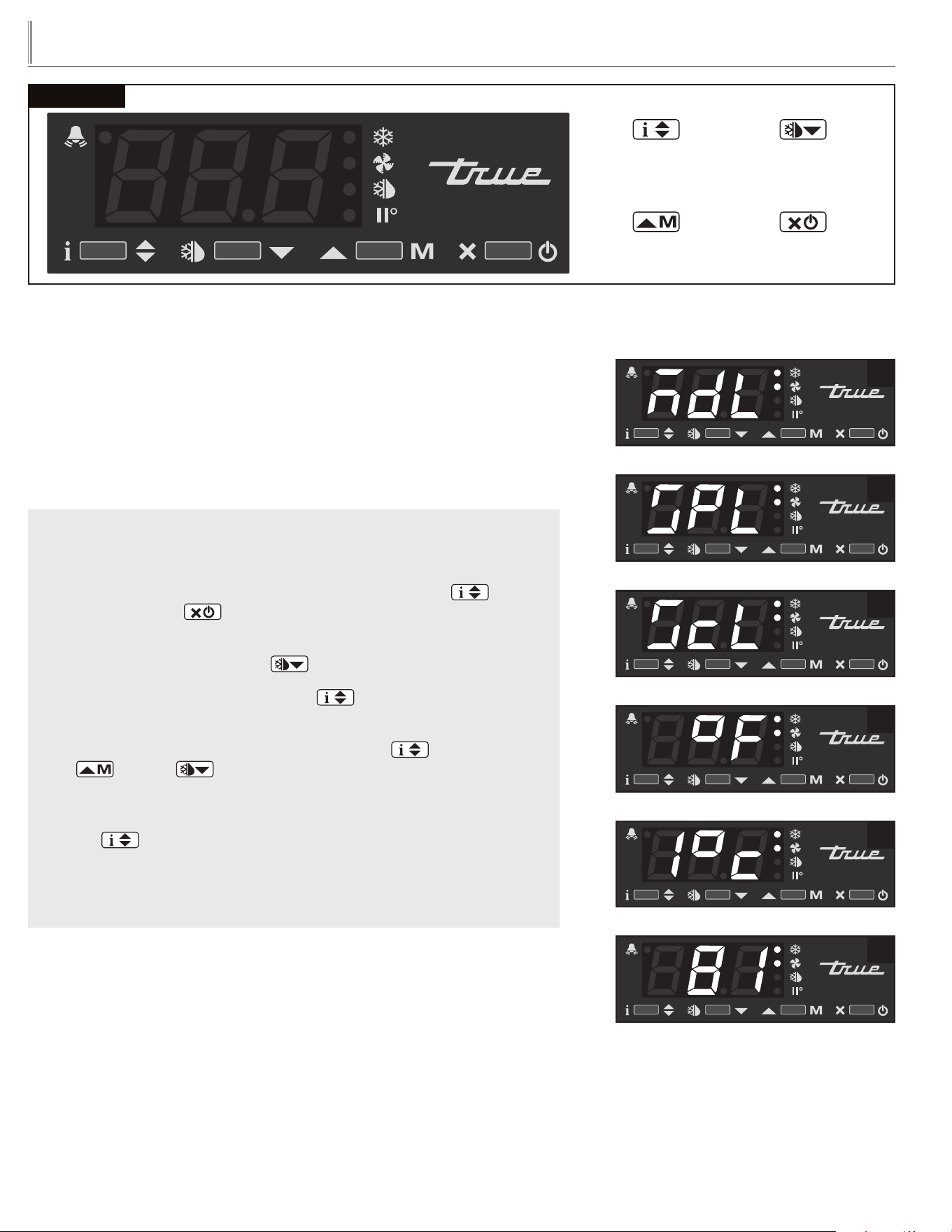
HOW TO CHANGE DISPLAY READOUT FROM
FAHRENHEIT TO CELSIUS:
May need to unlock control.
This can NOT be changed with the LAE model AR2-28 version of the control. See
page 32 for more information.
WHY: Changing readout will assist with customer application.
HOW TO CHANGE DISPLAY READOUT FROM
FAHRENHEIT TO CELSIUS:
STEP 1 - To change the display, press and hold the Info button and
the Stand-by button at the same time. “MdL” or “SPL” will appear.
See images 1a and 1b.
STEP 2 - Push the Down button until “ScL” appears. See image 2.
STEP 3 - Press and hold the Info button to see the “readout scale”.
See image 3.
STEP 4 - While pressing and holding the Info button , press the
up or down button to change the “readout scale".
See image 4.
STEP 5 - Once the “readout scale” has been changed, release the info
button .
STEP 6 - Wait 30 seconds for the display to show temperature.
See image 5.
1a
1b
2
3
4
5
20
TRUE
true display merchandiser
www.truemfg.com
LAE Control
Manual Activation
Up Button
Info / Set Point
Button
Stand-By
Button
Manual Defrost /
Down Button
2
1
HOW TO DISPLAY PROBE TEMPERATURES:
STEP 1 - To display T1 temperature, press and release the info button
. “t1” will appear. See image 1.
STEP 2 - Press and hold the info button . This is the temperature of
the T1 Probe. See image 2.
STEP 3 - By releasing the info button , “t2” will appear. Press and hold
the info button to display the temperature of the T2 probe.
STEP 4 - By releasing the info button again, “t3” will appear. Press
and hold the info button to display the temperature of
the T3 probe. (If probe T3 is not activated, “t3” will not appear of
the display.)
DISPLAYING TEMPERATURE PROBES, T1, T2, T3:
WHY: To display temperature probe readings in different locations of the cabinet.
Also, display may show an average cabinet temperature and not a specific probe
temperature.
DISPLAY CODES
DISPLAY
Defrost in progress Room high temperature alarm
Controller in stand-by Room low temperature alarm
Door open alarm Probe T1 failure
Instant Probe 1 temperature Probe T2 failure
Instant Probe 2 temperature Probe T3 failure
Instant Probe 3 temperature Maximum probe 1 temperature recorded
Minutes of the Real Time Clock Minimum probe 1 temperature recorded
Hours of the Real Time Clock Keypad state lock
21
TRUE
true display merchandiser
www.truemfg.com
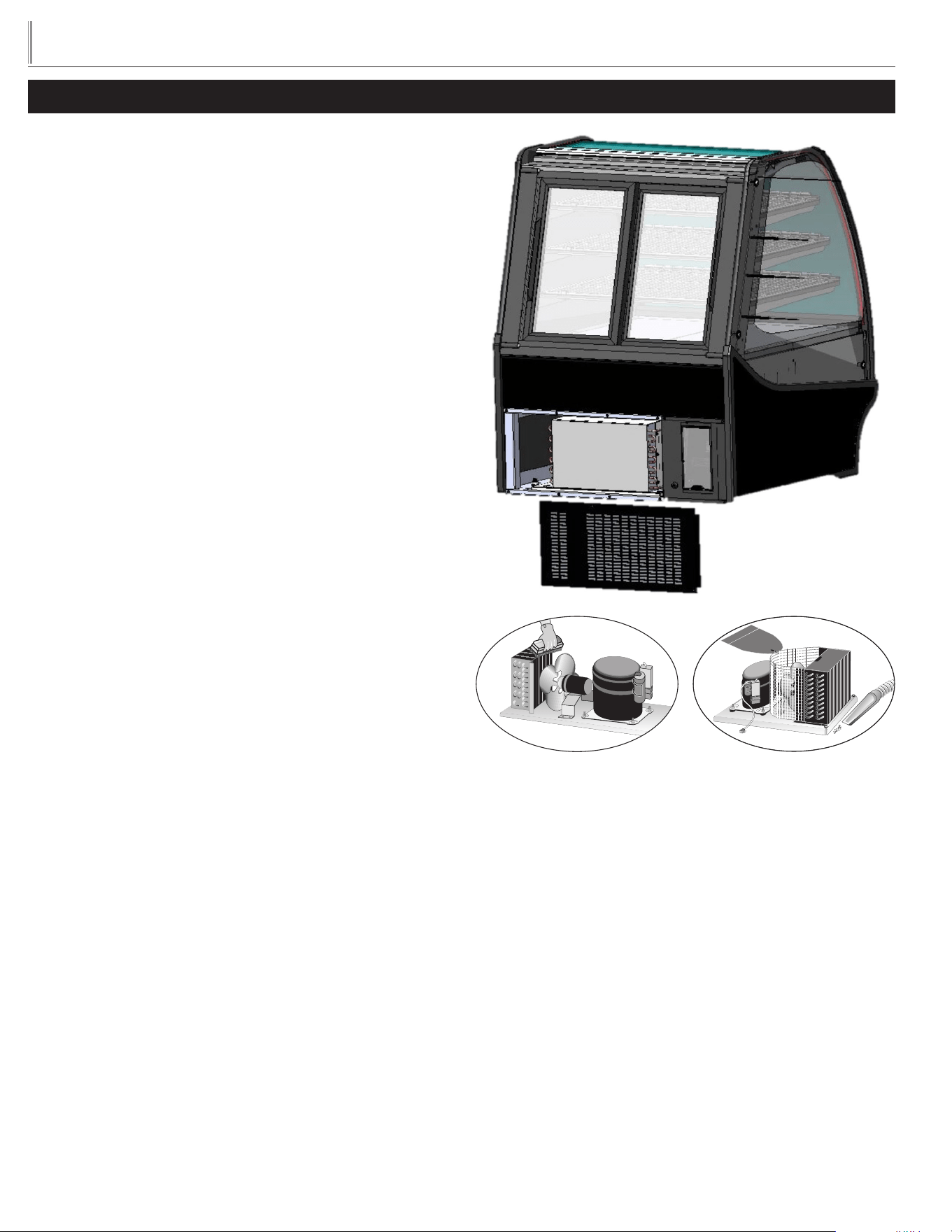
MAINTENANCE, CARE, CLEANING
CLEANING THE CONDENSER COIL
REFRIGERATED BAKERY & COLD DELI
When using electrical appliances, basic safety precautions should be
followed, including the following:
TOOLS REQUIRED
• Phillips Screwdriver
• Stiff Bristle Brush
• Adjustable Wrench
• Air Tank or CO2 Tank
• Vacuum Cleaner
STEP 1 - Disconnect power to unit.
STEP 2 - Take off rear lower grill assembly by removing all bottom
screws.
STEP 3 - Clean off accumulated dirt from condensing coil with a
stiff bristle brush.
STEP 4 - After brushing condenser coil vacuum dirt from coil and
interior floor.
STEP 5 - Connect unit to power and check to see if condenser is
running.
STEP 6 - Reinstall grill assembly onto unit and tighten all screws.
22
TRUE
true display merchandiser
www.truemfg.com
IMPORTANT WARRANTY INFORMATION
Condensers accumulate dirt and require cleaning every 30 days.
Dirty condensers result in compressor failure, product loss, and lost
sales, which are not covered by warranty.
If you keep the Condenser clean you will minimize your service
expense and lower your electrical costs. The Condenser requires
scheduled cleaning every thirty days or as needed.
Air is pulled through the Condenser continuously, along with dust,
lint, grease, etc.
A dirty Condenser can result in NON-WARRANTEED part &
Compressor Failures, Product Loss, and Lost Sales.
Proper cleaning involves removing dust from the Condenser. By using
a soft brush, or vacuuming the Condenser with a shop vac, or using
CO
2
, nitrogen, or pressurized air.
If you cannot remove the dirt adequately, please call your refrigera-
tion service company.
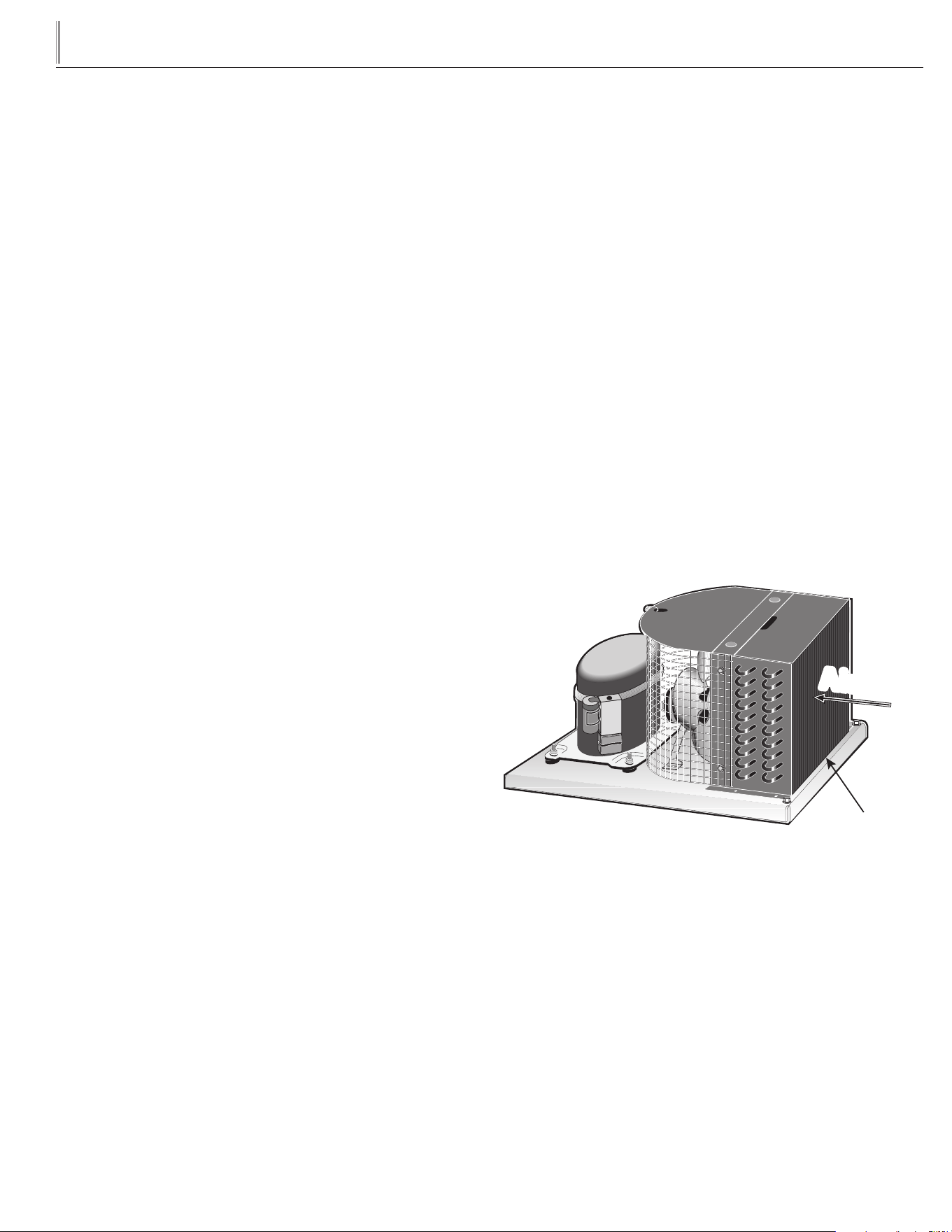
On most of the reach-in units the condenser is accessible in the
rear of the unit. You must remove the cabinet grill to expose the
Condenser.
The Condenser looks like a group of vertical fins. You need to be able
to see through the condenser for the unit to function at maximum
capacity. Do not place filter material in front of condensing coil. This
material blocks air-flow to the coil similar to having a dirty coil.
THE CLEANING OF THE CONDENSER IS NOT
COVERED BY THE WARRANTY!
HOW TO CLEAN THE CONDENSER:
1. Disconnect the electrical power to the unit.
2. Remove the louvered grill.
3. Vacuum or brush the dirt, lint, or debris from the finned
condenser coil.
4. If you have a significant dirt build up you can blow out the
condenser with compressed air.
(CAUTION MUST BE USED TO AVOID EYE INJURY.
EYE PROTECTION IS RECOMMENDED.)
5. When finished be sure to replace the louvered grill. The grill
protects the condenser.
6. Reconnect the electrical power to the unit.
If you have any questions, please call TRUE Manufacturing at 636-
240-2400 or 800-325-6152 and ask for the Service Department.
Direct to Service Department 1(855)372-1368. Service Department
Availability Monday-Thursday 7:00 a.m. to 7:00 p.m., Friday 7:00 a.m.
to 6:00 p.m. and Saturday 8:00 a.m. to 12:00 p.m. CST.
Condensing Unit
Airflow
Condenser

23
TRUE
true display merchandiser
www.truemfg.com
STAINLESS STEEL EQUIPMENT CARE
AND CLEANING
CAUTION: Do not use any steel wool, abrasive or chlorine based
products to clean stainless steel surfaces.
STAINLESS STEEL OPPONENTS
There are three basic things which can break down your stainless
steel’s passivity layer and allow corrosion to rear its ugly head.
1. Scratches from wire brushes, scrapers, and steel pads are just
a few examples of items that can be abrasive to stainless steel’s
surface.
2. Deposits left on your stainless steel can leave spots. You may have
hard or soft water depending on what part of the country you live
in. Hard water can leave spots. Hard water that is heated can leave
deposits if left to sit too long. These deposits can cause the
passive layer to break down and rust your stainless steel. All
deposits left from food prep or service should be removed as
soon as possible.
3. Chlorides are present in table salt, food, and water. Household
and industrial cleaners are the worst type of chlorides to use.
RECOMMENDED CLEANERS FOR CERTAIN
SITUATIONS / ENVIRONMENTS OF STAINLESS
STEEL
A. Soap, ammonia and detergent medallion applied with a cloth or
sponge can be used for routine cleaning.
B. Arcal 20, Lac-O-Nu Ecoshine applied provides barrier film for
fingerprints and smears.
C. Cameo, Talc, Zud First Impression is applied by rubbing in
the direction of the polished lines for stubborn stains and
discoloring.
D. Easy-off and De-Grease It oven aid are excellent for removals
on all finishes for grease-fatty acids, blood and burnt-on foods.
E. Any good commercial detergent can be applied with a sponge
or cloth to remove grease and oil.
F. Benefit, Super Sheen, Sheila Shine are good for restoration /
passivation.
NOTE: The use of stainless steel cleaners or other such solvents is
not recommended on plastic parts. Warm soap and water will suffice.
8 STEPS THAT CAN HELP PREVENT RUST ON
STAINLESS STEEL:
1. USING THE CORRECT CLEANING TOOLS
Use non-abrasive tools when cleaning your stainless steel
products. The stainless steel’s passive layer will not be harmed
by soft cloths and plastic scouring pads. Step 2 tells you how to
find the polishing marks.
2. CLEANING ALONG THE POLISH LINES
Polishing lines or “grain” are visible on some stainless steels.
Always scrub parallel to visible lines on some stainless steels.
Use a plastic scouring pad or soft cloth when you cannot see
the grain.
3. USE ALKALINE, ALKALINE CHLORINATED OR
NON-CHLORIDE CONTAINING CLEANERS
While many traditional cleaners are loaded with chlorides, the
industry is providing an ever increasing choice of non-chloride
cleaners. If you are not sure of your cleaner’s chloride content
contact your cleaner supplier. If they tell you that your present
cleaner contains chlorides, ask if they have an alternative. Avoid
cleaners containing quaternary salts as they can attack stainless
steel, causing pitting and rusting.
4. WATER TREATMENT
To reduce deposits, soften the hard water when possible.
Installation of certain filters can remove corrosive and distasteful
elements. Salts in a properly maintained water softener can be
to your advantage. Contact a treatment specialist if you are not
sure of the proper water treatment.
5. MAINTAINING THE CLEANLINESS OF YOUR
FOOD EQUIPMENT
Use cleaners at the recommended strength (alkaline chlorinated
or non-chloride). Avoid build-up of hard stains by cleaning
frequently. When boiling water with your stainless steel
equipment, the single most likely cause of damage is chlorides
in the water. Heating any cleaners containing chlorides will have
the same damaging effects.
6. RINSE
When using chlorinated cleaners you must rinse and wipe dry
immediately. It is better to wipe standing cleaning agents and
water as soon as possible. Allow the stainless steel equipment
to air dry. Oxygen helps maintain the passivity film on stainless
steel.
7. HYDROCHLORIC ACID (MURIATIC ACID)
SHOULD NEVER BE USED ON STAINLESS STEEL
8. REGULARLY RESTORE/PASSIVATE STAINLESS
STEEL
24
TRUE
true display merchandiser
www.truemfg.com
GENERAL MAINTENANCE
CLEANING THE EVAPORATOR COIL
Refrigerated units
TOOLS REQUIRED
• 1/4" nut driver
• Power drill with 1/4" nut setter bit (optional)
STEP 1
Unplug cabinet.
STEP 2
Lift front glass and air deflector.
STEP 3
Remove rear doors.
With door open, grab left and right side of door and lift up and out
from the bottom towards you.
STEP 4
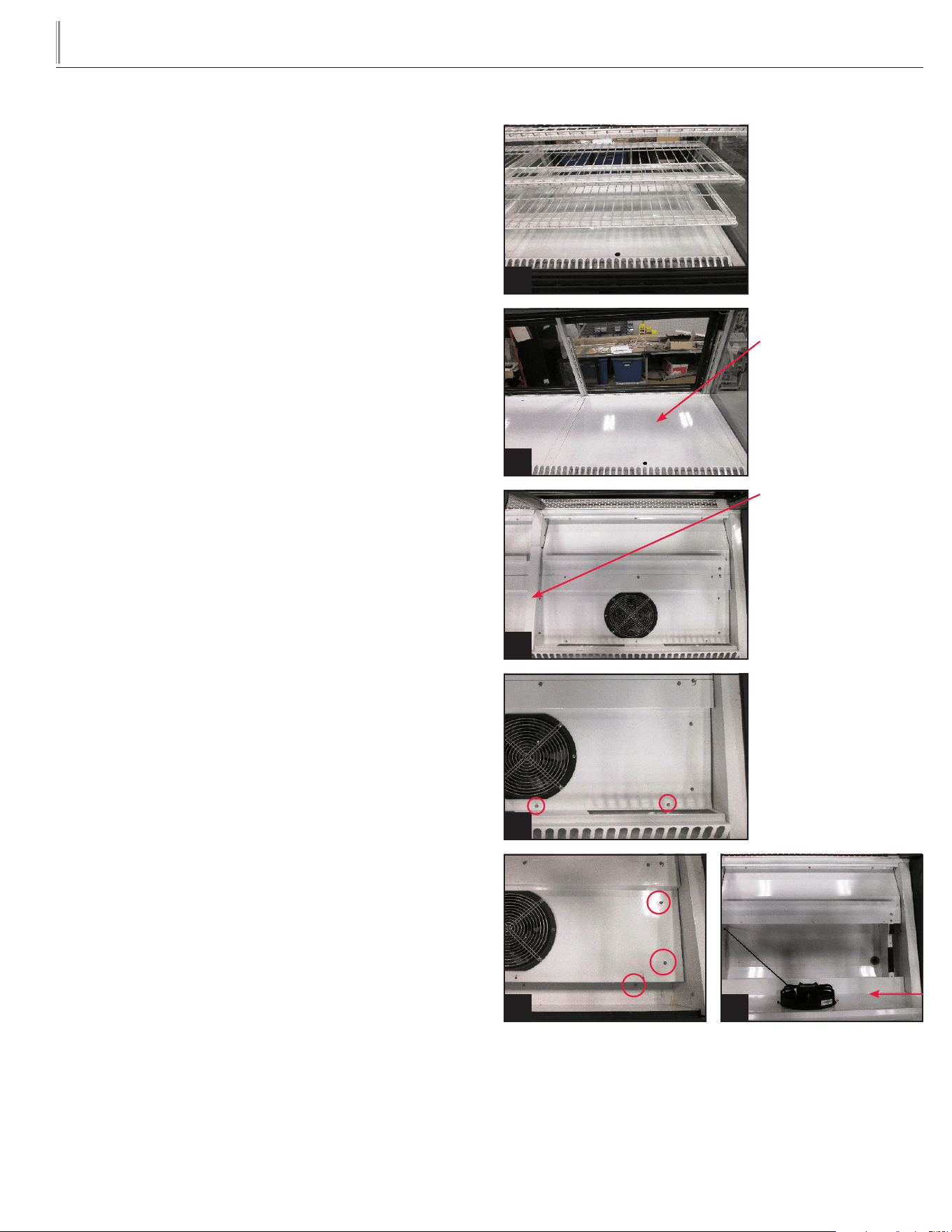
Remove all product from cabinet. See image 1.
STEP 5
Remove all shelving, horizontal light bar assembly, rear horizontal
bracket and shelf supports.
Refer to "Shelf Installation" in the Set-Up section of this manual
NOTE: When unplugging the light cords, ensure light cord is not
damaged when removing the light bar assembly from the cabinet.
STEP 6
Remove inner product floor.
(Only model TDMR-77, remove the center product floor filler
bracket.) See image 3.
STEP 7
Remove the screws securing the inner front return air grate.
Remove the inner front return air grate from the cabinet. See image 4.
STEP 8
Remove the screws securing the front fan housing cover.
Pivot the fan housing cover forward. See images 5 and 6.
View is from the front of
cabinet with the front glass
lifted up.
1
Shelves removed.
Product Floor shown.
TDMR-77 Filler Bracket.
Product oor removed.
Example of screws to
remove.
Example of screws to remove. Cover shown leaning forward.
2
3
4
5 6
25
TRUE
true display merchandiser
www.truemfg.com
STEP 9
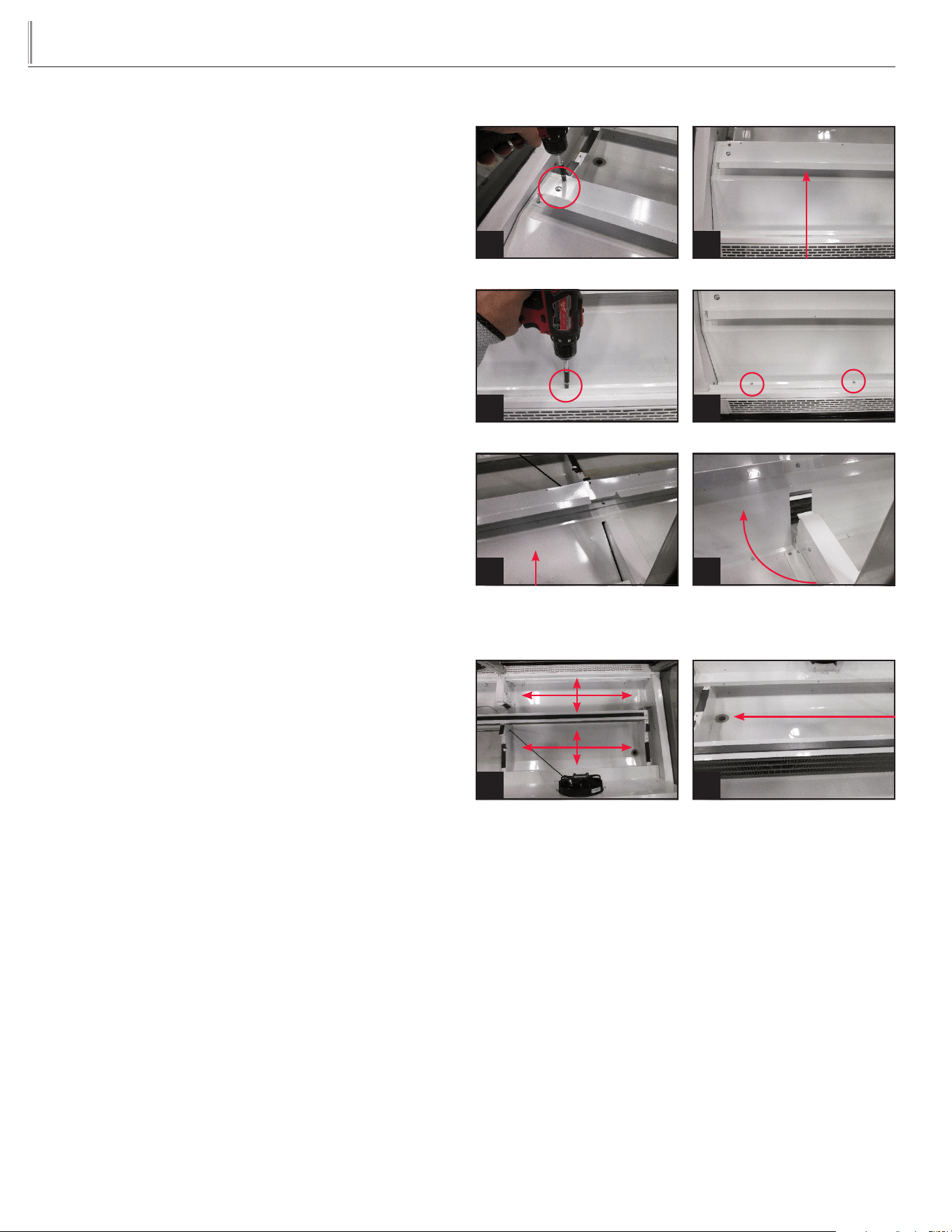
Remove the screws securing the rear evaporator coil cover.
Remove the rear evaporator coil cover from the cabinet.
NOTE: The bracket mounted to the top of the evaporator coil
cover does not need to be removed.
Leaving the bracket installed will assist the cover from not bending or
creasing. See images 7-12.
STEP 10
Vacuum entire area. Clean area with clean cloth, warm water and
mild soap solution.
Remove any debris that may clog the drain hose. See images 13 and 14.
STEP 11
Reassemble and reinstall all components in reverse order.
STEP 12
Plug in cabinet.
Example of screws to remove.
7
Bracket mounted on top of cover.
8
Example of screws to remove.
9
Example of screws to remove.
10
Center of TDMR-77
evaporator cover shown.
11
Pivot cover up and towards the
front of the cabinet.
12
Areas to clean. Drain hole.
1413

26
TRUE
true display merchandiser
www.truemfg.com
WARRANTY INFORMATION
(
U.S.A. & CANADA ONLY!
)
SB • 11/17
THREE-YEAR PARTS &LABOR WARRANTY
ADDITIONAL TWO-YEAR COMPRESSOR WARRANTY
404A/134A/HYDROCARBON COMPRESSOR WARRANTY
WARRANTY CLAIMS
WHAT IS NOT COVERED BY THIS WARRANTY
TRUE warrants to the original purchaser of every new TRUE refrigerated unit, the cabinet and all parts thereof, to be free from defects in
material or workmanship, under normal and proper use and maintenance service as specified by TRUE and upon proper installation and start-up in
accordance with the instruction packet supplied with each TRUE unit. TRUE’s obligation under this warranty is limited to a period of three (3) years from
the date of original installation or 39 months after shipment date from TRUE, whichever occurs first.
Any part covered under this warranty that are determined by TRUE to have been defective within three (3) years of original installation or
thirty-nine (39) months after shipment date from manufacturer, whichever occurs first, is limited to the repair or replacement, including labor charges, of
defective parts or assemblies. The labor warranty shall include standard straight time labor charges only and reasonable travel time, as determined by
TRUE.
Warranty does not cover standard wear parts which include door gaskets, incandescent bulbs or fluorescent bulbs. Warranty also does not
cover issues caused by improper installation or lack of basic preventative maintenance which includes regular cleaning of condenser coils.
In addition to the Three (3) year warranty stated above, TRUE warrants its hermetically and semi-hermetically sealed compressor to be free
from defects in both material and workmanship under normal and proper use and maintenance service for a period of two (2) additional years from the
date of original installation but not to exceed five (5) years and three (3) months after shipment from the manufacturer.
Compressors determined by TRUE to have been defective within this extended time period will, at TRUE’s option, be either repaired or
replaced with a compressor or compressor parts of similar design and capacity.
The two (2) year extended compressor warranty applies only to hermetically and semi-hermetically sealed parts of the compressor and does
not apply to any other parts or components, including, but not limited to: cabinet, paint finish, temperature control, refrigerant, metering device, driers,
motor starting equipment, fan assembly or any other electrical component, etcetera.
The two year compressor warranty detailed above will be voided if the following procedure is not carefully adhered to:
1. This system contains R404A, R134A, or R290 refrigerant and polyol ester lubricant. The polyol ester lubricant has rapid moisture absorbing
qualities. If long exposure to the ambient conditions occur, the lubricant must be removed and replaced with new. For oil amounts and specifications please
call TRUE technical service department (855-372-1368). Failure to comply with recommended lubricant specification will void the compressor warranty.
2. Drier replacement is very important and must be changed when a system is opened for servicing. An OEM exact replacement should be used.
The new drier must also be the same capacity as the drier being replaced.
3. Micron level vacuums must be achieved to insure low moisture levels in the system. 500 microns or lower must be obtained.
All claims for labor or parts must be made directly through TRUE. All claims should include: model number of the unit, the serial number of
the cabinet, proof of purchase, date of installation, and all pertinent information supporting the existence of the alleged defect.
In case of warranty compressor, the compressor model tag must be returned to TRUE along with above listed information.
Any action or breach of these warranty provisions must be commenced within one (1) year after that cause of action has occurred.
TRUE's sole obligation under this warranty is limited to either repair or replacement of parts, subject to the additional limitations below. This
warranty neither assumes nor authorizes any person to assume obligations other than those expressly covered by this warranty.
NO CONSEQUENTIAL DAMAGES. TRUE IS NOT RESPONSIBLE FOR ECONOMIC LOSS; PROFIT LOSS; OR SPECIAL, INDIRECT, OR
CONSEQUENTIAL DAMAGES, INCLUDING WITHOUT LIMITATION, LOSSES OR DAMAGES ARISING FROM FOOD OR PRODUCT SPOILAGE CLAIMS
WHETHER OR NOT ON ACCOUNT OF REFRIGERATION FAILURE.
WARRANTY IS NOT TRANSFERABLE. This warranty is not assignable and applies only in favor of the original purchaser/user to whom deliv-
ered. ANY SUCH ASSIGNMENT OR TRANSFER SHALL VOID THE WARRANTIES HEREIN MADE AND SHALL VOID ALL WARRANTIES, EXPRESS OR
IMPLIED, INCLUDING ANY WARRANTY OF MERCHANTABILITY OR FITNESS FOR A PARTICULAR PURPOSE.
IMPROPER USAGE. TRUE ASSUMES NO LIABILITY FOR PARTS OR LABOR COVERAGE FOR COMPONENT FAILURE OR OTHER DAMAGES
RESULTING FROM IMPROPER USAGE OR INSTALLATION OR FAILURE TO CLEAN AND/OR MAINTAIN PRODUCT AS SET FORTH IN THE WARRANTY
PACKET PROVIDED WITH THE UNIT.
RELOCATION OF CABINET FOR REPAIR. True is not responsible for the cost to move a cabinet for any reason from its position of operation on
the customer's premises to make a warranty repair.
NON OEM PARTS. Use of non OEM parts without manufacturer's approval will void cabinet warranty.
ALTERATION, NEGLECT, ABUSE, MISUSE, ACCIDENT, DAMAGE DURING TRANSIT OR INSTALLATION, FIRE, FLOOD, ACTS OF GOD. TRUE is
not responsible for the repair or replacement of any parts that TRUE determines have been subjected after the date of manufacture to alteration, neglect,
abuse, misuse, accident, damage during transit or installation, fire, flood, or act of God.
IMPROPER ELECTRICAL CONNECTIONS. TRUE IS NOT RESPONSIBLE FOR THE REPAIR OR REPLACEMENT OF FAILED OR DAMAGED
COMPONENTS RESULTING FROM INCORRECT SUPPLY VOLTAGE, THE USE OF EXTENSION CORDS, LOW VOLTAGE, OR UNSTABLE SUPPLY VOLTAGE.
NO IMPLIED WARRANTY OF MERCHANTABILITY OR FITNESS FOR A PARTICULAR PURPOSE: THERE ARE NO OTHER WARRANTIES,
EXPRESSED, IMPLIED OR STATUTORY, EXCEPT THE THREE (3) YEAR PARTS & LABOR WARRANTY AND THE ADDITIONAL TWO (2) YEAR COMPRESSOR
WARRANTY AS DESCRIBED ABOVE. THESE WARRANTIES ARE EXCLUSIVE AND IN LIEU OF ALL OTHER WARRANTIES, INCLUDING IMPLIED WARRANTY
AND MERCHANTABILITY OR FITNESS FOR A PARTICULAR PURPOSE. THERE ARE NO WARRANTIES WHICH EXTEND BEYOND THE DESCRIPTION ON
THE FACE HEREOF.
OUTSIDE U.S. AND CANADA: This warranty does not apply to, and TRUE is not responsible for, any warranty claims made on products sold or
used outside the United States and Canada. This warranty only applies to units shipped from True's manufacturing facilities after September 1, 2015.
THIS WARRANTY ONLY APPLIES TO UNITS SHIPPED FROM TRUE'S MANUFACTURING FACILITIES AFTER SEPTEMBER 1, 2015.