AVIOT WS-Q1
Bluetooth Speaker Quick Start Guide
Charging
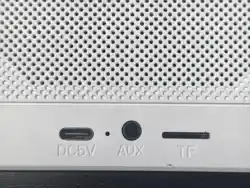
Please charge the device before first use. Connect the USB Type-C® cable to the charging
port for charging. It takes approximately 1 hour and 30 minutes to fully charge the battery from
0% remaining power.
Reset (If malfunctions occur during operation)
1. Delete the Bluetooth settings of the connected device.
2. With the power ON, press and hold the Volume - button and Power button simultaneously
for 2 seconds.
Cover Removal and Attachment
The cover can be attached or removed by aligning the recess of the speaker with the
protrusion of the cover. You can adjust the angle by standing the speaker with the corner of the
main unit bottom aligned with the groove of the cover.
Power ON/OFF
Power OFF: Press and hold the Power button for 2-6 seconds.
Pairing (For initial setup)
1. Press and hold the Power button to turn on the power, and confirm that the device is in
pairing mode.
2. Connect to "AVIOT WS-Q1" or "AVIOT WS-Q1-PNK" from the Bluetooth settings screen of
your connected device.
Note: The connected device settings screen display is only an example. For details, please
refer to the instruction manual of your connected device. Do not select the display of "APP WS-
Q1" or "WS-Q1-PNK". If pairing fails, please try resetting the device.
Safety Precautions
WARNING
• Use the device in an environment where you can ensure your safety, as warning sounds and
other ambient sounds may be difficult to hear.

• Do not use, store or leave the device in humid, dusty, smoky, steamy areas, near fire, in
direct sunlight, or in high-temperature places such as inside a car.
• Never use the device while driving a car, motorcycle, ship, bicycle or other vehicles. Pay
attention to the surrounding environment when using.
• Do not insert water or foreign objects into the device. Water or foreign objects may cause fire
or electric shock. If water or foreign objects enter the device, stop using it immediately and
consult your retailer.
• Do not use the device while it is covered with a blanket or other similar items.
• Never insert the USB plug when the device or USB cable is wet. Inserting a USB plug into a
wet device or cable may cause a short circuit due to liquids (tap water, seawater, soft drinks, etc.)
or foreign objects attached to the device or USB cable, leading to abnormal overheating or
malfunction.
• If the battery leaks or emits an unusual odor, immediately move the device away from fire
and stop using it.
• Use the included USB cable for charging.
CAUTION
• Be careful with high volume and prolonged use, as it may adversely affect your hearing. To
protect your ears, do not turn the volume up too high. Regardless of the volume level, prolonged
use will burden your ears. Please rest your ears about once an hour. Consult a doctor if
symptoms do not improve.
• Do not use the device near medical equipment.
• Do not touch the device for a long time while it is charging, as it may cause low-temperature
burns.
• Follow the instructions of the cabin crew when using the device on an aircraft. Radio waves
may cause malfunctions and lead to accidents.
• When using Bluetooth® devices in certain locations, noise, audio dropouts, or disconnections
may occur due to surrounding radio wave conditions, such as areas with wireless LAN or near
electromagnetic cookers like induction stoves.
• The effective communication range of Bluetooth® varies greatly depending on obstacles
(human body, metal, walls, etc.) and surrounding radio wave conditions.
• Radio waves generated by Bluetooth® devices may affect the operation of other electronic
devices and may cause accidents in some cases. Therefore, please turn off the power of this
device and other Bluetooth® devices in the following locations: Hospitals / Near priority seats on
trains / Locations where flammable gases are generated such as gas stations / Near fire alarms.

Warranty Terms
We will repair or replace the product free of charge for natural failures caused by normal use.
When contacting our company, please prepare documents or electronic data proving your
purchase and the purchase date, such as the receipt or delivery note from your retailer.
The warranty period is 12 months from the date of purchase. The warranty is only valid in the
country of purchase. Only the speaker is covered by the warranty. Damage to accessories or
outer boxes during inspection or replacement cannot be covered by the warranty.
※ Even if the product is replaced free of charge or for a fee within the warranty period, the
warranty period remains 12 months from the date of purchase and will not be extended after
replacement, whether free of charge or for a fee.
This product may be modified without prior notice for improvements and other reasons.
Please note that the warranty does not apply in the following cases in principle:
a. If the product has not been registered through our dedicated registration form.
b. If there are no documents or electronic data proving the purchase, such as a receipt or
delivery note from an authorized retailer.
c. If the product has been repaired or modified by anyone other than our service center.
d. If the product has deteriorated or been damaged due to customer negligence such as
misuse (including damage or burnout from excessive input), dropping, impact, etc., or improper
storage. Also, if scratches or signs of misuse are found on the faulty headphone regardless of
when the symptoms occurred.
e. If the product was used with a power supply and voltage outside the specified standards.
f. For consumable parts.
g. If the cause of the failure is in other devices other than this product, such as mobile
terminals.
h. Exterior damage such as scratches or stains on the main unit exterior or plug (occurred
after purchase).
i. If the date of contact is after the warranty period, even if the date of failure or malfunction is
within the warranty period.
We cannot provide warranty for products not handled by our company.
We do not lend replacement devices during the repair or replacement period.
In the unlikely event that the product is determined to be outside the warranty coverage, we
may charge you for the round-trip shipping costs.
Due to production, inventory conditions and other circumstances, we may not be able to
replace the product with the same model.

Disclaimer
We do not guarantee connection and operation with all Bluetooth® compatible devices and
applications. Our company shall not be liable for any failure, trouble, data loss or damage of other
connected devices caused by the use of this product. In addition, our company shall not be liable
for any damages caused by failure, trouble, data damage or loss of headphones, OS, other
software, compatible devices, etc. Please note this in advance.
Rechargeable Battery Disposal
The rechargeable battery built into this device is a recyclable resource. When disposing of this
device, do not disassemble it by yourself under any circumstances, and dispose of it in
accordance with the garbage disposal rules of your municipality.
For Long-Term Use
• Beware of over-discharging: Rechargeable batteries may deteriorate due to over-discharging
if left uncharged for a long period of time. For long-term storage, please charge the battery about
once a month to prevent over-discharging.
• Beware of deformation, damage and impact: The device may deform or be damaged if force
is applied to it for a long time. Please store it carefully. In addition, since the device uses precision
electronic components, do not subject it to strong impact such as dropping or hitting it.
• Cleaning instructions: Do not use chemicals such as benzene, thinner, or alcohol for cleaning,
as this may cause deterioration or malfunction.
Wired Connection
(No specific instructions provided in the original manual)
Dedicated Application
Using the "AVIOT Connect" application, you can make settings such as customizing the main
unit button operations and adjusting sound quality.
Trademarks
• Bluetooth® word mark and logo are registered trademarks owned by Bluetooth SIG, Inc.
Auracast™ word mark and logo are registered trademarks owned by Bluetooth SIG, Inc. Precede
Japan Co., Ltd. uses these marks and logos under license. • USB Type-C® and USB-C® are
registered trademarks of USB Implementers Forum. • LDAC and the LDAC logo are trademarks
of Sony Corporation. • Hi-Res Audio Wireless logo is a registered trademark or trademark of the
Japan Audio Society. • All other trademarks and registered trademarks are the property of their
respective owners.

FAQs / Inquiries
For frequently asked questions and inquiries, please contact our customer service center.
FCC ID: 2A9B6WS-Q1
NOTE: This equipment has been tested and found to comply with the limits for a Class B
digital device, pursuant to part 15 of the FCC Rules. These limits are
designed to provide reasonable protection against harmful interference in a
residential installation. This equipment generates, uses and can radiate radio
frequency energy and, if not installed and used in accordance with the instructions, may cause
harmful interference to radio communications. However, there is no guarantee that interference
will not occur in a particular installation. If this equipment does cause harmful interference to radio
or television reception, which can be determined by turning the equipment off and on, the user is
encouraged to try to correct the interference by one or more of the following measures:
- Reorient or relocate the receiving antenna.
- Increase the separation between the equipment and receiver.
-Connect the equipment into an outlet on a circuit different from that to which the receiver is
connected.
-Consult the dealer or an experienced radio/TV technician for help.
Changes or modifications not expressly approved by the party responsible for compliance
could void the user's authority to operate the equipment.
This device complies with Part 15 of the FCC Rules. Operation is subject to the following two
conditions: (1) this device may not cause harmful interference, and (2) this device must accept
any interference received, including interference that may cause undesired operation.