
AquaKara AK_101 Owner's Manual - Draft
AquaKara
OWNER'S MANUAL
Shower Phone Case with Bluetooth Speaker
Product Name: Bluetooth speaker
Model: AquaKara_101
VIDEOS, MUSIC, SOCIALS, CHATS - LIFE GOES ON, EVEN IN THE SHOWER.
1.GETTINGSTARTED
PACKAGECONTENTS
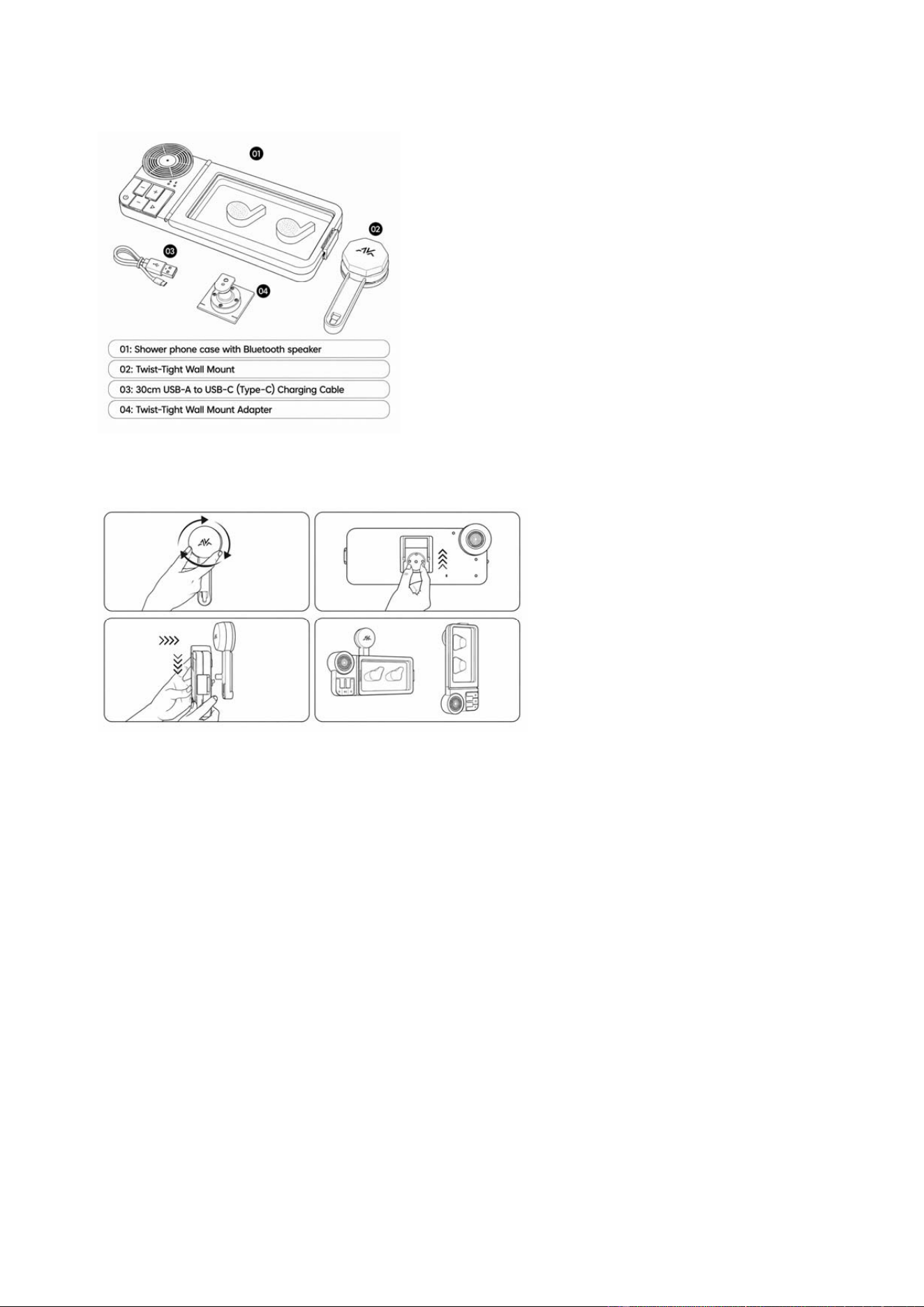
Before using your AquaKara AK_101, check that all parts are included:
1. Shower Phone Case with Bluetooth Speaker
2. Twist-Tight Wall Mount
3. 30cm USB-A to USB-C (Type-C) Charging Cable
4. Twist-Tight Wall Mount Adapter
Phone not included.
AquaKara AK_101 Owner's Manual - Draft
QUICKSTARTGUIDE
InstalltheTwist‐TightWallMount
1. Clean and dry a smooth, flat mounting surface. Press the Twist-Tight Wall Mount firmly against the wall, then
twist the knob clockwise until it cannot turn any further. For a stronger hold, keep pressing the mount against
the wall while tightening.
2. Slide the Twist-Tight Wall Mount Adapter onto the back of the case. Insert the smooth end first, then push the
adapter fully into place until the two locking tabs click securely.
3. Attach the case to the wall mount. Slide the open end of the adapter onto the wall mount bracket, then push
down until it reaches the end and sits securely.
4. Adjust the case to your preferred viewing angle. The mount supports 360° rotation and adjustable tilt for
portrait or landscape viewing.
Important: Install only on a smooth, flat, clean, dry, non-porous surface such as tile or glass.
Do not install on grout lines, textured tile, rough surfaces, painted surfaces, peeling surfaces, cracked surfaces, dusty surfaces,
oily surfaces, wet surfaces, natural marble, or other porous natural stone surfaces. Porous surfaces may allow air to pass
through tiny holes, which can weaken the wall mount’s hold and cause the product to fall.
Warning: Improper installation may cause the product to fall. A fall may damage the product, your phone, or the bathroom
surface. Before each use, gently check that the Twist-Tight Wall Mount is secure and that the case is properly attached. Do
not use the product if the mount slides, rotates, feels loose, or does not hold the case securely.
AquaKara AK_101 Owner's Manual - Draft
InsertPhoneandStartListening
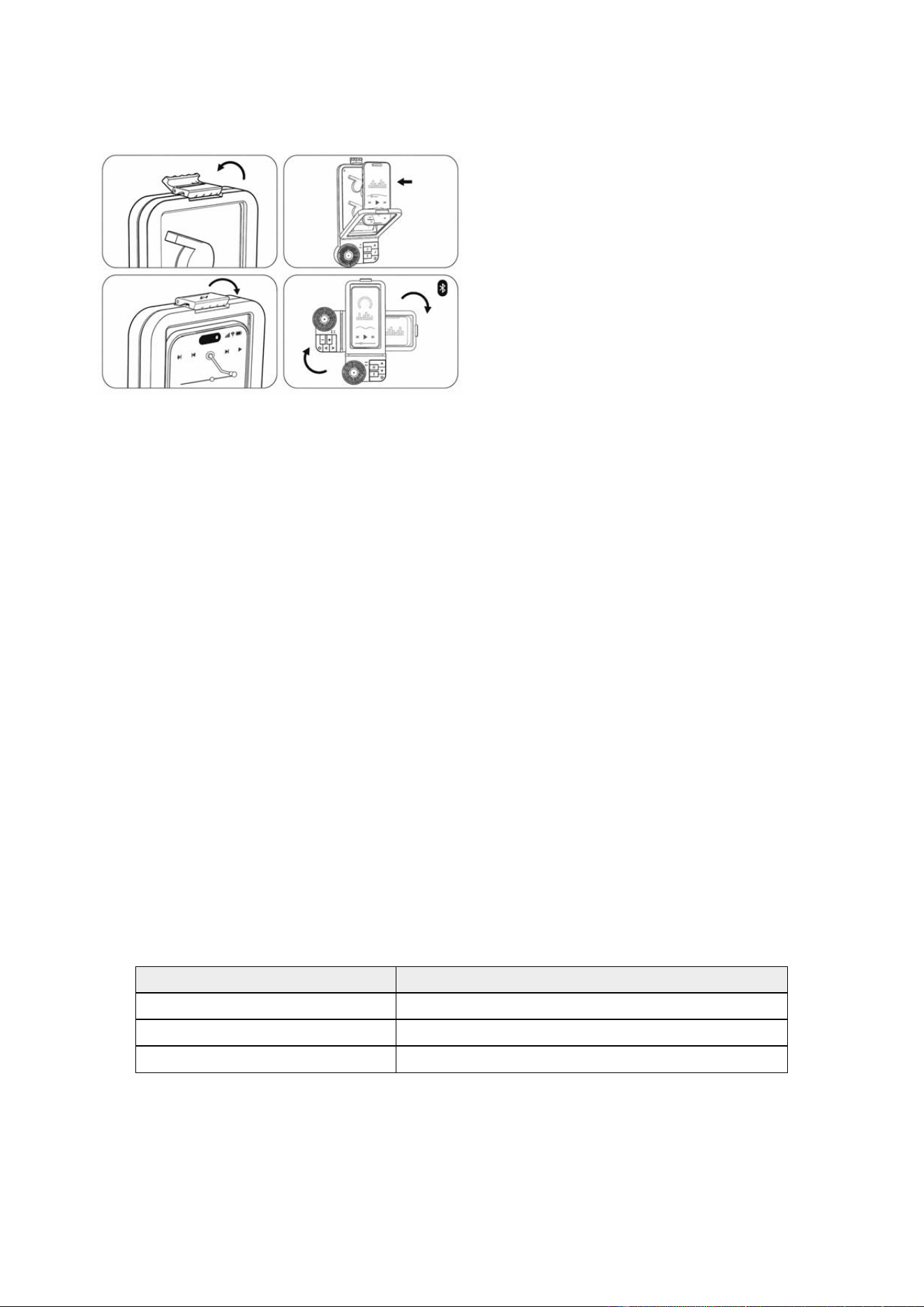
For the easiest setup, turn on and pair the speaker before placing your phone inside the case. Long press the
Power/Bluetooth button to turn on the speaker. For first-time pairing, open Bluetooth settings on your phone and
select AK_101.
1. Open the snap-lock latch and lift the flip-open lid.
2. Insert your phone with the screen facing the clear window.
3. Close the lid securely and lock the latch.
4. Rotate and tilt the case for your ideal viewing angle.
After first pairing, the speaker will try to reconnect automatically to the last connected phone when powered on.
To connect a different phone, disconnect Bluetooth from the previously connected phone, or quickly double-click
the Power/Bluetooth button to disconnect the current Bluetooth connection. Then select AK_101 on the new
phone.
Important: Before shower use, make sure the lid is fully closed, the latch is locked, and the USB-C charging port
cover is pressed securely into place.
CHARGINGBEFOREUSE
The speaker may arrive with some battery power from manufacturing, but it may not be fully charged.
To charge:
1. Open the USB-C charging port cover using the small pull tab.
2. Connect the included USB-A to USB-C charging cable.
3. Charge the speaker using a suitable USB power source.
4. When charging is complete, remove the cable.
5. Press the USB-C charging port cover firmly back into place before shower use.
Charging time: approximately [2.5 hours]
Play time: approximately [6 hours]
Status LED
Charging Red LED on
Fully charged LED off
Low battery LED changes from blue to red
Warning: Do not charge the product in the shower, near running water, or while the product is wet. The USB-C
charging port cover is part of the water-resistant design. If the cover is open or not properly sealed, water may
enter the charging port and damage the product.
AquaKara AK_101 Owner's Manual - Draft
BASICCONTROLS
Button Function
Power/Bluetooth Long press to power on/off
Power/Bluetooth Single press to play or pause audio/video
Power/Bluetooth Quick double-click to disconnect current Bluetooth connection
Volume + Press to increase volume one step
Volume - Press to decrease volume one step
Next Track Press to skip to next track
Previous Track Press to return to previous track
Button functions may vary depending on the connected phone, app, or Bluetooth connection status.
WATER‐RESISTANTUSE
The AquaKara AK_101 is designed for normal shower splash use.
Do not submerge the product in water. Do not use it underwater. Do not charge it while wet. Do not spray high-
pressure water directly into the speaker area, charging port, latch, or seal area.
Before each shower use, check that:
1. The lid is fully closed.
2. The latch is locked.
3. The USB-C charging port cover is fully closed.
4. The Twist-Tight Wall Mount is firmly attached.
Important: This product is water-resistant for normal shower splash use only. It is not designed for underwater
use or full water submersion.
2.PRODUCTINFORMATION&SAFETY
PRODUCTSPECIFICATIONS
Item Specification
Brand AquaKara
Model AquaKara_101
Product Name Bluetooth speaker
Bluetooth Name AquaKara_101
Bluetooth Version V5.4
Bluetooth Audio Codec SBC
Bluetooth Frequency 2.402GHz-2.480GHz
Transmission Range >=10 m in open space
Rated Output Power 6W
Maximum Output Power 6.5W
Frequency Response 50Hz-18kHz
Sensitivity >=85dB

AquaKara AK_101 Owner's Manual - Draft
Signal-to-Noise Ratio >=75dB
Speaker 4 ohm, 5W
Battery 800mAh
Charging Input DC 5V / 1A
Charging Cable USB-A to USB-C, 30 cm
Charging Time Approx. [2.5 hours / to be confirmed]
Play Time Approx. [6 hours / to be confirmed]
Water Resistance Designed for normal shower splash use only. No IP rating claimed.
Compatible Phone Size [To be confirmed]
Product Dimensions [To be confirmed]
Product Weight [To be confirmed]
CAREANDUSENOTES
Use the AquaKara AK_101 only as instructed in this manual.
Before each shower use:
1. Make sure the lid is fully closed.
2. Make sure the latch is locked.
3. Make sure the USB-C charging port cover is fully closed.
4. Make sure the Twist-Tight Wall Mount is firmly attached.
After shower use:
1. Wipe the outside of the product dry before opening the lid.
2. Keep water, soap, shampoo, and other liquids away from the inside of the case.
3. Allow the product to dry before charging.
4. Store the product in a clean, dry place when not in use.
Important: This product is designed for normal shower splash use only. Do not submerge it in water. Do not use
it underwater. Do not charge it while wet.
PHONEPROTECTIONNOTICE
The AquaKara AK_101 is designed to help protect your phone during normal shower splash use when the
product is properly closed and used correctly.
Always check the lid, latch, seal area, charging port cover, and wall mount before use.
AquaKara is not responsible for damage to phones, personal items, bathroom surfaces, or other property caused
by improper use, improper installation, failure to close the product correctly, submersion, impact, damaged parts,
or use outside the instructions in this manual.
Phone not included.
IMPORTANTSAFETYINSTRUCTIONS
Please read and follow all safety instructions before using this product.
1. Do not submerge the product in water.
2. Do not use the product underwater.
3. Do not charge the product in the shower, near running water, or while the product is wet.
4. Before charging, make sure the USB-C charging port is dry.
5. Use only a standard DC 5V / 1A USB power source.

AquaKara AK_101 Owner's Manual - Draft
6. Do not use fast chargers, high-voltage chargers, damaged chargers, or damaged charging cables.
7. Do not force the charging cable into the USB-C port.
8. Always close the USB-C charging port cover securely before shower use.
9. Do not use the product if the case, lid, latch, seal area, charging port cover, wall mount, or charging cable is
damaged.
10. Do not drop, crush, puncture, burn, disassemble, or modify the product.
11. Do not expose the product to fire, high heat, or extended direct sunlight.
12. Keep the product away from young children unless supervised by an adult.
13. This product is not a toy.
14. Avoid listening at high volume for long periods. High volume may cause hearing damage.
15. If the product becomes unusually hot, emits odor, changes shape, or does not work normally, stop using it
immediately and disconnect it from power if charging.
16. Refer servicing to qualified personnel only. Do not attempt to repair the product yourself.
MOUNTINGSAFETY
Install the Twist-Tight Wall Mount only on a smooth, flat, clean, dry, non-porous surface.
Do not install on grout lines, textured tile, rough surfaces, painted surfaces, peeling surfaces, cracked surfaces,
dusty surfaces, oily surfaces, or wet surfaces.
Wait 24 hours after installation before attaching the case.
Before each use, gently check that the wall mount is secure. Do not use the product if the mount slides, rotates,
or feels loose.
Warning: Improper wall mount installation may cause the product to fall. A fall may damage the product, your
phone, or the bathroom surface.

AquaKara AK_101 Owner's Manual - Draft
3.WARRANTY&COMPLIANCE
3.1One‐YearLimitedWarranty
AQUAKARA Limited, under the AquaKara brand, warrants the AquaKara Shower Phone Case with Bluetooth
Speaker, Model AK_101, to the original purchaser against defects in materials and workmanship under normal
use for one (1) year from the date of original retail purchase.
Proof of purchase may be required to obtain warranty service. If a valid warranty claim is approved, AquaKara or
its authorized service provider may, at its option, repair the product, replace the product, or provide a refund.
This limited warranty applies only where permitted by law and does not limit any rights you may have under
applicable consumer protection laws.
3.2WhatIsNotCovered
This limited warranty does not cover damage, defects, or loss caused by:
Accident, misuse, abuse, neglect, improper care, or failure to follow this owner's manual.
Submersion, underwater use, use outside normal shower splash conditions, high-pressure water spray,
charging while wet, or failure to securely close the USB-C charging-port cover before shower use.
Installation or mounting on unsuitable surfaces, improper surface preparation, improper use of the Twist-Tight
Wall Mount, or product fall caused by improper mounting.
Use with a phone that does not fit properly, forcing the case closed, or using a damaged, oversized, or
improperly positioned phone.
Exposure to soap, shampoo, conditioner, oils, cleaning chemicals, hard water/mineral buildup, or steam
exposure beyond normal shower conditions.
Unauthorized modification, repair, disassembly, or use with non-approved accessories.
Normal wear and tear, cosmetic damage, scratches, fading, or damage that does not affect normal product
operation.
Products purchased from unauthorized resellers or second-hand sellers.
AquaKara is not responsible for damage to phones, devices, walls, tile, grout, glass, mirrors, bathroom surfaces,
personal property, or loss of data.
3.3RequestingWarrantyService
To request warranty service, contact AquaKara Customer Support before returning any product.
Do not return the product without first contacting AquaKara Customer Support. AquaKara may require proof of
purchase and may provide instructions for inspection, repair, replacement, or refund.
Warranty service is subject to applicable local laws.
3.4CustomerSupport
For product support, warranty questions, or replacement assistance, contact:
AquaKara Customer Support
Email: [support@aquakara.com]
Website: [www.aquakara.com/support]
Please include your product model number, proof of purchase, and a description of the issue when contacting
support.
3.5FCCStatement‐UnitedStates
FCC ID: 2BVTX-AK101
This device complies with Part 15 of the FCC Rules. Operation is subject to the following two conditions:
(1) This device may not cause harmful interference, and
(2) this device must accept any interference received, including interference that may cause undesired operation.

AquaKara AK_101 Owner's Manual - Draft
Changes or modifications not expressly approved by the party responsible for compliance could void the user’s
authority to operate the equipment.
This equipment has been tested and found to comply with the limits for a Class B digital device, pursuant to part
15 of the FCC Rules. These limits are designed to provide reasonable protection against harmful interference in a
residential installation. This equipment generates, uses and can radiate radio frequency energy and, if not
installed and used in accordance with the instructions, may cause harmful interference to radio communications.
However, there is no guarantee that interference will not occur in a particular installation. If this equipment does
cause harmful interference to radio or television reception, which can be determined by turning the equipment off
and on, the user is encouraged to try to correct the interference by one or more of the following measures:
—Reorient or relocate the receiving antenna.
—Increase the separation between the equipment and receiver.
—Connect the equipment into an outlet on a circuit different from that to which the receiver is connected.
—Consult the dealer or an experienced radio/TV technician for help.
For radio-frequency exposure information, see Section 3.8 RF Exposure Notice.
3.6ISEDStatement‐Canada
IC: 35513-AK101
This device contains licence-exempt transmitter(s)/receiver(s) that comply with Innovation, Science and Economic
Development Canada's licence-exempt RSS standard(s).
Operation is subject to the following two conditions:
1. This device may not cause interference.
2. This device must accept any interference, including interference that may cause undesired operation of the
device.
French / Français:
L’émetteur/récepteur exempt de licence contenu dans le présent appareil est conforme aux CNR d’Innovation,
Sciences et Développement économique Canada applicables aux appareils radio exempts de licence.
L’exploitation est autorisée aux deux conditions suivantes :
1. L’appareil ne doit pas produire de brouillage.
2. L’appareil doit accepter tout brouillage radioélectrique subi, même si le brouillage est susceptible d’en
compromettre le fonctionnement.
3.7EU/UKComplianceDocuments
Where applicable, EU and UK compliance documents for the AquaKara Shower Phone Case with Bluetooth
Speaker, Model AK_101, are available at:
[www.aquakara.com/compliance]
Detailed regional compliance information, including responsible person, importer, or supplier details where
required, may be provided on a separate regional compliance insert, product label, package label, or other
accompanying documentation.
3.8RFExposureNotice
This product contains a Bluetooth radio transmitter.
The product is designed for normal consumer use. Do not modify the product, antenna, electronics, enclosure, or
internal components. Unauthorized changes or modifications may affect radio compliance and may void the user's
authority to operate the product where applicable.
Use the product only as described in this owner's manual.

AquaKara AK_101 Owner's Manual - Draft
3.9Built‐InBattery&DisposalNotice
This product contains a built-in rechargeable battery that is not user-replaceable.
Do not attempt to remove, replace, open, puncture, crush, burn, incinerate, or expose the product or battery to
excessive heat. Do not dispose of the product or battery in fire.
Where shown, the crossed-out wheeled bin symbol means this product should not be disposed of with unsorted
household waste. Dispose of the product according to local laws and recycling requirements for electronic
products and rechargeable batteries.
The built-in battery should be removed only by qualified recycling or service personnel where required by local
regulations.