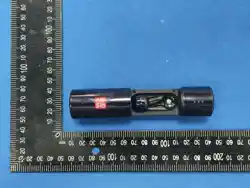

MK-���A(A�) 说明书
尺寸:��mm*��mm
�. Environmental Warnings
· Do not use this product in extremely high or low temperatures, or in dusty or
humid environments.
· Avoid direct sunlight, fire exposure, or any overheating conditions.
· In environments with strong wireless signals or dense crowds (such as airports,
stations, exhibitions, etc.), intermittent connection or interference may occur. This
is within normal range. Please continue to use the device later or change the usage
environment.
�. Operational Safety Warnings
· Do not drop, strike, or subject the product to strong vibration.
· Do not disassemble or modify this device without authorization, as doing so may
cause danger or damage.
· To protect your hearing, do not listen at high volume for prolonged periods.
· Keep the product and its packaging out of the reach of children and pets to
prevent accidents such as swallowing and suffocation.
· If any abnormality occurs, stop using the product immediately and contact your
dealer.
LED Indicator (earbuds)
Power on: White light stays on for 1 second
Power off: White light flashes 3 times and
then turns off
Pairing is successful: White light turns off
Pairing timed out: White light flashes 3
times and then turns off
Disconnect the phone: White light flashes
quickly
Low battery: White light flashes 2 times
every 5 seconds
LED Indicator (charging case)
Charging: Charging, the red light flashes
slowly. When fully charged, the red light
remains on continuously.
Discharge: Charging the earphones, the
white indicator light in the case remains
on continuously until the charge is
complete and then goes out
Low battery: white light flashes slowly
Pairing
Open the charging case cover, take out the
earbuds. The earbuds will automatically
turn on. For new device connection, turn on
the bluetooth in your device and choose
"MK-008A" fromthe bluetooth list to connect.
You will hear system prompts after the
earbuds are connected to the device. If the
earbuds have been paired before, they will
automatically reconnect to the previous
device when turned on.
Call
Answer/end a call: Double press
the MFB button
Reject the call: When an incoming
second
Product Cleaning
We recommend regularly cleaning
the charging contacts of the charging
case and the earbuds, as well as
their surfaces.
Music
Play/pause: Double press the MFB
button
Previous song: Press the
multi-function button on the left
earbud three times.
Game Mode
Connected phone status. Long
press the left ear for 2 seconds to
turn on/off.
Volume Control
Turn down the volume: While music
is playing, press the MFB button on
your left earbud.
Attention
*Private replacement of batteries without permission is not recommended.
*Batteries [battery packs or battery combinations] should not be exposed to
lighting, baking or similar overheating environments.
*The input voltage and current standard < 5V/0.5A when charging the headset
charging compartment from an external power source.
To ensure your safety and extend the service life of this product, please strictly
follow the warnings below:
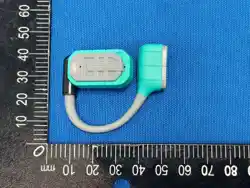
Wearing
Put the "MK-008A" onto your
ears and rotate to fit comfortably
to get the best wearing and sound
quality experience.
Factory Reset
To restore the earbuds to factory settings,
when the earbuds are powered on and not
connected, tap the left earbud 5 times
in quick succession. The earbuds will then
automatically power off.
(Note: When closing the cover, the positioning pins must align with the
insertion, otherwise the charging port will be misaligned)
Earbuds indicator light
Firmly turn counterclockwise to open Firmly turn counterclockwise to off
Position of the
scented stick
The small positions
correspond to each other
The large positions are
mutually corresponding
Safety Warnings And Precautions
Step For Replacing The Aroma Sticks
MFB Operation
Product Overview
�. Battery and Charging Warnings
· When the charging case indicator shows low battery, please recharge in time. If the
product is not used for a long period, please recharge it at least once every �� days.
· Use a power adapter that complies with local safety standards
· The earphones contain built-in batteries. Do not place them in high-temperature or
flammable environments.
· If the charging port of the earbuds contains foreign objects or has poor contact,
gently clean the charging port with a cotton swab dipped in alcohol. Regular
cleaning is recommended to ensure proper charging and power-on/off functions.
�. Important Notes
· If there are updates or changes to product functions, please refer to the official
website or the sales page for the latest information.
·Please keep this manual for future reference.
Warning Statement
This device complies with part 15 of the FCC Rules. Operation is subject to the
following two conditions: (1) This device may not cause harmful interference, and (2)
this device must accept any interference received, including interference that may cause
undesired operation.
Any Changes or modifications not expressly approved by the party responsible for
compliance could void the user's authority to operate the equipment.
Note: This equipment has been tested and found to comply with the limits for a Class B
digital device, pursuant to part 15 of the FCC Rules. These limits are designed to
provide reasonable protection against harmful interference in a residential installation.
This equipment generates uses and can radiate radio frequency energy and, if not
installed and used in accordance with the instructions, may cause harmful interference
to radio communications. However, there is no guarantee that interference will not
occur in a particular installation. If this equipment does cause harmful interference to
radio or television reception, which can be determined by turning the equipment off and
on, the user is encouraged to try to correct the interference by one or more of the
following measures:
-Reorient or relocate the receiving antenna.
-Increase the separation between the equipment and receiver.
-Connect the equipment into an outlet on a circuit different from that to which the
receiver is connected.
-Consult the dealer or an experienced radio/TV technician for help.
This equipment complies with FCC radiation exposure limits set forth for an
uncontrolled environment.