58.03.010.0178
@ReolinkTech https://reolink.com
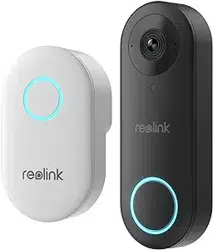
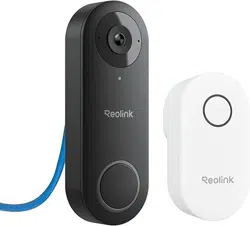
Reolink Video Doorbell SE
Operational Instructions
English English1 2
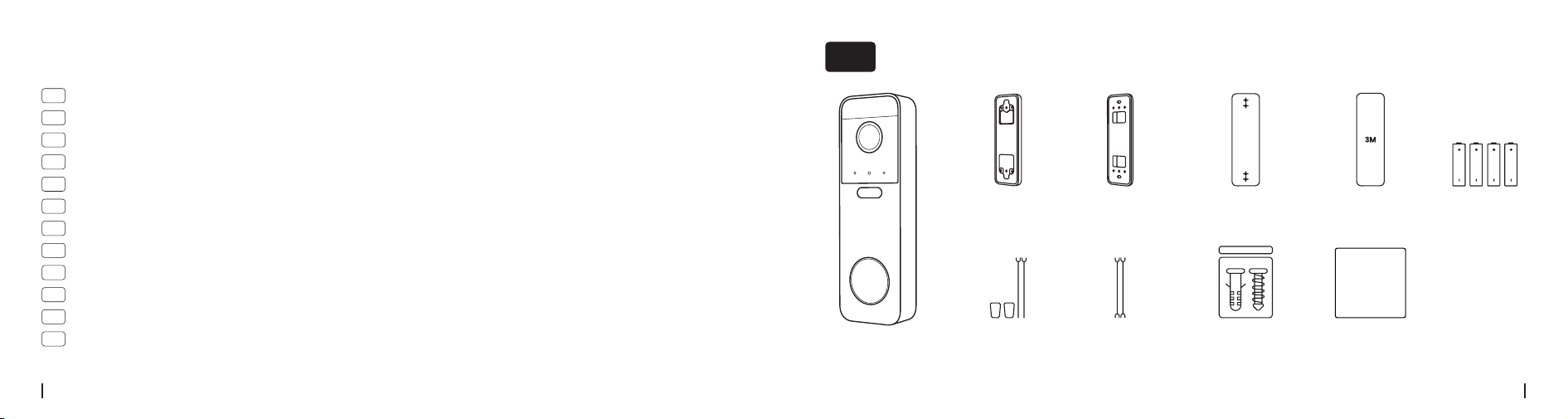
Doorbell
Mounting
Hole Template
3M Adhesive
Pad
AA Battery
×4
Extension
Cable
Horizontal
Wedge
Mounting
Plate
Jumper
Cable
Pack of
Screws
Operational
Instructions
Operational
Instructions
01
02
03
04
05
06
07
08
09
10
1 1
12
Contents
What's in the Box
01
What's in the Box ······························································································2
Device Overview ······························································································3
Set Up the Device ·····························································································5
Installation Tips ·······························································································7
Installation Steps······························································································8
Chime Options ·······························································································21
Detach the Doorbell··························································································24
Specications ································································································25
Troubleshooting······························································································25
Important Safety Instructions··············································································· 26
Legal Disclaimer ·····························································································27
Notication of Compliance ··················································································28
English English3 4
What You Also Need
* Not Included
Drill #2 Phillips Crosshead
Screwdriver
Device Overview
02
❶
❾
❿
⓬
⓫
❷
❹
❺
❻
❼
❸
❽
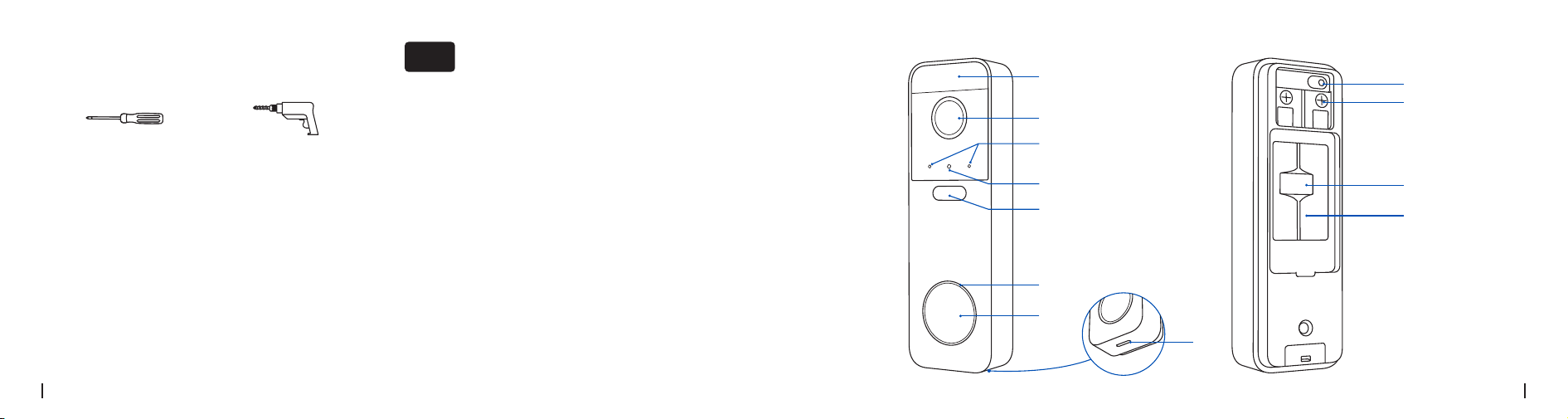
❶
PIR Sensor
❽
Speaker
❷
Lens
❾
Reset Button
❸
Microphone
* Short-press 3 times for
factory reset
❹
Daylight Sensor
❺
IR LEDs
❿
Terminal Block
❻
Button Ring Light
⓫
microSD Card Slot
❼
Doorbell Button
⓬
Battery Compartment
English English5 6
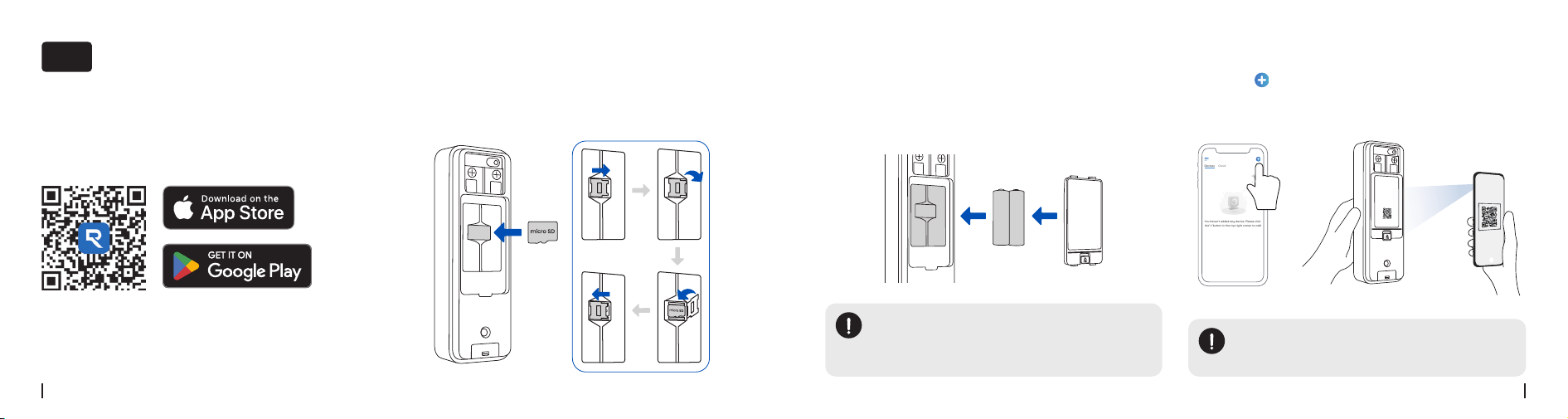
Step 1. Download the Reolink App or
Client
Download the Reolink Client: Go to https://reolink.
com > Support > App & Client
· On Smartphone
· On PC
Set Up the Device
03
Tap the “ ” in the top corner of the Reolink App,
scan the doorbell’s QR code, and follow the on-
screen instructions to set up.
Step 4. Scan QR Code to Set Up
1. Insert four AA batteries according to the polarity
markings.
2. Close the cover. The doorbell powers on
automatically.
1. Open the battery compartment on the back of the
doorbell.
2. Open the card slot cover and insert a microSD
card (not included).
Step 3. Install the BatteryStep 2. Install the SD Card
NOTE:
When both battery and adapter are
connected, the device uses DC power by
default.
NOTE:
You can nd the QR code on the back of the
doorbell.
Devices
Cloud
You haven't added any device. Please click
the"+"button in the top right corner to add

English English7 8
1. Mount the doorbell on a at surface.
2. Install the doorbell approximately 48 inches (1.2 m)
above the ground for best results.
3. Angle the doorbell so people move across the
camera’s view, not directly toward it.
4. If installing near a side wall, make sure the wall
is not within the camera’s eld of view to ensure
optimal night vision.
Installation Tips
04
Without a 15° Horizontal Wedge With a 15° Horizontal Wedge
Doorbell
Door Door
Doorbell
PIR Detection Distance:
0-7 m
Mounting Height:
1.2 m
Installation Steps
05
Option 1: Wired Connection
If you have an existing wired doorbell system, follow Steps 1–6.
If not, skip to Step 4 to install the Mounting Plate.
English English9 10
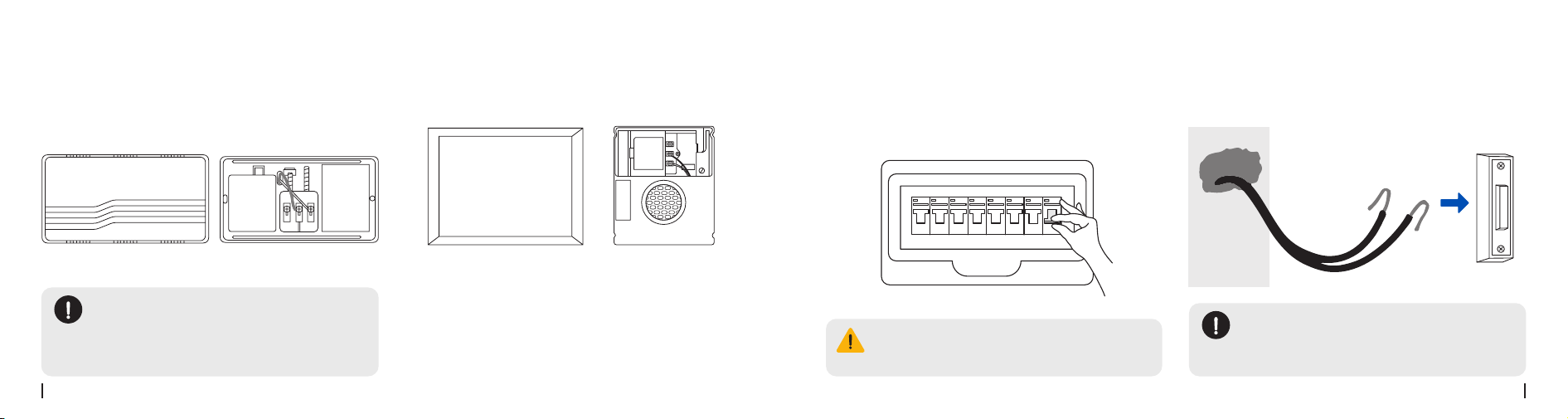
Step 2. Turn Off the Power
Turn off power at the circuit breaker. Handle wires
with care. If unsure, consult a licensed electrician.
Press the existing doorbell to conrm power is off.
The chime should not sound.
Step 3. Remove the Existing Doorbell
Remove the existing doorbell and any related
accessories.
WARNING:
Do not touch any wires until the power is
turned off to avoid the risk of electric shock.
NOTE:
Put a slight bend in the power wires to
prevent them from slipping through the
hole.
Step 1. Locate Your Existing Chime
Press the existing doorbell and follow the sound to
identify the chime.
NOTE:
Voltage Requirement:
8–24V AC
If the voltage does not meet this
requirement, replace or upgrade your
transformer.
Mechanical Chime Digital Chime
English English11 12
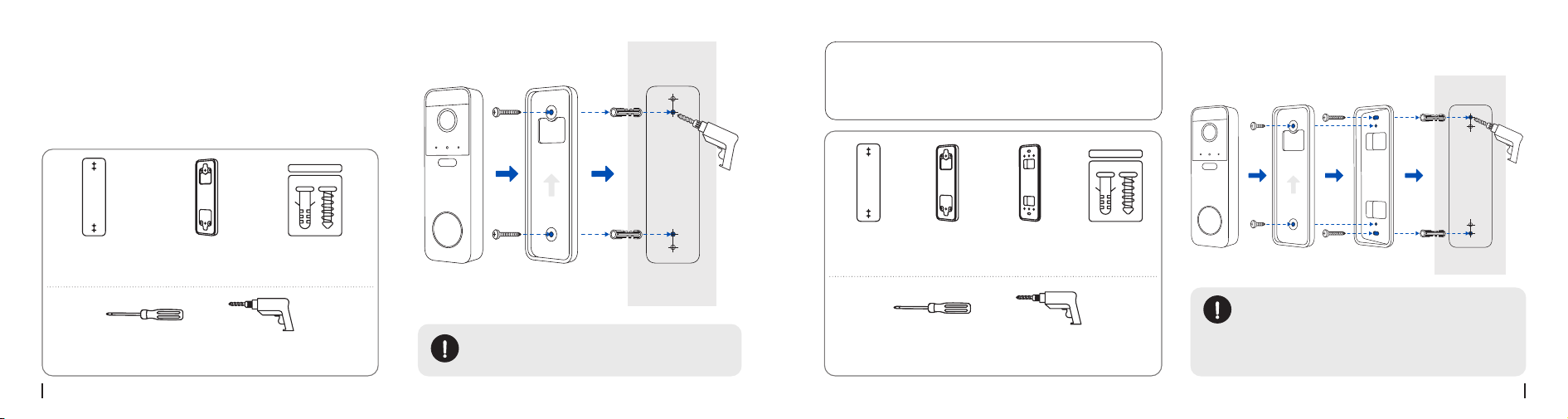
Screwdriver
(Not Included)
Screwdriver
(Not Included)
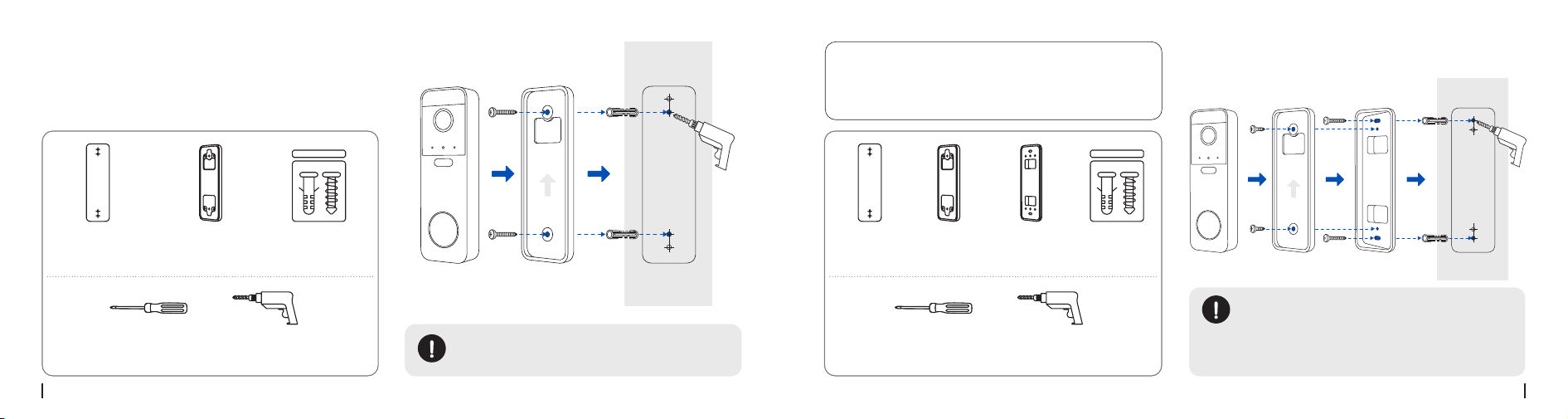
Mount with Screws
Secure the Mounting Plate to the wall with screws.
Mounting
Plate
Mounting
Plate
Horizontal
Wedge
Mounting
Template
Mounting
Template
Pack of
Screws
Pack of
Screws
Drill
(Not Included)
Drill
(Not Included)
Anchors required for drywall/brick; not
required for wood.
Secure the wedge to the wall with screws, then
attach the mounting plate to it.
Using the Horizontal Wedge (Optional)
If you need to adjust the doorbell angle, use the
included Horizontal Wedge with the Mounting
Plate.
NOTE:
1. Anchor hole positions differ depending on
whether the wedge is used.
2. Anchors required for drywall/brick; not
required for wood.
Step 4: Install the Mounting Plate
English English13 14
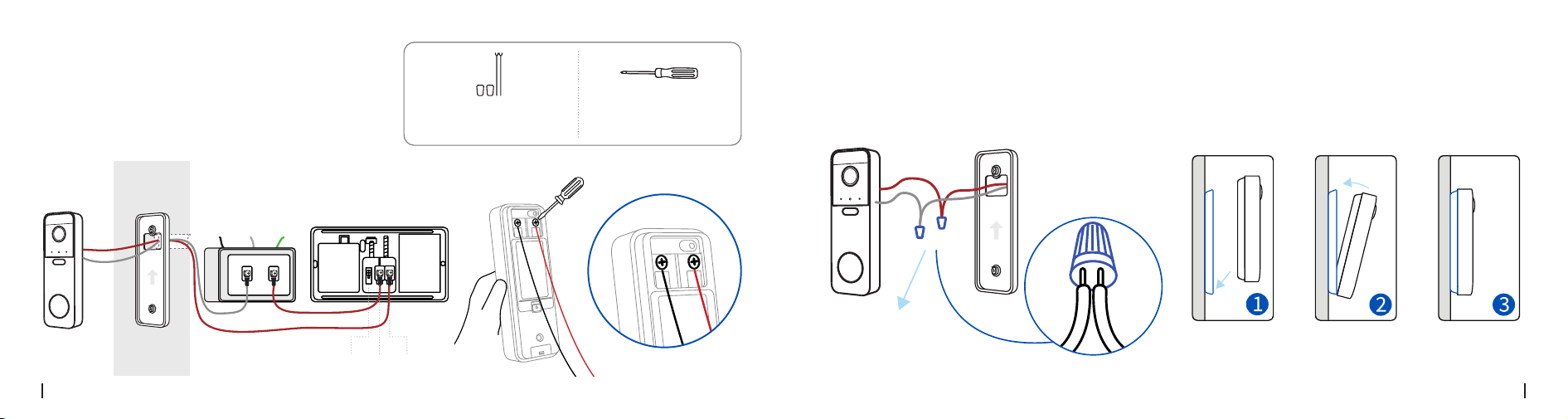
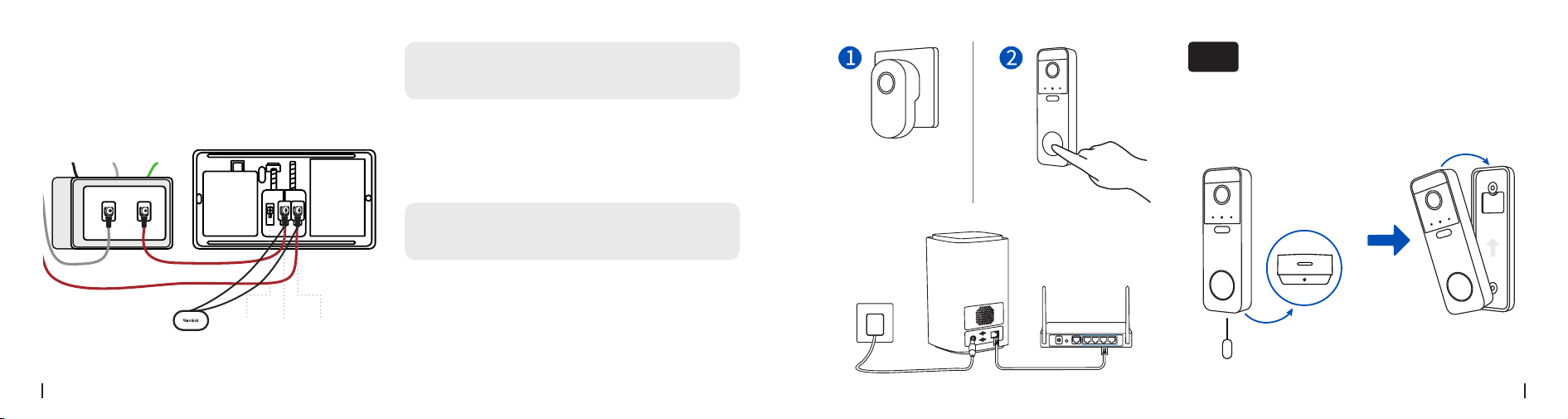
Step 5: Connect Doorbell Wires
Refer to the diagram below. Connect your existing
doorbell wires to the terminal blocks on the back of
the Reolink doorbell, and tighten the screws securely.
Make sure the wires are kept separate.
Screwdriver
(Not Included)
Extension Cable
(If necessary)
Doorbell Wire
Doorbell
Transformer
Mechanical
Chime
Terminal Block
AC
Neutral
Ground
Rear Trans Front
Step 6: Secure the Doorbell
If the existing wires are too short, use the included
extension cable and wire nuts (see diagram below).
Align the bottom of the doorbell with the mounting
plate, then press the top until it clicks into place.
Extension Cable

English English15 16
PIR Detection Distance:
0-7 m
Mounting Height:
1.2 m
Option 2: Wire-Free Connection
Step 1. Select a Mounting Spot
For optimal viewing, mount it approximately 48
inches (1.2 m) above the ground.
Angle the doorbell slightly away from where visitors
typically approach.
Without a 15° Horizontal Wedge With a 15° Horizontal Wedge
Doorbell
Door Door
Doorbell
English English17 18
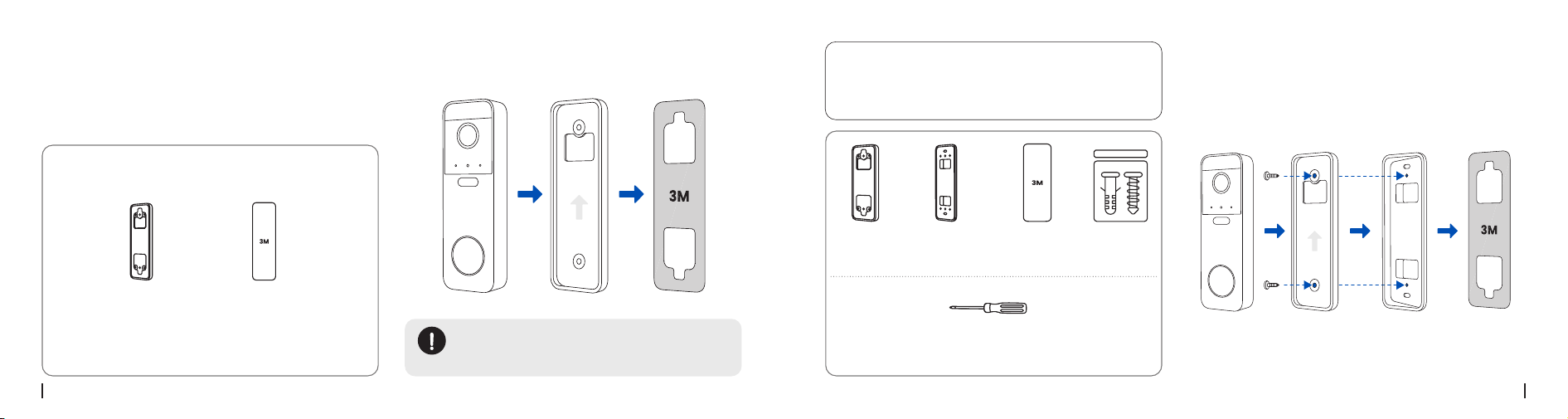
Screwdriver
(Not Included)
Screwdriver
(Not Included)
Mount with Screws
A
Secure the Mounting Plate to the wall with screws.
Mounting
Plate
Mounting
Plate
Horizontal
Wedge
Mounting
Template
Mounting
Template
Pack of
Screws
Pack of
Screws
Drill
(Not Included)
Drill
(Not Included)
Anchors required for drywall/brick; not
required for wood.
Secure the wedge to the wall with screws, then
attach the mounting plate to it.
Using the Horizontal Wedge (Optional)
If you need to adjust the doorbell angle, use the
included Horizontal Wedge with the Mounting
Plate.
NOTE:
1. Anchor hole positions differ depending on
whether the wedge is used.
2. Anchors required for drywall/brick; not
required for wood.
Step 2: Install the Mounting Plate
English English19 20
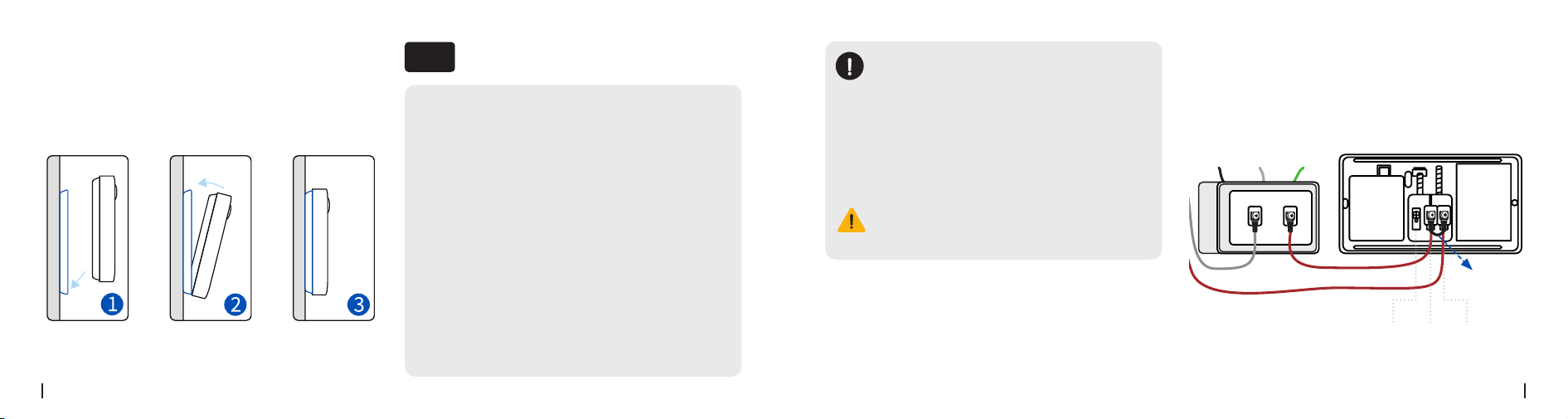
1. Attach the wedge to the mounting plate with short
screws, and apply the included adhesive pad to the
wedge.
2. Stick the wedge to a clean, dry wall.
Using the Horizontal Wedge (Optional)
If you need to adjust the doorbell angle, use the
included Horizontal Wedge with the Mounting
Plate.
3M Adhesive
Pad
Horizontal
wedge
Mounting
Plate
Screwdriver
(Not Included)
NOTE:
This method is suitable for smooth surfaces
such as tile, glass, marble, or metal.
Stick to the Wall
B
Apply the included 3M adhesive pad to the Mounting
Plate.
3M Adhesive
Pad
Mounting
Plate
Clean the mounting surface. Attach the plate to the
wall and press firmly for 15 seconds.
Pack of
Screws
English English21 22
Step 3: Secure the Doorbell
Align the bottom of the doorbell with the mounting
plate, then press the top until it clicks into place.
This battery-powered doorbell is compatible with
the existing wired mechanical/digital chime in your
home. For detailed instructions, please refer to the
"Wired Connection" section in the "Installation Steps"
guide.
Chime Options
06
Option 1:
Using Your Existing Chime
Jumper
Cable
NOTE:
If the doorbell is connected to a mechanical
chime and the chime produces abnormal
sounds, you can use the Jumper Cable to
short the chime (the chime will not ring).
Alternatively, you can purchase the RLA-PK1
accessory (sold separately) to resolve the
abnormal sound while allowing the
mechanical chime to ring normally.
Warning:
Do not touch any wires until the power is
turned off to avoid the risk of electric shock.
Doorbell
Transformer
Mechanical
Chime
AC
Neutral
Ground
Rear Trans Front
English English23 24
RLA-PK1
Option 2:
Reolink Chime
(Sold Separately)
Option 3:
Reolink Home Hub
(Sold Separately)
Plug the Reolink Chime into a power outlet, then
use the Reolink App to pair it with your doorbell. For
detailed instructions, see the manual included with
the Chime.
1
2
The Reolink Home Hub can be used as a chime,
allowing you to set different ringtones for multiple
Reolink doorbells. It also stores video recordings
locally, with no subscription fee required. For detailed
instructions, see the manual included with the Home
Hub.
Insert the release pin into the bottom slot to remove
the doorbell.
Detach the Doorbell
07
Doorbell
Transformer
Mechanical
Chime
AC
Neutral
Ground
Rear Trans Front

English English25 26
Specications
08
Field of View: 120° Horizontal, 90° Vertical
Dimensions: 156.0 × 50.0 × 28.5 mm
Weight: 140 g (without batteries)
Operating Temperature: -10
℃
to 55
℃
(14
℉
to 131
℉
)
Failed to Connect to Wi-Fi During
Initial Setup Process
If the camera fails to connect to Wi-Fi, please try the
following solutions:
Troubleshooting
09
Please read the instructions carefully before using
the device.
• Insert the batteries in the correct orientation as
indicated by the positive (+) and negative (-) marki
ngs in the battery compartment. Always use
non-rechargeable AA 1.5V alkaline batteries as provi
ded and specied for this product. Using incorrect b
atteries may pose an explosion risk.
• Do not charge the included non-rechargeable
batteries.And use it only in temperatures ranging
from -10
℃
and 55
℃
.
• Do not insert batteries in reverse. Batteries installed
incorrectly may short circuit or become charged,
causing overheating, leakage, venting, rupture,
explosion, re, or personal injury.
Important Safety
Instructions
10
• Ensure that you have entered the correct Wi-Fi
password.
• Put the camera closer to your router to ensure a
strong Wi-Fi signal.
• Change the encryption method of the Wi-Fi
network to WPA2-PSK/WPA-PSK (safer encryption)
on your router interface.
• Change your Wi-Fi SSID or password and make
sure that SSID is within 31 characters and password
is within 64 characters.
• Set your password using only the characters
available on the keyboard.
If the problem is not solved, please contact Reolink
Support.
• Do not short-circuit batteries. If the + and -
terminals come into contact (e.g., with keys or coins
in a pocket), a short circuit may occur, resulting in le
akage, venting, explosion, re, or personal injury.
• Do not expose the camera with batteries to extrem
ely low air pressure environments, as this may caus
e an explosion.
• Do not place the camera with batteries in
high-temperature environments or expose it to
direct lightning, as this may pose a re risk.
• Do not strike or heavily compress the camera while
batteries are installed, as this may cause re or
explosion.
• Do not use batteries that appear damaged, swolle
n, or compromised in any way (e.g., leaking, emitting
odors, dented, corroded, rusted, cracked, melted, or
scratched).
• Do not attempt to charge non-rechargeable
(primary) batteries. Charging them may generate
gas and/or heat internally, leading to leakage,
venting, explosion, re, or personal injury.

English English27 28
• Remove exhausted batteries immediately from the
equipment and dispose of them properly. Leaving di
scharged batteries in the device for long periods ma
y cause electrolyte leakage, damaging the device or
causing personal injury.
• Remove batteries from equipment if it will not be
used for an extended period, unless for emergency
purposes.
• Remove batteries immediately from malfunctionin
g equipment or equipment expected to remain unus
ed for a long period (e.g., camcorders, digital camer
as, photo ashes). Partially or fully discharged batteri
es are more prone to leakage than unused ones.
• Keep the camera and batteries out of reach of
children.
• Do not ingest or swallow batteries. Ingestion may
cause severe internal burns or damage. Seek
immediate medical attention if ingestion is
suspected.
• Keep the power port dry, clean, and free of debris.
• Always follow local safety laws and regulations wh
en using the camera.
To the maximum extent permitted by applicable law,
this document and the product described,
with its hardware, software, rmware, and services,
are delivered on an "as-is" and "as-available"
basis, with all faults and without warranty of any
kind. Reolink disclaims all warranties, express or
implied, including but not limited to, warranties of
merchantability, satisfactory quality, tness for a
particular purpose, accuracy, and non-infringement
of third-party rights. In no event will Reolink, its
directors, ofcers, employees, or agents be liable
to you for any special, consequential, incidental
or indirect damages, including but not limited
to damages for loss of business prots, business
interruption, or loss of data or documentation, in
connection with the use of this product, even if
Reolink has been advised of the possibility of such
damages.
Legal Disclaimer
11
To the extent permitted by applicable law, your use
of the Reolink products and services is at your sole
risk and you assume all risks associated with internet
access. Reolink does not take any responsibilities
for abnormal operation, privacy leakage or other
damages resulting from cyber attacks, hacker
attacks, virus inspections, or other internet security
risks. However, Reolink will provide timely technical
support if required.
The laws and regulations related to this product
vary by jurisdiction. Please check all relevant laws
and regulations in your jurisdiction before using this
product to ensure that your use conforms to the
applicable law and regulation. During the use of the
product, you must comply with relevant local laws
and regulations. Reolink is not responsible for any
illegal or improper use and its consequences. Reolink
is not liable in the event that this product is used
with illegitimate purposes, such as third-party rights
infringement, medical treatment, safety equipment,
or other situations where the product failure could
lead to death or personal injury, or for weapons of
mass destruction, chemical and biological weapons,
nuclear explosion, and any unsafe nuclear energy
uses or anti-humanity purposes. In the event of any
conicts between this manual and the applicable
law, the latter prevails.
Notication of
Compliance
12
FCC Statement
This device complies with Part 15 of the FCC Rules.
Operation is subject to the following two conditions:
(1) This device may not cause harmful interference,

English English29 30
and
(2) This device must accept any interference
received, including interference that may cause
undesired operation. Changes or modications
not expressly approved by the party responsible
for compliance could void the user's authority to
operate the equipment.
This equipment has been tested and found to
comply with the limits for a Class B digital device,
pursuant to Part 15 of the FCC Rules. These limits are
designed to provide reasonable protection against
harmful interference in a residential installation. This
equipment generates uses and can radiate radio
frequency energy and, if not installed and used
in accordance with the instructions, may cause
harmful interference to radio communications.
However, there is no guarantee that interference
will not occur in a particular installation. If this
equipment does cause harmful interference to radio
or television reception, which can be determined
by turning the equipment off and on, the user is
encouraged to try to correct the interference by one
or more of the following
measures:
• Reorient or relocate the receiving antenna.
• Increase the separation between the equipment
and receiver.
• Connect the equipment into an outlet on a
circuit different from that to which the receiver is
connected.
• Consult the dealer or an experienced radio/TV
technician for help.
FCC Radiation Exposure statement
This equipment complies with FCC radiation
exposure limits set forth for an uncontrolled
environment. This equipment should be installed and
operated with minimum distance 20cm between the
radiator & your body.
ISED Statement
This device contains licence-exempt transmitter(s)/receiver(s)
that comply with Innovation, Science and Economic
Development Canada’s licence-exempt RSS(s). Operation is
subject to the following two conditions
(1) this device may not cause interference, and
(2) this device must accept any interference,
including interference that may cause undesired
operation of the device.
This equipment should be installed and operated
with a minumum distance of 20 cm between the
radiator and your body.
L’émetteur ou le récepteur exempt de licence contenu dans le
présent appareil est conforme aux CNR d’Innovation, Sciences et
Développement économique Canada applicables aux appareils
radio exempts de licence. L’exploitation est autorisée aux deux
conditions suivantes :
(1) l'appareil ne doit pas produire de brouillage, et
(2) l'utilisateur de l'appareil doit accepter tout
brouillage radioélectrique subi, même si le
brouillage est susceptible d'en compromettre le
fonctionnement.
Cet équipement doit être installé et utilisé avec une
distance minimale de 20 cm entre la source de
rayonnement et votre corps.
MODIFICATION:
Any changes or modications not
expressly approved by the grantee of this device
could void the user's authority to operate the device.
MODIFICATION :
les changements ou modications
non expressément approuvés par le fournisseur de
licence de l'appareil sont susceptibles d'annuler
l'autorisation accordée à l'utilisateur de se servir de
l'équipement.
This Class B digital apparatus complies with
Canadian ICES-003.
Cet appareil numérique de la classe B est conforme
à la norme NMB-003 du Canada.
Operation of 5150-5350 MHz is restricted to indoor
use only.
Le fonctionnement de 5150-5350 MHz est limité à
une utilisation en intérieur uniquement.

English English31 32
Limited Warranty
This product comes with a 2-year limited warranty
that is valid only if purchased from Reolink Ofcial
Store or a Reolink authorized reseller. Learn more:
https://reolink.com/warranty-and-return/.
NOTE:
We hope that you enjoy the new purchase.
But if you are not satised with the product and plan
to return, we strongly suggest that you reset the
camera to factory default settings and take out the
inserted SD card before returning.
Terms and Privacy
Use of the product is subject to your agreement to
the Terms of Service and Privacy Policy at
reolink.com
Technical Service
By using the Product Software that is embedded on
the Reolink product, you agree to the terms&condi-
tions between you and Reolink. Learn more:
https://reolink.com/terms-conditions/
Technical Support
If you need any technical help, please visit our
official support site and contact our support team
before returning the products,
https://support.reolink.com.
Trademarks Acknowledgement
“Reolink” and other Reolink’s trademarks and logos
are the properties of Reolink. Other trademarks and
logos mentioned are the properties of their respec-
tive owners.