VisioNize sense
VisioNize
Operating Manual

Copyright © 2026 Eppendorf SE, Germany. All rights reserved, including graphics and images. No part of
this publication may be r
eproduced without the prior permission of the copyright owner.
Eppendorf
®
and the Eppendorf Brand Design are registered trademarks of Eppendorf SE, Germany.
Eppendorf trademarks and trademarks of third parties may appear in this manual. All trademarks are the
property of their respective owners. The respective trademark name, representations and listed owners
can be found on
www.eppendorf.com/ip.
The softwar
e of this product contains open source software. License information is available in the
delivery box.
U.S. Patents and U.S. Design Patents are listed on
www.eppendorf.com/ip.
ESS1900059-00/2026-03

Table of contents
1 About this manual................................................................................. 5
1.1 Notes on this manual........................................................................ 5
1.2 Warning notice structure.................................................................... 5
1.3 Graphics.................................................................................... 5
1.4 Other applicable documents................................................................. 6
2 Safety............................................................................................. 7
2.1 Intended use................................................................................ 7
2.2 Residual risks when used as intended........................................................ 7
2.2.1 Personal injury...................................................................... 7
2.2.2 Material damage.................................................................... 8
3 Product description............................................................................... 9
3.1 Product components......................................................................... 9
3.1.1 VisioNize sense environmental monitor............................................. 9
3.1.2 VisioNize sense temperature sensor................................................ 11
3.1.3 VisioNize box 2.................................................................... 12
4 Installation....................................................................................... 13
4.1 Preparing installation....................................................................... 13
4.1.1 Checking connection requirements................................................ 13
4.1.2 Checking the location.............................................................. 13
4.1.3 Checking the delivery and packing................................................. 13
4.1.4 Checking the delivery condition.................................................... 14
4.1.5 Checking the delivery package..................................................... 14
4.1.6 Setting up an account for VisioNize................................................ 14
4.1.7 Charging the VisioNize sense environmental monitor rechargeable battery......... 15
4.2 Performing the installation................................................................. 15
4.2.1 Installing the VisioNize sense environmental monitor.............................. 15
4.2.2 Connecting VisioNize sense and the device........................................ 17
5 Operation........................................................................................ 18
5.1 Operating the VisioNize sense environmental monitor...................................... 18
6 Maintenance..................................................................................... 19
6.1 Maintenance............................................................................... 19
6.1.1 Cleaning........................................................................... 19
6.1.2 Decontamination/disinfection...................................................... 20
7 Transport......................................................................................... 21
7.1 Sending the device......................................................................... 21
8 Disposal.......................................................................................... 22
8.1 ............................................................................................ 22
8.2 Preparing for disposal...................................................................... 22
8.3 Handing over the device to the disposal company........................................... 22
3
Table of contents
VisioNize sense
English (EN)

9 Technical data.................................................................................... 23
9.1 Dimensions................................................................................ 23
9.2 Weight..................................................................................... 23
9.3 Power supply............................................................................... 23
9.4 Ambient conditions......................................................................... 24
9.5 Interfaces.................................................................................. 25
9.6 Electromagnetic compatibility and radio.................................................... 25
9.7 Further conformities....................................................................... 26
10 Ordering information............................................................................ 27
10.1 Accessories................................................................................ 27
4
Table of contents
VisioNize sense
English (EN)
1 About this manual
1.1 Notes on this manual
The current version of this manual can be found on the website www.eppendorf.com/manuals. To
obtain a dierent version of the manual, contact Eppendorf SE.
1. Read this manual completely before using the product.
2. Ensure that you have the manual available while using the product.
The dates in this manual correspond to the international date format as specified in the ISO 8601
standard. All dates are shown in the format YYYY-MM-DD or YYYY-MM.
This manual uses units of measurement and unit symbols in accordance with the International System of
Units (SI) (see ISO 80000) and its derived and legally permissible units. For example, times are specified
in hours [h], minutes [min], and seconds [s].
1.2 Warning notice structure
HAZARD LEVEL! Type of danger
Sour
ce of danger
Consequences of disregarding the danger
– Measures to avoid the danger
Symbol Hazard level Type of danger Meaning
DANGER Personal injury Will lead to severe injuries or death.
WARNING Personal injury May lead to severe injuries or death.
CAUTION Personal injury May lead to minor or moderate injuries.
NOTICE Material damage May lead to material damage.
1.3 Graphics
Depiction Meaning
1.
2.
Work steps
• Bullet point
Text Display text
5
About this manual
VisioNize sense
English (EN)

Depiction Meaning
Key Name for port, button, status lamp, or key
Important information
Tip
1.4 Other applicable documents
1. The following documents supplement this manual:
• Operating manuals for the devices whose data is collected via VisioNize sense.
• Operating manual for the VisioNize box 2, which is used as a gateway for VisioNize sense products
(formerly VisioNize sense gateway router).
The manuals are available at www.eppendorf.com/manuals or from your Eppendorf partner.
6
About this manual
VisioNize sense
English (EN)

2 Safety
2.1 Intended use
VisioNize sense products are sensors for monitoring devices from Eppendorf SE or third-party devices.
The VisioNize sense environmental monitor is connected to the VisioNize box 2 (formerly VisioNize sense
gateway router) and transmits the collected measurement data from the VisioNize sense temperature
sensor. The sensors are placed near a device or inside a device.
VisioNize sense products are intended for indoor use only. Country-specific safety requirements for the
operation of electrical devices in laboratories must be observed.
VisioNize sense products may only be operated by appropriately qualified and trained personnel.
2.2 Residual risks when used as intended
2.2.1 Personal injury
2.2.1.1 Explosion hazard
The use of explosive substances or substances with violent reactions may cause explosions. Do not
operate the device under the following conditions:
• In an explosive atmosphere
• In areas where work with explosive substances is carried out
• With explosive substances or substances with violent reactions
• With substances that may, combined with a reactant or without such reactant, form an explosive
atmosphere
2.2.1.2 Electrical hazards
Touching parts that carry high voltage can cause an electric shock. A life-threatening electric shock can
cause cardiac arrhythmia, burns and respiratory paralysis.
• Only use earth/grounded sockets with a protective earth (PE) conductor.
• Ensure that a residual current circuit breaker is present and accessible.
• Ensure that the housing and mains/power cord are not damaged.
• In case of danger, disconnect the device from the mains/power line.
• Do not open or remove the housing.
• Compare the technical data of the mains/power cord and the mains/power plug with the technical
data on the name plate, taking into account national laws and regulations. This also includes legally
required test seals. Use only approved mains/power cords with plugs.
• Make sure that the mains/power plug and earth/grounded socket match and that the electrical PE
conductors of the device and the building installation are securely connected to each other.
• Only clean and maintain the device when it is disconnected from the mains/power line.
• Have the device regularly checked for electrical safety in accordance with national requirements.
7
Safety
VisioNize sense
English (EN)

2.2.2 Material damage
2.2.2.1 General hazards
NOTICE! Damage to device
The use of accessories and spare parts other than those recommended by Eppendorf SE
may impair the safety, functioning, and precision of the device. Eppendorf SE cannot be held
liable or accept any liability for damage resulting from the use of accessories and spare parts
other than those recommended.
– Use only the accessories and spare parts recommended by Eppendorf SE.
8
Safety
VisioNize sense
English (EN)
3 Product description
3.1 Product components
3.1.1 VisioNize sense environmental monitor
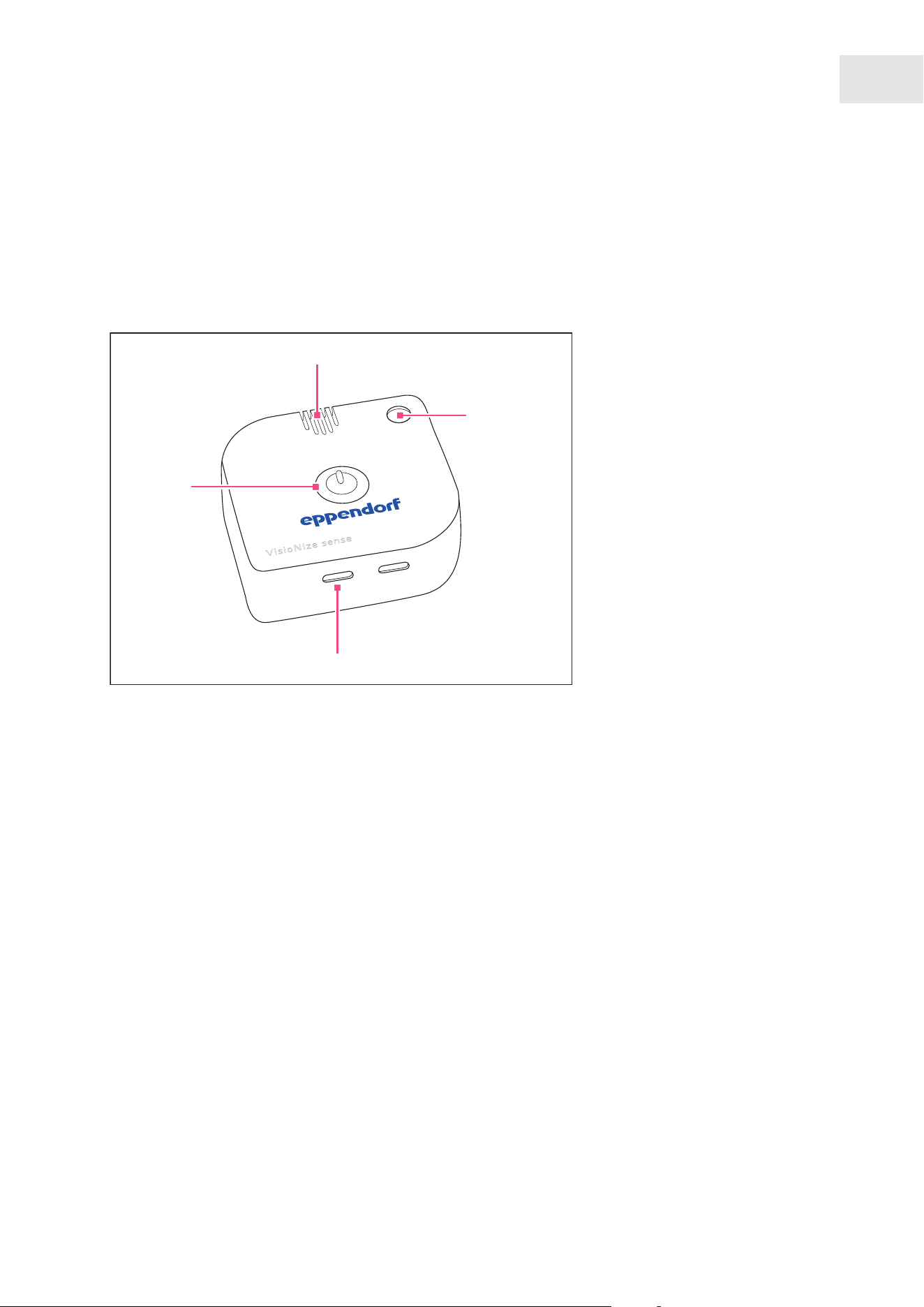
The VisioNize sense environmental monitor is a wireless, Bluetooth-enabled multi-sensor unit.
VisioNize sense
1
2
3
4
Fig.3-1:Displays and ports on the VisioNize sense environmental monitor
1 On/o button
2 Ventilation gaps for recording values
3 Status lamp
4 Charging and extension interface
9
Product description
VisioNize sense
English (EN)
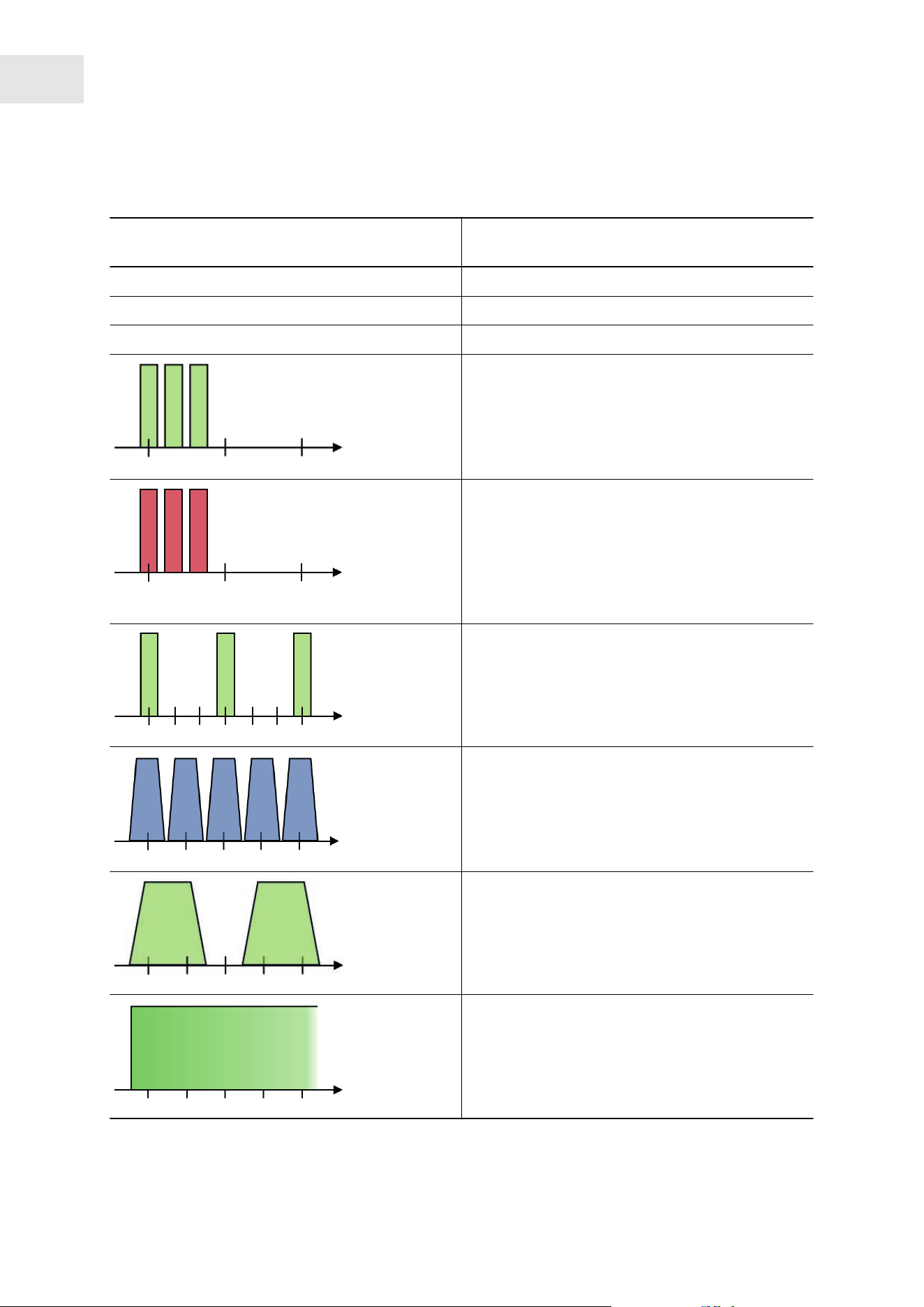
Colors and flashing codes indicated by the status lamp on the VisioNize sense environmental monitor
Color and flashing codes indicated by the status
lamp
Status
Green The device is operating.
Blue The memory is being read out.
Red A critical error has occurred.
The status lamp flashes green 3 times quickly
.
This flashing code indicates that the device has
been switched on.
This flashing code appears when a sensor exten‐
sion is plugged in via the USB interface.
The status lamp flashes red 3 times quickly
.
This flashing code indicates that the device has
been switched o.
This flashing code also appears when a sensor
extension is unplugged or not recognized via the
USB interface.
The status lamp flashes every 3 seconds.
In battery mode, the status lamp indicates the cur‐
rent device health by its color
.
The status lamp pulses blue.
The status lamp pulses blue while actively con‐
nected to a readout unit.
Data is being tr
ansferred.
The status lamp pulses.
The status lamp pulses during charging.
The LED status lamp indicates the current charging
status.
The status lamp lights up solid green.
The status lamp indicates that charging is complete
and the r
echargeable battery is fully charged by
lighting up solid green.
10
Product description
VisioNize sense
English (EN)

3.1.2 VisioNize sense temperature sensor
To display the measured values, the VisioNize sense temperature sensor and the VisioNize sense envi‐
ronmental monitor must be connected to each other. Further information on using the VisioNize sense
temperature sensor with the device to be monitored can be found in its operating manual.
1
2
Fig.3-2:Sensor and connection to the VisioNize sense environmental monitor
1 Sensor with accuracy classA, PT100 2 USB-C connector for connection to the
VisioNize sense envir
onmental monitor
11
Product description
VisioNize sense
English (EN)
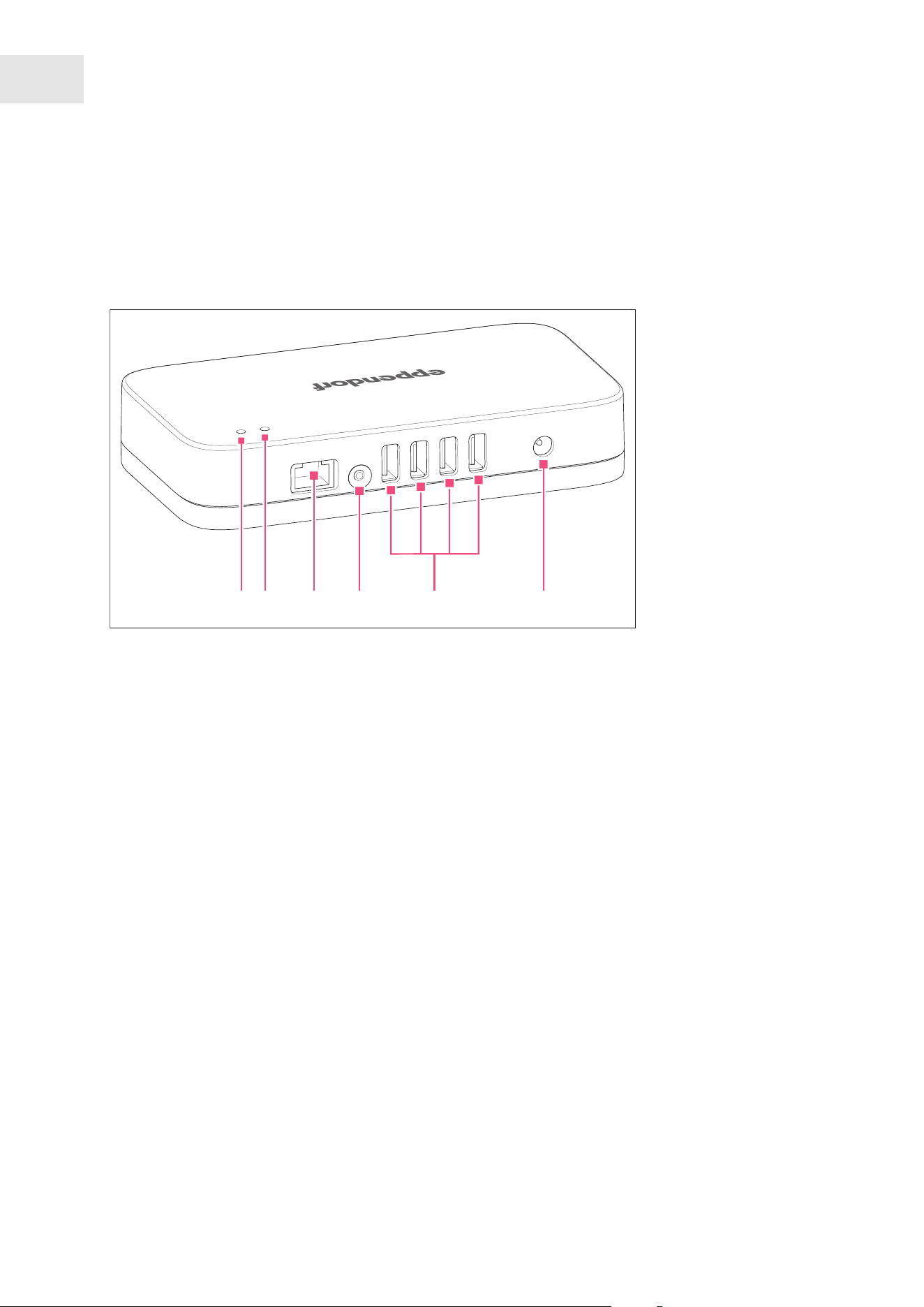
3.1.3 VisioNize box 2
The VisioNize box 2 is used as a gateway for VisioNize sense products and sends the collected measure‐
ment data to the VisioNize Lab Suite. Further information on the VisioNize box 2 can be found in the
corresponding operating manual.
654321
Fig.3-3:Displays and ports on the VisioNize box 2
1 Status LED
2 Power LED
3 Ethernet interface
4 Button
5 USB interfaces
6 Power supply
12
Product description
VisioNize sense
English (EN)

4 Installation
4.1 Preparing installation
4.1.1 Checking connection requirements
All prerequisites must be met before the device can be installed and put into operation.
Checking the electrical connection
1. Check that the electrical connection meets the following conditions:
• The power connection corresponds to the specifications on the name plate.
• A power socket with a PE conductor is present.
• The power socket is always freely accessible.
• A residual current circuit breaker is present and accessible.
4.1.2 Checking the location
If you move VisioNize sense from a cold environment to a warm environment, condensation
inside the devices can cause damage. After placing VisioNize sense on the devices, wait about
one hour before connecting VisioNize sense to the power line.
1. Check that the location meets the following conditions:
• The ambient conditions correspond to the specifications in the technical data.
• The footprint is designed to support the weight of the device.
• A free power connection is available near the device and the specifications on the power supply
device correspond to this connection.
• Good ventilation, no obstructions within 30cm of the ventilation gaps
• The power switch and disconnecting device of the power system circuit are accessible
2. Check that the location is protected from the following influences:
• Heat sources
• Sparks
• Open flames
• Direct sunlight
• UV radiation
• Strong electromagnetic radiation
• Humidity
4.1.3 Checking the delivery and packing
1. Check whether the packages indicated on the delivery note match the packages actually delivered.
2. Check the packing for transport damage.
3. Report any visible damage to your Eppendorf partner.
13
Installation
VisioNize sense
English (EN)

4.1.4 Checking the delivery condition
1. Check the device and accessories for visible damage.
2. Report any damage to your Eppendorf partner.
4.1.5 Checking the delivery package
1. Check that the supplied components match the specifications of the delivery package.
2. If any parts are missing, contact your Eppendorf partner.
Scope of delivery
Table1: VisioNize sense environmental monitor
Quantity Description
1 VisioNize sense environmental monitor
1 Power supply unit for VisioNize sense
3
2
Adhesive wall mount
Adhesive device mount
1 Installation guide
Table2: VisioNize sense temperature sensor
Quantity Description
1 VisioNize sense temperature sensor
1 Installation guide
4.1.6 Setting up an account for VisioNize
Further information on setting up a user account can be found online at
https://www.eppendorf.com/visionize.
To transfer measured values to VisioNize, set up an account with myEppendorf.
1. Visit www.eppendorf.com/visionize-subscription/.
2. Purchase the subscription that suits you best.
The administr
ator specified during the purchase process will receive access to the administrator
account for your organizational unit. You can then create all other user and administrator accounts
through this account.
14
Installation
VisioNize sense
English (EN)

4.1.7 Charging the VisioNize sense environmental monitor rechargeable battery
To ensure reliable measurement data, fully charge the VisioNize sense environmental monitor recharge‐
able battery before use.
NOTICE!
To avoid material damage, only use the power supply included in the scope of delivery to
charge the VisioNize sense environmental monitor.
The rechargeable battery takes up to 8 hours to charge. You can check the charging status in the
VisioNize Lab Suite.
Under normal operating conditions, the rechargeable battery run time is up to 6 months. The run
time may be r
educed depending on the number of extensions used.
Prerequisites:
•
The USB cable is ready.
• The adapter for the power supply is ready.
• The power supply is ready.
1. Plug the USB cable into the USB port on the VisioNize sense environmental monitor.
2. Plug the other end of the USB cable into the power supply adapter.
3. Connect the power supply to a power socket.
The status LED light indicates the charging process.
When the status LED is constantly lit, the charging process is complete.
4. Place the VisioNize sense environmental monitor near the device whose internal temperature you want
to measure.
For more information on the colors and meaning of the LED light duration, visit .
4.2 Performing the installation
4.2.1 Installing the VisioNize sense environmental monitor
Mount the VisioNize sense environmental monitor outside the device. To ensure good transmission
of the measur
ed values, choose a distance to the VisioNize box 2 of no more than 10 m. Walls and
other barriers between the two devices reduce the signal strength.
Mount the VisioNize sense environmental monitor in close proximity to the device, e.g., on the wall
or directly on the device in the case of an ULT freezer. This allows the data from the VisioNize sense
temperature sensor to be transferred to the VisioNize box 2 and into the VisioNize Lab Suite.
Prerequisites:
15
Installation
VisioNize sense
English (EN)

• The VisioNize sense environmental monitor rechargeable battery is charged.
• The surface on which the VisioNize sense environmental monitor is to be mounted is smooth, dust-
free, and grease-free.
1. Use one wall mount
2. Apply the mount firmly to the surface on the wall or device.
3. Attach the counterpart to the wall mount to the VisioNize sense environmental monitor.
4. Wait at least 2 minutes before attaching the VisioNize sense environmental monitor to the wall mount.
The mount will be fully load-bearing after a 10-minute waiting period.
You can use the VisioNize sense environmental monitor in rechargeable battery mode or con‐
nected to the power line.
16
Installation
VisioNize sense
English (EN)
4.2.2 Connecting VisioNize sense and the device
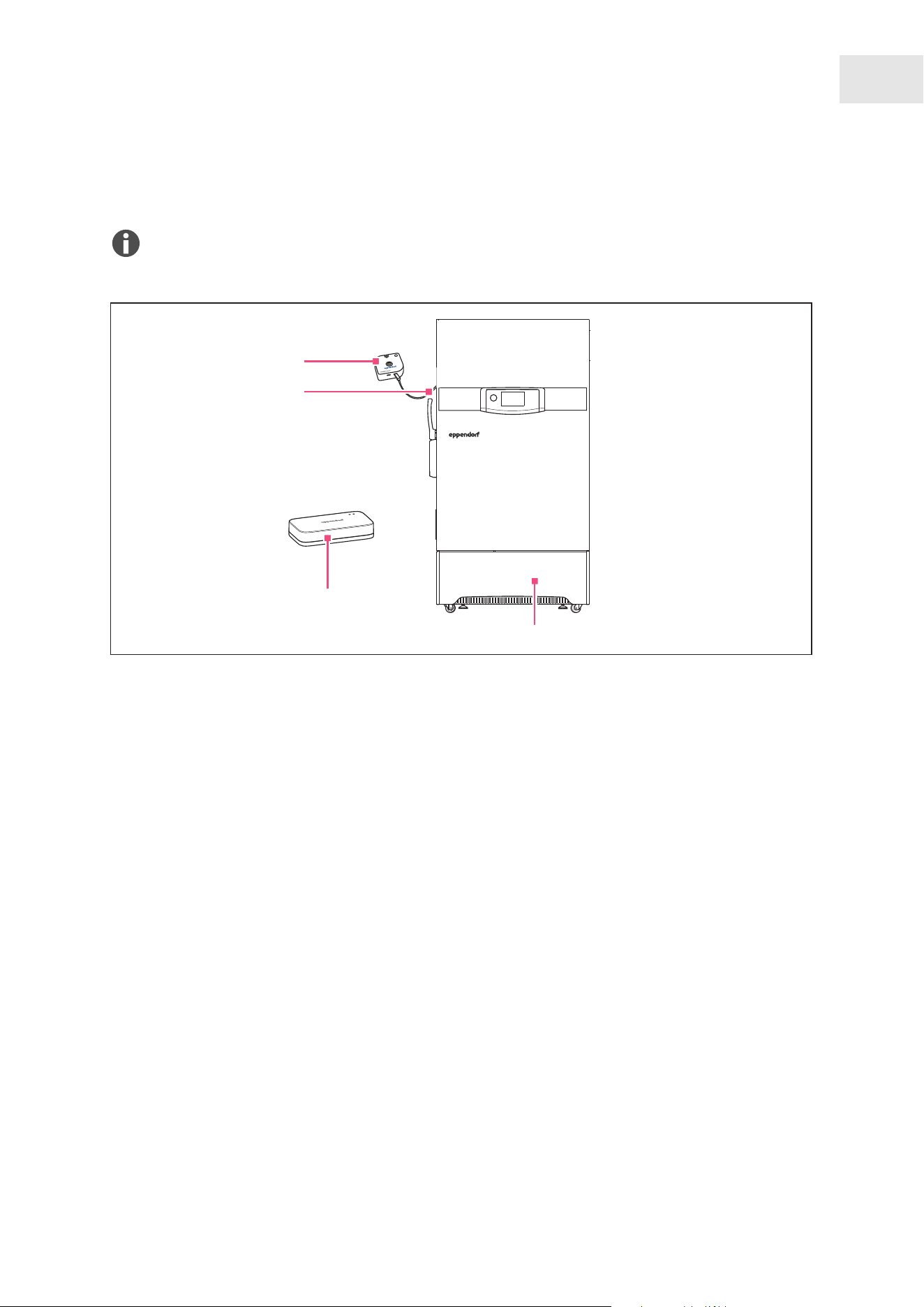
You can connect multiple devices to VisioNize sense and monitor measurement data in the
VisioNize Lab Suite.
auto
vent
V
isioNize sen se
4
1
3
2
Fig.4-1:Overview of connected devices
1 VisioNize box 2
2 VisioNize sense temperature sensor
3 VisioNize sense environmental monitor
4 ULT freezer
Prerequisites:
• The VisioNize box 2 is registered in VisioNize.
•
The VisioNize sense environmental monitor is registered in VisioNize.
• The VisioNize box 2 is connected to the power line and is connected to the network via a standard
Ethernet cable or via WLAN.
1. Place the VisioNize sense environmental monitor near the VisioNize box 2.
2. Briefly press the on/o button on the VisioNize sense environmental monitor.
The status LED flashes green.
The monitor will be displayed in the VisioNize Lab Suite as online after a few seconds.
3. Plug the USB-C connector from the VisioNize sense temperature sensor into the USB interface on the
VisioNize sense environmental monitor.
4. Position the sensor either at the access port on the ULT freezer or connect the sensor via the door seal
on the hinge side of the ULT freezer.
17
Installation
VisioNize sense
English (EN)

5 Operation
5.1 Operating the VisioNize sense environmental monitor
Switching on
1. Briefly press the on/o button on the VisioNize sense environmental monitor.
When you switch on the device for the first time, the VisioNize sense environmental monitor connects
to the VisioNize box 2.
If the monitor is correctly connected, the monitor's LED will flash green.
Switching o
1. Press the on/o button on the VisioNize sense environmental monitor for 6 to 7 seconds.
The monitor's LED will flash red, then remain red for a while, and then stay black.
Resetting
Prerequisites:
• To reset the VisioNize sense environmental monitor, make sure it is switched o.
• Make sure that no LED light is lit.
1. Press and hold the on/o button on the VisioNize sense environmental monitor until the LED lights up
continuously red.
2. When the LED lights up continuously red, release the on/o button.
The device begins to reset itself, which is indicated by the LED flashing red at a high frequency. When
the process is complete, the device switches back on.
18
Operation
VisioNize sense
English (EN)

6 Maintenance
6.1 Maintenance
6.1.1 Cleaning
Cleaning the VisioNize sense environmental monitor
NOTICE! Damage to the device and accessories
The use of unsuitable cleaning agents or sharp objects may damage the device and its
accessories.
– Do not use any aggressive cleaning agents, strong solvents or abrasive polishes.
– Check the compatibility with the materials used.
– Do not clean the device with acetone or organic solvents with a similar eect.
– Do not use any sharp or pointed objects to clean the device.
1. Briefly press the on/o button.
The VisioNize sense environmental monitor switches o.
2. Moisten all sides of the VisioNize sense environmental monitor with isopropanol, avoiding the USB
interfaces.
3. Wipe the sides dry with a microfiber cloth.
4. Wait 5 minutes until the isopropanol has completely evaporated.
5. Repeat this process, if necessary, until all contaminants have been removed.
The VisioNize sense environmental monitor is ready for use.
Cleaning the VisioNize sense temperature sensor
NOTICE! Damage to the device and accessories
The use of unsuitable cleaning agents or sharp objects may damage the device and its
accessories.
– Do not use any aggressive cleaning agents, strong solvents or abrasive polishes.
– Check the compatibility with the materials used.
– Do not clean the device with acetone or organic solvents with a similar eect.
– Do not use any sharp or pointed objects to clean the device.
1. Disconnect the USB cable from the VisioNize sense temperature sensor from the USB port on the
VisioNize sense environmental monitor.
2. Moisten the VisioNize sense temperature sensor on all sides with isopropanol.
3. Wait one minute for the isopropanol to take eect.
4. Wipe the VisioNize sense temperature sensor dry with a microfiber cloth.
5. Wait 5 minutes until the remaining isopropanol has evaporated.
The VisioNize sense temperature sensor is ready for use.
19
Maintenance
VisioNize sense
English (EN)

6.1.2 Decontamination/disinfection
Observe the instructions in the decontamination certificate. This is available as a PDF file on our
website (https://www.eppendorf.link/decontamination/).
1. Decontaminate all parts you intend to ship.
2. Enclose the fully completed decontamination certificate for returned goods with the shipment.
Disinfection
NOTICE! Component damage
If disinfectant gets inside the device, it can cause electronic components to corrode. This will
impair the function of the device.
– Only spray disinfectant onto a cloth.
1. Select the disinfection method in accordance with the legal regulations and guidelines for your area of
application.
2. Disinfect all parts you intend to ship.
20
Maintenance
VisioNize sense
English (EN)

7 Transport
7.1 Sending the device
Use the original packing to transport the device. If the original packing is no longer available,
please ensure that the device is suciently protected by replacement packing during storage and
further transport. Eppendorf SE is not liable for damage caused by improper replacement packing.
WARNING! Contamination
Shipping or storing a contaminated device or contaminated accessories may lead to contami‐
nation of persons or cause damage to health.
– Decontaminate the device and accessories before shipping or putting them into storage.
Material:
•
Packing
Prerequisites:
• The device is out of operation.
• The device is decontaminated.
1. Download the decontamination certificate for goods returns from
https://www.eppendorf.link/decontamination/.
2. Complete the decontamination certificate.
3. Pack the device.
4. Securely attach the decontamination certificate to the outside of the packing.
5. Ship the device.
21
Transport
VisioNize sense
English (EN)

8 Disposal
8.2 Preparing for disposal
Preparing disposal according to legal regulations
For information on the legal regulations that apply in your country, contact your local authority and
your Eppendorf partner.
Dispose of non-decontaminable devices as hazardous waste.
1. Check which legal regulations apply to disposal in your country.
2. Choose a certified waste disposal company or contact your Eppendorf partner.
Creating a decontamination certificate
Prerequisites:
• The device has been decontaminated.
1. Download the decontamination certificate from the website
https://www.eppendorf.link/decontamination/.
2. Complete the decontamination certificate.
8.3 Handing over the device to the disposal company
1. Inform the disposal company of any hazards posed by the device, e.g., locking devices, flammable
substances.
2. Hand over the device and the decontamination certificate to the certified disposal company.
22
Disposal
VisioNize sense
English (EN)

9 Technical data
9.1 Dimensions
VisioNize sense environmental monitor
Width 66 mm
Height 23 mm
Length 66 mm
VisioNize sense temperature sensor
Width 14 mm
Height 8 mm
Length 35.5 mm
Cable length 3 m
Sensor sleeve with PT 100 ceramic 50 mm
9.2 Weight
VisioNize sense environmental monitor
80 g
VisioNize sense temperature sensor
40 g
9.3 Power supply
VisioNize sense environmental monitor
Battery Li-polymer rechargeable battery 1900mAh
r
echargeable, permanently installed
Charging voltage 5 VDC (max.500 mA)
23
Technical data
VisioNize sense
English (EN)

9.4 Ambient conditions
Operating conditions
Table3: VisioNize sense environmental monitor
Environment Indoor use only, do not use or store in potentially explosive atmos‐
pher
es
Ambient temperature -10°C–58°C
Relative humidity max. 95%, non-condensing
Table4: VisioNize sense temperature sensor (with connector)
Environment Indoor use only, do not use or store in potentially explosive atmos‐
pher
es
Ambient temperature -10°C–+ 35°C ± 0.3°C
Relative humidity max. 80 %, relative humidity, non-condensing
Storage and charging conditions
Table5: VisioNize sense environmental monitor
Temperature 0 °C–40 °C
Relative humidity 10 %–50 %
Storage location Protected from:
• Frost and heat
•
Dust and sunlight
• Hazardous substances
Table6: VisioNize sense temperature sensor
Temperature 0 °C–40 °C
Relative humidity 10 %–50 %
Storage location Protected from:
• Frost and heat
• Dust and sunlight
• Hazardous substances
24
Technical data
VisioNize sense
English (EN)

Sensor specification and measuring range
Table7: VisioNize sense environmental monitor
Temperature -10°C–+58 °C (typ. ± 0.3 °C)
Humidity 0 %–100 % (typ. ± 2 %)
Barometric pressure 300 hPa – 1100 hPa (typ. ± 1 hPa)
Brightness 0 %–100 % (dark/light)
Motion detection Standstill, movement
Table8: VisioNize sense temperature sensor
Temperature -90 °C – 60 °C (typ. accuracy classA)
9.5 Interfaces
Interfaces of the VisioNize sense environmental monitor
Radio interface 2.4 GHz
2 USB interfaces TypeC for connecting sensor extensions
9.6 Electromagnetic compatibility and radio
VisioNize sense environmental monitor
ICES-Gen, Category
II, Class B
ICES-003
ANSI 63.4
This device has been tested and found to comply with the limits for a Class B,
Category II ITE device, pursuant to Canadian ICES-003. Class B includes devices
that cannot be classified as Class A. Category II devices ar
e exempt from certifica‐
tion pursuant to subsection 21(5) of the Radiocommunication Regulations.
RSS-Gen
RSS-247
Contains IC: 11306A-ISP1507
25
Technical data
VisioNize sense
English (EN)

FCC Part 15, Class B
ANSI 63.4
This device complies with Part 15 of the FCC Rules. Operation is subject to the
following conditions:
• (1) This device may not cause harmful interference, and
•
(2) this device must accept any interference received, including interference
that may cause undesired operation.
This device has been tested and found to comply with the limits for a Class B
digital device, pursuant to P
art 15 of the FCC Rules. These limits are designed
to provide reasonable protection against harmful interference in a residential
installation.
This device generates, uses, and can radiate radio frequency energy and, if not
installed and used in accordance with the instructions, may cause harmful inter‐
ference to radio communications. However, there is no guarantee that interfer‐
ence will not occur in a particular installation. If this device does cause harmful
interference to radio or television reception, which can be determined by turning
the device o and on, the user is encouraged to try to correct the interference by
one or more of the following measures:
• Reorient or relocate the receiving antenna.
•
Increase the separation between the device and receiver.
• Connect the device to an outlet on a circuit dierent from that to which the
receiver is connected.
• Consult the dealer or an experienced radio/TV technician for help.
Contains FCC ID: 2AAQS-ISP1507
IEC 61326-1
CISPR 11, Gr
oup 2,
Class B
Group 2 includes ISM devices with intentional RF transmitters for use in the
home environment.
Class B devices are devices that are suitable for use in residential areas and such
areas, and they are connected to the public mains.
EN IEC 61326-1
EN 55011, Gr
oup 2,
Class B
EN 61000-6-2
ETSI EN 300 328
ETSI EN 301 489-1
ETSI EN 301 489-17
Hereby, Eppendorf SE declares that the radio equipment type VisioNize
sense is in compliance with Directive 2014/53/EU. The full text of the
EU declaration of conformity is available at the following Internet address:
www.eppendorf.com/manuals
9.7 Further conformities
VisioNize sense environmental monitor
Degree of protection (DIN EN 60529:2014-09) IP20
26
Technical data
VisioNize sense
English (EN)

10 Ordering information
10.1 Accessories
Item number Description Order no.
1
VisioNize® box 2
Har
dware hub that serves as connection point for VisioNize sense
equipment and additionally connects up to four qualified Eppendorf
devices. Features WLAN connectivity. 1008 000 006
2
VisioNize® sense environmental monitor
a wir
eless, rechargeable multi-sensor unit (ambient temperature,
humidity, pressure & light) ESS1000002
3
VisioNize® sense temperature sensor
PT
-100 extension that can measure temperature of any device
(including ULT Freezers) within the range of +60 to -90 °C. ESS1000003
27
Ordering information
VisioNize sense
English (EN)



Evaluate Your Manual
Give us your feedback.
www.eppendorf.com/manualfeedback
Your local distributor: www.eppendorf.com/contact
Eppendorf SE · Barkhausenweg 1 · 22339 Hamburg · Germany
[email protected] · www.eppendorf.com

