2
1. Introduction
This communication module is designed to equip the PERS (Pedaling Energy Recovering System).
It ensures the link between the vehicle, the user's smartphone, and external data servers to
enable associated connectivity services and to gather and transmit data and to be controlled
remotely.
2. Safety
Before usage, please read the safety precautions carefully:
WARNING: Failure to comply with the safety rules releases Cixi company from any responsibility
for damages caused to persons or equipment.
➢ Avoid exposing the device to moisture or extreme temperatures.
➢ Never open the casing.
➢ Children should not approach the equipment.
Changes or modifications not expressly approved by the party responsible for compliance could
void the user’s authority to operate the equipment. The IoT is already integrated into the PERS,
which eliminates the need for any intervention at this level.
3. FCC Statement
This device complies with Part 15 of the FCC Rules. Operation is subject to the following two
conditions: (1) this device may not cause harmful interference, and (2) this device must accept any
interference received, including interference that may cause undesired operation.
This equipment has been tested and found to comply with the limits for a Class B digital device,
pursuant to part 15 of the FCC Rules. These limits are designed to provide reasonable protection
against harmful interference in a residential installation. This equipment generates, uses and can
radiate radio frequency energy and, if not installed and used in accordance with the instructions,
may cause harmful interference to radio communications. However, there is no guarantee that
interference will not occur in a particular installation. If this equipment does cause harmful
interference to radio or television reception, which can be determined by turning the equipment
off and on, the user is encouraged to try to correct the interference by one or more of the
following measures:
— Reorient or relocate the receiving antenna.
— Increase the separation between the equipment and receiver.
— Connect the equipment into an outlet on a circuit different from that to which the receiver is
connected.
— Consult the dealer or an experienced radio/TV technician for help
This portable equipment with it’s antenna complies with FCC’s radiation exposure limits set forth
for an uncontrolled environment. To maintain compliance, follow the instructions below :
1. This transmitter must not be co-located or operating in conjunction with any other antenna or
transmitter.
2. Avoid direct contact to the antenna, or keep contact to a minimum while using this equipment.
3. In usage, keep a distance of at least 3.3 cms from the equipment
www.cixi.life

3
4. ISED Statement
This portable equipment with it’s antenna complies with RSS102’s radiation exposure limits set
forth for an uncontrolled environment. To maintain compliance, follow the instructions below :
1. This transmitter must not be co-located or operating in conjunction with any other antenna or
transmitter.
2. Avoid direct contact to the antenna, or keep contact to a minimum while using this equipment.
3. In usage, keep a distance of at least 3.3 cms from the equipment
This device complies with Industry Canada’s licence-exempt RSSs. Operation is subject to the
following two conditions:
1. This device may not cause interference, and
2. This device must accept any interference, including interference that may cause undesired
operation of the device.
5. Installation
This device must be professionally installed. The installation is performed by CIXI directly on the
PERS. Do not remove the IoT Box from the PERS. If you need to do so, CIXI strongly recommend
you to contact us (see contact information in chap. 10). Any IoT box removed from its PERS without
CIXI’s written permission will void the warranty of the PERS.
A detailed replacement procedure can be found in chapter 12.
www.cixi.life
4
6. Technical specifications
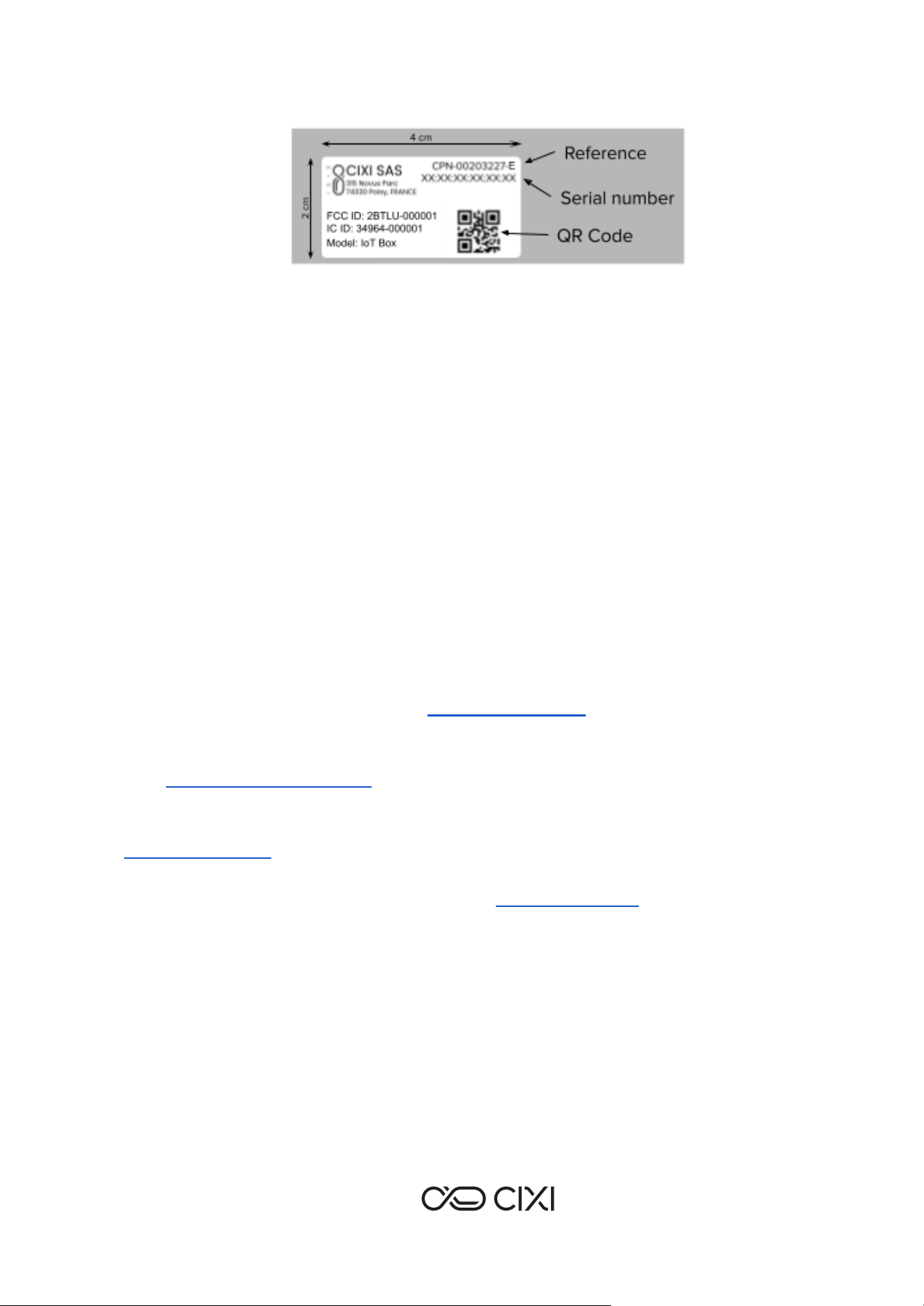
Reference
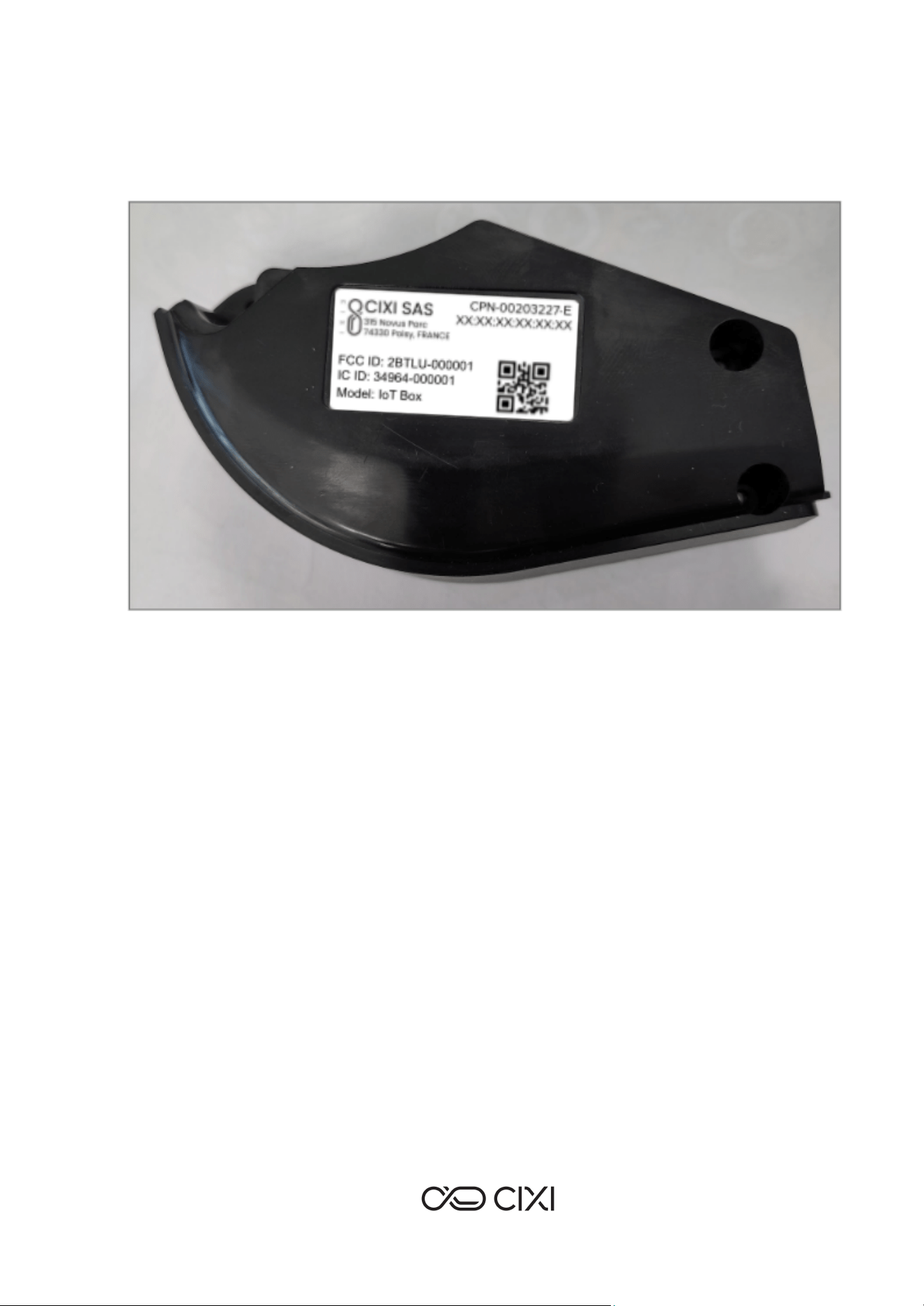
CPN-00203227-E
Power supply
Max voltage 4.2V DC
Current: 1.4 A max
Battery
The product contains a 18650 Li-ion battery
2900mAh – 3.6V
Power
6 W max
Connectivity
LTE-FDD: B2/B3/B4/B5/B7/B8/B28/B66
(GSM: EGSM900/DCS1800)
Power Class 3: 23 dBm ±2 dB
Bluetooth protocol version : 5.0 Bluetooth LE
Frequencies : 2402-2480 MHz
Max emitting power : class 1 +20 dBm
GNSS
Constellations:
GPS L1; GLONASS L1
Galileo E1
BDS B1I / BDS B1C
QZSS L1 C/A
SBAS L1
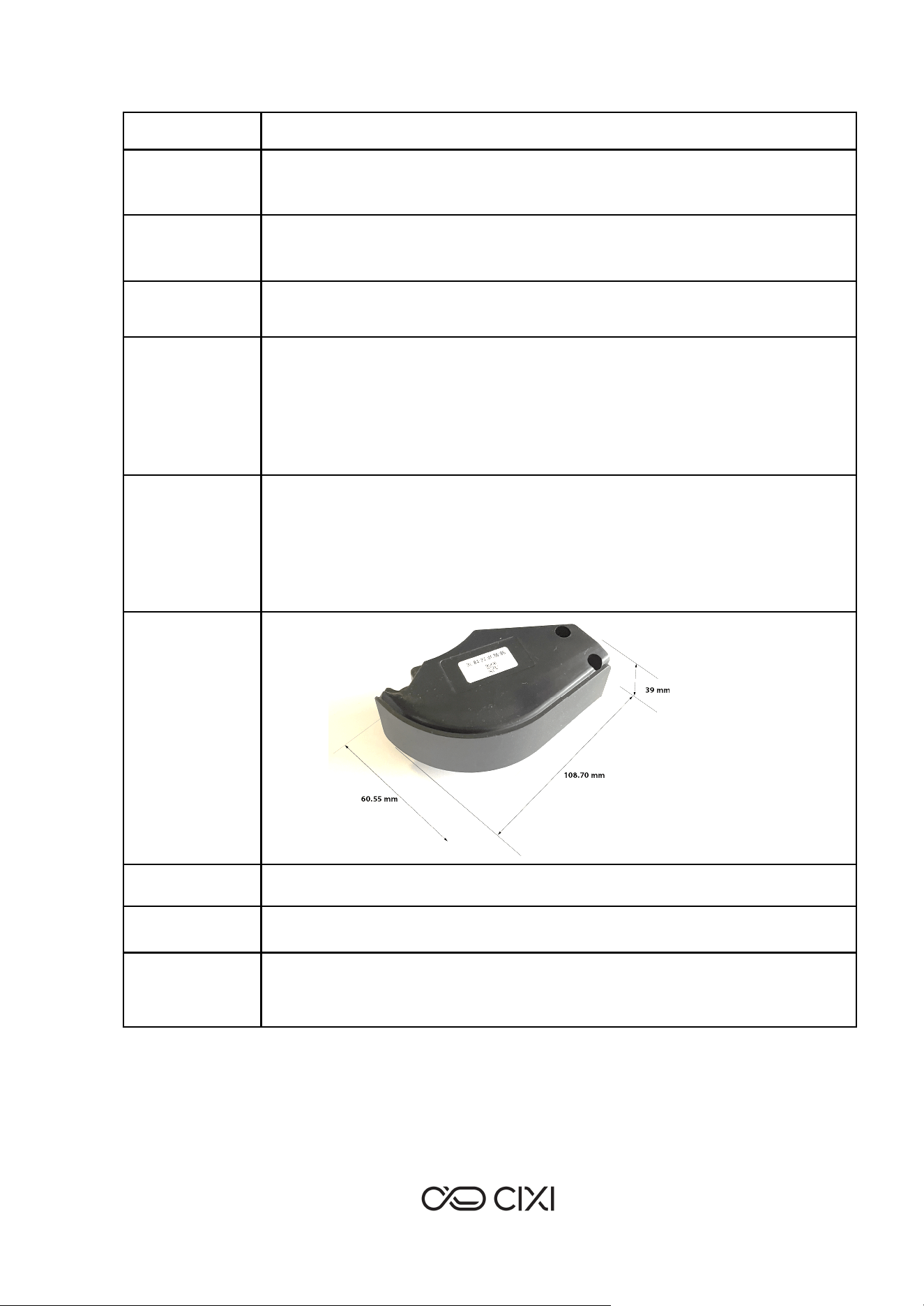
Dimensions
Weight
125g
Operating
temperature
-20°C / +60°C
Certifications
FCC ID: 2BTLU-000001
IC ID: 34964-000001
www.cixi.life
5
7. Label contents
8. Communication Peripherals
The module communicates with the following peripherals:
➢ The vehicle's PCU (Power Control Unit) board via a CAN or UART interface.
➢ A smartphone via Bluetooth LE.
➢ External servers via the LTE cellular network.
9. Declaration of Conformity
Add final FCC and ISED declarations of conformity and specific warnings.
10. Technical support
CIXI offers several channels to assist you and answer your questions. You can also connect with
our community on social media to share your experience and stay up to date.
Find answers to the most frequently asked questions about your connected vehicle, including
usage, maintenance, and troubleshooting tips.
Scan the QR code or visit our FAQ page: https://www.cixi.life/
You can also check out our ‘anti’ tutorials to learn about the different features your PERS has to
offer: www.instagram.com/cixilife/
Go on www.cixi.life or on your Active Pilot App or go on our CIXI Service Center :
www.service.cixi.life
Need more help? Reach out to us directly: Email: [email protected]
11. Maintenance
Check for updates: refer regularly to the manufacturer’s app or website for firmware updates or
maintenance alerts.
At around 1100 hours of using the IoT Box, a midlife maintenance check is recommended.
Schedule maintenance with authorized dealer, reset maintenance indicator after service (usually
through display menu or dealer tool)
12. IoT Box replacement procedure
www.cixi.life
6
a. Before replacing an IoT BOX
Before replacing the IoT BOX, you need a written approval from CIXI. Any IoT box removed from
its PERS without CIXI’s written permission will void the warranty of the PERS.
b. Tools and equipments
Equipment
Torque-controlled screwdriver (torque range that includes 0.5 and 0.7
Nm)
Tools
Torx T10 screwdriver end with a diameter < 4 mm on a minimal length of
30 mm so to access inside screw holes of the iot box and the external
cover
c. Detailed operation procedure
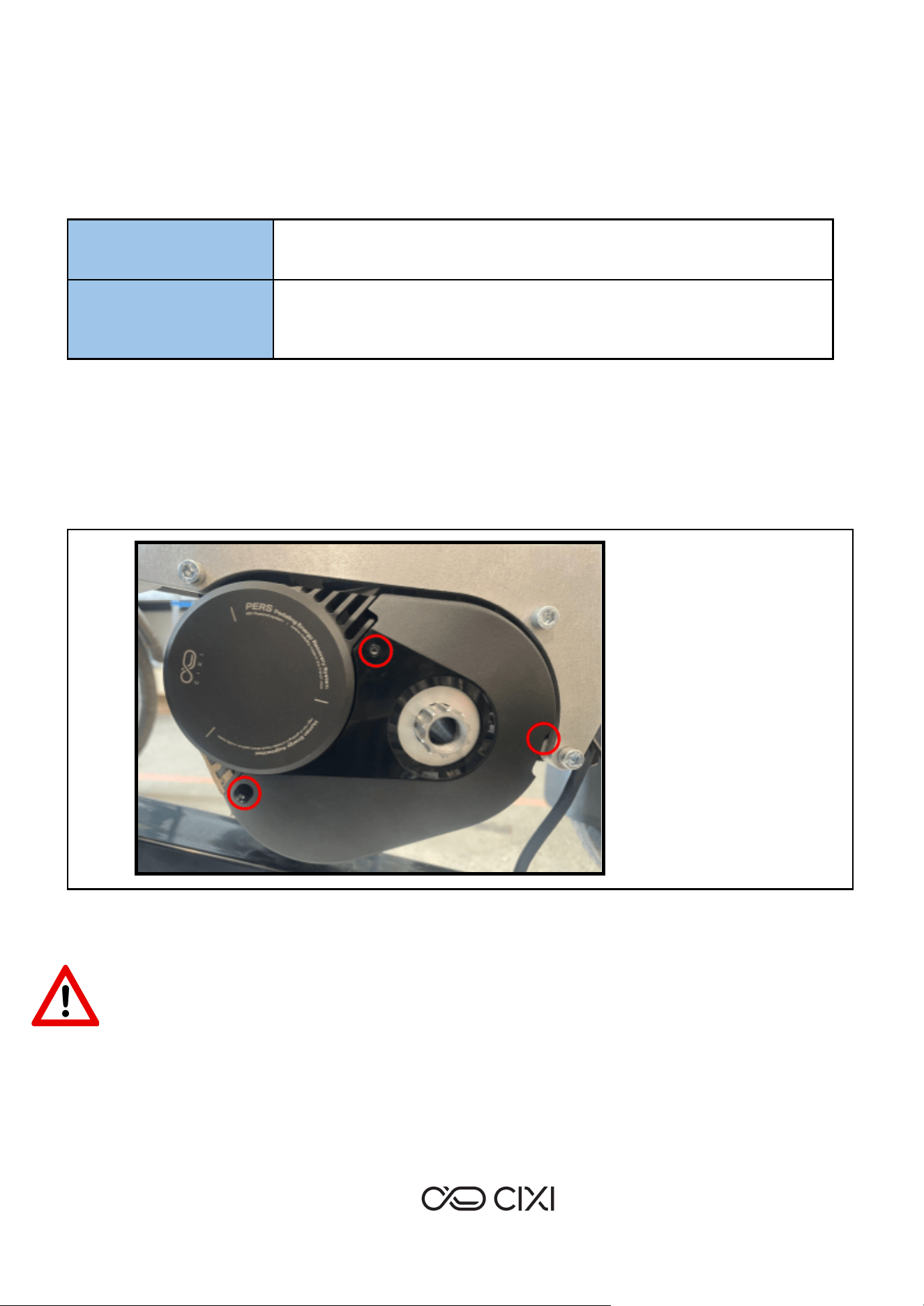
➢ Remove the crank from the PERS on the external cover side (plastic part masking the cable
routing)
➢ Remove the external cover : unscrew the 3 M3x10 screws (circled in red on the picture below) with
a torx T10 screwdriver end.
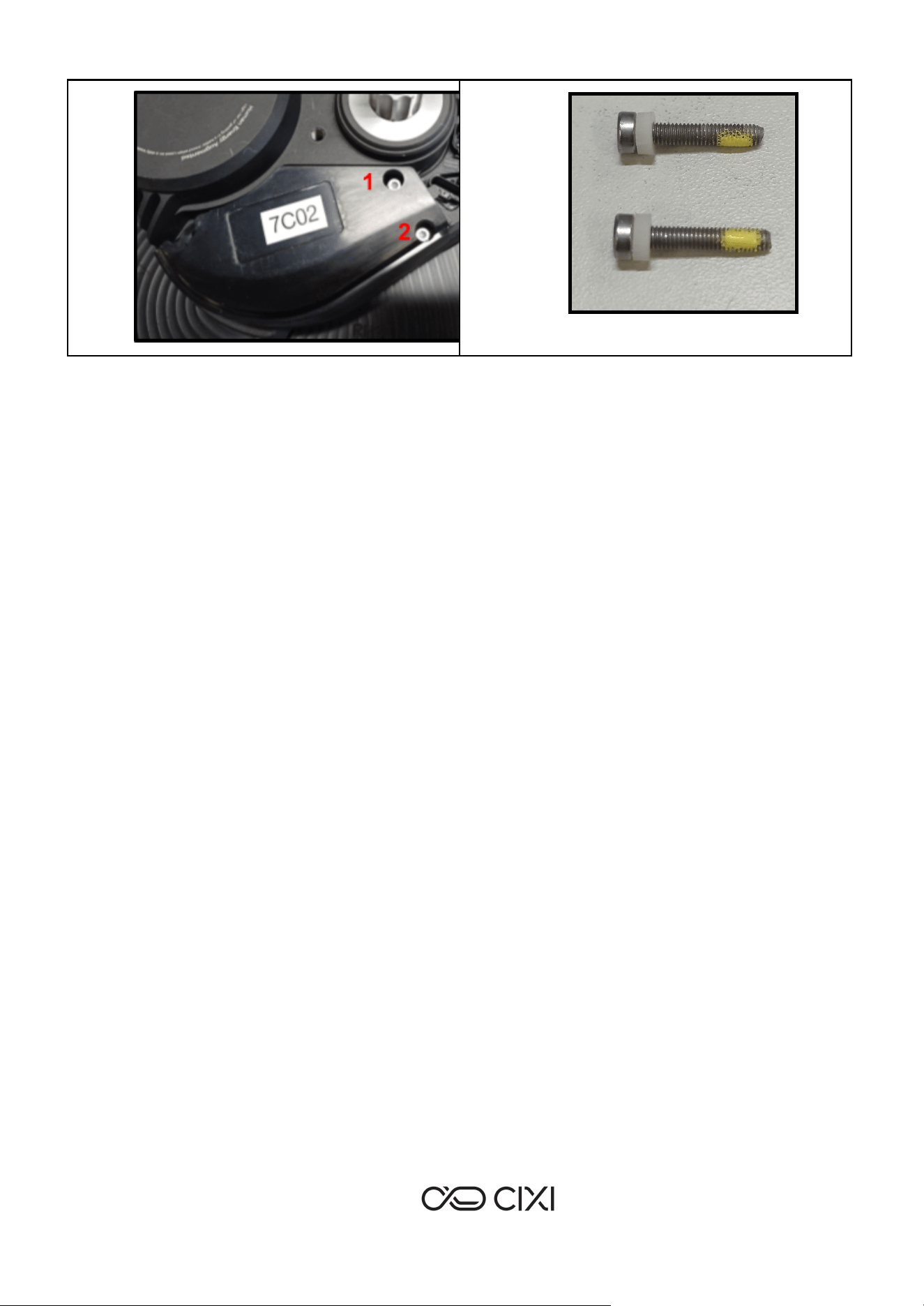
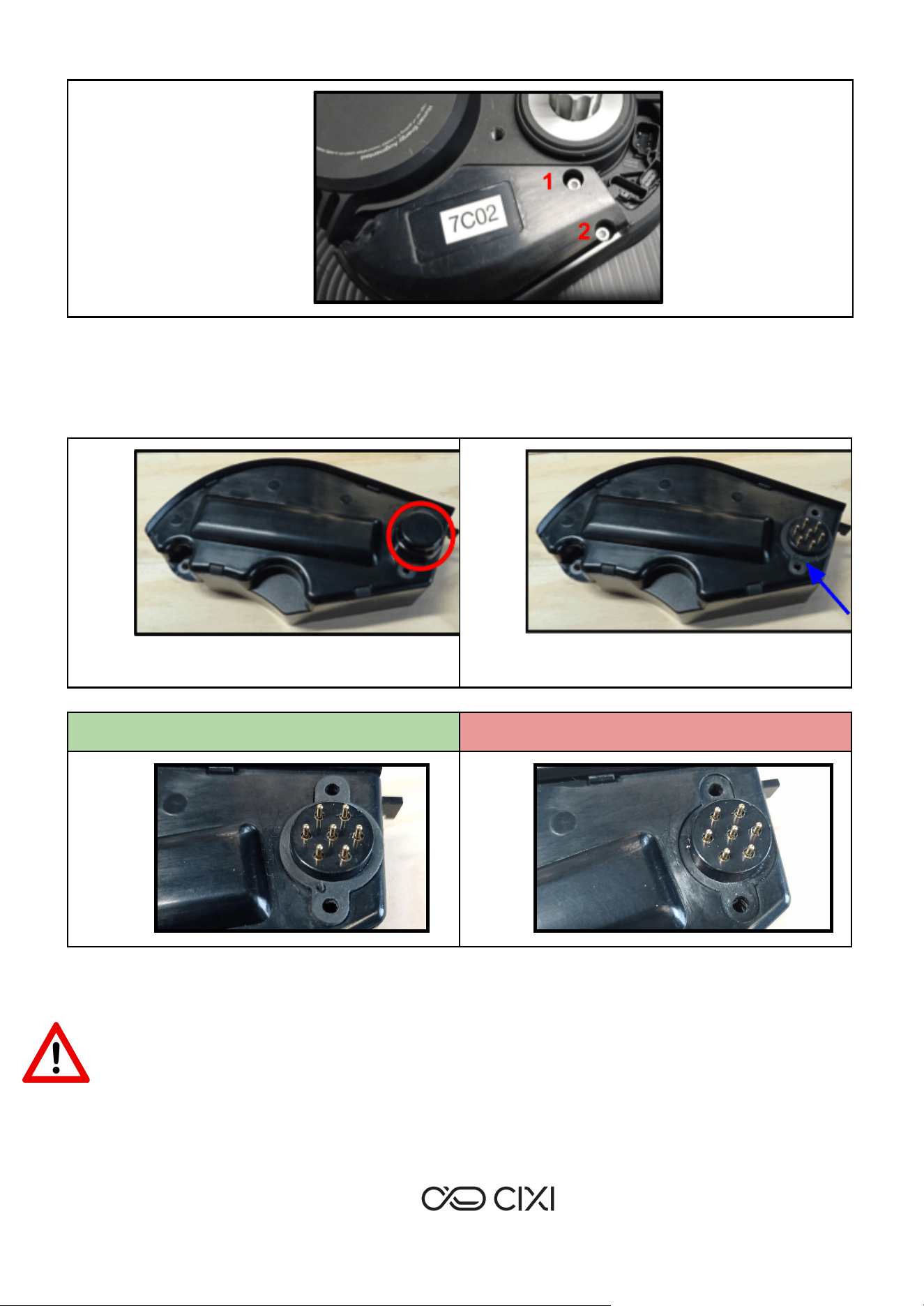
➢ Unscrew the 2 M3x16 screws of the iot box with a torx T10 screwdriver end. These screws are
inside the two holes of the iot box (number 1 & 2 on the picture below).
Be careful, if the PERS is on the bike (vertical), maintain the iot box with a hand so that it does not
fall when the 2 screws are removed !
www.cixi.life
7
➢ Simply remove the iot box from the PERS
➢ Take the new IoT BOX, remove the protecting cap (see picture below) and ensure that the gasket
around the connector is present.
Iot box protecting cap circled in red
Iot box connector gasket pointed by the
blue arrow
Iot box with connector gasket - OK
Iot box without connector gasket - NOK
➢ Place the iot box on the PERS and screw the 2 M3x16 screws with a torx T10 end at 0.5 Nm with a
torque-controlled screwdriver.
Check the presence of the two cylindrical seals under the M3x16 screws (picture below on the
right) !
www.cixi.life