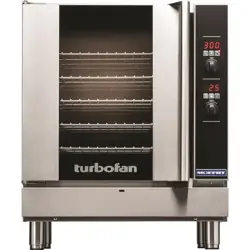

237461-1
Installation and Operation Manual
G32D5
Moisture Mode
Multi-Stage Cooking
Optional Core Temp Probe
30D
SERIES

The reproduction or copying of any part of this manual by any means whatsoever is strictly forbidden unless authorized previously in writing
by the manufacturer.
In line with policy to continually develop and improve its products, Moffat Ltd. reserves the right to change the specifications and design
without prior notice.
© Copyright Moffat Ltd. July 2014.
MANUFACTURED BY
Moffat Limited
Christchurch
New Zealand
INTERNATIONAL CONTACTS
AUSTRALIA
Moffat Pty Limited
Web: www.moffat.com.au
E.Mail: [email protected]
Main Office: (tel) +61 (03) 9518 3888
(fax) +61 (03) 9518 3833
Service: (tel): 1800 622 216
Spares: (tel): 1800 337 963
Customer Service: (tel): 1800 335 315
(fax): 1800 350 281
CANADA
Serve Canada
Web: www.servecanada.com
E.Mail: [email protected]
Sales: (tel): 800 551 8795 (Toll Free)
Service: (tel): 800 263 1455 (Toll Free)
NEW ZEALAND
Moffat Limited
Web: www.moffat.co.nz
E.Mail: [email protected]
Main Office: (tel): 0800 663328
UNITED KINGDOM
Blue Seal
Web: www.blue-seal.co.uk
E.Mail: [email protected]
Sales: (tel): +44 121 327 5575
(fax): +44 121 327 9711
Spares: (tel): +44 121 322 6640
(fax): +44 121 327 9201
Service: (tel): +44 121 322 6644
(fax): +44 121 327 6257
UNITED STATES
Moffat
Web: www.moffat.com
Sales: (tel): 800 551 8795 (Toll Free)
(tel): +1 336 661 1556
(fax): +1 336 661 9546
Service: (tel): 800 858 4477 (Toll Free)
(tel): +1 336 661 1556
(fax): +1 336 661 1660
REST OF WORLD
Moffat Limited
Web: www.moffat.co.nz
E.Mail: [email protected]

Contents List
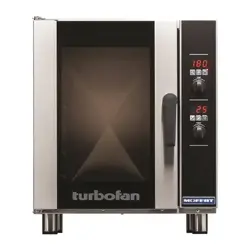
G32D5 Turbofan Convection Oven.
Introduction............................................................................................................ 2
Safety Information
Specifications.......................................................................................................... 3
Oven Gas Supply Requirements and Specifications
Installation ............................................................................................................. 5
Installation Requirements
Installation
Unpacking
Location
Clearances
Stand Mounted Ovens
Electrical Connection
Gas Connection
Water Connection
Recommended Water Specifications
Positioning and Levelling of Oven
Initial Start-Up
Commissioning
Operation ................................................................................................................ 7
Operation Guide
Cooking in Manual Mode
Cooking in Manual Mode using Core Temp Probe
Cooking in Program Mode
Programming ........................................................................................................ 14
Controller - Operator Settings .............................................................................. 17
Changing Operator Settings
Operator Settings
Cleaning and Maintenance ................................................................................... 18
Cleaning Guidelines
Oven Cleaning
Periodic Maintenance
Fault Finding ......................................................................................................... 21
Electrical Schematic.............................................................................................. 22
Gas Conversion and Specifications ....................................................................... 23
Conversion Procedure
Table of Gas Specifications
Replacement Parts List ......................................................................................... 24
Appendix 1 - Oven Door Reversal ......................................................................... 25
Introduction
2
Before using your new oven, please read this instruction manual
carefully, pay particular attention to any information labelled
‘WARNING’, ‘CAUTION’, ‘IMPORTANT’ or ‘NOTE’ in this
manual.
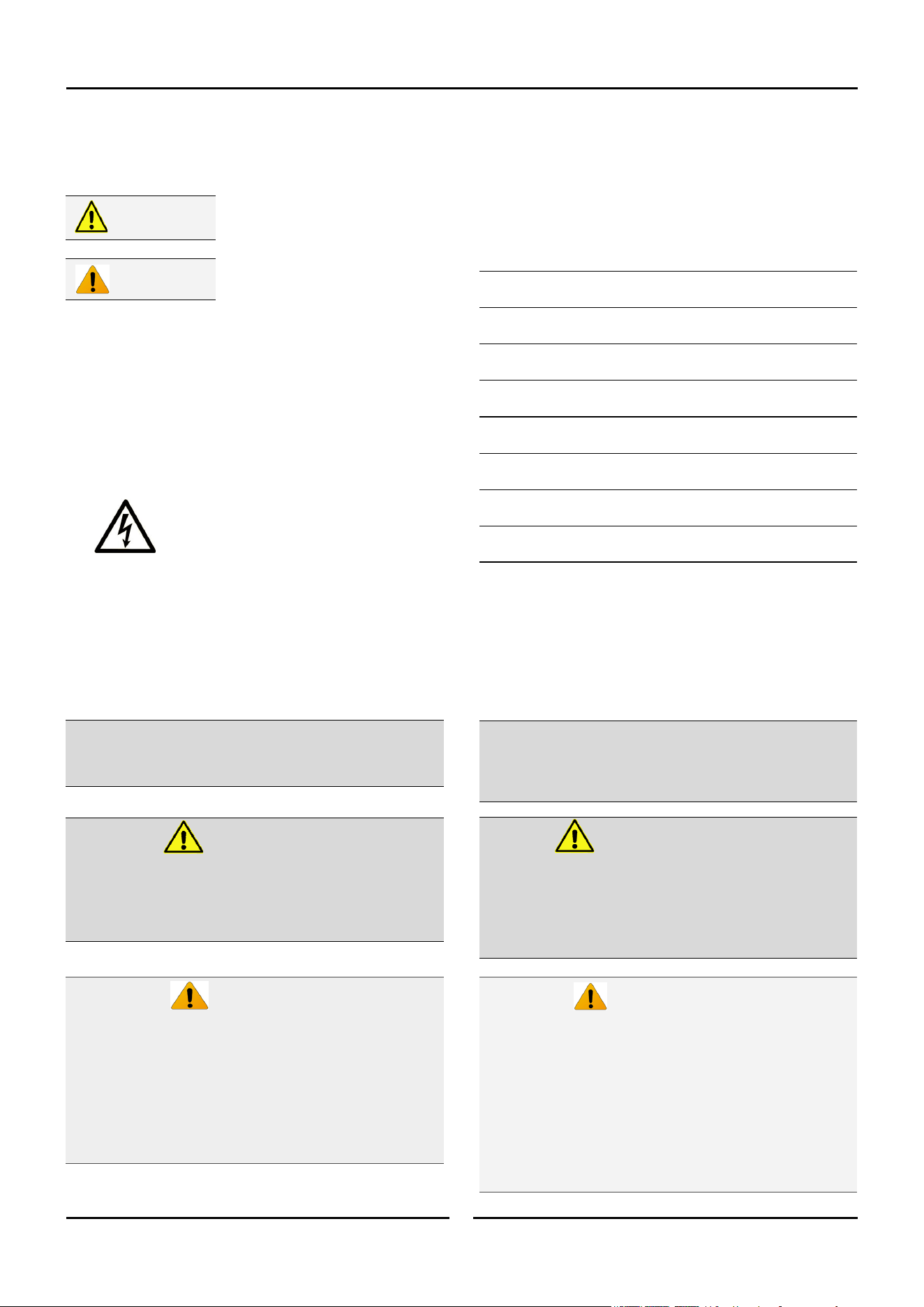
Indicates a hazardous situation
which, if not avoided, will result in
death or serious injury.
Indicates a hazardous situation
which, if not avoided, will result in
minor or moderate injury.
If you are unsure of any aspect of the installation, instructions or
performance of your oven, contact your TURBOFAN dealer promptly.
In many cases a phone call could answer your question.
Should you contact your TURBOFAN dealer on any matter
concerning this oven, please have the information provided
opposite, readily available.
For your safety, please pay attention to the following symbols
marked on the appliance.
- Risk of electric shock.
No user serviceable parts inside.
Qualified service person access only.
Disconnect from power before servicing.
Caution
Warning
Model Number:
Serial Number:
Dealer:
Service Provider:
Date Installed:
Date Purchased:
This manual must be kept by the owner for future reference.
A record of the
Date of Purchase,
Date of Installation
and
Serial Number of the oven
should be recorded in the area
provided below.
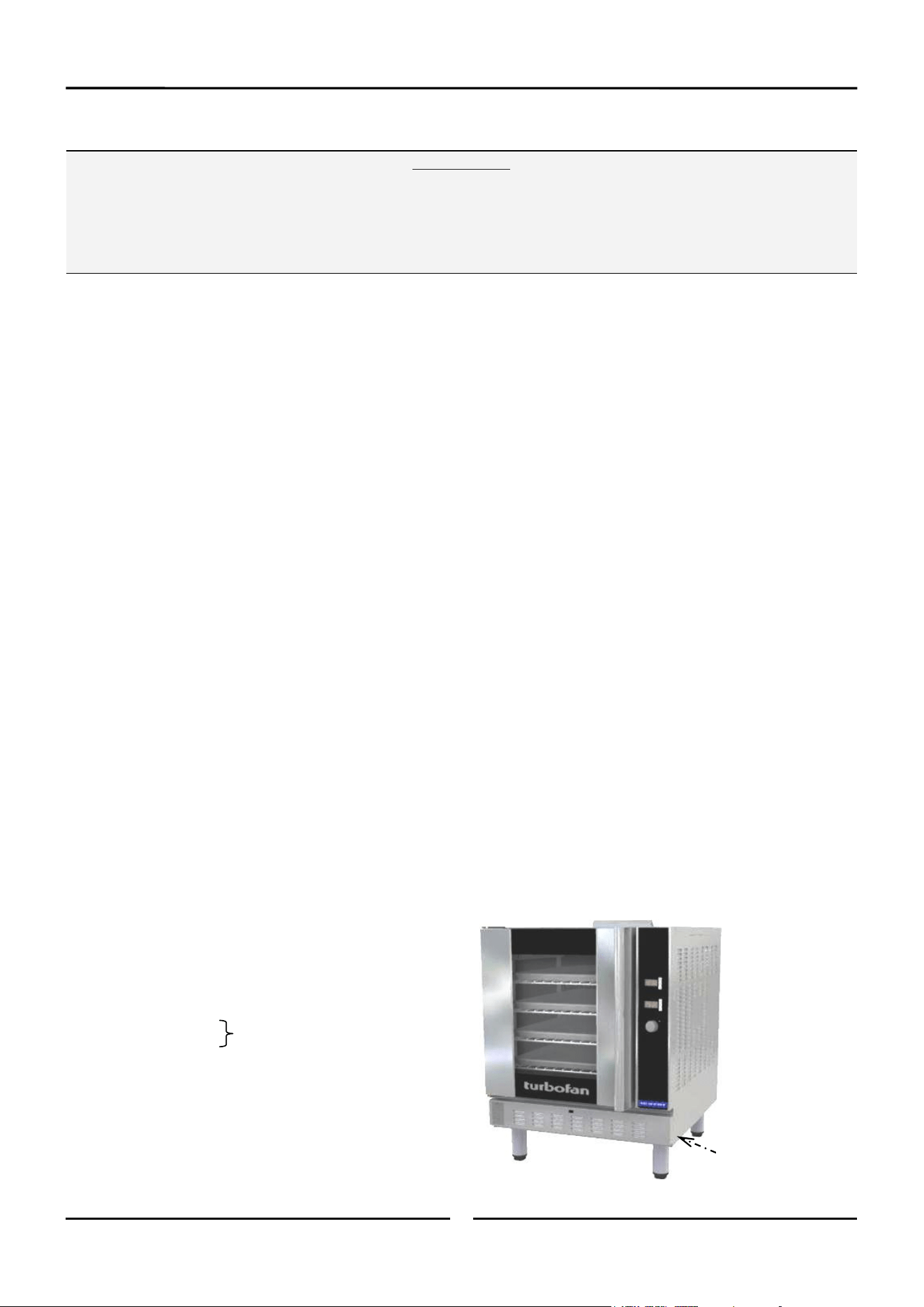
The serial number of this oven can be found on the
Technical Data Plate located on the front right hand side
panel, see diagram in ‘Installation Section’.
Safety Information
Instructions to be followed in the event the user smells gas are to be posted in a prominent location. This information shall be obtained by
consulting the local gas supplier.
MESURE DE SECURITÉ
Ne pas entreposer ni utiliser d’essence ni autres vapeurs
ou liquides inflammables à proximité de cet appareil ou de
tout autre appareil.
AVERTISSEMENT:
L’installation, le réglage, la modification, la réparation ou
l’entretien incorrect de cet appareil peut causer des dom-
mages matériels, des blessures ou la mort. Lire attentive-
ment les instructions d’installation, de fonctionnement et
d’entretien avant de procéder à son installation ou entre-
tien.
FOR YOUR SAFETY
Do not store or use gasoline or other flammable vapours or
liquids in the vicinity of this or any other appliance.
WARNING:
Improper installation, adjustment, alteration, service or
maintenance can cause property damage, injury or death.
Read the installation, operating and maintenance
instructions thoroughly before installing or servicing this
equipment.
This appliance is;
For professional use and is to be used by
qualified persons only.
Only qualified service persons are to carry out
installation, servicing and gas conversion
operations.
Components having adjustments protected (e.g.
paint sealed) by the manufacturer should not be
adjusted by the user / operator.
Caution:
Cet équipement est :
- Destiné à une utilisation dans un cadre professionnel et
doit être utilisé uniquement par du personnel qualifié.
- L'installation, la maintenance et la conversion du type de
gaz doivent obligatoirement être effectuées par des
techniciens agréés.
- Les pièces dont les ajustements sont protégés (peinture)
ne doivent pas être ajustées par l'opérateur / utilisateur.
Attention
Specifications
3
G32D5
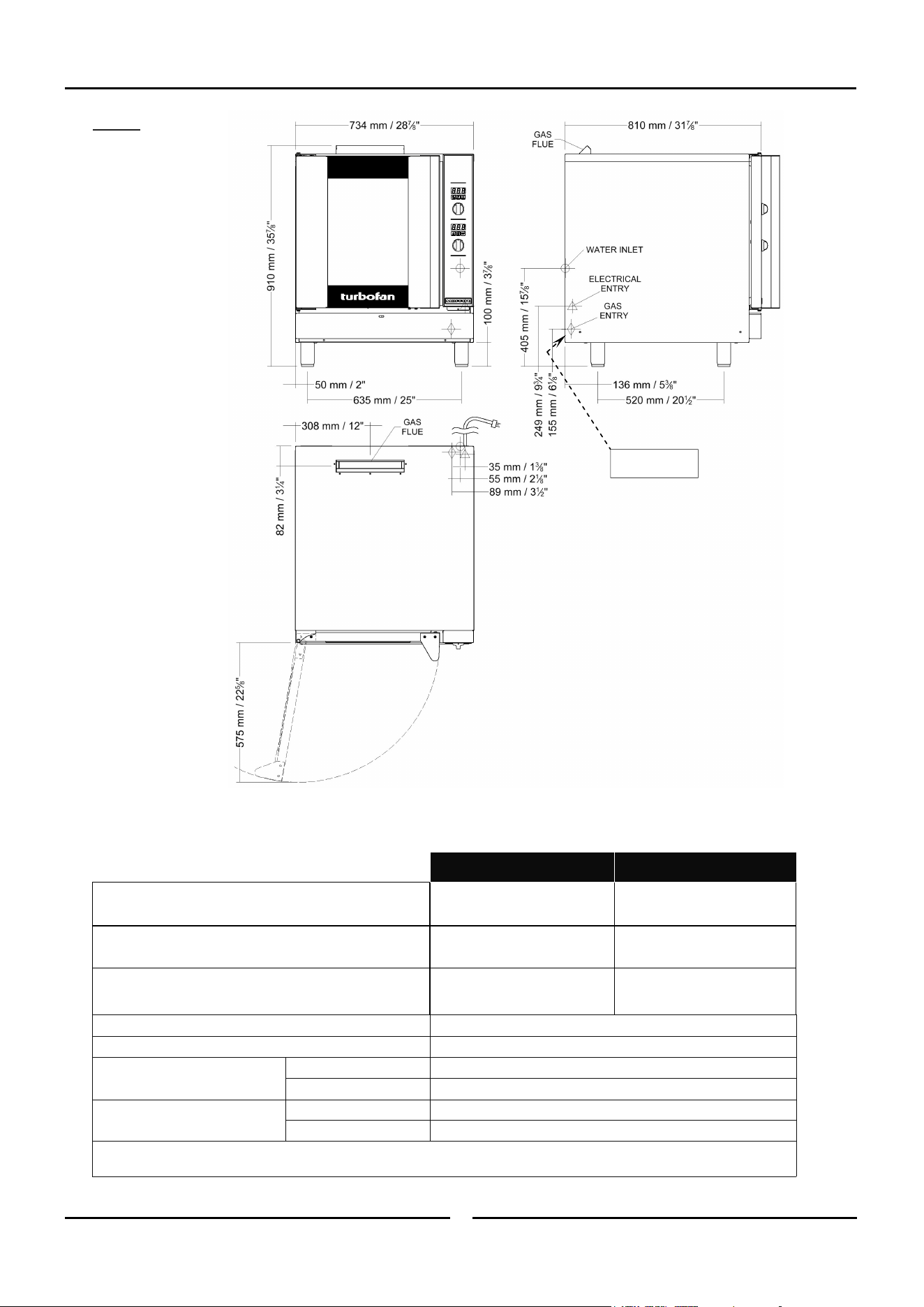
Oven Gas Supply Requirements and Specifications
Natural Gas LP Gas (Propane)
Input Rating
33,000 BTU/hr. 33,000 BTU/hr.
(35 MJ/hr). (35 MJ/hr).
Supply Pressure
7” w.c.
(1.75 kPa).
11” w.c.
(2.75 kPa).
Operating Pressure
4.2” w.c. 11” w.c.
(1.05 kPa). (2.75 kPa).
Gas Connection ½” NPT.
Electrical Power Ratings 1 Phase, 110-120V, 60HZ, 220W.
Oven Tray Details
Tray Capacity
5 x US Full Pan.
Tray Spacing
85 mm / 3
1
/
3
”.
Water Connection
Max Water Pressure
80 psi / 550 kPa.
Connection Size
¾” BSP with ¾” GHT Adaptor supplied.
NOTE: If Moisture Mode cooking option is not required, the oven does not need to be connected to a water supply.
Restraint Device
Anchor Point
Installation
4
Installation Requirements
This installation of this appliance must conform with local codes, or in the absence of local codes, must conform to the National Codes shown
below covering gas and electrical safety.
UNITED STATES: ANSI 223.1 / NFPA 54 National Fuel Gas Code.
ANSI / NFPA70 National Electrical Code.
CANADA: CSA B149.1 National Gas and Propane Installation Code.
CSA C22.2 Canadian Electrical Code.
Important:
Installation shall comply with local gas, electrical and health and safety requirements.
It is most important that this oven is installed correctly and that oven operation is correct before use.
If you have any questions regarding the proper installation and / or operation of this oven, please contact your local
Turbofan distributor.
Installation
Installations must be carried out by authorised persons only.
Failure to install equipment to the relevant codes and
manufacturers specifications shown above, will void the warranty.
NOTE:
The oven and its individual shutoff valve must be
disconnected from the gas supply piping system during
any pressure testing of that system at test pressures in
excess of 0.5psi (3.5 kPa).
The oven must be isolated from the gas supply
piping system by closing its individual manual shutoff
valve during any pressure testing of the gas supply piping
system at test pressures equal to or less than 0.5psi (3.5
kPa).
This oven must be electrically earthed / grounded in accordance
with local codes.
Installation must allow for a sufficient flow of fresh air for the
combustion air supply. Combustion air requirements:
Natural Gas 350ft
3
/hr (10m³/hr).
LPG 320ft
3
/hr (9m³/hr).
Components having adjustments protected (e.g. paint sealed) by
manufacturer are only to be adjusted by an authorised service
agent. They are not to be adjusted by the installation person.
Unpacking
1. Remove all packaging and transit protection including all
protective plastic coating from exterior stainless steel panels.
2. Check the oven and supplied parts for damage. Report any
damage immediately to the carrier and distributor.
3. Check that the following parts have been supplied with your
oven:-
4 x Leg Adjustable.
Brass Adaptor.
Rubber Washer.
4. Report any deficiencies to the distributor who supplied your
oven.
5. Securely fit the 4 legs supplied with the oven.
6. Check that the available gas and electrical supply is correct to
that shown on the Technical Data Plate located on the front
right hand side panel.
Refer to ‘Specifications’ section, ‘Oven
Specifications Tables’.
Location
1. This oven must be installed in an area of adequate air supply.
Adequate ventilation is essential, to prevent dangerous build
up of combustion products. DO NOT obstruct the air flow
around the ventilation slots.
2. This oven must be fitted on supplied legs in all installations.
(When installed on a manufacturers stand, the legs are used
to locate the oven in the correct position.
3. All air for burner combustion is supplied from underneath the
appliance. The legs must always be fitted and no obstructions
placed on the underside or around the base of the appliance,
as obstructions will cause incorrect operation and / or failure
of the appliance.
4. Installation must allow for a sufficient flow of fresh air for the
combustion air supply.
5. The area around the appliance must be kept free and clear
from combustibles.
6. Position oven in its approximate working position. It should be
positioned so that the control panel and oven shelves are
easily reachable for loading and unloading.
7. Use a spirit level to ensure oven is level from side to side and
front to back. (If this is not carried out, uneven cooking could
occur).
Technical Data Plate
Location
USA / Canada only.
Installation
5
Gas Connection
A ½" N.P.T connection is provided at the bottom rear of the oven.
It is important that adequately sized piping run directly to the
connection joint on the oven with as few tees and elbows as
possible to give maximum supply volume.
A suitable jointing compound which resists the break down action
of LPG must be used on every gas connection.
Check all gas connections for leakages using soapy water or other
gas detecting equipment.
Check the technical data plate located on the front right hand
corner of the oven, for correct operating pressure and gas orifice
size for the gas being used, before operation.
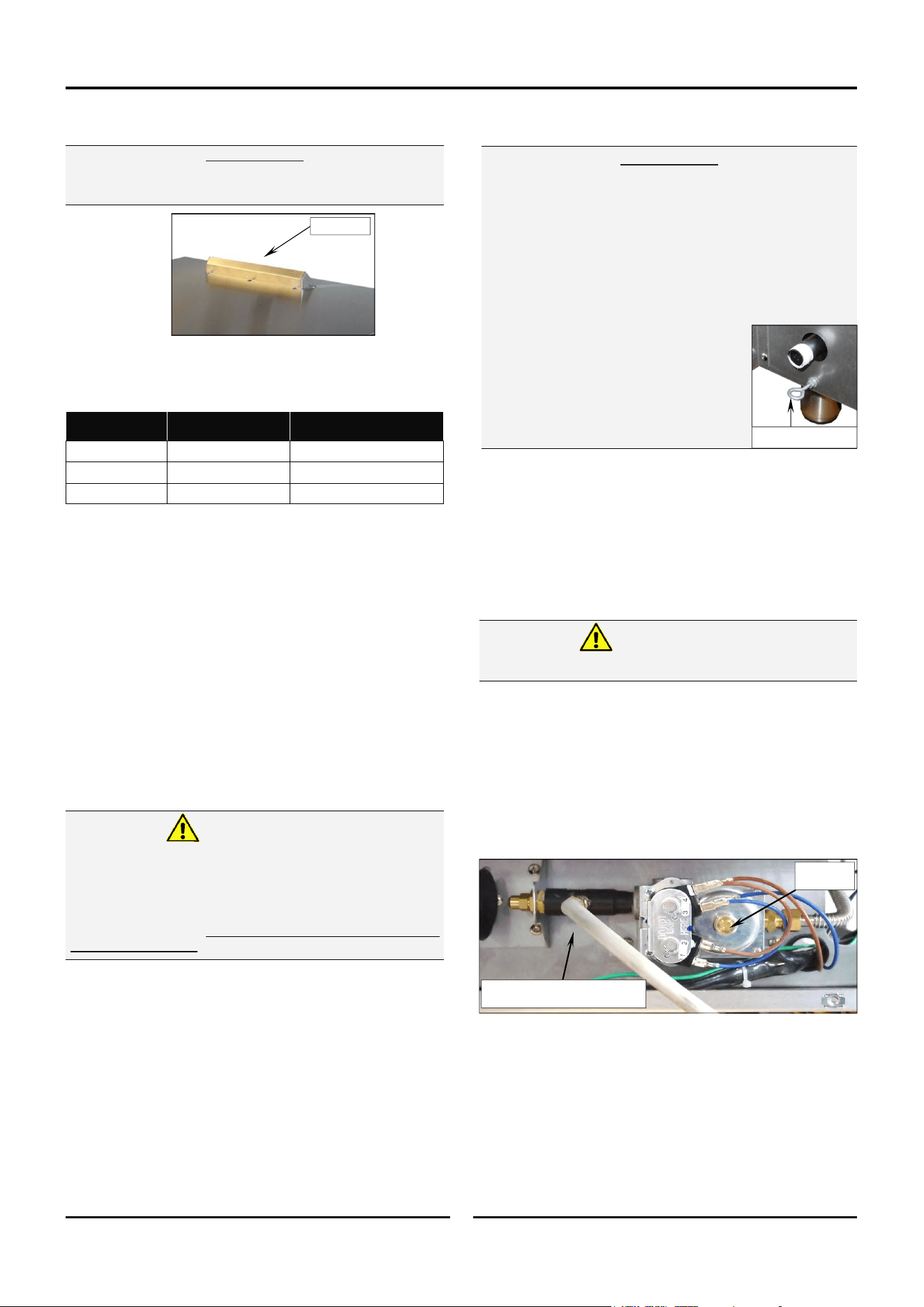
The appliance combination gas valve is fitted with an
internal regulator for adjusting operating pressure. To access,
remove appropriately marked service panel from beneath oven
door. Unscrew and remove regulator cap from gas valve.
Adjust regulator to achieve stated pressure. Also refer to
‘Specifications’ section.
NOTE: The Pressure Test Point is located behind the front
service panel beneath the oven door.
Clearances
1. To ensure correct ventilation for the motor and controller, the
following minimum installation clearances are to be adhered
to:-
CLEARANCE FROM SOURCE OF HEAT.
A minimum distance of 300mm (12”) from the appliance
sides is required.
NOTE: Fixed installations require at least 500mm (20”)
clearance at the right hand side of oven for service
access.
Stand Mounted Ovens
For ovens that are to be mounted to a stand, the oven legs are
used to level the oven on the stand. Refer to the
instructions supplied with separately ordered stands for mounting
details.
Electrical Connection
Each oven should be connected to an adequately protected power
supply and an isolation switch mounted adjacent to, but not
behind the oven and must be readily accessible to the operator.
This switch must be clearly marked and readily accessible in case
of fire.
Check electricity supply is correct to as shown on Technical Data
Plate on front right hand corner of oven side panel.
Ensure oven is fitted with appropriate power cord and plug.
Important:
The vent located on the top of the oven must NOT be
obstructed.
Do not use a naked flame to check for gas leakages.
Warning
Oven Vent
Combustible
Surface
Non Combustible
Surface
LH / RH Side 75mm / 3” 75mm / 3”
Rear 75mm / 3” 75mm / 3”
Top 600mm / 24” 200mm / 8”
Regulator
Cap
Pressure Test Point
(shown connected for testing)
Electrical Grounding Instructions
This appliance is equipped with a three-prong (grounding)
plug for your protection against shock hazard and should
be plugged directly into a properly grounded three-
pronged receptacle. Do not cut or remove the grounding
prong from this plug.
Warning
Important:
For appliances installed on castors (double stacked, on
base stand or on proofer), the installation shall be made
with a connector that complies with:-
- ANSI Z21.69 • CSA 6.16 - Connectors for Moveable Gas
Appliances.
and a Quick Disconnect Device that complies with:-
- ANSI Z21.41 • CSA 6.9, (2) - Quick Disconnect Devices
for use with Gas Fuel.
Adequate means must be provided to
limit the movement of the appliance
without depending on the gas connector
and the quick-disconnect device or its
associated piping to limit the appliance
movement.
The restraint anchor point is located
below the gas connection point as shown.
Restraining Anchor Point

Installation
6
Water Connection
NOTE: If the Moisture Mode cooking option is not required,
the oven does not need to be connected to a water
supply.
1. Tighten the 2 screws securing the
water connection to the rear of the
oven. (These have purposely been
left loose to prevent damage to the
water connection during transit).
2. Connect a cold water supply to the
water inlet (R ¾” Connector) on the
oven.
- Max Inlet Pressure 80psi / 550kPa.
3. Turn ‘On’ the water supply and check for leaks.
Recommended Water Specifications
In order to prevent corrosion or scaling in the oven and water
system due to supplying water that is either too soft or too hard,
the following recommendations should be used as a guideline.
Hardness: Between 60 and 90ppm.
PH: Greater than 7.5.
Chlorides: Less than 30 ppm.
Positioning and Levelling of Oven
1. Correctly locate the oven into its final operating position and
using a spirit level, adjust the oven feet so that the oven is
level and at the correct height.
Initial Start-Up
Before using the new oven;
1. For first time use of the oven, operate the oven for about 1
hour at 200°C / 400°F to remove any fumes or odours which
may be present.
2. Refer to the Operation Section of this manual for details on
how to correctly operate and shutdown the oven.
Commissioning
Before leaving the new installation;
1. Check the oven functions in accordance with the operating
instructions specified in the ‘Operation’ section of this manual.
2. Ensure that the operator has been instructed in the areas of
correct lighting, operation, and shutdown procedure for the
appliance.
NOTE: If for some reason it is not possible to get the
appliance to operate correctly, shut off the gas
supply and contact the supplier of this appliance.
Tighten Screws.
Operation
7
Operation Guide
This oven is intended for use in a commercial kitchen and must only be put to the use for which it was intended, i.e. cooking food
product. To use this oven correctly please read the following sections carefully:-
Some parts of this oven will become VERY
HOT during use and could cause burns if
touched.
Warning
Take care when opening the oven door
during baking. Let hot air and steam escape
before removing or replacing food as the
steam produced can cause steam burns.
Warning
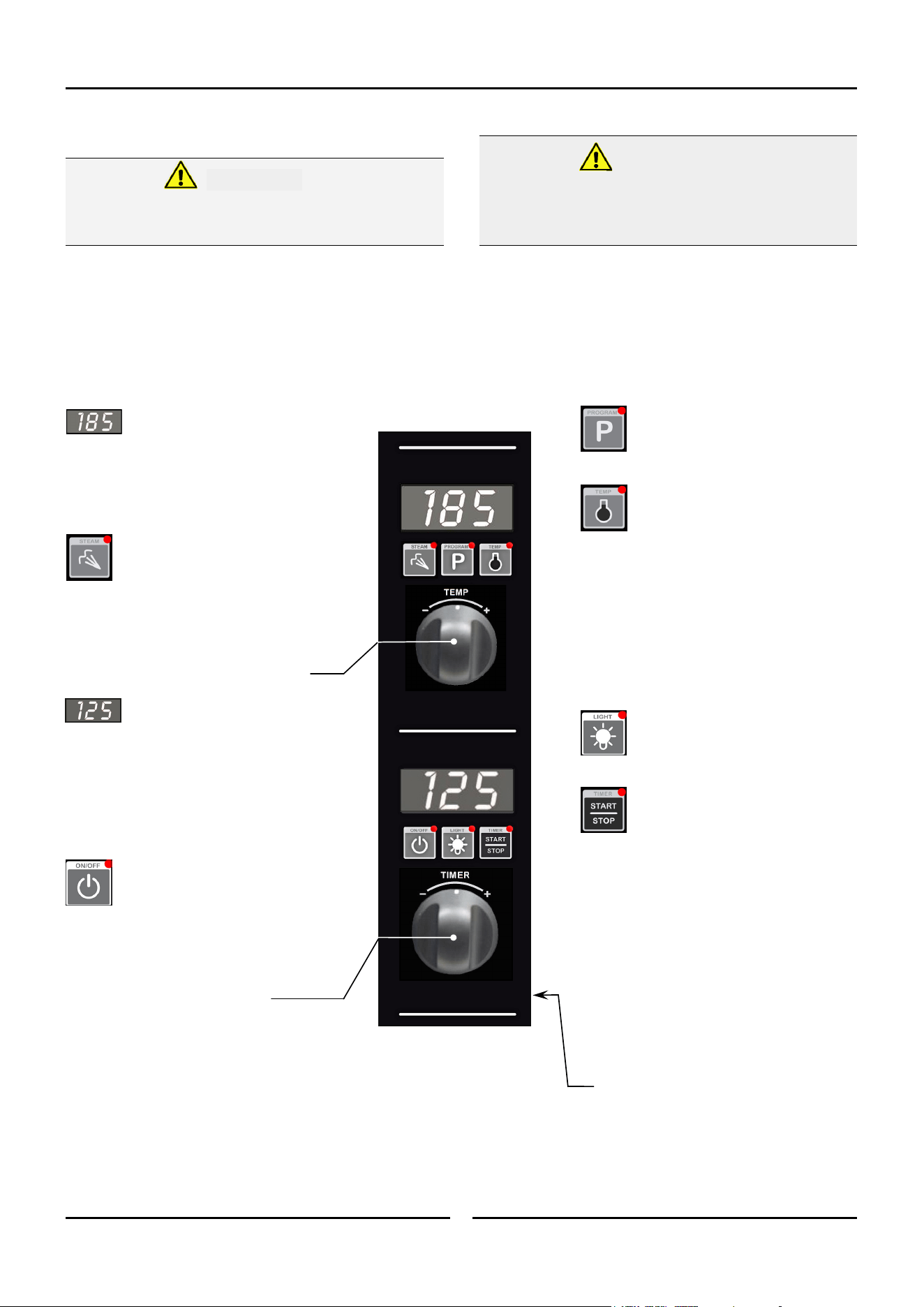
Temperature Display -
Shows pre-set chamber temperature.
When used with the ‘Temp’ key, display shows
actual oven temperature for 5 seconds.
Shows cooking programs and error codes.
‘Steam’ Key and LED -
Used to set moisture level or to
provide a manual injection of moisture
when in Manual Moisture Mode.
LED is ‘On’ when automatic moisture injection is
set or when moisture is manually injected.
Temperature Adjustment Control
Time Display -
Shows cook time in full minutes only
from 180 - 10, and in minutes and seconds for
the final 10 minutes.
NOTE:
In Core Temp Mode, time display alternates
between ‘CP’ and set core probe temperature.
‘On/Off’ Key and LED -
Press ‘On/Off’ key once to turn the
oven ‘On’.
Press and hold ‘On/Off’ key for 1.5
seconds to turn the oven ‘Off’.
Time Adjustment Control
NOTE: In Core Temp Mode, ‘Timer’ knob is
used to set core probe temperature.
‘Program’ Key and LED -
Used to select cooking programs and to
set program operator settings.
‘Temp’ Key and LED -
Displays actual oven temperature for 5
seconds on Temperature Display. LED
‘On’ when heating element is on
(heating indicator).
LED flashes when Upper Display is showing
actual temperature.
NOTE:
In Core Temp Mode, this key is used to
display Actual Oven Temperature (Upper
Display) and Core Probe Temperature (Lower
Display).
‘Light’ Key and LED -
Switches oven lights ‘On/Off’. LED is
‘On’ when oven lights are ‘On’.
‘Timer-Start/Stop’ Key & LED -
The ‘Timer-Start/Stop’ key is used to
control the following functions:-
Cancelling Alarm (All Modes).
Starting Core Temp Mode (Core Temp
Mode).
Starting Timer (Manual Mode).
Pausing (Manual / Program Modes).
Re-setting Timer (Manual Mode).
Starting Program (Program Mode).
Cancelling and Re-setting Program
(Program Mode).
Core Probe Connection Point

Operation
8
Changing Moisture Mode Level
Press and hold the ‘Steam’ Key until the ‘H-X’ level is
displayed and flashing in the upper display.
Rotate the ‘Temp’ Knob -/+ to select Moisture Mode
level required.
Press the STEAM Key to confirm setting.
The ‘Moisture’ Mode level can be changed at anytime during
operation by following the setting method as described above.
Core Temp Cooking Mode - Optional
An Optional Core Temp Probe Kit #236060 is available for
this oven.
This allows use of the Core Probe Cooking feature of this oven.
When the core probe is fitted to the connection point on control
panel side, the timer function and display becomes the core temp
probe temperature setting and display. Cooking completion is then
determined by the core temp probe reaching the set core probe
temperature.
To enable Core Probe Cooking Mode plug in the Core Probe.
The Timer Display will then change to '
CP'
(Core Probe).
The Timer Knob function will then be for Core Temp setting.
To disable Core Probe Cooking Mode, unplug the Core Probe.
The Timer Display and Knob will return to time function.
Manual Mode
In Manual mode the ovens settings are.
- Temperature - 50-250C / 150-550F.
- Timer setting - 0-180min or Infinite.
- Fan Speed setting - Hi / Lo.
- Moisture Mode settings - Off / On-Level.
- Oven lights - Off / On.
An Optional Core Probe can also be used in Manual Mode.
Program Mode
In Program Mode 20 Programs are able to be used.
In each program the following settings are possible.
- Temperature - 50-250C / 150-550F.
- Time - 0-180min or Infinite.
- Fan Speed - Hi/ Lo.
- Moisture Mode - Off / On-level.
3 cooking stages can also be set in each of the 20 programs.
- All settings can be changed between cooking stages.
- At completion of each stage an end of stage alarm can also
be set.
Optional Core Probe can also be used in Program Mode.
Changing between Manual to Program Modes
Press ‘Program’ key to select Program Mode. The LED
will illuminate showing Program Mode now set.
Press ‘Program’ Key to return to Manual mode.
Moisture Mode
There are 6 levels of pre-set moisture injection.
Each level defines the number of moisture injection pulses per
moisture cycle during oven operation.
H-0 Manual Moisture Mode. Automatic Moisture Injection is
‘Off’. Pressing ‘Steam’ key in this mode will inject 1 shot of
steam into the oven, ie, no steam injection without user
input.
H-1 Level 1. - Minimum automatic moisture injection setting.
One moisture pulse per moisture cycle.
H-2 Level 2.
H-3 Level 3.
H-4 Level 4.
H-5 Level 5. - Maximum automatic moisture injection setting.
Five moisture pulses per moisture cycle.
Selecting Moisture Mode
Press ‘Steam’ key to activate Moisture Mode. ‘Steam’
key LED will illuminate when Moisture Mode is ‘On’.
Moisture Mode will operate at the preset level during
the cooking cycle.
When Moisture Mode H-0 is selected, a shot of steam is
available whenever the oven is running, by pressing the
‘Steam’ key.
When Moisture Mode H-1 to H-5 are selected, these
moisture modes will only operate when a program is
running, Core Temp Probe Mode has been selected or
when a timer is running in Manual Mode.
When setting Moisture level, consider the Oven Set
Temperature. If set BELOW 100°C (212°F), water may pool
in oven as temperature will be too low to create steam.
Operation
9
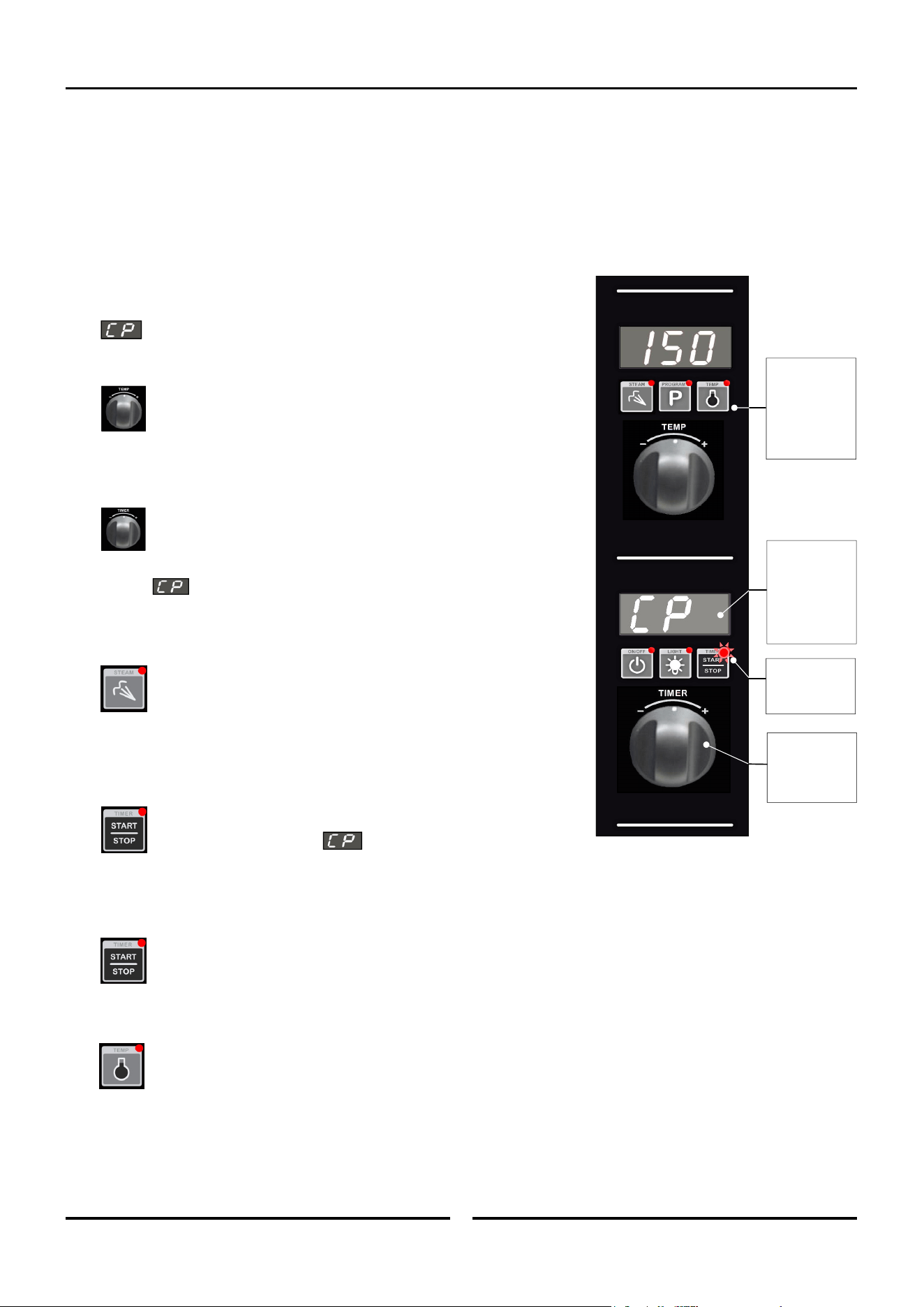
Cooking in Manual Mode
On oven start-up the controller defaults to the following settings:-
Oven Temperature is set to 150°C (302°F).
Refer ‘Controller - Operator Settings’ section to change this start-up temperature.
Oven Timer is not set, display shows ‘ - - -’.
Moisture Setting is setting to Manual Injection.
1. SET OVEN TEMPERATURE.
Rotate ‘Temp’ knob to select temperature required.
+ to increase the temperature (Max. 260°C / 500°F).
- to decrease the temperature (Min. 60°C / 140°F).
The oven will commence heating to the displayed set temperature.
NOTE: The oven can be used without using the timer.
2. SET TIMER.
Rotate ‘Timer’ knob to select time required.
+ to increase the time (Max. 180 minutes).
- to decrease the time (Min. 1 minute).
NOTE: Timer can be set to ‘Infinity’ . If timer is set to ‘Infinity’, timer will
count elapsed time to a max of 999 minutes and elapsed time will be
shown on the Lower Display.
3. SET MOISTURE MODE.
Press and hold ‘Steam’ key for 3 seconds.
Rotate ‘Temp’ knob to select desired moisture level (H-0 to H-5).
Press ‘Steam’ key to confirm settings.
NOTE: Refer to ‘Moisture Mode Settings’ at start of this section for additional
explanation of moisture level adjustments.
4. STARTING TIMER.
Press ‘Timer-Start/Stop’ key to start timer operation. LED will illuminate
to indicate the timer is running.
Pressing ‘Timer-Start/Stop’ key or opening oven door when timer is operating
will pause timer and turn ‘Off’ fan and heating. Timer LED will flash.
Press and hold ‘Timer-Start/Stop’ key for 3 seconds to cancel timer.
5. CANCELLING ‘TIME UP’ ALARM (COOKING TIME COMPLETED).
When the set Cooking Time is completed, alarm will sound and Lower Display flashes.
- Press ‘Timer-Start/Stop’ key to cancel alarm, oven will continue cooking at Oven Set Temperature. Display will revert to Set
Temperature and Time.
- Alternatively, open oven door to cancel alarm and turn ‘Off’ fan and heating. Close oven door to resume cooking at Oven
Set Temperature. Display will revert to Set Temperature and Time.
NOTE: Any of the above settings can be adjusted during the cooking operation by using the above controls and keys.
Viewing Actual Oven Temperature. Press ‘Temp’ key during cooking, Oven Actual Temperature will display on Upper
Display for 5 seconds and then will revert to displaying Oven Set Temperature.
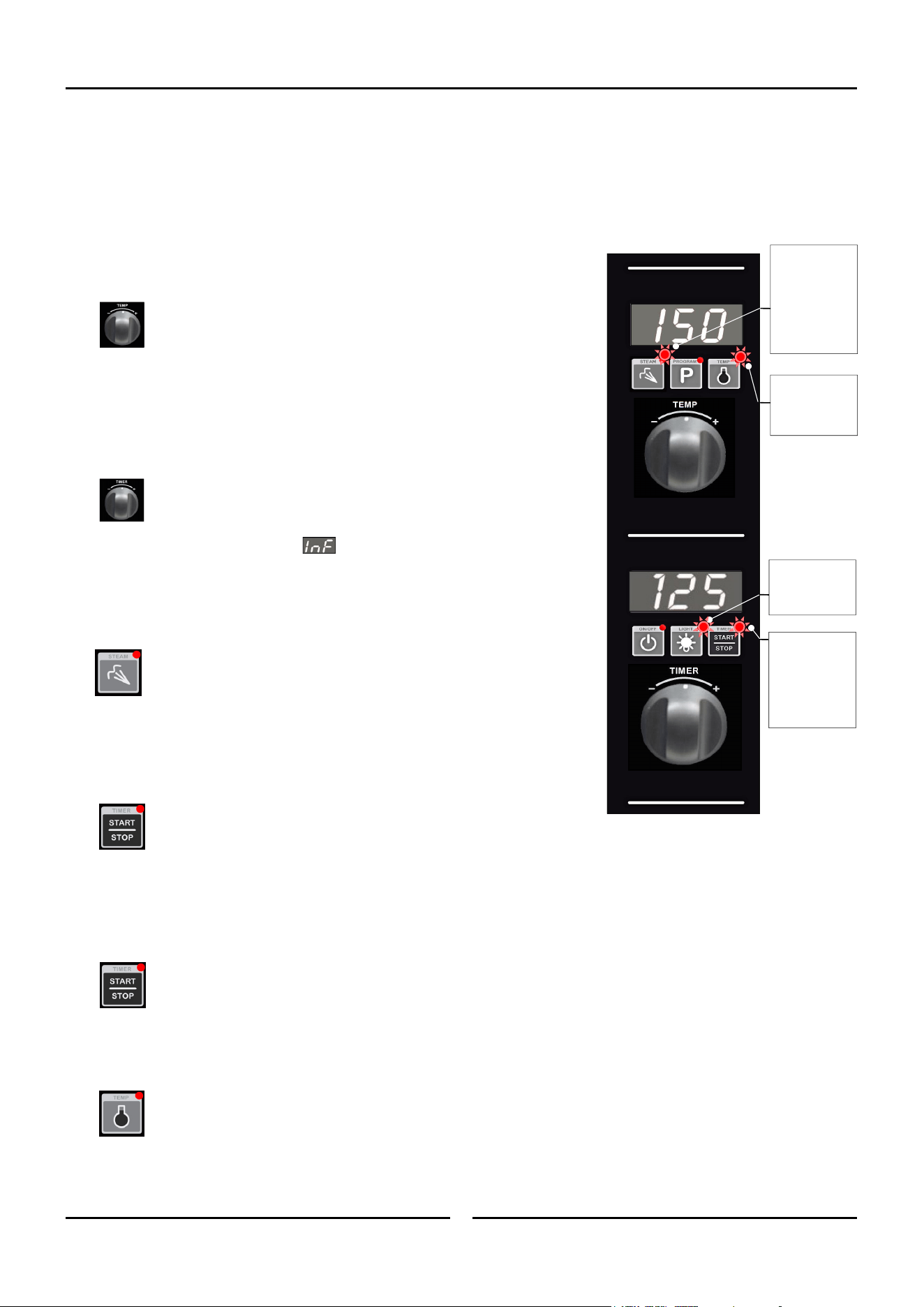
‘Steam’ LED will
illuminate when
automated
Moisture Mode is
set (H-1-H-5) or
during each
manual steam
injection in H-0.
‘Light’ LED is
‘On’ when oven
lights are ‘On’.
‘Timer-Start/
Stop’ LED is
steady ‘On’ when
Timer is running.
LED flashing
when Timer is
paused.
‘Temp’ LED will
remain ‘On’ until
oven reaches Set
Temperature.
Operation
10
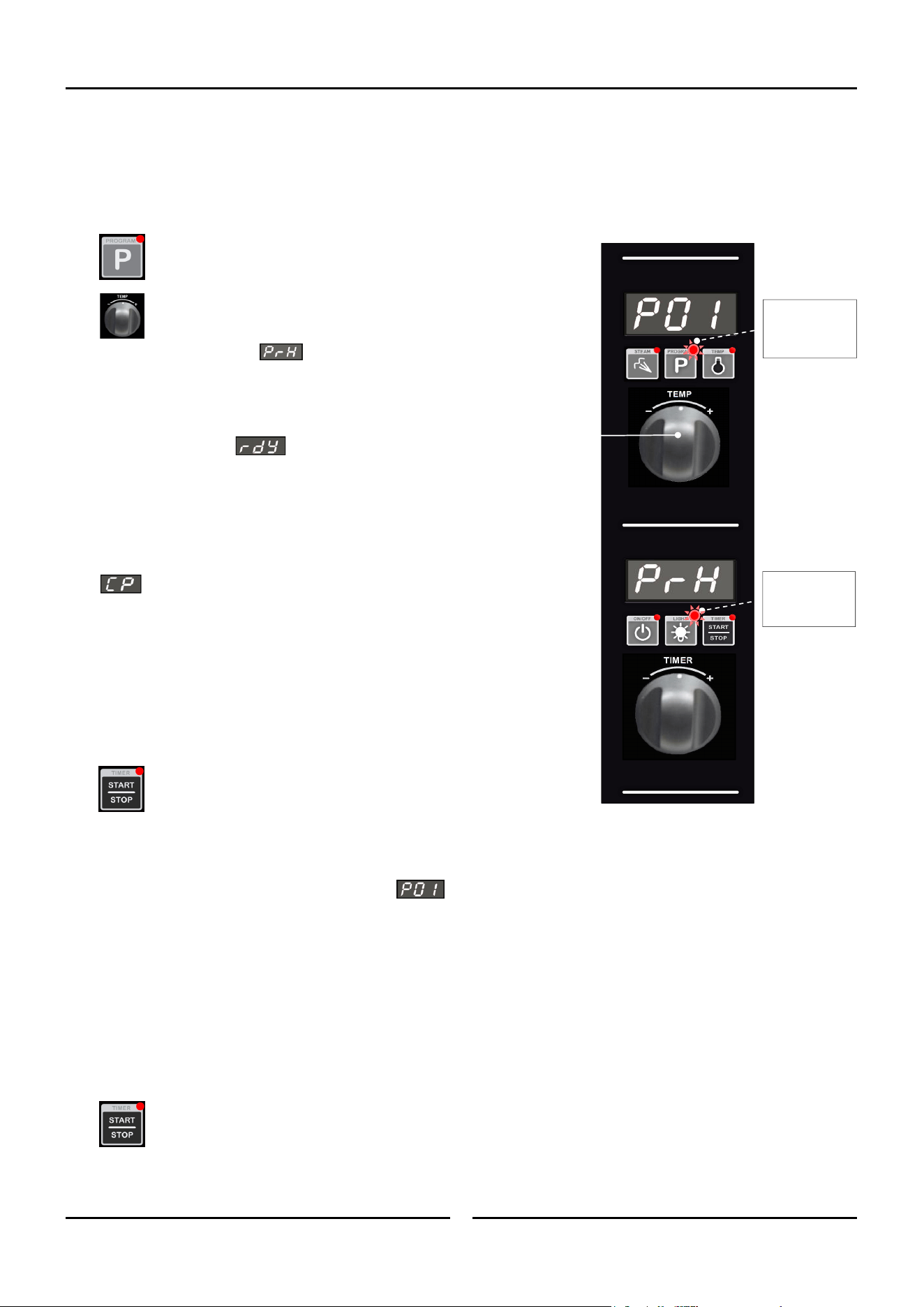
Cooking in Manual Mode using Core Temp Probe
(Requires Optional
Core Temp Probe Kit
#
236060).
On oven start-up the controller defaults to the following settings:-
Oven Temperature is set to 150°C (302°F).
Refer ‘Controller - Operator Settings’ section to change this start-up temperature.
Oven Timer is not set, display shows ‘ - - -’.
Moisture Setting is setting to Manual Injection.
1. CONNECT CORE TEMP PROBE.
Connect Core Temp Probe to connector on lower right side of control panel,
will be displayed on Lower Display.
2. SET OVEN TEMPERATURE.
Rotate ‘Temp’ knob to select temperature required.
+ to increase the temperature (Max. 260°C / 500°F).
- to decrease the temperature (Min. 60°C / 140°F).
The oven will commence heating to the displayed set temperature.
3. SET CORE PROBE TEMPERATURE.
Rotate Timer Knob to set the desired core probe temperature.
+ to increase temperature (Max. 90°C / 194°F).
- to decrease temperature (Min. 50°C / 122°F).
Once Core Probe Set Temperature is set, Lower Display will alternately flash
between and Core Probe Set Temperature.
‘Timer-Start/Stop’ LED is ‘Off’, indicating that cooking has not yet started.
4. SET MOISTURE MODE.
Press and hold ‘Steam’ key for 3 seconds.
Rotate ‘Temp’ knob to select desired moisture level (H-0 to H-5).
Press ‘Steam’ key to confirm settings.
NOTE: Refer to ‘Moisture Mode Settings’ at start of this section for additional
explanation of moisture level adjustments.
5. START CORE TEMP MODE COOKING.
Press ‘Timer-Start/Stop’ key to start Core Temp Mode cooking. ‘Timer-
Start/Stop’ LED is ‘On’ during Core Temp Mode cooking. Lower Display
will alternately flash between and Core Probe Set Temperature
during cooking.
6. CANCELLING CORE TEMP ALARM (CORE TEMP SETTING REACHED - COOKING COMPLETE).
When Core Probe Set Temperature is reached, an alarm will sound and the Lower Display will flash.
- Press ‘Timer-Start/Stop’ key to cancel alarm, oven will continue cooking at Oven Set Temperature. Display will show Oven
Set Temperature and Core Probe Set Temperature.
- Alternatively, open oven door to cancel alarm and turn ‘Off’ fan and heating. Close oven door to resume cooking at Oven
Set Temperature. The display will revert to the Oven and Core Probe Set Temperatures.
NOTE: Any of the above settings can be adjusted during cooking operation by using the above controls and keys.
Viewing Actual Oven and Core Temperatures. During cooking, press ‘Temp’ key to check Oven Actual Temperature
(Upper Display) and Core Probe Actual Temperature (Lower Display). Actual temperatures will display for 5 seconds before
display reverts to show Oven Set Temperature (Upper Display) and Core Probe Set Temp (Lower Display).
Exiting Core Temp Cooking Mode. Disconnect Core Probe from connector on lower right side of control panel. Lower
Display and ‘Timer’ knob will revert to normal Timer Mode operation.
‘Timer-Start/
Stop’ LED is ‘On’
when Cook Mode
in Progress.
In Core Temp
Mode, pressing
‘Temp’ key will
also display Core
Probe Actual
Temperature on
Lower Display.
In Core Temp
Mode, the ‘Timer’
knob is used to
set Core Probe
Temperature.
In Core Temp
Mode, the Lower
Display will
alternate
between ‘CP’ and
the Core Probe
Set Temperature.
Operation
11
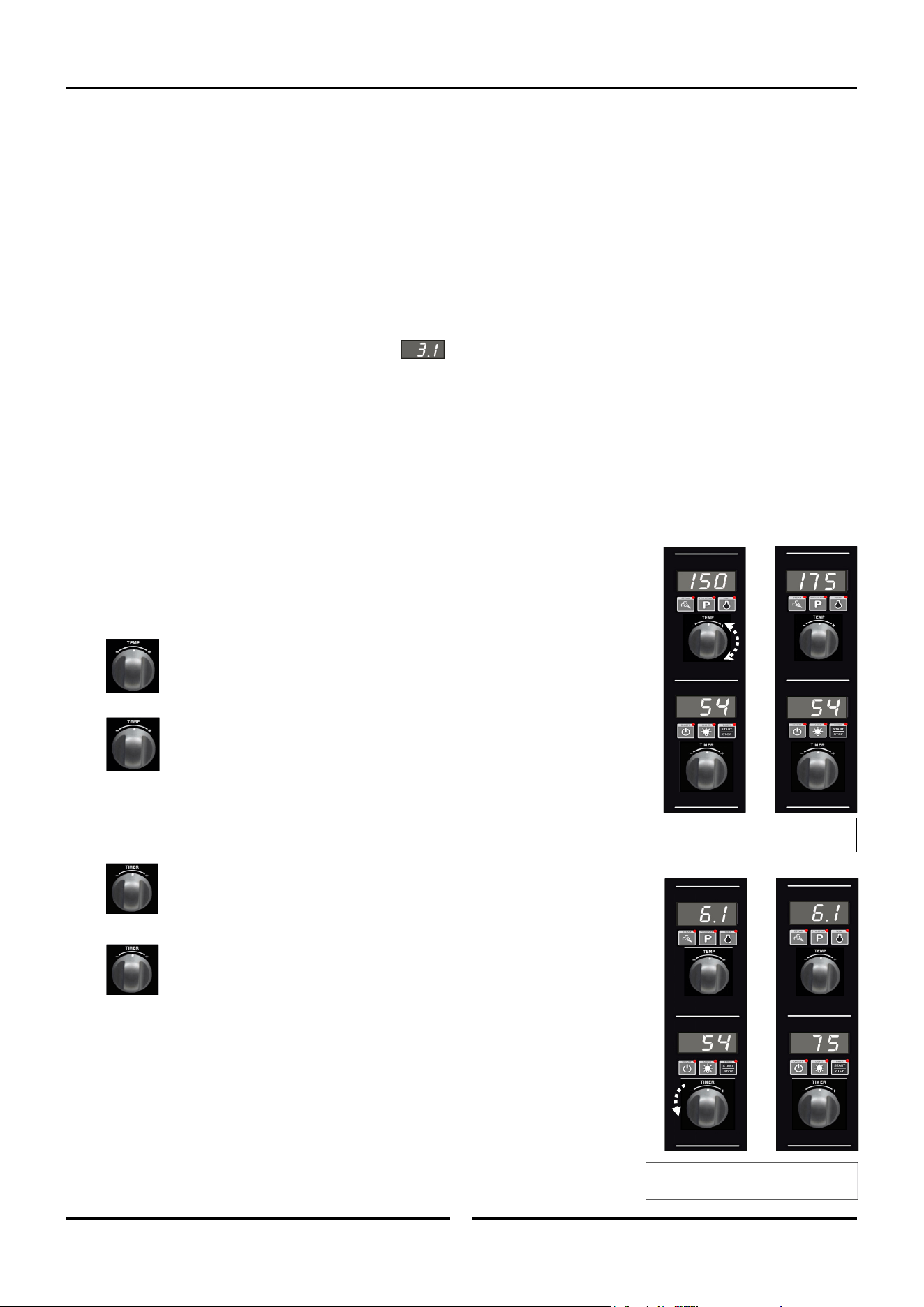
Cooking in Program Mode
The oven can be pre-programmed with up to 20 Programs; each program can contain a maximum of 3 stages. When you receive your oven,
the controller is not pre-programmed.
1. SELECTING A PROGRAM.
Press ‘Program’ key.
Upper Display will show program number selected.
+ to scroll forward through programs.
- to scroll backward through programs.
Lower Display will show , oven is ‘Pre-Heating’.
Program cannot be started until pre-heating is completed.
2. OVEN READY.
Lower Display will show when oven is up to pre-heat temperature and an
alarm will sound.
Load product into oven.
3. CONNECT CORE TEMP PROBE (IF REQUIRED).
Connect Core Temp Probe to connector on lower right side of control panel,
will be displayed on Lower Display.
NOTE: A Core Temp Probe can be used as part of a multi-stage cooking program.
If a program reaches a Stage that requires a Core Temp Probe and no Core
Temp Probe is connected, an error alarm will sound and ‘CP’ will flash on
Lower Display. The program is automatically paused until the Core Temp
Probe is connected. Once the probe is connected to the control panel and
inserted into the food product, press the ‘Timer-Start/Stop’ key to resume
the program.
4. START PROGRAM.
Press ‘Timer-Start/Stop’ key to start cooking program.
Pressing ‘Timer-Start/Stop’ key when timer is operating, will pause timer
and turn ‘Off’ Fan and Heating. LED will flash when timer is paused.
Pressing and holding ‘Timer-Start/Stop’ key for 3 seconds will cancel the program and return to the Preset Program.
During Program Operation the Upper and Lower Displays will show the following:-
Upper Display shows Program Number, e.g.
Lower Display will show either,
- Total Time Remaining in Program.
OR
- Total Elapsed Time of Program (if any Program Stages are set to CP or InF).
OR
- Alternate between ‘CP’ and Core Probe Set Temp (if presently in a Core Probe Stage).
5. CANCELLING PROGRAM ‘TIME UP’ ALARM (COOKING TIME COMPLETED).
When program is completed, the alarm will sound.
To cancel alarm, press ‘Timer-Start/Stop’, oven will continue to cook at Oven Set Temperature. Display will revert to
Program Number (Upper Display) and Total Program Time (Lower Display).
Alternatively, open oven door to cancel alarm and turn ‘Off’ fan and heating. Close oven door to resume cooking at Oven
Set Temperature. Display will revert to Program Number (Upper Display) and Total Program Time remaining (Lower Dis-
play).
‘Program’ LED is
‘On’ when Oven
operating in
Programs Mode.
‘Light’ LED is ‘On’
when oven lights
are ‘On’.
Operation
12
ADDITIONAL ADJUSTMENTS (These can be adjusted whilst Program Mode is Running).
NOTE: Adjustments made during cooking will not be saved to the program.
A. VIEWING STAGE NUMBER AND STAGE TIME REMAINING.
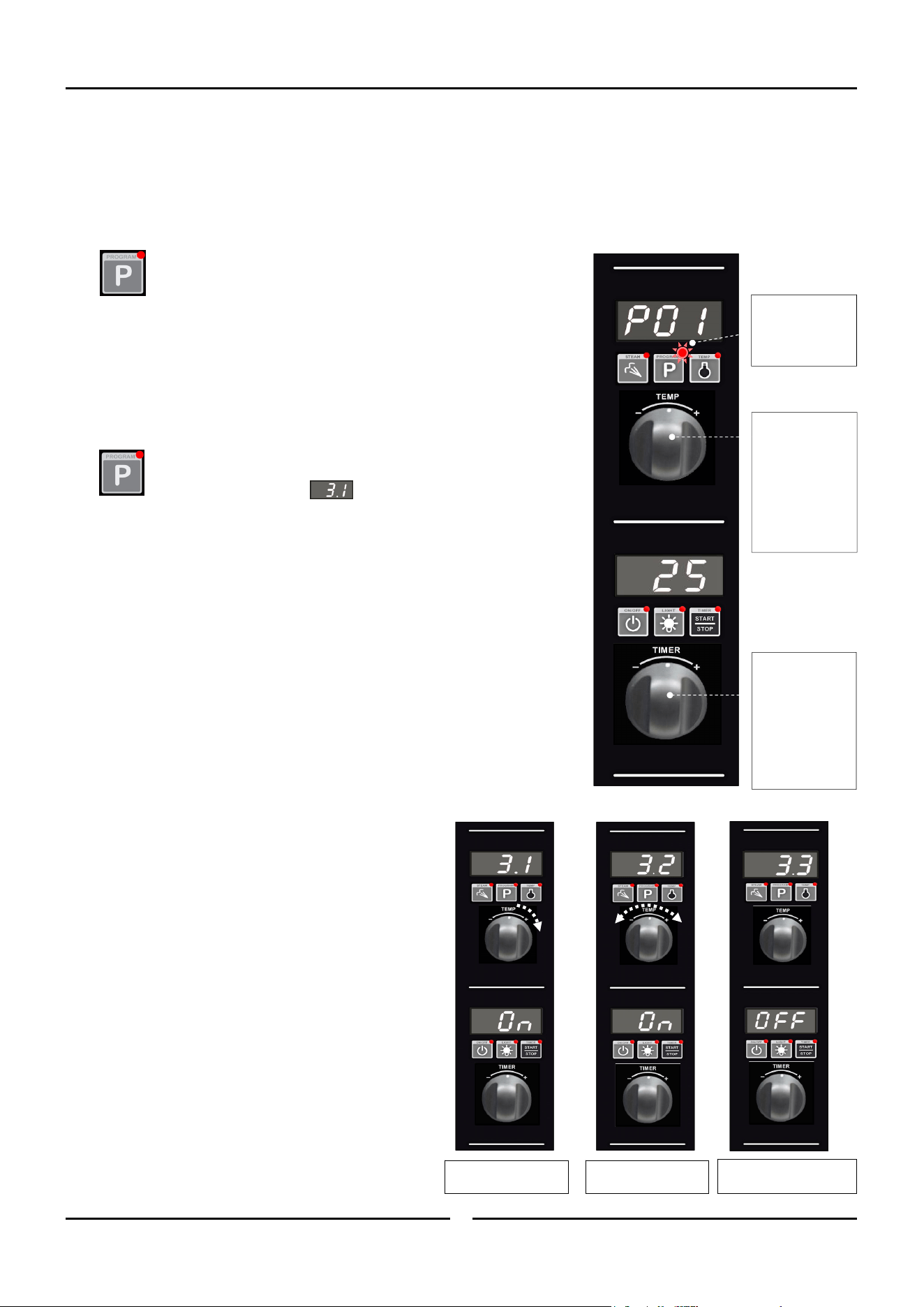
To view the Program and Stage numbers on the Upper Display, e.g. 3.1 = Program 3, Stage 1, and the Total Time Remaining in Stage
remaining on the Lower Display:
- Press ‘P’ key during Program Cooking.
OR
- Turn Timer knob in either direction.
Upper Display will show Program and Stage, e.g.
Lower Display will show either,
- Total Time Remaining in Stage.
OR
- Total Elapsed Time of Stage (if Stage is set to ‘InF’).
OR
- Core Probe Set Temp (if Stage is set to ‘CP’).
OR
- Alternate between ‘CP’ and Core Probe Set Temp (if presently in a Core Probe Stage).
Display will revert back to Overall Display after 5 seconds.
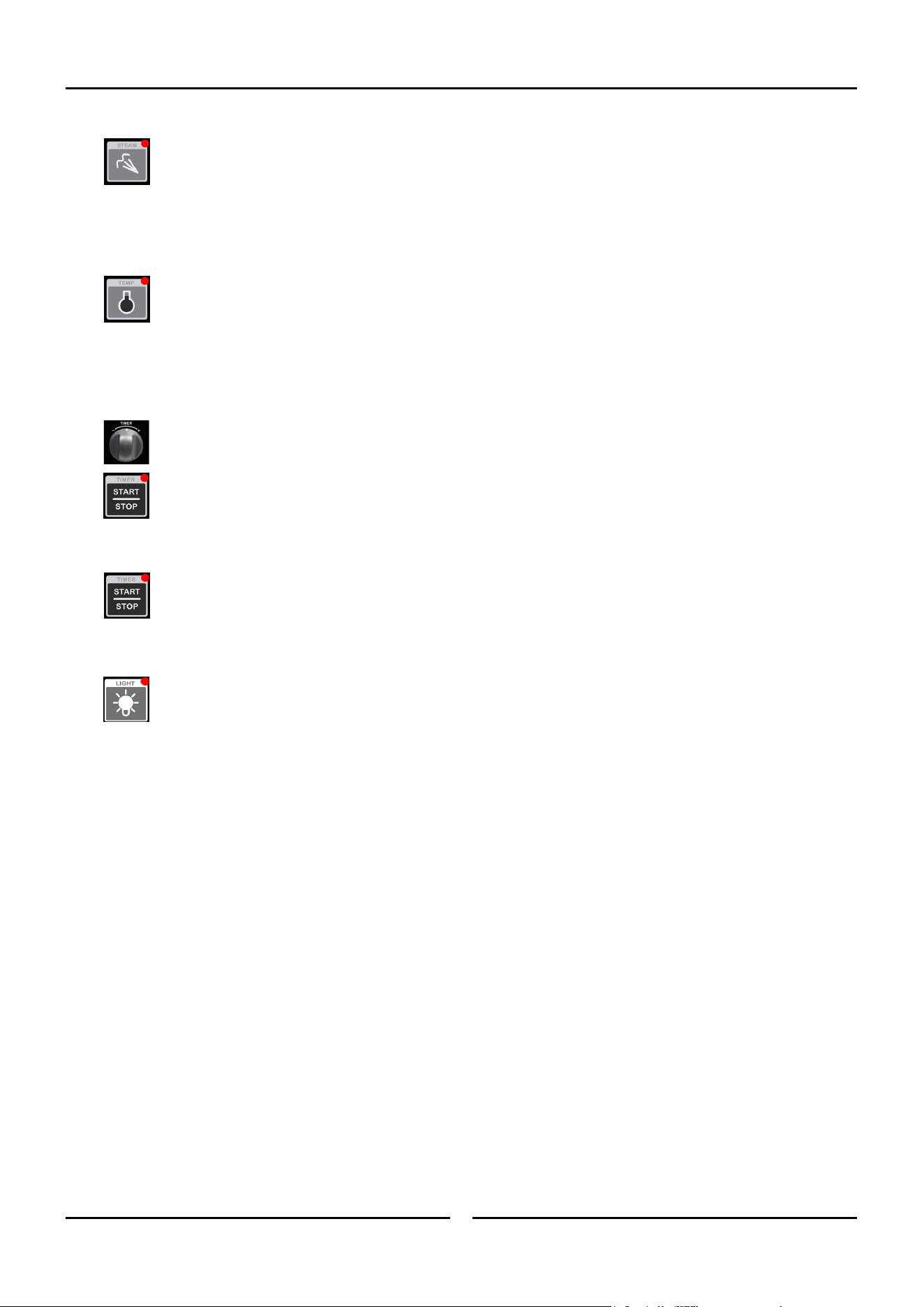
B. USING ‘TEMP’ KNOB DURING PROGRAM COOKING.
VIEWING SET TEMPERATURE
Turn ‘Temp’ knob (in either direction) to display Set Temperature of Current
Stage on Upper Display. Display will revert back to Overall Display after a
5-second delay.
ADJUSTING SET TEMPERATURE
Hold ‘Temp’ knob in either direction for 3 seconds will enter ‘Temp Edit Mode’
where ‘Temp’ knob can be used to temporarily adjust temperature for the current
stage. Controller will update the Temperature and exit ‘Temp Edit Mode’ after a
5-second delay.
C. USING ‘TIMER’ KNOB DURING PROGRAM COOKING.
VIEWING STAGE NUMBER AND REMAINING TIME
Turn ‘Timer’ knob (in either direction) to switch the display from Overall
(Program, Total Time remaining) to Current Stage-in-Progress (Stage, Stage
Time Remaining). Display will revert to Overall display after a 5-second delay.
ADJUSTING REMAINING TIME / ADJUSTING CORE PROBE SET TEMP
Hold the ‘Timer’ knob in either direction for 3 seconds to enter ‘Timer Edit Mode’
where ‘Timer’ knob can be used for temporary adjustment of either:
- Core Probe Set Temperature.
OR
- Stage Time remaining.
The controller will update the value and exit ‘Timer Edit Mode’ after a 5-second delay.
Time remaining can be adjusted between 0-180 minutes, but cannot be set to ‘InF’ or
‘CP’.
Core Probe Set Temp can be set between 50-90°C (122-194°F).
NOTE: Any changes will only apply to the current stage. Any following stages will
revert to the programmed settings.
Here Oven Set Temperature has been
increased from 150 to 175°C (325 to 350°F).
Here Core Probe Temperature has been
increased from 54 to 75°C (129 - 167°F).
Operation
13
D. CHANGING THE MOISTURE SETTING.
Press and hold ‘Steam’ key for 3 seconds.
Rotate ‘Temp’ knob to select desired moisture level (H-0 to H-5).
Press ‘Steam’ key to confirm settings.
NOTE: Refer to ‘Moisture Mode Settings’ at start of this section for additional explanation of moisture level adjustments.
E. VIEWING ACTUAL OVEN TEMPERATURE / ACTUAL CORE PROBE TEMPERATURE.
Press ‘Temp’ key during cooking. Oven Set Temperature will display on Upper Display for 2 seconds, then Actual Temperature
will display on Upper Display for 2 seconds. At the same time, Actual Core Probe temperature will display on Lower Display
for 4 seconds. After 4 seconds, controller will revert to displaying the program number.
F. ADDING MORE TIME TO A STAGE WHEN THE END OF STAGE ALARM IS SOUNDING.
At the end of a stage, provided that ‘ALr’=On, an end of stage alarm will sound for 1 minute before automatically progressing on to the
next stage of the program. While alarm is sounding, additional cooking time can be added to the stage that has just finished.
Rotate and hold ‘Timer’ knob for 3 seconds to enter Timer Edit Mode and add time to the stage.
When the length of time required has been added, either;
- Press ‘Timer-Start/Stop’ key to resume the stage,
OR
- Wait for the auto-resume feature to progress the oven on to the next stage, 1 minute after alarm initially sounded.
When the additional time has run out, the end of stage alarm will sound for a second time. Either press ‘Timer-Start/Stop’ key
to progress on to the next stage, or let the program automatically progress on to the next stage after 1 minute of inactivity.
G. TURNING THE LIGHTS ‘ON/OFF’.
Whenever the oven is ‘On’ the ‘Light’ key is used to turn the oven lights ‘On/Off’. To extend bulb life, an auto time-out can be
pre-set to switch oven lights ‘Off’ after a set length of time. The factory default for time-out is ‘Off’ (‘0’, ie lights remain ‘On’
until light key is pressed again). This time-out can be activated by setting the operator settings L-0 from 1-60 minutes.
NOTE: Any changes will only apply to the current stage. Following stages will revert to the programmed settings.
Programming
14
Programming
The oven can be pre-programmed with up to 20 Programs; each program can contain a maximum of 3 stages. When you receive your oven,
the controller is not pre-programmed. To set programs, carry out the following for each program required:
1. SELECT PROGRAMS MODE.
Press ‘Program’ key to enter Programs Mode.
‘Program’ LED will illuminate.
2. SELECT PROGRAM REQUIRED (P01 - P20).
Rotate ‘Temp’ knob to the program required.
Upper Display will show program selected.
3. ENTER PROGRAMMING MODE.
Press and hold ‘Program’ key until a beep is heard, indicating entry into
Programming Mode. Upper Display shows program and stage numbers
eg
.
= Program 3, Stage 1.
‘Program’ LED will flash whilst in Programming Mode.
4. SELECT STAGE TO PROGRAM.
NOTE: If Multi-Stage Cooking is disabled, (Parameter ’StG’ - refer to section
‘Controller Operator Settings’) skip to Step 6 to continue programming
otherwise continue as below and overleaf.
All active stages and the first inactive stage are visible and can be accessed by
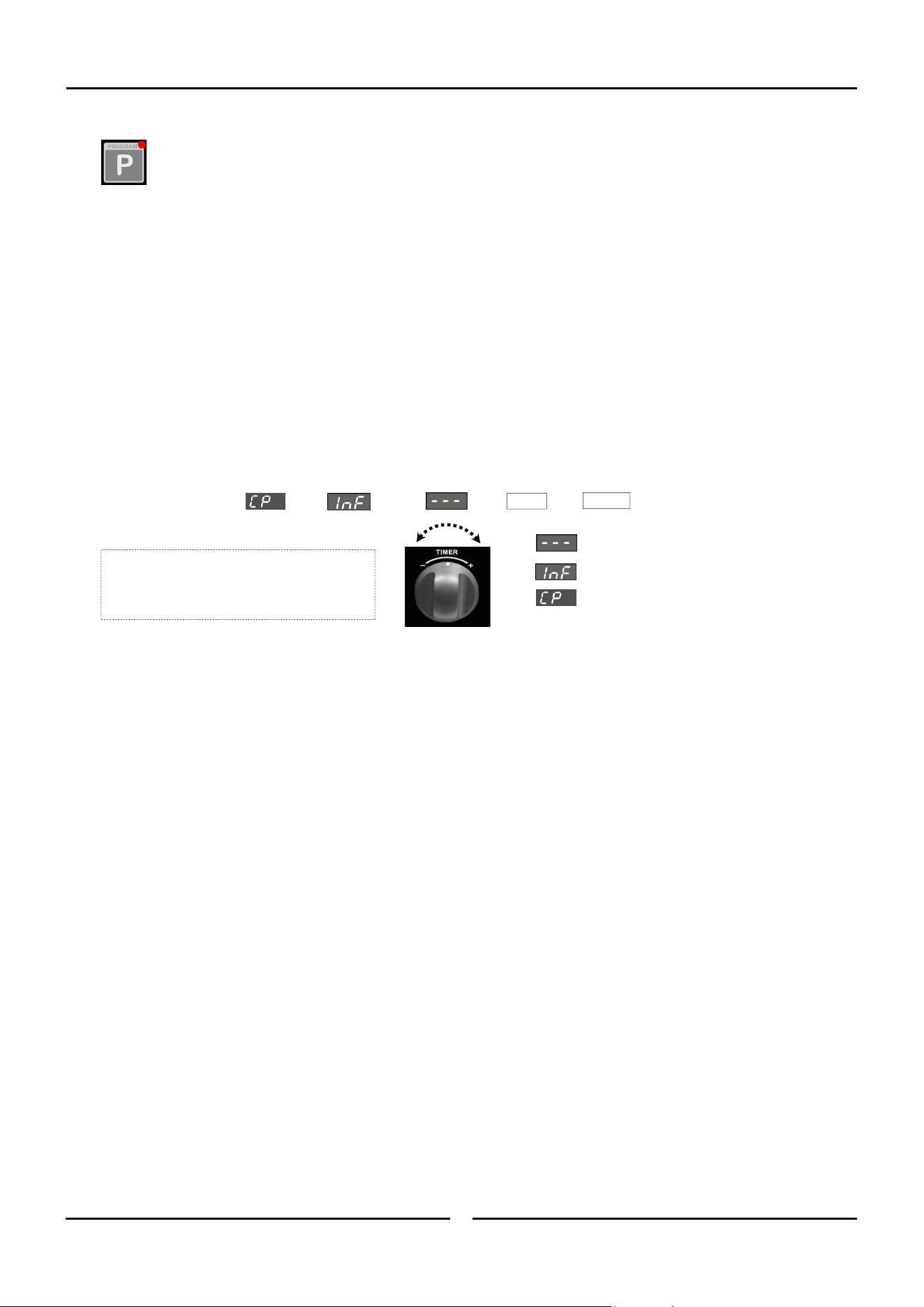
rotating the ‘Temp’ knob to scroll through the stages. When editing a program for
the first time, only the first stage will be visible and it will be ‘Off’ by default.
Setting parameters for a stage changes its state from ‘Off’ to ‘On’ (activates the
stage).
To Turn a Stage ‘On’.
Either - Rotate ‘Timer’ knob clockwise to select ‘On’.
Or - Press ‘P’ key and program stage settings.
(Setting parameters for a stage automatically changes
its state to ‘On’).
To Turn a Stage ‘Off’.
Rotate ‘Timer’ knob anti-clockwise to select ‘Off’.
NOTE: Only the last active (‘On’) stage can be turned
‘Off’.
Rotate ‘Temp’ knob:-
‘+’ to advance one stage.
‘-’ to go to the previous stage.
‘Program’ LED is ‘On’
when Oven is
operating in
Programs Mode.
In Program Mode,
‘Temp Knob’ is
used to select:-
Program.
Stage.
And to set:-
Cook Temperature.
Moisture Level.
In Program Mode,
‘Timer’ Knob is
used to select:-
Core Probe.
And to set:-
Program Time.
Core Probe
Temperature.
Program 3, Stage 1.
STATE: ON.
Program 3, Stage 2.
STATE: ON.
Program 3, Stage 3.
STATE: OFF (ie; Inactive).
Programming
15
5. CONFIRM STAGE TO EDIT.
Press ‘Program’ key to begin editing a program and stage displayed on the Upper Display.
6. SET OVEN TEMPERATURE.
*Upper Display flashing*
Rotate ‘Temp’ knob to select temperature required.
+ to increase the temperature (Max. 260°C / 500°F).
- to decrease the temperature (Min. 60°C / 140°F).
Press ‘P’ key to confirm temperature setting. Controller will step to Cook Time / Core Temp Probe setting.
7. SET COOK TIME / CORE TEMP PROBE.
*Lower Display flashing*
The ‘Timer’ knob can be used to select Core Temp Probe or a Cook Time option.
By setting a Cook Time, the stage will be governed by Oven Temperature, Timer, Moisture setting.
Rotate ‘Timer’ knob to select time required.
+ to increase Cook Time (Max. 180 minutes).
- to decrease Cook Time (Min. 1 minute).
Press ‘P’ key to confirm Timer setting and advance to setting Moisture setting.
By setting Core Temp Probe (CP), the stage will run at a set Oven Temperature, Moisture Mode until the actual core
temperature reaches the pre-set core probe temperature value. Refer to the ‘Cooking in Manual Mode with Core Probe’ Section for
instructions on cooking with the Core Probe fitted. Turn and hold timer knob until lower display shows ‘CP’. Controller will step to
setting Core Probe Temperature. Core Probe Temperature value is displayed on Lower Display.
Rotate ‘Timer’ knob to select temperature required.
‘+’ to increase Core Probe Temperature (Max 90°C / 194°F).
‘-’ to decrease Core Probe Temperature. (Min 50°C / 122°F).
Press ‘P’ key to confirm Core Probe Temp Setting. Controller will step to Moisture setting.
By setting Infinite Time setting (‘InF’), Oven counts time upwards up to a limit of 999 minutes. The Infinite (‘InF’) timer
option is only available as an option when setting the last stage of a program. If the ‘InF’ timer option is programmed, no stages
after the ‘InF’ stage will be available / visible. Turn ‘Off’ all stages that come after a given stage in order to set an ‘InF’ timer for
that stage.
Press ‘P’ key to confirm infinite time ‘InF’ setting and advance to setting Moisture setting.
= Stage has been set to ‘OFF’.
= Infinity Time Setting.
= Core Temp Probe (optional extra).
Time = From 1 minute to 180 minutes.
Turn and Release Timer Knob to change
selection.
Hold Knob to Fast Forward Fast Reverse.
1 Min
180 Mins

Programming
16
8. SET MOISTURE OPTION (H-0 - H-5).
*Upper Display flashing*
Rotate ‘Temp’ knob to select Moisture setting required.
‘+’ to increase moisture setting.
‘-’ to decrease moisture setting.
(Refer to Operation section, ‘Moisture Mode Settings’, for additional explanation of moisture level adjustment).
Press ‘P’ key to confirm Moisture setting. Controller will step to Alarm for End of Stage setting.
NOTE: If Multi-Stage Cooking is disabled, (Operator setting ’StG’ - set to ‘no’), the controller will exit the Programming Mode after
the ‘P’ key is pressed to confirm moisture setting.
9. SET ALARM FOR END OF STAGE (‘ON-OFF’).
Upper Display shows
*Lower Display flashing with current alarm setting*
Rotate ‘Timer’ knob to select desired alarm state which will be shown on the Lower Display.
‘ON’ - Alarm sounds at completion of the cooking stage, the program is paused awaiting user action. Without any input, the program
will automatically resume after 1 minute.
- Press ‘Timer-Start/Stop’ key to stop the alarm, resume cooking and to continue to the next cooking stage.
OR
- Open oven door to stop alarm. Close door and press ‘Timer-Start/Stop’ key to continue cooking and to continue on to the
next cooking stage.
‘OFF’ - Oven continues on to the next cooking stage without sounding an alarm.
NOTE: Regardless of the setting applied to the last stage of the program, a Cook Time Completed Alarm will sound to indicate the
end of the program.
Press ‘P’ key to confirm alarm option. Alarm will sound to confirm that all stage parameters have been set.
Repeat Step 1 to Step 9 to program additional stages.
10.EXIT PROGRAMMING MODE.
Press and hold ‘P’ key for 3 seconds until alarm sounds to exit the Programming Mode.
Controller - Operator Settings
17
Changing Operator Settings
With the Oven in ‘Stand-By’ Mode (i.e. Power to oven but both displays are blank).
1. ENTERING THE OPERATOR SETTING MODE.
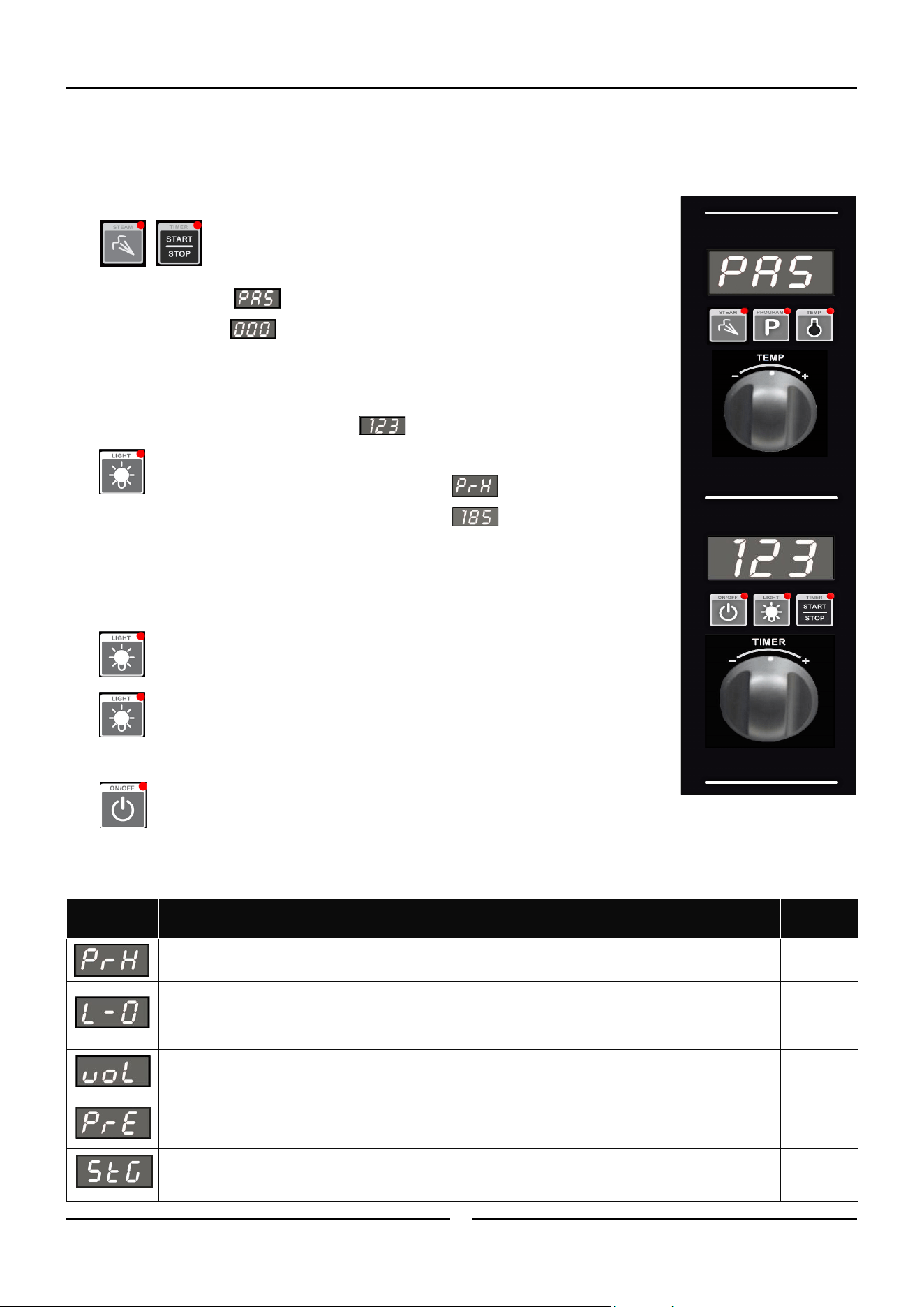
Press and hold 'Steam' and ‘Timer-Start/Stop’ keys together for 3 seconds.
Upper Display will show .
Lower Display will flash .
2. SETTING PASSWORD (OPERATOR PASSWORD - 123).
Rotate ‘Timer’ knob to set password .
Press ‘Light’ key to confirm password.
Upper Display will show one of the setting codes, eg.
Lower Display will show the value of the setting, eg.
3. CHANGING THE SETTINGS.
Rotate ‘Timer’ knob to the setting required.
Press ‘Light’ key to confirm setting required. Lower Display will flash.
While Lower Display is flashing, rotate ‘Timer’ knob to select value required.
Press ‘Light’ key to confirm value. Lower Display will stop flashing.
4. EXITING THE OPERATOR SETTING MODE.
Press ‘On-Off’ key, to exit the Operator Settings Mode and to return to Stand-By Mode.
Operator Settings
Setting
Number
Description
Default
Setting
Oven Pre-Heat; - (Automatic Pre-Heat Temp on oven start-up).
150ºC
(302ºF)
Light Auto ‘Off’ Setting Time -
0 = ‘On/Off’.
1 = 1 minute auto ‘Off’.
2 = 2 minutes auto ‘Off’, etc.
0
Alarm Volume - Can be adjusted to suit operators preference.
5
Program Pre-Heating Condition - This setting allows for pre-heating ‘Ready’ temperature in
‘Program Mode’ Mode to be set higher than Program Set Temperature. Factory Default Setting
is ‘0’ (Equal to Program Setting).
0
Multi-Stage Enable - This setting enables multi-stage programming. Factory Default Setting
is ‘YES’, multi-stage programming is enabled. Changing this setting this to ‘no’ simplifies
programming and program cooking.
YES
Setting
Range
60 - 260°C
140 - 500°F.
0 - 60 mins.
0 - 10.
0 - 30°C
0 - 54°F.
‘YES’ or ‘no’.
Cleaning and Maintenance
18
Cleaning Guidelines
NOTE:
If this appliance is fitted with a Restraint Device, the device
must be dis-connected prior to moving the appliance for
cleaning. Always ensure that the restraining device is re-
connected on completion of the cleaning operation.
To achieve the best results, cleaning must be regular and
thorough. If any small faults occur, have them looked at promptly.
Don't wait until they cause a complete breakdown.
NOTE:
Carefully read and follow the safety instructions on the
label of the cleaning product to be used.
DO NOT use harsh abrasive scouring pads or abrasive
detergents as they could damage the oven.
Ensure that any detergent or cleaning material has been
completely removed after each cleaning.
To keep your oven clean and operating at peak efficiency, follow
the procedures shown below:-
Oven Cleaning
NOTE:
If oven usage is very high, the cleaning procedure should
be carried out on a more frequent basis.
Allow the oven interior to cool to approx 50˚C / 120˚F
before commencing cleaning.
Stainless Steel Surfaces
a. Thoroughly clean exterior surfaces of oven with, a damp
cloth moistened with a mild detergent solution, or a soft
bristled brush.
b. Baked on deposits or discolouration may require a good
quality stainless steel cleaner. Always apply cleaner when
oven is cold and rub in direction of grain.
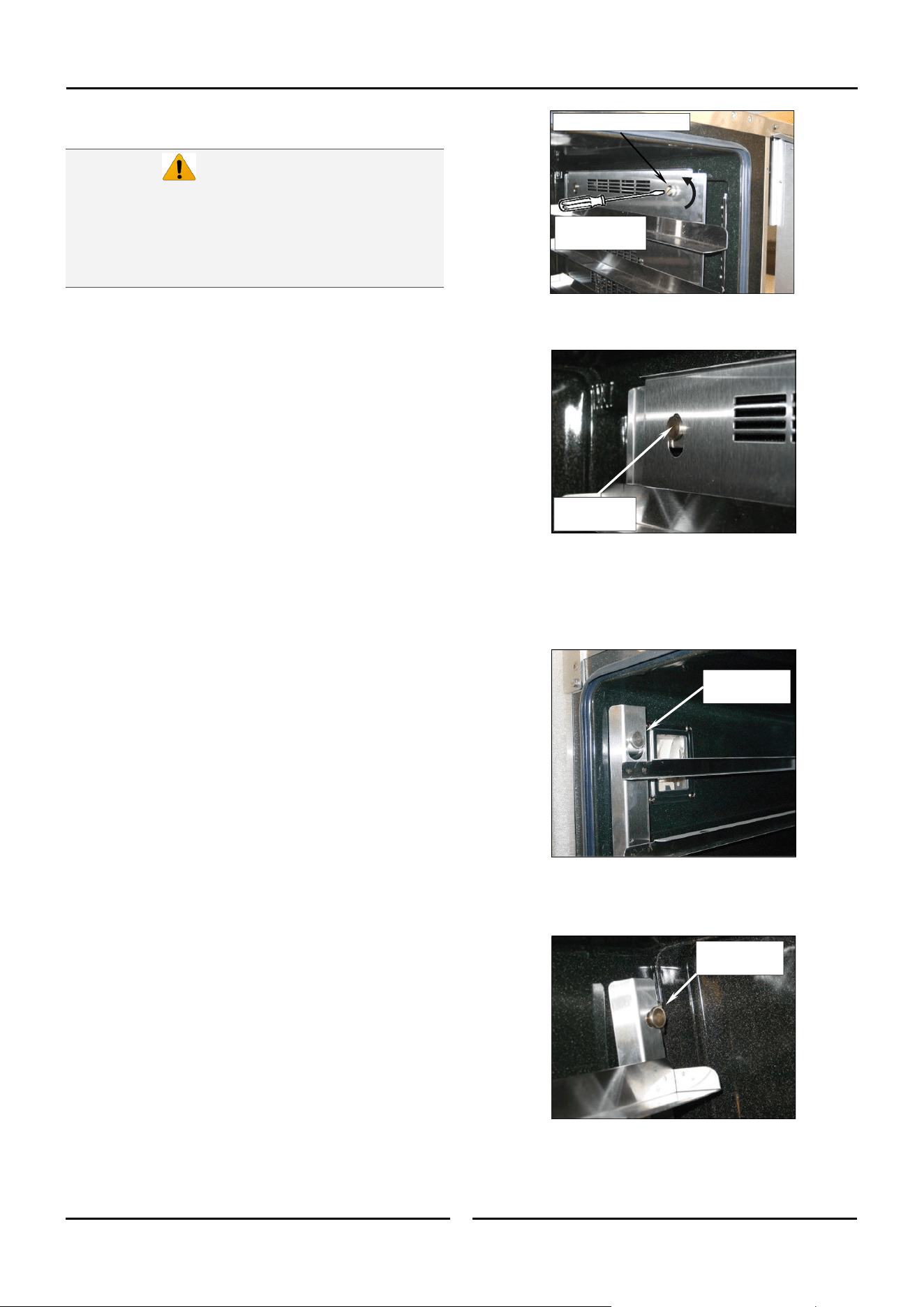
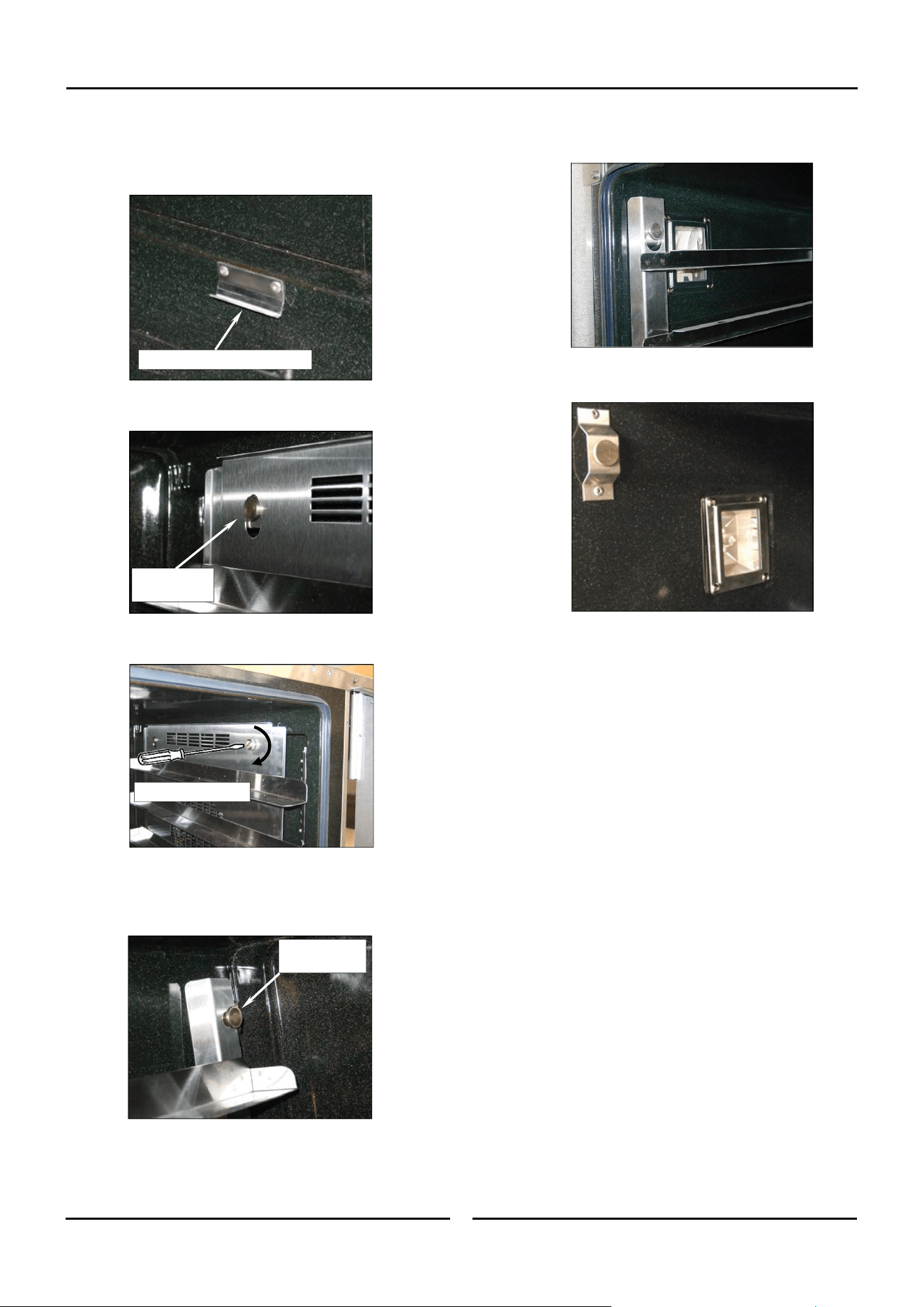
Side Racks Removal
Right Rack / Fan Baffle
a. Undo and remove rack securing screw securing front of RH
side rack. The fan baffle is an integral part of RH Side
Rack.
Always turn off electrical power at the
mains supply before commencing cleaning.
This oven is not water proof. Do not use
water jet spray to clean interior or exterior
of the appliance.
Caution
b. Lift up and unhook the rear of the rack from the locating
peg at the rear of the oven.
c. Tilt the top of the rack inwards and lift the rack off the
lower mounting brackets.
Left Rack
a. Lift the LH rack off the front locating peg.
b. Pull the rack forward out of the oven to disengage the rear
of the rack from the rear location peg and remove the rack
from the oven.
c. Clean the racks with a mild anti bacterial detergent and
hot water, using a soft bristled brush.
d. Dry the racks thoroughly with a dry cloth.
R/Hand Rear
Locating Peg
L/Hand Front
Locating Peg
L/Hand Rear
Locating Peg
Unscrew
Anti-Clockwise
Rack Securing Screw
Cleaning and Maintenance
19
Side Racks Re-Fitting
Right Rack
a. Align the bottom of the rack with the 2 brackets in the
bottom RH side of the oven.
b. Tilt the rack upwards and hook the top rear of the rack on
to the locating peg in the top rear of the oven.
c. Fit and tighten the rack securing screw to secure the front
of the RH rack.
Left Rack
a. Locate the top rear of the rack onto the locating peg at the
top rear LH side of the oven.
b. Locate the top front of the rack over the locating peg at
the top front LH side of the oven.
RH Lower Mounting Brackets
R/Hand Rear
Locating Peg
L/Hand Rear
Locating Peg
Tighten Clockwise
Oven Lamp
a. Remove the LH side rack as shown previously.
b. Wash the glass lens with a soft sponge using warm water
and a detergent solution. Rinse with clean, warm water.
c. Dry the glass lens thoroughly with a dry cloth.
d. Refit LH side rack as shown previously.
Cleaning and Maintenance
20
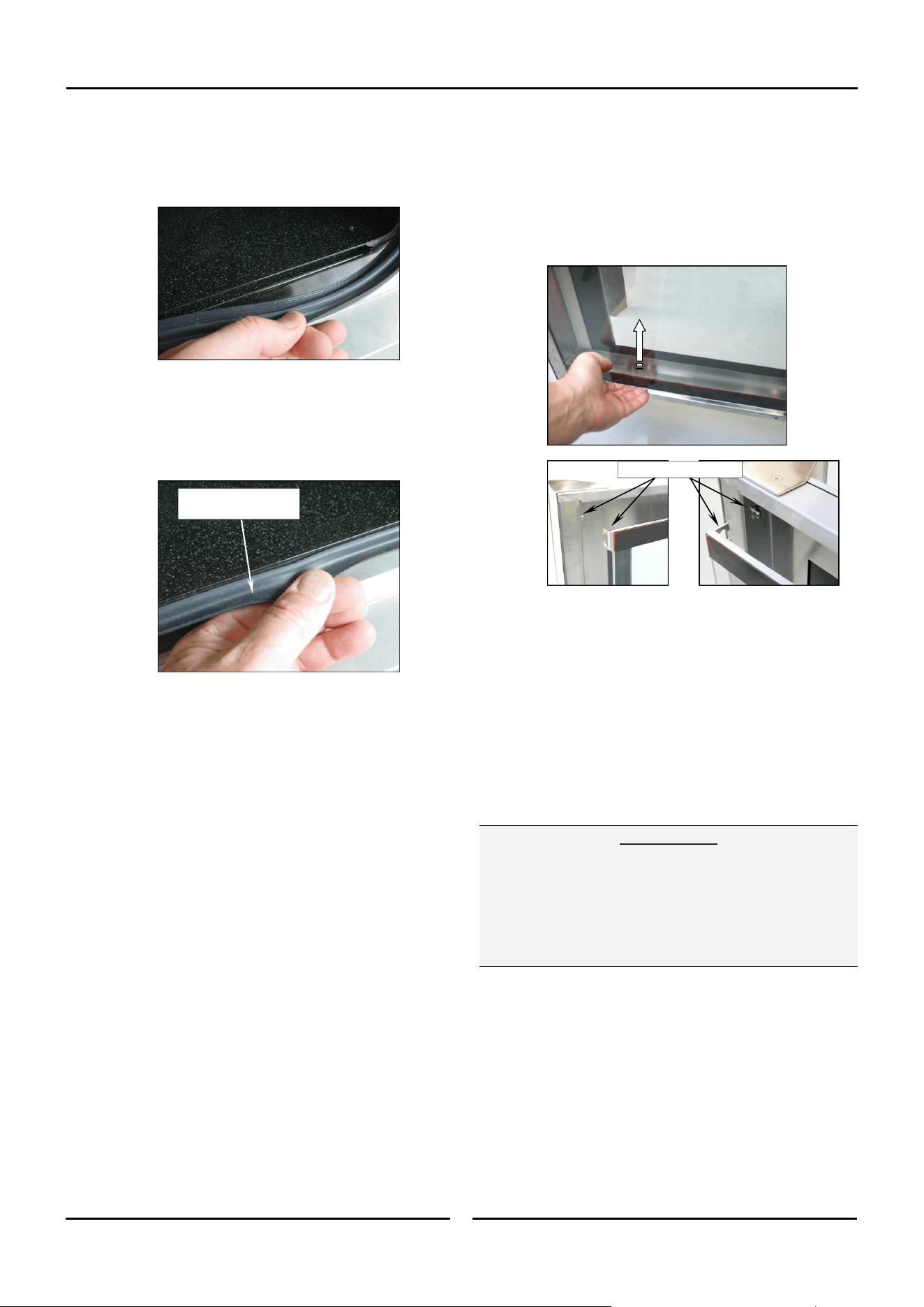
Door Seal
a. To remove the door seal, pull the 1 piece seal
forward until it pulls out of the location groove around the
oven. Note the way the seal is
fitted to the oven, with the lip facing inwards.
b. Check the door seal for wear and damage and replace as
required.
c. Wash the door seal in a sink, taking care not to cut or
damage the seal.
d. Dry the door seal thoroughly.
e. Refit the door seal with lip facing into centre of the oven.
f. Press the door seal into the locating groove in the front
face of the oven until the seal is properly located all
around the oven.
Oven Interior
Allow the oven interior to cool to approx 50˚C / 120˚F
before commencing cleaning.
a. Remove the oven racks as shown previously.
b. Clean any build up of grease from the oven interior, using
a soft bristled brush with a solution of hot water and a
mild anti bacterial detergent.
c. Dry the oven thoroughly with a soft dry cloth.
d. Clean the oven regularly with a good quality oven cleaner.
Push Seal carefully into
locating channel
Door Glass Cleaning
Ensure that the oven door is cool before cleaning the oven
door glass.
a. Open the oven door.
b. Lift up the bottom of the inner glass at the centre of the
door to unlock from the inner glass retaining catches and
swing the glass inwards towards the oven.
c. Clean both sides of the inner glass and the inner side of
the outer door glass with a conventional glass cleaner.
d. Dry the oven door thoroughly with a soft dry cloth.
e. Swing the inner glass back towards the outer door.
f. Whilst holding the outer door, lift the inner glass back onto
the locking catches until the inner glass is securely held.
Periodic Maintenance
NOTE: All maintenance operations should only be carried
out by a qualified service person.
Controls and mechanical parts should be checked and adjusted
periodically by a qualified service person. It is recommended that
the appliance is serviced every 6 months.
Top Locking Catches
Important:
When appliances are installed on castors (double stacked,
fitted on base stands, or on a proofer) and connected to
the gas supply piping by means of a connector for
moveable appliances, the appliance is fitted with a
restraining device. If disconnection of the restraining
device is necessary, ensure that it is re-connected once the
appliance is returned to its original operating position.

Fault Finding
21
This section provides a reference to the more common problems
that may occur during the operation of your oven. This fault
finding guide is intended to help you correct and accurately
diagnose problems with your oven.
When fault finding a problem, always use a process of elimination
starting with the simplest solution and working through to the
most complex. Never overlook the obvious.
You may encounter a problem not covered in this section, please
contact your service provider who will require the following
information:-
The Model and Serial Number of the oven, can be found on
the Technical Data Plate located on the front right hand
side panel of the oven.
Fault Possible Causes Remedy
Oven does not operate.
Mains isolating switch, circuit breaker or
fuses are 'Off' at the power board.
Overtemp tripped (No lights, no power
light).
Overtemp faulty.
Digital Controller faulty
Turn 'On'.
Call for service.
Call for service.
Call for service.
Oven Controller operates but:-
Oven heats up but fan does not operate.
Fan motor faulty.
Fan or fan motor obstructed.
Call for service.
Call for service.
Oven does not Steam.
Injector Nozzle blocked.
Water Solenoid faulty.
Controller faulty.
Call for service.
Call for service.
Call for service.
Door does not close fully.
Tray in way of door.
Door mis-aligned.
Door seal obstruction.
Correctly position tray in rack.
Re-align door.
Correctly install door seal. (Refer to the
‘Cleaning’ Section).
Oven light not illuminating. Blown bulb. Replace bulb.
Uneven cooking.
Too high a temperature selected.
Oven or racks not level.
Insufficient air space around trays or
baking tins.
Oven overloaded with too much product.
Opening oven door un-necessarily.
Oven door seal damaged or faulty.
Oven vent restricted.
Select a lower temperature.
Check oven racks and level.
Ensure oven racks are spaced to allow air flow
around baking on all shelves.
Re-load oven.
Ensure oven door remains closed during the
baking process.
Check seals and replace if damaged.
Ensure oven vent not blocked or shrouded.
‘Err 001’ on display.
‘Err 003’ on display.
Oven probe error.
Burner Box thermal overload switch
tripped.
Call for service.
Call for service.
a. Sparking operates (3 attempts) but
flame not established.
No gas supply to oven.
Gas Valve faulty.
Check gas supply. Turn oven OFF then ON to
reset ignition control.
Call for service.
b. No Sparking.
Ignition control is in lock-out.
Door not fully closed.
Door microswitch faulty.
Ignition control faulty.
Turn oven OFF then ON to reset ignition
control.
Close door (refer ‘Door does not close fully’).
Call for service.
Call for service.
‘CP’ flashing on Lower Display, alarm
sounding, oven program paused.
Core Probe not connected to control panel,
and program requires its use.
Core Probe Faulty.
Connect Core Probe to control panel.
Replace Core Probe.
Electrical Schematics
22
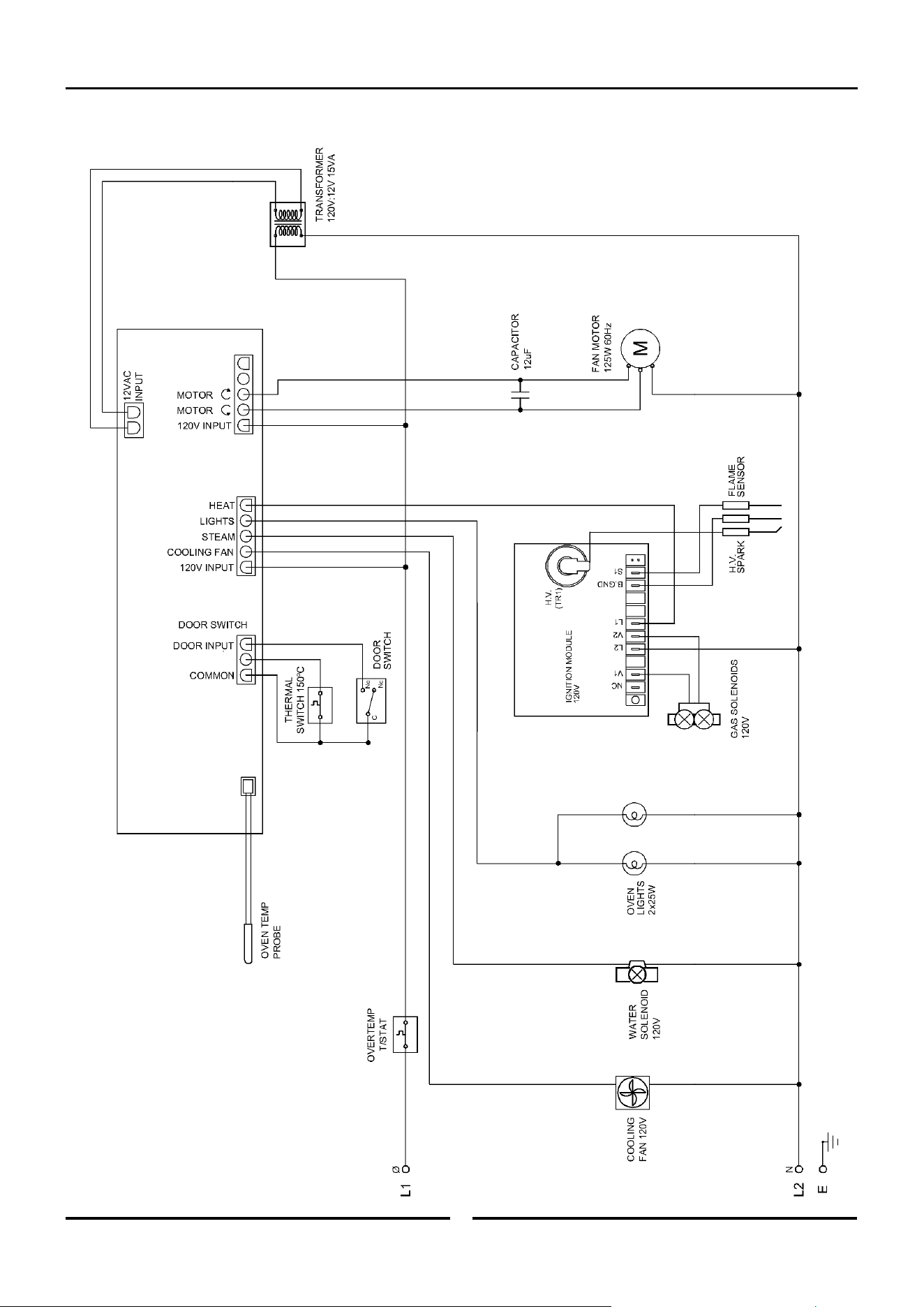
Electrical Schematic G32D5 Turbofan Oven
Gas Conversion and Specifications
23
Conversion Procedure
NOTE:
These conversions should only be carried out by qualified
persons. All connections must be checked for leaks before
re-commissioning the appliance.
Adjustment of components that have adjustments /
settings sealed (e.g. paint sealed) can only be adjusted in
accordance with the following instructions and shall be
re-sealed before re-commissioning this appliance.
For all relevant gas specifications refer to the ‘Gas
Specifications’ table at the end of this section.
Procedure:
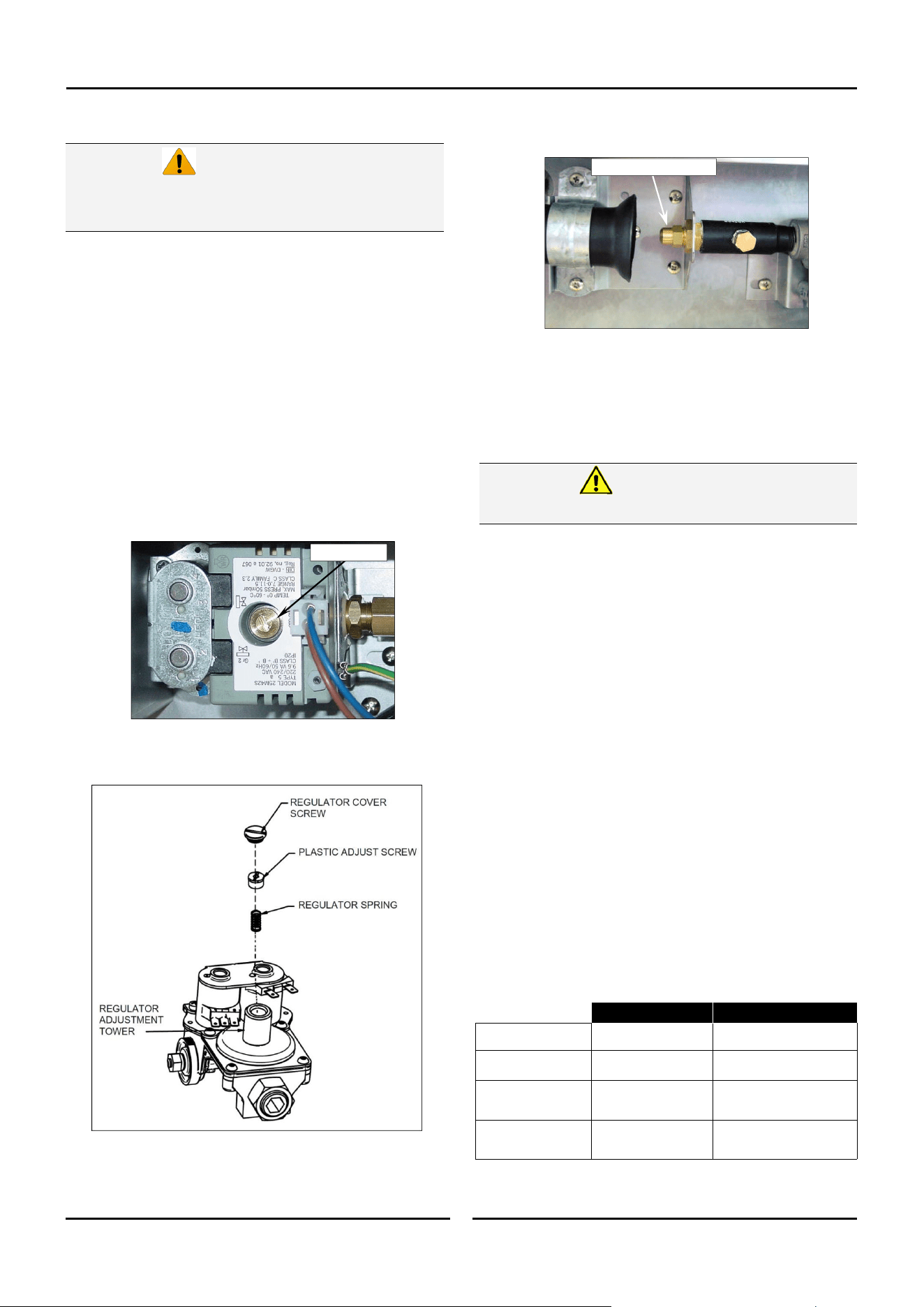
1. Remove the lower service panel to allow access to the gas
control valve.
2. Unscrew and remove the regulator cover screw from the
regulator incorporated in the gas control.
3. Remove the plastic adjusting screw and regulator spring from
the gas control valve. Replace with correct spring supplied
with the conversion kit.
Ensure that the appliance is isolated from
the electrical and gas supply before
commencing servicing.
Caution
4. Unscrew and remove the main burner injector and
replace with appropriate item.
5. Connect gas and electrical supplies.
6. Operate oven and adjust the plastic adjust screw on the
regulator to achieve correct pressure at pressure test point
(front RH corner).
7. Refit the regulator cover screw to the gas valve.
8. Conduct full leak test of the converted oven prior to placing it
into operation.
9. Refit the service panels.
Gas Type Identification Label
On completion of the gas conversion, replace the gas type
identification label with the appropriate label, located at:-
- The rear of the appliance, above the gas connection.
Commissioning
Before leaving the converted installation;
1. Check all gas connections for leakages using soapy water or
other gas detecting equipment.
2. Check the following functions in accordance with the operating
instructions specified in the ‘Operation’ section of this manual.
Ensure that all the oven controls operate correctly.
Ensure that the operating pressure remains correct.
3. Ensure any adjustments done to components that have the
adjustments / settings sealed (e.g. paint sealed), are
re-sealed.
NOTE: If for some reason it is not possible to get the
appliance to operate correctly, shut off the gas
supply and contact the supplier of this appliance.
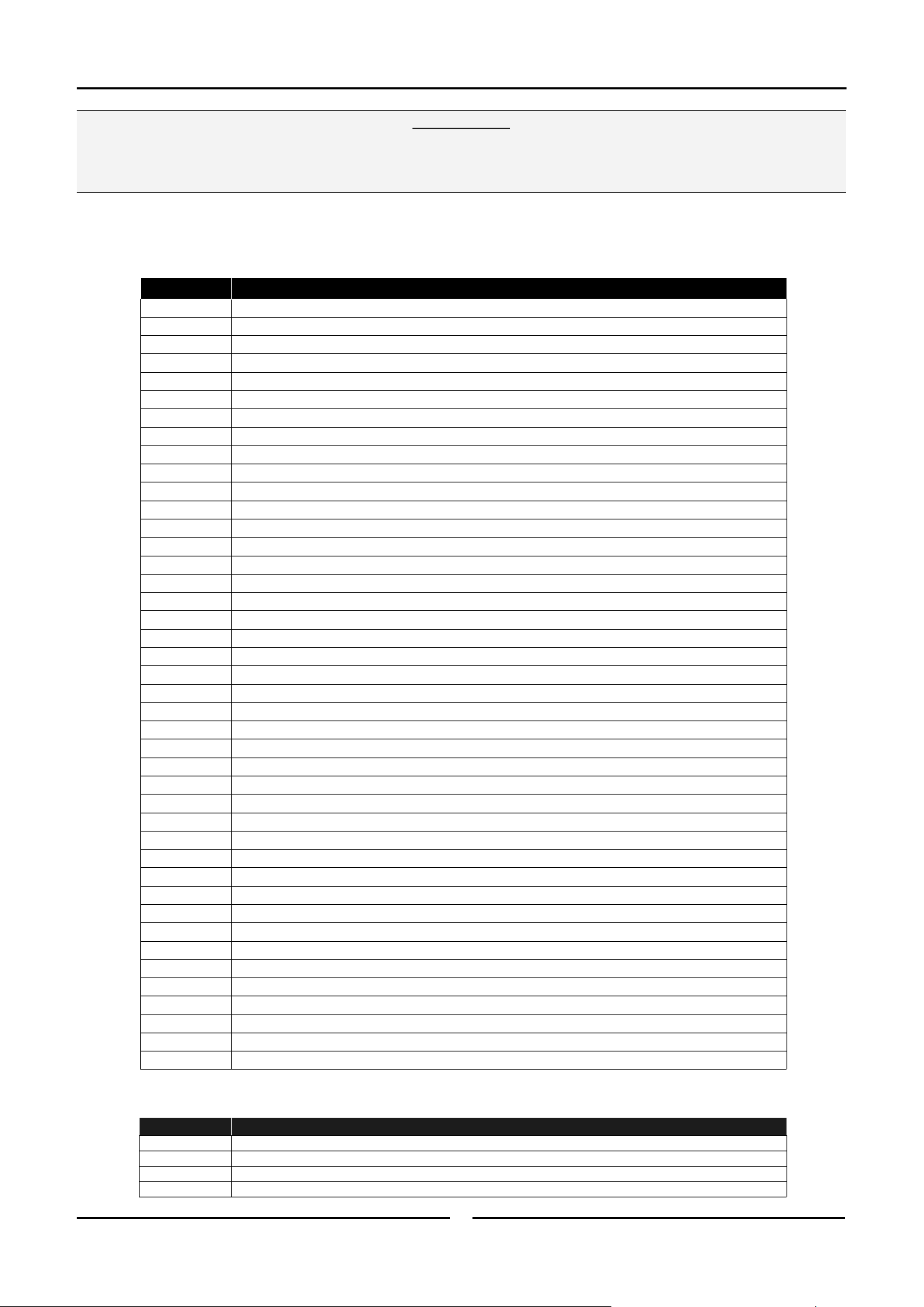
Gas Specifications Table
Do not use a naked flame to check for gas leakages.
Warning
Natural Gas LP Gas (Propane)
Orifice Size #36 Drill (2.70mm). #51 Drill (1.70mm).
Regulator Spring
(Colour)
Green Spring. Blue Spring.
Supply
Pressure
7” w.c.
(1.75 kPa).
11” w.c.
(2.75 kPa).
Operating
Pressure
4.2” w.c.
(1.05 kPa).
11” w.c.
(2.75 kPa).
Cover Screw
Main Burner Injector
Replacement Parts List
24
When ordering replacement parts, please quote the part number and the description as listed below. If the part required
is not listed below, request the part by description and quote model number and serial number which is shown on the
Technical Data Plate.
Important:
Only genuine authorized replacement parts should be used for the servicing and repair of this oven. The instructions
supplied with the parts should be followed when replacing components.
For further information and servicing instructions, contact your nearest authorized service provider or Turbofan Dealer.
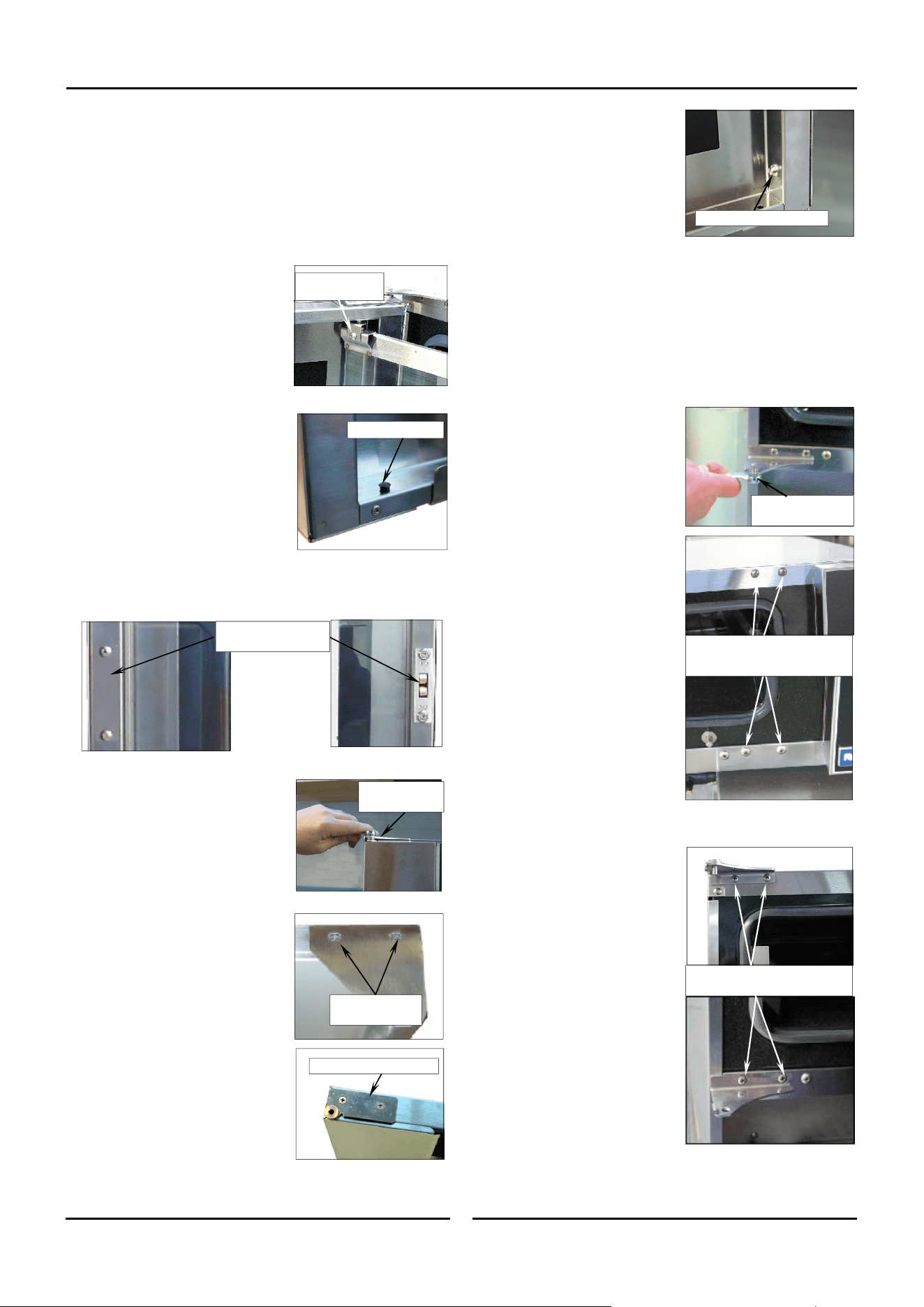
Item Description
236256 Digital Control Board Kit
234450 Encoder
234447 Control Knob
234430 Transformer 110-120V x 12VAC SEC 15VA
234461 Cooling Fan 110-120V 50/60HZ
237447K Temperature Probe Kit PT1000.
SA1530 Ignition Electrode Assembly
232552 Capacitor 12uF (110V Models)
025400 Overtemp 360°C / 680°F
232905 Fan Motor 110-120V 60HZ
232903 Fan Dia 175mm / 7”
234459 Ignition Module 110 - 120V
234458 Gas Valve G32 120V
232964 Thermal Switch 150°C
004952 Burner Painted
032170 Injector 1.70mm LPG (Propane)
032270 Injector 2.70mm NAT
235435 Gas Type Conversion Kit USA / Canada Only
015311 Test Point Plug
1
/
8
” NPT
024802 Door Microswitch
236885 Door Microswitch Gasket
232666 Door Seal
234580 Door Roller Catch
235277 Door Roller Catch Strike
235278 Strike Lock Nut
234930 Door Hinge Assy
234757 Door Inner Glass Assembly
234752 Hinge Pivot Kit
233884 Lamp Bulb G9 25W, Halogen 120V
236214 Lamp Holder G9 25W
021352 Oven Lamp Lens
021354 Oven Lamp Gasket
021617 Water Solenoid 90° Outlet 120V
025922 Adaptor Brass (USA / Canada only)
021527 Washer Rubber (USA / Canada only)
233986 Foot Adjustable 100mm
233649 Oven Rack
234658 Oven Side Rack LH 5-tray
234667 Oven Side Rack RH 5-tray
233552 Rack Securing Screw
Item Description
236060 Core Temperature Probe Kit.
235845 Core Temperature Probe.
235847 Dust Cap - Core Temperature Socket.
236271 Core Temperature Probe Holder.
Optional Extras
Appendix 1 - Oven Door Reversal
25
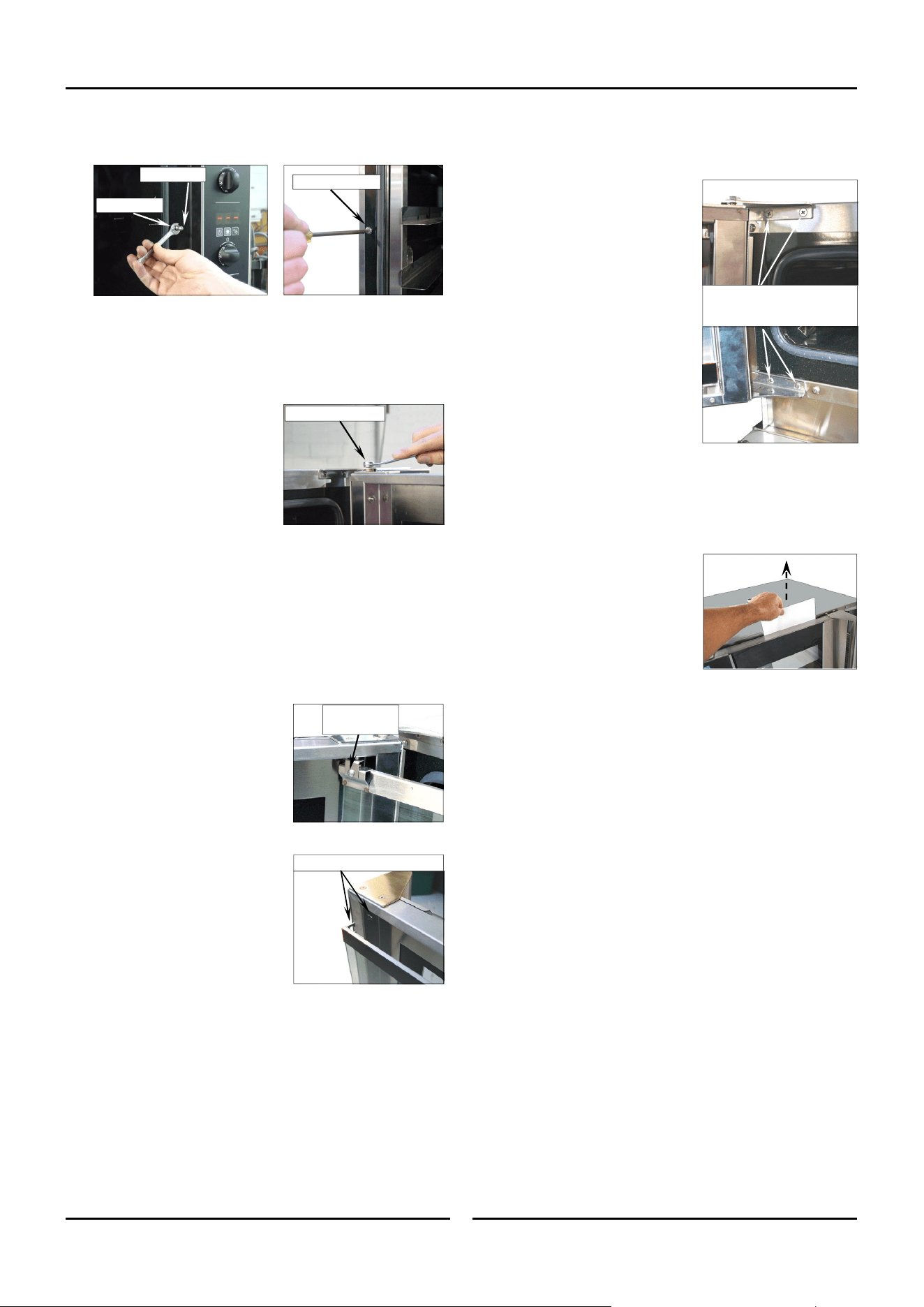
Remove Screw
and Retaining
Clip.
Reversing the Oven Door
Refit all screw fasteners using a low-mid strength thread
locking adhesive unless otherwise stated.
Door reversal should only be carried out by a suitably
competent person.
Remove the Oven Door Inner Glass.
1. Open the oven door and open the
door inner glass.
2. Remove screw securing inner
glass retaining clip and remove
clip.
3. Lift up inner glass and remove,
ensuring that pivot spacer is
removed from lower inner glass
pivot and retained.
4. Remove black plastic plugs from
top and bottom of door and fit to
holes where inner glass pivots
were removed from.
Remove the Oven Door.
5. Remove the door roller catch and blanking plate from the
inside of the door and swap these over.
6. Whilst supporting door, unscrew
and remove top door pivot bolt
from top door hinge assembly.
7. Remove door and lay on a flat
surface or workbench.
8. Unscrew screws securing the door
handle remove door handle.
9. Remove top door hinge and fit to
bottom opposite corner of door.
10. Remove bottom door hinge and
fit to top opposite corner of door.
Fit Blanking Plugs.
Remove Top
Door Pivot Bolt.
Remove Top Door Hinge
Remove Handle
Securing Screws
Swap Roller Catch and
Blanking Plate over.
11. Remove inner glass latching
studs and fit to opposite side of
door using Loctite 243 or
similar to secure.
12. Turn door handle over and fit to other end of door where
hinges were removed from. Ensure Flat of handle is to the
outside.
Remove Upper and Lower Door Hinges and Door
Catch.
13. Remove bottom door pivot bolt
and spacers and fit pivot bolt to
top door hinge assembly (as
this will be swapped over and
fitted to bottom of other side of
oven).
14. Remove the 4 blanking screws
from front of oven.
15. Remove Hinge Plate from top of
oven and fit diagonally
opposite, to lower corner.
16. Remove Hinge Plate from
bottom of oven and fit
diagonally opposite, to upper
corner.
17. Fit screws removed at Item 14
above to where hinges were
fitted.
Remove these screws to remove
top and bottom hinges.
Bottom Door Pivot
Bolt and Spacers.
Remove screws top and bottom
and fit to where hinges removed
from.
Remove Latching Studs
Appendix 1 - Oven Door Reversal
26
18. Remove Blanking Screw and Door Catch from front of oven
and swap around (refer ‘Adjusting Door Catch’).
19. Fit door spacers removed at Item 13 previously, to lower hinge
pivot bolt.
Oven Door Re-Fitting
Fit the Door.
1. Refit oven door by locating
bottom of door onto bottom hinge
plate pivot bolt and spacers.
2. Fit top of door into top hinge
plate and secure with top pivot
bolt.
Fit Inner Glass to Door.
NOTE: It is important to ensure that the inner glass is fitted
correctly and that the glass pivots at the hinge end
of the door and not the handle end.
3. Fit pivot spacer removed at Item 3 on previous page, to the
lower inner glass pivot and locate inner glass lower pivot into
position on inside of door.
4. Locate top pivot of inner glass into
top of door and secure in position
with inner glass retaining clip.
5. Lift inner glass up onto locking
catch to lock glass into position.
Top Door Pivot Bolt.
Inner Glass Locking Catch
Screw and
Retaining Clip.
Adjust Door for Correct Alignment.
Check alignment and operation of the door. Ensure that the door
is correctly aligned horizontally and vertically.
1. To align, slacken off the upper and
lower hinge plates and correctly
align the door. Re-tighten both
hinge plates.
2. Check that the roller catch
correctly retains door in the closed
position.
3. To adjust, slightly loosen screws
securing roller catch and close the
door. The roller catch will
centralise itself.
4. Open door and tighten roller catch
securing screws.
Adjusting Door Catch
If the door sealing requires adjustment, carry out the following to
adjust the door catch:-
1. Check that the door seals correctly
when closed, by placing a sheet of
paper between the door and the
seal.
2. Close the door on the paper and
attempt to withdraw the paper by
firmly tugging on the paper. The
paper should just pull out with
some resistance but without
tearing.
3. To adjust the door catch, loosen the locking nut on the door
catch:-
a. If the paper withdraws easily,
screw the door catch ‘In’
by ½ a turn
and repeat the test above until adjusted
correctly.
b. If the paper cannot be withdrawn and the door springs
open,
screw the door catch ‘Out’ by ½ a turn
and
repeat the test above until adjusted correctly.
4. Tighten the locking nut on the door catch.
Slacken these screws to adjust
door vertically - horizontally.
Door Catch
Locking Nut
Blanking Screw