
A
B
1
2
3
4
5
6
7
8
9
10
1
1
2
2
3 4
5 6
7 8
9 10
11 12
13 14
15 16
17 18
19 20
21 22
23
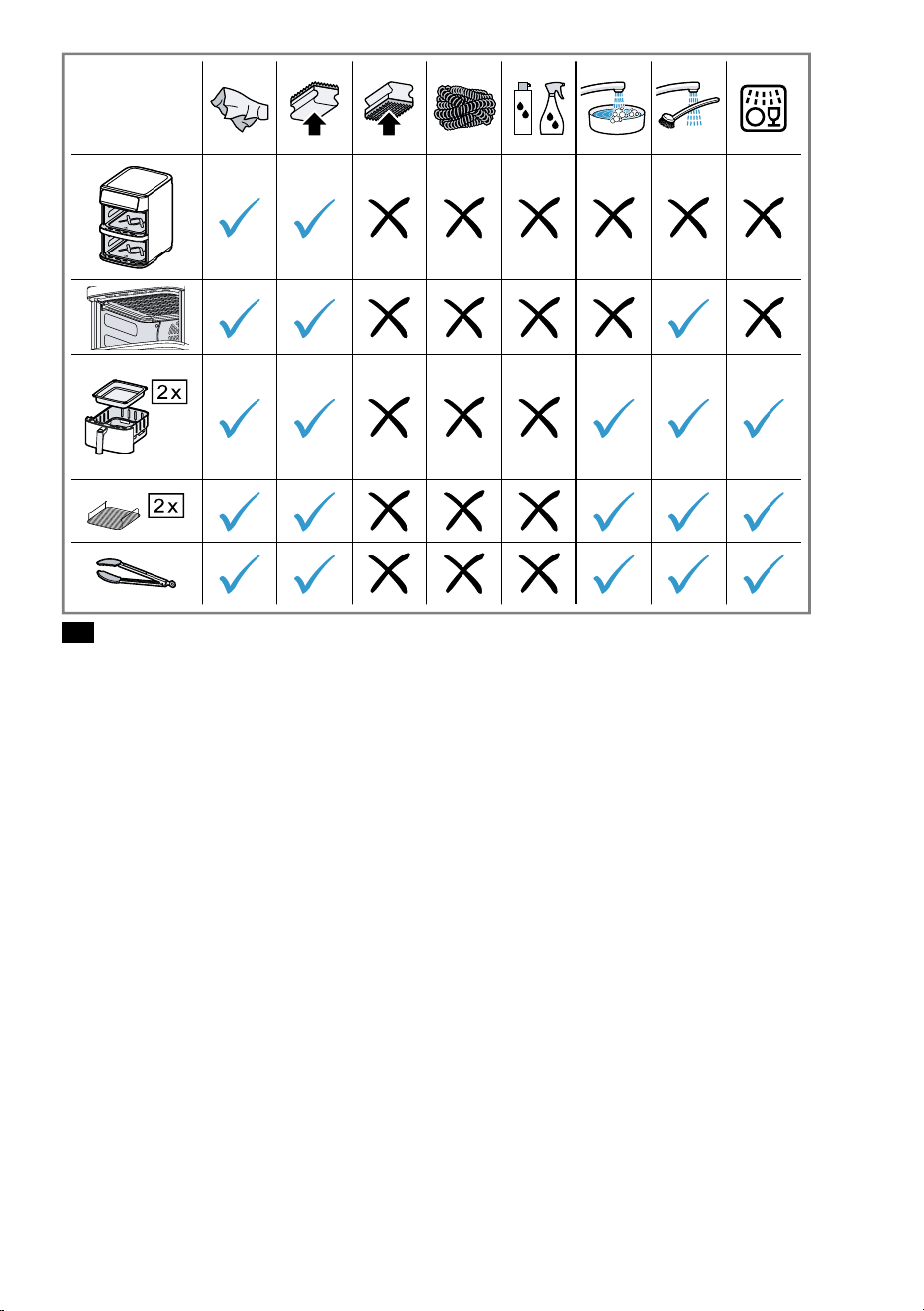
24
en
Safety Safety en
¡
Read this instruction manual carefully.
¡
Keep the instruction manual and the product information safe for future reference or
for the next owner.
Only use this appliance:
¡
with genuine parts and accessories.
¡
for warming, cooking, baking and frying with hot air.
¡
under supervision.
¡
for normal processing quantities and for normal processing times for domestic use.
¡
in private households and in enclosed spaces in a domestic environment at room tem-
perature.
¡
up to an altitude of max. 2000m above sea level.
The appliance must always be disconnected from the mains after each use, whenever
the appliance is unsupervised, before cleaning and in the event of an error.
This appliance may be used by children aged 8 or over and by people who have re-
duced physical, sensory or mental abilities or inadequate experience and/or knowledge,
provided that they are supervised or have been instructed on how to use the appliance
safely and have understood the resulting dangers.
Do not let children play with the appliance.
Children must not perform cleaning or user maintenance unless they are at least 8 years
old and are being supervised.
Keep children under the age of 8 years away from the appliance and power cable.
Never operate a damaged appliance.
Never operate an appliance with a cracked or fractured surface.
Never pull on the power cord to unplug the appliance. Always unplug the appliance at
the mains.
If the appliance or the power cord is damaged, immediately unplug the power cord or
switch off the fuse in the fuse box.
Connect and operate the appliance only in accordance with the specifications on the
rating plate.
Connect the appliance to a power supply with alternating current only via a properly in-
stalled socket with earthing.
The protective conductor system of the domestic electrical installation must be prop-
erly installed.
Never equip the appliance with an external switching device, e.g. a timer or remote
control.
Repairs to the appliance should only be carried out by trained specialist staff.
Only use genuine spare parts when repairing the appliance.
If the power cord of this appliance is damaged, it must be replaced by the manufac-
turer, the manufacturer's Customer Service or a similarly qualified person in order to
prevent any risk.
Never immerse the appliance or the power cord in water or clean in the dishwasher.
Only use the appliance in enclosed spaces.
Never expose the appliance to intense heat or humidity.
Do not use steam- or high-pressure cleaners to clean the appliance.
Never let the power cord come into contact with hot appliance parts or heat sources.
Never let the power cord come into contact with sharp points or edges.
Never kink, crush or modify the power cord.
Never place the appliance on or near hot surfaces.
Never place the appliance on or near flammable materials, e.g. curtains or tablecloths.
7
Always maintain a safety distance of at least 10cm to walls and other objects to avoid
a build-up of heat.
Never cover the appliance or set other objects down on it.
Do not store or deposit objects in the basket or the cooking compartment.
Never leave the appliance unattended while it is switched on.
Never fill oil or fat into the basket.
Never heat food containing high-proof alcohol or other highly flammable constituents
in the appliance.
Take note of the maximum permitted capacity. Never fill food beyond the upper edge
of the basket.
Do not use loose pieces of baking paper or lightweight ingredients that could be
sucked in by the fan, e.g. dry herbs.
If dark smoke comes out of the appliance, disconnect it from the mains immediately.
Do not take the basket out until the amount of smoke has decreased.
The appliance becomes hot during operation. Never touch the hot surfaces.
Allow the appliance to cool down before cleaning or transporting.
Never reach into the hot cooking compartment.
Never touch the hot grill rack with bare hands. Use suitable tools, e.g. potholders or
cooking utensils.
Be careful when taking out the basket as hot air and steam may escape.
Do not lean over the appliance.
Always keeps your hands and face away from the air outlets.
To avoid injuries, only use the appliance for its intended purpose.
Follow the cleaning instructions.
Clean surfaces which come in contact with food before each use.
To prevent the development of acrylamide, do not cook the food to the point where it is
too dark and remove any burnt residues.
Never heat fresh potatoes to over 180°C.
Avoiding material damageAvoiding material damage
Do not use sharp, pointed or metal cooking
utensils. Only use cooking utensils made of wood
or heat-resistant plastic.
After taking out the food, do not leave the tongs ly-
ing in the hot basket or set them down on other hot
surfaces.
Never stand the hot basket on heat-sensitive sur-
faces. Use a heat-resistant base underneath, e.g. a
heat or table mat.
Never leave the basket part way in the appliance in
order to prevent damage caused by intense heat or
the basket falling out. Always fully remove the bas-
ket and push it all the way back into the appliance.
Never fill water or other liquids into the basket.
Never use the grill rack in the microwave.
Familiarising yourself with your applianceFamiliarising yourself with your appli-
ance
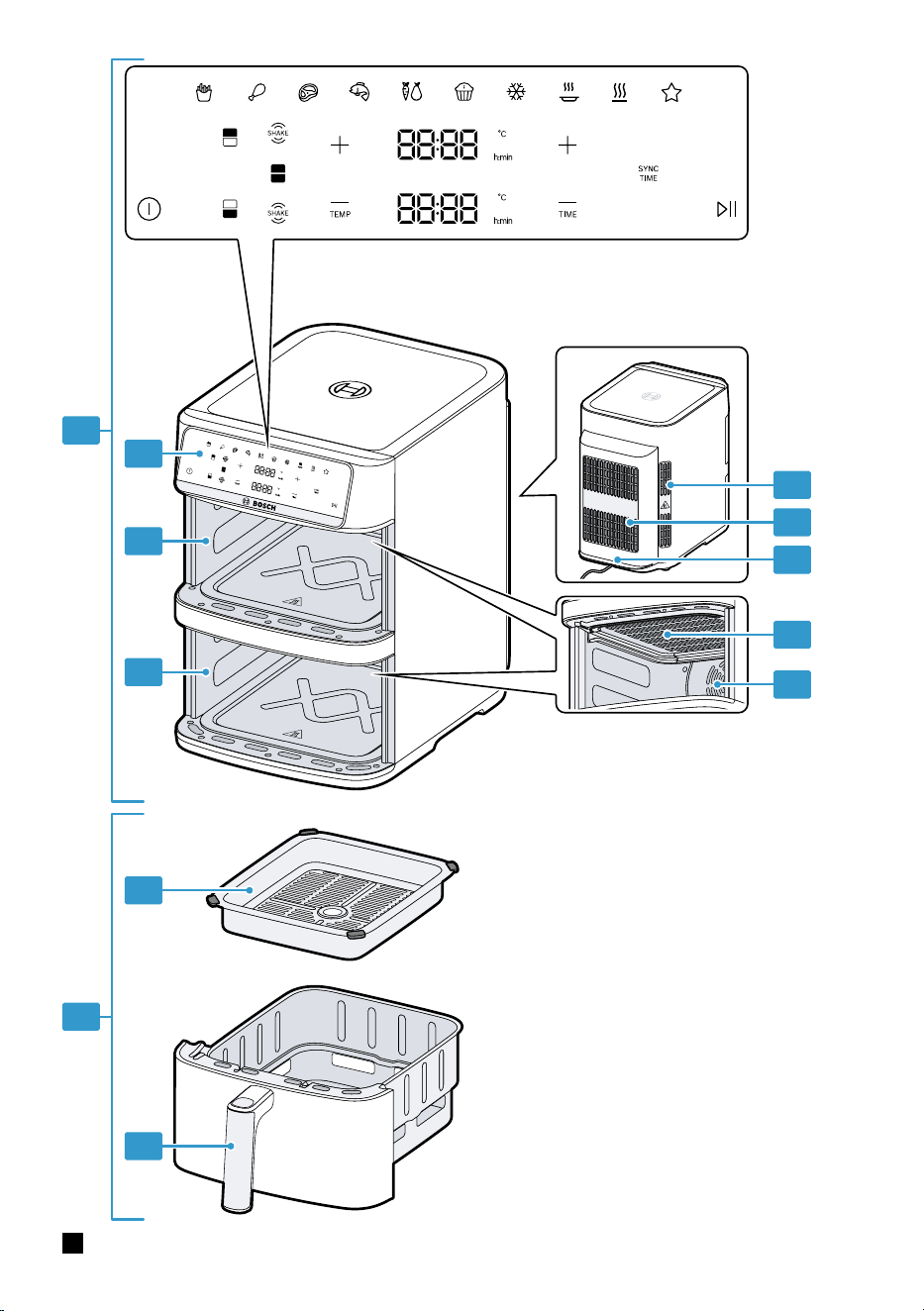
Overview
After unpacking all parts, check for any damage in
transit and completeness of the delivery.
Fig.
1
Main unit
Basket, 2pcs.
Bottom cooking compartment
Top cooking compartment
Control panel
Air outlet
Air inlet
Power cord
Cover for heating element
Fan
Handle
Grid
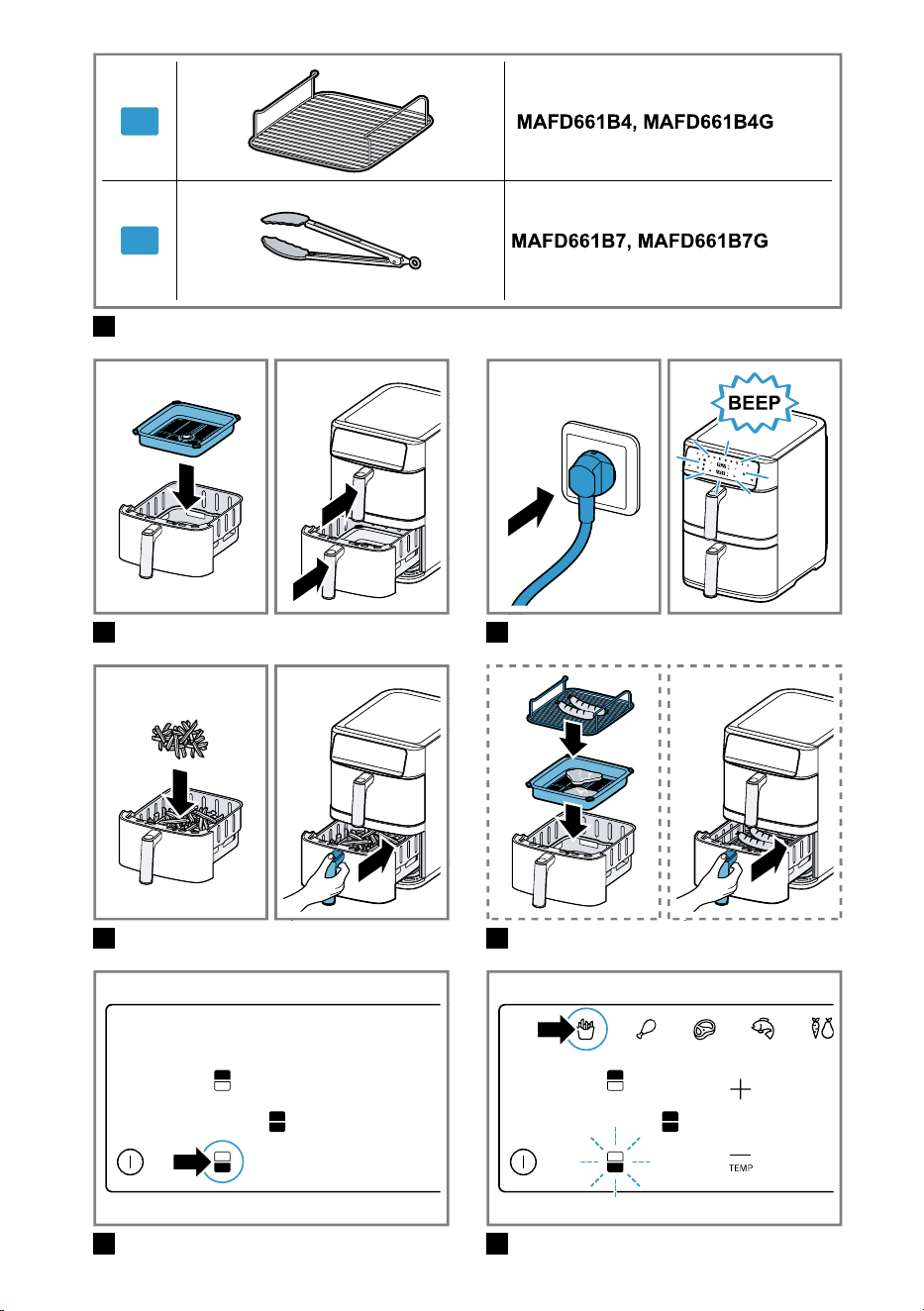
Model-specific accessories
Other accessories are included in delivery depending
on the specific model concerned.
Fig.
2
Grill rack, 2 pcs
Kitchen tongs
8
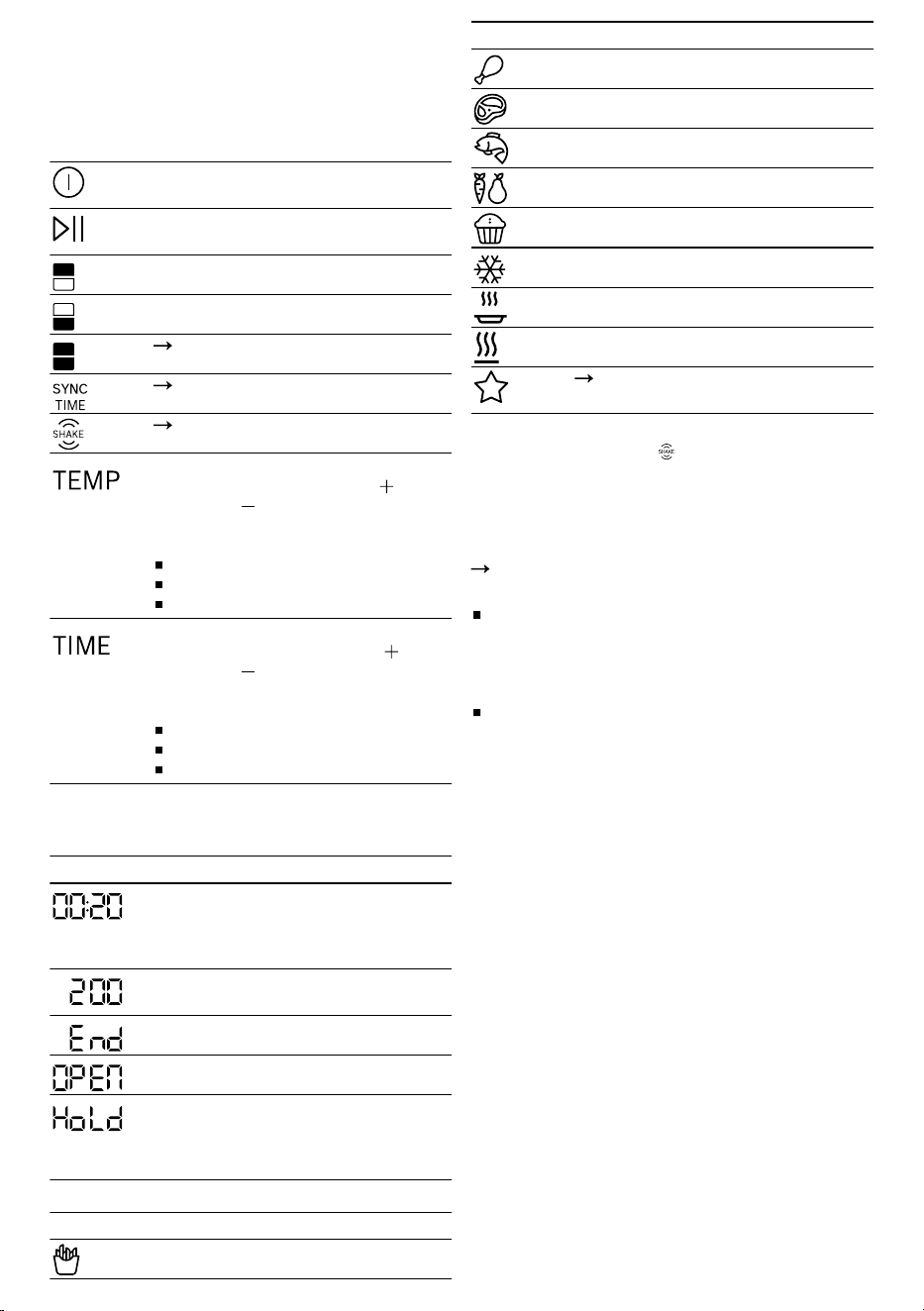
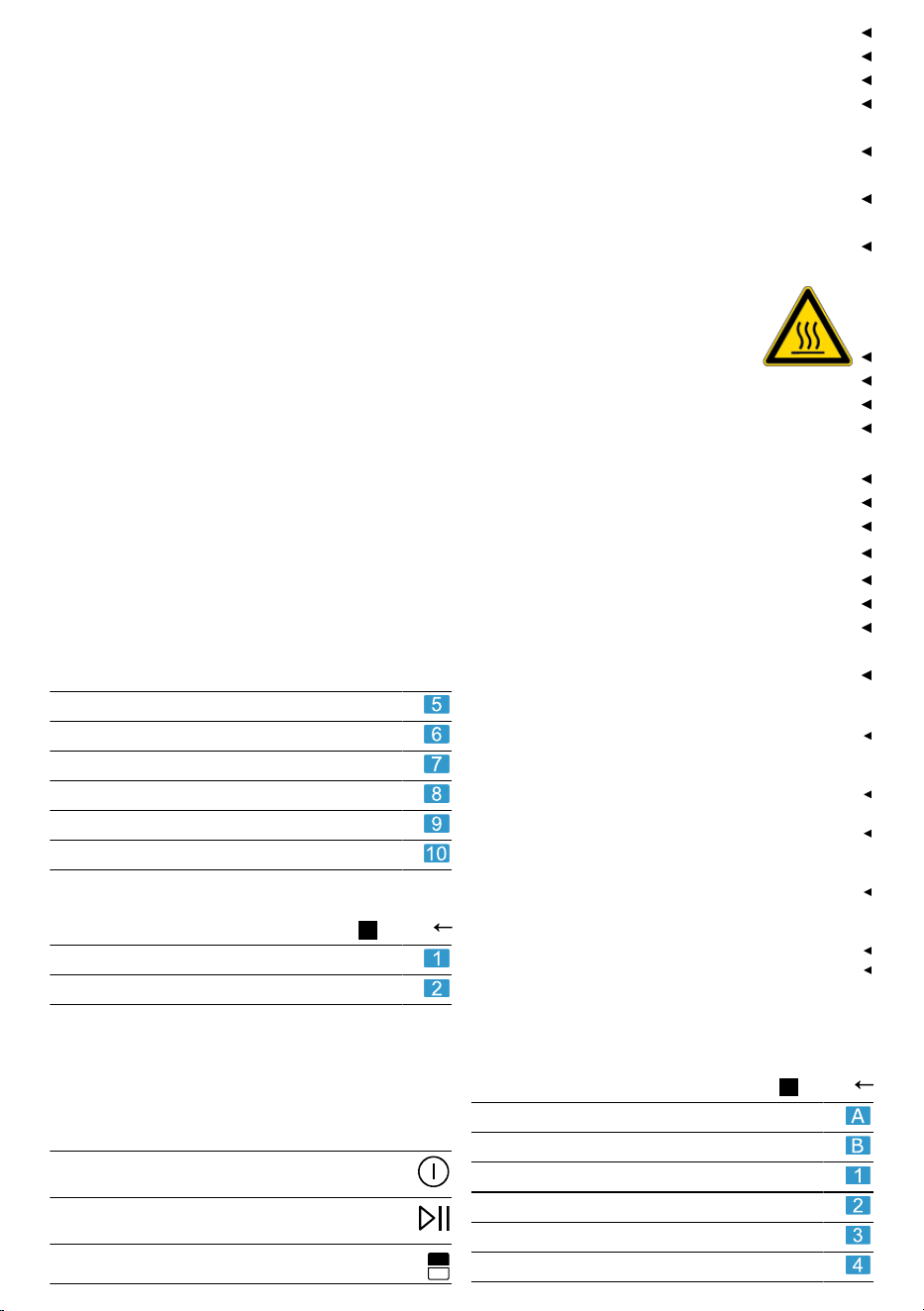
Control panel
You can find an overview of the control panel here.
Note: Press the buttons with your fingers without
wearing rubber/oven gloves. Do not operate buttons
with objects, e.g. a wooden spoon.
Display elements and function buttons
On/Off
Switch the appliance on and off
Start/Pause
Starting or pausing cooking
Select the top basket
Select the bottom basket
"MATCH function", Page11
"SYNC function", Page11
"Display SHAKE", Page9
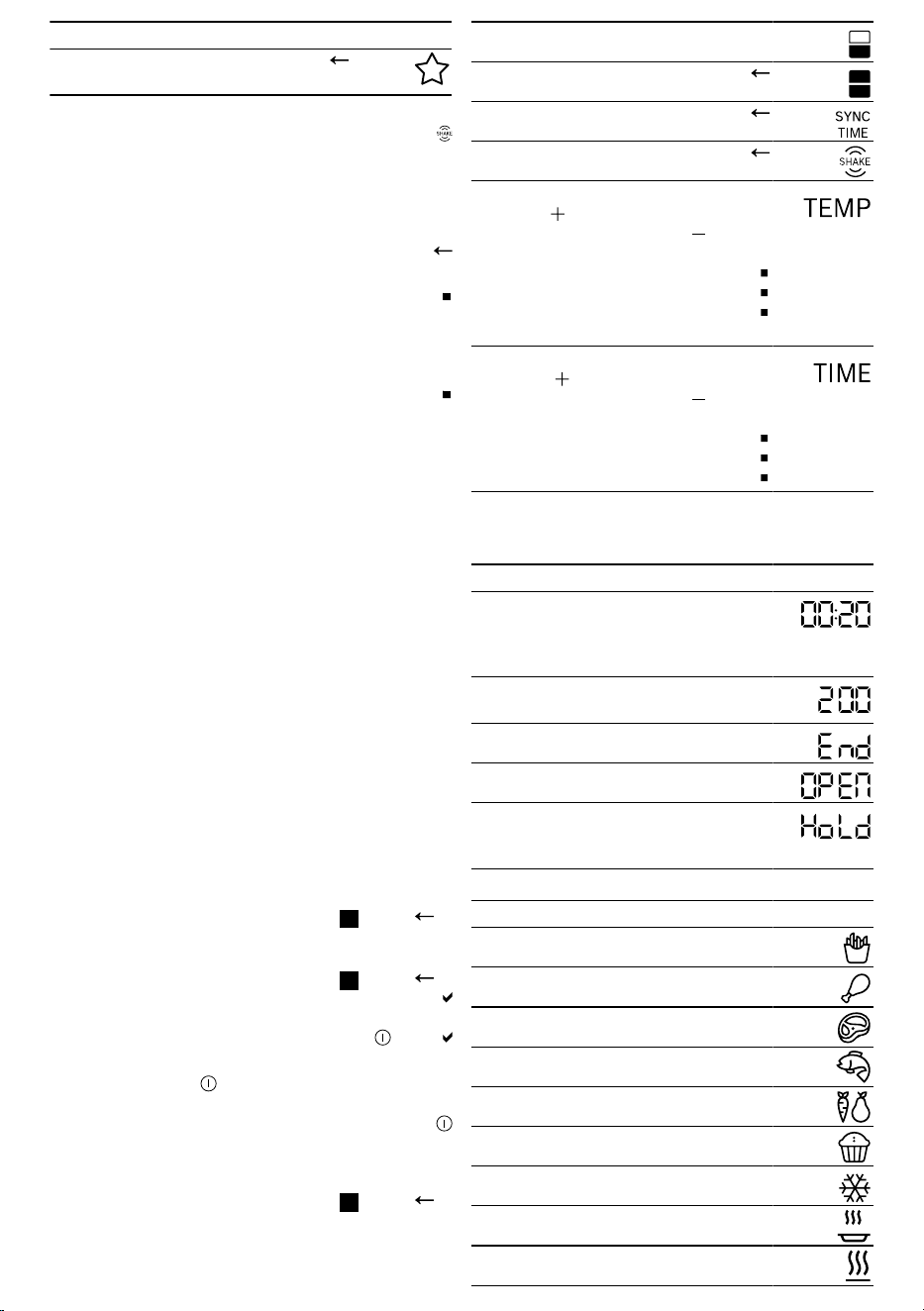
Temperature setting
Increase the temperature with or re-
duce it with .
Settings ranges (depends on the pro-
gramme):
205-230°C for 1-30minutes
85-200°C for 1-60minutes
40-80°C for 1minute- 8hours
Time setting
Increase the cooking time with or re-
duce it with .
Settings ranges (depends on the pro-
gramme):
1-30minutes at 205-230°C
1-60minutes at 85-200°C
1minute- 8hours at 40-80°C
Display
The appliance has two separate displays for the top
and the bottom basket.
Indicator Description
When h:min lights up, the display
shows the time in hours and minutes.
The colon flashes as long as cooking
takes place.
When °C lights up, the display shows
the temperature.
Cooking has finished.
The basket has been removed.
Only with activated SYNC function.
The basket with the shorter cooking
time waits for the automatic start of
cooking.
Programme buttons
Symbol Programme
French fries
Symbol Programme
Poultry
Roast
Fish
Vegetables
Small pastries
Defrost
Reheat
Keep warm
"Personalised programme MyFry",
Page11
Display SHAKE
On certain programmes, SHAKE flashes after a
certain period of time and a signal tone sounds.
When the display SHAKE flashes for the top or bot-
tom basket, shake or turn the food in the relevant bas-
ket. This ensures that all food in the basket is cooked
to the same degree.
"Shaking or turning food", Page10
Notes
If the food contains a lot of moisture or fat, the li-
quid will drip onto the base of the basket. To pre-
vent the liquid running out of the openings in the
basket, use a cooking utensil to turn or take out the
food and do not tip the basket out.
If you do not take the basket out and put it back
again, the display will flash until the end of the
cooking process and the signal tone will sound
roughly every 60seconds. When using the French
fries programme, the indicator goes out after ap-
prox. 5minutes.
Before using for the first timeBefore using for the first time
Cleaning the appliance before using it for the
first time
1. Remove any packaging material.
2. Remove any stickers or film.
3. In a well-ventilated room, heat up the appliance
without food at the highest temperature setting for
30minutes and then leave to cool down.
4. Clean all parts that come into contact with food be-
fore using for the first time.
Note: Slight smoke or odour emission during initial
use is normal.
OperationOperation
Preparing the appliance
1. Place the appliance on a stable, horizontal, flat and
heat-resistant work surface. Always maintain a
safety distance of at least 10cm to walls and other
objects.
9
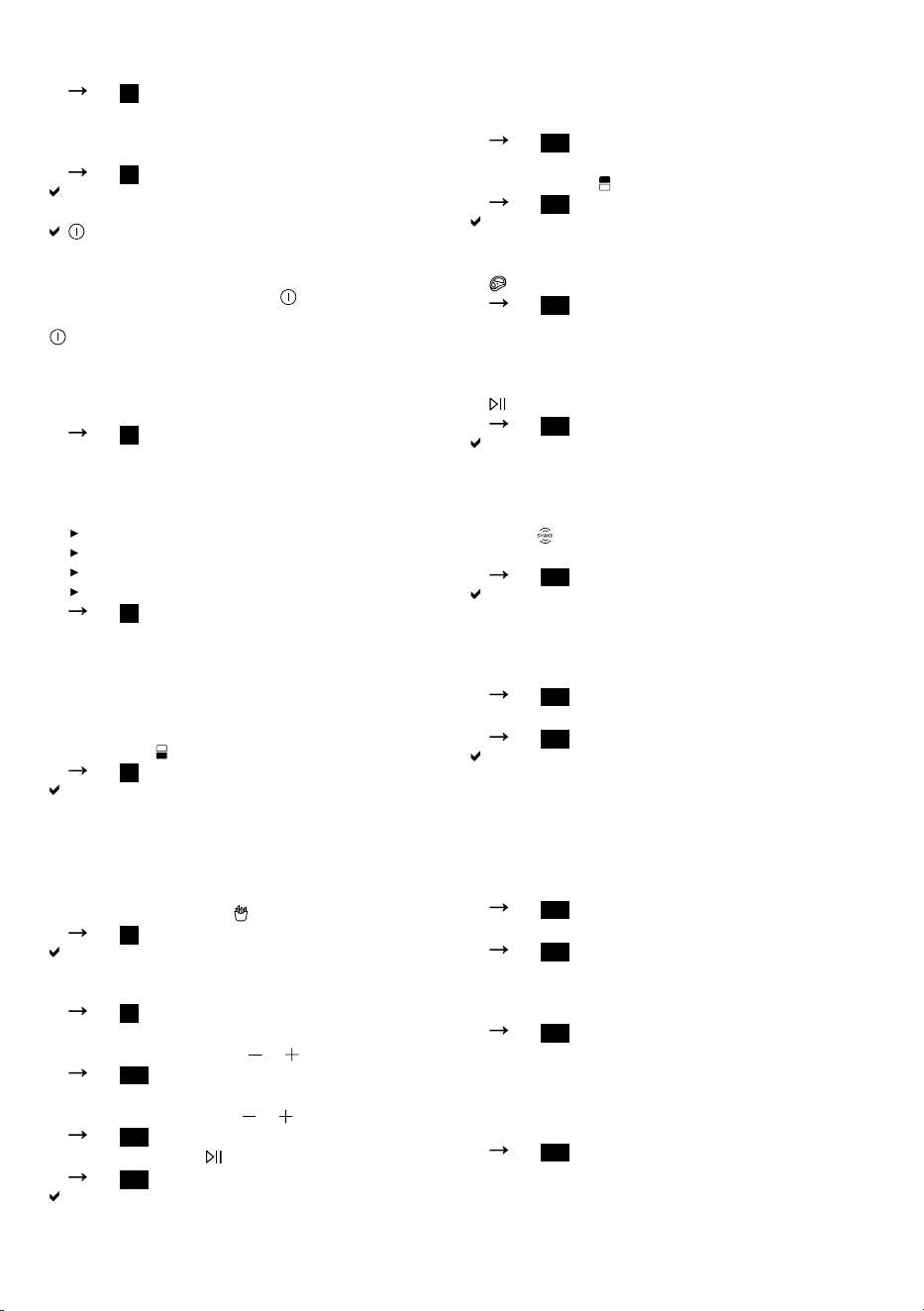
2. Put the grids in the baskets as shown and press
them down. Push the baskets fully into the appli-
ance.
Fig.
3
Never use a basket without having inserted the
grid.
3. Insert mains plug.
Fig.
4
A signal tone sounds and the entire control panel
lights up briefly.
On/Off and the symbols for basket selection
light up.
Note: If no input is made within approx. 10minutes,
the appliance switches off and On/Off lights up
dimmed. To display basket selection again, press
On/Off.
Starting cooking with one basket
1. Add the food to the basket and push the basket
fully into the appliance.
Fig.
5
Never fill food beyond the upper edge of the bas-
ket.
2. To cook food on the grill rack or on 2 levels, pro-
ceed as follows.
Place the grid in the basket.
If you wish, place food on the grid.
Place the grill rack in the basket.
Place the food on the grill rack.
Fig.
6
If you are cooking food on both levels, do not pack
the food too tightly on the upper level as this will ob-
struct the air flow to the lower level. If the food is rel-
atively thin or requires a lower cooking temperat-
ure, place it on the lower level.
3. Select the basket on the control panel, e.g. the bot-
tom basket .
Fig.
7
The symbol for the bottom basket flashes and the
programme symbols light up.
4. To start cooking without a programme, skip pro-
gramme selection and set the required values dir-
ectly.
5. To use a programme, press the required symbol on
the control panel, e.g. French fries.
Fig.
8
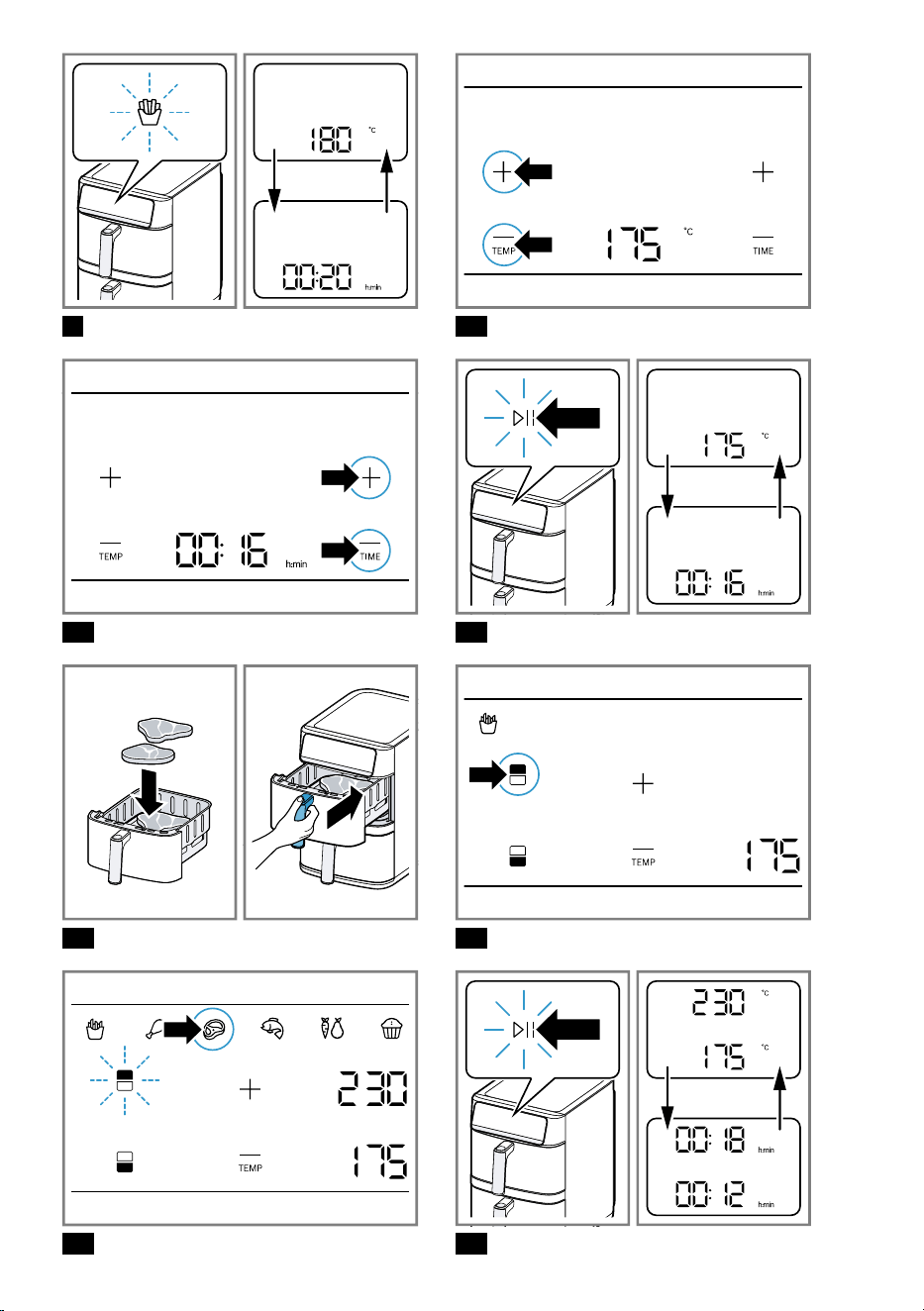
The programme symbol flashes and the display al-
ternately shows the preset temperature and the
cooking time for the programme.
Fig.
9
6. To adjust the preset temperature, select the re-
quired value with TEMP or .
Fig.
10
7. To adjust the preset cooking time, select the re-
quired value with TIME or .
Fig.
11
8. Start cooking with Start/Pause.
Fig.
12
The display for the basket selected alternately
shows the selected temperature and the remaining
cooking time.
Starting cooking with the second basket
You can start additional cooking in the second basket
at any time independently of the cooking in progress.
1. Add the food to the second basket and push the
basket fully into the appliance.
Fig.
13
2. Select the second basket on the control panel, e.g.
the top basket .
Fig.
14
The symbol for the top basket flashes and the pro-
gramme symbols light up.
3. Select a programme for the second basket, e.g.
Roast and if required, adjust the values.
Fig.
15
The same programme can be selected for the
second basket as for the first one, e.g. in order to
cook an additional portion with a time delay.
4. Start cooking with the second basket using
Start/Pause.
Fig.
16
The displays alternately show the selected temper-
ature and the remaining cooking time for both bas-
kets.
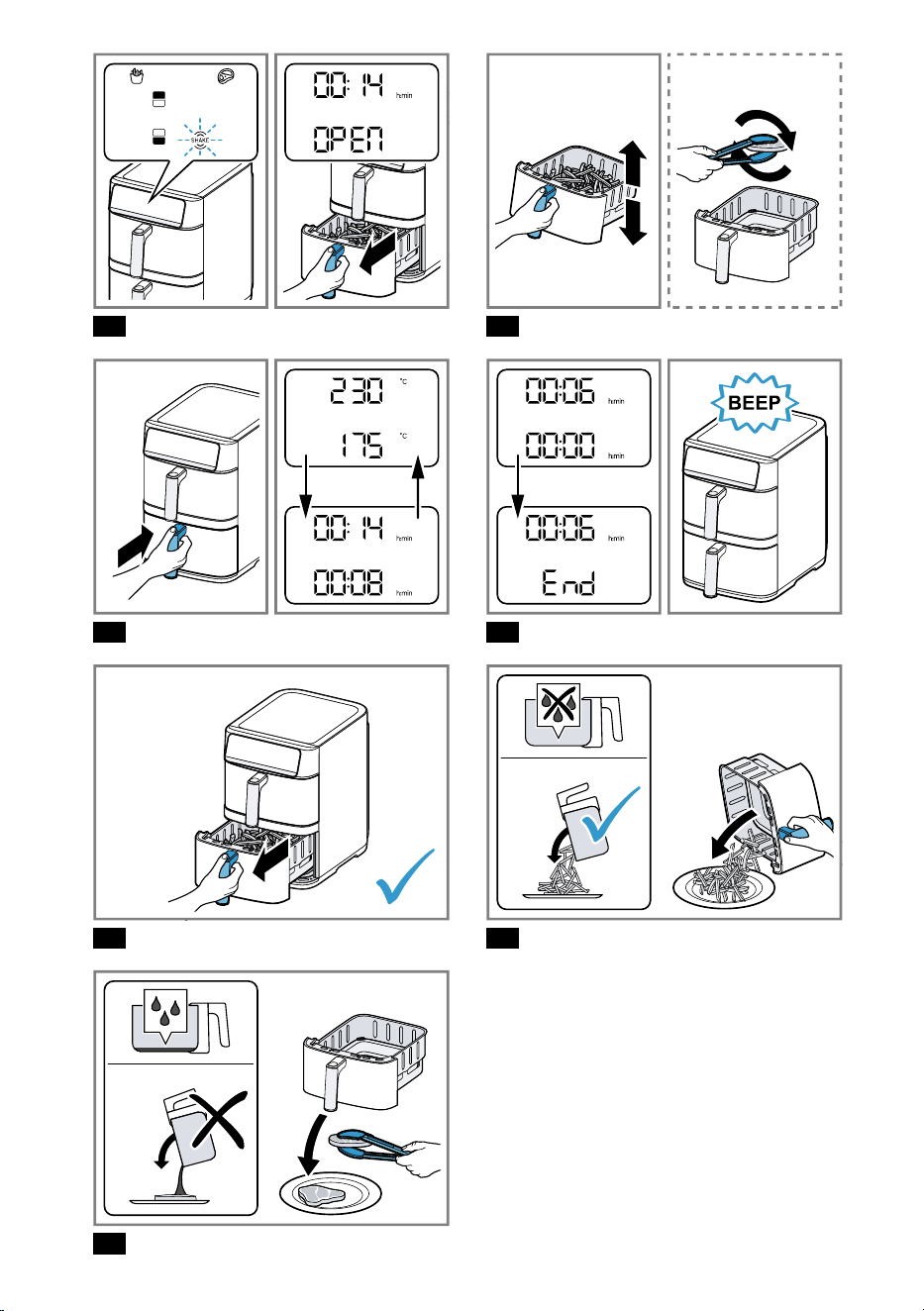
Shaking or turning food
1. When SHAKE flashes for the top or bottom bas-
ket, take the relevant basket out of the appliance.
Fig.
17
Cooking is paused and the display for the basket
shows OPEN as long as the basket is removed.
2. Shake the food in the basket. Turn large items of
food or delicate foods using cooking utensils made
of wood or heat-resistant plastic.
Fig.
18
3. Push the basket fully into the appliance.
Fig.
19
Cooking will continue automatically and the display
alternately shows the selected temperature and the
remaining cooking time.
Taking cooked food out
1. When cooking has finished in the top or the bottom
basket, End flashes in the display for the basket
and an acoustic signal sounds.
Fig.
20
2. Take out the basket with the cooked food.
Fig.
21
3. With food that has not given off any excess fat, e.g.
french fries, shake it out of the basket or take the
food out with a cooking utensil.
Fig.
22
4. With food that has given off excess fat or liquid, e.g.
marbled meat or vegetables containing a lot of
moisture, take it out of the basket with a cooking
utensil. To prevent the liquid running out of the
openings in the basket, do not tip the basket out.
Fig.
23
Allow hot fat or liquid in the basket to cool down
first, then carefully pour it out.
10
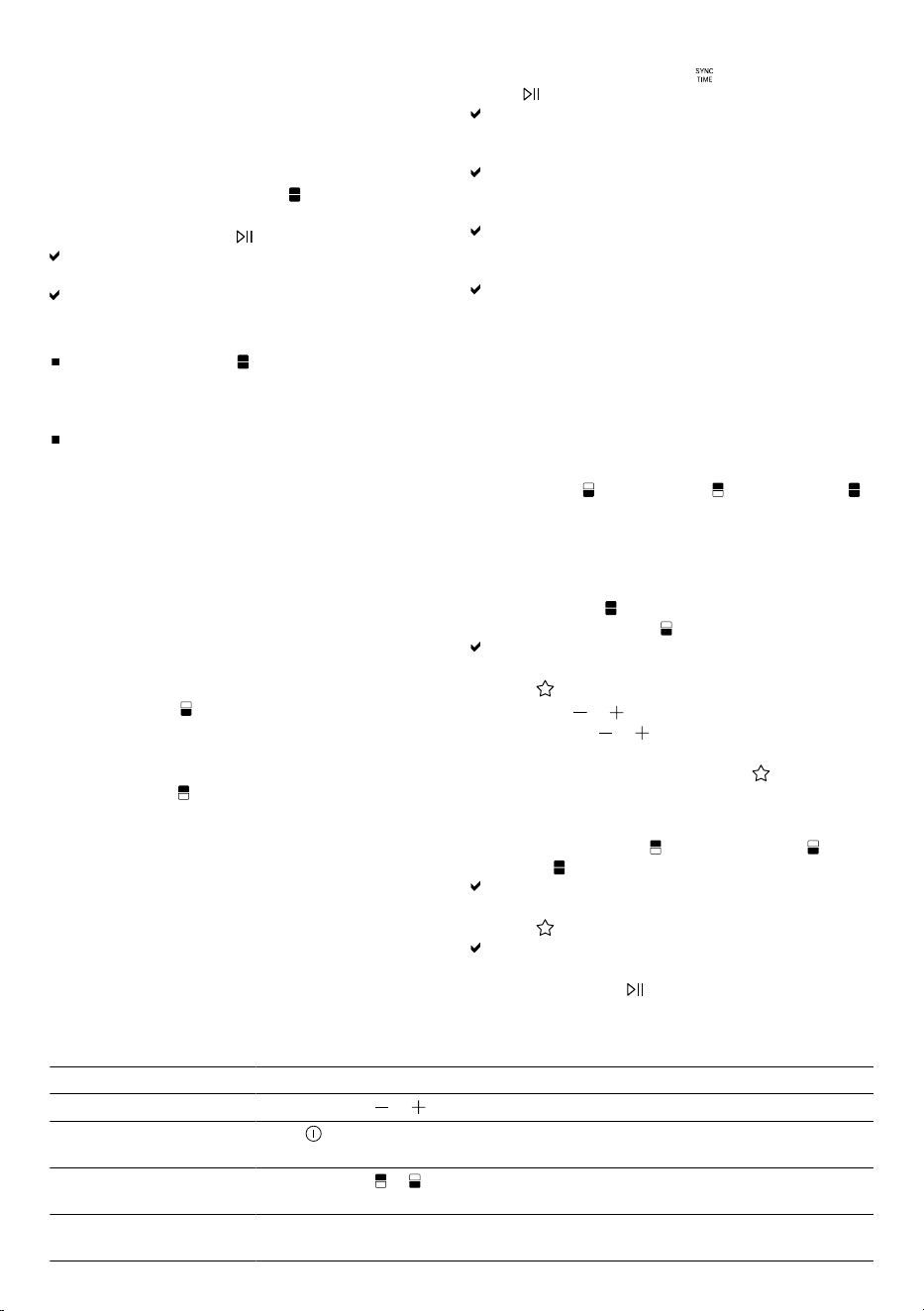
MATCH functionMATCH function
Use the MATCH function to utilise both baskets with
the same settings, e.g. to cook large quantities of the
same dish.
Using the MATCH function
1. Add the food to both baskets and push the baskets
fully into the switched-on appliance.
2. Activate the MATCH function .
3. Select a programme, adjust the values if required
and start cooking with Start/Pause.
Both displays alternately show identical values for
the temperature and the remaining cooking time.
When cooking has finished, End flashes on both
displays and an acoustic signal sounds.
Notes
If the MATCH function is activated after a pro-
gramme has already been selected and set for one
basket, the settings for the second basket will then
be adopted.
If during cooking the values for the temperature or
cooking time are changed for a single basket, the
MATCH function will then be terminated. Further
cooking takes place individually for each basket.
SYNC functionSYNC function
Use the SYNC function to synchronise the cooking
time for both baskets. Different dishes will be ready at
the same time.
Using the SYNC function
1. Add the food to both baskets and push the baskets
fully into the switched-on appliance.
2. Select the first basket on the control panel, e.g. the
bottom basket .
3. Select a programme for the first basket and if re-
quired, adjust the values.
4. Select the second basket on the control panel, e.g.
the top basket .
5. Select a programme for the second basket and if
required, adjust the values.
6. Activate the SYNC function and start cooking
with Start/Pause.
The display for the basket with the longer cooking
time alternately shows the temperature and the re-
maining cooking time.
The display for the basket with the shorter cooking
time alternately shows the temperature and Hold.
Cooking is still paused.
Once the same remaining running time for both
baskets has been reached, cooking will start in the
paused basket.
When cooking has finished, End flashes on both
displays and an acoustic signal sounds.
Note: If the SYNC function is active and the same re-
maining cooking time is shown for both baskets, any
changes to the cooking time for one basket will end
the SYNC function.
Personalised programme MyFryPersonalised programme MyFry
Use MyFry to save and retrieve your personalised
settings. You can save the settings separately for the
bottom basket , the top basket and for MATCH .
Setting up or adjusting MyFry
Note: When you set up MyFry for the first time, there
are no default values. If you adjust MyFry, the last val-
ues saved are displayed.
1. Select MATCH or a basket on the control panel,
e.g. the bottom basket .
The symbol for the bottom basket flashes and the
programme symbols light up.
2. Press MyFry.
3. Use TEMP or to select the required temperat-
ure, and TIME or to select the required cook-
ing time.
4. To save the values, press and hold MyFry for at
least 2seconds until a signal tone sounds.
Using MyFry
1. Select the top basket , the bottom basket or
MATCH .
The selected symbol flashes and the programme
symbols light up.
2. Press MyFry.
The display alternately shows the saved values for
the temperature and the cooking time.
3. Start cooking with Start/Pause.
Additional functionsAdditional functions
You can find an overview of additional functions here.
Function Features
Change values faster
Press and hold or .
Cancel cooking for all
baskets
Press On/Off.
Cancel cooking for one
basket
Press and hold or until the relevant display no longer shows any values.
Cancel basket selection Press and hold the flashing basket symbol until the relevant display no longer
shows any values.
11
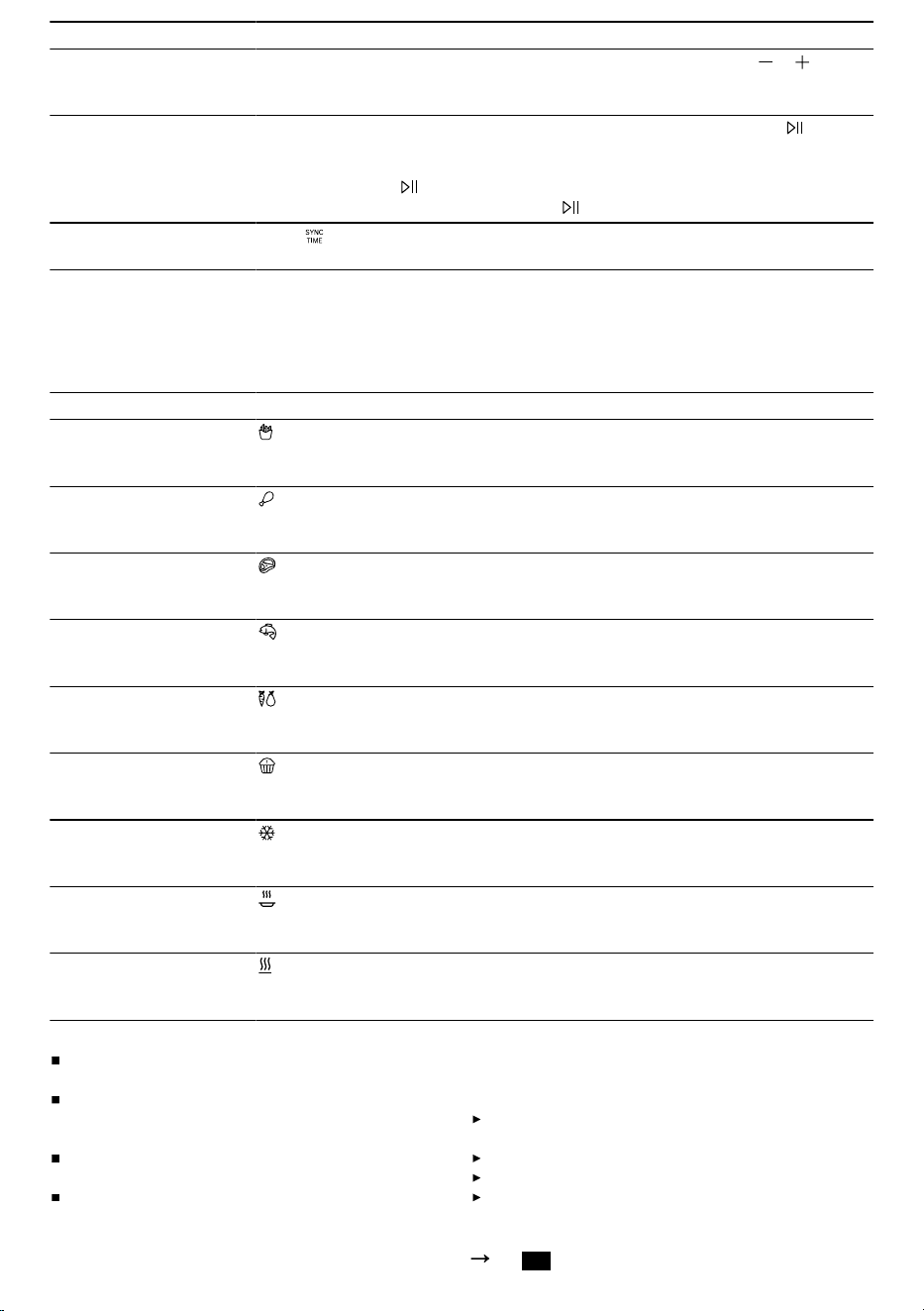
Function Features
Change the temperature
or cooking time during
cooking
If only one basket is active, the values can be directly adjusted with or .
If both baskets are active, first press the symbol for the required basket and then
adjust the values.
Pause cooking
If only one basket is active or to pause cooking for both baskets, press Start/
Pause.
To pause cooking for only one basket, first press the symbol for the required bas-
ket and then press Start/Pause.
To resume cooking when paused, press Start/Pause again.
Deactivate the SYNC
function
Press SYNC. Cooking starts for the paused basket and takes place individually
for each basket.
Application examplesApplication examples
Your appliance offers 9 different preset programmes. Select a suitable programme depending on the food.
Note: The values specified here are recommendations. As foods differ in terms of origin, size, shape, condition
and brand, an optimal setting for your food may diverge from these values.
Food Presetting Information
Frozen french fries,
10x10mm, 500g
French fries
180°C
20min.
When SHAKE flashes, shake or turn the food
Chicken legs,6 pcs,
each125g
Poultry
200°C
23min.
When SHAKE flashes, shake or turn the food
Beef steak,2 pcs, ap-
prox. 3cm thick
Roast
230°C
16min.
When SHAKE flashes, shake or turn the food
Salmon fillet,2 pcs, each
weighing150g
Fish
160°C
11min.
Grilled vegetables, 500g
Vegetables
180°C
16min.
Cut the vegetables into large pieces and mix with max.
1tbsp of oil
When SHAKE flashes, shake or turn the food
Small cakes or muffins,
9pcs
Small pastries
140°C
15min.
Defrosting frozen food
Defrost
40°C
40min.
Warming up cooked food
Reheat
150°C
5min.
For crispy results, set a temperature above 150°C.
Keeping cooked food
warm
Keep warm
80°C
30min.
Tips
If the size of the food diverges from those in the
table, shorten or lengthen the cooking time.
If the food is not cooked after the selected cooking
time, extend the cooking time or increase the tem-
perature.
To ensure an even cooking result, shake or turn the
food in the basket when SHAKE flashes.
If the food is not as crispy as you would like, apply a
little oil to the food before cooking, e.g. with a brush
or oil spray. Allow excess oil to drip away or wipe it
off.
Overview of cleaningOverview of cleaning
Clean all parts immediately after use so that residues
do not dry on.
Do not use cleaning agents containing alcohol or
spirits.
Do not use sharp, pointed or metal objects.
Do not use abrasive cloths or cleaning agents.
Only clean the control panel and the display using
a damp microfibre cloth.
Clean the individual parts as indicated in the table.
Fig.
24
12
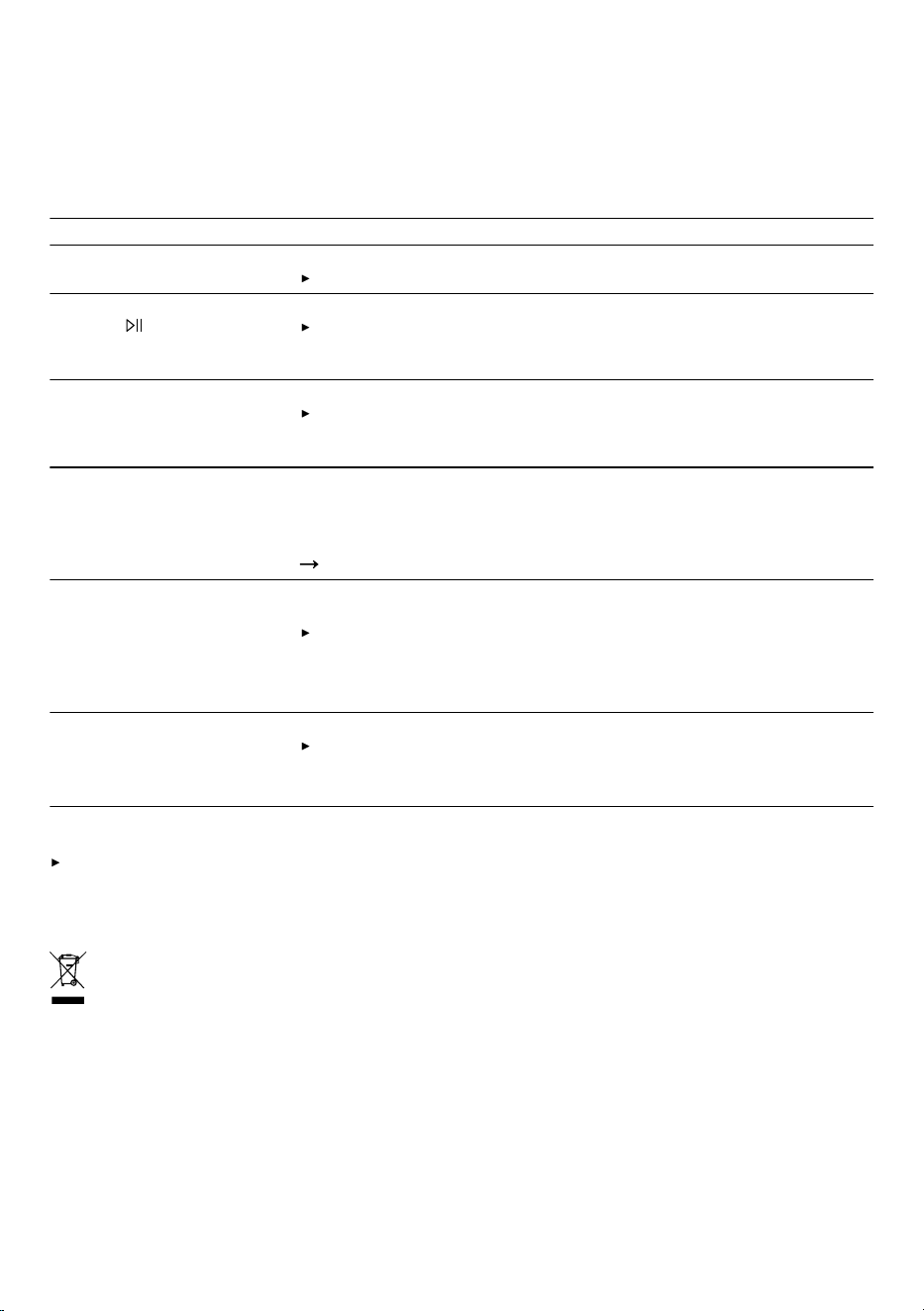
Cleaning the appliance and parts
1. Clean the main unit with a damp cloth and dry.
Use a damp microfibre cloth for the display.
2. If necessary, clean the cooking compartment with
warm water and a soft cloth or sponge.
3. Remove remnants of food on the cover of the heat-
ing element with a soft brush.
4. Remove any excess fat and oil from the basket.
5. If there are stubborn fat residues in the basket, add
a little warm water and a few drops of washing-up li-
quid to the basket to pre-clean it and leave to act.
6. Clean the baskets and the grids with detergent
solution and a soft cloth or sponge or put in the
dishwasher.
TroubleshootingTroubleshooting
Fault Cause and troubleshooting
The appliance is not working. Appliance has no power supply.
Check whether your appliance is supplied with power.
Cooking does not start or con-
tinue and Start/Pause does
not appear on the control
panel.
Basket has not been properly inserted in the appliance.
Push the basket fully into the appliance. The basket should not protrude
from the housing.
Basket cannot be fully pushed
into the appliance.
Food or objects in the cooking compartment.
Remove food or objects from the cooking compartment. Food or objects
in the cooking compartment become hot during cooking. Use heat-resist-
ant cooking utensils and proceed with care.
An error code appears on the
display, e.g. Ex.
The electronics have detected a fault.
1. Pull out the mains plug.
2. Re-insert the mains plug in the socket.
3. If the fault persists, call Customer Service.
"Customer Service", Page13
White smoke escapes from the
appliance.
Dripping fat and residues of fat in the basket or cooking compartment pro-
duce white smoke during heating.
Clean the basket, grid and cooking compartment thoroughly after each
use to remove all residues of fat.
Note: White smoke caused by residues of fat does not affect the cooking
result or the appliance.
Water collects in the cooking
compartment after food with a
high moisture content has
been cooked.
Condensation may form for reasons of physics.
After the appliance has cooled down sufficiently, dry the cooking compart-
ment with a cloth.
Note: The formation of condensation is normal and harmless.
Disposing of old applianceDisposing of old appliance
Dispose of the appliance in an environmentally
friendly manner.
Information about current disposal methods are avail-
able from your specialist dealer or local authority.
This appliance is labelled in accordance with
European Directive 2012/19/EU concerning
used electrical and electronic appliances
(waste electrical and electronic equipment -
WEEE).
The guideline determines the framework for the return
and recycling of used appliances as applicable
throughout the EU.
Customer ServiceCustomer Service
You can find the information required as per Regula-
tion (EU) 2023/826 online at
www.bosch-home.com
on the product and service pages for your appliance,
in the area of user manuals and additional docu-
ments.
13
ar
ar ناما ناما
¡
.ةيانعب ليلدلا اذه أرقا
¡
.يلاتلا كلاملا ىلإ اهميلستل وأ قحلا مادختسا ضرغل جتنملا تامولعمبو ليلدلاب ظفتحا
:إ زاهجلا مدختست
¡
.ةيلصا تايلامكلاو ءازجا عم
¡
.نخاسلا ءاوهلاب يلقلاو زبَخلاو يهطلاو نيخستلل
¡
.فارشا تحت
¡
.ةيلزنملا ضارغا يف ةداتعملا ليغشتلا تارتفلو تايمكلا ةجلاعمل
¡
.ةفرغلا ةرارح ةجرد يف ّيلزنملا طيحملا نم ةقلغملا نكاما يفو صاخلا لزنملا يف
¡
.رحبلا حطس قوف م 2000 غلبي عافترا ىتح
ةبقارم دوجو مدع ةلاح يف وأ مادختسا لك دعب اًمئاد ةقاطلا ردصم نع زاهجلا لصف بجي
.ام أطخ روهظ ةلاح يف وأ فيظنتلا لبق وأ
يف اًصقن نوناعي نيذلا صاخشل كلذكو ،قوف امف تاونس 8 رمُع نم اًءدب لافطل نكمي
وأ ةفرعملا وأ كاردا يف اًصقن نوناعي وأ ،ةيلقعلا وأ ةيسحلا وأ ةينامسُجلا تاردقلا
ليغشتلا ةيفيك ىلع مهعطا دعبو ٍفارشإ تحت كلذ مت اذإ ،زاهجلا اذه مادختسا ،امهيلك
.ةجتانلا رطاخملا كاردإو ،زاهجلل نما
.زاهجلاب ثبعلا لافطل زوجي
يف اونوكي مل ام مدختسملاب ةطونملا ةنايصلا لامعأ ءارجإ وأ زاهجلا فيظنت لافطل زوجي
.كلذ ءانثأ مهتبقارم متت نأ ىلع ،رثكأ وأ تاونس 8 نس
.ليصوتلا لباكو زاهجلا نع تاونس 8 نس نود لافطا داعبإ بجي
.اًررضتم اًزاهج اًدبأ لغشت
.روسكم وأ قوقشم ٍحطس اذ اًزاهج لغشت
عزنا .اًدبأ ءابرهكلا ةكبش نع زاهجلا لصفت يك ةكبشلاب لصتملا ءابرهكلا لباك دشت
.اًمئاد ءابرهكلا لباك نم ّيئابرهكلا سباقلا
سباقلا روفلا ىلع بحساف ،اًفلات ةكبشلاب ليصوتلا لباك وأ اًررضتم زاهجلا ناك اذإ
.رهاصملا قودنص يف دوجوملا رهصملا لصفا وأ رايتلا لباكل ّيئابرهكلا
.عنصلا ةحول ىلع ةحضوملا ميقلل اًقفو إ لّغشتو زاهجلا لصوت
ةكبش نوكت نأ ىلع ضيرأت ةلصوب دوزمو ةميلس ةقيرطب بّكرم سبقمب إ زاهجلا لصوت
.ددرتم رايت تاذ ءابرهكلا
اًقفو اًبكرم ةيئابرهكلا لزنملا تابيكرتب صاخلا ةيضرا ةيامحلا كسأ ماظن نوكي نأ بجي
.ةينعملا حئاولل
.دعب نع مكحت زاهج وأ يتاقيم ليبق نم ،ةيجراخ ليغشت ةزيهجت ربع اًدبأ زاهجلا دوزت
ىلع تاحصإ ءارجإب مهل حمسُي كلذ لجأ نم نوبردملا ّينفلا مقاطلا دارفأ مهدحو
.زاهجلا
.زاهجلا حص ةيلصا رايغلا عطق مادختساب إ حمسُي
زكرم وأ ةعناصلا ةهجلا لبق نم هرييغت بجي ،اًررضتم زاهجلا اذهل ءابرهكلا لباك ناك اذإ
.رطاخملا بنجتل كلذو ،لثامم لكشب لهؤم ينف لبق نم وأ اهل عباتلا ءمعلا ةمدخ
.يناوا ةلاسغ يف وأ ءاملا يف ءابرهكلا لباك وأ زاهجلا رمغت
.ةقلغم نكامأ يف إ زاهجلا مدختست
.نيتديدشلا ةبوطرلاو ةرارحلل اًدبأ زاهجلا ضرعت
.زاهجلا فّظنت يك ،راخبلاب فيظنت ةزهجأ وأ يلاعلا طغضلاب فيظنت ةزهجأ مدختست
رداصم وأ زاهجلا نم ةنخاس ءازجأ عم سمت عضو يف ةكبشلا ةلصو عضوب اًقلطم مقت
.ةيرارح
.ةداح فاوح وأ ةببدم نانسأ عم سمت عضو يف ةكبشلا ةلصو عضوب اًقلطم مقت
.ةيئابرهكلا ةكبشلا ةلصو رّيغت وأ قحست وأ ينثت
.هنم برقلاب وأ نخاس ٍحطس ىلع اًدبأ زاهجلا عضت
وأ رئاتسلا ،لاثملا ليبس ىلع ،اهنم برقلاب وأ قارتحل ةلباق داوم ىلع اًدبأ زاهجلا عضت
.ةدئاملا شرافم
بنجتل ىرخا ضارغاو ناردجلا نم مس10 نع لقت ةنمآ ٍةفاسم ىلع اًمئاد ظفاح
.ةرارحلا مكارت
.هقوف ىرخأ اًضارغأ عضت وأ اًدبأ َزاهجلا طغُت
14
.خبطلا ةروصقم يف وأ ةلسلا يف اًضارغأ عضت وأ نزخُت
.هليغشت ءانثأ اًمئاد زاهجلا ةبقارم ىلع صرحا
.اًدبأ ةلسلا يف اًنهد وأ اًتيز ئبعُت
ةلهس ىرخأ ٍتايوتحم وأ ةيلاع ٍةبسنب ٍلوحك ىلع يوتحت ةيئاذغ َداوم زاهجلا يف نخسُت
.لاعتشا
ةفاحلا ىتح ةيئاذغلا داوملا ئبعُت .اهب حومسملا ىوصقلا ءلملا ةيمك ةاعارم ىلإ هبتنا
!اًدبأ ةلسلل ةيولعلا
ليبق نم ،طافشلا اهطفشي نأ نكمي ،ةفيفخ ٍتانوكُم و اًبئاس زْبخ قرو مدختست
.ةفاجلا باشعا
إ َةلسلا بحست .روفلا ىلع ءابرهكلا لباك بحسا ،زاهجلا نم نكاد ٌناخد برست اذإ
.ناخدلا دعاصت تفخي امدنع
.ةنخاسلا حطسا اًدبأ سملت .ليغشتلا ءانثأ يف نخسي زاهجلا
.هلقن وأ هفيظنت لبق دربي زاهجلا كرتا
.ةنخاسلا خبطلا ةروصقم ىلإ كيدي دمت
ليبق نم ،ةبسانم ةدعاسم لئاسو مدختسا .اًدبأ نيتدرجم نيديب ءاوشلا ةكبش سملت
.يهطلا تاودأ وأ ّيرارحلا كساملا
.نخاس ٌراخبو نخاس ٌءاوه برستي دق ذإ ،ةلسلا عازتنا دنع َرذحلا خوت
.زاهجلا ىلع ِنحنت
.ةيوهتلا تاحتف نع اًمئاد ًةديعب هجولاو نيديلا ِقبأ
.تاباصإ ثودح بنجتل تاميلعتلل اًقفو إ زاهجلا مدختست
.فيظنتلا تاداشرإ ةاعارم ىلع صرحا
.مادختسا لك لبق ةيئاذغلا داوملا سمت يتلا حطسا فظن
ةدام روطت بنجتل ةقرتحملا اياقبلا لزأو ،ةنكاد ءادوس ةجرد ىلإ ةيئاذغلا داوملا رضحُت
.ديميركا
.م°180 قوف ام ىلإ ةجزاطلا سطاطبلا نخسُت
ةيداملا رارضا بنجتةيداملا رارضا بنجت
.ةيندعم وأ ةببدُم وأ ةداح يهط تاودأ مدختست
نم ةعونصم يهط تاودأ مادختسا ىلع رصتقا
.ةرارحلل مواقم كيتسب وأ بشخلا
هحرطت وأ ةنخاسلا ةلسلا يف خبطملا طقلم كرتت
.ماعطلا جارخإ دعب ىرخأ ٍةنخاس ٍحطسأ ىلع
.اًدبأ ةرارحلل ةساسح حطسأ ىلع َةنخاسلا َةلسلا عضت
لماح ليبق نم ،ةرارحلل ةساسح ريغ ًةدعاق مدختسا
.ةيعوأ
بنجتل زاهجلا لخاد اًيئزج ًةحوتفم َةلسلا كرتت
عزتنا .ةلسلا طوقس وأ ةدئازلا ةرارحلا لعفب رارضا
.زاهجلا يف ًةيلك اهتحازإ دعأو ًةيلك اًمئاد ًةلسلا
.اًدبأ ةلسلا يف ىرخأ َلئاوس وأ ًءام ئبعُت
.اًدبأ فيووركيملا نرف يف ءاوشلا ةكبش مدختست
فّرعتلافّرعتلا
ماع ضرع
نم اهولخ نم دكأت اهتفلغأ نم عطقلا ةفاك جارخإ دعب
.اهنم يأ ناصقن مدعو لقنلا رارضأ
1
لكشلا
ّيساسا زاهجلا
ناتعطق ،ةلس
يلفس يهط زيح
يولع يهط زيح
لامعتسا ةحول
ءاوهلا جورخ ذفنم
ءاوهلا لوخد ذفنم
ءابرهكلا لباك
نيخستلا رصنعل ءاطغ
ةحورم
ضبقم
ةيكلسلا ةكبشلا
زارطلاب ةطبترم تاقحلم
.زارطلا بسح ىرخأ ٍتاقحلم ديروتلا ُقاطن لمشي
2
لكشلا
ناتعطق ،ءاوشلا ةكبش
خبطملا طقلم
لامعتسا ةحول
.لامعتسا ةحول ىلع ةماع ًةرظن انه دجت
تازافق نودو عباصاب رارزا لمعتسا :ةظحم
نم ،ضارغأ ةطساوب رارزا لامعتسا كنكمي .خبطملا
.خبطلا ةقعلم ليبق
ةيفيظولا رارزاو ضرعلا رصانع
ءافطإ/ليغشت
زاهجلا ءافطإو ليغشت
فاقيا/ليغشتلا
هعطق وأ ريضحتلا ءدب
ةيولعلا ةلسلا رايتخا
15
ةيلفسلا ةلسلا رايتخا
17ةحفصلا ,"MATCH ةفيظو"
17ةحفصلا ,"SYNC ةفيظو"
16ةحفصلا ,"SHAKE نايبلا"
ةرارحلا ةجرد طبض
اهضفخ وأ ةطساوب ةرارحلا ةجرد ةدايز
. ةطساوب
:(جمانربلا بسح) طبضلا تاقاطن
ةقيقد30-1 ةدمل م°205-230
ةقيقد60-1 ةدمل م°85-200
-ةدحاو ةقيقد ةدمل م°40-80
ةعاس8
تقولا طبض
هضفخ وأ ةطساوب ريضحتلا نمز ةدايز
. ةطساوب
:(جمانربلا بسح) طبضلا تاقاطن
م°230-205 دنع ةقيقد1-30
م°200-85 دنع ةقيقد1-60
م°80-40 دنع ةعاس8 -ةدحاو ةقيقد
ضرعلا ةدحو
ةيولعلا ةلسلل نيتلصفنم نيتشاشب اًدوزُم زاهجلا نوكي
.ةيلفسلاو
نايبلاحرشلا
ُةشاشلا ضرعت ،h:min ءيضي امدنع
.قئاقدلاو تاعاسلاب َتقولا
ناك املاط ،ةجودزملا ةطقنلا ضموت
.اًيراج ُريضحتلا
َةجرد ُةشاشلا ضرعت ،C° ءيضي امدنع
.ةرارحلا
.ريضحتلا ىهتنا
.ةلسلا تعزتنُا
.SYNC ةفيظو ليعفت ةلاح يف طقف
َءدب رصقا ريضحتلا ةرتف تاذ ةلسلا رظتنت
.ّيكيتاموتوا ريضحتلا
جماربلا رارزأ
زمرلاجمانربلا
سطاطبلا قئاقر
رويطلا
عيرسلا ريمحتلا
كمسلا
تاوارضخ
ةريغص تازوبخم
دمجتلا ةباذإ
نيخستلا
ةنوخسلا ىلع ظافحلا
زمرلاجمانربلا
,"MyFry يصخشلا جمانربلا"
18ةحفصلا
SHAKE نايبلا
ةينمز ٍةرتف دعب ةنيعُم جمارب عم ضموي SHAKE
.ةيتوص ٌةراشإ ردصتو ةددحُم
،ةيلفسلا وأ ةيولعلا ةلسلل SHAKE نايبلا ضموي امدنع
هذه نمضت .هبلقا وأ ةينعملا ةلسلا يف َماعطلا ّجُر
َةجرد ةلسلا يف ةيئاذغلا داوملا ُعيمج ىقلتت نأ ةوطخلا
.اهَسفن يهطلا
17ةحفصلا ,"هبيلقت وأ ماعطلا ّجر"
تاظحم
نم ٍةيلاع ٍةبسن ىلع يوتحت ةيئاذغلا داوملا تناك اذإ
ىلع لئاسلا طقاستي فوسف ،نوهدلا وأ ةبوطرلا
،ةلسلا تاحتف نم لئاسلا برست عنمل .ةلسلا عاق
تاودأ مادختساب اهجرخأ وأ ةيئاذغلا داوملا بلقا
.ةلسلا ةلامإ بنجتو ،يهطلا
نايبلا ضموي ،اهلاخدإ ديعُتو َةلسلا عزتنت امدنع
لك ةيتوصلا ُةراشا ردصتو يهطلا ةيلمع ءاهتنا ىتح
قئاقر جمانربلا مادختسا دنع .اًبيرقت ًةيناث60
.قئاقد5 وحن دعب نيبملا ئفطني ،سطاطبلا
ةرم لو مادختسا لبقةرم لو مادختسا لبق
لوا مادختسا لبق زاهجلا فيظنت
.1.ةدوجوملا فيلغتلا ةدام ْعزنا
.2.زاهجلا نع قئاقر وأ تاقصلم يأ لزأ
.3ةديج ٍةفرغ يف ةيئاذغ ٍداوم نود َزاهجلا نخس
هكرتاو ةقيقد30 ةدمل ةرارح ةجرد ىلعأ ىلع ةيوهتلا
.اهدعب دربي
.4،ةيئاذغلا داوملا عم سمتت يتلا ،ءازجا ةفاك فظن
.لوا مادختسا لبق
ءانثأ يف ةحئارلا وأ ناخدلا نم ٍليئض ٍردق ُءوشن :ةظحم
.ّيداع ٌرمأ لوا مادختسا
لامعتسالامعتسا
زاهجلا ريضحت
.1ٍوتسمو يقفأو تباث لمع حطس ىلع َزاهجلا ْعض
ةنمآ ٍةفاسم ىلع اًمئاد ظفاحو .ةرارحلل مواقمو
.ىرخا ضارغاو ناردجلا نم مس10 نع لقت
.2يف حضوم وه امك لسلا يف ةيكلسلا تاكبشلا عض
يف لماكلاب َلسلا حزأ .لفس اهيلع طغضاو ةروصلا
.زاهجلا
3
لكشلا
.ةبكرُم ةيكلس ٍةكبش نود اًدبأ ًةلس مدختست
.3.يئابرهكلا سباقلا ليصوتب مق
4
لكشلا
ٍةرتفل لامعتسا ُةحول ءيضتو ،ٌةيتوص ٌةراشإ ردصت
.لماكلاب ةزيجو
.ةلسلا رايتخ زومرلاو ءافطإ/ليغشت ءيضي
وحن نوضغ يف ٍلاخدإ يأ ثدحي مل اذإ :ةظحم
ءافطإ/ليغشت ءيضيو زاهجلا ئفطني ،قئاقد10
طغضا ،ىرخأ ًةرم ةلسلا رايتخا ضرع ةداعو .توفخب
.ءافطإ/ليغشت
ةلس مادختساب ريضحتلا ءدب
.1.زاهجلا يف لماكلاب َةلسلا ْحزأو ةلسلا يف َماعطلا ْعض
5
لكشلا
ةلسلل ةيولعلا ةفاحلا ىتح ةيئاذغلا داوملا ئبعُت
!اًدبأ
16
.2،نييوتسم ىلع وأ ءاوشلا ةكبش ىلع ماعطلا يهطل
.ةيلاتلا تاوطخلا عبتا
.ةلسلا يف ةيكلسلا َةكبشلا عض
.ةبغرلا دنع ةيكلسلا ةكبشلا ىلع ماعطلا عض
.ةلسلا يف ءاوشلا َةكبش عض
.ءاوشلا ةكبش ىلع ماعطلا عض
6
لكشلا
عضت ،نييوتسملا ك ىلع ُماعطلا رضحُي امدنع
كلذ ن ،يولعلا ىوتسملا ىلع اًدج ةبراقتم رصانعلا
عض .يلفسلا ىوتسملا ىلإ ءاوهلا َقفدت قيعيس
يهط ةرارح ةجرد بلطتت يتلا وأ ةقيقرلا ةمعطا
.ّيلفسلا ىوتسملا ىلع ةضفخنم
.3لاثملا ليبس ىلع ،لامعتسا ةحول يف ةلسلا رتخا
. ةيلفسلا ةلسلا
7
لكشلا
.جماربلا زومر ءيضتو ةيلفسلا ةلسلا زمر ضموي
.4طبضاو جمانربلا رايتخا زواجت ،جمانرب نود ريضحتلا ءدبل
.ًةرشابم َةبوغرملا َميقلا
.5ةحول يف بوغرملا َزمرلا طغضا ،ام جمانرب مادختس
.سطاطبلا قئاقر لثم ،لامعتسا
8
لكشلا
ةشاشلا ىلع رهظتو ددحُملا جمانربلا ُزمر ضموي
ُتقوو اًقبسم ةطوبضملا ةرارحلا ُةجرد بوانتلاب
.جمانربلل ريضحتلا
9
لكشلا
.6ةميقلا طبضا ،اًقبسم ةطوبضملا ةرارحلا ةجرد ليدعتل
. وأ TEMP ةطساوب ةبولطملا
10
لكشلا
.7ةميقلا طبضا ،اًقبسم طوبضملا ريضحتلا تقو ليدعتل
. وأ TIME ةطساوب ةبولطملا
11
لكشلا
.8.فاقيا/ليغشتلا ةطساوب َريضحتلا أدبا
12
لكشلا
ةرارحلا ةجرد بوانتلاب ةراتخملا ةلسلا ُةشاش ضرعت
.يقبتملا ريضحتلا تقوو ةطوبضملا
ةيناثلا ةلسلا مادختساب ريضحتلا ءدب
تقو يأ يف ةيناثلا ةلسلا يف رخآ ريضحت ءدب كنكمي
.يراجلا ريضحتلا نع رظنلا فرصب
.1يف لماكلاب َةلسلا ْحزأو ةيناثلا ةلسلا يف َماعطلا ْعض
.زاهجلا
13
لكشلا
.2ليبس ىلع ،لامعتسا ةحول يف ةيناثلا ةلسلا رتخا
. ةيولعلا ةلسلا لاثملا
14
لكشلا
.جماربلا زومر ءيضتو ةيولعلا ةلسلا زمر ضموي
.3عيرسلا ريمحتلا لثم ،ةيناثلا ةلسلل اًجمانرب رتخا
.ةجاحلا دنع ميقلا مئاوو
15
لكشلا
ةلسلل امك ،ةيناثلا ةلسلل هسفن جمانربلا رايتخا نكمي
.قح ٍتقو يف ىرخأ ةصح دادع ًثم ،ىلوا
.4/ليغشتلا مادختساب ةيناثلا ةلسلا يف ريضحتلا أدبا
.فاقيا
16
لكشلا
ةطوبضملا ةرارحلا ةجرد بوانتلاب ةشاشلا ضرعت
.نيتلسلا اتلكل يقبتملا ريضحتلا تقوو
هبيلقت وأ ماعطلا ّجر
.1،ةيلفسلا وأ ةيولعلا ةلسلل SHAKE ضموي امدنع
.زاهجلا نم َةينعملا َةلسلا جرخأ
17
لكشلا
،OPEN ةلسلا ُةشاش ضرعتو اًتقؤم ُريضحتلا فقوتي
.ةعوزنم ةلسلا نأ املاط
.2ةعونصم يهط تاودأ مدختسا .ةلسلا يف َماعطلا ّجر
بلقل ةرارحلل مواقملا كيتسبلا وأ بشخلا نم
.ةساسحلا وأ ةريبكلا ةمعطا
18
لكشلا
.3.زاهجلا يف لماكلاب َةلسلا حزأ
19
لكشلا
بوانتلاب ةشاشلا ىلع رهظتو اًيئاقلت ُريضحتلا فنأتسُي
.يقبتملا ريضحتلا ُتقوو ُةطوبضملا ةرارحلا ُةجرد
ةزهاجلا ةمعطا جارخإ
.1ةلسلا يف وأ ةيولعلا ةلسلا يف ريضحتلا يهتني امدنع
يودتو End ةلسلا ضرع ةشاش يف ضموي ،ةيلفسلا
.ةيتوص ٌةراشإ
20
لكشلا
.2ةرضحُملا ةمعطا ىلع يوتحت يتلا َةلسلا جرخأ
.ةزهاجلا
21
لكشلا
.3وأ ةلسلا نم ًةدئاز اًنوهد فلخُت مل يتلا ،َةمعطا ّجُر
سطاطبلا لثم ،يهطلا تاودأ مادختساب اهجرخأ
.ةيلقملا
22
لكشلا
.4،ًةدئاز َلئاوس وأ اًنوهد تفلخ يتلا ،َةمعطا جرخأ
موحللا لثم ،يهطلا تاودأ مادختساب ةلسلا نم
ةبوطرلا ةبسن تاذ تاوارضخلا وأ نوهدلاب ةمحشُملا
بنجت ،ةلسلا تاحتف نم لئاسلا برست عنمل .ةيلاعلا
.ةلسلا ةلامإ
23
لكشلا
يف ةنخاسلا لئاوسلا وأ ةنخاسلا نوهدلا كرتا
.رذحب اهنم صلختو ًوأ دربتل ةلسلا
MATCH ةفيظوMATCH ةفيظو
نيتلسلا اتلك لامعتس MATCH ةفيظو مدختسا
قبطلا نم ربكأ ٍتايمك ريضحتل ًثم ،اهسفن طبضلا عاضوأب
.هسفن
MATCH ةفيظو مادختسا
.1لماكلاب نيتلسلا ْحزأو نيتلسلا اتلك يف َماعطلا ْعض
.لغشُملا زاهجلا يف
.2. MATCH ةفيظو لعف
.3َريضحتلا أدباو ،ةجاحلا دنع ميقلا مئاوو ،اًجمانرب رتخا
.فاقيا/ليغشتلا ةطساوب
ةقباطتملا َميقلا بوانتلاب نيتشاشلا اتلك ضرعت
.يقبتملا ريضحتلا تقوو ةرارحلا ةجردل
End نيتشاشلا اتلك يف ضموي ،ريضحتلا يهتني امدنع
.ةيتوص ٌةراشإ يودتو
تاظحم
ٌجمانرب ريتخُا امدعب ، MATCH ةفيظولا لعفُت امدنع
عاضوأ قبطُت ٍذئدنع ،ةدحاو ٍةلسل نيُعو لعفلاب
.ةيناثلا ةلسلا ىلع طبضلا
ٍةلسل ريضحتلا تقو وأ ةرارحلا ةجرد ميق ريغُت امدنع
.MATCH ةفيظو ٍذئدنع ىَهنُت ،ريضحتلا ءانثأ يف ةدرفم
.ةلس لكل ةيدرف ٍةروصب رخا ريضحتلا ريسي
SYNC ةفيظوSYNC ةفيظو
اتلكل ريضحتلا تقو ةنمازمل SYNC ةفيظو مدختسا
.هسفن تقولا يف ةفلتخم ٌقابطأ زهجت .نيتلسلا
SYNC ةفيظو مادختسا
.1لماكلاب نيتلسلا ْحزأو نيتلسلا اتلك يف َماعطلا ْعض
.لغشُملا زاهجلا يف
.2ليبس ىلع ،لامعتسا ةحول يف ىلوا ةلسلا رتخا
. ةيلفسلا ةلسلا لاثملا
.3.ةجاحلا دنع ميقلا مئاوو ،ىلوا ةلسلل اًجمانرب رتخا
17
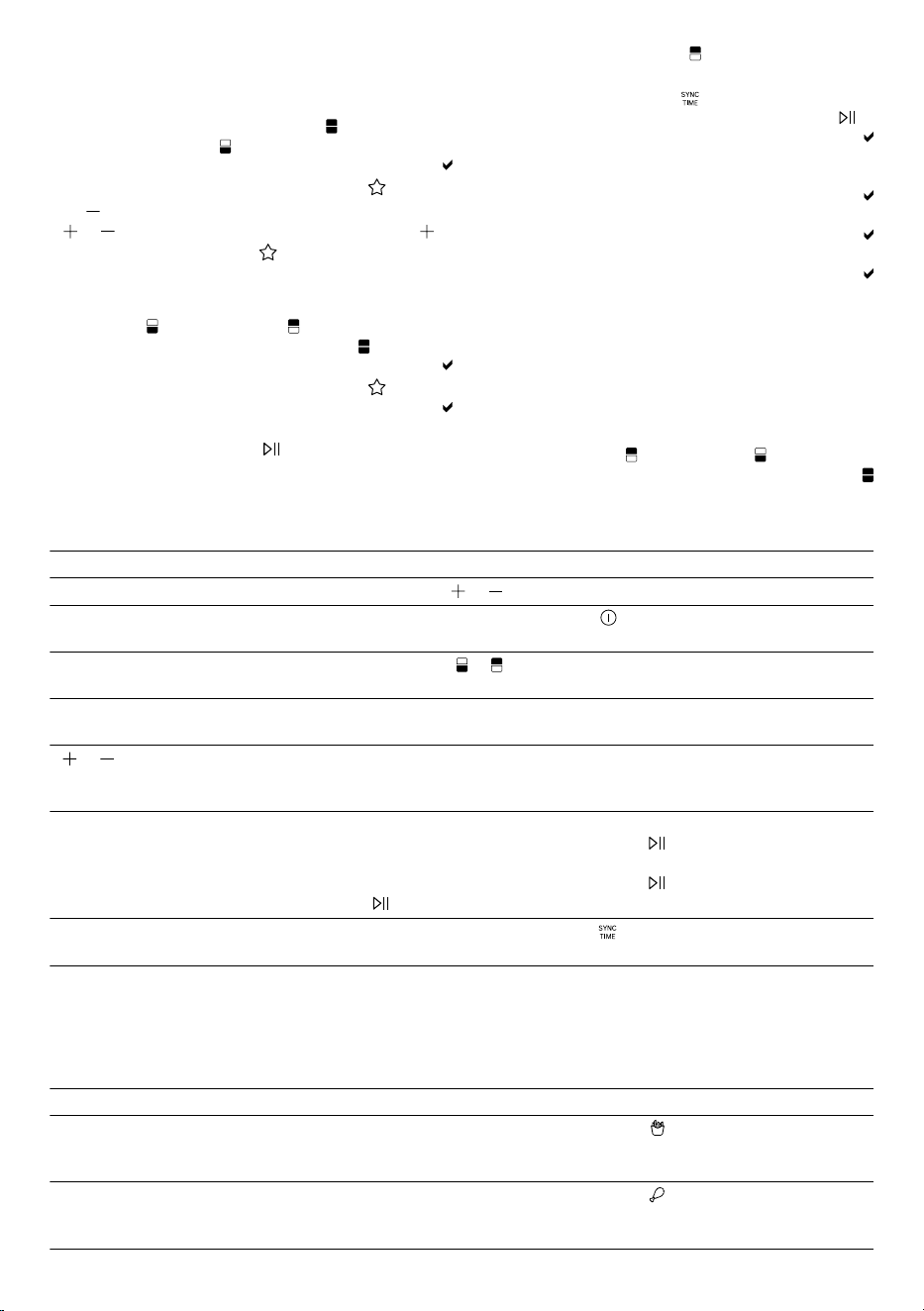
.4ليبس ىلع ،لامعتسا ةحول يف ةيناثلا ةلسلا رتخا
. ةيولعلا ةلسلا لاثملا
.5.ةجاحلا دنع ميقلا مئاوو ،ةيناثلا ةلسلل اًجمانرب رتخا
.6ةطساوب َريضحتلا أدباو SYNC ةفيظولا لعف
.فاقيا/ليغشتلا
لوطا ريضحتلا تقو تاذ ةلسلا ةشاش ضرعت
ريضحتلا تقوو ةطوبضملا ةرارحلا ةجرد بوانتلاب
.يقبتملا
رصقا ريضحتلا تقو تاذ ةلسلا ةشاش ضرعت
.اًفقوتم ريضحتلا لظي .Holdو ةرارحلا ةجرد بوانتلاب
أدبي ،نيتلسلا اتلكل هسفن يقبتملا تقولا غَلبُي امدنع
.ةفقوتملا ةلسلا يف ريضحتلا
End نيتشاشلا اتلك يف ضموي ،ريضحتلا يهتني امدنع
.ةيتوص ٌةراشإ يودتو
نيتلسلا اتلكل يقبتملا ريضحتلا ُتقو ضرُع اذإ :ةظحم
ىدح ريضحتلا ُتقو ريغت مث ،SYNC ةفيظولا ليعفت دنع
.SYNC ةفيظولا ىَهنُت فوسف ،نيتلسلا
MyFry يصخشلا جمانربلاMyFry يصخشلا جمانربلا
طبضلل ةيصخشلا كعاضوأ ظفحل MyFry مدختسا
ةدح ىلع ٍلك طبضلا عاضوأ ظفح كنكمي .اهئاعدتساو
MATCH لجأ نمو ةيولعلا ةلسلاو ةيلفسلا ةلسلل
.
هتمءاوم وأ MyFry دادعإ
كانه نوكت ،ىلوا ةرملل MyFry ّدعُت امدنع :ةظحم
ميقلا ضرعُت ،MyFry مءاوت امدنع .اًقبسم ةددحُم ميق
.اًريخأ ةظوفحملا
.1ىلع ،لامعتسا ةحول يف ًةلس وأ MATCH رتخا
. ةيلفسلا ةلسلا لاثملا ليبس
.جماربلا زومر ءيضتو ةيلفسلا ةلسلا زمر ضموي
.2.MyFry طغضا
.3وأ TEMP مادختساب ةبوغرملا ةرارحلا ةجرد طبضا
. وأ TIME مادختساب بوغرملا ريضحتلا تقوو ،
.4ةدمل اًطوغضم MyFry ىلع ِقبأ ،ميقلا ظفحل
.ةيتوص ٌةراشإ ردصت نأ ىلإ ،لقا ىلع نيتيناث
MyFry مادختسا
.1وأ ةيلفسلا ةلسلا وأ ةيولعلا ةلسلا رتخا
. MATCH
.جماربلا زومر ءيضتو راتخملا ضموي
.2.MyFry طغضا
ةجردل َةظوفحملا َميقلا بوانتلاب ةشاشلا ضرعت
.ريضحتلا تقوو ةرارحلا
.3.فاقيا/ليغشتلا ةطساوب َريضحتلا أدبا
ةيفاضإ فئاظوةيفاضإ فئاظو
.ةيفاضإ فئاظو ىلع ةماع ًةرظن انه دجت
ةفيظولاذيفنتلا
عرسأ ٍةريتوب ميقلا رييغت
. وأ ىلع طغضلا يف رمتسا
عيمجل ريضحتلا عطق
.لسلا
.ءافطإ/ليغشت طغضا
ةدحاو ةلسل ريضحتلا عطق
نم ديزملا ضرع نع ةينعملا ُةشاشلا فقوتت نأ ىلإ ، وأ ىلع طغضلا يف رمتسا
.ميقلا
ةلسلا رايتخا ءاغلإضرع نع ةينعملا ُةشاشلا فقوتت نأ ىلإ ،ضماولا ةلسلا زمر ىلع طغضلا يف رمتسا
.ميقلا نم ديزملا
تقو وأ ةرارحلا ةجرد رييغت
لمع ءانثأ يف ريضحتلا
ريضحتلا
. وأ مادختساب ًةرشابم ميقلا ةمئاوم نكمي ،ةلعفُم طقف ةدحاو ةلس نوكت امدنع
.كلذ دعب ميقلا مءاوو ةبوغرملا ةلسلا زمر ًوأ طغضا ،نيتلعفُم ناتلسلا نوكت امدنع
اًتقؤم ريضحتلا فاقيإطغضا ،اًتقؤم نيتلسلا اتلك يف ريضحتلا فاقي وأ ةلعفُم ةدحاو ةلس نوكت امدنع
.فاقيا/ليغشتلا
مث ،ةبوغرملا ةلسلا زمر ًوأ طغضا ،اًتقؤم طقف ةدحاو ةلس يف ريضحتلا فاقي
.فاقيا/ليغشتلا
.ىرخأ ًةرم فاقيا/ليغشتلا طغضا ،اًتقؤم فقوتم ريضحت فانئتس
ةفيظو ةيلاعف فاقيإ
SYNC
ةيدرف ٍةروصب ريضحتلا ريسيو اهليغشت فقوتملا ةلسلا ريضحت أدبي .SYNC طغضا
.ةلس لكل
ةيقيبطت ٌةلثمأةيقيبطت ٌةلثمأ
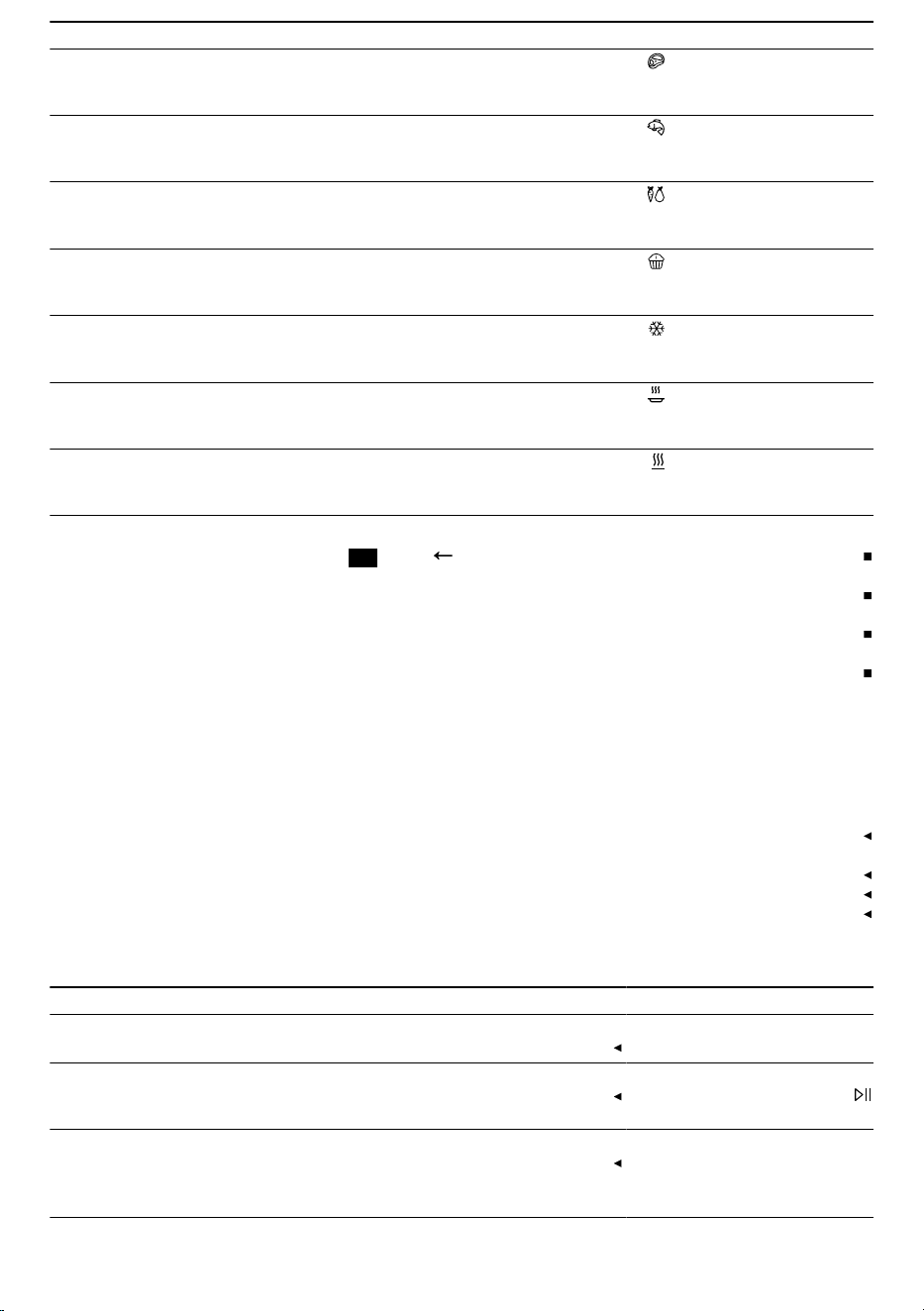
.ماعطلا عون بسح بسانملا جمانربلا رتخا .اًقبسم ةدعُم ةفلتخم جمارب 9 كُزاهج رفوي
ةمعلاو ةلاحلاو لكشلاو مجحلاو أشنملا ثيح نم ةمعطا فتخ اًرظن .تايصوت يه ةروكذملا ميقلا :ةظحم
.ةروكذملا ميقلا نع كتمعط ىلثملا ُتادادعا ديحت دق ،ةيراجتلا
ةيئاذغلا داوملاقبسملا طبضلاتاداشرإ
سطاطبلا قئاقر
،مم10×10 ،ةدمجُملا
مج500
سطاطبلا قئاقر
م°180
ةقيقد20
هبلقا وأ ماعطلا ّجُر ،SHAKE ضموي امدنع
ٌلك عطق6 ،جاجد كاروأ
مج125اهنم
رويطلا
م°200
ةقيقد23
هبلقا وأ ماعطلا ّجُر ،SHAKE ضموي امدنع
18
ةيئاذغلا داوملاقبسملا طبضلاتاداشرإ
،عطق2 ،يرقبلا كيتسا
اًبيرقت مس3 كمسب
عيرسلا ريمحتلا
م°230
ةقيقد16
هبلقا وأ ماعطلا ّجُر ،SHAKE ضموي امدنع
،نوملسلا كمس حئارش
مج150اهنم لك ةعطق2
كمسلا
م°160
ةقيقد11
،ةيوشملا تاوارضخلا
مج500
تاوارضخ
م°180
ةقيقد16
تيز ةقعلم عم اهطلخاو ةريبك ٍعطق ىلإ تاوارضخلا عطق
ةريبك
هبلقا وأ ماعطلا ّجُر ،SHAKE ضموي امدنع
نفام وأ كعك عطق
عطق9 ،ةريغص
ةريغص تازوبخم
م°140
ةقيقد15
ةيئاذغلا َداوملا ةباذإ
ةدمجُملا
دمجتلا ةباذإ
م°40
ةقيقد40
ةرضحُملا ةمعطا ةئفدت
ةزهاجلا
نيخستلا
م°150
ةقيقد5
ام ىلع ةرارحلا ةجرد طبضا ،ةشمرقم جئاتن ىلع لوصحلل
.ةيوئم ةجرد 150 نع ديزي
ةنوخس ىلع ظافحلا
ةوهطملا ةمعطا
ةنوخسلا ىلع ظافحلا
م°80
ةقيقد30
حئاصن
يف روكذملا نع فلتخي ماعطلا ُمجح ناك اذإ
.يهطلا تقو لطأ وأ رصقف ،لودجلا
يهطلا تقو ءاهتنا دعب اًزهاج ماعطلا نكي مل اذإو
.ةرارحلا ةجرد ْدز وأ يهطلا تقو لطأف ،ددحملا
يف ةمعطا ّجُر ،ةيواستم يهط ةجيتن ىلع لوصحلل
.SHAKE ضموت امدنع اهبلقا وأ ةلسلا
شرف ،ةبولطملا ةشمرقلا ىلع ةمعطا لصحت مل اذإ
ىلع ،يهطلا لبق ةمعطا ىلع تيزلا نم ليلقلا
كرتاو .تيز خاخب وأ ةاشرف مادختساب لاثملا ليبس
.هحسما وأ رطاقتي دئازلا َتيزلا
فيظنتلا ىلع ةماع ٌةرظنفيظنتلا ىلع ةماع ٌةرظن
ىتح ،مادختسا دعب روفلا ىلع ءازجا ةفاك فظن
.اياقبلا فجت
وأ لوحكلا ىلع ةيوتحم فيظنت داوم مدختست
.لوناثيا
.ةببدم وأ ةداح ةيندعم ضارغأ يأ مدختست
.ةشداخ فيظنت داوم وأ طوف ةيأ مدختست
مادختساب إ ضرعلا ةشاشو ليغشتلا لقح فظنت
.ةيعانص ٍفايلأ نم ةعونصم ةبطر ةطوف
.لودجلا يف نيبم وه امك ةدرفملا ءازجا فظن
24
لكشلا
ءازجاو زاهجلا فيظنت
.1مث ،ةبطر ةمعان شامق ةعطقب ّيساسا زاهجلا فظن
.هففج
ةقيقدلا فايلا نم ةللبُم شامق ةعطق مدختسا
.ةشاشلا فيظنتل
.2وأ ةمعان شامق ةعطقو ئفاد ٍءامب يهطلا زيح فظن
.رما مزل اذإ ،ةجنفسإ
.3ةاشرفب نيخستلا رصنع ءاطغ ىلع نم ماعطلا اياقب لزأ
.ةمعان
.4.ةلسلا نم ةدئازلا تويزلاو نوهدلا لزأ
.5،ةلسلا يف ةلازا ةبعص نوهد اياقب كانه تناك اذإ
ٍتارطق عضب عم ئفادلا ءاملا نم ٍليلقب ةلسلا ماف
.اهتفيظو يدؤت اهكرتاو فيظنتلا لئاس نم
.6نوباصلا ءامب ةيكلسلا تاكبشلاو لسلا فظن
ةلاسغ يف اهعض وأ ةجنفسإ وأ ةمعان شامق ةعطقو
.قابطا
تتخا ىلع بلغتلاتتخا ىلع بلغتلا
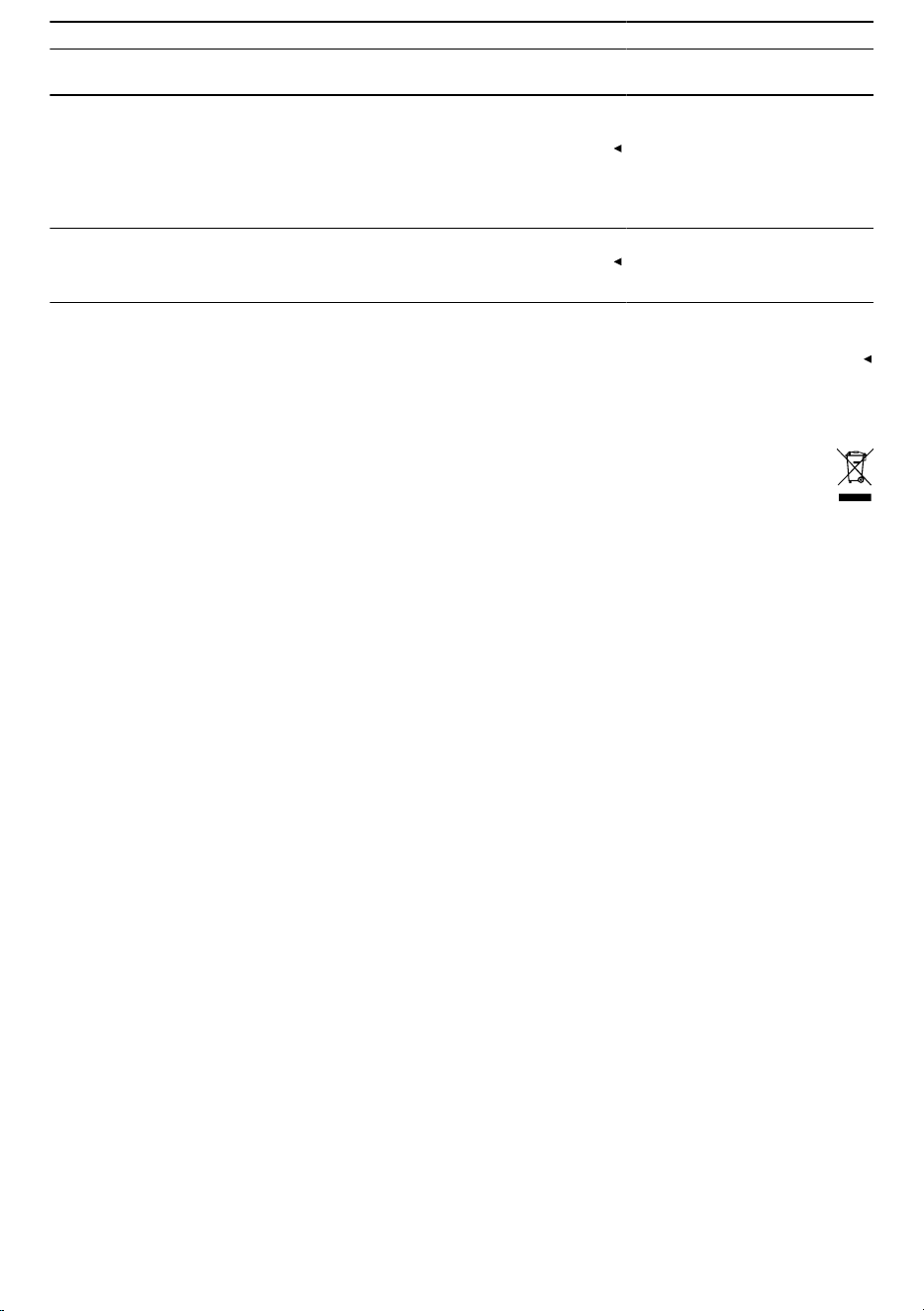
لطعلالاطعا ىلع بلغتلاو ببسلا
.لمعي زاهجلا.ءابرهكلاب لصتم ريغ زاهجلا
.ءابرهكلاب اًدوزُم كُزاهج ناك اذإ امم ققحت
و فنَأتسُي وأ أدبُي ريضحتلا
ضرعُي فاقيا/ليغشتلا
.لامعتسا ةحول يف
.زاهجلا يف حيحص لكشب ٍةعوضوم ُريغ ةلسلا
.ةنيكاملا مسج نم ةلسلا زربت أ بجي .زاهجلا لخاد ًةيلك َةلسلا حزأ
يف لماكلاب ةلسلا لاخدإ رذعتي
.زاهجلا
.يهطلا زيح يف ٌضارغأ وأ ٌةمعطأ كلانه
ُضارغا وأ ةمعطا حبصت .يهطلا زيح نم َضارغا وأ َةمعطا ْلزأ
يهط تاودأ مدختسا .ريضحتلا ءانثأ يف ًةنخاس يهطلا زيح يف ةدوجوملا
.رذحلا خوتو ةرارحلل ةمواقم
،ضرعلا ةشاش يف رهظي أطخ زمر
.Ex لثم
.أطخ دوجو ةينورتكلا ةدحولا تفشتكا
.1.يئابرهكلا سباقلا عزنا
.2.سبقملا يف ّيئابرهكلا سباقلا سبق ْدعأ
19
لطعلالاطعا ىلع بلغتلاو ببسلا
،ضرعلا ةشاش يف رهظي أطخ زمر
.Ex لثم
.3.ءمعلا ةمدخب لصتاف ،للخلا دوجو رمتسا اذإ
.زاهجلا نم جرخي ضيبأ ٌناخديف يهطلا زيح يف وأ ةلسلا يف نوهدلا اياقبو ةطقاستملا نوهدلا ببستت
.نيخستلا دنع ضيبأ ناخد روهظ
عيمج ةلاز مادختسا لك دعب اًديج يهطلا زيحو ةيكلسلا ةكبشلاو ةلسلا فظن
.نوهدلا اياقب
وأ يهطلا ةجيتن ىلع رثؤي نوهدلا اياقب نع جتانلا ضيبا ناخدلا :ةظحم
.زاهجلا
ىوتحم تاذ ةمعطا يهط دعب
يف ٌءام عمجتي ،عفترملا ةبوطرلا
.خبطلا ةروصقم
.ةيئايزيف بابس فثكتم ءام نوكتي
.شامق ةعطقب خبطلا ةروصقم ففج ،ٍفاك ٍلكشب زاهجلا دربي نأ درجمب
.راض ريغو اًيعيبط فثكتُملا ءاملا نوكت نوكي :ةظحم
ميدقلا زاهجلا نم صلختلاميدقلا زاهجلا نم صلختلا
.ةئيبلاب رضت ةقيرطب زاهجلا نم صلخت
لبس ثدحأب ةصاخلا تامولعملا ىلع لوصحلا كنكمي
ىدل وأ صصختملا كرجات ىدل تافلخملا نم صلختلا
.اهل عبتت يتلا ةنيدملا وأ ةيدلبلا ةرادإ
/2012/19 ةيبروا ةفصاوملل قباطم زاهجلا اذه
ةزهجاب ةصاخلا ةيبروا ةيداصتقا ةعومجملا
waste electrical) ةميدقلا ةينورتكلاو ةيئابرهكلا
.(and electronic equipment - WEEE
يف يرست دعاوقل ماعلا راطا ددحت ةفصاوملا هذهو
ةزهجا ةداعتسا صوصخب يبروا داحتا لود عيمج
.اهلغتسا ةداعإو ةميدقلا
20

Many thanks for choosing a Bosch
home appliance!
Register your new appliance now on MyBosch and benefit directly from:
•
Expert advice and tips to make the most of your appliance
•
Options for warranty extension
•
Discounts on spare parts and accessories
•
Digital information for use and all appliance data to hand
•
Easy access to Bosch Home Appliance Service
Simple to register, free of charge – including on mobile devices:
www.bosch-home.com/welcome
Need some help?
You can find it here.
Expert advice on your Bosch home appliances, help with problems or repairs by professionals
from Bosch.
Discover all the different ways Bosch can assist you:
www.bosch-home.com/service
The contact details of all countries are listed in the attached service directory.
BSH Hausgeräte GmbH
Carl-Wery-Straße 34
81739 München, GERMANY
www.bosch-home.com
A Bosch Company
Valid within Great Britain:
Imported to Great Britain by
BSH Home Appliances Ltd.
Grand Union House
Old Wolverton Road
Wolverton, Milton Keynes
MK12 5PT
United Kingdom
*8001376128*
8001376128 (060527)
en, ar