

1
English
Important Safety Instructions ............................................................. 2
Features ..............................................................................................6
Getting Started ................................................................................... 7
How To Use ......................................................................................... 8
Remote Control ...................................................................................9
Cleaning ............................................................................................ 10
Troubleshooting ............................................................................... 11
Español p. 12
CONTENTS
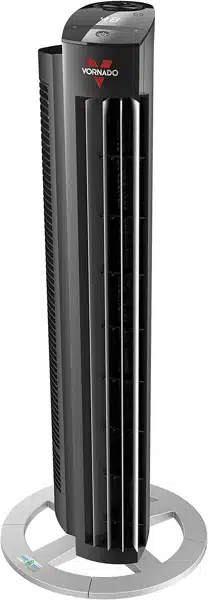
MODEL OZI42DC OWNER’S GUIDE
GUÍA DEL PROPIETARIO DE MODELO OZI42DC

2 English
READ AND SAVE THESE INSTRUCTIONS
IMPORTANT SAFETY INSTRUCTIONS
This owner’s guide and any additional inserts are considered part of
the product. They contain important information about safety, use
and disposal. Before using the product, please familiarize yourself
with all operating and safety instructions. Please keep all documents
for future reference and pass these documents on, together with
the product, to any future owner. See www.vornado.com/circulators-
manuals to view, download and print the most current version of
these instructions.
INTENDED USE: This product is intended to circulate the air
in indoor living spaces only in the United States. This product
is intended for oor use only. This product is not intended for
commercial or industrial use. The manufacturer assumes no
responsibility for damage or injury due to unauthorized use or
product modication. Failure to follow these directions will void the
product warranty.
WARNING: Risk to Children and Impaired Persons
Supervision is required during the installation, operation, cleaning
and maintenance of this product by children 12 years of age and
younger and anyone with reduced physical, sensory or mental
capabilities. Children should be supervised to ensure that they do not
play with the appliance, its parts and packaging material.
INSTALLATION WARNING—To reduce risk of re, electrical
shock and injury to persons, observe the following:
- Place this product away from curtains, draperies, tablecloths and
other fabrics, since they may be drawn into the product, damage
the motor and/or cause a re.
- No part of this product (the appliance, power cord, plug,
packaging, etc.) should be placed near furnaces, replaces, stoves
or other high temperature heat sources. Do not use this product in
a window, on an uneven or unstable surface, or near water.
- The appliance, power supply, power cord and plug cannot come
into contact with water. Do not use this product on wet surfaces.
Do not use this product in a bathtub or shower or position product
where it may fall into a bathtub, laundry, swimming pool or other
water container. Do not use this product outdoors or expose it to
weather or elements.
- Do not run cord under carpeting. Do not cover cord with throw
rugs, runners, or similar coverings. Do not route cord under
furniture or appliances. Arrange cord away from trafc area and
where it will not be tripped over. The cord should not hang over
edges of counters or be placed where it can be crimped or closed
in doors. Place appliance near an easily accessible outlet so the
product can be unplugged quickly during an emergency.
SAFE USE WARNING—To reduce risk of re, electrical shock and
injury to persons, observe the following:
- WARNING: To reduce likelihood of circuit overload, re and
electric shock, do not operate with a solid state speed device, such
as a dimmer control switch.
- Do not operate any fan with a damaged cord or plug. Discard fan
or return to an authorized service facility for examination and/or
repair.
- Do not operate unit if the unit has been dropped or damaged. Do
not use this product if it has a damaged power cord or plug. To
avoid risk of electrical shock, do not attempt to repair or replace
parts. Only original replacement parts may be used. If the power
cord is damaged, it must be replaced by the manufacturer, its

3
English
service agent, or similarly qualied persons in order to avoid a
hazard. Contact Vornado Consumer Service at 1-800-234-0604
(phone) or [email protected] (email) for further
instructions about replacement and repair.
- Before plugging power cord into electrical outlet, be sure that
all electrical information on the rating label, including voltage, is
compatible with your outlet’s power supply.
- Do not sit or stand on product.
- Never use the cord as a handle or otherwise yank, strain or stretch
the power cord.
- While the product is plugged in, do not insert or allow foreign
objects to enter any input or output opening as this may cause risk
of electric shock or re, or damage the product.
- A loose t between wall outlet (receptacle) and plug may cause
overheating and distortion of the plug. Discontinue use of the
product in this outlet. Contact a qualied electrician to replace
loose or worn outlets.
- This appliance has a polarized plug (one blade is wider than the
other.) To reduce the risk of electric shock, this plug is intended to
t in a polarized outlet only one way. If the plug does not t fully in
the outlet, reverse the plug. If it still does not t, contact a qualied
electrician. Do not attempt to defeat this safety feature.
- Before moving, repositioning, servicing, cleaning and when not in
use, use the product controls to turn off the power and then unplug.
To disconnect from outlet, grasp and pull only the plug. Also, power
off and unplug if the product will be left unattended for an extended
period of time or during electrical storms.
SERVICING WARNING—To reduce risk of re, electrical shock
and injury to persons, observe the following:
- Clean your product regularly, only as is instructed in this manual.
Prior to cleaning, turn off the power on your product and unplug. Do
not use gasoline, thinners, solvents, ammonias or other chemicals
for cleaning. Refer to the CLEANING instructions provided.
- Do not open appliance housing. To avoid risk of shock, all
service and/or repairs must be done by a Vornado Authorized
Service Center.
- This product employs overload protection (fuse). A blown fuse
indicates an overload or short-circuit situation. If the fuse blows,
unplug the product from the outlet. Replace the fuse as per the user
servicing instructions (follow product marking for proper fuse rating)
and check the product. If the replacement fuse blows, a short-circuit
may be present and the product should be discarded or returned to
an authorized service facility for examination and/or repair.
User Servicing Instructions
1. Using the product controls, turn off the appliance.
2. Grasp the plug (not the cord) and disconnect from the outlet.
3. Risk of Fire. Replace fuse only with 2.5 Amp, 125 Volt fuse as
approved by Vornado Consumer Service. For an authorized
replacement fuse, please contact Vornado Consumer Service.
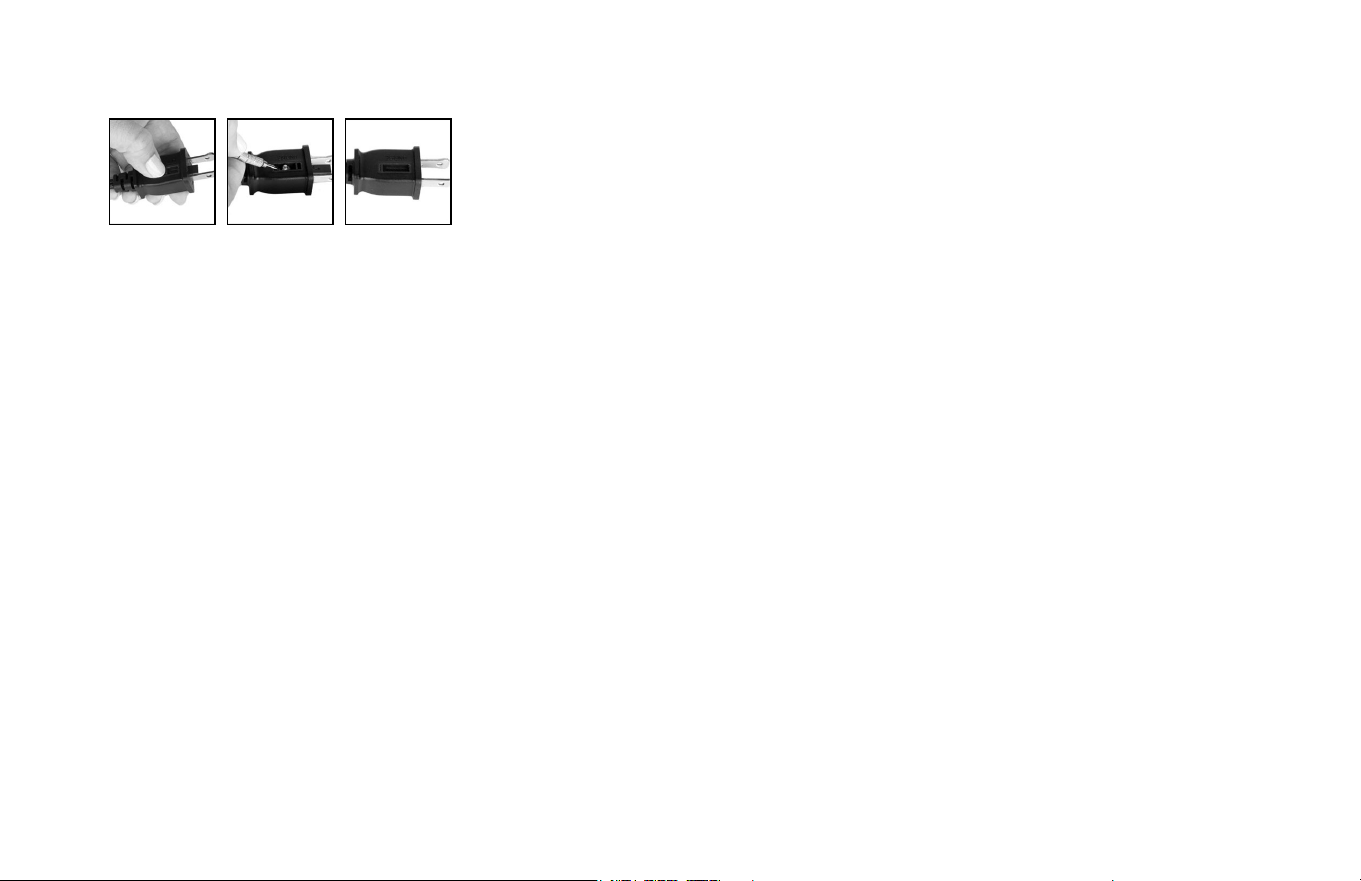
4. Once the replacement is received, use a small at-head
screwdriver to slide open the fuse cover (located on the plug)
(See Fig. A).
5. Remove fuse by using the screwdriver to gently lift each end of
the fuse (See Fig. B).
6. Install the replacement fuse by using the screwdriver to gently
push each metal end of the fuse into the receptacle one at a
time. Do not push on the center of the fuse—it is fragile and
may break.
7. Slide the fuse cover closed using the screwdriver. When
closed, the cover should t completely in the plug. No part of
the cover should stick out (See Fig. C).
8. Plug your appliance into the outlet and turn the power on.
4 English
9. If the replacement fuse blows, a short-circuit may be present
and the product should be discarded or returned to an
authorized service facility for examination and/or repair.
Risk of re. Do not replace attachment plug. Contains a safety device
(fuse, AFCI, LCDI) that should not be removed. Discard product if the
attachment plug is damaged.
FCC Compliance Statement
NOTE: This equipment has been tested and complies with Part 15 of
the FCC Rules. Operation is subject to the following two conditions:
(1) This device may not cause harmful interference, and (2) this device
must accept any interference received, including interference that may
cause undesired operation.
This equipment has been tested and found to comply with the
limits for a Class B digital device, pursuant to Part 15 of the FCC
Rules. These limits are designed to provide reasonable protection
against harmful interference in a residential installation. This product
generates, uses and can radiate radio frequency energy and, if not
installed and used in accordance with the instructions, may cause
harmful interference to radio communications.
However, there is no guarantee that interference will not occur in a
particular installation. If this product does cause harmful interference
to radio or television reception, which can be determined by turning
the product off and on, the user is encouraged to try to correct the
interference by one or more of the following measures:
- Reorient or relocate the receiving antenna.
- Increase the separation between the product and the receiver.
- Connect the product into an outlet on a circuit different from that to
which the receiver is connected.
- Contact Vornado Consumer Service or dealer or an experienced
radio/TV technician for help.
Changes or modications to this unit not expressly approved by the
party responsible for compliance could void the user’s authority to
operate the product.
Supplier’s FCC Declaration of Conformity
Unique Identier: Vornado Model OZI42DC
Responsible Party: Vornado Air LLC
Mailing Address : 415 E. 13th St., Andover, KS 67002
Contact: www.vornado.com
SAVE THESE INSTRUCTIONS
Fig. A Fig. B Fig. C
5
English
This Product includes a remote containing a replaceable
CR2032 Button Cell Battery (3V).
WARNING
• INGESTION HAZARD: This product contains a
button cell or coin battery.
• DEATH or serious injury can occur if ingested.
• A swallowed button cell or coin battery can
cause Internal Chemical Burns in as little as 2
hours.
• KEEP new and used batteries OUT OF REACH
of CHILDREN.
• Seek immediate medical attention if a battery
is suspected to be swallowed or inserted
inside any part of the body.
- Call a local poison control center for treatment information.
If you think batteries might have been swallowed or placed
inside any part of the body, seek immediate medical
attention. In the US call the National Poison Control Center at
1-800-222-1222 or 202-625-3333.
- Even used batteries may cause severe injury or death. New
and used batteries may cause injury. Keep new and used cells
(or batteries) away from children.
- Always completely secure the battery compartment. If the
battery compartment does not close securely, stop using the
product, remove the batteries, and keep them away from
children.
- Ensure the batteries are installed correctly according to
polarity (+ and -).
- Do not mix old and new batteries, different brands or types
of batteries, such as alkaline, carbon-zinc, or rechargeable
batteries.
- Do not force discharge, recharge, disassemble, heat above
104˚F / 40˚C or incinerate. Doing so may result in injury due to
venting, leakage or explosion resulting in chemical burns.
- Non-rechargeable batteries are not to be recharged.
- Remove and immediately recycle or dispose of used
batteries according to local regulations and keep away from
children. Do NOT dispose of batteries in household trash or
incinerate.
- BATTERY DISPOSAL: Please dispose of batteries according
to the local laws and regulations of your region, and while
keeping them away from children. Some batteries may be
recycled and accepted for disposal at your local recycling
center. DO NOT DISPOSE OF BATTERIES IN FIRE.
BATTERIES MAY EXPLODE OR LEAK.
- Remove and immediately recycle or dispose of batteries
from equipment not used for an extended period of time
according to local regulations.
SAVE THESE
INSTRUCTIONS
6 English
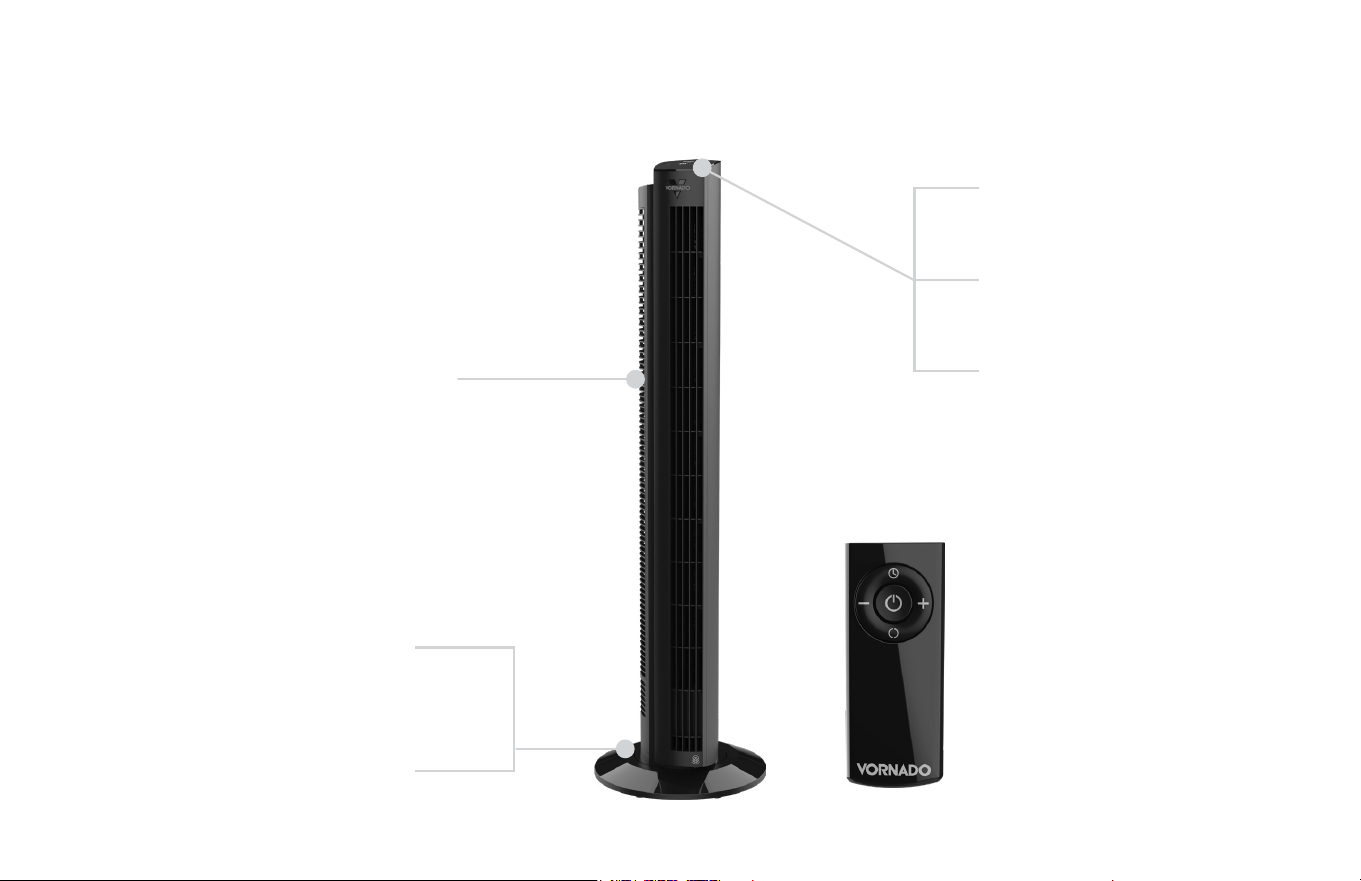
FEATURES
FINGER-FRIENDLY DESIGN
Resists curious ngers.
TOUCH-SENSITIVE
CONTROLS
MULTIPLE SPEEDS
99 speed settings for
every comfort level.
STURDY BASE
For wobble free airow.
SILICONE FEET
Non-marking feet added
for stability.
REMOTE
CONTROL
Convenience at
your nger tips.
ENERGY-SAVING TIMER
12 hour timer.
FEATURES
7
English
GETTING STARTED
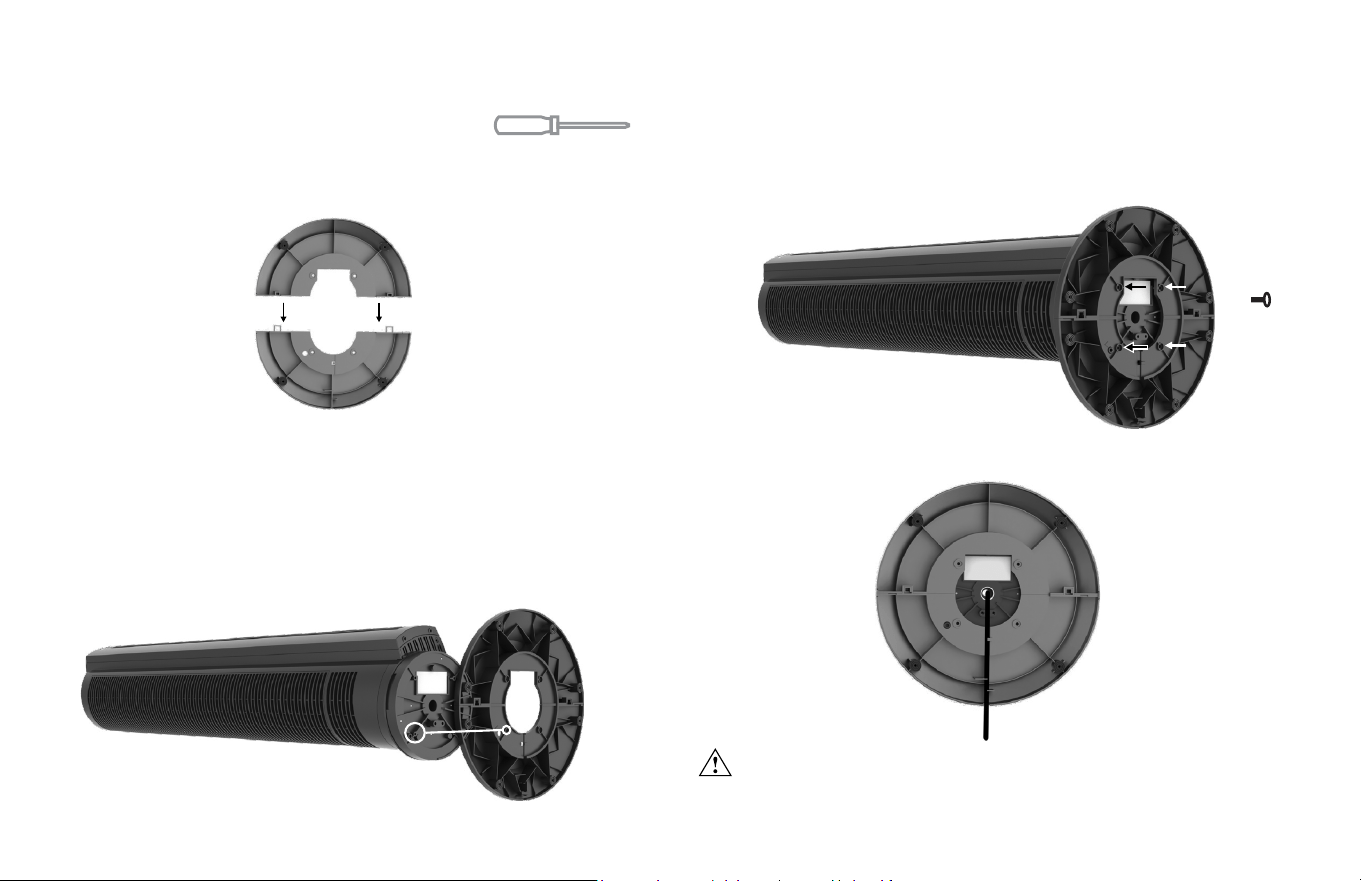
BASE ASSEMBLY Screwdriver required.
1. Assemble the two base halves together, pressing the two halves
together until ush. You should hear a slight click when fully
connected.
2. Feed the power cord through the center hole on the base.
3. Assemble the base to the bottom of the tower. There is an
alignment pin (A) located on the bottom of the tower and an
alignment recess (B) located on the base. An arrow on bottom
of base indicates alignment recess location. To ensure correct
assembly, position base onto bottom of tower with (A) and (B)
aligned.
4. Attach base to tower using 4 screws provided.
5. Route the powercord through cord path located on bottom of
base.
WARNING - Choking hazard. Keep small parts, like screws, away
from children and pets.
x4
A
B
8 English
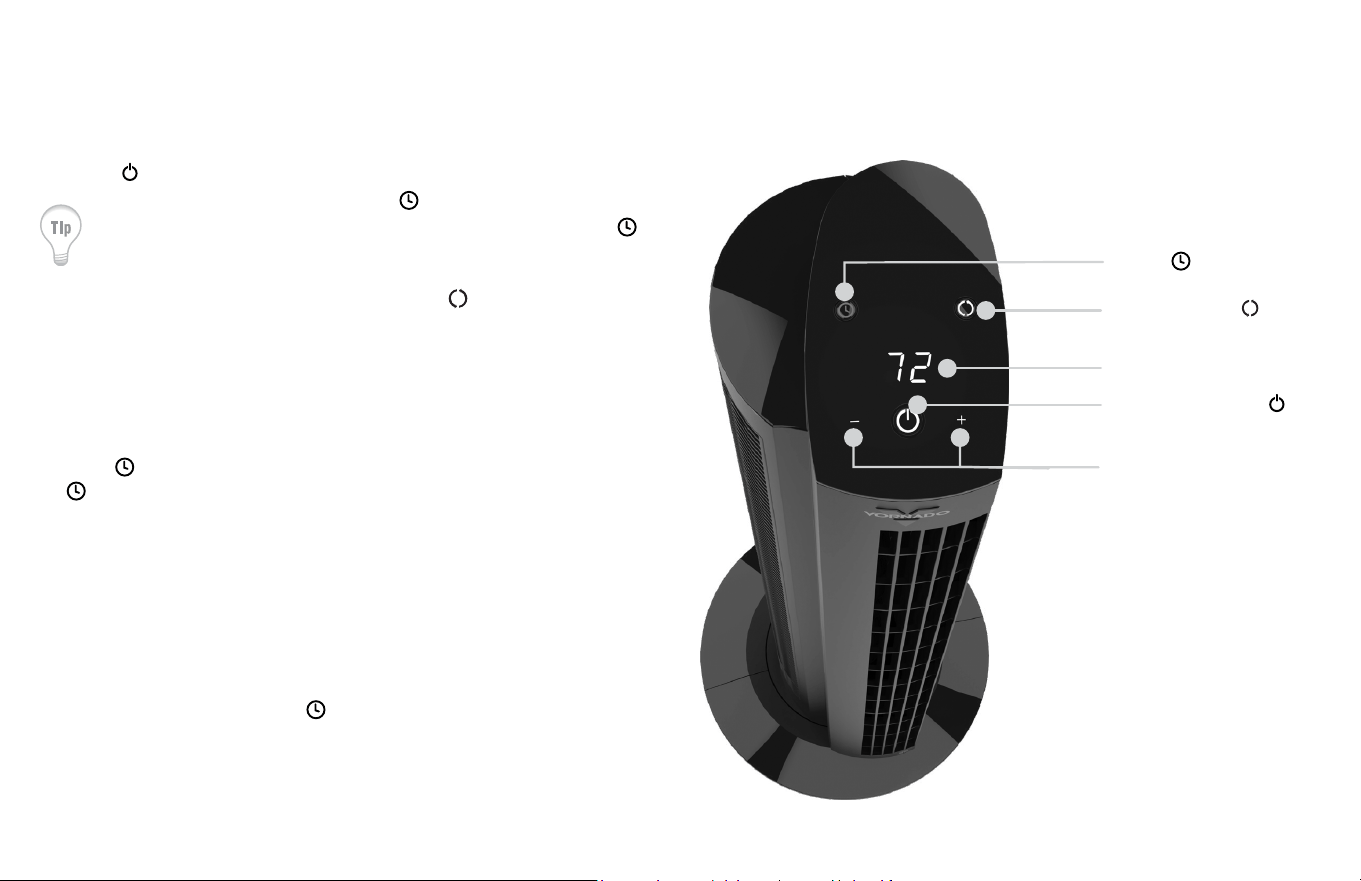
HOW TO USE
OSCILLATION
TIMER
POWER ON/OFF
SPEED / TIMER
ADJUSTMENT (-/+)
1. Touch to power on.
Your circulator returns to last
saved memory setting.
2. Select desired speed by
pressing -/+. Press and hold
-/+ to adjust speed up or down
quickly. Speed is indicated by
number shown on the display
(1-99).
3. Press
to activate timer. The
illuminates and display
ashes 0 to indicate Timer
Adjustment Mode. While in this
mode, select amount of time in
one-hour intervals by pressing
-/+. After three seconds,
ashing stops and display
shows hours to indicate timer is
set. The display returns to the
last speed selected. Touch
to quickly tell how many hours
are remaining on the timer.
4. To cancel timer, press and hold
for 4 seconds or press -
until
display shows
0 and the
is
white.
5. Press to turn Oscillation on
and off.
DISPLAY
9
English
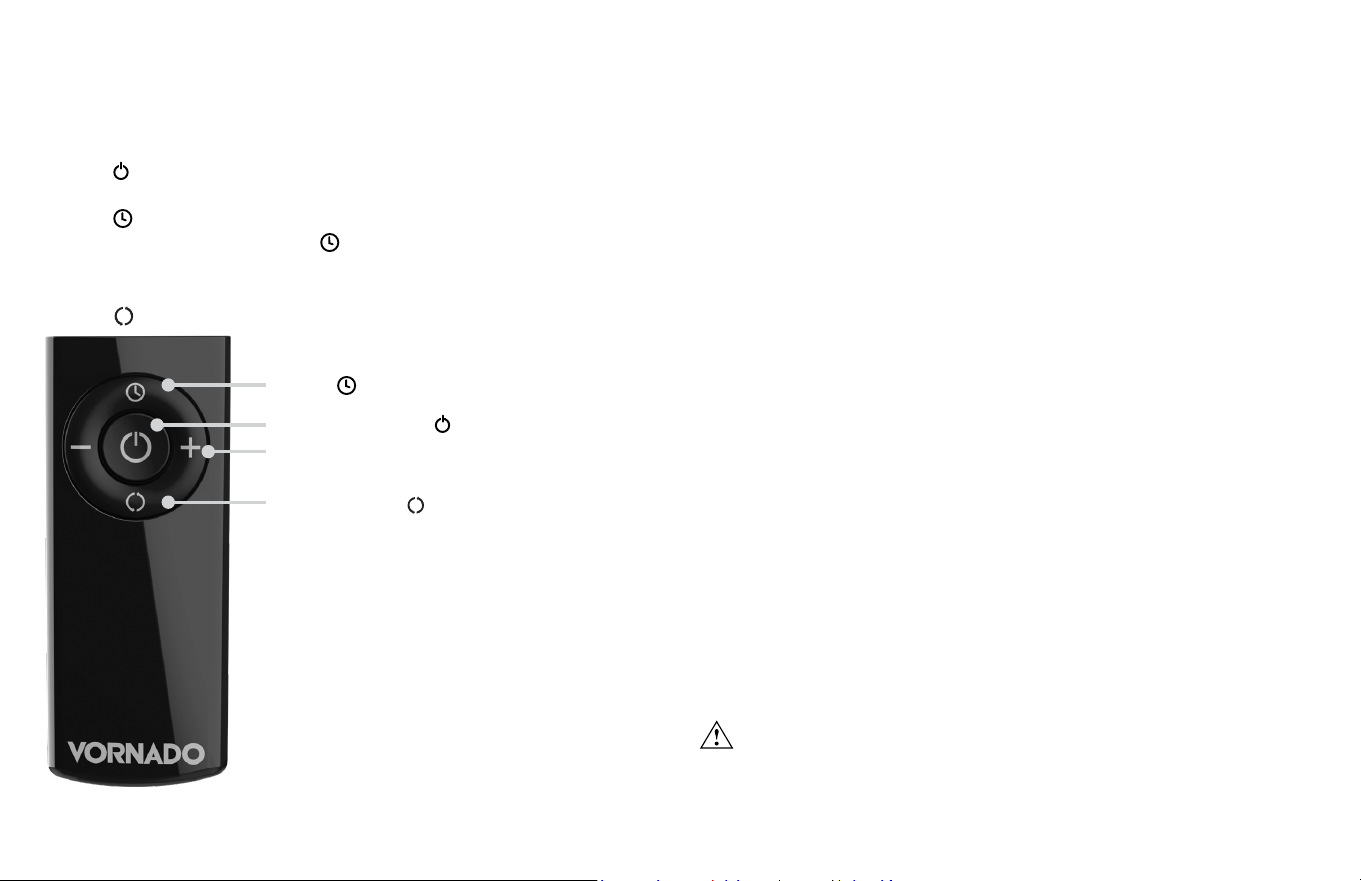
1. Press to power on.
2. Select desired fan speed setting by pressing +/- button.
3. Press to activate timer.
4. To adjust timer setting, press
or +/-.
5. To cancel timer, cycle through the timer settings or press and hold
timer button until off.
6.
Press to turn Oscillation on and off.
REMOTE CONTROL
REMOTE FUNCTIONS BATTERY REPLACEMENT
1. For battery replacement, the remote requires one coin style 3V
CR2032 battery. Always use the correct size and grade of battery for
this product.
2. To replace battery, open battery door on the back side of the
remote control (you will need to loosen the small screw on door
using a #1 Phillips screwdriver). If necessary, clean the battery
contacts and also those of the device prior to battery installation.
Remove any plastic protection from the battery and place it
in the remote with the + side facing out. Ensure the battery is
installed correctly with regard to polarity. Replace the battery door
and screw.
Note: Remove battery from the remote control when not in use for an
extended period of time and always remove dead battery immediately
and replace with fresh. Do not store dead battery in remote.
Your tower circulator remote includes (1) coin style 3V CR2032 battery.
Battery comes pre-installed. Remove battery pull tab before rst use.
Pre-installed battery has a one-year life expectancy (dependent on
use) after pull tab has been removed from remote.
Note: The remote requires a line-of-sight
path to allow for the signal to be received
by the tower. Position the tower so the
receiver lens (located inside the black “V”
logo) is visible from the remote control.
WARNING: This product contains a button battery. If swallowed,
it could cause severe injury or death in just 2 hours. Seek medical
attention immediately.
TIMER
OSCILLATION
SPEED / TIMER ADJUSTMENT (-/+)
POWER ON/OFF

10 English
CLEANING
Because your tower moves a substantial amount of air, it will need
regular cleaning. If service is required, return your tower to Vornado
(see WARRANTY for instructions).
WARNING: To reduce the risk of electrical shock and injury to
persons, unplug the tower before cleaning.
REGULAR CLEANING
1. Unplug tower before cleaning.
2. Use the brush attachment on your household vacuum cleaner to
vacuum any accumulated dust off the tower.
3. Wipe down the entire tower with a soft cloth.
Note: Do not use gasoline, thinners, solvents or other chemicals for
cleaning.

11
English
TROUBLESHOOTING
POSSIBLE CAUSE AND SOLUTIONPROBLEM
Unit is not plugged in. Plug Power Cord into electrical outlet.
Unit is damaged or in need of repair. Cease usage and unplug. Contact Consumer Service for assistance.
Fuse needs to be replaced. See IMPORTANT SAFETY INSTRUCTIONS for how to replace the fuse or
contact Consumer Service.
Ensure unit is set to highest setting for maximum air circulation.
Allow the unit to fully circulate the air throughout the room, this may take several minutes.
Ensure all air inlets and outlet grille are unobstructed.
The battery is dead. Replace with new 3 volt CR2032 battery. Refer to REMOTE CONTROL - Battery
Replacement for instructions.
The remote needs a line of sight to allow the unit to receive the signal. Position the unit so that the
receiving lens, located located inside the black “V” logo, is visible from the remote control.
Unit fails to
power on.
Unit is not producing
sufcient amount of air.
Remote Control is not
working.