NX01 INSTRUCTIONS FOR USE
Version 6
Page 1 sur
39
REVISION HISTORY
Date
Version
Scope of the modification
16/12/2024
1
Creation for FDA pre-sub
18/02/2024
Update for HFE testing
28/03/2025
2
Update after HFE + Technical testing:
● Layout corrections due to editor bugs
● Reorganization for clarity and printing
constraints
● Correction on required Chrome version for
download software
● Text updates mandated by BUG-6, 7, 8, 9,
10, 11, 13, 14, 21, 23, 24, 25, 26, 29, 30
17/04/2025
3
● Missing information regarding BUG-14 +
PRISK23, modification of sentence for
compliance with IEC TR 60601-4-2 before
the EMC tables
● Addition of table for immunity to proximity
magnetic fields and addition of IEC TR
60601-4-2 immunity levels
26/09/2025
4
● Addition of two caution statements
regarding cybersecurity (threat IDs 1 and
10)
10/10/2025
5
Addition of cybersecurity information in section
Device maintenance
5/11/2025
Update for CECILE project: addition of WEEE and
CE symbols, update of recycling information,
addition of SAR information
19/11/2025
Correction of bluetooth EIRP and frequency range
1/12/2025
Addition of battery ratings
14/10/2025
6
Changed service life for lifetime
1
HOW TO USE THIS DOCUMENT
This document is organized in sections:
Section
Contents
Page #
Notes
1
Revision history
Signatures
How to use this document
Normal
For QMS compliance of the entire document
2
Front cover of printed manual
1
Not shown
(no footer)
Must be one page only
3
Inside front cover
2
Shown
Must be one page only
Content of the manual
Starts from 3
Must remain a multiple of 4 (booklet format)
4
Inside back cover
No
(no footer)
Memo image for HCP, limit margins for maximum
image size
Must be one page only
Back cover
No
(no footer)
Memo image for Patient, limit margins for
maximum image size
Must be one page only
The sections are required to maintain independent and consistent page numbering of the actual printed
manual.
If the document needs to be updated:
● Only edit the document in Google Docs in Chrome! Word modifies styles (Header 5 and 6 are lost,
paragraph spacing is lost) and removes the properties of some elements such as the date chips (e.g. :
“Last revision” on the cover page)
● Make sure to display non printable characters (Ctrl + Maj + P) to see the section breaks. Do not
remove section breaks! They are crucial for the layout and proper numbering
● Before exporting the document as a PDF, make sure to update the “Last revision” date chip (cover
page) and the ToC (page 2)
To export the manual into a PDF format suitable for the printing company:
● Export as PDF: File > Download > PDF file (.pdf) (Fichier > Télécharger > Document PDF (.pdf) ) in
Google Docs
● To test the result on a regular printer, print pages 3-end (Front cover to Quick reference - EEG
recording) only as a booklet. The Quick reference pages may be cropped a bit, regular printers cannot
print without any margins but professional printers can. The final results from the printing company
should be checked and approved before final printing.
To keep certain headers hidden in the table of contents (QMS sections, ToC header), they need to be styled
with:
● Header 5 instead of Header 1
● Header 6 instead of Header 2
The styles are identical, but the manual’s ToC only includes the top levels.
3
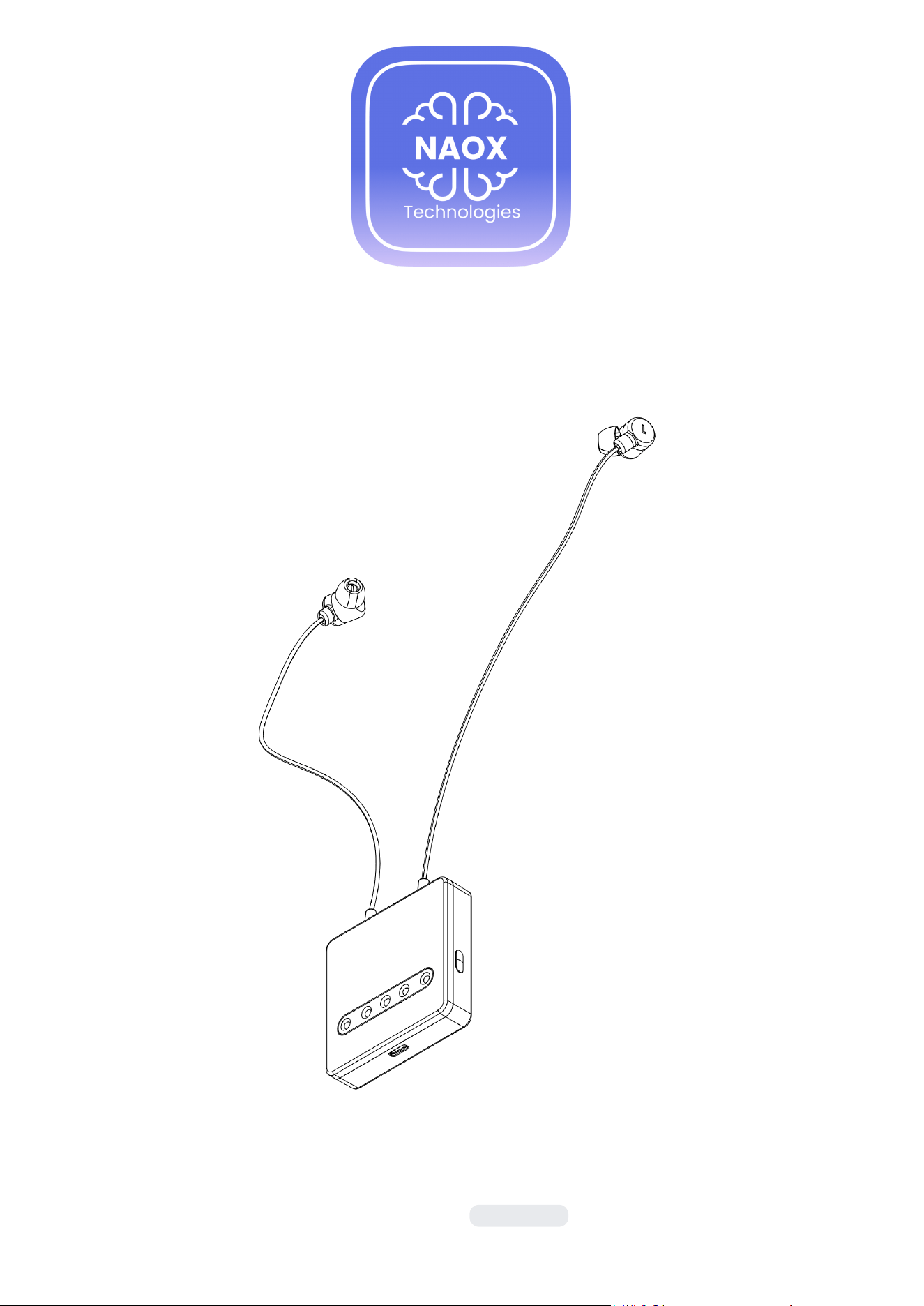
NX01
INSTRUCTIONS FOR USE
Last revision:
2026-02-02
TABLE OF CONTENTS
Manufacturer 2
Package and device symbols 2
Glossary 3
Product description 4
Product safety information 4
Package contents 7
Device command panel 9
Basic device operations 11
Instructions for patient use 13
Recording an EEG 15
Troubleshooting steps for patients 18
Instructions for healthcare professionals 19
Use of the Download Station by healthcare professionals 22
Troubleshooting steps for healthcare professionals 29
Device maintenance 31
Technical specifications 33
EMC tables 34
Regulatory information 35
Quick reference - EEG recording 36
MANUFACTURER
If you need assistance in setting up, using or maintaining NX01, please contact us:
Manufacturer
Address
Contact
NAOX Technologies
62 Rue Mazarine
75006 Paris
FRANCE
+33 (0)781605826
Copyright © 2025 – NaoX Technologies – All rights reserved.
2
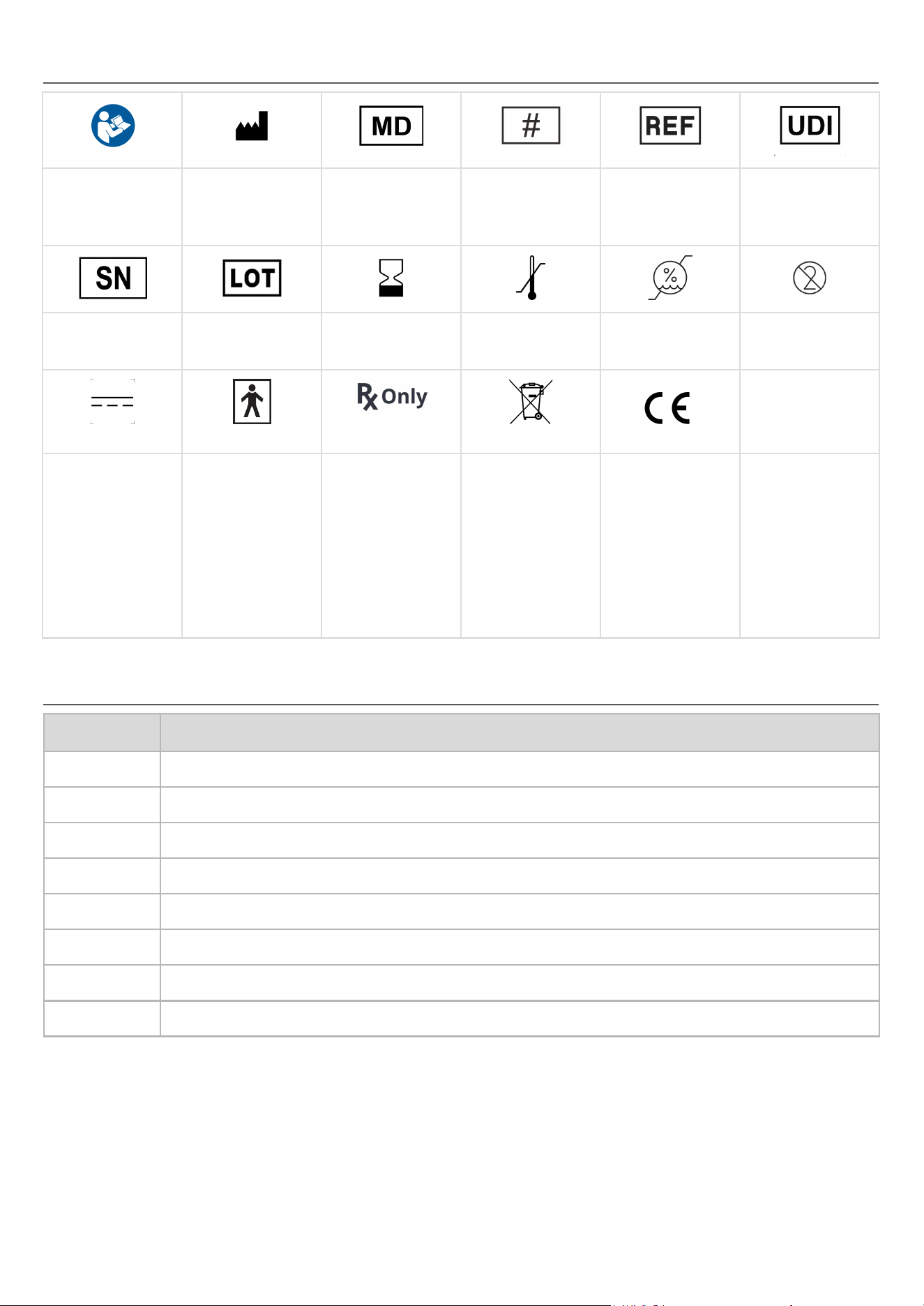
PACKAGE AND DEVICE SYMBOLS
Consult
Instructions
For Use
Manufactured For
+ Manufacturing
Date
Medical Device
Model Number
Catalog Number
Unique Device
Identification
Serial Number
Batch Number
Expiration Date
Temperature Limits
Humidity
Limitations
Single Use Only
Direct Current
Type BF Applied
Part
Prescription Only
Electronic
equipment, do not
dispose of the
device or battery
with household
waste
Compliance with
EU regulations.
The number of the
notified body
responsible for the
certification is
affixed next to this
symbol
GLOSSARY
Term
Definition
BLE
Bluetooth Low Energy
EEG
Electroencephalogram
HCP
Healthcare Professional
LED
Light Emitting Diode
Patient
Adult patient, or pediatric patient under the supervision of their adult caregiver.
Acquisition
Collecting EEG signals with the NX01 device.
Recording
Acquisition stored in the NX01 device’s memory.
Streaming
Acquisition performed via Bluetooth, with data transmitted to and saved on the monitoring computer.
3

PRODUCT DESCRIPTION
DEVICE DESCRIPTION
NX01 is a wearable device for continuous acquisition of non-invasive EEG signals in healthcare and home
settings. It consists of a pair of earbuds (one per ear) integrating a pair of active, dry electrodes, connected by
a cable to a command panel. This command panel houses the battery, the internal memory to store the data,
the main acquisition unit with function buttons and LEDs which display the device's status. The system offers
the following main features:
● The EEG signal is measured through 1 bipolar channel from a patient's ear canals in a cross-ear
montage (one ear referenced to its contralateral).
● The dry EEG electrodes are integrated into disposable eartips that are intended for a single use.
● The system is powered by a rechargeable low-voltage battery, and can record data for 10 hours on a
single charge (a full battery charge takes approximately 7 hours with the provided charger).
● The device has LED indicators to report the operating status and signal quality to the user.
● The EEG data can be retrieved by a trained healthcare professional as a European Data Format (.edf)
file.
● The EDF file contains the EEG data sampled at 250 Hz.
INTENDED USE/INDICATIONS FOR USE
NX01 is intended for use in healthcare or home settings to acquire, record, and transmit electrical activity of
the brain by placing non-invasive electrodes in the ears of patients. It acquires, records and transmits one
channel of electroencephalogram (EEG) data. The medical use of data acquired by NX01 is to be performed
under the direction and interpretation of a licensed medical professional. NX01 does not provide any
diagnostic conclusions about the patient's condition.
The NX01 is intended for use with adult and pediatric patients (6+).
INTENDED USERS
NX01 is intended for use by different populations:
● Patients:
○ Adults using the device autonomously or with assistance.
○ Children (from age 6) under the supervision of an adult caregiver.
● Healthcare professionals:
○ Neurologists prescribing the use of the device, who will review the EDF files.
○ Nurses, physician assistants, biomedical engineers in charge of device distribution / collection /
cleaning and disinfection / maintenance, performing acquisitions in the healthcare facility,
patient training, and data retrieval on behalf of the neurologist.
ENVIRONMENTS AND MODES OF USE
The physician prescribing the use of NX01 will determine that the NX01 is suitable for a given patient (in
particular with regards to the contra-indications listed in §Product safety).
The NX01 can be used in two modes:
● The streaming mode, which can only be used for examination in a healthcare facility (requires the
Download Station, only available to HCPs).
● The recording mode, designed for long-term monitoring of patients in healthcare facilities or home
settings.
The patient will use the recording mode of the device to perform acquisitions at home, without the direct
supervision of a trained HCP. The patient will receive training from the HCP on how to prepare the device and
perform recordings, and instructions from their physician regarding the context, frequency and duration of
recordings so as to collect the most relevant data for their specific case.
4
PRODUCT SAFETY INFORMATION
To ensure safety and optimal performance of the system, read this manual in its entirety before use. Follow all
instructions and use the device only as directed.
CONTRAINDICATIONS
Do not use in the following cases:
1. Deformation of the ear canal
2. Presence of skull bone defects, e.g. after prior neurosurgery
3. Patient reporting irritation of the ear canal
4. Patient with an active implanted device, such as a pacemaker, implanted defibrillator, vagal nerve
stimulation device, deep brain stimulation device, cochlear implant, implanted hearing aids
5. Patient with conventional or bone conduction hearing aids
6. Patient with a medical diagnosis of cerumen impaction (excessive earwax build-up)
7. Patient presenting an allergy, injury, lesion, open wound, infection or skin inflammation in the ear canal
8. Patient presenting with a case of suspected traumatic brain injury, skull fracture or ear canal fracture
9. In a surgical setting and/or in conjunction with high frequency surgical equipment
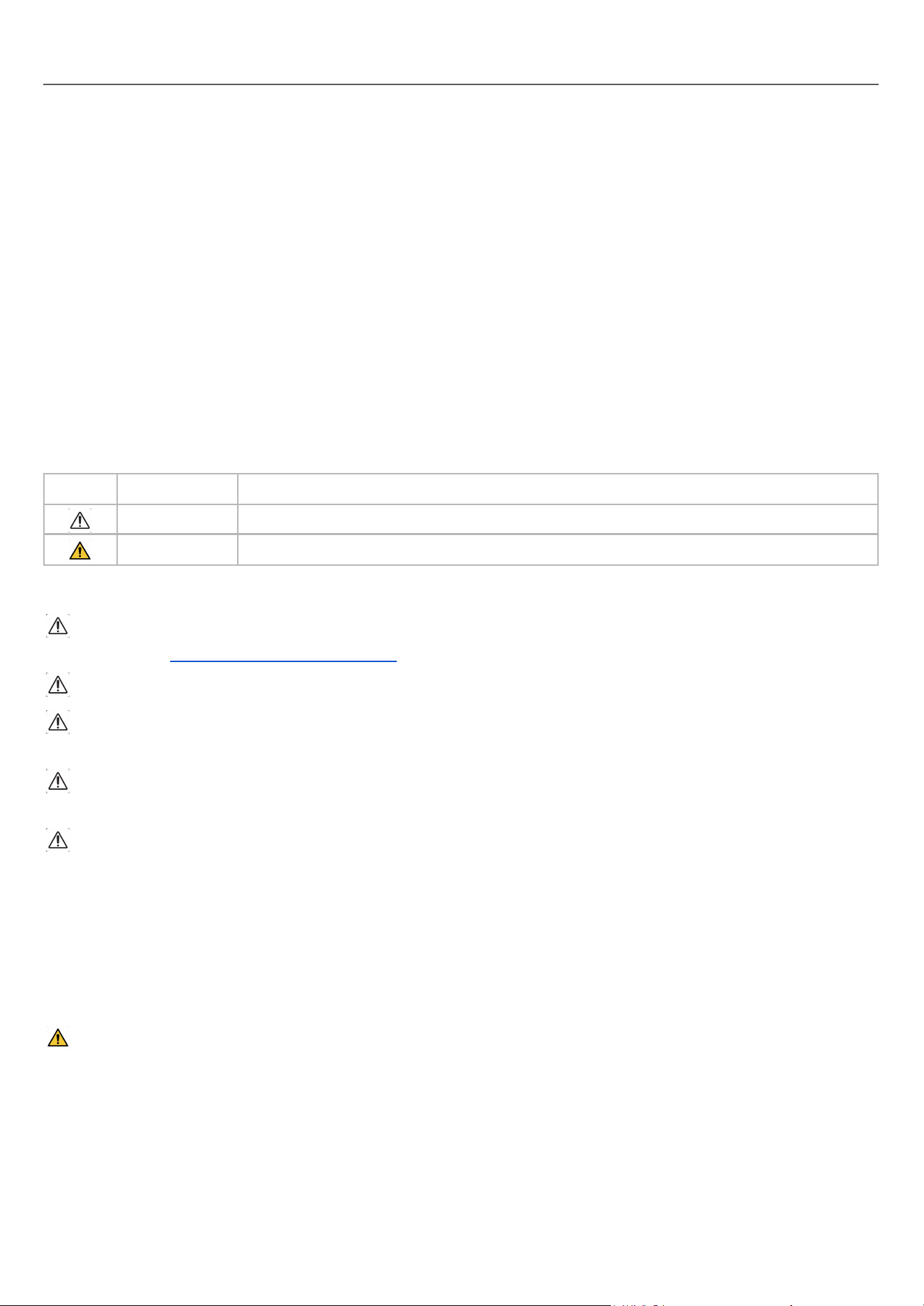
Symbol
Stands for
Meaning
CAUTION
The user needs to take precautions in the event where the described situation happens.
WARNING
The user needs to prevent or avoid the described dangerous situation.
CAUTIONS
If the NX01 device fails to operate despite attempting all troubleshooting steps described in this manual,
contact support ([email protected]) as soon as possible.
Do not use the NX01 device on patients undergoing defibrillation.
Do not use the NX01 device with eartips that are not supplied by NAOX, in their original packaging. The
NX01 device is not compatible with any other eartips on the market.
Do not use the NX01 device with a charger and charging cable other than the one supplied with the NX01
device.
Ear canal irritation
● Any patient reporting irritation of the ear canal before use will have to undergo medical examination to
confirm that they can use the NX01 device.
● Any complaint regarding a potential irritation of the ear canal linked to the use of the NX01 device
needs to be reported to the patient's attending physician immediately and followed up by a medical
examination.
WARNINGS
Hazards
● The battery used in the NX01 device may present a risk of fire, explosion, or chemical burn if handled
incorrectly. Do not expose the NX01 device to excessive heat or fire. Do not crush, puncture, or
incinerate as doing so can result in fire, explosion or the release of toxic gases. Do not use or charge if
the NX01 device appears to be leaking, discolored, deformed, or in any way abnormal.
● Ensure that the cables do not wrap around your neck or any part of your body to avoid the risk of
strangulation.
5

Electrical and electromagnetic safety
● Use of this equipment adjacent to or stacked with other equipment should be avoided because it could
result in improper operation. If such use is necessary, this equipment and the other equipment should
be observed to verify that they are operating normally
● Use of accessories, transducers and cables other than those specified or provided by the manufacturer
of this equipment could result in increased electromagnetic emissions or decreased electromagnetic
immunity of this equipment and result in improper operation
● Portable RF communications equipment should be used no closer than 30 cm (12 inches) to any part
of NX01. Otherwise, degradation of the performance of this equipment could result.
Children and pets
● The NX01 device may only be used on children ages 6 and above under the supervision of a caregiver.
● Keep the NX01 device away from children and pets. The NX01 device and other small components of
the NX01 device may present a choking hazard.
Medical devices
● Do not use the NX01 device on patients undergoing an MRI scan or in proximity to an MRI device.
The device prescribed by the healthcare professional is strictly for the prescribed patient's use only. Do not
let anyone else use the device. Doing so will create false and inaccurate data, leading to misdiagnosis and
potential patient harm.
ADVERSE EVENTS
If the patient experiences any adverse events while using the NX01 device (including an allergic reaction to
any of the materials used in the eartips), discontinue the use and contact a trained healthcare professional
immediately. The healthcare professional shall contact NaoX customer service and provide as much
information as possible about the adverse event.
STERILITY
The NX01 device and accessories are provided non-sterile.
6
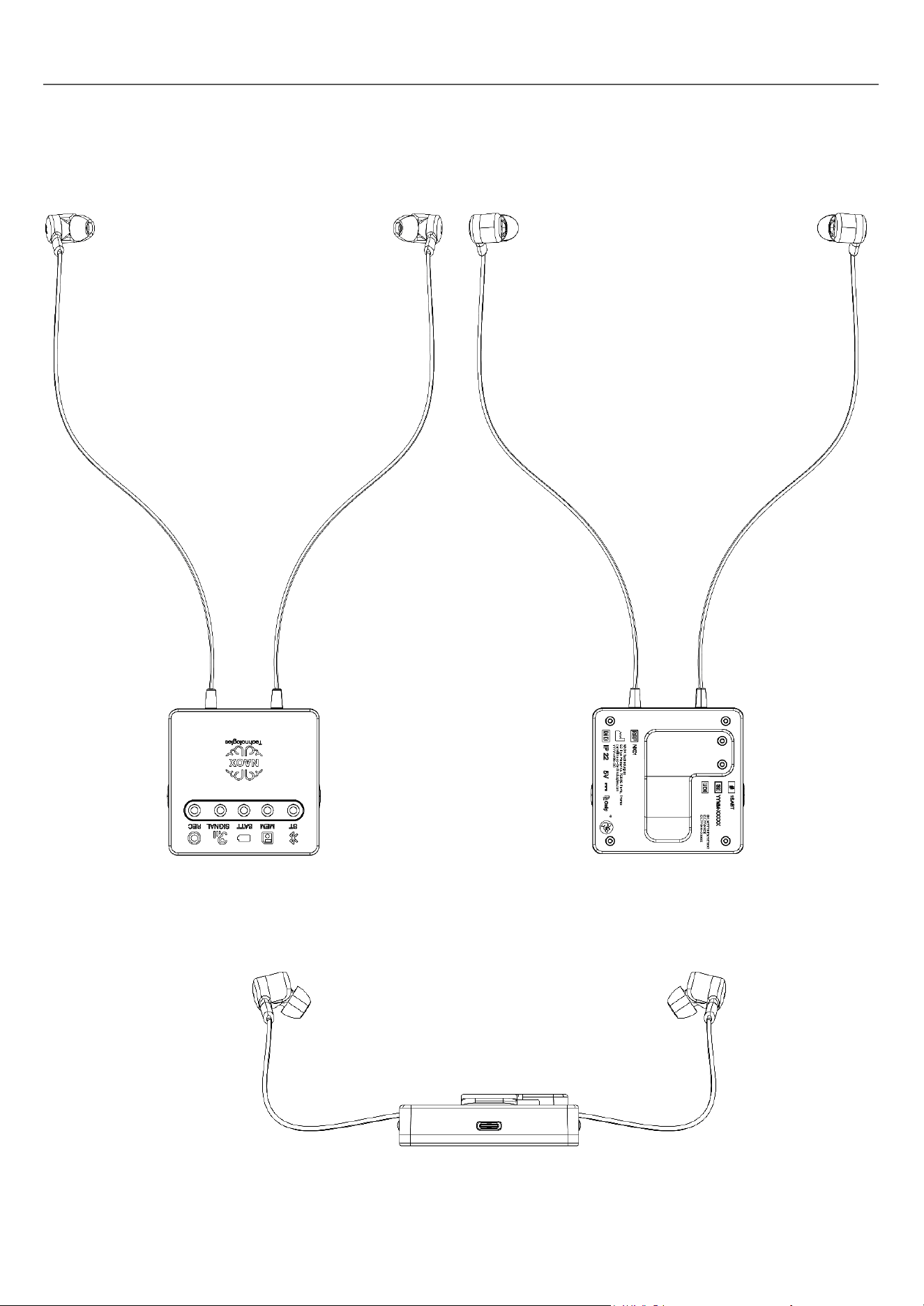
PACKAGE CONTENTS
The package contains:
● Two earbuds connected by a cable, with a command panel. This command panel houses the battery,
the internal memory to store the data, the main acquisition unit with function buttons (1 and 2) and
LEDs which display the device's status.
The command panel also includes a USB-C port which can be used to charge the device (with the
provided charger, described below), and for data transfer (with the provided cable, described below).
7
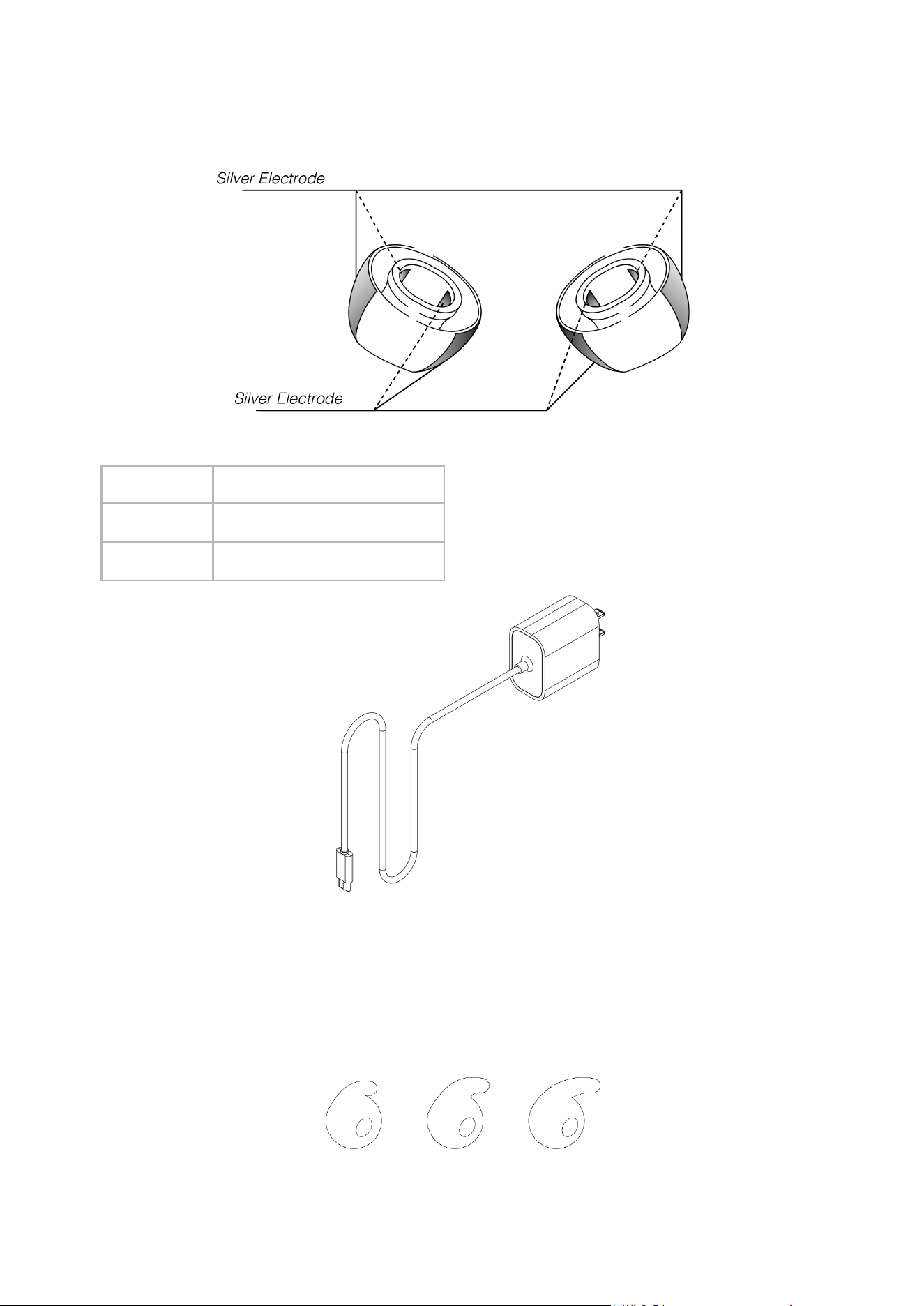
● A set of eartips in three sizes (S for small, M for medium and L for large), to be placed on the earbuds
for the acquisition. It is important to note that the provided eartips are for single-use only. Therefore,
they should be discarded and replaced for every acquisition that takes place. To purchase extra eartips
contact NAOX Technologies (see §Manufacturer).
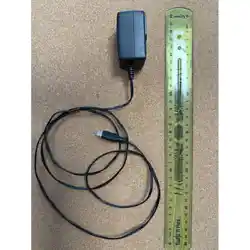
● A charger with the following specifications:
Input
AC 100-240V, 50/60Hz
Output
USB-C DC 5.0V, min 1.0A
Compliance
IEC 60601-1
● A USB cable to connect the device to a computer
● A pair of bud covers to stabilize the earbuds in the patient’s ears (especially during night
acquisitions). They are also available in three sizes (S for small, M for medium and L for large) and are
designed for single-patient use. To purchase extra bud covers, contact NAOX Technologies (see
§Manufacturer).
8
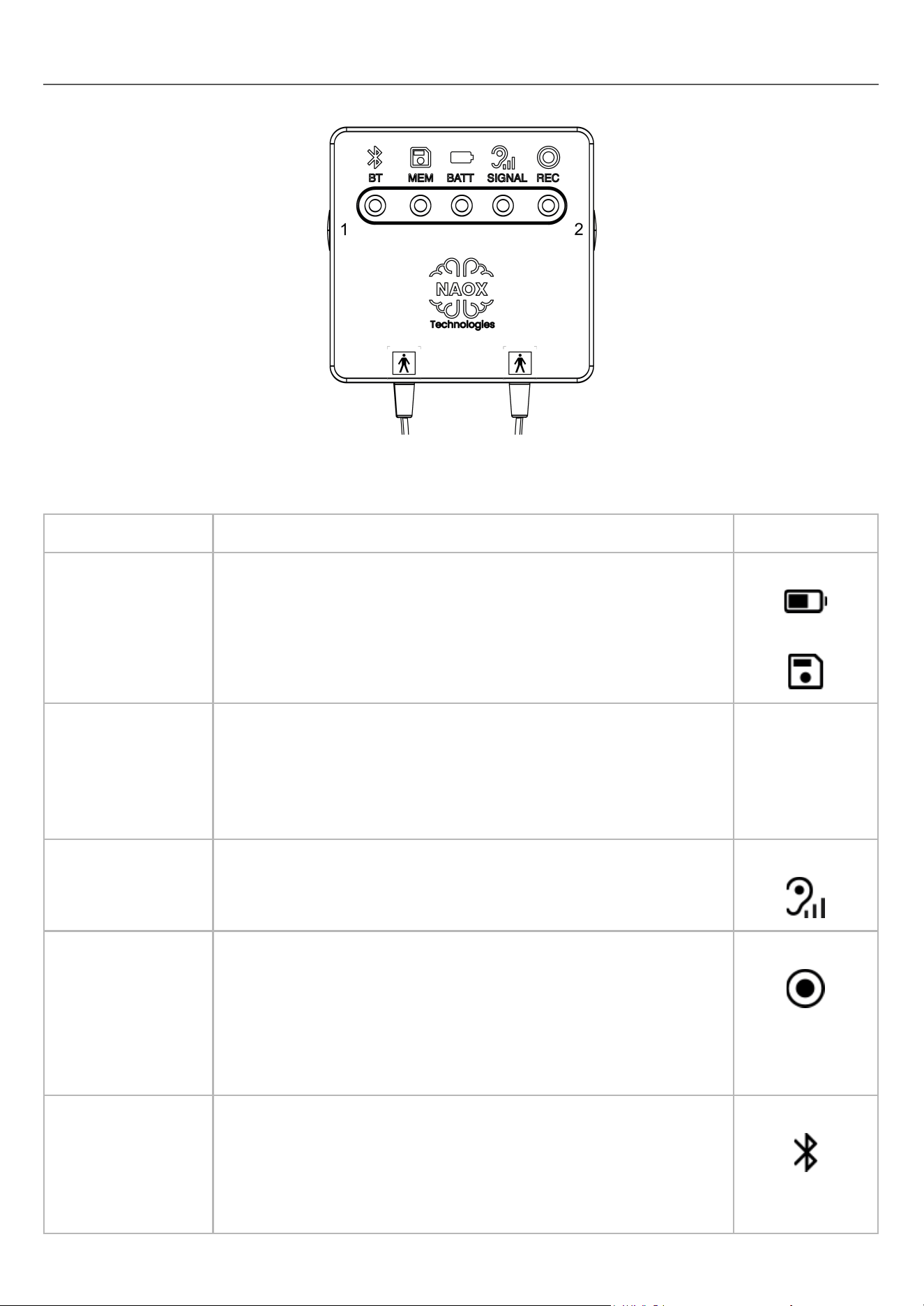
DEVICE COMMAND PANEL
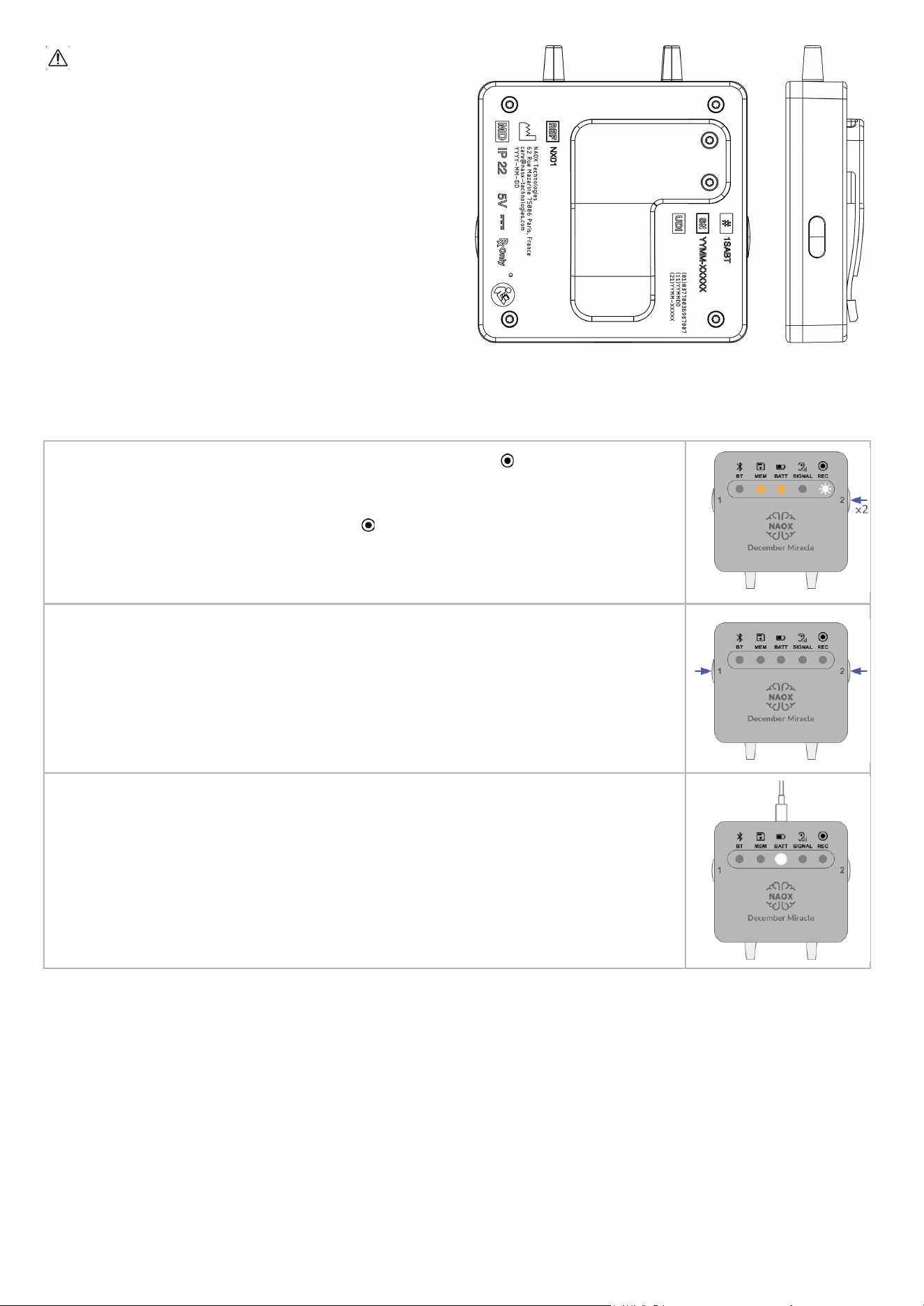
The NX01 command panel includes 2 buttons and 5 LEDs used to pilot and monitor the device.
BUTTONS
The buttons are located on each side of the command panel.
Function
Button(s) and how to use them
Associated LED
Power on
Simultaneously press and hold both Buttons 1+2 until BATT and
MEM turn on.
BATT
MEM
Power off
Simultaneously press and hold both Buttons 1+2 until all LEDs
switch off.
Note: The device cannot be turned off while an acquisition is in
progress. Make sure to stop the current acquisition before
attempting to turn off the device.
Signal quality check
Click Button 2 for a manual signal quality check during an ongoing
acquisition.
SIGNAL
Start/stop an
acquisition
In recording mode: double-click Button 2.
In streaming mode: through the interface of the Download Station
only (reserved for the use of the trained healthcare professional).
Note: No acquisition can be made while the device is charging.
Make sure to unplug the charging cable before attempting to
perform an acquisition.
REC
Bluetooth pairing
Double-click Button 1.
Note: The use of Bluetooth is reserved for the use of the
trained healthcare professional. It can only be used for
streaming acquisition and requires the Download Station to
start and stop the acquisition.
BT
9
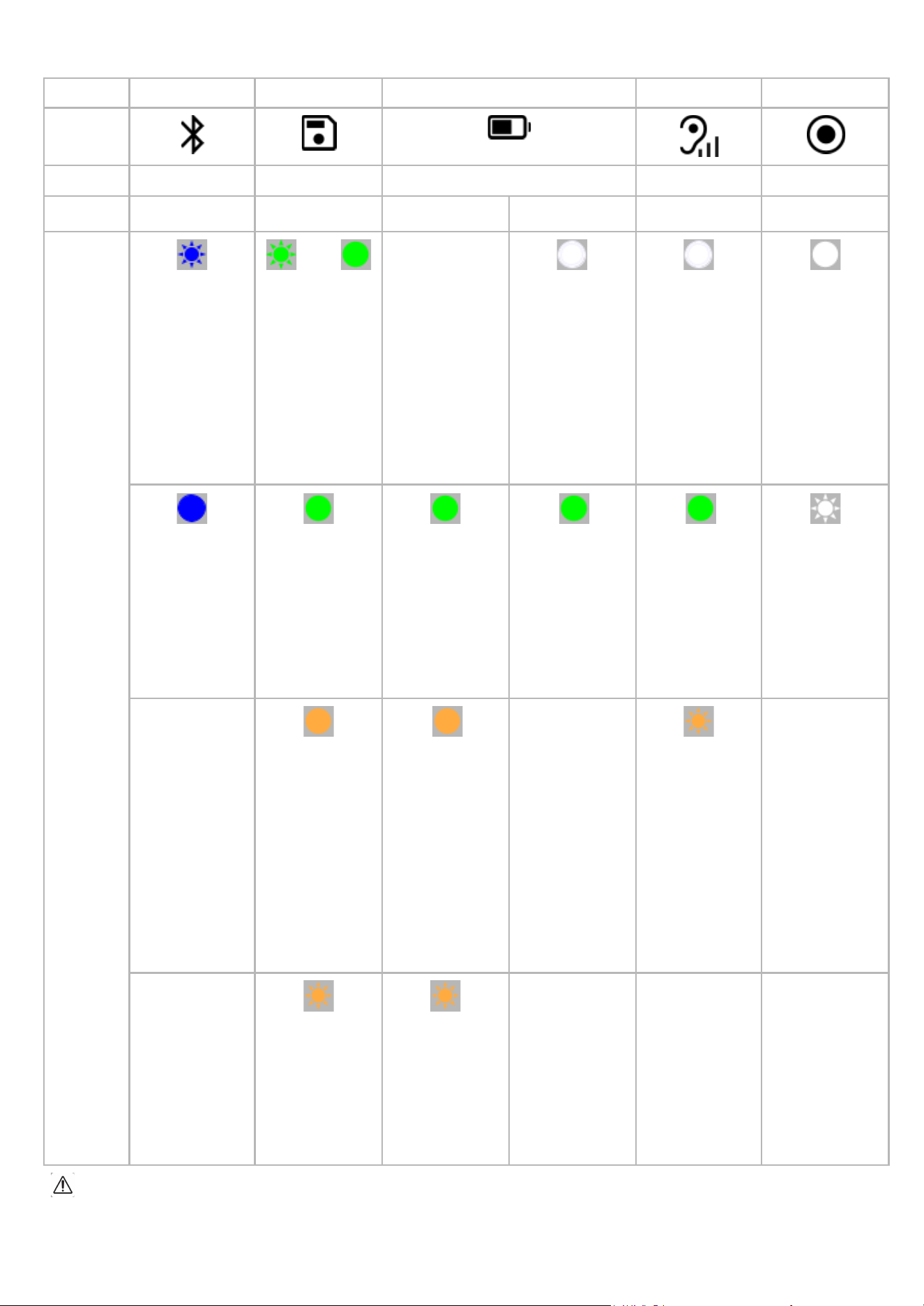
LEDS
LED
BT
MEM
BATT
SIGNAL
REC
Icon
Meaning
Bluetooth
Memory
Battery
Signal Quality
Recording
In use
Charging
Color and
pattern
Blinking blue
The NX01
device is in
pairing mode
x3 >
3 blinks
followed by
steady green
The memory is
completely
empty
Pulsing white
The NX01
device is
charging
Pulsing white
Displayed during
analysis of the
signal quality
(before the start
of a recording
and when a
manual signal
quality check is
triggered)
Steady white
An acquisition is
in progress
Steady blue
The NX01
device is paired
to another
device
Steady green
The memory is
partially used,
the remaining
space allows for
at least 8 hours
of EEG
recording
Steady green
The NX01
device is on and
the battery level
allows for at
least 10 hours of
EEG acquisition
Steady green
The NX01
device is fully
charged and can
be unplugged
from the charger
Steady green
The EEG signal
quality is good
and the
acquisition can
start or continue
without further
action
Blinking white
The device is
processing data
in its internal
memory to
finalize the
generation of the
EDF file
Steady orange
The memory is
partially used
and the
remaining space
allows for less
than 8 hours of
EEG recording
Steady orange
The battery level
allows for more
than 1 hour and
less than 10
hours of
acquisition (too
low for a full
night, but the
device can still
be used)
Blinking orange
The EEG signal
quality is weak,
reposition the
electrodes
Blinking orange
The remaining
space allows for
less than 1 hour
of EEG
recording
Blinking orange
The battery level
allows for less
than 1 hour of
acquisition.
Recharge the
device
The LEDs only reflect device status and operation mode. They do not provide any information about the
physiological status or health of the patient.
10
BASIC DEVICE OPERATIONS
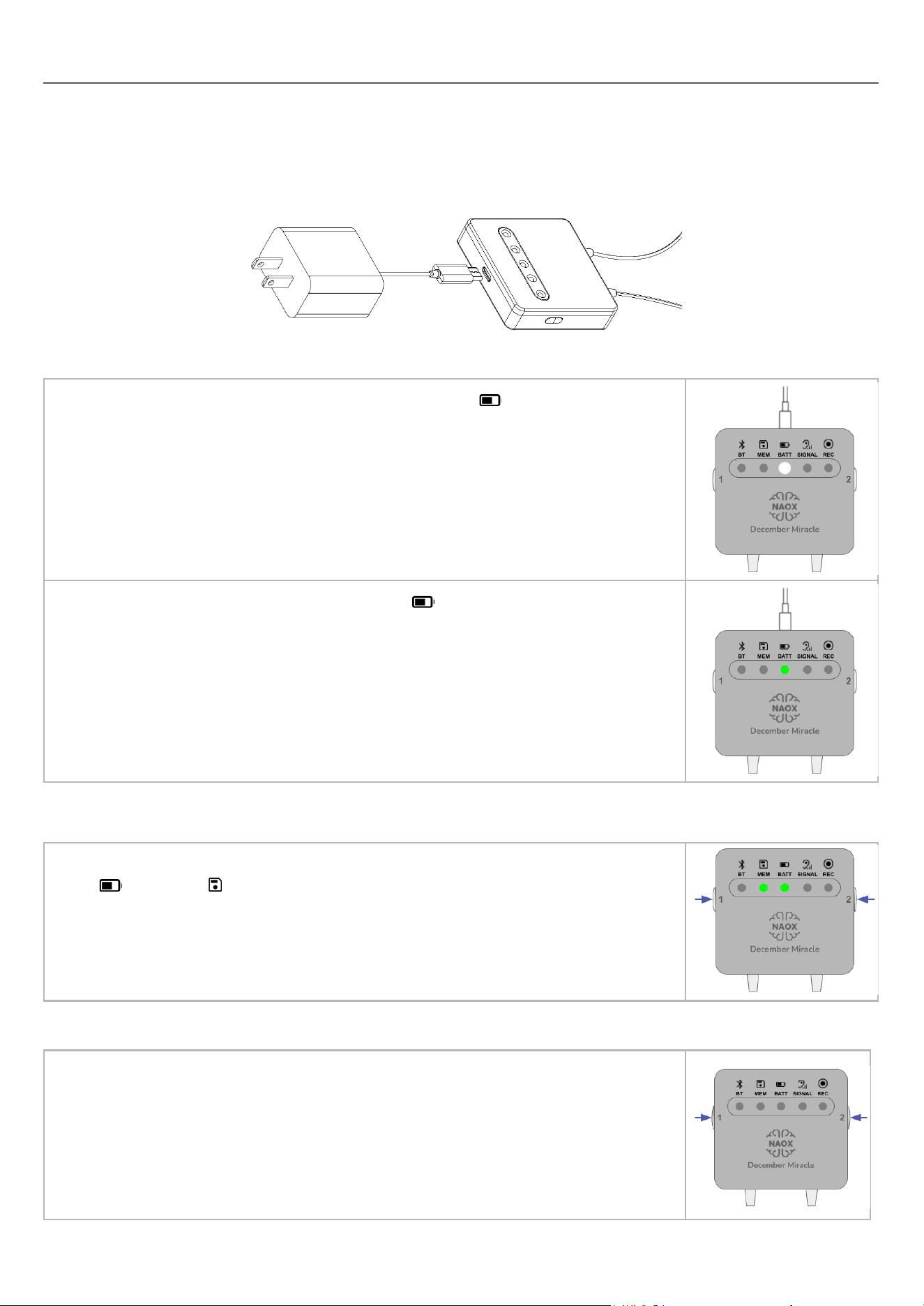
CHARGING THE NX01 DEVICE
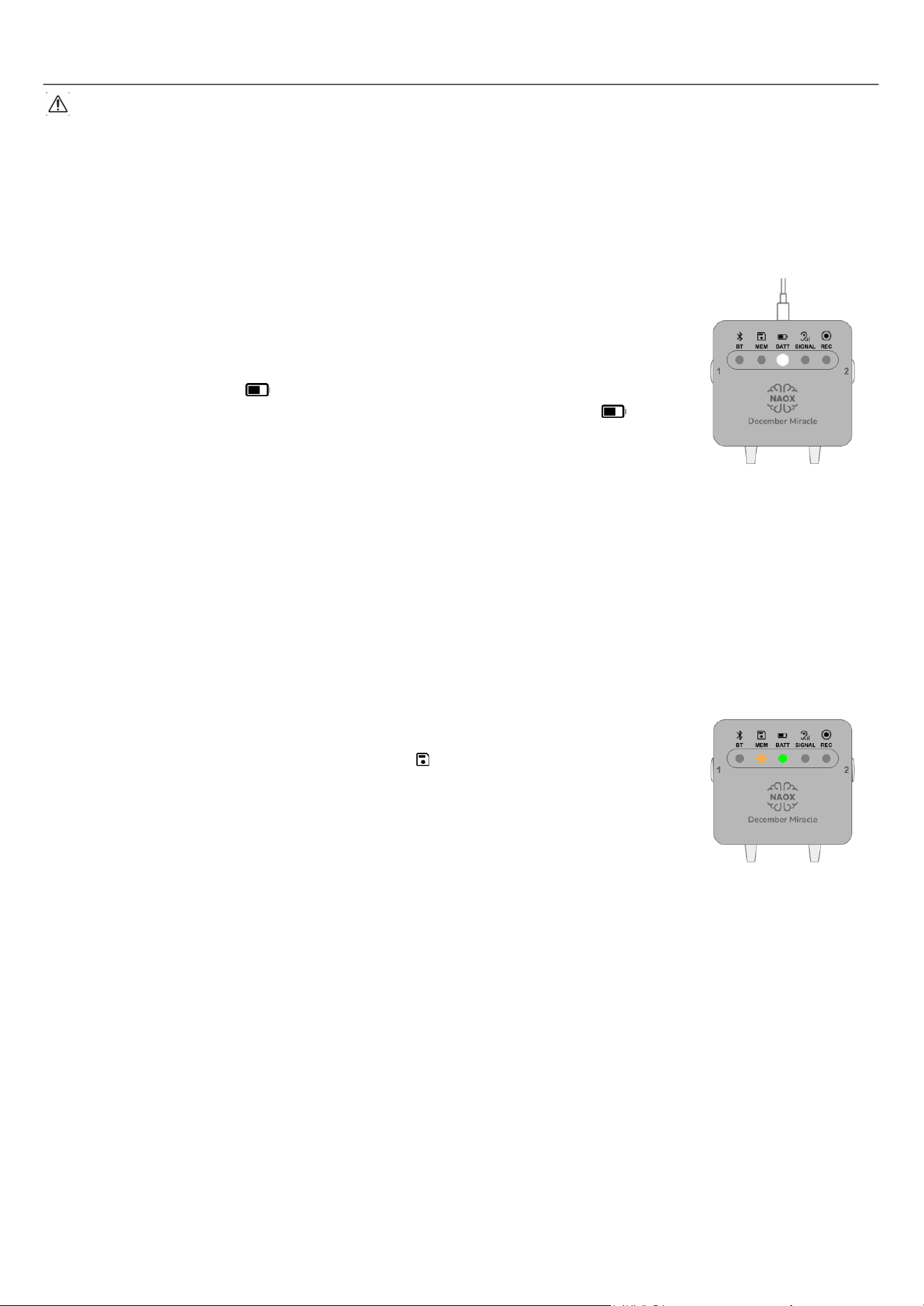
To recharge the NX01 device, plug the USB-C cable into the command panel and plug the charger into an
electrical outlet as illustrated below. Make sure that the device and charger both remain easily accessible, so
that they can be unplugged from each other or from the outlet quickly, safely and without difficulty.
When the NX01 device is plugged and charging, BATT begins pulsing white.
When the NX01 device is fully charged, BATT turns steady green. The device
can then be unplugged from the charger and used.
TURNING THE NX01 DEVICE ON
Turn on the NX01 device by pressing simultaneously Buttons 1+2, holding until
BATT and MEM turn on.
TURNING THE NX01 DEVICE OFF
To avoid interrupting any acquisition, the NX01 device cannot be turned off until the
acquisition has actually stopped. Make sure that no acquisition is occurring, and
turn off the device by pressing Buttons 1+2 simultaneously and holding until all
LEDs switch off.
11
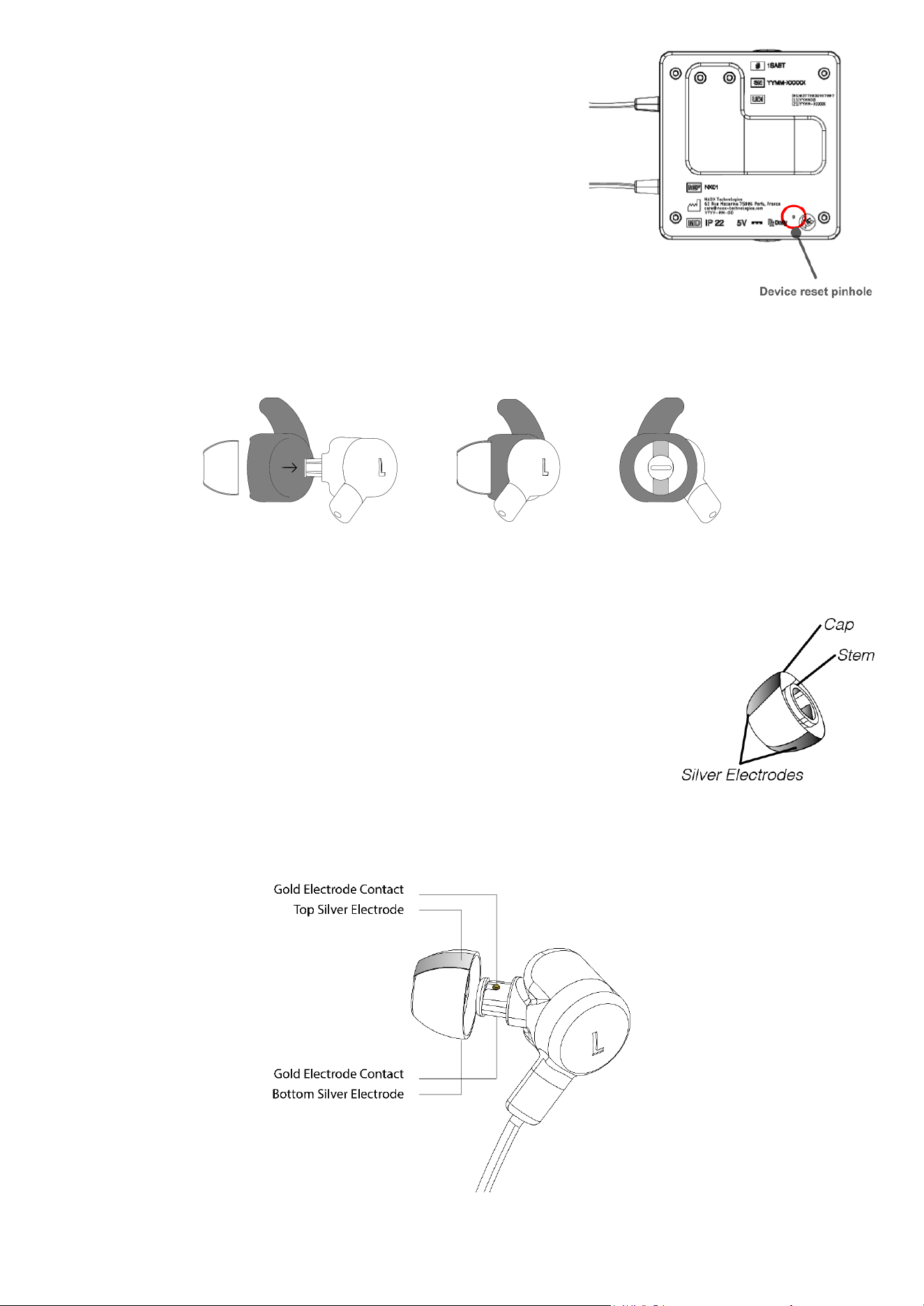
RESETTING THE DEVICE
If a device reset becomes necessary:
1. Locate the pinhole on the back of the device.
2. Using a thin tool (paper clip, toothpick), press and hold the
reset button for 10 seconds.
Note: A reset does not clear the device’s memory. Any data stored in
the device remains available for later download.
PREPARING THE NX01 DEVICE FOR AN ACQUISITION
● Before handling the NX01 device and eartips, make sure to wash your hands.
● For acquisitions performed during sleep, it is recommended to use the bud covers to stabilize the
earbuds in the patient’s ears.
● Open a bag of eartips.
● An eartip consists of:
○ Cap: the outer part, which will be in direct contact with your
ear canal.
○ Stem: the inner part, which will be in contact with the
earbud’s gold electrodes.
○ Silver electrodes: the metal bands visible on the outside of
the cap and inside the stem. The electrodes inside the stem
must be in contact with the earbud’s gold connectors.
Always make sure to properly align the bands with the gold
connectors before plugging the eartip.
● Insert the eartips, making sure that the silver electrodes are aligned with the gold electrode contacts on
the earbuds.
● To prevent the eartips from detaching during an acquisition, make sure that each eartip is plugged all
the way onto the connector and firmly attached to the earbud.
12

INSTRUCTIONS FOR PATIENT USE
INITIAL TRAINING BY THE HEALTHCARE PROFESSIONAL
NX01 can be prescribed for long-term monitoring of patients in home settings. In this context, you will be
expected to perform recordings at home, without the direct supervision of a trained healthcare professional. To
ensure that you can benefit the most from the use of the NX01 device, your healthcare professional will train
you on the proper use of the device during the time that it is first prescribed to you.
When you arrive at the medical facility:
1. The HCP will provide you with the NX01 case containing the device, its charger and this instructions
manual, as well as three sets of eartips, one in each size.
2. You open the case and the HCP provides explanations and relevant information about the earbuds, the
eartips, the command panel and the operating functions of the device.
3. The HCP will demonstrate how to properly attach the eartips to the earbuds.
4. Together with the HCP, you will determine the proper eartip size for your own ears.
○ The eartips are available in three sizes (small, medium, large). Selecting eartips of the proper
size will ensure both your comfort and good signal quality.
○ The eartips should be snug in your ears. They should feel comfortable to you and fit well in your
ear canal.
○ Eartips that are too large may hurt your ear canal or cause the earbuds to fall out of your ears.
○ Eartips that are too small may move within your ear canal or cause the earbuds to fall out of
your ears.
○ Try on the earbuds yourself to familiarize yourself with the process and to check the fit of the
eartips in your own ear canal.
○ The HCP will ask you to perform a few movements (tilting and turning your head, opening and
closing your mouth) to check that the earbuds remain in place.
5. Once you have determined the proper eartips size together, the HCP will provide you with an adequate
number of eartips of the proper size for your prescribed recordings.
6. The HCP will then thoroughly review this instructions manual with you and conduct a test. You should
follow the HCP's verbal and visual instructions, but perform the tasks yourself. The HCP will guide you
until you are able to perform an end-to-end recording without any help from them.
If you wear glasses with metal legs or metal earrings/piercings, the HCP will use the test to assess the
quality of the data when such elements are present. You may be required to remove the glasses/piercings for
every recording.
Earrings/piercings should be removed before a recording, to avoid any entanglement of the cable in the
earring/piercing.
In-ear hearing aids should be removed before a recording.
In order to collect the most relevant data for each patient, the context, frequency and duration of recordings
are decided by your trained healthcare professional. As a patient, make sure to follow their instructions when
using the device at home.
13

RECOMMENDATIONS
EEG signals are very sensitive, low amplitude signals which can be affected by a number of external and
biological signals, such as muscle movement, interference from surrounding devices, etc.
During a recording, the NX01 device performs a signal quality check every 15 minutes. If the signal quality is
insufficient (SIGNAL turns orange), it may be due to excessive movement or activity on your part.
Therefore, to generate the best possible EEG signals, it is recommended to use the NX01 device indoors,
during resting periods (such as naps or sleep), or while doing quiet activities that do not involve excessive
movement (such as meditating, reading, listening to calm music or watching TV, provided you avoid contents
that are too exciting or rousing).
Avoid activities that can create signal distortions, which include (but are not limited to) eating, talking,
walking, running, any sudden movement. These should be avoided as much as possible during a recording to
maintain signal quality.
DATA RETRIEVAL BY A HEALTHCARE PROFESSIONAL
At regular intervals or when the memory space becomes full on your device, bring the device to your trained
healthcare professional, who will retrieve the data.
RETURNING THE DEVICE TO THE HEALTHCARE PROFESSIONAL
Once the prescription period is over, you should bring the device back to your healthcare professional along
with its charger, this instructions manual, as well as any unused eartips, in its original case.
To ensure the safety of your personal data, only return your NX01 device to your healthcare professional
in person.
14
RECORDING AN EEG
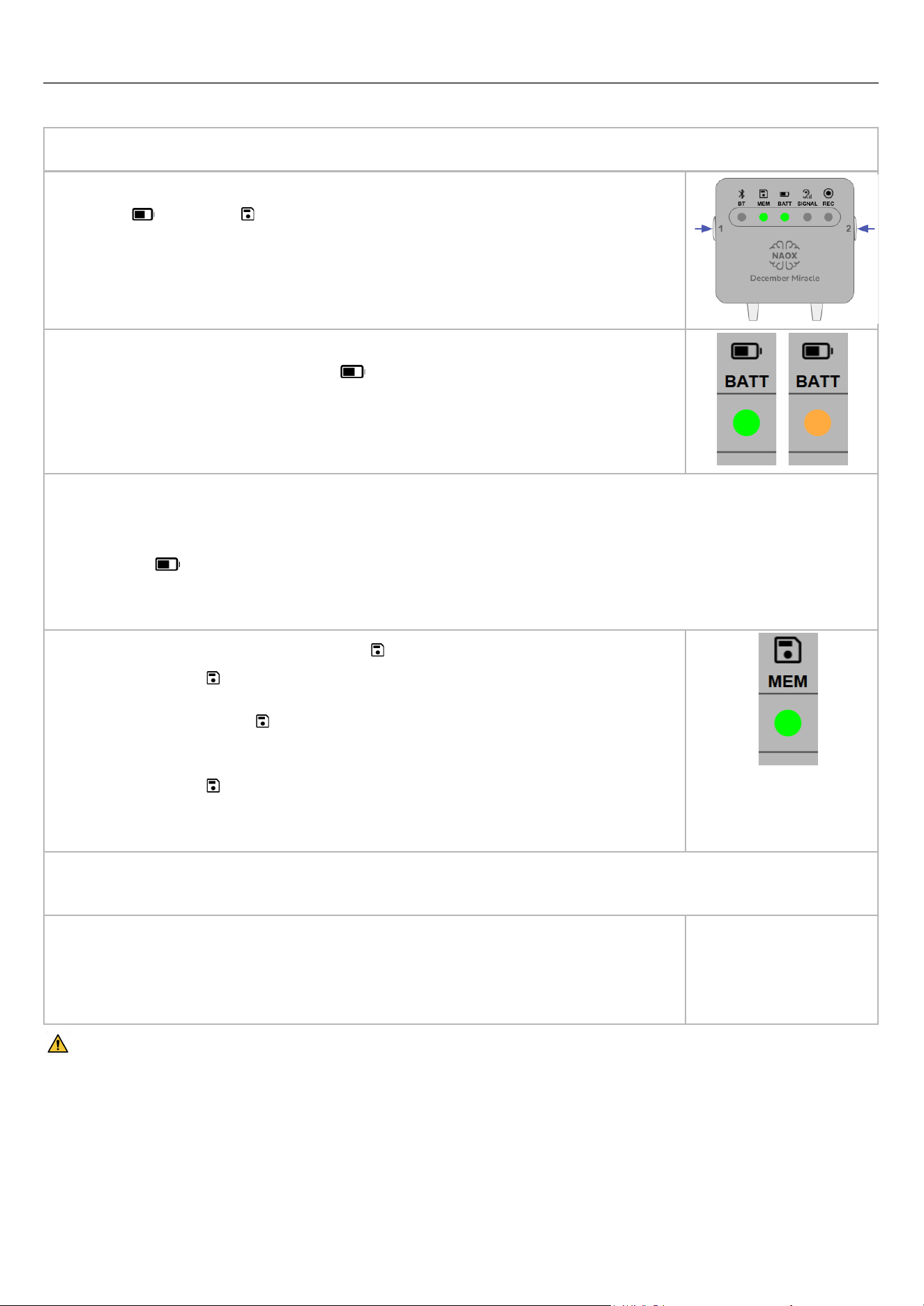
PREPARATION
1. Make sure that your ear canal is clean. If needed, use a Q-tip to remove any earwax inside the ear canal.
2. Turn on the NX01 device by pressing simultaneously Buttons 1+2, holding until
BATT and MEM turn on.
3. Make sure that the NX01 device is charged and the battery level is sufficient for
the length of the recording (BATT should be green for a full night, or
orange for a shorter recording).
Notes:
● To prevent a recording from being interrupted unexpectedly due to a lack of battery power, the NX01
device does not allow you to start a recording when the battery allows less than 1 hour of recording,
BATT
is blinking orange).
● If the battery completely discharges while a recording is taking place, all of the data obtained until the
moment the device turns off is stored in memory and remains available for download by the HCP.
4. Check the available memory on MEM .
● MEM remains steady green as long as the available memory
allows for at least 8 hours of recording.
● When MEM turns orange, please note that the memory space
remaining allows for less than 8 hours of recording.
● If the memory is full or only allows for less than 1 hour of recording,
MEM starts blinking orange. No new recording can be started,
and you need to bring the device to your HCP so that they can
retrieve the data.
Note: if the device runs out of memory while a recording is taking place, the recording stops. No existing data
is erased or overwritten, all of the recordings remain available for download by the HCP.
5. Insert the earbuds into your ears, ensuring the left earbud (marked L) goes into
your left ear and the right earbud (marked R) goes into your right ear. Position
the earbuds so that the eartips are snug in your ears. Once you have reached
proper positioning of the eartips, you can move on to the next step.
If one or both eartips slide off the earbuds and remain stuck in your ears:
● Stay calm and refrain from pushing the eartip further in your ear.
● If you can, ask someone to carefully remove the eartip from your ear. Do not use equipment such as
tweezers, which could lead to injury.
● If the eartip remains deeply stuck, consult a healthcare professional to have them remove the eartip
safely, with adequate equipment.
15
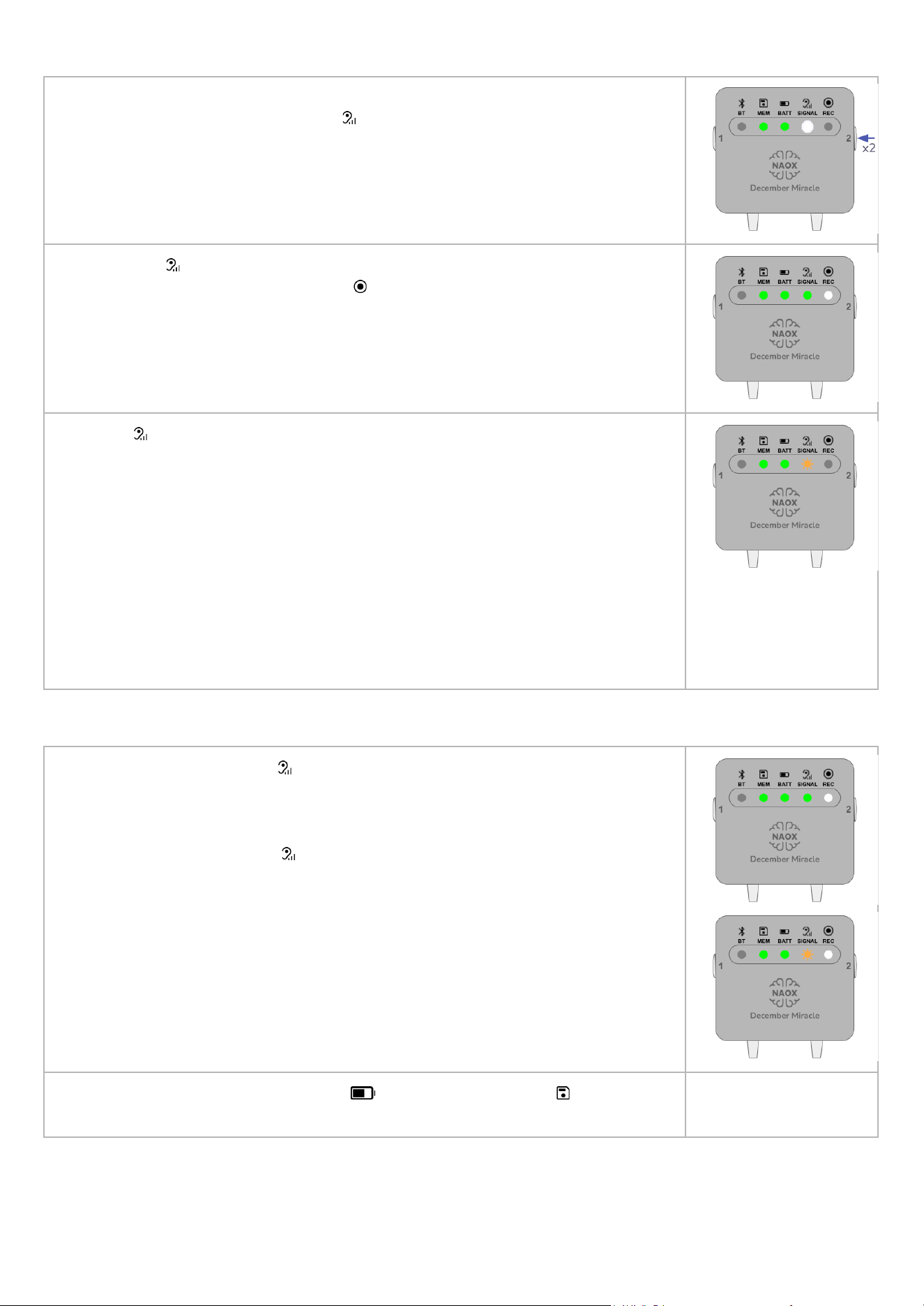
STARTING THE RECORDING
6. Start a recording by double-clicking Button 2. This launches an automatic
signal quality check, and SIGNAL begins pulsing in white while the NX01
device is analyzing the signal. This analysis takes approximately 30 seconds.
For best results, sit comfortably without moving until the analysis terminates.
7. If SIGNAL turns steady green, the signal quality is good and the actual
recording starts automatically. REC lights up steady white, indicating that a
recording is in progress.
If SIGNAL blinks orange, the signal quality is not good enough. This may be due
to bad contact between the eartips and the ear canal.
a. Reposition the eartips in your ear canal, making sure that they are tight
and do not move around. Start the recording again.
b. If the signal quality is still insufficient, remove the earbuds and check the
alignment of the eartips' silver electrodes and the earbuds’ gold
connectors. Start the recording again.
If you still cannot get a good signal after both of these checks, refer to section
§Troubleshooting steps for patients below for more detailed steps.
Note: The NX01 device does not allow a recording to start if the signal quality is
insufficient.
DURING THE RECORDING
8. Regularly check SIGNAL . During a recording, the signal quality is
automatically checked every 15 minutes. The result is displayed until the next
check is performed.
If you notice that SIGNAL is blinking orange at some point during your
recording, please note that the recording does not stop: you should reposition
the earbuds in your ears to improve the signal quality, and perform another
signal quality check by clicking on Button 1.
Regularly check the battery level BATT and the memory MEM to make sure
that you can perform the recording entirely.
16
To prevent the NX01 device’s cable from
getting entangled with an object in your
environment or with your clothes, make sure to use
the clip on the back of the command panel to attach
the panel to your clothes so as to keep the system
close to your body and to limit the movement of the
cable.
STOPPING THE EEG RECORDING
9. To stop the EEG recording, double-click Button 2. REC blinks white while
the device finalizes your recording in its internal memory (the duration depends
on the length of the recording). The device cannot be turned off during this
processing. Once it completes, REC turns off and you can proceed to the
next step.
10. Turn off the device by pressing Buttons 1+2 simultaneously and holding until all
LEDs switch off.
Gently remove the eartips from the earbuds and dispose of them.
11. Recharge the NX01 device for the next use.
17
TROUBLESHOOTING STEPS FOR PATIENTS
In the event that the NX01 device has been dropped, damaged or crushed, visually inspect the device for
physical damage first.
● If there is physical damage to any component of the NX01 device, do not use the device. Bring the
device back to your healthcare professional for replacement.
● If the NX01 device appears to be intact, it may still be safe to use but its performance may have been
affected. The next time you see your healthcare professional, bring the device and make sure to ask
your HCP to check the quality of the data.
THE DEVICE WILL NOT TURN ON
1. Make sure the device has been charged with the provided charger.
2. Attempt a device reset.
3. Make sure the charger is functional. When the NX01 device is plugged to
the charger, BATT should light up: the light pulses if the battery is
charging, or is steady green if the battery is fully charged. If BATT does
not light up, the charger may be faulty. In that case, consult your healthcare
professional.
THE SIGNAL QUALITY IS INSUFFICIENT
1. Make sure that your ears are clean. If needed, use a Q-tip to remove any earwax inside the ear canal.
2. Check that the eartips are tight in your ears and cannot move within the ear canal.
3. Remove the earbuds from your ears, and check that the silver electrodes on the eartips and the gold
connectors on the earbuds are correctly aligned.
4. If none of these solutions improves signal quality, change the eartips.
5. If changing the eartips does not improve signal quality, please consult your healthcare professional for
instructions on proper use of the device and to check that the device is functional.
THE MEMORY IS FULL
● If the memory is already full or only allows for less than 1 hour of recording
when you turn on the NX01 device, MEM is orange and blinking. No new
recording can be started, and you need to return the device to your HCP for
data retrieval.
● If a recording is ongoing and the memory becomes nearly full (less than 10
minutes of memory storage remaining), the device automatically stops the
recording and saves the data in the memory.
THE DEVICE RAN OUT OF BATTERY DURING A RECORDING
Recharge the device. The data recorded until the device runs out of battery is saved in the device's memory.
ONE OR MORE LEDS EXHIBIT INCONSISTENT BEHAVIOR
If the LED behavior on the NX01 command panel does not align with the instructions provided in this manual:
● Restart the device.
● If the inconsistent LED behavior happens again, attempt a device reset.
If the inconsistent LED behavior persists despite following these steps, this may indicate a device malfunction.
Please consult your healthcare professional to check that the device is functional.
BUTTONS STOP RESPONDING
Attempt a device reset. If this does not resolve the issue, this may indicate a device malfunction. Please
consult your healthcare professional to check that the device is functional.
18
INSTRUCTIONS FOR HEALTHCARE PROFESSIONALS
INITIAL INSPECTION UPON RECEPTION
Upon reception of the package by the healthcare professional, please make sure to first check the
physical integrity of the packaging. In the event that the packaging was damaged during transport from the
manufacturer's site, do not use the device and return the package to the manufacturer.
1. Open the packaging and check that all the contents and accessories are included.
2. Visually inspect the device to check for any damage that could cause patient injury or affect the
device's performance. If there is any damage to the device, return the package to the manufacturer.
3. If the device is intact, charge it to 100% battery.
4. Store the device until it is ready to be prescribed to a patient.
PATIENT APPOINTMENT PREPARATION
Once it has been determined that NX01 is suitable for a given patient and the device has been prescribed to
them, the patient will be asked to come either for an acquisition at the healthcare facility, or for a training
appointment so that they can perform recordings at home. In both cases, you are required to perform the
following tasks prior to the appointment:
● Make sure that the device, the charger and the instructions
manual are all in the original case.
● Visually inspect the NX01 device to check for any damage that
could affect the device's performance.
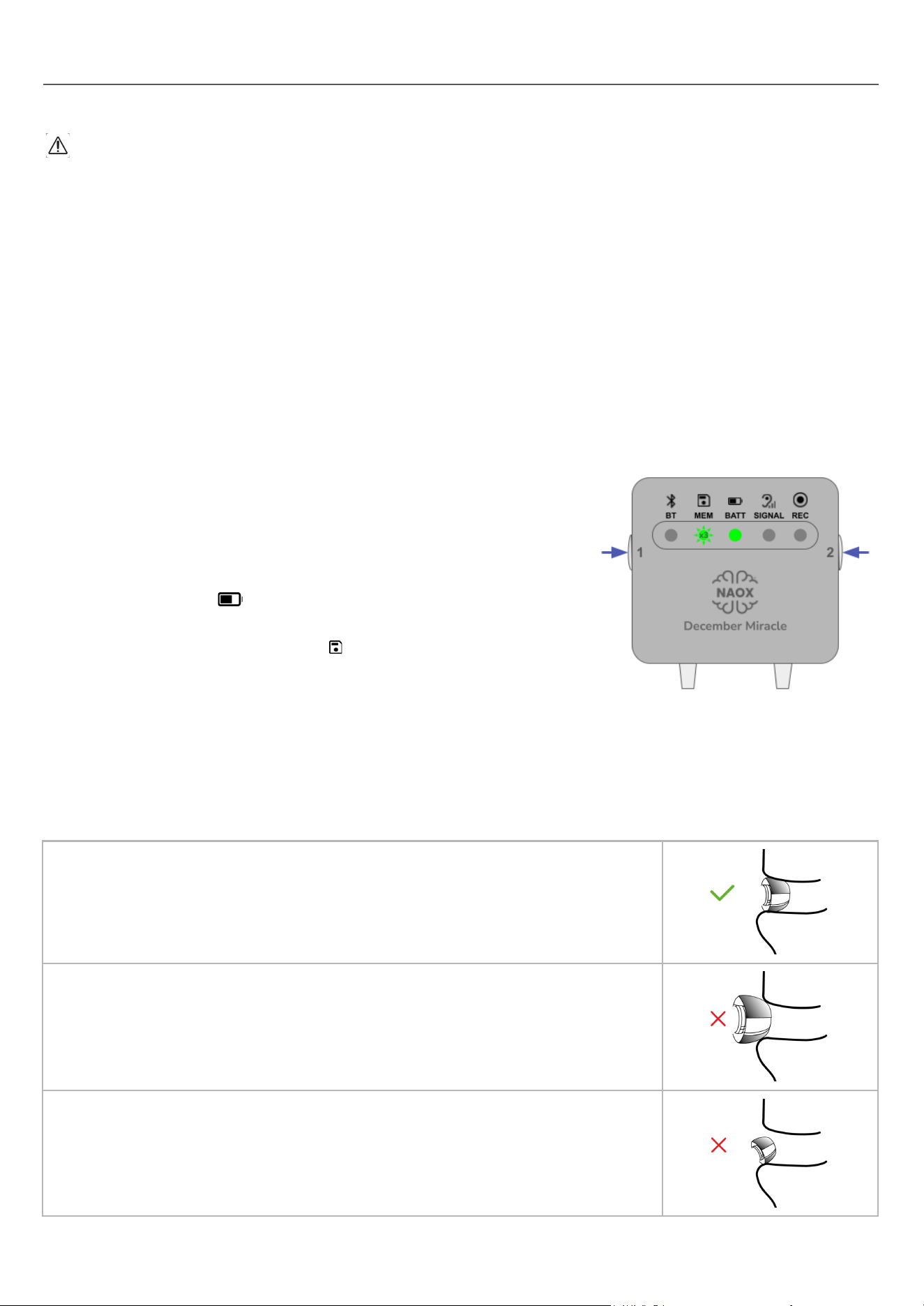
● Turn on the device and ensure that it is charged for the training
session: BATT should be green.
● Ensure that the memory has been fully cleared of any data
from a previous patient: MEM must blink 3 times before
turning steady green.
● Prepare three sets of eartips (one of each size) and bud covers
to be used to determine the proper size for the patient.
DETERMINING THE PROPER EARTIP SIZE FOR A PATIENT
Together with the patient, determine the proper eartip size. The eartips are available in three sizes (small,
medium, large). Selecting eartips of the proper size will ensure both the patient's comfort and good signal
quality by providing good contact between the ear canal and the electrodes.
The eartips should be snug in the patient's ears, feel comfortable to them and fit
well in their ear canal.
Eartips that are too large may hurt the patient's ear canal, cause the eartips to
be forced out of the ear canal or simply provide insufficient contact between the
ear canal and the surface of the eartip, leading to signal quality issues.
Eartips that are too small may fall from the patient’s ear or simply move within
the patient’s ear canal, also leading to signal quality issues.
19
Ensure that the earbuds remain in place and do not fall out of the patient’s ears by asking them to do the
following movements:
● turning their head to the left and right
● tilting their head forward, backward, to the left and to the right
● opening and closing the mouth
If the NX01 earbuds or eartips are not compatible with the anatomical structure of a patient's ear canal, it
is not recommended for the patient to use the NX01 device.
If the patient wears glasses with metal legs or metal earrings/piercings, use this test to assess the quality
of the data when such elements are present. You may have to require the patient to remove the
glasses/piercings for every acquisition.
Earrings/piercings should be removed before an acquisition, to avoid any entanglement of the cable in the
earring/piercing.
In-ear hearing aids should be removed before an acquisition.
ACQUISITION AT THE HEALTHCARE FACILITY
To perform a streaming acquisition at the healthcare facility:
1. Open the Download Station software, and select Stream an EEG acquisition in the Interface.
2. Turn on the device, activate Bluetooth and establish the pairing between the device and the computer
used to perform the acquisition.
3. Set up the patient on a chair or on a bed as required for the acquisition. Make sure that the
configuration allows for the device to remain within 5 m (15 ft) of the computer used for the acquisition.
4. Determine the proper size of eartips with the patient. You can use the EEG visualisation in the
Download Station to assess the signal quality and the fit of the eartips.
5. Start and monitor the acquisition from the Download Station.
6. When you stop the acquisition, gently remove the device from the patient's ears. Gently remove the
eartips from the earbuds and dispose of them.
7. Proceed to section “Device processing and storage after use” below.
The HCP should assess patients for adverse reactions on the skin where the device has contact, such as
redness (erythema), swelling (edema), irritation, sensitization (delayed Type IV hypersensitivity), allergy,
immune response, or other reactions.
RECOMMENDATIONS FOR OPTIMAL SIGNAL QUALITY
EEG signals are very sensitive, low amplitude signals which can be affected by a number of external and
biological signals, such as muscle movement, interference from surrounding devices, etc.
During an acquisition, the NX01 device performs a signal quality check every 15 minutes. If the signal quality is
insufficient (SIGNAL turns orange), this may be due to excessive movement or activity of the patient.
Whether you are performing a streaming acquisition on a patient in a clinical setting, or training the patient for
autonomous recordings at home, specific attention needs to be paid to the following recommendations:
● The NX01 device should be used indoors in a quiet room, if possible with no interfering devices nearby.
● The NX01 device should be used with minimal movement/activity of the patient. At home, this includes
resting periods (such as naps or sleep), or quiet activities that do not involve excessive movement
(such as meditating, reading, listening to calm music or watching TV quietly). If needed, you may be
more prescriptive regarding which activities are allowed or not during a recording.
As much as possible avoid activities that can create signal distortions, which include (but are not limited
to) eating, talking, walking, running, any sudden movement.
20

INITIAL TRAINING OF THE PATIENT FOR RECORDINGS AT HOME
When the patient arrives:
● Provide the patient with the NX01 case containing the device, its charger, and this instructions manual,
as well as the three sets of eartips.
● The patient opens the case: as per the training you received from NAOX Technologies, provide
explanations about the earbuds, eartips, command panel and operating functions of the device.
● Provide and demonstrate to the patient how to properly attach the eartips to the earbuds.
● Together with the patient, determine the proper eartip size by following the instructions of section
Determining the proper eartip size for a patient above. Make the patient try on the earbuds themself to
familiarize themself with the process and to check the fit of the eartips in their own ear canal.
● Once you have determined the proper eartips size together, provide the patient with an adequate
number of eartips of the proper size for their prescribed recordings.
● Thoroughly review this instructions manual with the patient and conduct a test recording. The patient
should follow your verbal and visual instructions but perform the tasks themself. Provide guidance to
ensure that the patient is able to perform an end-to-end recording without any intervention on your part.
The patient will perform recordings at home autonomously, without the direct supervision of a trained HCP. To
ensure optimal data quality, you need to make sure that the patient understands and memorizes:
● How to properly align and plug the eartips onto the earbuds.
● The recommended settings, activities, frequency and duration of the recordings to be performed.
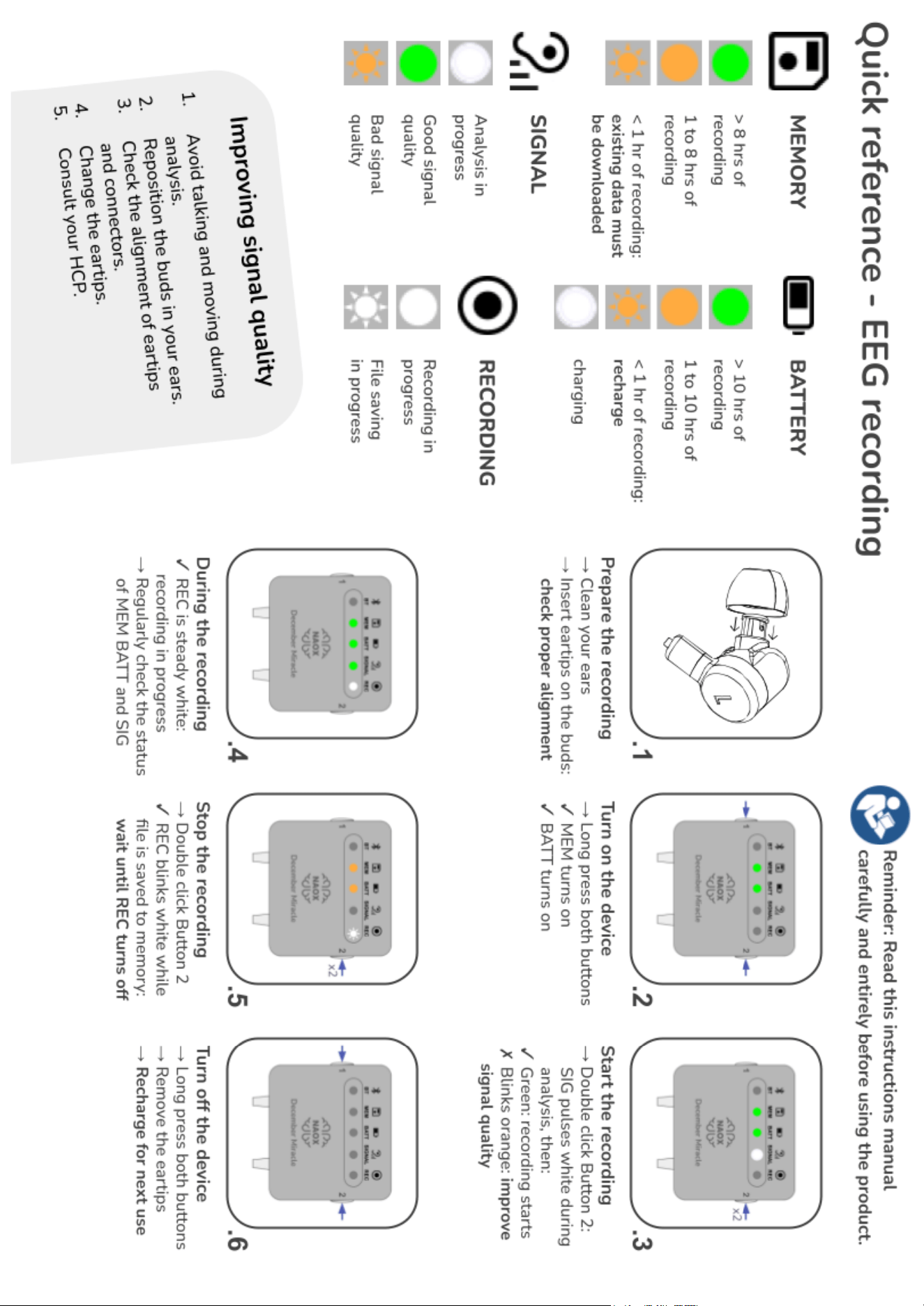
● The series of steps involved in a recording (summarized in the memo on the back of this manual).
● How to improve signal quality if SIGNAL is orange (also summarized in the memo).
● If they are a caregiver, how to perform a recording on a child and how to safely store the device.
Plan your next appointment for data retrieval with the patient based on the frequency and duration of
recordings that you prescribe. The device can hold up to 16 hours of recording data, which represents for
example 2 nights of sleep (8 hours each) or 32 naps of 30 minutes each. If MEM begins to blink orange
before the planned appointment, the patient should come back early for data retrieval.
DEVICE RETRIEVAL AFTER THE PRESCRIPTION PERIOD
Once the prescription period is over, the patient should bring the NX01 device back to you along with all its
accessories and any unused eartips.
● Make sure that the device, charger and instructions manual are returned in their original case, as well
as any unused eartips in their original packaging.
● Download any data associated with this patient. Ensure that the memory has been fully emptied (MEM
must blink 3 times before turning steady green).
● Proceed to the section “Post-use steps” below.
The HCP should inquire patients about adverse events during the use of the device, such as skin
reactions (erythema, edema, irritation, sensitization,...) or other reactions.
POST-USE STEPS
After performing an acquisition in the healthcare facility, or when a patient returns the device to you at the end
of the prescription period, you are required to perform the following tasks:
● Clean and disinfect the device and the case.
● Visually inspect the NX01 device for any damage that could cause patient injury or affect the device
performance.
● Ensure that the memory contains no data (when you turn on the device, MEM must blink 3 times
before turning steady green).
● Fully recharge the device for storage.
● Carefully store the device in its primary casing until it is prescribed to another patient.
21
USE OF THE DOWNLOAD STATION BY HEALTHCARE PROFESSIONALS
The Download Station is the software companion to the NX01 device, which allows healthcare professionals
to:
● Perform streaming acquisitions at the healthcare facility
● Retrieve the recordings performed at home by a patient for long term monitoring
OBTAINING AND INSTALLING THE DOWNLOAD STATION
The Download Station will be made available to you by NAOX Technologies before your initial training. For the
installation to succeed, make sure that you have adequate administrative rights on the computer(s) where the
Download Station is expected to be used. If required, contact your IT administrator.
If the Download Station must be installed on computers without Internet access, or if you later need to install
the Download Station on additional computers, contact NAOX Technologies support
([email protected]) to request detailed instructions and credentials to access a secure download
page on the official NAOX website.
The computer must satisfy the following requirements:
● One free USB port (built-in or adapter hub)
● Bluetooth 5.3+ capability (built-in or dongle)
● Operating system: MacOS or Windows
To install the Download Station, simply unzip the file on your computer to access the executable file.
LAUNCHING THE DOWNLOAD STATION
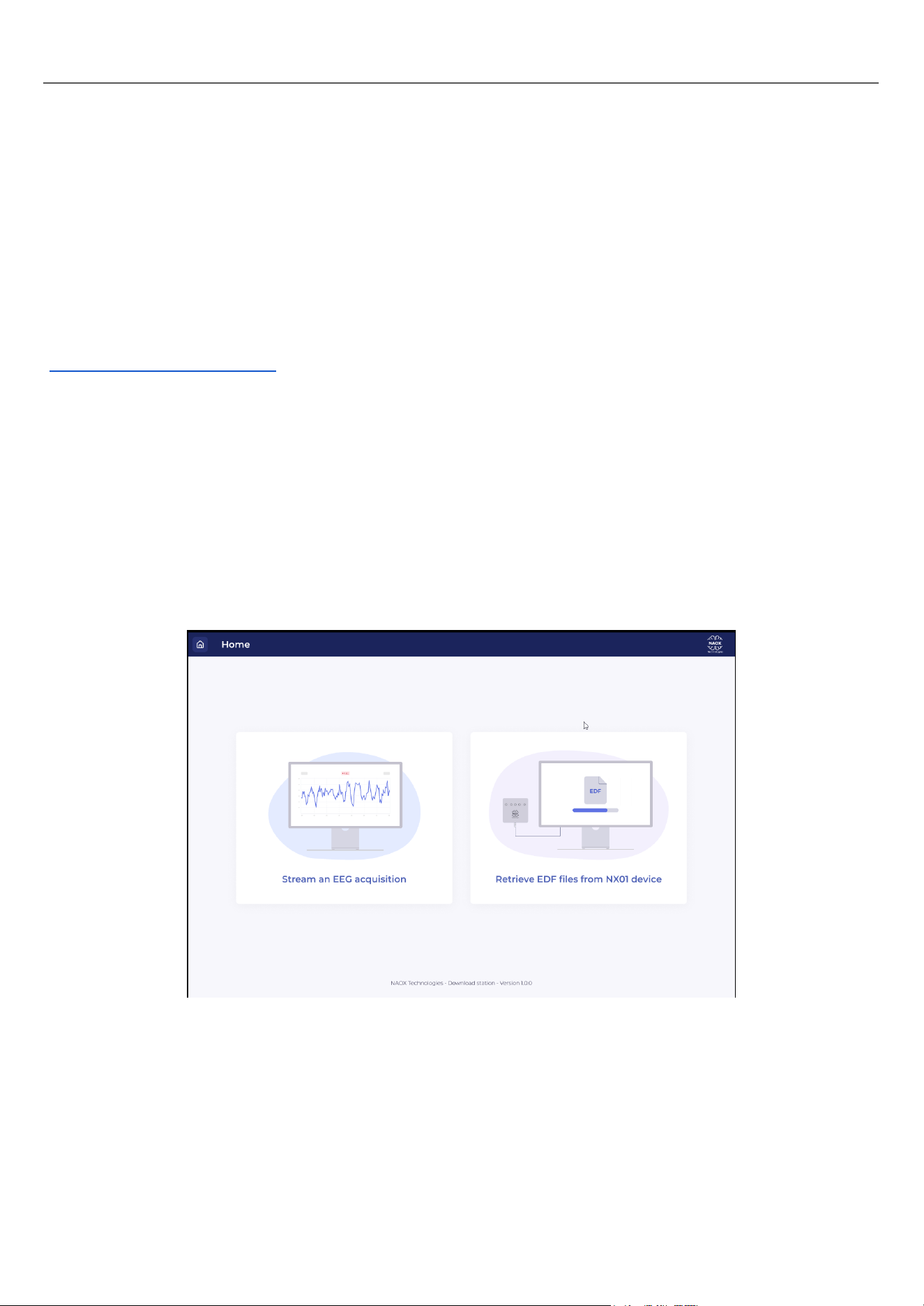
Start the Download Station software through the main menu of your OS or by double-clicking on the
DownloadStation shortcut on your desktop. The following screen opens.
● To perform an acquisition on a patient in the healthcare facility, select Stream an EEG
acquisition and follow the instructions of the “Streaming acquisition” section.
● To download the recordings performed by a patient at home, select Retrieve EDF files from
NX01 device and follow the instructions of the “Downloading recordings from a NX01 device” section
page YY.
22
STREAMING ACQUISITION
If the computer used for streaming is a laptop, make sure that it has enough battery/remains plugged to its
charger for the duration of the acquisition. Deactivate the sleep mode. The computer must remain on for the
entire acquisition. If it goes into sleep mode or turns off, the data acquired by streaming cannot be properly
finalized into a correct EDF file.
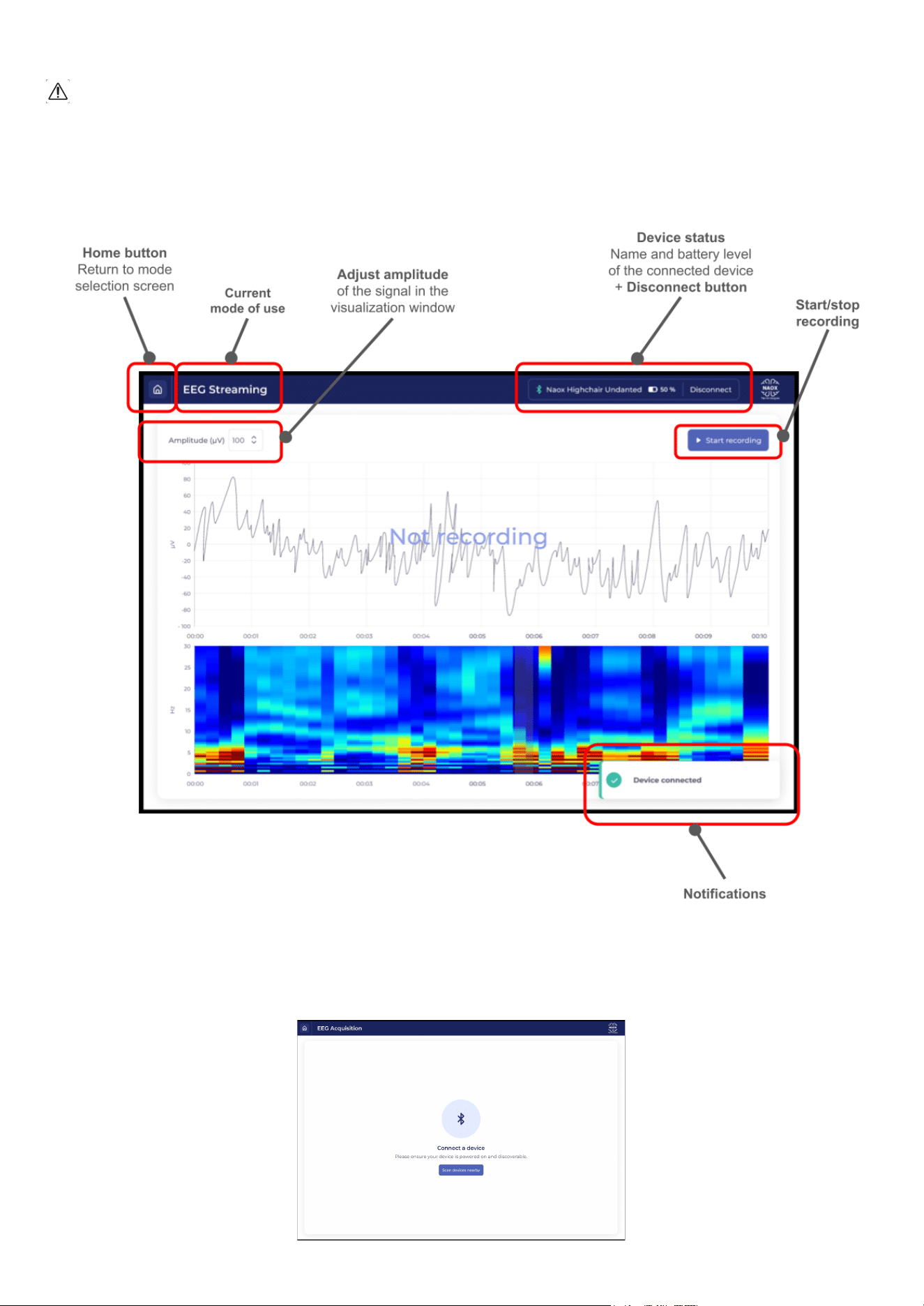
Overview of the main screen
Connecting the device
After selecting Stream an EEG acquisition on the home page of the Download Station, the following
page should be displayed.
23
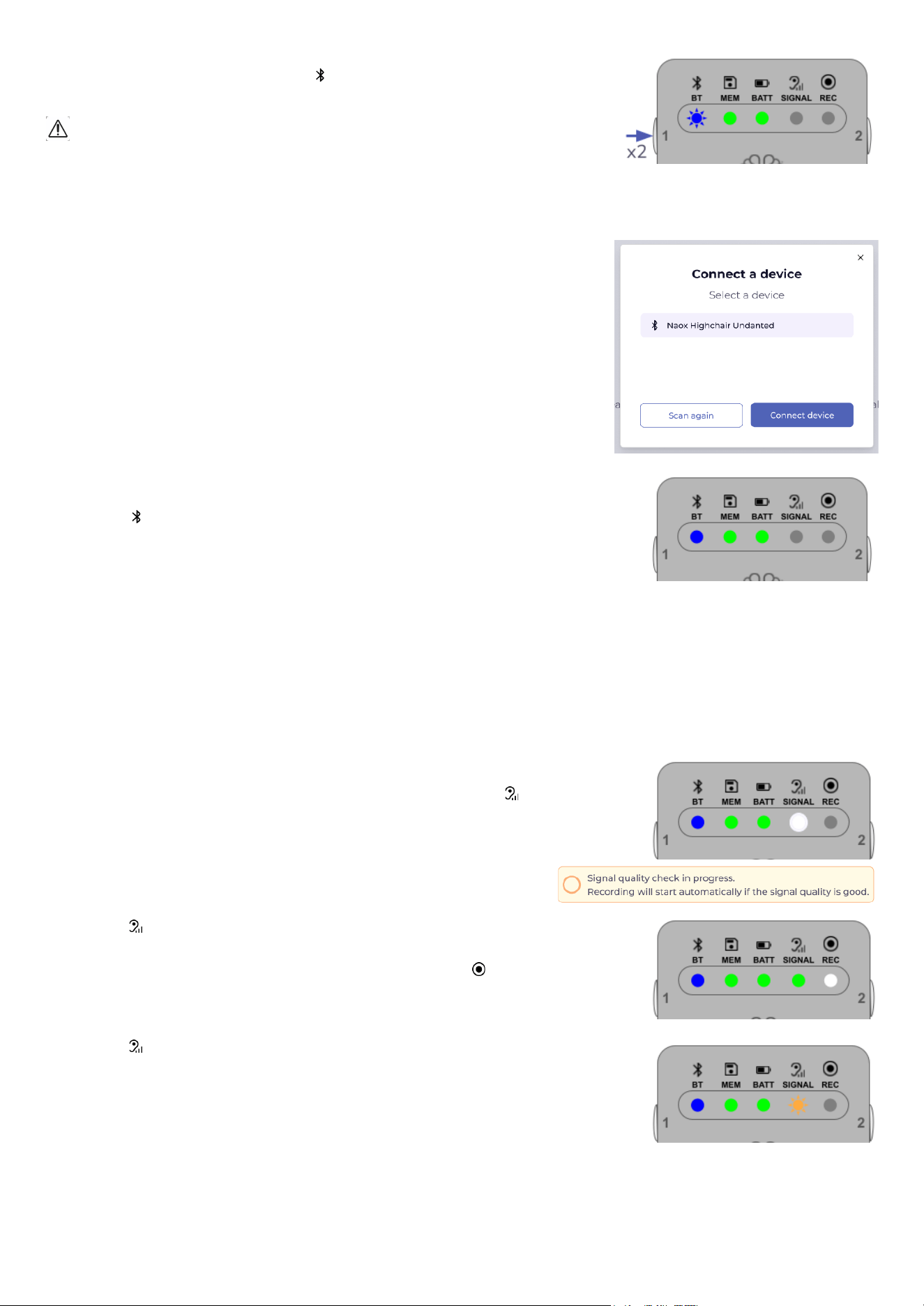
Set the NX01 device in pairing mode by double-clicking Button 1. When
the device enters pairing mode, BT starts blinking. The pairing mode
remains active for 120s.
To ensure patient data safety, only activate the Bluetooth function in
controlled environments (hospital, clinic, physician’s office). Do not use
the Bluetooth function in public or crowded areas, where NX01 could be
accessed by non authorized devices.
In the Download Station software, click on Scan nearby devices. A
pop-up window opens and displays the list of available Bluetooth devices.
Each NX01 device has a unique name (e.g. NAOX Highchair
Undanted) that is printed on the command panel. If there are several
NX01 devices in pairing mode at the same time, make sure to check the
name on the device you want to connect to. If you do not see the device,
click on scan again until it appears.
Click on the appropriate NX01 device, and confirm the pairing by clicking
on the Connect a device button in the pop-up.
The software establishes a Bluetooth connection with the device. On the
device, BT turns steady blue.
A successful pairing is confirmed by a notification in the Download
Station, and you are taken to the main screen.
Performing an acquisition
Visually check the signal quality using the EEG and spectrogram charts displayed by the software. If the
quality is satisfactory, click on Start recording to launch the acquisition.
Note: A streaming acquisition can only be started through the Download Station. If Bluetooth is activated on
the device, the double click function on the right button of the command panel is deactivated.
This launches an automatic signal quality check on the device. A
message is displayed in the Download Station, and SIGNAL pulses
white on the device during the assessment.
If SIGNAL turns steady green, the signal quality is good and
the actual recording starts automatically. A green checkmark is displayed
at the bottom right corner of the Download Station. REC lights up white
and begins pulsing, indicating that a recording is in progress.
If SIGNAL blinks orange, the signal quality is not good enough, which
prevents the recording from starting. This may be due to bad contact
between the eartips and the ear canal: check the position of the eartips in
the patient’s ear canal, making sure that they are tight and do not move
around, and try to start the recording again. If the recording still does not
start, refer to section Troubleshooting steps for HCP below for more
detailed steps.
Monitor the acquisition as needed, including the signal quality. In the Download Station, you can directly
monitor the live signal in the visualization and spectrogram windows for anomalies or artefacts.
24
On the device, the signal quality is automatically checked every 15 minutes, and SIGNAL displays the
result until the next check. If you or the patient notice that SIGNAL is blinking orange at some point during
acquisition, please note that the acquisition does not stop: the position of the earbuds in the patient’s ears
needs to be checked, and another signal quality check can be performed by clicking on Button 1.
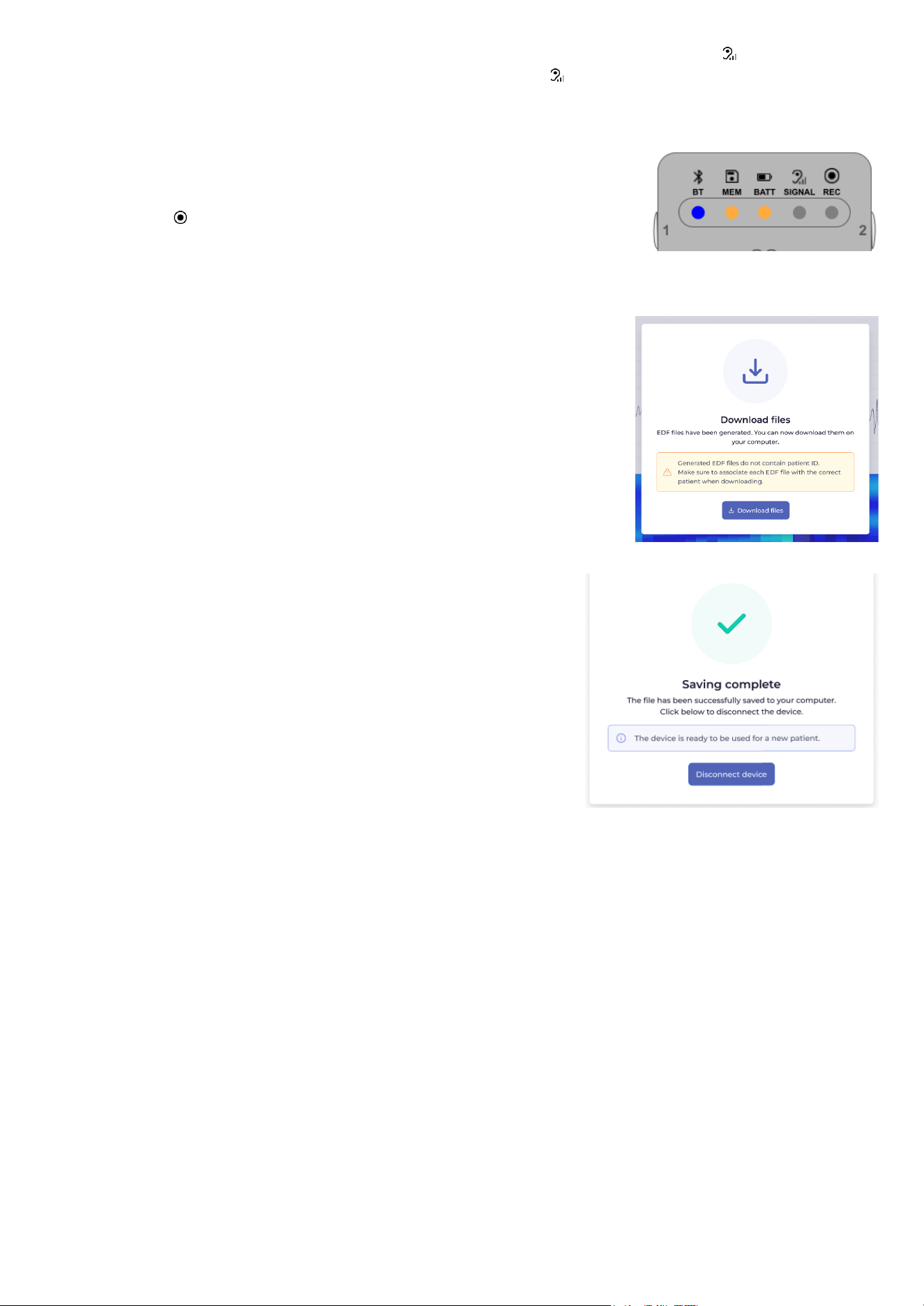
When you reach the scheduled acquisition duration, click on Stop
recording in the Download Station. Confirm in the popup window. On
the device, REC turns off.
File generation and saving
The data obtained during the streaming acquisition is now processed to
finalize the EDF file, which may take a few minutes (the exact duration is
indicated in the Download Station).
Once the file is ready, click on Save files.
Select the appropriate directory to store the patient’s data. Make sure to
follow the recommendations outlined in section Patient data management
best practices below. The writing process may take some time (the exact
duration is indicated in the popup).
Device disconnection
Once the files are saved, click on Disconnect device to terminate
the Bluetooth connection and return to the home page of the
Download Station.
Proceed with the final steps described in “Acquisition at the
healthcare facility”.
25
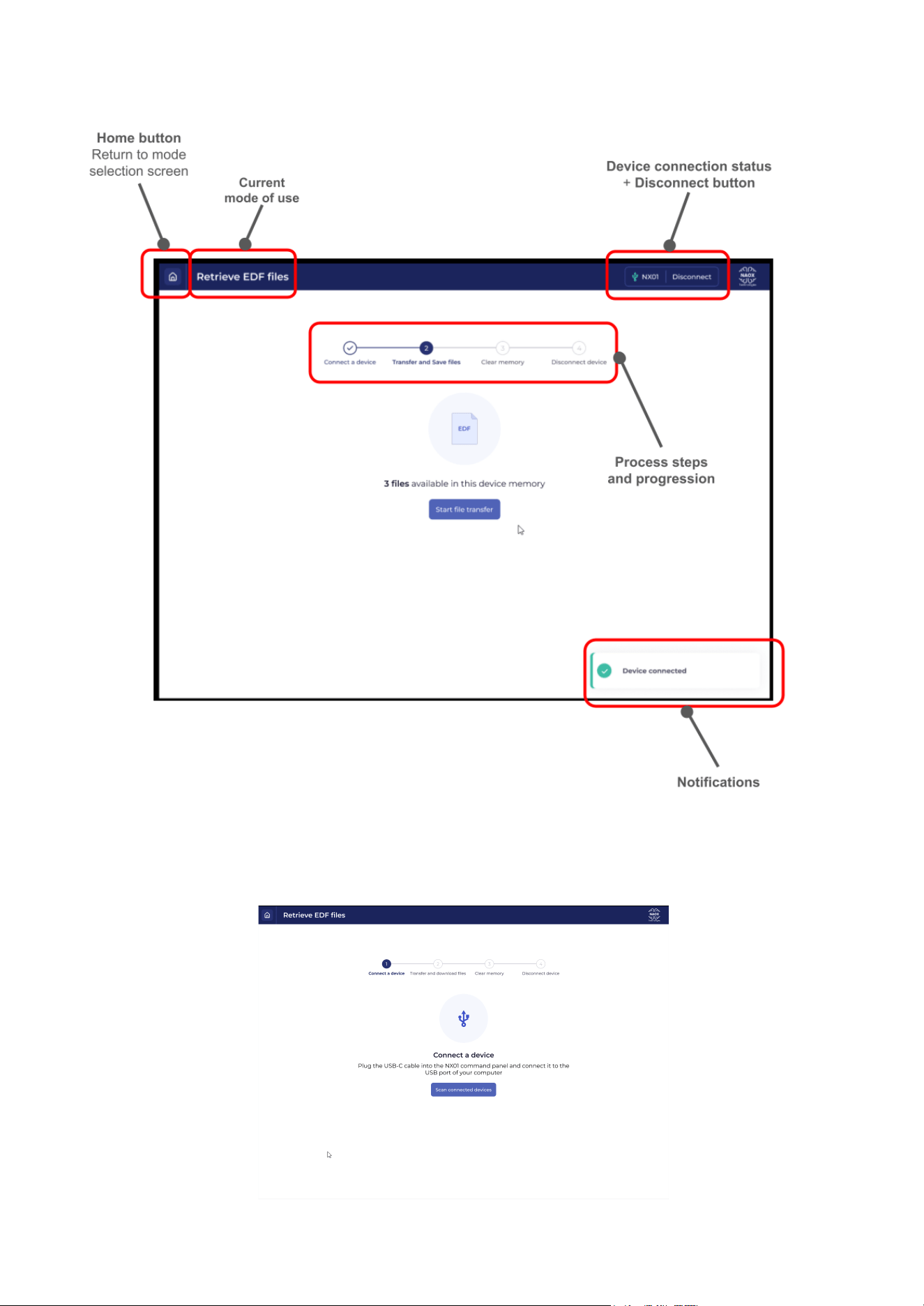
DOWNLOADING RECORDINGS FROM A NX01 DEVICE
Overview of the main screen
Connecting a device
After selecting Retrieve EDF files from NX01 device on the home page of the Download Station,
the following page should be displayed.
26
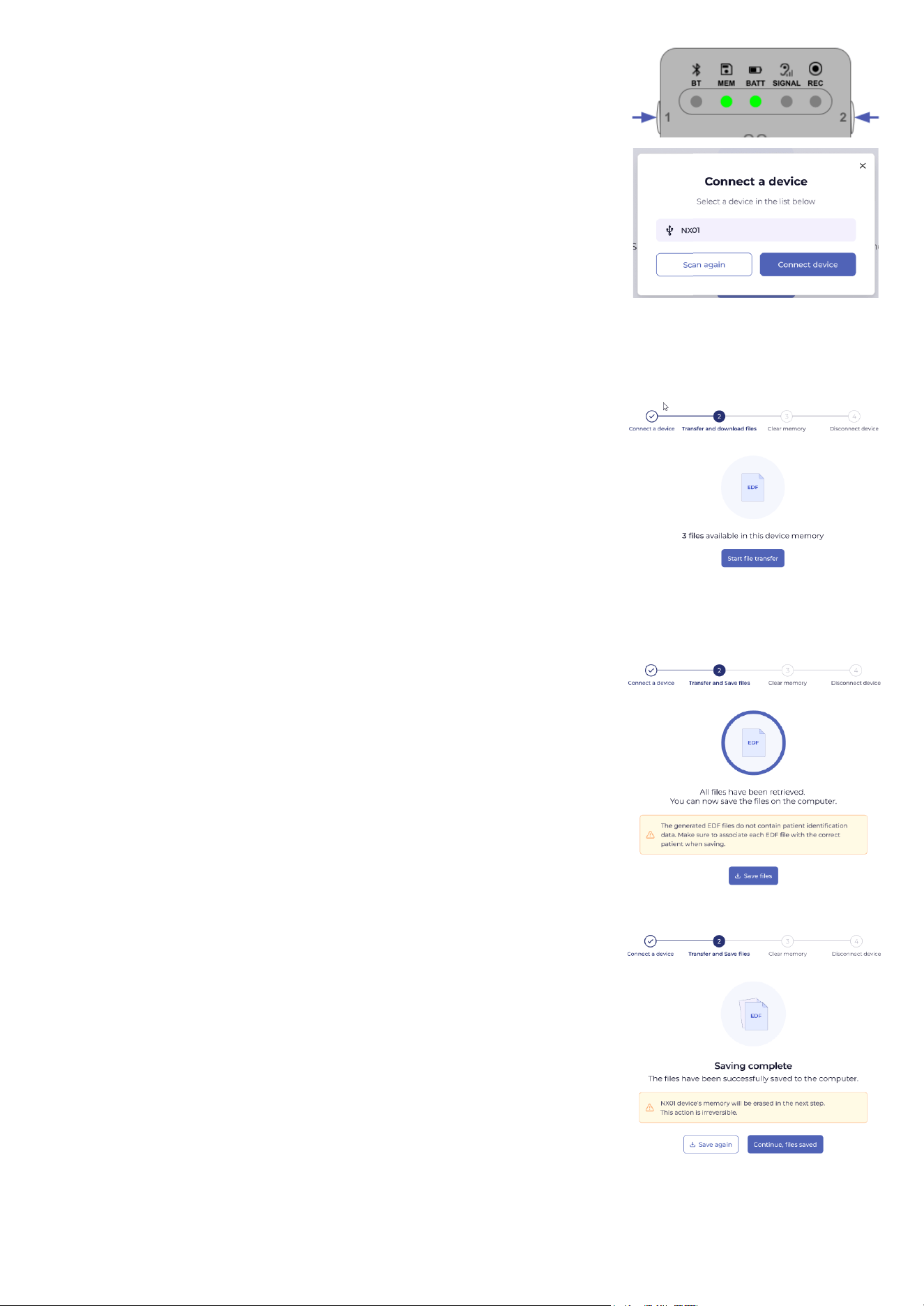
Turn on the NX01 device, and plug the device to your computer using the
USB cable provided in the NX01 case.
Note: Make sure to only connect one device at a time.
In the Download Station software, click on Scan connected devices.
A pop-up window opens and displays the connected device as NX01. Click
on the name of the device, then on Connect a device to confirm the
connection.
A successful connection is confirmed by a notification in the Download
Station, and you are taken to the main screen.
Transferring and saving the files
The Download Station reads the list of EDF files stored on the device. Click on Start file transfer to
initiate the file transfer process.
The file transfer process involves two stages:
1. First, the files stored on the device are retrieved from the device.
This stage is required before you can effectively save the data on
the computer. The duration of this process varies depending on the
volume of data to be retrieved and your hardware configuration.
The exact remaining time is displayed on the page.
Note: Do not disconnect the device during this data transfer. If you need to interrupt the transfer for any
reason, click on Cancel transfer first to safely disconnect the device from the computer.
2. The second stage is the actual file writing on your computer. Click
Save files to select the folder in which the files must be saved
(in your patient file management structure, the folder corresponding
to the patient that the device was prescribed for). Confirm the
selection.
If the transfer is completed in full, a confirmation message is displayed by the software.
The next step in the process completely clears the memory of the NX01
device of any data. Before proceeding to this step, confirm that the
downloaded files were saved in the intended folder. If this was not the
case, click on Save again.
If the files were correctly downloaded into the appropriate folder, you can
then select Continue, files saved to confirm that memory will be
cleared of any data.
27
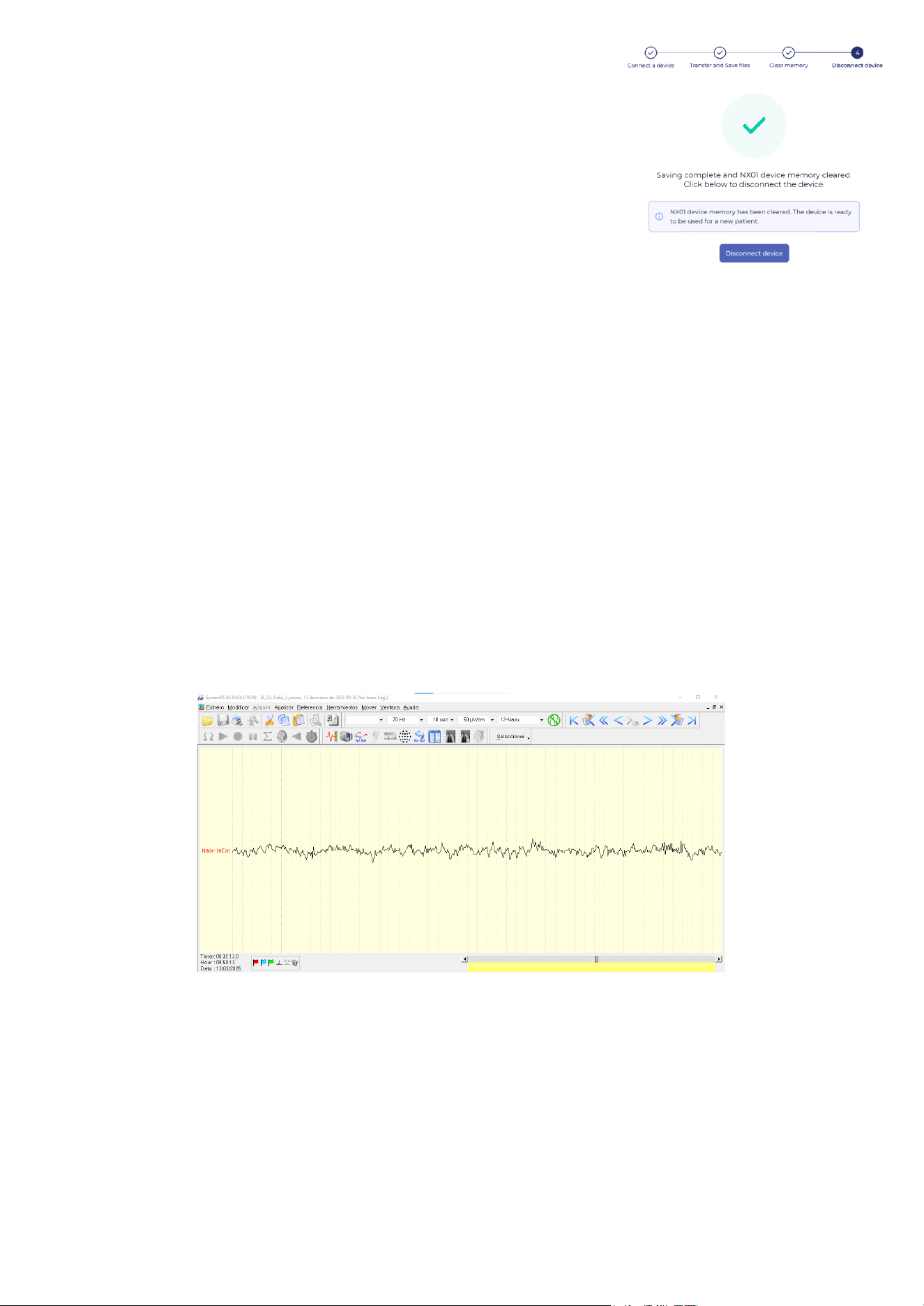
Memory cleanup
The last step of the process is the memory cleanup.
Once the memory has successfully been cleared, the Download Station
displays a final confirmation message along with a green checkmark.
Note: Do not attempt to use the device with another patient unless
you have reached this screen. If you do not see this screen, disconnect
the device and attempt the download again from the start.
Device disconnection
Disconnect the device by clicking on Disconnect device, and confirm in the popup window. The software
returns to the home page of the Download Station.
Unplug the cable from the device and the computer. Turn off the device, and proceed with the steps described
in “Device processing and storage after use”.
PATIENT DATA MANAGEMENT BEST PRACTICES
Note: The EDF files generated by the NX01 device do not contain any information that allows patient
identification.
When you stream or download the data to your computer, please keep in mind that it is your responsibility to:
● Make sure that the files are associated with the proper patient and stored in the correct patient folder.
● Ensure the secure management of the files on the computer.
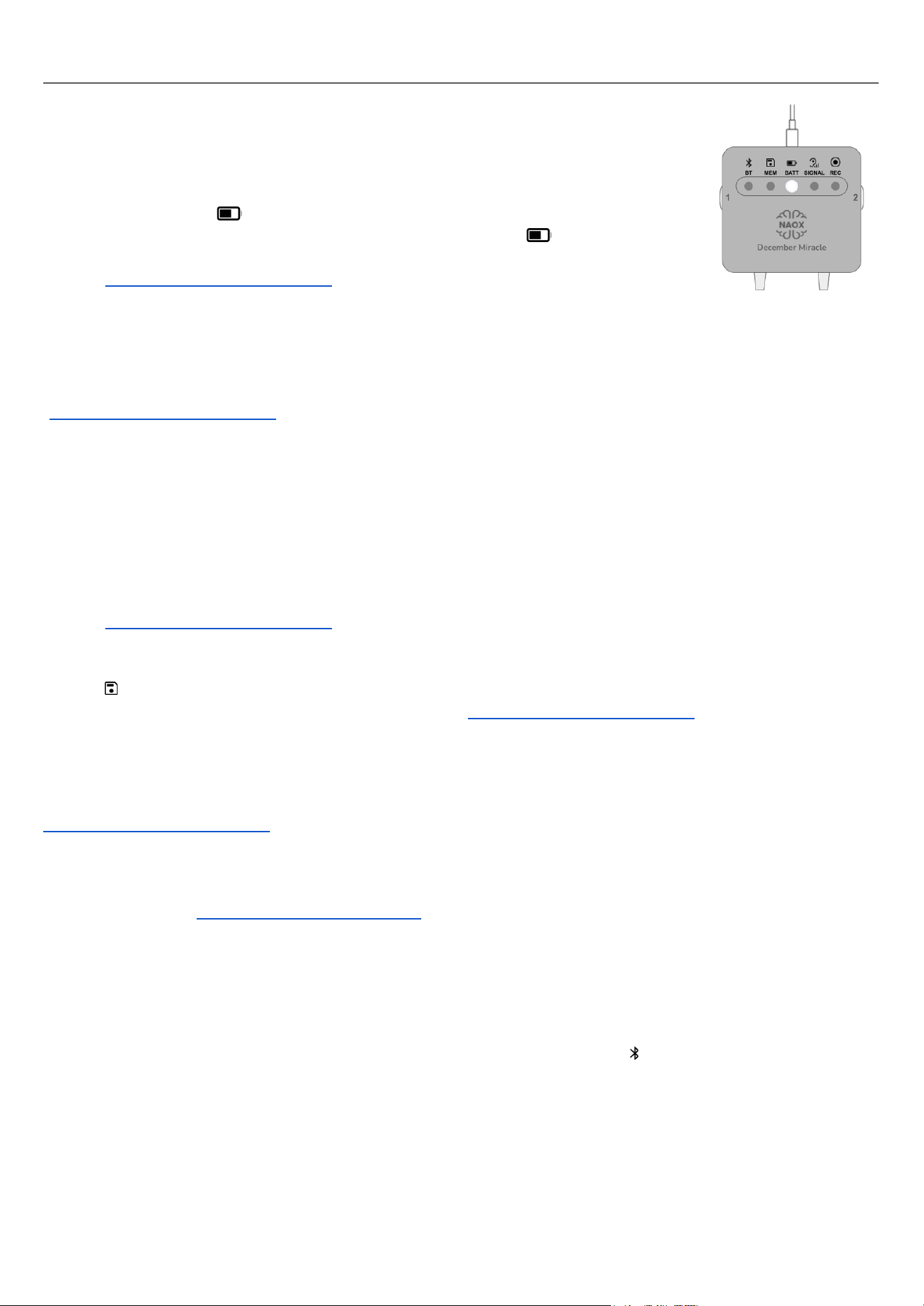
VIEWING AND ANNOTATING THE DATA
Once the data is saved on your computer, you can use any EDF-compatible viewer to open the files and
review the patient's EEG data.
EDF file produced by NX01, viewed in SystemPLUS Evolution (Micromed)
28
TROUBLESHOOTING STEPS FOR HEALTHCARE PROFESSIONALS
THE DEVICE WILL NOT TURN ON
1. Make sure the device has been charged with the provided charger.
2. Attempt a device reset.
3. Make sure the charger is functional. When the NX01 device is plugged to the
charger, BATT should light up: the light pulses if the battery is charging,
or is steady green if the battery is fully charged. If BATT does not light
up, the charger may be faulty. In that case, contact customer service
THE SIGNAL QUALITY REMAINS BAD DESPITE TROUBLESHOOTING
For patients doing recordings at home: make sure the patient is proficient in the troubleshooting steps
described in Section §Troubleshooting steps for patients. If the patient repeatedly experiences poor signal
quality despite performing all troubleshooting steps correctly, contact customer service
([email protected]) to check that the device is functional.
For streaming acquisitions:
1. Make sure the patient’s ears are clean. If needed, use a Q-tip to remove any earwax in the ear canal.
2. Check that the eartips are tight in the patient’s ears and cannot move within the ear canal.
3. Remove the earbuds from the patient’s ears, and check that the silver electrodes on the eartips and the
gold connectors on the earbuds are correctly aligned.
4. If none of these solutions improves signal quality, change the eartips.
5. If changing the eartips does not improve signal quality, please contact customer service
([email protected]) to check that the device is functional.
ONE OR MORE LEDS EXHIBIT INCONSISTENT BEHAVIOR
If MEM blinks orange despite the memory being empty (verified through the Download Station), this
indicates a memory failure. Contact customer service at care@naox-technologies.com to arrange for the
device to be replaced.
If any other LED behavior on the NX01 command panel repeatedly does not align with the instructions
provided in this manual, despite following all steps correctly, this may indicate a device malfunction. Attempt a
device reset. If the inconsistent LED behavior persists, contact customer service at
[email protected] to arrange for the device to be tested and replaced if necessary.
BUTTONS STOP RESPONDING
Attempt a device reset. If this does not resolve the issue, this may indicate a device malfunction. Contact
customer service at [email protected] to arrange for the device to be tested and replaced if
necessary.
STREAMING ACQUISITION - THE DOWNLOAD STATION CANNOT CONNECT TO THE DEVICE
Make sure that:
1. Bluetooth is activated on the computer running the Download Station.
2. The NX01 device is turned on, and it is in Bluetooth pairing mode (BT should be blinking blue).
3. You trigger the connection in the Download Station while the pairing mode is active: once triggered on
the device, the pairing mode remains active for 120s.
STREAMING ACQUISITION - THE BLUETOOTH CONNECTION IS LOST DURING AN ACQUISITION
If the Bluetooth connection is lost during a streaming acquisition:
● No data is displayed in the EEG and spectrogram windows until the connection is restored.
● No data is acquired during the interruption.
29

● The Download Station displays a series of popup windows to help you restore the connection:
○ Check that Bluetooth is still active on the computer used for the acquisition.
○ Make sure that the NX01 device is turned on, and check its Bluetooth status. If BT is turned
off, set the device in pairing mode again and attempt to reconnect the device.
○ If multiple attempts fail, save the data that has been collected until the disconnect event.
Contact customer service ([email protected]) to check that the device is functional.
STREAMING ACQUISITION - THE SOFTWARE CRASHES
Restart the software and the acquisition process from the beginning. No data is saved, so the acquisition
needs to be performed again in its entirety.
STREAMING ACQUISITION - THE DEVICE RUNS OUT OF BATTERY
The Download Station interface displays the device battery status in the upper right corner:
If the battery level drops below 7%, a notification is displayed in the bottom right corner of the screen.
If the battery level drops below 2%, a popup window displays a warning message and the Download Station
automatically initiates a graceful shutdown of the acquisition to avoid any data loss: the recording is stopped,
the EDF file is generated and the device turns off.
STREAMING ACQUISITION - FAILED TO GENERATE EDF FILE / SAVE THE FILE
Make sure that there is enough space on your hard drive to write the acquired data.
DATA RETRIEVAL - NO DEVICE FOUND
1. Make sure that the device is powered on.
2. Make sure to only connect one device at a time.
3. Check the cable using another NX01 device.
DATA RETRIEVAL - THE SOFTWARE CRASHES DURING A TRANSFER
Restart the software and the data retrieval procedure.
The data stored on the device is not affected if the software crashes during a transfer. The data is only deleted
after confirmation that the files have been successfully saved on the local computer.
DATA RETRIEVAL - THE DEVICE IS DISCONNECTED BEFORE COMPLETION OF THE TRANSFER
1. Make sure that the device is powered on.
2. Make sure to use the USB cable provided with the NX01 device, and check that it is in good condition.
3. Check the cable connections to the computer and the NX01 device.
After two failed attempts, you are redirected to the home screen.
1. Check the cable with another device.
2. Check the device with another cable.
If either one is faulty, contact customer service at [email protected]m to arrange for tests and
replacement of the faulty equipment.
DATA RETRIEVAL - THE TRANSFER FAILED
Make sure that there is enough space on your hard drive to write the transferred data.
DATA RETRIEVAL - THE MEMORY CLEARING FAILED
If the clearing operation fails multiple times, make sure to not use the device with another patient until the
issue is resolved. Contact customer service at [email protected]om to arrange for the device to be
tested and replaced if necessary.
THE SOFTWARE DOES NOT OPEN, CRASHES REPEATEDLY OR CAUSES THE COMPUTER TO CRASH
Contact customer service ([email protected]) for assistance.
30
DEVICE MAINTENANCE
WARRANTY
Do not alter or open any component of NX01 (hardware or software). Any modification is strictly prohibited
and will void the system's warranty.
EARTIPS REPLACEMENT
Good contact between the eartips and the skin is essential for the quality of the measurement. It is important to
note that the provided eartips are for single-use only. Therefore, they should be discarded and replaced for
every recording that takes place. To purchase extra eartips, contact NAOX Technologies (see §Manufacturer).
To ensure that the signal quality remains optimal over time, the cumulated use of a pair of eartips should
not exceed 24h.
CLEANING AND DISINFECTION
If the NX01 device is dusty, please make sure to clean them with a soft, dry, lint-free cloth.
For disinfection of the device (external casing of the command panel and cables) and its case, 70% isopropyl
alcohol may be used in the form of medical-grade alcohol wipes or sprayed on a clean tissue paper.
● Make sure that the device is unplugged before applying any alcohol on its surface.
● Pay particular attention to the device’s buttons, the groves in the casing and the screws on the back of
the casing.
● To ensure effective disinfection, the alcohol needs to remain in contact with the surface of the device
parts for at least 30 seconds.
● Allow the alcohol to air dry before handling the device or storing it.
● After drying, visually inspect the device to ensure that no trace of soil remains on the surface.
Do not use any cleaning agent to clean the eartips. The eartips contain the electrodes, which will be damaged
if they come into contact with any cleaning agent, including alcohol.
Do not perform cleaning or disinfection while the NX01 device is operating. Make sure that the device is
turned off to perform those activities.
Do not use the NX01 device on a patient without first cleaning it according to the instructions.
Do not clean the NX01 device parts with agents other than 70% isopropyl alcohol.
Do not clean the silicone eartips with any cleaning agent, which can damage the electrodes.
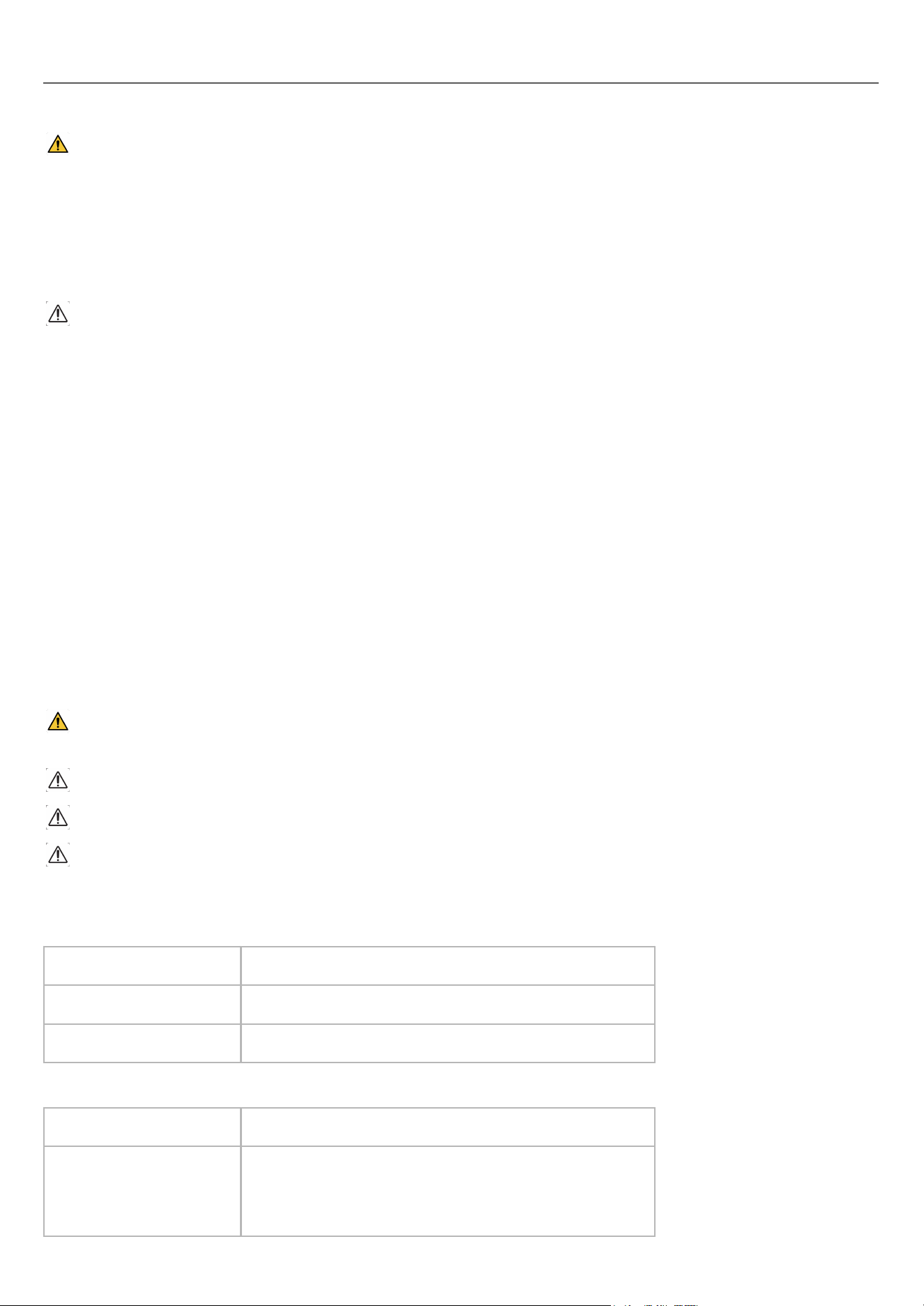
ENVIRONMENTAL PARAMETERS
Conditions for operation:
Temperature
+5°C to +40°C (+41°F to +104°F)
Relative humidity
15% to 90% non-condensing
Atmospheric pressure
700 hPa to 1060 hPa
Conditions for storage/transportation:
Temperature
-25°C to +70°C (-13°F to +158°F)
Relative humidity
0% to 90% non-condensing humidity.
Avoid humid places which can damage the electronic
components and discharge the battery.
31

To ensure proper storage of the NX01 device, carefully wrap the cable to avoid knots and damage to the
internal wires. Make sure to always store the device and its accessories in its primary packaging.
When using the NX01 device after storage at the minimum or maximum storage temperature, make sure to
wait 30 minutes for the device to reach room temperature before using it.
DEVICE TESTING
The NX01 device does not require regular testing or calibration over the course of its lifetime.
Before each recording, the device automatically performs a signal quality check (result displayed on SIGNAL
) which can be used to check the device’s function. If a user repeatedly obtains poor signal quality despite
performing all troubleshooting steps correctly, the HCP should contact customer service
([email protected]) for further testing.
RECYCLING
At the end of its lifetime, the device should be recycled following local regulations and must not be thrown
away with regular household waste. This includes recycling the single-use eartips according to local rules on
polymer materials.
The device, except for its internal battery, doesn't contain hazardous materials and can be recycled like
standard electronic equipment. You can take it to approved collection points or recycling centers in your area.
Alternatively, it can be returned to the manufacturer for proper disposal as Waste Electrical and Electronic
Equipment (WEEE). The battery should be disposed of at a designated disposal station or returned to NAOX
Technologies at the address provided in the instructions or on the device, as required by national laws.
CYBERSECURITY INFORMATION
To ensure the secure and effective use of the NX01 device, users must pay particular attention to the following
points:
● Patients should return their device to their physician in person.
● For streaming acquisitions, the HCP must ensure that:
○ Bluetooth is activated only in secure environments (e.g., clinics, hospitals).
○ The correct device is paired on the practitioner’s computer before data transfer.
● The computer used for streaming/download is up to date with the current OS.
● To download recordings performed at home by the patient, the HCP must use the USB-C cable
provided with the NX01 device.
● Any suspected cybersecurity incident must be reported to care@naox-technologies.com.
● For software updates, make sure to follow NAOX Technologies’ instructions provided via secure email.
NAOX Technologies will notify registered customers of:
● Cybersecurity vulnerabilities via secure email.
● Availability of a new software version via email campaigns.
● End-of-support via email campaigns.
For more information regarding cybersecurity, please refer to the Customer Security Documentation and
Manufacturer Disclosure Statement for Security documents available in the registered customers space on the
NAOX website.
32

TECHNICAL SPECIFICATIONS
33
Characteristics
Value
Classification
● Protection against electric shocks: power supply class II, eartips are type BF
applied parts
● Protection against harmful ingress of water or particulate matter: IP22
(protected against solid objects over 12.5 mm, and protected against dripping
water when tilted up to 15 degrees from its normal position)
● Sterility: non sterile
● Not suitable for use in an oxygen-rich environment
● Mode of operation: continuous
Essential performance
● Accuracy of amplitude and rate of variation: EEG signals are reproduced with
an error ≤ +/- 20%
● Input dynamic range and differential offset voltage +/- 150 mV
● Input noise: ≤ 6 µV
● Frequency range and bandwidth: +/- 2 dB in 0.5 - 50 Hz
● Common mode rejection ratio: ≥ 89 dB
When the essential performance is not achieved, the device indicates that the data are
invalid.
Battery lifetime
3.7V, 330mAh
Battery level will remain up to 80% of initial capacity for 2 years
Expected lifetime of the
device
2 years
Bluetooth
● Frequency Range: 2400 MHz to 2483.5 MHz
● Modulation Type: Gaussian Frequency Shift Keying (GFSK)
● Frequency Hopping: Yes, using frequency hopping spread spectrum (FHSS)
● Compliant with EN 55032 (2015 + A11/2020)
● Effective radiated power: 1.6 mW (2 dBm)
EMC TABLES
The NX01 device was tested according to the recommendations of IEC 60601-1-2: Medical electrical equipment – Part
1-2: General requirements for basic safety and essential performance – Collateral Standard: Electromagnetic
disturbances – Requirements and tests and IEC TR 60601-4-2: Medical electrical equipment – Part 4-2: Guidance and
interpretation – Electromagnetic immunity: performance of medical electrical equipment and medical electrical systems.
The NX01 device should withstand electromagnetic disturbances and recover from transient disturbances in less than
30s. In the unlikely event of an EMC phenomenon affecting the product in a way where it would not recover by itself,
simply reboot the device by turning it off and on.
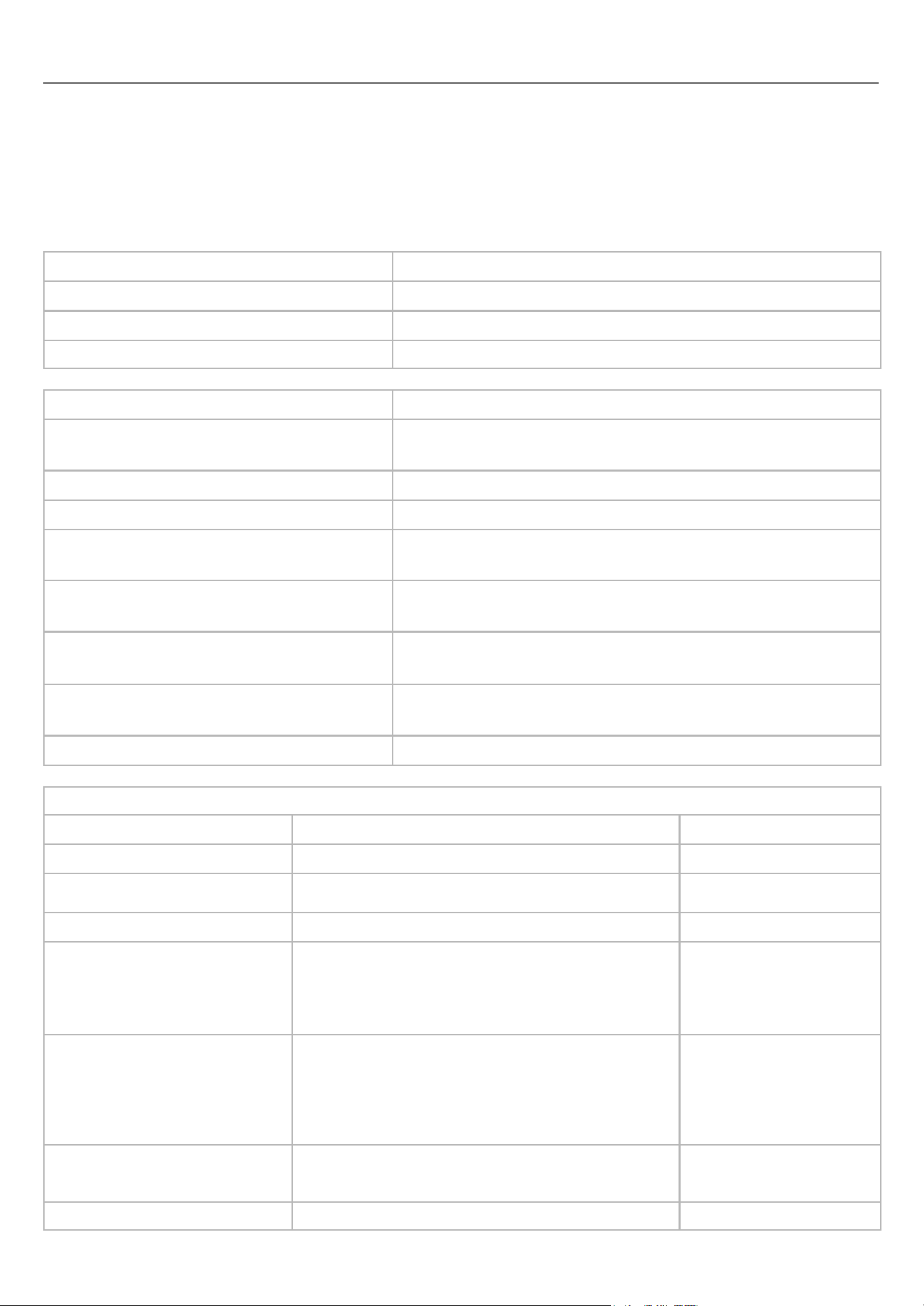
Emission test
Test level
Conducted and radiated RF emission (CISPR 11)
Group 1, Class B
Harmonic distortion (IEC 61000-3-2)
Class B
Voltage fluctuation and flicker (IEC 61000-3-3)
240 VAC
Immunity phenomenon
Immunity level
Electrostatic discharge (IEC 61000-4-2)
+/- 4 kV, +/- 8 kV contact
+/- 2 kV, +/- 4 kV, +/- 8 kV, +/- 15 kV air
Radiated RF EM fields (IEC 61000-4-3)
3 V/m and 10 V/m, 80 MHz - 2.7 GHz, 80% AM at 1 kHz
Power frequency magnetic field (IEC 61000-4-8)
3 A/m and 30 A/m, 50 or 60 Hz
Electrical fast transient (IEC 61000-4-4)
+/- 0.5 kV DC input, +/- 1 kV AC input
+/- 2 kV, 100 kHz repetition frequency
Surges (IEC 61000-4-5)
+/- 0.5 kV, +/- 1 kV line to line
+/- 0.5 kV, +/- 1 kV, +/- 2 kV line to ground
Conducted disturbances induced by RF fields
(IEC 61000-4-6)
3 V, 0.15 MHz - 80 MHz, 80% AM at 1 kHz
6 V in ISM and radio bands
Voltage dips (IEC 61000-4-11)
0% U
T
, 0.5 cycles at 0°, 45°, 90°, 135°, 180°, 225°, 270° and 315°
0% U
T
, 1 cycle and 70% U
T
, 25-30 cycles
Voltage interruptions (IEC 61000-4-11)
0% U
T
, 250/300 cycles
Immunity to RF wireless communications
Service
Characteristics
Immunity level
● TETRA 400
380 - 390 MHz, pulse modulation 18 Hz
27 V/m
● GMRS 460,
● FRS 460
430 - 470 MHz, FM +/- 5 kHz deviation 1 kHz sine
28 V/m
● LTE band 13, 17
704 - 787 MHz, pulse modulation 217 Hz
9 V/m
● GSM 800/900,
● TETRA 800,
● iDEN 820,
● CDMA 850,
● LTE band 5
800 - 960 MHz, pulse modulation 18 Hz
28 V/m
● GSM 1800
● CDMA 1900
● GSM 1900
● DECT
● LTE bands 1, 3, 4, 25
● UMTS
1.7 - 1.99 GHz, pulse modulation 217 Hz
28 V/m
● Bluetooth
● WLAN 802.11 b/g/n
● LTE band 7
2.4 - 2.57 GHz, pulse modulation 217 Hz
28 V/m
● WLAN 802.11 a/n
5.1 - 5.8 GHz, pulse modulation 217 Hz
9 V/m
34
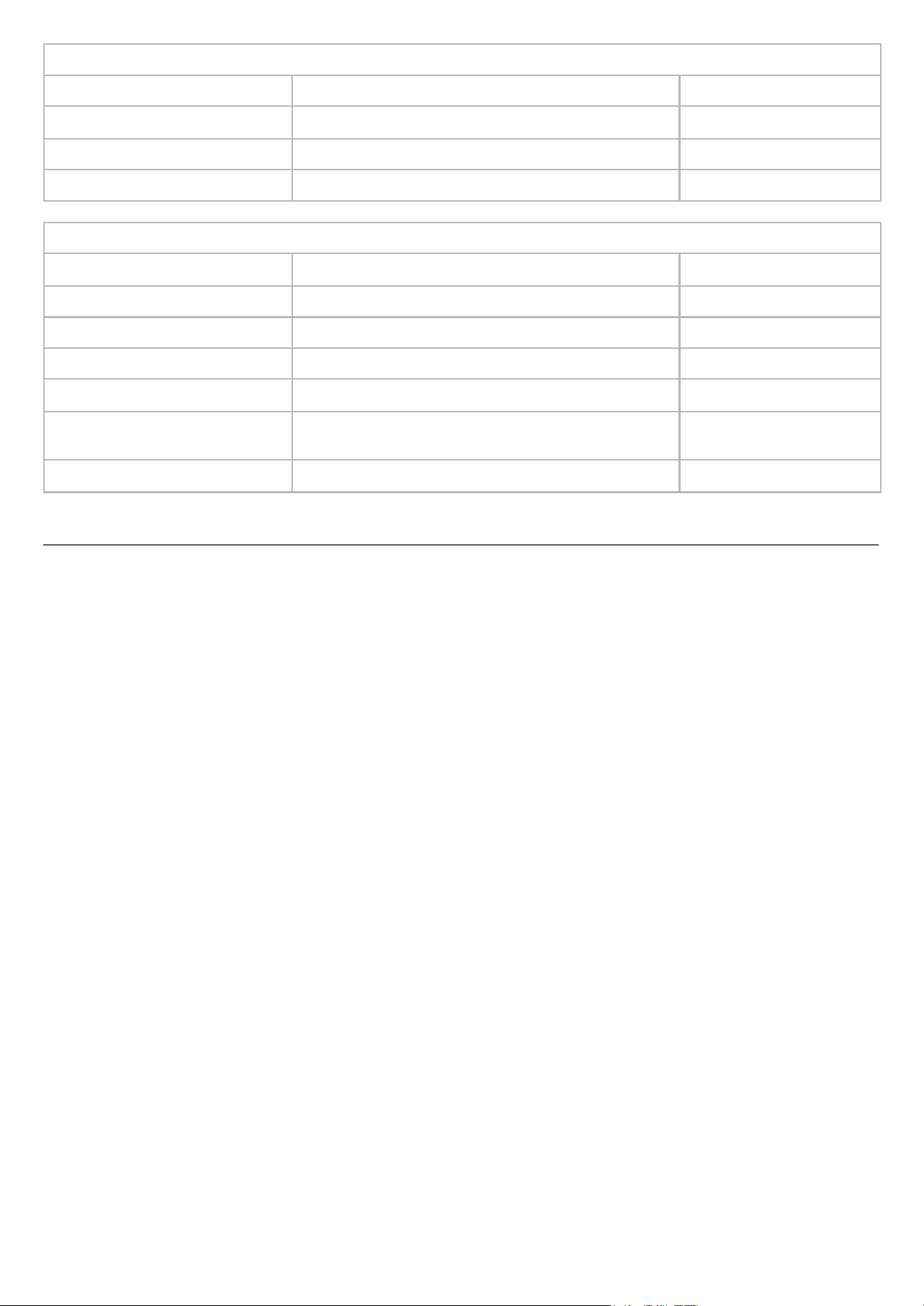
Immunity to proximity magnetic fields
Frequency
Modulation
Immunity level
30 kHz
CW
8 A/m
134.2 kHz
Pulse modulation 2.1 kHz
65 A/m
13.56 MHz
Pulse modulation 50 kHz
7.5 A/m
Immunity to proximity electric fields
Frequency
Modulation
Immunity level
385 MHz
Pulse modulation 18 Hz
6 V/m
450 MHz
Pulse modulation 18 Hz
9 V/m
710 MHz, 745 MHz & 780 MHz
Pulse modulation 217 Hz
3 V/m
810 MHz, 870 MHz, 930 MHz
Pulse modulation 18 Hz
9 V/m
1.72 GHz, 1.845 GHz, 1.97 GHz,
2.45 GHz
Pulse modulation 217 Hz
9 V/m
5.24 GHz, 5.50 GHz, 5.785 GHz
Pulse modulation 217 Hz
6 V/m
REGULATORY INFORMATION
FCC COMPLIANCE STATEMENT
This device complies with Part 15 of the FCC Rules. Operation is subject to the following two conditions: (1) This device
may not cause harmful interference, and (2) this device must accept any interference received, including interference that
may cause undesired operation.
NOTE: This equipment has been tested and found to comply with the limits for a Class B digital device, pursuant to part
15 of the FCC Rules. These limits are designed to provide reasonable protection against harmful interference in a
residential installation. This equipment generates, uses and can radiate radio frequency energy and, if not installed and
used in accordance with the instructions, may cause harmful interference to radio communications. However, there is no
guarantee that interference will not occur in a particular installation.
If this equipment does cause harmful interference to radio or television reception, which can be determined by turning the
equipment off and on, the user is encouraged to try to correct the interference by one or more of the following measures:
● Reorient or relocate the receiving antenna.
● Increase the separation between the equipment and receiver.
● Connect the equipment into an outlet on a circuit different from that to which the receiver is connected.
● Consult the dealer or an experienced radio/TV technician for help
FCC CAUTION
Any change or modifications not expressively approved by the party responsible for compliance could void the user's
authority to operate this equipment.
RADIATION EXPOSURE STATEMENT
This equipment complies with FCC radiation exposure limits set forth for an uncontrolled environment. This device has
been tested and meets applicable limits for Radio Frequency (RF) exposure.
Further RF exposure reduction can be achieved if the product is kept as far as possible from the user body.
SPECIFIC ABSORPTION RATE (SAR)
The Specific Absorption Rate (SAR) quantifies the user's exposure to electromagnetic waves from the equipment in
question. The maximum permitted SAR is 2 W/kg for the head and torso and 4 W/kg for the limbs. SAR tests are
conducted in standard usage positions indicated by the European Union Council at the highest certified power of the
device and across all frequency bands.
35
QUICK REFERENCE - EEG RECORDING
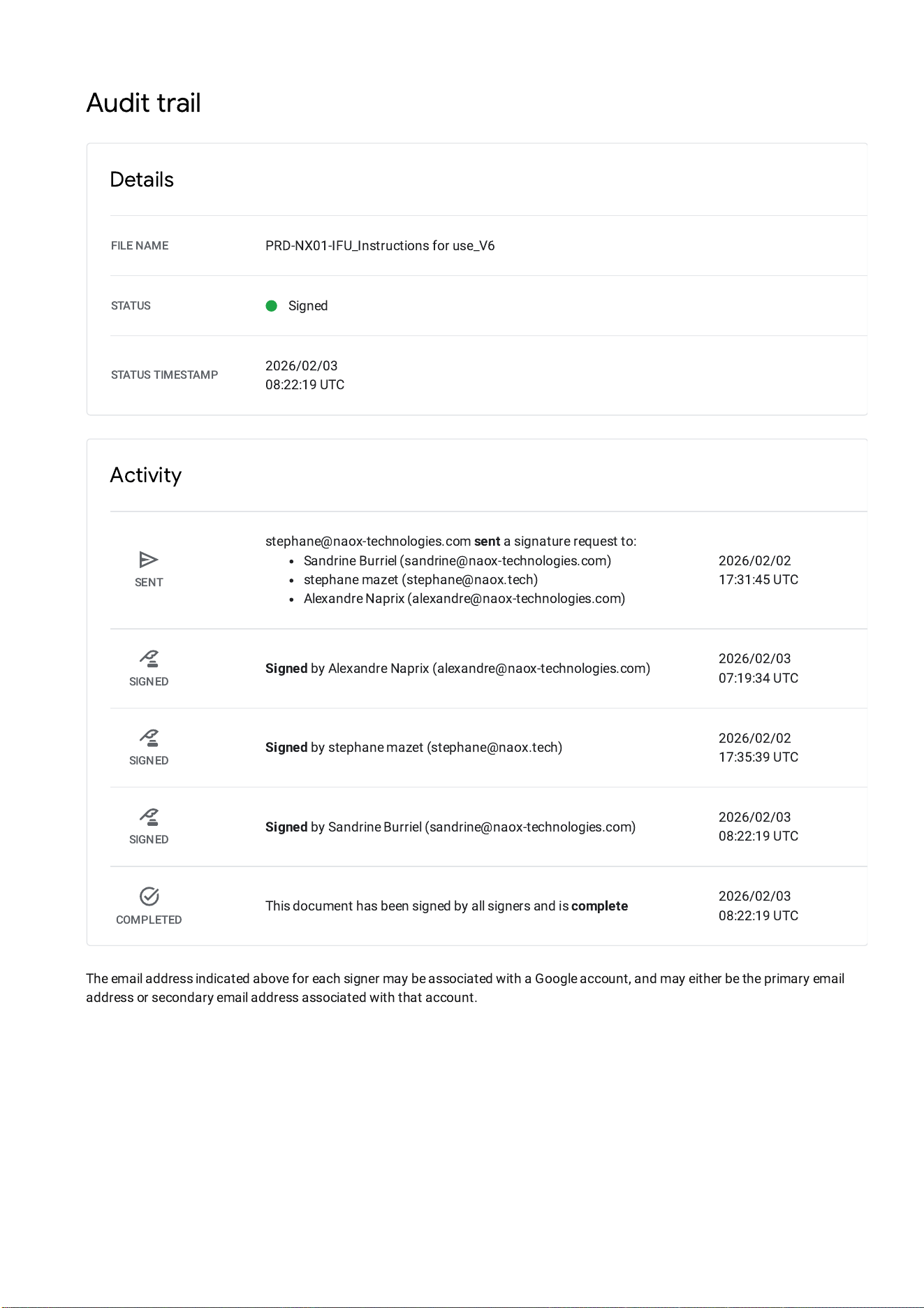
Audit trail
Details
FILE NAME
PRD-NX01-IFU_Instructions for use_V6
STATUS
Signed
STATUS TIMESTAMP
2026/02/03
08:22:19 UTC
Activity
SENT
stephane@naox-technologies.com
sent
a signature request to:
Sandrine Burriel (sandrine@naox-technologies.com)
stephane mazet (stephane@naox.tech)
Alexandre Naprix (alexandre@naox-technologies.com)
2026/02/02
17:31:45 UTC
SIGNED
Signed
byAlexandre Naprix (alexandre@naox-technologies.com)
2026/02/03
07:19:34 UTC
SIGNED
Signed
bystephane mazet (stephane@naox.tech)
2026/02/02
17:35:39 UTC
SIGNED
Signed
bySandrine Burriel (sandrine@naox-technologies.com)
2026/02/03
08:22:19 UTC
COMPLETED
This document has been signed by all signers and is
complete
2026/02/03
08:22:19 UTC
The email address indicated above for each signer may be associated with a Google account, and may either be the primary email
address or secondary email address associated with that account.