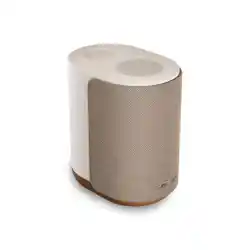
LIFESTYLE ULTRA SPEAKER

IMPORTANT SAFETY INSTRUCTIONS
2
|
ENG
Please read and keep all safety and use instructions.
Declarations of conformity can be found at: www.Bose.com/compliancewww.Bose.com/compliance
Important Safety Instructions
Do not use this apparatus near water.
Clean only with a dry cloth.
Do not block any ventilation openings. Install in accordance with the manufacturer’s instructions.
Only use aachments/accessories specified by the manufacturer.
Refer all servicing to qualified personnel. Servicing is required when the apparatus does not operate normally,
or has been physically damaged.
WARNINGS/CAUTIONS
• To reduce the risk of fire or electrical shock do NOT expose this product to rain, dripping, splashing, or
moisture and do not place liquid filled objects such as vases, on or near the product.
• Keep the product away from fire and heat sources. Do NOT place naked flame sources, such as lighted
candles, on or near the product.
• Do NOT make unauthorized alterations to this product.
• Do NOT use in vehicles or boats.
• Where the mains plug or an appliance coupler is used as the disconnect device, the disconnect device shall
remain readily operable.
仅适用于 2000m 以下地区安全使用
Use at altitude less than 2000 meters only.
• Only use the following hardware to mount this product: Bose Lifestyle Wall Bracket and Bose Lifestyle
Floor Stand.
• Do not place or install near any heat sources, such as fireplaces, radiators, heat registers, stoves or other
apparatus (including amplifiers) that produce heat.
• Do not mount the product in locations where condensation may occur.
• Product is not intended for use by children.
• The product label is located on the boom of the product.
WARNING: Do not expose product or mounting components to any chemical substances that are not
specified by Bose, including but not limited to lubricants, cleaning agents, contact sprays, or hydrocarbon
based solvents. Exposure to such substances can lead to degradation of the plastic material, resulting in
cracking and creating a falling hazard.
3
|
ENG
REGULATORY AND LEGAL INFORMATION
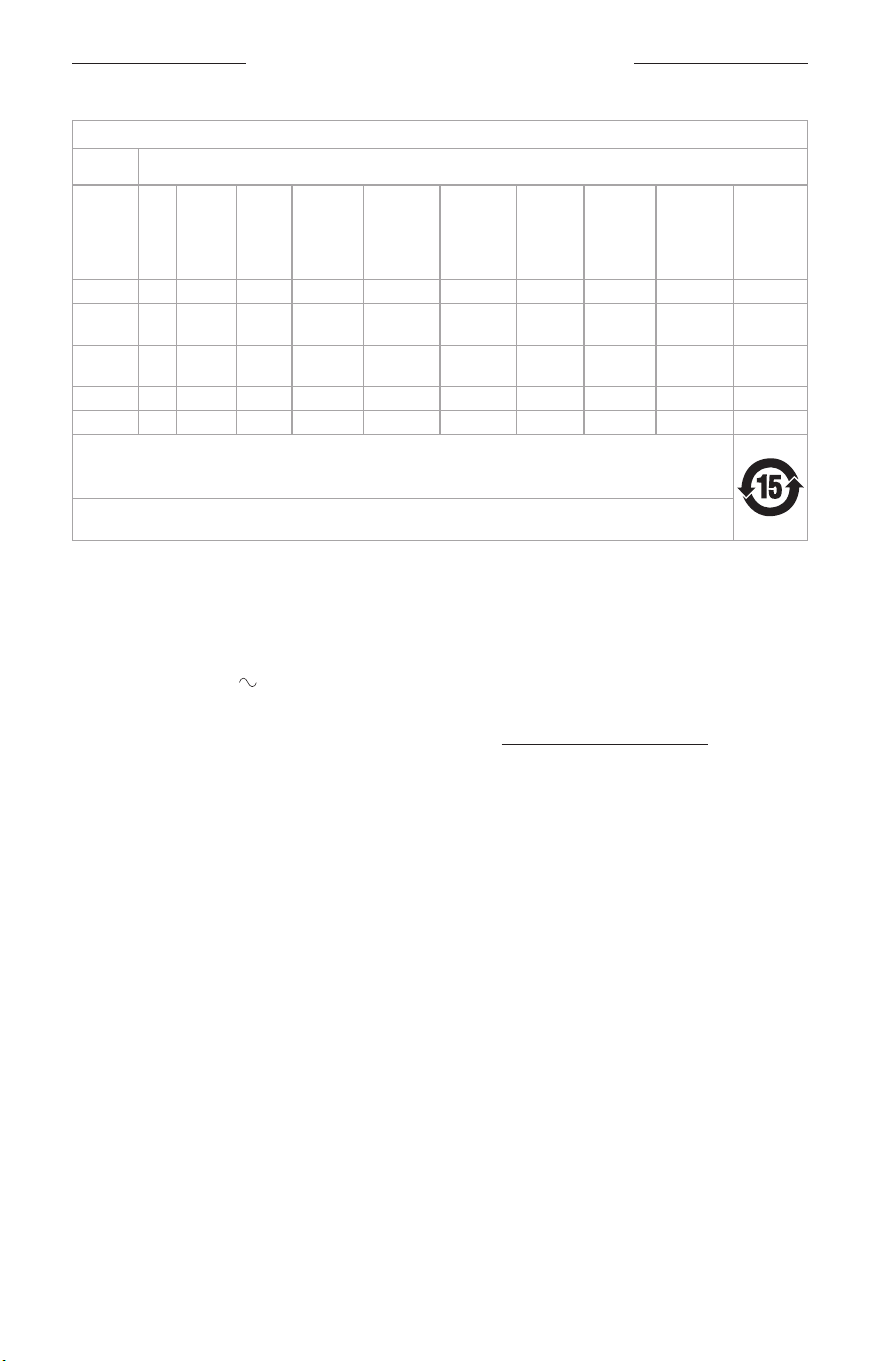
Names and Contents of Toxic or Hazardous Substances or Elements
Toxic or Hazardous Substances and Elements
Part
Name
Lead
(Pb)
Mercury
(Hg)
Cadmi-
um
(Cd)
Hexava-
lent
(CR(VI))
Polybromi-
nated
Biphenyl
(PBB)
Polybromi-
nated
diphenyle-
ther
(PBDE)
Dybutyl
phthalate
(DBP)
Diisobutyl
phthalate
(DIBP)
Butyl
benzyl
phthalate
(BBP)
Bis(2-eth-
ylhexyl)
phthalate
(DEHP)
PCBs X O O O O O O O O O
Metal
Parts
X O O O O O O O O O
Plastic
Parts
O O O O O O O O O O
Speakers X O O O O O O O O O
Cables X O O O O O O O O O
This table is prepared in accordance with the provisions of SJ/T 11364.
O: Indicates that this toxic or hazardous substance contained in all of the homogeneous materials for this part is
below the limit requirement of GB/T 26572.
X: Indicates that this toxic or hazardous substance contained in at least one of the homogeneous materials used
for this part is above the limit requirement of GB/T 26572.
Date of Manufacture: The eighth digit in the serial number indicates the year of manufacture; “6” is 2016
or 2026.
Importers: Bose Electronics (Shanghai) Company Limited, Level 6, Tower D, No. 2337 Gudai Rd. Minhang
District, Shanghai 201100
Input Rating: 100 - 240V , 50/60Hz, 20W
Model: 443508. The CMIIT ID is located on the boom of the speaker.
This product is covered by a Bose Limited Warranty, available at worldwide.Bose.com/Warrantyworldwide.Bose.com/Warranty
License Disclosures: To view the license disclosures that apply to the third-party software packages included
as components of the Bose Lifestyle Ultra Speaker, use the Bose app. You can access this information from
the Seings menu.
4
|
ENG
REGULATORY AND LEGAL INFORMATION
Apple, AirPlay, the Apple logo, and Apple Music are trademarks of Apple Inc., registered in the U.S. and other
countries. App Store is a service mark of Apple Inc.
Use of the Works with Apple badge means that an accessory has been designed to work specifically
with the technology identified in the badge and has been certified by the developer to meet Apple
performance standards.
The Bluetooth® word mark and logos are registered trademarks owned by Bluetooth SIG, Inc. and any use of
such marks by Bose Corporation is under license.
Android and other marks are trademarks of Google LLC.
This product is protected by certain intellectual property rights of Microsoft. Use or distribution of such
technology outside of this product is prohibited without a license from Microsoft.
Wi-Fi is a registered trademark of Wi-Fi Alliance®.
Bose, the B logo, and Lifestyle are trademarks of Bose Corporation. | Bose Corporation Headquarters:
1-877-230-5639 | ©2026 Bose Corporation. No part of this work may be reproduced, modified, distributed, or
otherwise used without prior wrien permission.
Please complete and retain for your records
The serial and model numbers are located on the boom of the speaker and under the rubber foot.
Serial number: ___________________________________________________________________________
Model number: 443508
Please keep your receipt with your owner’s guide. Now is a good time to register your Bose product.
You can easily do this by going to worldwide.Bose.com/ProductRegistrationworldwide.Bose.com/ProductRegistration

CONTENTS
5
|
ENG
WHAT’S IN THE CARTON
Contents ...................................................................................................................................................... 7
SPEAKER PLACEMENT
Recommendations .................................................................................................................................. 8
Mount the speaker................................................................................................................................... 9
CONNECT THE SPEAKER TO POWER .................................................................................... 10
BOSE APP SETUP
Download the Bose app ........................................................................................................................ 11
SET UP THE SPEAKER
Set up your home theater ..................................................................................................................... 12
POWER
Power on ...................................................................................................................................................... 13
Network Standby ...................................................................................................................................... 13
Enter Network Standby (manually) ......................................................................................... 13
Exit Network Standby ................................................................................................................... 13
SPEAKER CONTROLS
Media playback ......................................................................................................................................... 15
Volume .......................................................................................................................................................... 16
SPEAKER STATUS
Power status ............................................................................................................................................... 17
Update and error status ........................................................................................................................ 18

CONTENTS
6
|
ENG
BUILD A BOSE LIFESTYLE COLLECTION HOME THEATER SYSTEM
Benefits ........................................................................................................................................................ 19
Compatible products ............................................................................................................................. 19
........................................................................................................................................................................ 19
CARE AND MAINTENANCE
Update the speaker ................................................................................................................................. 20
Clean the speaker .................................................................................................................................... 20
Replacement parts and accessories ............................................................................................... 21
Limited warranty ....................................................................................................................................... 21
TROUBLESHOOTING
Try these solutions first .......................................................................................................................... 22
Additional solutions ................................................................................................................................ 22
Reset the speaker .................................................................................................................................... 23
Restore the speaker to factory seings ......................................................................................... 24
7
|
ENG
WHAT’S IN THE CARTON
CONTENTS
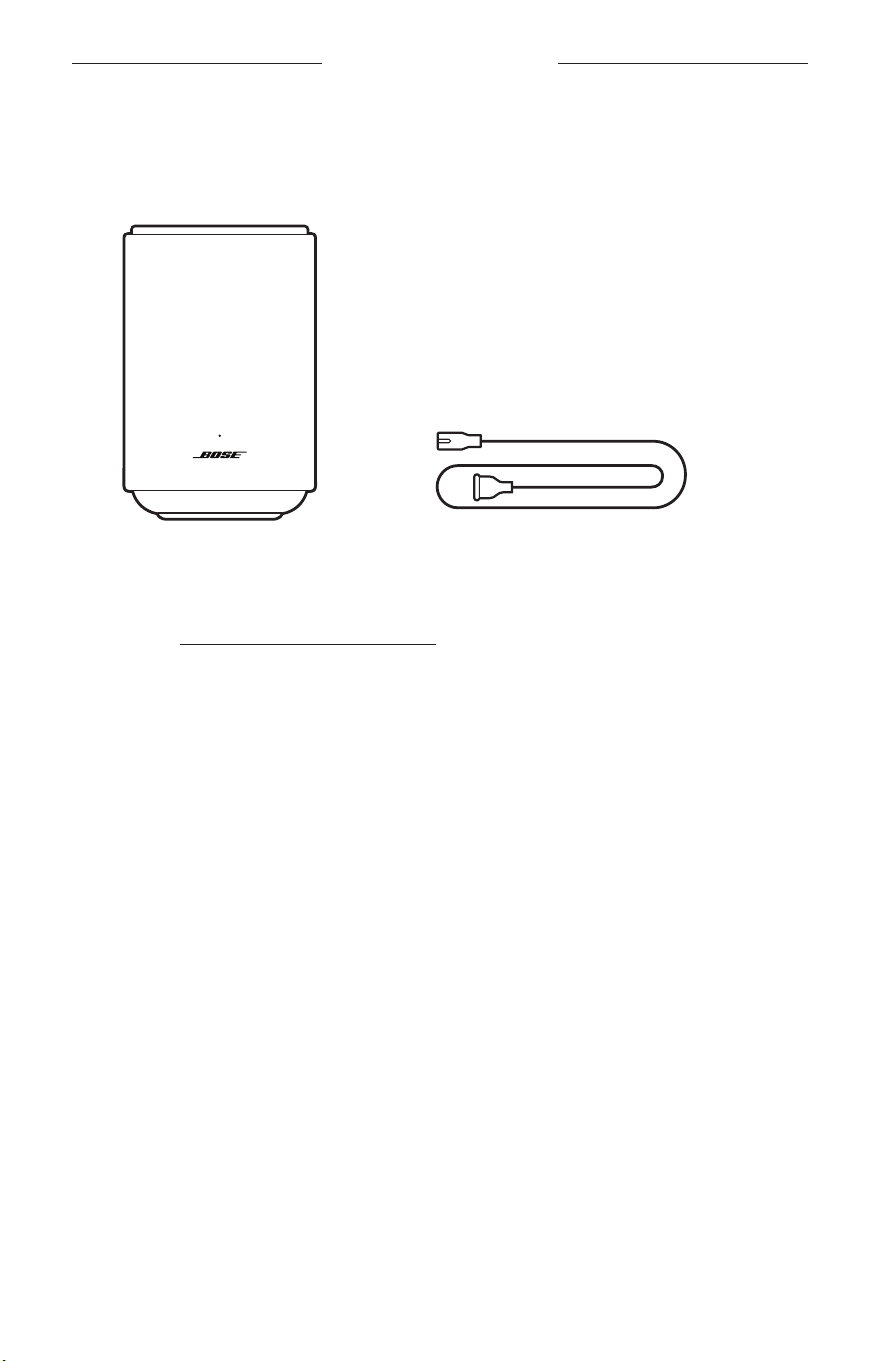
Confirm that the following parts are included:
Bose Lifestyle Ultra Speaker Power cord
NOTE: If any part of your product appears to be missing or damaged, don’t use it.
Visit support.Bose.com/lu-speakersupport.Bose.com/lu-speaker for troubleshooting articles, videos, and
product repair or replacement.

8
|
ENG
SPEAKER PLACEMENT
RECOMMENDATIONS
For best performance, follow these recommendations when placing the speaker:
• Do NOT place the speaker on top of audio/video equipment (receivers, TVs, etc.), or
any other object that may generate heat. Heat generated by these items may result
in poor speaker performance.
• Do NOT place any objects on top of the speaker or in front of the speaker.
• To avoid interference, keep other wireless equipment 1 – 3 ft (0.3 – 0.9 m) away
from the speaker. Place the speaker outside of and away from metal cabinets and
direct heat sources.
• Place the speaker on a stable and level surface.
• Keep the back and sides of the speaker at least 2 – 3 in (5.08 – 7.62 cm) from any
other surface or object. Blocking the port(s) aects sound quality.
• Make sure there is an AC (mains) power outlet nearby.
SPEAKER PLACEMENT
9
|
ENG
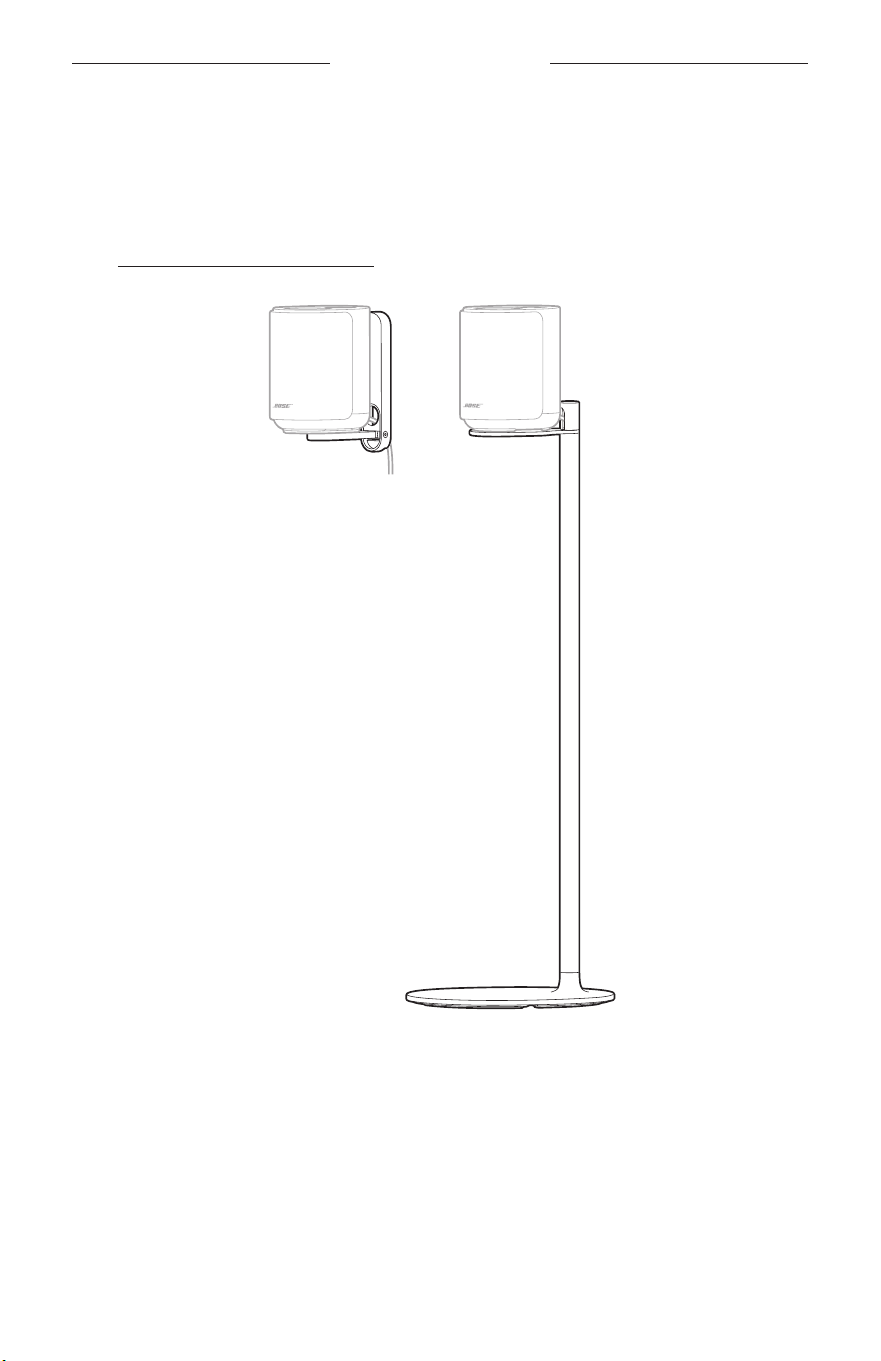
MOUNT THE SPEAKER
You can mount the speaker on a wall or aach it to a floor stand. To purchase the
Bose Lifestyle Wall Bracket or Bose Lifestyle Floor Stand, contact your authorized
Bose dealer.
Visit: support.Bose.com/lu-speakersupport.Bose.com/lu-speaker
CAUTION: Do NOT use any other hardware to mount the speaker.
10
|
ENG
CONNECT THE SPEAKER TO POWER
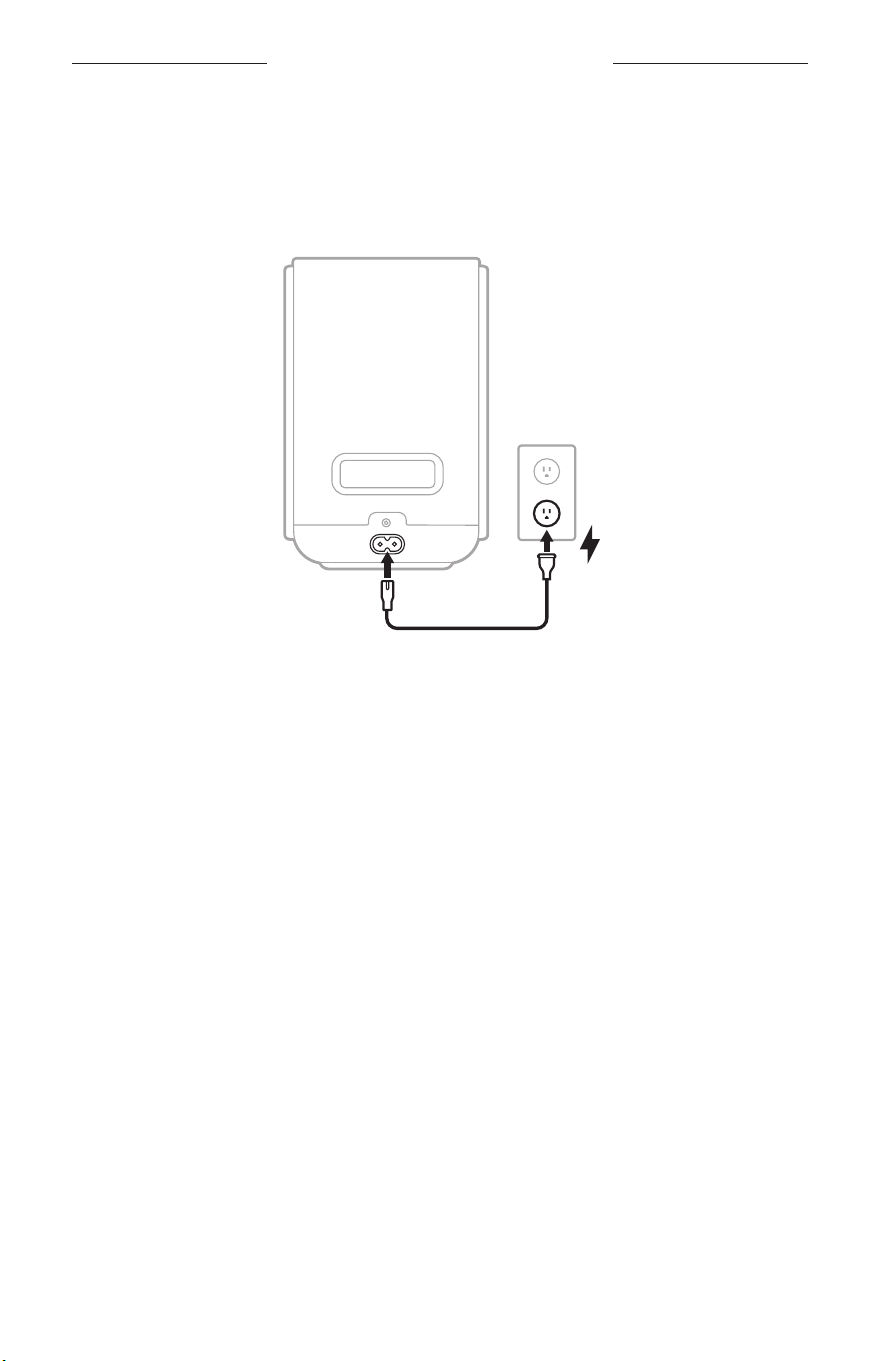
Connect the speaker to an AC (mains) power outlet using the power cord.
1. Connect the power cord to the power port on the speaker.
2. Plug the other end of the power cord into an AC (mains) power outlet.
The speaker powers on. The status light slowly pulses white, blue, green, red,
yellow, purple, and amber (repeated) and you hear a tone. The speaker is ready
to connect.
NOTE: The status light slowly pulses white, blue, green, red, yellow, purple, and
amber (repeated) and you hear a tone only during initial product setup. If
you’re reconnecting the speaker to power, the status light slowly pulses
white, then turns o. The speaker is fully powered on.
3. Set up the speaker using the Bose app (see page 11).
11
|
ENG
BOSE APP SETUP
The Bose app lets you set up and control the speaker from a mobile device, such as a
smartphone or tablet.
Using the app, you can build a home theater system, manage speaker seings, and
learn about any updates and new features made available by Bose.
NOTE: If you’ve already downloaded the Bose app for another Bose product, open
the app then add the speaker from the product list screen.
DOWNLOAD THE BOSE APP
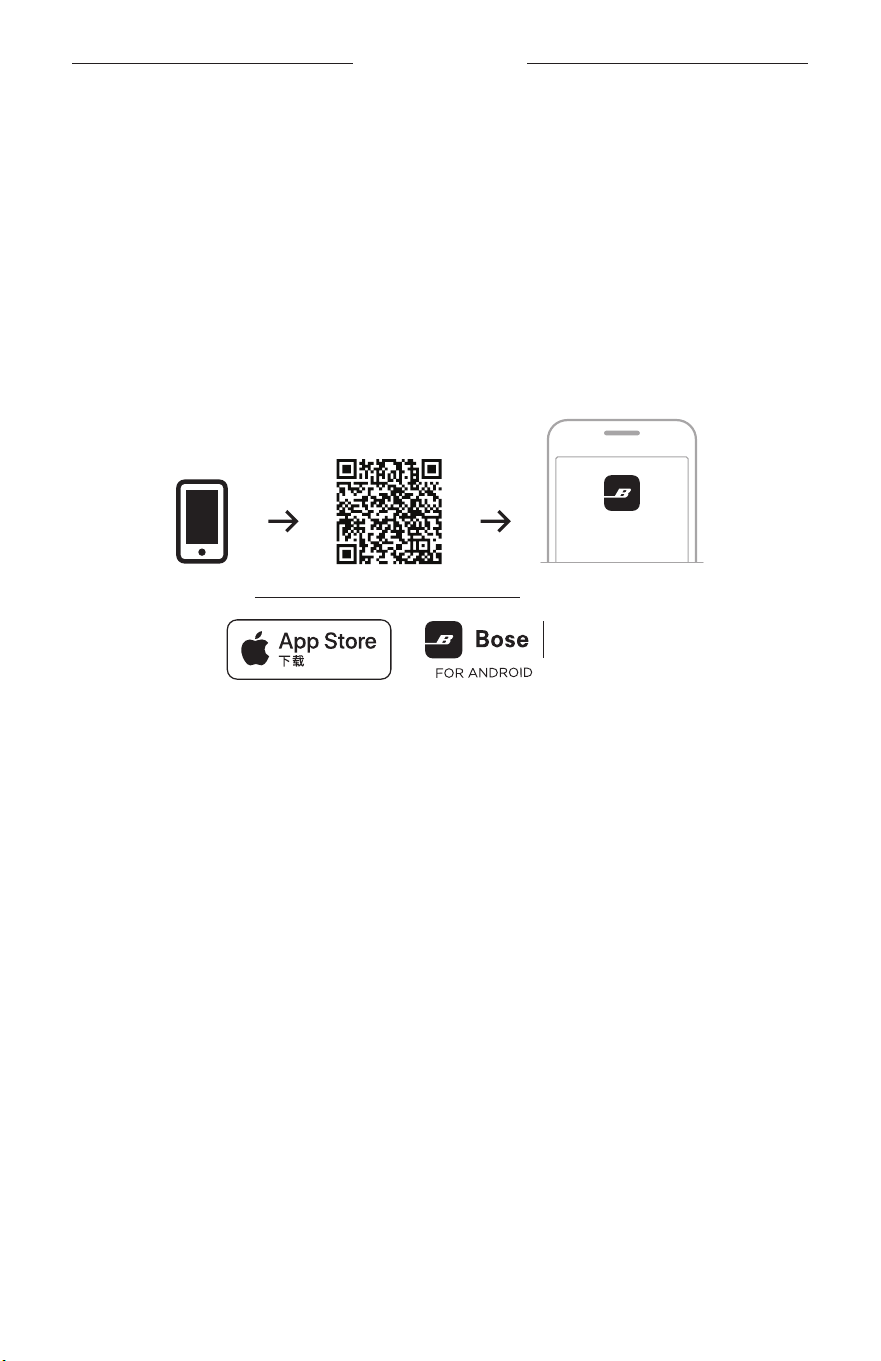
1. On your device, download the Bose app.
BOSE
setup.Bose.com/lu-speakersetup.Bose.com/lu-speaker
2. Follow the app instructions to set up the speaker as part of a home theater system
with other Bose Lifestyle Collection products (see page 19).
When you begin setup, the speaker status light glows solid green.
NOTE: If you’re connecting multiple Bose products at once, start with the
soundbar for a more seamless setup.

12
|
ENG
SET UP THE SPEAKER
SET UP YOUR HOME THEATER
Immerse yourself in your favorite movies and TV shows by creating a surround sound
experience for your home theater (see page 19).
You build a Bose Lifestyle Collection home theater system using the following
Bose products:
• Bose Lifestyle Ultra Soundbar
• Two Bose Lifestyle Ultra Speakers
• (Optional) Bose Lifestyle Ultra Subwoofer
NOTE: To set up a Bose Lifestyle Collection home theater system, use the Bose app
(see page 11). If you are connecting multiple Bose products at once, start
with the soundbar for easier setup.
13
|
ENG
POWER ON
When you plug the speaker into an AC (mains) power outlet, the speaker
automatically powers on. The status light slowly pulses white.
NETWORK STANDBY
The speaker transitions to a Network Standby state when audio has stopped and you
have not pressed any buons for 20 minutes.
NOTE: You can disable the standby timer using the Bose app. You can access this
option from the Seings menu.
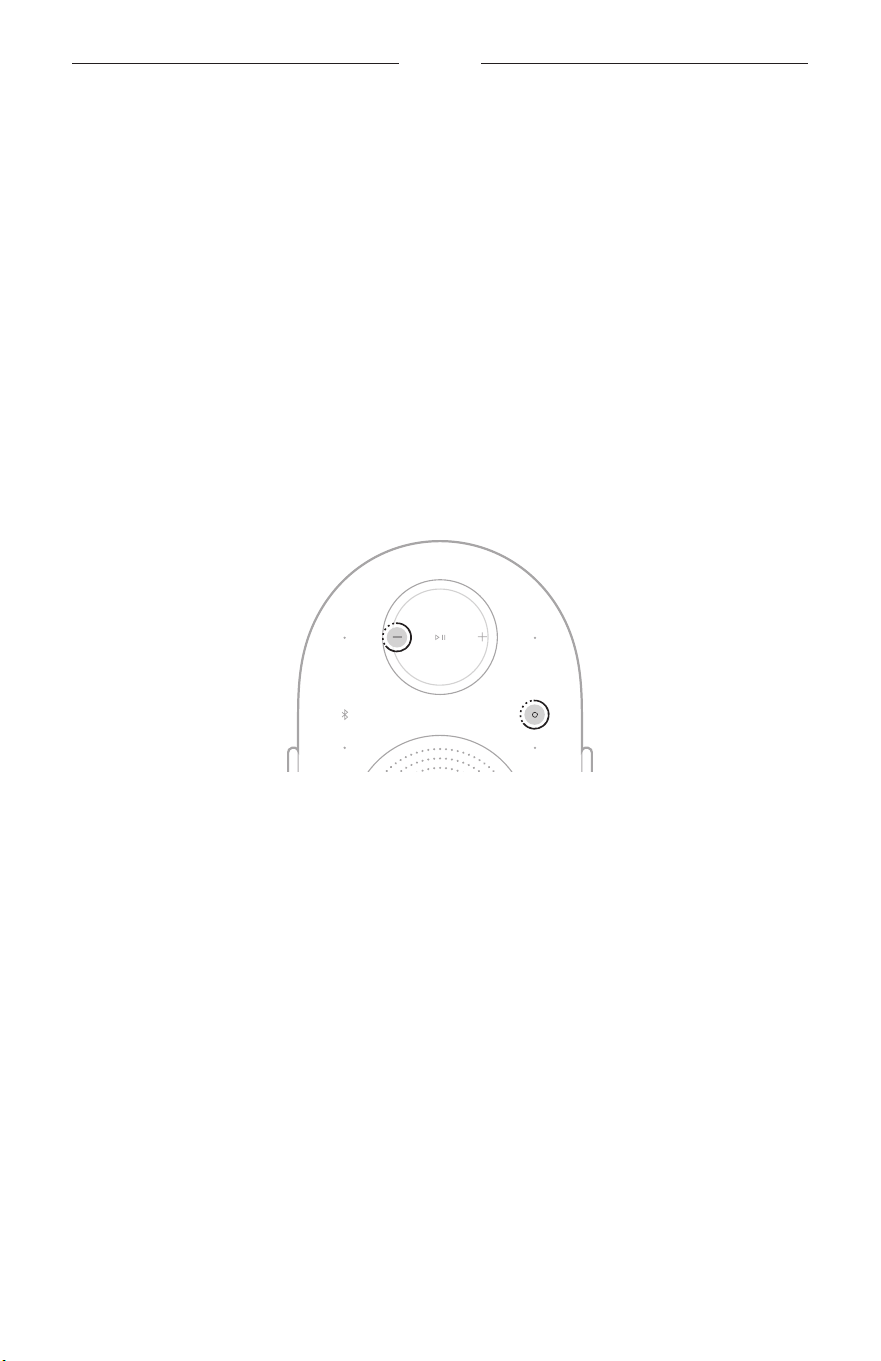
Enter Network Standby (manually)
To put the speaker into Network Standby manually, touch and hold the Action
buon b and Volume down buon z for 5 seconds until the status light blinks white
2 times.
Exit Network Standby
To wake the speaker from Network Standby:
• Tap the Bluetooth buon l, the Action buon b, or the Play/Pause buon F.
• Play or resume audio using your device or using the Bose app (see page 11).
POWER
14
|
ENG
SPEAKER CONTROLS
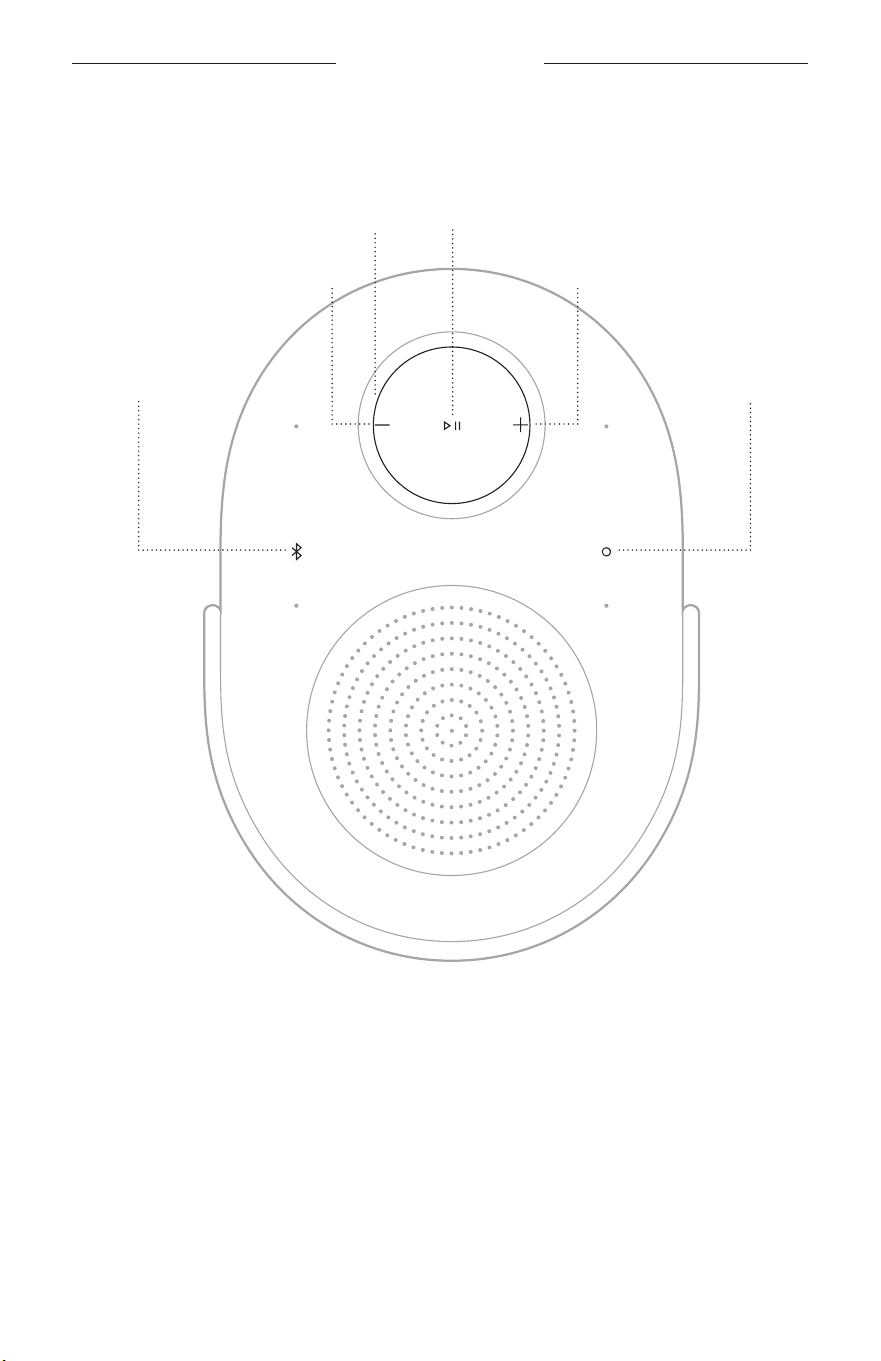
The speaker controls are located on the top of the speaker. They are used to control
the speaker.
Action buon
Volume up buon
Volume down buon
Play/Pause buon
Bluetooth buon
Volume ring
TIP: You can also control your speaker as part of a home theater by using the Bose
app (see page 11).
15
|
ENG
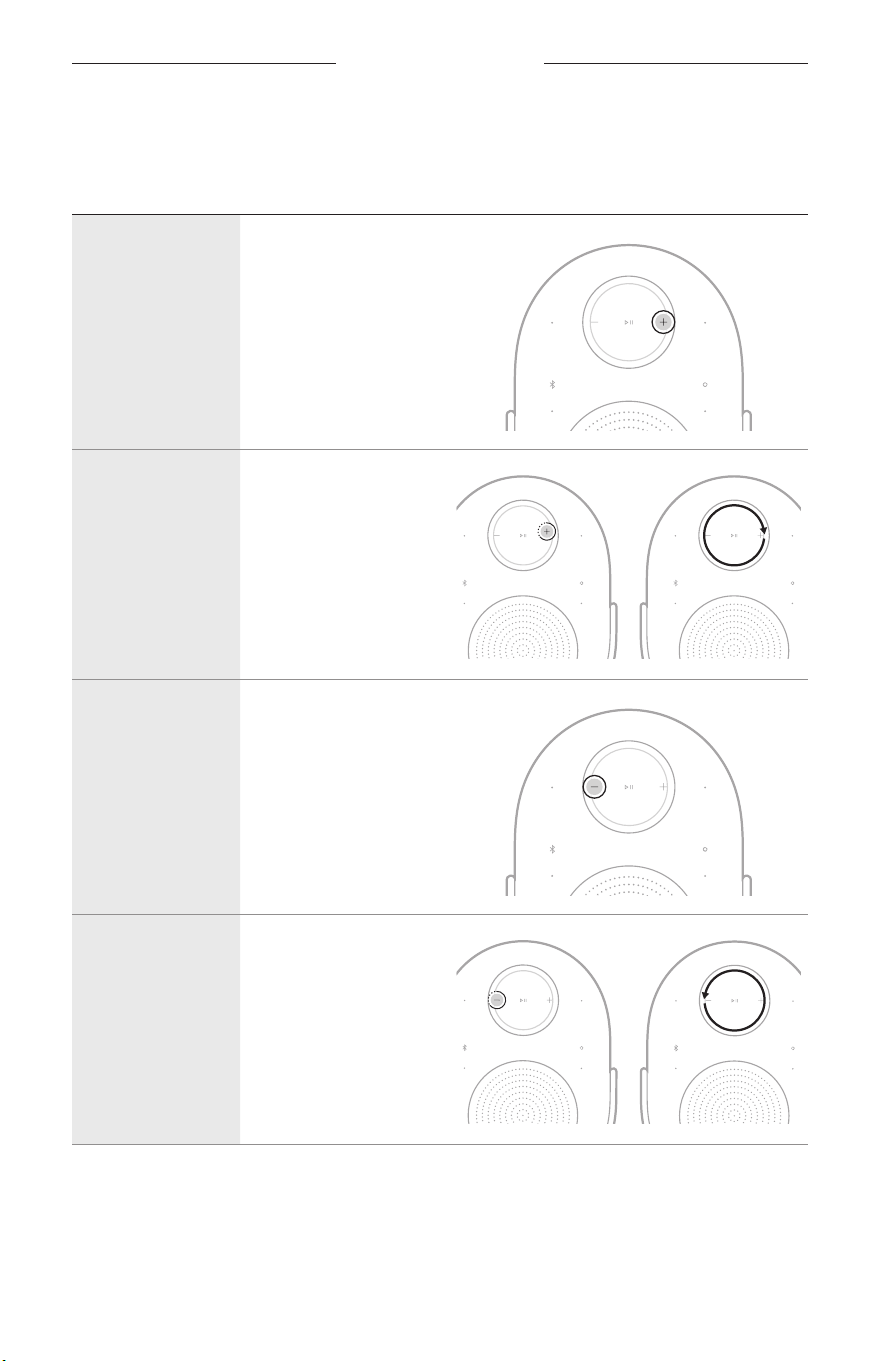
SPEAKER CONTROLS
MEDIA PLAYBACK
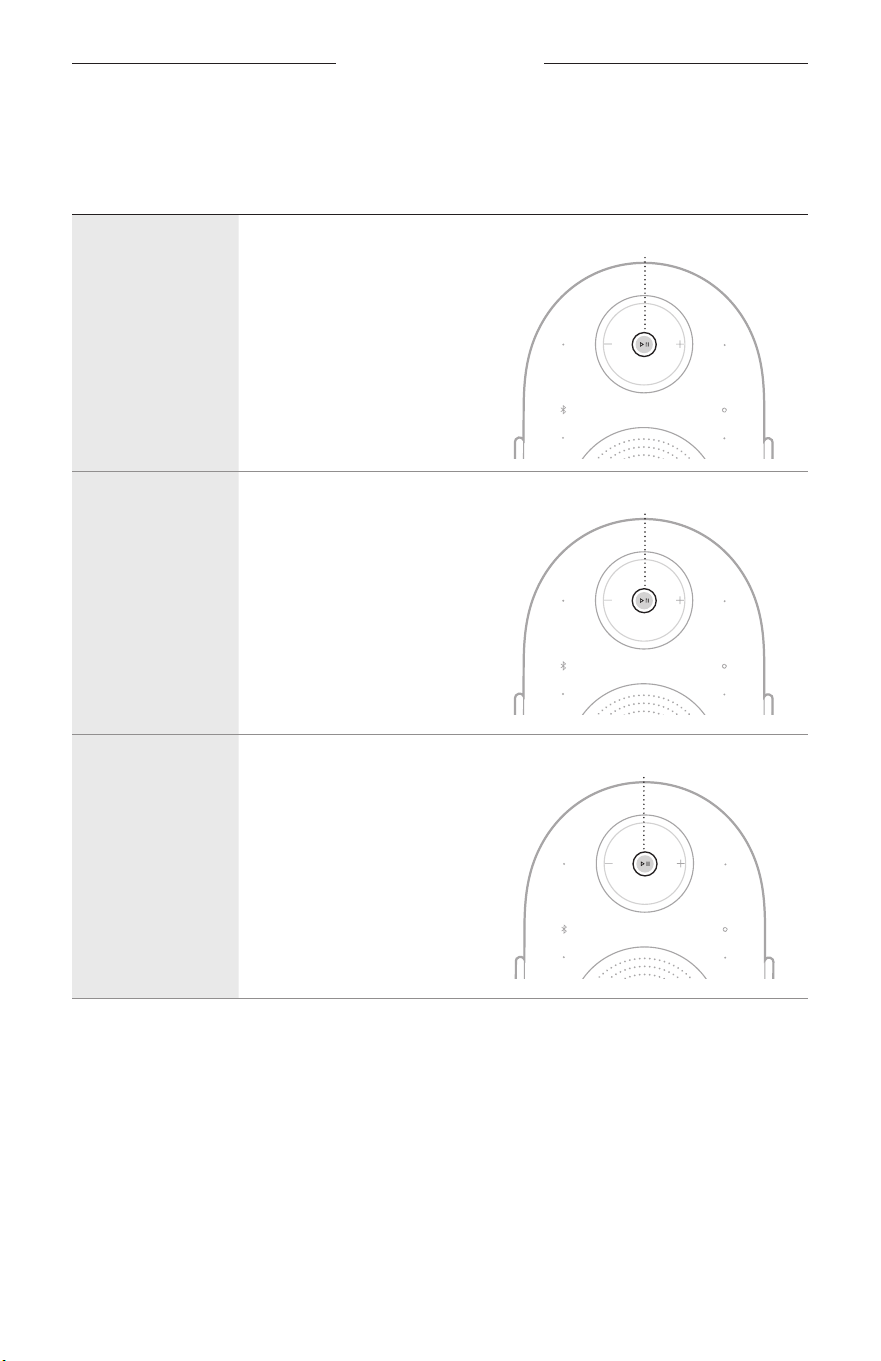
FUNCTION WHAT TO DO
Play/Pause Tap F .
1X
Skip forward Double-tap F .
2X
Skip backward Triple-tap F .
3X
SPEAKER CONTROLS
16
|
ENG
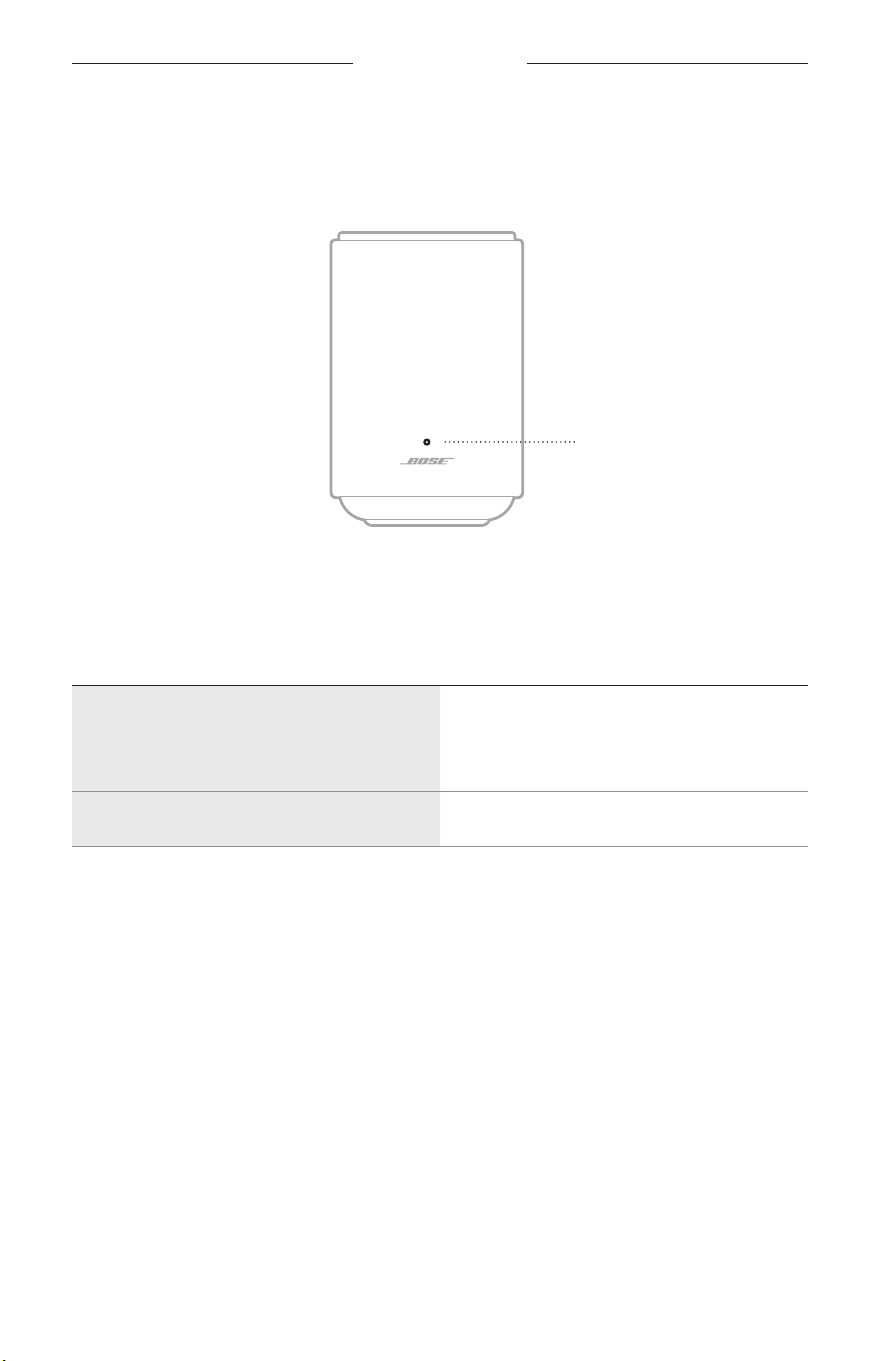
VOLUME
FUNCTION WHAT TO DO
Volume up Tap H.
Quickly increase
the volume
Touch and hold H
or swipe clockwise
on the volume ring.
Volume down Tap z .
Quickly decrease
the volume
Touch and hold z
or swipe counter-
clockwise on the
volume ring.
NOTE: When the volume has been fully increased or decreased, the status light
blinks white 2 times and you hear a tone.
17
|
ENG
SPEAKER STATUS
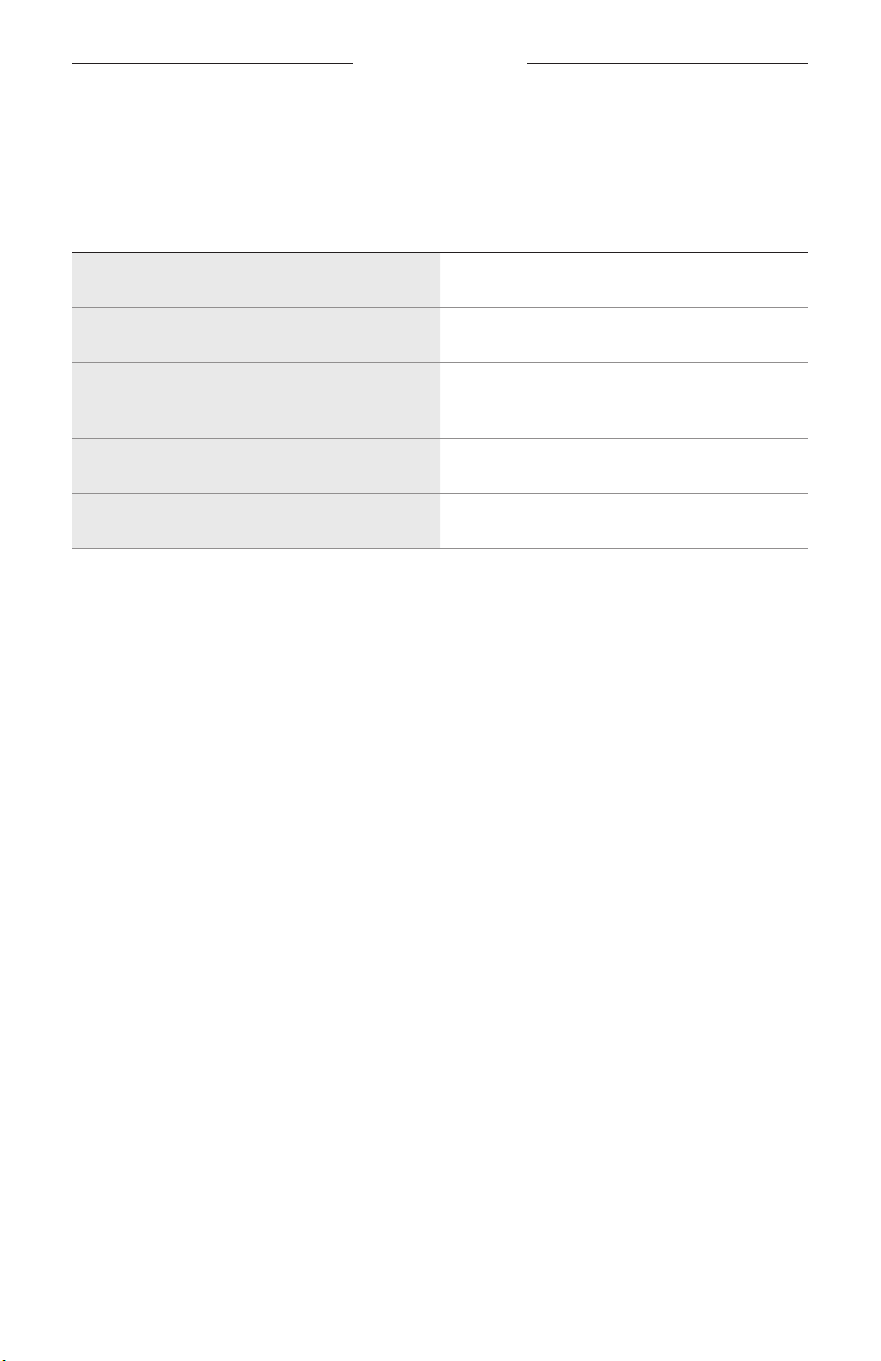
The status light is located on the front of the speaker and shows the speaker status.
NOTE: When the speaker successfully executes a command, the status light blinks
white 2 times.
Status light
POWER STATUS
Shows the power status of the speaker.
STATUS LIGHT ACTIVITY SYSTEM STATE
Slowly pulses white, blue, green, red,
yellow, purple, and amber (repeated)
Powering on, ready for setup
NOTE: Occurs only during initial
product setup.
Slowly pulses white Powering on
18
|
ENG
SPEAKER STATUS
UPDATE AND ERROR STATUS
Shows the status of software updates and error alerts.
STATUS LIGHT ACTIVITY SYSTEM STATE
Slowly pulses white Updating speaker
Slowly pulses amber Restoring speaker
Quickly blinks white and amber (repeated)
Request is temporarily unavailable -
try again later
Slowly pulses amber Source error
Quickly blinks red Error - contact Bose customer service

19
|
ENG
BUILD A BOSE LIFESTYLE COLLECTION HOME THEATER SYSTEM
The Bose Lifestyle Collection of products have seamless integration designed to work
together to create one aspirational and personal experience.
Building a home theater system creates a surround sound experience and immerses
you in your favorite movies and TV shows. Use the Bose app to build a Bose Lifestyle
Collection home theater system (see page 11).
BENEFITS
• Audio quality: Set the mood of the room or create a transformational experience
with rich, powerful, and immersive sound.
• Simplicity: Access audio that easily integrates with your home decor.
• Flexibility: Take control with the flexibility to play what you want, how you want
it, immediately.
COMPATIBLE PRODUCTS
You build a Bose Lifestyle Collection home theater system using the
following products:
• Bose Lifestyle Ultra Soundbar: support.Bose.com/lu-soundbarsupport.Bose.com/lu-soundbar
• Two Bose Lifestyle Ultra Speakers: support.Bose.com/lu-speakersupport.Bose.com/lu-speaker
• (Optional) Bose Lifestyle Ultra Subwoofer: support.Bose.com/lu-subwoofersupport.Bose.com/lu-subwoofer
NOTES:
• All products must be in the Bose app.
• You can control the media playback and volume on the home theater system using
the product controls, the Bose app, or your music service.
• When seing up a home theater system with a Bose Lifestyle Ultra Speaker, you
must have two speakers to create a left and right pair.
• For more information about other Bose Lifestyle Collection products, refer to the
product owner’s guide for that product.

20
|
ENG
CARE AND MAINTENANCE
UPDATE THE SPEAKER
After you complete the setup process of your home theater in the Bose app, the
speaker updates automatically.
NOTE: If an update is available, the software begins updating and the status light
slowly pulses white. When the update is complete, the speaker reboots.
CLEAN THE SPEAKER
Wipe the outside surface of the speaker with a soft, dry cloth. To remove stains, use a
soft, damp cloth.
NOTE: The speaker controls could be inadvertently activated during the
cleaning procedure.
CAUTIONS:
• Do NOT allow liquids to spill onto the speaker or into any openings.
• Do NOT blow air into the speaker.
• Do NOT use any sprays near the speaker.
• Do NOT use any solvents, chemicals or cleaning solutions containing alcohol,
ammonia or abrasives.
• Do NOT allow objects to drop into any openings.

21
|
ENG
CARE AND MAINTENANCE
REPLACEMENT PARTS AND ACCESSORIES
Replacement parts and accessories can be ordered through Bose customer service.
Visit: support.Bose.com/lu-speakersupport.Bose.com/lu-speaker
LIMITED WARRANTY
The speaker is covered by a limited warranty. Visit our website at
worldwide.Bose.com/Warrantyworldwide.Bose.com/Warranty for details of the limited warranty.
To register your product, visit worldwide.Bose.com/ProductRegistrationworldwide.Bose.com/ProductRegistration for
instructions. Failure to register will not aect your limited warranty rights.

22
|
ENG
TROUBLESHOOTING
TRY THESE SOLUTIONS FIRST
If you experience problems with the speaker, make sure that:
• The speaker is plugged firmly into a live AC (mains) power outlet (see page 13).
• All cables are secure.
• The speaker is set up in the Bose app (see page 11).
ADDITIONAL SOLUTIONS
If you could not resolve your issue, you can also access troubleshooting in the Bose
app or view articles, videos, and other resources at: support.Bose.com/lu-speakersupport.Bose.com/lu-speaker
If you are unable to resolve your issue, contact Bose customer service.
Visit: worldwide.Bose.com/contactworldwide.Bose.com/contact
23
|
ENG
TROUBLESHOOTING
RESET THE SPEAKER
If the speaker is unresponsive, you can reset it.
NOTE: Reseing the speaker resets the product controls and reboots the speaker. It
doesn’t clear any device seings.
Do one of the following:
• Unplug the speaker from the AC (mains) power outlet, wait 30 seconds, then plug
the speaker back into the outlet.
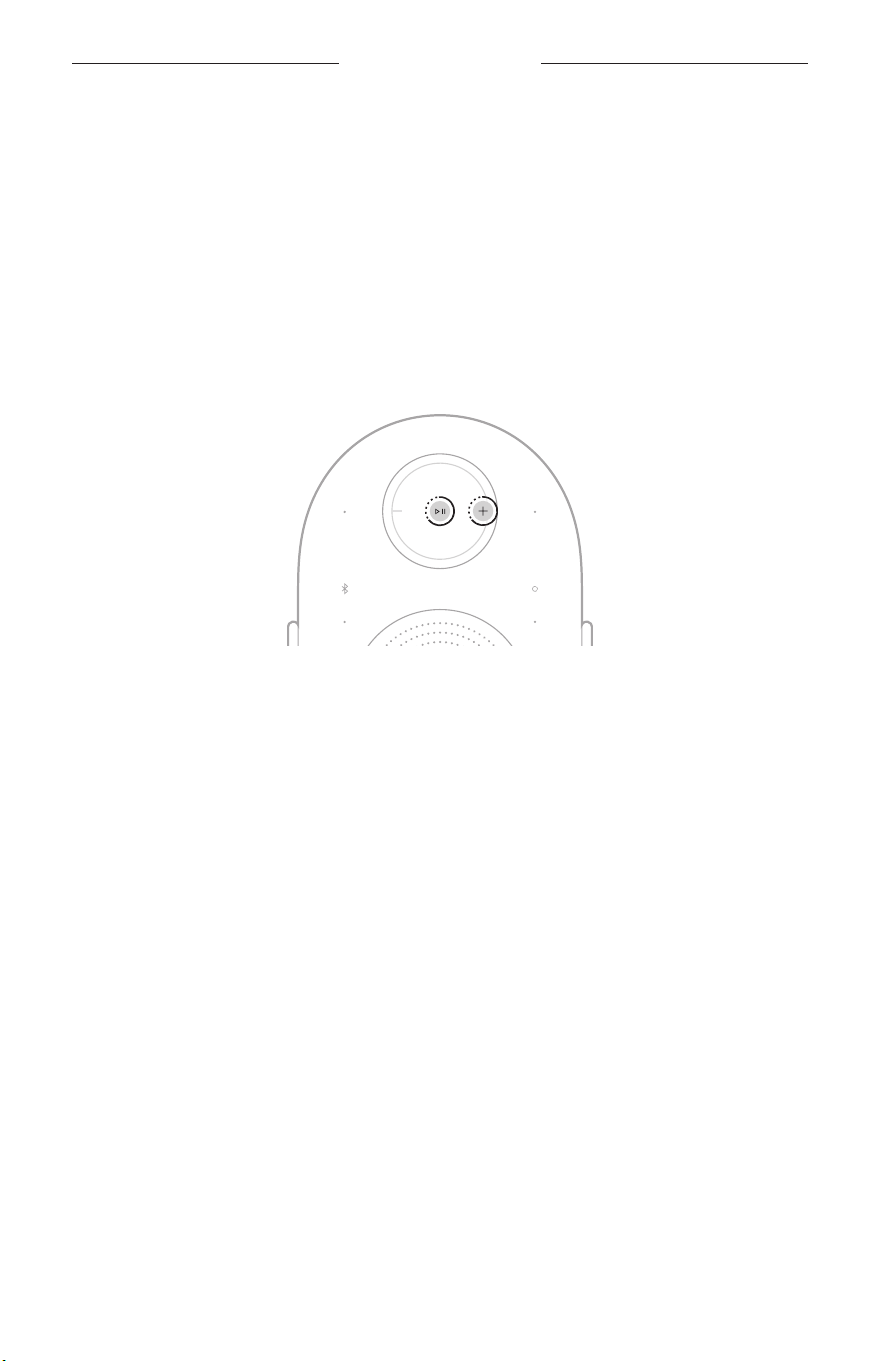
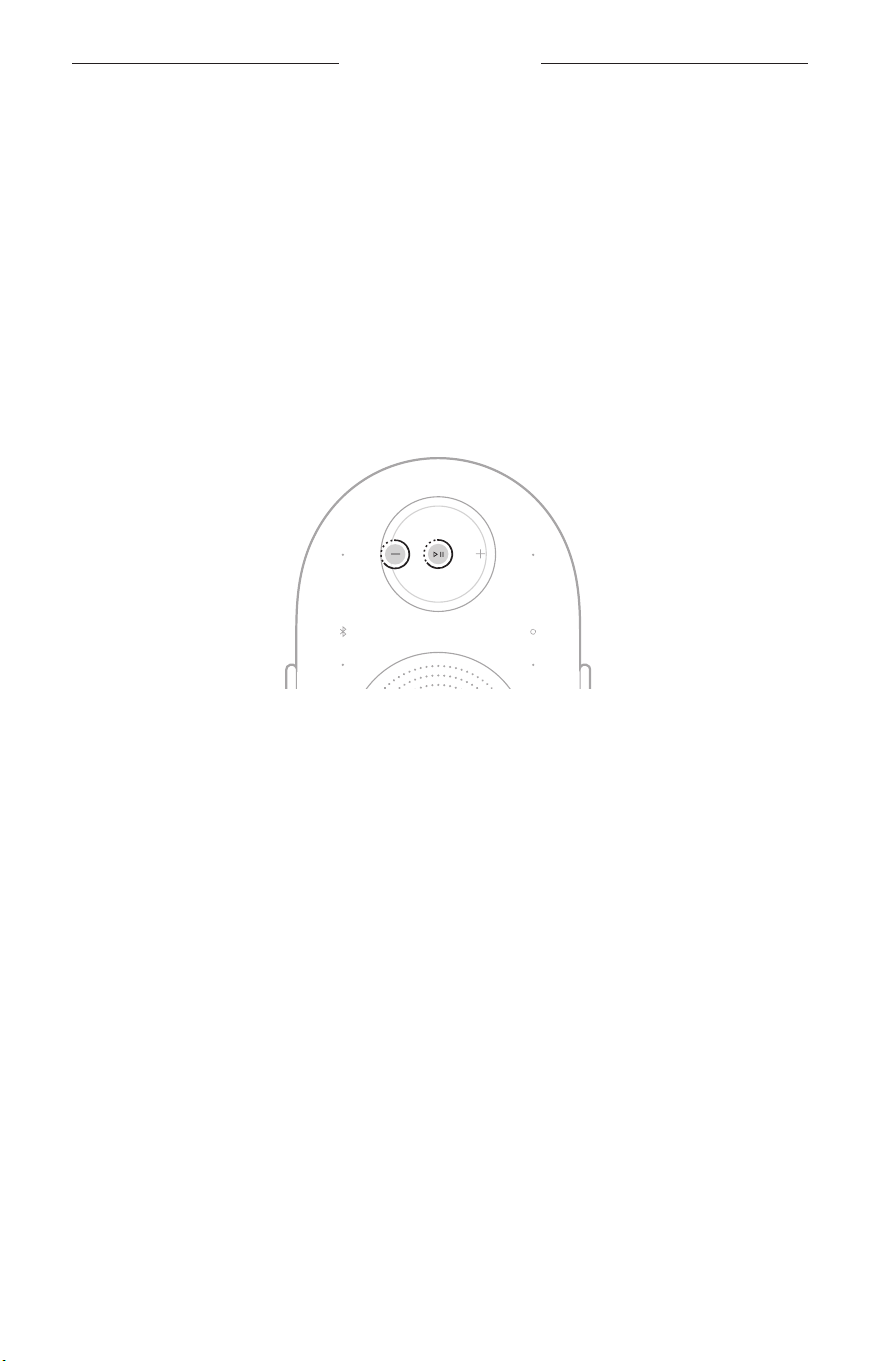
• Touch and hold the Play/Pause buon F and the Volume up buon H for 5
seconds until the status light blinks white 2 times.
The reset is complete. The speaker powers on, and the status light slowly
pulses white.
24
|
ENG
TROUBLESHOOTING
RESTORE THE SPEAKER TO FACTORY SETTINGS
Restoring the factory seings clears all source, audio, and network seings from the
speaker and returns the speaker to its default seings.
NOTE: Restoring the speaker disconnects any Bose Lifestyle Collection products that
are wirelessly connected to the speaker.
1. In the Bose app, remove the speaker from your Bose account.
2. Touch and hold the Play/Pause buon F and the Volume down buon z for 10
seconds until the status light slowly pulses amber.
NOTE: The status light glows solid white, then slowly pulses amber.
The restore is complete. The speaker reboots and is ready to connect.
3. Set up your speaker using the Bose app (see page 11).

©2026 Bose Corporation, 100 The Mountain Road, Framingham, MA 01701-9168 USA
AM899873-0010 Rev. 00