尺寸: ��x���mm ���g 铜版纸/ 折页/ 双面印刷
Description:
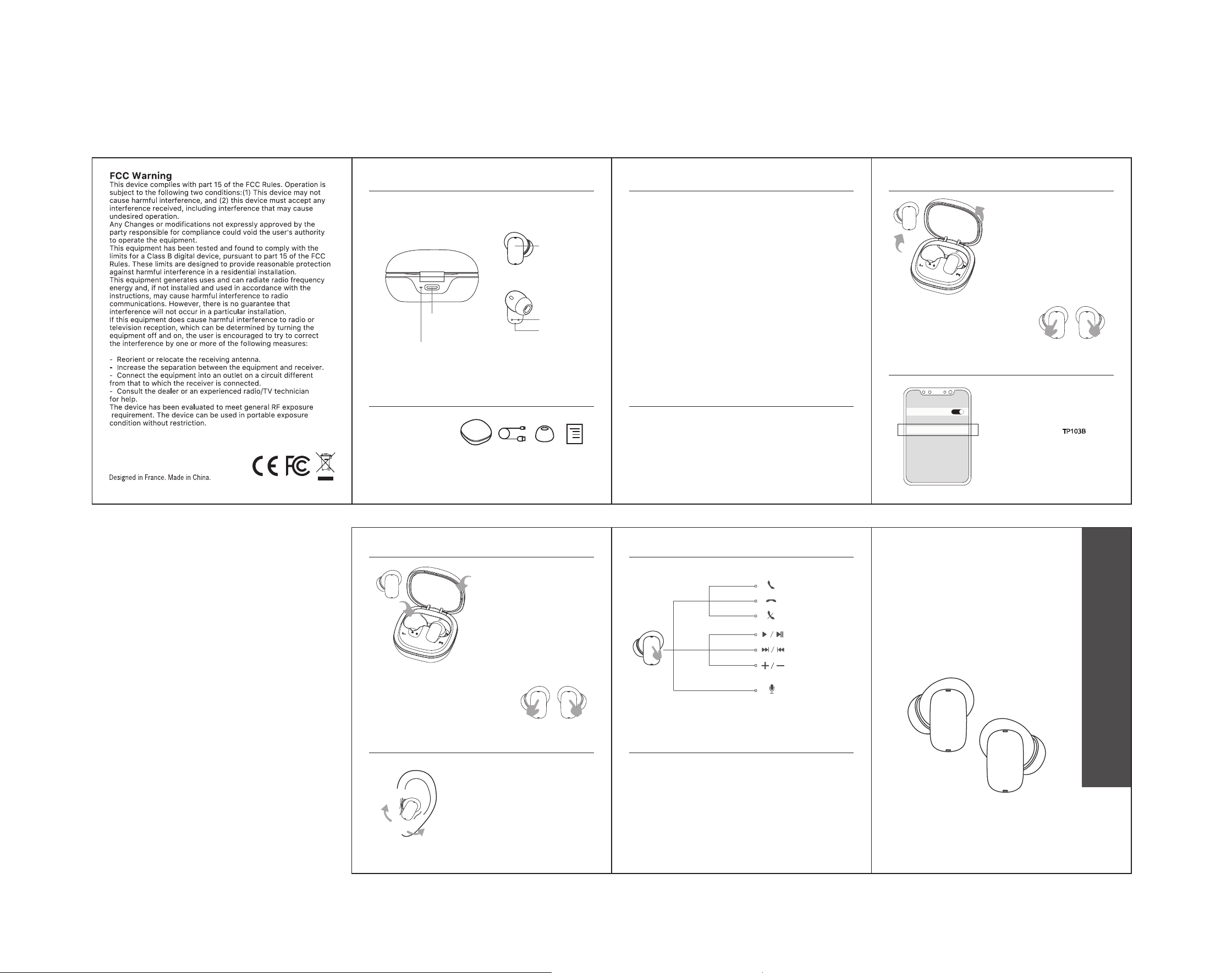
LED of Charging Case
Charging Port of
Charging Case
If you have problem to connect the earphones with your device, don’t
worry about it, please follow the step as below:
Control
Reset
1. Make sure all devices have turned off Bluetooth Function and pairing
record have been cleaned.
2. Take the earphones out of the case, tap each earbuds by 5 times quickly ,
prompt sound will be actived, then follow the pairing step as instruction.
Model: TP103B
Quick Guide
Insert the earphones directed towards
your ear canal. Twist gently until the
earbuds fit comfortably and get better
sound experience.
Wearing
Power-Off
Auto Power-Off
Manual Power-Off
Put L&R earbuds back into charging
case, the earbuds will automatically
power off .
1. Touch the MFB for 5 secs on both
earbuds to power off the earbuds.
2. The earbuds will automatically turn off
when without paring for 10 mins.
Connect
Turn on the device’s Bluetooth setting .
Search for and choose TP103B
to pair,
your device will show “connected” .
TP103B
BLUETOOTH
Bluetooth
Connected
Manual Power-On & Pairing
Touch the MFB for 2 secs on both earbuds
to turn on the earbuds. (You will hear the
prompt tone). The earbuds will
automatically enter pairing mode.
Product Specification
Bluetooth: V5.4
Frequency Range: 2402-2480 MHz
Sensitivity: 110 ± 3dB
Impedance: 32 ohm ± 15%
Input: DC 5V / 500mA
Earphones Battery Capacity: 30 mAh x 2
Charging Pod Battery Capacity: 250 mAh
Charge Time: 1.5 hours
When the charging case is connected with charger (or computer USB port)
by charging cable, the indicator will flash in red. When the charging case is
fully charged, the indicator will be lit-in red.
NOTE:
Charging for Charging Case:
When the charging case is out of battery, the earbuds will not turn on/off
automatically when removed from or placed back into the charging case.
In this case, turn the earbuds on/off manually.
First Use & Pairing
Auto Power-On & Pairing
Take the earbuds out of the charging
case, the earbuds will automatically
power on and enter into pairing mode.
Wireless Earphones
2S
Touch
Button - MFB
Microphone
Charging Pin
of Earbud
Calls
Answer Call
SIRI / Voice assistant
Tap Once
Reject Call
Touch for 2s
Tap Twice
End Call
Music
Tap Twice
Play / Pause
Earbud R- Volume Up
Earbud L- Volume Down
Earbud R- Next Track
Earbud L- Previous Track
Voice
Assistant
Tap 3 times
Touch for 2s
Tap Once
Content:
x1 x3x1 x1
TP103B Wireless Earphones
Type-C USB Charging Cable
Silicon Gel Tips (S/M/L)
Quick Guide
2S
1
2
2
1
5S
5S
FCC ID:2A7J2-TWS03B