3.
Game Import
Insert a FAT32 formatted memory card into the
external card slot of the game console, and a new
folder for each platform will be created. Just put the
game in the folder and select the game in the game
rooms.
Supported platform are: ported games,PSP,PS1,
N64,DC,NDS,ARCADE,GBA,GBC,GB,SFC,FC,MAME,MD,
GG,PCE,Sega32x,NGPC,SMS,WSC
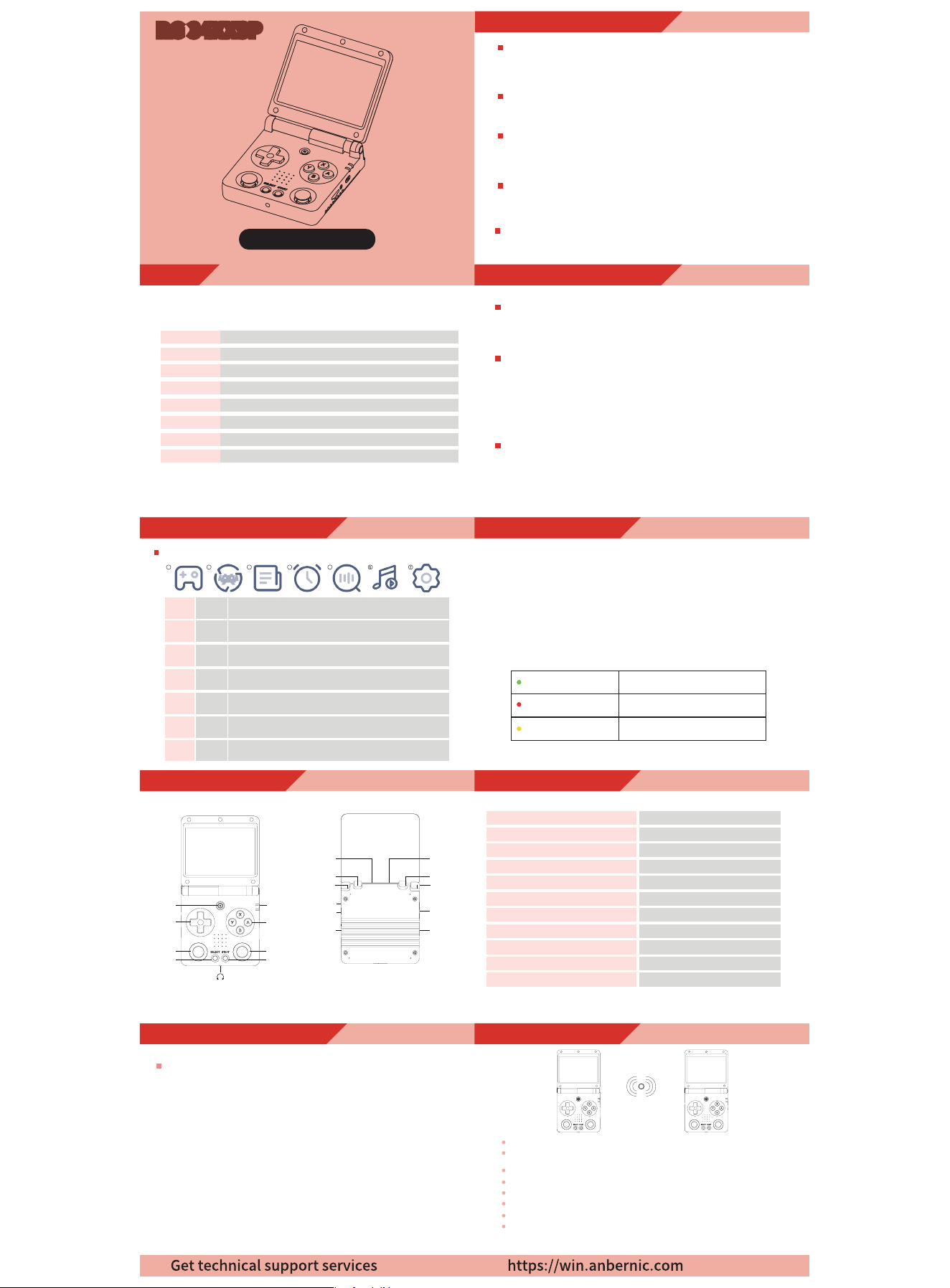
6.Indicator light and charging function
The packaging of the machine is matched with a 5V/1.5A four-lines
charging data cable. Plug in the charging cable and the machine
will start charging.
RG 34XXSP has two indicators, the down is the charging indicator,
and the Up is the working indicator.
The following light color and status table:
Green light
Red light
Yellow light
Working
Low power
Charging
7.RA Emulator Shortcuts
Menu
Menu+R2
Menu+L2
Menu+R1
Menu+L1
Menu+Y
Menu+B
Menu+X
Menu+START
Menu+
-VOL+
Menu+Left/Right Direction
Menu
Fast Forward
Slow Motion
Save State
Load State
Display Frame Rate
Screenshot
Pause
Quit
Adjust Brightness
Select Save State Slot
Language Settings
Backlight Brightness
Select Settings -> Backlight Brightness in the main interface.
There are 8 levels of backlight brightness.
Backlight Time
Select Settings -> Backlight Time in the main interface.
There are 1 minutes, 2 minutes, 5 minutes, 10 minutes, and always on.
The screen backlight will be turned off after the set time has elapsed.
Key Customization
Button Custom: Select Settings -> Button Custom in the main
interface. You can customize the button mapping of the body buttons
or the gamepad.
Select Settings -> Language Settings in the main interface.
Available languages are: Chinese, English, Japanese, Korean,
Russian, French, German, Spanish, Portuguese
4.Common Settings
Game quality
divided into high-definition, scan line, fast, dot matrix. Different
options will present different screen filter display effects.
RG 34XXSP Instructions
2.Game Buttons and Ports
Catalogs
1
2
3
4
5
6
Main interface operation
Game Buttons and Ports
Game Import
Common Settings
Game Settings
7
8
Indicator light and charging function
Online Play
RA Emulator Shortcuts
Game quality
divided into high-definition, scan line, fast, dot matrix. Different
options will present different screen filter display effects.
Bluetooth Settings
First, select Settings->Bluetooth Settings in the main interface,
select Enable Bluetooth, and press the X key to scan for devices
in the Search device. Finally, select the controller you want to
connect according to the device name.
Game streaming
First, make sure that the game console and the computer are under
the same WIFI. Select Settings -> moonlight in the main interface.
Enter the IP address of the computer to start pairing. Enter the
PIN code to pair successfully and select Connect. During streaming,
press menu+START to exit streaming.
5.
Game Settings
8.Online Play
A B
First make sure the two consoles are on the same WIFI
Note down the IP addresses of the two consoles by going to
NETWORK SETTINGS ->IP ADDRESS
In the RetroArch, enter the same game and call out the menu through the menu
Set it up with the following steps:
Game console A (host)
Select Netplay->Host->Start Netplay Host
Game console B (slave)
Select Netplay->Connect to Netplay Host, enter the IP address
and press the START button to connect successfully
Main Interface Menu:
1.
Main interface operation
2
3
4
5
6
RA
Game
Favorites
Search
History
App
Center
After entering, you can choose "Internal Card" or "External Card".
And select the game platform to play the game.
1
Game
Rooms
After entering, you can choose "Internal Card" or "External Card".
And select the game platform to play the game.
Press the START button in the game center to collect the game,
and the game will appear in this section.
The run game will appear in this section. History can be cleared
in settings.
Quickly search games from memory cards. The X key deletes
the keyword and the Y key confirms the search result.
7
Settings
Contains all settings for theRG 34XXSP. Including language
settings, backlight settings, background settings, etc.
Including video player,music player, e-book, file manager,
expert mode.
1 2 3 4 5 6 7
RG 34XXSP
RG 34XXSP
Right shoulder
button(R2)
Right shoulder
button(R1)
TF1/INT.
TF2/EXT.
Left shoulder
button(L2)
Left shoulder
button(L1)
SELECT
START
Indicator light
Power key
D-Pad
MENU
Game keys
RESET
HD
-VOL+
OTG/USB
Left joystick
Right joystick

FCC Warnning:
This equipment has been tested and found to comply with the limits for a Class B digital device,
pursuant to part 15 of the FCC Rules. These limits are designed to provide
reasonable
protection against harmful interference in a residential installation. This equipment generates,
uses and can radiate radio
frequency
energy
and,
if
not
installed
and
used
in
accordance
with
the
instructions,
may cause
harmful
interference
to
radio
communications.
However,
there
is
no
guarantee
that interference
will
not
occur
in
a
particular
installation.
If
this
equipment
does
cause
harmful interference to radio or television reception, which can be
determined by turning the equipment off
and
on,
the
user
is
encouraged
to
try
to
correct
the interference
by
one
or
more
of
the following measures:
•
Reorient or relocate the receiving antenna.
•
Increase the separation between the equipment and receiver.
•
Connect the equipment into an outlet on a circuit different from that to which the receiver is
connected.
• Consult the dealer or an experienced radio/TV technician for help.
Caution:
Any
changes
or
modifications
to
this
device
not
explicitly
approved
by
manufacturer
could void your authority to operate this equipment.
This
device
complies
with
part
15
of
the
FCC
Rules.
Operation
is
subject
to
the
following
two
conditions:
(1)This
device
may
not
cause
harmful
interference,
and
(2)
this
device
must
accept
any
interference received, including interference that may cause undesired operation.
This
equipment
complies
with
FCC
radiation
exposure
limits
set
forth
for
an
uncontrolled
environment.
This
equipment
should
be
installed
and
operated
with
minimum
distance
0cm
between the radiator and your body.