EN
...
01
13
...
ES
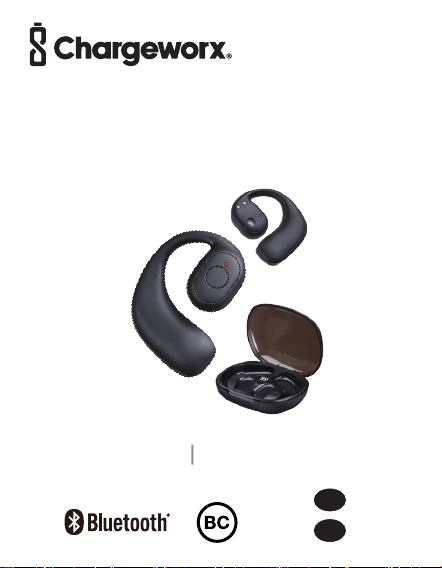
KH581BK
User Manual
Manual De Usuario
Open-Ear Earbuds with
Charging case
Auriculares abiertos con estuche de carga
?
Overview
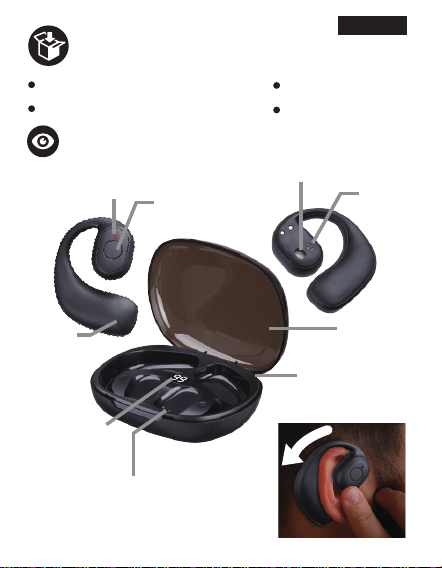
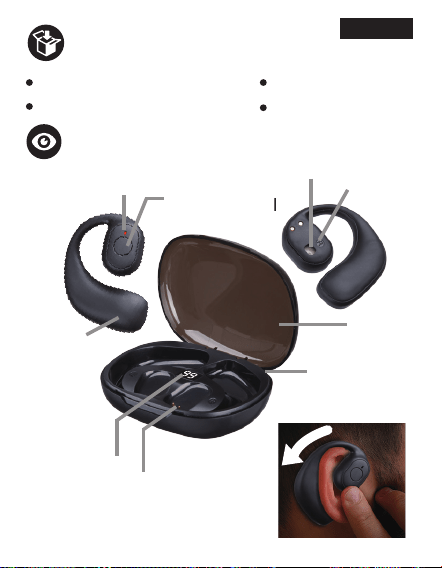
Package contents
1 x KH581BK Charging case
1 x USB-C charging cable
1 x User Manual
1 x Drop card
Status LED
indicator
Charging
contact
LED Display
for power
indication
USB-C
charging port
Multifunctional
Touch Sensor
Speaker
R:Right
Earbud
L:Left
Earbud
Lid
Wear the earbuds
EN 2
EN 1
ENGLISH
LED display
?
Charging
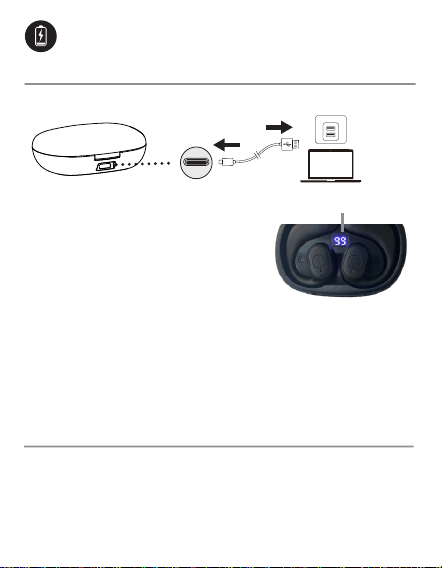
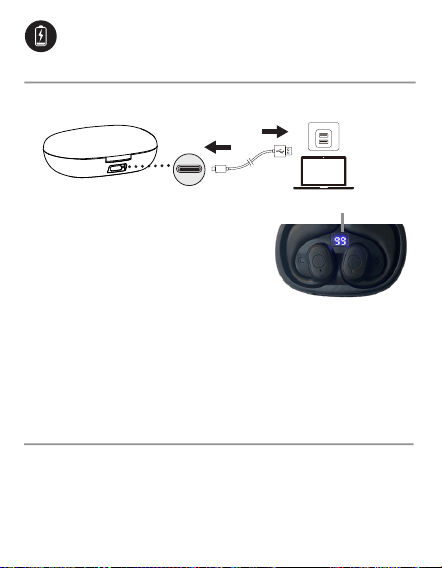
Charging the charging case
Notes: To check the remaining battery power of the
charging case,
take out the earbuds from the charging base
and then place them back
. The LED display will illuminate to
indicate the percentage of charging case’s battery life.
Charging your earbuds
When the battery of your earbuds runs low, the earbud
status indicators will slowly flash red, and a notication
tone will play. Place the earbuds into the charging case
and close the lid to start recharging.
EN 2
USB-C
charging port
USB Power Source
Charging time:
1.5 hours
When the KH581BK Charging
Case is charging, the LED
display will illuminate and flash
to indicate the percentage of
battery life. Once fully charged,
the LED display will show the
digital number "99", disconnect
the charging cable.
11
2
Steady red (Earbud status indicator)
OFF (Earbud status indicator)
Charging
Fully charged
Powering on/off
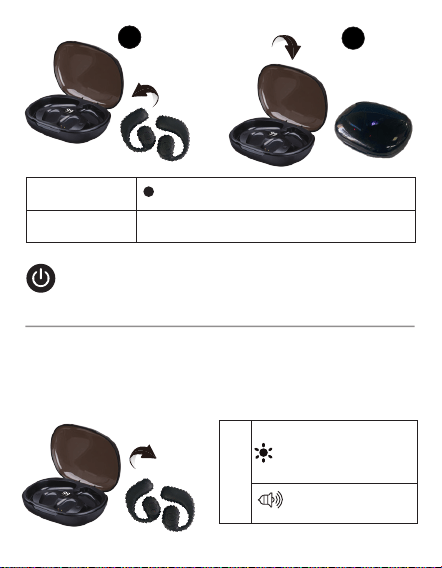
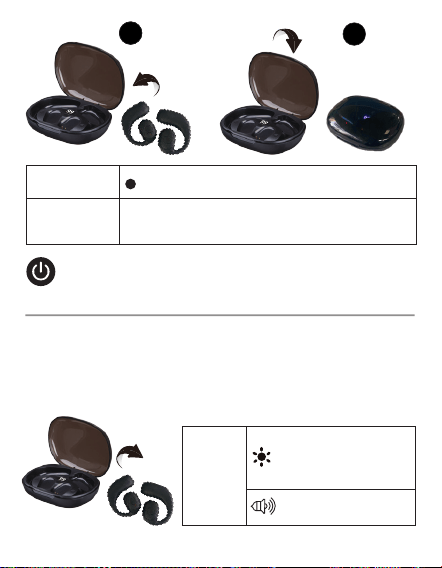
Your KH581BK earbuds will power on automatically
when taken out of the charging case. You can also
power them on manually by pressing and holding the
Touch Sensor on both earbuds for 3 seconds.
Powering on
ON
Power on
tone notication
?
EN 3
Alternately flashing
red and
blue on
both earbuds
EN 4
11
2
O
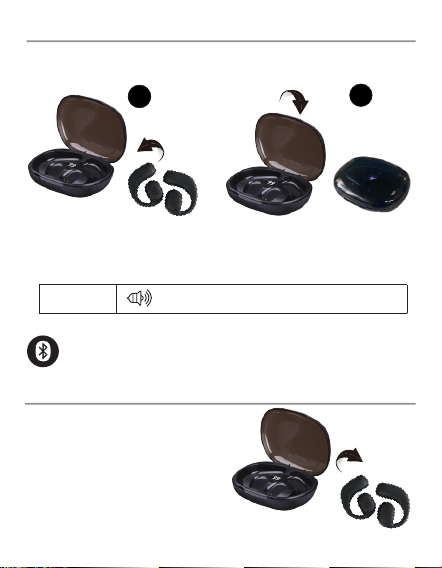
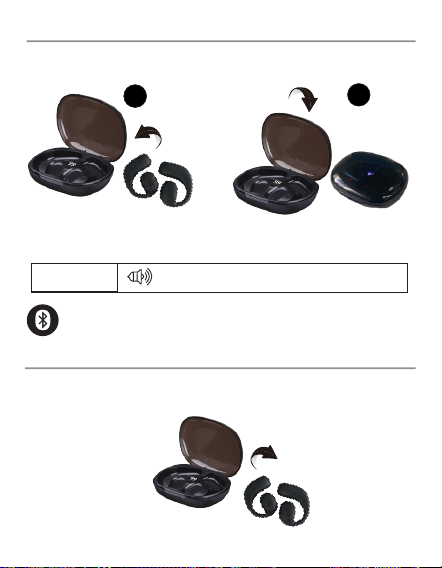
To power them off manually, press and hold the Touch
Sensor on a single earbud for 5 seconds.
Your KH581BK earbuds will power off automatically
when placed back into the charging case.
Powering off
Power off tone notication
Pairing
1. True Wireless stereo connection
When the earbuds are turned
on, they will automatically
enter True Wireless stereo
pairing mode.
?
EN 4
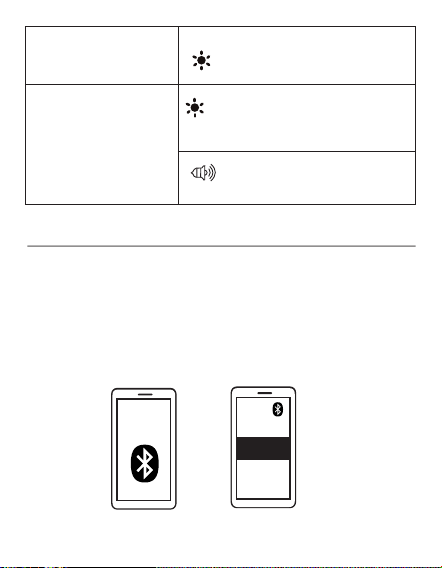
Connected tone
notication
Enter True Wireless
stereo pairing mode
When True Wireless
Stereo connection is
successful (the right
and left earbuds are
connected)
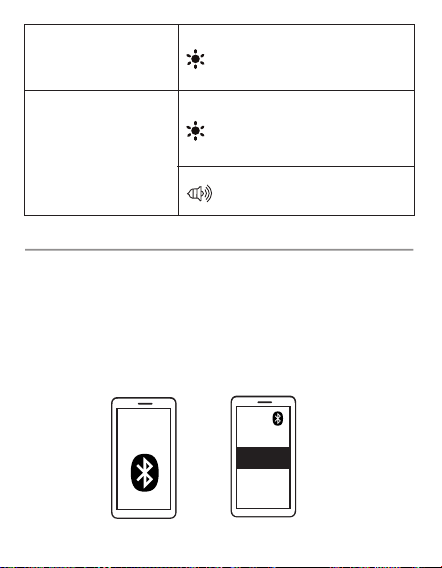
After a successful True Wireless stereo connection, your
KH581BK earbuds will automatically enter Bluetooth
pairing mode to connect to your device.
Turn on Bluetooth in your device’s settings and search
for “KH581BK”, then tap “KH581BK” to connect.
2. Bluetooth connection with your device
Alternately flashing red and
blue on one earbud, flashing
blue on the other earbud.
Alternately flashing red
and
blue on both earbuds
EN 5
ON
KH581BK
EN 6
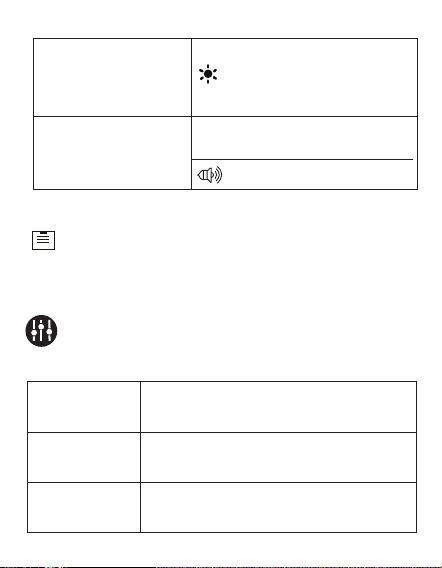
1. The earbuds will automatically be paired
with your last sucessfully connected media
device the next time they are turned on.
2. If there is no Bluetooth connection to the
earbuds for more than 5 minutes, they will
automatically turn off.
Pairing
mode
Connected to a device
(Successfully paired)
Connected tone notication
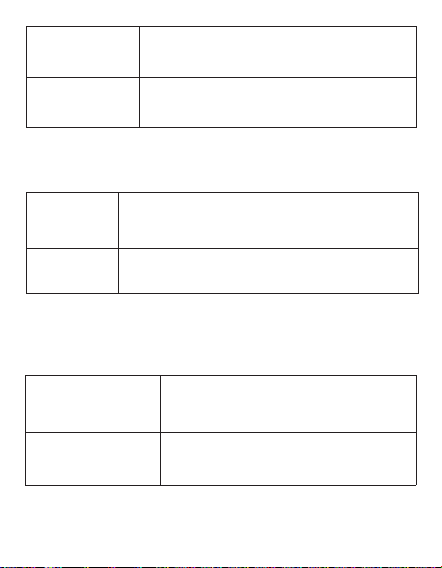
Controls
Music mode
Press the Touch Sensor once on
either earbud.
Quickly press the Touch Sensor
twice on the right earbud.
Quickly press the Touch Sensor
twice on the left earbud.
Play/Pause
Next track
Previous
track
?
Slowly flashing blue on both
earbuds.
EN 6
Alternately flashing red
and blue on one earbud,
flashing blue on the other
earbud.
Quickly press the Touch Sensor three
times on the right earbud.
Quickly press the Touch Sensor three
times on the left earbud.
Volume down
Volume up
Phone call mode
Voice Assistant mode
Quickly press the Touch Sensor twice on
either earbud.
Press and hold the Touch Sensor for
1.5 seconds on either earbud.
Press and hold the Touch Sensor
for 2 seconds on either earbud.
Press the Touch Sensor on either
earbud.
Answer
/End a call
Reject a
call
Exit voice
assistant
Activiate voice
assistant
EN 7
EN 8
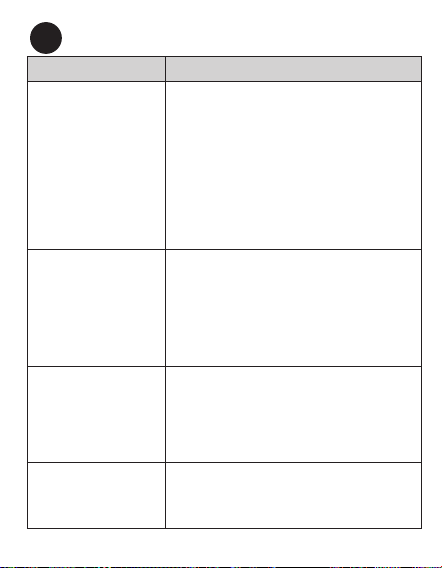
Troubleshooting
Problem Solution
Your left and right
earbuds aren’t
connected. The LED
indicators on both
earbuds are alter-
nating between red
and blue lights.
First, reset the earbuds by taking out
the earbuds from the charging base and
then placing them back to check whether
they are connected to each other. If
they are not, open Bluetooth settings in
your device and tap “Forget device” on
“KH581BK”, then turn off Bluetooth in
your device to manually initiate the True
Wire stereo connection. Please allow up
to 30 seconds to connect if you are in a
public area with interfering signals.
Your left and right
earbuds are con-
nected, but you can-
not connect them to
your device (phone,
laptop, tablet, etc.)
Ensure the earbuds are not currently
connected to another device. If they are,
open Bluetooth settings on those devices
and tap “Forget device” on “KH581BK”.
Conrm the device you would like to pair
with is Bluetooth enabled, please refer to
that device’s user manual to conrm.
There is no response
from the KH581BK
earbuds.
Firstly, check whether the battery power
in earbuds are used up, if they are, charge
the earbuds. If they are not, reset the
earbuds by taking out the earbuds from
the charging base and then placing them
back.
You can only hear
sound on one
earbud.
Reset the earbuds by taking out the
earbuds from the charging base and then
placing them back.
?
EN 8
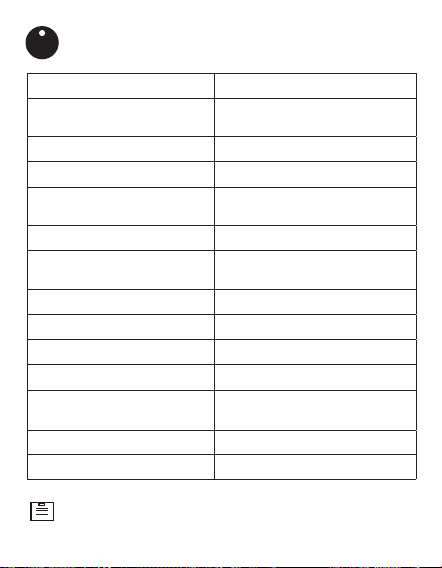
Model Number KH581BK
Model Name
Open-Ear True Wireless
Stereo Earbud
Power Input 5 V/1 A (Charging Case)
Charging time (Earbuds) 1 hour
Charging time (Charging
case)
1.5 hours
Playtime (Earbuds) Up to 5 hours
Playtime (With charging
case)
Up to 10 hours
Battery capacity
300 mAh
Driver (full range) 13 mm × 2
Range 33 ft (10 m)
Bluetooth version V 5.3
Dimension (Charging case)
82 x 65 x 30 mm
3.23" x 2.56" x 1.18"
Weight (earbuds alone) 0.51 oz / 14.5 g
Weight (with charging case) 1.87 oz / 53 g
Specications
Specications are subject to change without notice.
I
EN 9
EN 10

FCC Statement
FCC ID: 2AJVKKH581
This device complies with Part 15 of the FCC Rules. Operation is subject
to the following two conditions:
(1) this device may not cause harmful interference, and (2) this device
must accept any interference received, including interference that may
cause undesired operation.
Warning: Changes or modications not expressly approved by the party
responsible for compliance could void the user’s authority to operate the
equipment.
Note: This equipment has been tested and found to comply with the
limits for a Class B digital device, pursuant to Part 15 of the FCC Rules.
These limits are designed to provide reasonable protection against
harmful interference in a residential installation.
This equipment generates, uses and can radiate radio frequency energy
and, if not installed and used in accordance with the instructions, may
cause harmful interference to radio communications. However, there is
no guarantee that interference will not occur in a particular installation.
If this equipment does cause harmful interference to radio or television
reception, which can be determined by turning the equipment off and on,
the user is encouraged to try to correct the interference by one or more of
the following measures: (1) Reorient or relocate the receiving antenna. (2)
Increase the separation between the equipment and receiver. (3) Connect
the equipment into an outlet on a circuit different from that to which the
receiver is connected. (4) Consult the dealer or an experienced radio / TV
technician for help.
FCC Radiation Exposure Statement:
The device has been evaluated to meet general RF exposure requirement.
The device can be used in portable exposure condition without
restriction.
Notice
This symbol means the product must not be discarded as
household waste, and should be delivered to an appropriate
collection facility for recycling. Follow local rules and never
dispose of the product and rechargeable batteries with nor-
mal household waste.
EN 10

Disclaimer
correct at the time of this publication. As the product goes under contin-
uous upgrades and changes, however, the nal device may have slight
differences. The contents of this manual are subject to change without
prior notice, and ChargeWorx
®
will not be liable for any errors contained
herein or for incidental or consequential damages in connection with the
furnishing performance or use of this manual.
All information, design and specications contained in this manual were
EN 11
Limited 1 Year Warranty
EN 12
ChargeWorx
®
is a registered trademark of The Fesco Group, manufac-
tured by The Fesco Group. The information contained in this user man-
ual and all accompanying documentation is copyrighted and all rights
are reserved.
© 2025
ChargeWorx
®
, All rights reserved.
The ChargeWorx
®
Limited 1 Year Warranty guarantees the original pur-
chaser that the product is free from any defect in material and work-
manship in conjunction with the original purchaser using the product
according to any accompanying labels and instructions. ChargeWorx
®
agrees that it will, at its option, either repair the defect or replace the
defective product or part thereof at no charge to the purchaser for parts
or labor for the time period stated.
This limited 1 Year warranty does not cover any damage caused by acci-
dent, misuse, modication, or normal wear and tear, and is limited to the
value of the prodoct. There are no other express or implied warranties
for battery powered products. The limited 1 Year warranty described
herein is in addition to applicable law. ALL IMPLIED 1 YEAR WARRAN-
TIES INCLUDING THE WARRANTIES OF MERCHANTABILITY AND

EN 12
FITNESS FOR USE ARE LIMITED TO THE PERIOD FROM THE DATE OF
ORIGINAL PURCHASE SET FORTH. Some states do not allow limitations
on how long an implied warranty lasts, so the above limitation may not
apply to you. Neither the sales personnel of the seller nor any other per-
son is authorized to make any warranties other than those described
herein or to extend the duration of any warranties beyond the time peri-
od described herein on the behalf of ChargeWorx
®
.
The warranties described herein shall be the sole and exclusive war-
ranties granted by ChargeWorx
®
and shall be the sole and exclusive,
remedy available to the purchaser. Corrections of defects, in the manner
and for the period of time described herein, shall constitute complete
fulllment of all liabilities and responsibilities of ChargeWorx
®
to the
purchaser with respect to the product and shall constitute full satisfac-
tion of all claims, whether based on contract negligence, strict liability
or otherwise. In no event shall be liable or in any way responsible for an
incidental of consequential economic or property damage. Some states
do not allow the exclusion of incidental or consequential damages, so
the above exclusion may not apply to you. THIS LIMITED 1 YEAR WAR-
RANTY, GIVES YOU SPECIFIC LEGAL RIGHTS. YOU MAY ALSO HAVE
OTHER RIGHTS, WHICH VARY FROM STATE TO STATE.
Where to ship product
ChargeWorx
®
Returns Department
1 Rewe Street
2nd floor
New York, NY 11211
Enclose proof of purchase and $5.95 for Shipping and Handling
If you have any questions, please contact ChargeWorx® at
[email protected] or visit https://chargeworxtech.com.
ES 13 ES 14
Descripción general
Contenido del paquete
1 Estuche de carga KH581BK
1 Cable de carga USB-C
1 Manual del usuario
1 Suelta la tarjeta
Indicador LED
de estado
Contacto
de carga
Puerto de
carga USB-C
Sensor táctil
multifuncional
Orador
Pantalla
LED para
indicación de
alimentación
ESPAÑOL
?
Tapa
Ponte los auriculares
R: Auricu-
lar derecho
L: Auricular
izquierdo
ES 14
Cargando
Cargando el estuche de carga
Cargando tus auriculares
Puerto de carga
USB-C
Fuente de
alimentación USB
Pantalla LED
?
Notas: Para comprobar la carga restante de la batería del
estuche de carga, retira los auriculares de la base de carga y
vuelve a colocarlos. La pantalla LED se iluminará para indicar
el porcentaje de carga de la batería del estuche de carga.
Cuando la batería de los auriculares se esté agotando,
los indicadores de estado de los auriculares par-
padearán lentamente en rojo y se reproducirá un tono
de noticación. Coloque los auriculares en el estuche
de carga y cierre la tapa para comenzar a recargarlos.
Tiempo de carga:
1,5 horas
Cuando el estuche de carga KH581BK
se esté cargando, la pantalla LED se
iluminará y parpadeará para indicar
el porcentaje de vida útil de la batería.
Una vez que esté completamente
cargado, la pantalla LED mostrará el
número digital "99". Desconecte el
cable de carga.
Encendido/Apagado
Tus auriculares KH581BK se encenderán automáti-
camente cuando los saques del estuche de carga.
También puedes encenderlos manualmente presionan-
do y manteniendo presionado el sensor táctil en ambos
auriculares durante 3 segundos.
Encendido
Cargando
Totalmente
cargado
Rojo jo (Indicador de estado del auricular)
APAGADO (Indicador de estado del
auricular)
ENCEN-
DIDO
Activar noticación
de tono
Parpadeo alterno
de rojo y azul en
ambos auriculares
ES 15
ES 16
?
11
2
Para apagarlos manualmente, presiona y mantén presiona-
do el sensor táctil en un solo auricular durante 5 segundos.
Tus auriculares KH581BK se apagarán automáticamente
cuando se coloquen de nuevo en el estuche de carga.
Apagando
Emparejamiento
1. Conexión estéreo inalámbrica verdadera
Cuando los auriculares se encienden, entrarán automática-
mente en el modo de emparejamiento estéreo True Wireless.
Apagado
Noticación de tono de apagado
ES 16
?
11
2
ON
KH581BK
Noticación de tono
conectado
Ingresa al modo de
emparejamiento es-
téreo True Wireless
Cuando la conexión
estéreo inalámbrica
verdadera sea exi-
tosa (los auriculares
derecho e izquierdo
estén conectados)
Parpadea alternativamente
en rojo y azul en un auricular
y parpadea en azul en el otro.
Parpadeo alterno de rojo y
azul en ambos auriculares
Después de una conexión estéreo inalámbrica verdade-
ra exitosa, sus auriculares KH581BK entrarán automáti-
camente en modo de emparejamiento Bluetooth para
conectarse a su dispositivo.
Activa Bluetooth en la conguración de tu dispositivo
y busca “KH581BK”, luego presiona “KH581BK” para
conectarte.
2. Conexión Bluetooth con tu dispositivo
ES 17
ES 18
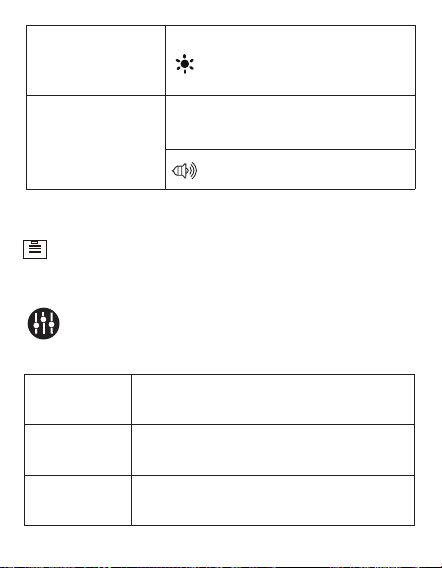
Controles
Modo música
Presione el sensor táctil una vez en
cualquiera de los auriculares.
Presione rápidamente el sensor táctil
dos veces en el auricular derecho.
Presione rápidamente el sensor táctil
dos veces en el auricular izquierdo.
Reproducir
pausar
Siguiente
pista
Pista anterior
1. Los auriculares se emparejarán automáticamente
con el último dispositivo multimedia conectado cor-
rectamente la próxima vez que se enciendan.
2. Si no hay conexión Bluetooth a los auriculares duran-
te más de 5 minutos, se apagarán automáticamente.
Modo de
emparejamiento
Conectado a
un dispositivo
(Emparejado
correctamente)
Noticación de tono conectado
Parpadeo azul lento en ambos
auriculares.
Parpadea alternativamente
en rojo y azul en un auricular
y parpadea en azul en el otro.
ES 18
?
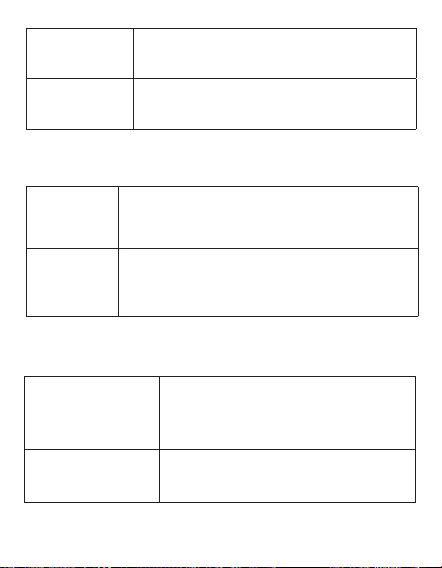
Presione rápidamente el sensor táctil
tres veces en el auricular derecho.
Presione rápidamente el sensor táctil
tres veces en el auricular izquierdo.
Bajar
volumen
Sube el
volumen
Modo de llamada telefónica
Modo asistente de voz
Presione rápidamente el sensor táctil dos
veces en cualquiera de los auriculares.
Mantenga presionado el sensor táctil
durante 1.5 segundos en cualquiera de
los auriculares.
Mantenga presionado el sensor
táctil durante 2 segundos en
cualquiera de los auriculares.
Presione el sensor táctil en cual-
quiera de los auriculares.
Responder/
nalizar una
llamada
Rechazar
una llamada
Salir del asis-
tente de voz
Activar asistente
de voz
ES 19
ES 20
ES 20
Troubleshooting
Problema Solución
Tus auriculares iz-
quierdo y derecho no
están conectados.
Los indicadores
LED de ambos
auriculares alternan
entre luces rojas y
azules.
Primero, restablezca los auriculares
sacándolos de la base de carga y luego
volviéndolos a colocar para vericar
si están conectados entre sí. Si no es
así, abra la conguración de Bluetooth
en su dispositivo y toque “Olvidar dis-
positivo” en “KH581BK”, luego apague
Bluetooth en su dispositivo para iniciar
manualmente la conexión estéreo True
Wire. Espere hasta 30 segundos para
conectarse si se encuentra en un área
pública con señales que intereren.
Sus auriculares
izquierdo y derecho
están conectados,
pero no puede
conectarlos a su
dispositivo (teléfono,
computadora
portátil, tableta, etc.)
Asegúrese de que los auriculares no es-
tén actualmente conectados a otro dis-
positivo. Si es así, abra la conguración
de Bluetooth en esos dispositivos y toque
“olvidar dispositivo” en “KH581BK”. Con-
rme que el dispositivo con el que le gus-
taría emparejarse tiene Bluetooth habil-
itado, consulte el manual del usuario de
ese dispositivo para conrmar.
No hay respuesta
de los auriculares
KH581BK.
En primer lugar, verique si la energía
de la batería en los auriculares está ag-
otada, si es así, cargue los auriculares.
Si no es así, restablezca los auriculares
sacándolos de la base de carga y luego
volviéndolos a colocar.
Solo puede escuchar
el sonido en un
auricular.
Restablezca los auriculares sacándolos
de la base de carga y luego volviéndolos
a colocar.
?
ES 21
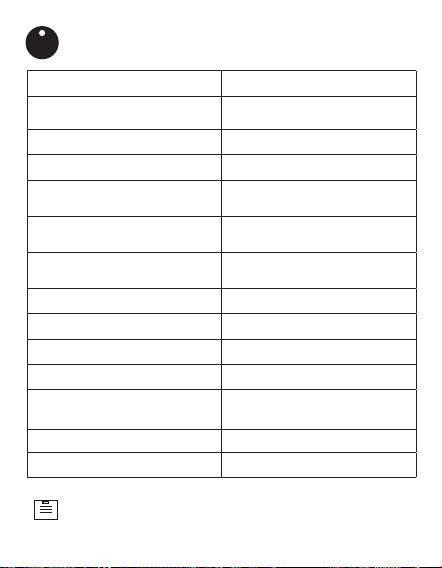
Modelo No. KH581BK
Modelo Nombre
Audífonos estéreo
inalámbricos de oído abierto
Entrada de alimentación
5 V/1 A (Estuche de carga)
Tiempo de carga (auriculares) 1 hora
Tiempo de carga (estuche de
carga)
1,5 horas
Tiempo de reproducción
(auriculares)
Hasta 5 horas
Tiempo de reproducción (con
estuche de carga)
Hasta 10 horas
Capacidad de la batería
300 mAh
Conductor (rango completo) 13 mm × 2
Rango 33 pies (10 m)
Versión Bluetooth V 5.3
Dimensiones (estuche de
carga)
82 x 65 x 30 mm
3,23" x 2,56" x 1,18"
Peso (auriculares solos) 0,51 onzas/14,5 gramos
Peso (con estuche de carga) 1,87 onzas / 53 gramos
Especicaciones
Las especicaciones están sujetas a cambios sin previo aviso.
I
ES 22
Precauciones de seguridad
1. Evitar caídas.
2. No desmonte este dispositivo.
3. No exponga este dispositivo a la lluvia o la humedad ni lo sumerja
en agua.
4. Las temperaturas ideales son de 0 °C a 35 °C. Evite las temperaturas
extremas.
5. Mantenga el dispositivo alejado del calor excesivo, como la luz solar,
el fuego o similares.
6. No utilice el dispositivo al aire libre durante tormentas eléctricas.
7. Utilice cables originales o certicados.
8. No use ningún limpiador/aceite corrosivo para limpiar.
9. Manténgase fuera del alcance de los niños. Contiene piezas pequeñas
que pueden suponer un peligro de asxia.
10. Observe las leyes y regulaciones locales mientras usa el dispositivo.
11. Para evitar daños a las piezas o circuitos internos de su dispositivo,
no lo use en ambientes polvorientos, con humo, húmedos o sucios.
12. No utilice, almacene ni transporte el dispositivo donde se almacenan
productos inflamables o explosivos. El uso de su dispositivo en estos
entornos aumenta el riesgo de explosión o incendio.
Declaración de seguridad
?
Seguridad Auditiva
1. Para evitar daños auditivos, no escuche durante períodos prolongados
a un volumen alto.
2. No suba el volumen tanto que no pueda escuchar su entorno.
3. No use auriculares mientras conduce.
4. Debe tener precaución o suspender temporalmente el uso en situa-
ciones potencialmente peligrosas.
Declaración de la FCC
ID de la FCC: 2AJVKKH581
Este dispositivo cumple con la Parte 15 de las Normas de la FCC. La
operación está sujeta a las siguientes dos condiciones:
(1) este dispositivo no puede causar interferencia dañina y (2) este dis-
positivo debe aceptar cualquier interferencia recibida, incluida la interfer-
encia que pueda causar un funcionamiento no deseado.
ES 22
Advertencia: Los cambios o modicaciones no aprobados expresa-
mente por la parte responsable del cumplimiento podrían anular la au-
toridad del usuario para operar el equipo.
Nota: Este equipo ha sido probado y se encontró que cumple con los
límites para un dispositivo digital Clase B, de conformidad con la Parte
15 de las Reglas de la FCC. Estos límites están diseñados para brindar
una protección razonable contra interferencias dañinas en una insta-
lación residencial.
Este equipo genera, utiliza y puede irradiar energía de radiofrecuencia
y, si no se instala y utiliza de acuerdo con las instrucciones, puede cau-
sar daños interferencias en las comunicaciones por radio. Sin embargo,
no hay garantía de que no se produzcan interferencias en una insta-
lación en particular. Si este equipo causa interferencias dañinas en la
recepción de radio o televisión, lo cual se puede determinar apagando y
encendiendo el equipo, se recomienda al usuario que intente corregir la
interferencia mediante una o más de las siguientes medidas: (1) Reori-
entar o reubicar la antena receptora. (2) Aumentar la separación entre
el equipo y el receptor. (3) Conecte el equipo a un tomacorriente en un
circuito diferente al que está conectado el receptor. (4) Consulte al dis-
tribuidor oa un técnico experimentado en radio/TV para obtener ayuda.
Declaración de exposición a la radiación de la FCC:
El dispositivo ha sido evaluado para cumplir con los requisitos genera-
les de exposición a radiofrecuencia.
El dispositivo puede utilizarse en condiciones de exposición portátil sin
restricciones.
ES 23
Descargo de responsabilidad
Toda la información, el diseño y las especicaciones contenidas en este
manual eran correctos en el momento de esta publicación. Sin embargo,
dado que el producto se somete a actualizaciones y cambios continu-
os, el dispositivo nal puede tener ligeras diferencias. El contenido de
este manual está sujeto a cambios sin previo aviso, y ChargeWorx
®
no
será responsable de los errores contenidos en este documento ni de los
daños incidentales o consecuentes en relación con el funcionamiento o
el uso de este manual.
ES 24
Aviso
Este símbolo signica que el producto no debe desechar-
se con la basura doméstica y debe entregarse en un punto
de recogida adecuado para su reciclaje. Siga las normas
locales y nunca deseche el producto ni las baterías recar-
gables con la basura doméstica normal.

ES 24
Garantía Limitada De 1 Año
ChargeWorx
®
es una marca registrada de The Fesco Group, fabricada por
The Fesco Group. La información contenida en este manual de usuario y
toda la documentación que lo acompaña está protegida por derechos de
autor y todos los derechos reservados.
© 2025 ChargeWorx
®
, Todos los derechos reservados.
La garantía limitada de 1 año de ChargeWorx
®
garantiza al comprador
original que el producto está libre de defectos de material y mano de
obra, siempre que lo utilice según las etiquetas e instrucciones adjun-
tas. ChargeWorx
®
se compromete, a su discreción, a reparar el defecto
o a reemplazar el producto defectuoso o una pieza del mismo sin costo
alguno para el comprador por piezas o mano de obra durante el período
indicado.
Esta garantía limitada de 1 año no cubre ningún daño causado por ac-
cidente, mal uso, modicación o desgaste normal, y se limita al valor
del producto. No existen otras garantías expresas o implícitas para
productos alimentados por batería. La garantía limitada de 1 año de-
scrita en este documento se suma a la legislación aplicable. TODAS
LAS GARANTÍAS IMPLÍCITAS DE 1 AÑO, INCLUIDAS LAS GARANTÍAS
DE COMERCIABILIDAD E IDONEIDAD PARA EL USO, SE LIMITARON AL
PERÍODO A PARTIR DE LA FECHA DE COMPRA ORIGINAL ESTABLECI-
DA. Algunos estados no permiten limitaciones en la duración de una
garantía implícita, por lo que la limitación anterior podría no aplicarse en
su caso. Ni el personal de ventas del vendedor ni ninguna otra persona
están autorizados a otorgar garantías distintas a las descritas en este
documento ni a extender la duración de ninguna garantía más allá del
período aquí descrito en nombre de ChargeWorx
®
.

Las Garantías Aquí Descritas Son Las Únicas Y Exclusivas Que Otorga
Chargeworx
®
Y Constituyen El Único Y Exclusivo Recurso Disponible
Para El Comprador. La Corrección De Defectos, En La Forma Y Duran-
te El Período Aquí Descrito, Constituirá El Cumplimiento Completo De
Todas Las Obligaciones Y Responsabilidades De Chargeworx
®
Ante El
Comprador Con Respecto Al Producto Y La Satisfacción Total De To-
das Las Reclamaciones, Ya Sean Basadas En Negligencia Contractual,
Responsabilidad Estricta O De Cualquier Otra Índole. En Ningún Caso
Chargeworx
®
Será Responsable De Daños Económicos O Materiales, In-
cidentales O Consecuentes. Algunos Estados No Permiten La Exclusión
De Daños Incidentales O Consecuentes, Por Lo Que La Exclusión Ante-
rior Podría No Aplicarse En Su Caso. Esta Garantía Limitada De 1 Año
Le Otorga Derechos Legales Especícos. También Puede Tener Otros
Derechos, Que Varían Según El Estado.
Dónde enviar el producto
Departamento de Devoluciones de ChargeWorx
®
1 Rewe Street
2.º piso
Nueva York, NY 11211
Incluya el comprobante de compra y $5.95 por gastos de envío.
Si tiene alguna pregunta, comuníquese con ChargeWorx
®
en
[email protected] o visite https://chargeworxtech.com.
ES 25
Customer Service
Servicio al Cliente
To get the best after-sales service, access the Contact
webpage from the link:
https://chargeworxtech.com
Or email us at
support@chargeworxtech.com
for return
information and customer support!
Para obtener el mejor servicio postventa, acceda a la
página web de contacto desde el enlace:
https://chargeworxtech.com
¡O envíenos un correo
electrónico a
support@chargeworxtech.com
para obtener
información sobre devoluciones y atención al cliente!
For more information, please visit:
Para mayor información por favor visite:
https://
chargeworxtech.com