Information to User
This device complies with Part 15 of the FCC Rules. Operation is subject to the following two conditions:
(1) This device may not cause harmful interference, and (2) this device must accept any interference received, including interference that may cause undesired operation.
NOTE 1: This equipment has been tested and found to comply with the limits for a Class B digital device, pursuant to part 15 of the FCC Rules. These limits are designed to
provide reasonable protection against harmful interference in a residential installation. This equipment generates, uses and can radiate radio frequency energy and, if not
installed and used in accordance with the instructions, may cause harmful interference to radio communications. However, there is no guarantee that interference will not occur
in a particular installation. If this equipment does cause harmful interference to radio or television reception, which can be determined by turning the equipment off and on, the
user is encouraged to try to correct the interference by one or more of the following measures:
- Reorient or relocate the receiving antenna.
- Increase the separation between the equipment and receiver.
-Connect the equipment into an outlet on a circuit different from that to which the receiver is connected.
-Consult the dealer or an experienced radio/TV technician for help.
NOTE 2: Any changes or modifications to this unit not expressly approved by the party responsible for compliance could void the user's authority to operate the equipment.
The device has been evaluated to meet general RF exposure requirement. The device can be used in portable exposure condition without restriction.
Important: Change or modifications not expressly approved
by the manufacturer responsible for compliance could void
the user's authority to operate the equipment.
Instruc�on Manual
EN
Func�on Explana�on
Func�on Explana�on
Parameter configura�on
Functional Operation LED
Power on
Shut down
Search for pairing
Slow flashing
white light
The white light stays
on for a long time
The main ear is
breathing
with a white light,
while the auxiliary
ear light is off
Automatic
reconnection
Play
Open the lid
Put it into the charging compartment
and cover it with the lid
Open your phone, find "E8" in the
list, and click on pairing
After connection, it will automatically
reconnect when turned on
When playing music, click once
Functional Operation LED
Volume increase
Volume down
Previous track
Next track
Summon voice
assistant
Incoming call
Answer the phone
Call rejection
Hang up the phone
Double click on the left ear
Double click on the right ear
When playing music,
triple tap the left ear
When playing music,
triple tap on the right ear
Long press for 2 seconds and
release to trigger Siri
Earphones ring
When playing music, touch/click
on the headphones once
Touch either side for 2 seconds
Touch either side and hang up
Charge
Pairing Name
Wireless Version
Operating Frequency
Distance
Standby Current
Charging Current
Charging Voltage
Indicator light
Touch area
Indicator light
E8
5.4
2.402GHz-2.480GHz
>10M
<1.0mA
30mA
4.6V-5.5V
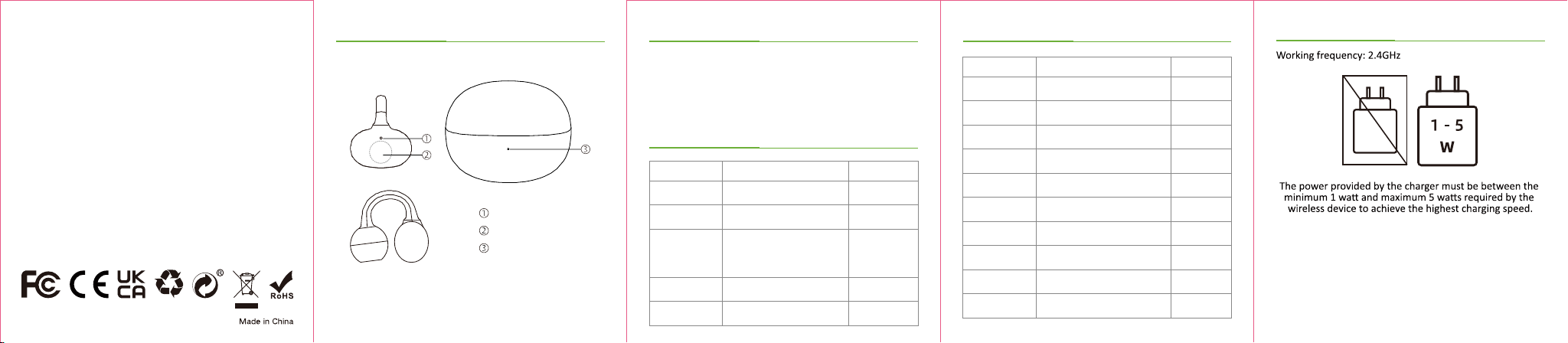
ID Diagram Precau�ons
1. Read instruc�ons carefully before use; keep them in a safe
place for future reference.
2. Avoid humid environments, water splashes, and extreme
temps (≤0°C/≥45°C).
3. Do not disassemble/modify. Handle with care; avoid
dropping/impac�ng.
4. Use a charger with appropriate power. Do not exceed
product specs.
5. Contains small parts—keep away from children
(swallowing hazard). Dispose of packaging properly.