AU385BT
Owner’s Manual
POWER
ON OFF
MIC- 1 MIC- 2 TALK -O VE R
DELAY
ECHO BASS
MID TREBLE AUX USB
SUB VOL
MUSIC VOL
MODE BT STO P CH- AUTO CH +
MIC VOL
MIN MAXMIN MAX
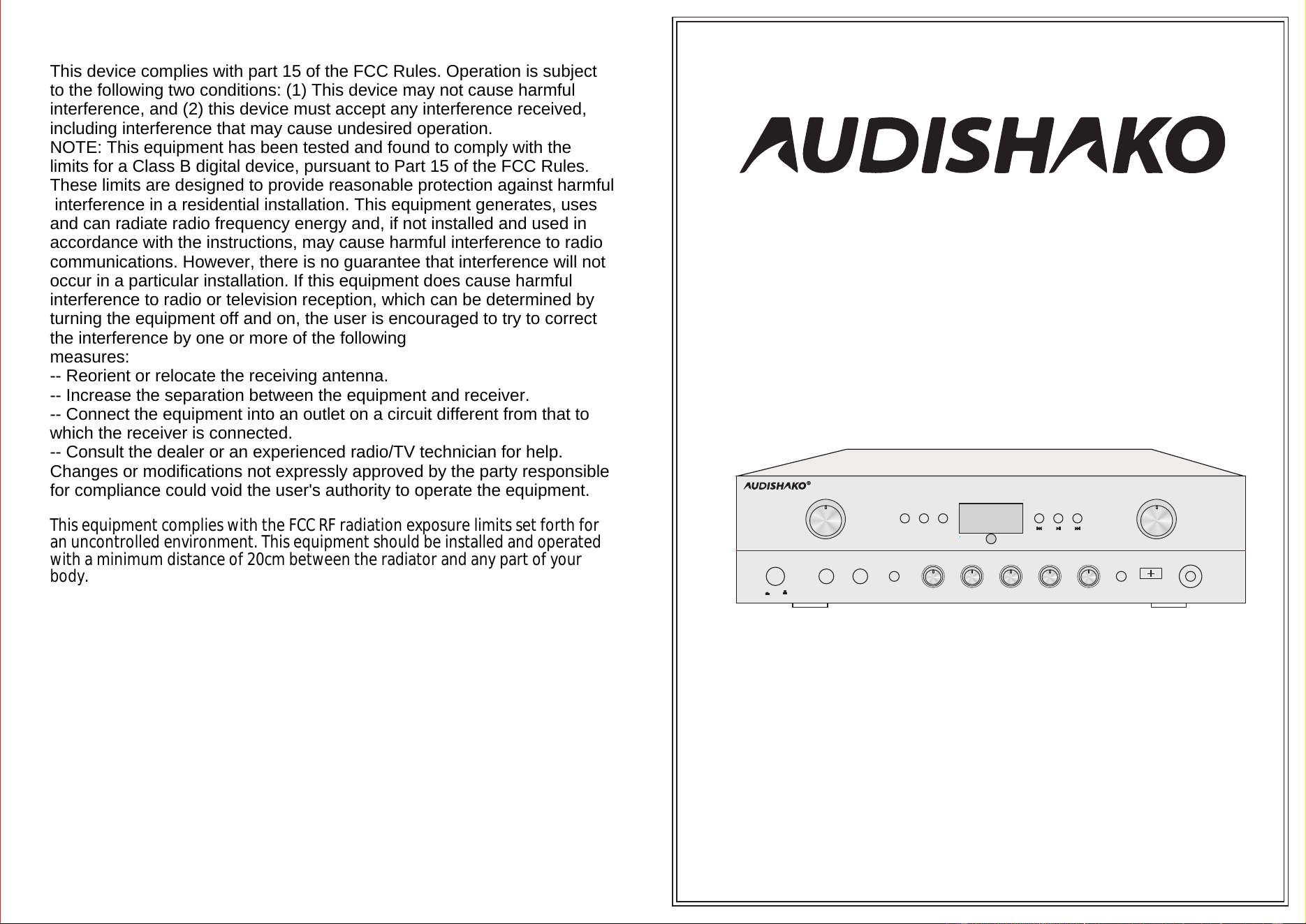
5.1 CHAN NE L KA RA OK E AM PLIFIER
5.1 CHANNEL KARAOKE AMPLIFIER
AU385BT
This device complies with part 15 of the FCC Rules. Operation is subject
to the following two conditions: (1) This device may not cause harmful
interference, and (2) this device must accept any interference received,
including interference that may cause undesired operation.
NOTE: This equipment has been tested and found to comply with the
limits for a Class B digital device, pursuant to Part 15 of the FCC Rules.
These limits are designed to provide reasonable protection against harmful
interference in a residential installation. This equipment generates, uses
and can radiate radio frequency energy and, if not installed and used in
accordance with the instructions, may cause harmful interference to radio
communications. However, there is no guarantee that interference will not
occur in a particular installation. If this equipment does cause harmful
interference to radio or television reception, which can be determined by
turning the equipment off and on, the user is encouraged to try to correct
the interference by one or more of the following
measures:
-- Reorient or relocate the receiving antenna.
-- Increase the separation between the equipment and receiver.
-- Connect the equipment into an outlet on a circuit different from that to
which the receiver is connected.
-- Consult the dealer or an experienced radio/TV technician for help.
Changes or modifications not expressly approved by the party responsible
for compliance could void the user's authority to operate the equipment.
This equipment complies with the FCC RF radiation exposure limits set forth for
an uncontrolled environment. This equipment should be installed and operated
with a minimum distance of 20cm between the radiator and any part of your
body.
Specifications subject to change without prior notice
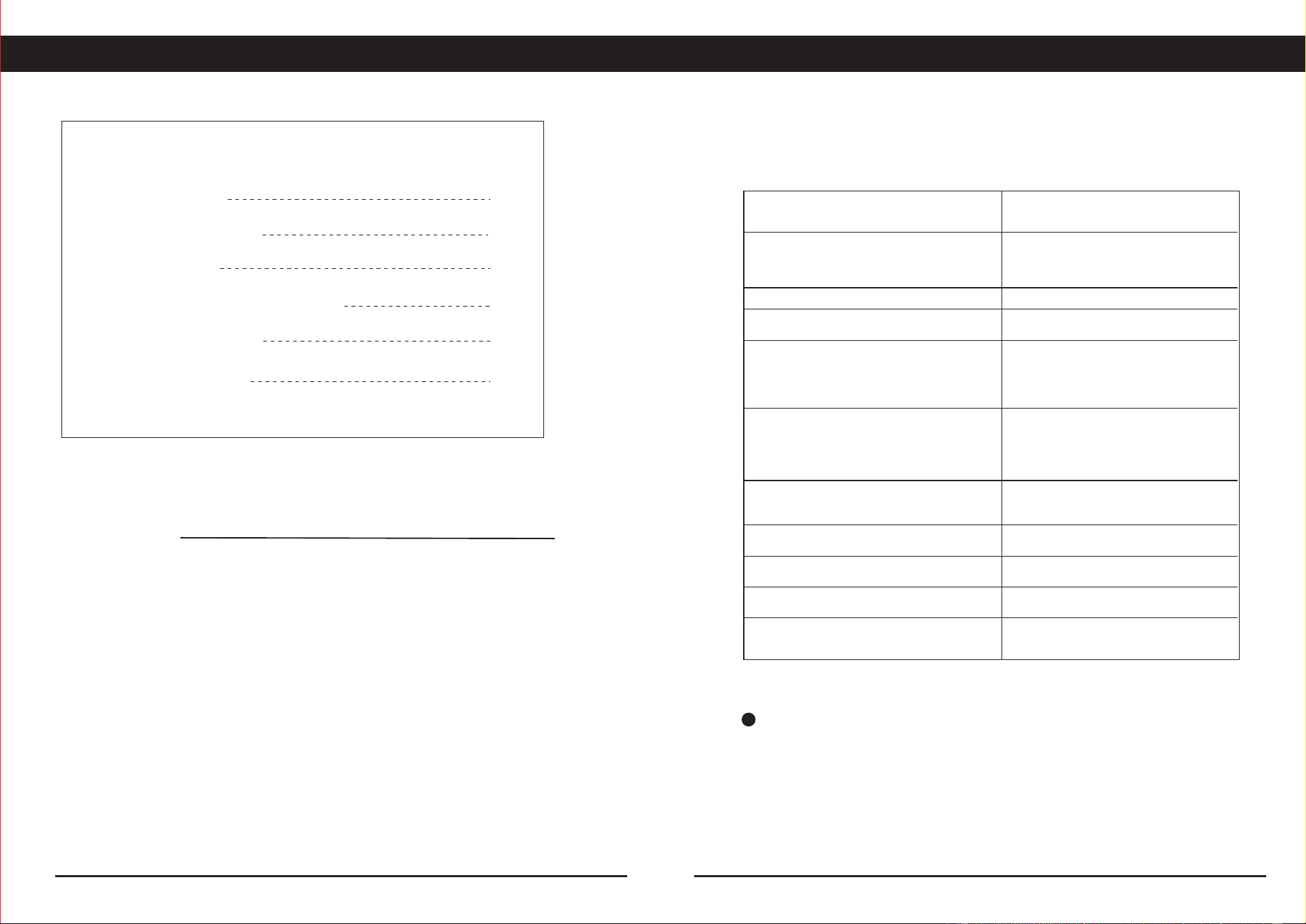
AC115V/60Hz
360x220x90(mm)
20mV/600 Ohm
AU385BT
500mV/33k Ohm
200WATTS
<1%
8 Ohm
≥72dB
≥70dB
±1.5dB
±12dB
3.5 kg
Technical Specifications
Frequency Response(40Hz-15KHz)
Tone Characteristic(100Hz-10KHz)
PMPO,8 Ohms, 1KHz test
Main Channel Power Output
Input Sensitivity Impedance
Normal Load Impedance
Signal to Noise Ratio
Power Requirements
Frequency Range
AUX,DVD,USB,BT,FM,
Pure Amplifier
THD(1KHz)
Microphone
KARAOKE
Technical
Dimension
Weight(N.W)
TECHNICAL SPECIFICATIONS
2
1
3
6
5
4
Technical specifications
Mp3 remote Function and bluetooth
Connecting to amplifier
Table of contents
TABLE OF and FEATURES CONTENTS
Table of and features
1
6
Features
◆ Digital karaoke system,
◆ 2 Mic Input, priority to microphone
◆ All-digital adjustment function
◆ Full function protect system
◆ USB For MP3 Player
◆ FM Tuner Function
◆ Optical and coaxial input
5.1 Channel output
◆ Bluetooth Function
◆ LED Dispaly Function
◆ Remote Function
Precautions and attention
Front and rear panel
AUDIO INPUT
AUX
BT ANT
AUX
DVD
DVD
LINE
LINE OPT
COA
FM ANT
OUTPUT
INPUT
L L
R R
CAUTION
RISK OF ELECTRIC SHOCK
DO NOT OPEN
MADE IN CHINA
AUTO FAN
SPEA KER ( 4Ω-8Ω)
SPEA KER ( 8Ω-16Ω)
AC IN
~115V 60Hz
RIGHT Channel Output x2
MODEL:AU385BT
5.1 CHANNEL KARA OKE AMPLIFIER
SR
FR FLSU B
CE N SL
SPEAKER OUTPUT
SPEAKER OUTPUT
5
2
1.Power source-The unit should be connected to a power supply AC~115V/60Hz.
2.Ventilation-The unit should be situated so that its location or position does not
interfere with its proper ventilation. Place the unit at least 10cm away from the walls.
3.Water and moisture-The unit should not be used near water-for example, near
a swimming pool in a wet basement, etc.
4.Electric shock-if a metal object, such as hair pin or needle comes into contact
inside this unit, a dangerous electric shock may result. For families with children,
never permit children to put anything, especially metal, inside this unit.
5.Enclosure removal-Never remove the enclosure. If the internal parts are touched
accidentally, a serious electric shock might occur.
6.Abnormal smell-if an abnormal smell or smoke is detected, immediately turn the
power OFF and pull out the power cord. Contact your dealer or nearest service
station.
7. INPUT SELECT
There are four input sources,press input select keys (AUX,DVD,BT,FM,USB,OPT,COA)
to choose input source.
8. MICROPHONE VOLUME: MIC VOL.
Adujst “MIC VOL”knob change the karaoke volume.
9. ECHO
Adjust “ECHO”can get a satiable echo effect.
10. TREBLE/MIDDLE/BASS
Turn “TREBLE”/“BASS”/“MIDDEL”knob to adjust master channel treble/ bass tones
11. MASTER VOLUME
Adjust “MASTER.VOL”turn right volume up, turn left volume down.
Precautions
PRECAUTIONS and ATTENTION
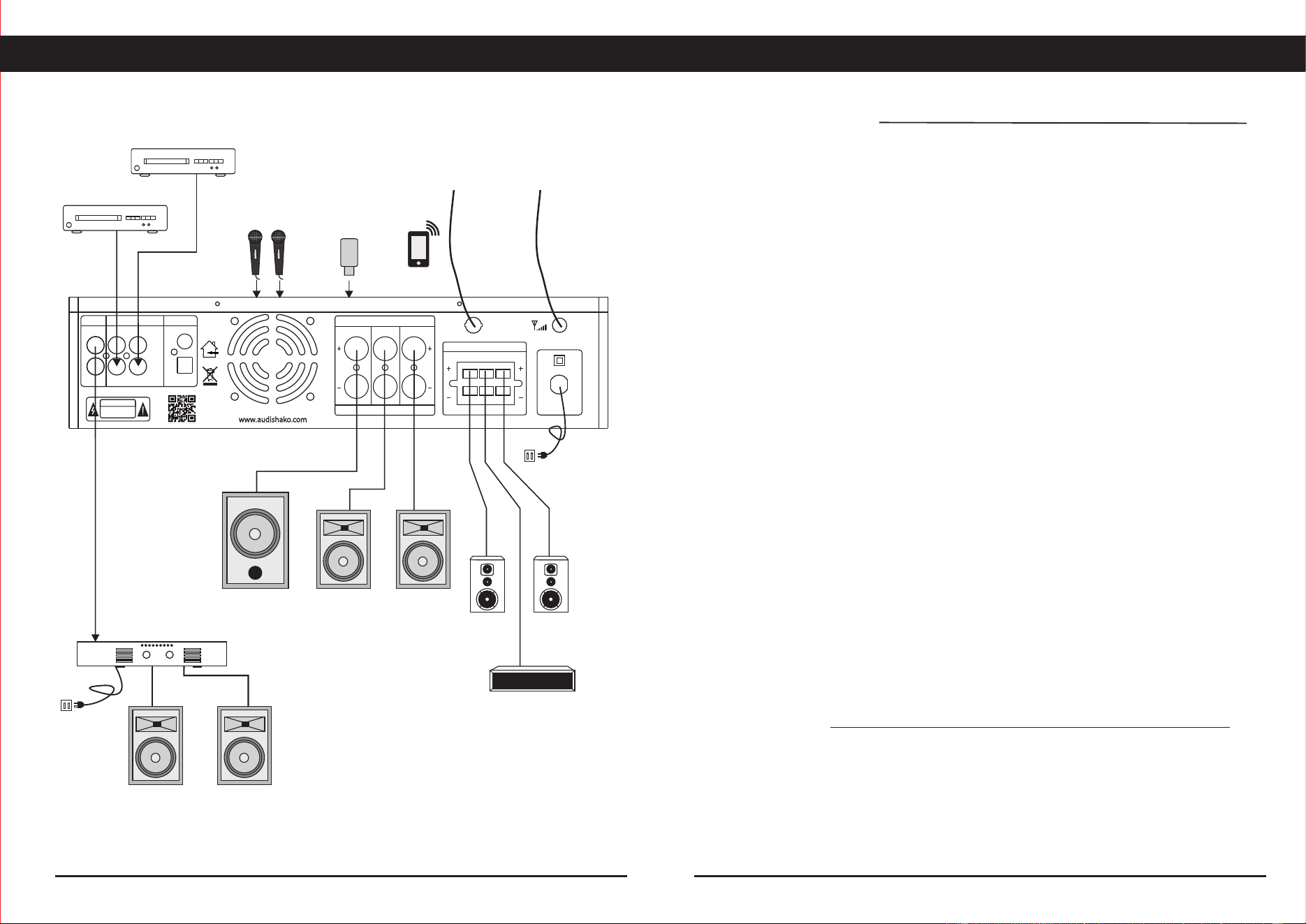
Connecting to amplifier
CONNECTING TO AMPLIFIER
FM ANTENNABT ANTENNA
DVD
AUX
AMPLIFIER
Left
speaker
2 MICROPHONE
INPUT
Right Right
speaker speaker
speaker speaker
USB INPUT
When you want to listen to the radio, press input key to select tuner(FM)
and then press scan button to seek for the station.
FM radio tuning
ATTENTION:
CENTER SPEAKER
REAR
RIGHT
SPEAKER
REAR
LEFT
SPEAKER
power
supply
power
supply
bluetooth
POWER
ON OFF
MIC- 1 MIC- 2 TALK-OVER
DELAY
ECHO BASS
MID TREBLE AU X USB
SUB VOL
MUSIC VOL
MODE BT STO P CH- AUTO CH+
MIC VOL
MIN MAXMIN MAX
5.1 CHAN NE L KA RA OK E AM PL IF IE R
AU385BT
Rear panel
FRONT and REAR PANEL FUNCTION Mp3 and BLUETOOTH FUNCTION
Front panel
3
4
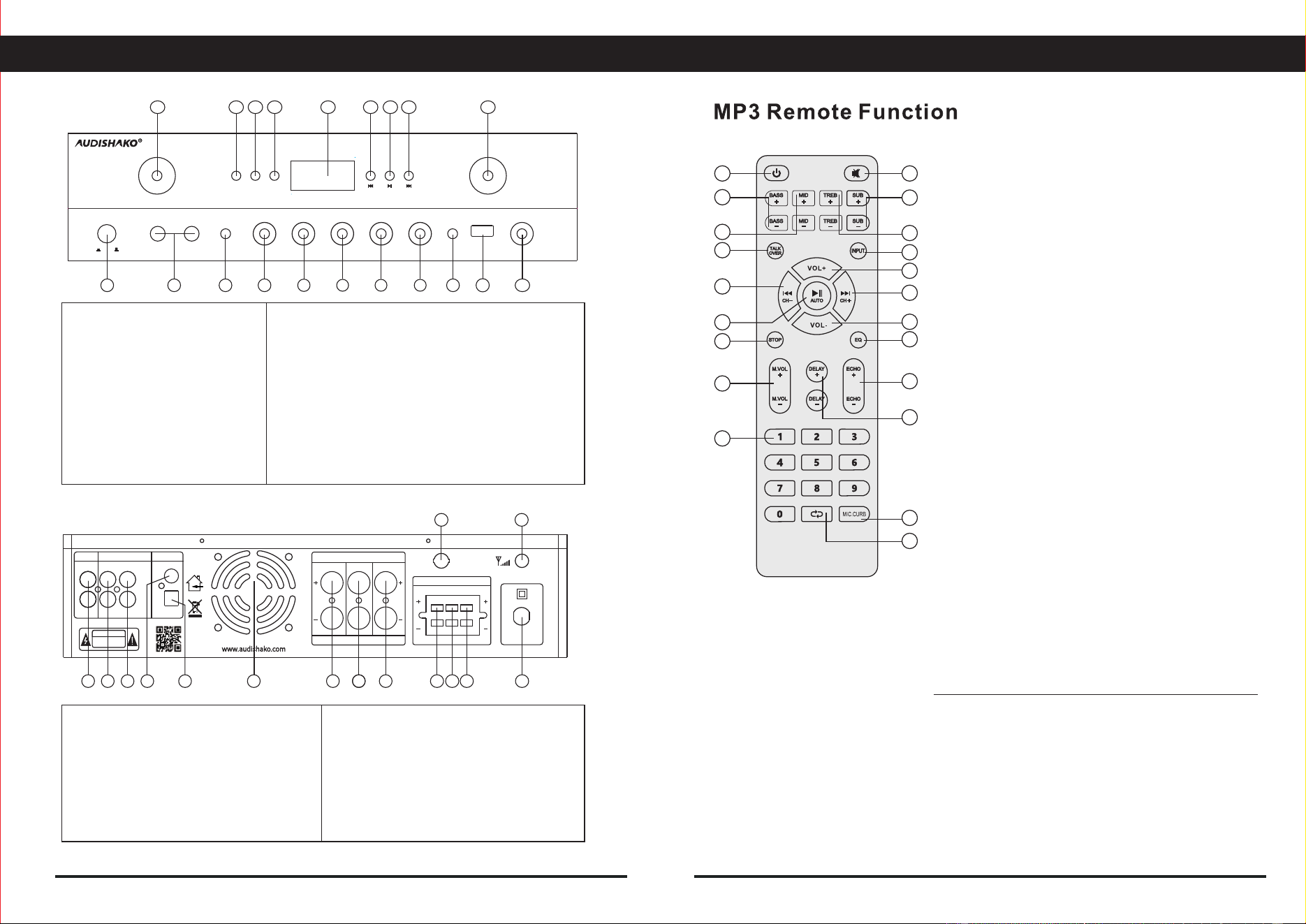
9. AUX INPUT jack
4. MIC DELAY control
5. MIC ECHO control
7. MIDDLE control
8. TREBLE control
6. BASS control
3. Microphone priority on/off key
10. USB JACK
2. MIC1.MIC2 jacks
12. MUSIC VOLUME control
20. MIC VOLUME control
15. USB/BT play prev and tuner(CH-) key
17. USB/BT play stop
16. LED display window
13. USB/BT play next and tuner(CH+) key
14. USB/BT play pause and tuner scan key
18. BT signal selector key
19. AUX,DVD,BT,FM,USB,OPT,COA signal selector
1. POWER switch
2. AUX1 signal input jack
3. DVD signal input jack
4. COAXIAL signal input
5. OPTICAL signal input
1. LINE signal output jack
8. Front speaker Right channel output
7. Subwoofer speaker channel output
6.FAN cooling
9. Front speaker LEFT channel output
12. Surround (left)speaker channel output
13. POWER INPUT
14. FM antenna
15. BT antenna
11. Center speaker channel output
10. Surround (right)speaker channel output
1516
17
181920
1 2
21
3
3
4
4
5
5
6
6
7
7
8
8
9
9
11
10
10 11 12 13
1415
12
13
14
Press 18 “BT” button input sources.When there is ding-dong sound it means the unit on
Bluetooth input status. Then you can use your Bluetooth device such as mobile phone to
search for Bluetooth device named AU385BT to pair it. When the pairing completed
there will be ding-dong sound as well then you can play music from your mobile phone on
the amplifier via Bluetooth.
Bluetooth operation
1.Built-in player standby and power-on functions
2.MUTE select key
3.Music bass control
4.Sub volume control
5.Music middle control
6.Music treble control
7.Microphone priority (P on / P oF) key
8.Signal input select
9.USB/BT play prev and tuner (CH-) key
10.Music volume up control
11.USB/BT play pause and tuner scan key
12.USB/BT play next and tuner (CH+)key
13.USB play stop
14.Music volume down control
15.Music EQ select
16.Mic volume control
17. Mic echo control
18.Mic delay control
19.USB/FM digital key select
20.Microphone anti-howling(ON/ OFF)
21.USB/BT play repeat (One or All)
1
4
6
2
8
10
12
14
15
17
18
20
21
3
7
9
11
13
16
19
5
11.Subwoofer Volume control
AUDIO INPUT
AUX
BT ANT
AUX
DVD
DVD
LINE
LINE OPT
COA
FM ANT
OUTPUT
INPUT
L L
R R
CAUTION
RISK OF ELECTRIC SHOCK
DO NOT OPEN
MADE IN CHINA
AUTO FAN
SPEA KE R ( 4Ω-8Ω)
SPEA KE R ( 8Ω-1 6Ω)
AC IN
~115 V 60 Hz
RIGHT Cha nne l Out put x 2
MODE L:AU385B T
5.1 CH ANNEL KAR AOKE AMP LIFIE R
SR
FR FLSU B
CE N SL
SPEAKER OUTPUT
SPEAKER OUT PUT