©2019 KICKYRIDE.COM (AutoCircuits, LLC. company)
INSTALL GUIDE
WWW.KICKYRIDE.COM - DIY Remote Start Gurus
GUIDE #KRRSFL8LT_QIG-June 29, 2021 9:33 AM
KR-RS-FL8
VEHICLE COMPATIBILITY
DISCLAIMER: KICKYRIDE.COM, its employees, nor its afliates accept
any responsibility for any electrical damage to the vehicle or any other
connected systems as a result of improper installation of this product.
All wiring connections & vehicle compatibility must be veried by a
professionally qualied technician prior to installation. Test all circuits to
verify function before connecting. This guide is provided as a reference only.
!
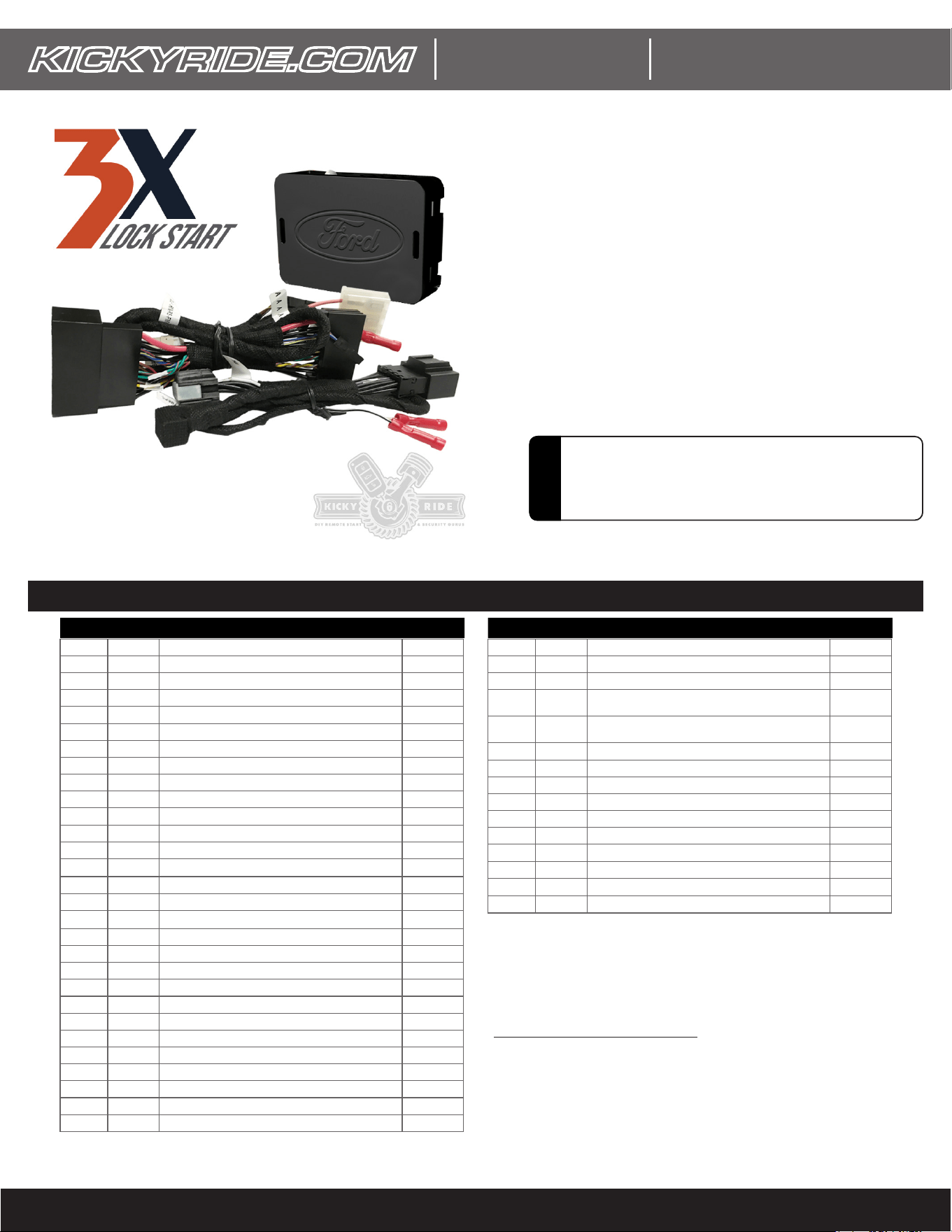
PRODUCTS COVERED:
KR-RS-FL8 / KR-RS-FL8LT
Remote Start From OEM Fob
Guide Revision Date: June 29, 2021 9:33 AM
Only For Kits With Harness P/N: H-KRRSFL8
Credits:
Some info, images, & graphics provided courtesy of
Omega Research & Devleopment Technologies, Inc. and
Automotive Data Solutions Inc.
Ford EcoSport Push-to-Start Gas Automatic* 2018 - 2020
Ford EcoSport Std. Key Gas Automatic* 2018 - 2020
Ford Edge Push-to-Start 4/6 Cyl. Automatic 2015 - 2020
Ford Edge Std. Key 4/6 Cyl. Automatic 2015 - 2020
Ford Escape Push-to-Start Gas Automatic 2020 - 2020
Ford Escape Std. Key Gas Automatic 2020 - 2020
Ford Expedition Push-to-Start 6 Cyl. Automatic 2018 - 2020
Ford Expedition Std. Key 80-bit 6 Cyl. Automatic 2018 - 2020
Ford Explorer Push-to-Start 4/6 Cyl. Automatic* 2016 - 2020
Ford Explorer Std. Key 4/6 Cyl. Automatic* 2016 - 2020
Ford F-150 Push-to-Start Automatic 2015 - 2020
Ford F-150 Std. Key w/ OEM Keyless Entry Automatic 2015 - 2020
Ford F-250 Push-to-Start 8 Cyl. Automatic 2017 - 2020
Ford F-250 Push-to-Start Diesel Automatic 2017 - 2020
Ford F-250 Std. Key w/ OEM Keyless Entry 8 Cyl. Automatic 2017 - 2020
Ford F-250 Std. Key w/ OEM Keyless Entry Diesel Automatic 2017 - 2020
Ford F-350 Push-to-Start 8 Cyl. Automatic 2017 - 2020
Ford F-350 Push-to-Start Diesel Automatic 2017 - 2020
Ford F-350 Std. Key w/ OEM Keyless Entry 8 Cyl. Automatic 2017 - 2020
Ford F-350 Std. Key w/ OEM Keyless Entry Diesel Automatic 2017 - 2020
Ford F-450 Push-to-Start Diesel Automatic 2017 - 2020
Ford F-450 Std. Key w/ OEM Keyless Entry Diesel Automatic 2017 - 2020
Ford Fusion Push-to-Start Sedan 4 Cyl. Automatic 2014 - 2017
Ford Fusion Push-to-Start Sedan 4/6 Cyl. Automatic 2018 - 2020
Ford Fusion Push-to-Start Sedan Hybrid Automatic 2014 - 2020
Ford Fusion Push-to-Start Sedan Plug-in Hybrid Automatic 2018 - 2020
Ford Fusion Std. Key Sedan 4 Cyl. Automatic 2014 - 2020
Ford Fusion Std. Key Sedan Hybrid Automatic 2014 - 2020
Ford Ranger Push-to-Start Gas Automatic 2019 - 2021
Ford Ranger Std. Key Gas Automatic 2019 - 2021
Ford Transit Std. Key Diesel Automatic 2020 - 2020
Ford Transit Std. Key Gas Automatic 2020 - 2020
Ford
Transit
Connect
Push-to-Start 4 Cyl. Automatic 2020 - 2020
Ford
Transit
Connect
Std. Key 4 Cyl. Automatic 2019 - 2021
Lincoln Aviator Push-to-Start Automatic 2020 - 2020
Lincoln Continental Push-to-Start Sedan 6 Cyl. Automatic 2017 - 2020
Lincoln Corsair Push-to-Start Automatic 2020 - 2020
Lincoln MKC Push-to-Start 4 Cyl. Automatic 2015 - 2019
Lincoln MKZ Push-to-Start Sedan 4 Cyl. Automatic 2014 - 2018
Lincoln MKZ Push-to-Start Sedan 4/6 Cyl. Automatic 2019 - 2020
Lincoln MKZ Push-to-Start Sedan 6 Cyl. Automatic 2014 - 2018
Lincoln MKZ Push-to-Start Sedan Hybrid Automatic 2014 - 2020
Lincoln Nautilus Push-to-Start Automatic 2019 - 2020
Lincoln Navigator Push-to-Start 6 Cyl. Automatic 2018 - 2020
Make Model Trim Years Make Model Trim Years
* Vehicle must be equipped with factory hood switch.
How to check for factory hood switch: Open the hood and turn the
ignition on (do not start engine). If a hood switch is equipped, you will
see a “Hood Ajar” message on the instrument cluster.
©2019 KICKYRIDE.COM (AutoCircuits, LLC. company)
INSTALL GUIDE
WWW.KICKYRIDE.COM - DIY Remote Start Gurus
GUIDE #KRRSFL8LT_QIG-June 29, 2021 9:33 AM
GREEN/BLACK wire
If no factory hood switch, Install the included hood switch
H-KRRS-10-1
DISCLAIMER: The manufacturer of this product nor
its afliates accept any responsibility for any electrical
damage to the vehicle or any other connected systems as
a result of improper installation of this product. All wiring
connections & vehicle compatibility must be veried by a
professionally qualied technician prior to installation.
!
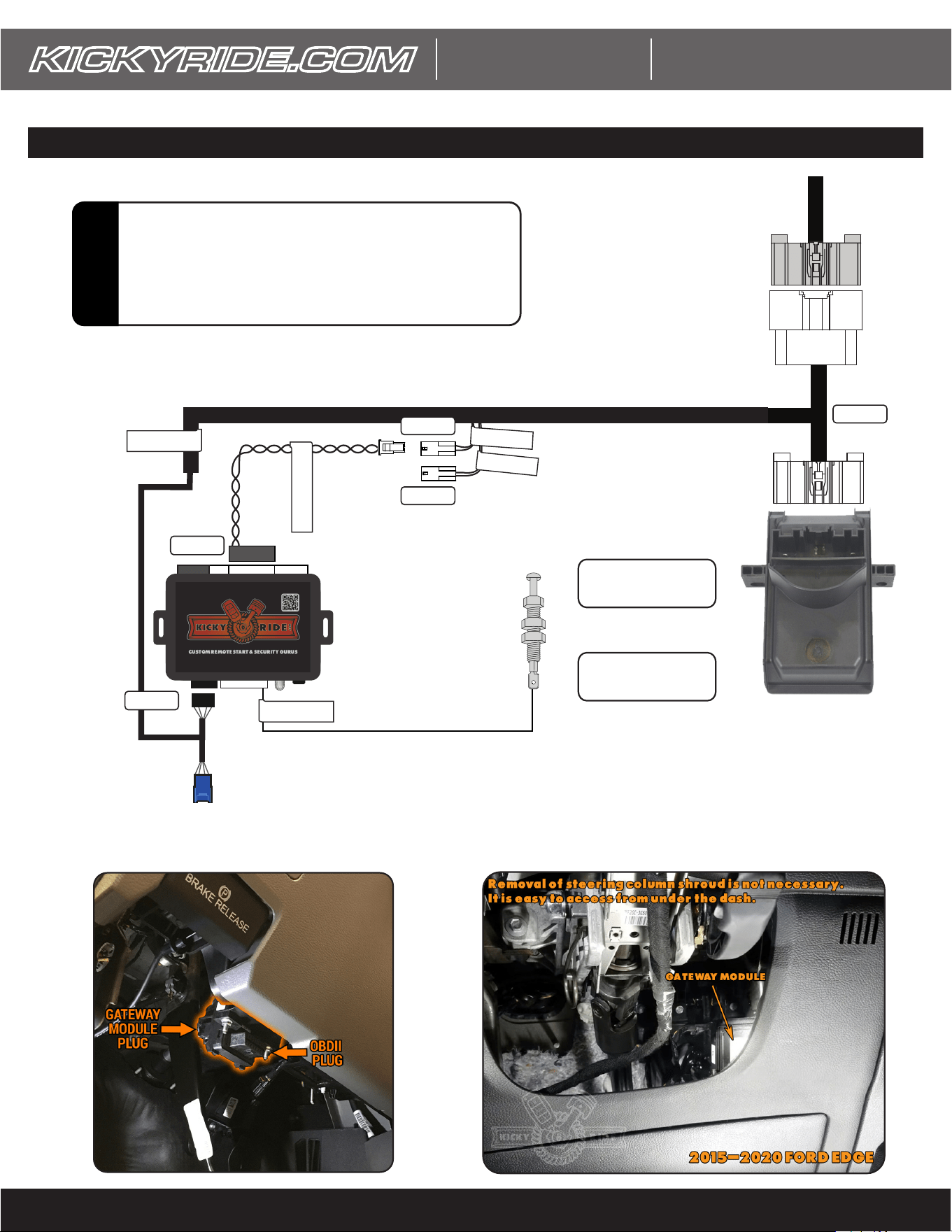
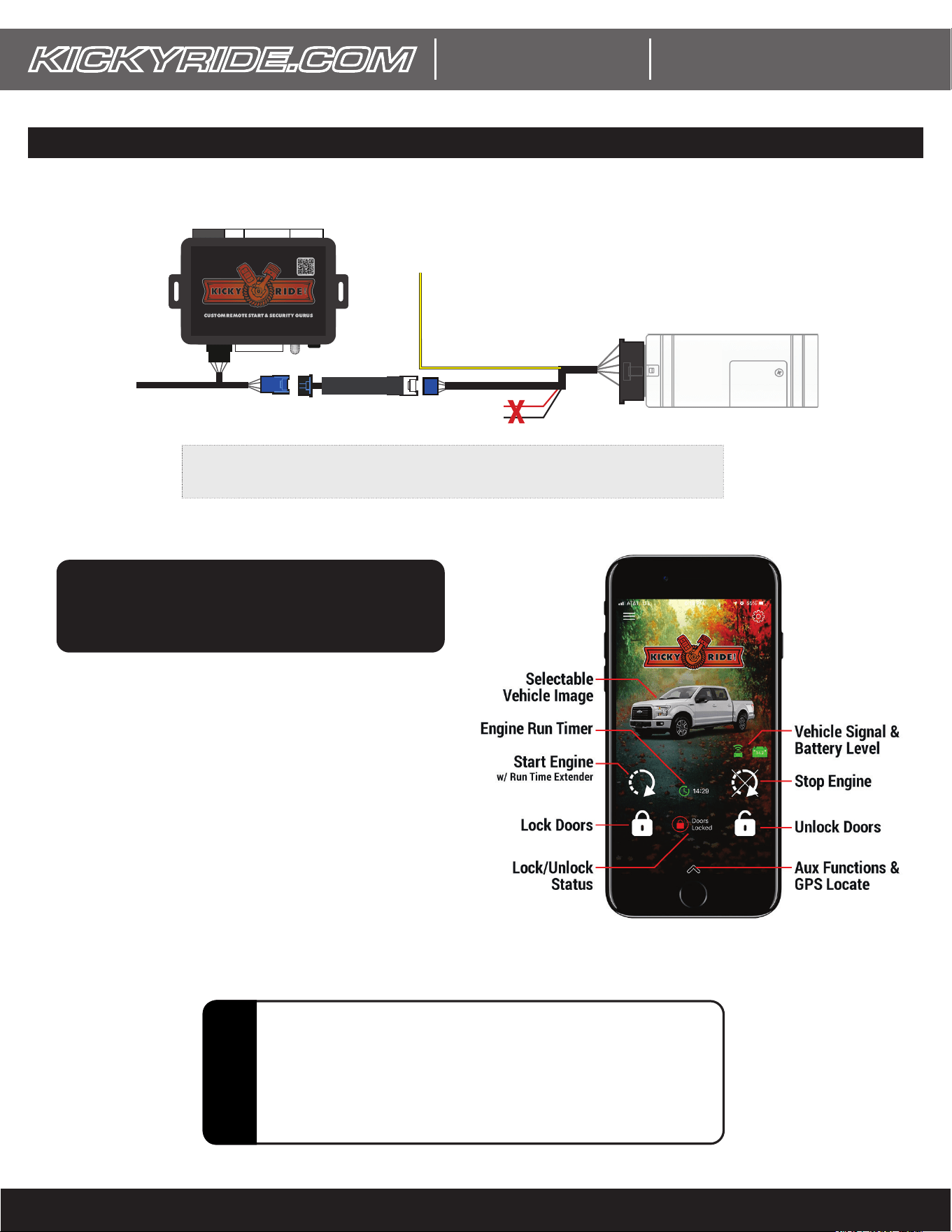
WIRING DIAGRAM FOR REMOTE START ONLY (w/ HARNESS P/N: H-KRRSFL8)
FACTORY GATEWAY
HARNESS PLUG
CAN 1 (MS)
CAN 2 (HS1)
GATEWAY MODULEGATEWAY MODULE
REMOTE STARTREMOTE START
MODULEMODULE
Smartphone Control Connector
(optional - see next page)
(Sample Image From 2018 F-250)(Sample Image From 2018 F-250)
H-KRRSFL8
H-KRRS-7 (CAN)
STEP 2
STEP 6
STEP 1
STEP 4
STEP 5:
Perform programming
steps 1-6 (see p5)
STEP 7:
Perform programming
steps 7+ (see p5)
STEP 3
FORD EDGE GATEWAY MODULE IS LOCATED BEHINDFORD EDGE GATEWAY MODULE IS LOCATED BEHIND
THE DRIVER DASH, RIGHT SIDE OF STEERING COLUMN. THE DRIVER DASH, RIGHT SIDE OF STEERING COLUMN.
GATEWAY MGATEWAY MODUODULE IS BUILT INTO THE LE IS BUILT INTO THE
BACK OF THE OBDII PLUGBACK OF THE OBDII PLUG
KR-RS-FL8
©2019 KICKYRIDE.COM (AutoCircuits, LLC. company)
INSTALL GUIDE
WWW.KICKYRIDE.COM - DIY Remote Start Gurus
GUIDE #KRRSFL8LT_QIG-June 29, 2021 9:33 AM
KR-RS-FL8
ADDING SMARTPHONE CONTROL w/ OPTIONAL P/N: KR-RS-SMART-2 (sold separately)
DISCLAIMER: The manufacturer of this product nor
its afliates accept any responsibility for any electrical
damage to the vehicle or any other connected systems as
a result of improper installation of this product. All wiring
connections & vehicle compatibility must be veried by a
professionally qualied technician prior to installation.
!
NOTES:
1) See user card included with KR-RS_SMART2 for app setup instructions.
OL-HRN-LINKRALL
YELLOW ALARM TRIGGER INPUT (OPTIONAL):
Must see 10 seconds of pulsed signal (horn honk) when alarm
triggers. (sends a push notication to the app) - email support with
vehicle info to learn how to identify the vehicle horn wire.
KR-RS-SMART2 ModuleKR-RS-SMART2 Module
INSTALLED & WORKING INSTALLED & WORKING
REMOTE START MODULEREMOTE START MODULE
T-HARNESST-HARNESS
see previous pagesee previous page
Add Plug-In Smartphone
Control Anytime!
KR-RS-SMART2
Model:
• 1st year of service included!
• Only $39.99/year afterwards
• Virtually unlimited range!
(uses t-mobile & AT&T networks. Your phone
can be on any network or wifi)
• GPS tracking included!

©2019 KICKYRIDE.COM (AutoCircuits, LLC. company)
INSTALL GUIDE
WWW.KICKYRIDE.COM - DIY Remote Start Gurus
GUIDE #KRRSFL8LT_QIG-June 29, 2021 9:33 AM
BEFORE BEGINNING INSTALLATION:
A factory hood pin switch is required on most vehicles for this system to work. You must check to make sure your vehicle
supports hood pin status. How to check for factory hoodpin:
1) Open the vehicle’s hood
2) Turn the vehicle’s ignition on.
3) The instrument cluster will display “hood ajar” if the pinswitch is present and functioning. If not, you can purchase a factory
hoodpinswitch and install it.
INSTALLATION:
1) Connect the main harness to vehicle’s gateway module. Normally this can be accessed without removing any panels.
2) Make sure the “2-pin CAN” connector is plugged into the “CAN 1 (MS)” plug for the rst portion of programming.
3) Press & hold the button on the module while connecting the 4 pin black plug from the harness. Once the module light ashes
rapidly red, release the button.
4) Follow steps 1-6 in the programming instructionst on the next page.
5) Unplug the “2-pin CAN” connector from “CAN 1 (MS)” and connect it to the “CAN2 (HS1)” connector
6) Complete programming steps 7-13 on the next page.
7) OPTIONAL HOOD PIN INSTALL - If your vehicle does not have a factory hood pin, install the included hoodpin with these steps:
- Find a good location in the radiator core support (most desirable) or along the hood drip rail (less desirable) that lines up
with a at low spot on your hood. The location should have access beneath it and clearance from any other components.
- Drill a 1/4” hole at your chosen location.
- Remove the bottom nut and star washer from the hood pin switch and insert it in the hole.
- Reinstall the bottom star washer and nut then hand tighten to test height. Slowly lower your hood to check contact. It
should NOT push the hood pin all the way down. About half way is desirable. Adjust the nuts to raise/lower the pin switch.
- Tighten the nuts with the proper tools
- Run a length of wire away from hot/moving parts and route through your rewall to te remote start module. Attach the wire
to the remote start’s GREEN/BLACK wire. Crimp the spade on the other end and attach to the pin switch.
8) Close all doors, hood, etc. and take your keys outside the vehicle.
9) Press LOCK on the factory fob 3 times within 5 seconds. Don’t press too fast, the doors should lock 3 times. Your vehicle should
crank up within a few seconds. Climate controls will honor your last used settings.
10) SMARTPHONE CONTROL INTERFACE INSTALL (OPTIONAL):
- Plug in the LINKR harness as described on the previous page and temporarily mount the module in your chosen
location. The side with the LED lights should be facing down (or away from largest opening) so the other side is
facing the sky and blocked by metal. Metal will block GPS reception. Check LED light status to conrm reception.
- After a few seconds, the LED lights on the unit will begin to ash. When the system has connectivity, both lights will
stay on solid. If not, you may need to drive the vehicle to an open location to help.
- The GREEN LED is cellular reception (T-mobile is the primary carrier). The RED LED is for GPS signal.
- Follow the user card instructions to download & setup the APP.
11) Secure the module, harness, and any other components out of the way of any moving or hot parts of the vehicle.
12) Reassemble the vehicle dash/interior. NOTE: If you do this before testing the system, you may upset the install gods and the
system could develop functional problems. Also don’t get too upset if you accidentally injure yourself (scraped knuckle, cut nger,
etc.). Blood offerings under the dash are considered a sign of good luck by many cultures!
13) MOST IMPORTANT STEP: Take pride in your work and enjoy your new level of comfort! Oh, and denitely brag to your friends.
Ofce Hours: 10AM-5PM Eastern Mon-Fri.
For AFTER HOURS & WEEKEND SUPPORT (existing customers only), send a text message or leave a voicemail at our ofce number
above. We always have support personnel on call and they will reply as quickly as possible though same day service is not
guaranteed. Thanks so much for being a valued KICKYRIDE customer.
INSTALLATION STEPS
If you have any problems, Contact us:
Phone/Text message: 706-395-KICK (5425)
Email: [email protected]om
Or visit www.kickyride.com and use our online chat window
KR-RS-FL8
©2019 KICKYRIDE.COM (AutoCircuits, LLC. company)
INSTALL GUIDE
WWW.KICKYRIDE.COM - DIY Remote Start Gurus
GUIDE #KRRSFL8LT_QIG-June 29, 2021 9:33 AM
KR-RS-FL8
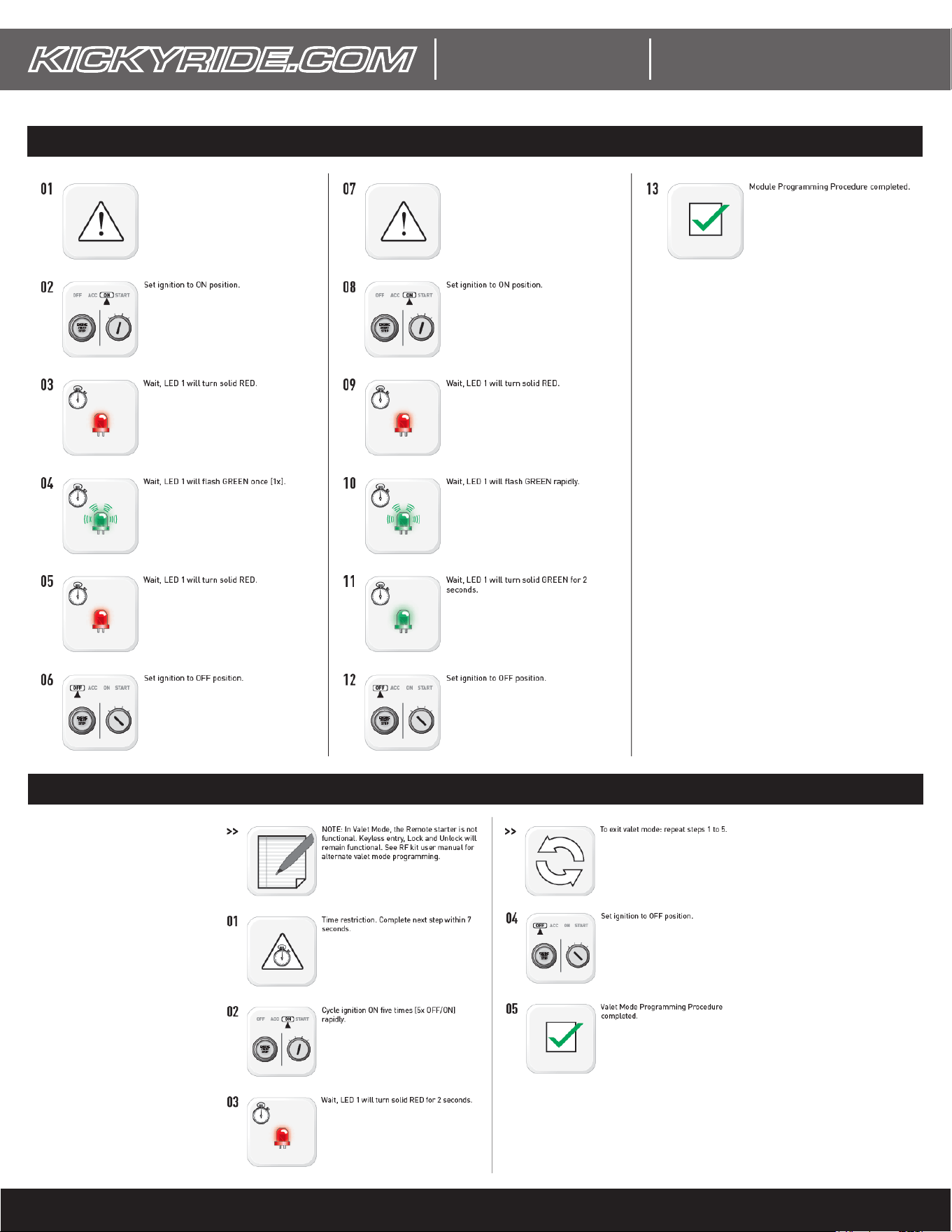
VALET MODE
VEHICLE PROGRAMMING STEPS
CONNECT the harness as shown in the wiring
diagram on the previous pages and make sure
the 2-wire CAN connector is plugged into the
“MS-CAN” connector.
DISCONNECT 2-wire CAN connector from
the “MS-CAN” and plug it into the “HS1-CAN”
connector.
©2019 KICKYRIDE.COM (AutoCircuits, LLC. company)
INSTALL GUIDE
WWW.KICKYRIDE.COM - DIY Remote Start Gurus
GUIDE #KRRSFL8LT_QIG-June 29, 2021 9:33 AM
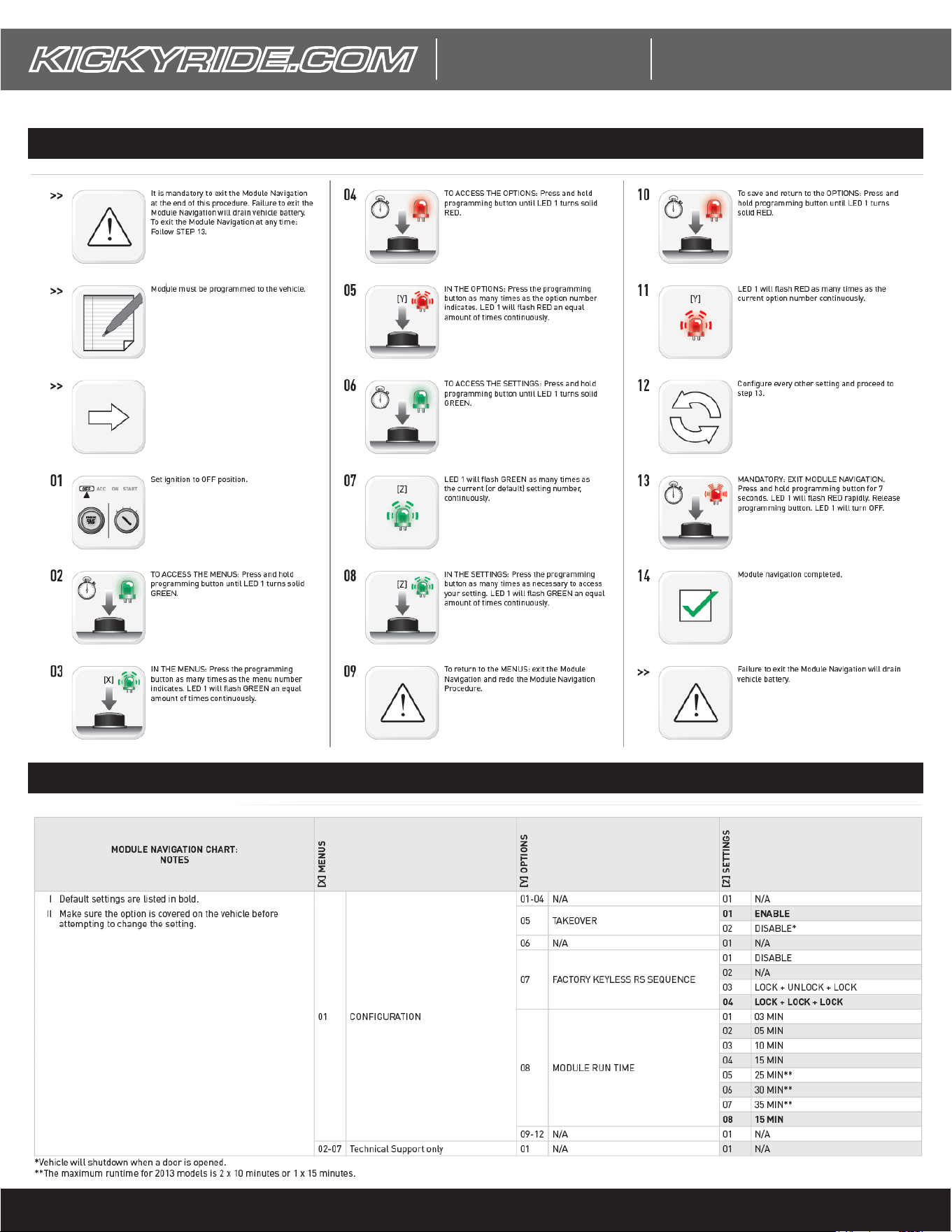
OPTION PROGRAMMING PROCEDURE
PROGRAMMABLE OPTIONS
Use the options chart below.
KR-RS-FL8
©2019 KICKYRIDE.COM (AutoCircuits, LLC. company)
INSTALL GUIDE
WWW.KICKYRIDE.COM - DIY Remote Start Gurus
GUIDE #KRRSFL8LT_QIG-June 29, 2021 9:33 AM
KR-RS-FL8
SYSTEM PROGRAMMED BUT REMOTE START IS NOT ACTIVATING:
- Makes sure all doors, hood, tailgate/trunk are closed before activating remote start.
- Your vehicle will not allow remote start if the check engine light or low fuel light is on.
- If you are getting hazard ashes a few seconds after attempting, this means you’ve made too many remote start requests. You
must drive the vehicle to enable remote start again.
- Make sure the optional hood pin (if used) is properly adjusted.
- For LOCK, LOCK, LOCK activation, make sure you press all three in ~3 seconds (you should hear 2 horn honks)
- For LOCK, UNLOCK, LOCK activation, make sure all 3 presses are done in ~3 seconds (the doors should LOCK, UNLOCK, LOCK)
- The system may have been accidentally placed in valet mode. Perform the valet mode procedure to exit.
REMOTE START WORKS FROM THE FOB BUT NOT FROM MY APP:
- Double check the order in which you have the harnesses connected. See the wire diagraom on page 5.
- Make sure the app shows a green signal icon (next to the battery icon). If it is gray, the system is out of cellular coverage. Move
the vehicle to a better location.
- The smartphone module/app is default for ‘ADS’ protocol. On the app control screen, press the gear icon, then press ‘Settings’.
Check that the protocol is set to ‘ADS’. If not, press and hold the protocol for 5+ seconds and change it as needed.
REMOTE START TROUBLESHOOTING
SMARTPHONE CONTROL TROUBLESHOOTING
SYSTEM WILL NOT PROGRAM TO VEHICLE:
- Double check vehicle compatibility on the rst page of this guide. Make sure your vehicle matches all requirements.
- Make sure the 2 pin “H-KRRSFL8-7 (CAN)” connector is connected to “CAN 1 (MS)” before programming
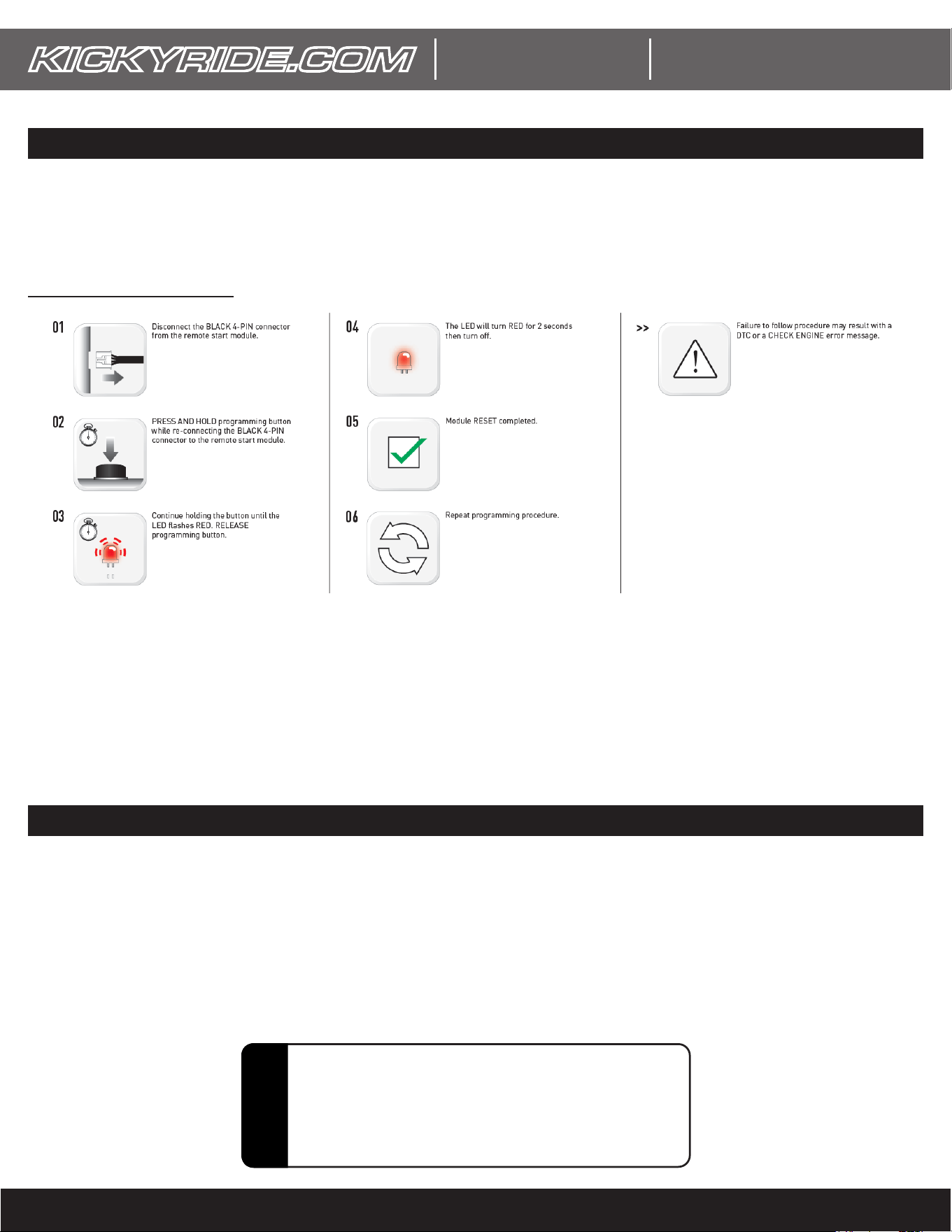
- Perform a module reset and begin programming again. NOTE: THIS WILL RETURN ALL FEATURES TO DEFAULT SETTINGS.
- Make sure all zones are closed and that the optional hood pin (if used) is properly adjusted.
MODULE RESET PROCEDURE
DISCLAIMER: The manufacturer of this product nor
its afliates accept any responsibility for any electrical
damage to the vehicle or any other connected systems as
a result of improper installation of this product. All wiring
connections & vehicle compatibility must be veried by a
professionally qualied technician prior to installation.
!