1
Owner’s Manual
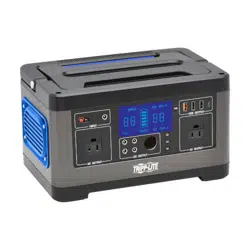
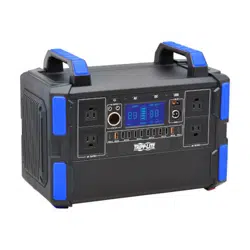
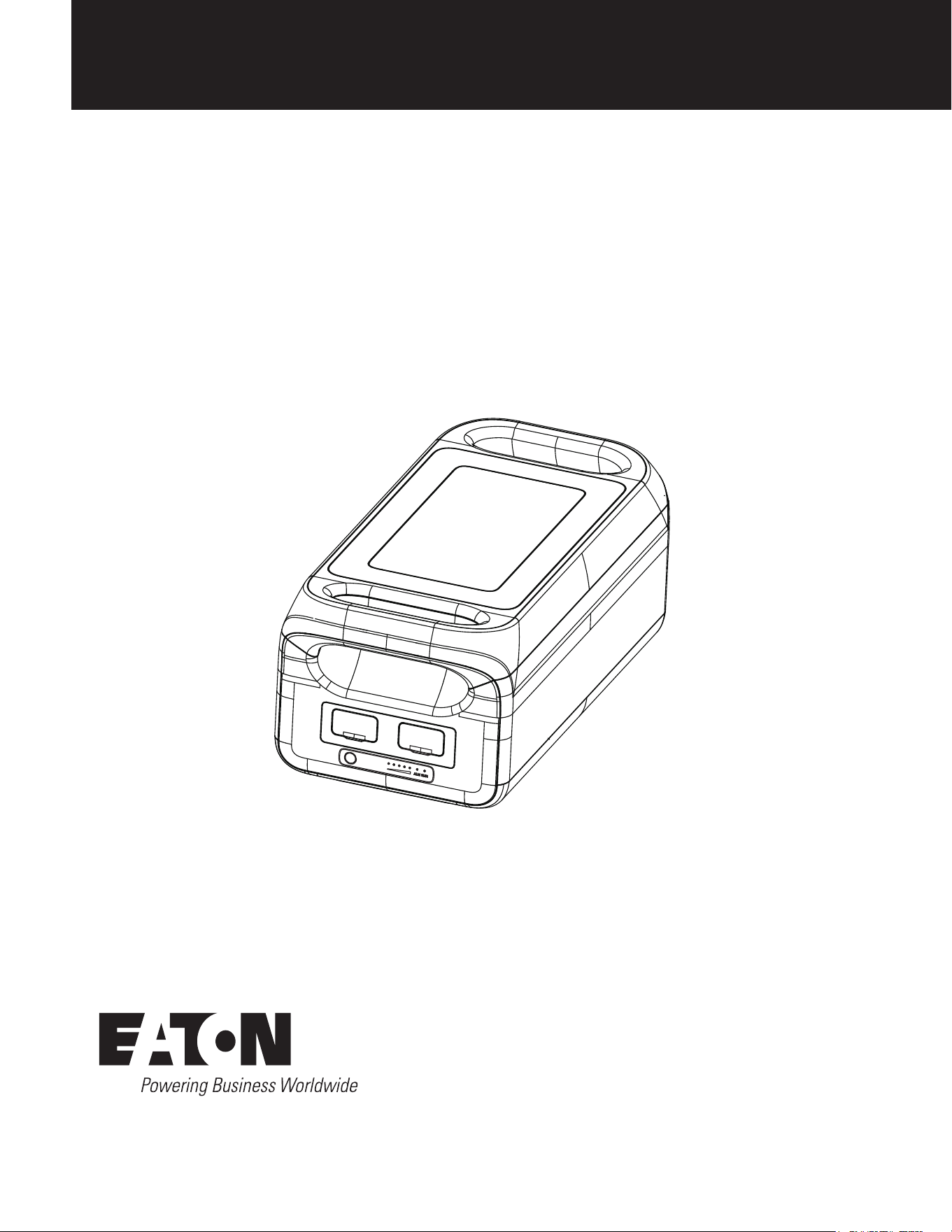
Purchased product
may differ from image.
Model:
BPGC2500L
Expansion Battery Pack for
GC3000L Power Station
Français 12

2
SAVE THESE INSTRUCTIONS!
This manual contains important instructions and warnings that should be followed during the
installation, operation and storage of this power station.
Important Safety Instructions
1.1 General Safety Warnings
• Do not use an operating expansion battery pack near a heat source, such as fire or heater.
• The expansion battery pack must not contact any liquid. The expansion battery pack shall not be used in wet or rainy
environments. Do not immerse the expansion battery pack or get it wet.
• Do not use the expansion battery pack in a strong electrostatic or strong magnetic field environment.
• Do not disassemble the expansion battery pack in any way or pierce it with a sharp object. The device contains no
user serviceable parts.
• Do not short the expansion battery pack with wires or other metal objects.
• Do not step on, sit or climb on the expansion battery pack.
• Use only approved parts and accessories. Contact Eaton for purchase information.
• When the using the expansion battery pack, follow the operating temperature defined in section 8. Specifications of
this manual. If the temperature is too high, the battery may catch fire or even explode. If the temperature is too low,
the expansion battery pack performance will be seriously impaired, even normal use will be impacted.
• Do not place heavy objects on the expansion battery pack; only a single additional expansion battery pack may be
placed on a expansion pack. Refer to section 5.2 for the permitted stacking method.
• Do not stop the fan by force or expose the expansion battery pack to an unventilated or dusty environment when the
device is in operation.
• Do not block the ventilation openings of the expansion battery pack.
• Avoid collisions, drops and violent vibrations. In the event of a severe impact, shut down the power supply
immediately. Secure the expansion battery pack firmly during transportation to avoid vibration and impact.
• If expansion battery pack falls into water accidentally, place it in a safe and wide area and stay away from it until it is
dry. Once dry, the expansion battery pack cannot be used again. Dispose of the expansion battery pack according to
local codes. If the expansion battery pack is on fire, use fire extinguishing equipment in the recommended order:
water or water mist, sand, fire blanket, dry powder, carbon dioxide fire extinguisher.
• The product along with its connections and accessories must be kept clean of any dirt or debris.
• Careful placement of the expansion battery pack must be made during both storage and usage to prevent tipping or
damage to the product. If the expansion battery pack is tipped over and seriously damaged, turn off immediately and
place the battery in a spacious place and keep it away from flammable materials and people, then dispose in
accordance with the requirements of local laws and regulations.
• Store the expansion battery pack out of the reach of children and pets.
• Store the expansion battery pack in a dry and ventilated place.
1.2 Product Disposal
• Conditions permitting, if discarding the expansion battery pack is required, the device battery must be completely
discharged. This product contains batteries which contain hazardous chemicals and are strictly forbidden for disposal
in ordinary garbage bins. Please follow local laws and regulations on battery recycling and disposal.
• If the battery cannot be discharged completely due to product failure, do not discard the battery directly in the
battery recycling bin. Contact a professional battery recycling company for further disposal.
• The battery will not start if it is over-discharged and must be disposed in accordance with the local laws and
regulations on battery recycling and disposal.
• Please recycle Eaton products. The batteries used in this product are lithium-ion batteries. These batteries are highly
recyclable. Refer to your local codes for disposal requirements. You can get up-to-date information on recycling the
batteries at: Tripplite.Eaton.com/support/recycling-program/.
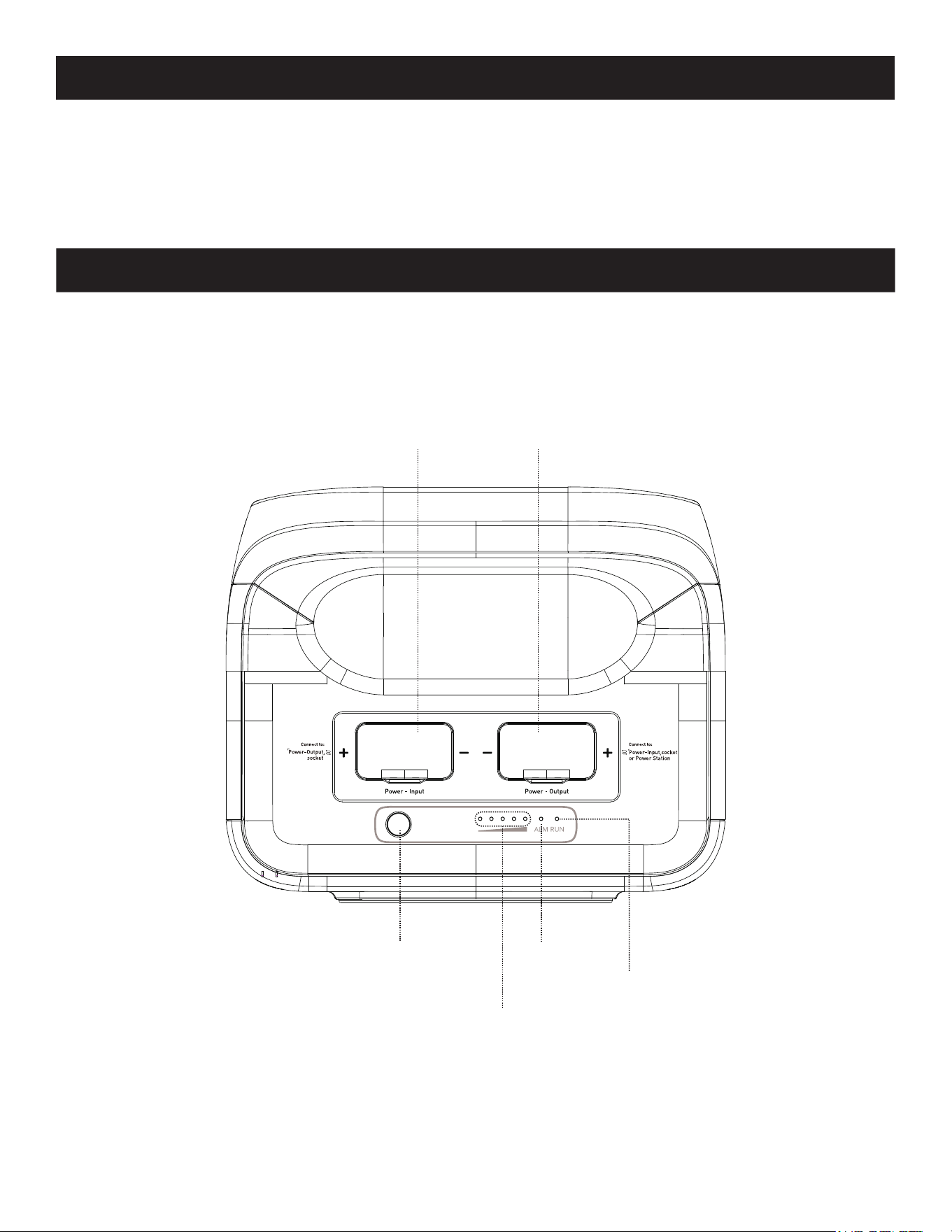
3
2. Package Includes
• Expansion Battery Pack
• Expansion Cable
• Owner’s Manual
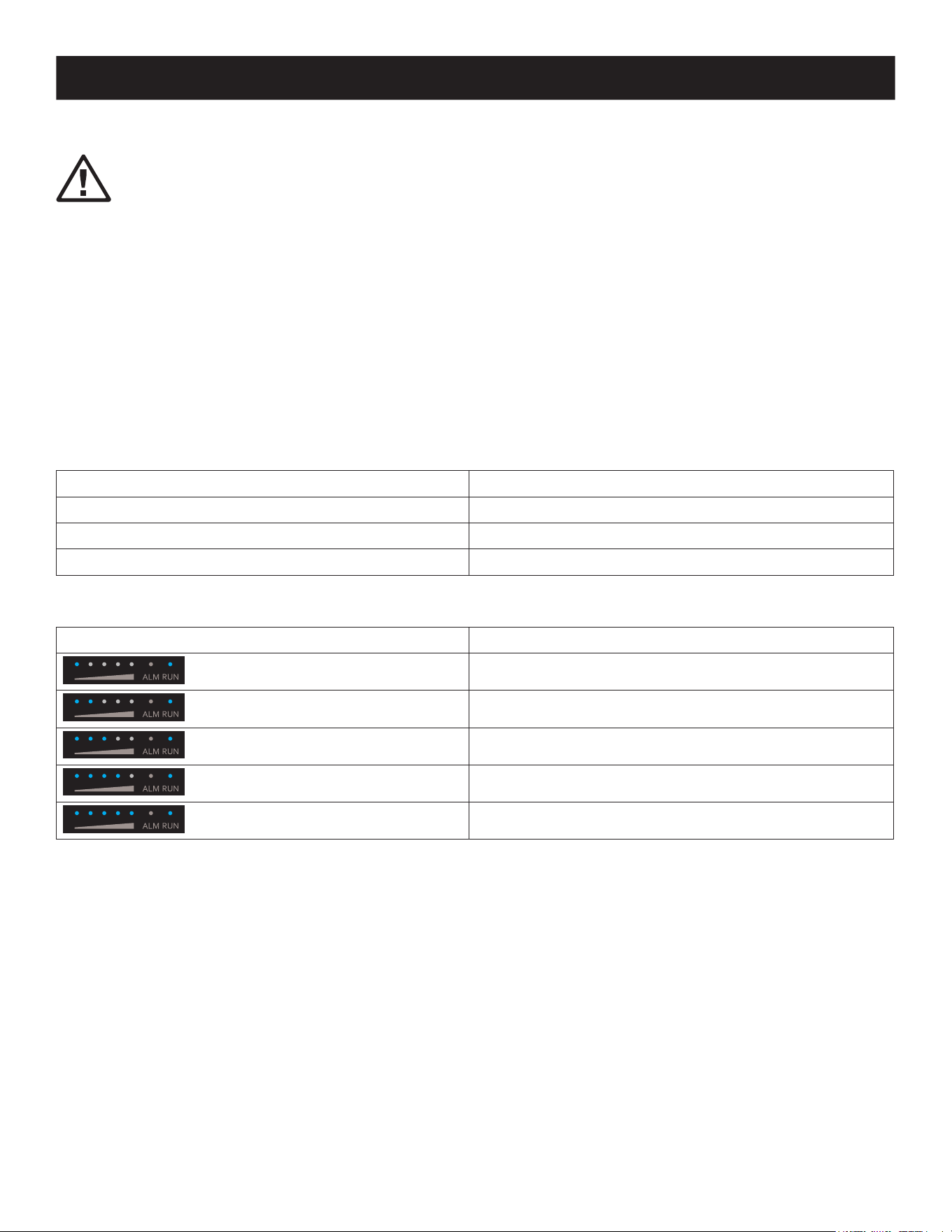
3. Product Overview
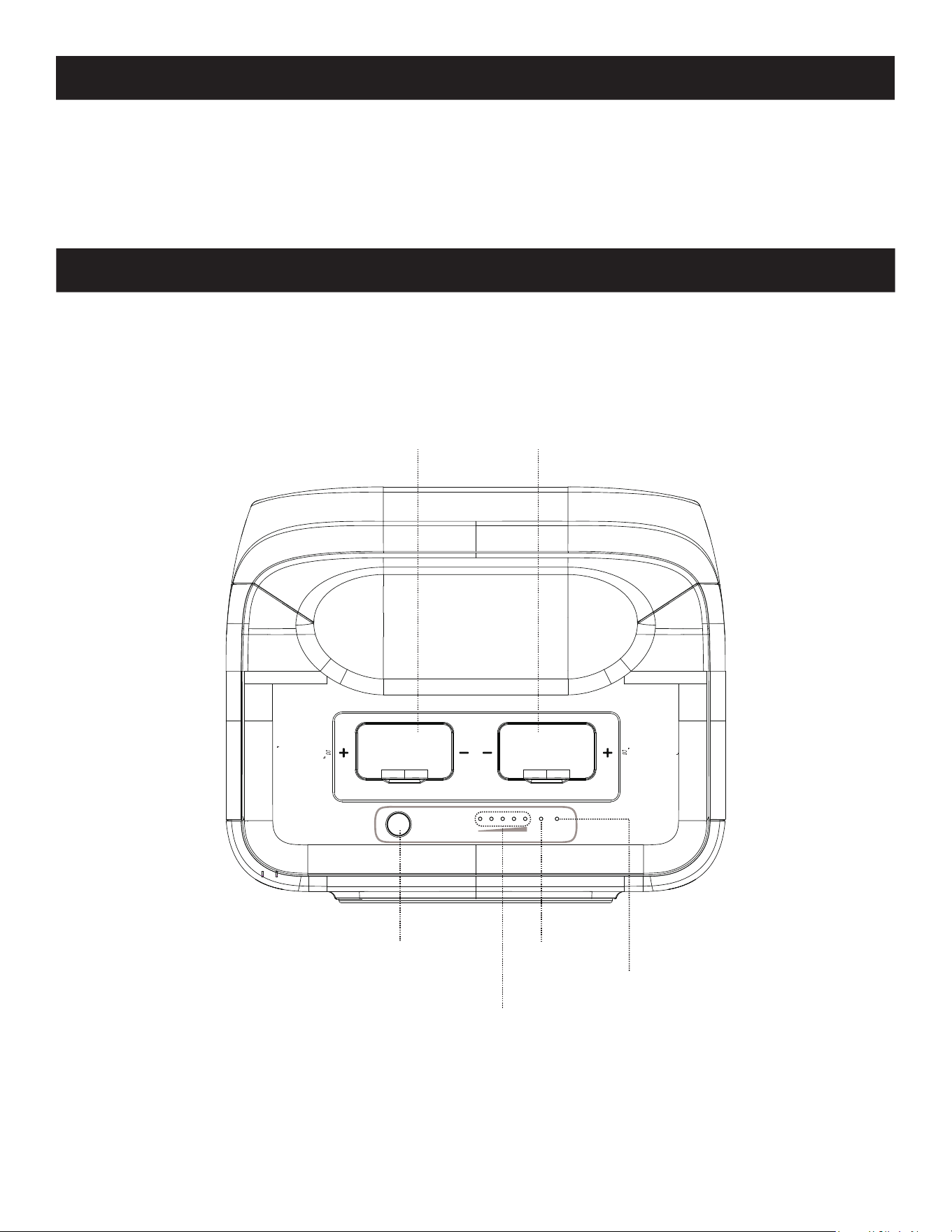
Front View
Power Input
Connect to the power
output interface of
another power pack.
Power button Red light:
Alarm indicator
Blue light:
Run indicator
Blue light:
SOC indicator
Power Output
Connect to the expansion Port
of power station or the power
input interface of another
power pack.
4
4. Operation
4.1 On and Off
• After the product is turned on, short press the main power button and the LED indicator light will stop
illuminating.
• If the product is not used within 2 minutes, it will enter a sleep state and the LED indicator lights will stop
illuminating automatically. When the product has a load change or operation, the indicator light will
illuminate automatically.
• This product cannot be used by itself and can only be used in combination with the Eaton GC3000L Power
Station.
Switching On/Off: To turn on the unit, short press of the power button. The indicator light will illuminate to show the
current operating status and the power level.
To turn off the unit, press the power button for 3 seconds. The expansion battery pack will shuts off, and the indicator
lights will stop illuminating.
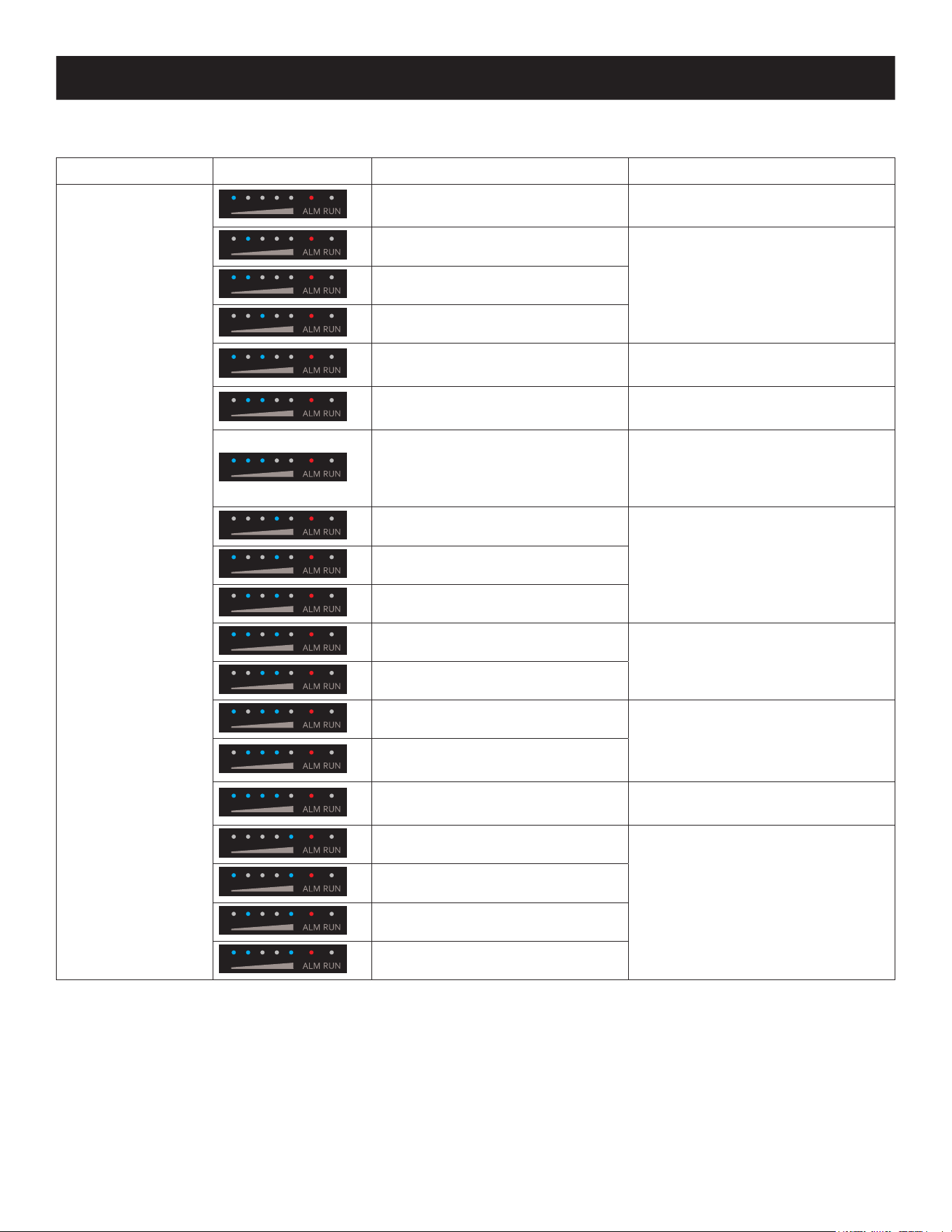
4.2 LED Indicator Status
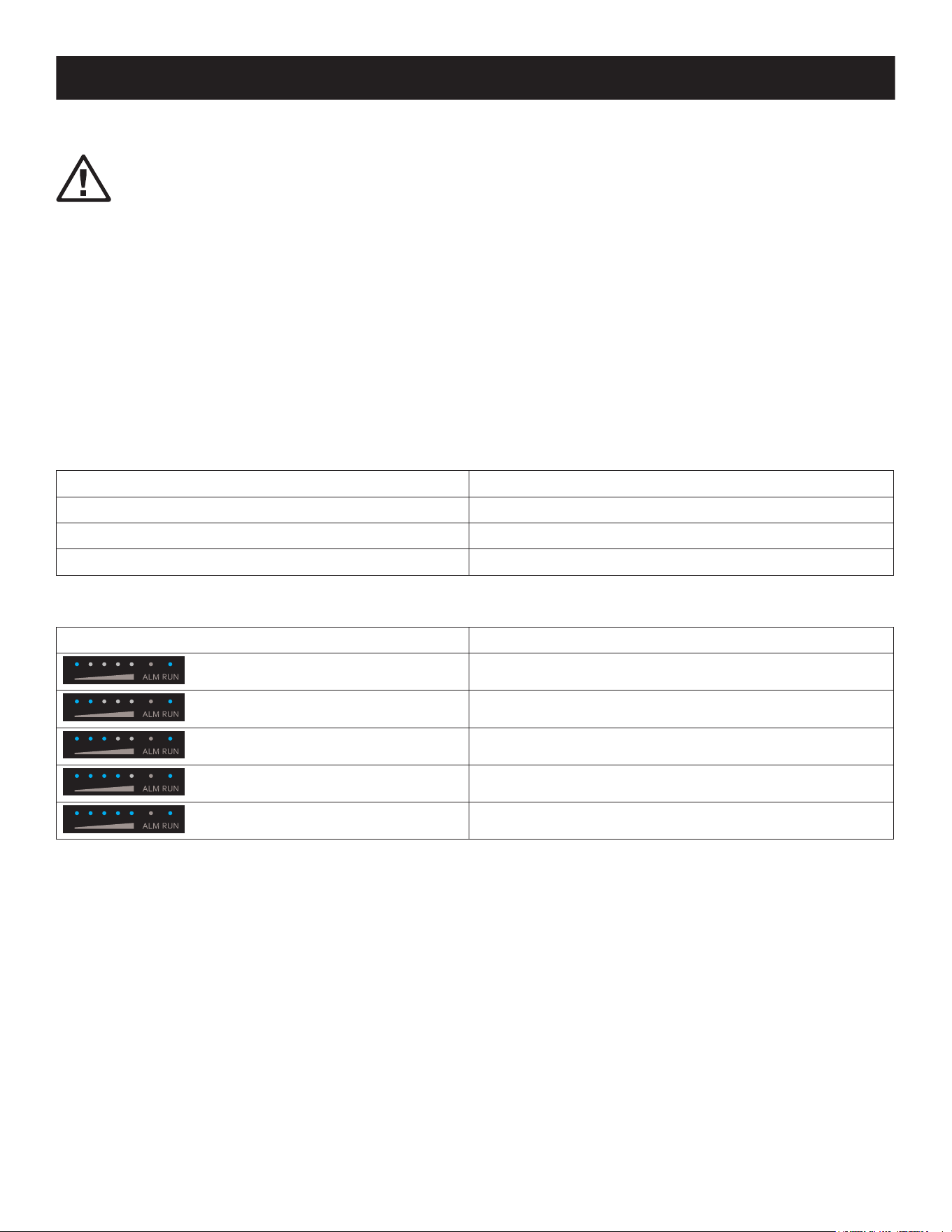
Indicator Status
Indicator Status
Blue light: Run indicator Standby, working
Red light: Alarm indicator Alert, faulty
Blue light: SOC indicator SOC indicator
Normal Operation
SOC Indicator Description
0%≤SOC≤20%
20%<SOC≤40%
40%<SOC≤60%
60%<SOC≤80%
80%<SOC≤100%
5
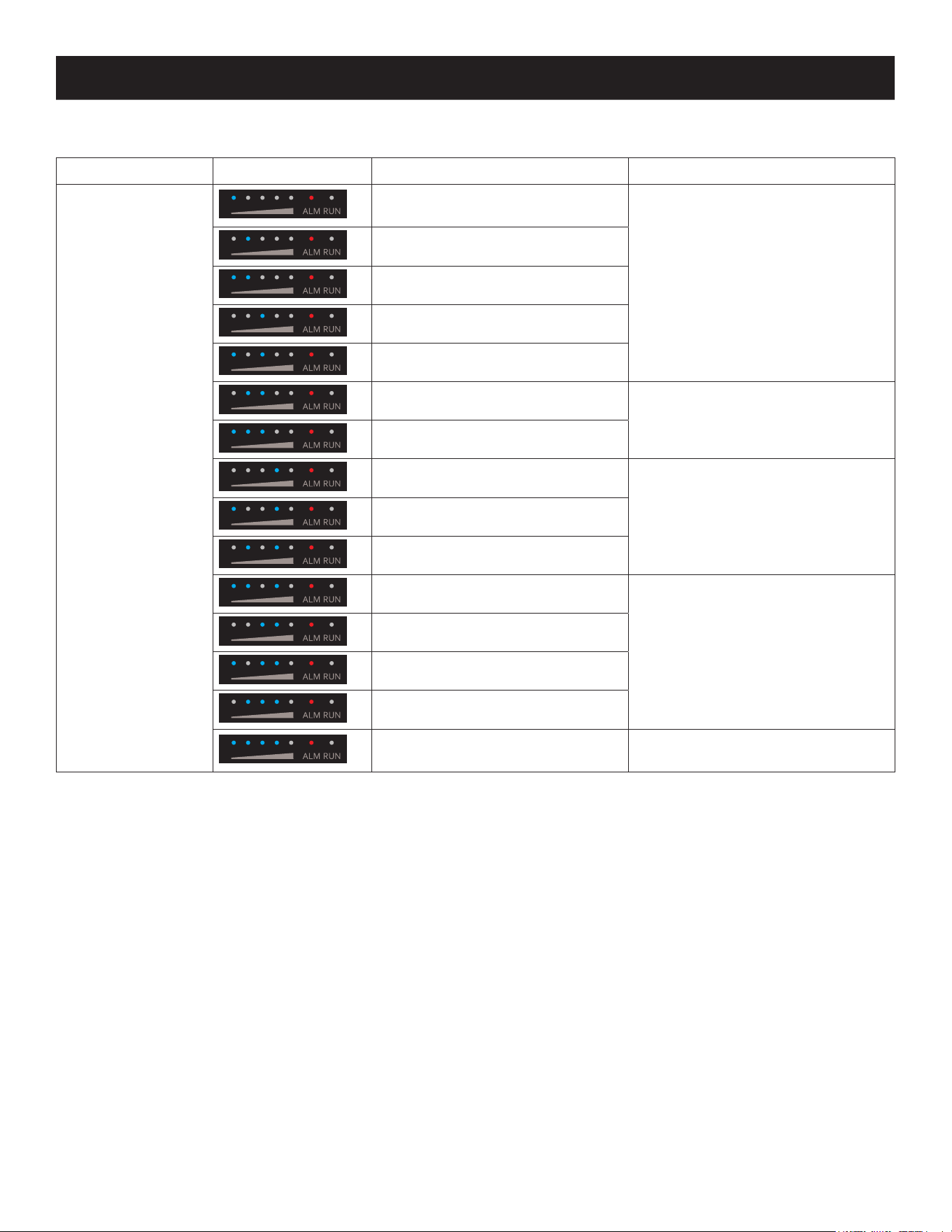
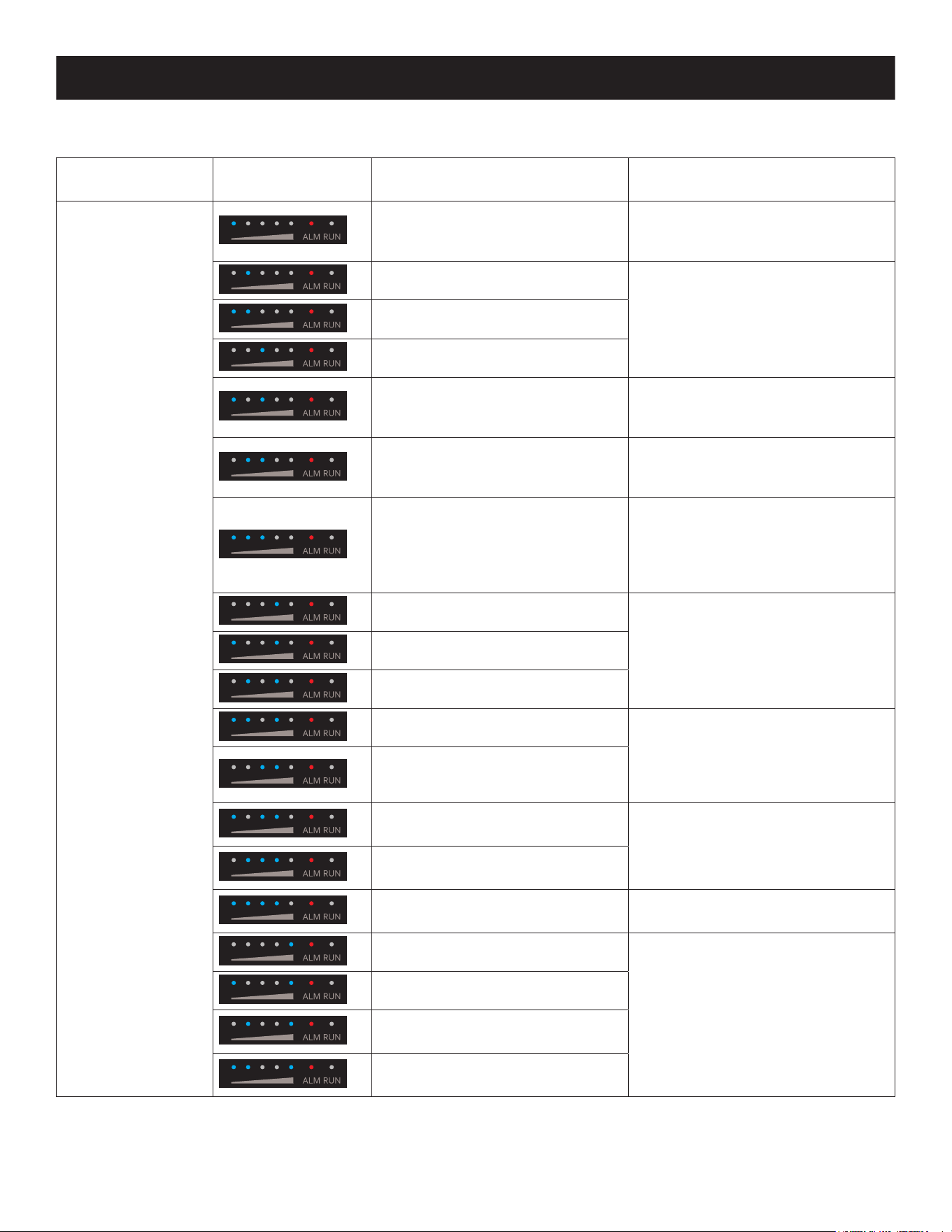
Alerts
Button Indicator SOC Indicator Alert Solution
Red Light Blinks
Battery over voltage
Restart the battery. If still not xed,
contact customer service.
Battery under voltage
Charge the battery and wait for the
voltage to recover.
Unit under voltage
VTOP under voltage
VTOP over voltage
Restart the battery. If still not xed,
contact customer service.
Battery over temperature
Turn o and wait for 2 hours. If still
not xed, contact customer service.
Battery low temperature
Turn o, wait the temperature to
recover and restart the battery.
If still not xed, contact customer
service.
Overcurrent when charging
Restart the battery. If still not xed,
contact customer service.
Overcurrent when discharging 1
Overcurrent when discharging 2
Short when discharging
Turn o, remove and check
equipment, restart the battery. If still
not xed, contact customer service.
Short when charging
PCB over temperature
Turn o and wait for 2 hours. If still
not xed, contact customer service.
Pre-charge resistor over
temperature
Battery under voltage
Charge the battery and wait for the
voltage to recover.
IUIP parallel signal fault
Turn o, check the communication
cable and restart the battery. If still
not xed, contact customer service.
I_WORK parallel signal fault
Parallelization overtime
Parallelization readiness failure
4. Operation
6
4. Operation
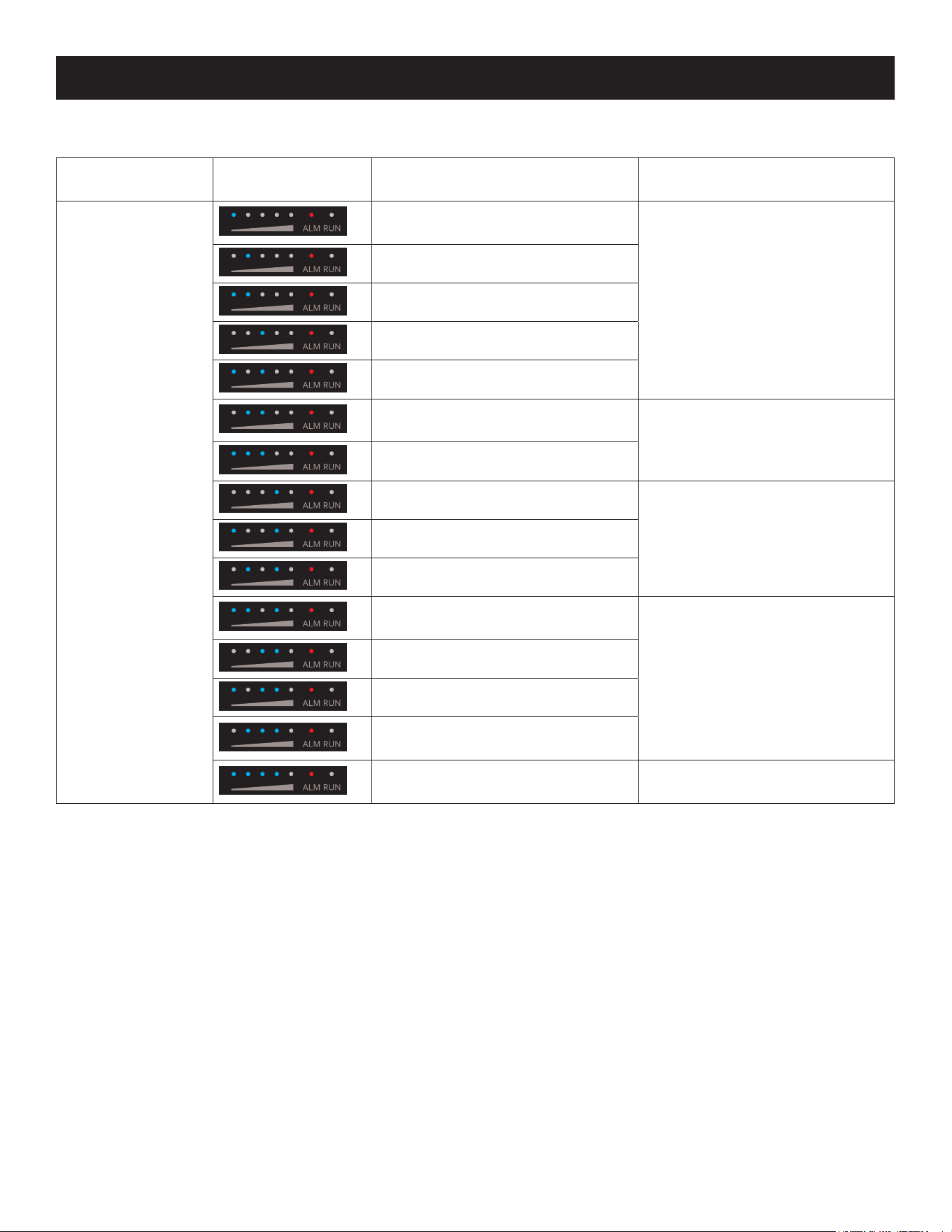
Faults
Button Indicator SOC Indicator Alert Solution
Red light always on
Battery voltage sampling wire
broken
Restart the battery. If still not xed,
contact customer service.
MOS failure
AFE communication failure
EEPROM failure
Voltage sensor failure
Current sensor drift failure
Contact customer service.
Main circuit fault
Pre-charge overtime
Restart the battery. If still not xed,
contact customer service.
Current sensor failure
Dead battery
Inverter communication failure
Turn o unit and check the
communication cable. If still not
xed, contact customer service.
CAN bus failure
RS485 bus failure
Parallel address recognition failure
Short circuit protection
fuse circuit fault
Contact customer service.
7
5. Battery Expansion
The BPGC2500L is not a standalone product. It can provide expansion capability of up to six expansion battery packs
(model BPGC2500) may be used with the separately sold EATON Power Station (model GC3000L). Refer to the power
station user documentation for details.
Notes:
• Before connecting the battery pack, make sure both the power station and battery pack are off.
• Once the battery pack is connected, check if battery icon is shown in the displays of both the power station and battery pack.
• While charging, do not connect or remove the battery pack. Always turn off the power station prior to operation.
• Do not touch the metal terminals. If there are foreign objects on the metal terminals, clean the terminals with a dry cloth gently and
carefully.
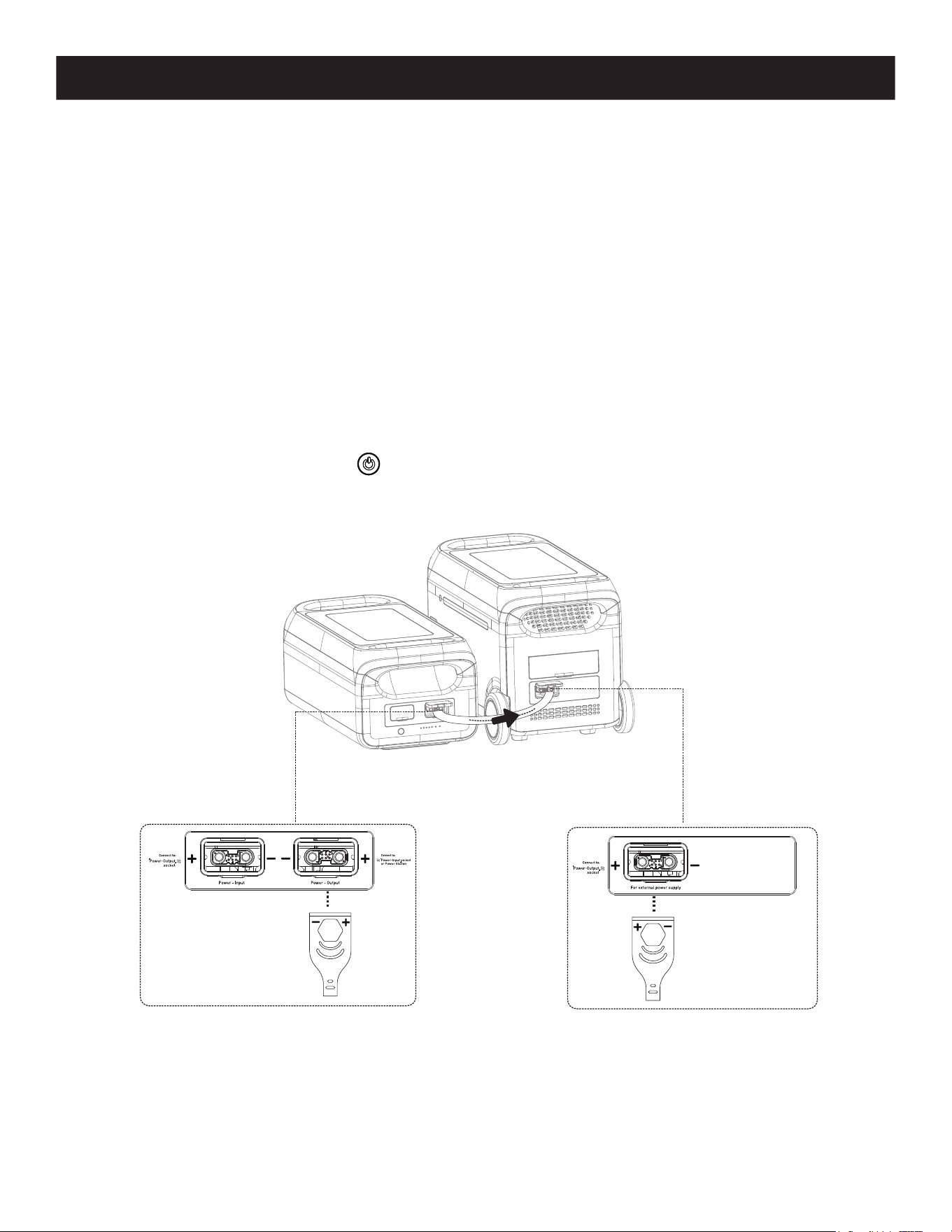
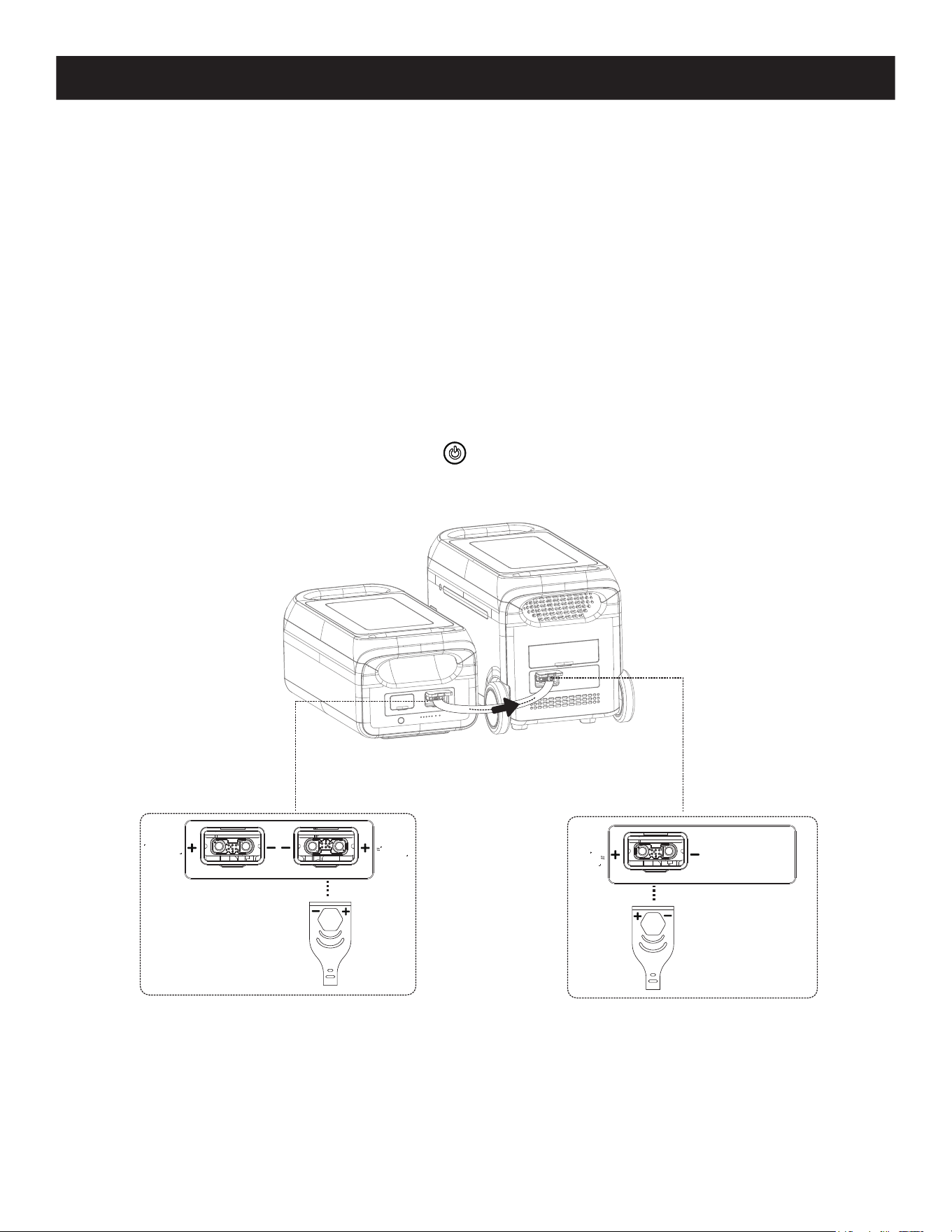
5.1 Parallel Mode of 1 Power Station and 1 Expansion Battery
Pack
1. Turn off the power station and expansion battery pack.
2. Plug one end of the cable into the power station’s expansion port, then plug the other end into the battery pack’s
power output port.
3. Press the power station’s power button to enable the power station and battery pack to show current capacity.
The power station will display the paralleled quantity and expanded capacity.
4. Connect the power station’s charging or discharging ports.
Note: + and - symbols are labeled on battery packs and cables to reduce reverse polarity connections.
Expansion
battery pack
Portable
power station
8
5. Charging
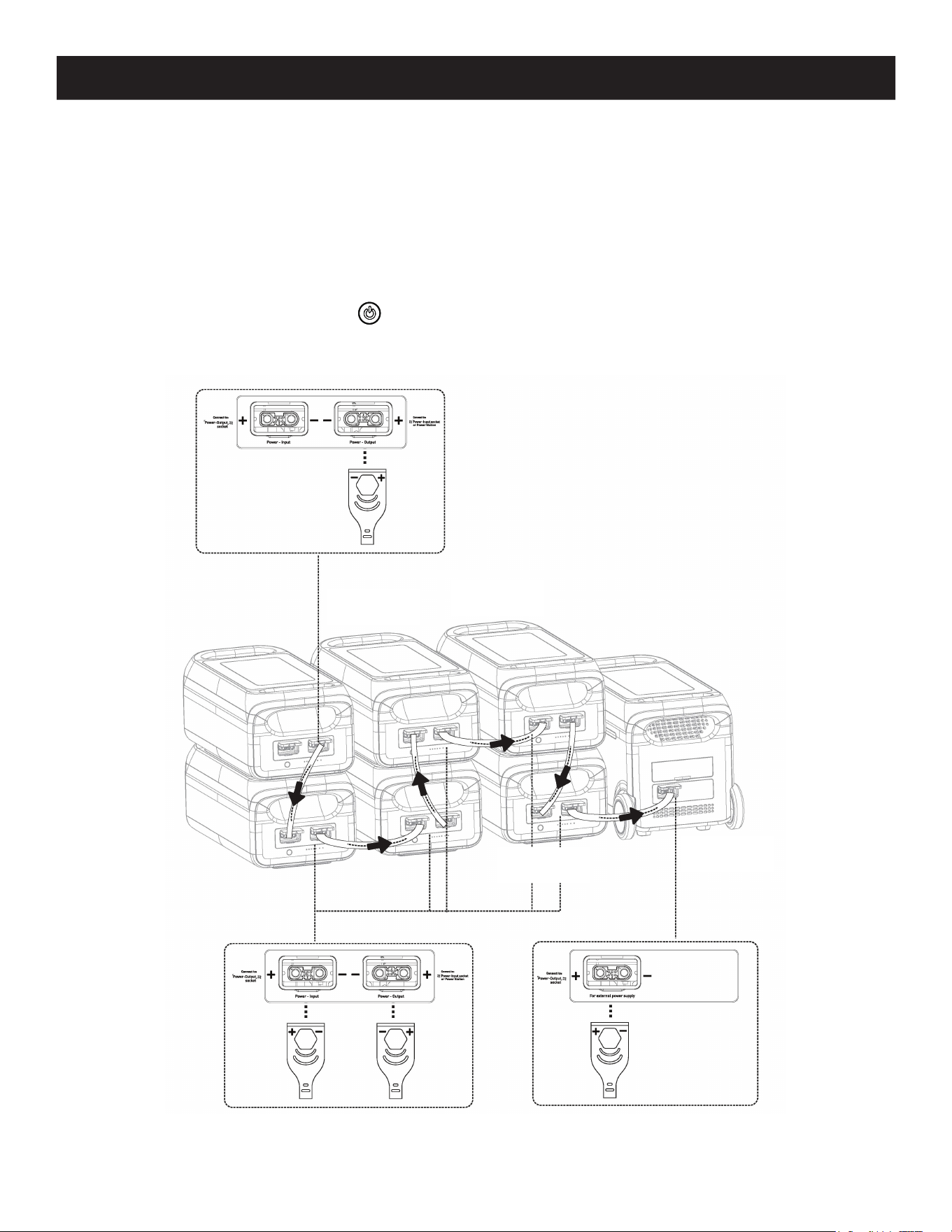
5.2 Parallel Mode of 1 Power Station and Multiple Expansion
Battery Packs
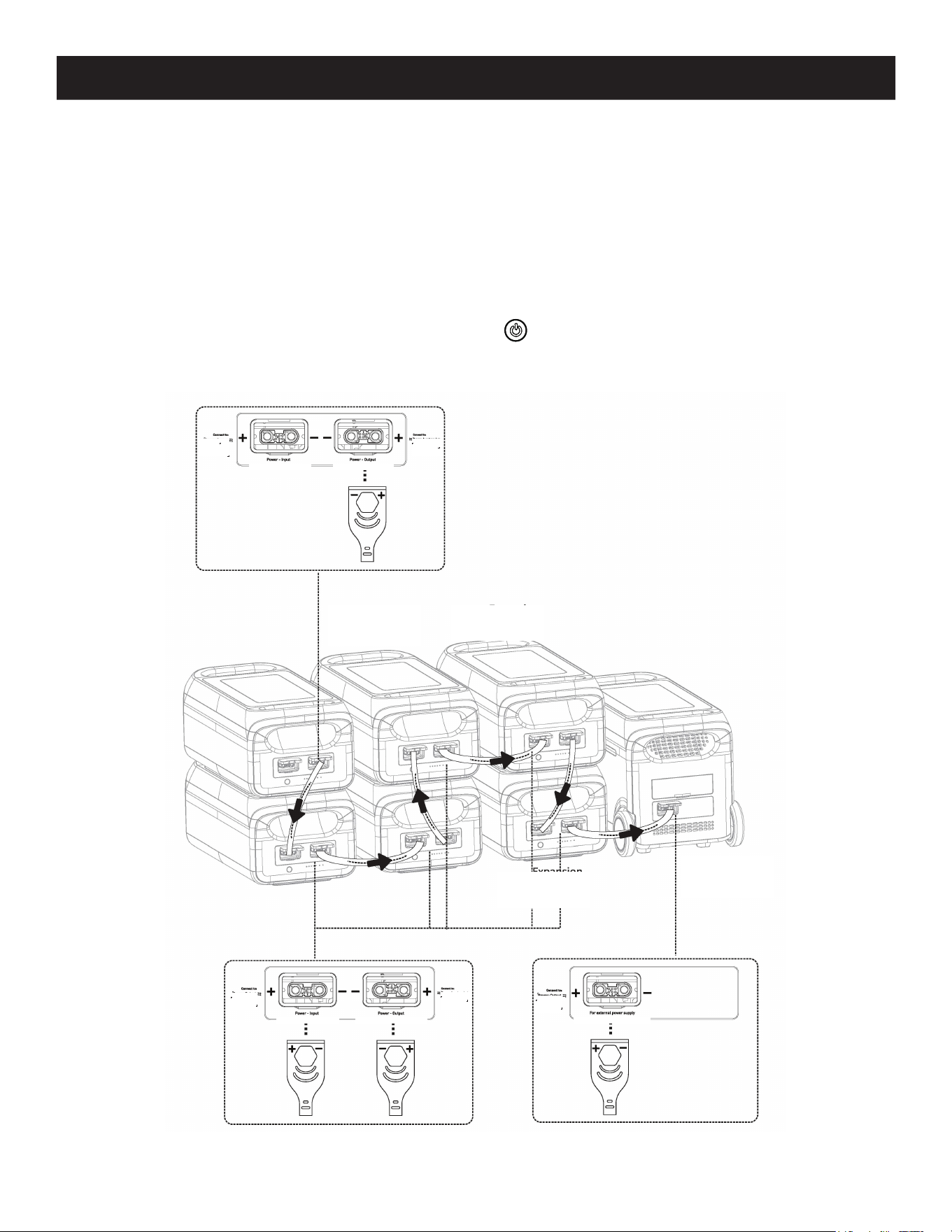
1. Turn off the power station and expansion battery packs.
2. Plug one end of the cable #1 into the power station’s expansion port, then plug the other end into the battery
pack’s power output port #1. Plug one end of cable #2 to the power input of battery pack #1, then plug the other
end to the power output of battery pack #2. Plug one end of cable #3 to the power input of battery pack #2, then
plug the other end to the power output of battery pack #3.
Note: A total of six battery packs can be installed in parallel mode.
3. Press the power station’s power button to enable the power station and battery packs to show current capacity.
The power station will display the paralleled quantity and expanded capacity.
4. Connect the power station’s charging or discharging ports.
Note: + and - symbols are labeled on battery packs and cables to reduce reverse polarity connections.
Expansion
battery pack #3
Portable
power station
Expansion
battery pack #2
Expansion
battery pack #1

9
6. Troubleshooting
6.1 Frequently Asked Questions
Q. What kind of battery is used?
A. Lithium iron phosphate battery (LiFePO4).
Q. How can I tell how much power supply time is remaining?
A. The power supply time displays in the expansion battery pack’s LED panel.
Q. How do I know the expansion battery pack is charging?
A. When charging, the expansion battery pack’s power indicators will flash to showing the charging state.
Q. How do I clean the expansion battery pack?
A. Clean the unit with a dry, soft and clean cloth or tissue.
Q. How do I store the expansion battery pack?
A. Turn it off and keep it in a dry and ventilated place. Do not expose the power station near water. For long-term
storage, charge and discharge every 3 months (i.e. discharge to 0%, then charge to 100%, then discharge to 60%).
7. Maintenance
• It is recommended to use or store the expansion battery pack between 68~86°F (20~30°C) ambient temperature.
Keep the expansion battery pack away from water, heaters and metal parts.
• For long-term storage, charge and discharge every 3 months (i.e. discharge to 0%, then charge to 100%, then
discharge to 60% for long-term storage); products that have not been charged and discharged for more than 6
months are not warranted.
• For safety, do not store the expansion battery pack with temperatures above 113°F (45°C) or below 14°F (-10°C).
• If the capacity is lower than 1%, charge to 60%. Long-term storage with serious power shortage will cause irreversible
damage to the battery cell and shorten the service life of the product.
• If the capacity is seriously insufficient and idle time is too long, the product will enter deep sleep mode, and the
product can only be used after being charged.
• After charging or discharging this product, you must wait for more than 30 minutes before using it.

10
8. Specifications
General
Net Weight 55.6 lb. (25.2 kg)
Dimensions 21 x 10.6 x 8.9 in. (536 x 270 x 225 mm)
Nominal Energy 2560Wh
Nominal Capacity 50Ah
Nominal Voltage 51.2V DC
Working Voltage Range 40~57.6V DC
Operating Humidity 10%-85% (non-condensing)
Altitude <6561 ft. (2000 m)
Output
Discharge Current 70A Max.
Input
Charging Current 50A Max.
Battery
Cell Type Lithium Iron Phosphate Battery (LiFePO4)
Life Cycle 4,000 Cycles
Protection Type Over-Temperature Protection, Low-Temperature Protection, Over-Discharge
Protection, Over-Charge Protection, Over-Load Protection, Short-Circuit
Protection, Over-Current Protection
Operating Temperature
Optimal Operating Temperature 68~86°F (20~30°C)
Discharge Ambient Temperature -4~113°F (-20~45°C)
Charge Ambient Temperature 32~113°F (0~45°C)
Storage Ambient Temperature -4°F~113°F (68~86°F preferred)
-20~45°C (20°C~30°C preferred)

11
9. Warranty
2-Year Limited Warranty
We warrant our products to be free from defects in materials and workmanship for a period of two (2) years from the date of initial
purchase. Our obligation under this warranty is limited to repairing or replacing (at its sole option) any such defective products. Visit
Tripplite.Eaton.com/support/product-returns before sending any equipment back for repair. This warranty does not apply to
equipment which has been damaged by accident, negligence or misapplication or has been altered or modified in any way.
EXCEPT AS PROVIDED HEREIN, WE MAKE NO WARRANTIES, EXPRESS OR IMPLIED, INCLUDING WARRANTIES OF MERCHANTABILITY
AND FITNESS FOR A PARTICULAR PURPOSE. Some states do not permit limitation or exclusion of implied warranties; therefore, the
aforesaid limitation(s) or exclusion(s) may not apply to the purchaser.
EXCEPT AS PROVIDED ABOVE, IN NO EVENT WILL WE BE LIABLE FOR DIRECT, INDIRECT, SPECIAL, INCIDENTAL OR CONSEQUENTIAL
DAMAGES ARISING OUT OF THE USE OF THIS PRODUCT, EVEN IF ADVISED OF THE POSSIBILITY OF SUCH DAMAGE. Specifically, we
are not liable for any costs, such as lost profits or revenue, loss of equipment, loss of use of equipment, loss of software, loss of data,
costs of substitutes, claims by third parties, or otherwise.
Regulatory Compliance Identification Numbers
For the purpose of regulatory compliance certifications and identification, your product has been assigned a unique series number.
The series number can be found on the product nameplate label, along with all required approval markings and information. When
requesting compliance information for this product, always refer to the series number. The series number should not be confused
with the marking name or model number of the product.
Eaton has a policy of continuous improvement. Specifications are subject to change without notice. Photos and illustrations may
differ slightly from actual products.
Eaton
1000 Eaton Boulevard
Cleveland, OH 44122
United States
Eaton.com
© 2024 Eaton
All Rights Reserved
Publication No. 24-08-103 / 93-4AD7_RevB
August 2024
Eaton is a registered trademark.
All trademarks are property
of their respective owners.
12
Manuel de l'utilisateur
Le produit acheté
peut être différent de l'image.
Modèle :
BPGC2500L
Batterie d'extension pour GC3000L
Power Station
English 1

13
CONSERVEZ CES INSTRUCTIONS!
Ce manuel contient des instructions et des avertissements importants qui doivent être respectés lors de
l'installation, de l'utilisation et du stockage de cette centrale électrique.
Consignes de sécurité importantes
1.1 Avertissements généraux de sécurité
• N'utilisez pas une batterie externe à proximité d'une source de chaleur, telle qu'un feu ou un radiateur.
• La batterie externe ne doit pas entrer en contact avec un quelconque liquide. La batterie externe ne doit pas être
utilisée dans des environnements humides ou pluvieux. N'immergez pas la batterie externe et ne la mouillez pas.
• N'utilisez pas la batterie d'extension dans un environnement fortement électrostatique ou magnétique.
• Ne démontez pas la batterie externe de quelque manière que ce soit et ne la percez pas avec un objet pointu.
L'appareil ne contient aucune pièce réparable par l'utilisateur.
• Ne court-circuitez pas la batterie externe avec des fils ou d'autres objets métalliques.
• Ne marchez pas, ne vous asseyez pas et ne grimpez pas sur la batterie externe.
• Utilisez uniquement des pièces et des accessoires approuvés. Contactez Eaton pour obtenir des renseignements sur
les achats.
• Lorsque vous utilisez la batterie externe, respectez la température de fonctionnement définie dans la section
8.Spécifications de ce manuel. Si la température est trop élevée, la batterie peut prendre feu ou même exploser.
Si la température est trop basse, les performances de la batterie externe seront sérieusement réduites, et même
l'utilisation normale sera affectée.
• Ne placez pas d'objets lourds sur le bloc-batterie externe ; un seul bloc-batterie externe supplémentaire peut être placé
sur un bloc-batterie externe. Reportez-vous à la section 5.2 pour connaître la méthode d'empilement autorisée.
• N'arrêtez pas le ventilateur par la force et n'exposez pas la batterie externe à un environnement non ventilé ou
poussiéreux lorsque l'appareil est en fonctionnement.
• N'obstruez pas les orifices de ventilation de la batterie d'extension.
• Évitez les chocs, les chutes et les vibrations violentes. En cas de choc violent, coupez immédiatement l'alimentation
électrique. Arrimez la batterie externe solidement pendant le transport afin d'éviter les vibrations et les chocs.
• Si le cordon d'alimentation de la batterie tombe accidentellement dans l'eau, placez-la dans un endroit sûr et large et
tenez-vous à l'écart jusqu'à ce qu'elle soit sèche. Une fois sec, la batterie externe ne peut plus être utilisé. Mettez au
rebut la batterie externe conformément aux réglementations locales. Si la batterie externe est en feu, utilisez
l'équipement d'extinction d'incendie dans l'ordre recommandé : eau ou brouillard d'eau, sable, couverture anti-feu,
poudre sèche, extincteur à dioxyde de carbone.
• Le produit, ses connecteurs et ses accessoires doivent être maintenus propres de toute saleté ou débris.
• Le bloc-batterie externe doit être placé avec précaution lors du stockage et de l'utilisation afin d'éviter que le produit
ne bascule ou ne soit endommagé. Si la batterie externe est renversée et sérieusement endommagée, éteignez-la
immédiatement, placez-la dans un endroit spacieux et tenez-la à l'écart des matériaux inflammables et des
personnes, puis éliminez-la conformément aux exigences des lois et réglementations locales.
• Conservez la batterie externe hors de portée des enfants et des animaux domestiques.
• Conservez la batterie externe dans un endroit sec et ventilé.
1.2 Élimination des produits
• Si les conditions le permettent, la batterie de l'appareil doit être complètement déchargée si le bloc-batterie externe
doit être mis au rebut. Ce produit comprend des batteries qui contiennent des produits chimiques dangereux et
qu'il est strictement interdit de jeter dans les poubelles ordinaires. Veuillez respecter les lois et réglementations
locales en matière de recyclage et d'élimination des batteries.
• Si la batterie ne peut pas être déchargée complètement en raison d'une défaillance du produit, ne la jetez pas
directement dans la poubelle de recyclage des batteries. Contactez une entreprise professionnelle de recyclage des
batteries pour une élimination ultérieure.
• La batterie ne démarrera pas si elle est trop déchargée et doit être mise au rebut conformément aux lois et
réglementations locales en matière de recyclage et de mise au rebut des batteries.
• Veuillez recycler les produits Eaton. Les batteries utilisées dans ce produit sont des batteries lithium-ion. Ces
batteries sont hautement recyclables. Se reporter aux codes locaux pour les exigences en matière d'élimination.
Vous pouvez obtenir des informations actualisées sur le recyclage des batteries à l'adresse suivante :
Tripplite.Eaton.com/support/recycling-program/
14
2. L'ensemble comprend
• Batterie d'extension
• Câble d'extension
• Manuel de l'utilisateur
3. Aperçu des produits
Vue avant
Entrée d'alimentation
Connectez à l'interface de
sortie d'alimentation d'un
autre bloc d'alimentation.
Bouton
d'alimentation
Voyant rouge :
Indicateur
d'alarme
Lumière bleue :
Indicateur de
mise en marche
Lumière bleue :
Indicateur SOC
Sortie d'alimentation
Connectez au port d'extension
de la station d'alimentation ou à
l'interface d' entrée d'alimentation
d'un autre bloc d' alimentation.
Se connecter à:
Prise d'alimentation
électrique
Se connecter à:
Prised' alimentation
ou station
d'alimentation
Sortie d'alimentation
ALM RUN
Alimentationr-Entrée
15
4. Fonctionnement
4.1 Marche et arrêt
- Une fois le produit allumé, appuyez brièvement sur le bouton d'alimentation principal et le témoin lumineux
s'éteindra.
- Si le produit n'est pas utilisé dans les 2 minutes, il entrera en état de veille et les voyants DEL cesseront de
s'allumer automatiquement. Lorsque le produit est en cours de changement de charge ou d'opération, le
voyant s'allume automatiquement.
- Ce produit ne peut être utilisé seul et peut être utilisé uniquement en combinaison avec la centrale
électrique Eaton GC3000L.
Mise en marche/arrêt : Pour mettre l'appareil en marche, appuyez brièvement sur le bouton d'alimentation. Le
voyant s'allume pour indiquer l'état de fonctionnement actuel et le niveau de puissance.
Pour éteindre l'appareil, appuyez sur le bouton d'alimentation pendant 3secondes. La batterie d'extension s'éteindra
et les témoins lumineux cesseront de s'allumer.
4.2 État de l'indicateur DEL
État de l'indicateur
Indicateur État
Lumière bleue : indicateur de mise en marche Veille, travail
Voyant rouge : indicateur d'alarme Alerte, défectueux
Lumière bleue : indicateur SOC Indicateur SOC
Fonctionnement normal
Indicateur SOC Description
0%≤SOC≤20%
20%<SOC≤40%
40%<SOC≤60%
60%<SOC≤80%
80%<SOC≤100%
16
Alertes
Indicateur de
bouton Indicateur SOC Alerte Solution
Le voyant rouge
clignote
Surtension de la batterie
Redémarrez la batterie. Si le
problème n'est toujours pas résolu,
contactez le service client.
Sous-tension de la batterie
Chargez la batterie et attendez le
rétablissement de la tension.
Unité sous tension
VTOP sous tension
VTOP surtension
Redémarrez la batterie. Si le
problème n'est toujours pas résolu,
contactez le service client.
Surchaue de la batterie
Éteignez et attendez 2 heures. Si le
problème n'est toujours pas résolu,
contactez le service client.
Température basse de la batterie
Éteignez l'appareil, attendez que
la température se rétablisse
et redémarrez la batterie. Si le
problème n'est toujours pas résolu,
contactez le service client.
Surintensité lors de la charge
Redémarrez la batterie. Si le
problème n'est toujours pas résolu,
contactez le service client.
Surintensité lors de la décharge 1
Surintensité lors de la décharge 2
Court-circuit lors de la décharge
Éteignez, retirez et vériez
l'équipement, redémarrez la
batterie. Si le problème n'est
toujours pas résolu, contactez le
service client.
Court-circuit lors de la charge
Surchaue de la carte de circuit
imprimé
Éteignez et attendez 2 heures. Si le
problème n'est toujours pas résolu,
contactez le service client.
Résistance de précharge en
fonction de la température
Sous-tension de la batterie
Chargez la batterie et attendez le
rétablissement de la tension.
Défaut du signal parallèle de l'UIPI
Éteignez, vériez le câble de
communication et redémarrez
la batterie. Si le problème n'est
toujours pas résolu, contactez le
service client.
Défaut du signal parallèle I_WORK
Temps supplémentaire de
parallélisation
Échec de la préparation à la
parallélisation
4. Fonctionnement
17
4. Fonctionnement
Défauts
Indicateur de
bouton Indicateur SOC Alerte Solution
Feu rouge toujours
allumé
Le l d'échantillonnage de la tension
de la batterie est cassé
Redémarrez la batterie. Si le
problème n'est toujours pas
résolu, contactez le service client.
Défaillance du MOS
Échec de la communication AFE
Défaillance de l'EEPROM
Défaillance du capteur de tension
Défaut de dérive du capteur de
courant
Contactez le service client.
Défaut du circuit principal
Précharge prolongée
Redémarrez la batterie. Si le
problème n'est toujours pas
résolu, contactez le service client.
Défaillance du capteur de courant
Batterie déchargée
Défaut de communication de
l'onduleur
Éteignez l'appareil et vériez
le câble de communication. Si
le problème n'est toujours pas
résolu, contactez le service client.
Défaillance du bus CAN
Défaillance du bus RS485
Échec de la reconnaissance des
adresses parallèles
Protection contre les courts-circuits
défaut du circuit du fusible
Contactez le service client.
18
5. Expansion de la batterie
Le site BPGC2500L n'est pas un produit autonome. Elle peut offrir une capacité d'expansion allant jusqu'à six blocs de
batteries (modèle BPGC2500) pouvant être utilisés avec la station d'alimentation EATON vendue séparément (modèle
GC3000L). Reportez-vous à la documentation de l'utilisateur de la station d'alimentation pour plus de détails.
Remarques :
• Avant de connecter le bloc-batterie, assurez-vous que la centrale électrique et le bloc-batterie sont tous deux hors tension.
• Une fois la batterie connectée, vérifiez que l'icône de la batterie s'affiche sur les écrans de la centrale et de la batterie.
• Pendant le chargement, ne connectez pas et ne retirez pas le bloc-batterie. Mettez toujours la centrale électrique hors tension avant
d'utiliser l'appareil.
• Ne touchez pas les bornes métalliques. Si des corps étrangers se trouvent sur les bornes métalliques, nettoyez les bornes avec un chiffon
sec, délicatement et avec précaution.
5.1 Mode parallèle d'1 centrale et d'1 batterie d'extension
1. Éteignez la centrale électrique et la batterie d'extension.
2. Branchez une extrémité du câble dans le port d'extension de la centrale, puis branchez l'autre extrémité dans le
port de sortie d'alimentation du bloc-batterie.
3. Appuyez sur le bouton d'alimentation de la centrale pour permettre à la centrale et au bloc-batterie d'afficher la
capacité actuelle. La centrale affichera la quantité mise en parallèle et la capacité accrue.
4. Connectez les ports de charge ou de décharge de la station d'énergie.
Remarque : les symboles + et - sont apposés sur les batteries et les câbles afin de réduire les risques d'inversion de polarité.
Batterie
d'extension
Centrale électrique
portable
Se connecter à :
Prise d'alimentation
électrique
Se connecter à :
Prise
d'alimentation
électrique
Se connecter à :
Prise d'entrée
d'alimentation ou
centrale
Sortie d'alimentationAlimentation électrique
Pour l'alimentation externe
19
5. Chargement
5.2 Mode parallèle de la centrale électrique 1 et des batteries
d'extension multiples
1. Mettez hors tension la centrale électrique et les batteries d'extension.
2. Branchez une extrémité du câble #1 dans le port d'extension de la centrale électrique, puis branchez l'autre
extrémité dans le port de sortie d'alimentation du bloc-batterie #1. Branchez une extrémité du câble #2 à l'entrée
d'alimentation du bloc-batterie #1, puis branchez l'autre extrémité à la sortie d'alimentation du bloc-batterie #2.
Branchez une extrémité du câble #3 à l'entrée d'alimentation du bloc-batterie #2, puis branchez l'autre extrémité à
la sortie d'alimentation du bloc-batterie #3.
Remarque : il est possible d'installer un total de six batteries en mode parallèle.
3. Appuyez sur le bouton d'alimentation de la station d'énergie pour permettre à la station d'énergie et aux blocs-
batteries d'afficher leur capacité actuelle. La centrale affichera la quantité mise en parallèle et la capacité accrue.
4. Connectez les ports de charge ou de décharge de la station d'énergie.
Remarque : les symboles + et - sont apposés sur les batteries et les câbles afin de réduire les risques d'inversion de polarité.
Pack batterie
d'extension #3
Centrale
électrique
portable
Pack batterie
d'extension #2
Pack batterie
d'extension #1
Se connecter à :
Prise
d'alimentation
électrique
Se connecter à :
Prise d'entrée
d'alimentation
ou centrale
Sortie d'alimentationAlimentation électrique
Se connecter à :
Prise de sortie
d'alimentation
Se connecter à :
Prise de sortie
d'alimentation
Se connecter à :
Prise d'entrée
d'alimentation
ou centrale
Sortie d'alimentationAlimentation électrique
Pour l'alimentation externe

20
6. Dépannage
6.1 Questions fréquemment posées
Q. Quel type de batterie est utilisé?
R. Batterie lithium fer phosphate (LiFePO4).
Q. Comment puis-je savoir combien de temps il reste à l'alimentation électrique?
A. La durée de l'alimentation est affichée sur le panneau DEL de la batterie externe.
Q. Comment puis-je savoir que le bloc-batterie externe est en cours de chargement?
A. Lors du chargement, les voyants d'alimentation de la batterie externe clignotent pour indiquer l'état de charge.
Q. Comment nettoyer la batterie externe?
R. Nettoyez l'appareil à l'aide d'un chiffon ou d'un tissu sec, doux et propre.
Q. Comment dois-je ranger la batterie externe?
R. Éteignez-la et conservez-la dans un endroit sec et ventilé. N'exposez pas la centrale à proximité d'eau. Pour un
stockage à long terme, chargez et déchargez tous les 3 mois (c'est-à-dire déchargez à 0%, puis chargez à 100%, puis
déchargez à 60%).
7 Entretien
• Il est recommandé d'utiliser ou de stocker le bloc-batterie externe à une température ambiante comprise entre 20
et 30 °C (68 et 86 °F). Conservez le bloc-batterie externe à l'écart de l'eau, des appareils de chauffage et des pièces
métalliques.
• Pour un stockage à long terme, chargez et déchargez tous les 3 mois (c'est-à-dire déchargez à 0%, puis chargez à
100%, puis déchargez à 60% pour un stockage à long terme) ; les produits qui n'ont pas été chargés et déchargés
pendant plus de 6 mois ne sont pas garantis.
• Pour des raisons de sécurité, ne stockez pas la batterie externe à des températures supérieures à 113 °F (45 °C) ou
inférieures à 14 °F (-10 °C).
• Si la capacité est inférieure à 1%, chargez à 60%. Un entreposage à long terme avec une grave pénurie d'électricité
causera des dommages irréversibles à la cellule de la batterie et raccourcira la durée de vie du produit.
• Si la capacité est nettement insuffisante et que le temps d'inactivité est trop long, le produit passera en mode veille
profonde et ne pourra être utilisé qu'après avoir été rechargé.
• Après avoir chargé ou déchargé ce produit, vous devez attendre plus de 30 minutes avant de l'utiliser.

21
8. Caractéristiques techniques
Spécications générales
Poids net 25.2 kg (55.6 lb)
Dimensions 21 x 10,6 x 8,9 po. (536 x 270 x 225 mm)
Énergie nominale 2560Wh
Capacité nominale 50 Ah
Tension nominale 51,2 V CC
Plage de tension de service 40~57,6 V CC
Humidité de fonctionnement 10% à 85% (sans condensation)
Altitude <6561 pieds (2000 m)
Sortie
Courant de décharge 70 A Max.
Entrée
Courant de charge 50 A Max.
Batterie
Type de cellule Batterie au lithium fer phosphate (LiFePO4)
Cycle de vie 4 000 cycles
Type de protection protection contre les surchaues, protection contre les basses températures,
protection contre les décharges excessives, protection contre les surcharges,
protection contre les surcharges, protection contre les courts-circuits,
protection contre les surintensités
Température de fonctionnement
Température de fonctionnement
optimale
68~86°F (20~30°C)
Température ambiante de décharge -4~113°F (-20~45°C)
Température ambiante de charge 32~113°F (0~45°C)
Température ambiante d'entreposage -4°F~113°F (mais de préférence 68~86°F)
-20~45°C (mais de préférence 20°C~30°C)

22
9. Garantie
Garantie limitée de 2 ans
Nous garantissons que nos produits sont exempts de défauts de matériaux et de fabrication pendant une période de deux (2) ans à
compter de la date d'achat initial. Notre responsabilité, en vertu de la présente garantie, se limite à la réparation ou au
remplacement (à notre seule discrétion) de ces produits défectueux. Visitez Tripplite.Eaton.com/support/product-returns avant de
renvoyer tout équipement pour réparation. Cette garantie ne s'applique pas au matériel ayant été endommagé suite à un accident, à
une négligence ou à une application abusive, ou ayant été altéré ou modifié d'une façon quelconque.
SAUF AUX TERMES DES PRÉSENTES, NOUS N'ÉMETTONS AUCUNE GARANTIE, EXPRESSE OU TACITE, Y COMPRIS DES GARANTIES DE
QUALITÉ COMMERCIALE ET D'ADAPTATION À UN USAGE PARTICULIER. Certains États n'autorisant pas la limitation ni l'exclusion de
garanties tacites, les limitations ou exclusions susmentionnées peuvent ne pas s'appliquer à l'acheteur.
À L'EXCEPTION DES DISPOSITIONS CI-DESSUS, NOUS NE POURRONS EN AUCUN CAS ÊTRE TENUE RESPONSABLE DE DOMMAGES
DIRECTS, INDIRECTS, SPÉCIAUX, FORTUITS OU CONSÉCUTIFS RÉSULTANT DE L'UTILISATION DE CE PRODUIT, MÊME SI AYANT ÉTÉ
AVISÉS DE L'ÉVENTUALITÉ DE TELS DOMMAGES. Plus précisément, nous ne pourrons être tenus responsables de coûts, tels que la
perte de bénéfices ou de recettes, la perte de matériel, l'impossibilité d'utiliser du matériel, la perte de logiciel, la perte de données,
des frais de produits de remplacement, des réclamations de tiers ou autres.
Numéros d'identification à la conformité réglementaire
À des fins de certification de conformité réglementaire et d'identification, un numéro de série unique a été attribué au produit. Le
numéro de série, ainsi que toutes les marques d'homologation et les renseignements requis, se trouvent sur la plaque signalétique
du produit. Lorsque des renseignements sont demandés concernant la conformité de ce produit, toujours se reporter au numéro
de série. Le numéro de série ne doit pas être confondu avec le nom de la marque ou le numéro de modèle du produit.
Eaton a une politique d'amélioration continue. Les caractéristiques techniques sont modifiables sans préavis. Les produits réels
peuvent différer légèrement des photos et des illustrations.

23

24
Eaton
1000 Eaton Boulevard
Cleveland, OH 44122
United States
Eaton.com
© 2024 Eaton
Tous droits réservés
Publication n° 24-08-103 / 93-4AD7_RevB
Août 2024
Eaton est une marque déposée.
Toutes les marques déposées sont
la propriété de leurs détenteurs
respectifs.