USING RX (RECEIVING) MODE
1 Press and hold the power button for three seconds to turn
your Bluetooth audio adapter on. The power indicator
ashes three times.
2 Slide the TX/RX switch to RX. The power indicator blinks red
and blue while pairing.
3 Connect your Bluetooth audio adapter to a 3.5 mm output
device (such as a speaker).
4 Search for Insignia NS-ADAPT35MMBT in your phone or
laptop’s Bluetooth devices list and select it to connect. The
power indicator glows blue to show it is connected, then it
turns o after 10 seconds.
CHARGING THE BATTERY
The indicator ashes red when your Bluetooth audio adapter’s
battery is low.
Connect a USB-C cable (included) from your Bluetooth audio
adapter to a USB-C charging port or to an AC power adapter
(not included). The power indicator glows red when charging
and turns to green when nished.
Note: You may use your Bluetooth audio adapter while it is charging. It
may take between 2.5 and 4.5 hours to reach a full charge. The battery
supports up to 17 hours of use in RX mode and 20 hours in TX mode.
CHOOSING BETWEEN TX (TRANSMITTING)
AND RX (RECIEVING) MODES
• TX Mode: Use Transmitting Mode (TX) to transfer audio
from a 3.5 mm audio device to Bluetooth earbuds,
headphones, or other audio devices. This mode can be
used with airplane in-ight entertainment systems and
gym equipment that provides audio. See “USING TX
(TRANSMITTING) MODE” to complete setup.
• RX Mode: Use Receiving Mode (RX) to transfer audio from
your Bluetooth device (such as a phone or laptop) to 3.5
mm devices such as cars, boats, and other sound systems
that do not support a wireless connection. See “USING RX
(RECEIVING) MODE” to complete setup.
Before using your new product, please read these instructions to prevent any damage.
PACKAGE CONTENTS
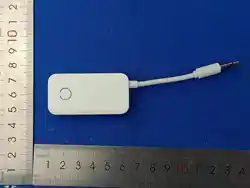
• 3.5 mm to Bluetooth audio adapter
• USB-C charging cable
• Carrying pouch
• 2-pin adapter
• Quick Setup Guide
FEATURES
• TX Mode: Transmit from 3.5mm sources to Bluetooth
playback devices
• RX Mode: Receive Bluetooth audio on 3.5 mm playback
devices
• Switch between transmitting and receiving Bluetooth
signals
• USB-A to USB-C cable recharges your adapter
• Memory pairing recalls up to 8 devices
PRODUCT OVERVIEW
BEFORE FIRST USE
Charge your Bluetooth audio adapter’s battery fully before rst
use. See “CHARGING THE BATTERY.”
QUICK SETUP GUIDE
3.5 mm to Bluetooth
Audio Adapter
NS-ADAPT35MMBT
USING TX (TRANSMITTING) MODE
1 Put your Bluetooth earbuds, headphones, or other audio
device into pairing mode.
2 Press and hold the power button for three seconds to turn
your Bluetooth audio adapter on. The power indicator
ashes three times.
3 Slide the TX/RX switch to TX. The power indicator blinks red
and green while pairing, then automatically connects to
your audio device. The power indicator glows green to
show it is connected, then turns o after 10 seconds.
4 Connect your Bluetooth audio adapter to a 3.5 mm source
(such as a phone, tablet, or in-ight entertainment systems).
Note: A 2-pin adapter is included for in-ight entertainment systems
that require 2-pin input. Insert the audio jack into the 2-pin adapter,
then plug the adapter into the in-ight entertainment system.
5 (Optional) To connect a second Bluetooth device, put your
second Bluetooth device into pairing mode, then press the
power button two times. The power indicator ashes red
and green to show it is pairing, then your Bluetooth audio
adapter automatically connects. The power indicator glows
green and blue to show it is connected.
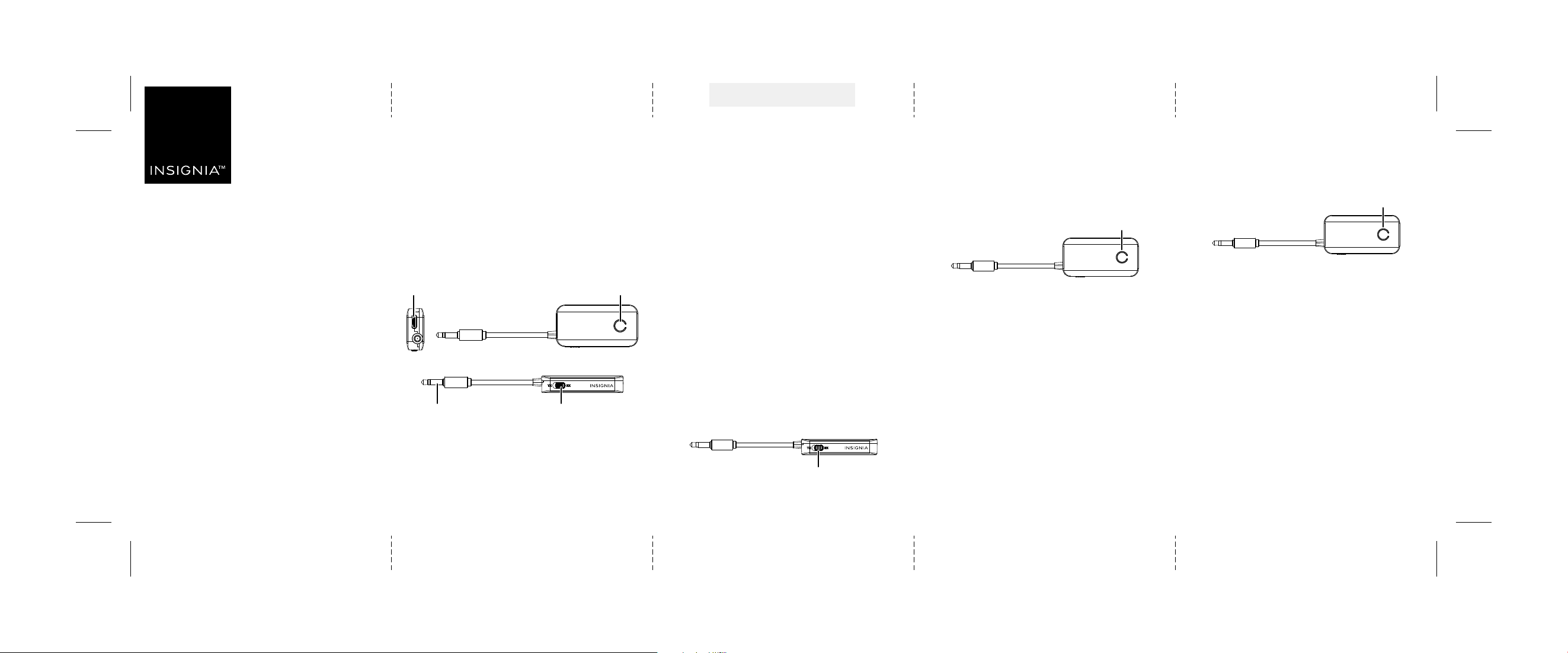
USB-C input
Power button/indicator
Audio jack TX/RX switch
Power button/indicator
Power button/indicator
TX/RX switch
Flat size (W×H): 13.77 × 4.13 in. (350 × 105 mm)
Final folded size: 2.75 × 4.7 in. (70 × 105 mm)
NS-ADAPT35MMBT_25-0635_QSG_V1_EN_Final.ai 1 1/21/2026 8:50:05 AMNS-ADAPT35MMBT_25-0635_QSG_V1_EN_Final.ai 1 1/21/2026 8:50:05 AM
V1
FINAL
FOR PRINT

ONE-YEAR LIMITED WARRANTY
Visit www.insigniaproducts.com for details.
CONTACT INSIGNIA:
For customer service, call 1-877-467-4289 (U.S. and Canada)
www.insigniaproducts.com
INSIGNIA is a trademark of Best Buy and its aliated companies.
Distributed by Best Buy Purchasing, LLC
Richeld, MN 55423
©2026 Best Buy. All rights reserved.
LEGAL NOTICES
FCC COMPLIANCE:
This device complies with part 15 of the FCC Rules. Operation is subject to the following two
conditions: (1) This device may not cause harmful interference, and (2) this device must accept any
interference received, including interference that may cause undesired operation.
FCC CAUTION:
Changes or modications not expressly approved by the party responsible for compliance could void
the user’s authority to operate the equipment.
FCC STATEMENT:
This equipment has been tested and found to comply with the limits for a Class B digital device,
pursuant to part 15 of the FCC Rules. These limits are designed to provide reasonable protection
against harmful interference in a residential installation. This equipment generates, uses, and can
radiate radio frequency energy and, if not installed and used in accordance with the instructions, may
cause harmful interference to radio communications. However, there is no guarantee that
interference will not occur in a particular installation.
If this equipment does cause harmful interference to radio or television reception, which can be
determined by turning the equipment o and on, the user is encouraged to try to correct the
interference by one or more of the following measures:
• Reorient or relocate the receiving antenna.
• Increase the separation between the equipment and receiver.
• Connect the equipment into an outlet on a circuit dierent from that to which the receiver is
connected.
• It is recommended that a dealer or an experienced radio/tv technician is contacted for help.
RF Exposure: This equipment complies with FCC radiation exposure limits set forth for an
uncontrolled environment. This transmitter must not be co-located or operating in conjunction with
any other antenna or transmitter.
V1 ENGLISH 25-0635
UNPAIRING YOUR BLUETOOTH AUDIO
ADAPTER
To unpair, choose one of the following options:
• Press and hold the power button for three seconds to
turn your Bluetooth audio adapter o.
• Turn o your Bluetooth device.
• Open Bluetooth settings on your Bluetooth source, locate
NS-ADAPT35MMBT in the list of connected devices,
then select it to disconnect.
Note: Bluetooth functionality varies by operating system. Check
with your device's manufacturer for specic instructions.
TROUBLESHOOTING
No sound is coming through my device.
• Make sure that the TX/RX switch is in the correct mode.
• Make sure that your device is connected. The power indicator glows green (one
device) or green and blue (two devices) when connected via TX mode and glows
blue when connected via RX mode.
• Make sure that the volume is turned up on your device.
• Make sure that your Bluetooth audio adapter has enough battery. Recharge if
necessary.
My device isn’t connecting.
• Make sure that the TX/RX switch is in the correct mode.
• Make sure that your device has Bluetooth enabled.
• Make sure that your Bluetooth audio adapter has enough battery. Recharge if
necessary.
• Make sure that your device is compatible with your Bluetooth audio adapter.
If using TX mode, your Bluetooth audio adapter may be connecting to a dierent
Bluetooth device. Make sure that other Bluetooth audio devices are turned o
when connecting. Your Bluetooth audio adapter will prioritize pairing to its last
connected device.
IMPORTANT SAFETY INFORMATION
CAUTION
• Do not expose this product to moisture or excessive temperatures.
• Do not use aerosol, solvent, or abrasive agents to clean this product.
• Keep out of the reach of children to avoid accidental swallowing.
• Stop use if the battery swells.
• Stop use if this product is submerged in liquid.
SPECIFICATIONS
• Dimensions (L × W × H):
2.56 × .98 × .39 in. (65 × 25 × 10 mm) including cable
• Battery power/capacity: 300mAH / 1.11Wh
• Input: USB-C 5W (5V/1A)
• Bluetooth: 5.3
• Bluetooth Range: 33 ft. (10 m)
• Weight: .6 oz (17 g)
NS-ADAPT35MMBT_25-0635_QSG_V1_EN_Final.ai 2 1/21/2026 8:50:09 AMNS-ADAPT35MMBT_25-0635_QSG_V1_EN_Final.ai 2 1/21/2026 8:50:09 AM