1 /18
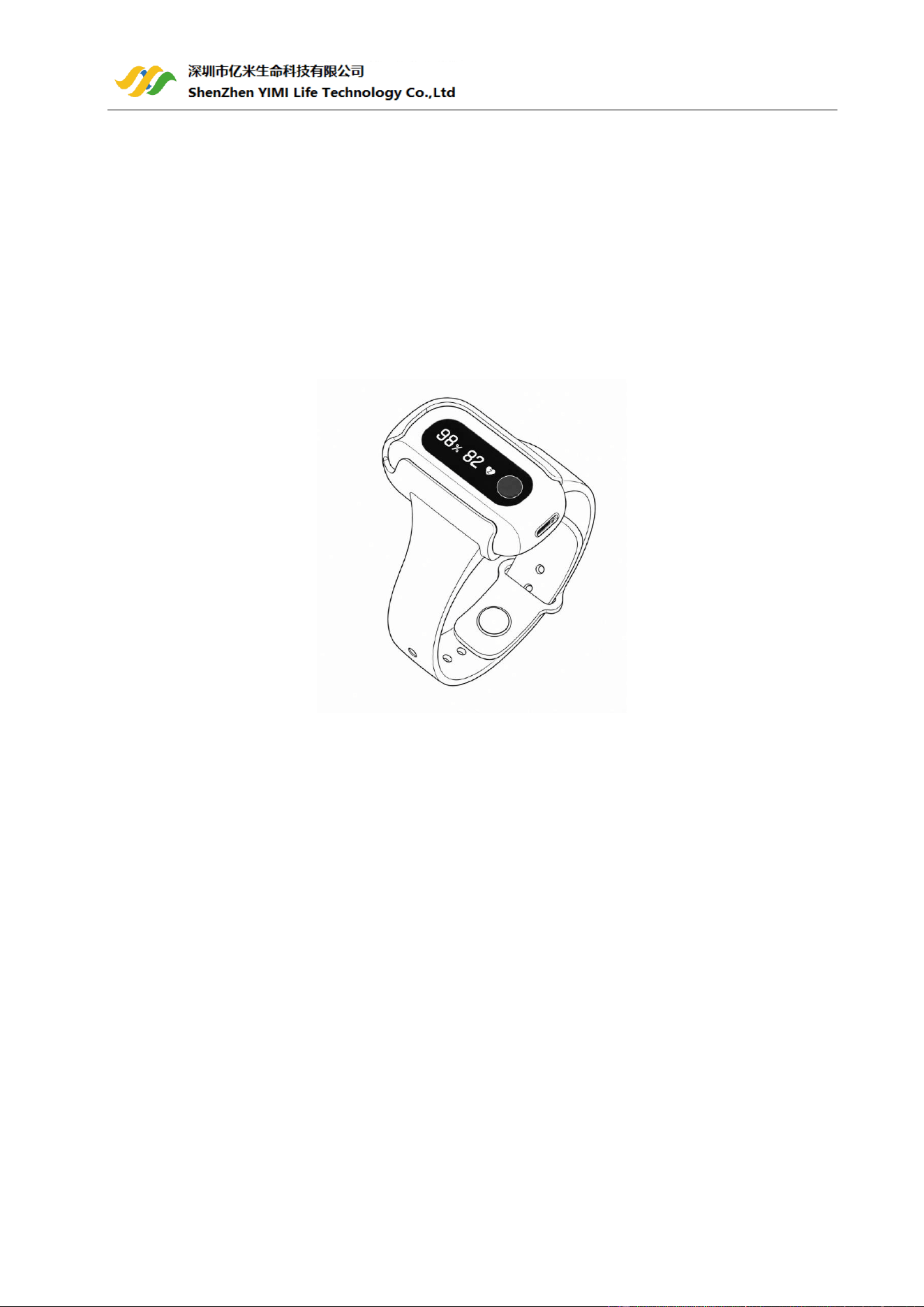
Pulse Oximeter
Model:Night O2
User Manual

2 /18
Content
1 Introduction .......................................................................................................................... 4
1.1 Intended Use ...............................................................................................................................................4
1.2 Warnings and Cautions ................................................................................................................................4
1.3 Symbols .......................................................................................................................................................5
1.4 Unpacking ....................................................................................................................................................5
2 Product operation ................................................................................................................. 6
2.1 Overview .....................................................................................................................................................6
2.2 Download APP .............................................................................................................................................6
2.3 Bluetooth Connection .................................................................................................................................7
2.4 Charging .......................................................................................................................................................7
2.5 Power ON/OFF .............................................................................................................................................7
2.6 Take the first recording ................................................................................................................................7
2.7 Stop monitoring & sync data .......................................................................................................................8
2.8 How to synchronize the time of the device .................................................................................................9
2.9 Screen wake up............................................................................................................................................9
2.10 Reminder ...................................................................................................................................................9
3 Maintenance ....................................................................................................................... 10
3.1 Cleaning .....................................................................................................................................................10
3.2 Battery .......................................................................................................................................................10
4 Accessories ......................................................................................................................... 11
5 Troubleshooting .................................................................................................................. 12
6 Product Specifications ......................................................................................................... 13
7 FCC statement ..................................................................................................................... 15
8 EMC .................................................................................................................................... 16

3 /18
Revision History
This manual has a revision number. This revision number changes whenever the manual is updated due to
software or technical specification change. Contents of this manual are subject to change without prior
notice.
◼ Version: A0
◼ Release time: 2026/08/07
© Copyright Shenzhen Yimi Life Technology Co.,Ltd . All rights reserved.
Contact Information
Manufacturer: Shenzhen Yimi Life Technology Co.,Ltd.
Address: 302 Building C,YouLiTong Technology Industrial Plant,No.56 Qingsong Road , Laokeng Community,
Longtian Street , Pingshan District ,518118 Shenzhen ,P.R.China
TEL: +86 755-89369909
Website:www.yimilife.com

4 /18
1 Introduction
1.1 Intended Use
The device is intended to be used for measuring, displaying and storing of oxygen level (SpO2), pulse rate(PR)
of adults.
It's not a medical device. This device is for Sports and Aviation use only and not intended for medical use.
Note:
⚫ The data and results provided by this device are for pre-check screening purpose only and cannot be
directly used for diagnostic or treatment.
⚫ The data provided by the APP is not intended for diagnosis or treatment purpose, always consult your
doctor for any health condition.
1.2 Warnings and Cautions
(1) DO NOT squeeze the sensor or apply excessive force on the sensor & cable.
(2) Do not use this device during MRI examination.
(3) Do not use the device together with a defibrillator.
(4) Do not operate the device in flammable and combustible environments.
(5) Do not drop the device or subject it to strong impact or collision.
(6) The device and its supplied accessories are non-sterile upon delivery.
(7) Never submerge the device in water or other liquids. Do not clean the device with acetone or other
volatile solutions.
(8) Do not place this device in pressure vessels or gas sterilization device.
(9) The device cannot function as an apnea monitor and must not be used for arrhythmia analysis.
(10) The device has no visual alert or audible alarm functions and does not support continuous monitoring.
(11) Consult your doctor immediately if you experience symptoms that could indicate acute disease.
(12) Do not self-diagnose or self-medicate on the basis of this device without consulting your doctor. In
particular, do not start taking any new medication or change the type and/or dosage of any existing
medication without prior approval.
(13) Use only cables, sensors and other accessories specified in this manual.
(14) Prolonged continuous oxygen level recording may increase the risk of undesirable changes in skin
characteristics, such as irritation, reddening, blistering or burns.
(15) Check the oxygen level(SpO2) sensor application site every 6-8 hours to determine the positioning of the
sensor and the circulation and skin sensitivity of the user. User sensitivity varies depending on medical
status or skin condition. For users with poor peripheral blood circulation or sensitive skin, inspect the
sensor site more frequently.
(16) Functional tester cannot be used to assess the accuracy of a SpO2 sensor or a device.
(17) Do not disassemble the device without permission; unauthorized disassembly will lead to device damage,
malfunction and abnormal operation.
(18) This device is designed to determine the arterial oxygen saturation percentage of functional hemoglobin.
Factors that may degrade pulse oximeter performance or affect the accuracy of the measurement
include the following:
- excess ambient light
5 /18
- excessive motion
- electrosurgical interference
- blood flow restrictors (arterial catheters, blood pressure cuffs, infusion lines, etc.)
- moisture in the sensor
- improperly applied sensor
- incorrect sensor type
- poor pulse quality
- venous pulsations
- anemia or low hemoglobin -concentrations
- cardiogreen and other -intravascular dyes
- carboxyhemoglobin
- methemoglobin
- dysfunctional hemoglobin
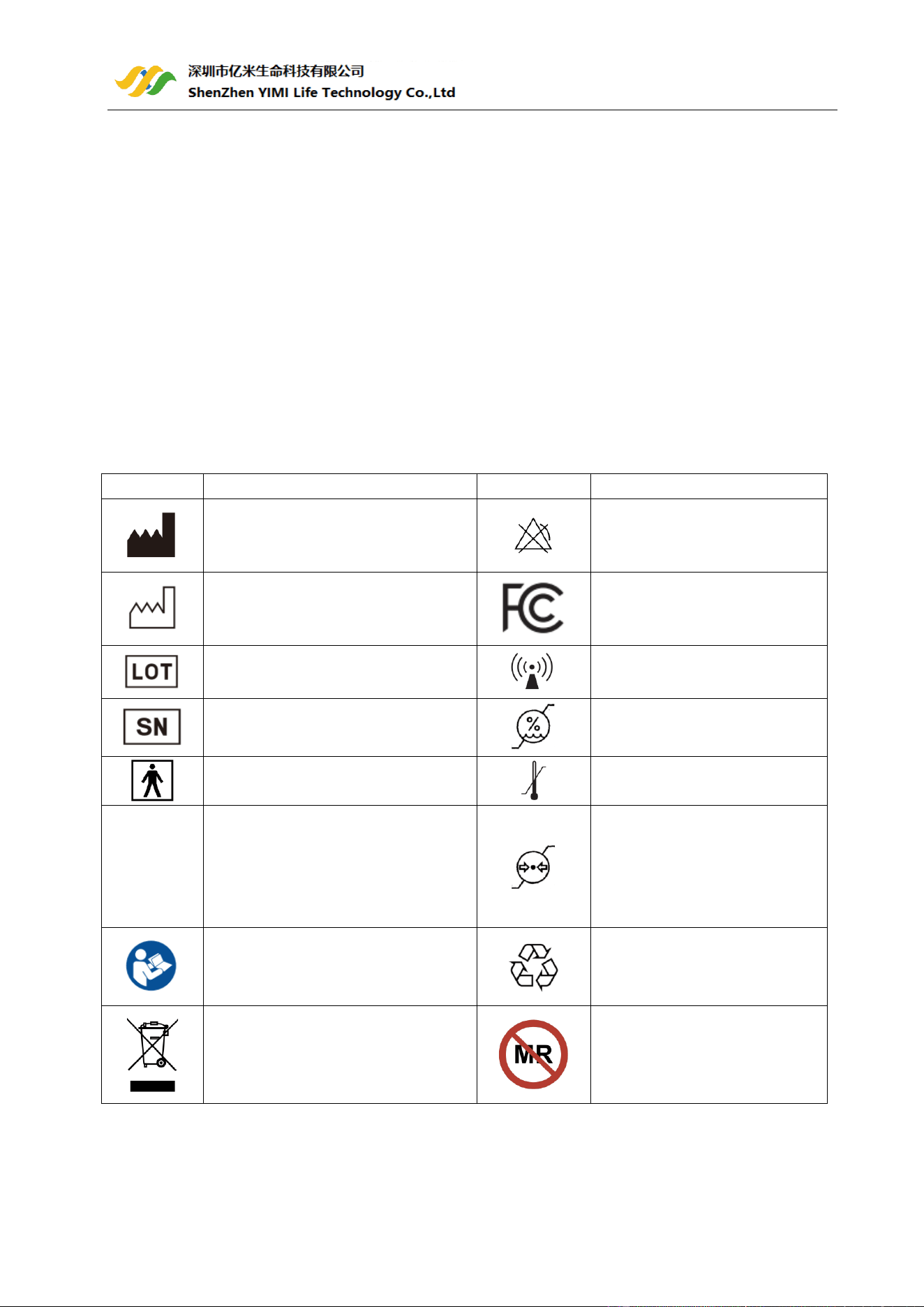
1.3 Symbols
Symbol
Description
Symbol
Description
Manufacturer
No alarm system
Date of Manufacture
Indicates that the product
complies with the applicable FCC
requirements
Batch code
Non-ionizing radiation
Serial Number
Humidity Limitation
Type BF-Applied Part
Temperature Limitation
IP22
Indicates that the product is protected
against solid foreign objects of 12,5
mm Ø and greater; and protected
against vertically falling water drops
when enclosure tilted up to 15°
Atmospheric Pressure Limitation
Refer to User Manual
Indicates that the marked item
or its material is part of a
recovery or recycling process
Indicates that the product should not
be discarded as unsorted waste but
must be sent to separate collection
facilities for recovery and recycling
MR unsafe
1.4 Unpacking
Main Unit(with band) × 1, SpO2 Sensor × 1 , Type-C Charging Cable × 1 , User Manual × 1
6 /18
2 Product operation
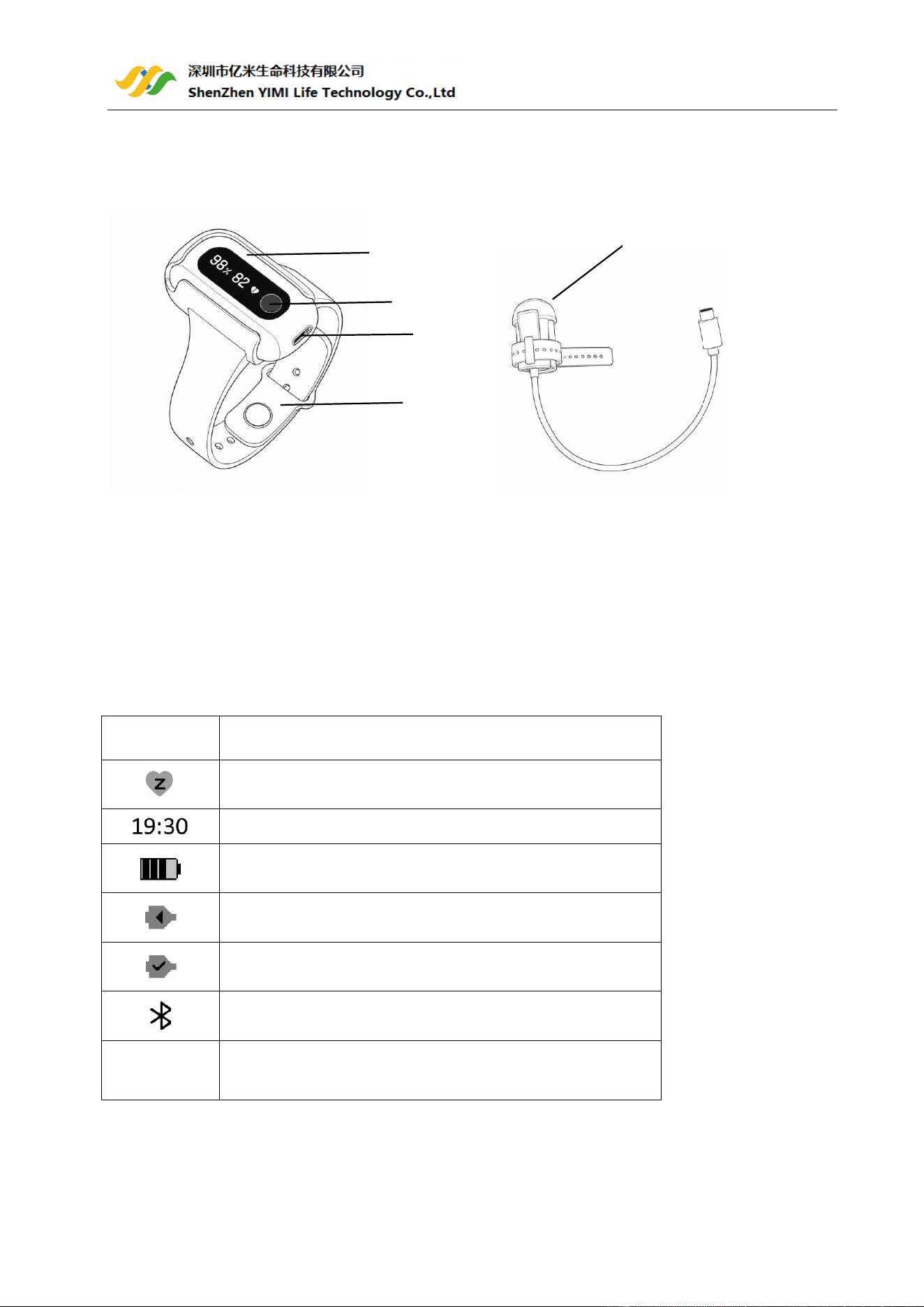
2.1 Overview
1.Main unit
2. Power button
3. Type C:Sensor interface / charging interface
4. Wristband
5. SpO2 sensor (Multiple sensor models are available; please refer to the supplied physical sensor.)
Screen display item description:
%
Oxygen Level(SpO2)
Pulse Rate(PR)
Time
Remaining battery capacity
Please insert the SpO2 sensor
SpO2 Sensor is connected
Bluetooth is connecting
LOW BAT
CHARGE
Low-battery indicator
2.2 Download APP
App name: YiMi Health
1
2
3
4
5
7 /18
iOS: App Store
Android: Google Play
⚫ Compatibility
The device is compatible with iOS versions 16.0+ and Android versions 9.0+. Refer to the YiMi Health App
manual for more details.
2.3 Bluetooth Connection
The device Bluetooth will be enabled automatically when the device is on.
To establish a Bluetooth connection:
1) Keep the device Bluetooth enabled.
2) Make sure the phone Bluetooth enabled.
3) Run the App.
Note: DO NOT PAIR in the settings of your smart device.
2.4 Charging
1) Charge the battery before using.
2) Use the charge cable to charge the battery of device in the USB Port of the computer or with USB
charging adapter.
3) After being fully charged, the device will display the full-battery icon.
2.5 Power ON/OFF
1) POWER ON:
Press the button for 3 seconds to turn on the device.
2) POWER OFF:
⚫ Automatically power off: The device will turn off automatically in 1 minute if no measurement, no
operation or without App connection.
⚫ Manually power off: You can press the button for about 3 seconds to turn off.
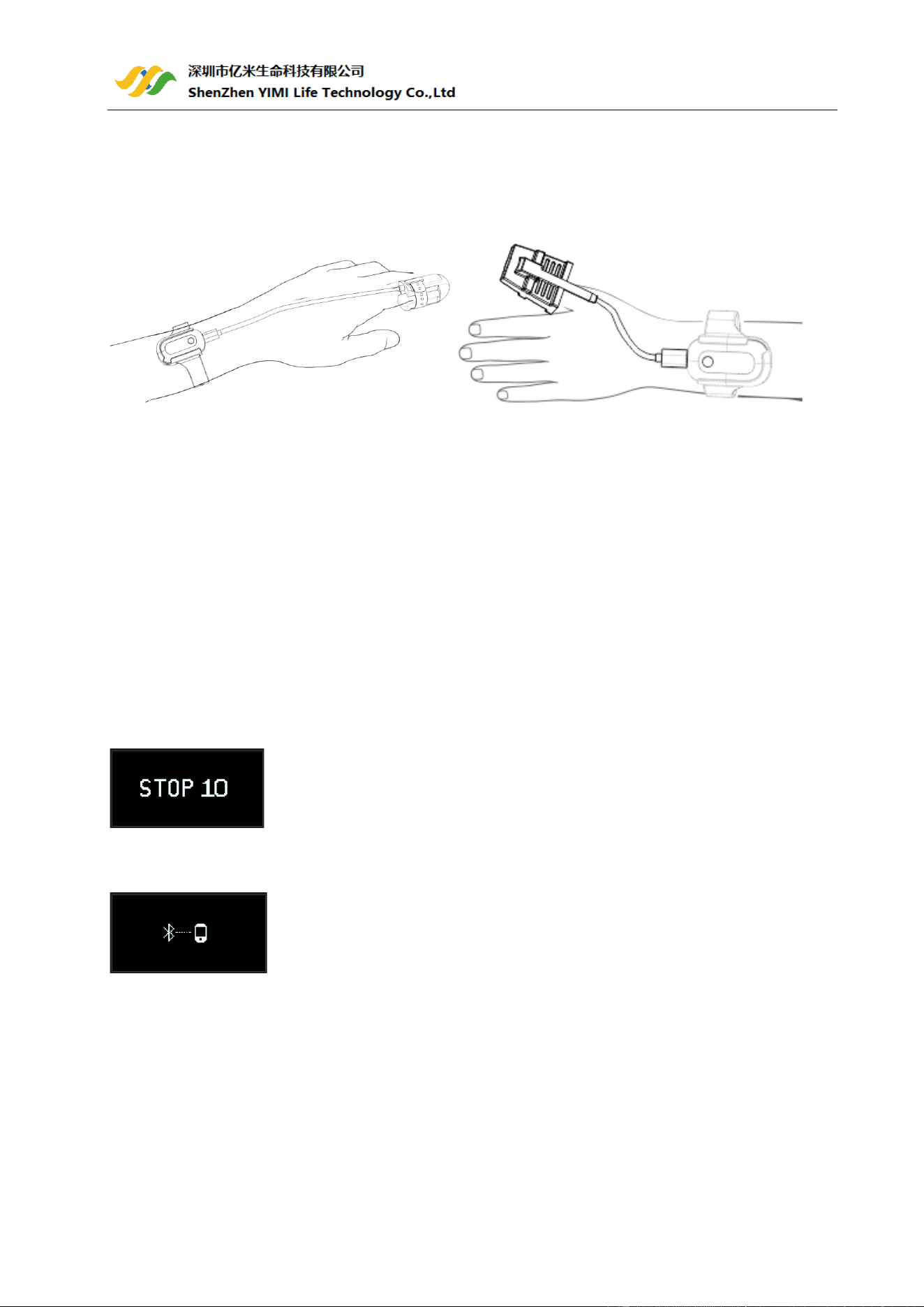
2.6 Take the first recording
8 /18
1) START:Wear the device and the SpO2 Sensor, press the button to power on. And keep yourself in the
quiet environment.
(For the sake of clarity, recommended the user wear the monitor watch on their left wrist and put the SpO2
sensor on the finger.( If it is too tight, try another finger. Avoid being loose.)
2) STOP:After the record, take off the SpO2 Sensor (and the device), the recording will be saved after the
countdown.
Note:
Please avoid excessive motion for the sensed finger during recording and avoid any strong ambient light
condition.
2.7 Stop monitoring & sync data
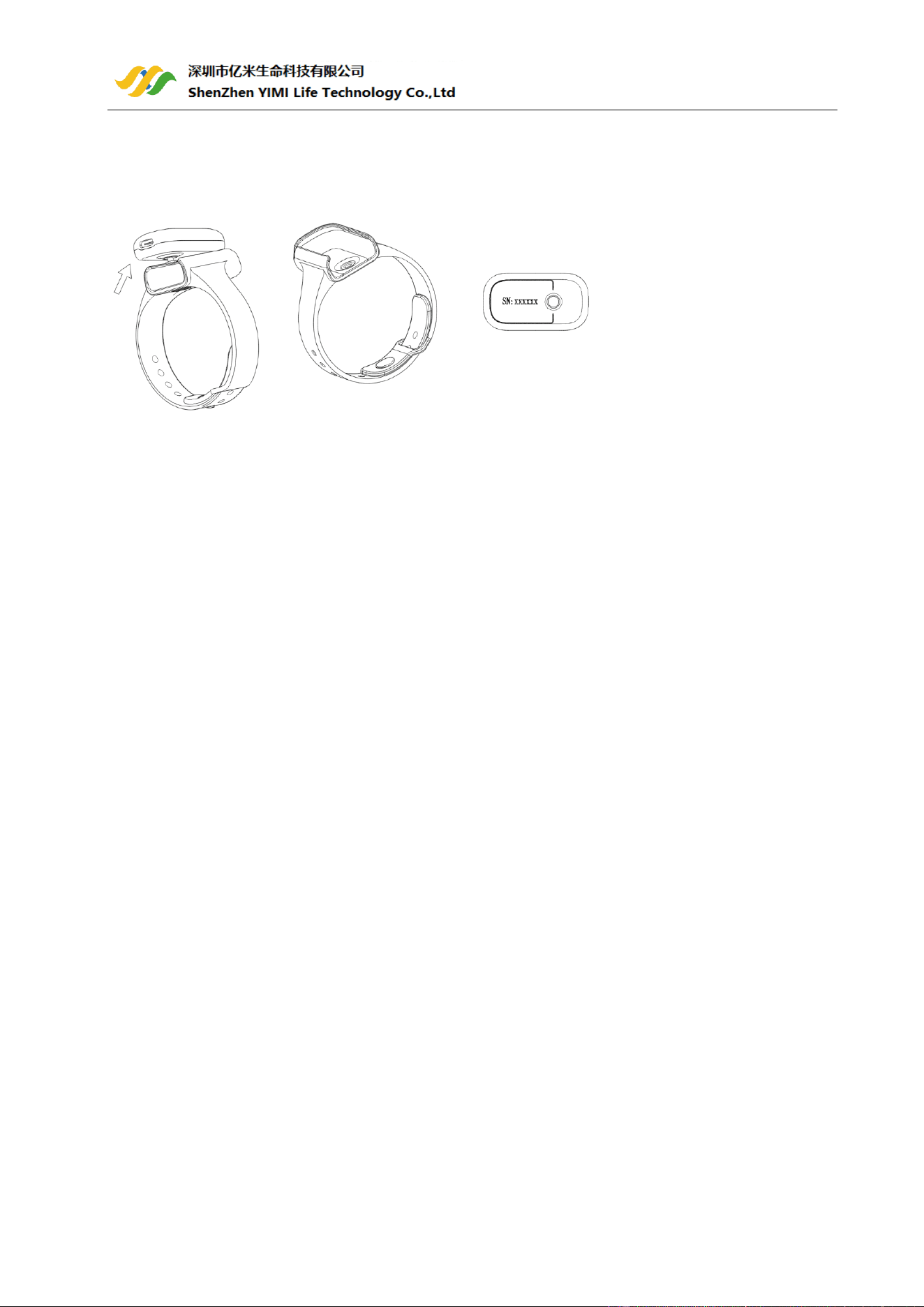
1) Take off the sensor, the countdown will begin.
2) During the countdown, if you wear the sensor again, the record will be resumed.
3) After the countdown, the data will be ready for sync.
Sync data to the YiMi Health App:
1) After the countdown,run App sync data;
2) OR next time after you turn on the device,run App to sync.
Note:
⚫ The device saves one valid SpO2 record every 4 seconds. The duration of a single SpO2 data recording
ranges from 4 seconds to 24 hours.
⚫ The built-in memory of the device can collect and store maximum 4 recordings,24 hours for each. The
oldest will be overwritten by the 5th. Please sync data to your phone in time.
⚫ Refer to the YiMi Health App manual for more details.
9 /18
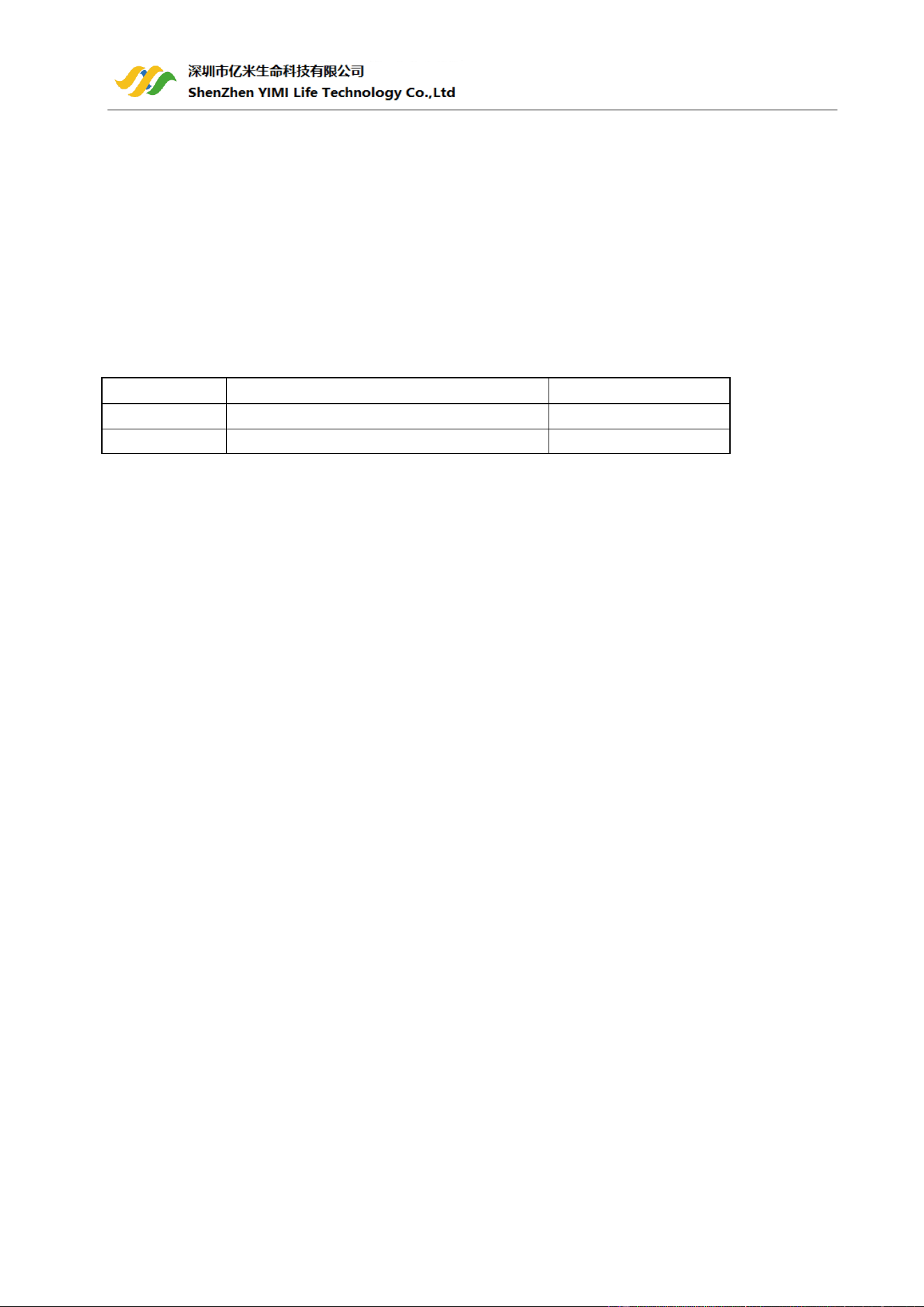
2.7.1 Locating the device ID
1) Detach the main unit from wristband.
2) Flip the main unit over, the series number is printed on the label of product.
Note:
The serial number is on the back of the device.
2.8 How to synchronize the time of the device
The time of the oximeter will be automatically synchronized with the network time on your smart device
after connected with the app.
Note:
Refer to the YiMi Health App manual for more details.
2.9 Screen wake up
During measurement,the screen will go off automatically for saving power,you can press the button to wake
up the screen.
2.10 Reminder
The main unit has a built-in vibrator. The device will vibrate to alert users under the following three
conditions:
1) Turn on the device and inserting the sensor into the main unit, the device vibrates to indicate successful
connection.
2) During night monitoring (19:00-10:00 next day): vibration reminder for battery level below 25%,
preventing incomplete night measurement due to power shortage.
3) If the finger slips out of the SpO2 sensor during measurement, the device will trigger a vibration alert by
vibrating 3 consecutive times to remind the user.Users can turn this vibration function ON or OFF in the
APP.

10 /18
3 Maintenance
3.1 Cleaning
Use a soft cloth moistened with water or alcohol to clean the device surface.
3.2 Battery
To keep the battery in good condition, charge the battery every 3 months when the device is not in use.
11 /18
4 Accessories
Warning
⚫ Only use accessories specified in this manual. Use of other accessories may damage the oximeter.
⚫ Stop using any accessory that shows visible signs of damage.
⚫ The SpO2 sensors described in this chapter meet the bio-compatibility requirements and comply with
the relevant ISO 10993-1 series standards.
⚫ Reference information for SpO2 sensor selection:
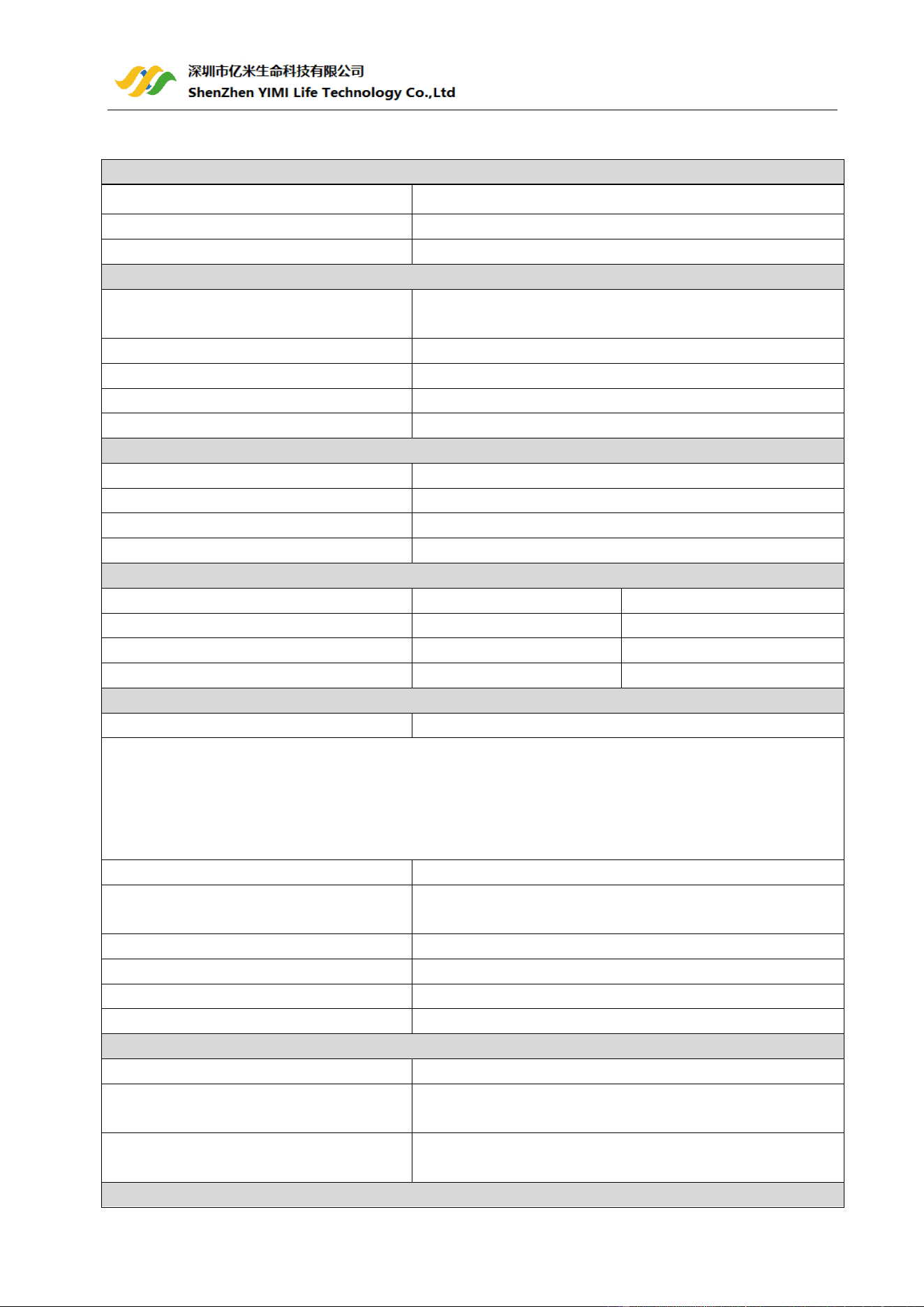
Model
Sensor Type
Intended User
WS-01
Reusable Wrap-Type SpO2 Sensor
Adult
WS-02
Reusable Silicone Finger Sleeve SpO2 Sensor
Adult

12 /18
5 Troubleshooting
Trouble
Possible Causes
Possible Solution
Device does not turn
on or no response.
Battery may be low.
Charge battery and try again.
Unexpected software condition
Press the button for about 3 seconds to reset.
Device might be damaged.
Please contact your local distributor.
The app cannot find
the device.
The Bluetooth of your phone is off.
Turn on the Bluetooth in the phone.
The device Bluetooth might be
damaged.
Turn on the device and confirm the Bluetooth
icon is displayed normally. If the icon does not
appear, please contact your local distributor first.
13 /18
6 Product Specifications
⚫ Classifications
Type of protection against electric shock
Internally powered
Degree protection against electrical shock
Type BF
Degree of dust & water resistance
IP22
⚫ Physical
Weight
16g (main unit);
About 60g (main unit with band and sensor)
Size
52mm×28.5mm×16.8mm (main unit)
Display
OLED
Wireless
Bluetooth 5.3 BLE
Vibrator
Main unit Built-in
⚫ Power Supply
Battery Type
3.7Vdc,230 mAh ,Rechargeable Li-ion battery
Charge input
DC 5V,1A
Battery run time
≥16 hours (with sensor connected,BLE off, display off)
Charge time
2~3 hours
⚫ Environmental specifications
Item
Operating
Transportation and Storage
Temperature
5℃ to 40 ℃
-20℃ to 60℃
Relative humidity (non-condensing)
15% to 95%
10% to 95%
Atmospheric pressure
70kPa to 106kPa
50kPa to 106kPa
⚫ Oxygen (SpO2) level
Standards
Meet standards of ISO 80601-2-61
Measurement accuracy verification: The oxygen level(SpO2) accuracy has been verified in human
experiments by comparing with arterial blood sample reference measured with a CO-oximeter. The pulse
rate accuracy has been verified by Emulator. Pulse oximeter measurement are statistically distributed and
about two-thirds of the measurements are expected to come within the specified accuracy range compared
to CO-oximeter measurements.
SpO2 range
35%~100%
SpO2 Accuracy (Arms)
70%~100%: ±2%;
35%~69%: undefined
Oxygen (SpO2) Resolution
1%
PR range
30 to 250 bpm
PR Accuracy
±2 bpm
PR Resolution
1bpm
⚫ Optical sensor specification
Wave length
660-905nm
Red Led
The wavelength of red light is about 660nm and the optical
output power is 9-13mW
IR Led
The wavelength of infrared light is about 905nm and the
optical output power is 3-7 mW
⚫ Data Storage
14 /18
Local storage capacity
4 records, 24 hours for each
⚫ Mobile APP
Android
Android 9.0 or above
iOS
iOS 16.0 or above
⚫ Bluetooth RF
Modulation Type
GFSK
Frequency Range
2402-2480MHz
RF Conducted Power(Max.)
6.2 dBm
Transmission distance(Max.)
10m
⚫ Durable period
Expected service life
3 years

15 /18
7 FCC statement
FCC ID:2A949YW10
Any Changes or modifications not expressly approved by the party responsible for compliance could void the
user's authority to operate the equipment.
This device complies with part 15 of the FCC Rules. Operation is subject to the following two conditions:
(1) This device may not cause harmful interference, and
(2) This device must accept any interference received, including interference that may cause undesired
operation.
Note: This equipment has been tested and found to comply with the limits for a Class B digital device,
pursuant to part 15 of the FCC Rules. These limits are designed to provide reasonable protection against
harmful interference in a residential installation. This equipment generates uses and can radiate radio
frequency energy and, if not installed and used in accordance with the instructions, may cause harmful
interference to radio communications. However, there is no guarantee that interference will not occur in a
particular installation. If this equipment does cause harmful interference to radio or television reception,
which can be determined by turning the equipment off and on, the user is encouraged to try to correct the
interference by one or more of the following measures:
-Reorient or relocate the receiving antenna.
-Increase the separation between the equipment and receiver.
-Connect the equipment into an outlet on a circuit different from that to which the receiver is connected.
-Consult the dealer or an experienced radio/TV technician for help.
This device meets the government's requirements for exposure to radio waves. The guidelines are based on
standards that were developed by independent scientific organizations through periodic and thorough
evaluation of scientific studies. The standards include a substantial safety margin designed to assure the
safety of all persons regardless of age or health. The SAR limit of USA (FCC) is 1.6 W/kg averaged. Device
types: Pulse Oximeter (FCC ID: 2A949YW10) has also been tested against this SAR limit. SAR information can
be viewed on‐line at http://www.fcc.gov/oet/ea/fccid/. Please use the device FCC ID number for search.
This device was tested simulation typical 0mm to face and Wrist. To maintain compliance with FCC RF
exposure requirements, use accessories should maintain a separation distance between the user's bodies
mentioned above, use accessories should not contain metallic components in its assembly, the use of
accessories that do not satisfy these requirements may not comply with FCC RF exposure requirements, and
should be avoided.
16 /18
8 EMC
The device complies with the requirement of standard IEC60601-1-2:2014+AMD1:2020(EN
60601-1-2:2015+A1:2021)“Electromagnetic disturances – Requirements and tests”.
Warning:Don’t near active HF surgical equipment and the RF shielded room of an ME system for magnetic
resonance imaging, where the intensity of EM disturbances is high.
Warning: Use of this equipment adjacent to or stacked with other equipment should be avoided because it
could result in improper operation. If such use is necessary, this equipment and the other equipment should
be observed to verify that they are operating normally.
Warning: Use of accessories, transducers and cables other than those specified or provided by the
manufacturer of this equipment could result in increased electromagnetic emissions or decreased
electromagnetic immunity of this equipment and result in improper operation.”
Warning:Portable RF communications equipment (including peripherals such as antenna cables and external
antennas) should be used no closer than 30 cm (12 inches) to any part of the device, including cables
specified by the manufacturer. Otherwise, degradation of the performance of this equipment could result.
Table 1
Guidance and manufacturer’s declaration - electromagnetic emissions
Emissions test
Compliance
RF emissions
CISPR 11
Group 1
RF emissions
CISPR 11
Class B
Harmonic emissions
IEC 61000-3-2
N/A
Voltage fluctuations/ flicker emissions
IEC 61000-3-3
N/A
Table 2
Guidance and manufacturer’s declaration - electromagnetic Immunity
Immunity Test
IEC 60601-1-2
Test level
Compliance level
Electrostatic discharge (ESD)
IEC 61000-4-2
±8 kV contact
±2 kV, ±4 kV, ±8 kV, ±15 kV air
±8 kV contact
±2 kV, ±4 kV, ±8 kV, ±15 kV air
Electrical fast transient/burst
IEC 61000-4-4
Power supply lines:±2 kV
100 kHz repetition frequency
N/A
Surge
IEC 61000-4-5
line(s) to line(s):±1 kV.
N/A
17 /18
Voltage dips, short interruptions and
voltage variations on power supply
input lines
IEC 61000-4-11
0%U
T
; 0.5 cycle
At 0º, 45 º, 90 º, 135 º, 180 º, 225
º, 270 º and 315 º
0%U
T
;1 cycle
And
70%U
T
;25/30 cycles
Single phase: at 0
0%U
T
;300 cycle
N/A
Power frequency magnetic field
IEC 61000-4-8
30 A/m
50Hz/60Hz
30 A/m
50Hz/60Hz
Conduced RF *
IEC61000-4-6
150KHz to 80MHz:
3Vrms
6Vrms (in ISM and amateur radio
bands)
80% Am at 1kHz
N/A
Radiated RF
IEC61000-4-3
10 V/m
80 MHz – 2,7 GHz
80 % AM at 1 kHz
10 V/m
80 MHz – 2,7 GHz
80 % AM at 1 kHz
Proximity magnetic fields
IEC 61000-4-39
30 kHz: 8A/m
134,2 kHz: 65A/m
13,56 MHz: 7.5A/m
30 kHz: 8A/m
134,2 kHz: 65A/m
13,56 MHz: 7,5A/m
NOTE: U
T
is the a.c. mains voltage prior to application of the test level.
Remark: “*” : Only test for User Coupling line.
Table 3
Guidance and manufacturer’s declaration - electromagnetic Immunity
Radiated RF
IEC61000-4-3
(Test
specifications
for ENCLOSURE
PORT
IMMUNITY to
RF wireless
communication
s equipment)
Test
Frequency
(MHz)
Band
(MHz)
Service
Modulation
Maximum
Power(W)
Distance
(m)
IEC 60601-1-2
Test level (V/m)
Compliance
level
(V/m)
385
380 –
390
TETRA 400
Pulse
modulation
18 Hz
1,8
0.3
27
27
450
430–470
GMRS 460,
FRS 460
FM
± 5 kHz
deviation
1 kHz sine
2
0.3
28
28
710
704 –
787
LTE Band 13,
17
Pulse
modulation
217 Hz
0,2
0.3
9
9
745
780
810
800 –
960
GSM
800/900,
TETRA 800,
iDEN 820,
CDMA 850,
LTE Band 5
Pulse
modulation
18 Hz
2
0.3
28
28
870
930
18 /18
1720
1 700 –
1 990
GSM 1800;
CDMA 1900;
GSM 1900;
DECT;
LTE Band 1,
3,
4, 25; UMTS
Pulse
modulation
217 Hz
2
0.3
28
28
1845
1970
2450
2 400 –
2 570
Bluetooth,
WLAN,
802.11
b/g/n,
RFID 2450,
LTE Band 7
Pulse
modulation
217 Hz
2
0.3
28
28
5240
5 100 –
5 800
WLAN
802.11
a/n
Pulse
modulation
217 Hz
0,2
0.3
9
9
5500
5785
Table 4
Guidance and manufacturer’s declaration - electromagnetic Immunity
Test frequency
Modulation
IMMUNITY TEST LEVEL (A/m)
30 kHz
CW
8
134,2 kHz
Pulse modulation
a
2,1 kHz
65
b
13,56 MHz
Pulse modulation
a
50 kHz
7,5
b
a) The carrier shall be modulated using a 50% duty cycle square wave signal.
b) r.m.s., before modulation is applied.