www.groovzaudio.com
Visit us at
for exciting product
offers and to register
your warranty
USER MANUAL
@Groovzaudio
@Groovzaudio
Thank you for your purchase! We hope you
enjoy your new Groovz Headphones.
If you have any questions or concerns,
please reach out: support@groovzaudio.com
TOUCH

FCC Information
This device complies with Part 15 of the FCC Rules.
Operation is subject to the following two conditions: (1) this
device may not cause harmful interference, and (2) this device
must accept any interference received, including interference that
may cause undesired operation. Changes or modifications to this
unit not expressly approved by the party responsible for
compliance could void the user’s authority to operate the
equipment. NOTE: This equipment has been tested and found to
comply with the limits for a Class B digital device, pursuant to
Part 15 of the FCC Rules. These limits are designed to provide
reasonable protection against harmful interference in a
residential installation. This equipment generates, uses and can
radiate radio frequency energy and, if not installed and used in
accordance with the instructions, may cause harmful interference
to radio communications. However, there is no guarantee that
interference will not occur in a particular installation. If this
equipment does cause harmful interference to radio or television
reception, which can be determined by turning the equipment off
and on, the user is encouraged to try to correct the interference
by one or more of the following measures:
• Reorient or relocate the receiving antenna.
• Increase the separation between the equipment and receiver.
• Connect the equipment into an outlet on a circuit different from
that to which the receiver is connected.
• Consult the dealer or an experienced radio/TV technician for
help. This device and its antenna(s) must not be co-located or
operation in
conjunction with any other antenna or transmitter.
Radiation Exposure Statement The device has been evaluated to
meet general RF exposure requirement. in portable exposure
condition without restriction.
Warning:
This equipment complies with FCC RF radiation exposure limits
set forth for an uncontrolled environment. This device and its
antenna(s) must not be co-located or conjunction with any other
antenna or transmitter.
TABLE OF CONTENTS
DEVICE DIAGRAM 01
SPECIFICATIONS 02
PACKAGE CONTENTS 02
SETTING UP YOUR
HEADPHONES 03
UNDERSTANDING YOUR
GROOVZ TOUCH SCREEN
INTERFACE 11-14
HOW TO OPERATE 15
CLEANING YOUR
EARBUDS 16
TROUBLESHOOTING 17-18
PRECAUTIONS FOR
USE 19-20
WARRANTY
INFORMATION 21
NEED HELP? 22
• Fitting 03
• Powering On 04
• Powering Off 05
• Bluetooth Pairing 06
• Understanding Power
Display 07
• Charging Your
Headphones 08
• UI Interface
Showcase 09-10
SPECIFICATIONS
Model: GROOVZ (Touch )
Bluetooth: v5.4
Bluetooth Range: 30 feet
Earbud Battery: 33mAh
Charging Case Battery:
400mAh
Power input: 5V
Standby time: ≤ 140 hours
Working time: 15 Hours
Working voltage: 3.3V-4.2V
Charging time: 70 minutes
Speaker impedance: 32Ω±15%
Frequency response:
20-20KHZ
Transmission distance:
30 Feet
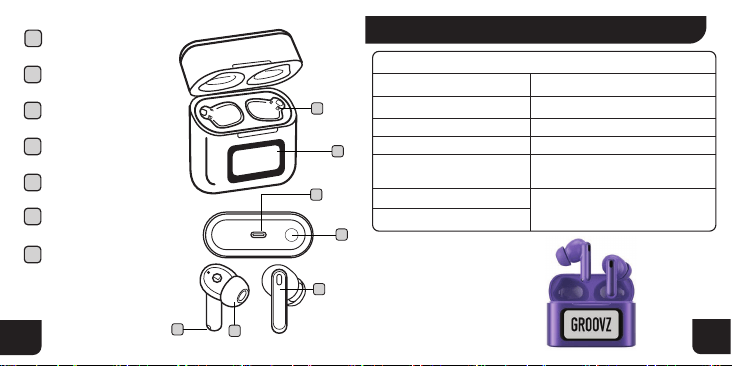
Display
1
Charging pin
2
Button
4
Touch area
7
Charging contacts
6
Type-C interface
3
Ear Cap
5
BOX CONTENTS
• Charging box
• Earbuds
• Type-C Charging Cable
• User Manual
• Set of Interchangeable
Earbud Tips
1
2
TECHNICAL SPECS
1
3
5
2
6
7
4
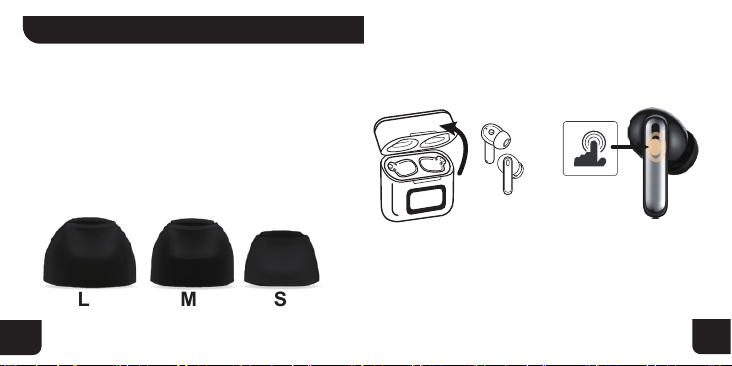
01. FITTING
Groovz Earbuds come with three sizes of ear tips:
small, medium, and large. We recommend trying
each size to find the most comfortable and secure
fit. Your earbuds should feel snug in your ears
without causing discomfort and should stay in place
during everyday movement. A proper fit also helps to
deliver the best sound quality and noise isolation.
02. POWERING ON/OFF
POWERING ON
(AUTO MODE)
POWERING ON
(MANUAL)
M SL
3
4
• Open top cover of
charging case.
• Remove earbuds
from case.
• The earbuds will
automatically enter
pairing mode.
• With earbuds already
removed from charging
case, press & hold both
left and right earbud
touch control locations
for 5 seconds.
SETTING UP YOUR HEADPHONES
5
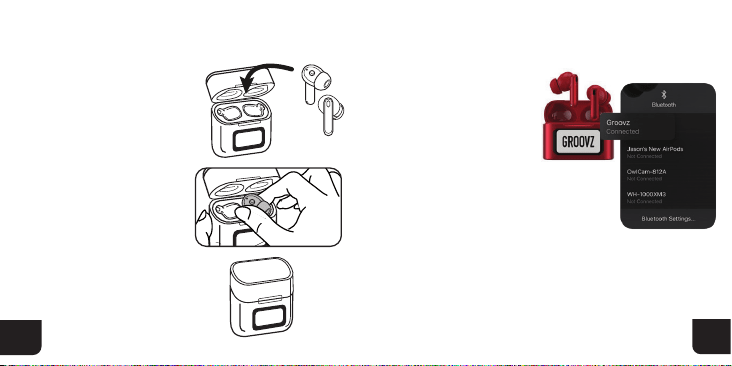
POWERING OFF
• Remove earbuds
from ears.
• Place left and
right earbuds into
charging case.
• Close charging
case and this will
automatically power
down the earbuds.
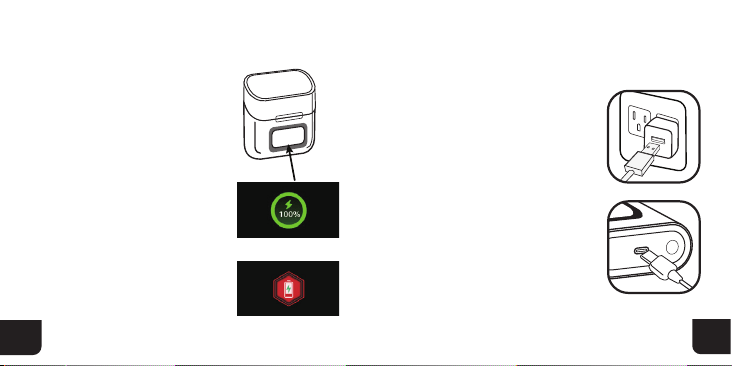
• Remove earbuds from
charging case.
• Turn ON Bluetooth
from device.
• Find bluetooth name
“Groovz” in list of pairing
options on device.
• Click to connect, and
Groovz earbuds will announce
successful connection.
6
03.BLUETOOTH PAIRING
NOTE: If there is pairing device information, the headset
will automatically connect to the device within 2-4s. If the
headset is not connected to the device, the headset
automatically turns off after 3 minutes of standby.
BUTTON FUNCTION: For the first pairing: Triple-click the
button to pair the left and right earbuds. Triple-click the
button again to pair the earbuds with the charging case.
7
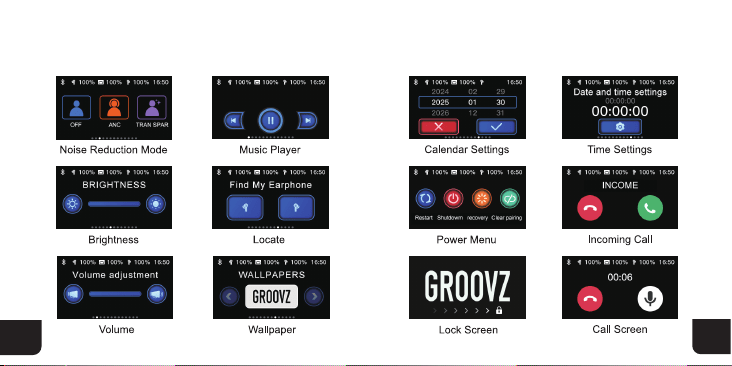
• Your Groovz charging case
features a touchscreen display
that shows the battery level of
both the case and the earbuds.
• When you place the earbuds
in the case, the screen will
indicate they are charging.
• A full battery is shown when
the screen shows 100%. If the
screen shows a red low battery
symbol, the case or earbuds
need charging.
• To charge the case, connect
the included USB-C cable to a
power source. The touch
screen will light up to show
charging progress.
• When the earbuds are placed
inside the charging case, they will
begin charging automatically.
• For the best performance, keep
your earbuds and case fully
charged before use.
8
05. CHARGING YOUR HEADPHONE04. UNDERSTANDING
POWER DISPLAY
Charging Interface
Low battery alert
9
10
06. UI INTERFACE SHOWCASE
11
12
Understanding Your Groovz Touch Screen Interface
Your Groovz Touch charging case features a built-in touchscreen
display that gives you fast access to useful controls and system info.
Here’s what each screen does and how to use it:
Noise Reduction Mode
Screen Options: OFF | ANC | TRANSPAR
How to Use:
Swipe to toggle between:
OFF – All sound modes are disabled.
ANC (Active Noise Cancellation) – Blocks outside noise for immersive
listening.
TRANSPAR (Transparency Mode) – Lets in ambient sound so you can
stay aware of your surroundings.
Music Player
Controls: Play / Pause / Next / Previous
How to Use:
Tap:
Center to Play or Pause
Right arrow for Next Track
Left arrow for Previous Track
Calendar Settings
How to Use:
Tap arrows to select the year, month, and day.
Tap the red X to cancel or the blue √ to confirm your selection.
Time Settings
How to Use:
Tap the hour, minute, or second fields to adjust time.
Confirm with the blue checkmark.
Brightness
How to Use:
Swipe the slider left or right to adjust the screen brightness.
Find My Earphone
How to Use:
Tap the left or right earbud icon to make that earbud play a sound.
(Helpful for finding a lost earbud nearby.)
Power Menu
Options: Restart | Shutdown | Recovery | Clear Pairing
How to Use:
Tap:
Restart – Reboots the case system
Shutdown – Powers off the case
Recovery – Use if the screen becomes unresponsive
Clear Pairing – Erases saved Bluetooth connections
13
14
Incoming Call
How to Use:
Tap the green phone to answer or the red phone to reject.
(Only functions when the earbuds are connected to your phone.)
Volume Adjustment
How to Use:
Swipe left or right to adjust volume of your earbuds.
Wallpaper
How to Use:
Swipe to scroll through available backgrounds.
Tap to select your favorite wallpaper for the display screen.
Lock Screen
What It Does:
This is the default idle screen. Swipe or tap to unlock and return to
the main interface.
Call Screen
What It Shows:
Displays call timer and allows microphone toggle during active calls.
15
• Gently pull off the ear tips
from each earbud.
• Rinse the ear tips with water
only—Do not submerge the
earbuds in water, do not use soap
or household cleaners.
• Wipe the ear tips with a soft,
dry, lint-free cloth.
• Allow the ear tips to dry
completely before reattaching
them to your earbuds.
CLEANING YOUR GROOVZ EARBUDS
16
HOW TO OPERATE
ON STATE
PLAYING
STATE
CALL
STATE
IN SIRI
NOISE
CANCELLATION
Turn off
Manually
Tap and hold for
5 seconds
Play/Pause
Previous track
Single tap
Double click left
Next track Double click right
Volume +
Volume -
Answer/End
a phone call
Reject a phone call
Activate voice
assistant
Transparency mode-
ANC on-ANC off
Triple tap left
Triple tap right
Double tap
Long press
Four tap
touch area
Long touch left/
right ear 3s
• Ensure Bluetooth Is On: Confirm
Bluetooth is enabled on your
smartphone, tablet, or computer.
• Check Earbud Battery: Place the
earbuds in the case and check the
touch screen display to ensure they
are charged.
• Charge the Case: Connect the
charging case to power if the battery
is low.
• Restart Your Devices: Restart
your device (phone, tablet, etc.) and
the earbuds.
• Forget the Device: Remove the earbuds from your
device’s Bluetooth list (this is often called “forget” or
“unpair”).
• Restart Bluetooth: Turn Bluetooth off and back on
again on your device.
• Re-Pair the Earbuds: Place the earbuds in pairing
mode and attempt to pair again.
HAVING TROUBLE PAIRING
YOUR GROOVZ EARBUDS?
RE-PAIRING STEPS:
• Charging Case Reset: Place the
earbuds in the charging case, then
press and hold the button on
the case
until the LED indicator flashes red,
then white. This signals that your
earbuds have been reset and are
ready to pair again.
RESETTING:
17
18
ON
TROUBLESHOOTING

• Store headphones in a cool dry,
ventilated environment.
• Avoid contact with oil, water vapor,
and steam.
• Avoid cleaning with irritating, organic
solvents or materials containing these
ingredients.
• Use the headphones according to the
provided specifications, and avoid
exposing to environments that could affect
performance like moisture, dust, or
extreme heat.
19
20
• To ensure smooth connection, it is recommended
that the distance between the mobile phone and the
headphones be within 10 meters.
• If the headphones fail to connect or communicate
properly, do not dismantle the headphones without
permission. The device and its accessories are not
guaranteed otherwise.
• To charge the headphones, please use the
standard Type-C charging cable or the one specified
by our company.
• Keep the headphones sufficiently c
harged to
ensure normal operation.
PRECAUTIONS FOR USE
Groovz headphones come with a 1-Year Limited
Warranty from the date of purchase. The
warranty covers defects in materials and
workmanship. It does not cover accidental
damage, misuse, or unauthorized repairs.
Should your product become defective during
the warranty period, we will repair or replace (at
our option) your product.
21
WARRANTY INFORMATION
22
NEED HELP?
GROOVZ is a registered trademark of
JTB Products LLC, West Chester,PA.
Designed and Engineered in the USA.
To register your warranty or
report any defects, please
contact customer support at
support@groovzaudio.com.
SCAN THIS CODE WITH
YOUR PHONE FOR
• Step-by-step tutorial videos
• Frequently asked questions
• 7-day-a-week support
www.groovzaudio.com
West Chester, PA